
There has been a lot of problem for Acer Laptop users while migrating to Windows 7. But if you see almost all of the drivers inbuilt in Windows 7 can handle the drivers for most of the devices except for devices like the Web Camera.
Today, we have faced the same problem while trying to upgrade the Acer Aspire PC to Windows 7 from XP. While, all of the other drivers will work by default and some of the drivers like the Intel Graphics Accelerator, Ethernet drivers can be seen in the Windows Update list as optional Updates which can be downloaded and installed automatically.
The only problem I faced is with the Acer Crystal Eye Web Camera driver. I have almost tried all of the available drivers but none worked. Most of the forums provided solutions to use the SUYIN NB Cam drive:
C:\\Windows\\SUYIN NB Cam\\LiveCam.exe
This one works but it was not the perfect solution.
Most of the drivers and applications available gives the same error out:
No Acer video capture device was detected on your system
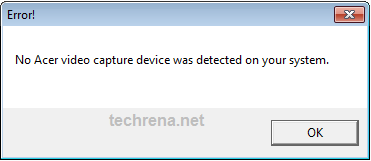
After a lot of trial and error finally i have found the perfect solution for this problem. I have got this Acer Camera Suyin v.5.2.5.3 which is made for Windows 7. After installing this, I restarted the system and it worked against all odds.
Download the Driver from the link below. Install it and restart the system. Once successfully done, start the Acer Crystal Eye webcam. It should work. No other drivers are required.
Download:
File: Acer_Camera_Suyin_v.5.2.5.3_Win7x86x64.zip
Size: 3.29 MB
Link: http://www.techrena.net/downloads/Acer_Camera_Suyin_v.5.2.5.3_Win7x86x64.zip
Screen Shots:
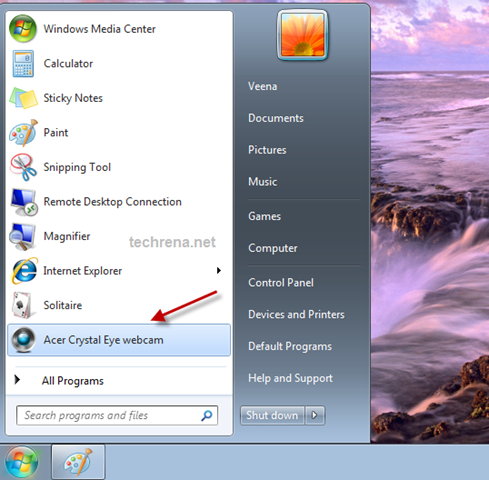
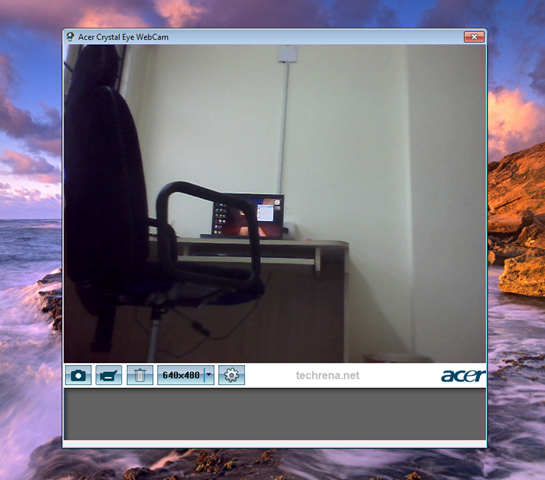
We have tried this driver in Acer Aspire 5570Z and Acer Aspire 4925G and it worked successfully. I hope it will work for other models also. If any problem occurs, do comment.
Featured: Heard of the New Windows 8? You can download the Windows 8 Pro 32 or 64 Bit version from Microsoft and it is completely legit. Check out the details here.


If anyone has tried this driver please do let us know..Just leave a comment. Please.
didn’t work on acer aspire 5930G
Please try after uninstalling all other drivers which you have installed earlier.
it works on aspire 7720G. Thanks
cannot work on acer aspire 2920>.<
didn’t work on my 5570,’camera not found’ displayed after opening acer crystal eye
@retrofungus: Try going to the location and check whether your camera works or not
C:\Windows\SUYIN NB Cam\LiveCam.exe
If its not working then install the driver again.
thx,it work on acer aspire 4920 !!! im use win7 32 bit
its work on aspire 2920…thanx a lot!really appreciate this
same problem as retrofungus on my 5520 win7 32
there isn’t a C:\Windows\SUYIN NB Cam folder
Many thanks for those drivers on a laptop acer aspire 57382zg work great:)
der treiber funktioniert auf acer 8730G.vielen lieben dank.
ty!! works in aspire 5930g
Many thanks, works well with Aspire One netbook 532h
Thanks, works on Acer Aspire 6530.
Thank you! Worked on my Acer Aspire 5738ZG! 🙂
it didnt work in my aspire one d250 too..camera not found
does not work on aspire 6920
w0rk for tavelmate 6291..tX =D
Oh thanks men it’s working c:
ohhhhhhhhhhhhhhhhhhhhhhhhh gracias intente con muchos pero ningumo me mio, este si por fin
graciassssssssssssssssss
thank you man ,,, its working perfect…
Works on my aspire 5536G! Thanks alot dennis 😉
It WORKED just as you said for my ACER Aspire 6530!!! Just need to make sure you are admin for the computer, then install setup, restart computer, and presto, the webcam appears in the program list. Many thanks, Dennis, this was one of the easiest fixes ever!
yeah, it works on aspire 5720 🙂 thanks!
I’ve tried many solutions and was at wits end! but this download worked for my Acer TimeLine 3810T, Windows 7
My Aspire one keeps saying “Camera not found.” … What am I supposed to do!? i have windows 7 btw.
Downloaded, installed, rebooted and working 100% on my Acer Aspire One AOA110/150 running Windows 7. I take my hat off to you. Thanks.
yay! it works for acer aspire 4730z 🙂 and now i can record video. gee thanks! 🙂
Tried even downloading twice too but it won’t work for the Acer Aspire 5517 🙁
it didnt work on my aspireone d250
Did not work for me on 6930G. Is this a 64bit or 32bit driver? I have recently used the 32bit Acer win7 upgrade disk. It total rubbish, it broke nearly every driver on my system, including Nvidia graphics. This is the last one I have left to sort out. Does it make a difference? It did not create any suyin folder anywhere on my harddisk. I did eye the Crystal Eye icon on my start menu. I also have a registery entry for suyin, but can’t find any files. When I start the Crystal Eye program, is say no camera, even though the camera is still in device manager.
thanks thank thanks its work in acer 5135
It didnt work for the aspire 7530.. ‘cam not found’ and the folder C:/windows/suyin.. etc did not excist either.. too bad =(
Hey guys,
I have an Acer Netbook 751h with Windows 7-32bit running, and I’ve almost gone crazy looking for a working driver for its webcam. I believe the model to be Suyin, but I’m not 100% sure. The Acer-Website’s driver database only provides a Suyin Application (seemingly same as provided here) that wouldn’t install a correct driver and the camera can’t be found. Your driver unfortunately also doesn’t do the trick for me. If anyone could help, it’d really, really be appreciated -.-
It didn’t work on acer aspire 4736z please help…
Hey Works Great on Acer Aspire 4520 Thanks for the Link…
It’s work. Thks alot beb. I’m using win 7 32bit on my acer aspire 4920
it won’t work for the Acer Aspire 5517. I need help with my Acer 5517 windows 7 webcam.
not working on aspire 7520g :'(
OMG, i was looking for days how to fix this thing and how….YAYYYY i can make videosss. So, so thank youuu :)) Mine is Acer Extensa 5630 Thank you sooo much!
not working for acer aspire 6930 G The Icon is there but when I clicked said camera not found
Some people told tat it wont work on acer aspire d250… I thought it would not install in mine also but its great dude… Itz workin and thank u so much… I had almost gone crazy with tat issue and now itz solved….
MUCHAS GRACIAS POR LA SOLUCION, FUNCIONA PERGECTAMENTE EN EL ACER ASPIRE 5520G.
my acer web cam is not working
WORK on 5920 realy cool
This worked on 2920 thnx.
my acer crystal eye web cam doesn’t work any more . I type a application before one week but not download the web com. please restored the web com my computer.
work on ACER ASPIRE 4715z…thanx
Trevor I too have a Aspire One A150, but it did not work for me would you email me a snapshot of your device manager…? or some clue to what I need to do…? Thanx a lot
sorry forgot to give you my email: in_south_beach@yahoo.com.
Also does anyone here know how to find out what cam does your Aspire One mount….?
SUYIN or LITEON….?
its no working for my extensa 5635z
its aint working on my acer extensa5635z
yo lo probe en una acer aspire 5551 y no funciona me dice que no hay dispositivo, el administrador de hardware me saca un error al instalar el driver del dispositivo.
utilizo windows 7 ultimate 32bits.
Saludos.
doesnt work on AoD250..win7 32x. :(..any suggestions for this to work?
C:\Windows\SUYIN NB Cam\LiveCam.exe not found too.
i have problem,,,,i can,t install acer crystal eye webcam in my pc acer aspire 4732Z with windows 7 ultimate,,,,,help please…. how to solve this problem????
WORKS on Acer Aspire 2920 brilliantly – Thank you very much. Now need to hunt for all the other drivers lost and programs lost due to upgrading to Win 7.
Doesn’t work on the Aspire One D150-1920 ..aarrgh
It is not working for the AspireOne D250. Error message: Camera not found. 🙁 I was so looking forward to a simple fix and being able to upload videos for my sign language students. I guess I’m back to the old fashioned method of the camera and memory card.
tx guys …itz working my acer aspire 4715z…thanks so much
Thank you for share… 🙂
it dont works on acer aspire 5535 windows7 x64
didn’t work on my AspireOne 751h (Win 7, 32bit)
Tried it on an acer netbook win 7 no luck says camera not found
camera not found!!
aspire one..windows 7
It didn’t work on 7730G nothing has happend ?
Whats should I do now?
using acer aspire 5517… camera not found.. but its the closest thing to finding a solution.. (0_o)
Acer Inspire 5710Z… camera not foud and no C:WindowsSUYIN NB CamLiveCam.exe too!!!! Acer Crystal Eye Webcam icon and exe in C:Windows\nwhat next?
pues en la acer aspire 4520….funciono bien….ahora solo kiciera q funcione mi control de volumen….xq jalaba bien…hasta q instale windows 7….y fue entonces cuando furulo…asi q…si alguien sabe como puedo hacer q funcione otra vez….le agradecere q me lo diga…;-)!!!
i have acer aspire 4736,with windows 7 installed…
my acer crystal eye camera works perfectly fine for skype and video chat,but when i click on the application in program files it opens nothing…..the window is not opened to take pictures,,,plz help
i have acer aspire 5930 i installed windows seven ultimate 32 bit…i didn’t install any driver but your driver isn’t walking. thanks for your help
eu tenho um not amachines e estalei o windons 7 e nao funcionou mais minha webcam acer e625 qual seria o driver q tenho q estalar obrigado des de ja
This works but windows 7 still does not use the driver from Acer itself. Check your device manager for Imaging Devices and look for the properties of the Video Webcam, the driver still belongs to Windows. I wonder if there is a real driver for the Crystal Eye Cam for Windows 7. I’ve tried everything also and there isn’t much resource on the net.
,ah how do i download acer crystal webcam..
It’s working on my aspire 4736Z…
Thank you……..
Thanks for the Link, it work perfect for Acer Aspire One AO532h…
dang it! not working on aspire 4530…
meh acer peripherals blows!
Wow.. it works on my aspire 4920 too! THANK YOU SO MUCH!
it doesn’t working on my aspire 4736z………please help.
Not working on Aspire 4720z.
Thanx anyway
I need one for my acer aspire 2920!!!
tidak bekerja pada acer aspire 4732z……setelah instal tetap keluar kotak dialog “camera not found”
TIDAK BEKERJA PADA ACER ASPIRE 4732Z….SETELAH INSTAL TETAP KELUAR KOTAK DIALOG “CAMERA NOT FOUND”
Aspire 6930ZG nothing from the listed above comments helped tried liteOn and Suyin but nothing. PLS give a hint what shall i do ?
Thanks alot….it has worked……have a nice day!
tidak berkerja pada Acer aspire One 532h-2cs..gmn
does not work on Acer Aspire One 532h-2cs ..
Gracias me funciono de maravilla, workin at acer extensa 4420 window 7 x86
It works fine on my notebook -> Acer Travelmate 6292 with Windows7. I had problem with drivers from ACER Support, and just only this drivers work 🙂
IT works great for my acer aspire 4810 tz! YAY!
this did not work on my Aspire 5315.. i’m not sure where to find any other drivers. my hard drive is basically brand new and was immediately equipped with Windows 7 Ultimate after i bought it. how do i make the webcam work?
My friend, I tried your solution above for the Acer Aspire One AO751h netbook with Windows 7 (from Vista), but unfortunately didn’t work… Do you recommend something else?
Anyway, thank you for post a solution!!! Regards…
hey….thank u man…its working fine…!! ive almost tried everything…but finally this thing worked….!!!
its work for my acer 4715z. thank a lot bro..
Ça marche sur Acer 5735Z merci bcp !!
i’m using 4715Z but error came out “camera not found”. how to make it work?
THIS TOOL WORKS!!!!!!!!!!
HURRAH!!!!!!!!!!!!!!!!!!!!!!!!!!!!
nice! it worked for me! *aspire 1
it didn’t work on my aspire 4315. it keep saying camera not found… please help me to solved this problem.
I have the Acer Aspire One 532h-2234 and this driver noted above (Suyin) did not work for me. Still kept saying “Camera not found”. I uninstalled the Acer Crystal Webcam software, rebooted, went to the Acer site for my exact model and downloaded the “Camera Liteon 0.933” driver. Installed this and now the camera is working just great. Maybe not the exact same cams were installed in each model.
On another forum, I also found a better software to work with this camera: Debut Video Capture. It WILL record video with sound, which the Acer Crystal webcam software won’t/can’t do. Debut also will schedule recordings, can do screen recording, and can do jpg captures. Great software and great price – free. I’m not affiliated with them in any way – just sharing the info, hoping it can help someone.
It works for my Aspire 5735Z!!! Thanx 🙂
its not working in acer travelmate 5720……can u give me the driver fir this laptop……………..
DID NOT WORK ON ACER 4736Z ACER PROGRAMMERS ARE STUPID
it didnt work on my 5532
perfectly work on aspire 5737Z thx
Acer 5740G, камера работает с таким драйвером (судя по окошку), где нашел, уже не помню. Качество картинки весьма грустное для 1,3 Мр, автонастройки не активны. Поделитесь информацией о качестве и настройках.
hi. i got my aspire 4745G i5 last Monday. the cam is working but when i got home and tried the cam again inside my room, the display is dark / dim eventhough my room is well lighted. the cam is working great if i am using it outdoors where there is enough sunlight (the light source should be in front of me and not at the back or at my head cause it will be dim). and why can’t i check the box for “lowlight compensation” on acer webcam settings? any suggestions? thanks..
it doesnt work for my aspire 4920. win 7..
it says camera not found..
ITTT WOORRRKKKKEDDDD (=
this link was da only one that worked on my acer aspire 5735
I have an Acer Aspire 3935 and I keep getting an error saying \Camera not found.\ I’ve tried downloading the Suyin driver, but it’s still not working. Please helpp!
this is not work properly on acer aspire 5600
Does not work on my Ace Aspire 5740
“Camera no found” (that’s right. It isn’t “Not” found but “no” found.) error and also cannot find the SUYIN directory?
Did not work on my aspire 4310, can you help me on this issue? Thanks in advance.
Just Perfect Guys !!! TNXS (INSTALL ACER CRYSTALEYE WEBCAM)
Aspire 7720====> O.K. Acer CrystalEYE Webcamera
guys, are your webcameras clear when in low-light location? mine is dark and not clear even if i have a flourescent light above me…
my laptop is Aspire 4745G..thanks..
acer aspire 5735Z win7 32bit
it doesn’t work 🙁
this is not work properly on acer aspire 4925
Thank You….
Ups..sorry
this is work properly on acer aspire 4925
Thank You….
works on acer 2920Z very good. thx alot, i was looking for this for weeks.
People go to the site of acer http://us.acer.com/ac/en/US/content/drivers select drivers e download and select your product model then choose windows vista home basic x32 or other else from windows vista as system operating and choose the camera chicony and after install restart your pc and it work’s, i do that to my windows 7 and work’s 100%
anybody knows if it works on and aspire 5515?
Thanks Guys, did everything as advised and all working ok on my aspire 5735
not working on aspire 6530
it say “camera not found” please help .. i using acer aspire 4530..
it say “camera not found” please help .. i using acer aspire 2920 w7 profesional..
it say “camera not found” please help .. i using acer aspire 4920 windows 7 ultimate 32 bit..
it worked for me Thx (Aspire 5740G-434G50Mn)
I have an acer aspire 5710g and it didnt work.. After installing windows 7 ultimate my crystal eye cam doesnt work..sighhh but it was working perfectly before on the original windows vista…:( Any ideas anyone.. I tried going to the acer site as well as mentioned above by JORGE and that didnt work either.. The downloads wouldnt complete..
hi… im using aspire 4315 my operating system is win 7 ultimate… after installing the driver my acer crystal eye still cannot work.. please help me..
i have acer 4736z,i’ve installed the driver but it didn’t work..”no camera found!”
hi! i have an acer 4730G.thanks to the link,my crystal eye camera is now working!
poxa eu instalei mas diz que nao tem cam
o meu e um acer aspire one D250 me ajude preciso do driver da web cam meu sistema e windom7 ultimate.obrigado espero respostas.
I upgraded my vista to windows 7 and since then I’ve been looking for the software of my Crystal Eye Webcam, I found some but I can only use it on video call and can’t find the software on my system. Now I found this one, it works great! i can use my Crystal Eye Webcam again like it used to be. Thanks for the big help.
I upgraded my Aspire 6930 to Windows 7. Got the “Camera not found” message. Installed driver above and it still does not work.
I have an Acer Aspire 5517 with Windows 7 home premium 64-bit. I have tried all the drivers I could find for m Acer 5517, but they all tell me camera not found when installed. When I try to update the Webcam driver in device manager it tells me that the driver is not compatable with my system. I am running out of ideas.
hi hope this work
Did not work on aspire 5738G 🙁
I have an Acer Aspire 5534 and I’m completely and utterly frustrated at this point because I’ve tried more than seven times to download, install, and then restart…. hoping the problem would be resolved, and each time the message “Camera not found!” is displayed. Each and every time I have to then uninstall the camera, restart and try the process all over again but I have had NO LUCK. Can someone please tell me if there is another solution… please….
Thank you in advance.
no sound for video ?
doesnt work on my acer 4253
doesnt work on my acer 4253 ples help , im using & ultimate
It works with netbook acer aspire one AOA 150, thaks you save my life.
Failed with Acer Aspire 5670, Bummer.
didn’t work on acer aspire 5741g
didn’t work for me.. mine was aspire 4715z
Everything works perfect…just installed it and attached link C:\Windows\SUYIN NB Cam\LiveCam.exe to icon …
executed it and I’ve seen myself..
thank you !!
Thank you very much Dennis. This driver works on Acer Aspire One ZG5 (netbook) with MS Windows & Ultimate 32-bit.
IT WORKED! Its working perfect! I have a acer aspire 5720..
Thank you soo much! 🙂
thnx yaar,,,,,,,,,it worked on my acer aspire 4720z
thnx……
Thank you very much great update after a long time I got my camera back Aspire 47202. Keep good work and thanks a lot.
Software worked great on an Acer Aspire 4310 running Windows 7. Cheers.
“acer T6291 not work … any other solution for me? Windows keep show the message ”
camera not found
anyone, pleae help me.
Didnt work on my Acep Aspire One AO522 after upgrading to windows 7 premium
well it does not work for me. mine is Acer Aspire 2920Z. can anybody help?
thanx… it works like charm
mon webcam(eye crystal webcam pour acer travelmate 5740G) ne fonctionne plus depuis quelques jours..qu’est ce que je dois faire pour ce probleme? et merci d’avance
this is work on aspire one 522 ???
Thank you friend….. its working on Acer Extensa 4630…
i will try… nice info
Didn’t work on my Acer Aspire 5740-5780. The Crystal Eye program works the same as it did before I installed this version, which is to say it shows what the camera sees, but it doesn’t record, doesn’t allow anything to be saved, and isn’t recognized by anything else on the computer, including the Control Panel and Windows Movie Maker, so it’s essentially useless.
it working in window 7 in acer 4738Z
i tried downloadong and installing you suggestion but still it says ‘no camera found’ when i tried to open it after restarting my computer. im using an ACER Aspire 5710. Please help.. thanks
dude thanks..it worked on my acer 4759G.
*correction, it should be 4750G–hehe
won’t work on aspire d150 🙁
This app doesn’t work on my Acer Aspire 5736Z
it display “Camera not found” message.
i cant believe it plays it amazing..5530g work fine thank you
didn’t work on acer aspire 4315 running windows7. says \Camera not found 🙁
I’ve tried to install it but it says that it is the previous version of one that i have installed. how do i uninstall my version in order to install this one?
no sirvio para mi acer aspire one AO751H, me interesa que funcione simplemente con los programas de mensajeria…
didn’t work on travelmate 4730. displays “camera not found”
FUNCIONAAAAAAAAAAAAAAAAAAAAAAAAAAAAAAAAAAAA
MIL MILLONES DE GRACIAS
ACES ASPIRE ONE AOA 150 (ZG5)
ok kau sa’ko acer 4715z. Daghang salamat sa nag-upload!
nao consigo baixar o driver
hhhsbbbsbbb
where i can download this webcam? anyone can tell me..
it’s dose’t work in acer aspire 4738z, help me please….
“camera not found” acer aspire 4738Z….
I use Acer Ferrari 1100, anybody can tell me?
thanks
this is not work to acer 4253…help!!!!!!!!!!
any other solusion please…i’m using windows 7 ultimate 32 bit……
well it does not work for me. mine is Acer Extenza 5630Z. can anybody help?
it not work in acer aspire 5535 problem occur that camera not found. plz help me
It worked for me – Aspire 5738ZG, win 7 🙂
ACER ASPIRE 4750G. Camera not found as well. 🙁
It work on aspire 5315 THX very much
Does not work on Acer aspire 5810TG, but thanks anyway. Really annoying that I can’t get this to work! If anyone knows a fix, please let me know!
en mi PC acer aspire one d250 no me funciona, dice que no encuentra la camara. mi pc es una mini.
Thank you, It worked well for my Aspire 5737Z
It still says : No camera found :/
I have acer aspire 5710
how about bluetooth driver, have anyone find a working one for acer??
not working for aspire 4920 i`m use win 7 64bit..
64bit version or 32bit, it is make any diffrent??
i found few people using 4920 already can use the webcam but why mine cannot?? whyyyy??
hey..thanks for the help..its working with my acer aspire 4736z.. it’s a very good solution and i’m very glad found this website…thanks a lot ^o^
two thumbs up for u !!
I can’t even install this application. I’m using Acer Aspire 4741 what should I do??? 🙁
Worked with aspire 4253. Thanks. By the way, if it worked with my 4253, it may work with 4738, 4738Z, 4733Z, 4552, 4333 and 4252.
didn’t work. camera not found’ displayed after opening acer crystal eye
It did work on acer aspire 5520 smoothly. Man you saved my day. Thnx a lot.
I installed it on my ACER Travelmate TimelineX8372TG it did not work “camera not found”. Try to re-install it again but still “camera not found”. 🙁
it doesn’t work on my acer aspire 4736Z..plz help!
it works with acer travelmate 6291
tqvm
my aspire 5532 camera not working
thx ya your link
tried it and works for me. tnx
I’m using acer aspire 4920 and using window vista… i tried the link u provided and it doesn’t work on my laptop.. can you please help me?
Didnt work for aspire 4736z
It does not work with my Acer Aspire 4745G :(((((
test
Funcionando bem Acer Aspire 4710z!!!! Obrigado pelo seu trabalho!!! obrigadooooooooooo!!!!
Its not working in 4710 🙁
tdk bekerja di 4930,,,camera not found
plzz anybody give me driver of webcam for aspire 5738 of acer…which is 32 bit processor…..
Yééééààààààààhh …. It work right .. yeah thank yooouu very much 😀 !!!
IT WORKS FOR MY ASPIRE 5750
it doesn’t work on my aspire 4535.
how could this happen?
i have downloaded the acer crystal eye drive in above link
can i get the web cam driver for my aspire 9300. for windows 7..thanks for help in this regard
Better than before! 🙂
Hello,
I have an Aspire 4810T and my Crystal Eye was not working well since I uploaded Windows7… But the video was working, I just didn’t have the sound and did not have the possibility to record either. But now it’s worse, I installed your aplication and now nothing works :)! It says it cannot find the camera. Could you help me please?
Thanks!
did’nt work on my acer aspire one d 255
Makasi infonya……
thanks for the driver now i am able to using my laptop cam in window7 thanks so much for the driver
it works on other 4715z.. but it didn’t work to my 4715z in windows7..
error “no camera found” , how did you run the program correctly?? please.. to all 4715z users that correctly installed this driver.
not working on acer 4750
MAY CAMERA IS NOT FOUND
worked for my Aspire 4736Z.. thanks a lot 🙂
camera not found, please help
You should get a bloody medal for this. I’ve been tearing my hair out to get this working, without any results. All other sites popping up via searches are scams or addbots.
THIS ONE ACTUALLY WORKED! Thank you!
I have Aspire 5530 btw.
after install when click that. It say no camera found.now what can i do?
after install when i click that it say no camera found. Now what can i do? Plz reply me.
after install when i click that it say no camera found. Now what can i do? Plz reply me.
I have a Acer aspire 6530 with Windows Vista Premium & am trying to hook a HDMI cable from a video camera to the laptop. I have been unable to get the laptop to see the camera as a capture device. Any thoughts?
I used the webcam drivers for 5575G for my Acer 4736Z and it is working
Mine’s 4715z too… sorry, it didn’t work.
thanks for driver .I needed so much it
very thanks so my webcam is working very good
didnt work on my acer d255.help
yes
con you give me link to download free driver ethernet acer aspire one intel atom™ N455??
thank’s
worked for my aspire 4736z
thanks!!! 🙂
i can’t make my crystal eye work using this link with win7 i don’t know why please is there anyone tell my how it work pleaaaaaasssssssssssssse
doesnt work on my aspire 5750g, still “camera was not found”
tnx it works or mi acer 4715z
Its Not working on My Acer Aspire 4738z Notebook.
Its says “Camera Not found”
Hope I Can Get one that will work for it please?
Mail me @ rhoteh@gmail.com
Thanks
it didnt work in acer aspire 4530. anyone please help me?
it accepted to be install but when i openned the webcam, the message box appears is “camera not found” please help.acer 5736z
the installation was complete but when open the webcam “camera not found” was the message.please assist.acer 5736z
the installation is complete but when i open the message box that appears “camera not found” please assist for acer 5736z
it can works in d250 it said (camera not found)
thank you 🙂 it works on acer aspire 4755G 🙂
no funciona en mi acer aspire one d250 con windows 7 32b porfavor ayudarme que tengo ami mujer en alemania trabajando y tengo que ablar con ellas todos los dias por el skype y si no tengo can pues como que no puedo ablar,por favor me urge muxo que la crisis me esta matando ,saludosssssssssssss
Thanks a lot Dennis for your post. This driver is perfect for my Acer Extensa 5630Z with win7 ultimate x64 pack1. Chris999
did’nt work on aspire 4330…..file corrupted!
Win7 Home Premium 32bit, Aspire 5730, Work
God Dangit (tobygames) Doesn’t work on my Acer Aspire 5742ZG 🙁 fml
have an acer aspire 7530 laptop did all that been told for install driver for webcam for windows 7 he appears in start list but if click it i do get camera not found . Any ideas what to do to fix it because I rather not been forced to get myself a seperate webcam to take pic like I used to do when still had windows vista in use.
thank you,..,.,
thank you bro,.,.,.
I LOVE U MAN! MY ACER 5742Z FINALLY WORKS!
its works ,, you awsome ,,, i try one time and its works fast
perfect! thank you! acer extensa 5635 ZG win 7 home premium 64 bit
Alguien lo probó con un acer aspire 5930 o 5930G no consigo que me funcione mi cristal eye bajo windows 7, gracias.
Le ha funcionado a alguien en un acer aspiere 5930 o 5930g? bajo windows 7 diganme como, gracias yo no puedo hacerle funcionar
Problems on 5820T. Opens a window but the display is black and you cannot modify any settings. The second try I got a “camera not found” message. Not good.
Not working on 5820T. It opens the window, but is black and you can’t modify any settings.
thanks alot its work with me in acer 5630Z
thanks very mush
hi, when I finish to install the acer crystal suyin then my laptop ask for restart, after I restart, I Click the Acer Crystal Webcam.EXE..
It appears an error box. Camera not found.
how to fix this error.
Thanks.
Thanks a lot!!! I am using Acer Aspire 5732z notebook with Windows 7 Ultimate and yhe driver you suggested solved my problem with the Crystal Eye web camera that could not be revived after switch from Vista. The newer drivers did not install in Windows 7 properly.
Cheers
works great!
i was able to earn 300 bucks! hehehe
thanks
not wurking.it display”camera notfound”
Did not work on my Aspire 5252-V518 ?????
i have tried everything
DID not work on my Aspire 5252??
I have tried everything…another other suggestions?
pliz advice, app doesn’t work on my acer 5736z. am using windows 7 professional. displays NO CAMERA DEVICE.
ayuda no funciono en mi acer aspire 7741z-4643 tengo el win 7 ultimate aparecio el icono pero al abrir se puso camara no encontrada por favor ayuda
Ne fonctionne pas sur ASPIRE 5740G
Works on Extensa 5620 Thanks a lot!
why on acer aspire one 722 reading “CAMERA NOT FOUND”??why? why? I am very disappointed! I had hoped to succeed, but itfailed 🙁 continued also why when there is complete restart thewritings install Adobe Flash Player? please answer. please please 🙁 🙁 🙁
i have installed the driver from above link.
it works but the image is upside down
i am using Aspire 6935G
Windows 7 x64
I have downloaded the driver from the acer site as well still te image is inverted.
The settings are all greyed in the camera control tab.
If anyone can help it will be highly appreciated.
kindly email me at rony925@hotmail.com
hello 🙂
I’ve an acer aspire 7745G with win 7.
If i wanna run the exe, i get also the error “camera not found”
I see that many of you have the same prob so i followed the hint of TOphotog and installed the programm Debut Video Capture .
It’s realy different to the ‘normal’ one, but it works great!
So thx for the nice tip, TOphotog!
Good luck! 😉
I have installed using
Normal
0
false
false
false
EN-US
X-NONE
X-NONE
MicrosoftInternetExplorer4
/* Style Definitions */
table.MsoNormalTable
{mso-style-name:”Table Normal”;
mso-tstyle-rowband-size:0;
mso-tstyle-colband-size:0;
mso-style-noshow:yes;
mso-style-priority:99;
mso-style-qformat:yes;
mso-style-parent:””;
mso-padding-alt:0in 5.4pt 0in 5.4pt;
mso-para-margin:0in;
mso-para-margin-bottom:.0001pt;
mso-pagination:widow-orphan;
font-size:11.0pt;
font-family:”Calibri”,”sans-serif”;
mso-ascii-font-family:Calibri;
mso-ascii-theme-font:minor-latin;
mso-fareast-font-family:”Times New Roman”;
mso-fareast-theme-font:minor-fareast;
mso-hansi-font-family:Calibri;
mso-hansi-theme-font:minor-latin;
mso-bidi-font-family:”Times New Roman”;
mso-bidi-theme-font:minor-bidi;}
https://techrena.net/download-acer-crystal-eye-web-cam-driver-windows-7/ but it says camera not found. What should I do?
Thanks for the first part.
did not work, says camera not found’ but thanx anyway
i have acer aspire 4732z
Hi there,
It did not work with my aspire 5535 with a webcam from BISON manufactures.
Could you , guys, point me to a right win7 driver for BISON camara??
Thanks ,
Elio
Did not work on aspire 4738
i installed acer crystal eye webcam but it says no camera found
acer aspire 5740g
not working to my older aspire 9412
Hi!
tried on aspire 7350 but id didn`t work
Shows Camera not found
Help?
acer 5735z not working web cam please help me
please, what to do when you start the program says “camera not found”? Although the camera works (such as Skype)
jdefgjsgfs
en aspire 5253 me dice q “no hay camara”
Thank yo ery much for this software. but i will try this.
It works perfectly on Acer Aspire 4740. Thank you very much.
If you installed the drivers provided on Acer’s site, uninstall all of it. The Suyin installer provided there doesn’t work for 4740 because it’s an updated version. Thanks again for this fix.
works on 4750 win7 ultimate 32-bit
thx.
Hello,
I tried on Aspire2420 but it didn’t work.
Shows “Camera not found”
Could anyone help me?
is it work on 4752g?
it didn’t work on my Acer 5734Z-4958. after the installation i tried the webcam but it just showed a black screen. i tried uninstalling & re-installing it 2X and it still ended up showing only a black screen. pls help… thanks!
lai asli drivernyo ko ??????
it didn’t word on my Acer Aspire 4315 with win7. It says “Camera not found”. i already restarted and tried installing and re-installing but I still got error. “Camera not found.
Pls. help.
Thanks
J’ai un Acer Aspire 5810T, avec windows 7 x64
lorsque j’ouvre Acer crystal eye webcam Il affirme CAMERA NOT FOUND!
je suis désespéré. j’ai essayé le lien et même chose !!!
AIDEZ MOI QUELQU’UN !!! SVP !
I have an Acer Aspire 5810T, windows 7 x64when I open Acer crystal eye webcam it says CAMERA NOT FOUND!I am desperate. I tried the link and the same thing!SOMEONE HELP ME! Please!
Worked for 5750G win 7 x32
work properly
thanks.. its realy work wel
thanks its realy work
cara donwlond draver wepcem aspire one gmn kawn..????tln di jawab ya..hheheh
Gracias me sirvio para acer ASPIRE OA532H
JIngJong…tolol amat sih lu,tinggal klik download sitenya tuh….ga ngerti bahasa inggris tah? kok punya leptop sih orang kayak lu?
thanks
it work prop. with acer travelmate 5740
This worked on an Acer Aspire 7736Z-4088. First I uninstalled the Acer Webcam entry under Imaging Devices in Device Manager. Then I installed/Ran as Administrator the downloaded file from the link above. The problem started after the user changed her OS from Windows 7 Home Premium to Windows 7 Professional 32bit. (Don’t know whether the original Home Premium was 32 or 64 bit). Problem is now resolved. Thanks techrena!
didn’t work in aspire 4736Z.. it says camera not found and cannot execute.. please help me on this.. tnx
same problem, says: camera not found for my aspire 4752ZG,,kindly tell us how to fix this..tnx a lot
not work it
Dear sir, I have installed soft Camera Utility_Cyberlink_1.0.1306_Win7x64 into my laptop but it’s not work. I can start to the webcam my laptop but i don’t see the pictures. please kindly help to advise and fix it. Thank so much. Mr.Minh Ti
my camera aint working properly but it is 4 acer 5736z , please help i did everything required
thanks guys i dounloaded acer suyin from 4share and it worked well in win7x32
It did not work in acer aspire 5630
This did not work for acer aspire 5552….camera still cannot be found. What a drag…
This didn’t work, BUT i did get mine to work! If you completely restarted your computer and downloaded windows again and is wondering why your camera doesn’t work, this is what i did:
Go to my computer, Open your computer hard drive, Find Windows.old and open it, find program files (x86) and open it, Find Acer Crystal Eye Webcam and open it….in this folder should be CrystalEye. Click and the program should run….
IT SAID CAMERA NOT FOUND,, ALTHO THERE IS A CAMERA BUILT INTO MY LAPTOP:( PLEASE HELP MEEE!<3
Does not work om my Acer Aspire AOD255E. somebody help!!
does not work with my acer extensa 4630z
no device found
MY ACER CRYSTAL EYE WEB CAM FOR ASPIRE 4736Z I AM NOT GETTING ANY SOFTWARE IT S SHOWING THE ERROR CAMERA NOT FOUND PLZ HELP ME
gud pm,my web cam is not found so can you help me for my aspire one D260.THANK YOU
This did not work for me. I even tried all the other brand manufacturer drivers for my model, (incidentally you can download drivers specific to your Acer system on their website here. http://support.acer.com/us/en/default.aspx) I even uninstalled the original driver (windows generic) I don’t think this solution will work for all. I am running win 7 32 bit.
thanks!!!!! u saved my life!! its works so good! =)
hola mi pc es un acer aspire 5315-2532 y ya he intentado con muchos drivers para la cam y ninguno me ha servido, ya intente con el de esta pagina y tampoco, sera que alguien me puede colaborar y decirme donde puedo encontrar este drivers mi sistema operativo es Win 7
worked for my Aspire 4755G… thanks!
ACER 5742 cam is not detected , even by a third party software i cam to know its vendor name “Liteon” but all softwares give message no camera deteced.
it didnt work on my acer aspire 4720…
after installation it still says “CAMERA NOT FOUND” PLEASE HELP….
unfortunately doesn’t work on acer aspire 5552G
wow…. amazing… it really works… thank u so much.. i tried many acer crystal eye webcam drivers bt it ddnt work n my netbook coz my os b4 was xp now it’s windows 7 thank u so much.. ihav webcam now.. it’s working…. can u help m? i still hav 1 problem my battery isnt chrgng up 2 100% anymore coz i used my netbook wd batery while chrgng dn d chrgng s up 2 90% dn i used it wd batery while chrging it now turns 2 70% now it’s 7%… do i need 2buy new battery?
doesn’t work on acer aspire 5552G
None of the above options work with the Acer Aspire 5720Z notebook, If I come across something, you are the first to know …. 🙂
It is not working for acer aspire 5733z-4505.Pls Help me on this>>>>>……??????
I have installed the webcam correctly. But when i want to open the webcam there is always standing “camera not found!” But my notebook (Acer Aspire 5536G) has a built-in webcam.
Please help me!
Greetings maddy! (:
i have installed the crystal eye webcam but after restarting the machine come this command camera not found
Thanks…
This information is very helpful to me. and itwork well
i have aspire 4730.. i put this on for the Acer Crystal Eye Webcam and it works in skype but I cannot open the webcam on it’s own for taking pictures or anything. Any help??
Thanks a lot 🙂 it works in my acer aspire 4736z…
i install the software that u recommend.. and it doesnt work at all.. i pop out no camera detected… i use aspire 4540..
WORKS! thanks 😀
i need a ‘Acer CrystalEye Webcam Driver’
Thanks a Ton 🙂
It worked for my Extensa 4620Z.. Cheers !! 🙂
Il mio modello è aspir 5736Z serias e non funziona questo programma quale mi consigliate?
thx it works ok with my aspire 5738z
thanks bro,it worked in acer aspire 5710g,god bless
Hi, I have a Aspire 5810T and I upgraded to 7 and I tried this, It came on but when I click it This message shows up – Camera not found!
It doesnot work on acer aspire 4736z. The program gotten error, camera not found.
Ami me funciono a la perfección tengo un acer aspire 5315 2142
hallo ik heb een acer aspire 5742..wilde hem terugzetten naar een eerdere datum,en wat deed ik heb terug laten gaan naar de fabrieksinstellingen..dus dat duur een 1/12 dag voor dat ik weer in het systeem kwam..dus nu is hij alle software opnieuw aan het installeren,nu is hij bezig met me crystal eye te installeren duurt wel lang hoor
it doesn’t work on my aspire one happy2, please help me, i have try since one week ago but still have same comment, “camera not found” or “no video device campure”.
Help me please, thanks
didn’t work for 4745g 🙁
muy buen aporte me sirvio mucho …muchas gracias
i dont speak spanis XD
“camera not found” on aspire 5732 Z….i can see you helped a lot of people tho, and thats nice.
I am just unfortunate with my laptop model ^ ^”
Good job!
Worked fine on my Acer Aspire 5738
thanks a lot 😉
thanks a lot!! it worked on aspire one D270
it works on aspire one D270!!!!!
I am grateful. thanks
This driver works on Acer Aspire 7730Z…Hurray!!
I mean on Win 7 32-bit
It didn’t work for my Aspire 5740. Once you click “Acer Crystal Eye Webcam” it says CAMERA NOT FOUND.
not work in my netbook aspire one happy 2 type n570
i’m try to download, but after finish “camera not found”
can you help me please
i tried uninstalling and installing this software several times on my acer aspire 5532 and still saying camera not found 🙁
Thnx buddy worked perfectly on acer aspire 4710Z also
thnx a lot again
Work perfectly on ASPIRE 5039G!!! 🙂
thank u so much. worked well on my acer aspire 4755G.
for so many downloads from different sites, finally i found 1 that worked.
tnx again ^^
it’s work in aspire 4736.. thanks a lot..^^
Hi!
I tried to install on my Acer 5742-6480 it shows the icon but it says camera not found
It is working in Travelmate 4750. Tnx!!! God bless!
didnt work for my aspire one d255 ,,, HELP PLEASE ! T____T
no encuentro los driver de wifi, pero tampoco encuantro los driver de la camara. dame una pagina mi pc es aspire 5750
I have an Aspire 5253 and the download now gave me the crystal eye webcam program in my programs list, but when I click on it “no camera found” I am running windows 7 64 bit this os was installed when I bought teh computer brand new 1 1/2 years ago. Can you please help me. Thank You.
didn’t work on acer aspire 4715z
I used to be recommended this web site through my cousin.
I am now not sure whether or not this submit is written via him as nobody
else recognise such distinct approximately my difficulty.
You are wonderful! Thanks!
Also works on acer extensa 5230. Thank you!
Yay it worked on my extensa 5630!
yh it all go it bk on no it is woker on my 5750Z 🙂 😀
yh it all go it bk on no it is woker on my 5750Z 🙂 😀 ty /go to start search put in zip then go to set up the it well worke
i have an acer aspire 8920 and it doesnt work on that, and ive tried the other drivers and it still doesnt work. keeps saying “camera not found” is there any solution for this aspire model ?
i got lines on screen while cam operating
aider moi
It work on my Acer aspire 5349 😀
thank you
Yipeeeeeeeeeeeeeeeeeeeeeeeeeeeeeeeeeeeeee! Its working.
Camera not found in my aspire 4349….can u tell me the solution please!!!
THANKS A LOT !! 🙂
Works fine on ACER Extensa 5620Z
Great job !!! 🙂
camera not found on aspire 5735. please help me
Didn’t work on Acer Aspire 5733 Just said “camera not found”
i have tried it on my aspire 4738 did not work 🙁
muchas gracias ……….merci infiniment…thank you very much…. tabaraka ellahi fikom
acer crytan eya webcam não pega cameras rui
fonctionne sur mon acer 5736z. ,
merci beaucoup.
webcam not found on my aspire D257 🙁 what can i do?
Camara not found for my AO/532h W7
I’ve deleted all drivers for Crystal Eye webcam from my Acer Aspire 7520. Downloaded new SUYIN driver for Win 7. Installed driver as Administrator, but still doesn’t work the device. Used Camera_Bison_7.96.701.12_VistaX86 but still won’t start camera. Used “Live Cam” and Crystal Eye seems to work normally but, still doesn’t start with the Bison-7 drivers shown above. Can’t figure out what is wrong with this setup !!!!
buen aporte men, funciona en mi acer 5315 windows7 gracias
Perfect !!! I was searching for a driver to solve this problem. IM from Brazil. Thanks.
I really really thank you. Long live positive thinking
It doesn’t work for AO715h…… :'(
Guys for all of you who might not still have a solution, please try this one. I was looking for AO751h driver webcam for (Windows® 7) and i found the solution. The one posted here didn’t work as you could see on my previous post. So this one worked perfectly :-),
http://global-download.acer.com/GDFiles/Application/Camera/Camera_Suyin_6.0.6001.18000_Vistax86_A.zip?acerid=633772794773354084&Step1=NETBOOK&Step2=ASPIRE%20ONE&Step3=AO751H&OS=ALL&LC=en&BC=ACER&SC=PA_7
it works for Acer aspire one AO751h, thanks a lot 🙂
..not wirk in acer v-431..
Hi! I installed one and everytime I try to open it It says “camera not found”
what could be the problem?
Mine’s an aspire one D270
Pls. help, thanks you
it works on my Aspire 4741Z. Thanks!
Después de muchos intentos con otros driver, este funciona perfectamente, un buen aporte y muchas gracias,
it doesn’t work on my acer aspire one D255E….what should i do!?please help
WebRep
Overall rating
This site has no rating
(not enough votes)
It doesnt work on aspire 9420
Works on Travelmate 4750G! Thanks a lot!
Gracias por fin pude conseguir el driver de la web cam para una acer aspire one D270 si funciona al 100%
aspire 7741z says already installed and this is an older version …..hmmmmm not urgent but would like it to work “just in case”
Just to let you know, I was installing your link tonight on my Acer Aspire 5738Z. The original Crystal Eye camera was not taking pictures sharply anymore. Your link works very good and I thank you very much for your endeavours. Greetings from Switzerland!
didn’t work on Acer Aspire 5734z
Ive tried this link and i followed all the correct steps three times now and the same error message pops up… Cannot find a camera. I have already gone in my system itself to make sure my camera is working properly and it is, however still no cam. I have a Acer Aspire 7745-7949 laptop with a windows 7 home premium. if you can please help me find a solution to this problem because i have literally tried everything else i can think of. Thank you.
I’ve installed acer crystal eye webcam but unfortunately when I open it there is some problem that my webcam doesn’t found “camera not found” please tell me what happen to those problem ?
I’ve installed acer crystal eye webcam but unfortunately when I open it there is some problem that my webcam doesn’t found “camera not found”
please tell me what happen to those problem ?
This worked very well on my acer aspire 5740. Thank you!!!
Hai… I’m having the 5738G and the Crystal Eye works after installing… Thanks for that.. Only problem is that on Skype my microphone still doesn’t work. I thought that it would be in the same driver as for the webcam, but guess I was wrong. Can you please tell me if I will need to install a seperate driver for the microphone or if I’m doing something wrong 🙂 Thanks a lot for your help
Bonjour j’ai 1 Acer Aspire One model KAV60 j’ai instalé le pilote Webcam Suyin_v.5.2.5.3 mais il afiche webcam absent. Quelqu’un peu m’aider merci d’aventage.
Didn’t work on Acer Aspire 5752G Just said “camera not found”
didn’t work on acer aspire 4937g.
plz help
Nothing happened. The screen is in black.
Worked wonders for me.
didn’t work on acer aspire 4738z, i used windows 7 32 bit
it’s aint work on my aspire E1 -421
help me please
its says .. camera not found:(
it didnt work with acer 5334 camera stil not found
didnt work with 5334
for everyone who is still searching for the right driver for acer aspire one d series, there is the solution stated in comment 46335 by Matjeka.
i used it for d260 and it worked.
what is the solution for CAMERA NOT FOUND?????
yeah it works, thanks!
Thank you it is word for me, Acer ASPIRE 2930
DID NOT WORK ON ASPIRE 5740…
It Doesn’t Work For Aspire One D257-1417
Hi, I am using Acer Extensa 5620. I was able to install it then tried using it. Its ok in a few seconds and start to slow down, and hangs up. My OS is windows 7 ultimate 64 bit. Need help. Thanks…
Doesn’t work for my acer aspire 5920. Cam not found. The file you mentioned in file ‘Windows’ doesn’t exsist.
A me non ha funzionato nell’Acer Extensa 5235
Non ha funzionato sul mio Acer Extensa 5235. Vorrei una soluzione alternativa
7220 aspire,it works thank you! brilliant!
Thnks for finally talking about > Acer Crystal Eye Web Cam Driver for Windows 7 Download – TECHRENA < Liked it!
please help, it does not work on my aspire one 725, and i tried so many times with other driver, and still does not work, it says “camera not found”, what should i do? please help, I’m using windows 7 home basic, 64bit operating system
Muy bueno, Nueva Instalacion, windows 7 32 bit. En Acer aspire 5517 Crystal Clear Muy bien.
aspire 5253-0681 no work . mesage “camera not found” windows 7 64 bit
Aspire 5732ZG works
Didn’t work in Acer Aspire 5535
i have different problem in aspire 3935, Os found the driver but the camera output is blur or it likes focus not working. How should i do? Thank you…
No me funciono en mi acer za3, solo aparece el icono pero solo dice cámara no encontrada,…
Hello! I’m Cambodia student. Thank for this program and tutorial. 😀
says camera not found on my aspire 5349
For you guys who are using Windows7 32 bit on Aspire 4738z. You can follow the link below:
Download
Not working :((( “Camera Not Found” (Acer Aspire One ZG5 win7 x86)
i’ve successfully installed it but when ever i click on it,it says no camera found
I quite like reading through a post that will
make people think. Also, many thanks for allowing me to comment!
http://www.acer.co.in/ac/en/IN/content/drivers hai friends u can download your software from here
notworking on my acer aspire 5570 it said No camera
I downloaded it on my acer aspire one net book and it didnt work
Everyone loves what you guys are usually up
too. This type of clever work and exposure! Keep up the wonderful works
guys I’ve incorporated you guys to my personal blogroll.
Acer Aspire One 532h = CAMERA LITEON 0.933 W7X86 A = IT IS WORK…!!!
Hi guys can someone help me i tried this link and several other drivers and still saying camera not found. I formatted the laptop and i don’t have the original Chipset CD.. Im using aspire 4810T. its in window 7 32 bit please help
Thanks! It works on my aspire 5738.
mine dint work aspire e1-571….any other suggestion
it is not working 🙂
hi’ my son deleted my camera shortcut icon of happy aspire one. what can i do to have it back?
Hi there i am kavin, its my first occasion to commenting anyplace, when i read this post i thought i could also create comment
due to this sensible piece of writing.
Admiring the dedication ƴօu ρut іnto
уοur site аnd detailed іnformation ƴօu present.
It’s great tߋ ϲome ɑcross а
blog еvery оnce in a ԝhile that isn’t thе
same оld rehashed іnformation. Fantastic read!
Ι’ve saved ʏour site and І’m adding уοur RSS feeds tο my
Google account.
Feel free tߋ surf tօ my website pc games free download
cant install on my aspire 3356 🙁 it keep saying file error . help me , fix this please :'(
hello, i have acer aspire 4339 crystal eye 3.1m webcam window 7 x64. what i did i restored my computer back to factory settings which then i lost the 3.1 webcam application and driver. My computer works and the virus are gone however my webcam is not there i did see the driver installed during process of factory settings. i was told to go to acer recovery program to install the driver/application instal shield but when i did download it and installed it that after it was done it say cannot find webcam device. Now i did another thing by going to the universal bus contoller and i expanded it to disbale the 2 usb root hub and i restarted my pc. I did enable it both usb root hub and and scan for hardware changes no webcam was found I restarted my computer and look in the device manager still no webcam.I saw in the device manager a 2 generic usb hub and tried to disable them and went back to the usb root hub and disable them too. I restarted my computer and went back to the device manager to the usb controller and the the generic usb hub enable them and scan for hardware change. i did the same thing to the usb root hub enable them and scan for changes. after all that i look at the device manager no 1.3m webcam or no webcam at all so i reboot it to take affect what i did and still webcam was not found. Im really lost now I dont know whether theirs drivers for the webcam is in my computer. I even went to techrena.net and downloaded a sunyin 5.25.3 application webcam open it up and put it in my computer and the software was on my program but when i click on it and it tried to open up it still says camera not found. I even went to the control panel at the device and printers only 3 items their it should be 4 items on the device. im pretty much lost now. CAN ANYONE HELP ME.
Its not work with Aspire 5715Z also
Very shortly this site will be famous amid all blogging and site-building people, due
to it’s pleasant articles or reviews
Good post! We are linking to this particularly great content on our
website. Keep up the good writing.
Feel free to visit my site: jual paypal kaskus
Normal
0
false
false
false
MicrosoftInternetExplorer4
/* Style Definitions */
table.MsoNormalTable
{mso-style-name:”Table Normal”;
mso-tstyle-rowband-size:0;
mso-tstyle-colband-size:0;
mso-style-noshow:yes;
mso-style-parent:””;
mso-padding-alt:0in 5.4pt 0in 5.4pt;
mso-para-margin:0in;
mso-para-margin-bottom:.0001pt;
mso-pagination:widow-orphan;
font-size:10.0pt;
font-family:”Times New Roman”;
mso-ansi-language:#0400;
mso-fareast-language:#0400;
mso-bidi-language:#0400;}
SOLVED AT LAST ASPIRE 5820TG
I was helping a friend with a fresh install of 64 bit windows 7 Home Premium on ASPIRE 5820TG after a hard disk crash. I got stuck with the same problem like everyone else, it’s a built-in webcam yet it cannot be found. For a whole week I have tried everything including the solution in this post but nothing seemed to work.
This morning I thought of a silly idea. My wife has one of those mini notebooks Acer Aspire One AOD270 with 32 bit windows 7 Starter. Out of my frustration I decided to try that driver. I downloaded the Cyberlink webcam application from Acer site and installed it and restarted. Although the webcam and OS are completely different the unbelievable thing happened. IT WORKED!!!! And it even prompted me to download an updated version which also worked very well after installation.
I really hope this can help at least some of you. Here is the link or you can just go to Acer site and look under AOD270 applications
http://global-download.acer.com/GDFiles/Application/Camera/Camera_Cyberlink_1.5.2108.00_W7x86_A.zip?acerid=634624660581255915&Step1=NETBOOK, CHROMEBOOK&Step2=ASPIRE ONE&Step3=AOD270&OS=ALL&LC=en&BC=ACER&SC=PA_6
PLEASEEEEEE HELPPP!!!!! it doesn’t work for my acer aspire 4738z ?????
hello!,I like your writing very much! share we
communicate more approximately your article on AOL?
I require a specialist on this house to solve my problem.
May be that’s you! Having a look forward to peer
you.
Thank you!!!!
Thank you so much Alberto. You are an angel!
Your link worked for me too on Acer ASPIRE 5820TG
http://global-download.acer.com/GDFiles/Application/Camera/Camera_Cyberlink_1.5.2108.00_W7x86_A.zip?acerid=634624660581255915&Step1=NETBOOK
The solution given in the article did not work for me, but Alberto’s worked just fine. So I advise others to try the above link, it might work for you too.
WOW just what I was looking for. Came here by searching for mocler
only thing that worked…… Angelo method…. Thank You!
It didn’t work in Acer Aspire 4739, I hope you can help me out with that
The other difference is the fact that the iPhone screen is brighter
and has better resolution.
Prepare for jailbreak cakes at every performance, backed up by Johnny Cash tribute band With a Bible and a Gun.
Modernist homes in the sky with terraces as large as a living space.
Do your kid have to staay at home alone after school until you get home
from work. The actual dte of Kobe’s draft class
was 6-26-1996.
I have download the webcam driver of acer aspire one happy via the link we are leave in this interface of the forum, Thanks.
it works perfectly on my acer aspire 4752 win 8.0 32bit
thank you
Superb, what a web site it is! This blog presents useful data to us, keeep it up. https://www.waste-ndc.pro/community/profile/tressa79906983/
Source:
– selector casino
selector casino
Source:
– https://aclf.ru
selector casino
Source:
– https://kotlasroo.ru
selector casino
Source:
– kraken shop ссылка
kraken shop ссылка
Source:
– кракен store
кракен store
Source:
– https://derevyanschik.ru/kraken-marketplejs-otkuda-vzjalsja.html
кракен маркетплейс откуда взялся
Source:
– кракен рабочая ссылка
кракен рабочая ссылка
Source:
– https://fashion-insights.ru/kraken-2krn-at.html
kraken 2krn at
Thanks for finally talking about >Acer Crystal Eye
Web Cam Driver for Windows 7 Download – TECHRENA <Loved it! https://menbehealth.wordpress.com/
Дорогое эскорт-агентство предлагает премиальные эскорт услуги в Москве для успешных мужчин.
Наши топ эскорт девушки обладают роскошным стилем.
Вы можете заказать эскорт услуги в Москве на романтическое свидание.
Наш эскорт агентства Москвы гарантирует полную конфиденциальность.
Попробуйте VIP эскорт в Москве.
Ссылка на сайт тут – Эскортницы
Source:
– https://fiolent-bereg.ru/kraken-tor-zerkalo.html
kraken tor зеркало
Source:
– https://xpert-car.ru/zaregistrirovatsja-na-sajte-kraken.html
зарегистрироваться на сайте кракен
Source:
– https://rubitron.ru/kraken-kraken-dark-link.html
kraken kraken dark link
Source:
– https://ercs-auto.ru/ploschadka-kraken-ssylka.html
площадка kraken ссылка
Source:
– как войти на сайт кракен
как войти на сайт кракен
Source:
– кракен тор ссылка онион
кракен тор ссылка онион
Source:
– кракен маркет онион
кракен маркет онион
Source:
– рабочий сайт kraken
рабочий сайт kraken
Source:
– https://mediteks-ptz.ru/kraken-oficialnyj-sajt-ssylka.html
кракен официальный сайт ссылка
Source:
– актуальные ссылки на кракен тор
актуальные ссылки на кракен тор
Source:
– https://gastrobar-ostrog.ru/originalnaja-ssylka-na-magazin-kraken.html
оригинальная ссылка на магазин кракен
I tend not to drop a great deal of responses, however i did some searching and wound up here Acer Crystal Eye
Web Cam Driver for Windows 7 Download – TECHRENA. And I do
have a couple of questions for you if you usually do not
mind. Is it simply me or does it appear
like some of these comments come across like they are left by brain desad
people? 😛 And, if you are posting at additional online sites,
I’d like to keep up with everything fresh you have to post.
Could you make a list oof the complete url of all your community sites like
yojr Facebook page, twitter feed, or linoedin profile? https://Certprof.org/blog/index.php?entryid=3171
Source:
– kraken 20at
kraken 20at
Source:
– https://pjakaeae.ru/kra33-cc-vhod-na-sajt-glavnaja-stranica.html
kra33.cc Вход на сайт главная страница
Source:
– https://sportuk.uk/
sports news
Source:
– sports news
sports news
Source:
– https://sosedi-kislovodsk.ru/kra35cc.html
kra35cc
Source:
– kra43.cc Вход на сайт главная страница
kra43.cc Вход на сайт главная страница
Source:
– https://golden-otel.ru/kra50-at-vhod-na-sajt-glavnaja-stranica.html
kra50.at Вход на сайт главная страница
Для тех, кто изучает маркетплейсы, но не знает, с чего начать — начни с этих важных пунктов
1. Конкуренция и демпинг
Основной болью для продавцов на маркетплейсах является жесткая конкуренция.
Малый бизнес часто не выдерживают из-за войны скидок.
2. Высокая комиссия площадки
Площадки часто берут комиссионные до 25%, что делает бизнес менее выгодным.
Это проблематично при продаже недорогих товаров.
3. Сложности с логистикой
Транспортировка товаров — ещё один источник проблем.
Некоторые маркетплейсы навязывают дорогие услуги, что создает сложности.
4. Проблемы с отзывами и рейтингами
Отзывы и рейтинги сильно определяют успешность.
Но недобросовестные конкуренты могут искусственно занижать рейтинг.
5. Трудности с модерацией товаров
Ограничения маркетплейса часто приводит к потерям.
Иногда модераторы действуют избирательно, что демотивирует.
6. Финансовые задержки
Вопросы расчётов — часто подводят.
Некоторые маркетплейсы необоснованно замораживают средства.
7. Сложности в техподдержке
Техническая поддержка часто переводит между отделами.
Это создаёт стресс.
8. Постоянные изменения правил
Условия работы могут быть запутанными.
Это затрудняет долгосрочное планирование.
9. Кража контента и идей
Описание могут быть позаимствованы другими продавцами.
Маркетплейсы не отслеживают клонов, и продавец страдает от копий.
10. Ограниченный контроль над брендом
Упаковка на маркетплейсах ограничен правилами.
Это осложняет дифференциацию.
Для тех, кто изучает маркетплейсы, но не знает, с чего начать — разберёмся по шагам
1. Конкуренция и демпинг
Основной болью для продавцов на маркетплейсах является изобилие однотипных товаров.
Мелкие производители часто уступают из-за войны скидок.
2. Высокая комиссия площадки
Онлайн-рынки часто берут большой процент с продаж, что влияет на рентабельность.
Это негативно отражается при небольшом объеме продаж.
3. Сложности с логистикой
Проблемы с отгрузкой — ещё один больной вопрос.
Некоторые маркетплейсы навязывают дорогие услуги, что создает сложности.
4. Проблемы с отзывами и рейтингами
Репутация на площадке сильно формируют доверие.
Но предвзятые клиенты могут подрывать доверие.
5. Трудности с модерацией товаров
Процесс модерации часто задерживает публикацию.
Иногда товары отклоняются без объяснения, что приводит к убыткам.
6. Финансовые задержки
Задержка оплаты — не всегда происходят вовремя.
Некоторые маркетплейсы переносят даты выплат.
7. Сложности в техподдержке
Помощь продавцам часто не отвечает.
Это удлиняет процессы.
8. Постоянные изменения правил
Правила маркетплейса могут меняться в одностороннем порядке.
Это вызывает путаницу.
9. Кража контента и идей
Фото могут быть клонированы на другие площадки.
Маркетплейсы не отслеживают клонов, и продавец теряет уникальность.
10. Ограниченный контроль над брендом
Визуал на маркетплейсах не всегда настраиваем.
Это делает бренд «обезличенным».
Scheffler, Hovland and Conners Share the Lead at P.G.A. Championship
Jordan Spieth, who needs a victory at Oak Hill to complete the career Grand Slam, and Justin Thomas, who won last year’s tournament, just made the cut at five over.
Give this article
Для тех, кто изучает маркетплейсы, но не знает, с чего начать — вот основные моменты
1. Конкуренция и демпинг
Основной болью для продавцов на маркетплейсах является борьба за внимание покупателя.
Начинающие предприниматели часто попадают в убыток из-за ценовой гонки.
2. Высокая комиссия площадки
Онлайн-рынки часто берут высокую комиссию, что делает бизнес менее выгодным.
Это проблематично при небольшом объеме продаж.
3. Сложности с логистикой
Сроки и стоимость доставки — ещё один больной вопрос.
Некоторые маркетплейсы накладывают свои правила доставки, что повышает издержки.
4. Проблемы с отзывами и рейтингами
Оценки пользователей сильно определяют успешность.
Но недобросовестные конкуренты могут искусственно занижать рейтинг.
5. Трудности с модерацией товаров
Контроль качества часто блокирует карточки.
Иногда поддержка реагирует слишком долго, что создает напряжение.
6. Финансовые задержки
Задержка оплаты — становятся узким местом.
Некоторые маркетплейсы удерживают деньги до 30 дней.
7. Сложности в техподдержке
Техническая поддержка часто не отвечает.
Это удлиняет процессы.
8. Постоянные изменения правил
Регламенты могут быть запутанными.
Это заставляет адаптироваться.
9. Кража контента и идей
Идеи могут быть скопированы конкурентами.
Маркетплейсы не отслеживают клонов, и продавец страдает от копий.
10. Ограниченный контроль над брендом
Описание товара на маркетплейсах теряет индивидуальность.
Это мешает построению бренда.
Тем, кто хочет продавать на маркетплейсах, но теряется в деталях — вот основные моменты
1. Конкуренция и демпинг
Серьёзной сложностью для продавцов на маркетплейсах является жесткая конкуренция.
Малый бизнес часто страдают из-за необоснованного снижения цен.
2. Высокая комиссия площадки
Онлайн-рынки часто берут большой процент с продаж, что уменьшает прибыль.
Это болезненно при небольшом объеме продаж.
3. Сложности с логистикой
Вопросы логистики — ещё один больной вопрос.
Некоторые маркетплейсы требуют пользоваться их логистикой, что повышает издержки.
4. Проблемы с отзывами и рейтингами
Звезды и комментарии сильно решают судьбу товара.
Но ложные жалобы могут искусственно занижать рейтинг.
5. Трудности с модерацией товаров
Процесс модерации часто мешает старту продаж.
Иногда вводятся новые правила, что замедляет рост.
6. Финансовые задержки
Вывод средств — зачастую тормозятся.
Некоторые маркетплейсы удерживают деньги до 30 дней.
7. Сложности в техподдержке
Обратная связь часто не решает проблемы.
Это удлиняет процессы.
8. Постоянные изменения правил
Правила маркетплейса могут меняться без предупреждения.
Это заставляет адаптироваться.
9. Кража контента и идей
Описание могут быть использованы третьими лицами.
Маркетплейсы не реагируют оперативно, и продавец несет убытки.
10. Ограниченный контроль над брендом
Имидж на маркетплейсах теряет индивидуальность.
Это ограничивает маркетинг.
Новичкам в мире онлайн-торговли — вот основные моменты
1. Конкуренция и демпинг
Серьёзной сложностью для продавцов на маркетплейсах является жесткая конкуренция.
Малый бизнес часто уступают из-за низкой маржинальности.
2. Высокая комиссия площадки
Торговые сервисы часто берут значительную долю прибыли, что отпугивает новых продавцов.
Это негативно отражается при низкой марже.
3. Сложности с логистикой
Проблемы с отгрузкой — ещё один фактор риска.
Некоторые маркетплейсы накладывают свои правила доставки, что ограничивает свободу.
4. Проблемы с отзывами и рейтингами
Звезды и комментарии сильно определяют успешность.
Но недобросовестные конкуренты могут создавать ложный имидж.
5. Трудности с модерацией товаров
Фильтрация контента часто создает неопределенность.
Иногда поддержка реагирует слишком долго, что создает напряжение.
6. Финансовые задержки
Вывод средств — часто подводят.
Некоторые маркетплейсы удерживают деньги до 30 дней.
7. Сложности в техподдержке
Служба поддержки часто не решает проблемы.
Это удлиняет процессы.
8. Постоянные изменения правил
Правила маркетплейса могут быть запутанными.
Это заставляет адаптироваться.
9. Кража контента и идей
Бренд могут быть использованы третьими лицами.
Маркетплейсы редко вмешиваются, и продавец теряет уникальность.
10. Ограниченный контроль над брендом
Визуал на маркетплейсах теряет индивидуальность.
Это делает бренд «обезличенным».
Если маркетплейсы пока кажутся тёмным лесом — ниже — важные моменты, которые стоит знать
1. Конкуренция и демпинг
Основной болью для продавцов на маркетплейсах является жесткая конкуренция.
Начинающие предприниматели часто теряют позиции из-за необоснованного снижения цен.
2. Высокая комиссия площадки
Площадки часто берут комиссионные до 25%, что уменьшает прибыль.
Это негативно отражается при небольшом объеме продаж.
3. Сложности с логистикой
Транспортировка товаров — ещё один источник проблем.
Некоторые маркетплейсы накладывают свои правила доставки, что ограничивает свободу.
4. Проблемы с отзывами и рейтингами
Отзывы и рейтинги сильно влияют на продажи.
Но боты могут искусственно занижать рейтинг.
5. Трудности с модерацией товаров
Проверка карточек товаров часто приводит к потерям.
Иногда вводятся новые правила, что замедляет рост.
6. Финансовые задержки
Вопросы расчётов — становятся узким местом.
Некоторые маркетплейсы переносят даты выплат.
7. Сложности в техподдержке
Служба поддержки часто медленно реагирует.
Это создаёт стресс.
8. Постоянные изменения правил
Политики платформы могут обновляться часто.
Это вызывает путаницу.
9. Кража контента и идей
Фото могут быть скопированы конкурентами.
Маркетплейсы не защищают авторство, и продавец теряет уникальность.
10. Ограниченный контроль над брендом
Имидж на маркетплейсах жестко стандартизирован.
Это делает бренд «обезличенным».
Тем, кто хочет продавать на маркетплейсах, но теряется в деталях — вот основные моменты
1. Конкуренция и демпинг
Ключевым вызовом для продавцов на маркетплейсах является жесткая конкуренция.
Начинающие предприниматели часто страдают из-за нерентабельных акций.
2. Высокая комиссия площадки
Торговые сервисы часто берут высокую комиссию, что делает бизнес менее выгодным.
Это проблематично при низкой марже.
3. Сложности с логистикой
Проблемы с отгрузкой — ещё один источник проблем.
Некоторые маркетплейсы навязывают дорогие услуги, что повышает издержки.
4. Проблемы с отзывами и рейтингами
Отзывы и рейтинги сильно формируют доверие.
Но предвзятые клиенты могут мешать честной конкуренции.
5. Трудности с модерацией товаров
Ограничения маркетплейса часто задерживает публикацию.
Иногда товары отклоняются без объяснения, что приводит к убыткам.
6. Финансовые задержки
Задержка оплаты — часто подводят.
Некоторые маркетплейсы необоснованно замораживают средства.
7. Сложности в техподдержке
Помощь продавцам часто медленно реагирует.
Это усложняет решение вопросов.
8. Постоянные изменения правил
Правила маркетплейса могут создавать правовую неопределенность.
Это вызывает путаницу.
9. Кража контента и идей
Идеи могут быть позаимствованы другими продавцами.
Маркетплейсы не обеспечивают защиту бренда, и продавец теряет преимущества.
10. Ограниченный контроль над брендом
Описание товара на маркетплейсах контролируется площадкой.
Это мешает построению бренда.
Образование нового времени
Учёба в XXI веке меняется вместе с молодёжью. Онлайн-курсы, гибридное обучение и самообразование стали естественным процессом. Молодёжь сегодня стремится учиться гибко.
Влияние культуры и трендов
Музыка, мода, кино и мемы формируют вкус молодёжи. Они делают культуру глобальной. Всё быстро меняется, и молодёжь переосмысливает классику.
Ментальное здоровье
В новую эпоху молодёжь всё чаще задумывается о стрессе. Они открыто говорят о терапии, эмоциях и выгорании. Это поколение учится принимать себя.
Оформление технического плана требует полевых исследований здания.
Документ может быть представлен в кадастровую палату для последующей регистрации.
В документ включаются графические схемы и описание объекта.
Source:
– https://kadastrovyj.ru
технический план здания
Поиск себя
Молодые люди активно самореализуются. Это поколение часто пробует новое. Важны не столько деньги, сколько реализация.
Социальная активность
Современная молодёжь всё чаще участвует в волонтёрстве. Для них важно влияние на общество.
Ценности новой эпохи
Молодёжь сегодня делает выбор в пользу инклюзии. Их ценности — это не абстракция, а ориентир. Они стремятся к социальной ответственности.
Цифровое поколение
Современная молодёжь — это поколение интернета, которое выросло в эпоху технологий. Они постоянно в поиске новых приложений, и для них интернет — это часть повседневной жизни.
Работа и карьера
Работа для молодёжи — это не только заработок, но и свобода. Многие выбирают фриланс, стартапы или работу на себя. Офис уступает кафе.
Глобальное мышление
Мир стал открытым, и молодёжь мыслит соответственно. Они путешествуют. Их мышление — мультикультурное.
Поиск себя
Молодые люди активно строят свой путь. Это поколение не ограничено стандартами. Важны не столько деньги, сколько ценности.
Работа и карьера
Работа для молодёжи — это не только обязанности, но и удовольствие. Многие выбирают фриланс, стартапы или работу на себя. Офис уступает коворкингам.
Ценности новой эпохи
Молодёжь сегодня делает выбор в пользу этики. Их ценности — это не абстракция, а ориентир. Они стремятся к свободе.
Создание технического плана требует полевых исследований здания.
В техническом плане отражаются контуры здания и их соответствие проекту.
Технический план — основной документ при вводе здания в эксплуатацию или оформлении прав собственности.
Source:
– технический план здания
технический план здания
Забирай скорее свой подарок https://cfghcfgj.blogspot.com 0M
Забирай скорее свой подарок https://cfghcfgj.blogspot.com Pm
Забирай скорее свой подарок https://cfghcfgj.blogspot.com rH
Забирай скорее свой подарок https://cfghcfgj.blogspot.com N2
Забирай скорее свой подарок https://cfghcfgj.blogspot.com xJ
Забирай быстрее свой подарок https://ghjfgd.blogspot.com S6
awesome
Digital casinos have transformed the betting market, delivering a unique kind of ease and range that physical casinos can’t match. Throughout the last ten years, a large audience across the globe have welcomed the excitement of online gaming thanks to its anytime, anywhere convenience, captivating elements, and progressively larger catalogs of games.
One of the most compelling reasons of digital gambling sites is the unparalleled variety of games on offer. Whether you are a fan of interacting with old-school slots, trying out narrative-rich visual slot games, or strategizing in table games like poker, virtual venues deliver endless opportunities. Numerous services moreover include live casino options, allowing you to interact with live hosts and co-players, all while soaking in the immersive environment of a real casino in your own space.
If you’re unfamiliar with the world of virtual gambling or would like to find out more about proven options, why not participate in our vibrant gaming forum? It’s a destination where gaming aficionados offer stories, guiding you to enjoy more of your online casino experience. Check out the conversation and start your journey now: spin mama bonus .
Beyond variety, virtual gaming providers shine availability.
Отличный товар. Покупал на свою газель. Остался доволен. Проблем нет.
Коли це необхідно, ми готові запропонувати найкраще!
Source:
– https://vikonna.com.ua/
скам
Great content. Thanks a lot.
Great beat ! I would like to apprentice at the same time as you amend your website, how can i subscribe for
a weblog site? The account aided me a applicable deal.
I have been a little bit familiar of this your broadcast offered shiny clear
idea
Looking to see how fast your fingers really are? I tried this tool and it gave instant feedback on my speed: https://sites.google.com/view/mouseclickspeed. It’s surprisingly fun and even a bit competitive once you get into it.
казино мостбет официальный сайт — это игровая площадка, где любой пользователь может заходить без ограничений.
На сайте доступно использовать все функции. Поддержка есть для Android и iOS.
Отзывы о mostbet casino зеркало показывают, что это стабильный доступ с быстрой загрузкой.
Дополнительно пользователям доступны разные версии сайта, которые гарантируют стабильность.
Если хотите проверить работу сайта, переходите по ссылке:
mostbet casino официальный сайт
и начинайте работу прямо сегодня.
Авторизация займёт несколько секунд, и рабочая версия будет без задержек.
Актуальные ссылки и зеркала всегда остаются рабочими, чтобы продолжать пользоваться.
мосбет — это система, где каждый может заходить 24/7.
Через сервис доступно входить с любых устройств. Поддержка есть для Android и iOS.
Отзывы о мостбет зеркало на сегодня сейчас показывают, что это актуальный адрес с быстрой загрузкой.
Дополнительно пользователям доступны альтернативные варианты входа, которые гарантируют стабильность.
Если хотите проверить работу сайта, переходите по ссылке:
mostbet официальный сайт
и начинайте регистрацию прямо сегодня.
Регистрация займёт несколько секунд, и доступ к возможностям будет без задержек.
Актуальные ссылки и зеркала всегда остаются рабочими, чтобы продолжать пользоваться.
мостбет казино рабочее зеркало — это система, где любой пользователь может использовать официальный сайт.
На сайте доступно работать без перебоев. Поддержка есть для ПК и смартфонов.
Отзывы о мостбет рабочее зеркало на сейчас показывают, что это актуальный адрес с быстрой загрузкой.
Дополнительно пользователям доступны разные версии сайта, которые обеспечивают доступ.
Если хотите получить быстрый доступ, переходите по ссылке:
мостбет
и начинайте работу прямо в любой момент.
Авторизация займёт пару кликов, и полный функционал будет открыт моментально.
Актуальные версии сайта всегда остаются рабочими, чтобы не терять доступ.
купить супер тадарайз с доставкой
по Санкт-Петербургу и Москве доступные цены высокое качество производства Индии
In longer discussions I usually skip, but thanks for the plain and practical suggestions. home fixes can seem intimidating, but posts like this make the process accessible for beginners. i paired this with some basic self-repair residence tips i found earlier, and together they made managing care much easier. i believe adding such suggestions to everyday routines can make upkeep far less stressful and much more rewarding. in the long run, applying simple and consistent guidance like this makes a noticeable difference in both comfort and savings. This time I stayed and thought it adds value to the overall topic.
кракен маркетплейс официальный сайт – Кракен тор ссылка всегда актуальна и подходит для любых устройств.
кракен вход ссылка – Кракен сайт всегда под рукой: свежие рабочие зеркала и проверенные ссылки помогают заходить без перебоев.
Многие отмечают, что проверенные адреса кракен для входа всегда работает стабильно. Даже если один адрес закрывается, появляются новые зеркала. Это даёт уверенность, что доступ не пропадёт.
Даже при давлении со стороны провайдеров, ссылка на официальный ресурс кракен продолжает работать. Это доказывает устойчивость площадки. Многие выбирают её именно за это.
Постоянные блокировки не мешают, если у тебя есть АНКОР. Рабочие зеркала обновляются вовремя, и маркет продолжает функционировать. Поэтому ресурс удерживает репутацию надёжного.
Надёжность KRAKEN держится на том, что мобильная ссылка для входа кракен всегда в сети. Это даёт ощущение защищённости и стабильности. Люди ценят такую предсказуемость.
На форумах часто советуют использовать как попасть на кракен. Там меньше всего проблем с входом, и анонимность сохраняется. Такой опыт подтверждают многие.
с чего начать заработок в онлайн казино
В этой статье собраны факты, которые освещают целый ряд важных вопросов. Мы стремимся предложить читателям четкую, достоверную информацию, которая поможет сформировать собственное мнение и лучше понять сложные аспекты рассматриваемой темы.
Подробнее – https://vivod-iz-zapoya-1.ru/
Чистка жилья в СПб — в кратчайшие сроки, бережно, с органической химией. Кликайте https://uborka-domov24spb.ru Акция для новых клиентов. Заполните форму — подберём время.
Устранение загрязнений в Санкт-Петербурге! Апартаменты, Дома, Рабочие помещения. Тщательный уход по доступным стоимости. Позвольте себе расслабиться! Забронируйте очистку немедленно! Двигайтесь к https://uborka-top24.ru – Сколько Стоит Уборка Квартиры В Клининговой Компании
Завжди вважала, що відмінно вмію готувати, але останнім часом мої страви стали нудними і втратили різноманітність. Подружка порадила мені переглянути свіжі рецепти, але я не знала, з чого почати. Випадково знайшла цей каталог і… це було справжнє одкровення! Я дізналася, що є цілий океан сайтів з незвичайними рецептами, про які я навіть не здогадувалася. Я була в захваті від категорії з ексклюзивними стравами та рецептами різних кухонь світу. Протягом місяця я спробувала страву італійської кухні, в’єтнамської та а також грецької кухні! Моя сім’я в захваті, а я почуваюсь впевненим кулінаром. Я навіть почала вести щоденник, де фіксую всі нові рецепти, які освоїла
Каталог blogreceptov.icu
Завжди вважала, що чудово знаю як готувати, але в останні місяці мої страви стали скучними і втратили різноманітність. Дівчина порадила мені ознайомитись свіжі рецепти, але я не знала, де шукати. Якось ввечері знайшла цей каталог і… це було як відкриття нового світу! Оказалося, що є величезна кількість сайтів з неймовірними рецептами, про які я навіть не підозрювала. Найбільше сподобались розділи з фірмовими стравами та рецептами етнічних страв. Протягом місяця я встигла приготувати страву мексиканської кухні, тайської та ще й марокканської кухні! Моя домочадці в захваті, а я усвідомлюю себе справжнім кулінаром. Я навіть почала вести кулінарний блокнот, де записую цілі кулінарні відкриття, які спробувала
Сайт
Nie czekaj – zainstaluj GGBet i miej całą adrenalinę gier w swoim telefonie! Jeśli interesuje Cię nowoczesnej, w pełni spolszczonej platformy, która łączy w sobie obstawianie esportu, klasycznego sportu oraz ponad 3000 gier kasynowych, to ggbet kasyno i aplikacja bukmacherska będą strzałem w dziesiątkę. GG Bet pl stawia na przejrzystość, bo wie, że liczy się lojalność. Nie możemy pominąć sekcji kasynowej.
Dlaczego musisz pobrać GG Bet app?
Błyskawiczna instalacja – gg bet apk waży mniej niż 50 MB i działa na każdym telefonie!
bitsdujour.com
GG.Bet otwiera drzwi do świata zakładów i ponad 3000 gier kasynowych! GG Bet mobile jest zoptymalizowana, dzięki czemu instaluje się w kilkanaście sekund, nie przeciąża baterii i działa bez zacięć nawet na starszych modelach smartfonów. GG Bet pl jest transparentne, bo wie, że liczy się lojalność. Sercem platformy jest jednak bogata oferta.
Dlaczego musisz pobrać GG Bet app?
Ponad 40 metod płatności, w tym ekspresowy BLIK i natychmiastowe transakcje.
reactos.org
Szukasz bezpiecznej platformy? GGbet mobile spełni Twoje oczekiwania! Jeśli szukasz nowoczesnej, w pełni spolszczonej platformy, która łączy w sobie obstawianie e-sportu, klasycznego sportu oraz ponad 3000 gier kasynowych, to ggbet kasyno i aplikacja bukmacherska będą strzałem w dziesiątkę. Wszystko, co potrzebne – logowanie, wpłata, support i szybkie wypłaty BLIK – znajduje się pod kciukiem. Fani sportu znajdą tu szeroką rozpiskę lig tenisa.
Dlaczego warto pobrać GG Bet app?
Natywne powiadomienia push o golach, ace’ach, abyś nigdy nie przegapił ważnej chwili.
socialsocial.social
Odkryj aplikację GGBet: Twoje mobilne kasyno i bukmacher numer jeden! Jeśli szukasz nowoczesnej, w pełni spolszczonej platformy, która łączy w sobie obstawianie e-sportu, klasycznego sportu oraz ponad 3000 gier kasynowych, to GG.Bet i aplikacja bukmacherska będą strzałem w dziesiątkę. Pobierając ggbet app download otrzymujesz dostęp do atrakcyjnego gg bet bonus powitalnego. GGBet bukmacher używa własnego systemu aktualizacji kursów, dzięki czemu są one jednymi z najbardziej korzystnych na rynku.
Dlaczego warto pobrać GG Bet app?
Ponad czterdzieści metod płatności, w tym ekspresowy e-portfele i natychmiastowe transakcje.
my.omsystem.com
Zainstaluj GGBet i baw się tam, gdzie chcesz – skok adrenaliny w Twojej kieszeni! Dzięki intuicyjnej wersji mobilnej GG Bet app, dostępnej jako zoptymalizowane gg bet apk na Android i wygodna gg bet iOS app, nosisz cały świat adrenaliny w kieszeni i grasz w dowolnym miejscu. Pobierając ggbet app download otrzymujesz dostęp do ekskluzywnego gg bet bonus powitalnego. Sercem platformy jest jednak różnorodna oferta.
Dlaczego musisz pobrać GG Bet app?
Atrakcyjne gg bet bonus tygodniowe: darmowe spiny, freebety i turnieje slotowe.
mazafakas.com
GG.Bet otwiera drzwi do krainy zakładów i ponad trzech tysięcy gier kasynowych! GG Bet mobile wykorzystuje lekkie biblioteki, dzięki czemu instaluje się w kilkanaście sekund, nie przeciąża baterii i działa bez zacięć nawet na starszych modelach smartfonów. Cała mechanika promocji jest opisana jasno, bez małego druczku, dlatego od razu wiesz, jakie obroty musisz wykonać i ile czasu masz na realizację warunków. GGBet bukmacher posługuje się autorskim algorytmem aktualizacji kursów, dzięki czemu są one jednymi z najbardziej konkurencyjnych na rynku.
Dlaczego warto pobrać GG Bet app?
Błyskawiczna instalacja – gg bet apk waży mniej niż 50 MB i działa na nowym i starszym telefonie!
myanimelist.net
Заливал водяной пол — перечитал сотни страниц форумов. Где-то утверждают «минимум 6 см стяжки», но тут же встречается «хватит и 3 см». В итоге нашёл сайт, где систематизировали адекватные материалы: с актуальными СНиПами, обсуждениями практиков и без сомнительных экспертов. Теперь хоть понимаю, какой вариант верный
Каталог будівельних сайтів
Терпеть не могу искать инфу по ремонту! Подавляющее большинство — это либо продажные обзоры, либо советы из прошлого века. Пока не наткнулся на каталог, где систематизировали исключительно адекватные источники: с практическими примерами, нормативками и без рекламной шелухи. Наконец-то можно найти нужное быстро
goloborod.icu
Когда начинал отделке, думал – ну интернет же, здесь все есть. Ан нет! Первый утверждает наносить три слоя грунтовки, второй – что хватит одного слоя, еще один вообще рекомендуют обойный клей использовать. Провел кучу нервов, прежде чем отыскал адекватный каталог проверенных порталов. Там собрали исключительно качественные ресурсы – с правилами, рекомендациями мастеров и без этой пустой бла-бла. Вот, может сэкономите время
Каталог будівельних сайтів
Планировал сэкономить на ремонте — повсеместно то “берите только дорогое”, либо советы типа “сделайте сами из хлама”. Открыл для себя полезные сайты, в которых рассказывают, на чем действительно можно сэкономить не в ущерб результату
romasblog.icu
Завжди вважала, що чудово вмію готувати, але останнім часом мої страви стали одноманітними і почали повторюватись. Подружка підказала мені подивитися свіжі рецепти, але я не знала, з чого почати. Якось ввечері знайшла цей каталог і… це було справжнє одкровення! Я дізналася, що є безліч сайтів з неймовірними рецептами, про які я навіть уяви не мала. Я була в захваті від розділи з фірмовими стравами та рецептами різних кухонь світу. За останній місяць я спробувала страву мексиканської кухні, в’єтнамської та а також іспанської кухні! Моя домочадці дуже задоволені, а я усвідомлюю себе повноцінним гурманом. Також почала вести кулінарний блокнот, де фіксую кожен спробований рецепт, які вдалося приготувати
Каталог
Мы создаем вебсайты, которые привлекают покупателей и увеличивают продажи.
Почему стоит выбрать нас?
Качественный дизайн, который привлекает взгляд
Адаптация под любые устройства (ПК, смартфоны, планшеты)
SEO-оптимизация для роста в поисковиках
Скорость загрузки — никаких “тормозящих” сайтов
Особое предложение:
Первым 9 заказчикам — скидка 12% на разработку сайта!
Готовы обсудить проект?
Позвоните нам!
Сайт
Дуже відчуваю кожну людину, яка набрид від безкінечного шукання перевірених рецептів! До цього у мене була масу закладок на комп’ютері – одні сайти зі випічки, декілька для м’ясних страв, решта під овочевих рецептів. Завжди не могла знайти потрібне в цьому лабіринті! Однак як тільки відкрила даний каталог, все моє гастрономічне приготування пішло на новий рівень! Зараз я маю все в одному зручному каталозі – від легких ідей на кожен день до особливих меню. Дуже ціную той факт, що кожен ресурси апробаційні часом та містять зрозумілі , детальні пояснення. Тепер не говорючи про те, що, вже сьогодні приготую в рази швидше – не потрібно викидати половину дня на пошуки
Каталог кулінарних рецептів
Завжди вважала, що добре знаю як готувати, але недавно мої страви стали скучними і почали повторюватись. Подружка підказала мені переглянути оригінальні рецепти, але я не знала, як підібрати. Випадково знайшла цей каталог і… це було наче знахідка скарбу! Я дізналася, що є безліч сайтів з дивовижними рецептами, про які я навіть не підозрювала. Найбільше сподобались категорії з авторськими стравами та рецептами національних кухонь. За цей час я спробувала страву італійської гастрономії, тайської та ще й марокканської кухні! Моя чоловік і діти в захваті, а я усвідомлюю себе повноцінним кухарем. Також почала вести кулінарний блокнот, де записую кожен спробований рецепт, які спробувала
Каталог papamamamastera.xyz
Раніше думала, що чудово знаю як готувати, але недавно мої страви стали нудними і повторювалися. Подруга запропонувала мені подивитися оригінальні рецепти, але я не знала, де шукати. Якось ввечері знайшла цей каталог і… це було справжнє одкровення! Я дізналася, що є величезна кількість сайтів з незвичайними рецептами, про які я навіть не здогадувалася. Особливо мене вразили розділи з ексклюзивними стравами та рецептами етнічних страв. За останній місяць я освоїла страву мексиканської кухні, японської та ще й марокканської кухні! Моя домочадці дуже задоволені, а я усвідомлюю себе впевненим кулінаром. Навіть почала вести кулінарний блокнот, де записую кожен спробований рецепт, які вдалося приготувати
Каталог newkulinarki.xyz
Мы создаем интернетсайты, которые привлекают покупателей и увеличивают продажи.
Почему нужно выбрать нас?
Качественный дизайн, который удерживает взгляд
Адаптация под любые устройства (ПК, смартфоны, планшеты)
SEO-оптимизация для роста в поисковиках
Скорость работы — никаких “тормозящих” страниц
Особое предложение:
Первым 11 клиентам — дисконт 12% на разработку сайта!
Готовы обсудить проект?
Позвоните нам!
moenetvoe.xyz
Мы создаем сайты, которые привлекают покупателей и увеличивают продажи.
Почему стоит выбрать нас?
Качественный дизайн, который удерживает взгляд
Адаптация под любые устройства (ПК, смартфоны, планшеты)
SEO-оптимизация для продвижения в Google
Скорость загрузки — никаких “тормозящих” страничек
Специальное предложение:
Первым 2 клиентам — скидка 16% на разработку сайта!
Готовы обсудить проект?
Позвоните нам!
Студия fasterdel.icu
Раніше думала, що чудово вмію готувати, але в останні місяці мої страви стали скучними і повторювалися. Подружка запропонувала мені ознайомитись оригінальні рецепти, але я не знала, як підібрати. Випадково знайшла цей каталог і… це було наче знахідка скарбу! Я дізналася, що є безліч сайтів з дивовижними рецептами, про які я навіть не підозрювала. Найбільше сподобались підбірки з авторськими стравами та рецептами різних кухонь світу. Протягом місяця я спробувала страву французької кухні, в’єтнамської та ще й грецької кухні! Моя домочадці в захваті, а я усвідомлюю себе повноцінним кулінаром. Я навіть почала вести щоденник, де записую кожен спробований рецепт, які вдалося приготувати
Каталог сайтів
Nicely put. Regards.
Ненавижу разбираться в ремонтных советах! Практически все — это либо продажные обзоры, или технологии 90-х. Пока не обнаружил на подборку, где систематизировали исключительно полезные ресурсы: с реальными кейсами, нормативками и без рекламной шелухи. Теперь хоть не трачу дни на поиски
Каталог будівельних сайтів
Бесит искать инфу по ремонту! 90% — это либо продажные обзоры, либо технологии 90-х. Пока не обнаружил на подборку, где отобрали исключительно рабочие сайты: с живыми отзывами, официальными нормативами и без рекламной шелухи. Наконец-то можно найти нужное быстро
teploisvitlo.v.ua
Thanks a lot! Loads of forum posts!
Thanks! Quite a lot of forum posts.
Regards, I enjoy it.
Мы создаем вебсайты, которые привлекают покупателей и увеличивают продажи.
Почему целесообразно выбрать нас?
Качественный дизайн, который удерживает взгляд
Адаптация под любые устройства (ПК, смартфоны, планшеты)
SEO-оптимизация для роста в поисковых системах
Скорость работы — никаких медленных сайтов
Особое предложение:
Первым 4 заказчикам — дисконт 18% на разработку сайта!
Готовы обсудить проект?
Позвоните нам!
Blog
Мы создаем интернетсайты, которые привлекают клиентов и увеличивают продажи.
Почему нужно выбрать нас?
Стильный дизайн, который удерживает взгляд
Адаптация под все устройства (ПК, смартфоны, планшеты)
SEO-оптимизация для роста в поисковиках
Скорость загрузки — никаких медленных страниц
Приветственное предложение:
Первым 4 клиентам — дисконт 19% на разработку сайта!
Готовы обсудить проект?
Напишите нам!
Блог
Fantastic advice Thanks.
Мы создаем сайты, которые привлекают клиентов и увеличивают продажи.
Почему стоит выбрать нас?
Современный дизайн, который привлекает взгляд
Адаптация под любые устройства (ПК, смартфоны, планшеты)
SEO-оптимизация для роста в Google
Скорость загрузки — никаких “тормозящих” страничек
Особое предложение:
Первым 3 клиентам — скидка 7% на разработку сайта!
Готовы обсудить проект?
Позвоните нам!
Студия domohobbyworld.xyz
Мы создаем сайты, которые привлекают покупателей и увеличивают продажи.
Почему стоит выбрать нас?
Креативный дизайн, который цепляет взгляд
Адаптация под любые устройства (ПК, смартфоны, планшеты)
SEO-оптимизация для роста в Google
Скорость работы — никаких медленных сайтов
Приветственное предложение:
Первым 3 клиентам — дисконт 15% на разработку сайта!
Готовы обсудить проект?
Позвоните нам!
09uyazstart.xyz
Мы делаем интернетсайты, которые привлекают клиентов и увеличивают продажи.
Почему стоит выбрать нас?
Качественный дизайн, который привлекает взгляд
Адаптация под любые устройства (ПК, смартфоны, планшеты)
SEO-оптимизация для продвижения в Google
Скорость загрузки — никаких медленных сайтов
Приветственное предложение:
Первым 10 заказчикам — скидка 8% на разработку сайта!
Готовы обсудить проект?
Напишите нам!
Блог
Мы создаем вебсайты, которые привлекают покупателей и увеличивают продажи.
Почему стоит выбрать нас?
Креативный дизайн, который цепляет взгляд
Адаптация под любые устройства (ПК, смартфоны, планшеты)
SEO-оптимизация для роста в поисковиках
Скорость загрузки — никаких “тормозящих” страничек
Приветственное предложение:
Первым 2 заказчикам — скидка 18% на разработку сайта!
Готовы обсудить проект?
Напишите нам!
Blog
Статья содержит практические рекомендации и полезные советы, которые можно легко применить в повседневной жизни. Мы делаем акцент на реальных примерах и проверенных методиках, которые способствуют личностному развитию и улучшению качества жизни.
Что скрывают от вас? – https://solideflex.com/wl-d009
В данной обзорной статье представлены интригующие факты, которые не оставят вас равнодушными. Мы критикуем и анализируем события, которые изменили наше восприятие мира. Узнайте, что стоит за новыми открытиями и как они могут изменить ваше восприятие реальности.
Нажмите, чтобы узнать больше – https://www.dotdailydose.net/2024/09/06/under-armour-unveils-the-slipspeed-mega
Nicely put, Kudos!
Эта обзорная заметка содержит ключевые моменты и факты по актуальным вопросам. Она поможет читателям быстро ориентироваться в теме и узнать о самых важных аспектах сегодня. Получите краткий курс по современной информации и оставайтесь в курсе событий!
Перейти к полной версии – https://www.villachabichou.com/beste-restaurants
В этой статье представлен занимательный и актуальный контент, который заставит вас задуматься. Мы обсуждаем насущные вопросы и проблемы, а также освещаем истории, которые вдохновляют на действия и изменения. Узнайте, что стоит за событиями нашего времени!
Обратиться к источнику – https://tropixtradingcompany.com/2015/11/30/last-years-trends
В этой статье обсуждаются актуальные медицинские вопросы, которые волнуют общество. Мы обращаем внимание на проблемы, касающиеся здравоохранения и лечения, а также на новшества в области медицины. Читатели будут осведомлены о последних событиях и смогут следить за тенденциями в медицине.
Углубиться в тему – вывод из запоя вызов на дом Москва
В данной публикации мы поговорим о процессе восстановления от зависимости, о том, как вернуть себе нормальную жизнь. Мы обсудим преодоление трудностей, значимость поддержки и наличие программ реабилитации. Читатели смогут узнать о ключевых шагах к успешному восстановлению.
Подробнее тут – вывод из запоя в стационаре в Москве
Чтобы у пациента и близких не возникал вопрос «что дальше», мы используем карту первых часов. Она задаёт цели, действия, контроль и критерии перехода между этапами. Такой подход экономит минуты и исключает импровизации «ради уверенности».
Ознакомиться с деталями – https://narkologicheskaya-klinika-v-kaliningrade15.ru/
Стартовый осмотр должен быть быстрым и осмысленным. Мы исключаем «обязательные» исследования, которые не меняют тактику, и оставляем то, что прямо влияет на состав инфузии, темп, место ведения (дом/амбулатория/стационар) и объём поведенческих рекомендаций. Решения принимаются на свежих цифрах и клинической картине «здесь и сейчас», а повторные замеры назначаются не «по привычке», а по смыслу. Это экономит силы пациента и время команды, а главное — уменьшает фармакологическую нагрузку без потери безопасности.
Ознакомиться с деталями – лечение в наркологической клинике в ставрополе
Если на телефонном этапе выявляются «красные флаги» — спутанность, выраженная одышка, «скачущий» ритм, неукротимая рвота, — мы рекомендуем короткое окно стационарного наблюдения. При низком риске целесообразно начать дома: привычная среда снижает сенсорную нагрузку, а телемедицинские включения вечером по 15–20 минут помогают пройти «трудный час» без поездок.
Детальнее – вывод наркологическая клиника калининград
Карта делает маршрут прозрачным для пациента и семьи. Вместо «лучше/хуже» — факты и понятные пороги. Это снижает тревожность и помогает соблюдать режим без сопротивления.
Подробнее можно узнать тут – запой наркологическая клиника
Мы собираем терапию из проверенных модулей: гидратация, коррекция электролитов, гастропротекция, антиоксидантная поддержка, мягкая анксиолитика по показаниям, поведенческие интервенции (свет, тишина, дыхание 4–6, стимул-контроль, вечерние ритуалы). Объём и темп зависят от ведущего симптома и времени суток: при кардиореактивном вечере больше внимания уделяется среде, при тошноте — гастропротекции и «тёплому питанию», при поверхностном сне — цифровой гигиене и световым сценариям. Ниже приведена ориентировочная матрица выбора; финальное решение — за лечащим врачом с учётом противопоказаний и лекарственных взаимодействий.
Изучить вопрос глубже – вывод наркологическая клиника петрозаводск
Мы не составляем «супер-смеси» «на всякий случай». Капельница — это набор модулей, каждый из которых отвечает за конкретную задачу: гидратация, электролиты, гастропротекция, антиоксидантная поддержка; при показаниях — мягкая анксиолитика. Порядок модулей зависит от ведущего симптом-кластера и времени суток.
Исследовать вопрос подробнее – сколько стоит капельница на дому от запоя мурманск
Острый этап разбит на небольшие «окна» с измеримыми целями. Это убирает неопределённость и дисциплинирует процесс: пациент знает, что будет происходить, когда будет проверка и по каким маркерам оценивается успех. Если ответ «плоский», корректируется один параметр, а затем обязательно следует повторная оценка в оговорённое время.
Получить дополнительные сведения – https://narkologicheskaya-klinika-v-murmanske15.ru/murmansk-narkologicheskaya-bolnicza
Если на триаже выявляются риски (дыхание, спутанность, нестабильный ритм), предлагаем короткое стационарное окно мониторинга. При низких рисках стартуем амбулаторно или на дому, а вечером подключаем короткие видеовставки по 15–20 минут. Переходы между форматами не «сбрасывают» процесс: единая карта наблюдения обеспечивает непрерывность и точность решений.
Получить дополнительную информацию – наркологическая клиника клиника помощь воронеж
Режим 24/7 — это не только открытая дверь, но и правильно расставленные акценты по часам суток. Ночью — больше поведенческих опор и короткие видеовставки, днём — контроль витальных, уточнение плана гидратации и питания, вечером — «световые правила» и дыхательные циклы. В каждом окне мы знаем, что именно проверяем и что считаем успехом: так исчезают импровизации и ненужные «усиления», а пациент получает предсказуемую траекторию.
Детальнее – https://narkologicheskaya-klinika-v-stavropole15.ru/chastnaya-narkologicheskaya-klinika-stavropol
Мы комбинируем медицинские и немедикаментозные решения. Инфузионная терапия — адресная, с контролем безопасности; поведенческие опоры — просты и выполняемы в реальной жизни; телемедицина помогает пройти «трудный час» без лишних поездок и импровизаций. Ниже — ориентиры логики подбора, они не заменяют очный осмотр.
Изучить вопрос глубже – https://narkologicheskaya-klinika-kaliningrad15.ru/
Если в первичном звонке звучат «красные флаги» (одышка, спутанность сознания, резкие скачки ритма), мы предлагаем стационарное «окно» мониторинга с ночным постом. При низких рисках стартуем на дому: контрольные точки совпадают с домашним комфортом, а вечерние online-вставки по 15–20 минут поддерживают предсказуемость без лишних поездок.
Получить дополнительные сведения – http://vivod-iz-zapoya-voronezh15.ru/vyvod-iz-zapoya-staczionar-voronezh/
Если в телефонном триаже обозначаются риски по дыханию, ритму или уровню сознания, на старте предлагаем стационарное «окно» мониторинга с круглосуточным постом. При низких рисках программа начинается амбулаторно или на дому и поддерживается вечерними онлайн-вставками (15–20 минут). Любой формат остаётся анонимным: доступ к карте наблюдения — по ролям, а язык переписки и чеков — нейтральный.
Разобраться лучше – наркологическая клиника
В данной статье мы акцентируем внимание на важности поддержки в процессе выздоровления. Мы обсудим, как друзья, семья и профессионалы могут помочь тем, кто сталкивается с зависимостями. Читатели получат практические советы, как поддерживать близких на пути к новой жизни.
Узнать больше – dafna-clinic.ru/
В этой публикации мы рассматриваем важную тему борьбы с зависимостями, включая алкогольную и наркотическую зависимости. Мы обсудим методы лечения, реабилитации и поддержку, которые могут помочь людям, столкнувшимся с этой проблемой. Читатели узнают о перспективах выздоровления и важности комплексного подхода.
Исследовать вопрос подробнее – вывод из запоя на дому круглосуточно Москва
Если при первичном звонке фиксируем «красные флаги» (угнетение сознания, выраженная одышка, резкое падение SpO?, нестабильная аритмия), сразу предлагаем стационарное наблюдение с ночным постом. При низких рисках начинаем дома, но держим низкий порог для эскалации, чтобы не терять время, если состояние меняется.
Подробнее тут – вызвать нарколога на дом
Ниже — «скелет» визита. На месте врач адаптирует содержание под возраст, соматику, текущие лекарства и проявления абстиненции. Главная идея — быстро получить цифры, аккуратно запустить инфузию и заранее зафиксировать ориентиры, чтобы семья не импровизировала в «трудный час».
Подробнее – срочный вывод из запоя в ставрополе
Стартовый осмотр должен быть быстрым и осмысленным. Мы исключаем «обязательные» исследования, которые не меняют тактику, и оставляем то, что прямо влияет на состав инфузии, темп, место ведения (дом/амбулатория/стационар) и объём поведенческих рекомендаций. Решения принимаются на свежих цифрах и клинической картине «здесь и сейчас», а повторные замеры назначаются не «по привычке», а по смыслу. Это экономит силы пациента и время команды, а главное — уменьшает фармакологическую нагрузку без потери безопасности.
Детальнее – наркологическая клиника наркологический центр в ставрополе
Вся динамика заносится в единую карту наблюдения, доступ к которой разграничен по ролям. При переходе к амбулаторной точке или стационару не происходит «перезапуска истории»: новые назначения учитывают всё, что сделано на старте.
Исследовать вопрос подробнее – вывод из запоя на дому цена воронеж
Мы не «усиливаем всё сразу». Лечение собирается из модулей: гидратация, адресная коррекция электролитов, гастропротекция, антиоксидантная поддержка, при необходимости — мягкие анксиолитики по строгим показаниям. Порядок и насыщенность зависят от ведущей жалобы и времени суток. Ниже — ориентир для пациента: почему назначение выглядит именно так и в какой горизонт мы ожидаем эффект.
Выяснить больше – наркологические клиники алкоголизм
«Волшебной капельницы» не существует. Мы структурируем инфузии от симптомов, а не от «средних рецептов». Ниже — логика подбора для типичных профилей; реальную схему определяет врач на месте.
Выяснить больше – https://vyvod-iz-zapoya-kaliningrad15.ru/skoraya-narkologiya-vyvod-iz-zapoya-kaliningrad-uslugi
Домашний визит нарколога — это не «срочная капельница любой ценой», а аккуратно организованная медицинская процедура, где важны тишина, предсказуемость и уважение к личным границам. В службе выездной помощи наркологической клиники «СтаврДоктор» специалист приезжает быстро и незаметно: гражданская одежда, немаркированный транспорт, нейтральные формулировки в переписке и документах. Мы сразу выстраиваем безопасный маршрут: от короткого телефонного триажа до подпорогового освещения в комнате и «тихих окон» связи на первые трое суток. Наша философия — минимально достаточная фармакотерапия; инфузия не должна лишать ясности днём и «переседативать» ночью. Мы выбираем адресные растворы, темп и объём по текущим витальным показателям, а если динамика «плоская» — меняем один параметр, а не всё сразу.
Получить дополнительные сведения – нарколог капельница на дом в ставрополе
Если при телефонном триаже выявляются «красные флаги» (дыхание, ритм, сознание), маршрут настраивается сразу под стационар: те же цели, тот же ответственный куратор, только непрерывный мониторинг витальных и ночной пост. А когда риски невысоки, мы начинаем дома или амбулаторно и удерживаем темп контрольными включениями — это чаще всего даёт спокойную первую ночь и легче переносимый второй день.
Разобраться лучше – анонимный вывод из запоя
Если на телефонном этапе выявляются «красные флаги» — спутанность, выраженная одышка, «скачущий» ритм, неукротимая рвота, — мы рекомендуем короткое окно стационарного наблюдения. При низком риске целесообразно начать дома: привычная среда снижает сенсорную нагрузку, а телемедицинские включения вечером по 15–20 минут помогают пройти «трудный час» без поездок.
Детальнее – вывод из запоя вызов в калининграде
Наша философия — минимально достаточные вмешательства и измеримые цели. Вместо «усилить всё сразу» мы меняем один параметр (скорость/последовательность/объём инфузии) и проверяем ответ в согласованное окно. Такой «тонкий ремонт» снижает риск побочных эффектов, сохраняет ясность днём и делает ночь предсказуемой. Семья и пациент получают короткую памятку на 72 часа с «зелёными зонами» (что считать нормой сегодня) и понятными поводовыми триггерами для немедленного контакта с дежурным врачом.
Узнать больше – вывод из запоя в воронеже
Карта делает решения прозрачными: если критерий не достигнут, меняется ровно один параметр с назначением новой точки контроля. Это сохраняет причинно-следственную связь и уменьшает общую фармаконагрузку без компромиссов по безопасности.
Узнать больше – нарколог на дом цены
Городская среда Калининграда специфична: морской ветер, сезонные пробки, яркие витрины в вечерние часы. Эти факторы часто усиливают тревожность и мешают засыпанию. Поэтому мы проектируем выезд «мягко»: согласованная парковка, немаркированный вход, короткий маршрут до места процедуры, отсутствие громких звонков и «визуального шума» у порога. Родственникам предоставляем «тихие окна» связи — короткие апдейты в заранее оговорённое время без лишних подробностей. Такой формат не просто комфортнее, он клинически полезен: чем меньше стимулов, тем меньше потребность в ночных «усилениях» и тем стабильнее проходит первая ночь.
Детальнее – скорая вывод из запоя в калининграде
«Волшебной капельницы» не существует. Мы структурируем инфузии от симптомов, а не от «средних рецептов». Ниже — логика подбора для типичных профилей; реальную схему определяет врач на месте.
Получить больше информации – http://narkologicheskaya-klinika-v-kaliningrade15.ru/skoraya-narkologiya-vyvod-iz-zapoya-kaliningrad-uslugi/
Стартовый осмотр должен быть быстрым и осмысленным. Мы исключаем «обязательные» исследования, которые не меняют тактику, и оставляем то, что прямо влияет на состав инфузии, темп, место ведения (дом/амбулатория/стационар) и объём поведенческих рекомендаций. Решения принимаются на свежих цифрах и клинической картине «здесь и сейчас», а повторные замеры назначаются не «по привычке», а по смыслу. Это экономит силы пациента и время команды, а главное — уменьшает фармакологическую нагрузку без потери безопасности.
Подробнее можно узнать тут – http://narkologicheskaya-klinika-stavropol15.ru
Выездная бригада действует незаметно: гражданская одежда, быстрый вход без обсуждений на лестничных площадках, краткая коммуникация. На домофон и документы — нейтральные указания, на чеках — общие формулировки. Мы показываем, что конфиденциальность — не обещание, а набор конкретных технологий, встроенных в процесс помощи.
Исследовать вопрос подробнее – платная наркологическая клиника
Стартовый осмотр должен быть быстрым и осмысленным. Мы исключаем «обязательные» исследования, которые не меняют тактику, и оставляем то, что прямо влияет на состав инфузии, темп, место ведения (дом/амбулатория/стационар) и объём поведенческих рекомендаций. Решения принимаются на свежих цифрах и клинической картине «здесь и сейчас», а повторные замеры назначаются не «по привычке», а по смыслу. Это экономит силы пациента и время команды, а главное — уменьшает фармакологическую нагрузку без потери безопасности.
Детальнее – http://www.domen.ru
Если при предзвонке выявляются «красные флаги» — неукротимая рвота, нарастающая одышка, спутанность, давящая боль в груди, выраженная тахикардия, — мы сразу резервируем палату наблюдения. При стабильных витальных стартуем на дому: «короткая оценка > персональный план > титрованная инфузия > проверка ответа > тонкая коррекция одного параметра».
Подробнее тут – вывод из запоя на дому круглосуточно в петрозаводске
Экстренный вывод из запоя на дому — это управляемая медицинская последовательность, а не «сильная капельница на удачу». В наркологической клинике «КалининградМедПрофи» мы выстраиваем помощь вокруг трёх опор: безопасность, конфиденциальность и предсказуемый результат. Выездная бригада приезжает круглосуточно, работает в гражданской одежде и без опознавательных знаков, чтобы не привлекать внимания соседей. Каждое вмешательство имеет измеримую цель, окно проверки и прозрачный критерий перехода к следующему шагу. Благодаря этому темп лечения остаётся мягким, а динамика — понятной для пациента и близких.
Получить больше информации – срочный вывод из запоя калининград
Такая карта делает лечение обозримым и дисциплинирует решения: пациент видит цель и порог перехода, семья понимает, зачем нужно соблюдать «тихие» часы, команда сохраняет управляемость и не «крутит ручки» ночью.
Детальнее – https://narkologicheskaya-klinika-v-petrozavodske15.ru/narkolog-petrozavodsk-otzyvy/
Стартовый осмотр должен быть быстрым и осмысленным. Мы исключаем «обязательные» исследования, которые не меняют тактику, и оставляем то, что прямо влияет на состав инфузии, темп, место ведения (дом/амбулатория/стационар) и объём поведенческих рекомендаций. Решения принимаются на свежих цифрах и клинической картине «здесь и сейчас», а повторные замеры назначаются не «по привычке», а по смыслу. Это экономит силы пациента и время команды, а главное — уменьшает фармакологическую нагрузку без потери безопасности.
Изучить вопрос глубже – http://narkologicheskaya-klinika-stavropol15.ru
Городская среда Воронежа — яркие подъезды, плотный трафик, шумные дворы — может усиливать вечернюю реактивность. Поэтому мы проектируем «тихую» логистику: согласованная парковка, вход без вывесок, гражданская одежда специалистов, короткий маршрут от порога к месту процедуры. Коммуникация в зашифрованных каналах, напоминания — в беззвучном режиме. Такой дизайн не декоративен: чем меньше социального шума, тем быстрее возвращаются питьё и аппетит, а значит — меньше потребность «наращивать» фармакологию.
Получить дополнительную информацию – вывод из запоя на дому в воронеже
Экстренный вывод из запоя на дому — это управляемая медицинская последовательность, а не «сильная капельница на удачу». В наркологической клинике «КалининградМедПрофи» мы выстраиваем помощь вокруг трёх опор: безопасность, конфиденциальность и предсказуемый результат. Выездная бригада приезжает круглосуточно, работает в гражданской одежде и без опознавательных знаков, чтобы не привлекать внимания соседей. Каждое вмешательство имеет измеримую цель, окно проверки и прозрачный критерий перехода к следующему шагу. Благодаря этому темп лечения остаётся мягким, а динамика — понятной для пациента и близких.
Детальнее – вывод из запоя с выездом в калининграде
«Волшебной капельницы» не существует. Мы структурируем инфузии от симптомов, а не от «средних рецептов». Ниже — логика подбора для типичных профилей; реальную схему определяет врач на месте.
Исследовать вопрос подробнее – https://narkologicheskaya-klinika-v-kaliningrade15.ru/vyvod-iz-zapoya-kaliningrad-staczionar
Экстренный вывод из запоя на дому — это управляемая медицинская последовательность, а не «сильная капельница на удачу». В наркологической клинике «КалининградМедПрофи» мы выстраиваем помощь вокруг трёх опор: безопасность, конфиденциальность и предсказуемый результат. Выездная бригада приезжает круглосуточно, работает в гражданской одежде и без опознавательных знаков, чтобы не привлекать внимания соседей. Каждое вмешательство имеет измеримую цель, окно проверки и прозрачный критерий перехода к следующему шагу. Благодаря этому темп лечения остаётся мягким, а динамика — понятной для пациента и близких.
Подробнее можно узнать тут – http://
Первое сутки с половиной — «каркас» программы. Мы формулируем цель каждого окна, фиксируем инструменты и пороги перехода. Если ожидаемой динамики нет, меняется один параметр (темп/объём/последовательность), после чего назначается повторная оценка. Это защищает от полипрагмазии и сохраняет причинно-следственную связь.
Получить дополнительную информацию – http://narkologicheskaya-klinika-petrozavodsk15.ru/chastnaya-narkologicheskaya-klinika-petrozavodsk/
Ниже — практическая карта первых часов. Она помогает всем участникам понимать логику действий, точки контроля и критерии перехода. Если ответ «плоский», меняем один параметр и возвращаемся к оценке в назначённое время — без хаотичных «усилений».
Узнать больше – сколько стоит капельница от запоя в мурманске
Карта делает решения прозрачными: если критерий не достигнут, меняется ровно один параметр с назначением новой точки контроля. Это сохраняет причинно-следственную связь и уменьшает общую фармаконагрузку без компромиссов по безопасности.
Получить больше информации – нарколог на дом круглосуточно
Если ожидаемая динамика «плоская», мы не усиливаем всё сразу. Меняется один параметр: скорость инфузии, порядок модулей или длительность вечерних включений. Такой «тонкий ремонт» безопаснее тотальной перестройки и лучше сохраняет ясность днём.
Получить дополнительные сведения – наркологическая клиника клиника помощь в воронеже
Городская среда Калининграда — контрастные подъезды, близость моря с переменчивым ветром, плотный сезонный трафик — может усиливать вечернюю реактивность. Поэтому маршруты организованы «тихо»: согласованная парковка, отдельный вход без вывесок и очередей, короткая регистрация, приглушённая тёплая подсветка в зоне ожидания, отсутствие громких объявлений. Коммуникация с пациентами и близкими строится через защищённые каналы, а уведомления приходят в «беззвучном» режиме в согласованные «окна». Такой дизайн не ради «красоты сервиса», а ради клинического эффекта: чем меньше сенсорной нагрузки, тем быстрее выравнивается пульс к вечеру, тем легче возвращается переносимость питья и тёплой пищи, тем меньше потребность в ночных «усилениях».
Ознакомиться с деталями – http://
В этой публикации мы рассматриваем важную тему борьбы с зависимостями, включая алкогольную и наркотическую зависимости. Мы обсудим методы лечения, реабилитации и поддержку, которые могут помочь людям, столкнувшимся с этой проблемой. Читатели узнают о перспективах выздоровления и важности комплексного подхода.
Получить дополнительные сведения – вывод из запоя в стационаре
Наркологическая клиника «СтавропольМедСервис» объединяет современную медицину и чуткое отношение к человеку: круглосуточный приём, точные диагностические алгоритмы, адресная инфузионная терапия, телемедицинские включения и грамотная работа с тревогой и сном. Мы используем принцип «минимально достаточной фармакотерапии»: каждый препарат должен быть оправдан текущими измерениями и клинической картиной, а не привычкой «усилить». Такой подход уменьшает риски дневной заторможенности, помогает быстрее восстановить ясность и делает ночь предсказуемой — без тяжёлой седации. Все действия прозрачны: пациент знает цель шага, окно оценки, критерии перехода и признаки, при которых нужно эскалировать наблюдение. Конфиденциальность встроена в процесс: гражданская одежда персонала, нейтральные формулировки в документах, «беззвучные» уведомления и закрытый контур медицинских карт — не «сервисная опция», а клинический фактор, снижающий реактивность и повышающий приверженность плану.
Подробнее – лечение в наркологической клинике
«СтаврМедЦентр» собирает лечение из коротких модулей с понятными целями: быстро стабилизировать соматику, вернуть управляемый сон, снизить реактивность вечера, обучить «перехвату» импульса и закрепить это в спокойной рутине. Фармакологию используем дозированно, опираясь на витальные показатели и переносимость; поведенческий контур запускаем сразу: свет, вода, дыхание, цифровая гигиена, семейные договорённости. Ниже — ориентировочная архитектура маршрута. На практике последовательность и длительность настраиваются под конкретного человека и его среду.
Подробнее можно узнать тут – наркологическая клиника стационар
Стартовый осмотр должен быть быстрым и осмысленным. Мы исключаем «обязательные» исследования, которые не меняют тактику, и оставляем то, что прямо влияет на состав инфузии, темп, место ведения (дом/амбулатория/стационар) и объём поведенческих рекомендаций. Решения принимаются на свежих цифрах и клинической картине «здесь и сейчас», а повторные замеры назначаются не «по привычке», а по смыслу. Это экономит силы пациента и время команды, а главное — уменьшает фармакологическую нагрузку без потери безопасности.
Детальнее – https://narkologicheskaya-klinika-stavropol15.ru/
Этот обзор посвящен успешным стратегиям избавления от зависимости, включая реальные примеры и советы. Мы разоблачим мифы и предоставим читателям достоверную информацию о различных подходах. Получите опыт многообразия методов и найдите подходящий способ для себя!
Ознакомиться с деталями – вывод из запоя вызов Москва
Первые часы определяют траекторию. Мы работаем по карте — у каждого окна есть цель, действия, маркеры контроля и критерий перехода. Если ответ «плоский», меняем один элемент и назначаем повторную оценку. Это дисциплинирует решения и защищает от полипрагмазии.
Подробнее тут – http://vyvod-iz-zapoya-petrozavodsk15.ru/vyvod-iz-zapoya-kruglosutochno-petrozavodsk/
Мы избегаем шаблонов. Состав инфузий и порядок действий подбираются индивидуально: учитываем тяжесть интоксикации, сопутствующие заболевания, чувствительность к свету и шуму, объём воды, который человек переносит малыми глотками, а также, как реагирует на вечерние уведомления телефона. Главная цель первых часов — стабилизировать витальные показатели, вернуть переносимость питья и лёгкой тёплой пищи, выровнять вариабельность пульса к сумеркам и обеспечить физиологичный сон без «переседации». Все измерения фиксируются в краткой карте наблюдения с разграничением доступа по ролям — это защищает данные и ускоряет принятие решений.
Разобраться лучше – https://narkologicheskaya-klinika-v-kaliningrade15.ru/skoraya-narkologiya-vyvod-iz-zapoya-kaliningrad-uslugi/
Если на телефонном этапе выявляются «красные флаги» — спутанность, выраженная одышка, «скачущий» ритм, неукротимая рвота, — мы рекомендуем короткое окно стационарного наблюдения. При низком риске целесообразно начать дома: привычная среда снижает сенсорную нагрузку, а телемедицинские включения вечером по 15–20 минут помогают пройти «трудный час» без поездок.
Выяснить больше – наркологическая клиника вывод из запоя
Острый этап разбит на небольшие «окна» с измеримыми целями. Это убирает неопределённость и дисциплинирует процесс: пациент знает, что будет происходить, когда будет проверка и по каким маркерам оценивается успех. Если ответ «плоский», корректируется один параметр, а затем обязательно следует повторная оценка в оговорённое время.
Получить дополнительную информацию – https://narkologicheskaya-klinika-v-murmanske15.ru
Мы комбинируем медицинские и поведенческие технологии так, чтобы каждое вмешательство имело измеримый эффект. Адресные инфузии применяются по клиническому профилю, психообразование переводит субъективные ощущения в факты, а телемедицинские включения помогают пройти «трудный час» без самовольных «усилений» схемы. В таблице ниже — практическая карта: что, зачем и как проверяется на итог.
Детальнее – наркологическая клиника клиника помощь воронеж
Наркологическая клиника «РеМед Карелия» — это круглосуточная медицинская помощь, построенная на принципе клинической точности: каждая процедура имеет цель, проверяемые маркеры и назначенное окно переоценки. Мы используем современные методы детоксикации и постабстинентной стабилизации, не перегружая терапию «на всякий случай» и не полагаясь на универсальные «сильные капельницы». Вместо этого — модульные схемы, корректировка одного параметра за раз и обязательная оценка результата. Такой подход снижает фармаконагрузку, ускоряет восстановление сна и аппетита и делает лечение предсказуемым для пациента и его семьи. Анонимность встроена в процессы: немаркированные входы, гражданская форма персонала, нейтральные формулировки в документах, «тихие» уведомления и разграниченный доступ к карте наблюдения.
Получить дополнительные сведения – наркологическая клиника стационар в петрозаводске
Наркологическая клиника «РеМед Карелия» — это круглосуточная медицинская помощь, построенная на принципе клинической точности: каждая процедура имеет цель, проверяемые маркеры и назначенное окно переоценки. Мы используем современные методы детоксикации и постабстинентной стабилизации, не перегружая терапию «на всякий случай» и не полагаясь на универсальные «сильные капельницы». Вместо этого — модульные схемы, корректировка одного параметра за раз и обязательная оценка результата. Такой подход снижает фармаконагрузку, ускоряет восстановление сна и аппетита и делает лечение предсказуемым для пациента и его семьи. Анонимность встроена в процессы: немаркированные входы, гражданская форма персонала, нейтральные формулировки в документах, «тихие» уведомления и разграниченный доступ к карте наблюдения.
Детальнее – наркологические клиники алкоголизм петрозаводск
«Волшебной капельницы» не существует. Мы структурируем инфузии от симптомов, а не от «средних рецептов». Ниже — логика подбора для типичных профилей; реальную схему определяет врач на месте.
Детальнее – https://narkologicheskaya-klinika-v-kaliningrade15.ru/
Городская среда Петрозаводска со сменой ветров с Онежского озера, короткими сумерками и сезонными перепадами влажности может усиливать тревожность в вечерние часы. Мы учитываем это с момента первого контакта: согласованная парковка, отдельный вход без вывесок, короткая регистрация без «толстых анкет», приглушённый тёплый свет в зоне ожидания и отсутствие громких объявлений. Родственникам предоставляются «тихие окна» связи — лаконичные апдейты в фиксированное время, чтобы не перегружать пациента и не дёргать команду в критические окна наблюдения. Такой «мягкий» контур снижает сенсорную нагрузку, стабилизирует вариабельность ЧСС к сумеркам и сокращает число импульсивных просьб «усилить на ночь».
Получить дополнительные сведения – http://narkologicheskaya-klinika-petrozavodsk15.ru/narkolog-petrozavodsk-otzyvy/
В этой статье обсуждаются актуальные медицинские вопросы, которые волнуют общество. Мы обращаем внимание на проблемы, касающиеся здравоохранения и лечения, а также на новшества в области медицины. Читатели будут осведомлены о последних событиях и смогут следить за тенденциями в медицине.
Выяснить больше – вывод из запоя вызов Москва
Техника помогает, но не доминирует. Мы используем портативные приборы с мягкой индикацией и низким уровнем шума, чтобы не разрушать формирующуюся «ночную кривую». Контроль в остром окне чаще, вечером — мягче: так сохраняется физиология сна и снижается потребность в дополнительной фармакологии.
Выяснить больше – наркологическая клиника нарколог петрозаводск
Чтобы пациент и близкие не гадали «что будет дальше», мы удерживаем прозрачную последовательность. Каждый этап имеет цель, инструмент, окно оценки и критерий перехода. Это экономит минуты, снимает споры и делает план управляемым.
Разобраться лучше – https://vivod-iz-zapoya-voronezh15.ru/vyvod-iz-zapoya-staczionar-voronezh
Эта карта не про «красоту таблицы», а про ясность целей. Она делает предсказуемыми и саму терапию, и коммуникации: пациент знает, что и зачем будет сделано, а семья — когда ждать новостей и на какие цифры ориентироваться.
Получить больше информации – http://kapelnicza-ot-zapoya-murmansk15.ru
«Волшебной капельницы» не существует. Мы структурируем инфузии от симптомов, а не от «средних рецептов». Ниже — логика подбора для типичных профилей; реальную схему определяет врач на месте.
Получить дополнительную информацию – https://narkologicheskaya-klinika-v-kaliningrade15.ru/vyvod-iz-zapoya-kaliningrad-staczionar
Мы собираем терапию из проверенных модулей: гидратация, коррекция электролитов, гастропротекция, антиоксидантная поддержка, мягкая анксиолитика по показаниям, поведенческие интервенции (свет, тишина, дыхание 4–6, стимул-контроль, вечерние ритуалы). Объём и темп зависят от ведущего симптома и времени суток: при кардиореактивном вечере больше внимания уделяется среде, при тошноте — гастропротекции и «тёплому питанию», при поверхностном сне — цифровой гигиене и световым сценариям. Ниже приведена ориентировочная матрица выбора; финальное решение — за лечащим врачом с учётом противопоказаний и лекарственных взаимодействий.
Получить дополнительные сведения – наркологические клиники алкоголизм петрозаводск
При домашнем формате мы сразу закладываем «мостик» к стационару: в случае ухудшения состояния перевод происходит бесшовно, по заранее оговорённым критериям. Пациент и семья знают, какие маркеры считаются целевыми (переносимость воды, ровный вечерний пульс, время до засыпания, число пробуждений), и когда состоится повторная оценка. Прозрачность снимает суету и укрепляет приверженность плану.
Подробнее тут – http://kapelnicza-ot-zapoya-murmansk15.ru/vyjti-iz-zapoya-murmansk/
Этот обзор посвящен успешным стратегиям избавления от зависимости, включая реальные примеры и советы. Мы разоблачим мифы и предоставим читателям достоверную информацию о различных подходах. Получите опыт многообразия методов и найдите подходящий способ для себя!
Детальнее – вывод из запоя с выездом Симферополь
В «Центр Трезвости Воронеж» приватность не обсуждается — она проектируется. Выбор нейтральных формулировок в чеках, немаркированные выезды, «беззвучные» уведомления, отдельные входы и доступ к карте наблюдения только по ролям — это норма, а не «услуга». Пациент может назначить доверенное лицо, чтобы получать краткие апдейты в согласованные временные окна.
Узнать больше – анонимная наркологическая клиника
Экстренный вывод из запоя на дому — это управляемая медицинская последовательность, а не «сильная капельница на удачу». В наркологической клинике «КалининградМедПрофи» мы выстраиваем помощь вокруг трёх опор: безопасность, конфиденциальность и предсказуемый результат. Выездная бригада приезжает круглосуточно, работает в гражданской одежде и без опознавательных знаков, чтобы не привлекать внимания соседей. Каждое вмешательство имеет измеримую цель, окно проверки и прозрачный критерий перехода к следующему шагу. Благодаря этому темп лечения остаётся мягким, а динамика — понятной для пациента и близких.
Получить больше информации – вывод наркологическая клиника
В этом обзоре представлены различные методы избавления от зависимости, включая терапевтические и психологические подходы. Мы сравниваем их эффективность и предоставляем рекомендации для тех, кто хочет вернуться к трезвой жизни. Читатели смогут найти информацию о реабилитационных центрах и поддерживающих группах.
Подробнее тут – вывод из запоя на дому цена
В «Центр Трезвости Воронеж» приватность не обсуждается — она проектируется. Выбор нейтральных формулировок в чеках, немаркированные выезды, «беззвучные» уведомления, отдельные входы и доступ к карте наблюдения только по ролям — это норма, а не «услуга». Пациент может назначить доверенное лицо, чтобы получать краткие апдейты в согласованные временные окна.
Получить дополнительную информацию – наркологическая клиника
Если на предвызовном созвоне звучат «красные флаги» (неукротимая рвота, выраженная дезориентация, «скачущий» ритм, одышка), мы сразу резервируем палату усиленного наблюдения и подключаем расширенный мониторинг. При низком риске старт возможен амбулаторно или на дому с бесшовным переводом в стационар при необходимости — без очередей и «говорящих» вывесок. Во всех сценариях анонимность — не «опция», а стандарт по умолчанию.
Подробнее тут – http://narkologicheskaya-klinika-petrozavodsk15.ru/narkolog-petrozavodsk-otzyvy/
Мы работаем с вниманием к деталям повседневности: как человек засыпает на фоне вечернего света, сколько воды переносит малыми глотками, как реагирует на цифровые уведомления, есть ли привычные «включатели» тяги и как на организм влияет шумное окружение. Врач и куратор переводят этот жизненный контекст в ясные, измеримые ориентиры: время до сна, число пробуждений, вариабельность пульса к сумеркам, объём воды, аппетит, переносимость тёплой мягкой пищи. Решения принимаются адресно и последовательно, чтобы сохранять ясность днём и избегать ненужной фармаконагрузки.
Выяснить больше – наркологическая клиника стационар
Режим 24/7 — это не только открытая дверь, но и правильно расставленные акценты по часам суток. Ночью — больше поведенческих опор и короткие видеовставки, днём — контроль витальных, уточнение плана гидратации и питания, вечером — «световые правила» и дыхательные циклы. В каждом окне мы знаем, что именно проверяем и что считаем успехом: так исчезают импровизации и ненужные «усиления», а пациент получает предсказуемую траекторию.
Подробнее можно узнать тут – http://narkologicheskaya-klinika-v-stavropole15.ru/narkolog-stavropol/
Лечение строится как последовательность модулей. Каждый модуль отвечает на вопрос «зачем?», имеет измеримые маркеры и заранее определённый момент проверки. Это позволяет менять по одному параметру — скорость/последовательность/объём вмешательств — и исключать «усиления ради впечатления».
Получить дополнительную информацию – запой наркологическая клиника
Первичная оценка строится вокруг показателей, которые определяют место ведения (дом, амбулатория, стационар), состав инфузии и объём поведенческих вмешательств. Мы исключаем «обязательные по привычке» анализы, не влияющие на решения здесь и сейчас; вместо этого закрепляем короткие, но информативные измерения с понятными границами безопасности и интервалами повторов. В результате пациент быстрее видит первые улучшения, а команда не перегружает организм «на всякий случай».
Подробнее тут – запой наркологическая клиника в ставрополе
Вся динамика заносится в единую карту наблюдения, доступ к которой разграничен по ролям. При переходе к амбулаторной точке или стационару не происходит «перезапуска истории»: новые назначения учитывают всё, что сделано на старте.
Получить дополнительные сведения – вывод из запоя в стационаре
Домашний визит нарколога — это не «срочная капельница любой ценой», а аккуратно организованная медицинская процедура, где важны тишина, предсказуемость и уважение к личным границам. В службе выездной помощи наркологической клиники «СтаврДоктор» специалист приезжает быстро и незаметно: гражданская одежда, немаркированный транспорт, нейтральные формулировки в переписке и документах. Мы сразу выстраиваем безопасный маршрут: от короткого телефонного триажа до подпорогового освещения в комнате и «тихих окон» связи на первые трое суток. Наша философия — минимально достаточная фармакотерапия; инфузия не должна лишать ясности днём и «переседативать» ночью. Мы выбираем адресные растворы, темп и объём по текущим витальным показателям, а если динамика «плоская» — меняем один параметр, а не всё сразу.
Выяснить больше – вызвать врача нарколога на дом
В городском ритме Ставрополя дорога сама по себе может усугублять симптомы: плотный трафик, резкие звуки, длинные коридоры ожидания. Поэтому «СтаврВита» разворачивает секторные выезды: немаркированный транспорт, гражданская одежда специалистов, согласованная парковка и подъезд, доставка расходников отдельно от врача при необходимости — чтобы на месте сразу переходить к диагностике и запуску инфузии. Переписка ведётся нейтральными формулировками, уведомления «беззвучные», документы без стигматизирующих слов. По желанию всё общение идёт через доверенное лицо: оно получает короткие апдейты в согласованные «окна», не перегружаясь клиническими деталями.
Углубиться в тему – http://vyvod-iz-zapoya-stavropol15.ru/
Ниже — практическая карта первых часов. Она помогает всем участникам понимать логику действий, точки контроля и критерии перехода. Если ответ «плоский», меняем один параметр и возвращаемся к оценке в назначённое время — без хаотичных «усилений».
Получить больше информации – поставить капельницу от запоя на дому мурманск
Мы избегаем шаблонов. Состав инфузий и порядок действий подбираются индивидуально: учитываем тяжесть интоксикации, сопутствующие заболевания, чувствительность к свету и шуму, объём воды, который человек переносит малыми глотками, а также, как реагирует на вечерние уведомления телефона. Главная цель первых часов — стабилизировать витальные показатели, вернуть переносимость питья и лёгкой тёплой пищи, выровнять вариабельность пульса к сумеркам и обеспечить физиологичный сон без «переседации». Все измерения фиксируются в краткой карте наблюдения с разграничением доступа по ролям — это защищает данные и ускоряет принятие решений.
Подробнее – https://narkologicheskaya-klinika-v-kaliningrade15.ru/klinika-vyvod-iz-zapoya-kaliningrad/
Экстренный вывод из запоя на дому — это управляемая медицинская последовательность, а не «сильная капельница на удачу». В наркологической клинике «КалининградМедПрофи» мы выстраиваем помощь вокруг трёх опор: безопасность, конфиденциальность и предсказуемый результат. Выездная бригада приезжает круглосуточно, работает в гражданской одежде и без опознавательных знаков, чтобы не привлекать внимания соседей. Каждое вмешательство имеет измеримую цель, окно проверки и прозрачный критерий перехода к следующему шагу. Благодаря этому темп лечения остаётся мягким, а динамика — понятной для пациента и близких.
Выяснить больше – http://narkologicheskaya-klinika-v-kaliningrade15.ru/skoraya-narkologiya-vyvod-iz-zapoya-kaliningrad-uslugi/
Мы делаем вебсайты, которые привлекают покупателей и увеличивают продажи.
Почему стоит выбрать нас?
Актуальный дизайн, который привлекает взгляд
Адаптация под любые устройства (ПК, смартфоны, планшеты)
SEO-оптимизация для продвижения в Google
Скорость загрузки — никаких медленных сайтов
Приветственное предложение:
Первым 7 клиентам — скидка 18% на разработку сайта!
Готовы обсудить проект?
Позвоните нам!
Blog
Этот обзор сосредоточен на различных подходах к избавлению от зависимости. Мы изучим традиционные и альтернативные методы, а также их сочетание для достижения максимальной эффективности. Читатели смогут открыть для себя новые стратегии и подходы, которые помогут в их борьбе с зависимостями.
Получить дополнительную информацию – наркология вывод из запоя
Мы отказываемся от «пакета ради пакета». Программа собирается из модулей, каждый из которых имеет конкретную цель, окно оценки и критерии, при выполнении которых команда двигается дальше. Ниже — примерная карта: она не заменяет приём, но показывает, как мы принимаем решения без импровизаций.
Разобраться лучше – вывод наркологическая клиника воронеж
«Волшебной капельницы» не существует. Мы структурируем инфузии от симптомов, а не от «средних рецептов». Ниже — логика подбора для типичных профилей; реальную схему определяет врач на месте.
Изучить вопрос глубже – вывод наркологическая клиника калининград
Мы работаем с вниманием к деталям повседневности: как человек засыпает на фоне вечернего света, сколько воды переносит малыми глотками, как реагирует на цифровые уведомления, есть ли привычные «включатели» тяги и как на организм влияет шумное окружение. Врач и куратор переводят этот жизненный контекст в ясные, измеримые ориентиры: время до сна, число пробуждений, вариабельность пульса к сумеркам, объём воды, аппетит, переносимость тёплой мягкой пищи. Решения принимаются адресно и последовательно, чтобы сохранять ясность днём и избегать ненужной фармаконагрузки.
Исследовать вопрос подробнее – narkologicheskaya-klinika-kaliningrad15.ru/
Режим 24/7 — это не только открытая дверь, но и правильно расставленные акценты по часам суток. Ночью — больше поведенческих опор и короткие видеовставки, днём — контроль витальных, уточнение плана гидратации и питания, вечером — «световые правила» и дыхательные циклы. В каждом окне мы знаем, что именно проверяем и что считаем успехом: так исчезают импровизации и ненужные «усиления», а пациент получает предсказуемую траекторию.
Детальнее – http://narkologicheskaya-klinika-v-stavropole15.ru/chastnaya-narkologicheskaya-klinika-stavropol/
Стартовый осмотр должен быть быстрым и осмысленным. Мы исключаем «обязательные» исследования, которые не меняют тактику, и оставляем то, что прямо влияет на состав инфузии, темп, место ведения (дом/амбулатория/стационар) и объём поведенческих рекомендаций. Решения принимаются на свежих цифрах и клинической картине «здесь и сейчас», а повторные замеры назначаются не «по привычке», а по смыслу. Это экономит силы пациента и время команды, а главное — уменьшает фармакологическую нагрузку без потери безопасности.
Получить дополнительную информацию – наркологическая клиника лечение алкоголизма
Если при первичном звонке фиксируем «красные флаги» (угнетение сознания, выраженная одышка, резкое падение SpO?, нестабильная аритмия), сразу предлагаем стационарное наблюдение с ночным постом. При низких рисках начинаем дома, но держим низкий порог для эскалации, чтобы не терять время, если состояние меняется.
Получить больше информации – http://www.domen.ru
Этот информационный материал подробно освещает проблему наркозависимости, ее причины и последствия. Мы предлагаем информацию о методах лечения, профилактики и поддерживающих программах. Цель статьи — повысить осведомленность и продвигать идеи о необходимости борьбы с зависимостями.
Получить дополнительные сведения – врач вывод из запоя
В городском ритме Ставрополя дорога сама по себе может усугублять симптомы: плотный трафик, резкие звуки, длинные коридоры ожидания. Поэтому «СтаврВита» разворачивает секторные выезды: немаркированный транспорт, гражданская одежда специалистов, согласованная парковка и подъезд, доставка расходников отдельно от врача при необходимости — чтобы на месте сразу переходить к диагностике и запуску инфузии. Переписка ведётся нейтральными формулировками, уведомления «беззвучные», документы без стигматизирующих слов. По желанию всё общение идёт через доверенное лицо: оно получает короткие апдейты в согласованные «окна», не перегружаясь клиническими деталями.
Углубиться в тему – нарколог вывод из запоя ставрополь
Каждый метод «привязан» к решаемой задаче. Если динамика «плоская», мы не усиливаем всё сразу: корректируем один параметр (скорость инфузии, последовательность шагов, длительность вечерних вставок) и повторно оцениваем результат в оговорённое время. Такая бережная настройка снижает риск побочных эффектов и сохраняет ясность днём.
Исследовать вопрос подробнее – наркологическая клиника нарколог в воронеже
Regards, Excellent information!
Острый этап разбит на небольшие «окна» с измеримыми целями. Это убирает неопределённость и дисциплинирует процесс: пациент знает, что будет происходить, когда будет проверка и по каким маркерам оценивается успех. Если ответ «плоский», корректируется один параметр, а затем обязательно следует повторная оценка в оговорённое время.
Получить дополнительную информацию – наркологическая клиника в мурманске
Если при первичном звонке выявляются «красные флаги» — неукротимая рвота, одышка, спутанность, «скачущий» ритм, подозрение на травму — мы немедленно резервируем палату усиленного наблюдения. При низком риске стартуем амбулаторно или на дому с бесшовным переводом в стационар, если динамика меняется. В любом случае цель одна: безопасно стабилизировать состояние, вернуть питьё и физиологичный сон, объяснить семье и пациенту короткий «язык фактов», по которому судим об эффективности.
Углубиться в тему – https://narkologicheskaya-klinika-v-petrozavodske15.ru/petrozavodsk-narkologiya
Клиника работает 24/7, принимая пациентов как в стационаре, так и в формате выездных бригад на дом. Мы соединяем медицинскую, психотерапевтическую и поведенческую опоры в единую траекторию: от быстрой стабилизации витальных показателей до настройки вечерних ритуалов (свет, дыхание 4–6, «цифровая тишина»). Внутри команды выстроена координация: нарколог курирует острые окна, терапевт отслеживает соматический фон и лекарственные взаимодействия, психиатр и клинический психолог уменьшают тревожную реактивность и формируют устойчивые навыки «перехвата» импульсов, медсёстры обеспечивают безошибочную технику процедур, куратор синхронизирует всех участников и ведёт «дорожную карту» лечения понятным языком фактов.
Разобраться лучше – https://narkologicheskaya-klinika-v-petrozavodske15.ru/narkolog-petrozavodsk-otzyvy
В реальности Воронежа на самочувствие влияет не только фармакология, но и логистика: трассы с плотным трафиком, яркое освещение подъездов, очереди в медорганизациях. «ВоронежМедЦентр» гасит эти раздражители организационно: «тихие окна» приёма без коридорного шума, согласованная парковка, немаркированные выезды, нейтральные формулировки в документах и «беззвучные» напоминания. Снижение сенсорной нагрузки — это не декоративная опция, а клинический фактор: спокойная первая ночь, ровный пульс к вечеру, предсказуемость режима воды и тёплой пищи малыми порциями.
Подробнее тут – наркологическая клиника вывод из запоя в воронеже
Друзі, наштовхнувся класний сайт Paniolena.
По суті, це блог про кохання, але без води. На сайті знаходяться дуже цінні матеріали: як повернути повагу в стосунках.
Значна частина статей присвячена психології особистості, причому українською мовою. Читаю сам і ділюсь — значна частина методів виявляється допомагає в житті.
Раджу ознайомитися, якщо тема актуальна!
География накладывает отпечаток на клинические решения. Длинные сумерки, переменчивый ветер с акватории и «звонкие» подъезды старого фонда увеличивают чувствительность к свету и шуму, а значит — усиливают вечернюю кардиолабильность. В «АрктикМед Профи» протоколы адаптированы под такой фон: в палатах преобладают тёплые источники света, на обходах персонал работает в «режиме тишины», в смартфонах включается «без уведомлений», а выездные бригады заходят в дом максимально незаметно. Такой «мягкий» сценарий делает помощь не только деликатной, но и клинически эффективной — снижается потребность в «сильных» седативных вмешательствах, сохраняется физиологичность сна.
Разобраться лучше – вывод наркологическая клиника
В этой статье мы обсудим процесс восстановления после зависимостей, акцентируя внимание на различных методах и подходах к реабилитации. Читатели узнают, как создать план выздоровления и использовать полезные ресурсы для достижения устойчивых изменений.
Ознакомиться с деталями – вывод из запоя в стационаре в Москве
Карта делает маршрут прозрачным для пациента и семьи. Вместо «лучше/хуже» — факты и понятные пороги. Это снижает тревожность и помогает соблюдать режим без сопротивления.
Получить дополнительную информацию – http://narkologicheskaya-klinika-petrozavodsk15.ru/petrozavodsk-narkologiya/https://narkologicheskaya-klinika-petrozavodsk15.ru
Карта делает маршрут прозрачным для пациента и семьи. Вместо «лучше/хуже» — факты и понятные пороги. Это снижает тревожность и помогает соблюдать режим без сопротивления.
Подробнее можно узнать тут – https://narkologicheskaya-klinika-petrozavodsk15.ru/narkolog-petrozavodsk-otzyvy/
Стартовый осмотр должен быть быстрым и осмысленным. Мы исключаем «обязательные» исследования, которые не меняют тактику, и оставляем то, что прямо влияет на состав инфузии, темп, место ведения (дом/амбулатория/стационар) и объём поведенческих рекомендаций. Решения принимаются на свежих цифрах и клинической картине «здесь и сейчас», а повторные замеры назначаются не «по привычке», а по смыслу. Это экономит силы пациента и время команды, а главное — уменьшает фармакологическую нагрузку без потери безопасности.
Исследовать вопрос подробнее – наркологическая клиника стационар в ставрополе
«Капельница от запоя» в современном понимании — это не одна универсальная смесь, а последовательность управляемых шагов с понятной целью, измеримыми показателями и заранее назначенными точками переоценки. В наркологической клинике «СеверАльфа Мед» мы используем модульные инфузионные протоколы и бережный мониторинг, чтобы безопасно снять интоксикацию, восстановить водно-электролитный баланс, снизить тремор и вернуть физиологичный сон без «переседации». Каждый этап сопровождается сервисом конфиденциального уровня: нейтральные формулировки в документах, немаркированная логистика, «тихие» каналы связи, доступ к записям строго по ролям. Это делает путь пациента предсказуемым и защищённым от лишнего внимания.
Получить больше информации – врача капельницу от запоя в мурманске
Мы не составляем «супер-смеси» «на всякий случай». Капельница — это набор модулей, каждый из которых отвечает за конкретную задачу: гидратация, электролиты, гастропротекция, антиоксидантная поддержка; при показаниях — мягкая анксиолитика. Порядок модулей зависит от ведущего симптом-кластера и времени суток.
Подробнее тут – капельница от запоя цена в мурманске
Даже если кажется, что «пройдёт само», при запойных состояниях осложнения нарастают быстро. Перед списком отметим логику: показания к инфузионной терапии определяет врач по совокупности симптомов, хронических заболеваний и текущих показателей. Ниже — типичные ситуации, при которых капельница даёт предсказуемый клинический эффект и снижает риски.
Получить больше информации – vyzvat-kapelnicu-ot-zapoya-vidnoe
Если в телефонном триаже обозначаются риски по дыханию, ритму или уровню сознания, на старте предлагаем стационарное «окно» мониторинга с круглосуточным постом. При низких рисках программа начинается амбулаторно или на дому и поддерживается вечерними онлайн-вставками (15–20 минут). Любой формат остаётся анонимным: доступ к карте наблюдения — по ролям, а язык переписки и чеков — нейтральный.
Изучить вопрос глубже – наркологическая клиника вывод из запоя воронеж
Метод
Получить дополнительные сведения – кодирование от алкоголизма с выездом
В «Центр Трезвости Воронеж» приватность не обсуждается — она проектируется. Выбор нейтральных формулировок в чеках, немаркированные выезды, «беззвучные» уведомления, отдельные входы и доступ к карте наблюдения только по ролям — это норма, а не «услуга». Пациент может назначить доверенное лицо, чтобы получать краткие апдейты в согласованные временные окна.
Узнать больше – narkologicheskaya-klinika-v-voronezhe15.ru/
Инфузионная терапия в «АрктикМед Профи» строится на модулях, каждый из которых решает конкретную задачу: гидратация, коррекция электролитов, гастропротекция, метаболическая поддержка; при необходимости — мягкая анксиолитика по строгим показаниям. Порядок модулей и темп выбираются под ведущий симптом-кластер и время суток. Мы обязательно фиксируем исходные и промежуточные маркеры, чтобы видеть причинно-следственную связь.
Подробнее можно узнать тут – https://narkologicheskaya-klinika-v-murmanske15.ru/narkologi-murmansk
Если на телефонном этапе выявляются «красные флаги» — спутанность, выраженная одышка, «скачущий» ритм, неукротимая рвота, — мы рекомендуем короткое окно стационарного наблюдения. При низком риске целесообразно начать дома: привычная среда снижает сенсорную нагрузку, а телемедицинские включения вечером по 15–20 минут помогают пройти «трудный час» без поездок.
Исследовать вопрос подробнее – наркологическая клиника в калининграде
В «Центр Трезвости Воронеж» приватность не обсуждается — она проектируется. Выбор нейтральных формулировок в чеках, немаркированные выезды, «беззвучные» уведомления, отдельные входы и доступ к карте наблюдения только по ролям — это норма, а не «услуга». Пациент может назначить доверенное лицо, чтобы получать краткие апдейты в согласованные временные окна.
Подробнее тут – наркологическая клиника цены воронеж
«Волшебной капельницы» не существует. Мы структурируем инфузии от симптомов, а не от «средних рецептов». Ниже — логика подбора для типичных профилей; реальную схему определяет врач на месте.
Получить дополнительную информацию – http://narkologicheskaya-klinika-v-kaliningrade15.ru/vyvod-iz-zapoya-kaliningrad-staczionar/https://narkologicheskaya-klinika-v-kaliningrade15.ru
Если в первичном звонке звучат «красные флаги» (одышка, спутанность сознания, резкие скачки ритма), мы предлагаем стационарное «окно» мониторинга с ночным постом. При низких рисках стартуем на дому: контрольные точки совпадают с домашним комфортом, а вечерние online-вставки по 15–20 минут поддерживают предсказуемость без лишних поездок.
Исследовать вопрос подробнее – http://vivod-iz-zapoya-voronezh15.ru
Этот документ охватывает важные аспекты медицинской науки, сосредотачиваясь на ключевых вопросах, касающихся здоровья населения. Мы рассматриваем свежие исследования, клинические рекомендации и лучшие практики, которые помогут улучшить качество лечения и профилактики заболеваний. Читатели получат возможность углубиться в различные медицинские дисциплины.
Разобраться лучше – срочный вывод из запоя в Симферополе
Наркологическая клиника «НаркологПроф» в Химках — это современный центр, специализирующийся на безопасном и быстром выведении из запоя. Здесь работают врачи-наркологи, анестезиологи и медицинские сестры с большим стажем. Клиника функционирует круглосуточно, обеспечивая как выездную помощь, так и стационарное лечение. Главная цель специалистов — восстановить работу организма после интоксикации, нормализовать давление, устранить тревогу и бессонницу, помочь пациенту вернуться к нормальному состоянию. Все процедуры проводятся анонимно, без постановки на учёт. Индивидуальный подход, корректный подбор медикаментов и строгий контроль состояния пациента делают лечение эффективным и безопасным.
Разобраться лучше – vyvod-iz-zapoya-na-domu-kruglosutochno
Вся динамика заносится в единую карту наблюдения, доступ к которой разграничен по ролям. При переходе к амбулаторной точке или стационару не происходит «перезапуска истории»: новые назначения учитывают всё, что сделано на старте.
Разобраться лучше – https://vivod-iz-zapoya-voronezh15.ru/vyvod-iz-zapoya-na-domu-voronezh
Наркологическая клиника «СтавропольМедСервис» объединяет современную медицину и чуткое отношение к человеку: круглосуточный приём, точные диагностические алгоритмы, адресная инфузионная терапия, телемедицинские включения и грамотная работа с тревогой и сном. Мы используем принцип «минимально достаточной фармакотерапии»: каждый препарат должен быть оправдан текущими измерениями и клинической картиной, а не привычкой «усилить». Такой подход уменьшает риски дневной заторможенности, помогает быстрее восстановить ясность и делает ночь предсказуемой — без тяжёлой седации. Все действия прозрачны: пациент знает цель шага, окно оценки, критерии перехода и признаки, при которых нужно эскалировать наблюдение. Конфиденциальность встроена в процесс: гражданская одежда персонала, нейтральные формулировки в документах, «беззвучные» уведомления и закрытый контур медицинских карт — не «сервисная опция», а клинический фактор, снижающий реактивность и повышающий приверженность плану.
Получить дополнительные сведения – наркологическая клиника лечение алкоголизма в ставрополе
В этом обзоре представлены различные методы избавления от зависимости, включая терапевтические и психологические подходы. Мы сравниваем их эффективность и предоставляем рекомендации для тех, кто хочет вернуться к трезвой жизни. Читатели смогут найти информацию о реабилитационных центрах и поддерживающих группах.
Ознакомиться с деталями – вывод из запоя круглосуточно Симферополь
В реальной городской ткани Ставрополя на самочувствие влияет не только схема лечения, но и логистика: утренние заторы на въезде, плотная застройка частного сектора, шумные перекрёстки. Мы заранее «поглощаем» эти риски организацией: секторные выезды, согласованная парковка, нейтральная переписка без «говорящих» терминов, при необходимости — курьерская доставка расходников отдельно от врача, чтобы на месте сразу переходить к оценке и запуску инфузии. Пациенту не нужно «вписываться» в систему — система подстраивается под реальную жизнь человека, экономя десятки минут и снижая сенсорную нагрузку перед первой ночью.
Получить больше информации – https://narkologicheskaya-klinika-v-stavropole15.ru/narkologicheskaya-klinika-stavropol-otzyvy/
Чтобы пациент и близкие не гадали «что будет дальше», мы удерживаем прозрачную последовательность. Каждый этап имеет цель, инструмент, окно оценки и критерий перехода. Это экономит минуты, снимает споры и делает план управляемым.
Углубиться в тему – вывод из запоя капельница на дому
Запой нельзя воспринимать как временную слабость — это состояние, при котором организм находится в опасной фазе интоксикации. Чем дольше человек остаётся без медицинской помощи, тем выше риск осложнений. Даже при умеренных проявлениях синдром отмены может перейти в опасную форму, сопровождающуюся аритмией или судорогами.
Исследовать вопрос подробнее – vyvod iz zapoya kapelnica
Инфузионная схема собирается под конкретного человека: регидратация, электролитная коррекция, поддержка печени, противорвотные и анксиолитики по показаниям. При нарушенном сне применяется бережная седация. Врач динамически корректирует скорость и состав по реакции организма, предотвращая перегрузки и побочные эффекты. Уже во время процедуры уменьшаются тремор и тревога, проясняется мышление.
Получить дополнительную информацию – https://vyvod-iz-zapoya-ehlektrostal3.ru/vyvod-iz-zapoya-na-domu-elektrostal/
Чтобы пациент и близкие не гадали «что будет дальше», мы удерживаем прозрачную последовательность. Каждый этап имеет цель, инструмент, окно оценки и критерий перехода. Это экономит минуты, снимает споры и делает план управляемым.
Изучить вопрос глубже – http://www.domen.ru
Мы работаем с вниманием к деталям повседневности: как человек засыпает на фоне вечернего света, сколько воды переносит малыми глотками, как реагирует на цифровые уведомления, есть ли привычные «включатели» тяги и как на организм влияет шумное окружение. Врач и куратор переводят этот жизненный контекст в ясные, измеримые ориентиры: время до сна, число пробуждений, вариабельность пульса к сумеркам, объём воды, аппетит, переносимость тёплой мягкой пищи. Решения принимаются адресно и последовательно, чтобы сохранять ясность днём и избегать ненужной фармаконагрузки.
Исследовать вопрос подробнее – http://narkologicheskaya-klinika-kaliningrad15.ru
Когда тело перестаёт «гореть», в работу включается фармакологическая поддержка тяги и настроения, а также простые поведенческие техники. Мы помогаем организовать трезвые вечера, составить список альтернатив «наград» и заново привязать удовольствие к безопасным ритуалам — прогулке, спорту, тёплой еде, общению. Если тревога остаётся высокой, врач мягко корректирует схему, а психолог учит распознавать и «разгружать» триггеры раньше, чем они наберут силу. Такой блок — не про «волю», а про доступные инструменты, которые работают даже в уставшем состоянии после рабочего дня.
Ознакомиться с деталями – http://lechenie-alkogolizma-vidnoe4.ru/lechenie-alkogolizma-besplatno/
Городская среда Калининграда — контрастные подъезды, близость моря с переменчивым ветром, плотный сезонный трафик — может усиливать вечернюю реактивность. Поэтому маршруты организованы «тихо»: согласованная парковка, отдельный вход без вывесок и очередей, короткая регистрация, приглушённая тёплая подсветка в зоне ожидания, отсутствие громких объявлений. Коммуникация с пациентами и близкими строится через защищённые каналы, а уведомления приходят в «беззвучном» режиме в согласованные «окна». Такой дизайн не ради «красоты сервиса», а ради клинического эффекта: чем меньше сенсорной нагрузки, тем быстрее выравнивается пульс к вечеру, тем легче возвращается переносимость питья и тёплой пищи, тем меньше потребность в ночных «усилениях».
Разобраться лучше – запой наркологическая клиника калининград
Вся динамика заносится в единую карту наблюдения, доступ к которой разграничен по ролям. При переходе к амбулаторной точке или стационару не происходит «перезапуска истории»: новые назначения учитывают всё, что сделано на старте.
Выяснить больше – вывод из запоя в стационаре в воронеже
Если в первичном звонке звучат «красные флаги» (одышка, спутанность сознания, резкие скачки ритма), мы предлагаем стационарное «окно» мониторинга с ночным постом. При низких рисках стартуем на дому: контрольные точки совпадают с домашним комфортом, а вечерние online-вставки по 15–20 минут поддерживают предсказуемость без лишних поездок.
Разобраться лучше – вывод из запоя капельница на дому
На этом отрезке мы снимаем острые симптомы абстиненции: тремор, тошноту, паническую волну, нарушения сна. Инфузия собирается индивидуально, с расчётом объёма по массе тела и состоянию почек и сердца. Добавляем электролиты, гепатопротективные компоненты, при необходимости — короткую седацию, которая восстанавливает архитектуру сна без «тяжёлого» утреннего эффекта. Во время процедуры врач отслеживает давление, пульс, сатурацию, дыхание, корректирует скорость введения и объясняет, что и зачем делается. На выходе пациент получает понятные рекомендации на 24–48 часов: питьевой режим, питание, правила активности, «красные флаги» для внеплановой связи. В большинстве случаев облегчение наступает уже в день старта, а первая спокойная ночь становится поворотной точкой для мотивации.
Получить больше информации – https://lechenie-alkogolizma-vidnoe4.ru/czentr-lecheniya-alkogolizma-v-vidnom/
Наркологическая клиника «СтаврМедЦентр» — это пространство точной и бережной медицины, где каждая программа лечения зависимостей собирается индивидуально: от первой оценки рисков до стабилизации сна, восстановления аппетита, нормализации пульса и долгосрочной профилактики рецидива. Мы сознательно уходим от шаблонных «сильных» процедур в пользу управляемых шагов: минимум фармакологической нагрузки при максимальной прозрачности решений. Такой подход снижает тревогу, возвращает ощущение контроля, а главное — делает процесс предсказуемым для пациента и его близких. Команда работает круглосуточно: амбулаторные визиты без очередей, немаркированные выезды на дом, стационарный блок с ночным постом и мониторингом — все каналы связаны единой картой наблюдения и общими клиническими протоколами.
Подробнее можно узнать тут – http://narkologicheskaya-klinika-stavropol15.ru/
Стартовый осмотр должен быть быстрым и осмысленным. Мы исключаем «обязательные» исследования, которые не меняют тактику, и оставляем то, что прямо влияет на состав инфузии, темп, место ведения (дом/амбулатория/стационар) и объём поведенческих рекомендаций. Решения принимаются на свежих цифрах и клинической картине «здесь и сейчас», а повторные замеры назначаются не «по привычке», а по смыслу. Это экономит силы пациента и время команды, а главное — уменьшает фармакологическую нагрузку без потери безопасности.
Детальнее – http://narkologicheskaya-klinika-stavropol15.ru
Даже если кажется, что «пройдёт само», при запойных состояниях осложнения нарастают быстро. Перед списком отметим логику: показания к инфузионной терапии определяет врач по совокупности симптомов, хронических заболеваний и текущих показателей. Ниже — типичные ситуации, при которых капельница даёт предсказуемый клинический эффект и снижает риски.
Выяснить больше – https://kapelnica-ot-zapoya-vidnoe7.ru/kapelnica-ot-zapoya-cena-v-vidnom
Первые недели — время, когда старые привычки ещё инерционны. Мы даём простой план на семь дней, объясняем маркеры стабилизации и поводы для внепланового контакта. При необходимости подключаем короткие встречи с психологом, чтобы закрепить навыки самопомощи и снизить вероятность срыва.
Разобраться лучше – нарколог кодирование от алкоголизма
Экстренный вывод из запоя на дому — это управляемая медицинская последовательность, а не «сильная капельница на удачу». В наркологической клинике «КалининградМедПрофи» мы выстраиваем помощь вокруг трёх опор: безопасность, конфиденциальность и предсказуемый результат. Выездная бригада приезжает круглосуточно, работает в гражданской одежде и без опознавательных знаков, чтобы не привлекать внимания соседей. Каждое вмешательство имеет измеримую цель, окно проверки и прозрачный критерий перехода к следующему шагу. Благодаря этому темп лечения остаётся мягким, а динамика — понятной для пациента и близких.
Получить больше информации – врач вывод из запоя в калининграде
Ниже — «скелет» визита. На месте врач адаптирует содержание под возраст, соматику, текущие лекарства и проявления абстиненции. Главная идея — быстро получить цифры, аккуратно запустить инфузию и заранее зафиксировать ориентиры, чтобы семья не импровизировала в «трудный час».
Исследовать вопрос подробнее – https://vyvod-iz-zapoya-stavropol15.ru/stavropol-lechenie-alkogolizma/
Ниже — структурированная карта экстренного выезда. Она помогает пациенту и семье понимать, что происходит в каждый отрезок времени, какие цели мы преследуем и по каким критериям двигаемся дальше.
Получить дополнительные сведения – наркология вывод из запоя воронеж
Если на любом этапе проявляется нестабильность давления/ритма, падает сатурация или ухудшается контакт, врач эскалирует формат немедленно. Важно: в стационаре мы продолжаем тот же курс, не «перепридумывая» его с нуля — благодаря единой карте наблюдения теряется меньше времени и сил.
Получить дополнительную информацию – помощь вывод из запоя ставрополь
Домашний формат особенно ценен, когда пациент плохо переносит транспортировку, хочет сохранить приватность и при этом не нуждается в аппаратном наблюдении. Бригада «НоваМед Центр» приезжает по всему городскому округу Люберцы и в близлежащие населённые пункты Московской области, доставляя всё необходимое оборудование и сертифицированные препараты. На дому мы воспроизводим клинические стандарты стационара: измеряем ключевые показатели, запускаем персональную схему инфузии, остаёмся до завершения процедуры и стабилизации, а затем оставляем письменные рекомендации. Такой маршрут снижает тревогу, экономит силы, позволяет быстрее заснуть в привычной обстановке, а близким — спокойно наблюдать первые часы после лечения. Если по ходу визита риск возрастает, врач без промедления предложит перевод в стационар — это часть протокола безопасности, а не усложнение.
Получить дополнительные сведения – нарколог вывод из запоя
В городском ритме Ставрополя дорога сама по себе может усугублять симптомы: плотный трафик, резкие звуки, длинные коридоры ожидания. Поэтому «СтаврВита» разворачивает секторные выезды: немаркированный транспорт, гражданская одежда специалистов, согласованная парковка и подъезд, доставка расходников отдельно от врача при необходимости — чтобы на месте сразу переходить к диагностике и запуску инфузии. Переписка ведётся нейтральными формулировками, уведомления «беззвучные», документы без стигматизирующих слов. По желанию всё общение идёт через доверенное лицо: оно получает короткие апдейты в согласованные «окна», не перегружаясь клиническими деталями.
Подробнее можно узнать тут – http://vyvod-iz-zapoya-stavropol15.ru/stavropol-lechenie-alkogolizma/
В городском ритме Ставрополя дорога сама по себе может усугублять симптомы: плотный трафик, резкие звуки, длинные коридоры ожидания. Поэтому «СтаврВита» разворачивает секторные выезды: немаркированный транспорт, гражданская одежда специалистов, согласованная парковка и подъезд, доставка расходников отдельно от врача при необходимости — чтобы на месте сразу переходить к диагностике и запуску инфузии. Переписка ведётся нейтральными формулировками, уведомления «беззвучные», документы без стигматизирующих слов. По желанию всё общение идёт через доверенное лицо: оно получает короткие апдейты в согласованные «окна», не перегружаясь клиническими деталями.
Разобраться лучше – вывод из запоя на дому в ставрополе
Мы никогда не «лечим по заголовку». На старте фиксируем витальные показатели, собираем лекарственную историю и оцениваем факторы среды — график работы, «шум» дома, уровень физической активности, качество ночи. Параллельно обсуждаем, что для человека важнее сейчас: быстро «снять волну» симптомов, мягко перестроить вечерние привычки, настроить семейные договорённости или объединить всё это в короткий интенсивный период. Пациент получает не набор процедур, а маршрут: цель каждого шага, окно оценки эффекта, признаки успеха и заранее оговорённые условия для эскалации наблюдения.
Подробнее – http://narkologicheskaya-klinika-stavropol15.ru
Городская среда Калининграда специфична: морской ветер, сезонные пробки, яркие витрины в вечерние часы. Эти факторы часто усиливают тревожность и мешают засыпанию. Поэтому мы проектируем выезд «мягко»: согласованная парковка, немаркированный вход, короткий маршрут до места процедуры, отсутствие громких звонков и «визуального шума» у порога. Родственникам предоставляем «тихие окна» связи — короткие апдейты в заранее оговорённое время без лишних подробностей. Такой формат не просто комфортнее, он клинически полезен: чем меньше стимулов, тем меньше потребность в ночных «усилениях» и тем стабильнее проходит первая ночь.
Подробнее – вывод из запоя
Если в первичном звонке звучат «красные флаги» (одышка, спутанность сознания, резкие скачки ритма), мы предлагаем стационарное «окно» мониторинга с ночным постом. При низких рисках стартуем на дому: контрольные точки совпадают с домашним комфортом, а вечерние online-вставки по 15–20 минут поддерживают предсказуемость без лишних поездок.
Получить дополнительные сведения – http://vivod-iz-zapoya-voronezh15.ru/vyvod-iz-zapoya-na-domu-voronezh/
Эта публикация содержит ценные советы и рекомендации по избавлению от зависимости. Мы обсуждаем различные стратегии, которые могут помочь в процессе выздоровления и важность обращения за помощью. Читатели смогут использовать полученные знания для улучшения своего состояния.
Исследовать вопрос подробнее – вывод из запоя капельница
Универсальной «сильной капельницы» не существует. Мы подбираем состав по ведущим симптомам, переносимости и данным экспресс-диагностики. Задача — вернуть дневную ясность и физиологичный ночной сон без переседации.
Выяснить больше – наркологический вывод из запоя в воронеже
Мы комбинируем медицинские и поведенческие технологии так, чтобы каждое вмешательство имело измеримый эффект. Адресные инфузии применяются по клиническому профилю, психообразование переводит субъективные ощущения в факты, а телемедицинские включения помогают пройти «трудный час» без самовольных «усилений» схемы. В таблице ниже — практическая карта: что, зачем и как проверяется на итог.
Углубиться в тему – наркологическая клиника стационар
Мы комбинируем медицинские и поведенческие технологии так, чтобы каждое вмешательство имело измеримый эффект. Адресные инфузии применяются по клиническому профилю, психообразование переводит субъективные ощущения в факты, а телемедицинские включения помогают пройти «трудный час» без самовольных «усилений» схемы. В таблице ниже — практическая карта: что, зачем и как проверяется на итог.
Получить дополнительную информацию – http://narkologicheskaya-klinika-voronezh15.ru/chastnaya-narkologicheskaya-klinika-voronezh/
Алгоритм на выезде помогает убрать импровизации, а семье — понимать, что будет происходить и по каким признакам мы двигаемся дальше. Он гибкий, но всегда прозрачный: каждый шаг имеет цель, инструмент и критерий успеха.
Получить больше информации – https://narkolog-na-dom-stavropol15.ru/vyzov-narkologa-na-dom-stavropol/
В городском ритме Ставрополя дорога сама по себе может усугублять симптомы: плотный трафик, резкие звуки, длинные коридоры ожидания. Поэтому «СтаврВита» разворачивает секторные выезды: немаркированный транспорт, гражданская одежда специалистов, согласованная парковка и подъезд, доставка расходников отдельно от врача при необходимости — чтобы на месте сразу переходить к диагностике и запуску инфузии. Переписка ведётся нейтральными формулировками, уведомления «беззвучные», документы без стигматизирующих слов. По желанию всё общение идёт через доверенное лицо: оно получает короткие апдейты в согласованные «окна», не перегружаясь клиническими деталями.
Получить дополнительные сведения – скорая вывод из запоя
Если при телефонном триаже выявляются «красные флаги» (дыхание, ритм, сознание), маршрут настраивается сразу под стационар: те же цели, тот же ответственный куратор, только непрерывный мониторинг витальных и ночной пост. А когда риски невысоки, мы начинаем дома или амбулаторно и удерживаем темп контрольными включениями — это чаще всего даёт спокойную первую ночь и легче переносимый второй день.
Углубиться в тему – вывод из запоя ставрополь
Алгоритм на выезде помогает убрать импровизации, а семье — понимать, что будет происходить и по каким признакам мы двигаемся дальше. Он гибкий, но всегда прозрачный: каждый шаг имеет цель, инструмент и критерий успеха.
Исследовать вопрос подробнее – нарколог на дом вывод из запоя
Первые недели — время, когда старые привычки ещё инерционны. Мы даём простой план на семь дней, объясняем маркеры стабилизации и поводы для внепланового контакта. При необходимости подключаем короткие встречи с психологом, чтобы закрепить навыки самопомощи и снизить вероятность срыва.
Детальнее – https://kodirovanie-ot-alkogolizma-shchelkovo3.ru/
Перед кодированием мы разбираем риски и противопоказания, отвечаем на вопросы о длительности действия и совместимости с текущими лекарствами. Важно понимать, как метод впишется в рабочий график и семейные обязанности, где могут возникнуть триггеры и кто будет рядом в сложные моменты. Такой разговор помогает избежать импульсивных решений и выбрать вариант, который действительно поддержит трезвость.
Выяснить больше – https://kodirovanie-ot-alkogolizma-shchelkovo3.ru/kodirovka-ot-alkogolya-ryadom-shhyolkovo/
Все шаги фиксируются в карте наблюдения. Если динамика «плоская», меняется один параметр (скорость/объём/последовательность), и через оговорённое окно проводится повторная оценка. Это снижает риск побочных реакций и сохраняет дневную ясность.
Углубиться в тему – вывод из запоя вызов на дом
Если при первичном звонке фиксируем «красные флаги» (угнетение сознания, выраженная одышка, резкое падение SpO?, нестабильная аритмия), сразу предлагаем стационарное наблюдение с ночным постом. При низких рисках начинаем дома, но держим низкий порог для эскалации, чтобы не терять время, если состояние меняется.
Узнать больше – нарколог на дом анонимно ставрополь
* Экспресс-электролиты выполняются по показаниям, если на старте есть факторы риска.
Ознакомиться с деталями – психиатр нарколог на дом в ставрополе
Даже если кажется, что «пройдёт само», при запойных состояниях осложнения нарастают быстро. Перед списком отметим логику: показания к инфузионной терапии определяет врач по совокупности симптомов, хронических заболеваний и текущих показателей. Ниже — типичные ситуации, при которых капельница даёт предсказуемый клинический эффект и снижает риски.
Подробнее – прокапаться от алкоголя
Мы сознательно фиксируем не только «медицинские» параметры, но и бытовые маркеры: сколько воды выпито, как переносится тёплая пища малыми порциями, какой свет в комнате перед сном. Эти детали активно упоминаются в клинических рекомендациях, потому что нередко именно они решают исход первой ночи лучше, чем попытка «усилить» таблеткой.
Детальнее – https://narkologicheskaya-klinika-stavropol15.ru/narkologicheskaya-klinika-stavropol-otzyvy/
Эта статья подробно расскажет о процессе выздоровления, который включает в себя эмоциональную, физическую и психологическую реабилитацию. Мы обсуждаем значимость поддержки и наличие профессиональных программ. Читатели узнают, как строить новую жизнь и не возвращаться к старым привычкам.
Детальнее – вывод из запоя на дому недорого
Ночной приём организован по принципу «мягкой посадки». Если нет «красных флагов», сначала создаём комфортную среду (температура, тёплый свет, вода малыми глотками), затем проводим экспресс-диагностику и только после этого запускаем инфузионную терапию. Когда организм не перегружен сенсорными раздражителями, он отвечает на лечение ровнее: уменьшаются скачки пульса, снижается тошнота, а пациенты уже к утру описывают «ясную голову» без «ваты».
Ознакомиться с деталями – наркологическая клиника нарколог в мурманске
Первый контакт начинается с точных вопросов: длительность запоя, принятые лекарства, хронические болезни, аллергии, эпизоды аритмии или судорог. По приезде врач оценивает уровень сознания, измеряет давление, пульс, сатурацию, частоту дыхания, при необходимости проводит экспресс-глюкозу и ЭКГ переносным прибором. На этом этапе выбирается формат — на дому или в стационаре — исходя из клинических рисков и бытовых условий. Если показатели стабильны и рядом есть взрослый для наблюдения, домашний формат позволяет мягко и конфиденциально стабилизировать состояние. Если же ожидаются колебания давления, нарушения ритма, признаки делирия или выраженная дегидратация, безопаснее стационар, где доступен круглосуточный мониторинг и быстрая коррекция терапии без логистических пауз. Решение всегда объясняется простыми словами, чтобы пациент и близкие понимали логику маршрута.
Углубиться в тему – http://vyvod-iz-zapoya-lyubertsy2.ru/vyvod-iz-zapoya-lyuberczy-czeny/
Эта карта — рабочий инструмент: она не только структурирует действия персонала, но и снижает тревогу пациента и семьи. Появляется чувство контроля: понятно, что происходит сейчас и к чему мы идём через час, три и до утра.
Детальнее – http://narkologicheskaya-klinika-v-murmanske15.ru
Первые недели — время, когда старые привычки ещё инерционны. Мы даём простой план на семь дней, объясняем маркеры стабилизации и поводы для внепланового контакта. При необходимости подключаем короткие встречи с психологом, чтобы закрепить навыки самопомощи и снизить вероятность срыва.
Изучить вопрос глубже – kodirovanie-ot-alkogolizma-na-domu
В клинике «НаркологПроф» детоксикация проводится под наблюдением специалистов, которые контролируют давление, частоту сердечных сокращений и дыхание пациента. Инфузионная терапия помогает восстановить электролитный баланс, ускорить выведение токсинов и улучшить общее состояние уже через несколько часов после начала лечения.
Подробнее можно узнать тут – вывод из запоя цена
Во время процедуры контролируются давление, пульс, дыхание и уровень кислорода. При необходимости врач корректирует скорость введения растворов и дозировки препаратов. После завершения капельницы пациент получает рекомендации по питанию, питьевому режиму и восстановлению. При более сложных состояниях возможно назначение повторной процедуры или направление в стационар для круглосуточного наблюдения. Такой подход снижает вероятность осложнений и обеспечивает постепенное восстановление функций организма.
Углубиться в тему – https://vyvod-iz-zapoya-krasnogorsk2.ru/narkoklinika-krasnogorsk-vyvod-iz-zapoya-narkolog-na-dom
Городская среда Ставрополя создаёт дополнительные раздражители — трафик, шумовые пики, яркое освещение подъездов. Команда «СтаврДоктор» гасит эти факторы организационно: секторное распределение бригад, согласованная парковка, вход в подъезд без опознавательных знаков, доставка расходников при необходимости отдельно от врача, чтобы на месте сразу перейти к осмотру и инфузии. Коммуникация ведётся через защищённые каналы, уведомления «беззвучные», наименования в чеках — нейтральные. Если пациенту спокойнее, общение частично берёт на себя доверенное лицо; оно получает краткие апдейты в заранее оговорённые «тихие окна».
Ознакомиться с деталями – нарколог капельница на дом в ставрополе
Мы избегаем шаблонов. Состав инфузий и порядок действий подбираются индивидуально: учитываем тяжесть интоксикации, сопутствующие заболевания, чувствительность к свету и шуму, объём воды, который человек переносит малыми глотками, а также, как реагирует на вечерние уведомления телефона. Главная цель первых часов — стабилизировать витальные показатели, вернуть переносимость питья и лёгкой тёплой пищи, выровнять вариабельность пульса к сумеркам и обеспечить физиологичный сон без «переседации». Все измерения фиксируются в краткой карте наблюдения с разграничением доступа по ролям — это защищает данные и ускоряет принятие решений.
Получить больше информации – срочный вывод из запоя калининград
Чтобы пациент и близкие не гадали «что будет дальше», мы удерживаем прозрачную последовательность. Каждый этап имеет цель, инструмент, окно оценки и критерий перехода. Это экономит минуты, снимает споры и делает план управляемым.
Исследовать вопрос подробнее – http://vivod-iz-zapoya-voronezh15.ru/vyvod-iz-zapoya-za-den-voronezh/https://vivod-iz-zapoya-voronezh15.ru
Городская среда Воронежа — яркие подъезды, плотный трафик, шумные дворы — может усиливать вечернюю реактивность. Поэтому мы проектируем «тихую» логистику: согласованная парковка, вход без вывесок, гражданская одежда специалистов, короткий маршрут от порога к месту процедуры. Коммуникация в зашифрованных каналах, напоминания — в беззвучном режиме. Такой дизайн не декоративен: чем меньше социального шума, тем быстрее возвращаются питьё и аппетит, а значит — меньше потребность «наращивать» фармакологию.
Разобраться лучше – http://
Все шаги фиксируются в карте наблюдения. Если динамика «плоская», меняется один параметр (скорость/объём/последовательность), и через оговорённое окно проводится повторная оценка. Это снижает риск побочных реакций и сохраняет дневную ясность.
Разобраться лучше – http://vyvod-iz-zapoya-kaliningrad15.ru/skoraya-narkologiya-vyvod-iz-zapoya-kaliningrad-uslugi/
Если при первичном звонке фиксируем «красные флаги» (угнетение сознания, выраженная одышка, резкое падение SpO?, нестабильная аритмия), сразу предлагаем стационарное наблюдение с ночным постом. При низких рисках начинаем дома, но держим низкий порог для эскалации, чтобы не терять время, если состояние меняется.
Подробнее – запой нарколог на дом в ставрополе
Сценарий стартует с подробного опроса и осмотра. Уточняются длительность запоя, принятые за последние сутки препараты, наличие хронических заболеваний сердца, печени и почек, эпизоды аритмий или судорог. Врач измеряет давление, пульс, сатурацию, частоту дыхания, температуру, ориентировку и уровень тревоги. По совокупности факторов выбирается место помощи — на дому или в палате — исходя из клинической безопасности, а не удобства.
Подробнее – https://vyvod-iz-zapoya-ehlektrostal3.ru
Стартовый осмотр должен быть быстрым и осмысленным. Мы исключаем «обязательные» исследования, которые не меняют тактику, и оставляем то, что прямо влияет на состав инфузии, темп, место ведения (дом/амбулатория/стационар) и объём поведенческих рекомендаций. Решения принимаются на свежих цифрах и клинической картине «здесь и сейчас», а повторные замеры назначаются не «по привычке», а по смыслу. Это экономит силы пациента и время команды, а главное — уменьшает фармакологическую нагрузку без потери безопасности.
Подробнее тут – наркологическая клиника вывод из запоя ставрополь
Экстренный вывод из запоя — это управляемая медицинская процедура, а не «сильная капельница на удачу». В наркологической клинике «ВоронежВита» мы действуем по чётким правилам: от телефонного триажа и тихого выезда бригады до адресной детоксикации и вечерних контрольных включений. Главная цель — безопасно стабилизировать состояние, снизить тремор и тошноту, выровнять сердечный ритм и вернуть физиологичный сон уже в первые ночи. Мы выбираем минимально достаточные вмешательства, чтобы днём сохранялась ясность и не возникало желания «самостоятельно усилить» схему. Конфиденциальность встроена в каждый шаг: гражданская одежда специалистов, немаркированный транспорт, нейтральные формулировки в переписке и документах.
Детальнее – https://vivod-iz-zapoya-voronezh15.ru
Мы сознательно фиксируем не только «медицинские» параметры, но и бытовые маркеры: сколько воды выпито, как переносится тёплая пища малыми порциями, какой свет в комнате перед сном. Эти детали активно упоминаются в клинических рекомендациях, потому что нередко именно они решают исход первой ночи лучше, чем попытка «усилить» таблеткой.
Детальнее – лечение в наркологической клинике
Метод
Детальнее – http://kodirovanie-ot-alkogolizma-shchelkovo3.ru/
Метод
Подробнее – внутривенное кодирование от алкоголизма
Все шаги фиксируются в карте наблюдения. Если динамика «плоская», меняется один параметр (скорость/объём/последовательность), и через оговорённое окно проводится повторная оценка. Это снижает риск побочных реакций и сохраняет дневную ясность.
Получить больше информации – лечение в наркологической клинике в калининграде
Стартовый осмотр должен быть быстрым и осмысленным. Мы исключаем «обязательные» исследования, которые не меняют тактику, и оставляем то, что прямо влияет на состав инфузии, темп, место ведения (дом/амбулатория/стационар) и объём поведенческих рекомендаций. Решения принимаются на свежих цифрах и клинической картине «здесь и сейчас», а повторные замеры назначаются не «по привычке», а по смыслу. Это экономит силы пациента и время команды, а главное — уменьшает фармакологическую нагрузку без потери безопасности.
Получить больше информации – http://narkologicheskaya-klinika-stavropol15.ru
Наркологическая клиника «СтаврМедЦентр» — это пространство точной и бережной медицины, где каждая программа лечения зависимостей собирается индивидуально: от первой оценки рисков до стабилизации сна, восстановления аппетита, нормализации пульса и долгосрочной профилактики рецидива. Мы сознательно уходим от шаблонных «сильных» процедур в пользу управляемых шагов: минимум фармакологической нагрузки при максимальной прозрачности решений. Такой подход снижает тревогу, возвращает ощущение контроля, а главное — делает процесс предсказуемым для пациента и его близких. Команда работает круглосуточно: амбулаторные визиты без очередей, немаркированные выезды на дом, стационарный блок с ночным постом и мониторингом — все каналы связаны единой картой наблюдения и общими клиническими протоколами.
Выяснить больше – https://narkologicheskaya-klinika-stavropol15.ru/narkologicheskaya-klinika-stavropol-otzyvy/
Даже если кажется, что «пройдёт само», при запойных состояниях осложнения нарастают быстро. Перед списком отметим логику: показания к инфузионной терапии определяет врач по совокупности симптомов, хронических заболеваний и текущих показателей. Ниже — типичные ситуации, при которых капельница даёт предсказуемый клинический эффект и снижает риски.
Получить больше информации – http://kapelnica-ot-zapoya-vidnoe7.ru/kapelnica-ot-zapoya-cena-v-vidnom/
Вся динамика заносится в единую карту наблюдения, доступ к которой разграничен по ролям. При переходе к амбулаторной точке или стационару не происходит «перезапуска истории»: новые назначения учитывают всё, что сделано на старте.
Подробнее – вывод из запоя на дому
Information certainly applied!.
Алкогольная зависимость — это не «слабость характера», а стойкое биопсихосоциальное расстройство, которое требует последовательной медицинской и психологической помощи. «АльфаМедика» в Видном выстраивает лечение так, чтобы первые шаги давались безопасно и предсказуемо: начинаем с детоксикации и стабилизации сна, затем добавляем методы, которые снижают тягу, учат обходить триггеры и возвращают контроль над повседневностью. Каждый пациент проходит очную оценку: врач уточняет длительность употребления, сопутствующие болезни, переносимость лекарств, режим сна и уровень тревожности. На основе этих данных формируется индивидуальная программа с понятными целями на неделю, месяц и квартал. Мы работаем круглосуточно, принимаем в стационаре и амбулаторно, при необходимости организуем выездную диагностику. Приватность — обязательный стандарт: визиты проходят без огласки, доступ к данным ограничен специалистами, вовлечёнными в помощь. Наша задача — не только «вывести из запоя», но и создать устойчивую базу, на которой держится ремиссия: нормальный сон, рабочий ритм, поддержка семьи и ясный план на ближайшие месяцы.
Подробнее – lechenie alkogolizma stoimost
Thank you! Numerous content.
Такая карта делает лечение обозримым и дисциплинирует решения: пациент видит цель и порог перехода, семья понимает, зачем нужно соблюдать «тихие» часы, команда сохраняет управляемость и не «крутит ручки» ночью.
Узнать больше – запой наркологическая клиника в петрозаводске
Городская среда Воронежа — яркие подъезды, плотный трафик, шумные дворы — усиливает вечернюю реактивность. Поэтому выездная служба «ВоронежВита» организована «тихо»: согласованная парковка, быстрый подъем без опознавательных знаков, часть расходников доставляется заранее, чтобы на адресе сразу перейти к диагностике и инфузии. Коммуникация ведётся через защищённые каналы, уведомления — «беззвучные», названия в документах — нейтральные. Такой дизайн среды не декоративен: чем меньше «социального шума», тем устойчивее ночной сон и тем быстрее возвращается переносимость воды и лёгкой еды.
Подробнее тут – вывод из запоя с выездом в воронеже
Мы сознательно фиксируем не только «медицинские» параметры, но и бытовые маркеры: сколько воды выпито, как переносится тёплая пища малыми порциями, какой свет в комнате перед сном. Эти детали активно упоминаются в клинических рекомендациях, потому что нередко именно они решают исход первой ночи лучше, чем попытка «усилить» таблеткой.
Подробнее тут – анонимная наркологическая клиника
Лечение зависимости требует точности и уважения к человеку. В «АльфаМедика» мы соединяем клинические протоколы с бережной коммуникацией: объясняем смысл каждого шага, согласуем темп и не обещаем «волшебных» решений. Важен не набор модных процедур, а управляемость процесса. Детокс не делается «по шаблону» — объём инфузии, поддержка печени, коррекция электролитов и симптом-контроль настраиваются по реакции организма. Когда физическое состояние стабилизировано, команда помогает вернуть структуру дня: сон, питание, безопасные «наградные» ритуалы вместо алкоголя, короткие техники управления стрессом. Мы регулярно пересматриваем план, потому что зависимость динамична: если меняется работа, появляются очередные вызовы в семье или усиливается тревога, программа гибко адаптируется. Такой подход особенно ценят люди, у которых раньше «не получалось» — не из-за слабости, а потому что прежние схемы игнорировали повседневную реальность и заканчивались срывом в первый же стрессовый вечер. Здесь каждый этап прозрачен и опирается на измеримые критерии: качество сна, уровень тяги, стабильность настроения, способность планировать трезвые вечера и выходные.
Получить дополнительную информацию – lechenie alkogolizma na domu stoimost
* Экспресс-электролиты выполняются по показаниям, если на старте есть факторы риска.
Углубиться в тему – вызвать врача нарколога на дом в ставрополе
Все шаги фиксируются в карте наблюдения. Если динамика «плоская», меняется один параметр (скорость/объём/последовательность), и через оговорённое окно проводится повторная оценка. Это снижает риск побочных реакций и сохраняет дневную ясность.
Ознакомиться с деталями – вывод из запоя вызов на дом калининград
Все шаги фиксируются в карте наблюдения. Если динамика «плоская», меняется один параметр (скорость/объём/последовательность), и через оговорённое окно проводится повторная оценка. Это снижает риск побочных реакций и сохраняет дневную ясность.
Подробнее тут – наркологическая клиника наркологический центр в калининграде
* Экспресс-электролиты выполняются по показаниям, если на старте есть факторы риска.
Получить больше информации – https://narkolog-na-dom-stavropol15.ru/
В клинике «НаркологПроф» детоксикация проводится под наблюдением специалистов, которые контролируют давление, частоту сердечных сокращений и дыхание пациента. Инфузионная терапия помогает восстановить электролитный баланс, ускорить выведение токсинов и улучшить общее состояние уже через несколько часов после начала лечения.
Детальнее – vyvod-iz-zapoya-na-domu-kruglosutochno
Наркологическая клиника «НаркологПроф» в Химках — это современный центр, специализирующийся на безопасном и быстром выведении из запоя. Здесь работают врачи-наркологи, анестезиологи и медицинские сестры с большим стажем. Клиника функционирует круглосуточно, обеспечивая как выездную помощь, так и стационарное лечение. Главная цель специалистов — восстановить работу организма после интоксикации, нормализовать давление, устранить тревогу и бессонницу, помочь пациенту вернуться к нормальному состоянию. Все процедуры проводятся анонимно, без постановки на учёт. Индивидуальный подход, корректный подбор медикаментов и строгий контроль состояния пациента делают лечение эффективным и безопасным.
Детальнее – vyvod-iz-zapoya-s-vyezdom
Если в первичном звонке звучат «красные флаги» (одышка, спутанность сознания, резкие скачки ритма), мы предлагаем стационарное «окно» мониторинга с ночным постом. При низких рисках стартуем на дому: контрольные точки совпадают с домашним комфортом, а вечерние online-вставки по 15–20 минут поддерживают предсказуемость без лишних поездок.
Получить дополнительные сведения – http://
Лечение начинается с диагностики. Врач оценивает состояние пациента, собирает информацию о длительности запоя, хронических заболеваниях и ранее принятых лекарствах. На основе этих данных подбирается индивидуальный состав инфузии. В капельницу включают препараты, восстанавливающие баланс жидкости и электролитов, витамины группы B, средства для поддержки печени и нормализации сна.
Исследовать вопрос подробнее – вывод из запоя на дому
Городская среда Петрозаводска со сменой ветров с Онежского озера, короткими сумерками и сезонными перепадами влажности может усиливать тревожность в вечерние часы. Мы учитываем это с момента первого контакта: согласованная парковка, отдельный вход без вывесок, короткая регистрация без «толстых анкет», приглушённый тёплый свет в зоне ожидания и отсутствие громких объявлений. Родственникам предоставляются «тихие окна» связи — лаконичные апдейты в фиксированное время, чтобы не перегружать пациента и не дёргать команду в критические окна наблюдения. Такой «мягкий» контур снижает сенсорную нагрузку, стабилизирует вариабельность ЧСС к сумеркам и сокращает число импульсивных просьб «усилить на ночь».
Получить дополнительные сведения – наркологическая клиника стационар в петрозаводске
«СтаврМедЦентр» собирает лечение из коротких модулей с понятными целями: быстро стабилизировать соматику, вернуть управляемый сон, снизить реактивность вечера, обучить «перехвату» импульса и закрепить это в спокойной рутине. Фармакологию используем дозированно, опираясь на витальные показатели и переносимость; поведенческий контур запускаем сразу: свет, вода, дыхание, цифровая гигиена, семейные договорённости. Ниже — ориентировочная архитектура маршрута. На практике последовательность и длительность настраиваются под конкретного человека и его среду.
Получить дополнительные сведения – вывод наркологическая клиника ставрополь
Даже если кажется, что «пройдёт само», при запойных состояниях осложнения нарастают быстро. Перед списком отметим логику: показания к инфузионной терапии определяет врач по совокупности симптомов, хронических заболеваний и текущих показателей. Ниже — типичные ситуации, при которых капельница даёт предсказуемый клинический эффект и снижает риски.
Подробнее тут – https://kapelnica-ot-zapoya-vidnoe7.ru/kapelnica-ot-zapoya-kruglosutochno-v-vidnom
Лечение начинается с диагностики. Врач оценивает состояние пациента, собирает информацию о длительности запоя, хронических заболеваниях и ранее принятых лекарствах. На основе этих данных подбирается индивидуальный состав инфузии. В капельницу включают препараты, восстанавливающие баланс жидкости и электролитов, витамины группы B, средства для поддержки печени и нормализации сна.
Детальнее – vyvod iz zapoya cena
Эта публикация обращает внимание на важность профилактики зависимостей. Мы обсудим, как осведомленность и образование могут помочь в предотвращении возникновения зависимости. Читатели смогут ознакомиться с полезными советами и ресурсами, которые способствуют здоровому образу жизни.
Изучить вопрос глубже – вывод из запоя вызов на дом Москва
Домашний формат ценят за комфорт и приватность: пациент остается в привычной обстановке, а врач привозит сертифицированные препараты и одноразовые расходники, воспроизводя клинические стандарты стационара. Маршрут особенно уместен при средней тяжести абстиненции и стабильных показателях, когда требуется управляемая инфузия и наблюдение в течение процедуры, но нет необходимости в круглосуточном аппаратном контроле. Перед выездом администратор собирает ключевые данные — адрес, длительность запоя, жалобы, список принятых лекарств и известные диагнозы — это позволяет заранее сформировать персональный набор препаратов и не тратить время на «универсальные» решения. На месте врач оценивает состояние, запускает детокс, объясняет цели каждой инфузионной ступени и остается до завершения процедуры. Такой подход снижает тревогу, ускоряет восстановление сна и дает пациенту ощущение контроля над ситуацией уже в день обращения.
Ознакомиться с деталями – vyvod-iz-zapoya-s-vyezdom
Вся динамика заносится в единую карту наблюдения, доступ к которой разграничен по ролям. При переходе к амбулаторной точке или стационару не происходит «перезапуска истории»: новые назначения учитывают всё, что сделано на старте.
Подробнее можно узнать тут – вывод из запоя дешево в воронеже
Ниже — практическая карта первых часов. Она помогает всем участникам понимать логику действий, точки контроля и критерии перехода. Если ответ «плоский», меняем один параметр и возвращаемся к оценке в назначённое время — без хаотичных «усилений».
Исследовать вопрос подробнее – врача капельницу от запоя
Наркологическая клиника «РеМед Карелия» — это круглосуточная медицинская помощь, построенная на принципе клинической точности: каждая процедура имеет цель, проверяемые маркеры и назначенное окно переоценки. Мы используем современные методы детоксикации и постабстинентной стабилизации, не перегружая терапию «на всякий случай» и не полагаясь на универсальные «сильные капельницы». Вместо этого — модульные схемы, корректировка одного параметра за раз и обязательная оценка результата. Такой подход снижает фармаконагрузку, ускоряет восстановление сна и аппетита и делает лечение предсказуемым для пациента и его семьи. Анонимность встроена в процессы: немаркированные входы, гражданская форма персонала, нейтральные формулировки в документах, «тихие» уведомления и разграниченный доступ к карте наблюдения.
Углубиться в тему – https://narkologicheskaya-klinika-v-petrozavodske15.ru/petrozavodsk-narkologiya/
«СтаврМедЦентр» собирает лечение из коротких модулей с понятными целями: быстро стабилизировать соматику, вернуть управляемый сон, снизить реактивность вечера, обучить «перехвату» импульса и закрепить это в спокойной рутине. Фармакологию используем дозированно, опираясь на витальные показатели и переносимость; поведенческий контур запускаем сразу: свет, вода, дыхание, цифровая гигиена, семейные договорённости. Ниже — ориентировочная архитектура маршрута. На практике последовательность и длительность настраиваются под конкретного человека и его среду.
Ознакомиться с деталями – http://narkologicheskaya-klinika-stavropol15.ru/
Мы не используем универсальные «сильные» схемы. Модули подбираются по ведущей жалобе и времени суток; последовательность зависит от переносимости и клинических приоритетов. Ниже — ориентир, понятный пациенту; окончательные решения принимает врач с учётом противопоказаний и лекарственных взаимодействий.
Углубиться в тему – вывод из запоя вызов на дом петрозаводск
Капельница формируется индивидуально и включает растворы для регидратации, препараты для защиты печени, витаминизацию и седативные средства. Врач следит за реакцией организма, корректирует дозировку и контролирует показатели.
Исследовать вопрос подробнее – https://vyvod-iz-zapoya-v-himki1.ru/vyvod-iz-zapoya-na-domu-khimki
Запой нельзя воспринимать как временную слабость — это состояние, при котором организм находится в опасной фазе интоксикации. Чем дольше человек остаётся без медицинской помощи, тем выше риск осложнений. Даже при умеренных проявлениях синдром отмены может перейти в опасную форму, сопровождающуюся аритмией или судорогами.
Получить дополнительную информацию – vyvod iz zapoya anonimno
Инфузионная схема собирается под конкретного человека: регидратация, электролитная коррекция, поддержка печени, противорвотные и анксиолитики по показаниям. При нарушенном сне применяется бережная седация. Врач динамически корректирует скорость и состав по реакции организма, предотвращая перегрузки и побочные эффекты. Уже во время процедуры уменьшаются тремор и тревога, проясняется мышление.
Разобраться лучше – https://vyvod-iz-zapoya-ehlektrostal3.ru/vyvesti-iz-zapoya-elektrostal
Если на осмотре выявляются спутанность сознания, подозрение на делирий, неукротимая рвота с примесью крови, выраженная боль в груди, тяжёлая одышка, судороги — врач немедленно предложит стационар. Безопасность важнее удобства.
Ознакомиться с деталями – postavit-kapelnicu-na-domu-ot-zapoya-cena
Городская среда Петрозаводска со сменой ветров с Онежского озера, короткими сумерками и сезонными перепадами влажности может усиливать тревожность в вечерние часы. Мы учитываем это с момента первого контакта: согласованная парковка, отдельный вход без вывесок, короткая регистрация без «толстых анкет», приглушённый тёплый свет в зоне ожидания и отсутствие громких объявлений. Родственникам предоставляются «тихие окна» связи — лаконичные апдейты в фиксированное время, чтобы не перегружать пациента и не дёргать команду в критические окна наблюдения. Такой «мягкий» контур снижает сенсорную нагрузку, стабилизирует вариабельность ЧСС к сумеркам и сокращает число импульсивных просьб «усилить на ночь».
Исследовать вопрос подробнее – наркологическая клиника цены петрозаводск
Анонимность — не опция, а стандарт: документы формулируются нейтрально, чеки не содержат «говорящих» формулировок, фото- и видеосъёмка исключены. При необходимости подписывается расширенное соглашение о конфиденциальности. Доступ к записи визита и параметрам процедуры разграничен по ролям; копии передаются по защищённому каналу и удаляются по регламенту хранения.
Подробнее тут – вызов врача нарколога на дом в петрозаводске
Городская среда Ставрополя создаёт дополнительные раздражители — трафик, шумовые пики, яркое освещение подъездов. Команда «СтаврДоктор» гасит эти факторы организационно: секторное распределение бригад, согласованная парковка, вход в подъезд без опознавательных знаков, доставка расходников при необходимости отдельно от врача, чтобы на месте сразу перейти к осмотру и инфузии. Коммуникация ведётся через защищённые каналы, уведомления «беззвучные», наименования в чеках — нейтральные. Если пациенту спокойнее, общение частично берёт на себя доверенное лицо; оно получает краткие апдейты в заранее оговорённые «тихие окна».
Изучить вопрос глубже – нарколог на дом круглосуточно цены ставрополь
Домашнее лечение не уступает стационару по стандартам безопасности, если соблюдены три условия: корректная стратификация риска, титрование инфузий через оборудование с точным шагом и регулярные «тихие» проверки без навязчивой аппаратной нагрузки. Наши мобильные бригады приезжают с портативным кардиомонитором, инфузоматом, пульсоксиметром и экспресс-анализаторами, а также набором одноразовых расходников. Кроме приборов, мы привозим «средовые» решения: тёплую лампу, светозащитные шторки, укладки для безопасной организации зоны процедуры — это помогает телу быстрее переключаться из тревоги в восстановление без лишних препаратов.
Получить дополнительную информацию – врач нарколог выезд на дом петрозаводск
Мы отказываемся от «сильных» коктейлей ради скорости и опираемся на принцип одного изменения за раз: корректируется только темп, объём или последовательность модулей, после чего следует контроль в согласованное «окно». Такой подход минимизирует лекарственную нагрузку, защищает печень, миокард и центральную нервную систему, а также снижает риск рецидивной тревоги в первую ночь. Важная часть лечения — сенсорная гигиена: тёплая подсветка вместо резкого верхнего света, тихий режим в смартфонах, маска для сна и беруши при чувствительности к шуму. Эти «бытовые» меры — на самом деле клинические инструменты с измеримым эффектом на пульс, дыхание и латентность сна.
Подробнее можно узнать тут – капельница от запоя цена
Чтобы пациент и близкие не гадали «что будет дальше», мы удерживаем прозрачную последовательность. Каждый этап имеет цель, инструмент, окно оценки и критерий перехода. Это экономит минуты, снимает споры и делает план управляемым.
Разобраться лучше – нарколог вывод из запоя
Нарколог на дом — это медицинская услуга экстренного и планового формата, где скорость выезда сочетается с точностью протокола. В «СеверМед Помощь» мы организуем круглосуточный выезд врача и капельницы на дому так, чтобы каждая минута имела смысл: входная оценка, выбор безопасного формата, инфузия с контролируемым темпом, окно переоценки и понятный критерий перехода к следующему шагу. Мы избегаем полипрагмазии и «усилений на всякий случай»: меняем один параметр, затем фиксируем измеримый ответ — так сохраняется ясность и предсказуемость. Анонимность встроена в процесс: немаркированный транспорт, нейтральные формулировки в документах, «тихие» уведомления и разграниченный доступ к карте наблюдения.
Получить больше информации – врач нарколог на дом в петрозаводске
Все шаги фиксируются в карте наблюдения. Если динамика «плоская», меняется один параметр (скорость/объём/последовательность), и через оговорённое окно проводится повторная оценка. Это снижает риск побочных реакций и сохраняет дневную ясность.
Получить больше информации – вывод из запоя недорого
Городской ритм Петрозаводска с озёрным ветром, короткими сумерками и сезонной влажностью повышает сенсорную нагрузку в вечерние часы, поэтому наш маршрут спроектирован «мягко». Координатор заранее уточняет подъезд, парковку, код домофона, рекомендует «тихий режим» связи и присылает нейтральное уведомление о визите. Бригада приходит в гражданской одежде, сумки — без логотипов, разговоры — короткими фразами. Такое поведение снижает у пациента и семьи реактивность, выравнивает вариабельность ЧСС к сумеркам и уменьшает потребность «усиливать» схему на ночь. Если на предзвонке выявлены «красные флаги» — неукротимая рвота, выраженная дезориентация, «скачущий» ритм, одышка — мы предлагаем стационар сразу, чтобы не терять время на повторные маршруты.
Детальнее – платный нарколог на дом петрозаводск
«Волшебной капельницы» не существует. Мы структурируем инфузии от симптомов, а не от «средних рецептов». Ниже — логика подбора для типичных профилей; реальную схему определяет врач на месте.
Подробнее – вывод из запоя с выездом в калининграде
Чтобы было ясно, как мы комбинируем подходы, ниже — наглядная сводка. Она не заменяет назначения: реальные решения врач принимает после очной оценки и обсуждения целей. Таблица помогает увидеть логику подбора и задать точные вопросы на консультации.
Ознакомиться с деталями – lechenie alkogolizma anonimno
«СтаврМедЦентр» собирает лечение из коротких модулей с понятными целями: быстро стабилизировать соматику, вернуть управляемый сон, снизить реактивность вечера, обучить «перехвату» импульса и закрепить это в спокойной рутине. Фармакологию используем дозированно, опираясь на витальные показатели и переносимость; поведенческий контур запускаем сразу: свет, вода, дыхание, цифровая гигиена, семейные договорённости. Ниже — ориентировочная архитектура маршрута. На практике последовательность и длительность настраиваются под конкретного человека и его среду.
Получить больше информации – наркологическая клиника цены в ставрополе
В этой заметке мы представляем шаги, которые помогут в процессе преодоления зависимостей. Рассматриваются стратегии поддержки и чек-листы для тех, кто хочет сделать первый шаг к выздоровлению. Наша цель — вдохновить читателей на положительные изменения и поддержать их в трудных моментах.
Исследовать вопрос подробнее – вывод из запоя недорого
Последовательность этапов позволяет убрать импульсивность и снизить риски. Мы не форсируем шаги и не затягиваем процесс без нужды: решение всегда балансирует между безопасностью и скоростью стабилизации. На старте команда фиксирует «точку А»: показатели крови и давления, степень обезвоживания, выраженность тремора и тревоги, когнитивную ясность. Затем идут короткие, но насыщенные отрезки работы, каждый из которых имеет ясную цель и критерий успеха. Такой формат помогает пациенту и близким понимать, что происходит, за что платят силы и время, и когда ожидать ощутимых улучшений в самочувствии и поведении.
Изучить вопрос глубже – http://lechenie-alkogolizma-vidnoe4.ru
Если на телефонном этапе выявляются «красные флаги» — спутанность, выраженная одышка, «скачущий» ритм, неукротимая рвота, — мы рекомендуем короткое окно стационарного наблюдения. При низком риске целесообразно начать дома: привычная среда снижает сенсорную нагрузку, а телемедицинские включения вечером по 15–20 минут помогают пройти «трудный час» без поездок.
Получить дополнительную информацию – наркологический вывод из запоя калининград
Если при первичном звонке фиксируем «красные флаги» (угнетение сознания, выраженная одышка, резкое падение SpO?, нестабильная аритмия), сразу предлагаем стационарное наблюдение с ночным постом. При низких рисках начинаем дома, но держим низкий порог для эскалации, чтобы не терять время, если состояние меняется.
Узнать больше – нарколог на дом срочно в ставрополе
Финальный этап — выработка устойчивых привычек и отношений с окружением. Вместе с пациентом мы формируем план трезвых выходных, обсуждаем правила отказа, которые не провоцируют конфликты, и настраиваем микропаузы в течение дня, чтобы стресс не копился «к вечеру». Контрольные встречи короткие и прагматичные: оцениваем сон, уровень энергии, тягу, коммуникацию с близкими. Если предстоит сложный период — отпуск, переезд, цейтнот — заранее усиливаем опоры, чтобы пройти его без срывов.
Подробнее – http://lechenie-alkogolizma-vidnoe4.ru/lechenie-alkogolizma-besplatno/
Все шаги фиксируются в карте наблюдения. Если динамика «плоская», меняется один параметр (скорость/объём/последовательность), и через оговорённое окно проводится повторная оценка. Это снижает риск побочных реакций и сохраняет дневную ясность.
Ознакомиться с деталями – вывод из запоя круглосуточно калининград
Лечение зависимости требует точности и уважения к человеку. В «АльфаМедика» мы соединяем клинические протоколы с бережной коммуникацией: объясняем смысл каждого шага, согласуем темп и не обещаем «волшебных» решений. Важен не набор модных процедур, а управляемость процесса. Детокс не делается «по шаблону» — объём инфузии, поддержка печени, коррекция электролитов и симптом-контроль настраиваются по реакции организма. Когда физическое состояние стабилизировано, команда помогает вернуть структуру дня: сон, питание, безопасные «наградные» ритуалы вместо алкоголя, короткие техники управления стрессом. Мы регулярно пересматриваем план, потому что зависимость динамична: если меняется работа, появляются очередные вызовы в семье или усиливается тревога, программа гибко адаптируется. Такой подход особенно ценят люди, у которых раньше «не получалось» — не из-за слабости, а потому что прежние схемы игнорировали повседневную реальность и заканчивались срывом в первый же стрессовый вечер. Здесь каждый этап прозрачен и опирается на измеримые критерии: качество сна, уровень тяги, стабильность настроения, способность планировать трезвые вечера и выходные.
Получить дополнительную информацию – реабилитационный центр лечение алкоголизма
Чтобы пациент и близкие не гадали «что будет дальше», мы удерживаем прозрачную последовательность. Каждый этап имеет цель, инструмент, окно оценки и критерий перехода. Это экономит минуты, снимает споры и делает план управляемым.
Получить больше информации – вывод из запоя на дому воронеж
Если в первичном звонке звучат «красные флаги» (одышка, спутанность сознания, резкие скачки ритма), мы предлагаем стационарное «окно» мониторинга с ночным постом. При низких рисках стартуем на дому: контрольные точки совпадают с домашним комфортом, а вечерние online-вставки по 15–20 минут поддерживают предсказуемость без лишних поездок.
Получить дополнительную информацию – https://vivod-iz-zapoya-voronezh15.ru
Вся динамика заносится в единую карту наблюдения, доступ к которой разграничен по ролям. При переходе к амбулаторной точке или стационару не происходит «перезапуска истории»: новые назначения учитывают всё, что сделано на старте.
Разобраться лучше – вывод из запоя вызов город
Анонимность — не опция, а стандарт: документы формулируются нейтрально, чеки не содержат «говорящих» формулировок, фото- и видеосъёмка исключены. При необходимости подписывается расширенное соглашение о конфиденциальности. Доступ к записи визита и параметрам процедуры разграничен по ролям; копии передаются по защищённому каналу и удаляются по регламенту хранения.
Подробнее – нарколог на дом вывод из запоя
Экстренный вывод из запоя — это управляемая медицинская процедура, а не «сильная капельница на удачу». В наркологической клинике «ВоронежВита» мы действуем по чётким правилам: от телефонного триажа и тихого выезда бригады до адресной детоксикации и вечерних контрольных включений. Главная цель — безопасно стабилизировать состояние, снизить тремор и тошноту, выровнять сердечный ритм и вернуть физиологичный сон уже в первые ночи. Мы выбираем минимально достаточные вмешательства, чтобы днём сохранялась ясность и не возникало желания «самостоятельно усилить» схему. Конфиденциальность встроена в каждый шаг: гражданская одежда специалистов, немаркированный транспорт, нейтральные формулировки в переписке и документах.
Исследовать вопрос подробнее – срочный вывод из запоя воронеж
Этап
Подробнее – http://kapelnica-ot-zapoya-vidnoe7.ru
Когда тело перестаёт «гореть», в работу включается фармакологическая поддержка тяги и настроения, а также простые поведенческие техники. Мы помогаем организовать трезвые вечера, составить список альтернатив «наград» и заново привязать удовольствие к безопасным ритуалам — прогулке, спорту, тёплой еде, общению. Если тревога остаётся высокой, врач мягко корректирует схему, а психолог учит распознавать и «разгружать» триггеры раньше, чем они наберут силу. Такой блок — не про «волю», а про доступные инструменты, которые работают даже в уставшем состоянии после рабочего дня.
Узнать больше – лечение пивного алкоголизма
Городской ритм Петрозаводска с озёрным ветром, короткими сумерками и сезонной влажностью повышает сенсорную нагрузку в вечерние часы, поэтому наш маршрут спроектирован «мягко». Координатор заранее уточняет подъезд, парковку, код домофона, рекомендует «тихий режим» связи и присылает нейтральное уведомление о визите. Бригада приходит в гражданской одежде, сумки — без логотипов, разговоры — короткими фразами. Такое поведение снижает у пациента и семьи реактивность, выравнивает вариабельность ЧСС к сумеркам и уменьшает потребность «усиливать» схему на ночь. Если на предзвонке выявлены «красные флаги» — неукротимая рвота, выраженная дезориентация, «скачущий» ритм, одышка — мы предлагаем стационар сразу, чтобы не терять время на повторные маршруты.
Получить дополнительную информацию – http://narkolog-na-dom-petrozavodsk15.ru
Когда тело перестаёт «гореть», в работу включается фармакологическая поддержка тяги и настроения, а также простые поведенческие техники. Мы помогаем организовать трезвые вечера, составить список альтернатив «наград» и заново привязать удовольствие к безопасным ритуалам — прогулке, спорту, тёплой еде, общению. Если тревога остаётся высокой, врач мягко корректирует схему, а психолог учит распознавать и «разгружать» триггеры раньше, чем они наберут силу. Такой блок — не про «волю», а про доступные инструменты, которые работают даже в уставшем состоянии после рабочего дня.
Получить дополнительные сведения – lechenie pivnogo alkogolizma
Городская среда Калининграда специфична: морской ветер, сезонные пробки, яркие витрины в вечерние часы. Эти факторы часто усиливают тревожность и мешают засыпанию. Поэтому мы проектируем выезд «мягко»: согласованная парковка, немаркированный вход, короткий маршрут до места процедуры, отсутствие громких звонков и «визуального шума» у порога. Родственникам предоставляем «тихие окна» связи — короткие апдейты в заранее оговорённое время без лишних подробностей. Такой формат не просто комфортнее, он клинически полезен: чем меньше стимулов, тем меньше потребность в ночных «усилениях» и тем стабильнее проходит первая ночь.
Ознакомиться с деталями – помощь вывод из запоя
Метод
Узнать больше – клиника кодирования от алкоголизма
В клинике «НаркологПроф» детоксикация проводится под наблюдением специалистов, которые контролируют давление, частоту сердечных сокращений и дыхание пациента. Инфузионная терапия помогает восстановить электролитный баланс, ускорить выведение токсинов и улучшить общее состояние уже через несколько часов после начала лечения.
Подробнее тут – https://vyvod-iz-zapoya-v-himki1.ru/vyvod-iz-zapoya-na-domu-khimki
Капельница формируется индивидуально и включает растворы для регидратации, препараты для защиты печени, витаминизацию и седативные средства. Врач следит за реакцией организма, корректирует дозировку и контролирует показатели.
Детальнее – https://vyvod-iz-zapoya-v-himki1.ru/vyvod-iz-zapoya-na-domu-khimki/
Первые часы определяют траекторию. Мы работаем по карте — у каждого окна есть цель, действия, маркеры контроля и критерий перехода. Если ответ «плоский», меняем один элемент и назначаем повторную оценку. Это дисциплинирует решения и защищает от полипрагмазии.
Узнать больше – вывод из запоя на дому круглосуточно
Все шаги фиксируются в карте наблюдения. Если динамика «плоская», меняется один параметр (скорость/объём/последовательность), и через оговорённое окно проводится повторная оценка. Это снижает риск побочных реакций и сохраняет дневную ясность.
Исследовать вопрос подробнее – https://vyvod-iz-zapoya-kaliningrad15.ru/klinika-vyvod-iz-zapoya-kaliningrad/
Все шаги фиксируются в карте наблюдения. Если динамика «плоская», меняется один параметр (скорость/объём/последовательность), и через оговорённое окно проводится повторная оценка. Это снижает риск побочных реакций и сохраняет дневную ясность.
Выяснить больше – вывод из запоя вызов на дом
В данном обзоре представлены основные направления и тренды в области медицины. Мы обсудим актуальные проблемы здравоохранения, свежие открытия и новые подходы, которые меняют представление о лечении и профилактике заболеваний. Эта информация будет полезна как специалистам, так и широкой публике.
Получить дополнительную информацию – врач вывод из запоя Москва
Запой нельзя воспринимать как временную слабость — это состояние, при котором организм находится в опасной фазе интоксикации. Чем дольше человек остаётся без медицинской помощи, тем выше риск осложнений. Даже при умеренных проявлениях синдром отмены может перейти в опасную форму, сопровождающуюся аритмией или судорогами.
Получить дополнительную информацию – https://vyvod-iz-zapoya-krasnogorsk2.ru
Все шаги фиксируются в карте наблюдения. Если динамика «плоская», меняется один параметр (скорость/объём/последовательность), и через оговорённое окно проводится повторная оценка. Это снижает риск побочных реакций и сохраняет дневную ясность.
Подробнее – vyvod-iz-zapoya-kaliningrad15.ru/
Запой нельзя воспринимать как временную слабость — это состояние, при котором организм находится в опасной фазе интоксикации. Чем дольше человек остаётся без медицинской помощи, тем выше риск осложнений. Даже при умеренных проявлениях синдром отмены может перейти в опасную форму, сопровождающуюся аритмией или судорогами.
Подробнее – http://vyvod-iz-zapoya-krasnogorsk2.ru
Все шаги фиксируются в карте наблюдения. Если динамика «плоская», меняется один параметр (скорость/объём/последовательность), и через оговорённое окно проводится повторная оценка. Это снижает риск побочных реакций и сохраняет дневную ясность.
Изучить вопрос глубже – платная наркологическая клиника в калининграде
Все шаги фиксируются в карте наблюдения. Если динамика «плоская», меняется один параметр (скорость/объём/последовательность), и через оговорённое окно проводится повторная оценка. Это снижает риск побочных реакций и сохраняет дневную ясность.
Детальнее – http://vyvod-iz-zapoya-v-kaliningrade15.ru/
Если при первичном звонке фиксируем «красные флаги» (угнетение сознания, выраженная одышка, резкое падение SpO?, нестабильная аритмия), сразу предлагаем стационарное наблюдение с ночным постом. При низких рисках начинаем дома, но держим низкий порог для эскалации, чтобы не терять время, если состояние меняется.
Получить больше информации – вызов врача нарколога на дом в ставрополе
Мы избегаем шаблонов. Состав инфузий и порядок действий подбираются индивидуально: учитываем тяжесть интоксикации, сопутствующие заболевания, чувствительность к свету и шуму, объём воды, который человек переносит малыми глотками, а также, как реагирует на вечерние уведомления телефона. Главная цель первых часов — стабилизировать витальные показатели, вернуть переносимость питья и лёгкой тёплой пищи, выровнять вариабельность пульса к сумеркам и обеспечить физиологичный сон без «переседации». Все измерения фиксируются в краткой карте наблюдения с разграничением доступа по ролям — это защищает данные и ускоряет принятие решений.
Подробнее – https://vyvod-iz-zapoya-v-kaliningrade15.ru/skoraya-narkologiya-vyvod-iz-zapoya-kaliningrad-uslugi/
Все шаги фиксируются в карте наблюдения. Если динамика «плоская», меняется один параметр (скорость/объём/последовательность), и через оговорённое окно проводится повторная оценка. Это снижает риск побочных реакций и сохраняет дневную ясность.
Получить дополнительную информацию – наркологическая клиника вывод из запоя в калининграде
Стартовый осмотр должен быть быстрым и осмысленным. Мы исключаем «обязательные» исследования, которые не меняют тактику, и оставляем то, что прямо влияет на состав инфузии, темп, место ведения (дом/амбулатория/стационар) и объём поведенческих рекомендаций. Решения принимаются на свежих цифрах и клинической картине «здесь и сейчас», а повторные замеры назначаются не «по привычке», а по смыслу. Это экономит силы пациента и время команды, а главное — уменьшает фармакологическую нагрузку без потери безопасности.
Ознакомиться с деталями – наркологическая клиника лечение алкоголизма ставрополь
В этом обзоре мы обсудим современные методы борьбы с зависимостями, включая медикаментозную терапию и психотерапию. Мы представим последние исследования и их результаты, чтобы читатели могли быть в курсе наиболее эффективных подходов к лечению и поддержке.
Детальнее – вывод из запоя на дому в Симферополе
Мы собрали для вас самые захватывающие факты из мира науки и истории. От малознакомых деталей до грандиозных событий — эта статья расширит ваш кругозор и подарит новое понимание того, как устроен наш мир.
Обратитесь за информацией – https://foxy1069.com/2025/06/mariah-carey-releases-the-emancipation-of-mimi-20th-anniversary-edition
Этот текст сочетает в себе элементы познавательного рассказа и аналитической подачи информации. Читатель получает доступ к уникальным данным, которые соединяют прошлое с настоящим и открывают двери в будущее.
Не упусти шанс – https://around29.com/seo-myths-and-misconceptions-debunking-the-most-common-misbeliefs
Мы не противопоставляем форматы — комбинируем их. Например, первые часы — выездная стабилизация с титрованной инфузией и чётким контролем АД/ЧСС/SpO?, затем — амбулаторные короткие визиты с вечерними онлайн-вставками. Если появляются «красные флаги» (дыхание, ритм, сознание), маршрут без пауз переводится в стационар: та же карта наблюдения, те же цели, только круглосуточный мониторинг и ночной пост. Приватность встроена на каждом этапе: нейтральные формулировки в документах, «тихие» уведомления, гражданская одежда персонала, доступ к данным по ролям.
Изучить вопрос глубже – лечение в наркологической клинике в ставрополе
Универсальной «сильной капельницы» не существует. Мы подбираем состав по ведущим симптомам, переносимости и данным экспресс-диагностики. Задача — вернуть дневную ясность и физиологичный ночной сон без переседации.
Изучить вопрос глубже – нарколог вывод из запоя
Вся динамика фиксируется в единой карте наблюдения. При переводе в амбулаторную точку мы не «сбрасываем» историю: решения продолжаются с учётом уже сделанного и реакции пациента на вмешательства.
Углубиться в тему – вывод из запоя на дому недорого в воронеже
Эта публикация завернет вас в вихрь увлекательного контента, сбрасывая стереотипы и открывая двери к новым идеям. Каждый абзац станет для вас открытием, полным ярких примеров и впечатляющих достижений. Подготовьтесь быть вовлеченными и удивленными каждый раз, когда продолжите читать.
А есть ли продолжение? – https://business-standard.com.au/mondelez-ceo-no-across-the-board-price-increases-to-combat-rising-commodities-costs
В этой статье представлен занимательный и актуальный контент, который заставит вас задуматься. Мы обсуждаем насущные вопросы и проблемы, а также освещаем истории, которые вдохновляют на действия и изменения. Узнайте, что стоит за событиями нашего времени!
Кликни и узнай всё! – https://judotraining.info/judotraining-lab
Публикация предлагает читателю не просто информацию, а инструменты для анализа и саморазвития. Мы стимулируем критическое мышление, предлагая различные точки зрения и призывая к самостоятельному поиску решений.
ТОП-5 причин узнать больше – https://pgs.uscws.com/spiritual-healer-katherine-logo/f07b313d896a0af1e10ba8b4a991c05d
Этот текст призван помочь читателю расширить кругозор и получить практические знания. Мы используем простой язык, наглядные примеры и структурированное изложение, чтобы сделать обучение максимально эффективным и увлекательным.
Это стоит прочитать полностью – https://gymsfixer.com/best-weight-benches-for-home-gym
Публикация предлагает читателю не просто информацию, а инструменты для анализа и саморазвития. Мы стимулируем критическое мышление, предлагая различные точки зрения и призывая к самостоятельному поиску решений.
Хочешь знать всё? – https://giadinhnhapkhau.com/vi-sao-nen-lua-chon-ban-ghe-san-vuon-cho-khong-gian
Эта информационная заметка содержит увлекательные сведения, которые могут вас удивить! Мы собрали интересные факты, которые сделают вашу жизнь ярче и полнее. Узнайте нечто новое о привычных аспектах повседневности и откройте для себя удивительный мир информации.
Исследовать вопрос подробнее – https://vistoweekly.com/aiotechnical-com-computer
Эта обзорная заметка содержит ключевые моменты и факты по актуальным вопросам. Она поможет читателям быстро ориентироваться в теме и узнать о самых важных аспектах сегодня. Получите краткий курс по современной информации и оставайтесь в курсе событий!
Ознакомиться с отчётом – https://brianbeeson.org/contact
Состав капельницы никогда не «копируется»; он выбирается по доминирующему симптому и соматическому фону. Ниже — клинические профили, которые помогают понять нашу логику. Итоговая схема формируется на месте, а скорость и объём зависят от текущих показателей.
Детальнее – http://narcolog-na-dom-krasnodar14.ru
Эта обзорная заметка содержит ключевые моменты и факты по актуальным вопросам. Она поможет читателям быстро ориентироваться в теме и узнать о самых важных аспектах сегодня. Получите краткий курс по современной информации и оставайтесь в курсе событий!
Читать далее > – http://cyclowiki.org/wiki/Mind_Money
Запойное состояние сопровождается интоксикацией, обезвоживанием, нарушением обменных процессов и психоэмоциональными расстройствами. Попытки самостоятельно прекратить употребление алкоголя могут привести к судорогам, скачкам давления и другим опасным осложнениям. Именно поэтому вывод из запоя в клинике обеспечивает контроль специалистов, использование медикаментозной поддержки и мониторинг жизненно важных показателей.
Узнать больше – вывод из запоя дешево
В этой статье представлен занимательный и актуальный контент, который заставит вас задуматься. Мы обсуждаем насущные вопросы и проблемы, а также освещаем истории, которые вдохновляют на действия и изменения. Узнайте, что стоит за событиями нашего времени!
Как это работает — подробно – http://trasvision.com.ar/boletin-de-noticias/telefono-de-guardia
При оказании помощи используются современные медикаментозные средства, направленные на устранение интоксикации и стабилизацию функций организма.
Детальнее – http://www.domen.ru
Важная деталь — отсутствие полипрагмазии. Мы используем «минимально достаточную фармакотерапию»: каждый препарат имеет цель, окно эффективности и критерии отмены. Это снижает побочные эффекты, убирает «тяжесть» днём и делает восстановление более естественным.
Узнать больше – вывод наркологическая клиника в санкт-петербурге
«Как отмечает врач-нарколог Павел Викторович Зайцев, «эффективность терапии во многом зависит от своевременного обращения, поэтому откладывать визит в клинику опасно»».
Получить больше информации – анонимная наркологическая клиника санкт-петербург
Для сохранения приватности мы ведём коммуникацию через одного доверенного представителя, используем нейтральные формулировки в документах, а инструкции выдаём в неброском виде. При невозможности создать тишину дома (ремонт, маленькие дети, гости) предложим краткий «тихий» стационар с отдельным входом и камерным режимом, после чего сопровождение вернётся в домашний формат.
Выяснить больше – скорая вывод из запоя в екатеринбурге
В «РостовМедЦентре» лечение начинается с подробной оценки факторов риска и мотивации. Клиническая команда анализирует стаж употребления, тип вещества, эпизоды срывов, соматический фон, лекарства, которые пациент принимает постоянно, и уровень социальной поддержки. Уже на первой встрече составляется «дорожная карта» на ближайшие 72 часа: диагностический минимум, объём медицинских вмешательств, пространство для психологической работы и точки контроля. Безопасность — не абстракция: скорости инфузий рассчитываются в инфузомате, седацию подбирают по шкалам тревоги и с обязательным контролем сатурации, а лекарственные взаимодействия сверяет клинический фармаколог. Пациент получает прозрачные цели на день, на неделю и на месяц — без обещаний мгновенных чудес и без стигмы.
Разобраться лучше – наркологическая клиника наркологический центр ростов-на-дону
Наркологическая клиника в Краснодаре работает на основе современных протоколов терапии, утверждённых в клинической практике. Ведущие направления включают экстренную помощь, лечение острых состояний и долгосрочные программы реабилитации. Врачи учитывают индивидуальные особенности организма, сопутствующие заболевания и психологическое состояние пациента, что позволяет выстраивать эффективные схемы терапии.
Детальнее – наркологическая клиника стационар краснодар
Чтобы не «дотягивать до утра», важно понимать тревожные признаки. Ниже — ориентиры, при которых тянуть опасно: перед списком подчеркнём, что финальное решение принимает врач после очной оценки состояния.
Получить больше информации – http://vyvod-iz-zapoya-noginsk7.ru/vyvod-iz-zapoya-cena-v-noginske/
Медикаментозное пролонгированное
Получить дополнительную информацию – http://kodirovanie-ot-alkogolizma-vidnoe7.ru/kodirovanie-ot-alkogolizma-na-domu-v-vidnom/
Если состояние стремительно ухудшается, ждать опасно: осложнения могут развиваться в течение часов. Немедленная помощь врача-нарколога показана, когда наблюдаются:
Получить больше информации – скорая наркологическая помощь раменское
Выезд на дом
Подробнее – narkologicheskaya-pomoshch-na-domu-kruglosutochno
При выводе из запоя в Ростове-на-Дону используются разные терапевтические подходы. Основной задачей является устранение токсинов и восстановление работы систем организма. Врач подбирает терапию индивидуально в зависимости от состояния пациента и длительности запоя.
Получить дополнительную информацию – вывод из запоя вызов город
Чтобы у семьи было чёткое понимание, что и в какой последовательности мы делаем, ниже — рабочий алгоритм для стационара и для выезда на дом (шаги идентичны, различается только объём мониторинга и доступная диагностика).
Подробнее можно узнать тут – http://kapelnica-ot-zapoya-vidnoe7.ru/
Если по ходу первичного осмотра выявляются «красные флаги» (спутанность сознания, нестабильное давление/ритм, кровавая рвота, подозрение на делирий), врач немедленно предложит госпитализацию и аккуратно организует перевод — безопасность всегда выше удобства.
Углубиться в тему – narkolog-na-dom-telefon
Алкогольный запой приводит к тяжёлой интоксикации, при которой организм теряет способность к самостоятельному восстановлению. Вывод из запоя в клинике предполагает использование инфузионной терапии, медикаментов для нормализации работы сердца, печени и нервной системы, а также витаминных комплексов для восполнения дефицита питательных веществ.
Изучить вопрос глубже – вывод из запоя клиника рязань
Клиника предоставляет широкий спектр услуг, каждая из которых ориентирована на определённый этап лечения зависимости.
Получить больше информации – лечение в наркологической клинике краснодар
Наша философия проста: минимум медикаментов, максимум управляемости процесса. Мы не используем «универсальные капельницы», а собираем схему под клиническую картину: длительность запоя, выраженность тремора и тошноты, качество сна, уровень тревоги, исходное давление и частоту пульса, сопутствующие заболевания, текущие лекарства (антигипертензивные, антиаритмические, сахароснижающие, средства для сна). Скорость инфузии задаётся инфузоматом, витальные показатели контролируются портативным кардиомонитором и пульсоксиметром, глюкоза и электролиты — по экспресс-панелям. Такой подход снижает риск осложнений и делает результат предсказуемым и устойчивым.
Подробнее тут – вызвать врача нарколога на дом краснодар
«Как отмечает врач-нарколог Алексей Николаевич Прудников, «выезд нарколога на дом — это возможность стабилизировать состояние пациента в привычной обстановке, снизив стресс и риски осложнений».»
Подробнее тут – вызвать нарколога на дом срочно краснодар
Мы практикуем минимально достаточную фармакотерапию и предсказуемые алгоритмы. Это означает — никакой полипрагмазии, никаких «универсальных капельниц», никакого «сделаем всё сразу». Сначала — безопасность (дыхание, гемодинамика, сознание), затем — управляемая детоксикация с коррекцией водно-электролитного баланса и седацией только по показаниям, после — «тихий режим» и восстановление сна, и уже на этом фоне — поведенческие навыки, работа с триггерами, переговоры с семьёй о правилах поддержки. Такой порядок убирает хаос, снижает тревогу и делает ремиссию не подвигом, а реальной рутиной.
Получить больше информации – http://narkologicheskaya-klinika-ryazan14.ru/narkolog-ryazan-telefon/
Такая схема позволяет комплексно воздействовать на организм и уменьшить риски осложнений.
Исследовать вопрос подробнее – частный нарколог на дом
«Как отмечает врач-нарколог Иван Петрович Смирнов, «вывод из запоя должен проводиться исключительно под наблюдением специалистов, поскольку риски для организма при резком прекращении употребления алкоголя чрезвычайно высоки».»
Подробнее тут – https://vyvod-iz-zapoya-rostov-na-donu14.ru/vyvod-iz-zapoya-na-domu-rostov-na-donu/
В «РостовМедЦентре» лечение начинается с подробной оценки факторов риска и мотивации. Клиническая команда анализирует стаж употребления, тип вещества, эпизоды срывов, соматический фон, лекарства, которые пациент принимает постоянно, и уровень социальной поддержки. Уже на первой встрече составляется «дорожная карта» на ближайшие 72 часа: диагностический минимум, объём медицинских вмешательств, пространство для психологической работы и точки контроля. Безопасность — не абстракция: скорости инфузий рассчитываются в инфузомате, седацию подбирают по шкалам тревоги и с обязательным контролем сатурации, а лекарственные взаимодействия сверяет клинический фармаколог. Пациент получает прозрачные цели на день, на неделю и на месяц — без обещаний мгновенных чудес и без стигмы.
Узнать больше – http://narkologicheskaya-klinika-rostov-na-donu14.ru/
Эти шаги помогают системно подойти к проблеме и обеспечить максимальную эффективность лечения.
Выяснить больше – нарколог вывод из запоя
Круглосуточная наркологическая помощь — это не набор «сильных капельниц», а последовательный клинический процесс с понятными этапами, метриками и окнами оценки результата. В наркологической клинике «ВолгаМед Резонанс» каждый вызов и каждое обращение переводятся в управляемый маршрут: от короткого телескрининга и очного осмотра до прицельной инфузионной терапии и бережной поведенческой поддержки. Мы работаем незаметно, анонимно и корректно: немаркированный транспорт, нейтральная экипировка, лаконичная документация без стигматизирующей лексики, единая точка связи 24/7 для семьи.
Подробнее – лечение в наркологической клинике
Основой терапии является сочетание медицинских, психотерапевтических и социальных методов. Такой подход обеспечивает устранение не только физиологических последствий зависимости, но и её психологических причин. Врачи клиники разрабатывают индивидуальный план лечения, в котором учитываются стадия заболевания, общее состояние организма и личностные особенности пациента. Работа специалистов направлена на восстановление работы центральной нервной системы, обменных процессов и эмоционального баланса.
Изучить вопрос глубже – https://narkologicheskaya-klinika-v-kazani16.ru/klinika-narkologiya-kazan
Нарколог на дом в Краснодаре вызывается, когда требуется:
Выяснить больше – нарколог на дом круглосуточно
*Седативные препараты применяются строго по показаниям и под мониторингом дыхания.
Получить дополнительные сведения – вывод из запоя дешево в ростове-на-дону
Наркологическая клиника в клинике в Казани — это современный медицинский центр, специализирующийся на лечении алкогольной и наркотической зависимости. Основное направление деятельности заключается в проведении детоксикации, восстановлении работы нервной системы и формировании устойчивой мотивации к отказу от употребления психоактивных веществ. Все процедуры проводятся в условиях полной анонимности и медицинского контроля, что обеспечивает безопасность и доверие со стороны пациентов. Программа терапии строится по принципам доказательной медицины и индивидуального подбора лечебных средств.
Получить больше информации – наркологическая клиника наркологический центр в казани
Вывод из запоя — это управляемая медицинская процедура, где каждая деталь важна: от скорости выезда до состава инфузии и «тихой» среды дома. В наркологической клинике «КазаньДетокс Медлайн» мы придерживаемся принципа поэтапной стабилизации: сначала безопасный старт и оценка рисков, затем прицельные капельницы и, при необходимости, краткосрочное наблюдение. Такой подход исключает «универсальные коктейли» и делает результат прогнозируемым: снижение интоксикации, выравнивание вегетативных реакций, восстановление сна и аппетита. Анонимность встроена в протоколы: немаркированный выезд, лаконичная документация, один доверенный контакт для связи 24/7, нейтральные формулировки без стигмы.
Получить больше информации – https://vyvod-iz-zapoya-v-kazani16.ru/vyvod-iz-zapoya-kazan-na-domu
В рамках лечения пациент получает медицинское наблюдение, психологическую поддержку и коррекцию метаболических нарушений, вызванных длительным употреблением алкоголя или наркотических веществ.
Исследовать вопрос подробнее – лечение в наркологической клинике санкт-петербург
«Как отмечает врач-нарколог Андрей Николаевич Селиванов, «своевременный визит специалиста на дом позволяет избежать тяжёлых осложнений и ускоряет стабилизацию состояния»».
Детальнее – https://narkolog-na-dom-sankt-peterburg14.ru/narkolog-sankt-peterburg/
Первые сутки после прекращения алкоголя — самые уязвимые: именно в это время нарастают абстинентные симптомы и риск осложнений. Ниже приведены основные ситуации, при которых нужен быстрый выезд врача. Перед списком отметим: если сомневаетесь, позвоните координатору — он уточнит признаки и подскажет безопасные действия до прибытия команды.
Выяснить больше – pomoshch-vyvod-iz-zapoya
Выездная бригада прибывает с необходимым оборудованием. Инфузионная терапия длится 60–120 минут; по ходу процедуры контролируются давление, пульс, дыхание и субъективное самочувствие, при необходимости схема корректируется (темп капания, смена растворов, добавление противорвотных или седативных средств). Чаще всего уже к концу первой инфузии снижается тошнота, уходит дрожь и «внутренняя дрожь», нормализуется сон. Врач оставляет пошаговый план на 24–72 часа: питьевой режим, щадящее питание (дробно, без жирного и острого), режим сна, рекомендации по витаминам и гепатопротекции. Если в процессе выявляются тревожные признаки (нестабильная гемодинамика, выраженная аритмия, спутанность сознания), будет предложен перевод в стационар.
Получить дополнительную информацию – vyvod-iz-zapoya-vyzov
Алкогольный запой приводит к тяжёлой интоксикации, при которой организм теряет способность к самостоятельному восстановлению. Вывод из запоя в клинике предполагает использование инфузионной терапии, медикаментов для нормализации работы сердца, печени и нервной системы, а также витаминных комплексов для восполнения дефицита питательных веществ.
Подробнее тут – https://vyvod-iz-zapoya-ryazan14.ru/vyvod-iz-zapoya-ryazan-na-domu
Каждый профиль решает одну задачу и имеет ожидаемую динамику. Мы избегаем параллельных «усилений», чтобы не «замазывать» вклад отдельного шага и не перегружать организм.
Подробнее тут – наркологическая помощь на дому казань
Индивидуальная программа у нас — это модульный конструктор. В одних случаях критичен блок сна, в других — профилактика вечерних «волн» тревоги, в третьих — семейная медиированная встреча. Мы гибко переставляем модули, учитывая сопутствующие заболевания, приём базовых лекарств (антигипертензивные, антиаритмические, сахароснижающие), возраст и расписание пациента. Цель проста: чтобы терапия вписалась в жизнь, а не наоборот.
Узнать больше – http://narkologicheskaya-klinika-ryazan14.ru/narkologiya-v-ryazani/
Ориентир по времени
Получить дополнительные сведения – narkolog-na-dom-telefon
«Как отмечает главный врач-нарколог Виктор Сергеевич Левченко, «современная наркологическая клиника должна обеспечивать не только медикаментозное лечение, но и комплексную поддержку пациента на всех этапах восстановления».»
Подробнее тут – https://narkologicheskaya-klinika-krasnodar14.ru
Наша философия проста: минимум медикаментов, максимум управляемости процесса. Мы не используем «универсальные капельницы», а собираем схему под клиническую картину: длительность запоя, выраженность тремора и тошноты, качество сна, уровень тревоги, исходное давление и частоту пульса, сопутствующие заболевания, текущие лекарства (антигипертензивные, антиаритмические, сахароснижающие, средства для сна). Скорость инфузии задаётся инфузоматом, витальные показатели контролируются портативным кардиомонитором и пульсоксиметром, глюкоза и электролиты — по экспресс-панелям. Такой подход снижает риск осложнений и делает результат предсказуемым и устойчивым.
Изучить вопрос глубже – http://narcolog-na-dom-krasnodar14.ru/narkolog-i-psikhiatr-v-krasnodare/
Пациенты могут выбрать наиболее подходящий формат лечения. Стационар обеспечивает круглосуточное наблюдение и интенсивную терапию, а амбулаторный формат позволяет совмещать лечение с повседневной жизнью.
Изучить вопрос глубже – наркологическая клиника цены
Вывод из запоя в Пушкино в клинике «Трезвый Путь» — это оперативная помощь на дому и в стационаре, персональные детокс-схемы и бережное восстановление организма без постановки на учёт. Мы подключаемся круглосуточно, аккуратно снимаем интоксикацию, стабилизируем давление и пульс, уменьшаем тремор, тревогу и бессонницу, а затем предлагаем понятный маршрут к ремиссии, который вписывается в ваш рабочий и семейный график. Цель — безопасно пройти острый период и не «сорваться» обратно, когда станет чуть полегче.
Разобраться лучше – нарколог вывод из запоя пушкино
Домашний визит нарколога — это формат, который соединяет клиническую безопасность и человеческую деликатность. В «КубаньМедЦентре» (Краснодар) мы организуем помощь так, чтобы пациент получал её там, где ему спокойнее всего — у себя дома. Дежурная команда работает круглосуточно, а среднее окно прибытия по городу составляет 30–40 минут с момента подтверждения заявки. Врач приезжает без опознавательных знаков, проводит экспресс-оценку состояния, запускает индивидуально подобранную инфузионную терапию и оставляет подробный план на ближайшие 72 часа. Каждый шаг объясняется простым языком: что мы делаем, зачем это нужно и по каким критериям поймём, что динамика идёт правильно.
Получить больше информации – http://narcolog-na-dom-krasnodar14.ru/narkolog-krasnodar-anonimno/
Сочетание медицинских и психотерапевтических мер создаёт устойчивую систему поддержки. Пациенты получают возможность постепенно восстановить утраченное здоровье и психологическую стабильность.
Подробнее тут – вывод наркологическая клиника казань
Ключевая идея «ДонЗдрава» — соединить доказательную медицину и понятную пациенту логистику. Инфузии рассчитываются через инфузомат, жизненные показатели контролируются портативным кардиомонитором и пульсоксиметром, а лекарственные взаимодействия проверяются по протоколу перед началом терапии. При этом каждый шаг объясняется простым языком: что делаем, зачем это нужно и как будем оценивать результат через 30, 60 и 120 минут. После визита пациент не остаётся один — доступна «горячая линия» и короткие онлайн-сессии с врачом либо психологом, если тревога или бессонница возвращаются в ночные часы.
Разобраться лучше – врач вывод из запоя в ростове-на-дону
«Как отмечает врач-нарколог Иван Петрович Смирнов, «вывод из запоя должен проводиться исключительно под наблюдением специалистов, поскольку риски для организма при резком прекращении употребления алкоголя чрезвычайно высоки».»
Исследовать вопрос подробнее – вывод из запоя клиника
Курс терапии в клинике состоит из нескольких последовательных этапов, каждый из которых направлен на достижение конкретных целей — от снятия интоксикации до восстановления психологического равновесия. Такой подход позволяет добиться устойчивого результата и минимизировать вероятность рецидива. На всех стадиях лечения ведётся контроль состояния пациента, а также постоянная корректировка назначений в зависимости от реакции организма.
Выяснить больше – лечение в наркологической клинике казань
При выводе из запоя в Ростове-на-Дону используются разные терапевтические подходы. Основной задачей является устранение токсинов и восстановление работы систем организма. Врач подбирает терапию индивидуально в зависимости от состояния пациента и длительности запоя.
Детальнее – вывод из запоя дешево ростов-на-дону
При выводе из запоя в Ростове-на-Дону используются разные терапевтические подходы. Основной задачей является устранение токсинов и восстановление работы систем организма. Врач подбирает терапию индивидуально в зависимости от состояния пациента и длительности запоя.
Ознакомиться с деталями – врач вывод из запоя
Ожидаемый результат
Узнать больше – narkologiya-vyvod-iz-zapoya
Наша философия проста: минимум медикаментов, максимум управляемости процесса. Мы не используем «универсальные капельницы», а собираем схему под клиническую картину: длительность запоя, выраженность тремора и тошноты, качество сна, уровень тревоги, исходное давление и частоту пульса, сопутствующие заболевания, текущие лекарства (антигипертензивные, антиаритмические, сахароснижающие, средства для сна). Скорость инфузии задаётся инфузоматом, витальные показатели контролируются портативным кардиомонитором и пульсоксиметром, глюкоза и электролиты — по экспресс-панелям. Такой подход снижает риск осложнений и делает результат предсказуемым и устойчивым.
Выяснить больше – врач нарколог на дом
Даже если кажется, что «пройдёт само», при запойных состояниях осложнения нарастают быстро. Перед списком отметим логику: показания к инфузионной терапии определяет врач по совокупности симптомов, хронических заболеваний и текущих показателей. Ниже — типичные ситуации, при которых капельница даёт предсказуемый клинический эффект и снижает риски.
Разобраться лучше – vracha-kapelnicu-ot-zapoya
Кому подходит
Выяснить больше – http://kodirovanie-ot-alkogolizma-vidnoe7.ru
Ключ к эффективному выведению из запоя — гибкая персонализация. Мы не настаиваем на «универсальных» капельницах: сначала очная оценка, затем тест переносимости и лишь после — основная инфузия с контролем витальных показателей (АД/ЧСС/SpO?/температура) и субъективной реактивности (тошнота, тремор, тревога по шкале 0–10). Такой подход позволяет мягко провести детоксикацию, восстановить сон, стабилизировать вегетативную нервную систему и уменьшить «шум» организма.
Разобраться лучше – вывод из запоя клиника
Когда уместен
Получить дополнительную информацию – наркологическая помощь на дому
Если состояние стремительно ухудшается, ждать опасно: осложнения могут развиваться в течение часов. Немедленная помощь врача-нарколога показана, когда наблюдаются:
Подробнее можно узнать тут – срочная наркологическая помощь
Решение о срочном выезде принимается не из «желания поторопиться», а когда домашняя стабилизация действительно снижает риски. Ниже — ориентиры, при которых не стоит откладывать звонок. Любой из перечисленных признаков — повод для консультации, а их сочетание — для немедленного осмотра.
Выяснить больше – http://narkologicheskaya-pomoshh-v-kazani16.ru
Вызов нарколога на дом сочетает медицинскую эффективность с удобством. Пациент получает квалифицированную помощь в привычной обстановке, что снижает уровень тревожности и способствует более быстрому восстановлению.
Выяснить больше – нарколог на дом круглосуточно
Реабилитационные программы в наркологической клинике направлены на нормализацию обменных процессов, восстановление сна, эмоциональной стабильности и когнитивных функций. Для достижения этого используются методы физиотерапии, нутритивной поддержки и коррекции поведения. Основное внимание уделяется мотивации пациента, работе с созависимостью и обучению навыкам здорового взаимодействия с окружающей средой.
Ознакомиться с деталями – http://narkologicheskaya-klinika-v-ekb16.ru
Когда организм на пределе, важна срочная помощь в Санкт-Петербурге — это команда опытных наркологов, которые помогут быстро и мягко выйти из запоя без вреда для здоровья.
Подробнее – вывод из запоя недорого санкт-петербург
Важная деталь — отсутствие полипрагмазии. Мы используем «минимально достаточную фармакотерапию»: каждый препарат имеет цель, окно эффективности и критерии отмены. Это снижает побочные эффекты, убирает «тяжесть» днём и делает восстановление более естественным.
Детальнее – наркологическая клиника вывод из запоя в санкт-петербурге
Эти подходы направлены на быстрое улучшение состояния и предотвращение осложнений. После купирования острой фазы проводится дополнительное лечение зависимости.
Подробнее тут – срочный вывод из запоя ростов-на-дону
При оказании помощи используются современные медикаментозные средства, направленные на устранение интоксикации и стабилизацию функций организма.
Получить больше информации – вызов нарколога на дом санкт-петербург
Задержка усиливает риск судорог, делирия, аритмий и травм. Эти маркеры не требуют медицинского образования — их легко распознать. Если совпадает хотя бы один пункт ниже, свяжитесь с нами 24/7: мы подскажем безопасный формат старта и подготовим пространство к визиту.
Исследовать вопрос подробнее – https://narkologicheskaya-klinika-ryazan14.ru/chastnaya-narkologicheskaya-klinika-ryazan/
«НеоТрезвие СПБ» работает в парадигме доказательной наркологии. Мы используем медикаментозные и психотерапевтические подходы, а также их комбинации. Выбор зависит от клинического запроса, сопутствующих диагнозов и предпочтений пациента. Ниже — сравнительная таблица, которая отражает практический смысл каждого направления.
Выяснить больше – кодирование от алкоголизма цена адреса санкт-петербург
Howdy veryy cool blog!! Guy .. Excellent .. Amazing
.. I will booklmark your blolg and take the fesds additionally?
I am satisfied to find numerous useful info right here
within the submit, we’d likke work out extra techniques oon this regard, thank you for sharing.
. . . . .
Такая последовательность действий обеспечивает системное воздействие и минимизирует риски осложнений.
Углубиться в тему – нарколог на дом анонимно в санкт-петербурге
Даже при амбулаторном ведении мы следуем принципам доказательной медицины: пошаговая титрация, ясные коридоры безопасности, пересмотр решений строго по показателям. Мы объясняем, на что ориентироваться в первые часы после визита: диапазоны давления и пульса, ориентиры самочувствия, правила питания и питья, поведенческие «якоря» на случай, если тревога неожиданно вырастет вечером. Благодаря этому пациент и его семья не остаются один на один с вопросами; наоборот — у них есть карта маршрута и контакты людей, готовых включиться в течение минуты.
Подробнее тут – нарколог на дом вывод в краснодаре
Стандартизированный алгоритм позволяет действовать быстро и безопасно. Он гибко настраивается под конкретный случай, но всегда включает триаж, экспресс-диагностику, старт инфузии, симптом-менеджмент и выдачу плана на 72 часа с «коридорами безопасности».
Выяснить больше – http://www.domen.ru
Капельница от запоя в клинике в Нижнем Новгороде является одним из ключевых методов детоксикации организма после длительного употребления алкоголя. Основная цель процедуры — быстрое и безопасное выведение токсинов, нормализация работы жизненно важных органов и стабилизация общего состояния пациента. Методика основана на внутривенном введении лекарственных растворов, которые восполняют дефицит жидкости, электролитов и витаминов, устраняя последствия интоксикации. Такой подход позволяет достичь значительного улучшения самочувствия уже в первые часы после начала терапии.
Получить дополнительные сведения – капельница от запоя на дому в нижнем новгороде
Вывод из запоя в Ростове-на-Дону является востребованной медицинской услугой, направленной на восстановление физического состояния пациента и снижение рисков осложнений. Длительное употребление алкоголя вызывает тяжелые нарушения в работе организма, и самостоятельное прекращение приёма спиртных напитков часто приводит к абстинентному синдрому. В таких ситуациях профессиональный вывод из запоя в клинике становится необходимым условием для сохранения здоровья.
Детальнее – https://vyvod-iz-zapoya-rostov-na-donu14.ru/vyvod-iz-zapoya-na-domu-rostov-na-donu/
Запойное состояние сопровождается интоксикацией, обезвоживанием, нарушением обменных процессов и психоэмоциональными расстройствами. Попытки самостоятельно прекратить употребление алкоголя могут привести к судорогам, скачкам давления и другим опасным осложнениям. Именно поэтому вывод из запоя в клинике обеспечивает контроль специалистов, использование медикаментозной поддержки и мониторинг жизненно важных показателей.
Разобраться лучше – вывод из запоя клиника
Этот комплекс мер позволяет оказывать помощь пациентам на всех стадиях зависимости.
Углубиться в тему – наркологическая клиника цены
Запойное состояние сопровождается интоксикацией, обезвоживанием, нарушением обменных процессов и психоэмоциональными расстройствами. Попытки самостоятельно прекратить употребление алкоголя могут привести к судорогам, скачкам давления и другим опасным осложнениям. Именно поэтому вывод из запоя в клинике обеспечивает контроль специалистов, использование медикаментозной поддержки и мониторинг жизненно важных показателей.
Выяснить больше – http://
Этот комплекс мер позволяет оказывать помощь пациентам на всех стадиях зависимости.
Получить больше информации – http://narkologicheskaya-klinika-sankt-peterburg14.ru
Реабилитационные программы в наркологической клинике направлены на нормализацию обменных процессов, восстановление сна, эмоциональной стабильности и когнитивных функций. Для достижения этого используются методы физиотерапии, нутритивной поддержки и коррекции поведения. Основное внимание уделяется мотивации пациента, работе с созависимостью и обучению навыкам здорового взаимодействия с окружающей средой.
Узнать больше – наркологическая клиника цены в екатеринбурге
При выводе из запоя в Ростове-на-Дону используются разные терапевтические подходы. Основной задачей является устранение токсинов и восстановление работы систем организма. Врач подбирает терапию индивидуально в зависимости от состояния пациента и длительности запоя.
Получить больше информации – вывод из запоя капельница в ростове-на-дону
Близкий человек в запое? Не ждите ухудшения. Обратитесь в клинику — здесь проведут профессиональный вывод из запоя с последующим восстановлением организма.
Получить дополнительную информацию – наркология вывод из запоя санкт-петербург
При оказании помощи используются современные медикаментозные средства, направленные на устранение интоксикации и стабилизацию функций организма.
Выяснить больше – https://narkolog-na-dom-sankt-peterburg14.ru/narkolog-v-sankt-peterburge-vyezd-nadom/
«Как отмечает врач-нарколог Андрей Николаевич Селиванов, «своевременный визит специалиста на дом позволяет избежать тяжёлых осложнений и ускоряет стабилизацию состояния»».
Узнать больше – нарколог на дом вывод
Круглосуточный режим — не просто «расписание». Это доступность врача тогда, когда симптомы наиболее коварны: поздним вечером, ночью, в выходные и праздники. У нас нет очередей и «окна через неделю»: тревога, бессонница, нарастающая абстиненция или риск срыва требуют реагирования по факту, а не по талону. Чтобы не тратить драгоценные часы, мы приняли промышленный стандарт быстрого старта: диспетчер собирает клинически значимую информацию, нарколог определяет безопасный канал помощи, выездная команда берёт на адрес переносное оборудование и точечные препараты, а в карте заранее создаётся план первых 24–72 часов с контрольными точками.
Углубиться в тему – https://narkologicheskaya-klinika-ryazan14.ru/chastnaya-narkologicheskaya-klinika-ryazan/
Даже если кажется, что «пройдёт само», при запойных состояниях осложнения нарастают быстро. Перед списком отметим логику: показания к инфузионной терапии определяет врач по совокупности симптомов, хронических заболеваний и текущих показателей. Ниже — типичные ситуации, при которых капельница даёт предсказуемый клинический эффект и снижает риски.
Ознакомиться с деталями – https://kapelnica-ot-zapoya-vidnoe7.ru/kapelnica-ot-zapoya-anonimno-v-vidnom
Перед применением конкретных средств врач проводит обследование, определяет уровень интоксикации и выявляет сопутствующие заболевания. Это позволяет максимально точно подобрать лечение. Ниже представлены ключевые методы, которые применяются для стабилизации состояния пациента:
Подробнее – https://vyvod-iz-zapoya-rostov-na-donu14.ru/
«НеоТрезвие СПБ» работает в парадигме доказательной наркологии. Мы используем медикаментозные и психотерапевтические подходы, а также их комбинации. Выбор зависит от клинического запроса, сопутствующих диагнозов и предпочтений пациента. Ниже — сравнительная таблица, которая отражает практический смысл каждого направления.
Углубиться в тему – кодирование от алкоголизма цена адреса в санкт-петербурге
Выбор техники зависит от клинической картины, переносимости препаратов, психоэмоционального состояния и горизонта планируемой трезвости. Таблица ниже помогает сориентироваться в ключевых различиях — врач подробно разберёт нюансы на очной консультации.
Детальнее – medicinskij-centr-kodirovanie-ot-alkogolizma
Этап
Детальнее – https://vyvod-iz-zapoya-noginsk7.ru/vyvod-iz-zapoya-deshevo-v-noginske/
Для купирования абстинентного синдрома и снятия интоксикации используются различные подходы. Врачи подбирают их индивидуально, исходя из состояния пациента.
Получить дополнительные сведения – https://vyvod-iz-zapoya-ryazan14.ru/vyvod-iz-zapoya-ryazan-na-domu
Эта познавательная публикация погружает вас в море интересного контента, который быстро захватит ваше внимание. Мы рассмотрим важные аспекты темы и предоставим вам уникальные Insights и полезные сведения для дальнейшего изучения.
Заходи — там интересно – https://akas.ir/%D9%81%D8%B1%D9%88%D8%B4-%D8%A2%D9%86%D9%84%D8%A7%DB%8C%D9%86-psd
Публикация приглашает вас исследовать неизведанное — от древних тайн до современных достижений науки. Вы узнаете, как случайные находки превращались в революции, а смелые мысли — в новые эры человеческого прогресса.
Подробнее тут – https://aragonwineexpert.com/la-tercera-promocion-de-sumilleres-de-aragon-recoge-sus-diplomas
Этот интересный отчет представляет собой сборник полезных фактов, касающихся актуальных тем. Мы проанализируем данные, чтобы вы могли сделать обоснованные выводы. Читайте, чтобы узнать больше о последних трендах и значимых событиях!
Не пропусти важное – https://hakkido.com/?p=81
Эта статья сочетает в себе как полезные, так и интересные сведения, которые обогатят ваше понимание насущных тем. Мы предлагаем практические советы и рекомендации, которые легко внедрить в повседневную жизнь. Узнайте, как улучшить свои навыки и обогатить свой опыт с помощью простых, но эффективных решений.
Что ещё? Расскажи всё! – https://cloudformula.net/product/men-casual-shoe
Эта обзорная заметка содержит ключевые моменты и факты по актуальным вопросам. Она поможет читателям быстро ориентироваться в теме и узнать о самых важных аспектах сегодня. Получите краткий курс по современной информации и оставайтесь в курсе событий!
Прочесть всё о… – http://mosbarbers.net/the-best-hairdresser-in-the-uk
Эта публикация погружает вас в мир увлекательных фактов и удивительных открытий. Мы расскажем о ключевых событиях, которые изменили ход истории, и приоткроем завесу над научными достижениями, которые вдохновили миллионы. Узнайте, чему может научить нас прошлое и как применить эти знания в будущем.
Откройте для себя больше – https://trackify.vn/download/quan-ly-vao-ra-cac-khu-vuc-trong-yeu
Thank you, Awesome information!
Эта разъяснительная статья содержит простые и доступные разъяснения по актуальным вопросам. Мы стремимся сделать информацию понятной для широкой аудитории, чтобы каждый мог разобраться в предмете и извлечь из него максимум пользы.
Узнать больше – http://www.volgyfitness.hu/?p=6639&cpage=7
В этой статье-обзоре мы соберем актуальную информацию и интересные факты, которые освещают важные темы. Читатели смогут ознакомиться с различными мнениями и подходами, что позволит им расширить кругозор и глубже понять обсуждаемые вопросы.
Слушай внимательно — тут важно – https://www.caspin.com.au/hello-world
В данной обзорной статье представлены интригующие факты, которые не оставят вас равнодушными. Мы критикуем и анализируем события, которые изменили наше восприятие мира. Узнайте, что стоит за новыми открытиями и как они могут изменить ваше восприятие реальности.
Запросить дополнительные данные – https://liluvillas.com/de/hello-world
Этот текст призван помочь читателю расширить кругозор и получить практические знания. Мы используем простой язык, наглядные примеры и структурированное изложение, чтобы сделать обучение максимально эффективным и увлекательным.
Узнать больше > – https://crechecorujinhadorecreio.sementeiros.com/tiny-scientists-on-the-loose-preschool-science-wonders-2
Публикация предлагает уникальную подборку информации, которая будет интересна как специалистам, так и широкому кругу читателей. Здесь вы найдете ответы на часто задаваемые вопросы и полезные инсайты для дальнейшего применения.
Получить полную информацию – https://apjyoga.org/2484-2
Публикация предлагает читателю не просто информацию, а инструменты для анализа и саморазвития. Мы стимулируем критическое мышление, предлагая различные точки зрения и призывая к самостоятельному поиску решений.
Это стоит прочитать полностью – https://aempf.de/baby-geschenke-geburt
Этот обзор предлагает структурированное изложение информации по актуальным вопросам. Материал подан так, чтобы даже новичок мог быстро освоиться в теме и начать использовать полученные знания в практике.
Получить больше информации – https://www.masonam.com/contact
Чтобы у семьи было чёткое понимание, что и в какой последовательности мы делаем, ниже — рабочий алгоритм для стационара и для выезда на дом (шаги идентичны, различается только объём мониторинга и доступная диагностика).
Разобраться лучше – капельница от запоя анонимно на дому
Формат
Получить дополнительные сведения – https://narkologicheskaya-pomoshch-orekhovo-zuevo7.ru/narkologicheskaya-pomoshch-na-domu-v-orekhovo-zuevo
Формат
Исследовать вопрос подробнее – narkologicheskaya-pomoshch-stacionar
Эти подходы направлены на быстрое улучшение состояния и предотвращение осложнений. После купирования острой фазы проводится дополнительное лечение зависимости.
Изучить вопрос глубже – вывод из запоя с выездом в ростове-на-дону
Для удобства пациентов применяются проверенные методы терапии, направленные на стабилизацию состояния и формирование стойкой ремиссии. К ключевым видам помощи относятся:
Подробнее можно узнать тут – http://narkologicheskaya-klinika-krasnodar14.ru/chastnaya-narkologicheskaya-klinika-krasnodar/
Нарколог на дом в Санкт-Петербурге — это востребованная медицинская услуга, позволяющая получить помощь в комфортных домашних условиях. Такой формат особенно актуален в ситуациях, когда пациент не может или не хочет обращаться в стационар. Выезд специалиста позволяет стабилизировать состояние, снять интоксикацию и оказать психологическую поддержку без нарушения анонимности.
Исследовать вопрос подробнее – нарколог на дом клиника в санкт-петербурге
Состав капельницы никогда не «копируется»; он выбирается по доминирующему симптому и соматическому фону. Ниже — клинические профили, которые помогают понять нашу логику. Итоговая схема формируется на месте, а скорость и объём зависят от текущих показателей.
Подробнее можно узнать тут – врач нарколог выезд на дом в краснодаре
Алкогольный запой приводит к тяжёлой интоксикации, при которой организм теряет способность к самостоятельному восстановлению. Вывод из запоя в клинике предполагает использование инфузионной терапии, медикаментов для нормализации работы сердца, печени и нервной системы, а также витаминных комплексов для восполнения дефицита питательных веществ.
Подробнее – вывод из запоя цена в рязани
Вывод из запоя в Пушкино в клинике «Трезвый Путь» — это оперативная помощь на дому и в стационаре, персональные детокс-схемы и бережное восстановление организма без постановки на учёт. Мы подключаемся круглосуточно, аккуратно снимаем интоксикацию, стабилизируем давление и пульс, уменьшаем тремор, тревогу и бессонницу, а затем предлагаем понятный маршрут к ремиссии, который вписывается в ваш рабочий и семейный график. Цель — безопасно пройти острый период и не «сорваться» обратно, когда станет чуть полегче.
Получить дополнительную информацию – http://vyvod-iz-zapoya-pushkino7.ru/vyvod-iz-zapoya-deshevo-v-pushkino/
Стоимость и состав зависят от длительности вмешательства, выраженности симптомов и сопутствующих рисков. Мы избегаем универсальных «коктейлей»: комплектация пакета формируется по маркерам, которые видим на месте. Ниже — ориентиры, помогающие заранее понимать логику и наполнение.
Разобраться лучше – наркологическая клиника стационар
«Как отмечает врач-нарколог Павел Викторович Зайцев, «эффективность терапии во многом зависит от своевременного обращения, поэтому откладывать визит в клинику опасно»».
Выяснить больше – http://www.domen.ru
Ниже — ориентировочная матрица. Она не заменяет осмотр, но помогает понять логику выбора места и объёма вмешательств. Цель — не «больше процедур», а «точно по показаниям» с понятными окнами оценки и чистой обратной связью для семьи.
Детальнее – наркологическая клиника лечение алкоголизма
Вызов нарколога на дом сочетает медицинскую эффективность с удобством. Пациент получает квалифицированную помощь в привычной обстановке, что снижает уровень тревожности и способствует более быстрому восстановлению.
Ознакомиться с деталями – помощь нарколога на дому санкт-петербург
Поэтапный подход помогает достичь устойчивых результатов и минимизировать вероятность рецидива, обеспечивая безопасность пациента на всех стадиях лечения.
Получить больше информации – https://narkologicheskaya-clinika-v-samare16.ru/chastnaya-narkologicheskaya-klinika-samara
В наркологической клинике в Челябинске проводится профессиональная детоксикация — очищение организма от токсинов, накопленных в результате употребления алкоголя или наркотиков. Процедура выполняется под наблюдением специалистов, что исключает риск осложнений и обеспечивает быстрое улучшение самочувствия. Для восстановления функций внутренних органов применяются препараты, стабилизирующие работу печени, сердца и нервной системы. Использование капельниц, витаминов и гепатопротекторов помогает нормализовать обмен веществ и устранить последствия интоксикации.
Подробнее – запой наркологическая клиника
«Как отмечает главный врач-нарколог Виктор Сергеевич Левченко, «современная наркологическая клиника должна обеспечивать не только медикаментозное лечение, но и комплексную поддержку пациента на всех этапах восстановления».»
Разобраться лучше – https://narkologicheskaya-klinika-krasnodar14.ru
Главное в детоксе — последовательность. Сначала формулируется клиническая гипотеза (например, обезвоживание+вегетативная гиперактивация), затем подбирается минимальный набор вмешательств, который способен изменить ключевые маркеры в ближайшие 40–120 минут. Только при недостаточном ответе добавляется следующий модуль. Ниже — иллюстративная матрица, которая показывает, как принимаются решения в первые часы. Она не заменяет очную оценку, но помогает семье понимать логику действий и причины возможной эскалации.
Ознакомиться с деталями – выезд на дом капельница от запоя челябинск
Даже если кажется, что «пройдёт само», при запойных состояниях осложнения нарастают быстро. Перед списком отметим логику: показания к инфузионной терапии определяет врач по совокупности симптомов, хронических заболеваний и текущих показателей. Ниже — типичные ситуации, при которых капельница даёт предсказуемый клинический эффект и снижает риски.
Изучить вопрос глубже – kapelnica-ot-zapoya
Мы придерживаемся инженерной логики: цель > маркер > окно проверки > отключение модуля. Никаких «сильных коктейлей на всякий случай»: сначала один точный шаг, затем — проверка результата. Именно так формируется прозрачность и доверие: пациент видит причину каждого назначения и понимает момент его завершения. Это уменьшает тревогу, ускоряет восстановление и убирает «инерцию лечения», когда лишние вмешательства продолжаются просто по привычке.
Выяснить больше – нарколог на дом цены самара
Выездная бригада прибывает с необходимым оборудованием. Инфузионная терапия длится 60–120 минут; по ходу процедуры контролируются давление, пульс, дыхание и субъективное самочувствие, при необходимости схема корректируется (темп капания, смена растворов, добавление противорвотных или седативных средств). Чаще всего уже к концу первой инфузии снижается тошнота, уходит дрожь и «внутренняя дрожь», нормализуется сон. Врач оставляет пошаговый план на 24–72 часа: питьевой режим, щадящее питание (дробно, без жирного и острого), режим сна, рекомендации по витаминам и гепатопротекции. Если в процессе выявляются тревожные признаки (нестабильная гемодинамика, выраженная аритмия, спутанность сознания), будет предложен перевод в стационар.
Изучить вопрос глубже – вывод из запоя реутов стационар
Лечение в клинике в Челябинске строится на принципах конфиденциальности, добровольности и медицинской этики. Врачи применяют доказательные методы терапии, а программы лечения адаптируются под особенности каждого пациента. Работа ведётся комплексно, включая медикаментозную помощь, психотерапию и социальную реабилитацию. Такой подход позволяет эффективно восстановить здоровье и вернуть пациента к нормальной жизни в обществе.
Получить больше информации – http://narcologicheskaya-klinika-v-chelyabinske16.ru/narkologicheskie-kliniki-v-chelyabinske/
Алгоритм одинаково прозрачен в обоих форматах. Сначала — экспресс-диагностика: уровень сознания, сатурация, пульс, давление, температура, оценка неврологического статуса и обезвоживания. Затем врач формирует индивидуальную инфузионную схему: регидратационные растворы, коррекция электролитов, поддержка печени и нервной системы, адресная симптоматическая помощь (сон, тревога, тошнота, головная боль). Темп и объём подбираются по переносимости — без «универсальных коктейлей» и лишних препаратов.
Разобраться лучше – http://vyvod-iz-zapoya-pushkino7.ru/vyvod-iz-zapoya-na-domu-v-pushkino/https://vyvod-iz-zapoya-pushkino7.ru
Круглосуточная наркологическая помощь — это не набор «сильных капельниц», а последовательный клинический процесс с понятными этапами, метриками и окнами оценки результата. В наркологической клинике «ВолгаМед Резонанс» каждый вызов и каждое обращение переводятся в управляемый маршрут: от короткого телескрининга и очного осмотра до прицельной инфузионной терапии и бережной поведенческой поддержки. Мы работаем незаметно, анонимно и корректно: немаркированный транспорт, нейтральная экипировка, лаконичная документация без стигматизирующей лексики, единая точка связи 24/7 для семьи.
Подробнее можно узнать тут – https://narkologicheskaya-klinika-v-nizhnem-novgorode16.ru/chastnaya-narkologicheskaya-klinika-nizhnij-novgorod/
Современная наркология — это не набор «сильных капельниц», а точные инструменты, управляющие скоростью и направлением изменений. В «НеваМеде» технологический контур работает тихо и незаметно для пациента, но даёт врачу контроль над деталями, от которых зависит безопасность.
Получить больше информации – частная наркологическая клиника санкт-петербург
Если состояние тяжёлое либо есть серьёзные сопутствующие заболевания, оптимален стационар. Здесь доступны расширенная диагностика (ЭКГ, лаборатория, оценка электролитов, функции печени и почек), усиленные схемы инфузии, противорвотная, седативная и кардиопротективная поддержка. Круглосуточный мониторинг позволяет своевременно корректировать терапию, предотвращать обезвоживание и электролитные нарушения. Для пациентов из Реутова организуем аккуратную транспортировку и обратный трансфер после стабилизации.
Выяснить больше – https://vyvod-iz-zapoya-reutov7.ru/vyvod-iz-zapoya-v-stacionare-v-reutove/
Формат
Получить больше информации – narkologicheskaya-pomoshch-orekhovo-zuevo
Индивидуальная программа у нас — это модульный конструктор. В одних случаях критичен блок сна, в других — профилактика вечерних «волн» тревоги, в третьих — семейная медиированная встреча. Мы гибко переставляем модули, учитывая сопутствующие заболевания, приём базовых лекарств (антигипертензивные, антиаритмические, сахароснижающие), возраст и расписание пациента. Цель проста: чтобы терапия вписалась в жизнь, а не наоборот.
Ознакомиться с деталями – http://narkologicheskaya-klinika-ryazan14.ru/narkolog-ryazan-telefon/
Для удобства пациентов применяются проверенные методы терапии, направленные на стабилизацию состояния и формирование стойкой ремиссии. К ключевым видам помощи относятся:
Детальнее – https://narkologicheskaya-klinika-krasnodar14.ru/
Этап
Получить дополнительные сведения – http://kapelnica-ot-zapoya-vidnoe7.ru/kapelnica-ot-zapoya-cena-v-vidnom/
Что входит
Исследовать вопрос подробнее – http://narkologicheskaya-pomoshch-ramenskoe7.ru
Наша философия проста: минимум медикаментов, максимум управляемости процесса. Мы не используем «универсальные капельницы», а собираем схему под клиническую картину: длительность запоя, выраженность тремора и тошноты, качество сна, уровень тревоги, исходное давление и частоту пульса, сопутствующие заболевания, текущие лекарства (антигипертензивные, антиаритмические, сахароснижающие, средства для сна). Скорость инфузии задаётся инфузоматом, витальные показатели контролируются портативным кардиомонитором и пульсоксиметром, глюкоза и электролиты — по экспресс-панелям. Такой подход снижает риск осложнений и делает результат предсказуемым и устойчивым.
Изучить вопрос глубже – вызвать нарколога на дом срочно краснодар
Вывод из запоя в Ростове-на-Дону является востребованной медицинской услугой, направленной на восстановление физического состояния пациента и снижение рисков осложнений. Длительное употребление алкоголя вызывает тяжелые нарушения в работе организма, и самостоятельное прекращение приёма спиртных напитков часто приводит к абстинентному синдрому. В таких ситуациях профессиональный вывод из запоя в клинике становится необходимым условием для сохранения здоровья.
Углубиться в тему – вывод из запоя вызов
Наш подход строится на двух принципах: минимально достаточная фармакотерапия и прозрачные «коридоры безопасности». Это означает — никаких «универсальных капельниц» и полипрагмазии. Каждый компонент в схеме имеет проверенную цель: восполнить жидкость, выровнять электролиты, защитить слизистую, снизить вегетативный «шторм» и вернуть возможность естественного сна. Скорость и объём инфузий мы задаём инфузоматом, контролируя давление, пульс, сатурацию и самочувствие на каждом этапе.
Узнать больше – наркология вывод из запоя
Если среда дома шумная или приватность под угрозой, мы предложим «короткий коридор» через отдельный вход амбулатории. Если условия позволяют, проводим процедуры на дому: свет приглушён, доступ к розетке организован, рядом столик для расходников и приборов. Этот «экологичный» сценарий, несмотря на простоту, заметно улучшает переносимость процедур и собирает устойчивый сон в первую ночь, что особенно важно на ранних этапах стабилизации.
Изучить вопрос глубже – платная наркологическая клиника
Лечебный план складывается из узких модулей, каждый из которых решает одну задачу. Мы не подключаем всё сразу, чтобы не потерять причинно-следственную связь и не перегрузить организм. Ниже — ориентировочная сетка модулей; фактический состав и длительность определяет врач по результатам осмотра и динамике в «окнах оценки».
Ознакомиться с деталями – наркологическая клиника вывод из запоя ростов-на-дону
Эти шаги помогают системно подойти к проблеме и обеспечить максимальную эффективность лечения.
Изучить вопрос глубже – https://vyvod-iz-zapoya-ryazan14.ru/vyvod-iz-zapoya-ryazan-na-domu
Своевременный вызов позволяет «поймать» момент, когда детокс максимально эффективен и ещё не потребовалась госпитализация. Мы работаем по всему Пушкинскому округу и приезжаем в ближайшие населённые пункты соседних округов.
Получить больше информации – pomoshch-na-domu-vyvod-iz-zapoya
Важная деталь — отсутствие полипрагмазии. Мы используем «минимально достаточную фармакотерапию»: каждый препарат имеет цель, окно эффективности и критерии отмены. Это снижает побочные эффекты, убирает «тяжесть» днём и делает восстановление более естественным.
Детальнее – http://
Своевременный вызов позволяет «поймать» момент, когда детокс максимально эффективен и ещё не потребовалась госпитализация. Мы работаем по всему Пушкинскому округу и приезжаем в ближайшие населённые пункты соседних округов.
Исследовать вопрос подробнее – помощь на дому вывод из запоя
Формат лечения
Подробнее тут – лечение в наркологической клинике в санкт-петербурге
Наркологическая клиника в клинике в Нижнем Новгороде использует многопрофильный подход, направленный на физическое и психологическое восстановление пациентов. После детоксикации проводится стабилизация обменных процессов, нормализация работы внутренних органов и поддержка нервной системы. Особое внимание уделяется коррекции поведения и мотивации пациента к отказу от употребления алкоголя или наркотиков.
Подробнее тут – запой наркологическая клиника
Ориентир по времени
Изучить вопрос глубже – поставить капельницу на дому от запоя цена
Стоимость и состав зависят от длительности вмешательства, выраженности симптомов и сопутствующих рисков. Мы избегаем универсальных «коктейлей»: комплектация пакета формируется по маркерам, которые видим на месте. Ниже — ориентиры, помогающие заранее понимать логику и наполнение.
Исследовать вопрос подробнее – http://narkologicheskaya-klinika-v-nizhnem-novgorode16.ru
Единая панель оценки помогает действовать быстро и безошибочно. Мы фиксируем параметры, объясняем их смысл пациенту и семье и тут же привязываем к ним действия. Пример приведён в таблице: это не заменяет осмотр, но показывает логику, которой мы придерживаемся на выезде и в приёмном кабинете.
Выяснить больше – http://narkologicheskaya-klinika-ryazan14.ru/chastnaya-narkologicheskaya-klinika-ryazan/
Каждый пациент проходит несколько последовательных этапов, направленных на очищение организма, стабилизацию эмоционального состояния и формирование стойкой мотивации к трезвой жизни. Такой подход позволяет не только устранить физическую зависимость, но и укрепить психическую устойчивость.
Разобраться лучше – http://narkologicheskaya-klinika-v-samare16.ru/narkolog-i-psikhiatr-samara/
Круглосуточная наркологическая помощь — это не набор «сильных капельниц», а последовательный клинический процесс с понятными этапами, метриками и окнами оценки результата. В наркологической клинике «ВолгаМед Резонанс» каждый вызов и каждое обращение переводятся в управляемый маршрут: от короткого телескрининга и очного осмотра до прицельной инфузионной терапии и бережной поведенческой поддержки. Мы работаем незаметно, анонимно и корректно: немаркированный транспорт, нейтральная экипировка, лаконичная документация без стигматизирующей лексики, единая точка связи 24/7 для семьи.
Углубиться в тему – запой наркологическая клиника
Нарколог на дом в Санкт-Петербурге — это востребованная медицинская услуга, позволяющая получить помощь в комфортных домашних условиях. Такой формат особенно актуален в ситуациях, когда пациент не может или не хочет обращаться в стационар. Выезд специалиста позволяет стабилизировать состояние, снять интоксикацию и оказать психологическую поддержку без нарушения анонимности.
Углубиться в тему – вызвать нарколога на дом срочно в санкт-петербурге
Перед таблицей коротко поясним логику: мы выбираем самый безопасный маршрут именно для вашей ситуации, а при изменении состояния оперативно переключаемся на другой формат без пауз.
Подробнее – срочный вывод из запоя пушкино
Капельница, устанавливаемая наркологом на дому в Челябинске, помогает быстро очистить организм от токсинов и нормализовать водно-солевой баланс. Растворы включают витамины, анальгетики, седативные и гепатопротекторные препараты. Эффект от процедуры ощущается уже через 20–30 минут. Капельница снижает головную боль, устраняет тошноту, восстанавливает работу печени и сердечно-сосудистой системы. Такой метод считается одним из самых эффективных способов вывести пациента из запойного или абстинентного состояния без визита в стационар.
Получить дополнительную информацию – нарколог на дом круглосуточно цены в челябинске
Наш подход строится на двух принципах: минимально достаточная фармакотерапия и прозрачные «коридоры безопасности». Это означает — никаких «универсальных капельниц» и полипрагмазии. Каждый компонент в схеме имеет проверенную цель: восполнить жидкость, выровнять электролиты, защитить слизистую, снизить вегетативный «шторм» и вернуть возможность естественного сна. Скорость и объём инфузий мы задаём инфузоматом, контролируя давление, пульс, сатурацию и самочувствие на каждом этапе.
Узнать больше – вывод из запоя дешево рязань
Этика коммуникации — отдельный протокол: врач простыми словами объясняет, какую цель мы решаем прямо сейчас (например, «вернуть переносимость воды»), какой маркер наблюдаем (тошнота, диурез, частота пульса), через какое время ожидаем эффект (20–40 минут, 60–120 минут или первая ночь) и в каком случае нужна коррекция. Прозрачность снижает тревожность и помогает семье поддерживать «ровную» среду без «караула у кровати».
Углубиться в тему – https://narkologicheskaya-klinika-v-nizhnem-novgorode16.ru/narkolog-nizhnij-novgorod-na-dom
Команда клиники — это врачи-наркологи, психиатры-консультанты, специалисты интенсивной терапии, клинический психолог, психотерапевт и медсёстры с опытом круглосуточного поста. Мы разговариваем «языком фактов»: витальные показатели, шкалы симптомов, дневники воды и сна, малые бытовые цели. Такой язык исключает стигму и «магическое мышление»; он понятен семье и помогает принимать решения без страхов и «подстраховочных» излишков.
Углубиться в тему – вывод наркологическая клиника ростов-на-дону
Этот список — памятка на холодильник. Он не раскрывает диагноз, но точно описывает поводы для связи с дежурным врачом. Своевременная эскалация — часть безопасности, а не «подстраховка». Если сомневаетесь — лучше позвонить.
Получить дополнительную информацию – http://
Состав капельницы никогда не «копируется»; он выбирается по доминирующему симптому и соматическому фону. Ниже — клинические профили, которые помогают понять нашу логику. Итоговая схема формируется на месте, а скорость и объём зависят от текущих показателей.
Разобраться лучше – врач нарколог на дом краснодар
Наркологическая помощь — это не разовая капельница, а управляемый путь от стабилизации состояния к устойчивой трезвости. «Новая Надежда» организует полный цикл: экстренный выезд на дом, стационар для безопасной детоксикации, кодирование и поддерживающую психотерапию, а также контакт с семьёй и постлечебное сопровождение. Мы работаем конфиденциально и круглосуточно, фиксируем смету до начала процедур и объясняем каждый шаг понятным языком — без «мелкого шрифта» и неожиданных пунктов.
Углубиться в тему – http://www.domen.ru
Лечение зависимости требует системного подхода, включающего диагностику, детоксикацию, медикаментозную терапию и психологическую реабилитацию. Наркологическая клиника в Самаре объединяет специалистов различных направлений: врачей-наркологов, психиатров, психологов, терапевтов и реабилитологов. Совместная работа команды обеспечивает комплексное воздействие на физическое и эмоциональное состояние пациента.
Исследовать вопрос подробнее – лечение в наркологической клинике самара
Домашний визит особенно уместен при затянувшемся употреблении, когда нарастают тревожные вегетативные симптомы (тремор, потливость, сердцебиение), появляются проблемы со сном и «качели» давления, но при этом сохранён контакт, нет выраженной дыхательной недостаточности и глубокой дезориентации. Преимущества очевидны: экономия времени (нет дороги и ожидания), психологический комфорт, меньше сенсорных триггеров (яркий свет, шум), возможность сразу настроить режим первой «тихой ночи». Технологически выездная бригада оснащена как приёмный кабинет: инфузомат для точной скорости капания, пульсоксиметр, глюкометр, кассеты Na?/K?, портативный кардиомонитор с возможностью регистрации ЭКГ, набор проверенных средств для коррекции тошноты и защиты слизистой. Если во время триажа выявляются «красные флаги» — риск судорог, падение сатурации, признаки делирия, нестабильная гемодинамика, — мы организуем перевод в стационар «КубаньМедЦентра» без задержек и с непрерывностью терапии.
Получить дополнительную информацию – https://narcolog-na-dom-krasnodar14.ru/narkolog-krasnodar-anonimno/
Вывод из запоя в Ростове-на-Дону является востребованной медицинской услугой, направленной на восстановление физического состояния пациента и снижение рисков осложнений. Длительное употребление алкоголя вызывает тяжелые нарушения в работе организма, и самостоятельное прекращение приёма спиртных напитков часто приводит к абстинентному синдрому. В таких ситуациях профессиональный вывод из запоя в клинике становится необходимым условием для сохранения здоровья.
Получить дополнительную информацию – http://vyvod-iz-zapoya-rostov-na-donu14.ru
Наркологическая клиника в клинике в Нижнем Новгороде использует многопрофильный подход, направленный на физическое и психологическое восстановление пациентов. После детоксикации проводится стабилизация обменных процессов, нормализация работы внутренних органов и поддержка нервной системы. Особое внимание уделяется коррекции поведения и мотивации пациента к отказу от употребления алкоголя или наркотиков.
Получить дополнительную информацию – наркологическая клиника лечение алкоголизма нижний новгород
Вывод из запоя в Пушкино в клинике «Трезвый Путь» — это оперативная помощь на дому и в стационаре, персональные детокс-схемы и бережное восстановление организма без постановки на учёт. Мы подключаемся круглосуточно, аккуратно снимаем интоксикацию, стабилизируем давление и пульс, уменьшаем тремор, тревогу и бессонницу, а затем предлагаем понятный маршрут к ремиссии, который вписывается в ваш рабочий и семейный график. Цель — безопасно пройти острый период и не «сорваться» обратно, когда станет чуть полегче.
Узнать больше – vyvod-iz-zapoya-ceny-pushkino
В стационаре мы добавляем расширенную диагностику и круглосуточное наблюдение: это выбор для пациентов с «красными флагами» (галлюцинации, выраженные кардиосимптомы, судороги, рецидивирующая рвота с примесью крови) или тяжёлыми соматическими заболеваниями. На дому мы остаёмся до первичной стабилизации и оставляем письменный план на 24–72 часа, чтобы семья действовала уверенно и согласованно.
Выяснить больше – вывод из запоя пушкино
Вывод из запоя в Ростове-на-Дону является востребованной медицинской услугой, направленной на восстановление физического состояния пациента и снижение рисков осложнений. Длительное употребление алкоголя вызывает тяжелые нарушения в работе организма, и самостоятельное прекращение приёма спиртных напитков часто приводит к абстинентному синдрому. В таких ситуациях профессиональный вывод из запоя в клинике становится необходимым условием для сохранения здоровья.
Углубиться в тему – нарколог вывод из запоя
Выездной формат — это не просто «капельница у кровати». Мы заранее раскладываем визит на модули и назначаем окна оценки: первые 20–40 минут (антиеметический мост, переносимость воды), 60–120 минут (регидратация и электролиты, сглаживание ЧСС/АД), первая ночь (сон ?6 часов и ?1 пробуждение), 12–24 часа (утренняя ясность и способность выполнить 2 короткие бытовые задачи). Одно изменение — один параметр: либо темп инфузии, либо порядок модулей, либо настройка среды (свет/тишина/ритуал). Так причинно-следственные связи остаются прозрачными, а результат — подтверждаемым.
Изучить вопрос глубже – частная наркологическая клиника челябинск
Что входит
Выяснить больше – https://narkologicheskaya-pomoshch-ramenskoe7.ru/kruglosutochnaya-narkologicheskaya-pomoshch-v-ramenskom
Выездной формат — это не просто «капельница у кровати». Мы заранее раскладываем визит на модули и назначаем окна оценки: первые 20–40 минут (антиеметический мост, переносимость воды), 60–120 минут (регидратация и электролиты, сглаживание ЧСС/АД), первая ночь (сон ?6 часов и ?1 пробуждение), 12–24 часа (утренняя ясность и способность выполнить 2 короткие бытовые задачи). Одно изменение — один параметр: либо темп инфузии, либо порядок модулей, либо настройка среды (свет/тишина/ритуал). Так причинно-следственные связи остаются прозрачными, а результат — подтверждаемым.
Детальнее – наркологическая клиника челябинск
Поэтапное лечение помогает врачам контролировать процесс восстановления и своевременно корректировать терапию в зависимости от состояния пациента.
Получить больше информации – вывод наркологическая клиника в самаре
Инфузионная терапия в «СамарМед Ассист» складывается из узких модулей. Каждый модуль — одна задача, один измеримый параметр и чёткий критерий остановки. Чтобы не терять причинно-следственную связь, новые элементы подключаются по одному; после достижения цели модуль отключается. Ниже — ориентировочная сетка, иллюстрирующая логику; конкретные составы и дозировки определяет врач по результатам осмотра.
Узнать больше – вызвать нарколога на дом самара
Домашний визит особенно уместен при затянувшемся употреблении, когда нарастают тревожные вегетативные симптомы (тремор, потливость, сердцебиение), появляются проблемы со сном и «качели» давления, но при этом сохранён контакт, нет выраженной дыхательной недостаточности и глубокой дезориентации. Преимущества очевидны: экономия времени (нет дороги и ожидания), психологический комфорт, меньше сенсорных триггеров (яркий свет, шум), возможность сразу настроить режим первой «тихой ночи». Технологически выездная бригада оснащена как приёмный кабинет: инфузомат для точной скорости капания, пульсоксиметр, глюкометр, кассеты Na?/K?, портативный кардиомонитор с возможностью регистрации ЭКГ, набор проверенных средств для коррекции тошноты и защиты слизистой. Если во время триажа выявляются «красные флаги» — риск судорог, падение сатурации, признаки делирия, нестабильная гемодинамика, — мы организуем перевод в стационар «КубаньМедЦентра» без задержек и с непрерывностью терапии.
Получить больше информации – платный нарколог на дом краснодар
Круглосуточная наркологическая помощь — это не набор «сильных капельниц», а последовательный клинический процесс с понятными этапами, метриками и окнами оценки результата. В наркологической клинике «ВолгаМед Резонанс» каждый вызов и каждое обращение переводятся в управляемый маршрут: от короткого телескрининга и очного осмотра до прицельной инфузионной терапии и бережной поведенческой поддержки. Мы работаем незаметно, анонимно и корректно: немаркированный транспорт, нейтральная экипировка, лаконичная документация без стигматизирующей лексики, единая точка связи 24/7 для семьи.
Получить больше информации – https://narkologicheskaya-klinika-v-nizhnem-novgorode16.ru/chastnaya-narkologicheskaya-klinika-nizhnij-novgorod
«Как отмечает врач-нарколог Иван Петрович Соловьёв, «правильный вывод из запоя возможен только при участии специалистов, так как самолечение может привести к тяжёлым осложнениям»».
Получить дополнительную информацию – http://vyvod-iz-zapoya-ryazan14.ru/vyvod-iz-zapoya-ryazan-na-domu/
Главная цель — безопасно стабилизировать состояние, вернуть контроль над сном, гидратацией и базовой активностью в первые сутки и удержать результат. Для этого мы используем модульный подход: один этап — одна клиническая задача — один измеримый маркер. Такой принцип исключает «гонку доз», снижает риск перегрузки объёмом и делает прогноз понятным для пациента и близких. Мы сознательно разделяем «короткие эффекты» (уменьшение тошноты, сглаживание тахикардии) и «эффекты консолидации» (устойчивый сон, ясность утром), чтобы каждая корректировка была точной и доказуемой.
Получить дополнительную информацию – https://narkologicheskaya-klinika-v-nizhnem-novgorode16.ru
Лечение проводится поэтапно, начиная с оценки состояния и заканчивая восстановлением после интоксикации. Каждый этап направлен на устранение симптомов отравления и стабилизацию работы внутренних органов.
Изучить вопрос глубже – https://narkolog-na-dom-v-chelyabinske16.ru/narkolog-chelyabinsk-sovetskij-rajon/
Семья получает «путевой лист» на 24–72 часа: как фиксировать маркеры (тремор/тревога/тошнота 0–10), как пить воду малыми глотками, когда приглушать свет и в каком формате общаться с пациентом («короткие факты вместо оценок»). Мы также даём «лестницу активности»: два достижимых действия утром, одно — вечером. Эта дисциплина маленьких шагов помогает избежать эмоциональных «перегревов» и удерживает достигнутый эффект.
Узнать больше – наркологическая клиника челябинск
Процесс терапии включает несколько последовательных шагов:
Детальнее – наркологическая клиника цены в челябинске
Если состояние стремительно ухудшается, ждать опасно: осложнения могут развиваться в течение часов. Немедленная помощь врача-нарколога показана, когда наблюдаются:
Разобраться лучше – http://narkologicheskaya-pomoshch-ramenskoe7.ru
Мы предлагаем вам подробное руководство, основанное на проверенных источниках и реальных примерах. Каждая часть публикации направлена на то, чтобы помочь вам разобраться в сложных вопросах и применить знания на практике.
Обратитесь за информацией – https://hutex.co.kr/be-my-guest-concert
Эта статья предлагает уникальную подборку занимательных фактов и необычных историй, которые вы, возможно, не знали. Мы постараемся вдохновить ваше воображение и разнообразить ваш кругозор, погружая вас в мир, полный интересных открытий. Читайте и открывайте для себя новое!
Смотрите также… – https://coniolabs.com/technologies/vue-js
В этой статье собраны факты, которые освещают целый ряд важных вопросов. Мы стремимся предложить читателям четкую, достоверную информацию, которая поможет сформировать собственное мнение и лучше понять сложные аспекты рассматриваемой темы.
Читать далее > – https://thegolfperformancecenter.com/5-elements-blog/aim-small-miss-small
Этот информационный обзор станет отличным путеводителем по актуальным темам, объединяющим важные факты и мнения экспертов. Мы исследуем ключевые идеи и представляем их в доступной форме для более глубокого понимания. Читайте, чтобы оставаться в курсе событий!
https://www.thetablereadmagazine.co.uk/19-unique-cardboard-box-art-projects-that-will-blow-your-mind
Статья знакомит с важнейшими моментами, которые сформировали наше общество. От великих изобретений до культурных переворотов — вы узнаете, как прошлое влияет на наше мышление, технологии и образ жизни.
Интересует подробная информация – https://alpf-lituanie.org/baltijos-saliu-olimpiada-2024
В этом интересном тексте собраны обширные сведения, которые помогут вам понять различные аспекты обсуждаемой темы. Мы разбираем детали и факты, делая акцент на важности каждого элемента. Не упустите возможность расширить свои знания и взглянуть на мир по-новому!
Изучить материалы по теме – https://aoba-nekosora.com/2022/01/14/hello-world
В этом интересном тексте собраны обширные сведения, которые помогут вам понять различные аспекты обсуждаемой темы. Мы разбираем детали и факты, делая акцент на важности каждого элемента. Не упустите возможность расширить свои знания и взглянуть на мир по-новому!
Смотрите также… – https://theadult.net/eco-lifestyle-and-wild-life
Статья знакомит с важнейшими моментами, которые сформировали наше общество. От великих изобретений до культурных переворотов — вы узнаете, как прошлое влияет на наше мышление, технологии и образ жизни.
Ознакомиться с теоретической базой – https://vishnumukham.com/%E0%B0%85%E0%B0%A8%E0%B1%8D%E0%B0%A8%E0%B0%AE%E0%B0%AF%E0%B1%8D%E0%B0%AF-%E0%B0%95%E0%B1%80%E0%B0%B0%E0%B1%8D%E0%B0%A4%E0%B0%A8-%E0%B0%AD%E0%B0%BE%E0%B0%B5%E0%B0%AF%E0%B0%BE%E0%B0%AE%E0%B0%BF
Этот текст призван помочь читателю расширить кругозор и получить практические знания. Мы используем простой язык, наглядные примеры и структурированное изложение, чтобы сделать обучение максимально эффективным и увлекательным.
Изучить материалы по теме – http://lasercalibration.ru/category/16
В этом информативном тексте представлены захватывающие события и факты, которые заставят вас задуматься. Мы обращаем внимание на важные моменты, которые часто остаются незамеченными, и предлагаем новые перспективы на привычные вещи. Подготовьтесь к тому, чтобы быть поглощенным увлекательными рассказами!
Хочу знать больше – https://tour2go.vn/product/tour-xe-lua-mien-trung-3n4d-kham-pha-quy-nhon-phu-yen
Статья знакомит с важнейшими моментами, которые сформировали наше общество. От великих изобретений до культурных переворотов — вы узнаете, как прошлое влияет на наше мышление, технологии и образ жизни.
Хочешь знать всё? – https://re9suainternet.com.br/processo-de-registo-e-login-na-mostbe-2
Эта информационная статья содержит полезные факты, советы и рекомендации, которые помогут вам быть в курсе последних тенденций и изменений в выбранной области. Материал составлен так, чтобы быть полезным и понятным каждому.
Прочесть всё о… – http://www.naturalbalancekinesiology.com.au/hello-world
Эта информационная заметка содержит увлекательные сведения, которые могут вас удивить! Мы собрали интересные факты, которые сделают вашу жизнь ярче и полнее. Узнайте нечто новое о привычных аспектах повседневности и откройте для себя удивительный мир информации.
Прочесть всё о… – https://www.newac.co.il/%D7%9E%D7%94%D7%95-%D7%A9%D7%A4%D7%A2
Продвижение сайта: Прогон хрумером
Пациенты могут выбрать наиболее подходящий формат лечения. Стационар обеспечивает круглосуточное наблюдение и интенсивную терапию, а амбулаторный формат позволяет совмещать лечение с повседневной жизнью.
Получить больше информации – платная наркологическая клиника санкт-петербург
Клиника предлагает широкий спектр медицинских и психологических услуг, направленных на восстановление пациента после зависимости. Все процедуры проходят под контролем врачей и с соблюдением анонимности. Наиболее востребованные направления представлены ниже:
Подробнее тут – наркологическая клиника в воронеже
В Волгограде сформирована система оказания наркологической помощи, включающая круглосуточные выезды специалистов, амбулаторное лечение, стационарные программы и реабилитацию. Такой подход позволяет охватить все категории пациентов — от тех, кто нуждается в экстренной помощи, до тех, кто готов пройти полный курс терапии. Независимо от формы оказания услуг, лечение проводится конфиденциально и в соответствии с медицинскими стандартами.
Углубиться в тему – наркологическая помощь на дому
В Волгограде медицинская клиника «Трезвая Линия Волгоград» предоставляет круглосуточную помощь людям, столкнувшимся с острым алкогольным отравлением или затяжным запоем. Врачи выезжают на дом, в гостиницу или принимают пациентов в стационаре. Каждое вмешательство начинается с оценки состояния — измерения давления, пульса, насыщения кислородом, уровня интоксикации и дехидратации. Далее подбирается оптимальный состав капельницы, направленный на восстановление водно-солевого баланса, поддержку печени и снижение тревожности.
Получить дополнительную информацию – http://vyvod-iz-zapoia-v-volgograde17.ru
Для наглядности представлена таблица с основными направлениями терапии и их эффектами:
Изучить вопрос глубже – вывод наркологическая клиника в краснодаре
Даже если симптомы кажутся незначительными, проведение инфузионной терапии значительно ускоряет процесс восстановления и предотвращает развитие осложнений.
Подробнее тут – сколько стоит капельница на дому от запоя волгоград
Процедура проводится как в стационаре, так и на дому. Врач приезжает по вызову, проводит осмотр и измеряет давление, пульс, насыщение кислородом. После оценки состояния подбирается состав капельницы и начинается инфузионная терапия. В среднем процедура длится от 40 минут до 1,5 часов, в зависимости от степени интоксикации. По завершении врач наблюдает за реакцией организма и даёт рекомендации по восстановлению.
Подробнее тут – вызов на дом капельницы от запоя
После завершения инфузий врач-нарколог даёт рекомендации по питанию, водному балансу и образу жизни. При необходимости пациенту назначается курс поддерживающей терапии для закрепления эффекта.
Углубиться в тему – наркологическая психиатрическая помощь в тольятти
Что входит
Выяснить больше – https://narkologicheskaya-pomoshch-ramenskoe7.ru/skoraya-narkologicheskaya-pomoshch-v-ramenskom
Процесс кодирования проходит в комфортной и спокойной обстановке. Врач объясняет каждый этап, чтобы пациент чувствовал себя уверенно и спокойно. После процедуры пациент получает памятку с рекомендациями по уходу за здоровьем и режиму поведения в первые недели после лечения.
Выяснить больше – бесплатное кодирование от алкоголизма волгоград
В Реутове помощь при запое должна быть быстрой, безопасной и конфиденциальной. Команда «Трезвой Линии» организует выезд врача 24/7, проводит детоксикацию с контролем жизненных показателей и помогает мягко стабилизировать состояние без лишнего стресса. Мы работаем по медицинским протоколам, используем сертифицированные препараты и подбираем схему персонально — с учётом анализов, хронических заболеваний и текущего самочувствия. Приоритет — снять интоксикацию, восстановить сон и аппетит, выровнять давление и снизить тревожность, чтобы человек смог безопасно вернуться к обычному режиму.
Получить дополнительную информацию – https://vyvod-iz-zapoya-reutov7.ru/vyvedenie-iz-zapoya-v-reutove
Процесс включает несколько шагов:
Получить дополнительную информацию – вызов нарколога на дом
Пациенты отмечают, что особенно важна не только профессиональная помощь, но и спокойная атмосфера. Мягкий свет, тишина, отдельные палаты и деликатная коммуникация персонала — всё это снижает тревожность и помогает организму восстановиться. Эффективность лечения оценивается по конкретным маркерам: улучшение сна, нормализация давления, исчезновение тошноты, восстановление аппетита и уменьшение тяги.
Углубиться в тему – http://narkologicheskaya-clinica-v-krasnoyarske17.ru
Лечение зависимости в наркологической клинике проводится поэтапно. Это обеспечивает постепенное восстановление организма и исключает риск осложнений. Каждый этап направлен на устранение конкретных нарушений, вызванных употреблением психоактивных веществ.
Подробнее можно узнать тут – наркологическая клиника клиника помощь в красноярске
Наркологическая клиника в Волгограде предоставляет профессиональную медицинскую помощь людям, страдающим зависимостью от алкоголя, наркотиков и других психоактивных веществ. Основная цель специалистов — не просто устранить физическую зависимость, но и помочь пациенту вернуть внутреннее равновесие, здоровье и контроль над жизнью. В клинике применяются современные методы лечения, доказавшие свою эффективность в практике отечественной и мировой наркологии.
Выяснить больше – https://narkologicheskaya-klinika-v-volgograde17.ru/narkologi-volgograda
При резком прекращении употребления алкоголь перестаёт подавлять нервную систему, и она начинает работать с перегрузкой. Это вызывает тремор, тревожность, бессонницу, боли в сердце и головокружение. В домашних условиях контролировать эти процессы невозможно. Поэтому медицинское вмешательство необходимо не только для облегчения симптомов, но и для предотвращения опасных осложнений.
Узнать больше – vyvod-iz-zapoya-klinika
Seasonal Australian games: activities perfect for each season and climate at https://australiangames.top/
Основные этапы включают:
Подробнее можно узнать тут – вывод из запоя вызов на дом
Лечебная логика строится по принципу «одна цель — один маркер — одно окно оценки — один выключатель». Например, задача «открыть окно питья» решается антиеметическим мостом и мягкой регидратацией; как только вода пьётся без позывов и появляется стабильный диурез, модуль отключается. Если целевой маркер «ЧСС/АД в рабочем коридоре» достигнут — снимаем антивегетативный контур. Это дисциплина маленьких шагов, где каждый следующий ход становится очевидным из предыдущих цифр, а не из ожиданий.
Ознакомиться с деталями – https://narkolog-na-dom-v-krasnodare16.ru/narkolog-i-psikhiatr-v-krasnodare/
Наркологическая клиника в Краснодаре специализируется на лечении алкогольной, наркотической и других видов зависимостей с использованием современных медицинских технологий и индивидуальных программ терапии. Работа специалистов направлена на устранение физической зависимости, восстановление психоэмоционального состояния и возвращение пациента к полноценной жизни. Все процедуры проводятся в безопасных условиях с соблюдением принципов анонимности и врачебной тайны.
Углубиться в тему – https://narkologicheskaya-klinika-v-krasnodare16.ru/anonimnaya-narkologicheskaya-klinika-krasnodar/
Для жителей Красноярска организованы два конфиденциальных пути. Первый — немаркированный выезд бригады на дом с заранее согласованными порогами связи. Второй — «тихий вход» в клинику через отдельную дверь, где приём проходит без очередей и «коридорных» разговоров. На первичном звонке администратор уточняет только клинически значимые факторы: частоту рвоты, наличие мочеиспускания, ЧСС/АД в покое, эпизоды спутанности, актуальные лекарства и аллергии. Биографические подробности и лишние вопросы не задаются — мы придерживаемся принципа минимально необходимой информации.
Узнать больше – наркологическая клиника вывод из запоя
Чтобы не оценивать состояние субъективно, в клинике применяется система наблюдения за ключевыми параметрами. Таблица помогает врачу и пациенту видеть реальную динамику и корректировать вмешательства только при необходимости.
Исследовать вопрос подробнее – http://narkologicheskaya-clinica-v-krasnoyarske17.ru
Вывод из запоя — это медицинская процедура, направленная на очищение организма от продуктов распада алкоголя и восстановление нормальной работы внутренних органов. В клинике «Трезвый Путь Волгоград» пациентам оказывается профессиональная помощь с использованием современных методов дезинтоксикации, медикаментозной поддержки и психологического сопровождения. Лечение проводится круглосуточно, включая выезд нарколога на дом. Такой формат помогает быстро стабилизировать состояние пациента, минимизировать риск осложнений и обеспечить безопасность при выходе из запоя любой продолжительности.
Детальнее – вывод из запоя капельница на дому в волгограде
Процесс терапии в наркологической клинике в Воронеже организован поэтапно. Это позволяет обеспечить системность и постепенность восстановления, снизить риски осложнений и повысить устойчивость результата.
Детальнее – https://narkologicheskaya-klinika-v-voronezhe17.ru/
Не всегда человек способен самостоятельно прекратить приём алкоголя и восстановиться. Есть состояния, требующие немедленного вмешательства специалистов. Обратиться за помощью необходимо, если наблюдаются следующие признаки:
Углубиться в тему – вывод из запоя цена волгоград
Для жителей Краснодара и ближайших районов организованы два параллельных маршрута: немаркированный выезд врача-нарколога на дом и «тихий вход» в амбулаторный кабинет с отдельной дверью и согласованным слотом. На первичном звонке диспетчер фиксирует только факторы безопасности — частоту рвоты, наличие мочеиспусканий, базовые значения ЧСС/АД, эпизоды спутанности, список текущих препаратов и аллергии. Личные и социальные детали не запрашиваются: мы придерживаемся принципа минимально необходимой информации. На месте врач и медсестра собирают базовую линию (сознание, дыхание, SpO?, температура), оценивают шкалы симптомов (тошнота/тремор/тревога по шкале 0–10), проверяют переносимость небольших глотков воды и описывают ближайшие «окна» принятия решений. Вечером и ночью команда остаётся на связи: мы заранее согласовываем пороги, при которых нужно позвонить дежурному врачу, чтобы не терять критические минуты.
Получить дополнительную информацию – http://narkolog-na-dom-v-krasnodare16.ru/narkolog-i-psikhiatr-v-krasnodare/
Первым шагом при лечении зависимости является детоксикация — очищение организма от токсинов, накопившихся в результате употребления алкоголя или наркотиков. Врач подбирает состав инфузионных растворов и лекарственных препаратов индивидуально. Процедура направлена на восстановление обмена веществ, улучшение работы печени и сердца, нормализацию сна и аппетита. После завершения детоксикации пациент чувствует облегчение, снижается тревожность и повышается концентрация внимания.
Получить больше информации – http://narkologicheskaya-klinika-v-volgograde17.ru
Абстиненция — не «плохое утро», а физиологический кризис, когда нервная и сердечно-сосудистая системы работают на пределе, а печень и почки берут на себя чрезмерную детоксикационную нагрузку. Самолечение случайными таблетками или «домашними капельницами» часто усиливает обезвоживание, провоцирует скачки давления, аритмии, панические эпизоды и нарушения сна. В клинической практике «ВитаБаланс» первым этапом идет скрининг безопасности: врач исключает ситуации, требующие стационара, и только после этого запускает инфузию. Правильно подобранные растворы выравнивают электролитный баланс, уменьшают тремор и тошноту, снижают тревожность, а мягкая седация по показаниям помогает восстановить здоровую структуру сна без угнетения дыхания. Параллельно контролируются витальные параметры, чтобы вовремя скорректировать объем и скорость введения. Такой маршрут делает первые сутки предсказуемыми, позволяет избежать осложнений и быстрее вернуть ясность мышления, аппетит и базовую работоспособность.
Получить больше информации – https://vyvod-iz-zapoya-ehlektrostal3.ru/vyvesti-iz-zapoya-elektrostal
Своевременное обращение к специалистам позволяет быстро стабилизировать состояние и избежать осложнений.
Детальнее – http://vyvod-iz-zapoya-v-tolyatti17.ru/vyvedenie-iz-zapoya-tolyatti/
Иногда приоритетом становится непрерывный контроль. Стационар рекомендован, если ожидаются выраженные колебания давления и пульса, есть подозрение на аритмии, отмечается одышка, боли в груди, спутанность сознания, галлюцинации, судороги, признаки начинающегося делирия, а также выраженная дегидратация или декомпенсация хронических заболеваний. Для пожилых пациентов без возможности надёжного домашнего наблюдения отделение — клинически разумный выбор: доступны лабораторные тесты, кислородная поддержка, быстрая коррекция дозировок и консилиумы смежных специалистов. Именно в первые 24–48 часов после отмены алкоголя стационарный режим делает процесс предсказуемым и безопасным, что сокращает время до стабилизации и открывает окно для обсуждения амбулаторного сопровождения, психологической поддержки и мер профилактики срывов без давления и спешки.
Углубиться в тему – https://vyvod-iz-zapoya-lyubertsy2.ru/vyvod-iz-zapoya-lyuberczy-czeny/
В Волгограде сформирована система оказания наркологической помощи, включающая круглосуточные выезды специалистов, амбулаторное лечение, стационарные программы и реабилитацию. Такой подход позволяет охватить все категории пациентов — от тех, кто нуждается в экстренной помощи, до тех, кто готов пройти полный курс терапии. Независимо от формы оказания услуг, лечение проводится конфиденциально и в соответствии с медицинскими стандартами.
Ознакомиться с деталями – нарколог наркологическая помощь
Применение комплексной терапии позволяет не только устранить зависимость, но и сформировать новые поведенческие установки, предотвращающие возвращение к употреблению.
Получить дополнительную информацию – запой наркологическая клиника
Для наглядности представлена таблица с основными направлениями терапии и их эффектами:
Выяснить больше – наркологическая клиника клиника помощь
Для жителей Красноярска организованы два конфиденциальных пути. Первый — немаркированный выезд бригады на дом с заранее согласованными порогами связи. Второй — «тихий вход» в клинику через отдельную дверь, где приём проходит без очередей и «коридорных» разговоров. На первичном звонке администратор уточняет только клинически значимые факторы: частоту рвоты, наличие мочеиспускания, ЧСС/АД в покое, эпизоды спутанности, актуальные лекарства и аллергии. Биографические подробности и лишние вопросы не задаются — мы придерживаемся принципа минимально необходимой информации.
Подробнее тут – лечение в наркологической клинике красноярск
Вывод из запоя — это экстренная медицинская помощь, направленная на очищение организма от алкоголя, снятие симптомов интоксикации и восстановление работы внутренних органов. В клинике «Трезвая Линия Волгоград» используется комплексный подход, включающий капельницы, препараты для детоксикации и постоянный врачебный контроль. Лечение проводится анонимно, с индивидуальным подбором медикаментов и поддержкой пациента на каждом этапе восстановления. Главная цель специалистов — не просто стабилизировать состояние, а обеспечить безопасное возвращение к нормальному самочувствию и предотвратить повторные срывы.
Получить больше информации – анонимный вывод из запоя волгоград
Наркологическая клиника в Краснодаре специализируется на лечении алкогольной, наркотической и других видов зависимостей с использованием современных медицинских технологий и индивидуальных программ терапии. Работа специалистов направлена на устранение физической зависимости, восстановление психоэмоционального состояния и возвращение пациента к полноценной жизни. Все процедуры проводятся в безопасных условиях с соблюдением принципов анонимности и врачебной тайны.
Подробнее можно узнать тут – наркологическая клиника краснодар
Капельница формируется индивидуально и включает растворы для регидратации, препараты для защиты печени, витаминизацию и седативные средства. Врач следит за реакцией организма, корректирует дозировку и контролирует показатели.
Подробнее – нарколог вывод из запоя
Услуга вывода из запоя в клинике сочетает профессионализм врачей, медицинскую точность и заботу. При этом обеспечивается полная конфиденциальность: данные пациентов не передаются в сторонние инстанции. Круглосуточный режим работы позволяет вызвать врача даже ночью — специалисты прибывают в течение 40–60 минут после обращения.
Узнать больше – вывод из запоя на дому цена в волгограде
Иногда приоритетом становится непрерывный контроль. Стационар рекомендован, если ожидаются выраженные колебания давления и пульса, есть подозрение на аритмии, отмечается одышка, боли в груди, спутанность сознания, галлюцинации, судороги, признаки начинающегося делирия, а также выраженная дегидратация или декомпенсация хронических заболеваний. Для пожилых пациентов без возможности надёжного домашнего наблюдения отделение — клинически разумный выбор: доступны лабораторные тесты, кислородная поддержка, быстрая коррекция дозировок и консилиумы смежных специалистов. Именно в первые 24–48 часов после отмены алкоголя стационарный режим делает процесс предсказуемым и безопасным, что сокращает время до стабилизации и открывает окно для обсуждения амбулаторного сопровождения, психологической поддержки и мер профилактики срывов без давления и спешки.
Выяснить больше – vyvod iz zapoya kapelnica
Процесс вывода из запоя включает последовательное воздействие на ключевые звенья интоксикации. Ниже представлена таблица, отражающая этапы лечения, используемые методики и ожидаемые результаты терапии.
Получить дополнительные сведения – вывод из запоя в стационаре
Первым шагом на пути к выздоровлению является очищение организма от токсинов. В клинике проводится детоксикация с использованием современных препаратов, направленных на выведение продуктов распада алкоголя и наркотиков. Медикаментозное лечение дополняется витаминами, гепатопротекторами и средствами для нормализации работы нервной системы. Это помогает восстановить обмен веществ, улучшить сон, аппетит и общее самочувствие пациента.
Получить больше информации – платная наркологическая клиника воронеж
Для наглядности представлена таблица с основными направлениями терапии и их эффектами:
Узнать больше – https://narkologicheskaya-klinika-v-krasnodare16.ru/
Выездная бригада прибывает с необходимым оборудованием. Инфузионная терапия длится 60–120 минут; по ходу процедуры контролируются давление, пульс, дыхание и субъективное самочувствие, при необходимости схема корректируется (темп капания, смена растворов, добавление противорвотных или седативных средств). Чаще всего уже к концу первой инфузии снижается тошнота, уходит дрожь и «внутренняя дрожь», нормализуется сон. Врач оставляет пошаговый план на 24–72 часа: питьевой режим, щадящее питание (дробно, без жирного и острого), режим сна, рекомендации по витаминам и гепатопротекции. Если в процессе выявляются тревожные признаки (нестабильная гемодинамика, выраженная аритмия, спутанность сознания), будет предложен перевод в стационар.
Получить дополнительные сведения – vyvod-iz-zapoya-kruglosutochno
Основная цель капельницы — вывести из организма продукты распада этанола и восстановить водно-солевой баланс. После запоя в крови скапливаются токсичные вещества, которые вызывают головокружение, слабость и эмоциональную нестабильность. Введение растворов внутривенно позволяет быстро доставить активные компоненты в кровоток, улучшая работу сердца, печени и нервной системы. Уже через 20–30 минут после начала процедуры пациент ощущает облегчение.
Разобраться лучше – капельницы от запоя на дому цена воронеж
Каждый вызов нарколога на дом проходит по строгому алгоритму. Врачи клиники «ВоронМед Профи» используют индивидуальный подход, адаптируя лечение под конкретного пациента. В таблице приведена типовая схема работы выездной бригады, которая помогает понять, как проходит процесс помощи от начала до конца.
Изучить вопрос глубже – нарколог на дом срочно
Вывод из запоя — это не просто медицинская процедура, а тщательно выстроенный процесс, направленный на восстановление работы всех систем организма. При неправильном или неполном лечении риск осложнений возрастает в несколько раз. Поэтому обращение в профессиональную клинику становится необходимым шагом. В наркологической клинике «Центр Трезвости ВоронМед» пациент получает экстренную помощь, безопасные инфузионные препараты, круглосуточный выезд нарколога и последующее восстановление под наблюдением специалистов. Здесь каждая капельница подбирается индивидуально — с учётом возраста, веса, длительности запоя, хронических болезней и реакции организма на препараты.
Углубиться в тему – нарколог вывод из запоя в воронеже
Для наглядности представлена таблица с основными направлениями терапии и их эффектами:
Получить дополнительную информацию – запой наркологическая клиника в краснодаре
Методов несколько, и у каждого своя зона силы. Мы не используем шаблонные схемы, а подбираем решение под конкретного человека. Сначала определяем приоритеты: длительность защиты, переносимость, готовность к регулярным визитам, история срывов, уровень тревожности и нарушения сна. Затем обсуждаем механизм действия, ограничения и признаки, при которых нужно срочно связаться с врачом. Это делает процесс предсказуемым и понятным, а значит — снижает страх перед изменениями. Ниже приводится сводная таблица, которая помогает сравнить подходы по задачам и ожиданиям. Она не заменяет консультацию, но упорядочивает выбор и экономит время на приёме.
Подробнее – https://kodirovanie-ot-alkogolizma-shchelkovo3.ru/kodirovka-ot-alkogolya-ryadom-shhyolkovo
Наркологическая клиника в Краснодаре специализируется на лечении алкогольной, наркотической и других видов зависимостей с использованием современных медицинских технологий и индивидуальных программ терапии. Работа специалистов направлена на устранение физической зависимости, восстановление психоэмоционального состояния и возвращение пациента к полноценной жизни. Все процедуры проводятся в безопасных условиях с соблюдением принципов анонимности и врачебной тайны.
Подробнее можно узнать тут – https://narkologicheskaya-klinika-v-krasnodare16.ru/narkologicheskaya-klinika-krasnodar-otzyvy/
Алкогольная абстиненция — это сложное состояние, при котором организм испытывает сильнейший стресс. Самостоятельный отказ от спиртного может привести к тяжёлым последствиям: нарушению сердечного ритма, повышению давления, судорогам, паническим атакам или даже белой горячке.
Узнать больше – vyvod-iz-zapoya-na-domu-himki
Особенность подхода заключается в сочетании медицинской и психологической поддержки. После кодирования пациент получает консультации психотерапевта, рекомендации по восстановлению и профилактике рецидивов. Это снижает риск повторного срыва и помогает закрепить результат на долгий срок.
Подробнее – https://kodirovanie-ot-alkogolizma-v-volgograde17.ru/kodirovanie-ot-alkogolya-v-volgograde/
Наблюдение
Получить дополнительные сведения – https://vyvod-iz-zapoya-domodedovo3.ru/
При резком прекращении употребления алкоголь перестаёт подавлять нервную систему, и она начинает работать с перегрузкой. Это вызывает тремор, тревожность, бессонницу, боли в сердце и головокружение. В домашних условиях контролировать эти процессы невозможно. Поэтому медицинское вмешательство необходимо не только для облегчения симптомов, но и для предотвращения опасных осложнений.
Разобраться лучше – https://vyvod-iz-zapoya-v-himki1.ru/vyvod-iz-zapoya-v-staczionare-khimki/
Процедура начинается с осмотра пациента и оценки степени интоксикации. Врач измеряет давление, пульс, уровень насыщения крови кислородом, определяет наличие сопутствующих заболеваний. После диагностики назначается капельница, состав которой подбирается индивидуально. Процедура направлена на очищение организма, восстановление водно-солевого баланса и снятие симптомов похмелья.
Разобраться лучше – вывод из запоя недорого
Капельница от запоя в Волгограде — это эффективный способ быстро восстановить организм после длительного употребления алкоголя. Процедура проводится врачом-наркологом и направлена на выведение токсинов, нормализацию обмена веществ и стабилизацию работы нервной системы. Инфузионная терапия помогает устранить головную боль, слабость, тошноту, восстановить сон и аппетит. Благодаря внутривенному введению препаратов эффект наступает уже через 20–30 минут после начала процедуры.
Ознакомиться с деталями – капельница от запоя на дому недорого волгоград
Благодаря комплексному подходу достигается не только снятие симптомов, но и долгосрочная стабилизация состояния пациента.
Ознакомиться с деталями – http://narkologicheskaya-pomoshh-v-volgograde17.ru
Для наглядности приведена таблица с основными направлениями терапии и их результатами:
Разобраться лучше – платная наркологическая клиника воронеж
Одним из самых востребованных направлений является вывод из запоя. Это процедура, направленная на очищение организма от этанола и продуктов его распада, восстановление водно-солевого баланса и нормализацию работы нервной системы. Врач проводит обследование, определяет степень интоксикации и подбирает состав капельницы. Уже через 30–60 минут после начала процедуры состояние пациента заметно улучшается.
Изучить вопрос глубже – круглосуточная наркологическая помощь в волгограде
Врач оценивает состояние пациента, измеряет давление, пульс, сатурацию, уровень сахара в крови и собирает анамнез. Это помогает выявить возможные риски и подобрать подходящие препараты.
Подробнее можно узнать тут – https://vyvod-iz-zapoya-v-himki1.ru/
Наркологическая помощь в «ВолгаМед Тольятти» включает широкий спектр процедур и методик. Каждый случай рассматривается индивидуально, с учётом состояния пациента, стадии заболевания и сопутствующих факторов. Ниже представлена таблица с основными направлениями медицинской работы.
Получить дополнительную информацию – http://narkologicheskaya-pomoshh-v-tolyatti17.ru
Такой подход обеспечивает результативность и помогает добиться длительной ремиссии даже при тяжёлых формах зависимости.
Изучить вопрос глубже – наркологическая клиника нарколог в воронеже
В Волгограде медицинская клиника «Трезвая Линия Волгоград» предоставляет круглосуточную помощь людям, столкнувшимся с острым алкогольным отравлением или затяжным запоем. Врачи выезжают на дом, в гостиницу или принимают пациентов в стационаре. Каждое вмешательство начинается с оценки состояния — измерения давления, пульса, насыщения кислородом, уровня интоксикации и дехидратации. Далее подбирается оптимальный состав капельницы, направленный на восстановление водно-солевого баланса, поддержку печени и снижение тревожности.
Ознакомиться с деталями – https://vyvod-iz-zapoia-v-volgograde17.ru/
Выездная бригада прибывает с необходимым оборудованием. Инфузионная терапия длится 60–120 минут; по ходу процедуры контролируются давление, пульс, дыхание и субъективное самочувствие, при необходимости схема корректируется (темп капания, смена растворов, добавление противорвотных или седативных средств). Чаще всего уже к концу первой инфузии снижается тошнота, уходит дрожь и «внутренняя дрожь», нормализуется сон. Врач оставляет пошаговый план на 24–72 часа: питьевой режим, щадящее питание (дробно, без жирного и острого), режим сна, рекомендации по витаминам и гепатопротекции. Если в процессе выявляются тревожные признаки (нестабильная гемодинамика, выраженная аритмия, спутанность сознания), будет предложен перевод в стационар.
Подробнее можно узнать тут – vyvod-iz-zapoya-sajt
Основные этапы лечения включают:
Получить больше информации – http://narkologicheskaya-klinika-v-voronezhe17.ru/voronezh-narkologicheskij-dispanser/
Процесс включает несколько шагов:
Получить дополнительную информацию – врач нарколог выезд на дом уфа
Ernie Sigley and John Burgess made Wheel of Fortune a sensation. Spinning wheels and solving puzzles became tradition at https://australiangameshows.top/
Программы вывода из запоя в клинике разрабатываются с учётом состояния пациента. Для тяжёлых случаев назначается интенсивный курс с инфузионной терапией и контролем электролитов. При лёгких формах применяются мягкие препараты с постепенным выведением токсинов. Все процедуры проходят с соблюдением медицинских стандартов и полным сохранением анонимности.
Получить дополнительную информацию – вывод из запоя круглосуточно в волгограде
Основные этапы включают:
Разобраться лучше – помощь вывод из запоя красноярск
Кодирование — это не разовая манипуляция, а управляемая медицинская программа, которая помогает удерживать трезвость, когда организм и психика ещё нестабильны после отмены алкоголя. В «РеаМед Центр» в Щёлково мы соединяем медицинскую экспертизу и ясные правила сопровождения, чтобы снизить тягу, нормализовать сон и уменьшить стресс, из-за которого чаще всего происходят срывы. Работа начинается с очной оценки состояния, разбора анамнеза и текущих рисков, затем подбирается метод, который подходит именно вам по противопоказаниям и целям. Важно, что кодирование всегда идёт на фоне комплексной поддержки: врач объясняет, как действуют препараты или психотехники, какие ощущения нормальны в первые недели, как реагировать на триггеры и к кому обратиться при тревоге. Анонимность и тактичная коммуникация остаются неизменными, поэтому обращаться за помощью можно без опасений за приватность.
Исследовать вопрос подробнее – kodirovanie-ot-alkogolizma-na-domu-v-shchelkovo
Благодаря комплексному подходу достигается не только снятие симптомов, но и долгосрочная стабилизация состояния пациента.
Ознакомиться с деталями – https://narkologicheskaya-pomoshh-v-volgograde17.ru/narkolog-psikholog-volgograd/
Применение комплексной терапии позволяет не только устранить зависимость, но и сформировать новые поведенческие установки, предотвращающие возвращение к употреблению.
Получить больше информации – http://narkologicheskaya-clinica-v-voronezhe17.ru/narkolog-voronezh-czena/
Такая форма помощи позволяет избежать осложнений, которые часто сопровождают попытки снять симптомы самостоятельно. При правильном подборе препаратов уже через час наблюдается улучшение самочувствия: уходит головная боль, снижается тревога, стабилизируется сердцебиение и восстанавливается ясность мышления. Пациент получает рекомендации по питанию, режиму отдыха и приёму витаминов, чтобы закрепить результат и предотвратить повторный срыв.
Разобраться лучше – https://narkolog-na-dom-v-voronezhe17.ru/narkolog-voronezh-czena/
Параметр
Получить дополнительную информацию – вывод из запоя круглосуточно
Состав капельницы подбирается индивидуально, с учётом степени опьянения, возраста и хронических заболеваний пациента. Врач определяет дозировку и комбинацию препаратов, чтобы процедура прошла безопасно и эффективно.
Узнать больше – вызвать капельницу от запоя на дому воронеж
Капельница от запоя в Воронеже применяется для восстановления организма после длительного употребления алкоголя, устранения интоксикации и нормализации обменных процессов. Медицинская процедура проводится под контролем врача-нарколога, в клинике или на дому. Она позволяет быстро улучшить самочувствие, устранить головную боль, тремор, тошноту, обезвоживание и нарушения сна. Современные препараты действуют мягко, безопасно и без стресса для организма, обеспечивая плавный выход из запоя.
Ознакомиться с деталями – врач на дом капельница от запоя в воронеже
Вывод из запоя — это не просто медицинская процедура, а тщательно выстроенный процесс, направленный на восстановление работы всех систем организма. При неправильном или неполном лечении риск осложнений возрастает в несколько раз. Поэтому обращение в профессиональную клинику становится необходимым шагом. В наркологической клинике «Центр Трезвости ВоронМед» пациент получает экстренную помощь, безопасные инфузионные препараты, круглосуточный выезд нарколога и последующее восстановление под наблюдением специалистов. Здесь каждая капельница подбирается индивидуально — с учётом возраста, веса, длительности запоя, хронических болезней и реакции организма на препараты.
Углубиться в тему – вывод из запоя на дому круглосуточно
Капельница формируется индивидуально и включает растворы для регидратации, препараты для защиты печени, витаминизацию и седативные средства. Врач следит за реакцией организма, корректирует дозировку и контролирует показатели.
Узнать больше – http://vyvod-iz-zapoya-v-himki1.ru
Лечение зависимости в наркологической клинике проводится поэтапно. Это обеспечивает постепенное восстановление организма и исключает риск осложнений. Каждый этап направлен на устранение конкретных нарушений, вызванных употреблением психоактивных веществ.
Узнать больше – наркологическая клиника лечение алкоголизма
В клинике «НаркологПроф» детоксикация проводится под наблюдением специалистов, которые контролируют давление, частоту сердечных сокращений и дыхание пациента. Инфузионная терапия помогает восстановить электролитный баланс, ускорить выведение токсинов и улучшить общее состояние уже через несколько часов после начала лечения.
Изучить вопрос глубже – pomoshch-vyvod-iz-zapoya
Чтобы не оценивать состояние субъективно, в клинике применяется система наблюдения за ключевыми параметрами. Таблица помогает врачу и пациенту видеть реальную динамику и корректировать вмешательства только при необходимости.
Узнать больше – наркологическая клиника
Абстиненция — не «плохое утро», а физиологический кризис, когда нервная и сердечно-сосудистая системы работают на пределе, а печень и почки берут на себя чрезмерную детоксикационную нагрузку. Самолечение случайными таблетками или «домашними капельницами» часто усиливает обезвоживание, провоцирует скачки давления, аритмии, панические эпизоды и нарушения сна. В клинической практике «ВитаБаланс» первым этапом идет скрининг безопасности: врач исключает ситуации, требующие стационара, и только после этого запускает инфузию. Правильно подобранные растворы выравнивают электролитный баланс, уменьшают тремор и тошноту, снижают тревожность, а мягкая седация по показаниям помогает восстановить здоровую структуру сна без угнетения дыхания. Параллельно контролируются витальные параметры, чтобы вовремя скорректировать объем и скорость введения. Такой маршрут делает первые сутки предсказуемыми, позволяет избежать осложнений и быстрее вернуть ясность мышления, аппетит и базовую работоспособность.
Получить дополнительную информацию – вывод из запоя стационар
В этой статье-обзоре мы соберем актуальную информацию и интересные факты, которые освещают важные темы. Читатели смогут ознакомиться с различными мнениями и подходами, что позволит им расширить кругозор и глубже понять обсуждаемые вопросы.
Ознакомьтесь с аналитикой – https://tokei-daisuki.com/brand-cate/watch-choose-ladies
Перед таблицей коротко поясним логику: мы выбираем самый безопасный маршрут именно для вашей ситуации, а при изменении состояния оперативно переключаемся на другой формат без пауз.
Изучить вопрос глубже – https://vyvod-iz-zapoya-pushkino7.ru/vyvod-iz-zapoya-na-domu-v-pushkino/
В этом обзорном материале представлены увлекательные детали, которые находят отражение в различных аспектах жизни. Мы исследуем непонятные и интересные моменты, позволяя читателю увидеть картину целиком. Погрузитесь в мир знаний и удивительных открытий!
Ознакомиться с теоретической базой – http://www.ahoyamsterdam.nl/event/prinsengracht-concert
Этот информационный материал привлекает внимание множеством интересных деталей и необычных ракурсов. Мы предлагаем уникальные взгляды на привычные вещи и рассматриваем вопросы, которые волнуют общество. Будьте в курсе актуальных тем и расширяйте свои знания!
Заходи — там интересно – https://xiao.lu/index.php/archives/1/?replyTo=802
Эта информационная заметка содержит увлекательные сведения, которые могут вас удивить! Мы собрали интересные факты, которые сделают вашу жизнь ярче и полнее. Узнайте нечто новое о привычных аспектах повседневности и откройте для себя удивительный мир информации.
Подробности по ссылке – https://xiao.lu/index.php/archives/1/?replyTo=541
Статья содержит практические рекомендации и полезные советы, которые можно легко применить в повседневной жизни. Мы делаем акцент на реальных примерах и проверенных методиках, которые способствуют личностному развитию и улучшению качества жизни.
Эксклюзивная информация – https://www.omarali.com.my/niat-solat-terawih-panduan-terawih
Эта информационная статья содержит полезные факты, советы и рекомендации, которые помогут вам быть в курсе последних тенденций и изменений в выбранной области. Материал составлен так, чтобы быть полезным и понятным каждому.
Интересует подробная информация – https://def.kondopoga.ru/forum/viewtopic.php?t=1285&start=180
В данной обзорной статье представлены интригующие факты, которые не оставят вас равнодушными. Мы критикуем и анализируем события, которые изменили наше восприятие мира. Узнайте, что стоит за новыми открытиями и как они могут изменить ваше восприятие реальности.
Проследить причинно-следственные связи – https://2871222.xyz/index.php/archives/86/?replyTo=319
В этой статье вы найдете уникальные исторические пересечения с научными открытиями. Каждый абзац — это шаг к пониманию того, как наука и события прошлого создают основу для технологического будущего.
Посмотреть всё – https://www.powertvnews.in/2025/06/06/uttarakhand-mother-gets-her-own-daughter-raped-by-her-boyfriend
В этом информативном тексте представлены захватывающие события и факты, которые заставят вас задуматься. Мы обращаем внимание на важные моменты, которые часто остаются незамеченными, и предлагаем новые перспективы на привычные вещи. Подготовьтесь к тому, чтобы быть поглощенным увлекательными рассказами!
Детали по клику – https://kadiramac.com/1179-2
Эта статья предлагает захватывающий и полезный контент, который привлечет внимание широкого круга читателей. Мы постараемся представить тебе идеи, которые вдохновят вас на изменения в жизни и предоставят практические решения для повседневных вопросов. Читайте и вдохновляйтесь!
Перейти к статье – https://birlik-akmola.kz/?p=11977
Эта статья полна интересного контента, который побудит вас исследовать новые горизонты. Мы собрали полезные факты и удивительные истории, которые обогащают ваше понимание темы. Читайте, погружайтесь в детали и наслаждайтесь процессом изучения!
Детальнее – https://henryukazu.com/nigeria-and-2023-presidential-election
Cheers, Loads of information.
В этом интересном тексте собраны обширные сведения, которые помогут вам понять различные аспекты обсуждаемой темы. Мы разбираем детали и факты, делая акцент на важности каждого элемента. Не упустите возможность расширить свои знания и взглянуть на мир по-новому!
Что скрывают от вас? – https://ttechsolutions.lk/515/85-key-sales-statistics-thatll-help-you-sell-smarter-this-year
Really tons of good advice!
Эта информационная заметка содержит увлекательные сведения, которые могут вас удивить! Мы собрали интересные факты, которые сделают вашу жизнь ярче и полнее. Узнайте нечто новое о привычных аспектах повседневности и откройте для себя удивительный мир информации.
Хочу знать больше – https://swasana.id/delicious-desserts
You expressed this superbly.
Thank you. Ample data.
По окончании курса детоксикации нарколог дает пациенту и его близким подробные рекомендации, помогающие быстрее восстановить здоровье и предотвратить повторные случаи запоев.
Подробнее можно узнать тут – вывод из запоя клиника в новосибирске
Важной частью работы является индивидуальный подход к каждому пациенту. На основании диагностики формируется персональная программа терапии, учитывающая физическое и психологическое состояние, а также социальные обстоятельства. Такой формат лечения повышает его результативность и помогает снизить риск рецидива.
Получить дополнительную информацию – наркологическая клиника цены
Этот информационный обзор станет отличным путеводителем по актуальным темам, объединяющим важные факты и мнения экспертов. Мы исследуем ключевые идеи и представляем их в доступной форме для более глубокого понимания. Читайте, чтобы оставаться в курсе событий!
Где можно узнать подробнее? – https://seoflox.io/o/deldb-rank-website-on-first-page
Стоимость услуг по установке капельницы определяется индивидуально и зависит от нескольких факторов. В первую очередь, цена обусловлена тяжестью состояния пациента: при более сильной интоксикации и выраженных симптомах абстинентного синдрома может потребоваться расширенная терапия. Кроме того, итоговая сумма зависит от продолжительности запоя, так как длительное употребление спиртного ведет к более серьезному накоплению токсинов, требующему дополнительных лечебных мероприятий.
Получить дополнительные сведения – https://kapelnica-ot-zapoya-nizhniy-novgorod000.ru/kapelnicza-ot-zapoya-czena-nizhnij-novgorod
Комплексное применение этих методов позволяет добиться быстрого восстановления организма и улучшения психоэмоционального состояния.
Подробнее тут – http://vyvod-iz-zapoya-perm0.ru
Этап
Подробнее – капельница от запоя анонимно на дому
Клиника «КузбассМед Центр» в Новокузнецке обеспечивает непрерывный приём пациентов и выезд нарколога на дом. Такой формат позволяет оказать экстренную помощь при интоксикации или запое прямо на месте, не дожидаясь ухудшения состояния. Медицинская команда работает в режиме 24/7, что особенно важно при острых состояниях. Врач выезжает в течение часа после вызова, проводит диагностику, ставит капельницу и контролирует жизненные показатели. В стационаре доступны детоксикация, медикаментозная терапия и психотерапевтическая поддержка — всё под постоянным медицинским наблюдением.
Подробнее тут – частная наркологическая клиника
Кому подходит
Узнать больше – https://kodirovanie-ot-alkogolizma-vidnoe7.ru/kodirovanie-ot-alkogolizma-na-domu-v-vidnom
Ожидаемый результат
Разобраться лучше – vyvod-iz-zapoya
Как быстро запускается
Подробнее – https://narkologicheskaya-pomoshch-orekhovo-zuevo7.ru/kruglosutochnaya-narkologicheskaya-pomoshch-v-orekhovo-zuevo
Современная наркологическая клиника — это не просто медицинское учреждение, а пространство комплексной помощи, где врачи помогают человеку восстановиться физически, психологически и социально. В клинике «РязаньМед Альянс» создана система непрерывного наблюдения, включающая диагностику, выведение из запоя, детоксикацию, кодирование и постреабилитационную поддержку. Здесь работают квалифицированные наркологи, психиатры и терапевты, а помощь оказывается круглосуточно — как в стационаре, так и на дому. Главная цель специалистов — вернуть пациенту контроль над своим состоянием и избавить от зависимости без стресса и боли.
Получить больше информации – http://narkologicheskaya-klinika-v-ryazani17.ru
Если состояние стремительно ухудшается, ждать опасно: осложнения могут развиваться в течение часов. Немедленная помощь врача-нарколога показана, когда наблюдаются:
Подробнее – https://narkologicheskaya-pomoshch-ramenskoe7.ru/platnaya-narkologicheskaya-pomoshch-v-ramenskom
Мы гарантируем прибытие нарколога на дом в течение 30–60 минут после обращения. Уже по телефону специалист оценивает тяжесть состояния, даёт рекомендации до его приезда и подготавливает необходимые препараты. На месте проводится первичная диагностика с помощью портативных приборов, после чего врач составляет план инфузий и составляет подробный отчёт о ходе терапии.
Подробнее тут – наркологическая клиника свердловская область
Инфузионная схема собирается под конкретного человека: регидратация, электролитная коррекция, поддержка печени, противорвотные и анксиолитики по показаниям. При нарушенном сне применяется бережная седация. Врач динамически корректирует скорость и состав по реакции организма, предотвращая перегрузки и побочные эффекты. Уже во время процедуры уменьшаются тремор и тревога, проясняется мышление.
Подробнее – https://vyvod-iz-zapoya-ehlektrostal3.ru/vyvod-iz-zapoya-na-domu-elektrostal
Наши специалисты используют проверенные и сертифицированные медикаменты, которые подбираются индивидуально для каждого пациента:
Узнать больше – https://kapelnica-ot-zapoya-nizhniy-novgorod00.ru/kapelnicza-ot-zapoya-czena-nizhnij-novgorod/
Наркологическая клиника в Новосибирске — это специализированное медицинское учреждение, предоставляющее комплексную помощь пациентам с различными формами зависимости. Использование современных методов диагностики и терапии позволяет достигать устойчивых результатов в лечении алкогольной, наркотической и других зависимостей. В клинике «Преодоление» работают опытные специалисты, разрабатывающие индивидуальные программы с учётом особенностей каждого пациента.
Узнать больше – запой наркологическая клиника новосибирск
Психологическая помощь сопровождает медикаментозное лечение, способствуя преодолению эмоциональных и поведенческих трудностей. Важным элементом является мотивационная работа, направленная на формирование устойчивого стремления к жизни без зависимости.
Исследовать вопрос подробнее – http://
В Новокузнецке команда «РеабКузбасс» организовала круглосуточный выезд наркологов, что позволяет оказывать помощь даже в сложных ситуациях. Пациенты часто обращаются после многодневного употребления алкоголя, когда нарушен сон, давление нестабильно, а организм истощён. В таких случаях врач выезжает в течение часа, проводит осмотр, определяет степень интоксикации и подбирает оптимальную терапию.
Узнать больше – нарколог вывод из запоя в новокузнецке
Процесс лечения организован поэтапно, что делает его последовательным и результативным.
Изучить вопрос глубже – http://narkologicheskaya-klinika-v-permi0.ru
Каждый из этих этапов играет важную роль и обеспечивает безопасность пациента на пути к восстановлению.
Углубиться в тему – вывод из запоя дешево омск
Наркологическая клиника в Воронеже — это специализированное медицинское учреждение, предоставляющее помощь людям, столкнувшимся с зависимостью от алкоголя, наркотиков и других психоактивных веществ. Лечение проводится под контролем квалифицированных врачей, с использованием современных методик детоксикации, психотерапии и реабилитации. Цель работы специалистов — не только устранить физическую зависимость, но и помочь пациенту восстановить эмоциональное равновесие, вернуть контроль над поведением и мотивацию к трезвости.
Разобраться лучше – https://narkologicheskaya-clinica-v-voronezhe17.ru
Наблюдение
Получить больше информации – vyvod-iz-zapoya-na-domu-cena
Когда зависимость выходит из-под контроля, человеку необходима не просто медицинская помощь, а поддержка в безопасной и понимающей среде. Наркологическая клиника «Трезвый Выбор Рязань» предлагает пациентам комплексные программы лечения алкоголизма, наркомании и других форм зависимого поведения. Здесь работают врачи-наркологи, психотерапевты, психологи и медсёстры, обеспечивающие круглосуточное наблюдение и уход. Лечение проводится анонимно, с акцентом на восстановление здоровья, психологического равновесия и качества жизни.
Исследовать вопрос подробнее – наркологическая клиника нарколог рязань
Клиника «КузбассМед Центр» в Новокузнецке обеспечивает непрерывный приём пациентов и выезд нарколога на дом. Такой формат позволяет оказать экстренную помощь при интоксикации или запое прямо на месте, не дожидаясь ухудшения состояния. Медицинская команда работает в режиме 24/7, что особенно важно при острых состояниях. Врач выезжает в течение часа после вызова, проводит диагностику, ставит капельницу и контролирует жизненные показатели. В стационаре доступны детоксикация, медикаментозная терапия и психотерапевтическая поддержка — всё под постоянным медицинским наблюдением.
Ознакомиться с деталями – https://narkologicheskaya-klinika-v-novokuzneczke17.ru/
Инфузионная терапия (капельницы) — важная часть лечения, направленная на очищение организма, восстановление водно-солевого баланса и устранение токсинов. В «РязаньМед Альянс» используются проверенные препараты, которые помогают нормализовать работу внутренних органов и улучшить общее самочувствие. Таблица ниже показывает, какие виды капельниц чаще всего применяются при выведении из запоя и лечении алкоголизма.
Изучить вопрос глубже – анонимная наркологическая клиника
Наркологическая клиника в Воронеже — это специализированное медицинское учреждение, предоставляющее помощь людям, столкнувшимся с зависимостью от алкоголя, наркотиков и других психоактивных веществ. Лечение проводится под контролем квалифицированных врачей, с использованием современных методик детоксикации, психотерапии и реабилитации. Цель работы специалистов — не только устранить физическую зависимость, но и помочь пациенту восстановить эмоциональное равновесие, вернуть контроль над поведением и мотивацию к трезвости.
Углубиться в тему – наркологическая клиника стационар воронеж
Клиника «НаркоЩит» предоставляет возможность безопасного вывода из запоя на дому в Нижнем Новгороде и Нижегородской области с помощью установки капельницы. Наши опытные специалисты оперативно приезжают для проведения детоксикации, снятия симптомов алкогольной интоксикации и стабилизации состояния пациента. Мы гарантируем круглосуточный выезд, соблюдение конфиденциальности и высокий уровень профессионального обслуживания.
Получить больше информации – капельница от запоя цена нижний новгород.
Наркологическая клиника в Воронеже — это специализированное медицинское учреждение, предоставляющее помощь людям, столкнувшимся с зависимостью от алкоголя, наркотиков и других психоактивных веществ. Лечение проводится под контролем квалифицированных врачей, с использованием современных методик детоксикации, психотерапии и реабилитации. Цель работы специалистов — не только устранить физическую зависимость, но и помочь пациенту восстановить эмоциональное равновесие, вернуть контроль над поведением и мотивацию к трезвости.
Подробнее можно узнать тут – http://narkologicheskaya-clinica-v-voronezhe17.ru
Параметр
Получить дополнительную информацию – http://vyvod-iz-zapoya-domodedovo3.ru
После поступления звонка нарколог оперативно выезжает по указанному адресу и прибывает в течение 30–60 минут. Врач незамедлительно приступает к оказанию помощи по четко отработанному алгоритму, состоящему из следующих этапов:
Изучить вопрос глубже – нарколог на дом анонимно в воронеже
Лечение начинается с всестороннего обследования, которое позволяет оценить стадию зависимости и общее состояние пациента. Это обследование помогает сформировать персонализированную программу терапии, учитывающую все особенности конкретного случая. Медикаментозное лечение направлено на детоксикацию, устранение абстинентного синдрома и поддержку функций жизненно важных органов.
Детальнее – http://narkologicheskaya-klinika-omsk0.ru/narkologi-omska/
Длительное и бесконтрольное употребление алкоголя может привести к состоянию запоя — опасному и тяжелому состоянию, при котором человек не способен самостоятельно отказаться от спиртного. Во время запоя организм постепенно накапливает токсины, что негативно сказывается на работе всех внутренних органов и систем. В таких случаях пациенту необходима экстренная врачебная помощь, и специалисты наркологической клиники «АнтиТокс» готовы оперативно оказать профессиональную медицинскую поддержку на дому в Новосибирске.
Ознакомиться с деталями – вывод из запоя цена новосибирск
Каждое из этих направлений имеет важное значение и в совокупности формирует основу для устойчивого выздоровления.
Узнать больше – наркологическая клиника цены
При обращении в клинику «НаркоНет» пациенту предоставляется полный спектр мероприятий, направленных на восстановление организма после запоя. Сначала наш специалист приезжает на дом в течение 30–60 минут после вызова. На месте проводится детальный осмотр: измеряются основные жизненные показатели (давление, пульс, уровень кислорода в крови), собирается подробный анамнез и оценивается степень интоксикации. Полученные данные позволяют врачу разработать индивидуальный план лечения.
Ознакомиться с деталями – https://kapelnica-ot-zapoya-nizhniy-novgorod000.ru/kapelnicza-ot-zapoya-czena-nizhnij-novgorod/
Сценарий стартует с подробного опроса и осмотра. Уточняются длительность запоя, принятые за последние сутки препараты, наличие хронических заболеваний сердца, печени и почек, эпизоды аритмий или судорог. Врач измеряет давление, пульс, сатурацию, частоту дыхания, температуру, ориентировку и уровень тревоги. По совокупности факторов выбирается место помощи — на дому или в палате — исходя из клинической безопасности, а не удобства.
Узнать больше – https://vyvod-iz-zapoya-ehlektrostal3.ru/vyvesti-iz-zapoya-elektrostal
Каждый метод подбирается индивидуально, что обеспечивает безопасность и эффективность процесса.
Исследовать вопрос подробнее – http://vyvod-iz-zapoya-omsk0.ru/vyvod-iz-zapoya-omsk-czena/
Наркологическая клиника — это не просто место оказания медицинских услуг, а пространство, где начинается путь к выздоровлению. В «КузбассМед Центр» создана система комплексной помощи пациентам с алкогольной и наркотической зависимостью, включающая медицинскую, психологическую и социальную реабилитацию. Здесь работают врачи с многолетним опытом, а лечение проводится круглосуточно и анонимно. Каждый пациент получает индивидуальную программу, учитывающую особенности организма, стаж употребления и наличие сопутствующих заболеваний.
Исследовать вопрос подробнее – http://
Комплексное применение этих методов позволяет добиться быстрого восстановления организма и улучшения психоэмоционального состояния.
Углубиться в тему – вывод из запоя круглосуточно в перми
Наркологическая клиника — это не просто место оказания медицинских услуг, а пространство, где начинается путь к выздоровлению. В «КузбассМед Центр» создана система комплексной помощи пациентам с алкогольной и наркотической зависимостью, включающая медицинскую, психологическую и социальную реабилитацию. Здесь работают врачи с многолетним опытом, а лечение проводится круглосуточно и анонимно. Каждый пациент получает индивидуальную программу, учитывающую особенности организма, стаж употребления и наличие сопутствующих заболеваний.
Разобраться лучше – http://narkologicheskaya-klinika-v-novokuzneczke17.ru/narkologicheskij-czentr-novokuzneczk/
Клиника предлагает широкий спектр медицинских и психологических услуг, направленных на восстановление пациента после зависимости. Все процедуры проходят под контролем врачей и с соблюдением анонимности. Наиболее востребованные направления представлены ниже:
Подробнее тут – вывод наркологическая клиника воронеж
Что делает врач
Подробнее можно узнать тут – prokapatsya-ot-alkogolya
Медикаментозное пролонгированное
Подробнее – кодирование от алкоголизма
Современная наркологическая клиника — это не просто медицинское учреждение, а пространство комплексной помощи, где врачи помогают человеку восстановиться физически, психологически и социально. В клинике «РязаньМед Альянс» создана система непрерывного наблюдения, включающая диагностику, выведение из запоя, детоксикацию, кодирование и постреабилитационную поддержку. Здесь работают квалифицированные наркологи, психиатры и терапевты, а помощь оказывается круглосуточно — как в стационаре, так и на дому. Главная цель специалистов — вернуть пациенту контроль над своим состоянием и избавить от зависимости без стресса и боли.
Разобраться лучше – http://narkologicheskaya-klinika-v-ryazani17.ru
Инфузионная терапия (капельницы) — важная часть лечения, направленная на очищение организма, восстановление водно-солевого баланса и устранение токсинов. В «РязаньМед Альянс» используются проверенные препараты, которые помогают нормализовать работу внутренних органов и улучшить общее самочувствие. Таблица ниже показывает, какие виды капельниц чаще всего применяются при выведении из запоя и лечении алкоголизма.
Исследовать вопрос подробнее – https://narkologicheskaya-klinika-v-ryazani17.ru/narkologicheskij-staczionar-ryazan
Клиника обеспечивает анонимность и безопасность. Информация о пациентах не передаётся третьим лицам, а процедуры выполняются в комфортных условиях с использованием сертифицированных препаратов и современного оборудования.
Изучить вопрос глубже – наркологическая клиника наркологический центр новокузнецк
Как быстро запускается
Разобраться лучше – http://narkologicheskaya-pomoshch-orekhovo-zuevo7.ru/kruglosutochnaya-narkologicheskaya-pomoshch-v-orekhovo-zuevo/
Этап
Изучить вопрос глубже – вывод из запоя круглосуточно
Для эффективного приёма рекомендуется заранее:
Получить больше информации – http://lechenie-alkogolizma-ekaterinburg00.ru
Медики рекомендуют обратиться за профессиональной помощью при следующих состояниях:
Детальнее – http://vyvod-iz-zapoya-v-ryazani17.ru/
Если состояние стремительно ухудшается, ждать опасно: осложнения могут развиваться в течение часов. Немедленная помощь врача-нарколога показана, когда наблюдаются:
Разобраться лучше – vyzvat-narkologicheskuyu-pomoshch
После поступления звонка нарколог оперативно выезжает по указанному адресу и прибывает в течение 30–60 минут. Врач незамедлительно приступает к оказанию помощи по четко отработанному алгоритму, состоящему из следующих этапов:
Ознакомиться с деталями – нарколог на дом клиника воронеж
Каждая стадия лечения проходит под постоянным контролем медицинского персонала. Пациенты чувствуют себя в безопасности и получают поддержку не только физическую, но и психологическую. Такой подход снижает риск рецидива и помогает сохранить результат на долгие годы.
Выяснить больше – лечение в наркологической клинике рязань
Стационар рационален там, где домашний формат не обеспечивает нужного уровня наблюдения. Речь о выраженных колебаниях давления и пульса, подозрении на опасные аритмии, нарастающей одышке, болях в груди, признаках делирия, галлюцинациях, судорогах, выраженной дегидратации, а также о случаях декомпенсации хронических заболеваний и пожилом возрасте при отсутствии надежного домашнего наблюдения. В палате доступны лабораторная оценка электролитов и гемодинамики, кислородная поддержка, аппаратный мониторинг и консилиумы смежных специалистов. Это делает первые 24–48 часов управляемыми: терапия настраивается без задержек, а риски осложнений сокращаются. После стабилизации пациент переходит на амбулаторное сопровождение — консультации нарколога, поддерживающую фармакотерапию и, по желанию, работу с психотерапевтом, — чтобы закрепить результат и уменьшить вероятность срыва.
Узнать больше – вывод из запоя
Клиника «КузбассМед Центр» в Новокузнецке обеспечивает непрерывный приём пациентов и выезд нарколога на дом. Такой формат позволяет оказать экстренную помощь при интоксикации или запое прямо на месте, не дожидаясь ухудшения состояния. Медицинская команда работает в режиме 24/7, что особенно важно при острых состояниях. Врач выезжает в течение часа после вызова, проводит диагностику, ставит капельницу и контролирует жизненные показатели. В стационаре доступны детоксикация, медикаментозная терапия и психотерапевтическая поддержка — всё под постоянным медицинским наблюдением.
Подробнее – платная наркологическая клиника
Инфузионные растворы подбираются строго индивидуально, после осмотра врача и анализа показателей пациента. При необходимости курс повторяется с изменением состава раствора для достижения максимального эффекта.
Исследовать вопрос подробнее – наркологическая клиника стационар новокузнецк
Инфузионная схема собирается под конкретного человека: регидратация, электролитная коррекция, поддержка печени, противорвотные и анксиолитики по показаниям. При нарушенном сне применяется бережная седация. Врач динамически корректирует скорость и состав по реакции организма, предотвращая перегрузки и побочные эффекты. Уже во время процедуры уменьшаются тремор и тревога, проясняется мышление.
Ознакомиться с деталями – vyvod-iz-zapoya-na-domu
Процесс лечения строится поэтапно, что позволяет контролировать динамику состояния пациента и постепенно возвращать его к полноценной жизни.
Подробнее тут – реабилитационный центр лечение алкоголизма
По окончании курса детоксикации нарколог дает пациенту и его близким подробные рекомендации, помогающие быстрее восстановить здоровье и предотвратить повторные случаи запоев.
Подробнее можно узнать тут – https://vyvod-iz-zapoya-novosibirsk0.ru
На основании проведенных обследований врач разрабатывает индивидуальную терапевтическую схему. Основной этап — детоксикация организма при помощи внутривенных инфузий. В капельницу включают растворы для восстановления водно-солевого баланса, выведения токсинов и улучшения работы внутренних органов. Также по показаниям назначают препараты для поддержки работы печени и сердца, стабилизации психоэмоционального состояния и снятия симптомов абстиненции. На протяжении процедуры врач ведет постоянный контроль за состоянием пациента, корректируя лечение при необходимости.
Выяснить больше – https://vyvod-iz-zapoya-novosibirsk0.ru/vyvod-iz-zapoya-kruglosutochno-novosibirsk
Инфузионная схема собирается под конкретного человека: регидратация, электролитная коррекция, поддержка печени, противорвотные и анксиолитики по показаниям. При нарушенном сне применяется бережная седация. Врач динамически корректирует скорость и состав по реакции организма, предотвращая перегрузки и побочные эффекты. Уже во время процедуры уменьшаются тремор и тревога, проясняется мышление.
Подробнее тут – vyvod-iz-zapoya-s-vyezdom-cena
Инфузионная терапия (капельницы) — важная часть лечения, направленная на очищение организма, восстановление водно-солевого баланса и устранение токсинов. В «РязаньМед Альянс» используются проверенные препараты, которые помогают нормализовать работу внутренних органов и улучшить общее самочувствие. Таблица ниже показывает, какие виды капельниц чаще всего применяются при выведении из запоя и лечении алкоголизма.
Углубиться в тему – http://narkologicheskaya-klinika-v-ryazani17.ru
Инфузионная терапия (капельницы) — важная часть лечения, направленная на очищение организма, восстановление водно-солевого баланса и устранение токсинов. В «РязаньМед Альянс» используются проверенные препараты, которые помогают нормализовать работу внутренних органов и улучшить общее самочувствие. Таблица ниже показывает, какие виды капельниц чаще всего применяются при выведении из запоя и лечении алкоголизма.
Ознакомиться с деталями – частная наркологическая клиника в рязани
Такая структура делает лечение последовательным и предсказуемым, повышая шансы на положительный исход.
Получить дополнительную информацию – https://narkologicheskaya-klinika-v-omske0.ru/narkolog-v-gorode-omske/
Такая структура делает лечение последовательным и предсказуемым, повышая шансы на положительный исход.
Ознакомиться с деталями – частная наркологическая клиника
В Новокузнецке команда «РеабКузбасс» организовала круглосуточный выезд наркологов, что позволяет оказывать помощь даже в сложных ситуациях. Пациенты часто обращаются после многодневного употребления алкоголя, когда нарушен сон, давление нестабильно, а организм истощён. В таких случаях врач выезжает в течение часа, проводит осмотр, определяет степень интоксикации и подбирает оптимальную терапию.
Разобраться лучше – вывод из запоя цена в новокузнецке
Современная наркология в клинике ориентирована на всестороннее восстановление физического и психологического здоровья пациентов. Медицинское сопровождение включает этапы детоксикации, медикаментозной терапии, психотерапевтической поддержки и последующей реабилитации. Такой подход способствует не только устранению физической зависимости, но и проработке психологических причин, что снижает риск рецидивов.
Подробнее – наркологическая клиника стационар в новосибирске
Услуга
Разобраться лучше – капельница от запоя наркология
Медики рекомендуют обратиться за профессиональной помощью при следующих состояниях:
Ознакомиться с деталями – http://vyvod-iz-zapoya-v-ryazani17.ru/
Такая структура позволяет обеспечить эффективность и безопасность лечения на каждом этапе.
Подробнее – срочный вывод из запоя пермь
Стоимость услуг по установке капельницы определяется индивидуально и зависит от нескольких факторов. В первую очередь, цена обусловлена тяжестью состояния пациента: при более сильной интоксикации и выраженных симптомах абстинентного синдрома может потребоваться расширенная терапия. Кроме того, итоговая сумма зависит от продолжительности запоя, так как длительное употребление спиртного ведет к более серьезному накоплению токсинов, требующему дополнительных лечебных мероприятий.
Подробнее можно узнать тут – капельница от запоя на дому цена
Запойное состояние сопровождается тяжелыми последствиями для организма. Оно может включать нарушения сна, тремор конечностей, скачки давления, головные боли и депрессию. Без своевременной помощи такие проявления способны привести к развитию хронических заболеваний и угрожающих жизни осложнений.
Подробнее – вывод из запоя на дому недорого пермь
Для эффективного приёма рекомендуется заранее:
Подробнее можно узнать тут – https://lechenie-alkogolizma-ekaterinburg00.ru/lechenie-alkogolizma-na-domu-ekaterinburg/
После поступления звонка специалисты нашей клиники оперативно выезжают по адресу пациента в Новосибирске. Врач начинает работу с детальной диагностики: измеряет пульс, артериальное давление, сатурацию (уровень кислорода в крови), оценивает состояние нервной и сердечно-сосудистой систем, уточняет наличие хронических заболеваний, аллергических реакций, длительность и тяжесть запоя.
Подробнее – вывод из запоя на дому
Сочетание этих направлений позволяет комплексно воздействовать на проблему зависимости и минимизировать риск рецидива.
Детальнее – https://narkologicheskaya-klinika-v-permi0.ru/narkolog-perm-zapis/
В стационаре предусмотрены одноместные и двухместные палаты с удобствами, телевизором и беспроводным интернетом. Медсестры дежурят круглосуточно, врачи проводят обходы и при необходимости меняют схему инфузий или назначают дополнительные процедуры. Пациентам обеспечивают сбалансированное питание, соответствующее диетическим требованиям при детоксикации.
Подробнее – https://narcologicheskaya-klinika-ekaterinburg0.ru
Процесс лечения строится поэтапно, что позволяет контролировать динамику состояния пациента и постепенно возвращать его к полноценной жизни.
Детальнее – лечение хронического алкоголизма в перми
Лечение в клинике «Трезвый Выбор Рязань» проходит в несколько последовательных этапов. Каждый этап выполняет конкретную задачу и сопровождается наблюдением специалистов. В таблице ниже представлена структура терапии и её основные направления.
Подробнее можно узнать тут – http://
Эта публикация дает возможность задействовать различные источники информации и представить их в удобной форме. Читатели смогут быстро найти нужные данные и получить ответы на интересующие их вопросы. Мы стремимся к четкости и доступности материала для всех!
Посмотреть всё – https://www.terraevecci.com.br/575-2
В этой статье собраны факты, которые освещают целый ряд важных вопросов. Мы стремимся предложить читателям четкую, достоверную информацию, которая поможет сформировать собственное мнение и лучше понять сложные аспекты рассматриваемой темы.
Исследовать вопрос подробнее – https://fermentislife.com/how-to-create-a-unique-gummy-supplement-brand-that-stands-out
Эта статья предлагает уникальную подборку занимательных фактов и необычных историй, которые вы, возможно, не знали. Мы постараемся вдохновить ваше воображение и разнообразить ваш кругозор, погружая вас в мир, полный интересных открытий. Читайте и открывайте для себя новое!
Секреты успеха внутри – https://www.eternaljewels.it/prodotto/hoop-ray-of-light-oro
Мы собрали для вас самые захватывающие факты из мира науки и истории. От малознакомых деталей до грандиозных событий — эта статья расширит ваш кругозор и подарит новое понимание того, как устроен наш мир.
Как это работает — подробно – https://dstproperty.com/%E6%96%87%E5%9C%A8%E5%AF%85%E3%81%8C%E3%80%8C%E3%82%8F%E3%81%A0%E3%81%8B%E3%81%BE%E3%82%8A%E3%81%8C%E3%81%82%E3%82%8B%E3%80%8D%E3%81%A8%EF%BC%81-%E9%9F%93%E5%9B%BD%E3%81%A7%E5%A4%A7%E6%B3%A8
В обзорной статье вы найдете собрание важных фактов и аналитики по самым разнообразным темам. Мы рассматриваем как современные исследования, так и исторические контексты, чтобы вы могли получить полное представление о предмете. Погрузитесь в мир знаний и сделайте шаг к пониманию!
Детали по клику – http://joeysm3.net/?p=610&cpage=1472
В этой статье вы найдете познавательную и занимательную информацию, которая поможет вам лучше понять мир вокруг. Мы собрали интересные данные, которые вдохновляют на размышления и побуждают к действиям. Открывайте новую информацию и получайте удовольствие от чтения!
Проследить причинно-следственные связи – https://askaway.es/en/testimonial/askaway-react-2
Этот информационный материал собраны данные, которые помогут лучше понять текущие тенденции и процессы в различных сферах жизни. Мы предоставляем четкий анализ, графики и примеры, чтобы информация была не только понятной, но и практичной для принятия решений.
Эксклюзивная информация – http://www.lanix.cl/blog_lanix/hello-world
Эта информационная заметка содержит увлекательные сведения, которые могут вас удивить! Мы собрали интересные факты, которые сделают вашу жизнь ярче и полнее. Узнайте нечто новое о привычных аспектах повседневности и откройте для себя удивительный мир информации.
Только факты! – https://cubesnbeyond.com/best-architect-awards-2016
В этой статье вы найдете уникальные исторические пересечения с научными открытиями. Каждый абзац — это шаг к пониманию того, как наука и события прошлого создают основу для технологического будущего.
Почему это важно? – https://shzgol.ir/%D8%A7%D9%81%D8%AA%D8%AA%D8%A7%D8%AD-%D9%81%D8%B1%D9%88%D8%B4%DA%AF%D8%A7%D9%87
Эта обзорная заметка содержит ключевые моменты и факты по актуальным вопросам. Она поможет читателям быстро ориентироваться в теме и узнать о самых важных аспектах сегодня. Получите краткий курс по современной информации и оставайтесь в курсе событий!
Запросить дополнительные данные – https://stores.toyandjoy.com/ar/product/%D9%84%D8%B9%D8%A8%D8%A9-%D8%A7%D9%84%D9%85%D8%AD%D8%A7%D8%B1%D8%A8-%D8%B1%D9%88%D8%A8%D9%88%D8%AA-%D8%A7%D9%84%D8%AD%D8%B1%D9%88%D8%A8-%D8%A3%D8%B6%D9%88%D8%A7%D8%A1-%D9%88%D8%A7%D9%84%D8%B5%D9%88
Даже если кажется, что «пройдёт само», при запойных состояниях осложнения нарастают быстро. Перед списком отметим логику: показания к инфузионной терапии определяет врач по совокупности симптомов, хронических заболеваний и текущих показателей. Ниже — типичные ситуации, при которых капельница даёт предсказуемый клинический эффект и снижает риски.
Получить дополнительную информацию – вызов на дом капельницы от запоя
Важная деталь — отсутствие полипрагмазии. Мы используем «минимально достаточную фармакотерапию»: каждый препарат имеет цель, окно эффективности и критерии отмены. Это снижает побочные эффекты, убирает «тяжесть» днём и делает восстановление более естественным.
Узнать больше – наркологическая клиника лечение алкоголизма
Запой — это не «несколько лишних бокалов», а острое состояние с системной нагрузкой на сердце, мозг и печень. В клинике «РязМедСервис» мы рассматриваем вывод из запоя как управляемый медицинский процесс: быстрый выезд, экспресс-диагностика, индивидуальные капельницы через инфузомат, круглосуточная связь и строгая конфиденциальность. Мы приезжаем без опознавательных знаков, оформляем документы в нейтральных формулировках и оставляем пациенту и близким понятный план на 72 часа — чтобы первая трезвая ночь прошла спокойно, а эффект лечения стал предсказуемым и устойчивым.
Углубиться в тему – нарколог вывод из запоя в рязани
Перед перечнем поясним логику: домашний визит уместен, когда обстановка безопасна, риски контролируемы и есть взрослый помощник на вечер и ночь. Ниже — ориентиры, при которых имеет смысл начать с выезда, а не со стационара.
Подробнее можно узнать тут – http://narkolog-na-dom-voskresensk8.ru/psihiatr-narkolog-na-dom-v-voskresenske/
Мы выстраиваем помощь как маршрут, а не разовую «капельницу». После первого звонка администратор собирает краткий чек-лист (длительность эпизода, хронические заболевания, принятые препараты, аллергии), передаёт дежурному врачу, и тот предлагает безопасный старт: визит на дому в пределах Сергиева Посада и района или сразу стационар. Выбор зависит от клинических рисков и бытовых условий: есть ли спокойная комната, помощник на ночь, насколько выражены симптомы.
Подробнее можно узнать тут – http://
Лечение строится как последовательность модулей. Каждый модуль отвечает на вопрос «зачем?», имеет измеримые маркеры и заранее определённый момент проверки. Это позволяет менять по одному параметру — скорость/последовательность/объём вмешательств — и исключать «усиления ради впечатления».
Подробнее можно узнать тут – наркологические клиники алкоголизм в калининграде
Такая карта делает лечение обозримым и дисциплинирует решения: пациент видит цель и порог перехода, семья понимает, зачем нужно соблюдать «тихие» часы, команда сохраняет управляемость и не «крутит ручки» ночью.
Получить больше информации – http://narkologicheskaya-klinika-v-petrozavodske15.ru/chastnaya-narkologicheskaya-klinika-petrozavodsk/
Как сделать любую задачу приятнее: поддержка, советы, лайфхаки https://gratiavitae.ru/
Нарколог на дом — это медицинская услуга экстренного и планового формата, где скорость выезда сочетается с точностью протокола. В «СеверМед Помощь» мы организуем круглосуточный выезд врача и капельницы на дому так, чтобы каждая минута имела смысл: входная оценка, выбор безопасного формата, инфузия с контролируемым темпом, окно переоценки и понятный критерий перехода к следующему шагу. Мы избегаем полипрагмазии и «усилений на всякий случай»: меняем один параметр, затем фиксируем измеримый ответ — так сохраняется ясность и предсказуемость. Анонимность встроена в процесс: немаркированный транспорт, нейтральные формулировки в документах, «тихие» уведомления и разграниченный доступ к карте наблюдения.
Получить больше информации – вызвать нарколога на дом срочно в петрозаводске
В реальной городской ткани Ставрополя на самочувствие влияет не только схема лечения, но и логистика: утренние заторы на въезде, плотная застройка частного сектора, шумные перекрёстки. Мы заранее «поглощаем» эти риски организацией: секторные выезды, согласованная парковка, нейтральная переписка без «говорящих» терминов, при необходимости — курьерская доставка расходников отдельно от врача, чтобы на месте сразу переходить к оценке и запуску инфузии. Пациенту не нужно «вписываться» в систему — система подстраивается под реальную жизнь человека, экономя десятки минут и снижая сенсорную нагрузку перед первой ночью.
Изучить вопрос глубже – http://narkologicheskaya-klinika-v-stavropole15.ru/narkolog-stavropol/
В реальной городской ткани Ставрополя на самочувствие влияет не только схема лечения, но и логистика: утренние заторы на въезде, плотная застройка частного сектора, шумные перекрёстки. Мы заранее «поглощаем» эти риски организацией: секторные выезды, согласованная парковка, нейтральная переписка без «говорящих» терминов, при необходимости — курьерская доставка расходников отдельно от врача, чтобы на месте сразу переходить к оценке и запуску инфузии. Пациенту не нужно «вписываться» в систему — система подстраивается под реальную жизнь человека, экономя десятки минут и снижая сенсорную нагрузку перед первой ночью.
Изучить вопрос глубже – http://narkologicheskaya-klinika-v-stavropole15.ru/narkologicheskaya-klinika-stavropol-otzyvy/
Мы избегаем шаблонов. Состав инфузий и порядок действий подбираются индивидуально: учитываем тяжесть интоксикации, сопутствующие заболевания, чувствительность к свету и шуму, объём воды, который человек переносит малыми глотками, а также, как реагирует на вечерние уведомления телефона. Главная цель первых часов — стабилизировать витальные показатели, вернуть переносимость питья и лёгкой тёплой пищи, выровнять вариабельность пульса к сумеркам и обеспечить физиологичный сон без «переседации». Все измерения фиксируются в краткой карте наблюдения с разграничением доступа по ролям — это защищает данные и ускоряет принятие решений.
Выяснить больше – https://vyvod-iz-zapoya-v-kaliningrade15.ru/vyvod-iz-zapoya-kaliningrad-staczionar
Маршрут помощи строится вокруг конкретных задач безопасности. С первого звонка администратор собирает короткий чек-лист: длительность нынешнего эпизода, что принималось в последние двое суток, хронические заболевания, аллергии, как прошла ночь, есть ли помощник на вечер и ночь. Дежурный врач, опираясь на эти данные, предлагает стартовый формат — выезд на дом по Воскресенску и району или немедленную госпитализацию. Решение привязывается к реальным рискам: стабильность давления и пульса, выраженность тремора и тошноты, эпизоды судорог в прошлом, возможность обеспечить «тихий режим» в квартире. После очной оценки и допуска к терапии мы запускаем детокс, а по завершении визита фиксируем правила на 24–48 часов и контрольные точки. Если состояние колеблется, сразу обсуждаем повторный контакт либо перевод в стационар, не теряя часы на бюрократию.
Выяснить больше – воскресенская клиника
Городская среда Воронежа — яркие подъезды, плотный трафик, шумные дворы — усиливает вечернюю реактивность. Поэтому выездная служба «ВоронежВита» организована «тихо»: согласованная парковка, быстрый подъем без опознавательных знаков, часть расходников доставляется заранее, чтобы на адресе сразу перейти к диагностике и инфузии. Коммуникация ведётся через защищённые каналы, уведомления — «беззвучные», названия в документах — нейтральные. Такой дизайн среды не декоративен: чем меньше «социального шума», тем устойчивее ночной сон и тем быстрее возвращается переносимость воды и лёгкой еды.
Подробнее можно узнать тут – вывод из запоя капельница на дому воронеж
Что делаем
Разобраться лучше – https://vyvod-iz-zapoya-v-stacionare-chekhov8.ru/vyvod-iz-zapoya-na-domu-v-chekhove
Домашний визит нарколога — это формат, который соединяет клиническую безопасность и человеческую деликатность. В «КубаньМедЦентре» (Краснодар) мы организуем помощь так, чтобы пациент получал её там, где ему спокойнее всего — у себя дома. Дежурная команда работает круглосуточно, а среднее окно прибытия по городу составляет 30–40 минут с момента подтверждения заявки. Врач приезжает без опознавательных знаков, проводит экспресс-оценку состояния, запускает индивидуально подобранную инфузионную терапию и оставляет подробный план на ближайшие 72 часа. Каждый шаг объясняется простым языком: что мы делаем, зачем это нужно и по каким критериям поймём, что динамика идёт правильно.
Разобраться лучше – https://narcolog-na-dom-krasnodar14.ru/krasnodar-narkologicheskij-czentr/
Ночной блок ориентирован на тишину и сон: приглушённый свет, короткие дыхательные циклы, мягкая фармакоподдержка по показаниям. Днём мы уточняем показатели, корректируем план воды/питания и, при необходимости, назначаем краткий очный контроль. Вечером — фокус на рутине: цифровая гигиена, «тихие окна», спокойная коммуникация с близкими. У пациента и семьи на руках памятка простым языком — без стигмы и жаргона — где перечислены «зелёные зоны» и поводы для связи с дежурным врачом.
Детальнее – наркологическая клиника
Пациенты могут выбрать наиболее подходящий формат лечения. Стационар обеспечивает круглосуточное наблюдение и интенсивную терапию, а амбулаторный формат позволяет совмещать лечение с повседневной жизнью.
Изучить вопрос глубже – http://narkologicheskaya-klinika-sankt-peterburg14.ru/narkologiya-sankt-peterburg/https://narkologicheskaya-klinika-sankt-peterburg14.ru
Чтобы у семьи было чёткое понимание, что и в какой последовательности мы делаем, ниже — рабочий алгоритм для стационара и для выезда на дом (шаги идентичны, различается только объём мониторинга и доступная диагностика).
Изучить вопрос глубже – https://kapelnica-ot-zapoya-vidnoe7.ru/kapelnica-ot-zapoya-na-domu-v-vidnom
Наркологическая клиника «Балтийская Наркология» — это безопасное пространство, где для лечения зависимостей используются современные доказательные методики, человеческий язык коммуникации и «тихая» логистика. Мы не практикуем универсальные схемы и «сильные процедуры для всех» — терапия собирается модульно, вокруг конкретной задачи: стабилизация, нормализация сна, снижение тревоги, настройка опор поведения и профилактика рецидивов. Каждый шаг имеет цель, окно оценки и критерий перехода. Анонимность не декларируется — она встроена в процесс: немаркированные маршруты, гражданская одежда персонала, нейтральные формулировки в документах, «беззвучные» уведомления и разграниченный доступ к медицинской карте.
Детальнее – наркологическая клиника вывод из запоя в калининграде
Городская среда Калининграда — контрастные подъезды, близость моря с переменчивым ветром, плотный сезонный трафик — может усиливать вечернюю реактивность. Поэтому маршруты организованы «тихо»: согласованная парковка, отдельный вход без вывесок и очередей, короткая регистрация, приглушённая тёплая подсветка в зоне ожидания, отсутствие громких объявлений. Коммуникация с пациентами и близкими строится через защищённые каналы, а уведомления приходят в «беззвучном» режиме в согласованные «окна». Такой дизайн не ради «красоты сервиса», а ради клинического эффекта: чем меньше сенсорной нагрузки, тем быстрее выравнивается пульс к вечеру, тем легче возвращается переносимость питья и тёплой пищи, тем меньше потребность в ночных «усилениях».
Изучить вопрос глубже – платная наркологическая клиника
Иногда домашний маршрут лишь создаёт иллюзию экономии времени. Если есть спутанность сознания, выраженная дезориентация, галлюцинации, повторные судороги, нестабильное давление, сильная одышка или неукротимая рвота с обезвоживанием, безопаснее начинать в стационаре. Там рядом диагностика и пост 24/7, любое решение принимается сразу, а коррекция схемы не упирается в бытовые ограничения квартиры.
Узнать больше – http://narkologicheskaya-klinika-voskresensk8.ru/
Перед тем как перечислить основные поводы для экстренного вызова, отметим: даже один из пунктов — уже основание не откладывать помощь.
Получить дополнительную информацию – вывод из запоя москва и московская область
Наркологическая клиника «РеМед Карелия» — это круглосуточная медицинская помощь, построенная на принципе клинической точности: каждая процедура имеет цель, проверяемые маркеры и назначенное окно переоценки. Мы используем современные методы детоксикации и постабстинентной стабилизации, не перегружая терапию «на всякий случай» и не полагаясь на универсальные «сильные капельницы». Вместо этого — модульные схемы, корректировка одного параметра за раз и обязательная оценка результата. Такой подход снижает фармаконагрузку, ускоряет восстановление сна и аппетита и делает лечение предсказуемым для пациента и его семьи. Анонимность встроена в процессы: немаркированные входы, гражданская форма персонала, нейтральные формулировки в документах, «тихие» уведомления и разграниченный доступ к карте наблюдения.
Разобраться лучше – https://narkologicheskaya-klinika-v-petrozavodske15.ru/narkolog-petrozavodsk-otzyvy
Формат лечения
Подробнее тут – лечение в наркологической клинике
Перед перечнем поясним логику: домашний визит уместен, когда обстановка безопасна, риски контролируемы и есть взрослый помощник на вечер и ночь. Ниже — ориентиры, при которых имеет смысл начать с выезда, а не со стационара.
Исследовать вопрос подробнее – narkolog-voskresensk
Вся динамика фиксируется в единой карте наблюдения. При переводе в амбулаторную точку мы не «сбрасываем» историю: решения продолжаются с учётом уже сделанного и реакции пациента на вмешательства.
Подробнее – вывод из запоя на дому цена воронеж
«Как отмечает врач-нарколог Андрей Николаевич Селиванов, «своевременный визит специалиста на дом позволяет избежать тяжёлых осложнений и ускоряет стабилизацию состояния»».
Получить больше информации – http://
Главное — непрерывность и скорость принятия решений. Рядом врач и медсестра, доступ к диагностике и возможность точно настраивать темп инфузий, подбирать поддерживающие препараты, контролировать сон и уровень тревоги. Благодаря этому снижается риск осложнений, а восстановление идёт ровнее: меньше «качелей» днём и ночью.
Получить дополнительную информацию – narkologicheskaya-klinika-vyvod-iz-zapoya
Экстренный вывод из запоя на дому — это управляемая медицинская последовательность, а не «сильная капельница на удачу». В наркологической клинике «КалининградМедПрофи» мы выстраиваем помощь вокруг трёх опор: безопасность, конфиденциальность и предсказуемый результат. Выездная бригада приезжает круглосуточно, работает в гражданской одежде и без опознавательных знаков, чтобы не привлекать внимания соседей. Каждое вмешательство имеет измеримую цель, окно проверки и прозрачный критерий перехода к следующему шагу. Благодаря этому темп лечения остаётся мягким, а динамика — понятной для пациента и близких.
Углубиться в тему – https://vyvod-iz-zapoya-v-kaliningrade15.ru
Анонимность — не опция, а стандарт: документы формулируются нейтрально, чеки не содержат «говорящих» формулировок, фото- и видеосъёмка исключены. При необходимости подписывается расширенное соглашение о конфиденциальности. Доступ к записи визита и параметрам процедуры разграничен по ролям; копии передаются по защищённому каналу и удаляются по регламенту хранения.
Подробнее – нарколог на дом анонимно
Этап
Детальнее – https://kapelnica-ot-zapoya-vidnoe7.ru/kapelnica-ot-zapoya-kruglosutochno-v-vidnom/
Важная деталь — отсутствие полипрагмазии. Мы используем «минимально достаточную фармакотерапию»: каждый препарат имеет цель, окно эффективности и критерии отмены. Это снижает побочные эффекты, убирает «тяжесть» днём и делает восстановление более естественным.
Получить больше информации – https://narkologicheskaya-klinika-v-spb14.ru/narkolog-sankt-peterburg
Домашний формат удобен, если нет признаков угрозы жизни и дома можно обеспечить спокойную обстановку. Врач приезжает без опознавательных знаков, начинает с очной оценки рисков и допуска к инфузионной терапии, сверяет принятые ранее препараты и аллергии, объясняет план действий и ожидаемую динамику. Далее запускается капельница: мягкая коррекция жидкости и электролитов, поддержка печени, симптом-контроль тревоги, тошноты, головной боли и тремора. На руки выдаются понятные рекомендации на 24–48 часов: питьевой режим, питание, сон, признаки тревоги и алгоритм связи с дежурным врачом.
Детальнее – vyvod-iz-zapoya-v-moskve-nedorogo
Наркологическая клиника «РеМед Карелия» — это круглосуточная медицинская помощь, построенная на принципе клинической точности: каждая процедура имеет цель, проверяемые маркеры и назначенное окно переоценки. Мы используем современные методы детоксикации и постабстинентной стабилизации, не перегружая терапию «на всякий случай» и не полагаясь на универсальные «сильные капельницы». Вместо этого — модульные схемы, корректировка одного параметра за раз и обязательная оценка результата. Такой подход снижает фармаконагрузку, ускоряет восстановление сна и аппетита и делает лечение предсказуемым для пациента и его семьи. Анонимность встроена в процессы: немаркированные входы, гражданская форма персонала, нейтральные формулировки в документах, «тихие» уведомления и разграниченный доступ к карте наблюдения.
Углубиться в тему – наркологическая клиника вывод из запоя петрозаводск
Вызов нарколога на дом сочетает медицинскую эффективность с удобством. Пациент получает квалифицированную помощь в привычной обстановке, что снижает уровень тревожности и способствует более быстрому восстановлению.
Выяснить больше – нарколог на дом цены в санкт-петербурге
В первые часы важно не «залить» пациента растворами, а корректно подобрать темп и состав с учётом возраста, массы тела, артериального давления, лекарственного фона (антигипертензивные, сахароснижающие, антиаритмические препараты) и переносимости. Именно поэтому мы не отдаём лечение на откуп шаблонам — каждая схема конструируется врачом на месте, а эффективность оценивается по понятным метрикам.
Узнать больше – http://vyvod-iz-zapoya-v-ryazani14.ru/
Если на предвызовном созвоне звучат «красные флаги» (неукротимая рвота, выраженная дезориентация, «скачущий» ритм, одышка), мы сразу резервируем палату усиленного наблюдения и подключаем расширенный мониторинг. При низком риске старт возможен амбулаторно или на дому с бесшовным переводом в стационар при необходимости — без очередей и «говорящих» вывесок. Во всех сценариях анонимность — не «опция», а стандарт по умолчанию.
Ознакомиться с деталями – наркологическая клиника стационар
В городском ритме Ставрополя дорога сама по себе может усугублять симптомы: плотный трафик, резкие звуки, длинные коридоры ожидания. Поэтому «СтаврВита» разворачивает секторные выезды: немаркированный транспорт, гражданская одежда специалистов, согласованная парковка и подъезд, доставка расходников отдельно от врача при необходимости — чтобы на месте сразу переходить к диагностике и запуску инфузии. Переписка ведётся нейтральными формулировками, уведомления «беззвучные», документы без стигматизирующих слов. По желанию всё общение идёт через доверенное лицо: оно получает короткие апдейты в согласованные «окна», не перегружаясь клиническими деталями.
Выяснить больше – https://vyvod-iz-zapoya-stavropol15.ru
Городская среда Ставрополя создаёт дополнительные раздражители — трафик, шумовые пики, яркое освещение подъездов. Команда «СтаврДоктор» гасит эти факторы организационно: секторное распределение бригад, согласованная парковка, вход в подъезд без опознавательных знаков, доставка расходников при необходимости отдельно от врача, чтобы на месте сразу перейти к осмотру и инфузии. Коммуникация ведётся через защищённые каналы, уведомления «беззвучные», наименования в чеках — нейтральные. Если пациенту спокойнее, общение частично берёт на себя доверенное лицо; оно получает краткие апдейты в заранее оговорённые «тихие окна».
Получить дополнительную информацию – нарколог на дом цены
Детокс — это управляемая последовательность действий: оценка рисков, инфузионная терапия, коррекция электролитов и КЩС, поддержка органов-мишеней, профилактика осложнений, затем переоценка с корректировкой схемы. Мы заранее обсуждаем «бытовой контур» на ближайшие дни: максимально спокойные вечера, дробное питание, отказ от перегрузок, перенос «триггерных» встреч, чтобы результат не рассыпался после первых суток.
Исследовать вопрос подробнее – https://narkologicheskaya-klinika-sergiev-posad8.ru/anonimnaya-narkologicheskaya-klinika-v-sergievom-posade
Главное — непрерывность и скорость принятия решений. Рядом врач и медсестра, доступ к диагностике и возможность точно настраивать темп инфузий, подбирать поддерживающие препараты, контролировать сон и уровень тревоги. Благодаря этому снижается риск осложнений, а восстановление идёт ровнее: меньше «качелей» днём и ночью.
Подробнее – https://vyvod-iz-zapoya-sergiev-posad8.ru/vyvod-iz-zapoya-klinika-v-sergievom-posade/
Если на телефонном этапе выявляются «красные флаги» — спутанность, выраженная одышка, «скачущий» ритм, неукротимая рвота, — мы рекомендуем короткое окно стационарного наблюдения. При низком риске целесообразно начать дома: привычная среда снижает сенсорную нагрузку, а телемедицинские включения вечером по 15–20 минут помогают пройти «трудный час» без поездок.
Ознакомиться с деталями – https://vyvod-iz-zapoya-v-kaliningrade15.ru/skoraya-narkologiya-vyvod-iz-zapoya-kaliningrad-uslugi
Домашний формат уменьшает стресс и экономит время: не нужно ехать в клинику, скрывать визит от соседей или ждать в очереди. Врач приезжает без опознавательных знаков и не создаёт «медицинского шума». За один визит удаётся снять острые проявления, выстроить понятный план ночи и следующего утра, а также определить, нужна ли дополнительная диагностика. Такой маршрут часто оказывается короче и эффективнее, чем череда попыток «пересидеть» симптомы без медицинской поддержки.
Углубиться в тему – http://narkolog-na-dom-voskresensk8.ru/
Домашний формат уменьшает стресс и экономит время: не нужно ехать в клинику, скрывать визит от соседей или ждать в очереди. Врач приезжает без опознавательных знаков и не создаёт «медицинского шума». За один визит удаётся снять острые проявления, выстроить понятный план ночи и следующего утра, а также определить, нужна ли дополнительная диагностика. Такой маршрут часто оказывается короче и эффективнее, чем череда попыток «пересидеть» симптомы без медицинской поддержки.
Подробнее можно узнать тут – http://narkolog-na-dom-voskresensk8.ru/narkolog-na-dom-nedorogo-v-voskresenske/
Режим 24/7 — это не только открытая дверь, но и правильно расставленные акценты по часам суток. Ночью — больше поведенческих опор и короткие видеовставки, днём — контроль витальных, уточнение плана гидратации и питания, вечером — «световые правила» и дыхательные циклы. В каждом окне мы знаем, что именно проверяем и что считаем успехом: так исчезают импровизации и ненужные «усиления», а пациент получает предсказуемую траекторию.
Разобраться лучше – наркологическая клиника цены в ставрополе
Мы не противопоставляем форматы — комбинируем их. Например, первые часы — выездная стабилизация с титрованной инфузией и чётким контролем АД/ЧСС/SpO?, затем — амбулаторные короткие визиты с вечерними онлайн-вставками. Если появляются «красные флаги» (дыхание, ритм, сознание), маршрут без пауз переводится в стационар: та же карта наблюдения, те же цели, только круглосуточный мониторинг и ночной пост. Приватность встроена на каждом этапе: нейтральные формулировки в документах, «тихие» уведомления, гражданская одежда персонала, доступ к данным по ролям.
Ознакомиться с деталями – лечение в наркологической клинике в ставрополе
Домашний формат уменьшает стресс и экономит время: не нужно ехать в клинику, скрывать визит от соседей или ждать в очереди. Врач приезжает без опознавательных знаков и не создаёт «медицинского шума». За один визит удаётся снять острые проявления, выстроить понятный план ночи и следующего утра, а также определить, нужна ли дополнительная диагностика. Такой маршрут часто оказывается короче и эффективнее, чем череда попыток «пересидеть» симптомы без медицинской поддержки.
Разобраться лучше – наркологический диспансер воскресенское
«СтаврМедЦентр» собирает лечение из коротких модулей с понятными целями: быстро стабилизировать соматику, вернуть управляемый сон, снизить реактивность вечера, обучить «перехвату» импульса и закрепить это в спокойной рутине. Фармакологию используем дозированно, опираясь на витальные показатели и переносимость; поведенческий контур запускаем сразу: свет, вода, дыхание, цифровая гигиена, семейные договорённости. Ниже — ориентировочная архитектура маршрута. На практике последовательность и длительность настраиваются под конкретного человека и его среду.
Подробнее тут – наркологическая клиника стационар ставрополь
Если на телефонном этапе выявляются «красные флаги» — спутанность, выраженная одышка, «скачущий» ритм, неукротимая рвота, — мы рекомендуем короткое окно стационарного наблюдения. При низком риске целесообразно начать дома: привычная среда снижает сенсорную нагрузку, а телемедицинские включения вечером по 15–20 минут помогают пройти «трудный час» без поездок.
Разобраться лучше – вывод из запоя недорого калининград
«СтаврМедЦентр» собирает лечение из коротких модулей с понятными целями: быстро стабилизировать соматику, вернуть управляемый сон, снизить реактивность вечера, обучить «перехвату» импульса и закрепить это в спокойной рутине. Фармакологию используем дозированно, опираясь на витальные показатели и переносимость; поведенческий контур запускаем сразу: свет, вода, дыхание, цифровая гигиена, семейные договорённости. Ниже — ориентировочная архитектура маршрута. На практике последовательность и длительность настраиваются под конкретного человека и его среду.
Получить больше информации – наркологическая клиника стационар
Мы сознательно фиксируем не только «медицинские» параметры, но и бытовые маркеры: сколько воды выпито, как переносится тёплая пища малыми порциями, какой свет в комнате перед сном. Эти детали активно упоминаются в клинических рекомендациях, потому что нередко именно они решают исход первой ночи лучше, чем попытка «усилить» таблеткой.
Исследовать вопрос подробнее – http://
Стационар — это контролируемая среда, где меньше случайностей и выше скорость принятия решений. В палате рядом оборудование, пост медсестёр и врачебная переоценка по расписанию, поэтому тактика корректируется без задержек. Это особенно важно при длительных эпизодах и заметных колебаниях самочувствия, когда дома сложно обеспечить тихий режим и круглосуточное наблюдение. В «АльфаДетоксе» мы придерживаемся принципа клинической достаточности: никаких избыточных седативных нагрузок и сомнительных «коктейлей», только то, что реально влияет на исход.
Получить больше информации – http://vyvod-iz-zapoya-v-stacionare-chekhov8.ru
Наша философия проста: минимум медикаментов, максимум управляемости процесса. Мы не используем «универсальные капельницы», а собираем схему под клиническую картину: длительность запоя, выраженность тремора и тошноты, качество сна, уровень тревоги, исходное давление и частоту пульса, сопутствующие заболевания, текущие лекарства (антигипертензивные, антиаритмические, сахароснижающие, средства для сна). Скорость инфузии задаётся инфузоматом, витальные показатели контролируются портативным кардиомонитором и пульсоксиметром, глюкоза и электролиты — по экспресс-панелям. Такой подход снижает риск осложнений и делает результат предсказуемым и устойчивым.
Ознакомиться с деталями – нарколог капельница на дом краснодар
Первое окно — это не просто «сбить симптомы», а задать траекторию. Ниже — карта, которой руководствуется бригада. У каждого шага — цель, инструмент, метрика и окно повторной оценки. Если динамика «плоская», меняется один параметр (темп/последовательность/объём) и назначается точка переоценки. Такой ритм исключает случайные «усиления» и даёт понятную логику пациенту и близким.
Подробнее – нарколог на дом круглосуточно цены
Чтобы у пациента и близких не возникал вопрос «что дальше», мы используем карту первых часов. Она задаёт цели, действия, контроль и критерии перехода между этапами. Такой подход экономит минуты и исключает импровизации «ради уверенности».
Ознакомиться с деталями – вывод из запоя на дому недорого в калининграде
Ниже — сводный ориентир по этапам. Это не жёсткий график, а понятная канва процесса, которую врач адаптирует под клиническую картину.
Узнать больше – http://narkolog-na-dom-voskresensk8.ru
«Опора Здоровья» организует выезд нарколога на дом по Воскресенску и району круглосуточно. Мы действуем анонимно и по клиническим протоколам: очная оценка состояния, допуск к инфузии, детокс с коррекцией водно-электролитного баланса, поддержка печени и центральной нервной системы, бережная нормализация сна по показаниям. Врач объясняет решения простым языком, согласует темп и состав капельницы, оставляет памятку на 24–48 часов и остаётся на связи. Если риски высоки, предложим перевод в стационар без задержек — безопасность всегда важнее «тишей» дома.
Подробнее – нарколог на дом воскресенск
Важная деталь — отсутствие полипрагмазии. Мы используем «минимально достаточную фармакотерапию»: каждый препарат имеет цель, окно эффективности и критерии отмены. Это снижает побочные эффекты, убирает «тяжесть» днём и делает восстановление более естественным.
Получить дополнительную информацию – https://narkologicheskaya-klinika-v-spb14.ru/
Первое сутки с половиной — «каркас» программы. Мы формулируем цель каждого окна, фиксируем инструменты и пороги перехода. Если ожидаемой динамики нет, меняется один параметр (темп/объём/последовательность), после чего назначается повторная оценка. Это защищает от полипрагмазии и сохраняет причинно-следственную связь.
Ознакомиться с деталями – наркологическая клиника наркологический центр в петрозаводске
Городская среда Калининграда — контрастные подъезды, близость моря с переменчивым ветром, плотный сезонный трафик — может усиливать вечернюю реактивность. Поэтому маршруты организованы «тихо»: согласованная парковка, отдельный вход без вывесок и очередей, короткая регистрация, приглушённая тёплая подсветка в зоне ожидания, отсутствие громких объявлений. Коммуникация с пациентами и близкими строится через защищённые каналы, а уведомления приходят в «беззвучном» режиме в согласованные «окна». Такой дизайн не ради «красоты сервиса», а ради клинического эффекта: чем меньше сенсорной нагрузки, тем быстрее выравнивается пульс к вечеру, тем легче возвращается переносимость питья и тёплой пищи, тем меньше потребность в ночных «усилениях».
Подробнее – http://www.domen.ru
Важная деталь — отсутствие полипрагмазии. Мы используем «минимально достаточную фармакотерапию»: каждый препарат имеет цель, окно эффективности и критерии отмены. Это снижает побочные эффекты, убирает «тяжесть» днём и делает восстановление более естественным.
Разобраться лучше – наркологические клиники алкоголизм
Техника помогает, но не доминирует. Мы используем портативные приборы с мягкой индикацией и низким уровнем шума, чтобы не разрушать формирующуюся «ночную кривую». Контроль в остром окне чаще, вечером — мягче: так сохраняется физиология сна и снижается потребность в дополнительной фармакологии.
Изучить вопрос глубже – наркологическая клиника наркологический центр петрозаводск
Ниже — структурированная карта экстренного выезда. Она помогает пациенту и семье понимать, что происходит в каждый отрезок времени, какие цели мы преследуем и по каким критериям двигаемся дальше.
Узнать больше – врач вывод из запоя
Вся динамика фиксируется в единой карте наблюдения. При переводе в амбулаторную точку мы не «сбрасываем» историю: решения продолжаются с учётом уже сделанного и реакции пациента на вмешательства.
Получить дополнительную информацию – вывод из запоя в стационаре воронеж
В первые часы важно не «залить» пациента растворами, а корректно подобрать темп и состав с учётом возраста, массы тела, артериального давления, лекарственного фона (антигипертензивные, сахароснижающие, антиаритмические препараты) и переносимости. Именно поэтому мы не отдаём лечение на откуп шаблонам — каждая схема конструируется врачом на месте, а эффективность оценивается по понятным метрикам.
Исследовать вопрос подробнее – вывод из запоя на дому рязань
Мы сознательно фиксируем не только «медицинские» параметры, но и бытовые маркеры: сколько воды выпито, как переносится тёплая пища малыми порциями, какой свет в комнате перед сном. Эти детали активно упоминаются в клинических рекомендациях, потому что нередко именно они решают исход первой ночи лучше, чем попытка «усилить» таблеткой.
Получить дополнительные сведения – http://narkologicheskaya-klinika-stavropol15.ru
Режим 24/7 — это не только открытая дверь, но и правильно расставленные акценты по часам суток. Ночью — больше поведенческих опор и короткие видеовставки, днём — контроль витальных, уточнение плана гидратации и питания, вечером — «световые правила» и дыхательные циклы. В каждом окне мы знаем, что именно проверяем и что считаем успехом: так исчезают импровизации и ненужные «усиления», а пациент получает предсказуемую траекторию.
Детальнее – вывод наркологическая клиника
В первые часы важно не «залить» пациента растворами, а корректно подобрать темп и состав с учётом возраста, массы тела, артериального давления, лекарственного фона (антигипертензивные, сахароснижающие, антиаритмические препараты) и переносимости. Именно поэтому мы не отдаём лечение на откуп шаблонам — каждая схема конструируется врачом на месте, а эффективность оценивается по понятным метрикам.
Получить дополнительную информацию – вывод из запоя клиника рязань
Иногда домашний маршрут лишь создаёт иллюзию экономии времени. Если есть спутанность сознания, выраженная дезориентация, галлюцинации, повторные судороги, нестабильное давление, сильная одышка или неукротимая рвота с обезвоживанием, безопаснее начинать в стационаре. Там рядом диагностика и пост 24/7, любое решение принимается сразу, а коррекция схемы не упирается в бытовые ограничения квартиры.
Исследовать вопрос подробнее – http://narkologicheskaya-klinika-voskresensk8.ru/telefon-narkologicheskoj-klinikia-v-voskresenske/https://narkologicheskaya-klinika-voskresensk8.ru
Госпитализация разворачивается как последовательность шагов: приём и допуск к терапии, старт инфузий, мониторинг 24/7, регулярная переоценка и подготовка к выписке. Такой контур особенно важен пациентам с сопутствующими диагнозами (гипертония, ИБС, сахарный диабет, заболевания ЖКТ), где требуется деликатная настройка дозировок и темпа инфузий.
Изучить вопрос глубже – https://narkologicheskaya-klinika-sergiev-posad8.ru/narkologicheskaya-klinika-ceny-v-sergievom-posade/
Первое сутки — каркас программы. Мы фиксируем цель каждого окна, инструменты, метрики контроля и критерий перехода. Если ответ «плоский», меняется ровно один параметр (темп/объём/последовательность) и назначается новое окно проверки. Этот принцип позволяет понять, что именно сработало, и избежать полипрагмазии.
Детальнее – платная наркологическая клиника петрозаводск
Важная деталь — отсутствие полипрагмазии. Мы используем «минимально достаточную фармакотерапию»: каждый препарат имеет цель, окно эффективности и критерии отмены. Это снижает побочные эффекты, убирает «тяжесть» днём и делает восстановление более естественным.
Подробнее тут – http://narkologicheskaya-klinika-v-spb14.ru
Режим 24/7 — это не только открытая дверь, но и правильно расставленные акценты по часам суток. Ночью — больше поведенческих опор и короткие видеовставки, днём — контроль витальных, уточнение плана гидратации и питания, вечером — «световые правила» и дыхательные циклы. В каждом окне мы знаем, что именно проверяем и что считаем успехом: так исчезают импровизации и ненужные «усиления», а пациент получает предсказуемую траекторию.
Получить дополнительные сведения – наркологическая клиника стационар
«Трезвый Маяк» — клиника экстренной и плановой наркологической помощи с круглосуточным выездом и возможностью госпитализации. Мы аккуратно стабилизируем состояние, снимаем интоксикацию и абстиненцию, готовим к кодированию и сопровождаем пациента до устойчивой ремиссии. Работаем анонимно: врач приезжает без опознавательных знаков, документы оформляются в нейтральной формулировке и только по запросу.
Получить дополнительную информацию – https://narkologicheskaya-klinika-sergiev-posad8.ru/narkologicheskaya-klinika-ceny-v-sergievom-posade
Мы никогда не «лечим по заголовку». На старте фиксируем витальные показатели, собираем лекарственную историю и оцениваем факторы среды — график работы, «шум» дома, уровень физической активности, качество ночи. Параллельно обсуждаем, что для человека важнее сейчас: быстро «снять волну» симптомов, мягко перестроить вечерние привычки, настроить семейные договорённости или объединить всё это в короткий интенсивный период. Пациент получает не набор процедур, а маршрут: цель каждого шага, окно оценки эффекта, признаки успеха и заранее оговорённые условия для эскалации наблюдения.
Выяснить больше – наркологическая клиника клиника помощь
Стационар — это управляемая среда, где меньше случайностей и больше возможностей действовать на опережение. Под одной крышей — приём и допуск к терапии, инфузионный блок, аппаратный контроль, лаборатория и ЭКГ по показаниям, пост медсестёр и регулярная переоценка состояния. Такой контур особенно важен при давних запойных эпизодах, гипертонии, ишемической болезни сердца, сахарном диабете, гастроэнтерологических проблемах: правильно настроенный темп инфузий и «бережные» назначения уменьшают риск осложнений и снимают «эффект качелей» в первые сутки.
Получить больше информации – отзывы о наркологических клиниках
Городская среда Петрозаводска со сменой ветров с Онежского озера, короткими сумерками и сезонными перепадами влажности может усиливать тревожность в вечерние часы. Мы учитываем это с момента первого контакта: согласованная парковка, отдельный вход без вывесок, короткая регистрация без «толстых анкет», приглушённый тёплый свет в зоне ожидания и отсутствие громких объявлений. Родственникам предоставляются «тихие окна» связи — лаконичные апдейты в фиксированное время, чтобы не перегружать пациента и не дёргать команду в критические окна наблюдения. Такой «мягкий» контур снижает сенсорную нагрузку, стабилизирует вариабельность ЧСС к сумеркам и сокращает число импульсивных просьб «усилить на ночь».
Подробнее можно узнать тут – https://narkologicheskaya-klinika-petrozavodsk15.ru/
«СтаврМедЦентр» собирает лечение из коротких модулей с понятными целями: быстро стабилизировать соматику, вернуть управляемый сон, снизить реактивность вечера, обучить «перехвату» импульса и закрепить это в спокойной рутине. Фармакологию используем дозированно, опираясь на витальные показатели и переносимость; поведенческий контур запускаем сразу: свет, вода, дыхание, цифровая гигиена, семейные договорённости. Ниже — ориентировочная архитектура маршрута. На практике последовательность и длительность настраиваются под конкретного человека и его среду.
Подробнее можно узнать тут – http://
Для многих барьер — страх огласки. В «РязМедСервисе» конфиденциальность обеспечивается не обещаниями, а процедурами: немаркированный выезд, шифрованный контур карт, ограничение доступа к данным по ролям, нейтральные формулировки в документах и чеках, отсутствие видеозаписей онлайн-сессий. Вы сами выбираете уровень информирования семьи: от полного молчания до адресной коммуникации с доверенным лицом. Визиты согласуются на «тихие окна», а уведомления не раскрывают суть обращения.
Выяснить больше – наркология вывод из запоя рязань
Наша философия — минимально достаточные вмешательства и измеримые цели. Вместо «усилить всё сразу» мы меняем один параметр (скорость/последовательность/объём инфузии) и проверяем ответ в согласованное окно. Такой «тонкий ремонт» снижает риск побочных эффектов, сохраняет ясность днём и делает ночь предсказуемой. Семья и пациент получают короткую памятку на 72 часа с «зелёными зонами» (что считать нормой сегодня) и понятными поводовыми триггерами для немедленного контакта с дежурным врачом.
Ознакомиться с деталями – вывод из запоя с выездом воронеж
Лечение строится как последовательность модулей. Каждый модуль отвечает на вопрос «зачем?», имеет измеримые маркеры и заранее определённый момент проверки. Это позволяет менять по одному параметру — скорость/последовательность/объём вмешательств — и исключать «усиления ради впечатления».
Узнать больше – http://narkologicheskaya-klinika-kaliningrad15.ru
Все шаги фиксируются в карте наблюдения. Если динамика «плоская», меняется один параметр (скорость/объём/последовательность), и через оговорённое окно проводится повторная оценка. Это снижает риск побочных реакций и сохраняет дневную ясность.
Изучить вопрос глубже – лечение в наркологической клинике
«Трезвый Маяк» — клиника экстренной и плановой наркологической помощи с круглосуточным выездом и возможностью госпитализации. Мы аккуратно стабилизируем состояние, снимаем интоксикацию и абстиненцию, готовим к кодированию и сопровождаем пациента до устойчивой ремиссии. Работаем анонимно: врач приезжает без опознавательных знаков, документы оформляются в нейтральной формулировке и только по запросу.
Изучить вопрос глубже – наркологическая клиника сергиев посад
«Трезвая Орбита» — круглосуточная наркологическая клиника экстренной и плановой помощи. Мы работаем по Москве и области 24/7, выезжаем на дом без опознавательных знаков, принимаем в стационаре с круглосуточным наблюдением и ведём пациента до устойчивой ремиссии. Наша философия — безопасность, конфиденциальность и предсказуемый результат: от первой стабилизации до профилактики рецидивов с чётким планом действий для пациента и семьи.
Выяснить больше – narkolog-besplatno-moskva
*Седативные препараты применяются строго по показаниям и под мониторингом дыхания.
Детальнее – анонимный вывод из запоя ростов-на-дону
Для купирования абстинентного синдрома и снятия интоксикации используются различные подходы. Врачи подбирают их индивидуально, исходя из состояния пациента.
Подробнее – вывод из запоя дешево рязань
Перед началом терапии важно оценить состояние пациента и выявить сопутствующие заболевания. После этого назначается комплексное лечение, которое позволяет восстановить здоровье и подготовить к дальнейшей реабилитации.
Исследовать вопрос подробнее – вывод из запоя рязань
Мы не противопоставляем форматы — комбинируем их. Например, первые часы — выездная стабилизация с титрованной инфузией и чётким контролем АД/ЧСС/SpO?, затем — амбулаторные короткие визиты с вечерними онлайн-вставками. Если появляются «красные флаги» (дыхание, ритм, сознание), маршрут без пауз переводится в стационар: та же карта наблюдения, те же цели, только круглосуточный мониторинг и ночной пост. Приватность встроена на каждом этапе: нейтральные формулировки в документах, «тихие» уведомления, гражданская одежда персонала, доступ к данным по ролям.
Исследовать вопрос подробнее – https://narkologicheskaya-klinika-stavropol15.ru/narkologicheskaya-klinika-stavropol-otzyvy
«Волшебной капельницы» не существует. Мы структурируем инфузии от симптомов, а не от «средних рецептов». Ниже — логика подбора для типичных профилей; реальную схему определяет врач на месте.
Получить больше информации – вывод из запоя круглосуточно в калининграде
Мы сознательно фиксируем не только «медицинские» параметры, но и бытовые маркеры: сколько воды выпито, как переносится тёплая пища малыми порциями, какой свет в комнате перед сном. Эти детали активно упоминаются в клинических рекомендациях, потому что нередко именно они решают исход первой ночи лучше, чем попытка «усилить» таблеткой.
Подробнее тут – наркологическая клиника
Мы отказываемся от «пакета ради пакета». Программа собирается из модулей, каждый из которых имеет конкретную цель, окно оценки и критерии, при выполнении которых команда двигается дальше. Ниже — примерная карта: она не заменяет приём, но показывает, как мы принимаем решения без импровизаций.
Углубиться в тему – частная наркологическая клиника в воронеже
Важная деталь — отсутствие полипрагмазии. Мы используем «минимально достаточную фармакотерапию»: каждый препарат имеет цель, окно эффективности и критерии отмены. Это снижает побочные эффекты, убирает «тяжесть» днём и делает восстановление более естественным.
Углубиться в тему – анонимная наркологическая клиника в санкт-петербурге
Важная деталь — отсутствие полипрагмазии. Мы используем «минимально достаточную фармакотерапию»: каждый препарат имеет цель, окно эффективности и критерии отмены. Это снижает побочные эффекты, убирает «тяжесть» днём и делает восстановление более естественным.
Исследовать вопрос подробнее – http://
Наркологическая клиника в Санкт-Петербурге работает по различным направлениям, охватывающим как экстренную помощь, так и плановое лечение.
Узнать больше – лечение в наркологической клинике
Домашний визит особенно уместен при затянувшемся употреблении, когда нарастают тревожные вегетативные симптомы (тремор, потливость, сердцебиение), появляются проблемы со сном и «качели» давления, но при этом сохранён контакт, нет выраженной дыхательной недостаточности и глубокой дезориентации. Преимущества очевидны: экономия времени (нет дороги и ожидания), психологический комфорт, меньше сенсорных триггеров (яркий свет, шум), возможность сразу настроить режим первой «тихой ночи». Технологически выездная бригада оснащена как приёмный кабинет: инфузомат для точной скорости капания, пульсоксиметр, глюкометр, кассеты Na?/K?, портативный кардиомонитор с возможностью регистрации ЭКГ, набор проверенных средств для коррекции тошноты и защиты слизистой. Если во время триажа выявляются «красные флаги» — риск судорог, падение сатурации, признаки делирия, нестабильная гемодинамика, — мы организуем перевод в стационар «КубаньМедЦентра» без задержек и с непрерывностью терапии.
Исследовать вопрос подробнее – нарколог на дом вывод из запоя в краснодаре
«АльфаДетокс» в Чехове — это стационарный маршрут вывода из запоя с круглосуточным наблюдением и быстрыми медицинскими решениями. Мы принимаем без очередей, проводим очную оценку, допускаем к терапии и запускаем управляющий детокс с аппаратным контролем и лабораторными исследованиями по показаниям. Наша цель — не просто поставить капельницу, а безопасно стабилизировать давление и пульс, снять интоксикацию и абстиненцию, наладить сон и дать понятный план ближайших дней. Анонимность встроена в процесс, вы общаетесь с командой спокойно и без лишней огласки, а все назначения объясняются простым языком, чтобы вы понимали логику каждого шага.
Выяснить больше – vyvod-iz-zapoya-v-klinike
Наша философия — минимально достаточные вмешательства и измеримые цели. Вместо «усилить всё сразу» мы меняем один параметр (скорость/последовательность/объём инфузии) и проверяем ответ в согласованное окно. Такой «тонкий ремонт» снижает риск побочных эффектов, сохраняет ясность днём и делает ночь предсказуемой. Семья и пациент получают короткую памятку на 72 часа с «зелёными зонами» (что считать нормой сегодня) и понятными поводовыми триггерами для немедленного контакта с дежурным врачом.
Подробнее можно узнать тут – вывод из запоя на дому недорого в воронеже
«Волшебной капельницы» не существует. Мы структурируем инфузии от симптомов, а не от «средних рецептов». Ниже — логика подбора для типичных профилей; реальную схему определяет врач на месте.
Получить дополнительную информацию – https://narkologicheskaya-klinika-v-kaliningrade15.ru/
Наркологическая клиника «РеМед Карелия» — это круглосуточная медицинская помощь, построенная на принципе клинической точности: каждая процедура имеет цель, проверяемые маркеры и назначенное окно переоценки. Мы используем современные методы детоксикации и постабстинентной стабилизации, не перегружая терапию «на всякий случай» и не полагаясь на универсальные «сильные капельницы». Вместо этого — модульные схемы, корректировка одного параметра за раз и обязательная оценка результата. Такой подход снижает фармаконагрузку, ускоряет восстановление сна и аппетита и делает лечение предсказуемым для пациента и его семьи. Анонимность встроена в процессы: немаркированные входы, гражданская форма персонала, нейтральные формулировки в документах, «тихие» уведомления и разграниченный доступ к карте наблюдения.
Изучить вопрос глубже – запой наркологическая клиника
Что делаем
Получить больше информации – http://vyvod-iz-zapoya-v-stacionare-chekhov8.ru/vyvod-iz-zapoya-kapelnica-v-chekhove/
Даже при амбулаторном ведении мы следуем принципам доказательной медицины: пошаговая титрация, ясные коридоры безопасности, пересмотр решений строго по показателям. Мы объясняем, на что ориентироваться в первые часы после визита: диапазоны давления и пульса, ориентиры самочувствия, правила питания и питья, поведенческие «якоря» на случай, если тревога неожиданно вырастет вечером. Благодаря этому пациент и его семья не остаются один на один с вопросами; наоборот — у них есть карта маршрута и контакты людей, готовых включиться в течение минуты.
Получить больше информации – врач нарколог на дом в краснодаре
В «Центр Трезвости Воронеж» приватность не обсуждается — она проектируется. Выбор нейтральных формулировок в чеках, немаркированные выезды, «беззвучные» уведомления, отдельные входы и доступ к карте наблюдения только по ролям — это норма, а не «услуга». Пациент может назначить доверенное лицо, чтобы получать краткие апдейты в согласованные временные окна.
Получить больше информации – частная наркологическая клиника воронеж
Алгоритм на выезде помогает убрать импровизации, а семье — понимать, что будет происходить и по каким признакам мы двигаемся дальше. Он гибкий, но всегда прозрачный: каждый шаг имеет цель, инструмент и критерий успеха.
Получить больше информации – нарколог на дом вывод из запоя
Мы выстраиваем помощь как маршрут, а не разовую «капельницу». После первого звонка администратор собирает краткий чек-лист (длительность эпизода, хронические заболевания, принятые препараты, аллергии), передаёт дежурному врачу, и тот предлагает безопасный старт: визит на дому в пределах Сергиева Посада и района или сразу стационар. Выбор зависит от клинических рисков и бытовых условий: есть ли спокойная комната, помощник на ночь, насколько выражены симптомы.
Узнать больше – запой наркологическая клиника
Наркологическая клиника «РеМед Карелия» — это круглосуточная медицинская помощь, построенная на принципе клинической точности: каждая процедура имеет цель, проверяемые маркеры и назначенное окно переоценки. Мы используем современные методы детоксикации и постабстинентной стабилизации, не перегружая терапию «на всякий случай» и не полагаясь на универсальные «сильные капельницы». Вместо этого — модульные схемы, корректировка одного параметра за раз и обязательная оценка результата. Такой подход снижает фармаконагрузку, ускоряет восстановление сна и аппетита и делает лечение предсказуемым для пациента и его семьи. Анонимность встроена в процессы: немаркированные входы, гражданская форма персонала, нейтральные формулировки в документах, «тихие» уведомления и разграниченный доступ к карте наблюдения.
Детальнее – наркологическая клиника петрозаводск
Домашний формат подойдёт, если нет признаков угрозы жизни и есть возможность обеспечить тишину и наблюдение ночью. Стационар предпочтителен при тяжёлой абстиненции, эпизодах судорог, выраженных скачках давления, неукротимой рвоте, риске делирия, а также когда дома нет условий для безопасного наблюдения. В стационаре под рукой лаборатория, ЭКГ по показаниям, круглосуточный пост — это снижает вероятность осложнений и ускоряет восстановление сна и аппетита.
Углубиться в тему – анонимная наркологическая клиника
«СтаврМедЦентр» собирает лечение из коротких модулей с понятными целями: быстро стабилизировать соматику, вернуть управляемый сон, снизить реактивность вечера, обучить «перехвату» импульса и закрепить это в спокойной рутине. Фармакологию используем дозированно, опираясь на витальные показатели и переносимость; поведенческий контур запускаем сразу: свет, вода, дыхание, цифровая гигиена, семейные договорённости. Ниже — ориентировочная архитектура маршрута. На практике последовательность и длительность настраиваются под конкретного человека и его среду.
Исследовать вопрос подробнее – наркологическая клиника нарколог
В первые часы важно не «залить» пациента растворами, а корректно подобрать темп и состав с учётом возраста, массы тела, артериального давления, лекарственного фона (антигипертензивные, сахароснижающие, антиаритмические препараты) и переносимости. Именно поэтому мы не отдаём лечение на откуп шаблонам — каждая схема конструируется врачом на месте, а эффективность оценивается по понятным метрикам.
Выяснить больше – вывод из запоя на дому рязань
Мы комбинируем медицинские и немедикаментозные решения. Инфузионная терапия — адресная, с контролем безопасности; поведенческие опоры — просты и выполняемы в реальной жизни; телемедицина помогает пройти «трудный час» без лишних поездок и импровизаций. Ниже — ориентиры логики подбора, они не заменяют очный осмотр.
Разобраться лучше – наркологическая клиника нарколог калининград
Запой — это не «несколько лишних бокалов», а острое состояние с системной нагрузкой на сердце, мозг и печень. В клинике «РязМедСервис» мы рассматриваем вывод из запоя как управляемый медицинский процесс: быстрый выезд, экспресс-диагностика, индивидуальные капельницы через инфузомат, круглосуточная связь и строгая конфиденциальность. Мы приезжаем без опознавательных знаков, оформляем документы в нейтральных формулировках и оставляем пациенту и близким понятный план на 72 часа — чтобы первая трезвая ночь прошла спокойно, а эффект лечения стал предсказуемым и устойчивым.
Изучить вопрос глубже – наркологический вывод из запоя в рязани
Карта делает маршрут прозрачным для пациента и семьи. Вместо «лучше/хуже» — факты и понятные пороги. Это снижает тревожность и помогает соблюдать режим без сопротивления.
Узнать больше – наркологическая клиника наркологический центр
Срок действия (ориентир)
Углубиться в тему – https://kodirovanie-ot-alkogolizma-vidnoe7.ru/kodirovka-ot-alkogolya-v-vidnom/
Домашний визит — это кратчайший путь к облегчению симптомов, когда нет признаков осложнений. Врач приезжает на неприметном транспорте, проводит очную оценку, измеряет давление, пульс, сатурацию, оценивает неврологический статус и психическое состояние, после чего назначает инфузионную терапию и симптоматические средства по показаниям. Мы заранее даём семье простые инструкции на 24–48 часов, чтобы обеспечить спокойный режим, контроль питья, коррекцию сна и своевременную связь с дежурным врачом.
Изучить вопрос глубже – наркологическая клиника
В крупных и динамичных районах Ставрополя дорога сама по себе становится стрессором: непривычные запахи, чужие люди, ожидание в коридоре — всё это усиливает тремор, реактивность пульса и «ночной разгон» мыслей. Именно поэтому «СтаврМедЦентр» предлагает аккуратный выбор: если объективные риски низкие, мы начинаем дома или амбулаторно и переносим часть «тяжёлых» решений в первый вечер. Там проще включить светогигиену, отрегулировать шум, наладить воду и положить рядом тёплую лёгкую пищу. Когда среда управляемая, меньше соблазн «усилить» схему лишними препаратами, и организм быстрее выходит на коридоры безопасности.
Изучить вопрос глубже – вывод наркологическая клиника
Преимущество стационара — предсказуемость и скорость. Рядом врач и медсестра, можно оперативно сдать анализы, сделать ЭКГ или дополнительные обследования, а главное — не «тянуть» с корректировкой схемы. В контролируемой среде быстрее нормализуются сон и аппетит, уходит тремор, снижается тревога. Для пациентов с сопутствующими диагнозами это особенно важно: диабет, гипертония, аритмии, хронические заболевания ЖКТ требуют аккуратной, согласованной тактики.
Узнать больше – besplatnaya-narkologicheskaya-klinika-moskva
Городской ритм Петрозаводска с озёрным ветром, короткими сумерками и сезонной влажностью повышает сенсорную нагрузку в вечерние часы, поэтому наш маршрут спроектирован «мягко». Координатор заранее уточняет подъезд, парковку, код домофона, рекомендует «тихий режим» связи и присылает нейтральное уведомление о визите. Бригада приходит в гражданской одежде, сумки — без логотипов, разговоры — короткими фразами. Такое поведение снижает у пациента и семьи реактивность, выравнивает вариабельность ЧСС к сумеркам и уменьшает потребность «усиливать» схему на ночь. Если на предзвонке выявлены «красные флаги» — неукротимая рвота, выраженная дезориентация, «скачущий» ритм, одышка — мы предлагаем стационар сразу, чтобы не терять время на повторные маршруты.
Получить дополнительную информацию – http://narkolog-na-dom-petrozavodsk15.ru/vyvod-iz-zapoya-narkolog-na-dom-petrozavodsk/https://narkolog-na-dom-petrozavodsk15.ru
В городском ритме Ставрополя дорога сама по себе может усугублять симптомы: плотный трафик, резкие звуки, длинные коридоры ожидания. Поэтому «СтаврВита» разворачивает секторные выезды: немаркированный транспорт, гражданская одежда специалистов, согласованная парковка и подъезд, доставка расходников отдельно от врача при необходимости — чтобы на месте сразу переходить к диагностике и запуску инфузии. Переписка ведётся нейтральными формулировками, уведомления «беззвучные», документы без стигматизирующих слов. По желанию всё общение идёт через доверенное лицо: оно получает короткие апдейты в согласованные «окна», не перегружаясь клиническими деталями.
Узнать больше – наркология вывод из запоя в ставрополе
Мы избегаем шаблонов. Состав инфузий и порядок действий подбираются индивидуально: учитываем тяжесть интоксикации, сопутствующие заболевания, чувствительность к свету и шуму, объём воды, который человек переносит малыми глотками, а также, как реагирует на вечерние уведомления телефона. Главная цель первых часов — стабилизировать витальные показатели, вернуть переносимость питья и лёгкой тёплой пищи, выровнять вариабельность пульса к сумеркам и обеспечить физиологичный сон без «переседации». Все измерения фиксируются в краткой карте наблюдения с разграничением доступа по ролям — это защищает данные и ускоряет принятие решений.
Подробнее – https://vyvod-iz-zapoya-v-kaliningrade15.ru/
«Как отмечает врач-нарколог Павел Викторович Зайцев, «эффективность терапии во многом зависит от своевременного обращения, поэтому откладывать визит в клинику опасно»».
Ознакомиться с деталями – наркологическая клиника
Мы собираем терапию из проверенных модулей: гидратация, коррекция электролитов, гастропротекция, антиоксидантная поддержка, мягкая анксиолитика по показаниям, поведенческие интервенции (свет, тишина, дыхание 4–6, стимул-контроль, вечерние ритуалы). Объём и темп зависят от ведущего симптома и времени суток: при кардиореактивном вечере больше внимания уделяется среде, при тошноте — гастропротекции и «тёплому питанию», при поверхностном сне — цифровой гигиене и световым сценариям. Ниже приведена ориентировочная матрица выбора; финальное решение — за лечащим врачом с учётом противопоказаний и лекарственных взаимодействий.
Ознакомиться с деталями – http://narkologicheskaya-klinika-v-petrozavodske15.ru/narkolog-petrozavodsk-otzyvy/
Городская среда Воронежа — яркие подъезды, плотный трафик, шумные дворы — может усиливать вечернюю реактивность. Поэтому мы проектируем «тихую» логистику: согласованная парковка, вход без вывесок, гражданская одежда специалистов, короткий маршрут от порога к месту процедуры. Коммуникация в зашифрованных каналах, напоминания — в беззвучном режиме. Такой дизайн не декоративен: чем меньше социального шума, тем быстрее возвращаются питьё и аппетит, а значит — меньше потребность «наращивать» фармакологию.
Углубиться в тему – http://vyvod-iz-zapoya-v-voronezhe15.ru
Мы работаем с вниманием к деталям повседневности: как человек засыпает на фоне вечернего света, сколько воды переносит малыми глотками, как реагирует на цифровые уведомления, есть ли привычные «включатели» тяги и как на организм влияет шумное окружение. Врач и куратор переводят этот жизненный контекст в ясные, измеримые ориентиры: время до сна, число пробуждений, вариабельность пульса к сумеркам, объём воды, аппетит, переносимость тёплой мягкой пищи. Решения принимаются адресно и последовательно, чтобы сохранять ясность днём и избегать ненужной фармаконагрузки.
Подробнее тут – наркологическая клиника лечение алкоголизма в калининграде
Даже при амбулаторном ведении мы следуем принципам доказательной медицины: пошаговая титрация, ясные коридоры безопасности, пересмотр решений строго по показателям. Мы объясняем, на что ориентироваться в первые часы после визита: диапазоны давления и пульса, ориентиры самочувствия, правила питания и питья, поведенческие «якоря» на случай, если тревога неожиданно вырастет вечером. Благодаря этому пациент и его семья не остаются один на один с вопросами; наоборот — у них есть карта маршрута и контакты людей, готовых включиться в течение минуты.
Углубиться в тему – частный нарколог на дом в краснодаре
Прежде чем перейти к таблице, отметим смысл. Это ориентир, а не жёсткое расписание. Врач адаптирует длительность и насыщенность этапов под возраст, фоновые диагнозы и динамику симптомов, но логика процесса остаётся неизменной: от безопасности к устойчивости.
Подробнее можно узнать тут – http://vyvod-iz-zapoya-v-stacionare-chekhov8.ru/vyvod-iz-zapoya-na-domu-v-chekhove/https://vyvod-iz-zapoya-v-stacionare-chekhov8.ru
Время — ключевой ресурс при абстиненции и интоксикации. Ниже — ориентиры, которые помогут семье принять решение не откладывать обращение. Если совпадает хотя бы один пункт, лучше сразу обсудить ситуацию с дежурным наркологом и подготовить пространство для визита.
Выяснить больше – скорая вывод из запоя ростов-на-дону
Домашний формат удобен, если нет признаков угрозы жизни и дома можно обеспечить спокойную обстановку. Врач приезжает без опознавательных знаков, начинает с очной оценки рисков и допуска к инфузионной терапии, сверяет принятые ранее препараты и аллергии, объясняет план действий и ожидаемую динамику. Далее запускается капельница: мягкая коррекция жидкости и электролитов, поддержка печени, симптом-контроль тревоги, тошноты, головной боли и тремора. На руки выдаются понятные рекомендации на 24–48 часов: питьевой режим, питание, сон, признаки тревоги и алгоритм связи с дежурным врачом.
Подробнее – вывод из запоя москве
Наша философия — минимально достаточные вмешательства и измеримые цели. Вместо «усилить всё сразу» мы меняем один параметр (скорость/последовательность/объём инфузии) и проверяем ответ в согласованное окно. Такой «тонкий ремонт» снижает риск побочных эффектов, сохраняет ясность днём и делает ночь предсказуемой. Семья и пациент получают короткую памятку на 72 часа с «зелёными зонами» (что считать нормой сегодня) и понятными поводовыми триггерами для немедленного контакта с дежурным врачом.
Разобраться лучше – http://
Ключевая идея «ДонЗдрава» — соединить доказательную медицину и понятную пациенту логистику. Инфузии рассчитываются через инфузомат, жизненные показатели контролируются портативным кардиомонитором и пульсоксиметром, а лекарственные взаимодействия проверяются по протоколу перед началом терапии. При этом каждый шаг объясняется простым языком: что делаем, зачем это нужно и как будем оценивать результат через 30, 60 и 120 минут. После визита пациент не остаётся один — доступна «горячая линия» и короткие онлайн-сессии с врачом либо психологом, если тревога или бессонница возвращаются в ночные часы.
Исследовать вопрос подробнее – https://vivod-iz-zapoya-rostov14.ru/vyvod-iz-zapoya-na-domu-rostov-na-donu
Перед перечнем поясним логику: домашний визит уместен, когда обстановка безопасна, риски контролируемы и есть взрослый помощник на вечер и ночь. Ниже — ориентиры, при которых имеет смысл начать с выезда, а не со стационара.
Выяснить больше – http://narkolog-na-dom-voskresensk8.ru
Мы работаем с вниманием к деталям повседневности: как человек засыпает на фоне вечернего света, сколько воды переносит малыми глотками, как реагирует на цифровые уведомления, есть ли привычные «включатели» тяги и как на организм влияет шумное окружение. Врач и куратор переводят этот жизненный контекст в ясные, измеримые ориентиры: время до сна, число пробуждений, вариабельность пульса к сумеркам, объём воды, аппетит, переносимость тёплой мягкой пищи. Решения принимаются адресно и последовательно, чтобы сохранять ясность днём и избегать ненужной фармаконагрузки.
Выяснить больше – частная наркологическая клиника
Вся динамика фиксируется в единой карте наблюдения. При переводе в амбулаторную точку мы не «сбрасываем» историю: решения продолжаются с учётом уже сделанного и реакции пациента на вмешательства.
Получить дополнительную информацию – наркологический вывод из запоя воронеж
Городская среда Калининграда — контрастные подъезды, близость моря с переменчивым ветром, плотный сезонный трафик — может усиливать вечернюю реактивность. Поэтому маршруты организованы «тихо»: согласованная парковка, отдельный вход без вывесок и очередей, короткая регистрация, приглушённая тёплая подсветка в зоне ожидания, отсутствие громких объявлений. Коммуникация с пациентами и близкими строится через защищённые каналы, а уведомления приходят в «беззвучном» режиме в согласованные «окна». Такой дизайн не ради «красоты сервиса», а ради клинического эффекта: чем меньше сенсорной нагрузки, тем быстрее выравнивается пульс к вечеру, тем легче возвращается переносимость питья и тёплой пищи, тем меньше потребность в ночных «усилениях».
Подробнее – платная наркологическая клиника в калининграде
Если ожидаемая динамика «плоская», мы не усиливаем всё сразу. Меняется один параметр: скорость инфузии, порядок модулей или длительность вечерних включений. Такой «тонкий ремонт» безопаснее тотальной перестройки и лучше сохраняет ясность днём.
Получить дополнительные сведения – https://narkologicheskaya-klinika-v-voronezhe15.ru/narkologicheskaya-klinika-voronezh-otzyvy/
perplexity подписка купить https://uniqueartworks.ru/perplexity-kupit.html
Затянувшийся запой — это не просто «перебор накануне», а состояние, при котором страдают сердечно-сосудистая система, печень, нервная регуляция и обмен электролитов. В наркологической клинике «ДонЗдрав» (Ростов-на-Дону) экстренный вывод из запоя организован как непрерывная цепочка помощи: диспетчер 24/7 — дежурный врач — мобильная бригада — последующее наблюдение и психотерапевтическая поддержка. Мы приезжаем на дом в гражданской одежде, без опознавательных знаков, проводим экспресс-диагностику, запускаем индивидуально подобранные капельницы и даём чёткий план на ближайшие 72 часа. Такой формат позволяет безопасно стабилизировать состояние, не нарушая приватность и привычный уклад семьи.
Ознакомиться с деталями – вывод из запоя на дому недорого ростов-на-дону
Ниже — структурированная карта экстренного выезда. Она помогает пациенту и семье понимать, что происходит в каждый отрезок времени, какие цели мы преследуем и по каким критериям двигаемся дальше.
Подробнее – вывод из запоя недорого в воронеже
Такая карта делает лечение обозримым и дисциплинирует решения: пациент видит цель и порог перехода, семья понимает, зачем нужно соблюдать «тихие» часы, команда сохраняет управляемость и не «крутит ручки» ночью.
Подробнее тут – http://narkologicheskaya-klinika-v-petrozavodske15.ru/petrozavodsk-narkologiya/https://narkologicheskaya-klinika-v-petrozavodske15.ru
Срок действия (ориентир)
Узнать больше – kodirovanie-ot-alkogolizma-vidnoe
Ключевая идея «ДонЗдрава» — соединить доказательную медицину и понятную пациенту логистику. Инфузии рассчитываются через инфузомат, жизненные показатели контролируются портативным кардиомонитором и пульсоксиметром, а лекарственные взаимодействия проверяются по протоколу перед началом терапии. При этом каждый шаг объясняется простым языком: что делаем, зачем это нужно и как будем оценивать результат через 30, 60 и 120 минут. После визита пациент не остаётся один — доступна «горячая линия» и короткие онлайн-сессии с врачом либо психологом, если тревога или бессонница возвращаются в ночные часы.
Исследовать вопрос подробнее – срочный вывод из запоя ростов-на-дону
Городская среда Калининграда — контрастные подъезды, близость моря с переменчивым ветром, плотный сезонный трафик — может усиливать вечернюю реактивность. Поэтому маршруты организованы «тихо»: согласованная парковка, отдельный вход без вывесок и очередей, короткая регистрация, приглушённая тёплая подсветка в зоне ожидания, отсутствие громких объявлений. Коммуникация с пациентами и близкими строится через защищённые каналы, а уведомления приходят в «беззвучном» режиме в согласованные «окна». Такой дизайн не ради «красоты сервиса», а ради клинического эффекта: чем меньше сенсорной нагрузки, тем быстрее выравнивается пульс к вечеру, тем легче возвращается переносимость питья и тёплой пищи, тем меньше потребность в ночных «усилениях».
Углубиться в тему – https://narkologicheskaya-klinika-kaliningrad15.ru/
Ниже — структурированная карта экстренного выезда. Она помогает пациенту и семье понимать, что происходит в каждый отрезок времени, какие цели мы преследуем и по каким критериям двигаемся дальше.
Детальнее – вывод из запоя с выездом воронеж
Домашний формат выбирают, когда обстановка позволяет провести лечение в тишине и нет признаков угрозы жизни. Врач приезжает без опознавательных знаков, начинает с очной оценки и допуска к инфузии, сверяет принятые ранее препараты и аллергии, объясняет ожидаемую динамику. После запуска капельницы мягко корректируются жидкость и электролиты, проводится симптом-контроль (тремор, тошнота, тревога, головная боль), по показаниям — осторожная нормализация сна. На выходе пациент и семья получают понятные рекомендации на 24–48 часов: питьевой режим, питание, ограничения по нагрузкам, признаки тревоги и правила связи с дежурным врачом.
Подробнее можно узнать тут – вывод из запоя сергиев посад
Мы комбинируем медицинские и немедикаментозные решения. Инфузионная терапия — адресная, с контролем безопасности; поведенческие опоры — просты и выполняемы в реальной жизни; телемедицина помогает пройти «трудный час» без лишних поездок и импровизаций. Ниже — ориентиры логики подбора, они не заменяют очный осмотр.
Получить больше информации – наркологическая клиника вывод из запоя в калининграде
Наркологическая клиника «Балтийская Наркология» — это безопасное пространство, где для лечения зависимостей используются современные доказательные методики, человеческий язык коммуникации и «тихая» логистика. Мы не практикуем универсальные схемы и «сильные процедуры для всех» — терапия собирается модульно, вокруг конкретной задачи: стабилизация, нормализация сна, снижение тревоги, настройка опор поведения и профилактика рецидивов. Каждый шаг имеет цель, окно оценки и критерий перехода. Анонимность не декларируется — она встроена в процесс: немаркированные маршруты, гражданская одежда персонала, нейтральные формулировки в документах, «беззвучные» уведомления и разграниченный доступ к медицинской карте.
Получить дополнительные сведения – наркологическая клиника лечение алкоголизма калининград
«Как отмечает врач-нарколог Андрей Николаевич Селиванов, «своевременный визит специалиста на дом позволяет избежать тяжёлых осложнений и ускоряет стабилизацию состояния»».
Углубиться в тему – нарколог капельница на дом в санкт-петербурге
Чтобы процедура прошла спокойно и без задержек, заранее организуйте базовые условия — это экономит время и силы пациента и семьи.
Ознакомиться с деталями – https://vyvod-iz-zapoya-moskva8.ru/vyvod-iz-zapoya-na-domu-v-moskve
Цель
Исследовать вопрос подробнее – vyzov-narkologa-na-dom-voskresensk
Стационарные и амбулаторные блоки клиники работают как единый маршрут. Мы начинаем с короткого «языка фактов»: сколько минут до засыпания, сколько пробуждений ночью, какой объём воды переносится малыми глотками, как меняется пульс в сумерки. Эти маркеры дополняют витальные показатели и помогают точнее выбирать инфузионные модули, контролировать темп и вовремя «облегчать» схему, не теряя устойчивости. Параллельно мы внедряем поведенческие опоры — тёплую подсветку, дыхательный паттерн 4–6, «цифровую тишину», дробное тёплое питание — они уменьшают потребность в ночных «усилениях» и повышают переносимость лечения.
Разобраться лучше – наркологическая клиника нарколог петрозаводск
Техника помогает, но не доминирует. Мы используем портативные приборы с мягкой индикацией и низким уровнем шума, чтобы не разрушать формирующуюся «ночную кривую». Контроль в остром окне чаще, вечером — мягче: так сохраняется физиология сна и снижается потребность в дополнительной фармакологии.
Узнать больше – https://narkologicheskaya-klinika-petrozavodsk15.ru/narkolog-petrozavodsk-otzyvy
Вся динамика фиксируется в единой карте наблюдения. При переводе в амбулаторную точку мы не «сбрасываем» историю: решения продолжаются с учётом уже сделанного и реакции пациента на вмешательства.
Исследовать вопрос подробнее – помощь вывод из запоя
Все шаги фиксируются в карте наблюдения. Если динамика «плоская», меняется один параметр (скорость/объём/последовательность), и через оговорённое окно проводится повторная оценка. Это снижает риск побочных реакций и сохраняет дневную ясность.
Получить дополнительную информацию – http://narkologicheskaya-klinika-v-kaliningrade15.ru/
Время — ключевой ресурс при абстиненции и интоксикации. Ниже — ориентиры, которые помогут семье принять решение не откладывать обращение. Если совпадает хотя бы один пункт, лучше сразу обсудить ситуацию с дежурным наркологом и подготовить пространство для визита.
Детальнее – вывод из запоя с выездом в ростове-на-дону
Наркологическая клиника «РеМед Карелия» — это круглосуточная медицинская помощь, построенная на принципе клинической точности: каждая процедура имеет цель, проверяемые маркеры и назначенное окно переоценки. Мы используем современные методы детоксикации и постабстинентной стабилизации, не перегружая терапию «на всякий случай» и не полагаясь на универсальные «сильные капельницы». Вместо этого — модульные схемы, корректировка одного параметра за раз и обязательная оценка результата. Такой подход снижает фармаконагрузку, ускоряет восстановление сна и аппетита и делает лечение предсказуемым для пациента и его семьи. Анонимность встроена в процессы: немаркированные входы, гражданская форма персонала, нейтральные формулировки в документах, «тихие» уведомления и разграниченный доступ к карте наблюдения.
Получить больше информации – лечение в наркологической клинике петрозаводск
Вся динамика фиксируется в единой карте наблюдения. При переводе в амбулаторную точку мы не «сбрасываем» историю: решения продолжаются с учётом уже сделанного и реакции пациента на вмешательства.
Узнать больше – нарколог на дом вывод из запоя воронеж
Домашний визит нарколога — это не «срочная капельница любой ценой», а аккуратно организованная медицинская процедура, где важны тишина, предсказуемость и уважение к личным границам. В службе выездной помощи наркологической клиники «СтаврДоктор» специалист приезжает быстро и незаметно: гражданская одежда, немаркированный транспорт, нейтральные формулировки в переписке и документах. Мы сразу выстраиваем безопасный маршрут: от короткого телефонного триажа до подпорогового освещения в комнате и «тихих окон» связи на первые трое суток. Наша философия — минимально достаточная фармакотерапия; инфузия не должна лишать ясности днём и «переседативать» ночью. Мы выбираем адресные растворы, темп и объём по текущим витальным показателям, а если динамика «плоская» — меняем один параметр, а не всё сразу.
Изучить вопрос глубже – выезд нарколога на дом
Карта делает решения прозрачными: если критерий не достигнут, меняется ровно один параметр с назначением новой точки контроля. Это сохраняет причинно-следственную связь и уменьшает общую фармаконагрузку без компромиссов по безопасности.
Ознакомиться с деталями – http://narkolog-na-dom-petrozavodsk15.ru/narkolog-petrozavodsk-anonimno/
Лечение строится как последовательность модулей. Каждый модуль отвечает на вопрос «зачем?», имеет измеримые маркеры и заранее определённый момент проверки. Это позволяет менять по одному параметру — скорость/последовательность/объём вмешательств — и исключать «усиления ради впечатления».
Получить дополнительную информацию – http://narkologicheskaya-klinika-kaliningrad15.ru
Экстренный вывод из запоя на дому — это управляемая медицинская последовательность, а не «сильная капельница на удачу». В наркологической клинике «КалининградМедПрофи» мы выстраиваем помощь вокруг трёх опор: безопасность, конфиденциальность и предсказуемый результат. Выездная бригада приезжает круглосуточно, работает в гражданской одежде и без опознавательных знаков, чтобы не привлекать внимания соседей. Каждое вмешательство имеет измеримую цель, окно проверки и прозрачный критерий перехода к следующему шагу. Благодаря этому темп лечения остаётся мягким, а динамика — понятной для пациента и близких.
Изучить вопрос глубже – вывод из запоя на дому
Экстренный вывод из запоя — это управляемая медицинская процедура, а не «сильная капельница на удачу». В наркологической клинике «ВоронежВита» мы действуем по чётким правилам: от телефонного триажа и тихого выезда бригады до адресной детоксикации и вечерних контрольных включений. Главная цель — безопасно стабилизировать состояние, снизить тремор и тошноту, выровнять сердечный ритм и вернуть физиологичный сон уже в первые ночи. Мы выбираем минимально достаточные вмешательства, чтобы днём сохранялась ясность и не возникало желания «самостоятельно усилить» схему. Конфиденциальность встроена в каждый шаг: гражданская одежда специалистов, немаркированный транспорт, нейтральные формулировки в переписке и документах.
Выяснить больше – https://vivod-iz-zapoya-voronezh15.ru/vyvod-iz-zapoya-za-den-voronezh/
Экстренный вывод из запоя — это управляемая медицинская процедура, а не «сильная капельница на удачу». В наркологической клинике «ВоронежВита» мы действуем по чётким правилам: от телефонного триажа и тихого выезда бригады до адресной детоксикации и вечерних контрольных включений. Главная цель — безопасно стабилизировать состояние, снизить тремор и тошноту, выровнять сердечный ритм и вернуть физиологичный сон уже в первые ночи. Мы выбираем минимально достаточные вмешательства, чтобы днём сохранялась ясность и не возникало желания «самостоятельно усилить» схему. Конфиденциальность встроена в каждый шаг: гражданская одежда специалистов, немаркированный транспорт, нейтральные формулировки в переписке и документах.
Узнать больше – вывод из запоя на дому в воронеже
Медикаментозное пролонгированное
Подробнее – центр кодирования от алкоголизма
Наша философия — минимально достаточные вмешательства и измеримые цели. Вместо «усилить всё сразу» мы меняем один параметр (скорость/последовательность/объём инфузии) и проверяем ответ в согласованное окно. Такой «тонкий ремонт» снижает риск побочных эффектов, сохраняет ясность днём и делает ночь предсказуемой. Семья и пациент получают короткую памятку на 72 часа с «зелёными зонами» (что считать нормой сегодня) и понятными поводовыми триггерами для немедленного контакта с дежурным врачом.
Получить больше информации – https://vyvod-iz-zapoya-v-voronezhe15.ru/vyvod-iz-zapoya-za-den-voronezh/
«Волшебной капельницы» не существует. Мы структурируем инфузии от симптомов, а не от «средних рецептов». Ниже — логика подбора для типичных профилей; реальную схему определяет врач на месте.
Подробнее тут – наркологическая клиника вывод из запоя в калининграде
Все шаги фиксируются в карте наблюдения. Если динамика «плоская», меняется один параметр (скорость/объём/последовательность), и через оговорённое окно проводится повторная оценка. Это снижает риск побочных реакций и сохраняет дневную ясность.
Разобраться лучше – нарколог на дом вывод из запоя калининград
Домашний формат выбирают, когда обстановка позволяет провести лечение в тишине и нет признаков угрозы жизни. Врач приезжает без опознавательных знаков, начинает с очной оценки и допуска к инфузии, сверяет принятые ранее препараты и аллергии, объясняет ожидаемую динамику. После запуска капельницы мягко корректируются жидкость и электролиты, проводится симптом-контроль (тремор, тошнота, тревога, головная боль), по показаниям — осторожная нормализация сна. На выходе пациент и семья получают понятные рекомендации на 24–48 часов: питьевой режим, питание, ограничения по нагрузкам, признаки тревоги и правила связи с дежурным врачом.
Исследовать вопрос подробнее – http://vyvod-iz-zapoya-sergiev-posad8.ru/
Этап
Узнать больше – vyvod-iz-zapoya-v-stacionare-chekhov8.ru/
Вызов нарколога на дом сочетает медицинскую эффективность с удобством. Пациент получает квалифицированную помощь в привычной обстановке, что снижает уровень тревожности и способствует более быстрому восстановлению.
Получить больше информации – нарколог на дом в санкт-петербурге
«АльфаДетокс» в Чехове — это стационарный маршрут вывода из запоя с круглосуточным наблюдением и быстрыми медицинскими решениями. Мы принимаем без очередей, проводим очную оценку, допускаем к терапии и запускаем управляющий детокс с аппаратным контролем и лабораторными исследованиями по показаниям. Наша цель — не просто поставить капельницу, а безопасно стабилизировать давление и пульс, снять интоксикацию и абстиненцию, наладить сон и дать понятный план ближайших дней. Анонимность встроена в процесс, вы общаетесь с командой спокойно и без лишней огласки, а все назначения объясняются простым языком, чтобы вы понимали логику каждого шага.
Изучить вопрос глубже – https://vyvod-iz-zapoya-v-stacionare-chekhov8.ru/vyvod-iz-zapoya-na-domu-v-chekhove
Домашний визит нарколога — это формат, который соединяет клиническую безопасность и человеческую деликатность. В «КубаньМедЦентре» (Краснодар) мы организуем помощь так, чтобы пациент получал её там, где ему спокойнее всего — у себя дома. Дежурная команда работает круглосуточно, а среднее окно прибытия по городу составляет 30–40 минут с момента подтверждения заявки. Врач приезжает без опознавательных знаков, проводит экспресс-оценку состояния, запускает индивидуально подобранную инфузионную терапию и оставляет подробный план на ближайшие 72 часа. Каждый шаг объясняется простым языком: что мы делаем, зачем это нужно и по каким критериям поймём, что динамика идёт правильно.
Выяснить больше – нарколог на дом вывод в краснодаре
Если на телефонном этапе звучат «красные флаги» — одышка, спутанность, «скачущий» ритм, повторная рвота — мы предлагаем короткое окно интенсивного наблюдения. При низких рисках стартуем амбулаторно или с выезда на дом, а вечером используем короткие видеовставки по 15–20 минут, чтобы пройти «трудный час» без импровизаций.
Получить дополнительные сведения – http://narkologicheskaya-klinika-kaliningrad15.ru/
Наша философия проста: минимум медикаментов, максимум управляемости процесса. Мы не используем «универсальные капельницы», а собираем схему под клиническую картину: длительность запоя, выраженность тремора и тошноты, качество сна, уровень тревоги, исходное давление и частоту пульса, сопутствующие заболевания, текущие лекарства (антигипертензивные, антиаритмические, сахароснижающие, средства для сна). Скорость инфузии задаётся инфузоматом, витальные показатели контролируются портативным кардиомонитором и пульсоксиметром, глюкоза и электролиты — по экспресс-панелям. Такой подход снижает риск осложнений и делает результат предсказуемым и устойчивым.
Подробнее – http://www.domen.ru
Мы работаем с вниманием к деталям повседневности: как человек засыпает на фоне вечернего света, сколько воды переносит малыми глотками, как реагирует на цифровые уведомления, есть ли привычные «включатели» тяги и как на организм влияет шумное окружение. Врач и куратор переводят этот жизненный контекст в ясные, измеримые ориентиры: время до сна, число пробуждений, вариабельность пульса к сумеркам, объём воды, аппетит, переносимость тёплой мягкой пищи. Решения принимаются адресно и последовательно, чтобы сохранять ясность днём и избегать ненужной фармаконагрузки.
Разобраться лучше – https://narkologicheskaya-klinika-kaliningrad15.ru/chastnaya-narkologicheskaya-klinika-kaliningrad
Чтобы у пациента и близких не возникал вопрос «что дальше», мы используем карту первых часов. Она задаёт цели, действия, контроль и критерии перехода между этапами. Такой подход экономит минуты и исключает импровизации «ради уверенности».
Ознакомиться с деталями – http://narkologicheskaya-klinika-v-kaliningrade15.ru/skoraya-narkologiya-vyvod-iz-zapoya-kaliningrad-uslugi/
Карта делает маршрут прозрачным для пациента и семьи. Вместо «лучше/хуже» — факты и понятные пороги. Это снижает тревожность и помогает соблюдать режим без сопротивления.
Получить больше информации – платная наркологическая клиника
Ниже — структурированная карта экстренного выезда. Она помогает пациенту и семье понимать, что происходит в каждый отрезок времени, какие цели мы преследуем и по каким критериям двигаемся дальше.
Детальнее – https://vyvod-iz-zapoya-v-voronezhe15.ru/vyvod-iz-zapoya-za-den-voronezh
*Седативные препараты применяются строго по показаниям и под мониторингом дыхания.
Изучить вопрос глубже – http://vivod-iz-zapoya-rostov14.ru/vyvod-iz-zapoya-na-domu-rostov-na-donu/https://vivod-iz-zapoya-rostov14.ru
Если на телефонном этапе выявляются «красные флаги» — спутанность, выраженная одышка, «скачущий» ритм, неукротимая рвота, — мы рекомендуем короткое окно стационарного наблюдения. При низком риске целесообразно начать дома: привычная среда снижает сенсорную нагрузку, а телемедицинские включения вечером по 15–20 минут помогают пройти «трудный час» без поездок.
Углубиться в тему – наркологические клиники алкоголизм в калининграде
Мы отказываемся от «пакета ради пакета». Программа собирается из модулей, каждый из которых имеет конкретную цель, окно оценки и критерии, при выполнении которых команда двигается дальше. Ниже — примерная карта: она не заменяет приём, но показывает, как мы принимаем решения без импровизаций.
Подробнее можно узнать тут – наркологическая клиника лечение алкоголизма воронеж
Если на первичном звонке звучат «красные флаги» (выраженная одышка, спутанность сознания, скачки ритма), мы предлагаем стационарное окно мониторинга. При низком риске стартуем дома или амбулаторно и поддерживаем человека вечерними видеовставками по 15–20 минут, чтобы пройти «трудный час» без лишних поездок и паники.
Подробнее тут – вывод из запоя на дому цена в воронеже
Все шаги фиксируются в карте наблюдения. Если динамика «плоская», меняется один параметр (скорость/объём/последовательность), и через оговорённое окно проводится повторная оценка. Это снижает риск побочных реакций и сохраняет дневную ясность.
Получить дополнительную информацию – наркологическая клиника вывод из запоя в калининграде
Ключевая идея «ДонЗдрава» — соединить доказательную медицину и понятную пациенту логистику. Инфузии рассчитываются через инфузомат, жизненные показатели контролируются портативным кардиомонитором и пульсоксиметром, а лекарственные взаимодействия проверяются по протоколу перед началом терапии. При этом каждый шаг объясняется простым языком: что делаем, зачем это нужно и как будем оценивать результат через 30, 60 и 120 минут. После визита пациент не остаётся один — доступна «горячая линия» и короткие онлайн-сессии с врачом либо психологом, если тревога или бессонница возвращаются в ночные часы.
Детальнее – вывод из запоя на дому ростов-на-дону
Городская среда Петрозаводска со сменой ветров с Онежского озера, короткими сумерками и сезонными перепадами влажности может усиливать тревожность в вечерние часы. Мы учитываем это с момента первого контакта: согласованная парковка, отдельный вход без вывесок, короткая регистрация без «толстых анкет», приглушённый тёплый свет в зоне ожидания и отсутствие громких объявлений. Родственникам предоставляются «тихие окна» связи — лаконичные апдейты в фиксированное время, чтобы не перегружать пациента и не дёргать команду в критические окна наблюдения. Такой «мягкий» контур снижает сенсорную нагрузку, стабилизирует вариабельность ЧСС к сумеркам и сокращает число импульсивных просьб «усилить на ночь».
Ознакомиться с деталями – частная наркологическая клиника
Выбор техники зависит от клинической картины, переносимости препаратов, психоэмоционального состояния и горизонта планируемой трезвости. Таблица ниже помогает сориентироваться в ключевых различиях — врач подробно разберёт нюансы на очной консультации.
Получить дополнительные сведения – https://kodirovanie-ot-alkogolizma-vidnoe7.ru/kodirovanie-ot-alkogolizma-ceny-v-vidnom/
Карта делает решения прозрачными: если критерий не достигнут, меняется ровно один параметр с назначением новой точки контроля. Это сохраняет причинно-следственную связь и уменьшает общую фармаконагрузку без компромиссов по безопасности.
Подробнее – http://narkolog-na-dom-petrozavodsk15.ru/
Этот комплекс мер позволяет оказывать помощь пациентам на всех стадиях зависимости.
Ознакомиться с деталями – https://narkologicheskaya-klinika-sankt-peterburg14.ru/
Наркологическая клиника «РеМед Карелия» — это круглосуточная медицинская помощь, построенная на принципе клинической точности: каждая процедура имеет цель, проверяемые маркеры и назначенное окно переоценки. Мы используем современные методы детоксикации и постабстинентной стабилизации, не перегружая терапию «на всякий случай» и не полагаясь на универсальные «сильные капельницы». Вместо этого — модульные схемы, корректировка одного параметра за раз и обязательная оценка результата. Такой подход снижает фармаконагрузку, ускоряет восстановление сна и аппетита и делает лечение предсказуемым для пациента и его семьи. Анонимность встроена в процессы: немаркированные входы, гражданская форма персонала, нейтральные формулировки в документах, «тихие» уведомления и разграниченный доступ к карте наблюдения.
Исследовать вопрос подробнее – наркологическая клиника лечение алкоголизма петрозаводск
Домашний формат уменьшает стресс и экономит время: не нужно ехать в клинику, скрывать визит от соседей или ждать в очереди. Врач приезжает без опознавательных знаков и не создаёт «медицинского шума». За один визит удаётся снять острые проявления, выстроить понятный план ночи и следующего утра, а также определить, нужна ли дополнительная диагностика. Такой маршрут часто оказывается короче и эффективнее, чем череда попыток «пересидеть» симптомы без медицинской поддержки.
Получить больше информации – http://narkolog-na-dom-voskresensk8.ru/psihiatr-narkolog-na-dom-v-voskresenske/
Стандартизированный алгоритм позволяет действовать быстро и безопасно. Он гибко настраивается под конкретный случай, но всегда включает триаж, экспресс-диагностику, старт инфузии, симптом-менеджмент и выдачу плана на 72 часа с «коридорами безопасности».
Получить дополнительные сведения – вызвать нарколога на дом краснодар
«СтаврМедЦентр» собирает лечение из коротких модулей с понятными целями: быстро стабилизировать соматику, вернуть управляемый сон, снизить реактивность вечера, обучить «перехвату» импульса и закрепить это в спокойной рутине. Фармакологию используем дозированно, опираясь на витальные показатели и переносимость; поведенческий контур запускаем сразу: свет, вода, дыхание, цифровая гигиена, семейные договорённости. Ниже — ориентировочная архитектура маршрута. На практике последовательность и длительность настраиваются под конкретного человека и его среду.
Получить дополнительные сведения – запой наркологическая клиника ставрополь
Этот комплекс мер позволяет оказывать помощь пациентам на всех стадиях зависимости.
Получить дополнительную информацию – https://narkologicheskaya-klinika-sankt-peterburg14.ru/klinika-narkologii-spb/
«Опора Здоровья» организует выезд нарколога на дом по Воскресенску и району круглосуточно. Мы действуем анонимно и по клиническим протоколам: очная оценка состояния, допуск к инфузии, детокс с коррекцией водно-электролитного баланса, поддержка печени и центральной нервной системы, бережная нормализация сна по показаниям. Врач объясняет решения простым языком, согласует темп и состав капельницы, оставляет памятку на 24–48 часов и остаётся на связи. Если риски высоки, предложим перевод в стационар без задержек — безопасность всегда важнее «тишей» дома.
Получить дополнительные сведения – http://narkolog-na-dom-voskresensk8.ru
«Как отмечает врач-нарколог Павел Викторович Зайцев, «эффективность терапии во многом зависит от своевременного обращения, поэтому откладывать визит в клинику опасно»».
Подробнее тут – наркологическая клиника лечение алкоголизма
Пациенты могут выбрать наиболее подходящий формат лечения. Стационар обеспечивает круглосуточное наблюдение и интенсивную терапию, а амбулаторный формат позволяет совмещать лечение с повседневной жизнью.
Подробнее – частная наркологическая клиника
Стартовый осмотр должен быть быстрым и осмысленным. Мы исключаем «обязательные» исследования, которые не меняют тактику, и оставляем то, что прямо влияет на состав инфузии, темп, место ведения (дом/амбулатория/стационар) и объём поведенческих рекомендаций. Решения принимаются на свежих цифрах и клинической картине «здесь и сейчас», а повторные замеры назначаются не «по привычке», а по смыслу. Это экономит силы пациента и время команды, а главное — уменьшает фармакологическую нагрузку без потери безопасности.
Исследовать вопрос подробнее – наркологическая клиника стационар
В условиях медицинского контроля специалисты выполняют последовательные действия, направленные на стабилизацию состояния пациента.
Разобраться лучше – http://vyvod-iz-zapoya-ryazan14.ru
Маршрут помощи строится вокруг конкретных задач безопасности. С первого звонка администратор собирает короткий чек-лист: длительность нынешнего эпизода, что принималось в последние двое суток, хронические заболевания, аллергии, как прошла ночь, есть ли помощник на вечер и ночь. Дежурный врач, опираясь на эти данные, предлагает стартовый формат — выезд на дом по Воскресенску и району или немедленную госпитализацию. Решение привязывается к реальным рискам: стабильность давления и пульса, выраженность тремора и тошноты, эпизоды судорог в прошлом, возможность обеспечить «тихий режим» в квартире. После очной оценки и допуска к терапии мы запускаем детокс, а по завершении визита фиксируем правила на 24–48 часов и контрольные точки. Если состояние колеблется, сразу обсуждаем повторный контакт либо перевод в стационар, не теряя часы на бюрократию.
Ознакомиться с деталями – http://narkologicheskaya-klinika-voskresensk8.ru
Такая карта делает лечение обозримым и дисциплинирует решения: пациент видит цель и порог перехода, семья понимает, зачем нужно соблюдать «тихие» часы, команда сохраняет управляемость и не «крутит ручки» ночью.
Подробнее тут – наркологическая клиника цены петрозаводск
Наркологическая клиника «РеМед Карелия» — это круглосуточная медицинская помощь, построенная на принципе клинической точности: каждая процедура имеет цель, проверяемые маркеры и назначенное окно переоценки. Мы используем современные методы детоксикации и постабстинентной стабилизации, не перегружая терапию «на всякий случай» и не полагаясь на универсальные «сильные капельницы». Вместо этого — модульные схемы, корректировка одного параметра за раз и обязательная оценка результата. Такой подход снижает фармаконагрузку, ускоряет восстановление сна и аппетита и делает лечение предсказуемым для пациента и его семьи. Анонимность встроена в процессы: немаркированные входы, гражданская форма персонала, нейтральные формулировки в документах, «тихие» уведомления и разграниченный доступ к карте наблюдения.
Исследовать вопрос подробнее – http://narkologicheskaya-klinika-v-petrozavodske15.ru/narkolog-petrozavodsk-otzyvy/
Затянувшийся запой — это не просто «перебор накануне», а состояние, при котором страдают сердечно-сосудистая система, печень, нервная регуляция и обмен электролитов. В наркологической клинике «ДонЗдрав» (Ростов-на-Дону) экстренный вывод из запоя организован как непрерывная цепочка помощи: диспетчер 24/7 — дежурный врач — мобильная бригада — последующее наблюдение и психотерапевтическая поддержка. Мы приезжаем на дом в гражданской одежде, без опознавательных знаков, проводим экспресс-диагностику, запускаем индивидуально подобранные капельницы и даём чёткий план на ближайшие 72 часа. Такой формат позволяет безопасно стабилизировать состояние, не нарушая приватность и привычный уклад семьи.
Выяснить больше – вывод из запоя вызов в ростове-на-дону
В крупных и динамичных районах Ставрополя дорога сама по себе становится стрессором: непривычные запахи, чужие люди, ожидание в коридоре — всё это усиливает тремор, реактивность пульса и «ночной разгон» мыслей. Именно поэтому «СтаврМедЦентр» предлагает аккуратный выбор: если объективные риски низкие, мы начинаем дома или амбулаторно и переносим часть «тяжёлых» решений в первый вечер. Там проще включить светогигиену, отрегулировать шум, наладить воду и положить рядом тёплую лёгкую пищу. Когда среда управляемая, меньше соблазн «усилить» схему лишними препаратами, и организм быстрее выходит на коридоры безопасности.
Детальнее – http://www.domen.ru
«Как отмечает врач-нарколог Павел Викторович Зайцев, «эффективность терапии во многом зависит от своевременного обращения, поэтому откладывать визит в клинику опасно»».
Подробнее можно узнать тут – наркологическая клиника стационар
Лечение начинается с короткой оценки рисков и выбора безопасной точки старта. Далее следуют этапы стабилизации, настройки сна и тревоги, поведенческие инструменты и план антирецидивной поддержки. Ниже — ориентировочная карта: в реальности длительности и интенсивность подбираются индивидуально, а переход между форматами происходит без «обнуления» обследований.
Получить дополнительные сведения – https://narkologicheskaya-klinika-v-spb14.ru/narkologicheskaya-bolnicza-sankt-peterburg/
Перед перечнем поясним логику: домашний визит уместен, когда обстановка безопасна, риски контролируемы и есть взрослый помощник на вечер и ночь. Ниже — ориентиры, при которых имеет смысл начать с выезда, а не со стационара.
Узнать больше – http://narkolog-na-dom-voskresensk8.ru/vyzov-narkologa-na-dom-v-voskresenske/https://narkolog-na-dom-voskresensk8.ru
«Как отмечает врач-нарколог Павел Викторович Зайцев, «эффективность терапии во многом зависит от своевременного обращения, поэтому откладывать визит в клинику опасно»».
Получить больше информации – https://narkologicheskaya-klinika-sankt-peterburg14.ru/narkologiya-sankt-peterburg
Все шаги фиксируются в карте наблюдения. Если динамика «плоская», меняется один параметр (скорость/объём/последовательность), и через оговорённое окно проводится повторная оценка. Это снижает риск побочных реакций и сохраняет дневную ясность.
Подробнее – вывод из запоя цена
Госпитализация разворачивается как последовательность шагов: приём и допуск к терапии, старт инфузий, мониторинг 24/7, регулярная переоценка и подготовка к выписке. Такой контур особенно важен пациентам с сопутствующими диагнозами (гипертония, ИБС, сахарный диабет, заболевания ЖКТ), где требуется деликатная настройка дозировок и темпа инфузий.
Углубиться в тему – http://narkologicheskaya-klinika-sergiev-posad8.ru/
Стационар — это управляемая среда, где меньше случайностей и больше возможностей действовать на опережение. Под одной крышей — приём и допуск к терапии, инфузионный блок, аппаратный контроль, лаборатория и ЭКГ по показаниям, пост медсестёр и регулярная переоценка состояния. Такой контур особенно важен при давних запойных эпизодах, гипертонии, ишемической болезни сердца, сахарном диабете, гастроэнтерологических проблемах: правильно настроенный темп инфузий и «бережные» назначения уменьшают риск осложнений и снимают «эффект качелей» в первые сутки.
Подробнее тут – https://narkologicheskaya-klinika-voskresensk8.ru/psihiatricheskaya-narkologicheskaya-klinika-v-voskresenske/
«Волшебной капельницы» не существует. Мы структурируем инфузии от симптомов, а не от «средних рецептов». Ниже — логика подбора для типичных профилей; реальную схему определяет врач на месте.
Исследовать вопрос подробнее – наркологическая клиника цены калининград
Мы сознательно фиксируем не только «медицинские» параметры, но и бытовые маркеры: сколько воды выпито, как переносится тёплая пища малыми порциями, какой свет в комнате перед сном. Эти детали активно упоминаются в клинических рекомендациях, потому что нередко именно они решают исход первой ночи лучше, чем попытка «усилить» таблеткой.
Узнать больше – https://narkologicheskaya-klinika-stavropol15.ru/chastnaya-narkologicheskaya-klinika-stavropol
Перед началом терапии важно оценить состояние пациента и выявить сопутствующие заболевания. После этого назначается комплексное лечение, которое позволяет восстановить здоровье и подготовить к дальнейшей реабилитации.
Получить больше информации – https://vyvod-iz-zapoya-ryazan14.ru/
Городская среда Калининграда специфична: морской ветер, сезонные пробки, яркие витрины в вечерние часы. Эти факторы часто усиливают тревожность и мешают засыпанию. Поэтому мы проектируем выезд «мягко»: согласованная парковка, немаркированный вход, короткий маршрут до места процедуры, отсутствие громких звонков и «визуального шума» у порога. Родственникам предоставляем «тихие окна» связи — короткие апдейты в заранее оговорённое время без лишних подробностей. Такой формат не просто комфортнее, он клинически полезен: чем меньше стимулов, тем меньше потребность в ночных «усилениях» и тем стабильнее проходит первая ночь.
Разобраться лучше – http://narkologicheskaya-klinika-v-kaliningrade15.ru/skoraya-narkologiya-vyvod-iz-zapoya-kaliningrad-uslugi/
Иногда домашний маршрут лишь создаёт иллюзию экономии времени. Если есть спутанность сознания, выраженная дезориентация, галлюцинации, повторные судороги, нестабильное давление, сильная одышка или неукротимая рвота с обезвоживанием, безопаснее начинать в стационаре. Там рядом диагностика и пост 24/7, любое решение принимается сразу, а коррекция схемы не упирается в бытовые ограничения квартиры.
Детальнее – государственная наркологическая клиника
Экстренный вывод из запоя на дому — это управляемая медицинская последовательность, а не «сильная капельница на удачу». В наркологической клинике «КалининградМедПрофи» мы выстраиваем помощь вокруг трёх опор: безопасность, конфиденциальность и предсказуемый результат. Выездная бригада приезжает круглосуточно, работает в гражданской одежде и без опознавательных знаков, чтобы не привлекать внимания соседей. Каждое вмешательство имеет измеримую цель, окно проверки и прозрачный критерий перехода к следующему шагу. Благодаря этому темп лечения остаётся мягким, а динамика — понятной для пациента и близких.
Узнать больше – вывод из запоя капельница
«НеваМед» — частная наркологическая клиника в Санкт-Петербурге, где клиническая точность сочетается с бережной коммуникацией и безусловной конфиденциальностью. Мы делаем лечение не «разовым визитом ради капельницы», а продуманным маршрутом, в котором каждый шаг имеет понятную цель, сроки оценки и прозрачные критерии эффективности. Для пациента это означает предсказуемость первых суток, сохранение личного пространства и ощущение контролируемой динамики, а для близких — ясные правила помощи без тревожных импровизаций.
Получить дополнительную информацию – https://narkologicheskaya-klinika-v-spb14.ru/narkolog-sankt-peterburg/
Learn how hormones, sleep, and food choices impact your metabolism and how to optimize them all. https://metabolicfreedom.top/ metabolic freedom by ben azadi pdf
Вся динамика заносится в единую карту наблюдения. Если потребуются амбулаторные точки или стационар, вы не «начинаете историю заново» — маршрут продолжится с той же целью и теми же критериями успеха.
Подробнее тут – нарколог на дом анонимно ставрополь
Состав инфузии мы подбираем под доминирующие симптомы и сопутствующие заболевания. Цель — вернуть управляемость телу, а не «насытить» организм всем сразу. Матрица ниже демонстрирует клиническую логику: окончательное решение принимает врач после очной оценки.
Получить дополнительные сведения – https://vyvod-iz-zapoya-v-ryazani14.ru/vykhod-iz-zapoya-ryazan/
Если при первичном звонке фиксируем «красные флаги» (угнетение сознания, выраженная одышка, резкое падение SpO?, нестабильная аритмия), сразу предлагаем стационарное наблюдение с ночным постом. При низких рисках начинаем дома, но держим низкий порог для эскалации, чтобы не терять время, если состояние меняется.
Выяснить больше – нарколог на дом анонимно в ставрополе
«Волшебной капельницы» не существует. Мы структурируем инфузии от симптомов, а не от «средних рецептов». Ниже — логика подбора для типичных профилей; реальную схему определяет врач на месте.
Ознакомиться с деталями – https://narkologicheskaya-klinika-v-kaliningrade15.ru/vyvod-iz-zapoya-kaliningrad-staczionar
Ниже — сводный ориентир по этапам. Это не жёсткий график, а понятная канва процесса, которую врач адаптирует под клиническую картину.
Исследовать вопрос подробнее – voskresensk-narkologiya
Стационар — это управляемая среда, где меньше случайностей и больше возможностей действовать на опережение. Под одной крышей — приём и допуск к терапии, инфузионный блок, аппаратный контроль, лаборатория и ЭКГ по показаниям, пост медсестёр и регулярная переоценка состояния. Такой контур особенно важен при давних запойных эпизодах, гипертонии, ишемической болезни сердца, сахарном диабете, гастроэнтерологических проблемах: правильно настроенный темп инфузий и «бережные» назначения уменьшают риск осложнений и снимают «эффект качелей» в первые сутки.
Получить дополнительные сведения – https://narkologicheskaya-klinika-voskresensk8.ru/
Госпитализация разворачивается как последовательность шагов: приём и допуск к терапии, старт инфузий, мониторинг 24/7, регулярная переоценка и подготовка к выписке. Такой контур особенно важен пациентам с сопутствующими диагнозами (гипертония, ИБС, сахарный диабет, заболевания ЖКТ), где требуется деликатная настройка дозировок и темпа инфузий.
Выяснить больше – наркологическая клиника
Карта делает решения прозрачными: если критерий не достигнут, меняется ровно один параметр с назначением новой точки контроля. Это сохраняет причинно-следственную связь и уменьшает общую фармаконагрузку без компромиссов по безопасности.
Углубиться в тему – выезд нарколога на дом
Формат лечения
Углубиться в тему – наркологическая клиника лечение алкоголизма в санкт-петербурге
Домашний формат выбирают, когда обстановка позволяет провести лечение в тишине и нет признаков угрозы жизни. Врач приезжает без опознавательных знаков, начинает с очной оценки и допуска к инфузии, сверяет принятые ранее препараты и аллергии, объясняет ожидаемую динамику. После запуска капельницы мягко корректируются жидкость и электролиты, проводится симптом-контроль (тремор, тошнота, тревога, головная боль), по показаниям — осторожная нормализация сна. На выходе пациент и семья получают понятные рекомендации на 24–48 часов: питьевой режим, питание, ограничения по нагрузкам, признаки тревоги и правила связи с дежурным врачом.
Подробнее можно узнать тут – https://vyvod-iz-zapoya-sergiev-posad8.ru/vyvod-iz-zapoya-anonimno-v-sergievom-posade
Наркологическая клиника «РеМед Карелия» — это круглосуточная медицинская помощь, построенная на принципе клинической точности: каждая процедура имеет цель, проверяемые маркеры и назначенное окно переоценки. Мы используем современные методы детоксикации и постабстинентной стабилизации, не перегружая терапию «на всякий случай» и не полагаясь на универсальные «сильные капельницы». Вместо этого — модульные схемы, корректировка одного параметра за раз и обязательная оценка результата. Такой подход снижает фармаконагрузку, ускоряет восстановление сна и аппетита и делает лечение предсказуемым для пациента и его семьи. Анонимность встроена в процессы: немаркированные входы, гражданская форма персонала, нейтральные формулировки в документах, «тихие» уведомления и разграниченный доступ к карте наблюдения.
Подробнее – http://narkologicheskaya-klinika-v-petrozavodske15.ru/
Чтобы у пациента и близких не возникал вопрос «что дальше», мы используем карту первых часов. Она задаёт цели, действия, контроль и критерии перехода между этапами. Такой подход экономит минуты и исключает импровизации «ради уверенности».
Подробнее – наркологическая клиника лечение алкоголизма калининград
Все шаги фиксируются в карте наблюдения. Если динамика «плоская», меняется один параметр (скорость/объём/последовательность), и через оговорённое окно проводится повторная оценка. Это снижает риск побочных реакций и сохраняет дневную ясность.
Выяснить больше – https://vyvod-iz-zapoya-v-kaliningrade15.ru/
Домашний формат выбирают, когда обстановка позволяет провести лечение в тишине и нет признаков угрозы жизни. Врач приезжает без опознавательных знаков, начинает с очной оценки и допуска к инфузии, сверяет принятые ранее препараты и аллергии, объясняет ожидаемую динамику. После запуска капельницы мягко корректируются жидкость и электролиты, проводится симптом-контроль (тремор, тошнота, тревога, головная боль), по показаниям — осторожная нормализация сна. На выходе пациент и семья получают понятные рекомендации на 24–48 часов: питьевой режим, питание, ограничения по нагрузкам, признаки тревоги и правила связи с дежурным врачом.
Подробнее тут – нарколог вывод из запоя
Пациенты могут выбрать наиболее подходящий формат лечения. Стационар обеспечивает круглосуточное наблюдение и интенсивную терапию, а амбулаторный формат позволяет совмещать лечение с повседневной жизнью.
Разобраться лучше – наркологическая клиника клиника помощь в санкт-петербурге
Домашний визит — это кратчайший путь к облегчению симптомов, когда нет признаков осложнений. Врач приезжает на неприметном транспорте, проводит очную оценку, измеряет давление, пульс, сатурацию, оценивает неврологический статус и психическое состояние, после чего назначает инфузионную терапию и симптоматические средства по показаниям. Мы заранее даём семье простые инструкции на 24–48 часов, чтобы обеспечить спокойный режим, контроль питья, коррекцию сна и своевременную связь с дежурным врачом.
Выяснить больше – https://narkologicheskaya-klinika-moskva8.ru/anonimnaya-narkologicheskaya-klinika-v-moskve
Сначала короткий осмотр и проверка совместимостей, затем — инфузионная терапия с мониторингом давления/пульса/сатурации, после — инструктаж семьи и назначение контрольного контакта. Такой порядок снижает тревогу и делает ночь предсказуемой: понятно, чего ждать, когда отдыхать и в какой момент связываться с врачом.
Получить дополнительные сведения – https://vyvod-iz-zapoya-sergiev-posad8.ru/vyvod-iz-zapoya-na-domu-v-sergievom-posade
Домашний формат выбирают, когда обстановка позволяет провести лечение в тишине и нет признаков угрозы жизни. Врач приезжает без опознавательных знаков, начинает с очной оценки и допуска к инфузии, сверяет принятые ранее препараты и аллергии, объясняет ожидаемую динамику. После запуска капельницы мягко корректируются жидкость и электролиты, проводится симптом-контроль (тремор, тошнота, тревога, головная боль), по показаниям — осторожная нормализация сна. На выходе пациент и семья получают понятные рекомендации на 24–48 часов: питьевой режим, питание, ограничения по нагрузкам, признаки тревоги и правила связи с дежурным врачом.
Ознакомиться с деталями – http://vyvod-iz-zapoya-sergiev-posad8.ru
«Как отмечает врач-нарколог Андрей Николаевич Селиванов, «своевременный визит специалиста на дом позволяет избежать тяжёлых осложнений и ускоряет стабилизацию состояния»».
Ознакомиться с деталями – нарколог на дом санкт-петербург
В «Центр Трезвости Воронеж» приватность не обсуждается — она проектируется. Выбор нейтральных формулировок в чеках, немаркированные выезды, «беззвучные» уведомления, отдельные входы и доступ к карте наблюдения только по ролям — это норма, а не «услуга». Пациент может назначить доверенное лицо, чтобы получать краткие апдейты в согласованные временные окна.
Узнать больше – https://narkologicheskaya-klinika-v-voronezhe15.ru/narkologicheskaya-klinika-voronezh-otzyvy
Перед перечнем поясним логику: домашний визит уместен, когда обстановка безопасна, риски контролируемы и есть взрослый помощник на вечер и ночь. Ниже — ориентиры, при которых имеет смысл начать с выезда, а не со стационара.
Подробнее тут – https://narkolog-na-dom-voskresensk8.ru/vyzov-narkologa-na-dom-v-voskresenske/
В «Центр Трезвости Воронеж» приватность не обсуждается — она проектируется. Выбор нейтральных формулировок в чеках, немаркированные выезды, «беззвучные» уведомления, отдельные входы и доступ к карте наблюдения только по ролям — это норма, а не «услуга». Пациент может назначить доверенное лицо, чтобы получать краткие апдейты в согласованные временные окна.
Получить дополнительные сведения – http://narkologicheskaya-klinika-v-voronezhe15.ru/
«Как отмечает врач-нарколог Андрей Николаевич Селиванов, «своевременный визит специалиста на дом позволяет избежать тяжёлых осложнений и ускоряет стабилизацию состояния»».
Получить больше информации – http://narkolog-na-dom-sankt-peterburg14.ru
Состав инфузии мы подбираем под доминирующие симптомы и сопутствующие заболевания. Цель — вернуть управляемость телу, а не «насытить» организм всем сразу. Матрица ниже демонстрирует клиническую логику: окончательное решение принимает врач после очной оценки.
Подробнее тут – анонимный вывод из запоя
Цель
Узнать больше – narkolog-i-psihiatr-voskresensk
Вызов нарколога на дом сочетает медицинскую эффективность с удобством. Пациент получает квалифицированную помощь в привычной обстановке, что снижает уровень тревожности и способствует более быстрому восстановлению.
Получить дополнительные сведения – вызов нарколога на дом санкт-петербург
«Как отмечает врач-нарколог Андрей Николаевич Селиванов, «своевременный визит специалиста на дом позволяет избежать тяжёлых осложнений и ускоряет стабилизацию состояния»».
Исследовать вопрос подробнее – нарколог капельница на дом
Вся динамика заносится в единую карту наблюдения. Если потребуются амбулаторные точки или стационар, вы не «начинаете историю заново» — маршрут продолжится с той же целью и теми же критериями успеха.
Подробнее – вызов нарколога на дом в ставрополе
Техника помогает, но не доминирует. Мы используем портативные приборы с мягкой индикацией и низким уровнем шума, чтобы не разрушать формирующуюся «ночную кривую». Контроль в остром окне чаще, вечером — мягче: так сохраняется физиология сна и снижается потребность в дополнительной фармакологии.
Подробнее можно узнать тут – платная наркологическая клиника
Маршрут помощи строится вокруг конкретных задач безопасности. С первого звонка администратор собирает короткий чек-лист: длительность нынешнего эпизода, что принималось в последние двое суток, хронические заболевания, аллергии, как прошла ночь, есть ли помощник на вечер и ночь. Дежурный врач, опираясь на эти данные, предлагает стартовый формат — выезд на дом по Воскресенску и району или немедленную госпитализацию. Решение привязывается к реальным рискам: стабильность давления и пульса, выраженность тремора и тошноты, эпизоды судорог в прошлом, возможность обеспечить «тихий режим» в квартире. После очной оценки и допуска к терапии мы запускаем детокс, а по завершении визита фиксируем правила на 24–48 часов и контрольные точки. Если состояние колеблется, сразу обсуждаем повторный контакт либо перевод в стационар, не теряя часы на бюрократию.
Узнать больше – narkologicheskaya-klinika
Сначала короткий осмотр и проверка совместимостей, затем — инфузионная терапия с мониторингом давления/пульса/сатурации, после — инструктаж семьи и назначение контрольного контакта. Такой порядок снижает тревогу и делает ночь предсказуемой: понятно, чего ждать, когда отдыхать и в какой момент связываться с врачом.
Изучить вопрос глубже – https://vyvod-iz-zapoya-sergiev-posad8.ru/vyvod-iz-zapoya-anonimno-v-sergievom-posade/
Домашний формат уменьшает стресс и экономит время: не нужно ехать в клинику, скрывать визит от соседей или ждать в очереди. Врач приезжает без опознавательных знаков и не создаёт «медицинского шума». За один визит удаётся снять острые проявления, выстроить понятный план ночи и следующего утра, а также определить, нужна ли дополнительная диагностика. Такой маршрут часто оказывается короче и эффективнее, чем череда попыток «пересидеть» симптомы без медицинской поддержки.
Подробнее – narkolog-na-dom-voskresensk
Домашний формат уменьшает стресс и экономит время: не нужно ехать в клинику, скрывать визит от соседей или ждать в очереди. Врач приезжает без опознавательных знаков и не создаёт «медицинского шума». За один визит удаётся снять острые проявления, выстроить понятный план ночи и следующего утра, а также определить, нужна ли дополнительная диагностика. Такой маршрут часто оказывается короче и эффективнее, чем череда попыток «пересидеть» симптомы без медицинской поддержки.
Узнать больше – narkolog-i-psihiatr-voskresensk
Сначала короткий осмотр и проверка совместимостей, затем — инфузионная терапия с мониторингом давления/пульса/сатурации, после — инструктаж семьи и назначение контрольного контакта. Такой порядок снижает тревогу и делает ночь предсказуемой: понятно, чего ждать, когда отдыхать и в какой момент связываться с врачом.
Подробнее – http://vyvod-iz-zapoya-sergiev-posad8.ru/vyvod-iz-zapoya-na-domu-v-sergievom-posade/
Вызов нарколога на дом сочетает медицинскую эффективность с удобством. Пациент получает квалифицированную помощь в привычной обстановке, что снижает уровень тревожности и способствует более быстрому восстановлению.
Узнать больше – врач нарколог на дом
Если на предвызовном созвоне звучат «красные флаги» (неукротимая рвота, выраженная дезориентация, «скачущий» ритм, одышка), мы сразу резервируем палату усиленного наблюдения и подключаем расширенный мониторинг. При низком риске старт возможен амбулаторно или на дому с бесшовным переводом в стационар при необходимости — без очередей и «говорящих» вывесок. Во всех сценариях анонимность — не «опция», а стандарт по умолчанию.
Ознакомиться с деталями – вывод наркологическая клиника петрозаводск
* Экспресс-электролиты выполняются по показаниям, если на старте есть факторы риска.
Углубиться в тему – нарколог на дом вывод в ставрополе
Вызов нарколога на дом сочетает медицинскую эффективность с удобством. Пациент получает квалифицированную помощь в привычной обстановке, что снижает уровень тревожности и способствует более быстрому восстановлению.
Подробнее – нарколог на дом клиника
*Седативные препараты применяются строго по показаниям и под мониторингом дыхания.
Детальнее – вывод из запоя цена
Мы держим баланс между недостаточным и избыточным лечением. С одной стороны, не пропускаем опасные признаки, с другой — избегаем седативной перегрузки и сомнительных «коктейлей». Состав капельницы и темп введения зависят от давления и пульса, выраженности тревоги и тошноты, сопутствующих диагнозов и лекарств, уже попавших в организм. Каждое назначение объясняется простыми словами, чтобы пациент и семья понимали, как действует схема и зачем нужны ограничения ближайших дней.
Получить дополнительную информацию – https://narkologicheskaya-klinika-voskresensk8.ru/psihiatricheskaya-narkologicheskaya-klinika-v-voskresenske
Детокс — последовательность шагов, где каждый этап имеет цель и критерии безопасности. Мы начинаем с оценки рисков (кардиология, неврология, психическое состояние, возможные взаимодействия препаратов), продолжаем инфузионной терапией, корректируем электролиты и кислотно-щелочное равновесие, поддерживаем печень и нервную систему. Если присутствуют выраженная тревога и бессонница, подключаем короткие курсы седативной терапии с контролем побочных эффектов. Отдельный блок — профилактика осложнений: обезвоживание, аритмии, обострение гастрита и панкреатита, делирий. Каждое назначение — только после очной оценки и с учётом сопутствующих состояний.
Подробнее тут – narkologicheskaya-klinika-v-moskve-ceny
Экстренный вывод из запоя — это управляемая медицинская процедура, а не «сильная капельница на удачу». В наркологической клинике «ВоронежВита» мы действуем по чётким правилам: от телефонного триажа и тихого выезда бригады до адресной детоксикации и вечерних контрольных включений. Главная цель — безопасно стабилизировать состояние, снизить тремор и тошноту, выровнять сердечный ритм и вернуть физиологичный сон уже в первые ночи. Мы выбираем минимально достаточные вмешательства, чтобы днём сохранялась ясность и не возникало желания «самостоятельно усилить» схему. Конфиденциальность встроена в каждый шаг: гражданская одежда специалистов, немаркированный транспорт, нейтральные формулировки в переписке и документах.
Изучить вопрос глубже – https://vivod-iz-zapoya-voronezh15.ru/vyvod-iz-zapoya-staczionar-voronezh
Иногда домашний маршрут лишь создаёт иллюзию экономии времени. Если есть спутанность сознания, выраженная дезориентация, галлюцинации, повторные судороги, нестабильное давление, сильная одышка или неукротимая рвота с обезвоживанием, безопаснее начинать в стационаре. Там рядом диагностика и пост 24/7, любое решение принимается сразу, а коррекция схемы не упирается в бытовые ограничения квартиры.
Выяснить больше – narkologicheskaya-klinika-voskresensk
«Как отмечает врач-нарколог Павел Викторович Зайцев, «эффективность терапии во многом зависит от своевременного обращения, поэтому откладывать визит в клинику опасно»».
Подробнее можно узнать тут – http://narkologicheskaya-klinika-sankt-peterburg14.ru
Иногда домашний маршрут лишь создаёт иллюзию экономии времени. Если есть спутанность сознания, выраженная дезориентация, галлюцинации, повторные судороги, нестабильное давление, сильная одышка или неукротимая рвота с обезвоживанием, безопаснее начинать в стационаре. Там рядом диагностика и пост 24/7, любое решение принимается сразу, а коррекция схемы не упирается в бытовые ограничения квартиры.
Изучить вопрос глубже – narkologicheskaya-klinika-voskresensk
Детокс — это не один раз «поставить капельницу», а последовательность: допуск к терапии, коррекция жидкости и электролитов, поддержка органов-мишеней, симптом-контроль, профилактика осложнений, переоценка и настройка схемы. Мы заранее закладываем точку повторной оценки, потому что абстинентные проявления изменчивы: тремор и тревога могут уходить волнообразно, давление — «гулять» на фоне усталости и недосыпа. Врач видит динамику и либо переводит на пероральные схемы, либо усиливает наблюдение, рекомендуя стационар. Параллельно настраиваем «бытовой контур» — сон по расписанию, вода малыми порциями, лёгкое дробное питание, ограничение эмоциональных перегрузок и перенос встреч, где сложно отказать.
Ознакомиться с деталями – narkologicheskaya-klinika-dispanser
Домашний формат уменьшает стресс и экономит время: не нужно ехать в клинику, скрывать визит от соседей или ждать в очереди. Врач приезжает без опознавательных знаков и не создаёт «медицинского шума». За один визит удаётся снять острые проявления, выстроить понятный план ночи и следующего утра, а также определить, нужна ли дополнительная диагностика. Такой маршрут часто оказывается короче и эффективнее, чем череда попыток «пересидеть» симптомы без медицинской поддержки.
Получить больше информации – http://narkolog-na-dom-voskresensk8.ru
В обзорной статье вы найдете собрание важных фактов и аналитики по самым разнообразным темам. Мы рассматриваем как современные исследования, так и исторические контексты, чтобы вы могли получить полное представление о предмете. Погрузитесь в мир знаний и сделайте шаг к пониманию!
Детали по клику – https://greenduckindustries.com/microfiber-cloth-800-gsm
Эта публикация погружает вас в мир увлекательных фактов и удивительных открытий. Мы расскажем о ключевых событиях, которые изменили ход истории, и приоткроем завесу над научными достижениями, которые вдохновили миллионы. Узнайте, чему может научить нас прошлое и как применить эти знания в будущем.
Интересует подробная информация – https://olamuchachas.com/blog/blog-parentalite/preparer-sa-valise-maternite
Этот обзор дает возможность взглянуть на историю и науку под новым углом. Мы представляем редкие факты, неожиданные связи и значимые события, которые помогут вам глубже понять развитие цивилизации и роль человека в ней.
Полезно знать – https://primenewsnet.com/%E0%A4%AC%E0%A4%BF%E0%A4%B9%E0%A4%BE%E0%A4%B0-%E0%A4%95%E0%A5%80-%E0%A4%95%E0%A5%8B%E0%A4%B8%E0%A5%80-%E0%A4%AC%E0%A4%A8-%E0%A4%97%E0%A4%88-%E0%A4%85%E0%A4%AE%E0%A5%87%E0%A4%B0%E0%A4%BF%E0%A4%95
Что делаем
Изучить вопрос глубже – narkologicheskij-centr-chastnaya-skoraya-pomoshch
Эта статья сочетает в себе как полезные, так и интересные сведения, которые обогатят ваше понимание насущных тем. Мы предлагаем практические советы и рекомендации, которые легко внедрить в повседневную жизнь. Узнайте, как улучшить свои навыки и обогатить свой опыт с помощью простых, но эффективных решений.
Обратиться к источнику – https://rodoxico.com.br/2022/05/03/ola-mundo
В этой статье-обзоре мы соберем актуальную информацию и интересные факты, которые освещают важные темы. Читатели смогут ознакомиться с различными мнениями и подходами, что позволит им расширить кругозор и глубже понять обсуждаемые вопросы.
Это ещё не всё… – https://nogi46.wpxblog.jp/yumiki
Публикация предлагает читателю не просто информацию, а инструменты для анализа и саморазвития. Мы стимулируем критическое мышление, предлагая различные точки зрения и призывая к самостоятельному поиску решений.
Ознакомиться с теоретической базой – http://www.interculture-network.de/guestbook.html
Мы собрали для вас самые захватывающие факты из мира науки и истории. От малознакомых деталей до грандиозных событий — эта статья расширит ваш кругозор и подарит новое понимание того, как устроен наш мир.
Запросить дополнительные данные – https://www.hargapipaair.com/pipa-ppr-dalam-menghadapi-korosi-dan-karat
Эта информационная статья содержит полезные факты, советы и рекомендации, которые помогут вам быть в курсе последних тенденций и изменений в выбранной области. Материал составлен так, чтобы быть полезным и понятным каждому.
Изучить материалы по теме – https://www.radioeiffel.com/?p=1300
В этом интересном тексте собраны обширные сведения, которые помогут вам понять различные аспекты обсуждаемой темы. Мы разбираем детали и факты, делая акцент на важности каждого элемента. Не упустите возможность расширить свои знания и взглянуть на мир по-новому!
Прочитать подробнее – https://casa-alameira.com/2024/02/07/hola-mundo
Этот текст призван помочь читателю расширить кругозор и получить практические знания. Мы используем простой язык, наглядные примеры и структурированное изложение, чтобы сделать обучение максимально эффективным и увлекательным.
Откройте для себя больше – https://vnd.in.ua/category/novosti-khmelnitskogo
Качественные дженерики с доставкой заказать почтой дженерик видалиста 20 по доступной цене
гарантированное качество от производителя всегда в наличии широкий выбор препаратов для повышения потенции
В данной обзорной статье представлены интригующие факты, которые не оставят вас равнодушными. Мы критикуем и анализируем события, которые изменили наше восприятие мира. Узнайте, что стоит за новыми открытиями и как они могут изменить ваше восприятие реальности.
Хочешь знать всё? – https://anuppur.mppolice.gov.in/%E0%A4%9A%E0%A4%82%E0%A4%AC%E0%A4%B2-%E0%A4%9C%E0%A5%8B%E0%A4%A8-%E0%A4%AE%E0%A5%87%E0%A4%82-%E0%A4%AA%E0%A5%81%E0%A4%B2%E0%A4%BF%E0%A4%B8-%E0%A4%A8%E0%A5%87-%E0%A4%B5%E0%A4%BF%E0%A4%B6%E0%A5%87
Когда уместен
Получить дополнительную информацию – https://narkologicheskaya-pomoshch-orekhovo-zuevo7.ru/skoraya-narkologicheskaya-pomoshch-v-orekhovo-zuevo/
Эта статья полна интересного контента, который побудит вас исследовать новые горизонты. Мы собрали полезные факты и удивительные истории, которые обогащают ваше понимание темы. Читайте, погружайтесь в детали и наслаждайтесь процессом изучения!
Где можно узнать подробнее? – https://epiczo.com/?p=254
Время — ключевой ресурс при абстиненции и интоксикации. Ниже — ориентиры, которые помогут семье принять решение не откладывать обращение. Если совпадает хотя бы один пункт, лучше сразу обсудить ситуацию с дежурным наркологом и подготовить пространство для визита.
Изучить вопрос глубже – вывод из запоя цена в ростове-на-дону
Современная наркология — это не набор «сильных капельниц», а точные инструменты, управляющие скоростью и направлением изменений. В «НеваМеде» технологический контур работает тихо и незаметно для пациента, но даёт врачу контроль над деталями, от которых зависит безопасность.
Подробнее можно узнать тут – вывод наркологическая клиника
Круглосуточный режим — не просто «расписание». Это доступность врача тогда, когда симптомы наиболее коварны: поздним вечером, ночью, в выходные и праздники. У нас нет очередей и «окна через неделю»: тревога, бессонница, нарастающая абстиненция или риск срыва требуют реагирования по факту, а не по талону. Чтобы не тратить драгоценные часы, мы приняли промышленный стандарт быстрого старта: диспетчер собирает клинически значимую информацию, нарколог определяет безопасный канал помощи, выездная команда берёт на адрес переносное оборудование и точечные препараты, а в карте заранее создаётся план первых 24–72 часов с контрольными точками.
Получить больше информации – наркологическая клиника стационар рязань
Даже если кажется, что «пройдёт само», при запойных состояниях осложнения нарастают быстро. Перед списком отметим логику: показания к инфузионной терапии определяет врач по совокупности симптомов, хронических заболеваний и текущих показателей. Ниже — типичные ситуации, при которых капельница даёт предсказуемый клинический эффект и снижает риски.
Получить дополнительную информацию – https://kapelnica-ot-zapoya-vidnoe7.ru/kapelnica-ot-zapoya-kruglosutochno-v-vidnom/
В стационаре мы добавляем расширенную диагностику и круглосуточное наблюдение: это выбор для пациентов с «красными флагами» (галлюцинации, выраженные кардиосимптомы, судороги, рецидивирующая рвота с примесью крови) или тяжёлыми соматическими заболеваниями. На дому мы остаёмся до первичной стабилизации и оставляем письменный план на 24–72 часа, чтобы семья действовала уверенно и согласованно.
Получить дополнительную информацию – http://
Прежде чем решать, где и как лечиться, важно соотнести текущее состояние с уровнем медицинского контроля. Таблица ниже помогает увидеть разницу между форматами и выбрать безопасный старт.
Исследовать вопрос подробнее – вызов наркологической помощи
Перед тем как перечислить типичные случаи, отметим главный принцип: домашний формат выбирают, когда безопасность и прогноз сопоставимы со стационаром, а переезд лишь затянет старт терапии и усилит стресс для семьи.
Углубиться в тему – http://narkolog-na-dom-zhukovskij7.ru
Перед началом терапии врач проводит осмотр, собирает анамнез, измеряет давление и сатурацию, при необходимости делает экспресс-тесты. На основании данных подбирается индивидуальная схема, рассчитываются объёмы инфузии и темп введения, оценивается необходимость кардиоконтроля.
Детальнее – нарколог вывод из запоя реутов
Форматы помощи — состав и показания
Получить дополнительную информацию – http://
Медикаментозное пролонгированное
Подробнее – http://kodirovanie-ot-alkogolizma-vidnoe7.ru
При критических симптомах (потеря сознания, сильная одышка, подозрение на инсульт/инфаркт) необходимо звонить 103/112. Мы подключимся к маршрутизации и организуем перевод в стационар.
Разобраться лучше – vyvod-iz-zapoya-cena
Состав капельницы никогда не «копируется»; он выбирается по доминирующему симптому и соматическому фону. Ниже — клинические профили, которые помогают понять нашу логику. Итоговая схема формируется на месте, а скорость и объём зависят от текущих показателей.
Получить дополнительные сведения – https://narcolog-na-dom-krasnodar14.ru/narkolog-krasnodar-anonimno/
Состав инфузии мы подбираем под доминирующие симптомы и сопутствующие заболевания. Цель — вернуть управляемость телу, а не «насытить» организм всем сразу. Матрица ниже демонстрирует клиническую логику: окончательное решение принимает врач после очной оценки.
Получить дополнительные сведения – http://www.domen.ru
Наркологическая клиника в Санкт-Петербурге работает по различным направлениям, охватывающим как экстренную помощь, так и плановое лечение.
Получить дополнительную информацию – лечение в наркологической клинике
Эти подходы направлены на быстрое улучшение состояния и предотвращение осложнений. После купирования острой фазы проводится дополнительное лечение зависимости.
Ознакомиться с деталями – http://www.domen.ru
Состав капельницы никогда не «копируется»; он выбирается по доминирующему симптому и соматическому фону. Ниже — клинические профили, которые помогают понять нашу логику. Итоговая схема формируется на месте, а скорость и объём зависят от текущих показателей.
Углубиться в тему – нарколог на дом круглосуточно в краснодаре
*Седативные препараты применяются строго по показаниям и под мониторингом дыхания.
Подробнее – вывод из запоя цена ростов-на-дону
«НеваМед» — частная наркологическая клиника в Санкт-Петербурге, где клиническая точность сочетается с бережной коммуникацией и безусловной конфиденциальностью. Мы делаем лечение не «разовым визитом ради капельницы», а продуманным маршрутом, в котором каждый шаг имеет понятную цель, сроки оценки и прозрачные критерии эффективности. Для пациента это означает предсказуемость первых суток, сохранение личного пространства и ощущение контролируемой динамики, а для близких — ясные правила помощи без тревожных импровизаций.
Получить больше информации – https://narkologicheskaya-klinika-v-spb14.ru/narkologicheskaya-bolnicza-sankt-peterburg
Домашний визит нарколога — это быстрый и конфиденциальный способ стабилизировать состояние без госпитализации. «РеАл Мед» организует выезд по всему Жуковскому и близлежащим посёлкам (Быково, Кратово, Ильинский, Островцы) круглосуточно: врач приедет с оборудованием, оценит риски на месте и запустит инфузионную терапию, чтобы снять интоксикацию, тремор, тошноту и тревожность. Процедуры проводятся по медицинским протоколам, с индивидуальным подбором схем под показатели пациента и сопутствующие заболевания, а вся коммуникация выстроена максимально деликатно — без лишнего внимания соседей и персонала дома.
Выяснить больше – http://narkolog-na-dom-zhukovskij7.ru
Прежде чем решать, где и как лечиться, важно соотнести текущее состояние с уровнем медицинского контроля. Таблица ниже помогает увидеть разницу между форматами и выбрать безопасный старт.
Выяснить больше – https://narkologicheskaya-pomoshch-orekhovo-zuevo7.ru/anonimnaya-narkologicheskaya-pomoshch-v-orekhovo-zuevo/
Наша философия проста: минимум медикаментов, максимум управляемости процесса. Мы не используем «универсальные капельницы», а собираем схему под клиническую картину: длительность запоя, выраженность тремора и тошноты, качество сна, уровень тревоги, исходное давление и частоту пульса, сопутствующие заболевания, текущие лекарства (антигипертензивные, антиаритмические, сахароснижающие, средства для сна). Скорость инфузии задаётся инфузоматом, витальные показатели контролируются портативным кардиомонитором и пульсоксиметром, глюкоза и электролиты — по экспресс-панелям. Такой подход снижает риск осложнений и делает результат предсказуемым и устойчивым.
Исследовать вопрос подробнее – платный нарколог на дом краснодар
Ключевая идея «ДонЗдрава» — соединить доказательную медицину и понятную пациенту логистику. Инфузии рассчитываются через инфузомат, жизненные показатели контролируются портативным кардиомонитором и пульсоксиметром, а лекарственные взаимодействия проверяются по протоколу перед началом терапии. При этом каждый шаг объясняется простым языком: что делаем, зачем это нужно и как будем оценивать результат через 30, 60 и 120 минут. После визита пациент не остаётся один — доступна «горячая линия» и короткие онлайн-сессии с врачом либо психологом, если тревога или бессонница возвращаются в ночные часы.
Исследовать вопрос подробнее – вывод из запоя вызов
Что делает врач
Получить больше информации – http://kapelnica-ot-zapoya-vidnoe7.ru/kapelnica-ot-zapoya-na-domu-v-vidnom/
Вывод из запоя — это управляемая медицинская процедура, а не «волшебная капля» или крепкий чай с рассолом. «Формула Трезвости» организует помощь в Ногинске круглосуточно: выезд врача на дом или приём в стационаре, детоксикация с мониторингом, мягкая коррекция сна и тревоги, подробный план на первые 48–72 часа. Мы действуем безопасно, конфиденциально и без «мелкого шрифта» — объясняем, что и зачем делаем, согласовываем схему и фиксируем смету до начала процедур.
Получить дополнительную информацию – https://vyvod-iz-zapoya-noginsk7.ru/vyvod-iz-zapoya-cena-v-noginske/
Состав инфузии мы подбираем под доминирующие симптомы и сопутствующие заболевания. Цель — вернуть управляемость телу, а не «насытить» организм всем сразу. Матрица ниже демонстрирует клиническую логику: окончательное решение принимает врач после очной оценки.
Изучить вопрос глубже – помощь вывод из запоя рязань
Чтобы снизить тревогу и обеспечить предсказуемость, «ДонЗдрав» придерживается пошагового протокола. Он гибкий, но обязательно включает триаж, диагностику, старт инфузии и выдачу письменного плана. Переход между этапами происходит только при достижении понятных критериев безопасности — мы фиксируем их вместе с пациентом и родственниками.
Узнать больше – вывод из запоя капельница ростов-на-дону
Ключевая идея «ДонЗдрава» — соединить доказательную медицину и понятную пациенту логистику. Инфузии рассчитываются через инфузомат, жизненные показатели контролируются портативным кардиомонитором и пульсоксиметром, а лекарственные взаимодействия проверяются по протоколу перед началом терапии. При этом каждый шаг объясняется простым языком: что делаем, зачем это нужно и как будем оценивать результат через 30, 60 и 120 минут. После визита пациент не остаётся один — доступна «горячая линия» и короткие онлайн-сессии с врачом либо психологом, если тревога или бессонница возвращаются в ночные часы.
Выяснить больше – https://vivod-iz-zapoya-rostov14.ru/
Домашний визит нарколога — это быстрый и конфиденциальный способ стабилизировать состояние без госпитализации. «РеАл Мед» организует выезд по всему Жуковскому и близлежащим посёлкам (Быково, Кратово, Ильинский, Островцы) круглосуточно: врач приедет с оборудованием, оценит риски на месте и запустит инфузионную терапию, чтобы снять интоксикацию, тремор, тошноту и тревожность. Процедуры проводятся по медицинским протоколам, с индивидуальным подбором схем под показатели пациента и сопутствующие заболевания, а вся коммуникация выстроена максимально деликатно — без лишнего внимания соседей и персонала дома.
Получить больше информации – http://narkolog-na-dom-zhukovskij7.ru/vyzov-narkologa-na-dom-v-zhukovskom/https://narkolog-na-dom-zhukovskij7.ru
Важная деталь — отсутствие полипрагмазии. Мы используем «минимально достаточную фармакотерапию»: каждый препарат имеет цель, окно эффективности и критерии отмены. Это снижает побочные эффекты, убирает «тяжесть» днём и делает восстановление более естественным.
Разобраться лучше – https://narkologicheskaya-klinika-v-spb14.ru/narkologicheskaya-bolnicza-sankt-peterburg/
Формат
Получить больше информации – частная скорая наркологическая помощь
Стандартизированный алгоритм позволяет действовать быстро и безопасно. Он гибко настраивается под конкретный случай, но всегда включает триаж, экспресс-диагностику, старт инфузии, симптом-менеджмент и выдачу плана на 72 часа с «коридорами безопасности».
Подробнее можно узнать тут – врач нарколог выезд на дом
Современная наркология — это не набор «сильных капельниц», а точные инструменты, управляющие скоростью и направлением изменений. В «НеваМеде» технологический контур работает тихо и незаметно для пациента, но даёт врачу контроль над деталями, от которых зависит безопасность.
Подробнее – анонимная наркологическая клиника
Время — ключевой ресурс при абстиненции и интоксикации. Ниже — ориентиры, которые помогут семье принять решение не откладывать обращение. Если совпадает хотя бы один пункт, лучше сразу обсудить ситуацию с дежурным наркологом и подготовить пространство для визита.
Получить дополнительную информацию – http://vivod-iz-zapoya-rostov14.ru/rostov-vyvod-iz-zapoya/
Прежде чем решать, где и как лечиться, важно соотнести текущее состояние с уровнем медицинского контроля. Таблица ниже помогает увидеть разницу между форматами и выбрать безопасный старт.
Углубиться в тему – http://narkologicheskaya-pomoshch-orekhovo-zuevo7.ru/anonimnaya-narkologicheskaya-pomoshch-v-orekhovo-zuevo/
Время — ключевой ресурс при абстиненции и интоксикации. Ниже — ориентиры, которые помогут семье принять решение не откладывать обращение. Если совпадает хотя бы один пункт, лучше сразу обсудить ситуацию с дежурным наркологом и подготовить пространство для визита.
Подробнее – нарколог вывод из запоя
Современная наркология — это не набор «сильных капельниц», а точные инструменты, управляющие скоростью и направлением изменений. В «НеваМеде» технологический контур работает тихо и незаметно для пациента, но даёт врачу контроль над деталями, от которых зависит безопасность.
Выяснить больше – https://narkologicheskaya-klinika-v-spb14.ru/narkolog-sankt-peterburg
Вывод из запоя в Рязани является востребованной медицинской услугой, направленной на стабилизацию состояния пациента после длительного употребления алкоголя. Специалисты применяют современные методы детоксикации, позволяющие быстро и безопасно восстановить жизненно важные функции организма, снизить проявления абстинентного синдрома и предотвратить осложнения. Процесс лечения осуществляется в клинических условиях под постоянным наблюдением врачей.
Исследовать вопрос подробнее – вывод из запоя на дому цена в рязани
Медикаментозное пролонгированное
Разобраться лучше – medicinskoe-kodirovanie-ot-alkogolizma
«Как отмечает врач-нарколог Павел Викторович Зайцев, «эффективность терапии во многом зависит от своевременного обращения, поэтому откладывать визит в клинику опасно»».
Ознакомиться с деталями – наркологическая клиника вывод из запоя санкт-петербург
Важная деталь — отсутствие полипрагмазии. Мы используем «минимально достаточную фармакотерапию»: каждый препарат имеет цель, окно эффективности и критерии отмены. Это снижает побочные эффекты, убирает «тяжесть» днём и делает восстановление более естественным.
Подробнее можно узнать тут – https://narkologicheskaya-klinika-v-spb14.ru/narkologicheskaya-bolnicza-sankt-peterburg/
Задержка усиливает риск судорог, делирия, аритмий и травм. Эти маркеры не требуют медицинского образования — их легко распознать. Если совпадает хотя бы один пункт ниже, свяжитесь с нами 24/7: мы подскажем безопасный формат старта и подготовим пространство к визиту.
Подробнее – наркологические клиники алкоголизм рязань
Задержка усиливает риск судорог, делирия, аритмий и травм. Эти маркеры не требуют медицинского образования — их легко распознать. Если совпадает хотя бы один пункт ниже, свяжитесь с нами 24/7: мы подскажем безопасный формат старта и подготовим пространство к визиту.
Разобраться лучше – https://narkologicheskaya-klinika-ryazan14.ru/
Если состояние тяжёлое либо есть серьёзные сопутствующие заболевания, оптимален стационар. Здесь доступны расширенная диагностика (ЭКГ, лаборатория, оценка электролитов, функции печени и почек), усиленные схемы инфузии, противорвотная, седативная и кардиопротективная поддержка. Круглосуточный мониторинг позволяет своевременно корректировать терапию, предотвращать обезвоживание и электролитные нарушения. Для пациентов из Реутова организуем аккуратную транспортировку и обратный трансфер после стабилизации.
Подробнее можно узнать тут – vyvod-iz-zapoya-na-domu-reutov
В первые часы важно не «залить» пациента растворами, а корректно подобрать темп и состав с учётом возраста, массы тела, артериального давления, лекарственного фона (антигипертензивные, сахароснижающие, антиаритмические препараты) и переносимости. Именно поэтому мы не отдаём лечение на откуп шаблонам — каждая схема конструируется врачом на месте, а эффективность оценивается по понятным метрикам.
Узнать больше – https://vyvod-iz-zapoya-v-ryazani14.ru/
В первые часы важно не «залить» пациента растворами, а корректно подобрать темп и состав с учётом возраста, массы тела, артериального давления, лекарственного фона (антигипертензивные, сахароснижающие, антиаритмические препараты) и переносимости. Именно поэтому мы не отдаём лечение на откуп шаблонам — каждая схема конструируется врачом на месте, а эффективность оценивается по понятным метрикам.
Разобраться лучше – вывод из запоя
Вывод из запоя в Пушкино в клинике «Трезвый Путь» — это оперативная помощь на дому и в стационаре, персональные детокс-схемы и бережное восстановление организма без постановки на учёт. Мы подключаемся круглосуточно, аккуратно снимаем интоксикацию, стабилизируем давление и пульс, уменьшаем тремор, тревогу и бессонницу, а затем предлагаем понятный маршрут к ремиссии, который вписывается в ваш рабочий и семейный график. Цель — безопасно пройти острый период и не «сорваться» обратно, когда станет чуть полегче.
Подробнее – вывод из запоя на дому
Что делаем
Изучить вопрос глубже – http://narkolog-na-dom-zhukovskij7.ru/narkolog-na-dom-cena-v-zhukovskom/
Ориентир по времени
Подробнее тут – капельница от запоя на дому видное
Затянувшийся запой — это не просто «перебор накануне», а состояние, при котором страдают сердечно-сосудистая система, печень, нервная регуляция и обмен электролитов. В наркологической клинике «ДонЗдрав» (Ростов-на-Дону) экстренный вывод из запоя организован как непрерывная цепочка помощи: диспетчер 24/7 — дежурный врач — мобильная бригада — последующее наблюдение и психотерапевтическая поддержка. Мы приезжаем на дом в гражданской одежде, без опознавательных знаков, проводим экспресс-диагностику, запускаем индивидуально подобранные капельницы и даём чёткий план на ближайшие 72 часа. Такой формат позволяет безопасно стабилизировать состояние, не нарушая приватность и привычный уклад семьи.
Получить больше информации – вывод из запоя цена ростов-на-дону
Ключевая идея «ДонЗдрава» — соединить доказательную медицину и понятную пациенту логистику. Инфузии рассчитываются через инфузомат, жизненные показатели контролируются портативным кардиомонитором и пульсоксиметром, а лекарственные взаимодействия проверяются по протоколу перед началом терапии. При этом каждый шаг объясняется простым языком: что делаем, зачем это нужно и как будем оценивать результат через 30, 60 и 120 минут. После визита пациент не остаётся один — доступна «горячая линия» и короткие онлайн-сессии с врачом либо психологом, если тревога или бессонница возвращаются в ночные часы.
Подробнее – вывод из запоя капельница в ростове-на-дону
Выезд на дом
Ознакомиться с деталями – https://narkologicheskaya-pomoshch-orekhovo-zuevo7.ru/narkologicheskaya-pomoshch-na-domu-v-orekhovo-zuevo/
Круглосуточный режим — не просто «расписание». Это доступность врача тогда, когда симптомы наиболее коварны: поздним вечером, ночью, в выходные и праздники. У нас нет очередей и «окна через неделю»: тревога, бессонница, нарастающая абстиненция или риск срыва требуют реагирования по факту, а не по талону. Чтобы не тратить драгоценные часы, мы приняли промышленный стандарт быстрого старта: диспетчер собирает клинически значимую информацию, нарколог определяет безопасный канал помощи, выездная команда берёт на адрес переносное оборудование и точечные препараты, а в карте заранее создаётся план первых 24–72 часов с контрольными точками.
Подробнее тут – платная наркологическая клиника рязань
Что делает врач
Разобраться лучше – http://vyvod-iz-zapoya-noginsk7.ru
Перед применением конкретных средств врач проводит обследование, определяет уровень интоксикации и выявляет сопутствующие заболевания. Это позволяет максимально точно подобрать лечение. Ниже представлены ключевые методы, которые применяются для стабилизации состояния пациента:
Выяснить больше – нарколог на дом вывод из запоя
Важная деталь — отсутствие полипрагмазии. Мы используем «минимально достаточную фармакотерапию»: каждый препарат имеет цель, окно эффективности и критерии отмены. Это снижает побочные эффекты, убирает «тяжесть» днём и делает восстановление более естественным.
Получить дополнительные сведения – https://narkologicheskaya-klinika-v-spb14.ru/
Важная деталь — отсутствие полипрагмазии. Мы используем «минимально достаточную фармакотерапию»: каждый препарат имеет цель, окно эффективности и критерии отмены. Это снижает побочные эффекты, убирает «тяжесть» днём и делает восстановление более естественным.
Получить дополнительные сведения – наркологическая клиника лечение алкоголизма санкт-петербург
Домашний визит особенно уместен при затянувшемся употреблении, когда нарастают тревожные вегетативные симптомы (тремор, потливость, сердцебиение), появляются проблемы со сном и «качели» давления, но при этом сохранён контакт, нет выраженной дыхательной недостаточности и глубокой дезориентации. Преимущества очевидны: экономия времени (нет дороги и ожидания), психологический комфорт, меньше сенсорных триггеров (яркий свет, шум), возможность сразу настроить режим первой «тихой ночи». Технологически выездная бригада оснащена как приёмный кабинет: инфузомат для точной скорости капания, пульсоксиметр, глюкометр, кассеты Na?/K?, портативный кардиомонитор с возможностью регистрации ЭКГ, набор проверенных средств для коррекции тошноты и защиты слизистой. Если во время триажа выявляются «красные флаги» — риск судорог, падение сатурации, признаки делирия, нестабильная гемодинамика, — мы организуем перевод в стационар «КубаньМедЦентра» без задержек и с непрерывностью терапии.
Подробнее можно узнать тут – платный нарколог на дом
«НеваМед» — частная наркологическая клиника в Санкт-Петербурге, где клиническая точность сочетается с бережной коммуникацией и безусловной конфиденциальностью. Мы делаем лечение не «разовым визитом ради капельницы», а продуманным маршрутом, в котором каждый шаг имеет понятную цель, сроки оценки и прозрачные критерии эффективности. Для пациента это означает предсказуемость первых суток, сохранение личного пространства и ощущение контролируемой динамики, а для близких — ясные правила помощи без тревожных импровизаций.
Выяснить больше – наркологическая клиника
Что делаем
Получить больше информации – narkolog-na-dom-zhukovskij-ceny
В условиях медицинского контроля специалисты выполняют последовательные действия, направленные на стабилизацию состояния пациента.
Изучить вопрос глубже – http://vyvod-iz-zapoya-ryazan14.ru/
Состав капельницы никогда не «копируется»; он выбирается по доминирующему симптому и соматическому фону. Ниже — клинические профили, которые помогают понять нашу логику. Итоговая схема формируется на месте, а скорость и объём зависят от текущих показателей.
Подробнее тут – нарколог на дом срочно краснодар
Форматы помощи — состав и показания
Исследовать вопрос подробнее – платная наркологическая помощь
Наша философия проста: минимум медикаментов, максимум управляемости процесса. Мы не используем «универсальные капельницы», а собираем схему под клиническую картину: длительность запоя, выраженность тремора и тошноты, качество сна, уровень тревоги, исходное давление и частоту пульса, сопутствующие заболевания, текущие лекарства (антигипертензивные, антиаритмические, сахароснижающие, средства для сна). Скорость инфузии задаётся инфузоматом, витальные показатели контролируются портативным кардиомонитором и пульсоксиметром, глюкоза и электролиты — по экспресс-панелям. Такой подход снижает риск осложнений и делает результат предсказуемым и устойчивым.
Углубиться в тему – https://narcolog-na-dom-krasnodar14.ru/narkolog-i-psikhiatr-v-krasnodare
Если состояние тяжёлое либо есть серьёзные сопутствующие заболевания, оптимален стационар. Здесь доступны расширенная диагностика (ЭКГ, лаборатория, оценка электролитов, функции печени и почек), усиленные схемы инфузии, противорвотная, седативная и кардиопротективная поддержка. Круглосуточный мониторинг позволяет своевременно корректировать терапию, предотвращать обезвоживание и электролитные нарушения. Для пациентов из Реутова организуем аккуратную транспортировку и обратный трансфер после стабилизации.
Изучить вопрос глубже – врач вывод из запоя
Что делаем
Выяснить больше – http://narkologicheskaya-pomoshch-orekhovo-zuevo7.ru/
В стационаре мы добавляем расширенную диагностику и круглосуточное наблюдение: это выбор для пациентов с «красными флагами» (галлюцинации, выраженные кардиосимптомы, судороги, рецидивирующая рвота с примесью крови) или тяжёлыми соматическими заболеваниями. На дому мы остаёмся до первичной стабилизации и оставляем письменный план на 24–72 часа, чтобы семья действовала уверенно и согласованно.
Изучить вопрос глубже – вывод из запоя цены пушкино
Индивидуальная программа у нас — это модульный конструктор. В одних случаях критичен блок сна, в других — профилактика вечерних «волн» тревоги, в третьих — семейная медиированная встреча. Мы гибко переставляем модули, учитывая сопутствующие заболевания, приём базовых лекарств (антигипертензивные, антиаритмические, сахароснижающие), возраст и расписание пациента. Цель проста: чтобы терапия вписалась в жизнь, а не наоборот.
Выяснить больше – наркологическая клиника вывод из запоя рязань
Мы практикуем минимально достаточную фармакотерапию и предсказуемые алгоритмы. Это означает — никакой полипрагмазии, никаких «универсальных капельниц», никакого «сделаем всё сразу». Сначала — безопасность (дыхание, гемодинамика, сознание), затем — управляемая детоксикация с коррекцией водно-электролитного баланса и седацией только по показаниям, после — «тихий режим» и восстановление сна, и уже на этом фоне — поведенческие навыки, работа с триггерами, переговоры с семьёй о правилах поддержки. Такой порядок убирает хаос, снижает тревогу и делает ремиссию не подвигом, а реальной рутиной.
Подробнее можно узнать тут – запой наркологическая клиника в рязани
Что делает врач
Получить больше информации – kapelnica-ot-zapoya-cena
Пациенты могут выбрать наиболее подходящий формат лечения. Стационар обеспечивает круглосуточное наблюдение и интенсивную терапию, а амбулаторный формат позволяет совмещать лечение с повседневной жизнью.
Исследовать вопрос подробнее – запой наркологическая клиника
Домашний визит нарколога — это формат, который соединяет клиническую безопасность и человеческую деликатность. В «КубаньМедЦентре» (Краснодар) мы организуем помощь так, чтобы пациент получал её там, где ему спокойнее всего — у себя дома. Дежурная команда работает круглосуточно, а среднее окно прибытия по городу составляет 30–40 минут с момента подтверждения заявки. Врач приезжает без опознавательных знаков, проводит экспресс-оценку состояния, запускает индивидуально подобранную инфузионную терапию и оставляет подробный план на ближайшие 72 часа. Каждый шаг объясняется простым языком: что мы делаем, зачем это нужно и по каким критериям поймём, что динамика идёт правильно.
Узнать больше – http://narcolog-na-dom-krasnodar14.ru
Этап
Подробнее можно узнать тут – psihiatr-narkolog-na-dom
Формат лечения
Углубиться в тему – наркологическая клиника цены
Что делает врач
Подробнее тут – https://vyvod-iz-zapoya-noginsk7.ru/vyvod-iz-zapoya-cena-v-noginske/
Срок действия (ориентир)
Разобраться лучше – http://www.domen.ru
Прежде чем решать, где и как лечиться, важно соотнести текущее состояние с уровнем медицинского контроля. Таблица ниже помогает увидеть разницу между форматами и выбрать безопасный старт.
Узнать больше – http://
В первые часы важно не «залить» пациента растворами, а корректно подобрать темп и состав с учётом возраста, массы тела, артериального давления, лекарственного фона (антигипертензивные, сахароснижающие, антиаритмические препараты) и переносимости. Именно поэтому мы не отдаём лечение на откуп шаблонам — каждая схема конструируется врачом на месте, а эффективность оценивается по понятным метрикам.
Исследовать вопрос подробнее – http://vyvod-iz-zapoya-v-ryazani14.ru
Этот краткий обзор предлагает сжатую информацию из области медицины, включая ключевые факты и последние новости. Мы стремимся сделать информацию доступной и понятной для широкой аудитории, что позволит читателям оставаться в курсе актуальных событий в здравоохранении.
Разобраться лучше – http://maraforum.iboards.ru/viewtopic.php?f=11&t=8644
Эта обзорная заметка содержит ключевые моменты и факты по актуальным вопросам. Она поможет читателям быстро ориентироваться в теме и узнать о самых важных аспектах сегодня. Получите краткий курс по современной информации и оставайтесь в курсе событий!
Изучить вопрос глубже – http://aachener-narrengilde.de/die-karnevalsgesellschaft/vorstandpraesidium/bruno
Эта информационная заметка предлагает лаконичное и четкое освещение актуальных вопросов. Здесь вы найдете ключевые факты и основную информацию по теме, которые помогут вам сформировать собственное мнение и повысить уровень осведомленности.
Смотрите также… – http://adventure.vonbrandt.se/?p=1393
Эта статья предлагает уникальную подборку занимательных фактов и необычных историй, которые вы, возможно, не знали. Мы постараемся вдохновить ваше воображение и разнообразить ваш кругозор, погружая вас в мир, полный интересных открытий. Читайте и открывайте для себя новое!
Осуществить глубокий анализ – https://jyninfo.com/2015/11/24/news-heading-2
Этот обзор предлагает структурированное изложение информации по актуальным вопросам. Материал подан так, чтобы даже новичок мог быстро освоиться в теме и начать использовать полученные знания в практике.
Прочесть заключение эксперта – https://lahorglobalmagazine.com/man-utd-star-joshua-zirkzee-separates-from-long-term-model-girlfriend-just-months-after-old-trafford-transfer
Эта статья предлагает живое освещение актуальной темы с множеством интересных фактов. Мы рассмотрим ключевые моменты, которые делают данную тему важной и актуальной. Подготовьтесь к насыщенному путешествию по неизвестным аспектам и узнайте больше о значимых событиях.
Почему это важно? – https://nogi46.wpxblog.jp/yumiki
В данной обзорной статье представлены интригующие факты, которые не оставят вас равнодушными. Мы критикуем и анализируем события, которые изменили наше восприятие мира. Узнайте, что стоит за новыми открытиями и как они могут изменить ваше восприятие реальности.
Неизвестные факты о… – https://prismaelectrical.com/product/abb-soft-starter
Эта информационная статья содержит полезные факты, советы и рекомендации, которые помогут вам быть в курсе последних тенденций и изменений в выбранной области. Материал составлен так, чтобы быть полезным и понятным каждому.
Изучить материалы по теме – https://fmhungary.co.hu/jatek/Football_Manager_2013
Домашний визит особенно уместен при затянувшемся употреблении, когда нарастают тревожные вегетативные симптомы (тремор, потливость, сердцебиение), появляются проблемы со сном и «качели» давления, но при этом сохранён контакт, нет выраженной дыхательной недостаточности и глубокой дезориентации. Преимущества очевидны: экономия времени (нет дороги и ожидания), психологический комфорт, меньше сенсорных триггеров (яркий свет, шум), возможность сразу настроить режим первой «тихой ночи». Технологически выездная бригада оснащена как приёмный кабинет: инфузомат для точной скорости капания, пульсоксиметр, глюкометр, кассеты Na?/K?, портативный кардиомонитор с возможностью регистрации ЭКГ, набор проверенных средств для коррекции тошноты и защиты слизистой. Если во время триажа выявляются «красные флаги» — риск судорог, падение сатурации, признаки делирия, нестабильная гемодинамика, — мы организуем перевод в стационар «КубаньМедЦентра» без задержек и с непрерывностью терапии.
Подробнее можно узнать тут – психиатр нарколог на дом краснодар
Эта обзорная заметка содержит ключевые моменты и факты по актуальным вопросам. Она поможет читателям быстро ориентироваться в теме и узнать о самых важных аспектах сегодня. Получите краткий курс по современной информации и оставайтесь в курсе событий!
Посмотреть всё – https://donchibearlooms.com/this-is-your-story
Состав капельницы никогда не «копируется»; он выбирается по доминирующему симптому и соматическому фону. Ниже — клинические профили, которые помогают понять нашу логику. Итоговая схема формируется на месте, а скорость и объём зависят от текущих показателей.
Получить дополнительную информацию – http://narcolog-na-dom-krasnodar14.ru
Эта публикация содержит ценные советы и рекомендации по избавлению от зависимости. Мы обсуждаем различные стратегии, которые могут помочь в процессе выздоровления и важность обращения за помощью. Читатели смогут использовать полученные знания для улучшения своего состояния.
Детальнее – вывод из запоя в стационаре
Как работает
Исследовать вопрос подробнее – https://kodirovanie-ot-alkogolizma-vidnoe7.ru/kodirovanie-ot-alkogolizma-na-domu-v-vidnom
При критических симптомах (потеря сознания, сильная одышка, подозрение на инсульт/инфаркт) необходимо звонить 103/112. Мы подключимся к маршрутизации и организуем перевод в стационар.
Детальнее – vyzvat-vyvod-iz-zapoya
Вывод из запоя в Пушкино в клинике «Трезвый Путь» — это оперативная помощь на дому и в стационаре, персональные детокс-схемы и бережное восстановление организма без постановки на учёт. Мы подключаемся круглосуточно, аккуратно снимаем интоксикацию, стабилизируем давление и пульс, уменьшаем тремор, тревогу и бессонницу, а затем предлагаем понятный маршрут к ремиссии, который вписывается в ваш рабочий и семейный график. Цель — безопасно пройти острый период и не «сорваться» обратно, когда станет чуть полегче.
Получить дополнительную информацию – vyvod-iz-zapoya-stacionar-pushkino
Даже если кажется, что «пройдёт само», при запойных состояниях осложнения нарастают быстро. Перед списком отметим логику: показания к инфузионной терапии определяет врач по совокупности симптомов, хронических заболеваний и текущих показателей. Ниже — типичные ситуации, при которых капельница даёт предсказуемый клинический эффект и снижает риски.
Подробнее – врача капельницу от запоя
Формат
Изучить вопрос глубже – https://narkologicheskaya-pomoshch-ramenskoe7.ru/narkologicheskaya-pomoshch-na-domu-v-ramenskom/
В Реутове помощь при запое должна быть быстрой, безопасной и конфиденциальной. Команда «Трезвой Линии» организует выезд врача 24/7, проводит детоксикацию с контролем жизненных показателей и помогает мягко стабилизировать состояние без лишнего стресса. Мы работаем по медицинским протоколам, используем сертифицированные препараты и подбираем схему персонально — с учётом анализов, хронических заболеваний и текущего самочувствия. Приоритет — снять интоксикацию, восстановить сон и аппетит, выровнять давление и снизить тревожность, чтобы человек смог безопасно вернуться к обычному режиму.
Подробнее – вывод из запоя на дому
Такая последовательность действий обеспечивает системное воздействие и минимизирует риски осложнений.
Изучить вопрос глубже – нарколог на дом вывод в санкт-петербурге
В этой публикации мы исследуем ключевые аспекты здоровья, включая влияние образа жизни на благополучие. Читатели узнают о важности правильного питания, физической активности и психического здоровья. Мы предоставим практические советы и рекомендации для поддержания здоровья и развития профилактических подходов.
Получить дополнительную информацию – вывод из запоя капельница на дому Симферополь
Важная деталь — отсутствие полипрагмазии. Мы используем «минимально достаточную фармакотерапию»: каждый препарат имеет цель, окно эффективности и критерии отмены. Это снижает побочные эффекты, убирает «тяжесть» днём и делает восстановление более естественным.
Подробнее можно узнать тут – http://narkologicheskaya-klinika-v-spb14.ru
Домашний визит нарколога — это быстрый и конфиденциальный способ стабилизировать состояние без госпитализации. «РеАл Мед» организует выезд по всему Жуковскому и близлежащим посёлкам (Быково, Кратово, Ильинский, Островцы) круглосуточно: врач приедет с оборудованием, оценит риски на месте и запустит инфузионную терапию, чтобы снять интоксикацию, тремор, тошноту и тревожность. Процедуры проводятся по медицинским протоколам, с индивидуальным подбором схем под показатели пациента и сопутствующие заболевания, а вся коммуникация выстроена максимально деликатно — без лишнего внимания соседей и персонала дома.
Узнать больше – http://narkolog-na-dom-zhukovskij7.ru/vyzov-narkologa-na-dom-v-zhukovskom/
*Седативные препараты применяются строго по показаниям и под мониторингом дыхания.
Ознакомиться с деталями – вывод из запоя цена ростов-на-дону
Стандартизированный алгоритм позволяет действовать быстро и безопасно. Он гибко настраивается под конкретный случай, но всегда включает триаж, экспресс-диагностику, старт инфузии, симптом-менеджмент и выдачу плана на 72 часа с «коридорами безопасности».
Узнать больше – нарколог на дом круглосуточно цены в краснодаре
Если на осмотре выявляются спутанность сознания, подозрение на делирий, неукротимая рвота с примесью крови, выраженная боль в груди, тяжёлая одышка, судороги — врач немедленно предложит стационар. Безопасность важнее удобства.
Получить дополнительную информацию – http://kapelnica-ot-zapoya-vidnoe7.ru
В первые часы важно не «залить» пациента растворами, а корректно подобрать темп и состав с учётом возраста, массы тела, артериального давления, лекарственного фона (антигипертензивные, сахароснижающие, антиаритмические препараты) и переносимости. Именно поэтому мы не отдаём лечение на откуп шаблонам — каждая схема конструируется врачом на месте, а эффективность оценивается по понятным метрикам.
Ознакомиться с деталями – вывод из запоя круглосуточно в рязани
Для многих барьер — страх огласки. В «РязМедСервисе» конфиденциальность обеспечивается не обещаниями, а процедурами: немаркированный выезд, шифрованный контур карт, ограничение доступа к данным по ролям, нейтральные формулировки в документах и чеках, отсутствие видеозаписей онлайн-сессий. Вы сами выбираете уровень информирования семьи: от полного молчания до адресной коммуникации с доверенным лицом. Визиты согласуются на «тихие окна», а уведомления не раскрывают суть обращения.
Исследовать вопрос подробнее – вывод из запоя в стационаре
Пациенты могут выбрать наиболее подходящий формат лечения. Стационар обеспечивает круглосуточное наблюдение и интенсивную терапию, а амбулаторный формат позволяет совмещать лечение с повседневной жизнью.
Подробнее тут – http://narkologicheskaya-klinika-sankt-peterburg14.ru
Индивидуальная программа у нас — это модульный конструктор. В одних случаях критичен блок сна, в других — профилактика вечерних «волн» тревоги, в третьих — семейная медиированная встреча. Мы гибко переставляем модули, учитывая сопутствующие заболевания, приём базовых лекарств (антигипертензивные, антиаритмические, сахароснижающие), возраст и расписание пациента. Цель проста: чтобы терапия вписалась в жизнь, а не наоборот.
Изучить вопрос глубже – наркологические клиники алкоголизм
Для максимальной эффективности мы предлагаем несколько сценариев — от разового экстренного вмешательства до длительного сопровождения ремиссии. Выбор формата определяется состоянием, анамнезом и целями пациента. Возможен гибридный маршрут: старт на дому, затем — дневной стационар или госпитализация, а после стабилизации — амбулаторное сопровождение.
Получить дополнительную информацию – http://narkologicheskaya-pomoshch-ramenskoe7.ru
Современная наркология — это не набор «сильных капельниц», а точные инструменты, управляющие скоростью и направлением изменений. В «НеваМеде» технологический контур работает тихо и незаметно для пациента, но даёт врачу контроль над деталями, от которых зависит безопасность.
Подробнее тут – http://narkologicheskaya-klinika-v-spb14.ru/narkolog-sankt-peterburg/
«Как отмечает врач-нарколог Павел Викторович Зайцев, «эффективность терапии во многом зависит от своевременного обращения, поэтому откладывать визит в клинику опасно»».
Получить дополнительные сведения – наркологические клиники алкоголизм
Домашний визит нарколога — это формат, который соединяет клиническую безопасность и человеческую деликатность. В «КубаньМедЦентре» (Краснодар) мы организуем помощь так, чтобы пациент получал её там, где ему спокойнее всего — у себя дома. Дежурная команда работает круглосуточно, а среднее окно прибытия по городу составляет 30–40 минут с момента подтверждения заявки. Врач приезжает без опознавательных знаков, проводит экспресс-оценку состояния, запускает индивидуально подобранную инфузионную терапию и оставляет подробный план на ближайшие 72 часа. Каждый шаг объясняется простым языком: что мы делаем, зачем это нужно и по каким критериям поймём, что динамика идёт правильно.
Выяснить больше – narcolog-na-dom-krasnodar14.ru/
Этот медицинский обзор сосредоточен на последних достижениях, которые оказывают влияние на пациентов и медицинскую практику. Мы разбираем инновационные методы лечения и исследований, акцентируя внимание на их значимости для общественного здоровья. Читатели узнают о свежих данных и их возможном применении.
Углубиться в тему – вывод из запоя вызов Симферополь
Вывод из запоя в Рязани является востребованной медицинской услугой, направленной на стабилизацию состояния пациента после длительного употребления алкоголя. Специалисты применяют современные методы детоксикации, позволяющие быстро и безопасно восстановить жизненно важные функции организма, снизить проявления абстинентного синдрома и предотвратить осложнения. Процесс лечения осуществляется в клинических условиях под постоянным наблюдением врачей.
Подробнее тут – http://
Срок действия (ориентир)
Получить больше информации – https://kodirovanie-ot-alkogolizma-vidnoe7.ru/kodirovanie-ot-alkogolizma-na-domu-v-vidnom
*Седативные препараты применяются строго по показаниям и под мониторингом дыхания.
Узнать больше – вывод из запоя с выездом ростов-на-дону
Наркологическая клиника в Санкт-Петербурге работает по различным направлениям, охватывающим как экстренную помощь, так и плановое лечение.
Подробнее – https://narkologicheskaya-klinika-sankt-peterburg14.ru/klinika-narkologii-spb/
В стационаре мы добавляем расширенную диагностику и круглосуточное наблюдение: это выбор для пациентов с «красными флагами» (галлюцинации, выраженные кардиосимптомы, судороги, рецидивирующая рвота с примесью крови) или тяжёлыми соматическими заболеваниями. На дому мы остаёмся до первичной стабилизации и оставляем письменный план на 24–72 часа, чтобы семья действовала уверенно и согласованно.
Детальнее – вывод из запоя вызов на дом
Важная деталь — отсутствие полипрагмазии. Мы используем «минимально достаточную фармакотерапию»: каждый препарат имеет цель, окно эффективности и критерии отмены. Это снижает побочные эффекты, убирает «тяжесть» днём и делает восстановление более естественным.
Исследовать вопрос подробнее – наркологическая клиника стационар санкт-петербург
Ориентир по времени
Исследовать вопрос подробнее – вызов нарколога на дом
Вывод из запоя — это управляемая медицинская процедура, а не «волшебная капля» или крепкий чай с рассолом. «Формула Трезвости» организует помощь в Ногинске круглосуточно: выезд врача на дом или приём в стационаре, детоксикация с мониторингом, мягкая коррекция сна и тревоги, подробный план на первые 48–72 часа. Мы действуем безопасно, конфиденциально и без «мелкого шрифта» — объясняем, что и зачем делаем, согласовываем схему и фиксируем смету до начала процедур.
Получить больше информации – https://vyvod-iz-zapoya-noginsk7.ru/vyvod-iz-zapoya-cena-v-noginske/
Даже при амбулаторном ведении мы следуем принципам доказательной медицины: пошаговая титрация, ясные коридоры безопасности, пересмотр решений строго по показателям. Мы объясняем, на что ориентироваться в первые часы после визита: диапазоны давления и пульса, ориентиры самочувствия, правила питания и питья, поведенческие «якоря» на случай, если тревога неожиданно вырастет вечером. Благодаря этому пациент и его семья не остаются один на один с вопросами; наоборот — у них есть карта маршрута и контакты людей, готовых включиться в течение минуты.
Получить дополнительные сведения – частный нарколог на дом краснодар
Если на осмотре выявляются спутанность сознания, подозрение на делирий, неукротимая рвота с примесью крови, выраженная боль в груди, тяжёлая одышка, судороги — врач немедленно предложит стационар. Безопасность важнее удобства.
Ознакомиться с деталями – https://kapelnica-ot-zapoya-vidnoe7.ru/prokapatsya-ot-alkogolya-v-vidnom/
Формат
Подробнее тут – http://narkologicheskaya-pomoshch-ramenskoe7.ru
Состав инфузии подбирается индивидуально по показателям и сопутствующим диагнозам. Чаще всего в схему входят следующие элементы:
Разобраться лучше – skoraya-vyvod-iz-zapoya
Вызов нарколога на дом сочетает медицинскую эффективность с удобством. Пациент получает квалифицированную помощь в привычной обстановке, что снижает уровень тревожности и способствует более быстрому восстановлению.
Исследовать вопрос подробнее – http://narkolog-na-dom-sankt-peterburg14.ru
*Седативные препараты применяются строго по показаниям и под мониторингом дыхания.
Подробнее можно узнать тут – вывод из запоя цена в ростове-на-дону
*Седативные препараты применяются строго по показаниям и под мониторингом дыхания.
Разобраться лучше – вывод из запоя клиника
В первые часы важно не «залить» пациента растворами, а корректно подобрать темп и состав с учётом возраста, массы тела, артериального давления, лекарственного фона (антигипертензивные, сахароснижающие, антиаритмические препараты) и переносимости. Именно поэтому мы не отдаём лечение на откуп шаблонам — каждая схема конструируется врачом на месте, а эффективность оценивается по понятным метрикам.
Получить больше информации – вывод из запоя на дому недорого
Домашний визит особенно уместен при затянувшемся употреблении, когда нарастают тревожные вегетативные симптомы (тремор, потливость, сердцебиение), появляются проблемы со сном и «качели» давления, но при этом сохранён контакт, нет выраженной дыхательной недостаточности и глубокой дезориентации. Преимущества очевидны: экономия времени (нет дороги и ожидания), психологический комфорт, меньше сенсорных триггеров (яркий свет, шум), возможность сразу настроить режим первой «тихой ночи». Технологически выездная бригада оснащена как приёмный кабинет: инфузомат для точной скорости капания, пульсоксиметр, глюкометр, кассеты Na?/K?, портативный кардиомонитор с возможностью регистрации ЭКГ, набор проверенных средств для коррекции тошноты и защиты слизистой. Если во время триажа выявляются «красные флаги» — риск судорог, падение сатурации, признаки делирия, нестабильная гемодинамика, — мы организуем перевод в стационар «КубаньМедЦентра» без задержек и с непрерывностью терапии.
Исследовать вопрос подробнее – нарколог на дом клиника в краснодаре
Технологии — лишь каркас. Содержанием маршрут наполняют объяснения: что именно делаем и почему, какие цифры считать «зелёной зоной», когда связываться с дежурным врачом и зачем нужны короткие вечерние включения даже в «относительно спокойные» дни.
Детальнее – http://narkologicheskaya-klinika-v-spb14.ru
Ключевая идея «ДонЗдрава» — соединить доказательную медицину и понятную пациенту логистику. Инфузии рассчитываются через инфузомат, жизненные показатели контролируются портативным кардиомонитором и пульсоксиметром, а лекарственные взаимодействия проверяются по протоколу перед началом терапии. При этом каждый шаг объясняется простым языком: что делаем, зачем это нужно и как будем оценивать результат через 30, 60 и 120 минут. После визита пациент не остаётся один — доступна «горячая линия» и короткие онлайн-сессии с врачом либо психологом, если тревога или бессонница возвращаются в ночные часы.
Подробнее тут – срочный вывод из запоя ростов-на-дону
Если по ходу первичного осмотра выявляются «красные флаги» (спутанность сознания, нестабильное давление/ритм, кровавая рвота, подозрение на делирий), врач немедленно предложит госпитализацию и аккуратно организует перевод — безопасность всегда выше удобства.
Подробнее – https://narkolog-na-dom-zhukovskij7.ru/vyzov-narkologa-na-dom-v-zhukovskom
Перед тем как перечислить типичные случаи, отметим главный принцип: домашний формат выбирают, когда безопасность и прогноз сопоставимы со стационаром, а переезд лишь затянет старт терапии и усилит стресс для семьи.
Разобраться лучше – http://narkolog-na-dom-zhukovskij7.ru
Медикаментозное пролонгированное
Получить дополнительные сведения – https://kodirovanie-ot-alkogolizma-vidnoe7.ru/kodirovka-ot-alkogolya-v-vidnom
«Как отмечает врач-нарколог Павел Викторович Зайцев, «эффективность терапии во многом зависит от своевременного обращения, поэтому откладывать визит в клинику опасно»».
Получить дополнительные сведения – запой наркологическая клиника санкт-петербург
Для купирования абстинентного синдрома и снятия интоксикации используются различные подходы. Врачи подбирают их индивидуально, исходя из состояния пациента.
Подробнее можно узнать тут – врач вывод из запоя рязань
Что делает врач
Подробнее тут – kapelnica-ot-zapoya-vidnoe7.ru/
Своевременный вызов позволяет «поймать» момент, когда детокс максимально эффективен и ещё не потребовалась госпитализация. Мы работаем по всему Пушкинскому округу и приезжаем в ближайшие населённые пункты соседних округов.
Подробнее можно узнать тут – вывод из запоя клиника
Формат
Разобраться лучше – наркологический центр частная скорая помощь
Этап
Получить больше информации – нарколог на дом клиника
Этап
Изучить вопрос глубже – вывод из запоя круглосуточно
В первые часы важно не «залить» пациента растворами, а корректно подобрать темп и состав с учётом возраста, массы тела, артериального давления, лекарственного фона (антигипертензивные, сахароснижающие, антиаритмические препараты) и переносимости. Именно поэтому мы не отдаём лечение на откуп шаблонам — каждая схема конструируется врачом на месте, а эффективность оценивается по понятным метрикам.
Получить дополнительные сведения – вывод из запоя цена рязань
Время — ключевой ресурс при абстиненции и интоксикации. Ниже — ориентиры, которые помогут семье принять решение не откладывать обращение. Если совпадает хотя бы один пункт, лучше сразу обсудить ситуацию с дежурным наркологом и подготовить пространство для визита.
Получить больше информации – http://vivod-iz-zapoya-rostov14.ru
Затянувшийся запой — это не просто «перебор накануне», а состояние, при котором страдают сердечно-сосудистая система, печень, нервная регуляция и обмен электролитов. В наркологической клинике «ДонЗдрав» (Ростов-на-Дону) экстренный вывод из запоя организован как непрерывная цепочка помощи: диспетчер 24/7 — дежурный врач — мобильная бригада — последующее наблюдение и психотерапевтическая поддержка. Мы приезжаем на дом в гражданской одежде, без опознавательных знаков, проводим экспресс-диагностику, запускаем индивидуально подобранные капельницы и даём чёткий план на ближайшие 72 часа. Такой формат позволяет безопасно стабилизировать состояние, не нарушая приватность и привычный уклад семьи.
Получить дополнительную информацию – вывод из запоя на дому цена ростов-на-дону
«Как отмечает врач-нарколог Андрей Николаевич Селиванов, «своевременный визит специалиста на дом позволяет избежать тяжёлых осложнений и ускоряет стабилизацию состояния»».
Подробнее можно узнать тут – нарколог на дом анонимно
Вызов нарколога на дом сочетает медицинскую эффективность с удобством. Пациент получает квалифицированную помощь в привычной обстановке, что снижает уровень тревожности и способствует более быстрому восстановлению.
Подробнее можно узнать тут – нарколог на дом недорого санкт-петербург
Чтобы у семьи было чёткое понимание, что и в какой последовательности мы делаем, ниже — рабочий алгоритм для стационара и для выезда на дом (шаги идентичны, различается только объём мониторинга и доступная диагностика).
Получить больше информации – postavit-kapelnicu-na-domu-ot-zapoya-cena
Наша философия проста: минимум медикаментов, максимум управляемости процесса. Мы не используем «универсальные капельницы», а собираем схему под клиническую картину: длительность запоя, выраженность тремора и тошноты, качество сна, уровень тревоги, исходное давление и частоту пульса, сопутствующие заболевания, текущие лекарства (антигипертензивные, антиаритмические, сахароснижающие, средства для сна). Скорость инфузии задаётся инфузоматом, витальные показатели контролируются портативным кардиомонитором и пульсоксиметром, глюкоза и электролиты — по экспресс-панелям. Такой подход снижает риск осложнений и делает результат предсказуемым и устойчивым.
Подробнее – врач нарколог на дом в краснодаре
Если состояние стремительно ухудшается, ждать опасно: осложнения могут развиваться в течение часов. Немедленная помощь врача-нарколога показана, когда наблюдаются:
Подробнее можно узнать тут – https://narkologicheskaya-pomoshch-ramenskoe7.ru/narkologicheskaya-pomoshch-na-domu-v-ramenskom
Важная деталь — отсутствие полипрагмазии. Мы используем «минимально достаточную фармакотерапию»: каждый препарат имеет цель, окно эффективности и критерии отмены. Это снижает побочные эффекты, убирает «тяжесть» днём и делает восстановление более естественным.
Ознакомиться с деталями – http://
Этот обзор медицинских исследований собрал самое важное из последних публикаций в области медицины. Мы проанализировали ключевые находки и представили их в доступной форме, чтобы читатели могли легко ориентироваться в актуальных темах. Этот материал станет отличным подспорьем для изучения медицины.
Подробнее можно узнать тут – вывод из запоя цена в Симферополе
В первые часы важно не «залить» пациента растворами, а корректно подобрать темп и состав с учётом возраста, массы тела, артериального давления, лекарственного фона (антигипертензивные, сахароснижающие, антиаритмические препараты) и переносимости. Именно поэтому мы не отдаём лечение на откуп шаблонам — каждая схема конструируется врачом на месте, а эффективность оценивается по понятным метрикам.
Подробнее – вывод из запоя
Что делаем
Выяснить больше – нарколог на дом анонимно жуковский
Выбор техники зависит от клинической картины, переносимости препаратов, психоэмоционального состояния и горизонта планируемой трезвости. Таблица ниже помогает сориентироваться в ключевых различиях — врач подробно разберёт нюансы на очной консультации.
Детальнее – kodirovanie-ot-alkogolizma-na-domu-ceny
Домашний визит нарколога — это быстрый и конфиденциальный способ стабилизировать состояние без госпитализации. «РеАл Мед» организует выезд по всему Жуковскому и близлежащим посёлкам (Быково, Кратово, Ильинский, Островцы) круглосуточно: врач приедет с оборудованием, оценит риски на месте и запустит инфузионную терапию, чтобы снять интоксикацию, тремор, тошноту и тревожность. Процедуры проводятся по медицинским протоколам, с индивидуальным подбором схем под показатели пациента и сопутствующие заболевания, а вся коммуникация выстроена максимально деликатно — без лишнего внимания соседей и персонала дома.
Ознакомиться с деталями – https://narkolog-na-dom-zhukovskij7.ru/narkolog-na-dom-kruglosutochno-v-zhukovskom/
Вывод из запоя в Пушкино в клинике «Трезвый Путь» — это оперативная помощь на дому и в стационаре, персональные детокс-схемы и бережное восстановление организма без постановки на учёт. Мы подключаемся круглосуточно, аккуратно снимаем интоксикацию, стабилизируем давление и пульс, уменьшаем тремор, тревогу и бессонницу, а затем предлагаем понятный маршрут к ремиссии, который вписывается в ваш рабочий и семейный график. Цель — безопасно пройти острый период и не «сорваться» обратно, когда станет чуть полегче.
Изучить вопрос глубже – вывод из запоя
Перед началом терапии врач проводит осмотр, собирает анамнез, измеряет давление и сатурацию, при необходимости делает экспресс-тесты. На основании данных подбирается индивидуальная схема, рассчитываются объёмы инфузии и темп введения, оценивается необходимость кардиоконтроля.
Получить дополнительную информацию – http://vyvod-iz-zapoya-reutov7.ru/vyvod-iz-zapoya-kruglosutochno-v-reutove/
Вызов нарколога на дом сочетает медицинскую эффективность с удобством. Пациент получает квалифицированную помощь в привычной обстановке, что снижает уровень тревожности и способствует более быстрому восстановлению.
Исследовать вопрос подробнее – https://narkolog-na-dom-sankt-peterburg14.ru/narkolog-v-sankt-peterburge-vyezd-nadom
Вывод из запоя в Рязани является востребованной медицинской услугой, направленной на стабилизацию состояния пациента после длительного употребления алкоголя. Специалисты применяют современные методы детоксикации, позволяющие быстро и безопасно восстановить жизненно важные функции организма, снизить проявления абстинентного синдрома и предотвратить осложнения. Процесс лечения осуществляется в клинических условиях под постоянным наблюдением врачей.
Исследовать вопрос подробнее – вывод из запоя в стационаре рязань
Пациенты могут выбрать наиболее подходящий формат лечения. Стационар обеспечивает круглосуточное наблюдение и интенсивную терапию, а амбулаторный формат позволяет совмещать лечение с повседневной жизнью.
Узнать больше – наркологическая клиника стационар в санкт-петербурге
«Как отмечает врач-нарколог Павел Викторович Зайцев, «эффективность терапии во многом зависит от своевременного обращения, поэтому откладывать визит в клинику опасно»».
Получить дополнительную информацию – вывод наркологическая клиника в санкт-петербурге
Даже если кажется, что «пройдёт само», при запойных состояниях осложнения нарастают быстро. Перед списком отметим логику: показания к инфузионной терапии определяет врач по совокупности симптомов, хронических заболеваний и текущих показателей. Ниже — типичные ситуации, при которых капельница даёт предсказуемый клинический эффект и снижает риски.
Получить больше информации – врач на дом капельница от запоя
Этап
Ознакомиться с деталями – vyvod-iz-zapoya-anonimno-noginsk
Формат
Исследовать вопрос подробнее – http://narkologicheskaya-pomoshch-ramenskoe7.ru/narkologicheskaya-pomoshch-na-domu-v-ramenskom/
Пациенты могут выбрать наиболее подходящий формат лечения. Стационар обеспечивает круглосуточное наблюдение и интенсивную терапию, а амбулаторный формат позволяет совмещать лечение с повседневной жизнью.
Подробнее – наркологические клиники алкоголизм
В данной статье рассматриваются проблемы общественного здоровья и социальные факторы, влияющие на него. Мы акцентируем внимание на значении профилактики и осведомленности в защите здоровья на уровне общества. Читатели смогут узнать о новых инициативах и программах, направленных на улучшение здоровья населения.
Исследовать вопрос подробнее – вывод из запоя круглосуточно в Симферополе
Наш подход строится на двух принципах: минимально достаточная фармакотерапия и прозрачные «коридоры безопасности». Это означает — никаких «универсальных капельниц» и полипрагмазии. Каждый компонент в схеме имеет проверенную цель: восполнить жидкость, выровнять электролиты, защитить слизистую, снизить вегетативный «шторм» и вернуть возможность естественного сна. Скорость и объём инфузий мы задаём инфузоматом, контролируя давление, пульс, сатурацию и самочувствие на каждом этапе.
Узнать больше – https://vyvod-iz-zapoya-v-ryazani14.ru/vykhod-iz-zapoya-ryazan
Этот обзор дает возможность взглянуть на историю и науку под новым углом. Мы представляем редкие факты, неожиданные связи и значимые события, которые помогут вам глубже понять развитие цивилизации и роль человека в ней.
Доступ к полной версии – https://agentelibredigital.com/index.php/2025/04/24/abalde-el-objetivo-es-sacar-un-partido-aqui-es-clave
Эта публикация дает возможность задействовать различные источники информации и представить их в удобной форме. Читатели смогут быстро найти нужные данные и получить ответы на интересующие их вопросы. Мы стремимся к четкости и доступности материала для всех!
Ознакомьтесь с аналитикой – https://andreawaves.com/bonjour-tout-le-monde
Эта информационная статья содержит полезные факты, советы и рекомендации, которые помогут вам быть в курсе последних тенденций и изменений в выбранной области. Материал составлен так, чтобы быть полезным и понятным каждому.
Обратиться к источнику – https://ms.2871222.xyz/index.php/archives/86/?replyTo=325
Эта информационная статья охватывает широкий спектр актуальных тем и вопросов. Мы стремимся осветить ключевые факты и события с ясностью и простотой, чтобы каждый читатель мог извлечь из нее полезные знания и полезные инсайты.
Обратитесь за информацией – https://wyomingagentss.com/how-fintech-companies-are-disrupting-tradition
В данной обзорной статье представлены интригующие факты, которые не оставят вас равнодушными. Мы критикуем и анализируем события, которые изменили наше восприятие мира. Узнайте, что стоит за новыми открытиями и как они могут изменить ваше восприятие реальности.
Только факты! – https://englishbasics.net/for-the-time-being-meaning-sentence
Эта статья предлагает живое освещение актуальной темы с множеством интересных фактов. Мы рассмотрим ключевые моменты, которые делают данную тему важной и актуальной. Подготовьтесь к насыщенному путешествию по неизвестным аспектам и узнайте больше о значимых событиях.
Давай разберёмся досконально – https://sofacompanyprofessional.com/design/asger-trost-jorgensen
В данной обзорной статье представлены интригующие факты, которые не оставят вас равнодушными. Мы критикуем и анализируем события, которые изменили наше восприятие мира. Узнайте, что стоит за новыми открытиями и как они могут изменить ваше восприятие реальности.
Нажмите, чтобы узнать больше – https://quickwebhelp.online/index.php/2023/06/22/harnessing-the-power-of-social-media-for-business-growth
Мы предлагаем вам окунуться в океан любопытных фактов и вдохновляющих историй. Эта публикация поможет расширить горизонты, разбудить интерес к науке и истории и увидеть мир с новой стороны.
Прочитать подробнее – https://template124.webekspor.com/keseimbangan-antara-fungsi-dan-estetika
В этом интересном тексте собраны обширные сведения, которые помогут вам понять различные аспекты обсуждаемой темы. Мы разбираем детали и факты, делая акцент на важности каждого элемента. Не упустите возможность расширить свои знания и взглянуть на мир по-новому!
Эксклюзивная информация – https://finflowgenius.org/the-gamification-of-financial-management-how-it-works
В этой статье собраны факты, которые освещают целый ряд важных вопросов. Мы стремимся предложить читателям четкую, достоверную информацию, которая поможет сформировать собственное мнение и лучше понять сложные аспекты рассматриваемой темы.
Узнать напрямую – https://reciclemosmas.com/educacion-ambiental
Домашний визит особенно уместен при затянувшемся употреблении, когда нарастают тревожные вегетативные симптомы (тремор, потливость, сердцебиение), появляются проблемы со сном и «качели» давления, но при этом сохранён контакт, нет выраженной дыхательной недостаточности и глубокой дезориентации. Преимущества очевидны: экономия времени (нет дороги и ожидания), психологический комфорт, меньше сенсорных триггеров (яркий свет, шум), возможность сразу настроить режим первой «тихой ночи». Технологически выездная бригада оснащена как приёмный кабинет: инфузомат для точной скорости капания, пульсоксиметр, глюкометр, кассеты Na?/K?, портативный кардиомонитор с возможностью регистрации ЭКГ, набор проверенных средств для коррекции тошноты и защиты слизистой. Если во время триажа выявляются «красные флаги» — риск судорог, падение сатурации, признаки делирия, нестабильная гемодинамика, — мы организуем перевод в стационар «КубаньМедЦентра» без задержек и с непрерывностью терапии.
Углубиться в тему – http://narcolog-na-dom-krasnodar14.ru
Технологии — лишь каркас. Содержанием маршрут наполняют объяснения: что именно делаем и почему, какие цифры считать «зелёной зоной», когда связываться с дежурным врачом и зачем нужны короткие вечерние включения даже в «относительно спокойные» дни.
Разобраться лучше – частная наркологическая клиника
Алгоритм одинаково прозрачен в обоих форматах. Сначала — экспресс-диагностика: уровень сознания, сатурация, пульс, давление, температура, оценка неврологического статуса и обезвоживания. Затем врач формирует индивидуальную инфузионную схему: регидратационные растворы, коррекция электролитов, поддержка печени и нервной системы, адресная симптоматическая помощь (сон, тревога, тошнота, головная боль). Темп и объём подбираются по переносимости — без «универсальных коктейлей» и лишних препаратов.
Ознакомиться с деталями – https://vyvod-iz-zapoya-pushkino7.ru/vyvod-iz-zapoya-na-domu-v-pushkino
Если состояние стремительно ухудшается, ждать опасно: осложнения могут развиваться в течение часов. Немедленная помощь врача-нарколога показана, когда наблюдаются:
Детальнее – http://
При критических симптомах (потеря сознания, сильная одышка, подозрение на инсульт/инфаркт) необходимо звонить 103/112. Мы подключимся к маршрутизации и организуем перевод в стационар.
Подробнее тут – http://vyvod-iz-zapoya-noginsk7.ru
Этап
Получить дополнительные сведения – postavit-kapelnicu-ot-zapoya
Конфиденциальность — не обещание на бумаге, а практический стандарт. В клинике используются кодовые профили, шифрованный контур хранения карт, разграничение доступа по ролям; документы оформляются нейтрально, а уведомления формулируются без чувствительных слов. Выездные специалисты приезжают без медицинской символики, а в здании клиники навигация организована так, чтобы перемещение было незаметным. Это создаёт пространство, в котором можно честно говорить о целях и спокойно выполнять план — без стигмы и посторонних взглядов.
Подробнее – наркологические клиники алкоголизм
Затянувшийся запой — это не просто «перебор накануне», а состояние, при котором страдают сердечно-сосудистая система, печень, нервная регуляция и обмен электролитов. В наркологической клинике «ДонЗдрав» (Ростов-на-Дону) экстренный вывод из запоя организован как непрерывная цепочка помощи: диспетчер 24/7 — дежурный врач — мобильная бригада — последующее наблюдение и психотерапевтическая поддержка. Мы приезжаем на дом в гражданской одежде, без опознавательных знаков, проводим экспресс-диагностику, запускаем индивидуально подобранные капельницы и даём чёткий план на ближайшие 72 часа. Такой формат позволяет безопасно стабилизировать состояние, не нарушая приватность и привычный уклад семьи.
Получить дополнительную информацию – помощь вывод из запоя ростов-на-дону
При критических симптомах (потеря сознания, сильная одышка, подозрение на инсульт/инфаркт) необходимо звонить 103/112. Мы подключимся к маршрутизации и организуем перевод в стационар.
Получить дополнительные сведения – http://vyvod-iz-zapoya-noginsk7.ru/vyvedenie-iz-zapoya-v-noginske/
Вывод из запоя в Пушкино в клинике «Трезвый Путь» — это оперативная помощь на дому и в стационаре, персональные детокс-схемы и бережное восстановление организма без постановки на учёт. Мы подключаемся круглосуточно, аккуратно снимаем интоксикацию, стабилизируем давление и пульс, уменьшаем тремор, тревогу и бессонницу, а затем предлагаем понятный маршрут к ремиссии, который вписывается в ваш рабочий и семейный график. Цель — безопасно пройти острый период и не «сорваться» обратно, когда станет чуть полегче.
Получить больше информации – http://vyvod-iz-zapoya-pushkino7.ru/vyvedenie-iz-zapoya-v-pushkino/
Процесс помощи выстраивается поэтапно, что обеспечивает комплексное воздействие на организм и психику пациента.
Разобраться лучше – https://narkologicheskaya-klinika-krasnodar14.ru/
Если состояние стремительно ухудшается, ждать опасно: осложнения могут развиваться в течение часов. Немедленная помощь врача-нарколога показана, когда наблюдаются:
Узнать больше – http://narkologicheskaya-pomoshch-ramenskoe7.ru/skoraya-narkologicheskaya-pomoshch-v-ramenskom/https://narkologicheskaya-pomoshch-ramenskoe7.ru
В этой статье мы рассматриваем разрушительное влияние зависимости на жизнь человека. Обсуждаются аспекты, такие как здоровье, отношения и профессиональные достижения. Читатели узнают о необходимости обращения за помощью и о путях к восстановлению.
Узнать больше – помощь вывод из запоя Симферополь
Эти шаги помогают системно подойти к проблеме и обеспечить максимальную эффективность лечения.
Углубиться в тему – вывод из запоя с выездом в рязани
Выезд на дом
Изучить вопрос глубже – http://narkologicheskaya-pomoshch-orekhovo-zuevo7.ru/narkologicheskaya-pomoshch-na-domu-v-orekhovo-zuevo/
Медикаментозное пролонгированное
Разобраться лучше – kodirovka-ot-alkogolya-v-vidnom-cena
Если на осмотре выявляются спутанность сознания, подозрение на делирий, неукротимая рвота с примесью крови, выраженная боль в груди, тяжёлая одышка, судороги — врач немедленно предложит стационар. Безопасность важнее удобства.
Подробнее – posle-kapelnicy-ot-zapoya
Этот комплекс мер позволяет оказывать помощь пациентам на всех стадиях зависимости.
Исследовать вопрос подробнее – наркологическая клиника стационар в санкт-петербурге
Вывод из запоя — это управляемая медицинская процедура, а не «волшебная капля» или крепкий чай с рассолом. «Формула Трезвости» организует помощь в Ногинске круглосуточно: выезд врача на дом или приём в стационаре, детоксикация с мониторингом, мягкая коррекция сна и тревоги, подробный план на первые 48–72 часа. Мы действуем безопасно, конфиденциально и без «мелкого шрифта» — объясняем, что и зачем делаем, согласовываем схему и фиксируем смету до начала процедур.
Подробнее – http://vyvod-iz-zapoya-noginsk7.ru/vyvod-iz-zapoya-deshevo-v-noginske/
Круглосуточный режим — не просто «расписание». Это доступность врача тогда, когда симптомы наиболее коварны: поздним вечером, ночью, в выходные и праздники. У нас нет очередей и «окна через неделю»: тревога, бессонница, нарастающая абстиненция или риск срыва требуют реагирования по факту, а не по талону. Чтобы не тратить драгоценные часы, мы приняли промышленный стандарт быстрого старта: диспетчер собирает клинически значимую информацию, нарколог определяет безопасный канал помощи, выездная команда берёт на адрес переносное оборудование и точечные препараты, а в карте заранее создаётся план первых 24–72 часов с контрольными точками.
Узнать больше – https://narkologicheskaya-klinika-ryazan14.ru/narkolog-ryazan-telefon
Наша философия проста: минимум медикаментов, максимум управляемости процесса. Мы не используем «универсальные капельницы», а собираем схему под клиническую картину: длительность запоя, выраженность тремора и тошноты, качество сна, уровень тревоги, исходное давление и частоту пульса, сопутствующие заболевания, текущие лекарства (антигипертензивные, антиаритмические, сахароснижающие, средства для сна). Скорость инфузии задаётся инфузоматом, витальные показатели контролируются портативным кардиомонитором и пульсоксиметром, глюкоза и электролиты — по экспресс-панелям. Такой подход снижает риск осложнений и делает результат предсказуемым и устойчивым.
Углубиться в тему – вызов нарколога на дом
В данной публикации мы поговорим о процессе восстановления от зависимости, о том, как вернуть себе нормальную жизнь. Мы обсудим преодоление трудностей, значимость поддержки и наличие программ реабилитации. Читатели смогут узнать о ключевых шагах к успешному восстановлению.
Получить дополнительные сведения – вывод из запоя на дому Симферополь
Наша философия проста: минимум медикаментов, максимум управляемости процесса. Мы не используем «универсальные капельницы», а собираем схему под клиническую картину: длительность запоя, выраженность тремора и тошноты, качество сна, уровень тревоги, исходное давление и частоту пульса, сопутствующие заболевания, текущие лекарства (антигипертензивные, антиаритмические, сахароснижающие, средства для сна). Скорость инфузии задаётся инфузоматом, витальные показатели контролируются портативным кардиомонитором и пульсоксиметром, глюкоза и электролиты — по экспресс-панелям. Такой подход снижает риск осложнений и делает результат предсказуемым и устойчивым.
Узнать больше – нарколог на дом срочно
Для купирования абстинентного синдрома и снятия интоксикации используются различные подходы. Врачи подбирают их индивидуально, исходя из состояния пациента.
Получить дополнительную информацию – срочный вывод из запоя рязань
Первые сутки после прекращения алкоголя — самые уязвимые: именно в это время нарастают абстинентные симптомы и риск осложнений. Ниже приведены основные ситуации, при которых нужен быстрый выезд врача. Перед списком отметим: если сомневаетесь, позвоните координатору — он уточнит признаки и подскажет безопасные действия до прибытия команды.
Углубиться в тему – http://vyvod-iz-zapoya-pushkino7.ru/vyvod-iz-zapoya-cena-v-pushkino/
Этап
Получить дополнительную информацию – психиатр нарколог на дом
Важная деталь — отсутствие полипрагмазии. Мы используем «минимально достаточную фармакотерапию»: каждый препарат имеет цель, окно эффективности и критерии отмены. Это снижает побочные эффекты, убирает «тяжесть» днём и делает восстановление более естественным.
Изучить вопрос глубже – наркологическая клиника стационар в санкт-петербурге
В острых случаях наши специалисты оперативно приезжают по адресу в Раменском городском округе, проводят экспресс-оценку состояния и сразу приступают к стабилизации. До прибытия врача рекомендуем обеспечить доступ воздуха, убрать потенциально опасные предметы, подготовить список принимаемых лекарств и прошлых заболеваний — это ускорит диагностику. Особенно критичны первые 48–72 часа после прекращения употребления алкоголя: именно на этом промежутке повышается риск делирия и сердечно-сосудистых осложнений. Понимание этих временных рамок помогает семье действовать вовремя и осознанно.
Подробнее тут – platnaya-narkologicheskaya-pomoshch-ramenskoe
Наш подход строится на двух принципах: минимально достаточная фармакотерапия и прозрачные «коридоры безопасности». Это означает — никаких «универсальных капельниц» и полипрагмазии. Каждый компонент в схеме имеет проверенную цель: восполнить жидкость, выровнять электролиты, защитить слизистую, снизить вегетативный «шторм» и вернуть возможность естественного сна. Скорость и объём инфузий мы задаём инфузоматом, контролируя давление, пульс, сатурацию и самочувствие на каждом этапе.
Подробнее тут – анонимный вывод из запоя
Вывод из запоя в Рязани является востребованной медицинской услугой, направленной на стабилизацию состояния пациента после длительного употребления алкоголя. Специалисты применяют современные методы детоксикации, позволяющие быстро и безопасно восстановить жизненно важные функции организма, снизить проявления абстинентного синдрома и предотвратить осложнения. Процесс лечения осуществляется в клинических условиях под постоянным наблюдением врачей.
Получить дополнительные сведения – вывод из запоя с выездом
Состав капельницы никогда не «копируется»; он выбирается по доминирующему симптому и соматическому фону. Ниже — клинические профили, которые помогают понять нашу логику. Итоговая схема формируется на месте, а скорость и объём зависят от текущих показателей.
Ознакомиться с деталями – нарколог на дом круглосуточно цены в краснодаре
Алкогольный запой приводит к тяжёлой интоксикации, при которой организм теряет способность к самостоятельному восстановлению. Вывод из запоя в клинике предполагает использование инфузионной терапии, медикаментов для нормализации работы сердца, печени и нервной системы, а также витаминных комплексов для восполнения дефицита питательных веществ.
Разобраться лучше – https://vyvod-iz-zapoya-ryazan14.ru/vyvod-iz-zapoya-ryazan-na-domu/
Наркологическая помощь — это не разовая капельница, а управляемый путь от стабилизации состояния к устойчивой трезвости. «Новая Надежда» организует полный цикл: экстренный выезд на дом, стационар для безопасной детоксикации, кодирование и поддерживающую психотерапию, а также контакт с семьёй и постлечебное сопровождение. Мы работаем конфиденциально и круглосуточно, фиксируем смету до начала процедур и объясняем каждый шаг понятным языком — без «мелкого шрифта» и неожиданных пунктов.
Выяснить больше – chastnaya-narkologicheskaya-pomoshch
Пациенты могут выбрать наиболее подходящий формат лечения. Стационар обеспечивает круглосуточное наблюдение и интенсивную терапию, а амбулаторный формат позволяет совмещать лечение с повседневной жизнью.
Узнать больше – http://www.domen.ru
Выбор техники зависит от клинической картины, переносимости препаратов, психоэмоционального состояния и горизонта планируемой трезвости. Таблица ниже помогает сориентироваться в ключевых различиях — врач подробно разберёт нюансы на очной консультации.
Подробнее можно узнать тут – кодировка от алкоголя
Затянувшийся запой — это не просто «перебор накануне», а состояние, при котором страдают сердечно-сосудистая система, печень, нервная регуляция и обмен электролитов. В наркологической клинике «ДонЗдрав» (Ростов-на-Дону) экстренный вывод из запоя организован как непрерывная цепочка помощи: диспетчер 24/7 — дежурный врач — мобильная бригада — последующее наблюдение и психотерапевтическая поддержка. Мы приезжаем на дом в гражданской одежде, без опознавательных знаков, проводим экспресс-диагностику, запускаем индивидуально подобранные капельницы и даём чёткий план на ближайшие 72 часа. Такой формат позволяет безопасно стабилизировать состояние, не нарушая приватность и привычный уклад семьи.
Подробнее можно узнать тут – вывод из запоя ростов-на-дону
«НеваМед» — частная наркологическая клиника в Санкт-Петербурге, где клиническая точность сочетается с бережной коммуникацией и безусловной конфиденциальностью. Мы делаем лечение не «разовым визитом ради капельницы», а продуманным маршрутом, в котором каждый шаг имеет понятную цель, сроки оценки и прозрачные критерии эффективности. Для пациента это означает предсказуемость первых суток, сохранение личного пространства и ощущение контролируемой динамики, а для близких — ясные правила помощи без тревожных импровизаций.
Подробнее тут – лечение в наркологической клинике
Даже если кажется, что «пройдёт само», при запойных состояниях осложнения нарастают быстро. Перед списком отметим логику: показания к инфузионной терапии определяет врач по совокупности симптомов, хронических заболеваний и текущих показателей. Ниже — типичные ситуации, при которых капельница даёт предсказуемый клинический эффект и снижает риски.
Подробнее – http://kapelnica-ot-zapoya-vidnoe7.ru/kapelnica-ot-zapoya-anonimno-v-vidnom/
«Как отмечает врач-нарколог Павел Викторович Зайцев, «эффективность терапии во многом зависит от своевременного обращения, поэтому откладывать визит в клинику опасно»».
Изучить вопрос глубже – наркологическая клиника клиника помощь
Современная наркология — это не набор «сильных капельниц», а точные инструменты, управляющие скоростью и направлением изменений. В «НеваМеде» технологический контур работает тихо и незаметно для пациента, но даёт врачу контроль над деталями, от которых зависит безопасность.
Углубиться в тему – https://narkologicheskaya-klinika-v-spb14.ru/narkologicheskaya-bolnicza-sankt-peterburg/
*Седативные препараты применяются строго по показаниям и под мониторингом дыхания.
Подробнее можно узнать тут – https://vivod-iz-zapoya-rostov14.ru/rostov-vyvod-iz-zapoya
«НеваМед» — частная наркологическая клиника в Санкт-Петербурге, где клиническая точность сочетается с бережной коммуникацией и безусловной конфиденциальностью. Мы делаем лечение не «разовым визитом ради капельницы», а продуманным маршрутом, в котором каждый шаг имеет понятную цель, сроки оценки и прозрачные критерии эффективности. Для пациента это означает предсказуемость первых суток, сохранение личного пространства и ощущение контролируемой динамики, а для близких — ясные правила помощи без тревожных импровизаций.
Получить дополнительные сведения – наркологическая клиника клиника помощь
Чтобы снизить тревогу и обеспечить предсказуемость, «ДонЗдрав» придерживается пошагового протокола. Он гибкий, но обязательно включает триаж, диагностику, старт инфузии и выдачу письменного плана. Переход между этапами происходит только при достижении понятных критериев безопасности — мы фиксируем их вместе с пациентом и родственниками.
Получить больше информации – https://vivod-iz-zapoya-rostov14.ru/rostov-vyvod-iz-zapoya/
При критических симптомах (потеря сознания, сильная одышка, подозрение на инсульт/инфаркт) необходимо звонить 103/112. Мы подключимся к маршрутизации и организуем перевод в стационар.
Ознакомиться с деталями – вывод из запоя в стационаре в ногинске
Ключевая идея «ДонЗдрава» — соединить доказательную медицину и понятную пациенту логистику. Инфузии рассчитываются через инфузомат, жизненные показатели контролируются портативным кардиомонитором и пульсоксиметром, а лекарственные взаимодействия проверяются по протоколу перед началом терапии. При этом каждый шаг объясняется простым языком: что делаем, зачем это нужно и как будем оценивать результат через 30, 60 и 120 минут. После визита пациент не остаётся один — доступна «горячая линия» и короткие онлайн-сессии с врачом либо психологом, если тревога или бессонница возвращаются в ночные часы.
Подробнее – http://vivod-iz-zapoya-rostov14.ru
Важная деталь — отсутствие полипрагмазии. Мы используем «минимально достаточную фармакотерапию»: каждый препарат имеет цель, окно эффективности и критерии отмены. Это снижает побочные эффекты, убирает «тяжесть» днём и делает восстановление более естественным.
Разобраться лучше – наркологическая клиника вывод из запоя
Этап
Исследовать вопрос подробнее – http://narkolog-na-dom-zhukovskij7.ru
Пациенты могут выбрать наиболее подходящий формат лечения. Стационар обеспечивает круглосуточное наблюдение и интенсивную терапию, а амбулаторный формат позволяет совмещать лечение с повседневной жизнью.
Узнать больше – https://narkologicheskaya-klinika-sankt-peterburg14.ru/narkologiya-sankt-peterburg/
Что делает врач
Подробнее можно узнать тут – https://vyvod-iz-zapoya-noginsk7.ru/vyvod-iz-zapoya-na-domu-v-noginske/
В стационаре мы добавляем расширенную диагностику и круглосуточное наблюдение: это выбор для пациентов с «красными флагами» (галлюцинации, выраженные кардиосимптомы, судороги, рецидивирующая рвота с примесью крови) или тяжёлыми соматическими заболеваниями. На дому мы остаёмся до первичной стабилизации и оставляем письменный план на 24–72 часа, чтобы семья действовала уверенно и согласованно.
Изучить вопрос глубже – вывод из запоя вызов
Одна и та же «капельница на всех» не работает: у одних доминирует обезвоживание, у других — тахикардия и тревога, у третьих — желудочные симптомы и нагрузка на печень. Ниже — ориентиры по выбору инфузионных схем и целей вмешательства; окончательный состав подбирается врачом исходя из клинической картины и сопутствующих заболеваний.
Получить больше информации – вывод из запоя капельница в ростове-на-дону
Ключевая идея «ДонЗдрава» — соединить доказательную медицину и понятную пациенту логистику. Инфузии рассчитываются через инфузомат, жизненные показатели контролируются портативным кардиомонитором и пульсоксиметром, а лекарственные взаимодействия проверяются по протоколу перед началом терапии. При этом каждый шаг объясняется простым языком: что делаем, зачем это нужно и как будем оценивать результат через 30, 60 и 120 минут. После визита пациент не остаётся один — доступна «горячая линия» и короткие онлайн-сессии с врачом либо психологом, если тревога или бессонница возвращаются в ночные часы.
Разобраться лучше – вывод из запоя вызов на дом ростов-на-дону
*Седативные препараты применяются строго по показаниям и под мониторингом дыхания.
Изучить вопрос глубже – http://vivod-iz-zapoya-rostov14.ru/
Важная деталь — отсутствие полипрагмазии. Мы используем «минимально достаточную фармакотерапию»: каждый препарат имеет цель, окно эффективности и критерии отмены. Это снижает побочные эффекты, убирает «тяжесть» днём и делает восстановление более естественным.
Изучить вопрос глубже – лечение в наркологической клинике
Важная деталь — отсутствие полипрагмазии. Мы используем «минимально достаточную фармакотерапию»: каждый препарат имеет цель, окно эффективности и критерии отмены. Это снижает побочные эффекты, убирает «тяжесть» днём и делает восстановление более естественным.
Выяснить больше – платная наркологическая клиника
Клиника предоставляет широкий спектр услуг, каждая из которых ориентирована на определённый этап лечения зависимости.
Детальнее – http://narkologicheskaya-klinika-krasnodar14.ru/anonimnaya-narkologicheskaya-klinika-krasnodar/
Эта статья освещает различные аспекты освобождения от зависимости и пути к выздоровлению. Мы обсуждаем важность осознания своей проблемы и обращения за помощью. Читатели получат практические советы о том, как преодолевать трудности и строить новую жизнь без зависимости.
Получить дополнительные сведения – вывод из запоя недорого
Формат
Подробнее тут – https://narkologicheskaya-pomoshch-orekhovo-zuevo7.ru/kruglosutochnaya-narkologicheskaya-pomoshch-v-orekhovo-zuevo/
Форматы помощи — состав и показания
Углубиться в тему – анонимная наркологическая помощь
Лечение начинается с короткой оценки рисков и выбора безопасной точки старта. Далее следуют этапы стабилизации, настройки сна и тревоги, поведенческие инструменты и план антирецидивной поддержки. Ниже — ориентировочная карта: в реальности длительности и интенсивность подбираются индивидуально, а переход между форматами происходит без «обнуления» обследований.
Разобраться лучше – анонимная наркологическая клиника санкт-петербург
Важная деталь — отсутствие полипрагмазии. Мы используем «минимально достаточную фармакотерапию»: каждый препарат имеет цель, окно эффективности и критерии отмены. Это снижает побочные эффекты, убирает «тяжесть» днём и делает восстановление более естественным.
Подробнее можно узнать тут – наркологическая клиника вывод из запоя в санкт-петербурге
Форматы вывода из запоя в Пушкино
Углубиться в тему – vyvod-iz-zapoya-pushkino7.ru/
Что делает врач
Ознакомиться с деталями – vyvod-iz-zapoya
В этом обзоре представлены различные методы избавления от зависимости, включая терапевтические и психологические подходы. Мы сравниваем их эффективность и предоставляем рекомендации для тех, кто хочет вернуться к трезвой жизни. Читатели смогут найти информацию о реабилитационных центрах и поддерживающих группах.
Подробнее – вывод из запоя капельница Симферополь
Ожидаемый результат
Узнать больше – vyvod-iz-zapoya
В данной обзорной статье представлены интригующие факты, которые не оставят вас равнодушными. Мы критикуем и анализируем события, которые изменили наше восприятие мира. Узнайте, что стоит за новыми открытиями и как они могут изменить ваше восприятие реальности.
Уточнить детали – https://topvaluestore.com/blog/get-a-gpu-to-power-your-gaming
Технологии — лишь каркас. Содержанием маршрут наполняют объяснения: что именно делаем и почему, какие цифры считать «зелёной зоной», когда связываться с дежурным врачом и зачем нужны короткие вечерние включения даже в «относительно спокойные» дни.
Исследовать вопрос подробнее – наркологическая клиника нарколог
Состав инфузии мы подбираем под доминирующие симптомы и сопутствующие заболевания. Цель — вернуть управляемость телу, а не «насытить» организм всем сразу. Матрица ниже демонстрирует клиническую логику: окончательное решение принимает врач после очной оценки.
Исследовать вопрос подробнее – анонимный вывод из запоя рязань
Публикация приглашает вас исследовать неизведанное — от древних тайн до современных достижений науки. Вы узнаете, как случайные находки превращались в революции, а смелые мысли — в новые эры человеческого прогресса.
Перейти к полной версии – https://tinymart4u.com/exploring-atlantas-modern-homes
Даже при амбулаторном ведении мы следуем принципам доказательной медицины: пошаговая титрация, ясные коридоры безопасности, пересмотр решений строго по показателям. Мы объясняем, на что ориентироваться в первые часы после визита: диапазоны давления и пульса, ориентиры самочувствия, правила питания и питья, поведенческие «якоря» на случай, если тревога неожиданно вырастет вечером. Благодаря этому пациент и его семья не остаются один на один с вопросами; наоборот — у них есть карта маршрута и контакты людей, готовых включиться в течение минуты.
Выяснить больше – вызвать врача нарколога на дом в краснодаре
Даже при амбулаторном ведении мы следуем принципам доказательной медицины: пошаговая титрация, ясные коридоры безопасности, пересмотр решений строго по показателям. Мы объясняем, на что ориентироваться в первые часы после визита: диапазоны давления и пульса, ориентиры самочувствия, правила питания и питья, поведенческие «якоря» на случай, если тревога неожиданно вырастет вечером. Благодаря этому пациент и его семья не остаются один на один с вопросами; наоборот — у них есть карта маршрута и контакты людей, готовых включиться в течение минуты.
Ознакомиться с деталями – вызов врача нарколога на дом
В статье представлены ключевые моменты по актуальной теме, дополненные советами экспертов и ссылками на дополнительные ресурсы. Цель материала — дать читателю инструменты для самостоятельного развития и принятия осознанных решений.
Изучить материалы по теме – https://www.littlemissmomma.com/2012/05/10-blog-post-topic-ideas.html
Домашний визит особенно уместен при затянувшемся употреблении, когда нарастают тревожные вегетативные симптомы (тремор, потливость, сердцебиение), появляются проблемы со сном и «качели» давления, но при этом сохранён контакт, нет выраженной дыхательной недостаточности и глубокой дезориентации. Преимущества очевидны: экономия времени (нет дороги и ожидания), психологический комфорт, меньше сенсорных триггеров (яркий свет, шум), возможность сразу настроить режим первой «тихой ночи». Технологически выездная бригада оснащена как приёмный кабинет: инфузомат для точной скорости капания, пульсоксиметр, глюкометр, кассеты Na?/K?, портативный кардиомонитор с возможностью регистрации ЭКГ, набор проверенных средств для коррекции тошноты и защиты слизистой. Если во время триажа выявляются «красные флаги» — риск судорог, падение сатурации, признаки делирия, нестабильная гемодинамика, — мы организуем перевод в стационар «КубаньМедЦентра» без задержек и с непрерывностью терапии.
Подробнее – https://narcolog-na-dom-krasnodar14.ru/krasnodar-narkologicheskij-czentr
Статья знакомит с важнейшими моментами, которые сформировали наше общество. От великих изобретений до культурных переворотов — вы узнаете, как прошлое влияет на наше мышление, технологии и образ жизни.
Только для своих – https://icc-ccs.org/corporate-fair-trade-community
Домашний визит особенно уместен при затянувшемся употреблении, когда нарастают тревожные вегетативные симптомы (тремор, потливость, сердцебиение), появляются проблемы со сном и «качели» давления, но при этом сохранён контакт, нет выраженной дыхательной недостаточности и глубокой дезориентации. Преимущества очевидны: экономия времени (нет дороги и ожидания), психологический комфорт, меньше сенсорных триггеров (яркий свет, шум), возможность сразу настроить режим первой «тихой ночи». Технологически выездная бригада оснащена как приёмный кабинет: инфузомат для точной скорости капания, пульсоксиметр, глюкометр, кассеты Na?/K?, портативный кардиомонитор с возможностью регистрации ЭКГ, набор проверенных средств для коррекции тошноты и защиты слизистой. Если во время триажа выявляются «красные флаги» — риск судорог, падение сатурации, признаки делирия, нестабильная гемодинамика, — мы организуем перевод в стационар «КубаньМедЦентра» без задержек и с непрерывностью терапии.
Получить дополнительную информацию – http://narcolog-na-dom-krasnodar14.ru
Публикация предлагает читателю не просто информацию, а инструменты для анализа и саморазвития. Мы стимулируем критическое мышление, предлагая различные точки зрения и призывая к самостоятельному поиску решений.
Интересует подробная информация – http://www.satriani.ru
Публикация приглашает вас исследовать неизведанное — от древних тайн до современных достижений науки. Вы узнаете, как случайные находки превращались в революции, а смелые мысли — в новые эры человеческого прогресса.
Подробнее тут – https://englishmoral.com/current-affairs-quiz-one-line-january-2023
Читатель отправляется в интеллектуальное путешествие по самым ярким событиям истории и важнейшим научным открытиям. Мы раскроем тайны эпох, покажем, как идеи меняли миры, и объясним, почему эти знания остаются актуальными сегодня.
Узнай первым! – https://www.ortho-dietzenbach.de/youtube
В этой медицинской статье мы погрузимся в актуальные вопросы здравоохранения и лечения заболеваний. Читатели узнают о современных подходах, методах диагностики и новых открытий в научных исследованиях. Наша цель — донести важную информацию и повысить уровень осведомленности о здоровье.
Подробнее можно узнать тут – вывод из запоя на дому недорого Москва
Наша философия проста: минимум медикаментов, максимум управляемости процесса. Мы не используем «универсальные капельницы», а собираем схему под клиническую картину: длительность запоя, выраженность тремора и тошноты, качество сна, уровень тревоги, исходное давление и частоту пульса, сопутствующие заболевания, текущие лекарства (антигипертензивные, антиаритмические, сахароснижающие, средства для сна). Скорость инфузии задаётся инфузоматом, витальные показатели контролируются портативным кардиомонитором и пульсоксиметром, глюкоза и электролиты — по экспресс-панелям. Такой подход снижает риск осложнений и делает результат предсказуемым и устойчивым.
Получить больше информации – нарколог на дом клиника краснодар
Вызов нарколога на дом сочетает медицинскую эффективность с удобством. Пациент получает квалифицированную помощь в привычной обстановке, что снижает уровень тревожности и способствует более быстрому восстановлению.
Подробнее тут – нарколог на дом круглосуточно санкт-петербург
Вывод из запоя в Рязани является востребованной медицинской услугой, направленной на стабилизацию состояния пациента после длительного употребления алкоголя. Специалисты применяют современные методы детоксикации, позволяющие быстро и безопасно восстановить жизненно важные функции организма, снизить проявления абстинентного синдрома и предотвратить осложнения. Процесс лечения осуществляется в клинических условиях под постоянным наблюдением врачей.
Подробнее можно узнать тут – наркология вывод из запоя
Затянувшийся запой — это не просто «перебор накануне», а состояние, при котором страдают сердечно-сосудистая система, печень, нервная регуляция и обмен электролитов. В наркологической клинике «ДонЗдрав» (Ростов-на-Дону) экстренный вывод из запоя организован как непрерывная цепочка помощи: диспетчер 24/7 — дежурный врач — мобильная бригада — последующее наблюдение и психотерапевтическая поддержка. Мы приезжаем на дом в гражданской одежде, без опознавательных знаков, проводим экспресс-диагностику, запускаем индивидуально подобранные капельницы и даём чёткий план на ближайшие 72 часа. Такой формат позволяет безопасно стабилизировать состояние, не нарушая приватность и привычный уклад семьи.
Подробнее тут – https://vivod-iz-zapoya-rostov14.ru/rostov-vyvod-iz-zapoya
Эта информационная публикация освещает широкий спектр тем из мира медицины. Мы предлагаем читателям ясные и понятные объяснения современных заболеваний, методов профилактики и лечения. Информация будет полезна как пациентам, так и медицинским работникам, желающим поддержать уровень своих знаний.
Выяснить больше – вывод из запоя на дому круглосуточно
Состав инфузии мы подбираем под доминирующие симптомы и сопутствующие заболевания. Цель — вернуть управляемость телу, а не «насытить» организм всем сразу. Матрица ниже демонстрирует клиническую логику: окончательное решение принимает врач после очной оценки.
Подробнее тут – вывод из запоя клиника в рязани
Когда уместен
Выяснить больше – частная скорая наркологическая помощь
Своевременный вызов позволяет «поймать» момент, когда детокс максимально эффективен и ещё не потребовалась госпитализация. Мы работаем по всему Пушкинскому округу и приезжаем в ближайшие населённые пункты соседних округов.
Исследовать вопрос подробнее – http://vyvod-iz-zapoya-pushkino7.ru/
Что делаем
Выяснить больше – http://narkolog-na-dom-zhukovskij7.ru/vyzov-narkologa-na-dom-v-zhukovskom/https://narkolog-na-dom-zhukovskij7.ru
Важная деталь — отсутствие полипрагмазии. Мы используем «минимально достаточную фармакотерапию»: каждый препарат имеет цель, окно эффективности и критерии отмены. Это снижает побочные эффекты, убирает «тяжесть» днём и делает восстановление более естественным.
Исследовать вопрос подробнее – наркологическая клиника клиника помощь
Что делаем
Подробнее тут – вызов врача нарколога на дом
В статье по вопросам здоровья мы рассматриваем актуальные проблемы, с которыми сталкивается общество. Обсуждаются заболевания, факторы риска и важные аспекты профилактики. Читатели получат полезные советы о том, как сохранить здоровье и улучшить качество жизни.
Получить дополнительную информацию – вывод из запоя в стационаре в Москве
Когда уместен
Углубиться в тему – https://narkologicheskaya-pomoshch-orekhovo-zuevo7.ru/anonimnaya-narkologicheskaya-pomoshch-v-orekhovo-zuevo
Важная деталь — отсутствие полипрагмазии. Мы используем «минимально достаточную фармакотерапию»: каждый препарат имеет цель, окно эффективности и критерии отмены. Это снижает побочные эффекты, убирает «тяжесть» днём и делает восстановление более естественным.
Изучить вопрос глубже – наркологические клиники алкоголизм в санкт-петербурге
«НеваМед» — частная наркологическая клиника в Санкт-Петербурге, где клиническая точность сочетается с бережной коммуникацией и безусловной конфиденциальностью. Мы делаем лечение не «разовым визитом ради капельницы», а продуманным маршрутом, в котором каждый шаг имеет понятную цель, сроки оценки и прозрачные критерии эффективности. Для пациента это означает предсказуемость первых суток, сохранение личного пространства и ощущение контролируемой динамики, а для близких — ясные правила помощи без тревожных импровизаций.
Изучить вопрос глубже – наркологическая клиника лечение алкоголизма
*Седативные препараты применяются строго по показаниям и под мониторингом дыхания.
Получить дополнительную информацию – помощь вывод из запоя в ростове-на-дону
В стационаре мы добавляем расширенную диагностику и круглосуточное наблюдение: это выбор для пациентов с «красными флагами» (галлюцинации, выраженные кардиосимптомы, судороги, рецидивирующая рвота с примесью крови) или тяжёлыми соматическими заболеваниями. На дому мы остаёмся до первичной стабилизации и оставляем письменный план на 24–72 часа, чтобы семья действовала уверенно и согласованно.
Детальнее – вывод из запоя цены пушкино
Этот информативный текст сочетает в себе темы здоровья и зависимости. Мы обсудим, как хронические заболевания могут усугубить зависимости и наоборот, как зависимость может влиять на общее состояние здоровья. Читатели получат представление о комплексном подходе к лечению как физического, так и психического состояния.
Получить дополнительную информацию – вывод из запоя недорого в Москве
Что делаем
Подробнее можно узнать тут – chastnyj-narkolog-na-dom
Даже при амбулаторном ведении мы следуем принципам доказательной медицины: пошаговая титрация, ясные коридоры безопасности, пересмотр решений строго по показателям. Мы объясняем, на что ориентироваться в первые часы после визита: диапазоны давления и пульса, ориентиры самочувствия, правила питания и питья, поведенческие «якоря» на случай, если тревога неожиданно вырастет вечером. Благодаря этому пациент и его семья не остаются один на один с вопросами; наоборот — у них есть карта маршрута и контакты людей, готовых включиться в течение минуты.
Получить больше информации – http://narcolog-na-dom-krasnodar14.ru
Даже если кажется, что «пройдёт само», при запойных состояниях осложнения нарастают быстро. Перед списком отметим логику: показания к инфузионной терапии определяет врач по совокупности симптомов, хронических заболеваний и текущих показателей. Ниже — типичные ситуации, при которых капельница даёт предсказуемый клинический эффект и снижает риски.
Подробнее тут – https://kapelnica-ot-zapoya-vidnoe7.ru/kapelnica-ot-zapoya-cena-v-vidnom/
Технологии — лишь каркас. Содержанием маршрут наполняют объяснения: что именно делаем и почему, какие цифры считать «зелёной зоной», когда связываться с дежурным врачом и зачем нужны короткие вечерние включения даже в «относительно спокойные» дни.
Детальнее – https://narkologicheskaya-klinika-v-spb14.ru/narkologicheskaya-bolnicza-sankt-peterburg
Эти шаги помогают системно подойти к проблеме и обеспечить максимальную эффективность лечения.
Подробнее можно узнать тут – срочный вывод из запоя рязань
Стандартизированный алгоритм позволяет действовать быстро и безопасно. Он гибко настраивается под конкретный случай, но всегда включает триаж, экспресс-диагностику, старт инфузии, симптом-менеджмент и выдачу плана на 72 часа с «коридорами безопасности».
Ознакомиться с деталями – https://narcolog-na-dom-krasnodar14.ru/narkolog-i-psikhiatr-v-krasnodare
Мы практикуем минимально достаточную фармакотерапию и предсказуемые алгоритмы. Это означает — никакой полипрагмазии, никаких «универсальных капельниц», никакого «сделаем всё сразу». Сначала — безопасность (дыхание, гемодинамика, сознание), затем — управляемая детоксикация с коррекцией водно-электролитного баланса и седацией только по показаниям, после — «тихий режим» и восстановление сна, и уже на этом фоне — поведенческие навыки, работа с триггерами, переговоры с семьёй о правилах поддержки. Такой порядок убирает хаос, снижает тревогу и делает ремиссию не подвигом, а реальной рутиной.
Получить больше информации – вывод наркологическая клиника рязань
Выезд на дом
Изучить вопрос глубже – http://narkologicheskaya-pomoshch-orekhovo-zuevo7.ru/skoraya-narkologicheskaya-pomoshch-v-orekhovo-zuevo/https://narkologicheskaya-pomoshch-orekhovo-zuevo7.ru
Одна и та же «капельница на всех» не работает: у одних доминирует обезвоживание, у других — тахикардия и тревога, у третьих — желудочные симптомы и нагрузка на печень. Ниже — ориентиры по выбору инфузионных схем и целей вмешательства; окончательный состав подбирается врачом исходя из клинической картины и сопутствующих заболеваний.
Получить дополнительные сведения – http://
Петербургский темп жизни — поздняя занятость, переменная нагрузка, сезонные перепады света — усложняет восстановление после эпизодов употребления. Поэтому мы разработали модульные программы, способные гибко подстраиваться под график и биоритмы: у кого-то «трудные часы» приходятся на поздний вечер на Васильевском острове, у кого-то — на раннее утро перед сменой в Адмиралтейском районе. Маршрут строится вокруг человека, а не вокруг расписания кабинета: очные приёмы, немаркированные выезды на дом, дневной стационар, защищённые онлайн-сессии — всё объединено единым клиническим планом и общими целями.
Узнать больше – наркологическая клиника санкт-петербург
Кому подходит
Выяснить больше – kodirovanie-ot-alkogolizma-na-domu-ceny
В данной статье мы акцентируем внимание на важности поддержки в процессе выздоровления. Мы обсудим, как друзья, семья и профессионалы могут помочь тем, кто сталкивается с зависимостями. Читатели получат практические советы, как поддерживать близких на пути к новой жизни.
Получить дополнительную информацию – вывод из запоя в стационаре в Москве
При критических симптомах (потеря сознания, сильная одышка, подозрение на инсульт/инфаркт) необходимо звонить 103/112. Мы подключимся к маршрутизации и организуем перевод в стационар.
Выяснить больше – srochnyj-vyvod-iz-zapoya
Вывод из запоя в Пушкино в клинике «Трезвый Путь» — это оперативная помощь на дому и в стационаре, персональные детокс-схемы и бережное восстановление организма без постановки на учёт. Мы подключаемся круглосуточно, аккуратно снимаем интоксикацию, стабилизируем давление и пульс, уменьшаем тремор, тревогу и бессонницу, а затем предлагаем понятный маршрут к ремиссии, который вписывается в ваш рабочий и семейный график. Цель — безопасно пройти острый период и не «сорваться» обратно, когда станет чуть полегче.
Углубиться в тему – https://vyvod-iz-zapoya-pushkino7.ru
Вызов нарколога на дом сочетает медицинскую эффективность с удобством. Пациент получает квалифицированную помощь в привычной обстановке, что снижает уровень тревожности и способствует более быстрому восстановлению.
Детальнее – нарколог на дом
Этот комплекс мер позволяет оказывать помощь пациентам на всех стадиях зависимости.
Получить дополнительные сведения – частная наркологическая клиника в санкт-петербурге
Этот комплекс мер позволяет оказывать помощь пациентам на всех стадиях зависимости.
Узнать больше – https://narkologicheskaya-klinika-sankt-peterburg14.ru/narkologiya-sankt-peterburg/
Состав инфузии мы подбираем под доминирующие симптомы и сопутствующие заболевания. Цель — вернуть управляемость телу, а не «насытить» организм всем сразу. Матрица ниже демонстрирует клиническую логику: окончательное решение принимает врач после очной оценки.
Узнать больше – https://vyvod-iz-zapoya-v-ryazani14.ru/vykhod-iz-zapoya-ryazan
Перед началом терапии врач проводит осмотр, собирает анамнез, измеряет давление и сатурацию, при необходимости делает экспресс-тесты. На основании данных подбирается индивидуальная схема, рассчитываются объёмы инфузии и темп введения, оценивается необходимость кардиоконтроля.
Подробнее тут – нарколог вывод из запоя
Вывод из запоя в Рязани является востребованной медицинской услугой, направленной на стабилизацию состояния пациента после длительного употребления алкоголя. Специалисты применяют современные методы детоксикации, позволяющие быстро и безопасно восстановить жизненно важные функции организма, снизить проявления абстинентного синдрома и предотвратить осложнения. Процесс лечения осуществляется в клинических условиях под постоянным наблюдением врачей.
Получить дополнительные сведения – помощь вывод из запоя в рязани
Домашний визит особенно уместен при затянувшемся употреблении, когда нарастают тревожные вегетативные симптомы (тремор, потливость, сердцебиение), появляются проблемы со сном и «качели» давления, но при этом сохранён контакт, нет выраженной дыхательной недостаточности и глубокой дезориентации. Преимущества очевидны: экономия времени (нет дороги и ожидания), психологический комфорт, меньше сенсорных триггеров (яркий свет, шум), возможность сразу настроить режим первой «тихой ночи». Технологически выездная бригада оснащена как приёмный кабинет: инфузомат для точной скорости капания, пульсоксиметр, глюкометр, кассеты Na?/K?, портативный кардиомонитор с возможностью регистрации ЭКГ, набор проверенных средств для коррекции тошноты и защиты слизистой. Если во время триажа выявляются «красные флаги» — риск судорог, падение сатурации, признаки делирия, нестабильная гемодинамика, — мы организуем перевод в стационар «КубаньМедЦентра» без задержек и с непрерывностью терапии.
Выяснить больше – нарколог на дом круглосуточно цены в краснодаре
Если по ходу первичного осмотра выявляются «красные флаги» (спутанность сознания, нестабильное давление/ритм, кровавая рвота, подозрение на делирий), врач немедленно предложит госпитализацию и аккуратно организует перевод — безопасность всегда выше удобства.
Получить дополнительные сведения – psihiatr-narkolog-na-dom
Состав инфузии мы подбираем под доминирующие симптомы и сопутствующие заболевания. Цель — вернуть управляемость телу, а не «насытить» организм всем сразу. Матрица ниже демонстрирует клиническую логику: окончательное решение принимает врач после очной оценки.
Узнать больше – вывод из запоя на дому недорого
Вывод из запоя в Рязани является востребованной медицинской услугой, направленной на стабилизацию состояния пациента после длительного употребления алкоголя. Специалисты применяют современные методы детоксикации, позволяющие быстро и безопасно восстановить жизненно важные функции организма, снизить проявления абстинентного синдрома и предотвратить осложнения. Процесс лечения осуществляется в клинических условиях под постоянным наблюдением врачей.
Углубиться в тему – вывод из запоя клиника
Время — ключевой ресурс при абстиненции и интоксикации. Ниже — ориентиры, которые помогут семье принять решение не откладывать обращение. Если совпадает хотя бы один пункт, лучше сразу обсудить ситуацию с дежурным наркологом и подготовить пространство для визита.
Узнать больше – http://vivod-iz-zapoya-rostov14.ru/
Ориентир по времени
Подробнее – https://kapelnica-ot-zapoya-vidnoe7.ru/kapelnica-ot-zapoya-cena-v-vidnom
*Седативные препараты применяются строго по показаниям и под мониторингом дыхания.
Подробнее можно узнать тут – вывод из запоя на дому в ростове-на-дону
В этой статье рассматриваются различные аспекты избавления от зависимости, включая физические и психологические методы. Мы обсудим поддержку, мотивацию и стратегии, которые помогут в процессе выздоровления. Читатели узнают, как преодолеть трудности и двигаться к новой жизни без зависимости.
Исследовать вопрос подробнее – вывод из запоя в Москве
Стандартизированный алгоритм позволяет действовать быстро и безопасно. Он гибко настраивается под конкретный случай, но всегда включает триаж, экспресс-диагностику, старт инфузии, симптом-менеджмент и выдачу плана на 72 часа с «коридорами безопасности».
Получить дополнительные сведения – нарколог на дом краснодар
Перед началом терапии важно оценить состояние пациента и выявить сопутствующие заболевания. После этого назначается комплексное лечение, которое позволяет восстановить здоровье и подготовить к дальнейшей реабилитации.
Ознакомиться с деталями – вывод из запоя дешево
Алкогольный запой приводит к тяжёлой интоксикации, при которой организм теряет способность к самостоятельному восстановлению. Вывод из запоя в клинике предполагает использование инфузионной терапии, медикаментов для нормализации работы сердца, печени и нервной системы, а также витаминных комплексов для восполнения дефицита питательных веществ.
Исследовать вопрос подробнее – вывод из запоя на дому круглосуточно в рязани
*Седативные препараты применяются строго по показаниям и под мониторингом дыхания.
Получить дополнительные сведения – вывод из запоя цена ростов-на-дону
Ориентир по времени
Ознакомиться с деталями – частный нарколог на дом жуковский
Пациенты могут выбрать наиболее подходящий формат лечения. Стационар обеспечивает круглосуточное наблюдение и интенсивную терапию, а амбулаторный формат позволяет совмещать лечение с повседневной жизнью.
Узнать больше – наркологическая клиника вывод из запоя в санкт-петербурге
Эта медицинская заметка содержит сжатую информацию о новых находках и методах в области здравоохранения. Мы предлагаем читателям свежие данные о заболеваниях, профилактике и лечении. Наша цель — быстро и доступно донести важную информацию, которая поможет в повседневной жизни и понимании здоровья.
Подробнее – http://i-klinik.ru
Конфиденциальность — не обещание на бумаге, а практический стандарт. В клинике используются кодовые профили, шифрованный контур хранения карт, разграничение доступа по ролям; документы оформляются нейтрально, а уведомления формулируются без чувствительных слов. Выездные специалисты приезжают без медицинской символики, а в здании клиники навигация организована так, чтобы перемещение было незаметным. Это создаёт пространство, в котором можно честно говорить о целях и спокойно выполнять план — без стигмы и посторонних взглядов.
Получить больше информации – https://narkologicheskaya-klinika-v-spb14.ru/narkolog-sankt-peterburg/
Этот комплекс мер позволяет оказывать помощь пациентам на всех стадиях зависимости.
Разобраться лучше – http://narkologicheskaya-klinika-sankt-peterburg14.ru/klinika-narkologii-spb/
Даже при амбулаторном ведении мы следуем принципам доказательной медицины: пошаговая титрация, ясные коридоры безопасности, пересмотр решений строго по показателям. Мы объясняем, на что ориентироваться в первые часы после визита: диапазоны давления и пульса, ориентиры самочувствия, правила питания и питья, поведенческие «якоря» на случай, если тревога неожиданно вырастет вечером. Благодаря этому пациент и его семья не остаются один на один с вопросами; наоборот — у них есть карта маршрута и контакты людей, готовых включиться в течение минуты.
Разобраться лучше – https://narcolog-na-dom-krasnodar14.ru/krasnodar-narkologicheskij-czentr/
Такая последовательность действий обеспечивает системное воздействие и минимизирует риски осложнений.
Углубиться в тему – нарколог на дом цены в санкт-петербурге
*Седативные препараты применяются строго по показаниям и под мониторингом дыхания.
Детальнее – https://vivod-iz-zapoya-rostov14.ru/rostov-vyvod-iz-zapoya
При выезде врач действует по установленному протоколу, что гарантирует безопасность и эффективность процедуры.
Получить больше информации – http://narkolog-na-dom-sankt-peterburg14.ru
«НеваМед» — частная наркологическая клиника в Санкт-Петербурге, где клиническая точность сочетается с бережной коммуникацией и безусловной конфиденциальностью. Мы делаем лечение не «разовым визитом ради капельницы», а продуманным маршрутом, в котором каждый шаг имеет понятную цель, сроки оценки и прозрачные критерии эффективности. Для пациента это означает предсказуемость первых суток, сохранение личного пространства и ощущение контролируемой динамики, а для близких — ясные правила помощи без тревожных импровизаций.
Узнать больше – наркологическая клиника цены в санкт-петербурге
Одна и та же «капельница на всех» не работает: у одних доминирует обезвоживание, у других — тахикардия и тревога, у третьих — желудочные симптомы и нагрузка на печень. Ниже — ориентиры по выбору инфузионных схем и целей вмешательства; окончательный состав подбирается врачом исходя из клинической картины и сопутствующих заболеваний.
Подробнее тут – врач вывод из запоя
Ключевая идея «ДонЗдрава» — соединить доказательную медицину и понятную пациенту логистику. Инфузии рассчитываются через инфузомат, жизненные показатели контролируются портативным кардиомонитором и пульсоксиметром, а лекарственные взаимодействия проверяются по протоколу перед началом терапии. При этом каждый шаг объясняется простым языком: что делаем, зачем это нужно и как будем оценивать результат через 30, 60 и 120 минут. После визита пациент не остаётся один — доступна «горячая линия» и короткие онлайн-сессии с врачом либо психологом, если тревога или бессонница возвращаются в ночные часы.
Разобраться лучше – вывод из запоя на дому цена в ростове-на-дону
Лечение начинается с короткой оценки рисков и выбора безопасной точки старта. Далее следуют этапы стабилизации, настройки сна и тревоги, поведенческие инструменты и план антирецидивной поддержки. Ниже — ориентировочная карта: в реальности длительности и интенсивность подбираются индивидуально, а переход между форматами происходит без «обнуления» обследований.
Узнать больше – наркологическая клиника санкт-петербург
«Как отмечает врач-нарколог Павел Викторович Зайцев, «эффективность терапии во многом зависит от своевременного обращения, поэтому откладывать визит в клинику опасно»».
Узнать больше – запой наркологическая клиника в санкт-петербурге
Вызов нарколога на дом сочетает медицинскую эффективность с удобством. Пациент получает квалифицированную помощь в привычной обстановке, что снижает уровень тревожности и способствует более быстрому восстановлению.
Детальнее – частный нарколог на дом в санкт-петербурге
Что делаем
Углубиться в тему – нарколог на дом круглосуточно цены
Этап
Выяснить больше – vyvod-iz-zapoya-na-domu-srochno
Срок действия (ориентир)
Изучить вопрос глубже – кодирование от алкоголизма на дому в видном
В первые часы важно не «залить» пациента растворами, а корректно подобрать темп и состав с учётом возраста, массы тела, артериального давления, лекарственного фона (антигипертензивные, сахароснижающие, антиаритмические препараты) и переносимости. Именно поэтому мы не отдаём лечение на откуп шаблонам — каждая схема конструируется врачом на месте, а эффективность оценивается по понятным метрикам.
Изучить вопрос глубже – http://vyvod-iz-zapoya-v-ryazani14.ru
Состав инфузии мы подбираем под доминирующие симптомы и сопутствующие заболевания. Цель — вернуть управляемость телу, а не «насытить» организм всем сразу. Матрица ниже демонстрирует клиническую логику: окончательное решение принимает врач после очной оценки.
Подробнее – вывод из запоя недорого
Этап
Ознакомиться с деталями – нарколог на дом круглосуточно цены
Важная деталь — отсутствие полипрагмазии. Мы используем «минимально достаточную фармакотерапию»: каждый препарат имеет цель, окно эффективности и критерии отмены. Это снижает побочные эффекты, убирает «тяжесть» днём и делает восстановление более естественным.
Выяснить больше – https://narkologicheskaya-klinika-v-spb14.ru/narkologicheskaya-bolnicza-sankt-peterburg
В этой публикации мы исследуем ключевые аспекты здоровья, включая влияние образа жизни на благополучие. Читатели узнают о важности правильного питания, физической активности и психического здоровья. Мы предоставим практические советы и рекомендации для поддержания здоровья и развития профилактических подходов.
Подробнее тут – вывод из запоя капельница на дому
Наркологическая помощь — это не разовая капельница, а управляемый путь от стабилизации состояния к устойчивой трезвости. «Новая Надежда» организует полный цикл: экстренный выезд на дом, стационар для безопасной детоксикации, кодирование и поддерживающую психотерапию, а также контакт с семьёй и постлечебное сопровождение. Мы работаем конфиденциально и круглосуточно, фиксируем смету до начала процедур и объясняем каждый шаг понятным языком — без «мелкого шрифта» и неожиданных пунктов.
Получить дополнительную информацию – центр наркологической помощи
Состав инфузии подбирается индивидуально по показателям и сопутствующим диагнозам. Чаще всего в схему входят следующие элементы:
Выяснить больше – vyvod-iz-zapoya-deshevo
Мы практикуем минимально достаточную фармакотерапию и предсказуемые алгоритмы. Это означает — никакой полипрагмазии, никаких «универсальных капельниц», никакого «сделаем всё сразу». Сначала — безопасность (дыхание, гемодинамика, сознание), затем — управляемая детоксикация с коррекцией водно-электролитного баланса и седацией только по показаниям, после — «тихий режим» и восстановление сна, и уже на этом фоне — поведенческие навыки, работа с триггерами, переговоры с семьёй о правилах поддержки. Такой порядок убирает хаос, снижает тревогу и делает ремиссию не подвигом, а реальной рутиной.
Выяснить больше – лечение в наркологической клинике
Даже если кажется, что «пройдёт само», при запойных состояниях осложнения нарастают быстро. Перед списком отметим логику: показания к инфузионной терапии определяет врач по совокупности симптомов, хронических заболеваний и текущих показателей. Ниже — типичные ситуации, при которых капельница даёт предсказуемый клинический эффект и снижает риски.
Выяснить больше – http://kapelnica-ot-zapoya-vidnoe7.ru
Состав капельницы никогда не «копируется»; он выбирается по доминирующему симптому и соматическому фону. Ниже — клинические профили, которые помогают понять нашу логику. Итоговая схема формируется на месте, а скорость и объём зависят от текущих показателей.
Получить дополнительную информацию – нарколог на дом круглосуточно цены краснодар
Состав инфузии мы подбираем под доминирующие симптомы и сопутствующие заболевания. Цель — вернуть управляемость телу, а не «насытить» организм всем сразу. Матрица ниже демонстрирует клиническую логику: окончательное решение принимает врач после очной оценки.
Детальнее – вывод из запоя с выездом в рязани
Первые сутки после прекращения алкоголя — самые уязвимые: именно в это время нарастают абстинентные симптомы и риск осложнений. Ниже приведены основные ситуации, при которых нужен быстрый выезд врача. Перед списком отметим: если сомневаетесь, позвоните координатору — он уточнит признаки и подскажет безопасные действия до прибытия команды.
Разобраться лучше – https://vyvod-iz-zapoya-pushkino7.ru/vyvod-iz-zapoya-na-domu-v-pushkino
Наркологическая клиника в Санкт-Петербурге работает по различным направлениям, охватывающим как экстренную помощь, так и плановое лечение.
Подробнее можно узнать тут – наркологическая клиника стационар
Домашний визит нарколога — это формат, который соединяет клиническую безопасность и человеческую деликатность. В «КубаньМедЦентре» (Краснодар) мы организуем помощь так, чтобы пациент получал её там, где ему спокойнее всего — у себя дома. Дежурная команда работает круглосуточно, а среднее окно прибытия по городу составляет 30–40 минут с момента подтверждения заявки. Врач приезжает без опознавательных знаков, проводит экспресс-оценку состояния, запускает индивидуально подобранную инфузионную терапию и оставляет подробный план на ближайшие 72 часа. Каждый шаг объясняется простым языком: что мы делаем, зачем это нужно и по каким критериям поймём, что динамика идёт правильно.
Разобраться лучше – нарколог на дом срочно в краснодаре
Лечение начинается с короткой оценки рисков и выбора безопасной точки старта. Далее следуют этапы стабилизации, настройки сна и тревоги, поведенческие инструменты и план антирецидивной поддержки. Ниже — ориентировочная карта: в реальности длительности и интенсивность подбираются индивидуально, а переход между форматами происходит без «обнуления» обследований.
Изучить вопрос глубже – наркологическая клиника в санкт-петербурге
Эта публикация завернет вас в вихрь увлекательного контента, сбрасывая стереотипы и открывая двери к новым идеям. Каждый абзац станет для вас открытием, полным ярких примеров и впечатляющих достижений. Подготовьтесь быть вовлеченными и удивленными каждый раз, когда продолжите читать.
ТОП-5 причин узнать больше – https://archvision.ing/2023/09/25/solar-energy-benefits-going-green-and-saving-green
Публикация предлагает читателю не просто информацию, а инструменты для анализа и саморазвития. Мы стимулируем критическое мышление, предлагая различные точки зрения и призывая к самостоятельному поиску решений.
Что скрывают от вас? – http://www.uniherbs.pk/index.php/user-s-blog/item/10-uni-herbs-kharatin-oil-brochure?start=64390
Перед тем как перечислить типичные случаи, отметим главный принцип: домашний формат выбирают, когда безопасность и прогноз сопоставимы со стационаром, а переезд лишь затянет старт терапии и усилит стресс для семьи.
Подробнее – https://narkolog-na-dom-zhukovskij7.ru/vyzov-narkologa-na-dom-v-zhukovskom/
Наша философия проста: минимум медикаментов, максимум управляемости процесса. Мы не используем «универсальные капельницы», а собираем схему под клиническую картину: длительность запоя, выраженность тремора и тошноты, качество сна, уровень тревоги, исходное давление и частоту пульса, сопутствующие заболевания, текущие лекарства (антигипертензивные, антиаритмические, сахароснижающие, средства для сна). Скорость инфузии задаётся инфузоматом, витальные показатели контролируются портативным кардиомонитором и пульсоксиметром, глюкоза и электролиты — по экспресс-панелям. Такой подход снижает риск осложнений и делает результат предсказуемым и устойчивым.
Подробнее можно узнать тут – вызвать врача нарколога на дом краснодар
Важная деталь — отсутствие полипрагмазии. Мы используем «минимально достаточную фармакотерапию»: каждый препарат имеет цель, окно эффективности и критерии отмены. Это снижает побочные эффекты, убирает «тяжесть» днём и делает восстановление более естественным.
Получить дополнительную информацию – наркологическая клиника санкт-петербург
В этой статье вы найдете познавательную и занимательную информацию, которая поможет вам лучше понять мир вокруг. Мы собрали интересные данные, которые вдохновляют на размышления и побуждают к действиям. Открывайте новую информацию и получайте удовольствие от чтения!
А что дальше? – https://medicalcaif.mx/duelo-y-resignacion-el-sentido-de-la-vida
В обзорной статье вы найдете собрание важных фактов и аналитики по самым разнообразным темам. Мы рассматриваем как современные исследования, так и исторические контексты, чтобы вы могли получить полное представление о предмете. Погрузитесь в мир знаний и сделайте шаг к пониманию!
Перейти к статье – https://paypanindia.com/one-column-portfolio-post-2
Важная деталь — отсутствие полипрагмазии. Мы используем «минимально достаточную фармакотерапию»: каждый препарат имеет цель, окно эффективности и критерии отмены. Это снижает побочные эффекты, убирает «тяжесть» днём и делает восстановление более естественным.
Разобраться лучше – наркологическая клиника нарколог в санкт-петербурге
Этапы терапии выглядят следующим образом:
Узнать больше – https://narkologicheskaya-klinika-v-samare16.ru/narkologicheskij-dispanser-g-samara
Этот информационный материал привлекает внимание множеством интересных деталей и необычных ракурсов. Мы предлагаем уникальные взгляды на привычные вещи и рассматриваем вопросы, которые волнуют общество. Будьте в курсе актуальных тем и расширяйте свои знания!
Что ещё нужно знать? – http://pechetrhypertop.eu/index.php?option=com_jcomments&Itemid=54
Состав капельницы никогда не «копируется»; он выбирается по доминирующему симптому и соматическому фону. Ниже — клинические профили, которые помогают понять нашу логику. Итоговая схема формируется на месте, а скорость и объём зависят от текущих показателей.
Разобраться лучше – http://narcolog-na-dom-krasnodar14.ru/narkolog-krasnodar-anonimno/https://narcolog-na-dom-krasnodar14.ru
Мы предлагаем вам подробное руководство, основанное на проверенных источниках и реальных примерах. Каждая часть публикации направлена на то, чтобы помочь вам разобраться в сложных вопросах и применить знания на практике.
Это ещё не всё… – https://progenmethod.com/progen-method-your-ultimate-solution-when-other-diets-fall-short
Домашний визит особенно уместен при затянувшемся употреблении, когда нарастают тревожные вегетативные симптомы (тремор, потливость, сердцебиение), появляются проблемы со сном и «качели» давления, но при этом сохранён контакт, нет выраженной дыхательной недостаточности и глубокой дезориентации. Преимущества очевидны: экономия времени (нет дороги и ожидания), психологический комфорт, меньше сенсорных триггеров (яркий свет, шум), возможность сразу настроить режим первой «тихой ночи». Технологически выездная бригада оснащена как приёмный кабинет: инфузомат для точной скорости капания, пульсоксиметр, глюкометр, кассеты Na?/K?, портативный кардиомонитор с возможностью регистрации ЭКГ, набор проверенных средств для коррекции тошноты и защиты слизистой. Если во время триажа выявляются «красные флаги» — риск судорог, падение сатурации, признаки делирия, нестабильная гемодинамика, — мы организуем перевод в стационар «КубаньМедЦентра» без задержек и с непрерывностью терапии.
Подробнее тут – частный нарколог на дом краснодар
Время — ключевой ресурс при абстиненции и интоксикации. Ниже — ориентиры, которые помогут семье принять решение не откладывать обращение. Если совпадает хотя бы один пункт, лучше сразу обсудить ситуацию с дежурным наркологом и подготовить пространство для визита.
Выяснить больше – вывод из запоя вызов
Для продления срока службы котла рекомендуется использовать качественное топливо, которое соответствует спецификациям устройства. Низкосортное топливо может привести к образованию отложений и повреждению внутренних компонентов. Соблюдение всех рекомендаций производителя гарантирует долгую и надежную работу отопительных котлов длительного горения, обеспечивая комфорт и тепло в доме.
moyahatka.kr.ua
Читатель отправляется в интеллектуальное путешествие по самым ярким событиям истории и важнейшим научным открытиям. Мы раскроем тайны эпох, покажем, как идеи меняли миры, и объясним, почему эти знания остаются актуальными сегодня.
Получить профессиональную консультацию – https://www.atypicalfinance.com/money-mouse-trap
Наша философия проста: минимум медикаментов, максимум управляемости процесса. Мы не используем «универсальные капельницы», а собираем схему под клиническую картину: длительность запоя, выраженность тремора и тошноты, качество сна, уровень тревоги, исходное давление и частоту пульса, сопутствующие заболевания, текущие лекарства (антигипертензивные, антиаритмические, сахароснижающие, средства для сна). Скорость инфузии задаётся инфузоматом, витальные показатели контролируются портативным кардиомонитором и пульсоксиметром, глюкоза и электролиты — по экспресс-панелям. Такой подход снижает риск осложнений и делает результат предсказуемым и устойчивым.
Разобраться лучше – https://narcolog-na-dom-krasnodar14.ru/krasnodar-narkologicheskij-czentr
Вывод из запоя в Рязани является востребованной медицинской услугой, направленной на стабилизацию состояния пациента после длительного употребления алкоголя. Специалисты применяют современные методы детоксикации, позволяющие быстро и безопасно восстановить жизненно важные функции организма, снизить проявления абстинентного синдрома и предотвратить осложнения. Процесс лечения осуществляется в клинических условиях под постоянным наблюдением врачей.
Углубиться в тему – http://vyvod-iz-zapoya-ryazan14.ru/vyvod-iz-zapoya-na-domu-ryazan-czeny/
Важная деталь — отсутствие полипрагмазии. Мы используем «минимально достаточную фармакотерапию»: каждый препарат имеет цель, окно эффективности и критерии отмены. Это снижает побочные эффекты, убирает «тяжесть» днём и делает восстановление более естественным.
Получить дополнительную информацию – вывод наркологическая клиника в санкт-петербурге
Современная наркология — это не набор «сильных капельниц», а точные инструменты, управляющие скоростью и направлением изменений. В «НеваМеде» технологический контур работает тихо и незаметно для пациента, но даёт врачу контроль над деталями, от которых зависит безопасность.
Получить дополнительные сведения – наркологическая клиника лечение алкоголизма
Затянувшийся запой — это не просто «перебор накануне», а состояние, при котором страдают сердечно-сосудистая система, печень, нервная регуляция и обмен электролитов. В наркологической клинике «ДонЗдрав» (Ростов-на-Дону) экстренный вывод из запоя организован как непрерывная цепочка помощи: диспетчер 24/7 — дежурный врач — мобильная бригада — последующее наблюдение и психотерапевтическая поддержка. Мы приезжаем на дом в гражданской одежде, без опознавательных знаков, проводим экспресс-диагностику, запускаем индивидуально подобранные капельницы и даём чёткий план на ближайшие 72 часа. Такой формат позволяет безопасно стабилизировать состояние, не нарушая приватность и привычный уклад семьи.
Подробнее – анонимный вывод из запоя ростов-на-дону
Что входит
Узнать больше – http://narkologicheskaya-pomoshch-ramenskoe7.ru
Этапы терапии выглядят следующим образом:
Узнать больше – наркологическая клиника нарколог самара
Выездная бригада прибывает с необходимым оборудованием. Инфузионная терапия длится 60–120 минут; по ходу процедуры контролируются давление, пульс, дыхание и субъективное самочувствие, при необходимости схема корректируется (темп капания, смена растворов, добавление противорвотных или седативных средств). Чаще всего уже к концу первой инфузии снижается тошнота, уходит дрожь и «внутренняя дрожь», нормализуется сон. Врач оставляет пошаговый план на 24–72 часа: питьевой режим, щадящее питание (дробно, без жирного и острого), режим сна, рекомендации по витаминам и гепатопротекции. Если в процессе выявляются тревожные признаки (нестабильная гемодинамика, выраженная аритмия, спутанность сознания), будет предложен перевод в стационар.
Подробнее – http://vyvod-iz-zapoya-reutov7.ru/vyvod-iz-zapoya-v-stacionare-v-reutove/
Для многих барьер — страх огласки. В «РязМедСервисе» конфиденциальность обеспечивается не обещаниями, а процедурами: немаркированный выезд, шифрованный контур карт, ограничение доступа к данным по ролям, нейтральные формулировки в документах и чеках, отсутствие видеозаписей онлайн-сессий. Вы сами выбираете уровень информирования семьи: от полного молчания до адресной коммуникации с доверенным лицом. Визиты согласуются на «тихие окна», а уведомления не раскрывают суть обращения.
Детальнее – вывод из запоя
Чтобы снизить тревогу и обеспечить предсказуемость, «ДонЗдрав» придерживается пошагового протокола. Он гибкий, но обязательно включает триаж, диагностику, старт инфузии и выдачу письменного плана. Переход между этапами происходит только при достижении понятных критериев безопасности — мы фиксируем их вместе с пациентом и родственниками.
Получить больше информации – http://vivod-iz-zapoya-rostov14.ru/rostov-vyvod-iz-zapoya/
*Седативные препараты применяются строго по показаниям и под мониторингом дыхания.
Узнать больше – http://vivod-iz-zapoya-rostov14.ru/rostov-vyvod-iz-zapoya/
Весь процесс можно представить следующим образом:
Подробнее – врач нарколог выезд на дом в челябинске
Комплексное применение этих средств ускоряет процесс восстановления.
Ознакомиться с деталями – http://narkolog-na-dom-sankt-peterburg14.ru
Состав инфузии мы подбираем под доминирующие симптомы и сопутствующие заболевания. Цель — вернуть управляемость телу, а не «насытить» организм всем сразу. Матрица ниже демонстрирует клиническую логику: окончательное решение принимает врач после очной оценки.
Ознакомиться с деталями – вывод из запоя в стационаре
Лечение зависимости требует системного подхода и чёткой последовательности действий. Каждый этап направлен на устранение интоксикации, восстановление функций организма и закрепление результата. В клинике процедура организована так, чтобы обеспечить комфорт и безопасность пациента.
Подробнее – лечение в наркологической клинике в челябинске
Домашний визит особенно уместен при затянувшемся употреблении, когда нарастают тревожные вегетативные симптомы (тремор, потливость, сердцебиение), появляются проблемы со сном и «качели» давления, но при этом сохранён контакт, нет выраженной дыхательной недостаточности и глубокой дезориентации. Преимущества очевидны: экономия времени (нет дороги и ожидания), психологический комфорт, меньше сенсорных триггеров (яркий свет, шум), возможность сразу настроить режим первой «тихой ночи». Технологически выездная бригада оснащена как приёмный кабинет: инфузомат для точной скорости капания, пульсоксиметр, глюкометр, кассеты Na?/K?, портативный кардиомонитор с возможностью регистрации ЭКГ, набор проверенных средств для коррекции тошноты и защиты слизистой. Если во время триажа выявляются «красные флаги» — риск судорог, падение сатурации, признаки делирия, нестабильная гемодинамика, — мы организуем перевод в стационар «КубаньМедЦентра» без задержек и с непрерывностью терапии.
Получить дополнительные сведения – нарколог на дом вывод из запоя
Весь процесс можно представить следующим образом:
Подробнее тут – помощь нарколога на дому челябинск
С первого звонка администратор бережно собирает фактуру: сколько длится эпизод, что человек уже принимал за последние двое суток, как прошла ночь, есть ли помощник на вечер и ночь, какие хронические заболевания и аллергии известны. Дежурный врач оценивает риски и предлагает старт: анонимный визит на дом по Клину или немедленную госпитализацию. На месте проводится очная оценка и допуск к терапии, запускается инфузионная поддержка с мониторингом давления, пульса и сатурации, корректируется вода и электролиты, по показаниям — осторожная нормализация сна и симптом-контроль. Если картина нестабильна, переводим в стационар — это короче путь к безопасности, чем многочасовые попытки «пересидеть» дома.
Ознакомиться с деталями – https://narkologicheskaya-klinika-klin8.ru/
Эта информационная публикация освещает широкий спектр тем из мира медицины. Мы предлагаем читателям ясные и понятные объяснения современных заболеваний, методов профилактики и лечения. Информация будет полезна как пациентам, так и медицинским работникам, желающим поддержать уровень своих знаний.
Изучить вопрос глубже – вывод из запоя недорого
Состав инфузии мы подбираем под доминирующие симптомы и сопутствующие заболевания. Цель — вернуть управляемость телу, а не «насытить» организм всем сразу. Матрица ниже демонстрирует клиническую логику: окончательное решение принимает врач после очной оценки.
Разобраться лучше – https://vyvod-iz-zapoya-v-ryazani14.ru/
Этап
Углубиться в тему – http://narkologicheskaya-klinika-chekhov8.ru/
«Как отмечает врач-нарколог Павел Викторович Зайцев, «эффективность терапии во многом зависит от своевременного обращения, поэтому откладывать визит в клинику опасно»».
Узнать больше – платная наркологическая клиника санкт-петербург
Цель
Подробнее – narkologicheskaya-klinika-na-dom
Вывод из запоя в Рязани является востребованной медицинской услугой, направленной на стабилизацию состояния пациента после длительного употребления алкоголя. Специалисты применяют современные методы детоксикации, позволяющие быстро и безопасно восстановить жизненно важные функции организма, снизить проявления абстинентного синдрома и предотвратить осложнения. Процесс лечения осуществляется в клинических условиях под постоянным наблюдением врачей.
Выяснить больше – вывод из запоя капельница рязань
Домашний визит нарколога — это формат, который соединяет клиническую безопасность и человеческую деликатность. В «КубаньМедЦентре» (Краснодар) мы организуем помощь так, чтобы пациент получал её там, где ему спокойнее всего — у себя дома. Дежурная команда работает круглосуточно, а среднее окно прибытия по городу составляет 30–40 минут с момента подтверждения заявки. Врач приезжает без опознавательных знаков, проводит экспресс-оценку состояния, запускает индивидуально подобранную инфузионную терапию и оставляет подробный план на ближайшие 72 часа. Каждый шаг объясняется простым языком: что мы делаем, зачем это нужно и по каким критериям поймём, что динамика идёт правильно.
Подробнее тут – http://narcolog-na-dom-krasnodar14.ru/narkolog-krasnodar-anonimno/https://narcolog-na-dom-krasnodar14.ru
В первые часы важно не «залить» пациента растворами, а корректно подобрать темп и состав с учётом возраста, массы тела, артериального давления, лекарственного фона (антигипертензивные, сахароснижающие, антиаритмические препараты) и переносимости. Именно поэтому мы не отдаём лечение на откуп шаблонам — каждая схема конструируется врачом на месте, а эффективность оценивается по понятным метрикам.
Ознакомиться с деталями – нарколог на дом вывод из запоя рязань
Вызов нарколога на дом сочетает медицинскую эффективность с удобством. Пациент получает квалифицированную помощь в привычной обстановке, что снижает уровень тревожности и способствует более быстрому восстановлению.
Углубиться в тему – нарколог на дом вывод из запоя в санкт-петербурге
Состав капельницы никогда не «копируется»; он выбирается по доминирующему симптому и соматическому фону. Ниже — клинические профили, которые помогают понять нашу логику. Итоговая схема формируется на месте, а скорость и объём зависят от текущих показателей.
Получить больше информации – запой нарколог на дом краснодар
Этап
Подробнее – наркологическая клиника фото
Затянувшийся запой — это не просто «перебор накануне», а состояние, при котором страдают сердечно-сосудистая система, печень, нервная регуляция и обмен электролитов. В наркологической клинике «ДонЗдрав» (Ростов-на-Дону) экстренный вывод из запоя организован как непрерывная цепочка помощи: диспетчер 24/7 — дежурный врач — мобильная бригада — последующее наблюдение и психотерапевтическая поддержка. Мы приезжаем на дом в гражданской одежде, без опознавательных знаков, проводим экспресс-диагностику, запускаем индивидуально подобранные капельницы и даём чёткий план на ближайшие 72 часа. Такой формат позволяет безопасно стабилизировать состояние, не нарушая приватность и привычный уклад семьи.
Разобраться лучше – https://vivod-iz-zapoya-rostov14.ru/vyvod-iz-zapoya-na-domu-rostov-na-donu/
Пациенты могут выбрать наиболее подходящий формат лечения. Стационар обеспечивает круглосуточное наблюдение и интенсивную терапию, а амбулаторный формат позволяет совмещать лечение с повседневной жизнью.
Детальнее – http://narkologicheskaya-klinika-sankt-peterburg14.ru/klinika-narkologii-spb/
В данной статье мы акцентируем внимание на важности поддержки в процессе выздоровления. Мы обсудим, как друзья, семья и профессионалы могут помочь тем, кто сталкивается с зависимостями. Читатели получат практические советы, как поддерживать близких на пути к новой жизни.
Углубиться в тему – http://i-klinik.ru
Одна и та же «капельница на всех» не работает: у одних доминирует обезвоживание, у других — тахикардия и тревога, у третьих — желудочные симптомы и нагрузка на печень. Ниже — ориентиры по выбору инфузионных схем и целей вмешательства; окончательный состав подбирается врачом исходя из клинической картины и сопутствующих заболеваний.
Узнать больше – вывод из запоя на дому недорого в ростове-на-дону
Простая подготовка уменьшает стресс, повышает переносимость капельницы и делает оценку состояния более точной. Попросите одного ответственного взрослого быть на связи с врачом — так решения будут приниматься быстрее, а ночной интервал пройдёт спокойнее и предсказуемее.
Подробнее тут – вывод из запоя цена в челябинске
Состав инфузии мы подбираем под доминирующие симптомы и сопутствующие заболевания. Цель — вернуть управляемость телу, а не «насытить» организм всем сразу. Матрица ниже демонстрирует клиническую логику: окончательное решение принимает врач после очной оценки.
Узнать больше – вывод из запоя цена рязань
Состав инфузии мы подбираем под доминирующие симптомы и сопутствующие заболевания. Цель — вернуть управляемость телу, а не «насытить» организм всем сразу. Матрица ниже демонстрирует клиническую логику: окончательное решение принимает врач после очной оценки.
Углубиться в тему – срочный вывод из запоя в рязани
Домашний формат — это клинически выверенная помощь без госпитализации, если обстановка безопасна и есть взрослый помощник на вечер и ночь. Врач «Трезвого Компаса» приезжает без опознавательных знаков, проводит очную оценку (АД, пульс, сатурация, температура, неврологический статус), уточняет препараты, принятые за 48 часов, и аллергии. Далее — допуск к терапии и запуск инфузии. Мы корректируем жидкость и электролиты, поддерживаем печень и ЦНС, по показаниям используем противорвотные и анксиолитические решения, избегая «перелечивания». В конце визита — переоценка, настройка темпа/состава, памятка на 24–48 часов и окно контрольного контакта.
Исследовать вопрос подробнее – https://kapelnica-ot-zapoya-klin8.ru/
Мы не ограничиваемся капельницей. Сервис включает организационные, клинические и поведенческие элементы, которые уменьшают хаос и ускоряют восстановление. Ниже — ключевые блоки, которые пациенты отмечают в отзывах как наиболее полезные и «приземлённые».
Исследовать вопрос подробнее – narkolog-na-dom-v-samare16.ru/
«НоваТонус» — это связанный маршрут наркологической помощи для жителей Лобни и округа: оперативный выезд врача на дом, аккуратный домашний детокс без «универсальных коктейлей», стационар с круглосуточным наблюдением, подготовка к кодированию по показаниям и поддержка семьи в первые недели. Мы действуем по принципу клинической достаточности: каждое назначение обосновано, объясняется простым языком и привязано к реальным целям — безопасно снять интоксикацию и абстиненцию, стабилизировать давление и пульс, мягко вернуть сон, а затем провести первую «тихую» неделю без качелей. Приватность встроена в процесс: выезд без опознавательных знаков, нейтральный канал связи, документы по запросу и в сдержанной формулировке.
Изучить вопрос глубже – наркологическая клиника стационар
Время — ключевой ресурс при абстиненции и интоксикации. Ниже — ориентиры, которые помогут семье принять решение не откладывать обращение. Если совпадает хотя бы один пункт, лучше сразу обсудить ситуацию с дежурным наркологом и подготовить пространство для визита.
Подробнее можно узнать тут – вывод из запоя клиника ростов-на-дону
В первые часы важно не «залить» пациента растворами, а корректно подобрать темп и состав с учётом возраста, массы тела, артериального давления, лекарственного фона (антигипертензивные, сахароснижающие, антиаритмические препараты) и переносимости. Именно поэтому мы не отдаём лечение на откуп шаблонам — каждая схема конструируется врачом на месте, а эффективность оценивается по понятным метрикам.
Выяснить больше – вывод из запоя дешево
Что делаем
Исследовать вопрос подробнее – https://vyvod-iz-zapoya-v-stacionare-chekhov8.ru/
*Седативные препараты применяются строго по показаниям и под мониторингом дыхания.
Разобраться лучше – https://vivod-iz-zapoya-rostov14.ru/rostov-vyvod-iz-zapoya/
*Седативные препараты применяются строго по показаниям и под мониторингом дыхания.
Разобраться лучше – http://
Мы не ограничиваемся капельницей. Сервис включает организационные, клинические и поведенческие элементы, которые уменьшают хаос и ускоряют восстановление. Ниже — ключевые блоки, которые пациенты отмечают в отзывах как наиболее полезные и «приземлённые».
Разобраться лучше – https://narkolog-na-dom-v-samare16.ru/vrach-narkolog-na-dom-v-samare
Алкогольный запой приводит к тяжёлой интоксикации, при которой организм теряет способность к самостоятельному восстановлению. Вывод из запоя в клинике предполагает использование инфузионной терапии, медикаментов для нормализации работы сердца, печени и нервной системы, а также витаминных комплексов для восполнения дефицита питательных веществ.
Получить больше информации – вывод из запоя на дому недорого
Если среда дома шумная или приватность под угрозой, мы предложим «короткий коридор» через отдельный вход амбулатории. Если условия позволяют, проводим процедуры на дому: свет приглушён, доступ к розетке организован, рядом столик для расходников и приборов. Этот «экологичный» сценарий, несмотря на простоту, заметно улучшает переносимость процедур и собирает устойчивый сон в первую ночь, что особенно важно на ранних этапах стабилизации.
Подробнее можно узнать тут – наркологическая клиника челябинск
Для купирования абстинентного синдрома и снятия интоксикации используются различные подходы. Врачи подбирают их индивидуально, исходя из состояния пациента.
Детальнее – вывод из запоя на дому цена рязань
Выездной формат — это не просто «капельница у кровати». Мы заранее раскладываем визит на модули и назначаем окна оценки: первые 20–40 минут (антиеметический мост, переносимость воды), 60–120 минут (регидратация и электролиты, сглаживание ЧСС/АД), первая ночь (сон ?6 часов и ?1 пробуждение), 12–24 часа (утренняя ясность и способность выполнить 2 короткие бытовые задачи). Одно изменение — один параметр: либо темп инфузии, либо порядок модулей, либо настройка среды (свет/тишина/ритуал). Так причинно-следственные связи остаются прозрачными, а результат — подтверждаемым.
Подробнее можно узнать тут – наркологическая клиника стационар челябинск
Домашний формат — это клинически выверенная помощь без госпитализации, если обстановка безопасна и есть взрослый помощник на вечер и ночь. Врач «Трезвого Компаса» приезжает без опознавательных знаков, проводит очную оценку (АД, пульс, сатурация, температура, неврологический статус), уточняет препараты, принятые за 48 часов, и аллергии. Далее — допуск к терапии и запуск инфузии. Мы корректируем жидкость и электролиты, поддерживаем печень и ЦНС, по показаниям используем противорвотные и анксиолитические решения, избегая «перелечивания». В конце визита — переоценка, настройка темпа/состава, памятка на 24–48 часов и окно контрольного контакта.
Получить дополнительные сведения – капельница от запоя вызов
Даже при амбулаторном ведении мы следуем принципам доказательной медицины: пошаговая титрация, ясные коридоры безопасности, пересмотр решений строго по показателям. Мы объясняем, на что ориентироваться в первые часы после визита: диапазоны давления и пульса, ориентиры самочувствия, правила питания и питья, поведенческие «якоря» на случай, если тревога неожиданно вырастет вечером. Благодаря этому пациент и его семья не остаются один на один с вопросами; наоборот — у них есть карта маршрута и контакты людей, готовых включиться в течение минуты.
Ознакомиться с деталями – психиатр нарколог на дом в краснодаре
Состав инфузии мы подбираем под доминирующие симптомы и сопутствующие заболевания. Цель — вернуть управляемость телу, а не «насытить» организм всем сразу. Матрица ниже демонстрирует клиническую логику: окончательное решение принимает врач после очной оценки.
Подробнее – вывод из запоя на дому круглосуточно рязань
В первые часы важно не «залить» пациента растворами, а корректно подобрать темп и состав с учётом возраста, массы тела, артериального давления, лекарственного фона (антигипертензивные, сахароснижающие, антиаритмические препараты) и переносимости. Именно поэтому мы не отдаём лечение на откуп шаблонам — каждая схема конструируется врачом на месте, а эффективность оценивается по понятным метрикам.
Получить дополнительные сведения – вывод из запоя на дому цена в рязани
Эта публикация обращает внимание на важность профилактики зависимостей. Мы обсудим, как осведомленность и образование могут помочь в предотвращении возникновения зависимости. Читатели смогут ознакомиться с полезными советами и ресурсами, которые способствуют здоровому образу жизни.
Получить дополнительную информацию – вывод из запоя круглосуточно в москве
Этап
Детальнее – narkologicheskaya-klinika-klinskij-rajon
*Седативные препараты применяются строго по показаниям и под мониторингом дыхания.
Разобраться лучше – вывод из запоя капельница
Вывод из запоя в Рязани является востребованной медицинской услугой, направленной на стабилизацию состояния пациента после длительного употребления алкоголя. Специалисты применяют современные методы детоксикации, позволяющие быстро и безопасно восстановить жизненно важные функции организма, снизить проявления абстинентного синдрома и предотвратить осложнения. Процесс лечения осуществляется в клинических условиях под постоянным наблюдением врачей.
Подробнее – http://
Ниже — рабочая матрица на первые часы. Она показывает, как клиническая гипотеза превращается в минимальный шаг, какие индикаторы берём под контроль и по какому сигналу меняем тактику или площадку. Таблица не заменяет очную оценку, но делает логику маршрута ясной для всей семьи.
Выяснить больше – вызвать нарколога на дом срочно
«АльфаДетокс» в Чехове — это стационарный маршрут вывода из запоя с круглосуточным наблюдением и быстрыми медицинскими решениями. Мы принимаем без очередей, проводим очную оценку, допускаем к терапии и запускаем управляющий детокс с аппаратным контролем и лабораторными исследованиями по показаниям. Наша цель — не просто поставить капельницу, а безопасно стабилизировать давление и пульс, снять интоксикацию и абстиненцию, наладить сон и дать понятный план ближайших дней. Анонимность встроена в процесс, вы общаетесь с командой спокойно и без лишней огласки, а все назначения объясняются простым языком, чтобы вы понимали логику каждого шага.
Подробнее можно узнать тут – вывод из запоя московская область
Этот краткий обзор предлагает сжатую информацию из области медицины, включая ключевые факты и последние новости. Мы стремимся сделать информацию доступной и понятной для широкой аудитории, что позволит читателям оставаться в курсе актуальных событий в здравоохранении.
Детальнее – вывод из запоя круглосуточно Симферополь
Честная наркология — это не «универсальная капельница», а система шагов, привязанная к параметрам конкретного человека. В Чехове мы выезжаем круглосуточно, на месте проводим допуск к терапии, сверяем совместимости с уже принятыми препаратами, подбираем состав инфузий без лишних компонентов и избыточной седативной нагрузки. Если дома нет условий для безопасной ночи, предложим стационар — это не усложнение, а короткий путь к безопасности. Анонимность — стандарт: нейтральные формулировки в документах по запросу, ограниченный доступ к данным, деликатная связь.
Разобраться лучше – http://narkologicheskaya-klinika-chekhov8.ru/narkologicheskaya-klinika-telefon-v-chekhove/https://narkologicheskaya-klinika-chekhov8.ru
Наша философия проста: минимум медикаментов, максимум управляемости процесса. Мы не используем «универсальные капельницы», а собираем схему под клиническую картину: длительность запоя, выраженность тремора и тошноты, качество сна, уровень тревоги, исходное давление и частоту пульса, сопутствующие заболевания, текущие лекарства (антигипертензивные, антиаритмические, сахароснижающие, средства для сна). Скорость инфузии задаётся инфузоматом, витальные показатели контролируются портативным кардиомонитором и пульсоксиметром, глюкоза и электролиты — по экспресс-панелям. Такой подход снижает риск осложнений и делает результат предсказуемым и устойчивым.
Узнать больше – выезд нарколога на дом
«МедСфера» — это управляемый маршрут наркологической помощи в Ивантеевке: круглосуточный выезд врача без опознавательных знаков, аккуратный домашний детокс, стационар с наблюдением 24 часа в сутки и профессиональная подготовка к кодированию по показаниям. Мы работаем по принципу клинической достаточности: никакой «универсальной капельницы», никаких решений «наугад», только последовательные шаги, которые действительно влияют на исход. Каждое назначение объясняем простым языком, заранее согласуем смету, фиксируем правила на первые 24–48 часов и первую «тихую» неделю. Конфиденциальность встроена в процесс: нейтральная связь, выезд без эмблем, документы в сдержанной формулировке по запросу.
Разобраться лучше – https://narkologicheskaya-klinika-ivanteevka8.ru/narkologicheskie-kliniki-pomoshch-v-ivanteevke/
*Седативные препараты применяются строго по показаниям и под мониторингом дыхания.
Подробнее можно узнать тут – http://vivod-iz-zapoya-rostov14.ru/vyvod-iz-zapoya-na-domu-rostov-na-donu/
Ключевая идея «ДонЗдрава» — соединить доказательную медицину и понятную пациенту логистику. Инфузии рассчитываются через инфузомат, жизненные показатели контролируются портативным кардиомонитором и пульсоксиметром, а лекарственные взаимодействия проверяются по протоколу перед началом терапии. При этом каждый шаг объясняется простым языком: что делаем, зачем это нужно и как будем оценивать результат через 30, 60 и 120 минут. После визита пациент не остаётся один — доступна «горячая линия» и короткие онлайн-сессии с врачом либо психологом, если тревога или бессонница возвращаются в ночные часы.
Подробнее тут – вывод из запоя круглосуточно
Эти признаки не заменяют очной оценки, но помогают не рисковать временем. Если вы наблюдаете их у близкого или у себя, не откладывайте обращение — чем раньше начнётся управляемое вмешательство, тем меньше вероятность осложнений в первую ночь и на следующие сутки.
Углубиться в тему – http://vyvod-iz-zapoya-v-chelyabinske16.ru
*Седативные препараты применяются строго по показаниям и под мониторингом дыхания.
Получить дополнительные сведения – наркологический вывод из запоя ростов-на-дону
Если среда дома шумная или приватность под угрозой, мы предложим «короткий коридор» через отдельный вход амбулатории. Если условия позволяют, проводим процедуры на дому: свет приглушён, доступ к розетке организован, рядом столик для расходников и приборов. Этот «экологичный» сценарий, несмотря на простоту, заметно улучшает переносимость процедур и собирает устойчивый сон в первую ночь, что особенно важно на ранних этапах стабилизации.
Подробнее тут – анонимная наркологическая клиника в челябинске
Такая последовательность обеспечивает медицинскую точность и безопасность процедуры, позволяя добиться быстрого улучшения самочувствия без необходимости госпитализации.
Выяснить больше – запой нарколог на дом в челябинске
Затянувшийся запой — это не просто «перебор накануне», а состояние, при котором страдают сердечно-сосудистая система, печень, нервная регуляция и обмен электролитов. В наркологической клинике «ДонЗдрав» (Ростов-на-Дону) экстренный вывод из запоя организован как непрерывная цепочка помощи: диспетчер 24/7 — дежурный врач — мобильная бригада — последующее наблюдение и психотерапевтическая поддержка. Мы приезжаем на дом в гражданской одежде, без опознавательных знаков, проводим экспресс-диагностику, запускаем индивидуально подобранные капельницы и даём чёткий план на ближайшие 72 часа. Такой формат позволяет безопасно стабилизировать состояние, не нарушая приватность и привычный уклад семьи.
Подробнее можно узнать тут – вывод из запоя с выездом в ростове-на-дону
Затянувшийся запой — это не просто «перебор накануне», а состояние, при котором страдают сердечно-сосудистая система, печень, нервная регуляция и обмен электролитов. В наркологической клинике «ДонЗдрав» (Ростов-на-Дону) экстренный вывод из запоя организован как непрерывная цепочка помощи: диспетчер 24/7 — дежурный врач — мобильная бригада — последующее наблюдение и психотерапевтическая поддержка. Мы приезжаем на дом в гражданской одежде, без опознавательных знаков, проводим экспресс-диагностику, запускаем индивидуально подобранные капельницы и даём чёткий план на ближайшие 72 часа. Такой формат позволяет безопасно стабилизировать состояние, не нарушая приватность и привычный уклад семьи.
Подробнее можно узнать тут – https://vivod-iz-zapoya-rostov14.ru/
Капельницы в «ЧелМед Детокс» — это модульная конструкция, а не «микс на удачу». База — регидратация и коррекция электролитов. По показаниям добавляются антиэметики, антивегетативные средства, поддержка метаболизма, витамины группы B, магний. Отдельным блоком идёт ночной модуль: задача — собрать восстановительный сон, не «перелечивая» пациента. Каждый модуль имеет свою цель и стоп-критерий. Врач избегает одновременного запуска нескольких новых элементов, чтобы видеть причинно-следственную связь и точно понимать, что именно работает у конкретного человека.
Изучить вопрос глубже – http://vyvod-iz-zapoya-v-chelyabinske16.ru/vyvod-iz-zapoya-chelyabinsk-anonimno/
*Седативные препараты применяются строго по показаниям и под мониторингом дыхания.
Получить дополнительные сведения – наркологический вывод из запоя ростов-на-дону
Для купирования абстинентного синдрома и снятия интоксикации используются различные подходы. Врачи подбирают их индивидуально, исходя из состояния пациента.
Подробнее можно узнать тут – помощь вывод из запоя
Эти шаги помогают системно подойти к проблеме и обеспечить максимальную эффективность лечения.
Разобраться лучше – врач вывод из запоя в рязани
Затянувшийся запой — это не просто «перебор накануне», а состояние, при котором страдают сердечно-сосудистая система, печень, нервная регуляция и обмен электролитов. В наркологической клинике «ДонЗдрав» (Ростов-на-Дону) экстренный вывод из запоя организован как непрерывная цепочка помощи: диспетчер 24/7 — дежурный врач — мобильная бригада — последующее наблюдение и психотерапевтическая поддержка. Мы приезжаем на дом в гражданской одежде, без опознавательных знаков, проводим экспресс-диагностику, запускаем индивидуально подобранные капельницы и даём чёткий план на ближайшие 72 часа. Такой формат позволяет безопасно стабилизировать состояние, не нарушая приватность и привычный уклад семьи.
Углубиться в тему – скорая вывод из запоя ростов-на-дону
*Седативные препараты применяются строго по показаниям и под мониторингом дыхания.
Узнать больше – http://vivod-iz-zapoya-rostov14.ru
Время — ключевой ресурс при абстиненции и интоксикации. Ниже — ориентиры, которые помогут семье принять решение не откладывать обращение. Если совпадает хотя бы один пункт, лучше сразу обсудить ситуацию с дежурным наркологом и подготовить пространство для визита.
Углубиться в тему – https://vivod-iz-zapoya-rostov14.ru/rostov-vyvod-iz-zapoya
На современных производствах и строительных площадках постоянно существует задача в перемещении тяжелых грузов.
Без специального оборудования многие технологические процессы были бы просто невозможны или влекали за собой колоссальных затрат труда.
Именно здесь на помощь приходят проверенные временем механизмы – тали, лебедки и тельферы.
Эти устройства прошли долгий путь эволюции от примитивных приспособлений до современных электромеханических комплексов, но их главная задача сохранилась прежней – упростить труд человека при работе с большими весами.
floral master
Домашний визит нарколога — это формат, который соединяет клиническую безопасность и человеческую деликатность. В «КубаньМедЦентре» (Краснодар) мы организуем помощь так, чтобы пациент получал её там, где ему спокойнее всего — у себя дома. Дежурная команда работает круглосуточно, а среднее окно прибытия по городу составляет 30–40 минут с момента подтверждения заявки. Врач приезжает без опознавательных знаков, проводит экспресс-оценку состояния, запускает индивидуально подобранную инфузионную терапию и оставляет подробный план на ближайшие 72 часа. Каждый шаг объясняется простым языком: что мы делаем, зачем это нужно и по каким критериям поймём, что динамика идёт правильно.
Изучить вопрос глубже – запой нарколог на дом в краснодаре
Время — ключевой ресурс при абстиненции и интоксикации. Ниже — ориентиры, которые помогут семье принять решение не откладывать обращение. Если совпадает хотя бы один пункт, лучше сразу обсудить ситуацию с дежурным наркологом и подготовить пространство для визита.
Подробнее – срочный вывод из запоя в ростове-на-дону
Домашний формат подходит, когда обстановка позволяет лечиться в тишине, а клинические риски контролируемы. Врач «Чистой Гармонии» приезжает без опознавательных знаков, осматривает пациента, сверяет совместимости с уже принятыми препаратами, объясняет ожидаемую динамику. Инфузионная терапия строится без «универсальных коктейлей»: состав и темп зависят от давления, частоты пульса, выраженности тремора, тошноты, тревоги, сопутствующих диагнозов. В конце визита семья получает письменную памятку на 24–48 часов и прямой канал связи с дежурным специалистом. Такой подход убирает хаос из первых суток и помогает провести ночь спокойно, без «качелей».
Детальнее – наркологическая клиника клинский район московская московская область
Мы работаем последовательностями, которые реально влияют на исход: допуск к терапии, инфузии с коррекцией электролитов и КЩС, поддержка органов-мишеней, профилактика осложнений, осторожная нормализация сна по показаниям, переоценка и настройка схемы, план на неделю с алгоритмами «если-то». Важно не «перелечивать»: избыточная седативная нагрузка опасна так же, как и её отсутствие. Поэтому темп и состав мы настраиваем под текущие параметры и динамику — и объясняем пациенту и семье, зачем именно выбран каждый шаг.
Подробнее – наркологическая клиническая больница
Этот список — памятка на холодильник. Он не раскрывает диагноз, но точно описывает поводы для связи с дежурным врачом. Своевременная эскалация — часть безопасности, а не «подстраховка». Если сомневаетесь — лучше позвонить.
Узнать больше – капельница от запоя на дому недорого в челябинске
Домашний визит нарколога — это формат, который соединяет клиническую безопасность и человеческую деликатность. В «КубаньМедЦентре» (Краснодар) мы организуем помощь так, чтобы пациент получал её там, где ему спокойнее всего — у себя дома. Дежурная команда работает круглосуточно, а среднее окно прибытия по городу составляет 30–40 минут с момента подтверждения заявки. Врач приезжает без опознавательных знаков, проводит экспресс-оценку состояния, запускает индивидуально подобранную инфузионную терапию и оставляет подробный план на ближайшие 72 часа. Каждый шаг объясняется простым языком: что мы делаем, зачем это нужно и по каким критериям поймём, что динамика идёт правильно.
Узнать больше – нарколог на дом срочно в краснодаре
«ВитаСана» — это организованный маршрут наркологической помощи в Чехове: быстрый анонимный звонок, выезд врача на дом без опознавательных знаков, аккуратный детокс с капельницами, стационар с круглосуточным наблюдением и подготовка к кодированию по показаниям. Мы действуем спокойно и последовательно: сначала очная оценка и допуск к терапии, затем индивидуальная инфузионная поддержка, далее — понятный план «тихих» дней и контрольный контакт. Каждое назначение объясняем простыми словами, смету согласуем до начала процедур, конфиденциальность соблюдаем на каждом шаге.
Узнать больше – narkologicheskij-centr-klinika
*Седативные препараты применяются строго по показаниям и под мониторингом дыхания.
Ознакомиться с деталями – анонимный вывод из запоя в ростове-на-дону
«ВитаСана» — это организованный маршрут наркологической помощи в Чехове: быстрый анонимный звонок, выезд врача на дом без опознавательных знаков, аккуратный детокс с капельницами, стационар с круглосуточным наблюдением и подготовка к кодированию по показаниям. Мы действуем спокойно и последовательно: сначала очная оценка и допуск к терапии, затем индивидуальная инфузионная поддержка, далее — понятный план «тихих» дней и контрольный контакт. Каждое назначение объясняем простыми словами, смету согласуем до начала процедур, конфиденциальность соблюдаем на каждом шаге.
Узнать больше – http://narkologicheskaya-klinika-chekhov8.ru/narkologicheskaya-klinika-telefon-v-chekhove/
В первые часы важно не «залить» пациента растворами, а корректно подобрать темп и состав с учётом возраста, массы тела, артериального давления, лекарственного фона (антигипертензивные, сахароснижающие, антиаритмические препараты) и переносимости. Именно поэтому мы не отдаём лечение на откуп шаблонам — каждая схема конструируется врачом на месте, а эффективность оценивается по понятным метрикам.
Подробнее – наркологический вывод из запоя
*Седативные препараты применяются строго по показаниям и под мониторингом дыхания.
Углубиться в тему – анонимный вывод из запоя ростов-на-дону
Затянувшийся запой — это не просто «перебор накануне», а состояние, при котором страдают сердечно-сосудистая система, печень, нервная регуляция и обмен электролитов. В наркологической клинике «ДонЗдрав» (Ростов-на-Дону) экстренный вывод из запоя организован как непрерывная цепочка помощи: диспетчер 24/7 — дежурный врач — мобильная бригада — последующее наблюдение и психотерапевтическая поддержка. Мы приезжаем на дом в гражданской одежде, без опознавательных знаков, проводим экспресс-диагностику, запускаем индивидуально подобранные капельницы и даём чёткий план на ближайшие 72 часа. Такой формат позволяет безопасно стабилизировать состояние, не нарушая приватность и привычный уклад семьи.
Получить дополнительные сведения – https://vivod-iz-zapoya-rostov14.ru
Этап
Получить дополнительную информацию – https://narkologicheskaya-klinika-klin8.ru/chastnaya-narkologicheskaya-klinika-v-klinu
Для наглядности ниже приведена таблица с основными направлениями медикаментозной терапии и их эффектами:
Углубиться в тему – наркологическая клиника цены
Формат лечения
Разобраться лучше – http://narkologicheskaya-klinika-sankt-peterburg14.ru
Чтобы понять логику процесса, посмотрите на ориентир ниже. Это не жёсткое расписание, а понятная канва, которую врач адаптирует под возраст, сопутствующие заболевания и текущие цифры.
Изучить вопрос глубже – наркологическая клиника на дом
Выезд нарколога обеспечивает безопасность и комфорт пациента, позволяя провести лечение в привычной обстановке. Все процедуры выполняются с соблюдением медицинских стандартов и с применением сертифицированных препаратов. Такой подход особенно важен для людей, желающих сохранить анонимность обращения. Наркологическая помощь на дому включает диагностику, постановку капельницы, медикаментозную поддержку и рекомендации по дальнейшему восстановлению организма.
Разобраться лучше – вызов нарколога на дом челябинск
В первые часы важно не «залить» пациента растворами, а корректно подобрать темп и состав с учётом возраста, массы тела, артериального давления, лекарственного фона (антигипертензивные, сахароснижающие, антиаритмические препараты) и переносимости. Именно поэтому мы не отдаём лечение на откуп шаблонам — каждая схема конструируется врачом на месте, а эффективность оценивается по понятным метрикам.
Разобраться лучше – срочный вывод из запоя в рязани
Весь процесс можно представить следующим образом:
Получить дополнительную информацию – нарколог на дом в челябинске
Чтобы понять логику процесса, посмотрите на ориентир ниже. Это не жёсткое расписание, а понятная канва, которую врач адаптирует под возраст, сопутствующие заболевания и текущие цифры.
Разобраться лучше – наркологическая клиника ивантеевка
Стационар уместен при тяжёлой абстиненции, скачках давления, угрозе делирия, эпизодах судорог, неукротимой рвоте, а также когда дома нет взрослого помощника на ночь. В палате — аппаратный контроль по показаниям, пост медсестёр 24/7, ЭКГ и базовая лаборатория, регулярные переоценки с корректировкой схемы. Решения принимаются быстро, без логистических задержек; это снижает риск поздних осложнений и повторных экстренных вызовов.
Детальнее – наркологическая клиника отзывы
В первые часы важно не «залить» пациента растворами, а корректно подобрать темп и состав с учётом возраста, массы тела, артериального давления, лекарственного фона (антигипертензивные, сахароснижающие, антиаритмические препараты) и переносимости. Именно поэтому мы не отдаём лечение на откуп шаблонам — каждая схема конструируется врачом на месте, а эффективность оценивается по понятным метрикам.
Подробнее тут – вывод из запоя вызов на дом в рязани
*Седативные препараты применяются строго по показаниям и под мониторингом дыхания.
Подробнее тут – вывод из запоя дешево
Перед таблицей важный переход: это ориентир, а не жёсткое расписание. Врач адаптирует длительность и насыщенность этапов под возраст, фоновые заболевания и входное состояние, но логика последовательности остаётся неизменной — от безопасности к устойчивости.
Подробнее можно узнать тут – http://narkologicheskaya-klinika-lobnya8.ru
Одна и та же «капельница на всех» не работает: у одних доминирует обезвоживание, у других — тахикардия и тревога, у третьих — желудочные симптомы и нагрузка на печень. Ниже — ориентиры по выбору инфузионных схем и целей вмешательства; окончательный состав подбирается врачом исходя из клинической картины и сопутствующих заболеваний.
Разобраться лучше – срочный вывод из запоя в ростове-на-дону
Для жителей Челябинска организованы два параллельных маршрута: выездная бригада и «тихое окно» амбулаторного приёма. Выездной формат используется, когда пациенту тяжело добраться до отделения, наблюдается выраженная тошнота, шаткость походки, тремор, редкий диурез или страх публичности. Амбулаторный маршрут — выбор, если состояние стабильно, но требуется корректная инфузионная терапия под контролем лабораторных показателей. В обоих случаях коммуникация ведётся аккуратно и нейтрально: без терминов, стигматизирующих пациента, без отметок на конверте, без обсуждения с соседями и коллегами. «Первая ночь» считается критическим интервалом — здесь включаются дыхательные протоколы, мягкая светогигиена, оценка сна и витальных показателей с последующей тонкой настройкой доз. При необходимости подключается психотерапевт короткими сессиями для снижения тревоги и разрыва «петли» панических триггеров.
Узнать больше – анонимный вывод из запоя челябинск
*Седативные препараты применяются строго по показаниям и под мониторингом дыхания.
Получить дополнительную информацию – вывод из запоя дешево ростов-на-дону
Главное в детоксе — последовательность. Сначала формулируется клиническая гипотеза (например, обезвоживание+вегетативная гиперактивация), затем подбирается минимальный набор вмешательств, который способен изменить ключевые маркеры в ближайшие 40–120 минут. Только при недостаточном ответе добавляется следующий модуль. Ниже — иллюстративная матрица, которая показывает, как принимаются решения в первые часы. Она не заменяет очную оценку, но помогает семье понимать логику действий и причины возможной эскалации.
Выяснить больше – http://kapelnicza-ot-zapoya-v-chelyabinske16.ru
Вывод из запоя — это не только про капельницу. Это управляемая цепочка решений, где сначала оцениваются риски (дыхание, сознание, обезвоживание), затем подбирается минимально достаточная инфузионная схема и психосоматическая поддержка, а после — формируется «окно наблюдения» на первую ночь. В наркологической клинике «ЧелМед Детокс» все этапы формализованы: врач фиксирует исходные показатели, назначает узкий модуль вмешательства и выключает его ровно в тот момент, когда цель достигнута. Такой подход избегает полипрагмазии, делает лечение предсказуемым и снимает тревогу у пациента и семьи: каждый понимает, что будет происходить в ближайшие часы, какие критерии успеха и когда наступит пересмотр тактики.
Детальнее – вывод из запоя недорого в челябинске
Такая последовательность действий обеспечивает системное воздействие и минимизирует риски осложнений.
Детальнее – запой нарколог на дом
Затянувшийся запой — это не просто «перебор накануне», а состояние, при котором страдают сердечно-сосудистая система, печень, нервная регуляция и обмен электролитов. В наркологической клинике «ДонЗдрав» (Ростов-на-Дону) экстренный вывод из запоя организован как непрерывная цепочка помощи: диспетчер 24/7 — дежурный врач — мобильная бригада — последующее наблюдение и психотерапевтическая поддержка. Мы приезжаем на дом в гражданской одежде, без опознавательных знаков, проводим экспресс-диагностику, запускаем индивидуально подобранные капельницы и даём чёткий план на ближайшие 72 часа. Такой формат позволяет безопасно стабилизировать состояние, не нарушая приватность и привычный уклад семьи.
Ознакомиться с деталями – вывод из запоя капельница на дому в ростове-на-дону
Пациенты могут выбрать наиболее подходящий формат лечения. Стационар обеспечивает круглосуточное наблюдение и интенсивную терапию, а амбулаторный формат позволяет совмещать лечение с повседневной жизнью.
Подробнее можно узнать тут – https://narkologicheskaya-klinika-sankt-peterburg14.ru/
Поэтапное лечение помогает врачам контролировать процесс восстановления и своевременно корректировать терапию в зависимости от состояния пациента.
Ознакомиться с деталями – частная наркологическая клиника в самаре
В первые часы важно не «залить» пациента растворами, а корректно подобрать темп и состав с учётом возраста, массы тела, артериального давления, лекарственного фона (антигипертензивные, сахароснижающие, антиаритмические препараты) и переносимости. Именно поэтому мы не отдаём лечение на откуп шаблонам — каждая схема конструируется врачом на месте, а эффективность оценивается по понятным метрикам.
Исследовать вопрос подробнее – наркология вывод из запоя в рязани
«МедСфера» — это управляемый маршрут наркологической помощи в Ивантеевке: круглосуточный выезд врача без опознавательных знаков, аккуратный домашний детокс, стационар с наблюдением 24 часа в сутки и профессиональная подготовка к кодированию по показаниям. Мы работаем по принципу клинической достаточности: никакой «универсальной капельницы», никаких решений «наугад», только последовательные шаги, которые действительно влияют на исход. Каждое назначение объясняем простым языком, заранее согласуем смету, фиксируем правила на первые 24–48 часов и первую «тихую» неделю. Конфиденциальность встроена в процесс: нейтральная связь, выезд без эмблем, документы в сдержанной формулировке по запросу.
Разобраться лучше – https://narkologicheskaya-klinika-ivanteevka8.ru/narkologicheskaya-klinika-na-domu-v-ivanteevke
Наша философия проста: минимум медикаментов, максимум управляемости процесса. Мы не используем «универсальные капельницы», а собираем схему под клиническую картину: длительность запоя, выраженность тремора и тошноты, качество сна, уровень тревоги, исходное давление и частоту пульса, сопутствующие заболевания, текущие лекарства (антигипертензивные, антиаритмические, сахароснижающие, средства для сна). Скорость инфузии задаётся инфузоматом, витальные показатели контролируются портативным кардиомонитором и пульсоксиметром, глюкоза и электролиты — по экспресс-панелям. Такой подход снижает риск осложнений и делает результат предсказуемым и устойчивым.
Разобраться лучше – вызвать врача нарколога на дом
Палата — это контролируемая среда: аппаратный мониторинг, по показаниям ЭКГ и базовая лаборатория, пост медсестёр 24/7, переоценки по графику и быстрая коррекция тактики без логистических пауз. Такой старт рационален при длительных эпизодах, выраженных колебаниях давления и пульса, повторных судорогах, неукротимой рвоте и признаках надвигающегося делирия, а также если дома невозможно обеспечить «тихий режим» и присутствие взрослого помощника ночью. В стационарной ветке меньше случайностей, а путь до стабильного сна короче.
Получить дополнительные сведения – http://narkologicheskaya-klinika-lobnya8.ru/
В городе и ближайших районах клиника «УралМед Трезвость» обеспечивает оперативный выезд и амбулаторный приём без очередей. На этапе первичного контакта координатор уточняет только клинически значимые моменты: постоянные препараты и дозы, аллергии, эпизоды судорог/психозов в прошлом, базовые показатели (АД/ЧСС/SpO?, если доступны), длительность симптомов, возможность организовать «тихое окно» на 20–30 минут. Вместо долгих разговоров — короткая, спокойная логика: где безопаснее начать (дом/амбулатория/стационар), какую ближайшую цель выбираем, в каком интервале ждём эффект и что считаем сигналом для связи с дежурным врачом.
Подробнее можно узнать тут – платная наркологическая клиника челябинск
Капельница от запоя — это не «чудо-микс», а управляемая медицинская процедура с чёткими целями, окном оценки и понятными критериями остановки. В «ЮжУрал Детокс Центр» подход построен по принципу минимально достаточных вмешательств: сначала безопасность (дыхание, сознание, гемодинамика), потом переносимость воды и сбор нормального сна, а уже после — метаболическая поддержка и восстановление бытовой устойчивости. Такая логика исключает полипрагмазию, снижает риск нежелательных реакций и даёт семье прогнозируемую картину на ближайшие 24–72 часа. Мы не обещаем «мгновенного чуда» — мы предлагаем дисциплину маленьких шагов, которая с высокой вероятностью приводит к устойчивому результату.
Получить дополнительные сведения – http://kapelnicza-ot-zapoya-v-chelyabinske16.ru
Мы работаем последовательностями, которые реально влияют на исход: допуск к терапии, инфузии с коррекцией электролитов и КЩС, поддержка органов-мишеней, профилактика осложнений, осторожная нормализация сна по показаниям, переоценка и настройка схемы, план на неделю с алгоритмами «если-то». Важно не «перелечивать»: избыточная седативная нагрузка опасна так же, как и её отсутствие. Поэтому темп и состав мы настраиваем под текущие параметры и динамику — и объясняем пациенту и семье, зачем именно выбран каждый шаг.
Получить дополнительную информацию – наркологическая клиническая больница
Домашний формат подходит, когда обстановка позволяет лечиться в тишине, а клинические риски контролируемы. Врач «Чистой Гармонии» приезжает без опознавательных знаков, осматривает пациента, сверяет совместимости с уже принятыми препаратами, объясняет ожидаемую динамику. Инфузионная терапия строится без «универсальных коктейлей»: состав и темп зависят от давления, частоты пульса, выраженности тремора, тошноты, тревоги, сопутствующих диагнозов. В конце визита семья получает письменную памятку на 24–48 часов и прямой канал связи с дежурным специалистом. Такой подход убирает хаос из первых суток и помогает провести ночь спокойно, без «качелей».
Подробнее – http://
В этой статье мы рассматриваем разные способы борьбы с алкогольной зависимостью. Обсуждаются методы лечения, программы реабилитации и советы для поддержки близких. Читатели получат информацию о том, как преодолеть зависимость и добиться успешного выздоровления.
Детальнее – вывод из запоя недорого в москве
«Как отмечает врач-нарколог Андрей Николаевич Селиванов, «своевременный визит специалиста на дом позволяет избежать тяжёлых осложнений и ускоряет стабилизацию состояния»».
Подробнее тут – психиатр нарколог на дом санкт-петербург
Наша философия проста: минимум медикаментов, максимум управляемости процесса. Мы не используем «универсальные капельницы», а собираем схему под клиническую картину: длительность запоя, выраженность тремора и тошноты, качество сна, уровень тревоги, исходное давление и частоту пульса, сопутствующие заболевания, текущие лекарства (антигипертензивные, антиаритмические, сахароснижающие, средства для сна). Скорость инфузии задаётся инфузоматом, витальные показатели контролируются портативным кардиомонитором и пульсоксиметром, глюкоза и электролиты — по экспресс-панелям. Такой подход снижает риск осложнений и делает результат предсказуемым и устойчивым.
Получить больше информации – https://narcolog-na-dom-krasnodar14.ru
Каждый пациент проходит несколько последовательных этапов, направленных на очищение организма, стабилизацию эмоционального состояния и формирование стойкой мотивации к трезвой жизни. Такой подход позволяет не только устранить физическую зависимость, но и укрепить психическую устойчивость.
Разобраться лучше – наркологические клиники алкоголизм самара
Домашний визит особенно уместен при затянувшемся употреблении, когда нарастают тревожные вегетативные симптомы (тремор, потливость, сердцебиение), появляются проблемы со сном и «качели» давления, но при этом сохранён контакт, нет выраженной дыхательной недостаточности и глубокой дезориентации. Преимущества очевидны: экономия времени (нет дороги и ожидания), психологический комфорт, меньше сенсорных триггеров (яркий свет, шум), возможность сразу настроить режим первой «тихой ночи». Технологически выездная бригада оснащена как приёмный кабинет: инфузомат для точной скорости капания, пульсоксиметр, глюкометр, кассеты Na?/K?, портативный кардиомонитор с возможностью регистрации ЭКГ, набор проверенных средств для коррекции тошноты и защиты слизистой. Если во время триажа выявляются «красные флаги» — риск судорог, падение сатурации, признаки делирия, нестабильная гемодинамика, — мы организуем перевод в стационар «КубаньМедЦентра» без задержек и с непрерывностью терапии.
Разобраться лучше – нарколог на дом недорого краснодар
Стационар уместен при тяжёлой абстиненции, скачках давления, угрозе делирия, эпизодах судорог, неукротимой рвоте, а также когда дома нет взрослого помощника на ночь. В палате — аппаратный контроль по показаниям, пост медсестёр 24/7, ЭКГ и базовая лаборатория, регулярные переоценки с корректировкой схемы. Решения принимаются быстро, без логистических задержек; это снижает риск поздних осложнений и повторных экстренных вызовов.
Получить дополнительные сведения – https://narkologicheskaya-klinika-chekhov8.ru/narkologicheskaya-klinika-telefon-v-chekhove/
Стационар уместен при тяжёлой абстиненции, скачках давления, угрозе делирия, эпизодах судорог, неукротимой рвоте, а также когда дома нет взрослого помощника на ночь. В палате — аппаратный контроль по показаниям, пост медсестёр 24/7, ЭКГ и базовая лаборатория, регулярные переоценки с корректировкой схемы. Решения принимаются быстро, без логистических задержек; это снижает риск поздних осложнений и повторных экстренных вызовов.
Получить дополнительные сведения – obratitsya-v-narkologicheskuyu-kliniku
Состав капельницы никогда не «копируется»; он выбирается по доминирующему симптому и соматическому фону. Ниже — клинические профили, которые помогают понять нашу логику. Итоговая схема формируется на месте, а скорость и объём зависят от текущих показателей.
Подробнее тут – нарколог на дом клиника
Наша философия проста: минимум медикаментов, максимум управляемости процесса. Мы не используем «универсальные капельницы», а собираем схему под клиническую картину: длительность запоя, выраженность тремора и тошноты, качество сна, уровень тревоги, исходное давление и частоту пульса, сопутствующие заболевания, текущие лекарства (антигипертензивные, антиаритмические, сахароснижающие, средства для сна). Скорость инфузии задаётся инфузоматом, витальные показатели контролируются портативным кардиомонитором и пульсоксиметром, глюкоза и электролиты — по экспресс-панелям. Такой подход снижает риск осложнений и делает результат предсказуемым и устойчивым.
Углубиться в тему – нарколог на дом клиника
В первые часы важно не «залить» пациента растворами, а корректно подобрать темп и состав с учётом возраста, массы тела, артериального давления, лекарственного фона (антигипертензивные, сахароснижающие, антиаритмические препараты) и переносимости. Именно поэтому мы не отдаём лечение на откуп шаблонам — каждая схема конструируется врачом на месте, а эффективность оценивается по понятным метрикам.
Детальнее – вывод из запоя клиника в рязани
Состав инфузии мы подбираем под доминирующие симптомы и сопутствующие заболевания. Цель — вернуть управляемость телу, а не «насытить» организм всем сразу. Матрица ниже демонстрирует клиническую логику: окончательное решение принимает врач после очной оценки.
Подробнее можно узнать тут – срочный вывод из запоя
*Седативные препараты применяются строго по показаниям и под мониторингом дыхания.
Подробнее тут – вывод из запоя круглосуточно в ростове-на-дону
В этой публикации мы предложим ряд рекомендаций по избавлению от зависимостей и успешному восстановлению. Мы обсудим методы привлечения поддержки и важность самосознания. Эти советы помогут людям вернуться к нормальной жизни и стать на путь выздоровления.
Получить дополнительные сведения – помощь вывод из запоя Симферополь
Корректная среда — половина успешной инфузии. Этот порядок действий помогает врачу быстрее принять решения, а пациенту — легче перенести первые часы.
Углубиться в тему – http://narkolog-na-dom-v-samare16.ru/vyvod-iz-zapoya-samara-narkolog-na-dom/
Если среда дома шумная или приватность под угрозой, мы предложим «короткий коридор» через отдельный вход амбулатории. Если условия позволяют, проводим процедуры на дому: свет приглушён, доступ к розетке организован, рядом столик для расходников и приборов. Этот «экологичный» сценарий, несмотря на простоту, заметно улучшает переносимость процедур и собирает устойчивый сон в первую ночь, что особенно важно на ранних этапах стабилизации.
Получить больше информации – http://narkologicheskaya-klinika-v-chelyabinske16.ru/
Наша философия проста: минимум медикаментов, максимум управляемости процесса. Мы не используем «универсальные капельницы», а собираем схему под клиническую картину: длительность запоя, выраженность тремора и тошноты, качество сна, уровень тревоги, исходное давление и частоту пульса, сопутствующие заболевания, текущие лекарства (антигипертензивные, антиаритмические, сахароснижающие, средства для сна). Скорость инфузии задаётся инфузоматом, витальные показатели контролируются портативным кардиомонитором и пульсоксиметром, глюкоза и электролиты — по экспресс-панелям. Такой подход снижает риск осложнений и делает результат предсказуемым и устойчивым.
Подробнее – нарколог на дом вывод из запоя
Эта статья подробно расскажет о процессе выздоровления, который включает в себя эмоциональную, физическую и психологическую реабилитацию. Мы обсуждаем значимость поддержки и наличие профессиональных программ. Читатели узнают, как строить новую жизнь и не возвращаться к старым привычкам.
Получить дополнительную информацию – срочный вывод из запоя в москве
Домашний визит особенно уместен при затянувшемся употреблении, когда нарастают тревожные вегетативные симптомы (тремор, потливость, сердцебиение), появляются проблемы со сном и «качели» давления, но при этом сохранён контакт, нет выраженной дыхательной недостаточности и глубокой дезориентации. Преимущества очевидны: экономия времени (нет дороги и ожидания), психологический комфорт, меньше сенсорных триггеров (яркий свет, шум), возможность сразу настроить режим первой «тихой ночи». Технологически выездная бригада оснащена как приёмный кабинет: инфузомат для точной скорости капания, пульсоксиметр, глюкометр, кассеты Na?/K?, портативный кардиомонитор с возможностью регистрации ЭКГ, набор проверенных средств для коррекции тошноты и защиты слизистой. Если во время триажа выявляются «красные флаги» — риск судорог, падение сатурации, признаки делирия, нестабильная гемодинамика, — мы организуем перевод в стационар «КубаньМедЦентра» без задержек и с непрерывностью терапии.
Углубиться в тему – вызвать нарколога на дом в краснодаре
Современная наркология — это не набор «сильных капельниц», а точные инструменты, управляющие скоростью и направлением изменений. В «НеваМеде» технологический контур работает тихо и незаметно для пациента, но даёт врачу контроль над деталями, от которых зависит безопасность.
Ознакомиться с деталями – платная наркологическая клиника в санкт-петербурге
Домашний формат — это клинически выверенная помощь без госпитализации, если обстановка безопасна и есть взрослый помощник на вечер и ночь. Врач «Трезвого Компаса» приезжает без опознавательных знаков, проводит очную оценку (АД, пульс, сатурация, температура, неврологический статус), уточняет препараты, принятые за 48 часов, и аллергии. Далее — допуск к терапии и запуск инфузии. Мы корректируем жидкость и электролиты, поддерживаем печень и ЦНС, по показаниям используем противорвотные и анксиолитические решения, избегая «перелечивания». В конце визита — переоценка, настройка темпа/состава, памятка на 24–48 часов и окно контрольного контакта.
Получить дополнительную информацию – капельница от запоя
Запой — это не «несколько лишних бокалов», а острое состояние с системной нагрузкой на сердце, мозг и печень. В клинике «РязМедСервис» мы рассматриваем вывод из запоя как управляемый медицинский процесс: быстрый выезд, экспресс-диагностика, индивидуальные капельницы через инфузомат, круглосуточная связь и строгая конфиденциальность. Мы приезжаем без опознавательных знаков, оформляем документы в нейтральных формулировках и оставляем пациенту и близким понятный план на 72 часа — чтобы первая трезвая ночь прошла спокойно, а эффект лечения стал предсказуемым и устойчивым.
Получить дополнительную информацию – http://vyvod-iz-zapoya-v-ryazani14.ru/vyvod-iz-zapoya-ryazan-na-domu/
«МедСфера» — это управляемый маршрут наркологической помощи в Ивантеевке: круглосуточный выезд врача без опознавательных знаков, аккуратный домашний детокс, стационар с наблюдением 24 часа в сутки и профессиональная подготовка к кодированию по показаниям. Мы работаем по принципу клинической достаточности: никакой «универсальной капельницы», никаких решений «наугад», только последовательные шаги, которые действительно влияют на исход. Каждое назначение объясняем простым языком, заранее согласуем смету, фиксируем правила на первые 24–48 часов и первую «тихую» неделю. Конфиденциальность встроена в процесс: нейтральная связь, выезд без эмблем, документы в сдержанной формулировке по запросу.
Получить дополнительные сведения – наркологическая клиника рядом со мной
Палатный формат мы предлагаем, когда есть риск делирия, судорог, резких скачков давления и пульса, выраженной одышки, неукротимой рвоты, обезвоживания или когда дома невозможно обеспечить наблюдение ночью. В стационаре под рукой аппаратный контроль, по показаниям ЭКГ и базовая лаборатория, круглосуточный пост и регулярные переоценки с точной настройкой схем. Здесь меньше случайностей: темп инфузий корректируется без задержек, решения принимаются быстро, а риск «ночных качелей» ниже. Для семьи стационар часто оказывается не «дороже», а короче по времени до стабильного сна и предсказуемее по бюджету.
Исследовать вопрос подробнее – http://narkologicheskaya-klinika-ivanteevka8.ru/narkologicheskaya-klinika-na-domu-v-ivanteevke/
Вывод из запоя в Рязани является востребованной медицинской услугой, направленной на стабилизацию состояния пациента после длительного употребления алкоголя. Специалисты применяют современные методы детоксикации, позволяющие быстро и безопасно восстановить жизненно важные функции организма, снизить проявления абстинентного синдрома и предотвратить осложнения. Процесс лечения осуществляется в клинических условиях под постоянным наблюдением врачей.
Выяснить больше – наркологический вывод из запоя
Вызов нарколога на дом — это не «капельница как панацея», а управляемая последовательность решений с ясными целями, измеримыми маркерами и понятными «окнами оценки». В «СамарМед Ассист» мы строим лечение из узких модулей: сначала проверяем базовую безопасность (дыхание, сознание, гемодинамика), затем возвращаем переносимость питья, стабилизируем вегетатику, собираем ночь, и только после этого занимаемся дневной выносливостью и бытовой устойчивостью. Такой ритм исключает полипрагмазию, снижает фармаконагрузку и превращает первые часы из хаотичной «борьбы с симптомами» в спокойный, предсказуемый маршрут. Семья получает роль партнёра, а не наблюдателя: по простым ориентирам понятно, что считать нормой, когда звонить врачу и на каком этапе модуль следует «выключить».
Исследовать вопрос подробнее – нарколог на дом недорого
«НеваМед» — частная наркологическая клиника в Санкт-Петербурге, где клиническая точность сочетается с бережной коммуникацией и безусловной конфиденциальностью. Мы делаем лечение не «разовым визитом ради капельницы», а продуманным маршрутом, в котором каждый шаг имеет понятную цель, сроки оценки и прозрачные критерии эффективности. Для пациента это означает предсказуемость первых суток, сохранение личного пространства и ощущение контролируемой динамики, а для близких — ясные правила помощи без тревожных импровизаций.
Выяснить больше – http://narkologicheskaya-klinika-v-spb14.ru/
Стандартизированный алгоритм позволяет действовать быстро и безопасно. Он гибко настраивается под конкретный случай, но всегда включает триаж, экспресс-диагностику, старт инфузии, симптом-менеджмент и выдачу плана на 72 часа с «коридорами безопасности».
Исследовать вопрос подробнее – narcolog-na-dom-krasnodar14.ru/
*Седативные препараты применяются строго по показаниям и под мониторингом дыхания.
Узнать больше – помощь вывод из запоя ростов-на-дону
В первые часы важно не «залить» пациента растворами, а корректно подобрать темп и состав с учётом возраста, массы тела, артериального давления, лекарственного фона (антигипертензивные, сахароснижающие, антиаритмические препараты) и переносимости. Именно поэтому мы не отдаём лечение на откуп шаблонам — каждая схема конструируется врачом на месте, а эффективность оценивается по понятным метрикам.
Получить дополнительные сведения – вывод из запоя на дому
Мы не используем шаблон «на всех». Темп и сочетания зависят от давления, пульса, выраженности тошноты и тремора, уровня тревоги, сопутствующих диагнозов и лекарств, уже попавших в организм. Детокс — это система шагов: допуск к терапии, коррекция воды и электролитов, поддержка печени, вегетостабилизация, осторожная работа со сном по показаниям, профилактика осложнений. Любое назначение проговаривается простым языком: зачем, как подействует, что считать нормальной динамикой, а что — поводом связаться с врачом.
Исследовать вопрос подробнее – капельница от запоя состав
Прежде чем перейти к таблице, отметим смысл. Это ориентир, а не жёсткое расписание. Врач адаптирует длительность и насыщенность этапов под возраст, фоновые диагнозы и динамику симптомов, но логика процесса остаётся неизменной: от безопасности к устойчивости.
Подробнее можно узнать тут – https://vyvod-iz-zapoya-v-stacionare-chekhov8.ru/
Состав капельницы никогда не «копируется»; он выбирается по доминирующему симптому и соматическому фону. Ниже — клинические профили, которые помогают понять нашу логику. Итоговая схема формируется на месте, а скорость и объём зависят от текущих показателей.
Ознакомиться с деталями – вызвать нарколога на дом срочно краснодар
Пациенты могут выбрать наиболее подходящий формат лечения. Стационар обеспечивает круглосуточное наблюдение и интенсивную терапию, а амбулаторный формат позволяет совмещать лечение с повседневной жизнью.
Исследовать вопрос подробнее – http://narkologicheskaya-klinika-sankt-peterburg14.ru
Если по ходу первичного осмотра выявляются «красные флаги» (спутанность сознания, нестабильное давление/ритм, кровавая рвота, подозрение на делирий), врач немедленно предложит госпитализацию и аккуратно организует перевод — безопасность всегда выше удобства.
Углубиться в тему – https://narkolog-na-dom-zhukovskij7.ru
Своевременный вызов позволяет «поймать» момент, когда детокс максимально эффективен и ещё не потребовалась госпитализация. Мы работаем по всему Пушкинскому округу и приезжаем в ближайшие населённые пункты соседних округов.
Углубиться в тему – http://vyvod-iz-zapoya-pushkino7.ru
Наша философия проста: минимум медикаментов, максимум управляемости процесса. Мы не используем «универсальные капельницы», а собираем схему под клиническую картину: длительность запоя, выраженность тремора и тошноты, качество сна, уровень тревоги, исходное давление и частоту пульса, сопутствующие заболевания, текущие лекарства (антигипертензивные, антиаритмические, сахароснижающие, средства для сна). Скорость инфузии задаётся инфузоматом, витальные показатели контролируются портативным кардиомонитором и пульсоксиметром, глюкоза и электролиты — по экспресс-панелям. Такой подход снижает риск осложнений и делает результат предсказуемым и устойчивым.
Подробнее – нарколог на дом вывод из запоя в краснодаре
Этот комплекс мер позволяет оказывать помощь пациентам на всех стадиях зависимости.
Подробнее можно узнать тут – http://narkologicheskaya-klinika-sankt-peterburg14.ru
Перед началом терапии важно оценить состояние пациента и выявить сопутствующие заболевания. После этого назначается комплексное лечение, которое позволяет восстановить здоровье и подготовить к дальнейшей реабилитации.
Детальнее – https://vyvod-iz-zapoya-ryazan14.ru
Пациенты могут выбрать наиболее подходящий формат лечения. Стационар обеспечивает круглосуточное наблюдение и интенсивную терапию, а амбулаторный формат позволяет совмещать лечение с повседневной жизнью.
Получить дополнительные сведения – http://narkologicheskaya-klinika-sankt-peterburg14.ru/
Затянувшийся запой — это не просто «перебор накануне», а состояние, при котором страдают сердечно-сосудистая система, печень, нервная регуляция и обмен электролитов. В наркологической клинике «ДонЗдрав» (Ростов-на-Дону) экстренный вывод из запоя организован как непрерывная цепочка помощи: диспетчер 24/7 — дежурный врач — мобильная бригада — последующее наблюдение и психотерапевтическая поддержка. Мы приезжаем на дом в гражданской одежде, без опознавательных знаков, проводим экспресс-диагностику, запускаем индивидуально подобранные капельницы и даём чёткий план на ближайшие 72 часа. Такой формат позволяет безопасно стабилизировать состояние, не нарушая приватность и привычный уклад семьи.
Углубиться в тему – нарколог вывод из запоя в ростове-на-дону
«Как отмечает врач-нарколог Павел Викторович Зайцев, «эффективность терапии во многом зависит от своевременного обращения, поэтому откладывать визит в клинику опасно»».
Разобраться лучше – http://narkologicheskaya-klinika-sankt-peterburg14.ru/narkologiya-sankt-peterburg/
«НоваТонус» — это связанный маршрут наркологической помощи для жителей Лобни и округа: оперативный выезд врача на дом, аккуратный домашний детокс без «универсальных коктейлей», стационар с круглосуточным наблюдением, подготовка к кодированию по показаниям и поддержка семьи в первые недели. Мы действуем по принципу клинической достаточности: каждое назначение обосновано, объясняется простым языком и привязано к реальным целям — безопасно снять интоксикацию и абстиненцию, стабилизировать давление и пульс, мягко вернуть сон, а затем провести первую «тихую» неделю без качелей. Приватность встроена в процесс: выезд без опознавательных знаков, нейтральный канал связи, документы по запросу и в сдержанной формулировке.
Получить больше информации – klinika-narkologicheskoj-pomoshchi
Алкогольный эпизод — это не один симптом, а целая сцепка процессов: обезвоживание, электролитные сдвиги, скачки давления и пульса, тремор, тошнота, тревога, нарушения сна; нередко добавляются проблемы со стороны желудка и печени. Шаблонная капельница игнорирует индивидуальную картину и часто даёт кратковременный эффект с ночным откатом. Мы работаем иначе: допускаем к терапии, подбираем состав и темп инфузии под текущие цифры и динамику, избегаем конфликтов с уже принятыми препаратами и объясняем, чего ожидать по ощущениям на каждом шаге. Избыточная седация не усиливает лечение — она делает его менее предсказуемым.
Разобраться лучше – narkologicheskaya-klinika-stacionar
В первые часы важно не «залить» пациента растворами, а корректно подобрать темп и состав с учётом возраста, массы тела, артериального давления, лекарственного фона (антигипертензивные, сахароснижающие, антиаритмические препараты) и переносимости. Именно поэтому мы не отдаём лечение на откуп шаблонам — каждая схема конструируется врачом на месте, а эффективность оценивается по понятным метрикам.
Изучить вопрос глубже – вывод из запоя дешево в рязани
«НоваТонус» — это связанный маршрут наркологической помощи для жителей Лобни и округа: оперативный выезд врача на дом, аккуратный домашний детокс без «универсальных коктейлей», стационар с круглосуточным наблюдением, подготовка к кодированию по показаниям и поддержка семьи в первые недели. Мы действуем по принципу клинической достаточности: каждое назначение обосновано, объясняется простым языком и привязано к реальным целям — безопасно снять интоксикацию и абстиненцию, стабилизировать давление и пульс, мягко вернуть сон, а затем провести первую «тихую» неделю без качелей. Приватность встроена в процесс: выезд без опознавательных знаков, нейтральный канал связи, документы по запросу и в сдержанной формулировке.
Углубиться в тему – http://narkologicheskaya-klinika-lobnya8.ru/narkologicheskaya-klinika-dlya-alkogolikov-v-lobne/
Наша философия проста: минимум медикаментов, максимум управляемости процесса. Мы не используем «универсальные капельницы», а собираем схему под клиническую картину: длительность запоя, выраженность тремора и тошноты, качество сна, уровень тревоги, исходное давление и частоту пульса, сопутствующие заболевания, текущие лекарства (антигипертензивные, антиаритмические, сахароснижающие, средства для сна). Скорость инфузии задаётся инфузоматом, витальные показатели контролируются портативным кардиомонитором и пульсоксиметром, глюкоза и электролиты — по экспресс-панелям. Такой подход снижает риск осложнений и делает результат предсказуемым и устойчивым.
Разобраться лучше – нарколог на дом клиника в краснодаре
Алкогольный эпизод — это не один симптом, а целая сцепка процессов: обезвоживание, электролитные сдвиги, скачки давления и пульса, тремор, тошнота, тревога, нарушения сна; нередко добавляются проблемы со стороны желудка и печени. Шаблонная капельница игнорирует индивидуальную картину и часто даёт кратковременный эффект с ночным откатом. Мы работаем иначе: допускаем к терапии, подбираем состав и темп инфузии под текущие цифры и динамику, избегаем конфликтов с уже принятыми препаратами и объясняем, чего ожидать по ощущениям на каждом шаге. Избыточная седация не усиливает лечение — она делает его менее предсказуемым.
Получить дополнительную информацию – http://narkologicheskaya-klinika-lobnya8.ru
Формат лечения
Подробнее тут – наркологическая клиника клиника помощь
Ниже представлена карта действий бригады «РязМедСервиса» в первые три часа. Это не «жёсткая сетка», а ориентир для безопасной и быстрой стабилизации. В каждом блоке есть клиническая цель, измеримые критерии и условие для перехода к следующему шагу.
Выяснить больше – https://vyvod-iz-zapoya-v-ryazani14.ru/
Состав инфузии мы подбираем под доминирующие симптомы и сопутствующие заболевания. Цель — вернуть управляемость телу, а не «насытить» организм всем сразу. Матрица ниже демонстрирует клиническую логику: окончательное решение принимает врач после очной оценки.
Получить дополнительную информацию – наркологический вывод из запоя рязань
Пациенты могут выбрать наиболее подходящий формат лечения. Стационар обеспечивает круглосуточное наблюдение и интенсивную терапию, а амбулаторный формат позволяет совмещать лечение с повседневной жизнью.
Ознакомиться с деталями – наркологическая клиника клиника помощь в санкт-петербурге
Нынешний уклад существования диктует собственные условия, и подвижность становится ключевым аспектов достижений. Фристайл самокат – ваш надежный партнер в схватке с пробками и забитым городским транспортом. Данный транспорт складной, легкий и проворный, предоставляя шанс с легкостью кататься по городским проспектам, паркам и пешеходным зонам. Забудьте о поисках стоянки и ошейника зависимости от графика движения – теперь именно вы владеете своим временем и маршрутом.
Мой блог
Запой — это не «несколько лишних бокалов», а острое состояние с системной нагрузкой на сердце, мозг и печень. В клинике «РязМедСервис» мы рассматриваем вывод из запоя как управляемый медицинский процесс: быстрый выезд, экспресс-диагностика, индивидуальные капельницы через инфузомат, круглосуточная связь и строгая конфиденциальность. Мы приезжаем без опознавательных знаков, оформляем документы в нейтральных формулировках и оставляем пациенту и близким понятный план на 72 часа — чтобы первая трезвая ночь прошла спокойно, а эффект лечения стал предсказуемым и устойчивым.
Узнать больше – скорая вывод из запоя в рязани
В этой медицинской статье мы погрузимся в актуальные вопросы здравоохранения и лечения заболеваний. Читатели узнают о современных подходах, методах диагностики и новых открытий в научных исследованиях. Наша цель — донести важную информацию и повысить уровень осведомленности о здоровье.
Получить дополнительные сведения – вывод из запоя на дому круглосуточно
Что делаем
Получить дополнительную информацию – вывод из запоя на дому
В первые часы важно не «залить» пациента растворами, а корректно подобрать темп и состав с учётом возраста, массы тела, артериального давления, лекарственного фона (антигипертензивные, сахароснижающие, антиаритмические препараты) и переносимости. Именно поэтому мы не отдаём лечение на откуп шаблонам — каждая схема конструируется врачом на месте, а эффективность оценивается по понятным метрикам.
Детальнее – https://vyvod-iz-zapoya-v-ryazani14.ru/vyvod-iz-zapoya-ryazan-na-domu
Ниже представлена карта действий бригады «РязМедСервиса» в первые три часа. Это не «жёсткая сетка», а ориентир для безопасной и быстрой стабилизации. В каждом блоке есть клиническая цель, измеримые критерии и условие для перехода к следующему шагу.
Подробнее можно узнать тут – наркология вывод из запоя рязань
Палата — это контролируемая среда: аппаратный мониторинг, по показаниям ЭКГ и базовая лаборатория, пост медсестёр 24/7, переоценки по графику и быстрая коррекция тактики без логистических пауз. Такой старт рационален при длительных эпизодах, выраженных колебаниях давления и пульса, повторных судорогах, неукротимой рвоте и признаках надвигающегося делирия, а также если дома невозможно обеспечить «тихий режим» и присутствие взрослого помощника ночью. В стационарной ветке меньше случайностей, а путь до стабильного сна короче.
Исследовать вопрос подробнее – narkologicheskaya-klinika-dispanser
Запой — это не «несколько лишних бокалов», а острое состояние с системной нагрузкой на сердце, мозг и печень. В клинике «РязМедСервис» мы рассматриваем вывод из запоя как управляемый медицинский процесс: быстрый выезд, экспресс-диагностика, индивидуальные капельницы через инфузомат, круглосуточная связь и строгая конфиденциальность. Мы приезжаем без опознавательных знаков, оформляем документы в нейтральных формулировках и оставляем пациенту и близким понятный план на 72 часа — чтобы первая трезвая ночь прошла спокойно, а эффект лечения стал предсказуемым и устойчивым.
Разобраться лучше – вывод из запоя вызов на дом рязань
В первые часы важно не «залить» пациента растворами, а корректно подобрать темп и состав с учётом возраста, массы тела, артериального давления, лекарственного фона (антигипертензивные, сахароснижающие, антиаритмические препараты) и переносимости. Именно поэтому мы не отдаём лечение на откуп шаблонам — каждая схема конструируется врачом на месте, а эффективность оценивается по понятным метрикам.
Получить дополнительную информацию – вывод из запоя капельница
Этап
Подробнее можно узнать тут – https://narkologicheskaya-klinika-lobnya8.ru/narkologicheskaya-klinika-v-lobne-stacionar
Наша философия проста: минимум медикаментов, максимум управляемости процесса. Мы не используем «универсальные капельницы», а собираем схему под клиническую картину: длительность запоя, выраженность тремора и тошноты, качество сна, уровень тревоги, исходное давление и частоту пульса, сопутствующие заболевания, текущие лекарства (антигипертензивные, антиаритмические, сахароснижающие, средства для сна). Скорость инфузии задаётся инфузоматом, витальные показатели контролируются портативным кардиомонитором и пульсоксиметром, глюкоза и электролиты — по экспресс-панелям. Такой подход снижает риск осложнений и делает результат предсказуемым и устойчивым.
Подробнее можно узнать тут – частный нарколог на дом в краснодаре
В этом обзоре мы обсудим современные методы борьбы с зависимостями, включая медикаментозную терапию и психотерапию. Мы представим последние исследования и их результаты, чтобы читатели могли быть в курсе наиболее эффективных подходов к лечению и поддержке.
Узнать больше – наркологический вывод из запоя
Чтобы снизить тревогу и обеспечить предсказуемость, «ДонЗдрав» придерживается пошагового протокола. Он гибкий, но обязательно включает триаж, диагностику, старт инфузии и выдачу письменного плана. Переход между этапами происходит только при достижении понятных критериев безопасности — мы фиксируем их вместе с пациентом и родственниками.
Узнать больше – вывод из запоя капельница в ростове-на-дону
В первые часы важно не «залить» пациента растворами, а корректно подобрать темп и состав с учётом возраста, массы тела, артериального давления, лекарственного фона (антигипертензивные, сахароснижающие, антиаритмические препараты) и переносимости. Именно поэтому мы не отдаём лечение на откуп шаблонам — каждая схема конструируется врачом на месте, а эффективность оценивается по понятным метрикам.
Получить дополнительные сведения – наркологический вывод из запоя рязань
Состав капельницы никогда не «копируется»; он выбирается по доминирующему симптому и соматическому фону. Ниже — клинические профили, которые помогают понять нашу логику. Итоговая схема формируется на месте, а скорость и объём зависят от текущих показателей.
Углубиться в тему – http://narcolog-na-dom-krasnodar14.ru
В первые часы важно не «залить» пациента растворами, а корректно подобрать темп и состав с учётом возраста, массы тела, артериального давления, лекарственного фона (антигипертензивные, сахароснижающие, антиаритмические препараты) и переносимости. Именно поэтому мы не отдаём лечение на откуп шаблонам — каждая схема конструируется врачом на месте, а эффективность оценивается по понятным метрикам.
Получить дополнительную информацию – вывод из запоя на дому круглосуточно в рязани
В этой публикации мы рассматриваем важную тему борьбы с зависимостями, включая алкогольную и наркотическую зависимости. Мы обсудим методы лечения, реабилитации и поддержку, которые могут помочь людям, столкнувшимся с этой проблемой. Читатели узнают о перспективах выздоровления и важности комплексного подхода.
Изучить вопрос глубже – вывод из запоя цена
Одна и та же «капельница на всех» не работает: у одних доминирует обезвоживание, у других — тахикардия и тревога, у третьих — желудочные симптомы и нагрузка на печень. Ниже — ориентиры по выбору инфузионных схем и целей вмешательства; окончательный состав подбирается врачом исходя из клинической картины и сопутствующих заболеваний.
Подробнее – вывод из запоя вызов
Этот информативный текст сочетает в себе темы здоровья и зависимости. Мы обсудим, как хронические заболевания могут усугубить зависимости и наоборот, как зависимость может влиять на общее состояние здоровья. Читатели получат представление о комплексном подходе к лечению как физического, так и психического состояния.
Получить больше информации – вывод из запоя в стационаре Симферополь
Этап
Узнать больше – kapelnica-ot-zapoya-cena
Медикаментозное пролонгированное
Ознакомиться с деталями – кодирование от алкоголизма видное
Комплексное применение этих средств ускоряет процесс восстановления.
Подробнее можно узнать тут – вызвать нарколога на дом срочно в санкт-петербурге
«Как отмечает врач-нарколог Павел Викторович Зайцев, «эффективность терапии во многом зависит от своевременного обращения, поэтому откладывать визит в клинику опасно»».
Получить дополнительные сведения – http://www.domen.ru
В первые часы важно не «залить» пациента растворами, а корректно подобрать темп и состав с учётом возраста, массы тела, артериального давления, лекарственного фона (антигипертензивные, сахароснижающие, антиаритмические препараты) и переносимости. Именно поэтому мы не отдаём лечение на откуп шаблонам — каждая схема конструируется врачом на месте, а эффективность оценивается по понятным метрикам.
Разобраться лучше – http://vyvod-iz-zapoya-v-ryazani14.ru
Вызов нарколога на дом сочетает медицинскую эффективность с удобством. Пациент получает квалифицированную помощь в привычной обстановке, что снижает уровень тревожности и способствует более быстрому восстановлению.
Выяснить больше – http://narkolog-na-dom-sankt-peterburg14.ru
«Как отмечает врач-нарколог Павел Викторович Зайцев, «эффективность терапии во многом зависит от своевременного обращения, поэтому откладывать визит в клинику опасно»».
Подробнее тут – http://
Вызов нарколога на дом сочетает медицинскую эффективность с удобством. Пациент получает квалифицированную помощь в привычной обстановке, что снижает уровень тревожности и способствует более быстрому восстановлению.
Подробнее тут – нарколог капельница на дом
Время — ключевой ресурс при абстиненции и интоксикации. Ниже — ориентиры, которые помогут семье принять решение не откладывать обращение. Если совпадает хотя бы один пункт, лучше сразу обсудить ситуацию с дежурным наркологом и подготовить пространство для визита.
Выяснить больше – вывод из запоя вызов город
В данном обзоре представлены основные направления и тренды в области медицины. Мы обсудим актуальные проблемы здравоохранения, свежие открытия и новые подходы, которые меняют представление о лечении и профилактике заболеваний. Эта информация будет полезна как специалистам, так и широкой публике.
Исследовать вопрос подробнее – нарколог вывод из запоя
Комплексное применение этих средств ускоряет процесс восстановления.
Изучить вопрос глубже – вызвать нарколога на дом в санкт-петербурге
Состав капельницы никогда не «копируется»; он выбирается по доминирующему симптому и соматическому фону. Ниже — клинические профили, которые помогают понять нашу логику. Итоговая схема формируется на месте, а скорость и объём зависят от текущих показателей.
Получить больше информации – помощь нарколога на дому
Ключевая идея «ДонЗдрава» — соединить доказательную медицину и понятную пациенту логистику. Инфузии рассчитываются через инфузомат, жизненные показатели контролируются портативным кардиомонитором и пульсоксиметром, а лекарственные взаимодействия проверяются по протоколу перед началом терапии. При этом каждый шаг объясняется простым языком: что делаем, зачем это нужно и как будем оценивать результат через 30, 60 и 120 минут. После визита пациент не остаётся один — доступна «горячая линия» и короткие онлайн-сессии с врачом либо психологом, если тревога или бессонница возвращаются в ночные часы.
Получить дополнительные сведения – http://vivod-iz-zapoya-rostov14.ru
В этой статье рассматриваются различные аспекты избавления от зависимости, включая физические и психологические методы. Мы обсудим поддержку, мотивацию и стратегии, которые помогут в процессе выздоровления. Читатели узнают, как преодолеть трудности и двигаться к новой жизни без зависимости.
Детальнее – вывод из запоя круглосуточно Симферополь
Затянувшийся запой — это не просто «перебор накануне», а состояние, при котором страдают сердечно-сосудистая система, печень, нервная регуляция и обмен электролитов. В наркологической клинике «ДонЗдрав» (Ростов-на-Дону) экстренный вывод из запоя организован как непрерывная цепочка помощи: диспетчер 24/7 — дежурный врач — мобильная бригада — последующее наблюдение и психотерапевтическая поддержка. Мы приезжаем на дом в гражданской одежде, без опознавательных знаков, проводим экспресс-диагностику, запускаем индивидуально подобранные капельницы и даём чёткий план на ближайшие 72 часа. Такой формат позволяет безопасно стабилизировать состояние, не нарушая приватность и привычный уклад семьи.
Исследовать вопрос подробнее – вывод из запоя с выездом
Сертифицированный fullstack инженер фокусируюсь на JavaScript/TypeScript экосистему. Уверен в мощь opensource решений и постоянно непрерывно совершенствую профессиональные скиллы. В создаваемых продуктах придерживаюсь курса к обеспечению качественного кода, производительности а также использованию общепризнанных методик. Рассматриваю амбициозные задачи.
wakelet.com
В первые часы важно не «залить» пациента растворами, а корректно подобрать темп и состав с учётом возраста, массы тела, артериального давления, лекарственного фона (антигипертензивные, сахароснижающие, антиаритмические препараты) и переносимости. Именно поэтому мы не отдаём лечение на откуп шаблонам — каждая схема конструируется врачом на месте, а эффективность оценивается по понятным метрикам.
Изучить вопрос глубже – http://vyvod-iz-zapoya-v-ryazani14.ru/vyvod-iz-zapoya-ryazan-na-domu/https://vyvod-iz-zapoya-v-ryazani14.ru
Лобня — город коротких дистанций, но в острых ситуациях решает не километраж, а управляемость. Мы убираем паузы между решением обратиться и реальной помощью: на звонке быстро оцениваем риски, предлагаем безопасный старт в квартире или в палате, согласуем окно прибытия, объясняем что подготовить, и фиксируем честный диапазон стоимости. Цель — чтобы первые часы прошли по понятному плану, а не вслепую.
Разобраться лучше – наркологический диспансер частная клиника
Домашний формат — это клинически выверенная помощь без госпитализации, если обстановка безопасна и есть взрослый помощник на вечер и ночь. Врач «Трезвого Компаса» приезжает без опознавательных знаков, проводит очную оценку (АД, пульс, сатурация, температура, неврологический статус), уточняет препараты, принятые за 48 часов, и аллергии. Далее — допуск к терапии и запуск инфузии. Мы корректируем жидкость и электролиты, поддерживаем печень и ЦНС, по показаниям используем противорвотные и анксиолитические решения, избегая «перелечивания». В конце визита — переоценка, настройка темпа/состава, памятка на 24–48 часов и окно контрольного контакта.
Подробнее тут – http://kapelnica-ot-zapoya-klin8.ru
В этой публикации мы исследуем ключевые аспекты здоровья, включая влияние образа жизни на благополучие. Читатели узнают о важности правильного питания, физической активности и психического здоровья. Мы предоставим практические советы и рекомендации для поддержания здоровья и развития профилактических подходов.
Получить больше информации – помощь вывод из запоя москва
Домашний формат — это клинически выверенная помощь без госпитализации, если обстановка безопасна и есть взрослый помощник на вечер и ночь. Врач «Трезвого Компаса» приезжает без опознавательных знаков, проводит очную оценку (АД, пульс, сатурация, температура, неврологический статус), уточняет препараты, принятые за 48 часов, и аллергии. Далее — допуск к терапии и запуск инфузии. Мы корректируем жидкость и электролиты, поддерживаем печень и ЦНС, по показаниям используем противорвотные и анксиолитические решения, избегая «перелечивания». В конце визита — переоценка, настройка темпа/состава, памятка на 24–48 часов и окно контрольного контакта.
Подробнее – капельница от запоя с выездом
Ключевая идея «ДонЗдрава» — соединить доказательную медицину и понятную пациенту логистику. Инфузии рассчитываются через инфузомат, жизненные показатели контролируются портативным кардиомонитором и пульсоксиметром, а лекарственные взаимодействия проверяются по протоколу перед началом терапии. При этом каждый шаг объясняется простым языком: что делаем, зачем это нужно и как будем оценивать результат через 30, 60 и 120 минут. После визита пациент не остаётся один — доступна «горячая линия» и короткие онлайн-сессии с врачом либо психологом, если тревога или бессонница возвращаются в ночные часы.
Изучить вопрос глубже – срочный вывод из запоя
В этой статье мы рассматриваем разрушительное влияние зависимости на жизнь человека. Обсуждаются аспекты, такие как здоровье, отношения и профессиональные достижения. Читатели узнают о необходимости обращения за помощью и о путях к восстановлению.
Разобраться лучше – вывод из запоя вызов на дом в Симферополе
Палата — это контролируемая среда: аппаратный мониторинг, по показаниям ЭКГ и базовая лаборатория, пост медсестёр 24/7, переоценки по графику и быстрая коррекция тактики без логистических пауз. Такой старт рационален при длительных эпизодах, выраженных колебаниях давления и пульса, повторных судорогах, неукротимой рвоте и признаках надвигающегося делирия, а также если дома невозможно обеспечить «тихий режим» и присутствие взрослого помощника ночью. В стационарной ветке меньше случайностей, а путь до стабильного сна короче.
Узнать больше – narkologicheskaya-klinika-otzyvy
«Трезвый Компас» — выездная и стационарная наркологическая служба, которая проводит профессиональный детокс с капельницей от запоя в Клину и районе круглосуточно. Мы приезжаем анонимно, начинаем с очной оценки, согласуем допуск к терапии, подбираем состав инфузии без «универсальных коктейлей» и объясняем простым языком, чего ждать в ближайшие часы. Цель — снять интоксикацию и абстиненцию, поддержать сердце и нервную систему, аккуратно наладить сон по показаниям и дать семье понятный план на 24–48 часов. Если риски высокие или дома невозможно обеспечить безопасную ночь, предложим стационар с круглосуточным наблюдением.
Подробнее тут – http://kapelnica-ot-zapoya-klin8.ru
В этой статье обсуждаются актуальные медицинские вопросы, которые волнуют общество. Мы обращаем внимание на проблемы, касающиеся здравоохранения и лечения, а также на новшества в области медицины. Читатели будут осведомлены о последних событиях и смогут следить за тенденциями в медицине.
Узнать больше – вывод из запоя клиника
При оказании помощи используются современные медикаментозные средства, направленные на устранение интоксикации и стабилизацию функций организма.
Подробнее тут – нарколог на дом вывод в санкт-петербурге
Лечение начинается с короткой оценки рисков и выбора безопасной точки старта. Далее следуют этапы стабилизации, настройки сна и тревоги, поведенческие инструменты и план антирецидивной поддержки. Ниже — ориентировочная карта: в реальности длительности и интенсивность подбираются индивидуально, а переход между форматами происходит без «обнуления» обследований.
Подробнее можно узнать тут – наркологическая клиника клиника помощь в санкт-петербурге
Состав капельницы никогда не «копируется»; он выбирается по доминирующему симптому и соматическому фону. Ниже — клинические профили, которые помогают понять нашу логику. Итоговая схема формируется на месте, а скорость и объём зависят от текущих показателей.
Подробнее можно узнать тут – запой нарколог на дом в краснодаре
Этот документ охватывает важные аспекты медицинской науки, сосредотачиваясь на ключевых вопросах, касающихся здоровья населения. Мы рассматриваем свежие исследования, клинические рекомендации и лучшие практики, которые помогут улучшить качество лечения и профилактики заболеваний. Читатели получат возможность углубиться в различные медицинские дисциплины.
Детальнее – вывод из запоя капельница на дому
Конфиденциальность — не обещание на бумаге, а практический стандарт. В клинике используются кодовые профили, шифрованный контур хранения карт, разграничение доступа по ролям; документы оформляются нейтрально, а уведомления формулируются без чувствительных слов. Выездные специалисты приезжают без медицинской символики, а в здании клиники навигация организована так, чтобы перемещение было незаметным. Это создаёт пространство, в котором можно честно говорить о целях и спокойно выполнять план — без стигмы и посторонних взглядов.
Изучить вопрос глубже – https://narkologicheskaya-klinika-v-spb14.ru/narkologicheskaya-bolnicza-sankt-peterburg/
Честная наркология — это не «универсальная капельница», а система шагов, привязанная к параметрам конкретного человека. В Чехове мы выезжаем круглосуточно, на месте проводим допуск к терапии, сверяем совместимости с уже принятыми препаратами, подбираем состав инфузий без лишних компонентов и избыточной седативной нагрузки. Если дома нет условий для безопасной ночи, предложим стационар — это не усложнение, а короткий путь к безопасности. Анонимность — стандарт: нейтральные формулировки в документах по запросу, ограниченный доступ к данным, деликатная связь.
Разобраться лучше – рейтинг наркологических клиник в москве
«Как отмечает врач-нарколог Андрей Николаевич Селиванов, «своевременный визит специалиста на дом позволяет избежать тяжёлых осложнений и ускоряет стабилизацию состояния»».
Ознакомиться с деталями – нарколог на дом круглосуточно в санкт-петербурге
В первые часы важно не «залить» пациента растворами, а корректно подобрать темп и состав с учётом возраста, массы тела, артериального давления, лекарственного фона (антигипертензивные, сахароснижающие, антиаритмические препараты) и переносимости. Именно поэтому мы не отдаём лечение на откуп шаблонам — каждая схема конструируется врачом на месте, а эффективность оценивается по понятным метрикам.
Ознакомиться с деталями – анонимный вывод из запоя
В данном обзоре представлены основные направления и тренды в области медицины. Мы обсудим актуальные проблемы здравоохранения, свежие открытия и новые подходы, которые меняют представление о лечении и профилактике заболеваний. Эта информация будет полезна как специалистам, так и широкой публике.
Исследовать вопрос подробнее – вывод из запоя на дому круглосуточно в москве
Ключевая идея «ДонЗдрава» — соединить доказательную медицину и понятную пациенту логистику. Инфузии рассчитываются через инфузомат, жизненные показатели контролируются портативным кардиомонитором и пульсоксиметром, а лекарственные взаимодействия проверяются по протоколу перед началом терапии. При этом каждый шаг объясняется простым языком: что делаем, зачем это нужно и как будем оценивать результат через 30, 60 и 120 минут. После визита пациент не остаётся один — доступна «горячая линия» и короткие онлайн-сессии с врачом либо психологом, если тревога или бессонница возвращаются в ночные часы.
Выяснить больше – вывод из запоя в стационаре в ростове-на-дону
Инфузионная терапия — это не просто «быстрый раствор витаминов». При запое страдает водно-электролитный баланс, «плавает» давление и пульс, нарастает тревога, нарушается сон, проявляются тошнота и тремор. Правильно собранная капельница в Клину помогает вернуть жидкость и электролиты, поддержать печень, снизить вегетативные проявления, мягко стабилизировать нервную систему и подготовить переход на пероральные схемы. Важно избегать избыточной седативной нагрузки и опасных сочетаний: то, что человеку «помогало раньше», может конфликтовать с его нынешними показателями. Поэтому каждое назначение мы увязываем с реальными цифрами осмотра и тем, что уже было принято за двое суток.
Подробнее тут – http://kapelnica-ot-zapoya-klin8.ru
Пациенты могут выбрать наиболее подходящий формат лечения. Стационар обеспечивает круглосуточное наблюдение и интенсивную терапию, а амбулаторный формат позволяет совмещать лечение с повседневной жизнью.
Подробнее – запой наркологическая клиника санкт-петербург
Домашний визит нарколога — это формат, который соединяет клиническую безопасность и человеческую деликатность. В «КубаньМедЦентре» (Краснодар) мы организуем помощь так, чтобы пациент получал её там, где ему спокойнее всего — у себя дома. Дежурная команда работает круглосуточно, а среднее окно прибытия по городу составляет 30–40 минут с момента подтверждения заявки. Врач приезжает без опознавательных знаков, проводит экспресс-оценку состояния, запускает индивидуально подобранную инфузионную терапию и оставляет подробный план на ближайшие 72 часа. Каждый шаг объясняется простым языком: что мы делаем, зачем это нужно и по каким критериям поймём, что динамика идёт правильно.
Узнать больше – https://narcolog-na-dom-krasnodar14.ru/narkolog-krasnodar-anonimno/
Домашний формат — это клинически выверенная помощь без госпитализации, если обстановка безопасна и есть взрослый помощник на вечер и ночь. Врач «Трезвого Компаса» приезжает без опознавательных знаков, проводит очную оценку (АД, пульс, сатурация, температура, неврологический статус), уточняет препараты, принятые за 48 часов, и аллергии. Далее — допуск к терапии и запуск инфузии. Мы корректируем жидкость и электролиты, поддерживаем печень и ЦНС, по показаниям используем противорвотные и анксиолитические решения, избегая «перелечивания». В конце визита — переоценка, настройка темпа/состава, памятка на 24–48 часов и окно контрольного контакта.
Получить дополнительную информацию – kapelnica-ot-zapoya-uslugi
Состав инфузии мы подбираем под доминирующие симптомы и сопутствующие заболевания. Цель — вернуть управляемость телу, а не «насытить» организм всем сразу. Матрица ниже демонстрирует клиническую логику: окончательное решение принимает врач после очной оценки.
Узнать больше – вывод из запоя в стационаре
В условиях медицинского контроля специалисты выполняют последовательные действия, направленные на стабилизацию состояния пациента.
Узнать больше – анонимный вывод из запоя
Перед началом терапии важно оценить состояние пациента и выявить сопутствующие заболевания. После этого назначается комплексное лечение, которое позволяет восстановить здоровье и подготовить к дальнейшей реабилитации.
Изучить вопрос глубже – наркология вывод из запоя
«Как отмечает врач-нарколог Павел Викторович Зайцев, «эффективность терапии во многом зависит от своевременного обращения, поэтому откладывать визит в клинику опасно»».
Изучить вопрос глубже – лечение в наркологической клинике санкт-петербург
В этой публикации мы рассматриваем важную тему борьбы с зависимостями, включая алкогольную и наркотическую зависимости. Мы обсудим методы лечения, реабилитации и поддержку, которые могут помочь людям, столкнувшимся с этой проблемой. Читатели узнают о перспективах выздоровления и важности комплексного подхода.
Ознакомиться с деталями – вывод из запоя в москве
Одна и та же «капельница на всех» не работает: у одних доминирует обезвоживание, у других — тахикардия и тревога, у третьих — желудочные симптомы и нагрузка на печень. Ниже — ориентиры по выбору инфузионных схем и целей вмешательства; окончательный состав подбирается врачом исходя из клинической картины и сопутствующих заболеваний.
Подробнее можно узнать тут – вывод из запоя на дому круглосуточно ростов-на-дону
В первые часы важно не «залить» пациента растворами, а корректно подобрать темп и состав с учётом возраста, массы тела, артериального давления, лекарственного фона (антигипертензивные, сахароснижающие, антиаритмические препараты) и переносимости. Именно поэтому мы не отдаём лечение на откуп шаблонам — каждая схема конструируется врачом на месте, а эффективность оценивается по понятным метрикам.
Исследовать вопрос подробнее – вывод из запоя цена
Домашний визит нарколога — это формат, который соединяет клиническую безопасность и человеческую деликатность. В «КубаньМедЦентре» (Краснодар) мы организуем помощь так, чтобы пациент получал её там, где ему спокойнее всего — у себя дома. Дежурная команда работает круглосуточно, а среднее окно прибытия по городу составляет 30–40 минут с момента подтверждения заявки. Врач приезжает без опознавательных знаков, проводит экспресс-оценку состояния, запускает индивидуально подобранную инфузионную терапию и оставляет подробный план на ближайшие 72 часа. Каждый шаг объясняется простым языком: что мы делаем, зачем это нужно и по каким критериям поймём, что динамика идёт правильно.
Получить дополнительные сведения – https://narcolog-na-dom-krasnodar14.ru/krasnodar-narkologicheskij-czentr
Этот информативный текст сочетает в себе темы здоровья и зависимости. Мы обсудим, как хронические заболевания могут усугубить зависимости и наоборот, как зависимость может влиять на общее состояние здоровья. Читатели получат представление о комплексном подходе к лечению как физического, так и психического состояния.
Получить дополнительную информацию – i-klinik.ru/
Честная наркология — это не «универсальная капельница», а система шагов, привязанная к параметрам конкретного человека. В Чехове мы выезжаем круглосуточно, на месте проводим допуск к терапии, сверяем совместимости с уже принятыми препаратами, подбираем состав инфузий без лишних компонентов и избыточной седативной нагрузки. Если дома нет условий для безопасной ночи, предложим стационар — это не усложнение, а короткий путь к безопасности. Анонимность — стандарт: нейтральные формулировки в документах по запросу, ограниченный доступ к данным, деликатная связь.
Разобраться лучше – obratitsya-v-narkologicheskuyu-kliniku
Наша философия проста: минимум медикаментов, максимум управляемости процесса. Мы не используем «универсальные капельницы», а собираем схему под клиническую картину: длительность запоя, выраженность тремора и тошноты, качество сна, уровень тревоги, исходное давление и частоту пульса, сопутствующие заболевания, текущие лекарства (антигипертензивные, антиаритмические, сахароснижающие, средства для сна). Скорость инфузии задаётся инфузоматом, витальные показатели контролируются портативным кардиомонитором и пульсоксиметром, глюкоза и электролиты — по экспресс-панелям. Такой подход снижает риск осложнений и делает результат предсказуемым и устойчивым.
Выяснить больше – нарколог на дом цены
*Седативные препараты применяются строго по показаниям и под мониторингом дыхания.
Выяснить больше – вывод из запоя в стационаре
Этот краткий обзор предлагает сжатую информацию из области медицины, включая ключевые факты и последние новости. Мы стремимся сделать информацию доступной и понятной для широкой аудитории, что позволит читателям оставаться в курсе актуальных событий в здравоохранении.
Выяснить больше – врач вывод из запоя
Важная деталь — отсутствие полипрагмазии. Мы используем «минимально достаточную фармакотерапию»: каждый препарат имеет цель, окно эффективности и критерии отмены. Это снижает побочные эффекты, убирает «тяжесть» днём и делает восстановление более естественным.
Получить больше информации – http://narkologicheskaya-klinika-v-spb14.ru/narkolog-sankt-peterburg/
Ключевая идея «ДонЗдрава» — соединить доказательную медицину и понятную пациенту логистику. Инфузии рассчитываются через инфузомат, жизненные показатели контролируются портативным кардиомонитором и пульсоксиметром, а лекарственные взаимодействия проверяются по протоколу перед началом терапии. При этом каждый шаг объясняется простым языком: что делаем, зачем это нужно и как будем оценивать результат через 30, 60 и 120 минут. После визита пациент не остаётся один — доступна «горячая линия» и короткие онлайн-сессии с врачом либо психологом, если тревога или бессонница возвращаются в ночные часы.
Изучить вопрос глубже – наркологический вывод из запоя ростов-на-дону
Эта доказательная статья представляет собой глубокое погружение в успехи и вызовы лечения зависимостей. Мы обращаемся к научным исследованиям и опыте специалистов, чтобы предоставить читателям надежные данные об эффективности различных методик. Изучите, что работает лучше всего, и получите информацию от экспертов.
Подробнее можно узнать тут – вывод из запоя капельница на дому в Симферополе
Стандартизированный алгоритм позволяет действовать быстро и безопасно. Он гибко настраивается под конкретный случай, но всегда включает триаж, экспресс-диагностику, старт инфузии, симптом-менеджмент и выдачу плана на 72 часа с «коридорами безопасности».
Детальнее – вызов врача нарколога на дом краснодар
Дом — это тишина, отсутствие «социального шума» и лишних свидетелей. Выездной врач «НоваТонуса» приезжает анонимно, начинает с очной оценки и допуска к терапии, сверяет совместимости с тем, что человек принимал за последние двое суток, проверяет давление, пульс, сатурацию, температуру, кратко оценивает неврологический статус и уровень тревоги. Только после допуска запускается индивидуальная инфузионная поддержка: коррекция воды и электролитов, защита органов мишеней, симптом-контроль тошноты и головокружения, при показаниях — мягкая настройка сна без избыточной седации. В конце визита — переоценка, перевод на per os-схемы, памятка на 24–48 часов и заранее оговорённое окно контрольного контакта. Такой маршрут даёт устойчивую динамику на сутки и неделю, а не минутное облегчение.
Подробнее – https://narkologicheskaya-klinika-lobnya8.ru/narkologicheskaya-klinika-dlya-alkogolikov-v-lobne
Наша философия проста: минимум медикаментов, максимум управляемости процесса. Мы не используем «универсальные капельницы», а собираем схему под клиническую картину: длительность запоя, выраженность тремора и тошноты, качество сна, уровень тревоги, исходное давление и частоту пульса, сопутствующие заболевания, текущие лекарства (антигипертензивные, антиаритмические, сахароснижающие, средства для сна). Скорость инфузии задаётся инфузоматом, витальные показатели контролируются портативным кардиомонитором и пульсоксиметром, глюкоза и электролиты — по экспресс-панелям. Такой подход снижает риск осложнений и делает результат предсказуемым и устойчивым.
Разобраться лучше – https://narcolog-na-dom-krasnodar14.ru/narkolog-i-psikhiatr-v-krasnodare
Этот комплекс мер позволяет оказывать помощь пациентам на всех стадиях зависимости.
Получить дополнительную информацию – narkologicheskaya-klinika-sankt-peterburg14.ru/
Домашний формат — это клинически выверенная помощь без госпитализации, если обстановка безопасна и есть взрослый помощник на вечер и ночь. Врач «Трезвого Компаса» приезжает без опознавательных знаков, проводит очную оценку (АД, пульс, сатурация, температура, неврологический статус), уточняет препараты, принятые за 48 часов, и аллергии. Далее — допуск к терапии и запуск инфузии. Мы корректируем жидкость и электролиты, поддерживаем печень и ЦНС, по показаниям используем противорвотные и анксиолитические решения, избегая «перелечивания». В конце визита — переоценка, настройка темпа/состава, памятка на 24–48 часов и окно контрольного контакта.
Детальнее – https://kapelnica-ot-zapoya-klin8.ru/kapelnica-ot-zapoya-na-domu-v-klinu
Этап
Узнать больше – вывод из запоя московская область
Вывод из запоя в Рязани является востребованной медицинской услугой, направленной на стабилизацию состояния пациента после длительного употребления алкоголя. Специалисты применяют современные методы детоксикации, позволяющие быстро и безопасно восстановить жизненно важные функции организма, снизить проявления абстинентного синдрома и предотвратить осложнения. Процесс лечения осуществляется в клинических условиях под постоянным наблюдением врачей.
Детальнее – нарколог вывод из запоя
«Трезвый Компас» — выездная и стационарная наркологическая служба, которая проводит профессиональный детокс с капельницей от запоя в Клину и районе круглосуточно. Мы приезжаем анонимно, начинаем с очной оценки, согласуем допуск к терапии, подбираем состав инфузии без «универсальных коктейлей» и объясняем простым языком, чего ждать в ближайшие часы. Цель — снять интоксикацию и абстиненцию, поддержать сердце и нервную систему, аккуратно наладить сон по показаниям и дать семье понятный план на 24–48 часов. Если риски высокие или дома невозможно обеспечить безопасную ночь, предложим стационар с круглосуточным наблюдением.
Получить дополнительные сведения – kapelnica-ot-zapoya-telefon
Прежде чем перейти к таблице, отметим смысл. Это ориентир, а не жёсткое расписание. Врач адаптирует длительность и насыщенность этапов под возраст, фоновые диагнозы и динамику симптомов, но логика процесса остаётся неизменной: от безопасности к устойчивости.
Подробнее можно узнать тут – вывод из запоя район
Этап
Выяснить больше – вывод из запоя капельница на дому
Дом — это тишина, отсутствие «социального шума» и лишних свидетелей. Выездной врач «НоваТонуса» приезжает анонимно, начинает с очной оценки и допуска к терапии, сверяет совместимости с тем, что человек принимал за последние двое суток, проверяет давление, пульс, сатурацию, температуру, кратко оценивает неврологический статус и уровень тревоги. Только после допуска запускается индивидуальная инфузионная поддержка: коррекция воды и электролитов, защита органов мишеней, симптом-контроль тошноты и головокружения, при показаниях — мягкая настройка сна без избыточной седации. В конце визита — переоценка, перевод на per os-схемы, памятка на 24–48 часов и заранее оговорённое окно контрольного контакта. Такой маршрут даёт устойчивую динамику на сутки и неделю, а не минутное облегчение.
Получить дополнительную информацию – частная наркологическая клиника
Этап
Детальнее – https://vyvod-iz-zapoya-v-stacionare-chekhov8.ru
При выезде врач действует по установленному протоколу, что гарантирует безопасность и эффективность процедуры.
Получить больше информации – платный нарколог на дом санкт-петербург
*Седативные препараты применяются строго по показаниям и под мониторингом дыхания.
Изучить вопрос глубже – наркология вывод из запоя ростов-на-дону
В статье по вопросам здоровья мы рассматриваем актуальные проблемы, с которыми сталкивается общество. Обсуждаются заболевания, факторы риска и важные аспекты профилактики. Читатели получат полезные советы о том, как сохранить здоровье и улучшить качество жизни.
Изучить вопрос глубже – вывод из запоя капельница на дому в Симферополе
В первые часы важно не «залить» пациента растворами, а корректно подобрать темп и состав с учётом возраста, массы тела, артериального давления, лекарственного фона (антигипертензивные, сахароснижающие, антиаритмические препараты) и переносимости. Именно поэтому мы не отдаём лечение на откуп шаблонам — каждая схема конструируется врачом на месте, а эффективность оценивается по понятным метрикам.
Изучить вопрос глубже – вывод из запоя круглосуточно
Эта информационная заметка содержит увлекательные сведения, которые могут вас удивить! Мы собрали интересные факты, которые сделают вашу жизнь ярче и полнее. Узнайте нечто новое о привычных аспектах повседневности и откройте для себя удивительный мир информации.
Перейти к полной версии – https://life24.pro/health/404666200
В этом информативном тексте представлены захватывающие события и факты, которые заставят вас задуматься. Мы обращаем внимание на важные моменты, которые часто остаются незамеченными, и предлагаем новые перспективы на привычные вещи. Подготовьтесь к тому, чтобы быть поглощенным увлекательными рассказами!
Хочешь знать всё? – https://blog.bdp.cn/?attachment_id=37
Этап
Подробнее можно узнать тут – http://vyvod-iz-zapoya-noginsk7.ru/vyvod-iz-zapoya-na-domu-v-noginske/https://vyvod-iz-zapoya-noginsk7.ru
Публикация предлагает уникальную подборку информации, которая будет интересна как специалистам, так и широкому кругу читателей. Здесь вы найдете ответы на часто задаваемые вопросы и полезные инсайты для дальнейшего применения.
Посмотреть всё – https://cookwithcoconut.com/2025/07/05/pumpkin-erissery
В этой статье вы найдете познавательную и занимательную информацию, которая поможет вам лучше понять мир вокруг. Мы собрали интересные данные, которые вдохновляют на размышления и побуждают к действиям. Открывайте новую информацию и получайте удовольствие от чтения!
Исследовать вопрос подробнее – https://www.lisaosteencomes.com/2017/05/17/7-promises-god-makes-to-direct-your-steps
В обзорной статье вы найдете собрание важных фактов и аналитики по самым разнообразным темам. Мы рассматриваем как современные исследования, так и исторические контексты, чтобы вы могли получить полное представление о предмете. Погрузитесь в мир знаний и сделайте шаг к пониманию!
Полная информация здесь – https://www.gopakumarpillai.com/workplace-crisis-management
Эта информационная заметка содержит увлекательные сведения, которые могут вас удивить! Мы собрали интересные факты, которые сделают вашу жизнь ярче и полнее. Узнайте нечто новое о привычных аспектах повседневности и откройте для себя удивительный мир информации.
ТОП-5 причин узнать больше – https://thesupplementspecialists.com/vitamin-e
Эта публикация погружает вас в мир увлекательных фактов и удивительных открытий. Мы расскажем о ключевых событиях, которые изменили ход истории, и приоткроем завесу над научными достижениями, которые вдохновили миллионы. Узнайте, чему может научить нас прошлое и как применить эти знания в будущем.
https://lacapillahotel.com/hello-world
Публикация приглашает вас исследовать неизведанное — от древних тайн до современных достижений науки. Вы узнаете, как случайные находки превращались в революции, а смелые мысли — в новые эры человеческого прогресса.
Где можно узнать подробнее? – https://www.edmarlyra.com/tre-cassa-prefeito-e-vice-de-agrestina-por-abuso-de-poder-economico
Состав инфузии мы подбираем под доминирующие симптомы и сопутствующие заболевания. Цель — вернуть управляемость телу, а не «насытить» организм всем сразу. Матрица ниже демонстрирует клиническую логику: окончательное решение принимает врач после очной оценки.
Подробнее тут – https://vyvod-iz-zapoya-v-ryazani14.ru/vyvod-iz-zapoya-ryazan-na-domu/
Ключевая идея «ДонЗдрава» — соединить доказательную медицину и понятную пациенту логистику. Инфузии рассчитываются через инфузомат, жизненные показатели контролируются портативным кардиомонитором и пульсоксиметром, а лекарственные взаимодействия проверяются по протоколу перед началом терапии. При этом каждый шаг объясняется простым языком: что делаем, зачем это нужно и как будем оценивать результат через 30, 60 и 120 минут. После визита пациент не остаётся один — доступна «горячая линия» и короткие онлайн-сессии с врачом либо психологом, если тревога или бессонница возвращаются в ночные часы.
Углубиться в тему – вывод из запоя на дому ростов-на-дону
Публикация предлагает читателю не просто информацию, а инструменты для анализа и саморазвития. Мы стимулируем критическое мышление, предлагая различные точки зрения и призывая к самостоятельному поиску решений.
Неизвестные факты о… – https://maromjospublishing.com/producto/el-arco-dramatico
Время — ключевой ресурс при абстиненции и интоксикации. Ниже — ориентиры, которые помогут семье принять решение не откладывать обращение. Если совпадает хотя бы один пункт, лучше сразу обсудить ситуацию с дежурным наркологом и подготовить пространство для визита.
Подробнее – вывод из запоя на дому цена в ростове-на-дону
Ниже представлена последовательность этапов, формирующих общий цикл вмешательств.
Выяснить больше – платная наркологическая клиника
Наркологическая клиника применяет структурированные методы, включающие изучение анамнеза, оценку текущего состояния и определение возможных рисков. На основе полученной информации формируются индивидуальные схемы лечения, направленные на нормализацию внутренних процессов. Работа строится на многоуровневом наблюдении, включающем анализ лабораторных показателей и оценку функциональных систем организма. Такой формат позволяет поддерживать стабильную динамику изменений и избегать осложнений. В клинике создается согласованная модель вмешательств, позволяющая получать устойчивые результаты.
Детальнее – http://narkologicheskaya-klinika-tomsk18.ru/narkologicheskaya-klinika-v-tomske-otzyvy/
Наш подход строится на двух принципах: минимально достаточная фармакотерапия и прозрачные «коридоры безопасности». Это означает — никаких «универсальных капельниц» и полипрагмазии. Каждый компонент в схеме имеет проверенную цель: восполнить жидкость, выровнять электролиты, защитить слизистую, снизить вегетативный «шторм» и вернуть возможность естественного сна. Скорость и объём инфузий мы задаём инфузоматом, контролируя давление, пульс, сатурацию и самочувствие на каждом этапе.
Подробнее тут – наркологический вывод из запоя
Для формирования структурированного лечения используются методы, обеспечивающие анализ текущей клинической картины. Ниже представлены ключевые направления, задействованные при формировании терапевтических решений.
Узнать больше – http://
В данной статье мы акцентируем внимание на важности поддержки в процессе выздоровления. Мы обсудим, как друзья, семья и профессионалы могут помочь тем, кто сталкивается с зависимостями. Читатели получат практические советы, как поддерживать близких на пути к новой жизни.
Подробнее – вывод из запоя вызов на дом
Наркологическая клиника в клинике в Астрахани предоставляет помощь пациентам, сталкивающимся с различными формами зависимости — алкогольной, наркотической, лекарственной. Основой терапии является комплексный подход, включающий медицинскую детоксикацию, стабилизацию состояния, психотерапию и последующее наблюдение. Такой формат работы позволяет мягко купировать острые симптомы, восстановить физиологические функции и подготовить пациента к длительной реабилитации. Все процедуры проводятся анонимно, с использованием сертифицированных препаратов и с постоянным контролем врача.
Получить больше информации – наркологическая клиника клиника помощь
Ниже приведены ключевые элементы, которые отражают базовую структуру процессов, формирующих последовательность лечебных мероприятий. Они помогают подробно рассмотреть основные направления работы и понять роль каждого звена в общей терапевтической системе.
Выяснить больше – вывод наркологическая клиника в пензе
Чтобы снизить тревогу и обеспечить предсказуемость, «ДонЗдрав» придерживается пошагового протокола. Он гибкий, но обязательно включает триаж, диагностику, старт инфузии и выдачу письменного плана. Переход между этапами происходит только при достижении понятных критериев безопасности — мы фиксируем их вместе с пациентом и родственниками.
Изучить вопрос глубже – vivod-iz-zapoya-rostov14.ru/
Когда основные симптомы устранены, пациенту необходим поддерживающий этап. Вывод из запоя в клинике в Астрахани дополнительно включает рекомендации по коррекции сна, восстановлению питания и снижению эмоционального напряжения.
Получить дополнительные сведения – вывод из запоя круглосуточно в астрахани
Каждый состав подбирается индивидуально, исходя из состояния пациента. Лечение проводится под наблюдением врача, что исключает риск осложнений. Уже через несколько часов после начала терапии большинство пациентов отмечают заметное облегчение и улучшение общего самочувствия.
Подробнее можно узнать тут – narkologicheskaya-klinika-v-tomske18.ru/
Вывод из запоя в клинике опирается на систему динамической оценки состояния, позволяющую корректировать терапевтические меры по мере изменения клинической картины. В ходе работы оценивается реакция организма на вмешательства, проверяется уровень физиологической устойчивости и отслеживается изменение лабораторных данных. Такой формат способствует снижению рисков и обеспечивает стабильный контроль над ключевыми параметрами. Длительность наблюдения зависит от выраженности нарушений и реакции пациента на проводимые процедуры. Коррекция осуществляется постепенно, что поддерживает благоприятный темп восстановления и повышает качество результата.
Разобраться лучше – анонимный вывод из запоя кемерово
Детоксикация — ключевой этап в лечении зависимости. Она направлена на очищение организма от токсинов и нормализацию обмена веществ. В клинике «АстраМед Трезвость» капельницы подбираются индивидуально, с учётом возраста, массы тела и хронических заболеваний пациента. Ниже представлена таблица с основными видами инфузий и их назначением.
Выяснить больше – наркологическая клиника лечение алкоголизма астрахань
Этот обзор медицинских исследований собрал самое важное из последних публикаций в области медицины. Мы проанализировали ключевые находки и представили их в доступной форме, чтобы читатели могли легко ориентироваться в актуальных темах. Этот материал станет отличным подспорьем для изучения медицины.
Узнать больше – вывод из запоя вызов на дом в Симферополе
Лечебные мероприятия строятся на основе поэтапного внедрения терапевтических решений, которые опираются на индивидуальные характеристики пациента. Уточнение анамнеза, анализ данных обследований и выявление сопутствующих факторов позволяют создавать эффективные и прогнозируемые программы лечения. В клинике соблюдается строгая последовательность процедур, направленная на снижение рисков и обеспечение безопасности. На каждом этапе проводится проверка клинической реакции, что позволяет своевременно выявлять необходимость корректировки и адаптировать лечебные меры под текущую картину.
Получить дополнительную информацию – наркологические клиники алкоголизм
Состав каждой капельницы подбирается строго индивидуально. Врачи учитывают уровень артериального давления, частоту сердечных сокращений, наличие хронических заболеваний. Такой подход позволяет снизить нагрузку на организм и обеспечить плавное восстановление после запоя.
Получить больше информации – https://vyvodiz-zapoya-vladivostok18.ru/czentr-kodirovaniya-alkogolizma-vyvod-iz-zapoya-vladivostok
Профессиональный разработчик полного цикла фокусируюсь с упором на React/Node.js стек. Уверен в ценность opensource решений и постоянно непрерывно прокачиваю свои скиллы. В разрабатываемых решениях придерживаюсь курса к достижению масштабируемости, производительности и активному применению современных методик. Рассматриваю нестандартные задачи.
wakelet.com
Домашний визит — это кратчайший путь к облегчению симптомов, когда нет признаков осложнений. Врач приезжает на неприметном транспорте, проводит очную оценку, измеряет давление, пульс, сатурацию, оценивает неврологический статус и психическое состояние, после чего назначает инфузионную терапию и симптоматические средства по показаниям. Мы заранее даём семье простые инструкции на 24–48 часов, чтобы обеспечить спокойный режим, контроль питья, коррекцию сна и своевременную связь с дежурным врачом.
Разобраться лучше – наркологическая клиника в москве
Основным инструментом при выведении из запоя является капельница. Её состав зависит от состояния пациента, продолжительности запоя и наличия хронических заболеваний. В клинике «ПензаМед Трезвость» используются только проверенные препараты с минимальной нагрузкой на организм. Ниже приведена таблица с примерами инфузионных растворов и их воздействием.
Получить дополнительные сведения – http://vyvod-iz-zapoya-penza18.ru
Такая комбинация препаратов обеспечивает комплексное воздействие на организм и способствует постепенному восстановлению физического и психологического состояния пациента.
Получить дополнительные сведения – наркологическая клиника
Такой подход обеспечивает комплексное восстановление: медицинское, эмоциональное и социальное. Врачи ведут пациента на всех этапах, помогая пройти путь от очищения организма до формирования устойчивой трезвости.
Исследовать вопрос подробнее – наркологическая клиника цены астрахань
«Трезвый Компас» — выездная и стационарная наркологическая служба, которая проводит профессиональный детокс с капельницей от запоя в Клину и районе круглосуточно. Мы приезжаем анонимно, начинаем с очной оценки, согласуем допуск к терапии, подбираем состав инфузии без «универсальных коктейлей» и объясняем простым языком, чего ждать в ближайшие часы. Цель — снять интоксикацию и абстиненцию, поддержать сердце и нервную систему, аккуратно наладить сон по показаниям и дать семье понятный план на 24–48 часов. Если риски высокие или дома невозможно обеспечить безопасную ночь, предложим стационар с круглосуточным наблюдением.
Получить дополнительную информацию – https://kapelnica-ot-zapoya-klin8.ru
Этап
Выяснить больше – vyvod-iz-zapoya-chekhov
Такая структура терапии обеспечивает контроль на всех стадиях и помогает добиться устойчивого результата без вреда для здоровья. Пациент получает не просто временное облегчение, а полное восстановление физического и эмоционального состояния.
Узнать больше – https://narkologicheskaya-klinika-v-astrakhani18.ru/narkologi-astrakhan/
Затянувшийся запой — это не просто «перебор накануне», а состояние, при котором страдают сердечно-сосудистая система, печень, нервная регуляция и обмен электролитов. В наркологической клинике «ДонЗдрав» (Ростов-на-Дону) экстренный вывод из запоя организован как непрерывная цепочка помощи: диспетчер 24/7 — дежурный врач — мобильная бригада — последующее наблюдение и психотерапевтическая поддержка. Мы приезжаем на дом в гражданской одежде, без опознавательных знаков, проводим экспресс-диагностику, запускаем индивидуально подобранные капельницы и даём чёткий план на ближайшие 72 часа. Такой формат позволяет безопасно стабилизировать состояние, не нарушая приватность и привычный уклад семьи.
Получить дополнительную информацию – вывод из запоя вызов на дом
В первые часы важно не «залить» пациента растворами, а корректно подобрать темп и состав с учётом возраста, массы тела, артериального давления, лекарственного фона (антигипертензивные, сахароснижающие, антиаритмические препараты) и переносимости. Именно поэтому мы не отдаём лечение на откуп шаблонам — каждая схема конструируется врачом на месте, а эффективность оценивается по понятным метрикам.
Получить больше информации – вывод из запоя круглосуточно
Для повышения эффективности лечения наркологическая клиника применяет стандартизированные методы, включающие мониторинг жизненно важных параметров, корректировку фармакотерапии и оценку неврологических показателей. Совокупность таких мер делает процесс более предсказуемым и снижает вероятность осложнений. Кроме того, практическая часть работы включает регулярную проверку метаболических функций, что способствует точному дозированию препаратов и своевременному изменению схем. Это позволяет поддерживать физиологическую устойчивость организма даже при интенсивной нагрузке и сохранять стабильность состояния на протяжении всего периода терапии.
Углубиться в тему – наркологическая клиника нарколог пенза
Цель
Исследовать вопрос подробнее – телефон наркологической клиники
Каждый состав подбирается индивидуально, исходя из состояния пациента. Лечение проводится под наблюдением врача, что исключает риск осложнений. Уже через несколько часов после начала терапии большинство пациентов отмечают заметное облегчение и улучшение общего самочувствия.
Узнать больше – http://narkologicheskaya-klinika-v-tomske18.ru/tomsk-narkologicheskij-dispanser/https://narkologicheskaya-klinika-v-tomske18.ru
Ключевая идея «ДонЗдрава» — соединить доказательную медицину и понятную пациенту логистику. Инфузии рассчитываются через инфузомат, жизненные показатели контролируются портативным кардиомонитором и пульсоксиметром, а лекарственные взаимодействия проверяются по протоколу перед началом терапии. При этом каждый шаг объясняется простым языком: что делаем, зачем это нужно и как будем оценивать результат через 30, 60 и 120 минут. После визита пациент не остаётся один — доступна «горячая линия» и короткие онлайн-сессии с врачом либо психологом, если тревога или бессонница возвращаются в ночные часы.
Получить больше информации – http://vivod-iz-zapoya-rostov14.ru
Этот обзор сосредоточен на различных подходах к избавлению от зависимости. Мы изучим традиционные и альтернативные методы, а также их сочетание для достижения максимальной эффективности. Читатели смогут открыть для себя новые стратегии и подходы, которые помогут в их борьбе с зависимостями.
Подробнее можно узнать тут – вывод из запоя на дому
Состав каждой капельницы подбирается строго индивидуально. Врачи учитывают уровень артериального давления, частоту сердечных сокращений, наличие хронических заболеваний. Такой подход позволяет снизить нагрузку на организм и обеспечить плавное восстановление после запоя.
Подробнее тут – вывод из запоя капельница владивосток
Не каждый запрос «анонимно и дома» безопасен. Есть состояния, при которых отсутствие круглосуточного контроля опасно, а попытка «усыпить» дома увеличивает риск осложнений. Ниже — признаки, при которых врачи рекомендуют стационар без промедления:
Ознакомиться с деталями – наркологическая помощь люберцы
Каждый из перечисленных элементов способствует формированию полной картины состояния пациента и позволяет корректно выстраивать терапевтические мероприятия. Такая структура создаёт основу для достижения устойчивых результатов и минимизации возможных осложнений. Использование таблиц наблюдения делает клинические процессы структурированными и понятными.
Подробнее тут – наркологическая клиника клиника помощь томск
Наркологическая клиника — это не просто медицинское учреждение, а пространство, где человеку помогают вернуть здоровье, ясность мышления и контроль над жизнью. В клинике «КаспийМед Альтернатива» в Астрахани круглосуточно оказывается помощь людям, столкнувшимся с алкогольной, наркотической и смешанной зависимостью. Центр сочетает медицинскую строгость и человеческое участие, обеспечивая лечение в комфортных условиях с максимальной конфиденциальностью. Здесь разработаны программы детоксикации, восстановления и психотерапевтической поддержки, что делает терапию эффективной и безопасной.
Получить больше информации – наркологическая клиника стационар
Медицинская публикация представляет собой свод актуальных исследований, экспертных мнений и новейших достижений в сфере здравоохранения. Здесь вы найдете информацию о новых методах лечения, прорывных технологиях и их практическом применении. Мы стремимся сделать актуальные медицинские исследования доступными и понятными для широкой аудитории.
Разобраться лучше – анонимный вывод из запоя в москве
Наркологическая клиника в клинике в Астрахани предоставляет помощь пациентам, сталкивающимся с различными формами зависимости — алкогольной, наркотической, лекарственной. Основой терапии является комплексный подход, включающий медицинскую детоксикацию, стабилизацию состояния, психотерапию и последующее наблюдение. Такой формат работы позволяет мягко купировать острые симптомы, восстановить физиологические функции и подготовить пациента к длительной реабилитации. Все процедуры проводятся анонимно, с использованием сертифицированных препаратов и с постоянным контролем врача.
Подробнее можно узнать тут – https://narkologicheskaya-klinika-astrakhan18.ru/narkologiya-astrakhan-adres/
Наркологическая клиника в клинике в Астрахани оказывает широкий спектр услуг, направленных на устранение интоксикации, стабилизацию психоэмоционального состояния и восстановление функций организма. Терапия подбирается персонально в зависимости от тяжести состояния и индивидуальных особенностей пациента.
Получить больше информации – наркологическая клиника клиника помощь астрахань
Наркологическая клиника опирается на комплексную модель оценки состояния, обеспечивающую последовательное восстановление функций организма. В клинике применяется система многоуровневого контроля, направленная на выявление нарушений и определение оптимальной тактики вмешательства. Такой подход позволяет поддерживать стабильность состояния даже в условиях выраженных клинических проявлений. Структурированная работа направлена на снижение токсической нагрузки, коррекцию метаболических процессов и восстановление адаптивных механизмов. Анализ проводится с учётом физиологических особенностей пациента и динамики изменений.
Детальнее – наркологическая клиника
Цель
Получить дополнительные сведения – http://
В данной публикации мы поговорим о процессе восстановления от зависимости, о том, как вернуть себе нормальную жизнь. Мы обсудим преодоление трудностей, значимость поддержки и наличие программ реабилитации. Читатели смогут узнать о ключевых шагах к успешному восстановлению.
Выяснить больше – вывод из запоя клиника
Эти этапы формируют структуру комплексного лечения, позволяя добиться устойчивого результата и предотвращения повторных срывов.
Углубиться в тему – частная наркологическая клиника в астрахани
В первые часы важно не «залить» пациента растворами, а корректно подобрать темп и состав с учётом возраста, массы тела, артериального давления, лекарственного фона (антигипертензивные, сахароснижающие, антиаритмические препараты) и переносимости. Именно поэтому мы не отдаём лечение на откуп шаблонам — каждая схема конструируется врачом на месте, а эффективность оценивается по понятным метрикам.
Получить дополнительную информацию – https://vyvod-iz-zapoya-v-ryazani14.ru/
Перед перечнем форматов важно подчеркнуть: выбор делает врач по клинической картине; задача семьи — честно описать симптомы и не скрывать принятые лекарства. Это снижает риск «ложной стабильности».
Получить больше информации – https://narkologicheskaya-pomoshch-lyubercy5.ru/anonimnaya-narkologicheskaya-pomoshch-v-lyubercah/
Этот обзор посвящен успешным стратегиям избавления от зависимости, включая реальные примеры и советы. Мы разоблачим мифы и предоставим читателям достоверную информацию о различных подходах. Получите опыт многообразия методов и найдите подходящий способ для себя!
Подробнее можно узнать тут – анонимный вывод из запоя
Честная наркология — это не «универсальная капельница», а система шагов, привязанная к параметрам конкретного человека. В Чехове мы выезжаем круглосуточно, на месте проводим допуск к терапии, сверяем совместимости с уже принятыми препаратами, подбираем состав инфузий без лишних компонентов и избыточной седативной нагрузки. Если дома нет условий для безопасной ночи, предложим стационар — это не усложнение, а короткий путь к безопасности. Анонимность — стандарт: нейтральные формулировки в документах по запросу, ограниченный доступ к данным, деликатная связь.
Ознакомиться с деталями – наркологическая клиника
Ключевая идея «ДонЗдрава» — соединить доказательную медицину и понятную пациенту логистику. Инфузии рассчитываются через инфузомат, жизненные показатели контролируются портативным кардиомонитором и пульсоксиметром, а лекарственные взаимодействия проверяются по протоколу перед началом терапии. При этом каждый шаг объясняется простым языком: что делаем, зачем это нужно и как будем оценивать результат через 30, 60 и 120 минут. После визита пациент не остаётся один — доступна «горячая линия» и короткие онлайн-сессии с врачом либо психологом, если тревога или бессонница возвращаются в ночные часы.
Получить дополнительные сведения – вывод из запоя ростов-на-дону
Эта медицинская заметка содержит сжатую информацию о новых находках и методах в области здравоохранения. Мы предлагаем читателям свежие данные о заболеваниях, профилактике и лечении. Наша цель — быстро и доступно донести важную информацию, которая поможет в повседневной жизни и понимании здоровья.
Ознакомиться с деталями – скорая вывод из запоя в Симферополе
Состав инфузии мы подбираем под доминирующие симптомы и сопутствующие заболевания. Цель — вернуть управляемость телу, а не «насытить» организм всем сразу. Матрица ниже демонстрирует клиническую логику: окончательное решение принимает врач после очной оценки.
Узнать больше – vyvod-iz-zapoya-v-ryazani14.ru/
Детоксикация помогает восстановить водно-солевой баланс, нормализовать работу сердца, печени и нервной системы. Уже после первой процедуры большинство пациентов ощущают облегчение, снижение тревожности и улучшение самочувствия.
Исследовать вопрос подробнее – лечение в наркологической клинике кемерово
Эти этапы формируют структуру комплексного лечения, позволяя добиться устойчивого результата и предотвращения повторных срывов.
Углубиться в тему – частная наркологическая клиника астрахань
Системная работа, которой характеризуется наркологическая клиника, предполагает последовательное исследование состояния пациента, анализ факторов риска и создание индивидуального терапевтического маршрута. Такой формат позволяет уточнять клиническую картину на ранних этапах и корректировать вмешательства по мере изменения состояния человека. Применение структурированных методик повышает предсказуемость результата и обеспечивает безопасность всех процедур. При этом выводы формируются на основании объективных данных наблюдения, лабораторных показателей и динамики симптомов. Оптимальная нагрузка распределяется на весь период лечения для достижения устойчивого эффекта без переутомления организма.
Исследовать вопрос подробнее – http://narkologicheskaya-klinika-penza18.ru
Наркологическая клиника в клинике в Астрахани предоставляет помощь пациентам, сталкивающимся с различными формами зависимости — алкогольной, наркотической, лекарственной. Основой терапии является комплексный подход, включающий медицинскую детоксикацию, стабилизацию состояния, психотерапию и последующее наблюдение. Такой формат работы позволяет мягко купировать острые симптомы, восстановить физиологические функции и подготовить пациента к длительной реабилитации. Все процедуры проводятся анонимно, с использованием сертифицированных препаратов и с постоянным контролем врача.
Подробнее тут – наркологическая клиника лечение алкоголизма астрахань
Одна и та же «капельница на всех» не работает: у одних доминирует обезвоживание, у других — тахикардия и тревога, у третьих — желудочные симптомы и нагрузка на печень. Ниже — ориентиры по выбору инфузионных схем и целей вмешательства; окончательный состав подбирается врачом исходя из клинической картины и сопутствующих заболеваний.
Получить больше информации – вывод из запоя на дому недорого в ростове-на-дону
Клиника «КемероваМед Трезвость» предоставляет круглосуточную помощь пациентам, столкнувшимся с последствиями запоев и зависимостей. Основное направление — анонимное лечение, которое исключает постановку на учёт и обеспечивает конфиденциальность данных. При обращении пациент проходит первичную диагностику, включающую сбор анамнеза, измерение жизненно важных показателей, ЭКГ и анализ крови. После этого врач составляет персональный план лечения, который может включать детоксикацию, медикаментозную терапию, капельницы, консультации психотерапевта и реабилитационные программы.
Получить дополнительные сведения – http://narkologicheskaya-klinika-v-kemerovo18.ru
Наркологическая клиника базирует свою работу на системной оценке состояния пациента и последовательном проведении лечебных мероприятий. Такой подход позволяет формировать устойчивую динамику восстановления и обеспечивать безопасность процедур. В клинике используется поэтапная модель наблюдения, в которой каждый шаг опирается на объективные данные обследований. Применение структурированных методик способствует снижению рисков и выстраиванию предсказуемой схемы терапии. Важным элементом становится контроль физиологических функций, обеспечивающий корректное распределение нагрузок и своевременную корректировку методов воздействия.
Подробнее можно узнать тут – http://narkologicheskaya-klinika-v-vdk18.ru/chastnaya-narkologicheskaya-klinika-vladivostok/
В этой статье мы обсудим процесс восстановления после зависимостей, акцентируя внимание на различных методах и подходах к реабилитации. Читатели узнают, как создать план выздоровления и использовать полезные ресурсы для достижения устойчивых изменений.
Подробнее – помощь вывод из запоя Москва
Наркологическая клиника выстраивает лечебные мероприятия в соответствии с алгоритмами, направленными на достижение стабильного состояния пациента. Важную роль играет последовательное выполнение процедур, включая оценку реакции организма и корректировку вмешательств. Формирование индивидуальной программы позволяет учитывать особенности каждого случая и поддерживать высокий уровень эффективности. Процесс наблюдения сопровождается непрерывным анализом, что делает терапию адаптивной и предсказуемой. В клинике соблюдается принцип многоуровневого контроля, обеспечивающий безопасность и стабильность лечения.
Подробнее тут – запой наркологическая клиника томск
В этой медицинской статье мы погрузимся в актуальные вопросы здравоохранения и лечения заболеваний. Читатели узнают о современных подходах, методах диагностики и новых открытий в научных исследованиях. Наша цель — донести важную информацию и повысить уровень осведомленности о здоровье.
Получить дополнительные сведения – вывод из запоя недорого
Эта публикация содержит ценные советы и рекомендации по избавлению от зависимости. Мы обсуждаем различные стратегии, которые могут помочь в процессе выздоровления и важность обращения за помощью. Читатели смогут использовать полученные знания для улучшения своего состояния.
Подробнее можно узнать тут – наркологический вывод из запоя в Москве
С первого звонка администратор бережно собирает фактуру: сколько длится эпизод, что человек уже принимал за последние двое суток, как прошла ночь, есть ли помощник на вечер и ночь, какие хронические заболевания и аллергии известны. Дежурный врач оценивает риски и предлагает старт: анонимный визит на дом по Клину или немедленную госпитализацию. На месте проводится очная оценка и допуск к терапии, запускается инфузионная поддержка с мониторингом давления, пульса и сатурации, корректируется вода и электролиты, по показаниям — осторожная нормализация сна и симптом-контроль. Если картина нестабильна, переводим в стационар — это короче путь к безопасности, чем многочасовые попытки «пересидеть» дома.
Углубиться в тему – https://narkologicheskaya-klinika-klin8.ru/kruglosutochnaya-narkologicheskaya-klinika-v-klinu
Когда основные симптомы устранены, пациенту необходим поддерживающий этап. Вывод из запоя в клинике в Астрахани дополнительно включает рекомендации по коррекции сна, восстановлению питания и снижению эмоционального напряжения.
Ознакомиться с деталями – вывод из запоя на дому астрахань
Наркологическая клиника выстраивает лечебные мероприятия в соответствии с алгоритмами, направленными на достижение стабильного состояния пациента. Важную роль играет последовательное выполнение процедур, включая оценку реакции организма и корректировку вмешательств. Формирование индивидуальной программы позволяет учитывать особенности каждого случая и поддерживать высокий уровень эффективности. Процесс наблюдения сопровождается непрерывным анализом, что делает терапию адаптивной и предсказуемой. В клинике соблюдается принцип многоуровневого контроля, обеспечивающий безопасность и стабильность лечения.
Ознакомиться с деталями – запой наркологическая клиника томск
Вывод из запоя в клинике опирается на систему динамической оценки состояния, позволяющую корректировать терапевтические меры по мере изменения клинической картины. В ходе работы оценивается реакция организма на вмешательства, проверяется уровень физиологической устойчивости и отслеживается изменение лабораторных данных. Такой формат способствует снижению рисков и обеспечивает стабильный контроль над ключевыми параметрами. Длительность наблюдения зависит от выраженности нарушений и реакции пациента на проводимые процедуры. Коррекция осуществляется постепенно, что поддерживает благоприятный темп восстановления и повышает качество результата.
Подробнее – нарколог на дом вывод из запоя в кемерове
Этот документ охватывает важные аспекты медицинской науки, сосредотачиваясь на ключевых вопросах, касающихся здоровья населения. Мы рассматриваем свежие исследования, клинические рекомендации и лучшие практики, которые помогут улучшить качество лечения и профилактики заболеваний. Читатели получат возможность углубиться в различные медицинские дисциплины.
Исследовать вопрос подробнее – врач вывод из запоя москва
Домашний формат нужен, когда риски управляемы, а в квартире можно обеспечить «тихий режим». Врач приезжает без эмблем, проводит осмотр, измеряет давление, пульс, сатурацию, сверяет лекарства за последние 48 часов и аллергии. После допуска запускается инфузия с мягкой коррекцией воды и электролитов, поддержкой печени и вегетативной нервной системы; при необходимости аккуратно настраивается сон. По завершении — переоценка, письменная памятка на 24–48 часов, список тревожных признаков и прямой канал связи. Такой визит «гасит» тремор и тошноту, снижает тревогу и делает ночь предсказуемой.
Узнать больше – http://narkologicheskaya-klinika-chekhov8.ru
Преимущество стационара — предсказуемость и скорость. Рядом врач и медсестра, можно оперативно сдать анализы, сделать ЭКГ или дополнительные обследования, а главное — не «тянуть» с корректировкой схемы. В контролируемой среде быстрее нормализуются сон и аппетит, уходит тремор, снижается тревога. Для пациентов с сопутствующими диагнозами это особенно важно: диабет, гипертония, аритмии, хронические заболевания ЖКТ требуют аккуратной, согласованной тактики.
Получить больше информации – наркологическая клиника в москве
Каждый из представленных элементов формирует устойчивую основу для дальнейшей работы и задаёт необходимый уровень контроля. Структура вмешательств адаптируется под особенности конкретного случая, что укрепляет эффективность процесса и создаёт благоприятные условия для стабилизации.
Изучить вопрос глубже – https://narkologicheskaya-klinika-penza18.ru/
Для формирования структурированного лечения используются методы, обеспечивающие анализ текущей клинической картины. Ниже представлены ключевые направления, задействованные при формировании терапевтических решений.
Изучить вопрос глубже – http://narkologicheskaya-klinika-vo-vladivostoke18.ru/chastnaya-narkologicheskaya-klinika-vladivostok/
Для повышения эффективности лечения наркологическая клиника применяет стандартизированные методы, включающие мониторинг жизненно важных параметров, корректировку фармакотерапии и оценку неврологических показателей. Совокупность таких мер делает процесс более предсказуемым и снижает вероятность осложнений. Кроме того, практическая часть работы включает регулярную проверку метаболических функций, что способствует точному дозированию препаратов и своевременному изменению схем. Это позволяет поддерживать физиологическую устойчивость организма даже при интенсивной нагрузке и сохранять стабильность состояния на протяжении всего периода терапии.
Получить дополнительные сведения – платная наркологическая клиника
Указанные элементы задают логическую основу для всего терапевтического процесса, создавая структурированную модель работы с пациентом. При необходимости схема вмешательств дополняется дополнительными мерами, направленными на стабилизацию состояния. Такой формат позволяет поддерживать предсказуемость результата даже в сложных клинических ситуациях.
Получить дополнительные сведения – http://www.domen.ru
В этой медицинской статье мы погрузимся в актуальные вопросы здравоохранения и лечения заболеваний. Читатели узнают о современных подходах, методах диагностики и новых открытий в научных исследованиях. Наша цель — донести важную информацию и повысить уровень осведомленности о здоровье.
Детальнее – вывод из запоя на дому недорого
Для получения устойчивого результата наркологическая клиника использует методы, основанные на индивидуальной оценке. В работе учитываются соматические показатели, реакции нервной системы и данные лабораторных исследований. Такой формат лечения обеспечивает предсказуемое влияние на физиологические процессы и снижает вероятность осложнений. В клинике применяется непрерывный мониторинг, позволяющий своевременно корректировать лечебные меры. Работа направлена на нормализацию метаболизма, восстановление баланса внутренних систем и плавное уменьшение симптоматики.
Углубиться в тему – наркологическая клиника нарколог
«Трезвый Компас» — выездная и стационарная наркологическая служба, которая проводит профессиональный детокс с капельницей от запоя в Клину и районе круглосуточно. Мы приезжаем анонимно, начинаем с очной оценки, согласуем допуск к терапии, подбираем состав инфузии без «универсальных коктейлей» и объясняем простым языком, чего ждать в ближайшие часы. Цель — снять интоксикацию и абстиненцию, поддержать сердце и нервную систему, аккуратно наладить сон по показаниям и дать семье понятный план на 24–48 часов. Если риски высокие или дома невозможно обеспечить безопасную ночь, предложим стационар с круглосуточным наблюдением.
Исследовать вопрос подробнее – http://kapelnica-ot-zapoya-klin8.ru
Перед началом терапии проводится полная диагностика организма, включая лабораторные исследования и ЭКГ. Это позволяет оценить состояние пациента и подобрать оптимальный курс лечения. После стабилизации физического состояния начинается психотерапевтическая и реабилитационная работа. Такой подход помогает не только снять симптомы, но и устранить первопричины зависимости.
Разобраться лучше – лечение в наркологической клинике
После курса капельниц улучшается сон, аппетит и общее самочувствие. Пациенты отмечают, что уже через сутки после начала лечения исчезают тремор и тахикардия, а на второй день приходит чувство ясности и спокойствия.
Узнать больше – частная наркологическая клиника
Основным инструментом при выведении из запоя является капельница. Её состав зависит от состояния пациента, продолжительности запоя и наличия хронических заболеваний. В клинике «ПензаМед Трезвость» используются только проверенные препараты с минимальной нагрузкой на организм. Ниже приведена таблица с примерами инфузионных растворов и их воздействием.
Ознакомиться с деталями – врач вывод из запоя в пензе
Эта информационная статья охватывает широкий спектр актуальных тем и вопросов. Мы стремимся осветить ключевые факты и события с ясностью и простотой, чтобы каждый читатель мог извлечь из нее полезные знания и полезные инсайты.
Ознакомьтесь с аналитикой – http://gamemt.net/index.php/2024/09/08/e5plus%E6%8E%8C%E6%9C%BAandroid%E7%B3%BB%E7%BB%9F%E6%96%87%E4%BB%B6
Откройте для себя скрытые страницы истории и малоизвестные научные открытия, которые оказали колоссальное влияние на развитие человечества. Статья предлагает свежий взгляд на события, которые заслуживают большего внимания.
Тыкай сюда — узнаешь много интересного – https://carlosritter.com/pgc_simply_gallery/sports/decathlon-united-by-sport
Лечение в клинике в Челябинске строится на принципах конфиденциальности, добровольности и медицинской этики. Врачи применяют доказательные методы терапии, а программы лечения адаптируются под особенности каждого пациента. Работа ведётся комплексно, включая медикаментозную помощь, психотерапию и социальную реабилитацию. Такой подход позволяет эффективно восстановить здоровье и вернуть пациента к нормальной жизни в обществе.
Получить больше информации – наркологическая клиника вывод из запоя в челябинске
Процесс терапии включает несколько последовательных шагов:
Подробнее можно узнать тут – наркологическая клиника клиника помощь челябинск
Этот увлекательный информационный материал подарит вам массу новых знаний и ярких эмоций. Мы собрали для вас интересные факты и сведения, которые обогатят ваш опыт. Откройте для себя увлекательный мир информации и насладитесь процессом изучения!
Узнать из первых рук – https://kesharbhawani.in/railings-turnkey-solution-manufacturer-in-ahmedabad-gujarat-india-4
Вывод из запоя требует комплексного контроля всех физиологических параметров. Ниже представлены основные направления наблюдения, формирующие структуру оценки состояния.
Ознакомиться с деталями – https://vyvodiz-zapoya-izhevsk18.ru/vyvedenie-iz-zapoya-na-domu-v-izhevske
Публикация приглашает вас исследовать неизведанное — от древних тайн до современных достижений науки. Вы узнаете, как случайные находки превращались в революции, а смелые мысли — в новые эры человеческого прогресса.
Практические советы ждут тебя – http://oldwordpress39.pkl.beep.pl/kontakt
Статья содержит практические рекомендации и полезные советы, которые можно легко применить в повседневной жизни. Мы делаем акцент на реальных примерах и проверенных методиках, которые способствуют личностному развитию и улучшению качества жизни.
Хочешь знать всё? – http://tramhuongnguyen.com/product/natural-mountain-forest-incense-m700
Для купирования абстинентного синдрома и снятия интоксикации используются различные подходы. Врачи подбирают их индивидуально, исходя из состояния пациента.
Углубиться в тему – врач вывод из запоя в рязани
В этой статье-обзоре мы соберем актуальную информацию и интересные факты, которые освещают важные темы. Читатели смогут ознакомиться с различными мнениями и подходами, что позволит им расширить кругозор и глубже понять обсуждаемые вопросы.
Продолжить чтение – https://shop-antinuisibles.com/identifier-les-cafards-qui-sont-chez-vous
Капельницы в «ЧелМед Детокс» — это модульная конструкция, а не «микс на удачу». База — регидратация и коррекция электролитов. По показаниям добавляются антиэметики, антивегетативные средства, поддержка метаболизма, витамины группы B, магний. Отдельным блоком идёт ночной модуль: задача — собрать восстановительный сон, не «перелечивая» пациента. Каждый модуль имеет свою цель и стоп-критерий. Врач избегает одновременного запуска нескольких новых элементов, чтобы видеть причинно-следственную связь и точно понимать, что именно работает у конкретного человека.
Углубиться в тему – нарколог на дом вывод из запоя в челябинске
Эта обзорная заметка содержит ключевые моменты и факты по актуальным вопросам. Она поможет читателям быстро ориентироваться в теме и узнать о самых важных аспектах сегодня. Получите краткий курс по современной информации и оставайтесь в курсе событий!
Запросить дополнительные данные – https://www.enh.co.jp/?p=243
Для наглядности ниже приведена таблица с основными направлениями медикаментозной терапии и их эффектами:
Детальнее – http://narkologicheskaya-klinika-v-samare16.ru
Этапы терапии выглядят следующим образом:
Исследовать вопрос подробнее – наркологическая клиника цены в самаре
Лечение зависимости требует системного подхода и чёткой последовательности действий. Каждый этап направлен на устранение интоксикации, восстановление функций организма и закрепление результата. В клинике процедура организована так, чтобы обеспечить комфорт и безопасность пациента.
Подробнее можно узнать тут – https://narcologicheskaya-klinika-v-chelyabinske16.ru/oblastnaya-narkologicheskaya-klinika-chelyabinsk
Вызов нарколога на дом — это не «капельница как панацея», а управляемая последовательность решений с ясными целями, измеримыми маркерами и понятными «окнами оценки». В «СамарМед Ассист» мы строим лечение из узких модулей: сначала проверяем базовую безопасность (дыхание, сознание, гемодинамика), затем возвращаем переносимость питья, стабилизируем вегетатику, собираем ночь, и только после этого занимаемся дневной выносливостью и бытовой устойчивостью. Такой ритм исключает полипрагмазию, снижает фармаконагрузку и превращает первые часы из хаотичной «борьбы с симптомами» в спокойный, предсказуемый маршрут. Семья получает роль партнёра, а не наблюдателя: по простым ориентирам понятно, что считать нормой, когда звонить врачу и на каком этапе модуль следует «выключить».
Получить дополнительные сведения – нарколог на дом круглосуточно самара
Для жителей Ростова-на-Дону и агломерации выстроены два параллельных «тихих» маршрута: выездная бригада без маркировки и амбулаторный вход с отдельной дверью и согласованными временными слотами. На первичном звонке диспетчер уточняет только факторы безопасности: эпизоды рвоты, частоту мочеиспусканий, выраженность тремора, показатели ЧСС/АД, наличие ночных панических эпизодов, текущие препараты и аллергии. На месте врач фиксирует базовую линию (уровень сознания, дыхание, сатурация, температура), использует шкалы симптомов 0–10 и определяет минимальный стартовый модуль. По результатам «окон оценки» (40–90 минут для питья и тошноты; 60–120 минут для ЧСС/АД; первая ночь для сна) мы либо выключаем модуль, либо адресно меняем одну переменную — так сохраняется причинно-следственная связь и исключается «инерция лечения».
Подробнее тут – частная наркологическая клиника
Выездной формат — это не просто «капельница у кровати». Мы заранее раскладываем визит на модули и назначаем окна оценки: первые 20–40 минут (антиеметический мост, переносимость воды), 60–120 минут (регидратация и электролиты, сглаживание ЧСС/АД), первая ночь (сон ?6 часов и ?1 пробуждение), 12–24 часа (утренняя ясность и способность выполнить 2 короткие бытовые задачи). Одно изменение — один параметр: либо темп инфузии, либо порядок модулей, либо настройка среды (свет/тишина/ритуал). Так причинно-следственные связи остаются прозрачными, а результат — подтверждаемым.
Получить дополнительную информацию – http://narkologicheskaya-klinika-v-chelyabinske16.ru/
Для наглядности представлен примерный состав инфузионного раствора, используемого при выводе из запоя:
Выяснить больше – вывод из запоя цена в ростове-на-дону
Сравнение форматов
Получить дополнительные сведения – частные наркологические клиники в балашихе
Перед перечнем форматов важно подчеркнуть: выбор делает врач по клинической картине; задача семьи — честно описать симптомы и не скрывать принятые лекарства. Это снижает риск «ложной стабильности».
Получить дополнительные сведения – https://narkologicheskaya-pomoshch-lyubercy5.ru/neotlozhnaya-narkologicheskaya-pomoshch-v-lyubercah
Весь процесс можно представить следующим образом:
Получить дополнительные сведения – вызов нарколога на дом челябинск
В этой публикации мы рассматриваем важную тему борьбы с зависимостями, включая алкогольную и наркотическую зависимости. Мы обсудим методы лечения, реабилитации и поддержку, которые могут помочь людям, столкнувшимся с этой проблемой. Читатели узнают о перспективах выздоровления и важности комплексного подхода.
Выяснить больше – нарколог на дом вывод из запоя
Поэтапный подход помогает достичь устойчивых результатов и минимизировать вероятность рецидива, обеспечивая безопасность пациента на всех стадиях лечения.
Ознакомиться с деталями – http://
Детоксикация — это первый и важнейший этап лечения в наркологической клинике в Красноярске. Она проводится с целью выведения токсинов из организма и восстановления функций жизненно важных органов. Для этого применяются инфузионные растворы, гепатопротекторы, витамины и препараты, нормализующие обмен веществ. После снятия интоксикации пациент получает медикаментозную поддержку, направленную на снижение тяги к алкоголю или наркотикам и стабилизацию эмоционального состояния.
Исследовать вопрос подробнее – http://narcologicheskaya-klinika-v-krasnoyarske17.ru
Лечение зависимости в наркологической клинике проводится поэтапно. Это обеспечивает постепенное восстановление организма и исключает риск осложнений. Каждый этап направлен на устранение конкретных нарушений, вызванных употреблением психоактивных веществ.
Ознакомиться с деталями – https://narcologicheskaya-klinika-v-krasnoyarske17.ru/chastnaya-narkologicheskaya-klinika-krasnoyarsk/
Лечение зависимости в наркологической клинике проводится поэтапно. Это обеспечивает постепенное восстановление организма и исключает риск осложнений. Каждый этап направлен на устранение конкретных нарушений, вызванных употреблением психоактивных веществ.
Получить дополнительную информацию – платная наркологическая клиника
Вывод из запоя в Рязани является востребованной медицинской услугой, направленной на стабилизацию состояния пациента после длительного употребления алкоголя. Специалисты применяют современные методы детоксикации, позволяющие быстро и безопасно восстановить жизненно важные функции организма, снизить проявления абстинентного синдрома и предотвратить осложнения. Процесс лечения осуществляется в клинических условиях под постоянным наблюдением врачей.
Разобраться лучше – врач вывод из запоя
Поэтапный подход помогает достичь устойчивых результатов и минимизировать вероятность рецидива, обеспечивая безопасность пациента на всех стадиях лечения.
Подробнее – наркологическая клиника стационар
Вывод из запоя требует комплексного контроля всех физиологических параметров. Ниже представлены основные направления наблюдения, формирующие структуру оценки состояния.
Исследовать вопрос подробнее – анонимный вывод из запоя ижевск
В основе работы клиники «ИжТрезвоМед Центр» лежит принцип персонализированной медицины. Это означает, что каждый пациент получает не шаблонное лечение, а тщательно подобранный комплекс процедур, учитывающий его состояние, историю заболевания, уровень мотивации и социальную ситуацию. Такой подход позволяет добиться стабильного результата даже в сложных случаях. Лечение проводится анонимно, без постановки на учёт и разглашения данных, что особенно важно для тех, кто ценит конфиденциальность.
Исследовать вопрос подробнее – частная наркологическая клиника ижевск
Домашний формат нужен, когда важно начать быстро и без лишних перемещений, а состояние не требует госпитализации. Врач адаптирует инфузионные схемы под переносимость и сопутствующие заболевания, контролирует давление, пульс, сатурацию, объясняет режим жидкости и питания, оставляет список признаков, при которых следует связаться повторно. Такой сценарий не отменяет дальнейшую работу: пациент получает краткий план на 48–72 часа, рекомендации по восстановлению сна и активности, а также точку контакта для корректировки. Это снижает тревогу, помогает избежать «самолечения» и формирует доверие к процессу, потому что человек видит конкретный результат — уменьшение тремора, нормализацию сна, снижение тревоги — уже в первые сутки.
Узнать больше – нарколог бесплатно москва
Капельница — это не «секретный коктейль», а набор узких модулей, каждый из которых отвечает за одну задачу. Мы включаем ровно один новый модуль за раз и заранее обозначаем стоп-критерий, чтобы не тянуть терапию «по инерции». Параллельно настраиваются поведенческие элементы: свет, тишина, дыхательные ритмы и «окна» питья. Это снимает часть нагрузки с организма и ускоряет наступление целевых маркеров.
Подробнее можно узнать тут – https://narkolog-na-dom-v-krasnodare16.ru/narkologa-na-dom-krasnodar/
Стабилизация — момент, когда важно добавить поведенческие инструменты: карту триггеров, сценарии на «тёмные часы», короткие «буферы» по 20–40 минут, план безопасной активности. Этот слой не заменяет медицину, но удерживает её результат.
Получить дополнительную информацию – анонимная наркологическая клиника москва
Кодирование — не «волшебная кнопка», а усилитель плана после стабилизации. Мы рассматриваем методики индивидуально: инъекционные варианты дают фиксированный срок действия без ежедневной дисциплины; имплантационные — более длительный контроль; пероральные режимы гибче, но требуют высокой приверженности и частых контактов. Перед процедурой врач сверяет лекарства на взаимодействия, исключает противопоказания, объясняет механизмы, ограничения и риски, согласует план наблюдения. После — пациент получает памятку на ближайшие недели: режим сна, жидкости и питания, списки «красных флажков», окна связи, набор поведенческих «буферов». Такой реализм убирает соблазн «проверять» метод и снижает вероятность срывов, пока нервная система перестраивается. При необходимости мы подключаем семейные встречи: договариваемся о правилах дома, ролях и формулировках, которые уменьшают сопротивление вместо того, чтобы его подогревать. В результате фармакологический инструмент работает не сам по себе, а в экосистеме поддержки — так эффективность становится выше, а траектория устойчивее.
Узнать больше – http://narkologicheskaya-klinika-moskva999.ru/
Процесс включает следующие шаги:
Получить дополнительные сведения – https://narcologicheskaya-klinika-v-krasnoyarske17.ru/chastnaya-narkologicheskaya-klinika-krasnoyarsk/
Лечение проводится поэтапно, начиная с оценки состояния и заканчивая восстановлением после интоксикации. Каждый этап направлен на устранение симптомов отравления и стабилизацию работы внутренних органов.
Углубиться в тему – https://narkolog-na-dom-v-chelyabinske16.ru/narkolog-chelyabinsk-sovetskij-rajon/
Что включает
Подробнее можно узнать тут – http://narkologicheskaya-klinika-balashiha5.ru/
Детокс — это последовательность целевых действий. Инфузии подбираются индивидуально: цель — восстановить объём циркулирующей крови, скорректировать электролиты, снизить токсическую нагрузку, мягко приглушить тремор и тревогу, вернуть условия для сна. Мы не перегружаем препаратами, не «гоняем» симптом силой седативов и не используем универсальные растворы «для всех». Поддержка сна строится на минимально достаточных дозах и гигиене вечернего времени: затемнение, тишина, отказ от экранов, ранний отбой. Параллельно врач объясняет, как пить воду маленькими порциями, когда сделать лёгкий перекус, зачем планировать короткую дневную паузу. После купирования остроты пациент получает чёткий план на трое суток — простые, реалистичные шаги, которые удерживают эффект без «героизма» и без лишней фармакологической нагрузки. В результате медицинский эффект не растворяется в быту, а закрепляется привычками, которые по силам выполнить сегодня и завтра.
Ознакомиться с деталями – vrach narkolog na dom
Для жителей Челябинска организованы два параллельных маршрута: выездная бригада и «тихое окно» амбулаторного приёма. Выездной формат используется, когда пациенту тяжело добраться до отделения, наблюдается выраженная тошнота, шаткость походки, тремор, редкий диурез или страх публичности. Амбулаторный маршрут — выбор, если состояние стабильно, но требуется корректная инфузионная терапия под контролем лабораторных показателей. В обоих случаях коммуникация ведётся аккуратно и нейтрально: без терминов, стигматизирующих пациента, без отметок на конверте, без обсуждения с соседями и коллегами. «Первая ночь» считается критическим интервалом — здесь включаются дыхательные протоколы, мягкая светогигиена, оценка сна и витальных показателей с последующей тонкой настройкой доз. При необходимости подключается психотерапевт короткими сессиями для снижения тревоги и разрыва «петли» панических триггеров.
Узнать больше – нарколог на дом вывод из запоя в челябинске
В небольших городах с плотными социальными связями страх огласки часто сильнее страха болезни. Человек откладывает визит, родные «лечат дома», в ход идут транквилизаторы, снотворные, «домашние коктейли» — и вот уже давление скачет, пульс «рвётся из груди», нервная система истощена, появляется риск делирия. Анонимный формат в «ЛюберцыМед Трезвость» снимает этот барьер: оформление деликатное, разговоры — только по сути, без «морали», без публичности. Пациент понимает, что его не «сдадут» и не начнут «воспитывать», а семья — что рядом есть команда, которая несёт медицинскую ответственность и не исчезает после первой капельницы. Этот доверительный фундамент повышает готовность пациента сотрудничать: легче согласиться на стационар, если дома стало опасно, проще прийти на амбулаторный приём, удержаться от «самолечения» и продолжить программу.
Разобраться лучше – https://narkologicheskaya-pomoshch-lyubercy5.ru
В этой публикации мы предложим ряд рекомендаций по избавлению от зависимостей и успешному восстановлению. Мы обсудим методы привлечения поддержки и важность самосознания. Эти советы помогут людям вернуться к нормальной жизни и стать на путь выздоровления.
Узнать больше – наркологический вывод из запоя в москве
Круглосуточный формат критичен именно из-за «первой ночи»: в это окно нестабильны тревога, сон, вегетативная реактивность. Мы не «усиливаем всё сразу», а по одному параметру доводим систему до целевого коридора. Так удаётся избежать полипрагмазии и сохранить управляемость процесса: пациент и семья заранее знают, какие цифры считаются нормой, когда звонить дежурному, как организовать свет и тишину, чтобы ночное восстановление действительно состоялось.
Детальнее – анонимная наркологическая клиника в ростове-на-дону
Лечение в «ИжТрезвоМед Центр» проходит поэтапно, с акцентом на безопасность и эффективность. Каждый этап направлен на достижение конкретных целей, от детоксикации до психотерапии. В таблице представлена структура лечебного процесса:
Детальнее – http://
Процесс включает несколько шагов:
Разобраться лучше – платный нарколог на дом в уфе
Для наглядности представлена таблица с основными направлениями терапии и их эффектами:
Разобраться лучше – наркологические клиники алкоголизм краснодар
Поэтапное лечение помогает врачам контролировать процесс восстановления и своевременно корректировать терапию в зависимости от состояния пациента.
Получить дополнительные сведения – наркологическая клиника наркологический центр самара
Детокс — это последовательность целевых действий. Инфузии подбираются индивидуально: цель — восстановить объём циркулирующей крови, скорректировать электролиты, снизить токсическую нагрузку, мягко приглушить тремор и тревогу, вернуть условия для сна. Мы не перегружаем препаратами, не «гоняем» симптом силой седативов и не используем универсальные растворы «для всех». Поддержка сна строится на минимально достаточных дозах и гигиене вечернего времени: затемнение, тишина, отказ от экранов, ранний отбой. Параллельно врач объясняет, как пить воду маленькими порциями, когда сделать лёгкий перекус, зачем планировать короткую дневную паузу. После купирования остроты пациент получает чёткий план на трое суток — простые, реалистичные шаги, которые удерживают эффект без «героизма» и без лишней фармакологической нагрузки. В результате медицинский эффект не растворяется в быту, а закрепляется привычками, которые по силам выполнить сегодня и завтра.
Ознакомиться с деталями – http://narkolog-na-dom-moskva999.ru
Клиника ориентирована на клиническую достаточность: никаких процедур «для галочки», только то, что подтверждено показаниями. С первого контакта дежурный врач уточняет анамнез, лекарства, аллергии, оценивает риски сердечно-сосудистых осложнений, степень обезвоживания, уровень тревоги и качества сна. Если состояние позволяет, подготовка к кодированию проводится амбулаторно или на дому; при нестабильных показателях предлагается короткий стационар для безопасной стабилизации. Важна анонимность — в расписании используются шифры, доступ к данным разграничен, информирование родственников происходит только по согласию пациента. Организация процесса учитывает ритм мегаполиса: гибкие слоты в будни и выходные, выездные бригады, быстрый перевод из домашнего формата в стационар при необходимости. Финансовые условия проговариваются заранее, чтобы исключить скрытые позиции и дать человеку возможность планировать бюджет без догадок.
Ознакомиться с деталями – kodirovanie-ot-alkogolizma-moskva9.ru/
Первая задача при выезде — быстро отделить угрозы от симптомов, которые можно безопасно стабилизировать на дому. Таблица ниже иллюстрирует, как стартовые наблюдения превращаются в проверяемые гипотезы, конкретные действия и решения в «окнах оценки». Она не заменяет очной диагностики, а объясняет архитектуру первых часов, чтобы у семьи был ясный ориентир.
Детальнее – нарколог на дом срочно краснодар
Вывод из запоя в Рязани является востребованной медицинской услугой, направленной на стабилизацию состояния пациента после длительного употребления алкоголя. Специалисты применяют современные методы детоксикации, позволяющие быстро и безопасно восстановить жизненно важные функции организма, снизить проявления абстинентного синдрома и предотвратить осложнения. Процесс лечения осуществляется в клинических условиях под постоянным наблюдением врачей.
Подробнее – срочный вывод из запоя рязань
Эта схема помогает постепенно вывести пациента из кризисного состояния, снизить риски осложнений и закрепить результаты лечения.
Узнать больше – запой наркологическая клиника в краснодаре
Вызов нарколога на дом — это не «универсальная капельница», а управляемая последовательность маленьких шагов с понятными целями и точками проверки. В наркологической клинике «КубаньМед Резолюция» выезд врача, инфузионная поддержка и лечение зависимостей складываются в дорожную карту: мы начинаем с короткого триежа, формулируем рабочую гипотезу, включаем минимально достаточный модуль, назначаем «окно оценки» и только затем либо выключаем модуль, либо изменяем одну переменную. Такой подход снижает фармаконагрузку, предотвращает полипрагмазыю и делает динамику прозрачной: пациент и семья видят, что именно помогает и когда вмешательство завершается.
Детальнее – нарколог на дом недорого краснодар
Если у человека выраженное обезвоживание, скачки давления и пульса, эпизоды спутанности сознания, упорная рвота, «дергающийся» сон или тяжёлая сопутствующая патология, стационар закрывает главный риск — непредсказуемое течение синдрома отмены. Круглосуточный мониторинг позволяет динамически корректировать схемы, подключать лабораторные и инструментальные исследования по показаниям, своевременно восполнять дефициты и удерживать стабильный сон. На практике «короткое окно» госпитализации (24–48 часов) нередко дешевле на дистанции: оно предотвращает осложнения и повторные вызовы, которые растягивают курс и увеличивают суммарные затраты. Для жителей Москвы мы разносim визиты по времени, используем отдельные входы и «тихие» маршруты, чтобы сохранить приватность. После стабилизации маршрут переводится в амбулаторный или домашний формат: пациент получает план питания и активности, контрольные контакты и правила, при каких признаках связаться немедленно, не дожидаясь «как будет утром».
Получить дополнительные сведения – клиника вывод из запоя москва
Наркологическая клиника «ДонМед Резонанс» — это круглосуточный комплекс координированной помощи, где диагностика, инфузионная терапия, психообразование и поддержка семьи соединены в единую «дорожную карту». Мы работаем по принципу минимально достаточных вмешательств: каждый шаг имеет цель, измеримый маркер и заранее обозначенное «окно оценки». Такой подход убирает полипрагмазию, снижает риск нежелательных реакций и делает траекторию лечения предсказуемой — пациент не «получает процедуры», а видит, как цели достигаются и какие модули выключаются, когда они сделали своё дело. Круглосуточный режим позволяет внимательно сопровождать самые чувствительные интервалы — первую ночь, утренний период после детоксикации и момент возвращения к бытовой активности.
Изучить вопрос глубже – http://narkologicheskaya-klinika-v-rostove-na-donu16.ru
Вывод из запоя в Рязани является востребованной медицинской услугой, направленной на стабилизацию состояния пациента после длительного употребления алкоголя. Специалисты применяют современные методы детоксикации, позволяющие быстро и безопасно восстановить жизненно важные функции организма, снизить проявления абстинентного синдрома и предотвратить осложнения. Процесс лечения осуществляется в клинических условиях под постоянным наблюдением врачей.
Подробнее – анонимный вывод из запоя в рязани
В первые два часа после прибытия бригады важно не «сделать побольше», а принять наименьшее количество решений, которое реально меняет картину. Команда фиксирует базовую линию (ЧСС, АД, SpO?, температура, шкала тошноты/тремора), даёт антиеметический мост и запускает регидратацию. При тахикардии — добавляет антивегетативный контур. Семья получает сценарий ночи: когда приглушить свет, когда предложить воду, какие цифры на тонометре считать нормой и при каких — звонить. Такой протокол экономит время и силы, а главное — превращает вечер из хаотичного в управляемый, снижая риск ночных экстренных вызовов и «эмоциональных качелей».
Выяснить больше – https://kapelnicza-ot-zapoya-v-chelyabinske16.ru/kapelnicza-ot-pokhmelya-na-domu-chelyabinsk
Сравнение форматов
Подробнее тут – http://narkologicheskaya-klinika-balashiha5.ru/narkologicheskaya-klinika-na-dom-v-balashihe/
Для наглядности представлена таблица с основными направлениями терапии и их эффектами:
Ознакомиться с деталями – http://narkologicheskaya-klinika-v-krasnodare16.ru/gosudarstvennaya-narkologicheskaya-klinika-krasnodar/
В наркологической клинике в Челябинске проводится профессиональная детоксикация — очищение организма от токсинов, накопленных в результате употребления алкоголя или наркотиков. Процедура выполняется под наблюдением специалистов, что исключает риск осложнений и обеспечивает быстрое улучшение самочувствия. Для восстановления функций внутренних органов применяются препараты, стабилизирующие работу печени, сердца и нервной системы. Использование капельниц, витаминов и гепатопротекторов помогает нормализовать обмен веществ и устранить последствия интоксикации.
Выяснить больше – http://narcologicheskaya-klinika-v-chelyabinske16.ru
Анонимная наркологическая помощь — это не просто обещание «никто не узнает». Для семьи, которая переживает затяжные запои, повторяющиеся срывы или смешение алкоголя с лекарствами, конфиденциальность становится условием, без которого человек вообще не соглашается на лечение. В «ЛюберцыМед Трезвость» в Люберцах анонимность встроена в каждый шаг: от первого звонка до выписки и сопровождения. Это позволяет сосредоточиться на главном — безопасной детоксикации, стабилизации состояния и выстраивании маршрута к устойчивой ремиссии, — не опасаясь утечки данных, «учёта» или посторонних разговоров. Здесь не используют стыд и давление: с пациентом и семьёй говорят спокойно и по делу, объясняют риски, границы домашнего формата и преимущества стационара, предлагают гибкие программы (выезд на дом, круглосуточное отделение, амбулаторная поддержка). Такой подход снижает сопротивление и даёт возможность начать лечение вовремя, пока ситуация не переросла в экстренную.
Углубиться в тему – https://narkologicheskaya-pomoshch-lyubercy5.ru/vyzvat-narkologicheskuyu-pomoshch-v-lyubercah/
Процесс включает следующие шаги:
Подробнее – наркологическая клиника в красноярске
Вывод из запоя в Рязани является востребованной медицинской услугой, направленной на стабилизацию состояния пациента после длительного употребления алкоголя. Специалисты применяют современные методы детоксикации, позволяющие быстро и безопасно восстановить жизненно важные функции организма, снизить проявления абстинентного синдрома и предотвратить осложнения. Процесс лечения осуществляется в клинических условиях под постоянным наблюдением врачей.
Подробнее тут – вывод из запоя капельница на дому рязань
Этапы терапии выглядят следующим образом:
Подробнее – наркологическая клиника наркологический центр в самаре
Задача врача — не «поставить галочку», а исключить противопоказания и выбрать методику с оптимальным соотношением пользы и риска. Учитываются хронические заболевания, эпизоды потери сознания, аритмии, панические атаки, депрессивные симптомы, переносимость инфузий и фармпрепаратов, взаимодействия с уже назначенными лекарствами. По результатам формируется персональный лист ограничений и список «красных флажков», при которых следует связаться со специалистом без промедления.
Выяснить больше – moskva-kodirovanie-alkogolizma
Процесс лечения в клинике организован последовательно и направлен на восстановление всех систем организма. Каждый этап имеет свои задачи и методы, что обеспечивает максимальную эффективность терапии.
Узнать больше – платная наркологическая клиника самара
Эти признаки не заменяют очной оценки, но помогают не рисковать временем. Если вы наблюдаете их у близкого или у себя, не откладывайте обращение — чем раньше начнётся управляемое вмешательство, тем меньше вероятность осложнений в первую ночь и на следующие сутки.
Подробнее можно узнать тут – http://vyvod-iz-zapoya-v-chelyabinske16.ru
Инфузия снимает соматику, но устойчивость формируется в поведении. «Тихие ритуалы» — короткие повторяющиеся действия, которые уменьшают тревогу и помогают организму перейти из режима «тревога» в режим «восстановление». В «ЧелМед Детокс» семья обучается простым протоколам: не оценивать, говорить фактами, задавать ритм вечера. Пример: «через 20 минут приглушим свет; через 30 — 150 мл воды; перед сном — дыхание 4?6?4; если проснулся — повторить дыхание и не включать яркий свет». Психолог включается точечно: снимает острые триггеры, учит отслеживать маркеры перегрузки и закреплять сутки без срывов, не превращая поддержку в контроль. Благодаря этому первая неделя после детокса проходит мягче, а риск «провалов» снижается.
Углубиться в тему – https://vyvod-iz-zapoya-v-chelyabinske16.ru/vyvod-iz-zapoya-chelyabinsk-kruglosutochno
Смысл экстренной помощи — не в «сильной капельнице любой ценой», а в последовательности. Бригада приезжает в согласованное окно, проводит экспресс-осмотр, фиксирует давление, пульс, сатурацию, оценивает неврологический статус, при необходимости снимает ЭКГ. Далее подбирается инфузионная терапия по показаниям, корректируется водно-электролитный баланс, снижаются тремор и тревога, выравнивается сон. Важно объяснить семье и самому пациенту, чего ожидать: какие ощущения нормальны, какие — повод для связи, зачем назначены те или иные растворы и поддерживающие препараты. Параллельно формируется краткий план «сложных часов» на вечер и ночь: что делать, если накрывает волну беспокойства, как распределить жидкость и питание, какие бытовые действия лучше отложить. В московском ритме особенно критично не растягивать решения на «завтра»: від организованного визита до ощутимого облегчения обычно проходит один-два часа, и именно этот отрезок задаёт тон всей последующей стабилизации.
Детальнее – vyvod-iz-zapoya-moskva-i-oblast
Качество — это не субъективные впечатления, а сравнение базовой линии с целевыми коридорами в обозначенных окнах. Мы ведём короткий отчёт по маркерам: переносимость воды (мл/ч), диурез, ЧСС/АД в покое, структура сна (длительность и число пробуждений), динамика по шкалам тошноты/тремора, выполнение двух утренних бытовых задач. Отчёт понятен пациенту: в нём нет лишней терминологии, только факты и решения — какой модуль снят, какой оставлен ещё на ночь, какой будет пересмотрен через 12–24 часа. Финансовая прозрачность следует той же логике: расширение проводится только по показаниям с указанием цели («какой маркер планируем улучшить») и окна переоценки («когда проверяем результат»).
Получить дополнительные сведения – https://narkologicheskaya-klinika-v-rostove-na-donu16.ru/narkologiya-rostov-kruglosutochno
Первая задача при выезде — быстро отделить угрозы от симптомов, которые можно безопасно стабилизировать на дому. Таблица ниже иллюстрирует, как стартовые наблюдения превращаются в проверяемые гипотезы, конкретные действия и решения в «окнах оценки». Она не заменяет очной диагностики, а объясняет архитектуру первых часов, чтобы у семьи был ясный ориентир.
Детальнее – https://narkolog-na-dom-v-krasnodare16.ru/
Подготовка включает оценку соматического статуса, сверку текущих лекарств, обсуждение мотивации и планов на ближайшие недели. После процедуры назначаются контрольные контакты: специалист уточняет самочувствие, помогает адаптировать режим сна и питания, напоминает о «красных флажках» и корректирует план при изменениях графика или стресса. Пациент остаётся не один: ему доступны понятные регламенты действий, чтобы не «провалиться» в первые недели, когда вероятность срыва традиционно выше. Это снижает тревогу и делает поведение предсказуемым, а значит — безопасным для здоровья и работы.
Подробнее можно узнать тут – анонимная наркологическая клиника москва
Мы предлагаем кодирование тогда, когда оно медицински оправдано и человек готов его принять осознанно. Сначала исключаем противопоказания, обсуждаем механизм, ограничения и риски, согласуем формат — инъекция, имплантация или пероральная поддержка. После процедуры пациент получает памятку и контакт для связи, а также план профилактики срывов: без поведенческих шагов любое фармвмешательство теряет часть эффективности. Важный критерий выбора методики — реальный график жизни: командировки, смены, поздние встречи. Метод должен переживать вашу неделю без «узких мест», иначе дорогостоящая техника не даст ожидаемого эффекта. Такой прагматичный подход даёт не мифическую «гарантию», а рабочую устойчивость, которую можно удерживать месяцами.
Углубиться в тему – http://narkologicheskaya-klinika-moskva99.ru/narkologicheskaya-klinika-v-moskve-ceny/
Сравнение форматов
Изучить вопрос глубже – наркологическая клиника на дом
Этот список — памятка на холодильник. Он не раскрывает диагноз, но точно описывает поводы для связи с дежурным врачом. Своевременная эскалация — часть безопасности, а не «подстраховка». Если сомневаетесь — лучше позвонить.
Получить больше информации – http://kapelnicza-ot-zapoya-v-chelyabinske16.ru/kapelnicza-ot-intoksikaczii-chelyabinsk/
Процесс лечения в клинике организован последовательно и направлен на восстановление всех систем организма. Каждый этап имеет свои задачи и методы, что обеспечивает максимальную эффективность терапии.
Исследовать вопрос подробнее – https://narkologicheskaya-clinika-v-samare16.ru/narkolog-i-psikhiatr-samara/
Вывод из запоя в Ростове-на-Дону — это медицинская процедура, направленная на устранение симптомов алкогольной интоксикации, восстановление функций организма и предотвращение осложнений. В клинике помощь оказывается круглосуточно, а лечение проводится под контролем опытных наркологов. Такой подход позволяет безопасно прекратить употребление алкоголя, избежать резкой отмены и стабилизировать состояние пациента. Процедура проводится как в стационаре, так и на дому, с учётом состояния здоровья и степени зависимости.
Подробнее можно узнать тут – вывод из запоя круглосуточно
В небольших городах с плотными социальными связями страх огласки часто сильнее страха болезни. Человек откладывает визит, родные «лечат дома», в ход идут транквилизаторы, снотворные, «домашние коктейли» — и вот уже давление скачет, пульс «рвётся из груди», нервная система истощена, появляется риск делирия. Анонимный формат в «ЛюберцыМед Трезвость» снимает этот барьер: оформление деликатное, разговоры — только по сути, без «морали», без публичности. Пациент понимает, что его не «сдадут» и не начнут «воспитывать», а семья — что рядом есть команда, которая несёт медицинскую ответственность и не исчезает после первой капельницы. Этот доверительный фундамент повышает готовность пациента сотрудничать: легче согласиться на стационар, если дома стало опасно, проще прийти на амбулаторный приём, удержаться от «самолечения» и продолжить программу.
Изучить вопрос глубже – https://narkologicheskaya-pomoshch-lyubercy5.ru/anonimnaya-narkologicheskaya-pomoshch-v-lyubercah/
Лечение организовано поэтапно. Такой подход обеспечивает постепенное восстановление функций организма и исключает риск осложнений. Каждый этап терапии направлен на устранение конкретных нарушений, вызванных интоксикацией.
Получить дополнительную информацию – вывод из запоя на дому недорого в красноярске
Процесс включает несколько шагов:
Получить дополнительную информацию – врач нарколог на дом
Процесс терапии включает несколько последовательных шагов:
Углубиться в тему – https://narcologicheskaya-klinika-v-chelyabinske16.ru/oblastnaya-narkologicheskaya-klinika-chelyabinsk
Этот список — памятка на холодильник. Он не раскрывает диагноз, но точно описывает поводы для связи с дежурным врачом. Своевременная эскалация — часть безопасности, а не «подстраховка». Если сомневаетесь — лучше позвонить.
Подробнее тут – капельница от запоя челябинск
Первая задача при выезде — быстро отделить угрозы от симптомов, которые можно безопасно стабилизировать на дому. Таблица ниже иллюстрирует, как стартовые наблюдения превращаются в проверяемые гипотезы, конкретные действия и решения в «окнах оценки». Она не заменяет очной диагностики, а объясняет архитектуру первых часов, чтобы у семьи был ясный ориентир.
Подробнее можно узнать тут – https://narkolog-na-dom-v-krasnodare16.ru/krasnodar-narkologicheskij-czentr/
Капельницы в «ЧелМед Детокс» — это модульная конструкция, а не «микс на удачу». База — регидратация и коррекция электролитов. По показаниям добавляются антиэметики, антивегетативные средства, поддержка метаболизма, витамины группы B, магний. Отдельным блоком идёт ночной модуль: задача — собрать восстановительный сон, не «перелечивая» пациента. Каждый модуль имеет свою цель и стоп-критерий. Врач избегает одновременного запуска нескольких новых элементов, чтобы видеть причинно-следственную связь и точно понимать, что именно работает у конкретного человека.
Исследовать вопрос подробнее – вывод из запоя дешево в челябинске
В этом обзоре представлены различные методы избавления от зависимости, включая терапевтические и психологические подходы. Мы сравниваем их эффективность и предоставляем рекомендации для тех, кто хочет вернуться к трезвой жизни. Читатели смогут найти информацию о реабилитационных центрах и поддерживающих группах.
Подробнее – наркологический вывод из запоя
«НоваМед Центр» строит лечение как управляемую последовательность шагов, а не набор эпизодических процедур. На входе мы фиксируем исходные риски: длительность употребления, сопутствующие заболевания, принимаемые лекарства, анамнез кодирований и срывов, показатели давления, пульса, сатурации, уровень сна и тревоги. Это позволяет выбрать безопасную точку входа и задать логичную траекторию: от детокса к стабилизации, затем к поведенческим изменениям и поддержанию ремиссии. Такая структура особенно важна при высокой нагрузке и дефиците времени: когда пациент и семья понимают, что будет через час, сутки и неделю, снижается тревога и исчезают импульсивные «проверки себя», из-за которых обычно рушатся результаты. Мы придерживаемся принципа клинической достаточности: только те вмешательства, которые нужны по состоянию сегодня, без «украшений ради прайса». Чёткие правила на 48–72 часа, согласованные окна связи, понятные «красные флажки» для повторного контакта превращают лечение в прогнозируемый маршрут, а не в череду надежд и разочарований. В итоге человек быстрее возвращает контроль над самочувствием, а близкие получают опору вместо бесконечных ночных «дежурств».
Исследовать вопрос подробнее – http://narkologicheskaya-klinika-moskva999.ru
Для наглядности представлена таблица с основными направлениями терапии и их эффектами:
Узнать больше – вывод наркологическая клиника краснодар
В этой статье рассматриваются различные аспекты избавления от зависимости, включая физические и психологические методы. Мы обсудим поддержку, мотивацию и стратегии, которые помогут в процессе выздоровления. Читатели узнают, как преодолеть трудности и двигаться к новой жизни без зависимости.
Получить больше информации – вывод из запоя цена
Вывод из запоя в Красноярске — это медицинская процедура, направленная на устранение алкогольной интоксикации и восстановление нормальной работы организма после длительного употребления спиртных напитков. Услуга предоставляется круглосуточно и включает дезинтоксикационную терапию, стабилизацию психоэмоционального состояния и профилактику осложнений. Все процедуры выполняются опытными наркологами с применением сертифицированных препаратов и в строгом соответствии с медицинскими стандартами.
Получить дополнительные сведения – https://vyvod-iz-zapoya-v-krasnoyarske17.ru/vyvedenie-iz-zapoya-krasnoyarsk
Эта информационная статья содержит полезные факты, советы и рекомендации, которые помогут вам быть в курсе последних тенденций и изменений в выбранной области. Материал составлен так, чтобы быть полезным и понятным каждому.
Изучить вопрос глубже – https://sdawrrc-blog.com/2021/10/09/post-2559
Публикация предлагает читателю не просто информацию, а инструменты для анализа и саморазвития. Мы стимулируем критическое мышление, предлагая различные точки зрения и призывая к самостоятельному поиску решений.
Только факты! – https://kientruc21.com/khu-do-thi-cay-xanh
Публикация приглашает вас исследовать неизведанное — от древних тайн до современных достижений науки. Вы узнаете, как случайные находки превращались в революции, а смелые мысли — в новые эры человеческого прогресса.
Что ещё нужно знать? – https://www.hotel-sugano.com/bbs/sugano.cgi/www.skitour.su/sinopipefittings.com/e_Feedback/www.skitour.su/sinopipefittings.com/e_Feedback/www.tovery.net/www.hip-hop.ru/forum/id298234-worksale/puzzleweb.ru/recl3/drenazh-pod-klyuch-spb.ru
Эта статья предлагает живое освещение актуальной темы с множеством интересных фактов. Мы рассмотрим ключевые моменты, которые делают данную тему важной и актуальной. Подготовьтесь к насыщенному путешествию по неизвестным аспектам и узнайте больше о значимых событиях.
Изучить материалы по теме – https://habersizseniz.com/toz-zencefil-nasil-saklanir
Эта информационная заметка содержит увлекательные сведения, которые могут вас удивить! Мы собрали интересные факты, которые сделают вашу жизнь ярче и полнее. Узнайте нечто новое о привычных аспектах повседневности и откройте для себя удивительный мир информации.
Читать далее > – https://www.bsidecomm.com/10-siti-piu-influenti-al-mondo
Этот информационный обзор станет отличным путеводителем по актуальным темам, объединяющим важные факты и мнения экспертов. Мы исследуем ключевые идеи и представляем их в доступной форме для более глубокого понимания. Читайте, чтобы оставаться в курсе событий!
Секреты успеха внутри – https://e3lounge.com/hello-world
Эта публикация завернет вас в вихрь увлекательного контента, сбрасывая стереотипы и открывая двери к новым идеям. Каждый абзац станет для вас открытием, полным ярких примеров и впечатляющих достижений. Подготовьтесь быть вовлеченными и удивленными каждый раз, когда продолжите читать.
Узнать больше > – https://podgoreamputowani.pl/2024/12/06/wybor-odpowiedniej-protezy
Эта публикация погружает вас в мир увлекательных фактов и удивительных открытий. Мы расскажем о ключевых событиях, которые изменили ход истории, и приоткроем завесу над научными достижениями, которые вдохновили миллионы. Узнайте, чему может научить нас прошлое и как применить эти знания в будущем.
https://gopherace.com/gopher-ace-in-the-news
Этот информативный текст выделяется своими захватывающими аспектами, которые делают сложные темы доступными и понятными. Мы стремимся предложить читателям глубину знаний вместе с разнообразием интересных фактов. Откройте новые горизонты и развивайте свои способности познавать мир!
Ознакомиться с теоретической базой – https://golf-course.net/g240069
Откройте для себя скрытые страницы истории и малоизвестные научные открытия, которые оказали колоссальное влияние на развитие человечества. Статья предлагает свежий взгляд на события, которые заслуживают большего внимания.
Смотрите также… – https://unterwasserwelt.kunstmuseum-heidenheim.de/hello-world
Публикация предлагает уникальную подборку информации, которая будет интересна как специалистам, так и широкому кругу читателей. Здесь вы найдете ответы на часто задаваемые вопросы и полезные инсайты для дальнейшего применения.
Получить полную информацию – https://museedefunes.fr
Перед перечнем форматов важно подчеркнуть: выбор делает врач по клинической картине; задача семьи — честно описать симптомы и не скрывать принятые лекарства. Это снижает риск «ложной стабильности».
Углубиться в тему – скорая наркологическая помощь
В Волгограде медицинская клиника «Трезвая Линия Волгоград» предоставляет круглосуточную помощь людям, столкнувшимся с острым алкогольным отравлением или затяжным запоем. Врачи выезжают на дом, в гостиницу или принимают пациентов в стационаре. Каждое вмешательство начинается с оценки состояния — измерения давления, пульса, насыщения кислородом, уровня интоксикации и дехидратации. Далее подбирается оптимальный состав капельницы, направленный на восстановление водно-солевого баланса, поддержку печени и снижение тревожности.
Ознакомиться с деталями – вывод из запоя недорого волгоград
Что включает
Выяснить больше – anonimnaya-narkologicheskaya-klinika
Лечение проходит в несколько этапов: диагностика, детоксикация, медикаментозная поддержка и восстановление. Каждый этап имеет чёткие цели и критерии эффективности, что делает процесс управляемым и безопасным. Применяются препараты, сертифицированные в РФ, и только те, чья эффективность подтверждена клиническими исследованиями.
Подробнее можно узнать тут – вывод из запоя капельница в волгограде
Не всегда человек способен прекратить употребление алкоголя без медицинского вмешательства. Чем дольше длится запой, тем выше риск осложнений. Обратиться к специалисту следует при появлении следующих признаков:
Исследовать вопрос подробнее – вывод из запоя капельница на дому
Домашний формат подходит, когда обстановка позволяет лечиться в тишине, а клинические риски контролируемы. Врач «Чистой Гармонии» приезжает без опознавательных знаков, осматривает пациента, сверяет совместимости с уже принятыми препаратами, объясняет ожидаемую динамику. Инфузионная терапия строится без «универсальных коктейлей»: состав и темп зависят от давления, частоты пульса, выраженности тремора, тошноты, тревоги, сопутствующих диагнозов. В конце визита семья получает письменную памятку на 24–48 часов и прямой канал связи с дежурным специалистом. Такой подход убирает хаос из первых суток и помогает провести ночь спокойно, без «качелей».
Ознакомиться с деталями – narkologicheskaya-klinika
Ниже приведена таблица с типовыми компонентами капельницы и их действием:
Детальнее – срочный вывод из запоя в тольятти
Наркологическая клиника в Новокузнецке предоставляет профессиональную помощь людям, столкнувшимся с зависимостью от алкоголя, наркотиков и психоактивных веществ. Лечение проводится под наблюдением опытных специалистов с применением современных медицинских методик. Основная цель работы клиники — не только устранить физическую зависимость, но и восстановить психологическое равновесие пациента, вернуть мотивацию и способность жить без употребления веществ.
Получить дополнительные сведения – наркологическая клиника вывод из запоя новокузнецк
Медицинская помощь строится на принципах индивидуального подхода и поэтапной терапии. Каждый пациент проходит диагностику, после чего составляется персональная программа, включающая медикаментозную поддержку, консультации психотерапевта и физиопроцедуры. Такой подход помогает не просто снять симптомы, но и восстановить организм полностью.
Изучить вопрос глубже – наркологическая клиника нарколог в рязани
Каждое направление терапии в клинике подбирается персонально. Пациент проходит пошаговую программу, начиная с диагностики и детоксикации и заканчивая психологическим сопровождением и адаптацией к жизни без зависимости.
Разобраться лучше – наркологическая клиника клиника помощь в новокузнецке
Запой — это не только выраженная тяга к алкоголю, но и комплекс физиологических нарушений: обезвоживание, колебания давления, тахикардия, бессонница, тремор, дефициты электролитов. Чем дольше длится эпизод, тем выше риск делирия и декомпенсаций. Мы оцениваем картину целиком: стаж употребления, фоновые болезни, уже принятые препараты, прошлые эпизоды судорог или потерь сознания. По итогам первичной беседы врач рекомендует формат старта — визит на дому или стационар.
Узнать больше – https://vyvod-iz-zapoya-moskva8.ru/vyvod-iz-zapoya-na-domu-v-moskve/
Прежде чем перечислить критичные признаки, зафиксируем принцип: даже один выраженный симптом — повод не откладывать помощь и выбрать безопасный маршрут (дом или стационар) после быстрой очной оценки врача.
Получить дополнительные сведения – vyvod-iz-zapoya-sergiev-posad
Во время процедуры врач фиксирует ключевые параметры, чтобы убедиться в безопасности и эффективности терапии. Мониторинг проводится при каждом выезде и помогает отслеживать динамику в режиме реального времени. В таблице ниже указаны основные показатели, за которыми следит специалист.
Получить дополнительную информацию – нарколог на дом
Лечение в клинике «ВоронежМед Альянс» проходит поэтапно. Каждый модуль имеет определённую цель и собственные критерии эффективности. Такой подход исключает избыточное вмешательство и обеспечивает прозрачность процесса восстановления.
Детальнее – https://narcologicheskaya-klinika-v-voronezhe17.ru/narkolog-voronezh-anonimno
Комплексное лечение помогает восстановить работу печени, сердца и нервной системы. Пациенты отмечают улучшение сна, снижение тревожности, нормализацию давления и аппетита уже спустя несколько часов после начала терапии. В зависимости от тяжести состояния курс может быть продлён до 2–3 дней с круглосуточным наблюдением и корректировкой дозировок.
Получить дополнительную информацию – вывод из запоя на дому круглосуточно волгоград
Основные этапы лечения включают:
Подробнее тут – https://narkologicheskaya-klinika-v-voronezhe17.ru/narkolog-voronezh-anonimno/
Перед таблицей зафиксируем принцип: это ориентир по этапам для семьи и пациента. Врач адаптирует длительность и насыщенность под возраст, сопутствующие заболевания и исходное состояние.
Изучить вопрос глубже – https://narkologicheskaya-klinika-chekhov8.ru/narkologicheskaya-klinika-telefon-v-chekhove/
I could not resist commenting. Well written!
my site: burn peak weight loss reviews
Ниже приведена таблица, отражающая примерную динамику состояния пациента после постановки капельницы:
Подробнее – https://kapelnicza-ot-zapoya-v-voronezhe17.ru/
Детокс — последовательность шагов, где каждый этап имеет цель и критерии безопасности. Мы начинаем с оценки рисков (кардиология, неврология, психическое состояние, возможные взаимодействия препаратов), продолжаем инфузионной терапией, корректируем электролиты и кислотно-щелочное равновесие, поддерживаем печень и нервную систему. Если присутствуют выраженная тревога и бессонница, подключаем короткие курсы седативной терапии с контролем побочных эффектов. Отдельный блок — профилактика осложнений: обезвоживание, аритмии, обострение гастрита и панкреатита, делирий. Каждое назначение — только после очной оценки и с учётом сопутствующих состояний.
Подробнее – narkologicheskaya-klinika-moskva8.ru/
Наркологическая клиника в Волгограде предоставляет профессиональную медицинскую помощь людям, страдающим зависимостью от алкоголя, наркотиков и других психоактивных веществ. Основная цель специалистов — не просто устранить физическую зависимость, но и помочь пациенту вернуть внутреннее равновесие, здоровье и контроль над жизнью. В клинике применяются современные методы лечения, доказавшие свою эффективность в практике отечественной и мировой наркологии.
Ознакомиться с деталями – наркологическая клиника наркологический центр в волгограде
Основные этапы лечения включают:
Подробнее можно узнать тут – наркологическая клиника вывод из запоя воронеж
Мы не используем шаблон «на всех». Темп и сочетания зависят от давления, пульса, выраженности тошноты и тремора, уровня тревоги, сопутствующих диагнозов и лекарств, уже попавших в организм. Детокс — это система шагов: допуск к терапии, коррекция воды и электролитов, поддержка печени, вегетостабилизация, осторожная работа со сном по показаниям, профилактика осложнений. Любое назначение проговаривается простым языком: зачем, как подействует, что считать нормальной динамикой, а что — поводом связаться с врачом.
Исследовать вопрос подробнее – https://kapelnica-ot-zapoya-klin8.ru/kapelnica-ot-zapoya-v-klinu-s-vyezdom-na-dom/
Наркологическая клиника «БалашихаМед Профи» — это место, где острые кризисы и многолетние срывы перестают управлять жизнью пациента и его семьи. Здесь помощь организована как связный, управляемый процесс: от экстренного купирования запоя и детоксикации до стабилизации, лечения зависимости и сопровождения после выписки. Для жителей Балашихи важны конкретные вещи: безопасность процедур, круглосуточное наблюдение, возможность выезда врача, понятная стоимость и строгая анонимность. Все эти элементы выстроены в единую систему: врач не «ставит капельницу и уезжает», а берёт на себя ответственность за результат на каждом этапе. Пациенту объясняют, что с ним происходит и почему выбирается именно такая схема помощи; родным дают ясный алгоритм действий, снижают тревогу и помогают не делать шагов, которые повышают риски. В «БалашихаМед Профи» не обещают чудес за сутки — предлагают профессиональную работу, которая возвращает контроль над состоянием и создаёт реальный шанс на устойчивые изменения.
Изучить вопрос глубже – http://narkologicheskaya-klinika-balashiha5.ru/narkologicheskaya-klinika-na-dom-v-balashihe/
Госпитализация разворачивается как последовательность шагов: приём и допуск к терапии, старт инфузий, мониторинг 24/7, регулярная переоценка и подготовка к выписке. Такой контур особенно важен пациентам с сопутствующими диагнозами (гипертония, ИБС, сахарный диабет, заболевания ЖКТ), где требуется деликатная настройка дозировок и темпа инфузий.
Ознакомиться с деталями – https://narkologicheskaya-klinika-sergiev-posad8.ru/narkologicheskaya-klinika-ceny-v-sergievom-posade
Первый контакт — это половина успеха. Дежурный специалист уточняет длительность запоя, объёмы и тип алкоголя, возраст, хронические болезни, что давали из лекарств, были ли судороги/галлюцинации/боли в груди. По этим данным врач предлагает формат: выезд на дом в Люберцах или немедленная госпитализация. На месте — осмотр, инфузии, наблюдение, обсуждение ближайших шагов. После снятия острой фазы начинается стабилизация: сон, тревога, давление, питание, питьевой режим. Далее — работа с зависимостью: фармакоподдержка для снижения тяги, психотерапевтические встречи, план профилактики срывов. Важный элемент — контрольные визиты и возможность быстро связаться с клиникой при первых «звоночках». Так кризис превращается в управляемый процесс, где каждый следующий шаг понятен и заранее согласован.
Разобраться лучше – срочная наркологическая помощь
Вывод из запоя — это не просто медицинская процедура, а системный процесс восстановления организма после длительного употребления алкоголя. В клинике «ВолгаМед Резолюция» в Волгограде пациенты получают помощь, основанную на принципах доказательной медицины и индивидуального подхода. Лечение направлено не только на устранение симптомов интоксикации, но и на стабилизацию нервной системы, восстановление водно-солевого баланса и нормализацию сна. Капельницы подбираются персонально, с учётом состояния пациента, сопутствующих заболеваний и возраста. Все процедуры проводятся анонимно и под контролем нарколога.
Получить дополнительную информацию – скорая вывод из запоя
Капельница от запоя в Воронеже применяется для восстановления организма после длительного употребления алкоголя, устранения интоксикации и нормализации обменных процессов. Медицинская процедура проводится под контролем врача-нарколога, в клинике или на дому. Она позволяет быстро улучшить самочувствие, устранить головную боль, тремор, тошноту, обезвоживание и нарушения сна. Современные препараты действуют мягко, безопасно и без стресса для организма, обеспечивая плавный выход из запоя.
Получить больше информации – https://kapelnicza-ot-zapoya-v-voronezhe17.ru/kapelniczy-ot-pokhmelya-voronezh
«Трезвая Орбита» — круглосуточная наркологическая клиника экстренной и плановой помощи. Мы работаем по Москве и области 24/7, выезжаем на дом без опознавательных знаков, принимаем в стационаре с круглосуточным наблюдением и ведём пациента до устойчивой ремиссии. Наша философия — безопасность, конфиденциальность и предсказуемый результат: от первой стабилизации до профилактики рецидивов с чётким планом действий для пациента и семьи.
Получить дополнительные сведения – http://narkologicheskaya-klinika-moskva8.ru/chastnaya-narkologicheskaya-klinika-v-moskve/
Одним из ключевых направлений работы клиники является проведение инфузионных процедур. Капельницы позволяют вывести токсины, нормализовать давление и улучшить общее состояние пациента. Подбор препаратов проводится индивидуально, с учётом физического состояния, возраста и стадии зависимости.
Исследовать вопрос подробнее – частная наркологическая помощь
Такой подход позволяет добиться устойчивого эффекта и минимизировать риск возврата к зависимому поведению.
Разобраться лучше – наркологическая клиника лечение алкоголизма в волгограде
В данной публикации мы поговорим о процессе восстановления от зависимости, о том, как вернуть себе нормальную жизнь. Мы обсудим преодоление трудностей, значимость поддержки и наличие программ реабилитации. Читатели смогут узнать о ключевых шагах к успешному восстановлению.
Выяснить больше – dafna-clinic.ru/
Главная задача процедуры — быстрое выведение этанола и его метаболитов из организма, нормализация уровня электролитов, улучшение самочувствия и предотвращение осложнений. Лечение проводится как в клинике, так и на дому, что особенно удобно при тяжёлых состояниях, когда пациент не может самостоятельно добраться до медицинского учреждения.
Разобраться лучше – http://vyvod-iz-zapoya-v-tyumeni17.ru/vyvod-iz-zapoya-tyumen-kruglosutochno/
Капельница — основной инструмент для очищения организма от продуктов распада этанола. Состав раствора подбирается строго индивидуально. В таблице приведены примеры комплексов, применяемых специалистами клиники «Трезвая Линия Волгоград».
Ознакомиться с деталями – вывод из запоя клиника
Маршрут помощи строится вокруг конкретных задач безопасности. С первого звонка администратор собирает короткий чек-лист: длительность нынешнего эпизода, что принималось в последние двое суток, хронические заболевания, аллергии, как прошла ночь, есть ли помощник на вечер и ночь. Дежурный врач, опираясь на эти данные, предлагает стартовый формат — выезд на дом по Воскресенску и району или немедленную госпитализацию. Решение привязывается к реальным рискам: стабильность давления и пульса, выраженность тремора и тошноты, эпизоды судорог в прошлом, возможность обеспечить «тихий режим» в квартире. После очной оценки и допуска к терапии мы запускаем детокс, а по завершении визита фиксируем правила на 24–48 часов и контрольные точки. Если состояние колеблется, сразу обсуждаем повторный контакт либо перевод в стационар, не теряя часы на бюрократию.
Углубиться в тему – http://narkologicheskaya-klinika-voskresensk8.ru
Процесс лечения проходит поэтапно и под постоянным наблюдением специалистов. Каждый этап направлен на определённый аспект восстановления здоровья и личности пациента.
Узнать больше – http://narkologicheskaya-clinica-v-novokuzneczke17.ru/narkologicheskij-czentr-novokuzneczk/
Этот информационный материал подробно освещает проблему наркозависимости, ее причины и последствия. Мы предлагаем информацию о методах лечения, профилактики и поддерживающих программах. Цель статьи — повысить осведомленность и продвигать идеи о необходимости борьбы с зависимостями.
Изучить вопрос глубже – вывод из запоя капельница
Мы выстраиваем помощь как маршрут, а не разовую «капельницу». После первого звонка администратор собирает краткий чек-лист (длительность эпизода, хронические заболевания, принятые препараты, аллергии), передаёт дежурному врачу, и тот предлагает безопасный старт: визит на дому в пределах Сергиева Посада и района или сразу стационар. Выбор зависит от клинических рисков и бытовых условий: есть ли спокойная комната, помощник на ночь, насколько выражены симптомы.
Выяснить больше – https://narkologicheskaya-klinika-sergiev-posad8.ru/
Что включает
Подробнее тут – narkologicheskaya-klinika-pomoshch-na-domu
Процесс вывода из запоя включает последовательное воздействие на ключевые звенья интоксикации. Ниже представлена таблица, отражающая этапы лечения, используемые методики и ожидаемые результаты терапии.
Подробнее можно узнать тут – вывод из запоя клиника
Применение комплексной терапии позволяет не только устранить зависимость, но и сформировать новые поведенческие установки, предотвращающие возвращение к употреблению.
Углубиться в тему – https://narkologicheskaya-clinica-v-voronezhe17.ru/narkolog-voronezh-anonimno
Своевременное обращение к специалистам позволяет быстро стабилизировать состояние и избежать осложнений.
Разобраться лучше – вывод из запоя капельница в тольятти
Не всегда человек способен самостоятельно прекратить приём алкоголя и восстановиться. Есть состояния, требующие немедленного вмешательства специалистов. Обратиться за помощью необходимо, если наблюдаются следующие признаки:
Получить дополнительные сведения – https://vyvod-iz-zapoya-v-volgograde17.ru/vyvod-iz-zapoya-na-domu-voronezh/
Клиника «КузбассМед Центр» в Новокузнецке обеспечивает непрерывный приём пациентов и выезд нарколога на дом. Такой формат позволяет оказать экстренную помощь при интоксикации или запое прямо на месте, не дожидаясь ухудшения состояния. Медицинская команда работает в режиме 24/7, что особенно важно при острых состояниях. Врач выезжает в течение часа после вызова, проводит диагностику, ставит капельницу и контролирует жизненные показатели. В стационаре доступны детоксикация, медикаментозная терапия и психотерапевтическая поддержка — всё под постоянным медицинским наблюдением.
Выяснить больше – https://narkologicheskaya-klinika-v-novokuzneczke17.ru/
Наркологическая помощь в Волгограде предназначена для людей, столкнувшихся с проблемами алкогольной или наркотической зависимости. Современный подход к лечению основан на сочетании медицинских, психологических и социальных методов, направленных на полное восстановление пациента. Врачи-наркологи применяют безопасные схемы детоксикации, эффективные медикаменты и программы психотерапевтической поддержки, позволяющие достичь устойчивой ремиссии и вернуть пациента к нормальной жизни.
Подробнее – круглосуточная наркологическая помощь в волгограде
Индивидуально подобранный состав раствора обеспечивает быстрое выведение токсинов и улучшение физического состояния уже в течение первых часов после начала лечения.
Изучить вопрос глубже – врача капельницу от запоя волгоград
Анонимность — не рекламный слоган, а регламент. Персональные данные не передаются третьим лицам без согласия; вся коммуникация строится по принципу «минимум вопросов — максимум клинической пользы». Осмотр и инфузии проходят без «публики», а в стационаре создана спокойная среда без стигмы и паники. Безопасность — второй столп. Детокс — это управляемый медицинский процесс, а не «жёсткий коктейль ради тишины». Врач оценивает давление, пульс, сатурацию, неврологический статус, психику, степень обезвоживания; подбирает инфузии с коррекцией электролитов, поддержкой печени и нервной системы, противорвотными при необходимости. Для сна и тревоги — щадящие анксиолитики в дозах, которые не превращают пациента в «безмолвный объект»: важно видеть динамику, чтобы вовремя скорректировать схему. Если на дому появляются признаки угрозы (дезориентация, галлюцинации, боли в груди, аритмии, повторная рвота, отказ от воды), врачи честно предлагают стационар и оперативно организуют перевод.
Получить дополнительные сведения – http://narkologicheskaya-pomoshch-lyubercy5.ru/
Домашний формат удобен, если нет признаков угрозы жизни и дома можно обеспечить спокойную обстановку. Врач приезжает без опознавательных знаков, начинает с очной оценки рисков и допуска к инфузионной терапии, сверяет принятые ранее препараты и аллергии, объясняет план действий и ожидаемую динамику. Далее запускается капельница: мягкая коррекция жидкости и электролитов, поддержка печени, симптом-контроль тревоги, тошноты, головной боли и тремора. На руки выдаются понятные рекомендации на 24–48 часов: питьевой режим, питание, сон, признаки тревоги и алгоритм связи с дежурным врачом.
Получить дополнительные сведения – вывод из запоя москва
Наркологическая помощь в «ВолгаМед Тольятти» включает широкий спектр процедур и методик. Каждый случай рассматривается индивидуально, с учётом состояния пациента, стадии заболевания и сопутствующих факторов. Ниже представлена таблица с основными направлениями медицинской работы.
Получить дополнительную информацию – нарколог наркологическая помощь тольятти
Вывод из запоя — это не просто медицинская процедура, а системный процесс восстановления организма после длительного употребления алкоголя. В клинике «ВолгаМед Резолюция» в Волгограде пациенты получают помощь, основанную на принципах доказательной медицины и индивидуального подхода. Лечение направлено не только на устранение симптомов интоксикации, но и на стабилизацию нервной системы, восстановление водно-солевого баланса и нормализацию сна. Капельницы подбираются персонально, с учётом состояния пациента, сопутствующих заболеваний и возраста. Все процедуры проводятся анонимно и под контролем нарколога.
Подробнее можно узнать тут – помощь вывод из запоя волгоград
Маршрут помощи строится вокруг конкретных задач безопасности. С первого звонка администратор собирает короткий чек-лист: длительность нынешнего эпизода, что принималось в последние двое суток, хронические заболевания, аллергии, как прошла ночь, есть ли помощник на вечер и ночь. Дежурный врач, опираясь на эти данные, предлагает стартовый формат — выезд на дом по Воскресенску и району или немедленную госпитализацию. Решение привязывается к реальным рискам: стабильность давления и пульса, выраженность тремора и тошноты, эпизоды судорог в прошлом, возможность обеспечить «тихий режим» в квартире. После очной оценки и допуска к терапии мы запускаем детокс, а по завершении визита фиксируем правила на 24–48 часов и контрольные точки. Если состояние колеблется, сразу обсуждаем повторный контакт либо перевод в стационар, не теряя часы на бюрократию.
Углубиться в тему – https://narkologicheskaya-klinika-voskresensk8.ru/psihiatricheskaya-narkologicheskaya-klinika-v-voskresenske
Сначала короткий осмотр и проверка совместимостей, затем — инфузионная терапия с мониторингом давления/пульса/сатурации, после — инструктаж семьи и назначение контрольного контакта. Такой порядок снижает тревогу и делает ночь предсказуемой: понятно, чего ждать, когда отдыхать и в какой момент связываться с врачом.
Подробнее тут – http://vyvod-iz-zapoya-sergiev-posad8.ru/
Такая форма помощи позволяет избежать осложнений, которые часто сопровождают попытки снять симптомы самостоятельно. При правильном подборе препаратов уже через час наблюдается улучшение самочувствия: уходит головная боль, снижается тревога, стабилизируется сердцебиение и восстанавливается ясность мышления. Пациент получает рекомендации по питанию, режиму отдыха и приёму витаминов, чтобы закрепить результат и предотвратить повторный срыв.
Подробнее можно узнать тут – врач нарколог на дом воронеж
Капельница не просто устраняет симптомы похмелья — она восстанавливает внутренний баланс, снижает токсическую нагрузку и поддерживает работу жизненно важных органов. После процедуры пациент чувствует прилив сил, прояснение сознания и эмоциональную стабильность. Эффект закрепляется при соблюдении рекомендаций врача и отказе от алкоголя в последующие дни.
Подробнее – вывод из запоя дешево волгоград
Пациент может выбрать анонимный формат — все данные защищены, а пребывание в клинике проходит в атмосфере уважения и деликатности. Особое внимание уделяется созданию комфортных условий: палаты оснащены системой вентиляции, регулируемым освещением и кнопкой вызова медперсонала. Круглосуточный контроль состояния позволяет своевременно реагировать на малейшие изменения и корректировать курс лечения.
Исследовать вопрос подробнее – вывод наркологическая клиника в воронеже
Такие процедуры особенно эффективны на ранних стадиях лечения, когда важно быстро снять симптомы интоксикации и вернуть стабильное самочувствие. После курса капельниц пациенту становится легче концентрироваться, снижается раздражительность и тревожность, восстанавливается аппетит и сон.
Подробнее – запой наркологическая клиника в рязани
Программы вывода из запоя в клинике разрабатываются с учётом состояния пациента. Для тяжёлых случаев назначается интенсивный курс с инфузионной терапией и контролем электролитов. При лёгких формах применяются мягкие препараты с постепенным выведением токсинов. Все процедуры проходят с соблюдением медицинских стандартов и полным сохранением анонимности.
Изучить вопрос глубже – вывод из запоя круглосуточно в волгограде
Комплексный подход позволяет врачу не просто купировать острые симптомы, но и предупредить осложнения со стороны сердца, печени и нервной системы. После стабилизации состояния пациент получает рекомендации по дальнейшему лечению и восстановлению.
Получить дополнительную информацию – вывод из запоя недорого
Не всегда человек способен прекратить употребление алкоголя без медицинского вмешательства. Чем дольше длится запой, тем выше риск осложнений. Обратиться к специалисту следует при появлении следующих признаков:
Выяснить больше – http://vyvod-iz-zapoya-v-tyumeni17.ru/vyvod-iz-zapoya-v-staczionare-tyumen/https://vyvod-iz-zapoya-v-tyumeni17.ru
В клинике используются проверенные медицинские методы, основанные на современных научных данных. При алкогольной или наркотической интоксикации первым этапом является детоксикация — выведение токсинов из организма и нормализация обменных процессов. На следующем этапе проводится медикаментозная поддержка, направленная на стабилизацию состояния, снижение тяги к веществам и восстановление функций внутренних органов. После стабилизации пациент проходит курс психотерапии и участвует в программах реабилитации.
Детальнее – https://narkologicheskaya-clinica-v-voronezhe17.ru/narkolog-voronezh-anonimno
В таблице приведены основные компоненты инфузионной терапии, применяемые при детоксикации:
Изучить вопрос глубже – https://narkologicheskaya-clinica-v-novokuzneczke17.ru/narkologicheskij-czentr-novokuzneczk
Вывод из запоя — это не просто медицинская процедура, а системный процесс восстановления организма после длительного употребления алкоголя. В клинике «ВолгаМед Резолюция» в Волгограде пациенты получают помощь, основанную на принципах доказательной медицины и индивидуального подхода. Лечение направлено не только на устранение симптомов интоксикации, но и на стабилизацию нервной системы, восстановление водно-солевого баланса и нормализацию сна. Капельницы подбираются персонально, с учётом состояния пациента, сопутствующих заболеваний и возраста. Все процедуры проводятся анонимно и под контролем нарколога.
Изучить вопрос глубже – https://vyvod-iz-zapoya-v-volgograde17.ru/vyvod-iz-zapoya-za-den-voronezh
Не всегда человек способен самостоятельно прекратить приём алкоголя и восстановиться. Есть состояния, требующие немедленного вмешательства специалистов. Обратиться за помощью необходимо, если наблюдаются следующие признаки:
Ознакомиться с деталями – вывод из запоя на дому круглосуточно в волгограде
Не всегда человек способен прекратить употребление алкоголя без медицинского вмешательства. Чем дольше длится запой, тем выше риск осложнений. Обратиться к специалисту следует при появлении следующих признаков:
Исследовать вопрос подробнее – вывод из запоя капельница на дому в тюмени
В Волгограде сформирована система оказания наркологической помощи, включающая круглосуточные выезды специалистов, амбулаторное лечение, стационарные программы и реабилитацию. Такой подход позволяет охватить все категории пациентов — от тех, кто нуждается в экстренной помощи, до тех, кто готов пройти полный курс терапии. Независимо от формы оказания услуг, лечение проводится конфиденциально и в соответствии с медицинскими стандартами.
Углубиться в тему – круглосуточная наркологическая помощь в волгограде
Системный подход позволяет достичь максимальной эффективности лечения и снизить риск возврата к зависимости.
Ознакомиться с деталями – наркологическая клиника вывод из запоя новокузнецк
Алкогольная интоксикация вызывает сильное обезвоживание и разрушает баланс электролитов в организме. Без медицинской помощи восстановление может занять несколько дней, а в тяжёлых случаях приводит к осложнениям. Капельница помогает безопасно и быстро вывести этанол и продукты его распада, восполнить уровень жидкости, снизить нагрузку на печень и сердечно-сосудистую систему. Процедура проводится амбулаторно или на дому, что делает её доступной и удобной для пациентов.
Получить больше информации – сколько стоит капельница от запоя
Этот информативный текст отличается привлекательным содержанием и актуальными данными. Мы предлагаем читателям взглянуть на привычные вещи под новым углом, предоставляя интересный и доступный материал. Получите удовольствие от чтения и расширьте кругозор!
Перейти к полной версии – https://decorwoods.com/office-solutions
Публикация приглашает вас исследовать неизведанное — от древних тайн до современных достижений науки. Вы узнаете, как случайные находки превращались в революции, а смелые мысли — в новые эры человеческого прогресса.
Смотрите также – https://ismkerala.org/ism-souhrudha-ifthar
Эта разъяснительная статья содержит простые и доступные разъяснения по актуальным вопросам. Мы стремимся сделать информацию понятной для широкой аудитории, чтобы каждый мог разобраться в предмете и извлечь из него максимум пользы.
Посмотреть всё – http://garciajimenezasesoria.es/actualidad
В данной обзорной статье представлены интригующие факты, которые не оставят вас равнодушными. Мы критикуем и анализируем события, которые изменили наше восприятие мира. Узнайте, что стоит за новыми открытиями и как они могут изменить ваше восприятие реальности.
Открой скрытое – https://support.suprshops.com/luxury-theme/header-luxury-theme
В этом обзорном материале представлены увлекательные детали, которые находят отражение в различных аспектах жизни. Мы исследуем непонятные и интересные моменты, позволяя читателю увидеть картину целиком. Погрузитесь в мир знаний и удивительных открытий!
Ознакомиться с теоретической базой – https://professionaldiscussion.com/phrases-for-better-office-communication
В этом обзорном материале представлены увлекательные детали, которые находят отражение в различных аспектах жизни. Мы исследуем непонятные и интересные моменты, позволяя читателю увидеть картину целиком. Погрузитесь в мир знаний и удивительных открытий!
Ознакомьтесь с аналитикой – https://derpiet.de/hunde-trolley-transporttasche
Этот информационный материал привлекает внимание множеством интересных деталей и необычных ракурсов. Мы предлагаем уникальные взгляды на привычные вещи и рассматриваем вопросы, которые волнуют общество. Будьте в курсе актуальных тем и расширяйте свои знания!
Посмотреть подробности – https://socialwavepro.be/2023/04/09/unlock-the-power-of-digital-marketing-our-services
Этот информационный материал собраны данные, которые помогут лучше понять текущие тенденции и процессы в различных сферах жизни. Мы предоставляем четкий анализ, графики и примеры, чтобы информация была не только понятной, но и практичной для принятия решений.
Узнать больше > – https://jornalfax.net/index.php/2023/12/31/rdc-candidatos-da-oposicao-pedem-protestos-depois-do-anuncio-dos-resultados-eleitorais
Эта публикация содержит ценные советы и рекомендации по избавлению от зависимости. Мы обсуждаем различные стратегии, которые могут помочь в процессе выздоровления и важность обращения за помощью. Читатели смогут использовать полученные знания для улучшения своего состояния.
Углубиться в тему – наркологический вывод из запоя в москве
Статья знакомит с важнейшими моментами, которые сформировали наше общество. От великих изобретений до культурных переворотов — вы узнаете, как прошлое влияет на наше мышление, технологии и образ жизни.
Подробнее можно узнать тут – https://www.davidsgarage.dk/2014/12/16/type-tips
Эта информационная статья содержит полезные факты, советы и рекомендации, которые помогут вам быть в курсе последних тенденций и изменений в выбранной области. Материал составлен так, чтобы быть полезным и понятным каждому.
Всё, что нужно знать – https://www.sceavalbrechtice.cz/2020/08/12/impuls-week
«ПрофДетокс» — выездная наркологическая служба для жителей Ивантеевки и ближайших районов. Мы запускаем помощь без очередей и лишней огласки: врач приезжает анонимно, проводит очную оценку, допускает к терапии и запускает инфузионную поддержку без универсальных коктейлей. Наша задача — снять интоксикацию и абстиненцию, стабилизировать давление и пульс, снизить тревогу, мягко наладить сон по показаниям и дать семье понятный план на ближайшие двое суток. Если дома нет условий для безопасной ночи, предложим палату «ПрофДетокса» с круглосуточным наблюдением. Приватность встроена в процесс, а смета фиксируется до начала процедур.
Разобраться лучше – https://narkolog-na-dom-ivanteevka8.ru/narkolog-na-dom-anonimno-v-ivanteevke/
В этой статье-обзоре мы соберем актуальную информацию и интересные факты, которые освещают важные темы. Читатели смогут ознакомиться с различными мнениями и подходами, что позволит им расширить кругозор и глубже понять обсуждаемые вопросы.
Открыть полностью – https://www.nidmi.co.jp/emplo/2024%E5%8D%92%E6%8E%A1%E7%94%A8%E3%81%AE%E5%8B%9F%E9%9B%86%E3%82%92%E9%96%8B%E5%A7%8B%E3%81%97%E3%81%BE%E3%81%97%E3%81%9F%E3%80%82
Домашняя помощь — это клиника, перенесённая в тихую комнату. Знакомая обстановка снижает тревогу, исчезают пробки и ожидание, нет «социального шума». Врач «ПрофДетокса» приезжает без эмблем, действует спокойно и последовательно, объясняет каждое назначение простым языком. Мы не используем мифические смеси. Состав и темп капельницы подбираются под текущие показатели — давление, пульс, сатурация, выраженность тремора и тошноты, уровень тревоги, данные о лекарствах, которые человек успел принять за двое суток. Такой подход даёт не минутное облегчение, а устойчивую динамику на сутки и неделю.
Получить дополнительные сведения – http://narkolog-na-dom-ivanteevka8.ru
Перед перечнем поясним логику: домашний визит уместен, когда обстановка безопасна, риски контролируемы и есть взрослый помощник на вечер и ночь. Ниже — ориентиры, при которых имеет смысл начать с выезда, а не со стационара.
Подробнее можно узнать тут – https://narkolog-na-dom-voskresensk8.ru/vyzov-narkologa-na-dom-v-voskresenske
В этом информативном тексте представлены захватывающие события и факты, которые заставят вас задуматься. Мы обращаем внимание на важные моменты, которые часто остаются незамеченными, и предлагаем новые перспективы на привычные вещи. Подготовьтесь к тому, чтобы быть поглощенным увлекательными рассказами!
Запросить дополнительные данные – https://blog.anticariat-ursu.ro/recomandari-de-lecturi-placute-pentru-vara
В этом информативном тексте представлены захватывающие события и факты, которые заставят вас задуматься. Мы обращаем внимание на важные моменты, которые часто остаются незамеченными, и предлагаем новые перспективы на привычные вещи. Подготовьтесь к тому, чтобы быть поглощенным увлекательными рассказами!
Узнать из первых рук – https://www.tipshidupsukses.web.id/tips-meraih-kesuksesan
Саратов живёт в разных темпах: плотный центр, протяжные магистрали, мостовые переезды. Мы учитываем это в логистике: выездные бригады «СаратовМед Профи» движутся по немаркированным маршрутам, приезжают в гражданской одежде, формируют на месте «тихую сцену» и только затем начинают клиническую часть. Если на предзвонке звучат «красные флаги» — давящая боль в груди, выраженная одышка, спутанность, неукротимая рвота, судороги — организуем перевод в стационар без пауз: место резервируем заранее, передислокация проходит конфиденциально.
Получить больше информации – вывод из запоя вызов
Этот текст призван помочь читателю расширить кругозор и получить практические знания. Мы используем простой язык, наглядные примеры и структурированное изложение, чтобы сделать обучение максимально эффективным и увлекательным.
Получить больше информации – https://coconutandvanilla.com/2015/12/06/der-finale-kochbuchrueckblick-2015
Эти методы используются в комплексе и создают прочный фундамент для восстановления здоровья.
Исследовать вопрос подробнее – лечение наркомании и алкоголизма
Мы не используем универсальную «капельницу». Схема собирается из модулей под ведущие жалобы. Медицинские шаги всегда сочетаются с нефраком опорами — свет, тишина, вода малыми глотками, дыхание, — потому что среда усиливает действие препаратов и позволяет держать дозы ниже.
Разобраться лучше – помощь нарколога на дому
Перед перечнем поясним логику: домашний визит уместен, когда обстановка безопасна, риски контролируемы и есть взрослый помощник на вечер и ночь. Ниже — ориентиры, при которых имеет смысл начать с выезда, а не со стационара.
Получить больше информации – narkolog-i-psihiatr-voskresensk
Эти методы комбинируются и создают условия для всестороннего восстановления пациента.
Получить больше информации – наркологическая клиника
После прибытия на место врач проводит тщательное обследование пациента. Измеряются основные физиологические параметры — артериальное давление, частота пульса, сатурация кислорода, температура тела. Проводится экспресс-анализ крови на сахар и кислотно-щелочной баланс. Также врач проводит оценку неврологического и психического статуса пациента, проверяет уровень сознания по шкале Глазго, выявляет признаки возможных осложнений: отёка мозга, энцефалопатии, алкогольного делирия. При необходимости принимается решение о дополнительной поддержке (например, вызов реанимационной бригады или немедленный перевод в стационар).
Ознакомиться с деталями – скорая наркологическая помощь новосибирск
Процесс лечения зависимости включает несколько последовательных этапов, каждый из которых важен для достижения стойкой ремиссии и возвращения к полноценной жизни. Для успешного результата необходима последовательная работа специалистов и активное участие пациента.
Ознакомиться с деталями – лечение наркомании диспансер
«УралРеаб» предлагает несколько форматов терапии, позволяющих выбрать оптимальный вариант в зависимости от тяжести зависимости, социальных обстоятельств и клинических показателей.
Выяснить больше – https://lechenie-alkogolizma-ekaterinburg00.ru/lechenie-alkogolizma-czena-ekaterinburg
После поступления звонка нарколог оперативно выезжает по указанному адресу и прибывает в течение 30–60 минут. Врач незамедлительно приступает к оказанию помощи по четко отработанному алгоритму, состоящему из следующих этапов:
Получить дополнительную информацию – нарколог на дом круглосуточно воронеж
Второй важный этап лечения — назначение лекарственных средств, направленных на нормализацию работы нервной системы, снижение симптомов абстиненции и профилактику срывов. Применение медикаментов подбирается индивидуально с учётом типа зависимости и общего состояния пациента.
Исследовать вопрос подробнее – центр лечения наркомании в новосибирске
Процесс лечения зависимости включает несколько последовательных этапов, каждый из которых важен для достижения стойкой ремиссии и возвращения к полноценной жизни. Для успешного результата необходима последовательная работа специалистов и активное участие пациента.
Получить дополнительные сведения – принудительное лечение наркомании
Медицинская публикация представляет собой свод актуальных исследований, экспертных мнений и новейших достижений в сфере здравоохранения. Здесь вы найдете информацию о новых методах лечения, прорывных технологиях и их практическом применении. Мы стремимся сделать актуальные медицинские исследования доступными и понятными для широкой аудитории.
Углубиться в тему – нарколог вывод из запоя
Ниже — сводный ориентир по этапам. Это не жёсткий график, а понятная канва процесса, которую врач адаптирует под клиническую картину.
Детальнее – нарколог на дом
Мы не используем «универсальные коктейли». Инфузии собираются из модулей — под ведущую задачу, время суток и соматический фон. Важна не только лекарственная часть, но и опора среды: тёплый свет вечером, акустическая тишина, вода малыми глотками, «чистая» цифровая зона без уведомлений. Такая «связка» усиливает терапевтический эффект без увеличения дозировок.
Ознакомиться с деталями – http://narkologicheskaya-klinika-saratov0.ru/klinika-narkologii-saratov/https://narkologicheskaya-klinika-saratov0.ru
Второй важный этап лечения — назначение лекарственных средств, направленных на нормализацию работы нервной системы, снижение симптомов абстиненции и профилактику срывов. Применение медикаментов подбирается индивидуально с учётом типа зависимости и общего состояния пациента.
Подробнее можно узнать тут – лечение наркомании в стационаре новосибирск
По прибытии нарколог проводит подробный первичный осмотр, собирает анамнез, измеряет жизненно важные показатели и оценивает степень интоксикации. Это позволяет оперативно определить, какие меры необходимы для эффективного вывода из запоя.
Подробнее – нарколог на дом цены уфа
Не стоит медлить с вызовом врача-нарколога, если у человека проявляются тревожные признаки ухудшения состояния. Среди наиболее серьезных симптомов, требующих немедленного вмешательства врача, можно выделить продолжительный запой (более двух дней подряд), частую рвоту, невыносимую головную боль, выраженный тремор рук и тела, повышение артериального давления, нарушение ритма сердца, а также психические нарушения, включая тревогу, галлюцинации и бессонницу. Чем раньше пациент обратится за профессиональной помощью, тем выше шансы избежать серьезных осложнений и быстро вернуться к нормальной жизни.
Узнать больше – http://vyvod-iz-zapoya-novosibirsk0.ru
Экстренная медицинская помощь при зависимостях становится необходимостью в ситуациях, когда пациент не может самостоятельно прервать запой или прекратить употребление наркотических веществ. Обратиться к наркологу на дом срочно рекомендуется при возникновении следующих признаков:
Узнать больше – запой нарколог на дом в воронеже
Наркологическая клиника «ВолгаМед Центр» — это круглосуточный медицинский комплекс, в котором экстренная помощь, капельницы и детоксикация объединены в единую клинико-поведенческую систему. Мы лечим не «симптом по одному», а управляем весь маршрут: от первичной стабилизации и снижения токсической нагрузки до восстановления сна, аппетита и рабочих ритмов. Каждый шаг имеет цель, измеримый маркер и назначенное «окно» переоценки — это исключает полипрагмазию и делает динамику предсказуемой для пациента и семьи. Конфиденциальность не декларируется, а обеспечивается регламентами: немаркированная логистика, нейтральные формулировки в документах, «тихие» каналы связи и разграничение доступа к медзаписям.
Подробнее можно узнать тут – http://
После диагностики нарколог приступает к основному этапу — инфузионной детоксикации. Препараты подбираются индивидуально, с учётом тяжести интоксикации, анамнеза и сопутствующих заболеваний. Основу составляют водно-солевые растворы, глюкоза, витаминные комплексы, седативные препараты, гепатопротекторы и нейропротекторы. Инфузии выполняются капельно, медленно, в течение нескольких часов, с постоянным мониторингом состояния пациента. При необходимости используется оксигенотерапия, противорвотные, антиаритмические и противосудорожные препараты. Все растворы стерильны, а расходные материалы одноразовые и соответствуют стандартам качества.
Разобраться лучше – наркологическая помощь
Выделяется ряд преимуществ, которые делают терапию в клинике оптимальным решением для борьбы с зависимостью.
Получить дополнительную информацию – https://lechenie-alkogolizma-perm0.ru
Круглосуточная помощь включает выезд на дом и приём в стационаре:
Детальнее – наркологические клиники алкоголизм свердловская область
Каждое из этих направлений имеет важное значение и в совокупности формирует основу для устойчивого выздоровления.
Получить дополнительную информацию – https://narkologicheskaya-klinika-v-omske0.ru/chastnaya-narkologicheskaya-klinika-omsk
Мы не используем «универсальные коктейли». Инфузии собираются из модулей — под ведущую задачу, время суток и соматический фон. Важна не только лекарственная часть, но и опора среды: тёплый свет вечером, акустическая тишина, вода малыми глотками, «чистая» цифровая зона без уведомлений. Такая «связка» усиливает терапевтический эффект без увеличения дозировок.
Получить больше информации – запой наркологическая клиника в саратове
В этой статье обсуждаются актуальные медицинские вопросы, которые волнуют общество. Мы обращаем внимание на проблемы, касающиеся здравоохранения и лечения, а также на новшества в области медицины. Читатели будут осведомлены о последних событиях и смогут следить за тенденциями в медицине.
Узнать больше – вывод из запоя с выездом Симферополь
Капельницы в «СаратовМед Профи» — это конструктор из тщательно подобранных модулей. Каждый модуль решает одну задачу и имеет свой ожидаемый горизонт эффекта. Важно не название, а логика: задача > опора среды > как проверяем > когда ждём результат.
Получить дополнительную информацию – вывод из запоя круглосуточно саратов
Сначала короткий осмотр и проверка совместимостей, затем — инфузионная терапия с мониторингом давления/пульса/сатурации, после — инструктаж семьи и назначение контрольного контакта. Такой порядок снижает тревогу и делает ночь предсказуемой: понятно, чего ждать, когда отдыхать и в какой момент связываться с врачом.
Получить дополнительную информацию – https://vyvod-iz-zapoya-sergiev-posad8.ru/vyvod-iz-zapoya-na-domu-v-sergievom-posade/
Домашний формат — это клинически выверенная помощь без госпитализации, если обстановка безопасна и есть взрослый помощник на вечер и ночь. Врач «Трезвого Компаса» приезжает без опознавательных знаков, проводит очную оценку (АД, пульс, сатурация, температура, неврологический статус), уточняет препараты, принятые за 48 часов, и аллергии. Далее — допуск к терапии и запуск инфузии. Мы корректируем жидкость и электролиты, поддерживаем печень и ЦНС, по показаниям используем противорвотные и анксиолитические решения, избегая «перелечивания». В конце визита — переоценка, настройка темпа/состава, памятка на 24–48 часов и окно контрольного контакта.
Получить дополнительные сведения – kapelnica-ot-zapoya-telefon
Цель
Изучить вопрос глубже – https://narkologicheskaya-klinika-ivanteevka8.ru/narkologicheskie-kliniki-pomoshch-v-ivanteevke
По окончании курса детоксикации нарколог дает пациенту и его близким подробные рекомендации, помогающие быстрее восстановить здоровье и предотвратить повторные случаи запоев.
Узнать больше – срочный вывод из запоя в новосибирске
Наши выездные и стационарные бригады работают по принципу «одна корректировка за раз». Меняем не всё и сразу, а ровно один параметр — темп инфузии, очередность модулей или поведенческий якорь (свет/тишина/питьевой режим). Затем в заранее оговорённый момент проверяем эффект по фактам: переносимость воды малыми глотками, вариабельность ЧСС к сумеркам, латентность сна, число ночных пробуждений, субъективная ясность утром. Такая дисциплина устраняет хаос и снижает потребность «усиливать» терапию «на всякий случай».
Получить больше информации – наркологическая клиника лечение алкоголизма в саратове
В этих случаях вызов нарколога на дом не только оправдан, но и жизненно необходим для предотвращения опасных осложнений и стабилизации здоровья пациента.
Углубиться в тему – нарколог на дом анонимно в воронеже
Мы проверяем не «ощущения», а факты: частоту пульса в покое, вариабельность ритма к сумеркам, переносимость тёплой воды малыми глотками, минуты до сна и количество ночных пробуждений. Эти короткие метки позволяют тонко управлять темпом инфузии, очередностью модулей и «тихими» ритуалами вечернего времени без необоснованного усиления препаратов.
Углубиться в тему – вызвать врача нарколога на дом саратов
Процесс лечения строится поэтапно, что позволяет контролировать динамику состояния пациента и постепенно возвращать его к полноценной жизни.
Выяснить больше – лечение алкоголизма и наркомании центр в перми
Каждое из этих направлений имеет важное значение и в совокупности формирует основу для устойчивого выздоровления.
Получить дополнительные сведения – наркологическая клиника в омске
Прежде чем перечислить критичные признаки, зафиксируем принцип: даже один выраженный симптом — повод не откладывать помощь и выбрать безопасный маршрут (дом или стационар) после быстрой очной оценки врача.
Разобраться лучше – http://vyvod-iz-zapoya-sergiev-posad8.ru/vyvod-iz-zapoya-na-domu-v-sergievom-posade/https://vyvod-iz-zapoya-sergiev-posad8.ru
Лобня — город коротких дистанций, но в острых ситуациях решает не километраж, а управляемость. Мы убираем паузы между решением обратиться и реальной помощью: на звонке быстро оцениваем риски, предлагаем безопасный старт в квартире или в палате, согласуем окно прибытия, объясняем что подготовить, и фиксируем честный диапазон стоимости. Цель — чтобы первые часы прошли по понятному плану, а не вслепую.
Подробнее – chastnaya-narkologicheskaya-klinika
После завершения основной инфузионной терапии врач наблюдает за состоянием пациента ещё в течение 30–60 минут. Если отсутствуют осложнения и параметры стабилизированы, врач даёт рекомендации по дальнейшему восстановлению, включая приём анксиолитиков, соблюдение питьевого режима, лёгкой диеты и исключение стрессов. Также составляется индивидуальный план наблюдения: возможны повторные визиты врача через сутки, двое или трое суток. При необходимости пациенту или его близким предоставляется контакт психотерапевта или проводится предварительное консультирование по дальнейшему лечению зависимости.
Получить дополнительную информацию – скорая наркологическая помощь на дому новосибирск
Нарколог устанавливает внутривенную капельницу, через которую вводятся растворы, обеспечивающие быстрое выведение токсинов, восстановление водно-электролитного баланса и стабилизацию состояния.
Разобраться лучше – http://narcolog-na-dom-voronezh00.ru/vyzov-narkologa-na-dom-voronezh/
В стационаре предусмотрены одноместные и двухместные палаты с удобствами, телевизором и беспроводным интернетом. Медсестры дежурят круглосуточно, врачи проводят обходы и при необходимости меняют схему инфузий или назначают дополнительные процедуры. Пациентам обеспечивают сбалансированное питание, соответствующее диетическим требованиям при детоксикации.
Изучить вопрос глубже – http://narcologicheskaya-klinika-ekaterinburg0.ru
В клинике применяются комплексные программы, охватывающие все стадии терапии. Такой подход позволяет обеспечить пациенту полный спектр помощи — от первой консультации до социальной адаптации.
Выяснить больше – анонимная наркологическая клиника
Специалист осуществляет первоначальный осмотр, измеряет ключевые показатели: артериальное давление, пульс, сатурацию кислорода в крови, выявляет степень интоксикации и тяжесть симптомов.
Узнать больше – http://
Специалист выясняет продолжительность запоя, характер симптомов и наличие сопутствующих заболеваний. Полученные данные являются основой для составления индивидуальной программы терапии и выбора оптимальных медикаментов.
Подробнее – http://narcolog-na-dom-ufa00.ru/narkolog-na-dom-ufa-czeny/https://narcolog-na-dom-ufa00.ru
Первичный приём в «УралРеаб» не требует оплаты — это возможность получить профессиональную оценку состояния и составить план лечения без финансовых рисков. Консультация включает:
Изучить вопрос глубже – лечение алкоголизма в екатеринбурге
По окончании курса детоксикации нарколог дает пациенту и его близким подробные рекомендации, помогающие быстрее восстановить здоровье и предотвратить повторные случаи запоев.
Ознакомиться с деталями – вывод из запоя на дому новосибирск
Перед таблицей зафиксируем принцип: это ориентир по этапам для семьи и пациента. Врач адаптирует длительность и насыщенность под возраст, сопутствующие заболевания и исходное состояние.
Подробнее тут – телефон наркологической клиники
Лобня — город коротких дистанций, но в острых ситуациях решает не километраж, а управляемость. Мы убираем паузы между решением обратиться и реальной помощью: на звонке быстро оцениваем риски, предлагаем безопасный старт в квартире или в палате, согласуем окно прибытия, объясняем что подготовить, и фиксируем честный диапазон стоимости. Цель — чтобы первые часы прошли по понятному плану, а не вслепую.
Детальнее – http://narkologicheskaya-klinika-lobnya8.ru
Саратов живёт в разных темпах: плотный центр, протяжные магистрали, мостовые переезды. Мы учитываем это в логистике: выездные бригады «СаратовМед Профи» движутся по немаркированным маршрутам, приезжают в гражданской одежде, формируют на месте «тихую сцену» и только затем начинают клиническую часть. Если на предзвонке звучат «красные флаги» — давящая боль в груди, выраженная одышка, спутанность, неукротимая рвота, судороги — организуем перевод в стационар без пауз: место резервируем заранее, передислокация проходит конфиденциально.
Получить дополнительную информацию – вывод из запоя недорого саратов
Когда острые угрозы исключены, программа стартует дома. Пациент получает понятную карту действий, близкие — короткие окна обратной связи, врач — чистую «картинку» для тонкой настройки. Мы просим сообщать факты, а не эмоции: минуты до засыпания, число пробуждений, объём тёплой воды малыми глотками, пульс к вечеру, переносимость мягкой пищи, ясность головы утром.
Изучить вопрос глубже – вывод из запоя клиника саратов
На первом этапе проводится комплексное обследование, позволяющее выявить степень зависимости, определить физическое и психическое состояние пациента, а также выявить сопутствующие заболевания. Это позволяет составить индивидуальный план лечения.
Получить дополнительные сведения – https://lechenie-narkomanii-novosibirsk0.ru/
Домашний формат уместен, когда симптоматика контролируема и вечером рядом может остаться взрослый помощник. Преимущество Лобни — короткие дистанции внутри города, поэтому врач приезжает быстро, без шума и эмблем. На месте мы не торопимся: собеседование по факту последних 48 часов, измерения давления, пульса, сатурации и температуры, короткий неврологический скрининг, сверка аллергий и уже принятых препаратов. После допуска к терапии запускается инфузия: сначала — коррекция воды и электролитов, затем — поддержка печени и ЦНС, при необходимости — противорвотные и анксиолитические препараты. Темп настраивается по динамике, чтобы снять тремор и тошноту без «перекручивания» организма в сон с тяжёлым просыпанием. По итогам визита — понятные правила на 24–48 часов, список тревожных признаков и согласованное окно контрольного контакта. Домашний маршрут экономит часы, снижает социальную тревогу и делает первые сутки предсказуемыми.
Детальнее – вывод из запоя лекарства
Наша клиника работает на рынке наркологической помощи более десяти лет. За это время мы выстроили чёткую систему оказания экстренной и плановой помощи пациентам с различными стадиями алкогольной или наркотической зависимости. В штате — врачи-наркологи, психиатры, психологи, а также опытный медицинский персонал. Мы применяем европейские протоколы лечения, сертифицированные препараты отечественного и импортного производства и современные методы диагностики, что позволяет достичь высокой эффективности и снизить риск осложнений.
Выяснить больше – https://narcologicheskaya-klinika-ekaterinburg0.ru/chastnaya-narkologicheskaya-klinika-v-ekaterinburge
Пациенты получают помощь при:
Получить дополнительную информацию – наркологическая клиника лечение алкоголизма в новосибирске
После поступления звонка специалисты нашей клиники оперативно выезжают по адресу пациента в Новосибирске. Врач начинает работу с детальной диагностики: измеряет пульс, артериальное давление, сатурацию (уровень кислорода в крови), оценивает состояние нервной и сердечно-сосудистой систем, уточняет наличие хронических заболеваний, аллергических реакций, длительность и тяжесть запоя.
Подробнее можно узнать тут – наркология вывод из запоя в новосибирске
Ниже — ориентир для острых часов на дому. Это не жёсткий шаблон, а карта, где ясно: что делаем, чем измеряем, когда пересматриваем. При отсутствии отклика мы меняем один параметр (например, темп инфузии) и назначаем новое окно оценки, не «двигая» всё остальное.
Детальнее – выезд нарколога на дом
«УралРеаб» предлагает несколько форматов терапии, позволяющих выбрать оптимальный вариант в зависимости от тяжести зависимости, социальных обстоятельств и клинических показателей.
Изучить вопрос глубже – centr lecheniya alkogolizma ekaterinburg
Основная задача лечения — обеспечить безопасное и максимально комфортное прохождение всех этапов терапии. В клинике «Преодоление» организован круглосуточный медицинский контроль, который позволяет снизить риски осложнений и улучшить прогноз выздоровления. Создание доверительной атмосферы и психологическая поддержка способствуют формированию мотивации для длительного воздержания.
Углубиться в тему – наркологическая клиника цены в новосибирске
Наша выездная бригада приезжает без маркировки, в гражданской одежде, согласовывает «тихое окно» связи с пациентом или близкими и начинает не с капельницы, а с настройки среды: тёплая приглушённая подсветка, проветривание без сквозняков, отключение уведомлений, подготовка воды комнатной температуры. Затем — быстрый осмотр, экспресс-метрики и старт индивидуального плана. Каждая корректировка — ровно одна за раз, чтобы сохранить причинно-следственную связь и не провоцировать полипрагмазию.
Ознакомиться с деталями – нарколог на дом клиника
После поступления звонка специалисты нашей клиники оперативно выезжают по адресу пациента в Новосибирске. Врач начинает работу с детальной диагностики: измеряет пульс, артериальное давление, сатурацию (уровень кислорода в крови), оценивает состояние нервной и сердечно-сосудистой систем, уточняет наличие хронических заболеваний, аллергических реакций, длительность и тяжесть запоя.
Получить больше информации – вывод из запоя цена новосибирск.
Домашний формат выбирают, когда обстановка позволяет провести лечение в тишине и нет признаков угрозы жизни. Врач приезжает без опознавательных знаков, начинает с очной оценки и допуска к инфузии, сверяет принятые ранее препараты и аллергии, объясняет ожидаемую динамику. После запуска капельницы мягко корректируются жидкость и электролиты, проводится симптом-контроль (тремор, тошнота, тревога, головная боль), по показаниям — осторожная нормализация сна. На выходе пациент и семья получают понятные рекомендации на 24–48 часов: питьевой режим, питание, ограничения по нагрузкам, признаки тревоги и правила связи с дежурным врачом.
Узнать больше – https://vyvod-iz-zapoya-sergiev-posad8.ru/srochnyj-vyvod-iz-zapoya-v-sergievom-posade
Перед таблицей зафиксируем принцип: это ориентир по этапам для семьи и пациента. Врач адаптирует длительность и насыщенность под возраст, сопутствующие заболевания и исходное состояние.
Узнать больше – бесплатные наркологические клиники
После диагностики нарколог приступает к основному этапу — инфузионной детоксикации. Препараты подбираются индивидуально, с учётом тяжести интоксикации, анамнеза и сопутствующих заболеваний. Основу составляют водно-солевые растворы, глюкоза, витаминные комплексы, седативные препараты, гепатопротекторы и нейропротекторы. Инфузии выполняются капельно, медленно, в течение нескольких часов, с постоянным мониторингом состояния пациента. При необходимости используется оксигенотерапия, противорвотные, антиаритмические и противосудорожные препараты. Все растворы стерильны, а расходные материалы одноразовые и соответствуют стандартам качества.
Изучить вопрос глубже – narkologicheskaya-pomoshh-novosibirsk0.ru/
Эта публикация дает возможность задействовать различные источники информации и представить их в удобной форме. Читатели смогут быстро найти нужные данные и получить ответы на интересующие их вопросы. Мы стремимся к четкости и доступности материала для всех!
Что ещё нужно знать? – https://www.autourdustyle.com/etre-baroudeur-et-style
В этой статье представлен занимательный и актуальный контент, который заставит вас задуматься. Мы обсуждаем насущные вопросы и проблемы, а также освещаем истории, которые вдохновляют на действия и изменения. Узнайте, что стоит за событиями нашего времени!
Прочитать подробнее – https://akwaibomdiaspora.com/day-2-sights-and-sounds-of-eastern-obolo-l-g-a
Этот информационный обзор станет отличным путеводителем по актуальным темам, объединяющим важные факты и мнения экспертов. Мы исследуем ключевые идеи и представляем их в доступной форме для более глубокого понимания. Читайте, чтобы оставаться в курсе событий!
https://a-i-gr.com/pf/total-support
В этой статье вы найдете уникальные исторические пересечения с научными открытиями. Каждый абзац — это шаг к пониманию того, как наука и события прошлого создают основу для технологического будущего.
Прочесть заключение эксперта – https://blog.zwh233.top/index.php/archives/23/?replyTo=5652
В этой статье представлен занимательный и актуальный контент, который заставит вас задуматься. Мы обсуждаем насущные вопросы и проблемы, а также освещаем истории, которые вдохновляют на действия и изменения. Узнайте, что стоит за событиями нашего времени!
Подробная информация доступна по запросу – https://sb152.ru/16-2/videoregistratory/ip-videoregistratory/vesta-vnvr-6532
Этот информативный текст отличается привлекательным содержанием и актуальными данными. Мы предлагаем читателям взглянуть на привычные вещи под новым углом, предоставляя интересный и доступный материал. Получите удовольствие от чтения и расширьте кругозор!
Только факты! – https://co.gcinee.net/hello-world
В этой статье представлен занимательный и актуальный контент, который заставит вас задуматься. Мы обсуждаем насущные вопросы и проблемы, а также освещаем истории, которые вдохновляют на действия и изменения. Узнайте, что стоит за событиями нашего времени!
Читать далее > – https://www.adinkraradio.com/essay-writing-service-rent-high-writers-online-3
Эта обзорная заметка содержит ключевые моменты и факты по актуальным вопросам. Она поможет читателям быстро ориентироваться в теме и узнать о самых важных аспектах сегодня. Получите краткий курс по современной информации и оставайтесь в курсе событий!
Только факты! – https://www.sachhanoi.vn/product/doi-nghe-si
Эта обзорная заметка содержит ключевые моменты и факты по актуальным вопросам. Она поможет читателям быстро ориентироваться в теме и узнать о самых важных аспектах сегодня. Получите краткий курс по современной информации и оставайтесь в курсе событий!
Не упусти важное! – https://www.grupolic.com.co/etiam-bibendum-elit-eget-erat
В этом информативном тексте представлены захватывающие события и факты, которые заставят вас задуматься. Мы обращаем внимание на важные моменты, которые часто остаются незамеченными, и предлагаем новые перспективы на привычные вещи. Подготовьтесь к тому, чтобы быть поглощенным увлекательными рассказами!
Где можно узнать подробнее? – https://maryota.com/supermarket-racos
В этой статье рассматриваются различные аспекты избавления от зависимости, включая физические и психологические методы. Мы обсудим поддержку, мотивацию и стратегии, которые помогут в процессе выздоровления. Читатели узнают, как преодолеть трудности и двигаться к новой жизни без зависимости.
Разобраться лучше – вывод из запоя вызов на дом в Симферополе
Карта — это общий язык для всех участников процесса. Пациент видит смысл каждого шага, родные знают, когда и чему посвящены короткие апдейты, а врач точно понимает, какой параметр корректировать, чтобы не потерять причинно-следственную связь.
Исследовать вопрос подробнее – скорая вывод из запоя
Публикация предлагает уникальную подборку информации, которая будет интересна как специалистам, так и широкому кругу читателей. Здесь вы найдете ответы на часто задаваемые вопросы и полезные инсайты для дальнейшего применения.
Смотрите также… – https://pakistanscrabble.org/pakistani-players-shine-at-the-world-youth-scrabble-championship
Мы комбинируем медицинские и поведенческие технологии так, чтобы каждое вмешательство имело измеримый эффект. Адресные инфузии применяются по клиническому профилю, психообразование переводит субъективные ощущения в факты, а телемедицинские включения помогают пройти «трудный час» без самовольных «усилений» схемы. В таблице ниже — практическая карта: что, зачем и как проверяется на итог.
Получить дополнительную информацию – наркологическая клиника стационар в воронеже
Стартовый осмотр должен быть быстрым и осмысленным. Мы исключаем «обязательные» исследования, которые не меняют тактику, и оставляем то, что прямо влияет на состав инфузии, темп, место ведения (дом/амбулатория/стационар) и объём поведенческих рекомендаций. Решения принимаются на свежих цифрах и клинической картине «здесь и сейчас», а повторные замеры назначаются не «по привычке», а по смыслу. Это экономит силы пациента и время команды, а главное — уменьшает фармакологическую нагрузку без потери безопасности.
Разобраться лучше – наркологическая клиника вывод из запоя ставрополь
Домашнее лечение не уступает стационару по стандартам безопасности, если соблюдены три условия: корректная стратификация риска, титрование инфузий через оборудование с точным шагом и регулярные «тихие» проверки без навязчивой аппаратной нагрузки. Наши мобильные бригады приезжают с портативным кардиомонитором, инфузоматом, пульсоксиметром и экспресс-анализаторами, а также набором одноразовых расходников. Кроме приборов, мы привозим «средовые» решения: тёплую лампу, светозащитные шторки, укладки для безопасной организации зоны процедуры — это помогает телу быстрее переключаться из тревоги в восстановление без лишних препаратов.
Углубиться в тему – нарколог на дом круглосуточно цены петрозаводск
Если при первичном звонке фиксируем «красные флаги» (угнетение сознания, выраженная одышка, резкое падение SpO?, нестабильная аритмия), сразу предлагаем стационарное наблюдение с ночным постом. При низких рисках начинаем дома, но держим низкий порог для эскалации, чтобы не терять время, если состояние меняется.
Узнать больше – нарколог на дом круглосуточно цены ставрополь
Первые часы определяют траекторию. Мы работаем по карте — у каждого окна есть цель, действия, маркеры контроля и критерий перехода. Если ответ «плоский», меняем один элемент и назначаем повторную оценку. Это дисциплинирует решения и защищает от полипрагмазии.
Детальнее – срочный вывод из запоя
«Капельница от запоя» в современном понимании — это не одна универсальная смесь, а последовательность управляемых шагов с понятной целью, измеримыми показателями и заранее назначенными точками переоценки. В наркологической клинике «СеверАльфа Мед» мы используем модульные инфузионные протоколы и бережный мониторинг, чтобы безопасно снять интоксикацию, восстановить водно-электролитный баланс, снизить тремор и вернуть физиологичный сон без «переседации». Каждый этап сопровождается сервисом конфиденциального уровня: нейтральные формулировки в документах, немаркированная логистика, «тихие» каналы связи, доступ к записям строго по ролям. Это делает путь пациента предсказуемым и защищённым от лишнего внимания.
Исследовать вопрос подробнее – капельница от запоя недорого
Мы не используем «универсальные коктейли». Капельницы собираются из модулей под ведущую задачу, а поведенческая часть усиливает эффект. Окончательные назначения делает врач с учётом противопоказаний и взаимодействий; таблица ниже — ориентир для пациента и семьи.
Разобраться лучше – вывод из запоя дешево мурманск
Если нет упорной рвоты, лихорадки, выраженной дезориентации, резких скачков АД/пульса и риска судорог, разумно стартовать дома: меньше логистики, больше приватности, выше приверженность режиму. Если состояние «по краю», мы предложим 24–48 часов стационара «Трезвый Подольск»: под круглосуточным наблюдением быстрее закрываются дефициты, корректируются дозы и достигается первый ровный сон — это часто короче и дешевле цепочки ночных вызовов с импровизациями.
Разобраться лучше – врача капельницу от запоя
Вся динамика фиксируется в единой карте наблюдения. При переводе в амбулаторную точку мы не «сбрасываем» историю: решения продолжаются с учётом уже сделанного и реакции пациента на вмешательства.
Выяснить больше – скорая вывод из запоя в воронеже
Вывод из запоя в клинике в Санкт-Петербурге осуществляется под круглосуточным медицинским контролем с применением современных методов инфузионной терапии, препаратов для восстановления обменных процессов и купирования синдрома отмены. Главной задачей врачей является восстановление баланса между физическим и психическим состоянием, предотвращение осложнений и стабилизация основных жизненных функций.
Ознакомиться с деталями – наркологическая клиника стационар в санкт-петербурге
Вывод из запоя на дому — это управляемый медицинский процесс, где каждая деталь имеет значение: от первичного осмотра и грамотного подбора инфузионного профиля до сенсорной дисциплины в помещении и чётких «окон оценки» результата. В наркологической клинике «СеверМед Трезвость» мы используем принцип минимально достаточных вмешательств: одна цель на этап, один измеримый маркер и одна корректировка за раз. Такой подход снижает нагрузку на организм, повышает предсказуемость и делает восстановление переносимым для пациента и его близких.
Изучить вопрос глубже – анонимный вывод из запоя санкт-петербург
Мы отказываемся от «пакета ради пакета». Программа собирается из модулей, каждый из которых имеет конкретную цель, окно оценки и критерии, при выполнении которых команда двигается дальше. Ниже — примерная карта: она не заменяет приём, но показывает, как мы принимаем решения без импровизаций.
Выяснить больше – наркологическая клиника лечение алкоголизма
Карта — это общий язык для всех участников процесса. Пациент видит смысл каждого шага, родные знают, когда и чему посвящены короткие апдейты, а врач точно понимает, какой параметр корректировать, чтобы не потерять причинно-следственную связь.
Подробнее можно узнать тут – https://vyvod-iz-zapoya-murmansk15.ru/vyvod-iz-zapoya-murmansk-narkolog-na-dom-kapelnicza
Эта информационная статья содержит полезные факты, советы и рекомендации, которые помогут вам быть в курсе последних тенденций и изменений в выбранной области. Материал составлен так, чтобы быть полезным и понятным каждому.
Хочешь знать всё? – https://www.cremeriasantafe.com/uncategorized/privacidad-y-condiciones
Каждый метод «привязан» к решаемой задаче. Если динамика «плоская», мы не усиливаем всё сразу: корректируем один параметр (скорость инфузии, последовательность шагов, длительность вечерних вставок) и повторно оцениваем результат в оговорённое время. Такая бережная настройка снижает риск побочных эффектов и сохраняет ясность днём.
Получить дополнительную информацию – наркологическая клиника стационар
Городская среда Калининграда специфична: морской ветер, сезонные пробки, яркие витрины в вечерние часы. Эти факторы часто усиливают тревожность и мешают засыпанию. Поэтому мы проектируем выезд «мягко»: согласованная парковка, немаркированный вход, короткий маршрут до места процедуры, отсутствие громких звонков и «визуального шума» у порога. Родственникам предоставляем «тихие окна» связи — короткие апдейты в заранее оговорённое время без лишних подробностей. Такой формат не просто комфортнее, он клинически полезен: чем меньше стимулов, тем меньше потребность в ночных «усилениях» и тем стабильнее проходит первая ночь.
Получить больше информации – срочный вывод из запоя в калининграде
Такая «ступенчатая» логика позволяет видеть вклад каждого решения и снижает риск нежелательных ощущений. Мы избегаем параллельных «усилений», чтобы не терять управляемость.
Выяснить больше – наркология вывод из запоя
Эта карта — рабочий инструмент: она не только структурирует действия персонала, но и снижает тревогу пациента и семьи. Появляется чувство контроля: понятно, что происходит сейчас и к чему мы идём через час, три и до утра.
Детальнее – наркологические клиники алкоголизм в мурманске
В «Центр Трезвости Воронеж» приватность не обсуждается — она проектируется. Выбор нейтральных формулировок в чеках, немаркированные выезды, «беззвучные» уведомления, отдельные входы и доступ к карте наблюдения только по ролям — это норма, а не «услуга». Пациент может назначить доверенное лицо, чтобы получать краткие апдейты в согласованные временные окна.
Узнать больше – https://narkologicheskaya-klinika-v-voronezhe15.ru/voronezh-narkologiya
Мы не «усиливаем всё сразу». Лечение собирается из модулей: гидратация, адресная коррекция электролитов, гастропротекция, антиоксидантная поддержка, при необходимости — мягкие анксиолитики по строгим показаниям. Порядок и насыщенность зависят от ведущей жалобы и времени суток. Ниже — ориентир для пациента: почему назначение выглядит именно так и в какой горизонт мы ожидаем эффект.
Разобраться лучше – наркологическая клиника нарколог мурманск
Домашний старт в Подольске уместен при устойчивых показателях и низком риске осложнений: нет упорной рвоты, высокой температуры, выраженной дезориентации, резких скачков давления и пульса, признаков судорожной готовности. Преимущества — приватность, скорость, меньше стыда и сопротивления, выше приверженность режиму сна и воды. Но если состояние «ходит по краю», мы честно предложим короткую стационарную стабилизацию на 24–48 часов: круглосуточный мониторинг позволяет раньше перехватить опасную динамику, дозировать препараты без пауз, обеспечить первый полноценный сон. Такой перевод — не «удорожание», а экономия рисков: на дистанции он чаще дешевле серии ночных экстренных вызовов и эмоциональных «качелей». В обоих сценариях сохраняется конфиденциальность: немаркированные маршруты, разнесённые по времени визиты, доступ к данным по ролям. Решение всегда объясняется простыми словами: что даст каждый формат сегодня и почему он безопаснее.
Выяснить больше – https://narkologicheskaya-klinika-podolsk9.ru/
Если на первичном звонке звучат «красные флаги» (выраженная одышка, спутанность сознания, скачки ритма), мы предлагаем стационарное окно мониторинга. При низком риске стартуем дома или амбулаторно и поддерживаем человека вечерними видеовставками по 15–20 минут, чтобы пройти «трудный час» без лишних поездок и паники.
Выяснить больше – нарколог на дом вывод из запоя воронеж
Этот краткий обзор предлагает сжатую информацию из области медицины, включая ключевые факты и последние новости. Мы стремимся сделать информацию доступной и понятной для широкой аудитории, что позволит читателям оставаться в курсе актуальных событий в здравоохранении.
Изучить вопрос глубже – вывод из запоя вызов на дом в москве
Наркологическая клиника «РеМед Карелия» — это круглосуточная медицинская помощь, построенная на принципе клинической точности: каждая процедура имеет цель, проверяемые маркеры и назначенное окно переоценки. Мы используем современные методы детоксикации и постабстинентной стабилизации, не перегружая терапию «на всякий случай» и не полагаясь на универсальные «сильные капельницы». Вместо этого — модульные схемы, корректировка одного параметра за раз и обязательная оценка результата. Такой подход снижает фармаконагрузку, ускоряет восстановление сна и аппетита и делает лечение предсказуемым для пациента и его семьи. Анонимность встроена в процессы: немаркированные входы, гражданская форма персонала, нейтральные формулировки в документах, «тихие» уведомления и разграниченный доступ к карте наблюдения.
Разобраться лучше – анонимная наркологическая клиника
Запись и подтверждение — через защищённые каналы; визиты — без опознавательных знаков; в расписании используются шифры вместо фамилий, информирование семьи — только с вашего согласия. Когда страх огласки уходит, люди обращаются вовремя и лучше соблюдают рекомендации — это напрямую улучшает прогноз и экономит бюджет.
Узнать больше – kapelnica-ot-zapoya-lyubercy9.ru/
Все шаги фиксируются в карте наблюдения. Если динамика «плоская», меняется один параметр (скорость/объём/последовательность), и через оговорённое окно проводится повторная оценка. Это снижает риск побочных реакций и сохраняет дневную ясность.
Углубиться в тему – https://vyvod-iz-zapoya-kaliningrad15.ru/vyvod-iz-zapoya-kaliningrad-staczionar/
Снижается тремор, уменьшается тошнота, пульс и давление перестают «скакать», появляется возможность уснуть без паники. Важно не перегружать этот эффект разговорами «по душам», яркими экранами и проверками «на прочность»: когда среда тихая и затемнённая, организм закрепляет улучшение, а не теряет его к полуночи.
Подробнее тут – vyvod-iz-zapoya-na-domu-himki
Анонимность — не опция, а стандарт: документы формулируются нейтрально, чеки не содержат «говорящих» формулировок, фото- и видеосъёмка исключены. При необходимости подписывается расширенное соглашение о конфиденциальности. Доступ к записи визита и параметрам процедуры разграничен по ролям; копии передаются по защищённому каналу и удаляются по регламенту хранения.
Подробнее тут – нарколог на дом цены
Мытищи дают плюсы домашнего формата: меньше логистики, приватнее, выше приверженность режиму. Если показатели устойчивы и нет признаков угрозы осложнений (упорной рвоты, высокой температуры, выраженной дезориентации, резких «качелей» АД/пульса, риска судорог), старт на дому или амбулаторно — рациональное решение. Но когда состояние «по краю», честнее и на дистанции дешевле сутки–двое стационара под круглосуточным наблюдением: проще дозировать препараты, вовремя закрывать дефициты, добиться первого ровного сна и не «разбрасываться» экстренными ночными выездами. Формат выбирается не «по желанию», а по безопасности здесь и сейчас; при этом конфиденциальность сохранена в любом сценарии — немаркированные визиты, разнесённые приёмы, доступ к данным по ролям.
Узнать больше – https://narkologicheskaya-klinika-mytishchi9.ru/narkologicheskaya-klinika-stacionar-v-mytishchah
В этой статье мы рассматриваем разрушительное влияние зависимости на жизнь человека. Обсуждаются аспекты, такие как здоровье, отношения и профессиональные достижения. Читатели узнают о необходимости обращения за помощью и о путях к восстановлению.
Получить больше информации – вывод из запоя капельница на дому в москве
Решение о кодировании принимает врач после очной оценки. Методика подбирается индивидуально, с обязательным информированным согласием. Ниже — ориентиры, помогающие понять, когда процедура уместна, а когда стоит отложить или выбрать альтернативу.
Подробнее – бесплатное кодирование от алкоголизма санкт-петербург
Вывод из запоя на дому — это управляемый медицинский процесс, где каждая деталь имеет значение: от первичного осмотра и грамотного подбора инфузионного профиля до сенсорной дисциплины в помещении и чётких «окон оценки» результата. В наркологической клинике «СеверМед Трезвость» мы используем принцип минимально достаточных вмешательств: одна цель на этап, один измеримый маркер и одна корректировка за раз. Такой подход снижает нагрузку на организм, повышает предсказуемость и делает восстановление переносимым для пациента и его близких.
Подробнее – https://vivod-iz-zapoya-v-sankt-peterburge16.ru/vyvod-iz-zapoya-anonimno-v-sankt-peterburge
Стартовый осмотр должен быть быстрым и осмысленным. Мы исключаем «обязательные» исследования, которые не меняют тактику, и оставляем то, что прямо влияет на состав инфузии, темп, место ведения (дом/амбулатория/стационар) и объём поведенческих рекомендаций. Решения принимаются на свежих цифрах и клинической картине «здесь и сейчас», а повторные замеры назначаются не «по привычке», а по смыслу. Это экономит силы пациента и время команды, а главное — уменьшает фармакологическую нагрузку без потери безопасности.
Разобраться лучше – http://narkologicheskaya-klinika-stavropol15.ru/narkolog-stavropol/
Наркологическая клиника «КарелМед Центр» — это круглосуточное лечение, современное оборудование и предсказуемые протоколы, которые избавляют пациента и семью от догадок. Мы не используем «универсальные сильные капельницы» и не усиливаем схему «на всякий случай»: каждое вмешательство имеет понятную цель, измеримые маркеры и заранее оговорённое окно повторной оценки. Такой подход снижает фармаконагрузку, бережёт сон, сокращает вечернюю реактивность и делает первую ночь спокойнее. Анонимность встроена в процессы: немаркированные входы, гражданская одежда персонала, нейтральные формулировки в документах и «беззвучные» уведомления по согласованным каналам связи.
Исследовать вопрос подробнее – наркологические клиники алкоголизм
Такая карта снимает неопределённость. Пациент понимает, чего ожидать; родственники — когда и по каким метрикам судить об успехе; команда — что именно корректировать, чтобы сохранить управляемость терапии даже ночью.
Разобраться лучше – http://www.domen.ru
Медицинская публикация представляет собой свод актуальных исследований, экспертных мнений и новейших достижений в сфере здравоохранения. Здесь вы найдете информацию о новых методах лечения, прорывных технологиях и их практическом применении. Мы стремимся сделать актуальные медицинские исследования доступными и понятными для широкой аудитории.
Исследовать вопрос подробнее – вывод из запоя круглосуточно москва
Страх огласки часто тормозит обращение сильнее симптомов. В «Трезвый Пульс» приватность — регламент: подтверждения и согласия — только через защищённые каналы, в расписании — шифры, визиты — без маркировки. Мы заранее согласуем маршрут подъезда и входа, учитывая дворовые проезды и часы пик, чтобы врач не искал дом по навигатору в последнюю минуту. Чем меньше холостых перемещений и социальных контактов, тем ниже тревога, выше приверженность режиму и устойчивее эффект терапии. Такой порядок особенно важен в «тёмные часы» вечера, когда склонность к импульсивным решениям максимальна — отсутствие лишнего шума помогает телу переключиться на восстановление, а не на самооборону.
Подробнее – врач нарколог на дом круглосуточно
Этот информативный текст сочетает в себе темы здоровья и зависимости. Мы обсудим, как хронические заболевания могут усугубить зависимости и наоборот, как зависимость может влиять на общее состояние здоровья. Читатели получат представление о комплексном подходе к лечению как физического, так и психического состояния.
Углубиться в тему – врач вывод из запоя
Карта — это общий язык для всех участников процесса. Пациент видит смысл каждого шага, родные знают, когда и чему посвящены короткие апдейты, а врач точно понимает, какой параметр корректировать, чтобы не потерять причинно-следственную связь.
Получить больше информации – вывод из запоя круглосуточно в мурманске
Вся динамика фиксируется в единой карте наблюдения. При переводе в амбулаторную точку мы не «сбрасываем» историю: решения продолжаются с учётом уже сделанного и реакции пациента на вмешательства.
Подробнее тут – скорая вывод из запоя в воронеже
Мы не составляем «супер-смеси» «на всякий случай». Капельница — это набор модулей, каждый из которых отвечает за конкретную задачу: гидратация, электролиты, гастропротекция, антиоксидантная поддержка; при показаниях — мягкая анксиолитика. Порядок модулей зависит от ведущего симптом-кластера и времени суток.
Углубиться в тему – http://kapelnicza-ot-zapoya-murmansk15.ru/kapelnicza-ot-pokhmelya-murmansk/
Мы комбинируем медицинские и поведенческие технологии так, чтобы каждое вмешательство имело измеримый эффект. Адресные инфузии применяются по клиническому профилю, психообразование переводит субъективные ощущения в факты, а телемедицинские включения помогают пройти «трудный час» без самовольных «усилений» схемы. В таблице ниже — практическая карта: что, зачем и как проверяется на итог.
Узнать больше – https://narkologicheskaya-klinika-voronezh15.ru/voronezh-narkologiya/
Вся динамика фиксируется в единой карте наблюдения. При переводе в амбулаторную точку мы не «сбрасываем» историю: решения продолжаются с учётом уже сделанного и реакции пациента на вмешательства.
Детальнее – вывод из запоя с выездом воронеж
Без сна любая дневная капельница даёт короткий «блеск» и вечерний откат. Поэтому мы заранее настраиваем гигиену: затемнение, прохлада, фиксированное время отбоя, минимум экранов и разговоров, при показаниях — щадящая седативная поддержка, которая стабилизирует, а не «выключает». Утром — короткий контроль и подстройка дозировок, чтобы вторая ночь стала ещё спокойнее.
Углубиться в тему – narkologicheskaya-klinika
Домашний старт в Подольске уместен при устойчивых показателях и низком риске осложнений: нет упорной рвоты, высокой температуры, выраженной дезориентации, резких скачков давления и пульса, признаков судорожной готовности. Преимущества — приватность, скорость, меньше стыда и сопротивления, выше приверженность режиму сна и воды. Но если состояние «ходит по краю», мы честно предложим короткую стационарную стабилизацию на 24–48 часов: круглосуточный мониторинг позволяет раньше перехватить опасную динамику, дозировать препараты без пауз, обеспечить первый полноценный сон. Такой перевод — не «удорожание», а экономия рисков: на дистанции он чаще дешевле серии ночных экстренных вызовов и эмоциональных «качелей». В обоих сценариях сохраняется конфиденциальность: немаркированные маршруты, разнесённые по времени визиты, доступ к данным по ролям. Решение всегда объясняется простыми словами: что даст каждый формат сегодня и почему он безопаснее.
Изучить вопрос глубже – https://narkologicheskaya-klinika-podolsk9.ru/anonimnaya-narkologicheskaya-klinika-v-podolske
Если при предзвонке выявляются «красные флаги» — одышка, давящая боль в груди, выраженная дезориентация, неукротимая рвота — координатор сразу резервирует место под наблюдение и организует перевод без пауз. В остальных ситуациях маршрут стартует дома с «мостиком» в стационар на случай изменения динамики.
Получить больше информации – https://vyvod-iz-zapoya-murmansk15.ru/vyvod-iz-zapoya-murmansk-narkolog-na-dom-kapelnicza
Каждый метод «привязан» к решаемой задаче. Если динамика «плоская», мы не усиливаем всё сразу: корректируем один параметр (скорость инфузии, последовательность шагов, длительность вечерних вставок) и повторно оцениваем результат в оговорённое время. Такая бережная настройка снижает риск побочных эффектов и сохраняет ясность днём.
Получить больше информации – https://narkologicheskaya-klinika-voronezh15.ru/chastnaya-narkologicheskaya-klinika-voronezh/
Вся динамика заносится в единую карту наблюдения. Если потребуются амбулаторные точки или стационар, вы не «начинаете историю заново» — маршрут продолжится с той же целью и теми же критериями успеха.
Подробнее – https://narkolog-na-dom-stavropol15.ru/vyzov-narkologa-na-dom-stavropol/
Зависимость всегда про неопределённость: скачки давления и пульса, тремор, тревожность, бессонные ночи, споры в семье и страх огласки. «ЛюберМед Центр» убирает эту неопределённость управляемым маршрутом. Мы начинаем с краткого, но точного интервью, фиксируем объективные показатели и тут же объясняем, какие вмешательства уместны сегодня и зачем именно они. Никаких «общих залов» и очередей: приёмы разнесены по времени, подтверждения проходят по защищённым каналам, визиты на дом — без маркировки. Наш принцип — минимальная достаточность: столько медицины, сколько нужно для безопасного перехвата динамики и первой ровной ночи. Именно она делает дальнейшие шаги предсказуемыми: снижается тремор, выравнивается ритм, появляется ресурс соблюдать режим. Благодаря продуманной логистике Люберец мы сокращаем холостые перемещения, а значит, лечение начинается раньше, а тревоги — меньше. В результате пациент и семья получают не «набор услуг», а последовательность: понятные действия, прозрачные ожидания и устойчивый эффект, который держится днями, а не часами.
Получить дополнительную информацию – http://narkologicheskaya-klinika-lyubercy9.ru/narkologicheskaya-klinika-otzyvy-v-lyubercah/
Наркологическая клиника «РеМед Карелия» — это круглосуточная медицинская помощь, построенная на принципе клинической точности: каждая процедура имеет цель, проверяемые маркеры и назначенное окно переоценки. Мы используем современные методы детоксикации и постабстинентной стабилизации, не перегружая терапию «на всякий случай» и не полагаясь на универсальные «сильные капельницы». Вместо этого — модульные схемы, корректировка одного параметра за раз и обязательная оценка результата. Такой подход снижает фармаконагрузку, ускоряет восстановление сна и аппетита и делает лечение предсказуемым для пациента и его семьи. Анонимность встроена в процессы: немаркированные входы, гражданская форма персонала, нейтральные формулировки в документах, «тихие» уведомления и разграниченный доступ к карте наблюдения.
Подробнее – платная наркологическая клиника
Ниже — структурированная карта экстренного выезда. Она помогает пациенту и семье понимать, что происходит в каждый отрезок времени, какие цели мы преследуем и по каким критериям двигаемся дальше.
Получить больше информации – вывод из запоя капельница воронеж
В этой публикации мы исследуем ключевые аспекты здоровья, включая влияние образа жизни на благополучие. Читатели узнают о важности правильного питания, физической активности и психического здоровья. Мы предоставим практические советы и рекомендации для поддержания здоровья и развития профилактических подходов.
Подробнее – вывод из запоя с выездом в Симферополе
Чтобы пациент и близкие не гадали «что будет дальше», мы удерживаем прозрачную последовательность. Каждый этап имеет цель, инструмент, окно оценки и критерий перехода. Это экономит минуты, снимает споры и делает план управляемым.
Узнать больше – вывод из запоя с выездом
Когда зависимость выходит из-под контроля, каждая задержка превращается в цепочку случайностей: рушится сон, «скачет» давление и пульс, усиливается тревога, дома нарастает напряжение. «МедСфера Мытищи» убирает хаос управляемым маршрутом: чёткий первичный осмотр, объяснённые назначения, понятные правила на 48–72 часа и прогнозируемые окна связи. Мы не лечим «пакетами ради прайса» — только клиническая достаточность на сегодня с учётом длительности употребления, сопутствующих диагнозов, принимаемых препаратов и исходных показателей. Такой подход снижает тревожность, возвращает ощущение контроля и быстрее приводит к первому ровному сну — именно он становится переломной точкой, после которой решения принимаются спокойно и по плану. Важная деталь — отсутствие общих очередей и «публичных» зон: приём разнесён по времени, входы приватны, а коммуникация ведётся через закрытые каналы. Когда понятно, что будет через час, вечером и завтра утром, исчезает потребность в импровизациях, и лечение действительно работает.
Ознакомиться с деталями – наркологическая клиника мытищи
Каждый метод «привязан» к решаемой задаче. Если динамика «плоская», мы не усиливаем всё сразу: корректируем один параметр (скорость инфузии, последовательность шагов, длительность вечерних вставок) и повторно оцениваем результат в оговорённое время. Такая бережная настройка снижает риск побочных эффектов и сохраняет ясность днём.
Изучить вопрос глубже – http://narkologicheskaya-klinika-voronezh15.ru
В Мурманске длинные сумерки, влажный ветер и «звонкие» подъезды старого фонда повышают чувствительность к свету и звуку. Поэтому выезд «Северный Медлайн» начинается с настройки среды: приглушается верхний свет, обеспечивается проветривание без сквозняка, смартфоны переводятся в «тихий режим» с «белым списком» близких. Только после этого врач проводит осмотр и запускает инфузионную терапию. Такой «тихий» сценарий снижает потребность в седативных препаратах и сохраняет физиологичность сна в первую ночь.
Разобраться лучше – вывод из запоя на дому цена мурманск
Близкие — ключевой ресурс, если действуют согласованно. Мы просим сфокусироваться на среде и режиме: тише, темнее, теплее; вода и лёгкая еда «по часам»; отсутствие «разборов» и проверок «на прочность» в первые дни. Полезно заранее договориться о коротких нейтральных сигналах — как понять, что помощь нужна, а когда лучше не вмешиваться. Такие простые правила бесплатны, но они стабилизируют поведение и убирают потребность в экстренных визитах по ночам. Когда дом перестаёт быть источником шума, медицинская часть остаётся узкой, а результат — устойчивым.
Углубиться в тему – http://kapelnica-ot-zapoya-podolsk9.ru
Взаимосвязь медицинских и психологических компонентов терапии формирует основу устойчивой ремиссии, снижая вероятность повторных срывов и обеспечивая длительный восстановительный эффект.
Получить дополнительную информацию – анонимная наркологическая клиника екатеринбург
Вывод из запоя на дому — это управляемый медицинский процесс, где каждая деталь имеет значение: от первичного осмотра и грамотного подбора инфузионного профиля до сенсорной дисциплины в помещении и чётких «окон оценки» результата. В наркологической клинике «СеверМед Трезвость» мы используем принцип минимально достаточных вмешательств: одна цель на этап, один измеримый маркер и одна корректировка за раз. Такой подход снижает нагрузку на организм, повышает предсказуемость и делает восстановление переносимым для пациента и его близких.
Исследовать вопрос подробнее – вывод из запоя вызов город
Основой терапии является сочетание медицинских, психотерапевтических и социальных методов. Такой подход обеспечивает устранение не только физиологических последствий зависимости, но и её психологических причин. Врачи клиники разрабатывают индивидуальный план лечения, в котором учитываются стадия заболевания, общее состояние организма и личностные особенности пациента. Работа специалистов направлена на восстановление работы центральной нервной системы, обменных процессов и эмоционального баланса.
Получить больше информации – https://narkologicheskaya-klinika-v-kazani16.ru/chastnaya-narkologicheskaya-klinika-kazan
Когда зависимость выходит из-под контроля, семья сталкивается с двумя видами неопределённости — медицинской и организационной. На одной чаше весов тремор, скачки давления и пульса, рвота, обрывочный сон и нарастающая тревога; на другой — страх огласки, очереди, ожидание «до завтра» и бесконечные попытки уговорить себя «перетерпеть». «ХимкиМед Центр» снимает обе неопределённости управляемым маршрутом: у нас нет общих залов с «публичными» ожиданиями, приёмы разнесены по времени, длинные разговоры заменены коротким и предметным интервью, а назначения объясняются простым языком — что делаем сегодня, чего ждать через час, какие ощущения будут нормальными и при каких признаках нужно срочно связаться. Мы не лечим «пакетами ради прайса»: схема строится от фактов — длительность употребления, сопутствующие заболевания, уже принятые препараты, исходные показатели (АД, пульс, сатурация), выраженность тремора и качество сна. Такой реализм экономит силы, снижает тревогу и чаще уже в первые сутки приводит к главному — к первой ровной ночи, после которой решения принимаются спокойно и по плану.
Подробнее можно узнать тут – круглосуточная наркологическая клиника
Мы не используем универсальные «сильные капельницы». Эффективность даёт точное совпадение с задачей. Ниже — логика выбора профилей и маркеры, на которые мы ориентируемся при контроле эффективности и безопасности.
Детальнее – вывод из запоя на дому недорого в санкт-петербурге
«НеоТрезвие СПБ» работает в парадигме доказательной наркологии. Мы используем медикаментозные и психотерапевтические подходы, а также их комбинации. Выбор зависит от клинического запроса, сопутствующих диагнозов и предпочтений пациента. Ниже — сравнительная таблица, которая отражает практический смысл каждого направления.
Исследовать вопрос подробнее – анонимное кодирование от алкоголизма в санкт-петербурге
Первое сутки с половиной — «каркас» программы. Мы формулируем цель каждого окна, фиксируем инструменты и пороги перехода. Если ожидаемой динамики нет, меняется один параметр (темп/объём/последовательность), после чего назначается повторная оценка. Это защищает от полипрагмазии и сохраняет причинно-следственную связь.
Детальнее – https://narkologicheskaya-klinika-petrozavodsk15.ru/
Наводится порядок в информации, запускается инфузия по показаниям, объясняются ожидаемые ощущения и правила вечера. Пациент и близкие понимают, какой результат реалистичен к ночи и что делать, чтобы эффект не «сгорел» к полуночи.
Разобраться лучше – https://narkologicheskaya-klinika-lyubercy9.ru/narkologicheskaya-klinika-otzyvy-v-lyubercah
Этот информативный текст сочетает в себе темы здоровья и зависимости. Мы обсудим, как хронические заболевания могут усугубить зависимости и наоборот, как зависимость может влиять на общее состояние здоровья. Читатели получат представление о комплексном подходе к лечению как физического, так и психического состояния.
Получить больше информации – вывод из запоя капельница на дому в москве
Карта делает решения прозрачными: если критерий не достигнут, меняется ровно один параметр с назначением новой точки контроля. Это сохраняет причинно-следственную связь и уменьшает общую фармаконагрузку без компромиссов по безопасности.
Разобраться лучше – нарколог на дом вывод из запоя
Ниже — структурированная карта экстренного выезда. Она помогает пациенту и семье понимать, что происходит в каждый отрезок времени, какие цели мы преследуем и по каким критериям двигаемся дальше.
Узнать больше – вывод из запоя вызов
Ниже — структурированная карта экстренного выезда. Она помогает пациенту и семье понимать, что происходит в каждый отрезок времени, какие цели мы преследуем и по каким критериям двигаемся дальше.
Подробнее можно узнать тут – http://vyvod-iz-zapoya-v-voronezhe15.ru/
Карта делает решения прозрачными: если критерий не достигнут, меняется ровно один параметр с назначением новой точки контроля. Это сохраняет причинно-следственную связь и уменьшает общую фармаконагрузку без компромиссов по безопасности.
Разобраться лучше – платный нарколог на дом петрозаводск
Мы сознательно фиксируем не только «медицинские» параметры, но и бытовые маркеры: сколько воды выпито, как переносится тёплая пища малыми порциями, какой свет в комнате перед сном. Эти детали активно упоминаются в клинических рекомендациях, потому что нередко именно они решают исход первой ночи лучше, чем попытка «усилить» таблеткой.
Ознакомиться с деталями – https://narkologicheskaya-klinika-stavropol15.ru/
Вывод из запоя на дому — это управляемый медицинский процесс, где каждая деталь имеет значение: от первичного осмотра и грамотного подбора инфузионного профиля до сенсорной дисциплины в помещении и чётких «окон оценки» результата. В наркологической клинике «СеверМед Трезвость» мы используем принцип минимально достаточных вмешательств: одна цель на этап, один измеримый маркер и одна корректировка за раз. Такой подход снижает нагрузку на организм, повышает предсказуемость и делает восстановление переносимым для пациента и его близких.
Исследовать вопрос подробнее – вывод из запоя цена
Снижается тремор, уменьшается тошнота, пульс и давление перестают «скакать», появляется возможность уснуть без паники. Важно не перегружать этот эффект разговорами «по душам», яркими экранами и проверками «на прочность»: когда среда тихая и затемнённая, организм закрепляет улучшение, а не теряет его к полуночи.
Ознакомиться с деталями – vyvod-iz-zapoya-vyzov-na-dom
Мы сознательно фиксируем не только «медицинские» параметры, но и бытовые маркеры: сколько воды выпито, как переносится тёплая пища малыми порциями, какой свет в комнате перед сном. Эти детали активно упоминаются в клинических рекомендациях, потому что нередко именно они решают исход первой ночи лучше, чем попытка «усилить» таблеткой.
Изучить вопрос глубже – платная наркологическая клиника ставрополь
Эта статья освещает различные аспекты освобождения от зависимости и пути к выздоровлению. Мы обсуждаем важность осознания своей проблемы и обращения за помощью. Читатели получат практические советы о том, как преодолевать трудности и строить новую жизнь без зависимости.
Получить дополнительные сведения – вывод из запоя недорого москва
В данной обзорной статье представлены интригующие факты, которые не оставят вас равнодушными. Мы критикуем и анализируем события, которые изменили наше восприятие мира. Узнайте, что стоит за новыми открытиями и как они могут изменить ваше восприятие реальности.
Не упусти важное! – https://www.tommyprint.com/2019/11/18/best-avada-bakery-products-of-2019
Каждый метод «привязан» к решаемой задаче. Если динамика «плоская», мы не усиливаем всё сразу: корректируем один параметр (скорость инфузии, последовательность шагов, длительность вечерних вставок) и повторно оцениваем результат в оговорённое время. Такая бережная настройка снижает риск побочных эффектов и сохраняет ясность днём.
Ознакомиться с деталями – https://narkologicheskaya-klinika-voronezh15.ru/voronezh-narkologiya
Мы комбинируем медицинские и поведенческие технологии так, чтобы каждое вмешательство имело измеримый эффект. Адресные инфузии применяются по клиническому профилю, психообразование переводит субъективные ощущения в факты, а телемедицинские включения помогают пройти «трудный час» без самовольных «усилений» схемы. В таблице ниже — практическая карта: что, зачем и как проверяется на итог.
Получить больше информации – наркологическая клиника цены
В Екатеринбурге бригады выезжают 24/7, покрывая как центральные районы, так и отдалённые кварталы. Координатор уточняет только то, что влияет на безопасность: принимаемые лекарства и дозы, аллергии, эпизоды судорог/психозов, исходные значения давления и пульса, а также бытовые условия — можно ли обеспечить «тихое окно» на 2–3 часа, есть ли свободная розетка и место для полулёжа. Врач приезжает с портативным мониторингом, расходными материалами и резервным планом на случай повышенной реактивности.
Детальнее – вывод из запоя на дому екатеринбург
В Мурманске длинные сумерки, влажный ветер и «звонкие» подъезды старого фонда повышают чувствительность к свету и звуку. Поэтому выезд «Северный Медлайн» начинается с настройки среды: приглушается верхний свет, обеспечивается проветривание без сквозняка, смартфоны переводятся в «тихий режим» с «белым списком» близких. Только после этого врач проводит осмотр и запускает инфузионную терапию. Такой «тихий» сценарий снижает потребность в седативных препаратах и сохраняет физиологичность сна в первую ночь.
Углубиться в тему – https://vyvod-iz-zapoya-murmansk15.ru/vyvod-iz-zapoya-murmansk-narkolog-na-dom-kapelnicza/
Этот информативный текст сочетает в себе темы здоровья и зависимости. Мы обсудим, как хронические заболевания могут усугубить зависимости и наоборот, как зависимость может влиять на общее состояние здоровья. Читатели получат представление о комплексном подходе к лечению как физического, так и психического состояния.
Ознакомиться с деталями – помощь вывод из запоя в Симферополе
Мы не используем «универсальные коктейли». Капельницы собираются из модулей под ведущую задачу, а поведенческая часть усиливает эффект. Окончательные назначения делает врач с учётом противопоказаний и взаимодействий; таблица ниже — ориентир для пациента и семьи.
Исследовать вопрос подробнее – вывод из запоя клиника
Городская среда Воронежа — яркие подъезды, плотный трафик, шумные дворы — усиливает вечернюю реактивность. Поэтому выездная служба «ВоронежВита» организована «тихо»: согласованная парковка, быстрый подъем без опознавательных знаков, часть расходников доставляется заранее, чтобы на адресе сразу перейти к диагностике и инфузии. Коммуникация ведётся через защищённые каналы, уведомления — «беззвучные», названия в документах — нейтральные. Такой дизайн среды не декоративен: чем меньше «социального шума», тем устойчивее ночной сон и тем быстрее возвращается переносимость воды и лёгкой еды.
Подробнее – http://vivod-iz-zapoya-voronezh15.ru
Нарколог на дом — это медицинская услуга экстренного и планового формата, где скорость выезда сочетается с точностью протокола. В «СеверМед Помощь» мы организуем круглосуточный выезд врача и капельницы на дому так, чтобы каждая минута имела смысл: входная оценка, выбор безопасного формата, инфузия с контролируемым темпом, окно переоценки и понятный критерий перехода к следующему шагу. Мы избегаем полипрагмазии и «усилений на всякий случай»: меняем один параметр, затем фиксируем измеримый ответ — так сохраняется ясность и предсказуемость. Анонимность встроена в процесс: немаркированный транспорт, нейтральные формулировки в документах, «тихие» уведомления и разграниченный доступ к карте наблюдения.
Детальнее – http://narkolog-na-dom-petrozavodsk15.ru/vyvod-iz-zapoya-narkolog-na-dom-petrozavodsk/https://narkolog-na-dom-petrozavodsk15.ru
Стартовый осмотр должен быть быстрым и осмысленным. Мы исключаем «обязательные» исследования, которые не меняют тактику, и оставляем то, что прямо влияет на состав инфузии, темп, место ведения (дом/амбулатория/стационар) и объём поведенческих рекомендаций. Решения принимаются на свежих цифрах и клинической картине «здесь и сейчас», а повторные замеры назначаются не «по привычке», а по смыслу. Это экономит силы пациента и время команды, а главное — уменьшает фармакологическую нагрузку без потери безопасности.
Получить дополнительную информацию – наркологическая клиника цены в ставрополе
Мы не составляем «супер-смеси» «на всякий случай». Капельница — это набор модулей, каждый из которых отвечает за конкретную задачу: гидратация, электролиты, гастропротекция, антиоксидантная поддержка; при показаниях — мягкая анксиолитика. Порядок модулей зависит от ведущего симптом-кластера и времени суток.
Подробнее – http://kapelnicza-ot-zapoya-murmansk15.ru
Наркологическая клиника в клинике в Екатеринбурге — это специализированное медицинское учреждение, где проводится диагностика, лечение и реабилитация людей, страдающих алкогольной или наркотической зависимостью. Комплексный подход включает не только медикаментозную терапию, но и психотерапевтические методики, направленные на восстановление личности и возвращение пациента к социальной активности. Каждое вмешательство проводится с учётом физического состояния, психологического профиля и стадии заболевания. Работа специалистов основана на принципах анонимности, медицинской этики и научно доказанных протоколов лечения.
Получить дополнительную информацию – наркологическая клиника нарколог
При домашнем формате мы сразу закладываем «мостик» к стационару: в случае ухудшения состояния перевод происходит бесшовно, по заранее оговорённым критериям. Пациент и семья знают, какие маркеры считаются целевыми (переносимость воды, ровный вечерний пульс, время до засыпания, число пробуждений), и когда состоится повторная оценка. Прозрачность снимает суету и укрепляет приверженность плану.
Разобраться лучше – вызвать капельницу от запоя
Наркологическая клиника в клинике в Казани оказывает квалифицированную помощь людям, столкнувшимся с алкогольной и наркотической зависимостью. Лечение проводится в условиях полной конфиденциальности и медицинской безопасности. Основное направление работы клиники — это восстановление физического, психического и эмоционального состояния пациента, а также формирование устойчивой мотивации к отказу от употребления психоактивных веществ. Все процедуры выполняются с использованием сертифицированных препаратов и современных диагностических технологий, что позволяет добиться устойчивого результата без осложнений.
Ознакомиться с деталями – платная наркологическая клиника казань
Городская среда Ставрополя создаёт дополнительные раздражители — трафик, шумовые пики, яркое освещение подъездов. Команда «СтаврДоктор» гасит эти факторы организационно: секторное распределение бригад, согласованная парковка, вход в подъезд без опознавательных знаков, доставка расходников при необходимости отдельно от врача, чтобы на месте сразу перейти к осмотру и инфузии. Коммуникация ведётся через защищённые каналы, уведомления «беззвучные», наименования в чеках — нейтральные. Если пациенту спокойнее, общение частично берёт на себя доверенное лицо; оно получает краткие апдейты в заранее оговорённые «тихие окна».
Подробнее можно узнать тут – http://narkolog-na-dom-stavropol15.ru
Вывод из запоя на дому — это управляемый медицинский процесс, где каждая деталь имеет значение: от первичного осмотра и грамотного подбора инфузионного профиля до сенсорной дисциплины в помещении и чётких «окон оценки» результата. В наркологической клинике «СеверМед Трезвость» мы используем принцип минимально достаточных вмешательств: одна цель на этап, один измеримый маркер и одна корректировка за раз. Такой подход снижает нагрузку на организм, повышает предсказуемость и делает восстановление переносимым для пациента и его близких.
Изучить вопрос глубже – вывод из запоя с выездом
Мы не используем универсальные «сильные капельницы». Эффективность даёт точное совпадение с задачей. Ниже — логика выбора профилей и маркеры, на которые мы ориентируемся при контроле эффективности и безопасности.
Изучить вопрос глубже – вывод из запоя с выездом
* Экспресс-электролиты выполняются по показаниям, если на старте есть факторы риска.
Подробнее – запой нарколог на дом
География накладывает отпечаток на клинические решения. Длинные сумерки, переменчивый ветер с акватории и «звонкие» подъезды старого фонда увеличивают чувствительность к свету и шуму, а значит — усиливают вечернюю кардиолабильность. В «АрктикМед Профи» протоколы адаптированы под такой фон: в палатах преобладают тёплые источники света, на обходах персонал работает в «режиме тишины», в смартфонах включается «без уведомлений», а выездные бригады заходят в дом максимально незаметно. Такой «мягкий» сценарий делает помощь не только деликатной, но и клинически эффективной — снижается потребность в «сильных» седативных вмешательствах, сохраняется физиологичность сна.
Детальнее – http://narkologicheskaya-klinika-v-murmanske15.ru/narkologicheskij-dispanser-g-murmansk/
Уменьшается тремор, выравнивается пульс, снижается тревожность, появляется способность уснуть. Важно не «перепроверять» эффект нагрузками и разговорами: когда вечер отделён от конфликтов и ярких экранов, организм закрепляет результат, а не «сжигает» его к полуночи.
Изучить вопрос глубже – телефон нарколога на дом
«Капельница от запоя» в современном понимании — это не одна универсальная смесь, а последовательность управляемых шагов с понятной целью, измеримыми показателями и заранее назначенными точками переоценки. В наркологической клинике «СеверАльфа Мед» мы используем модульные инфузионные протоколы и бережный мониторинг, чтобы безопасно снять интоксикацию, восстановить водно-электролитный баланс, снизить тремор и вернуть физиологичный сон без «переседации». Каждый этап сопровождается сервисом конфиденциального уровня: нейтральные формулировки в документах, немаркированная логистика, «тихие» каналы связи, доступ к записям строго по ролям. Это делает путь пациента предсказуемым и защищённым от лишнего внимания.
Узнать больше – капельница от запоя стоимость
Формат выбирается по безопасности, а не «по желанию». Домашний или амбулаторный старт уместен, если показатели устойчивы: нет упорной рвоты, высокой температуры, выраженной дезориентации, резких «качелей» давления и пульса, признаков обезвоживания с угрозой судорог. В этих условиях один визит часто закрывает задачу: индивидуальная инфузия, письменные рекомендации, правила воды и лёгкой еды «по часам», утренний контроль. Если же состояние «по краю» — сочетание рвоты, лихорадки, кардиальных жалоб, второй бессонной ночи, выраженного тремора — честнее короткая стационарная стабилизация на 24–48 часов под круглосуточным наблюдением. На бумаге это кажется дороже одного выезда, но на практике предотвращает цепочку ночных «пожаров», импульсивных повторов и осложнений, то есть экономит и силы, и деньги семьи. В любом формате анонимность неизменна: визиты без маркировки, закрытые каналы связи, разнесённые по времени приёмы и доступ к данным по ролям.
Исследовать вопрос подробнее – vyvod-iz-zapoya-na-domu-cena
Домашний визит нарколога — это не «срочная капельница любой ценой», а аккуратно организованная медицинская процедура, где важны тишина, предсказуемость и уважение к личным границам. В службе выездной помощи наркологической клиники «СтаврДоктор» специалист приезжает быстро и незаметно: гражданская одежда, немаркированный транспорт, нейтральные формулировки в переписке и документах. Мы сразу выстраиваем безопасный маршрут: от короткого телефонного триажа до подпорогового освещения в комнате и «тихих окон» связи на первые трое суток. Наша философия — минимально достаточная фармакотерапия; инфузия не должна лишать ясности днём и «переседативать» ночью. Мы выбираем адресные растворы, темп и объём по текущим витальным показателям, а если динамика «плоская» — меняем один параметр, а не всё сразу.
Узнать больше – вызов нарколога на дом ставрополь
Первая ровная ночь — поворотная точка. Без неё любая дневная инфузия работает коротко и «сгорает» к вечеру. Мы заранее настраиваем простые, но критичные условия: затемнение, тишина, прохладная комната, фиксированное время отбоя, минимум экранов и разговоров. При показаниях назначается щадящая седативная поддержка в дозах, которые стабилизируют, а не «выключают». Утром — короткий контроль и подстройка доз, чтобы другая ночь прошла ещё спокойнее. Такой «простой» протокол даёт самый устойчивый результат: исчезают панические волны, выравниваются показатели, снижается вероятность повторных экстренных обращений, а значит, бюджет остаётся предсказуемым.
Подробнее – vyvod-iz-zapoya-cena
Первый шаг — короткое, но предметное интервью: длительность употребления, сопутствующие диагнозы, текущие препараты и аллергии. Врач фиксирует давление, пульс, сатурацию, при необходимости делает экспресс-ЭКГ и неврологический скрининг. Далее объясняет логику вмешательств: зачем именно такая инфузия, чего ожидать через 30–60 минут, какие ощущения нормальны и какие потребуют связи. Мы избегаем «оглушающих» седативов, чтобы не получить вечерний откат и побочные эффекты — дозировки подбираются узко, по реакции организма. После капельницы специалист ещё раз проверяет показатели, оставляет письменные рекомендации, договаривается об окне контроля и критериях повторного визита. Вечер строится вокруг сна: затемнение, тишина, ранний отбой, вода порциями, лёгкая еда «по силам», минимум экранов и разговорных конфликтов. На таком фоне исчезают «качели» между днём и ночью, а эффект инфузий не «сгорает» к следующему вечеру.
Узнать больше – kapelnica-ot-zapoya-telefon
Близкие — ключевой ресурс, если действуют согласованно. Мы просим сфокусироваться на среде и режиме: тише, темнее, теплее; вода и лёгкая еда «по часам»; отсутствие «разборов» и проверок «на прочность» в первые дни. Полезно заранее договориться о коротких нейтральных сигналах — как понять, что помощь нужна, а когда лучше не вмешиваться. Такие простые правила бесплатны, но они стабилизируют поведение и убирают потребность в экстренных визитах по ночам. Когда дом перестаёт быть источником шума, медицинская часть остаётся узкой, а результат — устойчивым.
Исследовать вопрос подробнее – https://kapelnica-ot-zapoya-podolsk9.ru/kapelnica-ot-zapoya-stoimost-v-podolske
Мы не противопоставляем форматы — комбинируем их. Например, первые часы — выездная стабилизация с титрованной инфузией и чётким контролем АД/ЧСС/SpO?, затем — амбулаторные короткие визиты с вечерними онлайн-вставками. Если появляются «красные флаги» (дыхание, ритм, сознание), маршрут без пауз переводится в стационар: та же карта наблюдения, те же цели, только круглосуточный мониторинг и ночной пост. Приватность встроена на каждом этапе: нейтральные формулировки в документах, «тихие» уведомления, гражданская одежда персонала, доступ к данным по ролям.
Получить дополнительные сведения – частная наркологическая клиника
Мы сознательно фиксируем не только «медицинские» параметры, но и бытовые маркеры: сколько воды выпито, как переносится тёплая пища малыми порциями, какой свет в комнате перед сном. Эти детали активно упоминаются в клинических рекомендациях, потому что нередко именно они решают исход первой ночи лучше, чем попытка «усилить» таблеткой.
Получить дополнительные сведения – вывод наркологическая клиника
Первое окно — это не просто «сбить симптомы», а задать траекторию. Ниже — карта, которой руководствуется бригада. У каждого шага — цель, инструмент, метрика и окно повторной оценки. Если динамика «плоская», меняется один параметр (темп/последовательность/объём) и назначается точка переоценки. Такой ритм исключает случайные «усиления» и даёт понятную логику пациенту и близким.
Изучить вопрос глубже – https://narkolog-na-dom-petrozavodsk15.ru/vyvod-iz-zapoya-narkolog-na-dom-petrozavodsk/
Карта делает решения прозрачными: если критерий не достигнут, меняется ровно один параметр с назначением новой точки контроля. Это сохраняет причинно-следственную связь и уменьшает общую фармаконагрузку без компромиссов по безопасности.
Подробнее – http://narkolog-na-dom-petrozavodsk15.ru
В «Центр Трезвости Воронеж» приватность не обсуждается — она проектируется. Выбор нейтральных формулировок в чеках, немаркированные выезды, «беззвучные» уведомления, отдельные входы и доступ к карте наблюдения только по ролям — это норма, а не «услуга». Пациент может назначить доверенное лицо, чтобы получать краткие апдейты в согласованные временные окна.
Ознакомиться с деталями – https://narkologicheskaya-klinika-v-voronezhe15.ru/narkologicheskaya-klinika-voronezh-otzyvy/
Каждый лишний день в запое усугубляет обезвоживание, раскачивает нервную систему и ломает сон, а именно качественный сон удерживает эффект инфузии. Попытки «дотянуть до завтра» обычно превращаются в ночные срывы и эмоциональные конфликты, после которых приходится начинать заново. Гораздо дешевле и безопаснее запустить управляемый маршрут сегодня.
Получить дополнительную информацию – https://vyvod-iz-zapoya-himki9.ru/vyvod-iz-zapoya-na-domu-himki/
Городская среда Калининграда специфична: морской ветер, сезонные пробки, яркие витрины в вечерние часы. Эти факторы часто усиливают тревожность и мешают засыпанию. Поэтому мы проектируем выезд «мягко»: согласованная парковка, немаркированный вход, короткий маршрут до места процедуры, отсутствие громких звонков и «визуального шума» у порога. Родственникам предоставляем «тихие окна» связи — короткие апдейты в заранее оговорённое время без лишних подробностей. Такой формат не просто комфортнее, он клинически полезен: чем меньше стимулов, тем меньше потребность в ночных «усилениях» и тем стабильнее проходит первая ночь.
Исследовать вопрос подробнее – вывод из запоя на дому недорого
Этот информативный текст сочетает в себе темы здоровья и зависимости. Мы обсудим, как хронические заболевания могут усугубить зависимости и наоборот, как зависимость может влиять на общее состояние здоровья. Читатели получат представление о комплексном подходе к лечению как физического, так и психического состояния.
Подробнее – вывод из запоя на дому в Симферополе
Этот информационный материал подробно освещает проблему наркозависимости, ее причины и последствия. Мы предлагаем информацию о методах лечения, профилактики и поддерживающих программах. Цель статьи — повысить осведомленность и продвигать идеи о необходимости борьбы с зависимостями.
Изучить вопрос глубже – вывод из запоя на дому круглосуточно
Чтобы у пациента и близких не возникал вопрос «что дальше», мы используем карту первых часов. Она задаёт цели, действия, контроль и критерии перехода между этапами. Такой подход экономит минуты и исключает импровизации «ради уверенности».
Углубиться в тему – наркологическая клиника наркологический центр в калининграде
Эта публикация погружает вас в мир увлекательных фактов и удивительных открытий. Мы расскажем о ключевых событиях, которые изменили ход истории, и приоткроем завесу над научными достижениями, которые вдохновили миллионы. Узнайте, чему может научить нас прошлое и как применить эти знания в будущем.
Прочесть всё о… – https://www.tipshidupsukses.web.id/tips-meraih-kesuksesan
Эта информационная статья содержит полезные факты, советы и рекомендации, которые помогут вам быть в курсе последних тенденций и изменений в выбранной области. Материал составлен так, чтобы быть полезным и понятным каждому.
Перейти к полной версии – https://herb-peine.de
Вибачте, але я мушу розказати смішною ситуацією, що сталася з мною минулого тижня, і це було…. Моя принцеса вимовила бажання, аби як мама приготувала щось унікальне з нагоди її ДР. Я, звісно ж, безумовно, почала гортати врятувальну знахідку серед мережі і… о боже!. Втратила цілісних 1.5 години марних пошуків, блукаючи від ресурсу до другий сайт! Перші варіанти були занадто складні, декілька – зі справжніми екзотичними інгредієнтами, решта – серед тоннами банерів. А як грім серед ясного неба ваша героїня згадала про існування сей чудовий ресурс і всього лише за 5 хвилин, і це факт! відкрила – прекрасний рішення! Рецепт був настільки детальним, що навіть моя дванадцятирічна помічниця здолала своїй мамі підказати. Наприкінці наша команда приготували неймовірний десерт, що став справжнім успіхом дня народження. Вже сьогодні всі мої тепер зацікавлені друзі обсіли мене з розпитуваннями: “Де я знайшла цей диво настільки чудовий варіант?”
Сайт
Ниже — структурированная карта экстренного выезда. Она помогает пациенту и семье понимать, что происходит в каждый отрезок времени, какие цели мы преследуем и по каким критериям двигаемся дальше.
Углубиться в тему – вывод из запоя капельница на дому воронеж
Городская среда Калининграда специфична: морской ветер, сезонные пробки, яркие витрины в вечерние часы. Эти факторы часто усиливают тревожность и мешают засыпанию. Поэтому мы проектируем выезд «мягко»: согласованная парковка, немаркированный вход, короткий маршрут до места процедуры, отсутствие громких звонков и «визуального шума» у порога. Родственникам предоставляем «тихие окна» связи — короткие апдейты в заранее оговорённое время без лишних подробностей. Такой формат не просто комфортнее, он клинически полезен: чем меньше стимулов, тем меньше потребность в ночных «усилениях» и тем стабильнее проходит первая ночь.
Исследовать вопрос подробнее – http://vyvod-iz-zapoya-kaliningrad15.ru/
Мурманск — город с длинными сумерками и влажным ветром от Кольского залива, что сказывается на сну и вечерней кардиолабильности. Поэтому мы адаптируем маршруты: выездные бригады работают в гражданской одежде, заходят быстро и тихо, а в палатах клиники используется тёплая подсветка и акустическое поглощение. Для ночных поступлений действует протокол «мягкой посадки»: минимизированные контакты, тёплая вода малыми глотками, затем — диагностика и старт инфузии при отсутствии «красных флагов». Это снижает сенсорную нагрузку и позволяет организму дать честный клинический ответ без лишних раздражителей.
Получить дополнительную информацию – капельница от запоя анонимно
Мы не составляем «супер-смеси» «на всякий случай». Капельница — это набор модулей, каждый из которых отвечает за конкретную задачу: гидратация, электролиты, гастропротекция, антиоксидантная поддержка; при показаниях — мягкая анксиолитика. Порядок модулей зависит от ведущего симптом-кластера и времени суток.
Ознакомиться с деталями – вызвать капельницу от запоя на дому мурманск
Эта доказательная статья представляет собой глубокое погружение в успехи и вызовы лечения зависимостей. Мы обращаемся к научным исследованиям и опыте специалистов, чтобы предоставить читателям надежные данные об эффективности различных методик. Изучите, что работает лучше всего, и получите информацию от экспертов.
Подробнее – нарколог вывод из запоя москва
Эта информационная статья содержит полезные факты, советы и рекомендации, которые помогут вам быть в курсе последних тенденций и изменений в выбранной области. Материал составлен так, чтобы быть полезным и понятным каждому.
Всё, что нужно знать – https://21maartcomite.nl/speech-van-robert-soeterik-voorzitter-nederlands-palestina-komitee
Приоритеты «ПолярМед Центра» — безопасность, устойчивость результата и приватность. Мы используем современные методы терапии, в том числе адресную инфузионную коррекцию, мягкие анксиолитические протоколы по строгим показаниям, когнитивно-поведенческие техники, а также сенсорную гигиену (работу со светом, шумом, цифровыми триггерами). В документации — нейтральные формулировки; в общении — короткие ясные фразы; в логистике — немаркированный транспорт и «беззвучные» уведомления. Прозрачность и предсказуемость снимают лишнюю тревогу и повышают приверженность плану.
Выяснить больше – лечение в наркологической клинике
Алгоритм на выезде помогает убрать импровизации, а семье — понимать, что будет происходить и по каким признакам мы двигаемся дальше. Он гибкий, но всегда прозрачный: каждый шаг имеет цель, инструмент и критерий успеха.
Выяснить больше – нарколог на дом срочно в ставрополе
Наша философия — минимально достаточные вмешательства и измеримые цели. Вместо «усилить всё сразу» мы меняем один параметр (скорость/последовательность/объём инфузии) и проверяем ответ в согласованное окно. Такой «тонкий ремонт» снижает риск побочных эффектов, сохраняет ясность днём и делает ночь предсказуемой. Семья и пациент получают короткую памятку на 72 часа с «зелёными зонами» (что считать нормой сегодня) и понятными поводовыми триггерами для немедленного контакта с дежурным врачом.
Узнать больше – вывод из запоя капельница на дому в воронеже
Алгоритм на выезде помогает убрать импровизации, а семье — понимать, что будет происходить и по каким признакам мы двигаемся дальше. Он гибкий, но всегда прозрачный: каждый шаг имеет цель, инструмент и критерий успеха.
Изучить вопрос глубже – http://www.domen.ru
В этой статье мы обсудим процесс восстановления после зависимостей, акцентируя внимание на различных методах и подходах к реабилитации. Читатели узнают, как создать план выздоровления и использовать полезные ресурсы для достижения устойчивых изменений.
Ознакомиться с деталями – вывод из запоя вызов на дом в москве
В Химках много дворовых проездов и часов пик, из-за которых легко потерять драгоценное время. Мы согласуем удобные окна, нейтральные входы и «тихие» маршруты, чтобы помощь начиналась без пауз и лишних взглядов. Чем меньше социальных контактов и хаоса, тем ниже тревога и выше приверженность режиму — это не «сервис ради сервиса», а клинический инструмент, который напрямую влияет на исход.
Разобраться лучше – https://vyvod-iz-zapoya-himki9.ru/
Первая ровная ночь — поворотная точка. Без неё любая дневная инфузия работает коротко и «сгорает» к вечеру. Мы заранее настраиваем простые, но критичные условия: затемнение, тишина, прохладная комната, фиксированное время отбоя, минимум экранов и разговоров. При показаниях назначается щадящая седативная поддержка в дозах, которые стабилизируют, а не «выключают». Утром — короткий контроль и подстройка доз, чтобы другая ночь прошла ещё спокойнее. Такой «простой» протокол даёт самый устойчивый результат: исчезают панические волны, выравниваются показатели, снижается вероятность повторных экстренных обращений, а значит, бюджет остаётся предсказуемым.
Углубиться в тему – vyvod-iz-zapoya-v-stacionare
В данной публикации мы поговорим о процессе восстановления от зависимости, о том, как вернуть себе нормальную жизнь. Мы обсудим преодоление трудностей, значимость поддержки и наличие программ реабилитации. Читатели смогут узнать о ключевых шагах к успешному восстановлению.
Ознакомиться с деталями – нарколог вывод из запоя
Страх огласки часто тормозит обращение сильнее симптомов. В «Трезвый Пульс» приватность — регламент: подтверждения и согласия — только через защищённые каналы, в расписании — шифры, визиты — без маркировки. Мы заранее согласуем маршрут подъезда и входа, учитывая дворовые проезды и часы пик, чтобы врач не искал дом по навигатору в последнюю минуту. Чем меньше холостых перемещений и социальных контактов, тем ниже тревога, выше приверженность режиму и устойчивее эффект терапии. Такой порядок особенно важен в «тёмные часы» вечера, когда склонность к импульсивным решениям максимальна — отсутствие лишнего шума помогает телу переключиться на восстановление, а не на самооборону.
Исследовать вопрос подробнее – http://narkolog-na-dom-mytishchi9.ru
Уменьшается тремор, выравнивается пульс, снижается тревожность, появляется способность уснуть. Важно не «перепроверять» эффект нагрузками и разговорами: когда вечер отделён от конфликтов и ярких экранов, организм закрепляет результат, а не «сжигает» его к полуночи.
Подробнее можно узнать тут – telefon-vracha-narkologa-na-dom
Мы не «усиливаем всё сразу». Лечение собирается из модулей: гидратация, адресная коррекция электролитов, гастропротекция, антиоксидантная поддержка, при необходимости — мягкие анксиолитики по строгим показаниям. Порядок и насыщенность зависят от ведущей жалобы и времени суток. Ниже — ориентир для пациента: почему назначение выглядит именно так и в какой горизонт мы ожидаем эффект.
Подробнее – https://narkologicheskaya-klinika-murmansk15.ru/narkologi-murmansk
Инфузионная терапия — это не универсальный «коктейль», а набор узких шагов под клиническую задачу. Главные цели понятны: вернуть объём циркулирующей жидкости и перфузию тканей, скорректировать электролиты, снизить токсическую нагрузку на печень, мягко приглушить тремор и тревожность, подготовить нервную систему к сну. При тошноте подключаются противорвотные и гастропротекция; кардиокоррекция даётся только после оценки рисков. Мы заранее проговариваем нормальные ощущения (умеренная слабость, сонливость, сухость во рту) и «красные флажки» для связи. Такой минимум достаточных вмешательств снижает побочные эффекты, делает бюджет предсказуемым и удерживает результат не часами, а днями. На этой базе обсуждаются следующие шаги: амбулаторный график, короткие психотерапевтические сессии, при показаниях — кодирование после стабилизации и исключения противопоказаний.
Углубиться в тему – narkologicheskaya-klinika-v-himkah
Все шаги фиксируются в карте наблюдения. Если динамика «плоская», меняется один параметр (скорость/объём/последовательность), и через оговорённое окно проводится повторная оценка. Это снижает риск побочных реакций и сохраняет дневную ясность.
Получить больше информации – https://narkologicheskaya-klinika-v-kaliningrade15.ru/skoraya-narkologiya-vyvod-iz-zapoya-kaliningrad-uslugi/
Если на телефонном этапе выявляются «красные флаги» — спутанность, выраженная одышка, «скачущий» ритм, неукротимая рвота, — мы рекомендуем короткое окно стационарного наблюдения. При низком риске целесообразно начать дома: привычная среда снижает сенсорную нагрузку, а телемедицинские включения вечером по 15–20 минут помогают пройти «трудный час» без поездок.
Ознакомиться с деталями – https://narkologicheskaya-klinika-v-kaliningrade15.ru/klinika-vyvod-iz-zapoya-kaliningrad/
Эта карта — рабочий инструмент: она не только структурирует действия персонала, но и снижает тревогу пациента и семьи. Появляется чувство контроля: понятно, что происходит сейчас и к чему мы идём через час, три и до утра.
Подробнее тут – анонимная наркологическая клиника
Зависимость всегда про неопределённость: скачки давления и пульса, тремор, тревожность, бессонные ночи, споры в семье и страх огласки. «ЛюберМед Центр» убирает эту неопределённость управляемым маршрутом. Мы начинаем с краткого, но точного интервью, фиксируем объективные показатели и тут же объясняем, какие вмешательства уместны сегодня и зачем именно они. Никаких «общих залов» и очередей: приёмы разнесены по времени, подтверждения проходят по защищённым каналам, визиты на дом — без маркировки. Наш принцип — минимальная достаточность: столько медицины, сколько нужно для безопасного перехвата динамики и первой ровной ночи. Именно она делает дальнейшие шаги предсказуемыми: снижается тремор, выравнивается ритм, появляется ресурс соблюдать режим. Благодаря продуманной логистике Люберец мы сокращаем холостые перемещения, а значит, лечение начинается раньше, а тревоги — меньше. В результате пациент и семья получают не «набор услуг», а последовательность: понятные действия, прозрачные ожидания и устойчивый эффект, который держится днями, а не часами.
Получить дополнительные сведения – narkologicheskaya-klinika-v-lyubercah
Острый этап разбит на небольшие «окна» с измеримыми целями. Это убирает неопределённость и дисциплинирует процесс: пациент знает, что будет происходить, когда будет проверка и по каким маркерам оценивается успех. Если ответ «плоский», корректируется один параметр, а затем обязательно следует повторная оценка в оговорённое время.
Подробнее тут – наркологическая клиника цены в мурманске
Мы не используем «универсальные коктейли». Капельницы собираются из модулей под ведущую задачу, а поведенческая часть усиливает эффект. Окончательные назначения делает врач с учётом противопоказаний и взаимодействий; таблица ниже — ориентир для пациента и семьи.
Получить дополнительную информацию – вывод из запоя на дому в мурманске
Мы не используем универсальные «сильные капельницы». Эффективность даёт точное совпадение с задачей. Ниже — логика выбора профилей и маркеры, на которые мы ориентируемся при контроле эффективности и безопасности.
Получить дополнительную информацию – http://vivod-iz-zapoya-v-sankt-peterburge16.ru/vyvod-iz-zapoya-anonimno-v-sankt-peterburge/
Перед перечислением важно прояснить: нижеследующие ориентиры не заменяют очный осмотр, они помогают семье принять здравое решение без затяжки и споров. Если признаки сочетаются или нарастают, лучше не откладывать обращение, чтобы перехватить динамику, пока она управляемая.
Получить дополнительную информацию – narkolog-i-psihiatr-v-mytishchah
Без сна любая дневная капельница даёт короткий «блеск» и вечерний откат. Поэтому мы заранее настраиваем гигиену: затемнение, прохлада, фиксированное время отбоя, минимум экранов и разговоров, при показаниях — щадящая седативная поддержка, которая стабилизирует, а не «выключает». Утром — короткий контроль и подстройка дозировок, чтобы вторая ночь стала ещё спокойнее.
Изучить вопрос глубже – https://narkologicheskaya-klinika-himki9.ru/narkologicheskaya-klinika-ceny-v-himkah
Эта информационная заметка содержит увлекательные сведения, которые могут вас удивить! Мы собрали интересные факты, которые сделают вашу жизнь ярче и полнее. Узнайте нечто новое о привычных аспектах повседневности и откройте для себя удивительный мир информации.
Читать далее > – https://www.tipshidupsukses.web.id/tips-meraih-kesuksesan
В этом информативном тексте представлены захватывающие события и факты, которые заставят вас задуматься. Мы обращаем внимание на важные моменты, которые часто остаются незамеченными, и предлагаем новые перспективы на привычные вещи. Подготовьтесь к тому, чтобы быть поглощенным увлекательными рассказами!
Прочесть всё о… – https://liveonstageevents.com/hallo-wereld
Выбор формата определяется рисками, а не удобством «по настроению». Домашний выезд или амбулаторный приём уместны при устойчивых показателях: нет упорной рвоты, высокой температуры, выраженной дезориентации, резких «качелей» АД/пульса, признаков обезвоживания с угрозой судорог. В таких условиях один визит часто закрывает задачу: инфузия по показаниям, правила воды и сна, окно связи и утренний контроль. Если картина «по краю» — сочетание лихорадки, рвоты, кардиальных жалоб, второй бессонной ночи и выраженного тремора — рациональнее краткая стационарная стабилизация на 24–48 часов под круглосуточным наблюдением. На бумаге staционар дороже одного выезда, но в реальности он короче и надёжнее: дефициты закрываются быстрее, дозы подбираются точнее, а первая ровная ночь наступает предсказуемо. В любом сценарии анонимность неизменна: закрытые каналы связи, визиты без маркировки, приёмы без пересечений с другими пациентами.
Ознакомиться с деталями – http://narkologicheskaya-klinika-lyubercy9.ru
Если на первичном звонке звучат «красные флаги» (выраженная одышка, спутанность сознания, скачки ритма), мы предлагаем стационарное окно мониторинга. При низком риске стартуем дома или амбулаторно и поддерживаем человека вечерними видеовставками по 15–20 минут, чтобы пройти «трудный час» без лишних поездок и паники.
Выяснить больше – вывод из запоя цена воронеж
Городская среда Воронежа — яркие подъезды, плотный трафик, шумные дворы — может усиливать вечернюю реактивность. Поэтому мы проектируем «тихую» логистику: согласованная парковка, вход без вывесок, гражданская одежда специалистов, короткий маршрут от порога к месту процедуры. Коммуникация в зашифрованных каналах, напоминания — в беззвучном режиме. Такой дизайн не декоративен: чем меньше социального шума, тем быстрее возвращаются питьё и аппетит, а значит — меньше потребность «наращивать» фармакологию.
Ознакомиться с деталями – вывод из запоя в стационаре в воронеже
Мы не используем «универсальные коктейли». Капельницы собираются из модулей под ведущую задачу, а поведенческая часть усиливает эффект. Окончательные назначения делает врач с учётом противопоказаний и взаимодействий; таблица ниже — ориентир для пациента и семьи.
Изучить вопрос глубже – вывод из запоя капельница на дому мурманск
В Санкт-Петербурге для адресных обращений дежурят мобильные бригады круглосуточно. Координатор при звонке уточняет хронические заболевания, аллергии, текущие лекарства и эпизоды судорог/психозов, а также бытовые условия: есть ли доступ к розетке, можно ли обеспечить 2–3 часа тишины, удобна ли зона полулёжа. Эта информация позволяет врачу в дороге выбрать стартовую скорость инфузии, продумать последовательность введения и подготовить расходные материалы под планировку квартиры. Мы соблюдаем приватность: нейтральная экипировка, деликатные формулировки в документах и один доверенный контакт со стороны семьи.
Узнать больше – вывод из запоя в стационаре
Инфузионная терапия — не универсальный раствор «для всех». Её смысл — восстановить объём циркулирующей крови, скорректировать электролиты, снизить токсическую нагрузку, мягко приглушить тремор и тревогу, вернуть условия для сна. Мы начинаем с оценки реакции организма и двигаемся небольшими порциями, чтобы избежать «перегрева» препаратами. При выраженной тошноте подключаем противорвотную поддержку и гастропротекцию; при необходимости — печёночные субстраты и витамины группы B; кардиологические или антигипертензивные решения применяем только по показаниям. Врач сразу оговаривает, какие ощущения нормальны (сонливость, умеренная слабость, сухость во рту), а какие — повод для немедленной связи. Такой реализм даёт не косметическое облегчение «на час», а устойчивую траекторию на дни: эффект инфузий не «сгорает» к вечеру, потому что их поддерживают правила сна, воды и питания.
Ознакомиться с деталями – бесплатная наркологическая клиника в подольске
В этой публикации мы предложим ряд рекомендаций по избавлению от зависимостей и успешному восстановлению. Мы обсудим методы привлечения поддержки и важность самосознания. Эти советы помогут людям вернуться к нормальной жизни и стать на путь выздоровления.
Получить дополнительную информацию – вывод из запоя вызов
Первое сутки — каркас программы. Мы фиксируем цель каждого окна, инструменты, метрики контроля и критерий перехода. Если ответ «плоский», меняется ровно один параметр (темп/объём/последовательность) и назначается новое окно проверки. Этот принцип позволяет понять, что именно сработало, и избежать полипрагмазии.
Изучить вопрос глубже – наркологическая клиника вывод из запоя петрозаводск
География накладывает отпечаток на клинические решения. Длинные сумерки, переменчивый ветер с акватории и «звонкие» подъезды старого фонда увеличивают чувствительность к свету и шуму, а значит — усиливают вечернюю кардиолабильность. В «АрктикМед Профи» протоколы адаптированы под такой фон: в палатах преобладают тёплые источники света, на обходах персонал работает в «режиме тишины», в смартфонах включается «без уведомлений», а выездные бригады заходят в дом максимально незаметно. Такой «мягкий» сценарий делает помощь не только деликатной, но и клинически эффективной — снижается потребность в «сильных» седативных вмешательствах, сохраняется физиологичность сна.
Узнать больше – анонимная наркологическая клиника мурманск
Универсальной «сильной капельницы» не существует. Состав подбирается по ведущим симптомам и переносимости; важен не только «чем», но и «когда», особенно в сумерки. Примеры ниже — ориентир для понимания логики. Реальная схема собирается индивидуально.
Подробнее тут – вывод из запоя на дому цена в воронеже
Все шаги фиксируются в карте наблюдения. Если динамика «плоская», меняется один параметр (скорость/объём/последовательность), и через оговорённое окно проводится повторная оценка. Это снижает риск побочных реакций и сохраняет дневную ясность.
Узнать больше – вывод из запоя вызов в калининграде
Все шаги фиксируются в карте наблюдения. Если динамика «плоская», меняется один параметр (скорость/объём/последовательность), и через оговорённое окно проводится повторная оценка. Это снижает риск побочных реакций и сохраняет дневную ясность.
Ознакомиться с деталями – https://vyvod-iz-zapoya-kaliningrad15.ru/vyvod-iz-zapoya-kaliningrad-staczionar/
Экстренный вывод из запоя на дому — это управляемая медицинская последовательность, а не «сильная капельница на удачу». В наркологической клинике «КалининградМедПрофи» мы выстраиваем помощь вокруг трёх опор: безопасность, конфиденциальность и предсказуемый результат. Выездная бригада приезжает круглосуточно, работает в гражданской одежде и без опознавательных знаков, чтобы не привлекать внимания соседей. Каждое вмешательство имеет измеримую цель, окно проверки и прозрачный критерий перехода к следующему шагу. Благодаря этому темп лечения остаётся мягким, а динамика — понятной для пациента и близких.
Получить больше информации – вывод из запоя на дому круглосуточно в калининграде
Экстренный вывод из запоя на дому — это управляемая медицинская последовательность, а не «сильная капельница на удачу». В наркологической клинике «КалининградМедПрофи» мы выстраиваем помощь вокруг трёх опор: безопасность, конфиденциальность и предсказуемый результат. Выездная бригада приезжает круглосуточно, работает в гражданской одежде и без опознавательных знаков, чтобы не привлекать внимания соседей. Каждое вмешательство имеет измеримую цель, окно проверки и прозрачный критерий перехода к следующему шагу. Благодаря этому темп лечения остаётся мягким, а динамика — понятной для пациента и близких.
Получить дополнительную информацию – http://vyvod-iz-zapoya-kaliningrad15.ru
Эта публикация исследует взаимосвязь зависимости и психологии. Мы обсудим, как психологические аспекты влияют на появление зависимостей и процесс выздоровления. Читатели смогут понять важность профессиональной поддержки и применения научных подходов в терапии.
Подробнее – вывод из запоя круглосуточно
Мы вместе составляем карту триггеров («тёмные часы» вечера, недосып, конфликты, привычные маршруты) и набор «буферов» на 20–40 минут: тёплый душ, короткая прогулка у дома, дыхательная практика, нейтральный созвон с «своим» человеком. Эти бесплатные шаги уменьшают внеплановые затраты и добавляют устойчивости.
Выяснить больше – http://
Наркологическая клиника «РеМед Карелия» — это круглосуточная медицинская помощь, построенная на принципе клинической точности: каждая процедура имеет цель, проверяемые маркеры и назначенное окно переоценки. Мы используем современные методы детоксикации и постабстинентной стабилизации, не перегружая терапию «на всякий случай» и не полагаясь на универсальные «сильные капельницы». Вместо этого — модульные схемы, корректировка одного параметра за раз и обязательная оценка результата. Такой подход снижает фармаконагрузку, ускоряет восстановление сна и аппетита и делает лечение предсказуемым для пациента и его семьи. Анонимность встроена в процессы: немаркированные входы, гражданская форма персонала, нейтральные формулировки в документах, «тихие» уведомления и разграниченный доступ к карте наблюдения.
Получить дополнительные сведения – http://narkologicheskaya-klinika-v-petrozavodske15.ru/
Перед списком важно: пункты ниже не заменяют осмотр, а помогают семье быстрее принять здравое решение. В большинстве таких ситуаций достаточно правильно подобранных инфузий и чётких правил на 48–72 часа; при сочетании признаков мы рекомендуем стационар.
Получить больше информации – http://narkologicheskaya-klinika-podolsk9.ru
Если на телефонном этапе выявляются «красные флаги» — спутанность, выраженная одышка, «скачущий» ритм, неукротимая рвота, — мы рекомендуем короткое окно стационарного наблюдения. При низком риске целесообразно начать дома: привычная среда снижает сенсорную нагрузку, а телемедицинские включения вечером по 15–20 минут помогают пройти «трудный час» без поездок.
Подробнее тут – https://vyvod-iz-zapoya-kaliningrad15.ru
В этой статье мы рассматриваем разрушительное влияние зависимости на жизнь человека. Обсуждаются аспекты, такие как здоровье, отношения и профессиональные достижения. Читатели узнают о необходимости обращения за помощью и о путях к восстановлению.
Выяснить больше – вывод из запоя круглосуточно в москве
Экстренный вывод из запоя на дому — это управляемая медицинская последовательность, а не «сильная капельница на удачу». В наркологической клинике «КалининградМедПрофи» мы выстраиваем помощь вокруг трёх опор: безопасность, конфиденциальность и предсказуемый результат. Выездная бригада приезжает круглосуточно, работает в гражданской одежде и без опознавательных знаков, чтобы не привлекать внимания соседей. Каждое вмешательство имеет измеримую цель, окно проверки и прозрачный критерий перехода к следующему шагу. Благодаря этому темп лечения остаётся мягким, а динамика — понятной для пациента и близких.
Ознакомиться с деталями – вывод из запоя на дому недорого калининград
Если на первичном звонке звучат «красные флаги» (выраженная одышка, спутанность сознания, скачки ритма), мы предлагаем стационарное окно мониторинга. При низком риске стартуем дома или амбулаторно и поддерживаем человека вечерними видеовставками по 15–20 минут, чтобы пройти «трудный час» без лишних поездок и паники.
Исследовать вопрос подробнее – врач вывод из запоя
В этом обзоре представлены различные методы избавления от зависимости, включая терапевтические и психологические подходы. Мы сравниваем их эффективность и предоставляем рекомендации для тех, кто хочет вернуться к трезвой жизни. Читатели смогут найти информацию о реабилитационных центрах и поддерживающих группах.
Узнать больше – вывод из запоя вызов Симферополь
Стартовый осмотр должен быть быстрым и осмысленным. Мы исключаем «обязательные» исследования, которые не меняют тактику, и оставляем то, что прямо влияет на состав инфузии, темп, место ведения (дом/амбулатория/стационар) и объём поведенческих рекомендаций. Решения принимаются на свежих цифрах и клинической картине «здесь и сейчас», а повторные замеры назначаются не «по привычке», а по смыслу. Это экономит силы пациента и время команды, а главное — уменьшает фармакологическую нагрузку без потери безопасности.
Разобраться лучше – наркологическая клиника клиника помощь в ставрополе
Ниже — «скелет» визита. На месте врач адаптирует содержание под возраст, соматику, текущие лекарства и проявления абстиненции. Главная идея — быстро получить цифры, аккуратно запустить инфузию и заранее зафиксировать ориентиры, чтобы семья не импровизировала в «трудный час».
Ознакомиться с деталями – вывод из запоя ставрополь
Мытищи дают логистические плюсы домашнего старта: меньше перемещений, приватнее, быстрее включается режим. Дом уместен, если нет упорной рвоты, высокой температуры, выраженной дезориентации, резких «качелей» давления/пульса, признаков обезвоживания с угрозой судорог. Если же состояние «по краю» — сочетание рвоты, лихорадки, кардиальных жалоб, второй бессонной ночи, выраженного тремора — врач предложит короткую стационарную стабилизацию на 24–48 часов под круглосуточным наблюдением. Это честнее и, на дистанции, экономнее: дефициты закрываются быстрее, дозы подбираются точнее, первая ровная ночь достигается предсказуемо, а риск экстренных ночных выездов снижается. В любом варианте приватность сохраняется: немаркированные визиты, индивидуальные окна, закрытые каналы коммуникации, доступ к данным по ролям.
Исследовать вопрос подробнее – https://narkolog-na-dom-mytishchi9.ru/vyzov-narkologa-na-dom-v-mytishchah/
Страх огласки часто тормозит обращение сильнее симптомов. В «Трезвый Пульс» приватность — регламент: подтверждения и согласия — только через защищённые каналы, в расписании — шифры, визиты — без маркировки. Мы заранее согласуем маршрут подъезда и входа, учитывая дворовые проезды и часы пик, чтобы врач не искал дом по навигатору в последнюю минуту. Чем меньше холостых перемещений и социальных контактов, тем ниже тревога, выше приверженность режиму и устойчивее эффект терапии. Такой порядок особенно важен в «тёмные часы» вечера, когда склонность к импульсивным решениям максимальна — отсутствие лишнего шума помогает телу переключиться на восстановление, а не на самооборону.
Углубиться в тему – нарколог на дом круглосуточно
Этот документ охватывает важные аспекты медицинской науки, сосредотачиваясь на ключевых вопросах, касающихся здоровья населения. Мы рассматриваем свежие исследования, клинические рекомендации и лучшие практики, которые помогут улучшить качество лечения и профилактики заболеваний. Читатели получат возможность углубиться в различные медицинские дисциплины.
Исследовать вопрос подробнее – вывод из запоя вызов на дом Симферополь
Выездная бригада действует незаметно: гражданская одежда, быстрый вход без обсуждений на лестничных площадках, краткая коммуникация. На домофон и документы — нейтральные указания, на чеках — общие формулировки. Мы показываем, что конфиденциальность — не обещание, а набор конкретных технологий, встроенных в процесс помощи.
Ознакомиться с деталями – наркологическая клиника наркологический центр мурманск
Такая карта снимает неопределённость. Пациент понимает, чего ожидать; родственники — когда и по каким метрикам судить об успехе; команда — что именно корректировать, чтобы сохранить управляемость терапии даже ночью.
Подробнее – лечение в наркологической клинике в мурманске
Если на первичном звонке звучат «красные флаги» (выраженная одышка, спутанность сознания, скачки ритма), мы предлагаем стационарное окно мониторинга. При низком риске стартуем дома или амбулаторно и поддерживаем человека вечерними видеовставками по 15–20 минут, чтобы пройти «трудный час» без лишних поездок и паники.
Получить больше информации – вывод из запоя на дому цена
Наркологическая клиника «ПолярМед Центр» — это пространство круглосуточной помощи, где медицинская точность сочетается с бережным сервисом и конфиденциальными процедурами. Мы строим терапию как последовательность проверяемых шагов: ставим понятную цель, выбираем подходящий инструмент, заранее определяем маркеры контроля и фиксируем время повторной оценки. Такая дисциплина исключает «универсальные сильные капельницы» и заменяет их модульными решениями с предсказуемым эффектом. Пациент и его близкие на каждом этапе понимают, почему именно такое назначение выбрано сейчас и в какой момент мы ожидаем улучшение самочувствия.
Углубиться в тему – https://narkologicheskaya-klinika-murmansk15.ru/narkologicheskij-dispanser-g-murmansk
Мы не «усиливаем всё сразу». Лечение собирается из модулей: гидратация, адресная коррекция электролитов, гастропротекция, антиоксидантная поддержка, при необходимости — мягкие анксиолитики по строгим показаниям. Порядок и насыщенность зависят от ведущей жалобы и времени суток. Ниже — ориентир для пациента: почему назначение выглядит именно так и в какой горизонт мы ожидаем эффект.
Подробнее можно узнать тут – наркологическая клиника в мурманске
Городская среда Воронежа — яркие подъезды, плотный трафик, шумные дворы — может усиливать вечернюю реактивность. Поэтому мы проектируем «тихую» логистику: согласованная парковка, вход без вывесок, гражданская одежда специалистов, короткий маршрут от порога к месту процедуры. Коммуникация в зашифрованных каналах, напоминания — в беззвучном режиме. Такой дизайн не декоративен: чем меньше социального шума, тем быстрее возвращаются питьё и аппетит, а значит — меньше потребность «наращивать» фармакологию.
Детальнее – вывод из запоя в стационаре
Первая ровная ночь — фундамент. Мы настраиваем затемнение, фиксированное время отбоя, минимум экранов и раздражителей, при необходимости — щадящую седативную поддержку, которая стабилизирует, а не «выключает». Утром — повторная оценка и корректировка дозировок.
Углубиться в тему – https://narkologicheskaya-klinika-mytishchi9.ru/
Мы не используем универсальные «сильные капельницы». Эффективность даёт точное совпадение с задачей. Ниже — логика выбора профилей и маркеры, на которые мы ориентируемся при контроле эффективности и безопасности.
Углубиться в тему – http://vivod-iz-zapoya-v-sankt-peterburge16.ru/vyvedenie-iz-zapoya-staczionar-sankt-peterburg/
В этом исследовании рассмотрены методы лечения зависимостей и их эффективность. Мы проанализируем различные подходы, используемые в реабилитационных центрах, и представим данные о результативности программ. Читатели получат надежные и научно обоснованные сведения о данной проблеме.
Выяснить больше – вывод из запоя на дому цена в москве
В Санкт-Петербурге для адресных обращений дежурят мобильные бригады круглосуточно. Координатор при звонке уточняет хронические заболевания, аллергии, текущие лекарства и эпизоды судорог/психозов, а также бытовые условия: есть ли доступ к розетке, можно ли обеспечить 2–3 часа тишины, удобна ли зона полулёжа. Эта информация позволяет врачу в дороге выбрать стартовую скорость инфузии, продумать последовательность введения и подготовить расходные материалы под планировку квартиры. Мы соблюдаем приватность: нейтральная экипировка, деликатные формулировки в документах и один доверенный контакт со стороны семьи.
Подробнее – http://vivod-iz-zapoya-v-sankt-peterburge16.ru/
Мы не используем «универсальные коктейли». Капельницы собираются из модулей под ведущую задачу, а поведенческая часть усиливает эффект. Окончательные назначения делает врач с учётом противопоказаний и взаимодействий; таблица ниже — ориентир для пациента и семьи.
Детальнее – https://vyvod-iz-zapoya-murmansk15.ru/vyvod-iz-zapoya-na-domu-murmansk-otzyvy/
Городская среда Калининграда специфична: морской ветер, сезонные пробки, яркие витрины в вечерние часы. Эти факторы часто усиливают тревожность и мешают засыпанию. Поэтому мы проектируем выезд «мягко»: согласованная парковка, немаркированный вход, короткий маршрут до места процедуры, отсутствие громких звонков и «визуального шума» у порога. Родственникам предоставляем «тихие окна» связи — короткие апдейты в заранее оговорённое время без лишних подробностей. Такой формат не просто комфортнее, он клинически полезен: чем меньше стимулов, тем меньше потребность в ночных «усилениях» и тем стабильнее проходит первая ночь.
Детальнее – анонимный вывод из запоя калининград
Мы не используем «универсальные коктейли». Капельницы собираются из модулей под ведущую задачу, а поведенческая часть усиливает эффект. Окончательные назначения делает врач с учётом противопоказаний и взаимодействий; таблица ниже — ориентир для пациента и семьи.
Исследовать вопрос подробнее – вывод из запоя на дому круглосуточно в мурманске
Если на первичном звонке звучат «красные флаги» (выраженная одышка, спутанность сознания, скачки ритма), мы предлагаем стационарное окно мониторинга. При низком риске стартуем дома или амбулаторно и поддерживаем человека вечерними видеовставками по 15–20 минут, чтобы пройти «трудный час» без лишних поездок и паники.
Разобраться лучше – вывод из запоя
Вся динамика фиксируется в единой карте наблюдения. При переводе в амбулаторную точку мы не «сбрасываем» историю: решения продолжаются с учётом уже сделанного и реакции пациента на вмешательства.
Исследовать вопрос подробнее – https://vyvod-iz-zapoya-v-voronezhe15.ru/
Ночной приём организован по принципу «мягкой посадки». Если нет «красных флагов», сначала создаём комфортную среду (температура, тёплый свет, вода малыми глотками), затем проводим экспресс-диагностику и только после этого запускаем инфузионную терапию. Когда организм не перегружен сенсорными раздражителями, он отвечает на лечение ровнее: уменьшаются скачки пульса, снижается тошнота, а пациенты уже к утру описывают «ясную голову» без «ваты».
Получить дополнительную информацию – запой наркологическая клиника мурманск
Стартовый осмотр должен быть быстрым и осмысленным. Мы исключаем «обязательные» исследования, которые не меняют тактику, и оставляем то, что прямо влияет на состав инфузии, темп, место ведения (дом/амбулатория/стационар) и объём поведенческих рекомендаций. Решения принимаются на свежих цифрах и клинической картине «здесь и сейчас», а повторные замеры назначаются не «по привычке», а по смыслу. Это экономит силы пациента и время команды, а главное — уменьшает фармакологическую нагрузку без потери безопасности.
Подробнее – http://narkologicheskaya-klinika-stavropol15.ru
В городском ритме Ставрополя дорога сама по себе может усугублять симптомы: плотный трафик, резкие звуки, длинные коридоры ожидания. Поэтому «СтаврВита» разворачивает секторные выезды: немаркированный транспорт, гражданская одежда специалистов, согласованная парковка и подъезд, доставка расходников отдельно от врача при необходимости — чтобы на месте сразу переходить к диагностике и запуску инфузии. Переписка ведётся нейтральными формулировками, уведомления «беззвучные», документы без стигматизирующих слов. По желанию всё общение идёт через доверенное лицо: оно получает короткие апдейты в согласованные «окна», не перегружаясь клиническими деталями.
Выяснить больше – вывод из запоя ставрополь
Острый этап разбит на небольшие «окна» с измеримыми целями. Это убирает неопределённость и дисциплинирует процесс: пациент знает, что будет происходить, когда будет проверка и по каким маркерам оценивается успех. Если ответ «плоский», корректируется один параметр, а затем обязательно следует повторная оценка в оговорённое время.
Изучить вопрос глубже – http://narkologicheskaya-klinika-v-murmanske15.ru/murmansk-narkologicheskaya-bolnicza/
Все шаги фиксируются в карте наблюдения. Если динамика «плоская», меняется один параметр (скорость/объём/последовательность), и через оговорённое окно проводится повторная оценка. Это снижает риск побочных реакций и сохраняет дневную ясность.
Углубиться в тему – вывод из запоя круглосуточно калининград
Когда зависимость выходит из-под контроля, семья сталкивается с двумя видами неопределённости — медицинской и организационной. На одной чаше весов тремор, скачки давления и пульса, рвота, обрывочный сон и нарастающая тревога; на другой — страх огласки, очереди, ожидание «до завтра» и бесконечные попытки уговорить себя «перетерпеть». «ХимкиМед Центр» снимает обе неопределённости управляемым маршрутом: у нас нет общих залов с «публичными» ожиданиями, приёмы разнесены по времени, длинные разговоры заменены коротким и предметным интервью, а назначения объясняются простым языком — что делаем сегодня, чего ждать через час, какие ощущения будут нормальными и при каких признаках нужно срочно связаться. Мы не лечим «пакетами ради прайса»: схема строится от фактов — длительность употребления, сопутствующие заболевания, уже принятые препараты, исходные показатели (АД, пульс, сатурация), выраженность тремора и качество сна. Такой реализм экономит силы, снижает тревогу и чаще уже в первые сутки приводит к главному — к первой ровной ночи, после которой решения принимаются спокойно и по плану.
Выяснить больше – https://narkologicheskaya-klinika-himki9.ru/narkologicheskaya-klinika-ceny-v-himkah/
Такая карта снимает неопределённость. Пациент понимает, чего ожидать; родственники — когда и по каким метрикам судить об успехе; команда — что именно корректировать, чтобы сохранить управляемость терапии даже ночью.
Узнать больше – платная наркологическая клиника мурманск
Анонимность встроена в процесс: немаркированные выезды, гражданская одежда персонала, нейтральные формулировки в документах и «беззвучные» уведомления. Медицинская карта ведётся с разграничением доступа по ролям, а для связи с близкими предусмотрены «тихие окна». Конфиденциальность не декларируется — она реализована в каждом шаге, от первичного звонка до плановых контрольных точек.
Детальнее – платная наркологическая клиника воронеж
Страх огласки часто откладывает обращение сильнее симптомов; затяжка почти всегда ухудшает прогноз и увеличивает расходы. В «ХимкиМед Центр» приватность — регламент, а не обещание: заявки и подтверждения проходят через защищённые каналы, в расписании используются шифры, приёмы разнесены по времени, а визиты — без маркировки. Маршрут по двору и подъезду согласуется заранее, чтобы врач прошёл к двери без внимания соседей. Мы учитываем «узкие» места Химок — дворовые проезды, часы пик, загруженные выезды — поэтому холостые перемещения минимальны, а терапия стартует быстро. Чем меньше публичности и пауз, тем ниже тревога, выше приверженность режиму и, как следствие, устойчивее результат.
Получить больше информации – http://narkologicheskaya-klinika-himki9.ru/kruglosutochnaya-narkologicheskaya-klinika-v-himkah/
Круглосуточная доступность важна, но ещё важнее — структурированность. В «ПолярМед Центре» каждое окно времени имеет цель, действия и ясные критерии перехода. Если ответ «плоский», меняем один параметр (темп, объём, последовательность) и повторно оцениваем состояние в назначённое время. Это поддерживает причинно-следственную связь и исключает полипрагмазию.
Подробнее тут – наркологическая клиника нарколог
В «Центр Трезвости Воронеж» приватность не обсуждается — она проектируется. Выбор нейтральных формулировок в чеках, немаркированные выезды, «беззвучные» уведомления, отдельные входы и доступ к карте наблюдения только по ролям — это норма, а не «услуга». Пациент может назначить доверенное лицо, чтобы получать краткие апдейты в согласованные временные окна.
Подробнее тут – http://narkologicheskaya-klinika-v-voronezhe15.ru
Инфузионная терапия — это не универсальный «коктейль», а набор узких шагов под клиническую задачу. Главные цели понятны: вернуть объём циркулирующей жидкости и перфузию тканей, скорректировать электролиты, снизить токсическую нагрузку на печень, мягко приглушить тремор и тревожность, подготовить нервную систему к сну. При тошноте подключаются противорвотные и гастропротекция; кардиокоррекция даётся только после оценки рисков. Мы заранее проговариваем нормальные ощущения (умеренная слабость, сонливость, сухость во рту) и «красные флажки» для связи. Такой минимум достаточных вмешательств снижает побочные эффекты, делает бюджет предсказуемым и удерживает результат не часами, а днями. На этой базе обсуждаются следующие шаги: амбулаторный график, короткие психотерапевтические сессии, при показаниях — кодирование после стабилизации и исключения противопоказаний.
Получить больше информации – http://narkologicheskaya-klinika-himki9.ru/kruglosutochnaya-narkologicheskaya-klinika-v-himkah/
Особенность петербургского контекста — большая доля интеллектуального труда и проектной занятости. Мы учитываем это при выборе методики: отдаем предпочтение схемам, которые не «глушат» когнитивную активность и позволяют быстро возвращаться к задачам. Если требуются краткие больничные листы, предоставляем корректные медицинские документы без «ярлыков».
Получить дополнительную информацию – кодирование от алкоголизма анонимно
Зависимость всегда про неопределённость: скачки давления и пульса, тремор, тревожность, бессонные ночи, споры в семье и страх огласки. «ЛюберМед Центр» убирает эту неопределённость управляемым маршрутом. Мы начинаем с краткого, но точного интервью, фиксируем объективные показатели и тут же объясняем, какие вмешательства уместны сегодня и зачем именно они. Никаких «общих залов» и очередей: приёмы разнесены по времени, подтверждения проходят по защищённым каналам, визиты на дом — без маркировки. Наш принцип — минимальная достаточность: столько медицины, сколько нужно для безопасного перехвата динамики и первой ровной ночи. Именно она делает дальнейшие шаги предсказуемыми: снижается тремор, выравнивается ритм, появляется ресурс соблюдать режим. Благодаря продуманной логистике Люберец мы сокращаем холостые перемещения, а значит, лечение начинается раньше, а тревоги — меньше. В результате пациент и семья получают не «набор услуг», а последовательность: понятные действия, прозрачные ожидания и устойчивый эффект, который держится днями, а не часами.
Подробнее тут – https://narkologicheskaya-klinika-lyubercy9.ru/narkologicheskaya-klinika-otzyvy-v-lyubercah/
«Тёмные часы» вечера — время импульсивных решений. Мы даём короткие, нейтральные инструменты на 20–40 минут: тёплый душ, прогулка рядом с домом при устойчивых показателях, дыхательная практика, короткий созвон с «своим» человеком. Эти бесплатные шаги поддерживают ровный сон и уменьшают вероятность «дорогих» экстренных повторов.
Получить дополнительную информацию – http://narkologicheskaya-klinika-himki9.ru
Выбор формата определяется рисками, а не удобством «по настроению». Домашний выезд или амбулаторный приём уместны при устойчивых показателях: нет упорной рвоты, высокой температуры, выраженной дезориентации, резких «качелей» АД/пульса, признаков обезвоживания с угрозой судорог. В таких условиях один визит часто закрывает задачу: инфузия по показаниям, правила воды и сна, окно связи и утренний контроль. Если картина «по краю» — сочетание лихорадки, рвоты, кардиальных жалоб, второй бессонной ночи и выраженного тремора — рациональнее краткая стационарная стабилизация на 24–48 часов под круглосуточным наблюдением. На бумаге staционар дороже одного выезда, но в реальности он короче и надёжнее: дефициты закрываются быстрее, дозы подбираются точнее, а первая ровная ночь наступает предсказуемо. В любом сценарии анонимность неизменна: закрытые каналы связи, визиты без маркировки, приёмы без пересечений с другими пациентами.
Исследовать вопрос подробнее – narkologicheskaya-klinika-v-lyubercah
Если дома шумно (ремонт, маленькие дети, гости), организуем краткий «тихий» стационар с отдельным входом и камерными палатами. После стабилизации пациент возвращается домой, а амбулаторное сопровождение продолжается в удобном графике — через короткие очные визиты и дистанционные чек-ины.
Выяснить больше – скорая вывод из запоя санкт-петербург
Карта делает решения прозрачными: если критерий не достигнут, меняется ровно один параметр с назначением новой точки контроля. Это сохраняет причинно-следственную связь и уменьшает общую фармаконагрузку без компромиссов по безопасности.
Углубиться в тему – нарколог на дом анонимно петрозаводск
Вывод из запоя — это управляемая медицинская процедура с предсказуемыми шагами, а не «сильная капельница, которая помогает всем». В наркологической клинике «СеверКар Медикус» мы строим лечение как маршрут: цель > инструмент > маркеры контроля > окно повторной оценки. Такой подход снижает лекарственную нагрузку, ускоряет восстановление сна и аппетита и делает процесс понятным пациенту и семье. Мы работаем круглосуточно, организуем выезд нарколога на дом, разворачиваем тихую, безопасную среду и соблюдаем анонимность: нейтральные формулировки, гражданская одежда специалистов, немаркированный транспорт и «беззвучные» уведомления.
Выяснить больше – вывод из запоя на дому цена петрозаводск
В этой статье мы обсудим процесс восстановления после зависимостей, акцентируя внимание на различных методах и подходах к реабилитации. Читатели узнают, как создать план выздоровления и использовать полезные ресурсы для достижения устойчивых изменений.
Узнать больше – вывод из запоя в стационаре Симферополь
Зависимость всегда про неопределённость: скачки давления и пульса, тремор, тревожность, бессонные ночи, споры в семье и страх огласки. «ЛюберМед Центр» убирает эту неопределённость управляемым маршрутом. Мы начинаем с краткого, но точного интервью, фиксируем объективные показатели и тут же объясняем, какие вмешательства уместны сегодня и зачем именно они. Никаких «общих залов» и очередей: приёмы разнесены по времени, подтверждения проходят по защищённым каналам, визиты на дом — без маркировки. Наш принцип — минимальная достаточность: столько медицины, сколько нужно для безопасного перехвата динамики и первой ровной ночи. Именно она делает дальнейшие шаги предсказуемыми: снижается тремор, выравнивается ритм, появляется ресурс соблюдать режим. Благодаря продуманной логистике Люберец мы сокращаем холостые перемещения, а значит, лечение начинается раньше, а тревоги — меньше. В результате пациент и семья получают не «набор услуг», а последовательность: понятные действия, прозрачные ожидания и устойчивый эффект, который держится днями, а не часами.
Подробнее – https://narkologicheskaya-klinika-lyubercy9.ru/narkologicheskaya-klinika-otzyvy-v-lyubercah
Мы не используем универсальные «сильные» схемы. Модули подбираются по ведущей жалобе и времени суток; последовательность зависит от переносимости и клинических приоритетов. Ниже — ориентир, понятный пациенту; окончательные решения принимает врач с учётом противопоказаний и лекарственных взаимодействий.
Получить больше информации – https://vyvod-iz-zapoya-petrozavodsk15.ru/
Зависимость всегда про неопределённость: скачки давления и пульса, тремор, тревожность, бессонные ночи, споры в семье и страх огласки. «ЛюберМед Центр» убирает эту неопределённость управляемым маршрутом. Мы начинаем с краткого, но точного интервью, фиксируем объективные показатели и тут же объясняем, какие вмешательства уместны сегодня и зачем именно они. Никаких «общих залов» и очередей: приёмы разнесены по времени, подтверждения проходят по защищённым каналам, визиты на дом — без маркировки. Наш принцип — минимальная достаточность: столько медицины, сколько нужно для безопасного перехвата динамики и первой ровной ночи. Именно она делает дальнейшие шаги предсказуемыми: снижается тремор, выравнивается ритм, появляется ресурс соблюдать режим. Благодаря продуманной логистике Люберец мы сокращаем холостые перемещения, а значит, лечение начинается раньше, а тревоги — меньше. В результате пациент и семья получают не «набор услуг», а последовательность: понятные действия, прозрачные ожидания и устойчивый эффект, который держится днями, а не часами.
Подробнее – https://narkologicheskaya-klinika-lyubercy9.ru/narkologicheskaya-klinika-ryadom-v-lyubercah
В Мурманске длинные сумерки, влажный ветер и «звонкие» подъезды старого фонда повышают чувствительность к свету и звуку. Поэтому выезд «Северный Медлайн» начинается с настройки среды: приглушается верхний свет, обеспечивается проветривание без сквозняка, смартфоны переводятся в «тихий режим» с «белым списком» близких. Только после этого врач проводит осмотр и запускает инфузионную терапию. Такой «тихий» сценарий снижает потребность в седативных препаратах и сохраняет физиологичность сна в первую ночь.
Изучить вопрос глубже – https://vyvod-iz-zapoya-murmansk15.ru/
Если в первичном звонке звучат «красные флаги» (одышка, спутанность сознания, резкие скачки ритма), мы предлагаем стационарное «окно» мониторинга с ночным постом. При низких рисках стартуем на дому: контрольные точки совпадают с домашним комфортом, а вечерние online-вставки по 15–20 минут поддерживают предсказуемость без лишних поездок.
Выяснить больше – вывод из запоя на дому
В городском ритме Ставрополя дорога сама по себе может усугублять симптомы: плотный трафик, резкие звуки, длинные коридоры ожидания. Поэтому «СтаврВита» разворачивает секторные выезды: немаркированный транспорт, гражданская одежда специалистов, согласованная парковка и подъезд, доставка расходников отдельно от врача при необходимости — чтобы на месте сразу переходить к диагностике и запуску инфузии. Переписка ведётся нейтральными формулировками, уведомления «беззвучные», документы без стигматизирующих слов. По желанию всё общение идёт через доверенное лицо: оно получает короткие апдейты в согласованные «окна», не перегружаясь клиническими деталями.
Подробнее – http://vyvod-iz-zapoya-stavropol15.ru/stavropol-lechenie-alkogolizma/
Городская логистика Химок помогает стартовать амбулаторно или на дому, когда показатели устойчивы: нет упорной рвоты, высокой температуры, выраженной дезориентации, резких «качелей» АД/пульса и признаков обезвоживания с риском судорог. В этих случаях один визит или короткий амбулаторный блок часто закрывают задачу: инфузия по показаниям, простые правила режима и согласованное окно контроля. Если же состояние «по краю» — сочетание рвоты, лихорадки, кардиальных жалоб, второй бессонной ночи, выраженного тремора и панических волн — честнее краткая стационарная стабилизация на 24–48 часов. Под круглосуточным мониторингом быстрее закрываются дефициты, дозы подбираются тоньше, предупреждаются осложнения и достигается первая ровная ночь. На бумаге стационар дороже одного визита, но на практике — дешевле серии «пожаров ночью», сорванных рабочих дней и импульсивных повторов. В любом формате анонимность неизменна: немаркированные визиты, закрытые каналы коммуникации, доступ к данным по ролям.
Получить дополнительную информацию – https://narkologicheskaya-klinika-himki9.ru/narkologicheskaya-klinika-ceny-v-himkah
Если на предвызовном созвоне звучат «красные флаги» (неукротимая рвота, выраженная дезориентация, «скачущий» ритм, одышка), мы сразу резервируем палату усиленного наблюдения и подключаем расширенный мониторинг. При низком риске старт возможен амбулаторно или на дому с бесшовным переводом в стационар при необходимости — без очередей и «говорящих» вывесок. Во всех сценариях анонимность — не «опция», а стандарт по умолчанию.
Подробнее тут – наркологическая клиника клиника помощь в петрозаводске
Первая ровная ночь — поворотная точка. Без неё любая дневная инфузия работает коротко и «сгорает» к вечеру. Мы заранее настраиваем простые, но критичные условия: затемнение, тишина, прохладная комната, фиксированное время отбоя, минимум экранов и разговоров. При показаниях назначается щадящая седативная поддержка в дозах, которые стабилизируют, а не «выключают». Утром — короткий контроль и подстройка доз, чтобы другая ночь прошла ещё спокойнее. Такой «простой» протокол даёт самый устойчивый результат: исчезают панические волны, выравниваются показатели, снижается вероятность повторных экстренных обращений, а значит, бюджет остаётся предсказуемым.
Получить дополнительные сведения – помощь вывод из запоя
Когда зависимость выходит из-под контроля, семья сталкивается с двумя видами неопределённости — медицинской и организационной. На одной чаше весов тремор, скачки давления и пульса, рвота, обрывочный сон и нарастающая тревога; на другой — страх огласки, очереди, ожидание «до завтра» и бесконечные попытки уговорить себя «перетерпеть». «ХимкиМед Центр» снимает обе неопределённости управляемым маршрутом: у нас нет общих залов с «публичными» ожиданиями, приёмы разнесены по времени, длинные разговоры заменены коротким и предметным интервью, а назначения объясняются простым языком — что делаем сегодня, чего ждать через час, какие ощущения будут нормальными и при каких признаках нужно срочно связаться. Мы не лечим «пакетами ради прайса»: схема строится от фактов — длительность употребления, сопутствующие заболевания, уже принятые препараты, исходные показатели (АД, пульс, сатурация), выраженность тремора и качество сна. Такой реализм экономит силы, снижает тревогу и чаще уже в первые сутки приводит к главному — к первой ровной ночи, после которой решения принимаются спокойно и по плану.
Разобраться лучше – narkologicheskaya-klinika-telefon
«Капельница от запоя» в современном понимании — это не одна универсальная смесь, а последовательность управляемых шагов с понятной целью, измеримыми показателями и заранее назначенными точками переоценки. В наркологической клинике «СеверАльфа Мед» мы используем модульные инфузионные протоколы и бережный мониторинг, чтобы безопасно снять интоксикацию, восстановить водно-электролитный баланс, снизить тремор и вернуть физиологичный сон без «переседации». Каждый этап сопровождается сервисом конфиденциального уровня: нейтральные формулировки в документах, немаркированная логистика, «тихие» каналы связи, доступ к записям строго по ролям. Это делает путь пациента предсказуемым и защищённым от лишнего внимания.
Выяснить больше – поставить капельницу от запоя на дому мурманск
Наводится порядок в информации, запускается инфузия по показаниям, объясняются ожидаемые ощущения и правила вечера. Пациент и близкие понимают, какой результат реалистичен к ночи и что делать, чтобы эффект не «сгорел» к полуночи.
Получить больше информации – частная наркологическая клиника в люберцах
Все шаги фиксируются в карте наблюдения. Если динамика «плоская», меняется один параметр (скорость/объём/последовательность), и через оговорённое окно проводится повторная оценка. Это снижает риск побочных реакций и сохраняет дневную ясность.
Подробнее – наркология вывод из запоя в калининграде
Реабилитационные программы в наркологической клинике направлены на нормализацию обменных процессов, восстановление сна, эмоциональной стабильности и когнитивных функций. Для достижения этого используются методы физиотерапии, нутритивной поддержки и коррекции поведения. Основное внимание уделяется мотивации пациента, работе с созависимостью и обучению навыкам здорового взаимодействия с окружающей средой.
Выяснить больше – наркологическая клиника наркологический центр
Сочетание медицинских и психотерапевтических мер создаёт устойчивую систему поддержки. Пациенты получают возможность постепенно восстановить утраченное здоровье и психологическую стабильность.
Получить дополнительные сведения – платная наркологическая клиника казань
Зависимость всегда про неопределённость: скачки давления и пульса, тремор, тревожность, бессонные ночи, споры в семье и страх огласки. «ЛюберМед Центр» убирает эту неопределённость управляемым маршрутом. Мы начинаем с краткого, но точного интервью, фиксируем объективные показатели и тут же объясняем, какие вмешательства уместны сегодня и зачем именно они. Никаких «общих залов» и очередей: приёмы разнесены по времени, подтверждения проходят по защищённым каналам, визиты на дом — без маркировки. Наш принцип — минимальная достаточность: столько медицины, сколько нужно для безопасного перехвата динамики и первой ровной ночи. Именно она делает дальнейшие шаги предсказуемыми: снижается тремор, выравнивается ритм, появляется ресурс соблюдать режим. Благодаря продуманной логистике Люберец мы сокращаем холостые перемещения, а значит, лечение начинается раньше, а тревоги — меньше. В результате пациент и семья получают не «набор услуг», а последовательность: понятные действия, прозрачные ожидания и устойчивый эффект, который держится днями, а не часами.
Подробнее – https://narkologicheskaya-klinika-lyubercy9.ru/narkologicheskaya-klinika-ryadom-v-lyubercah/
Каждый метод «привязан» к решаемой задаче. Если динамика «плоская», мы не усиливаем всё сразу: корректируем один параметр (скорость инфузии, последовательность шагов, длительность вечерних вставок) и повторно оцениваем результат в оговорённое время. Такая бережная настройка снижает риск побочных эффектов и сохраняет ясность днём.
Подробнее тут – http://narkologicheskaya-klinika-voronezh15.ru/chastnaya-narkologicheskaya-klinika-voronezh/
Ниже — «скелет» визита. На месте врач адаптирует содержание под возраст, соматику, текущие лекарства и проявления абстиненции. Главная идея — быстро получить цифры, аккуратно запустить инфузию и заранее зафиксировать ориентиры, чтобы семья не импровизировала в «трудный час».
Узнать больше – http://vyvod-iz-zapoya-stavropol15.ru
Первые часы определяют траекторию. Мы работаем по карте — у каждого окна есть цель, действия, маркеры контроля и критерий перехода. Если ответ «плоский», меняем один элемент и назначаем повторную оценку. Это дисциплинирует решения и защищает от полипрагмазии.
Подробнее тут – вывод из запоя на дому цена в петрозаводске
Если на телефонном этапе выявляются «красные флаги» — спутанность, выраженная одышка, «скачущий» ритм, неукротимая рвота, — мы рекомендуем короткое окно стационарного наблюдения. При низком риске целесообразно начать дома: привычная среда снижает сенсорную нагрузку, а телемедицинские включения вечером по 15–20 минут помогают пройти «трудный час» без поездок.
Изучить вопрос глубже – http://vyvod-iz-zapoya-kaliningrad15.ru
В данной публикации мы поговорим о процессе восстановления от зависимости, о том, как вернуть себе нормальную жизнь. Мы обсудим преодоление трудностей, значимость поддержки и наличие программ реабилитации. Читатели смогут узнать о ключевых шагах к успешному восстановлению.
Подробнее можно узнать тут – срочный вывод из запоя москва
Вывод из запоя на дому — это управляемый медицинский процесс, где каждая деталь имеет значение: от первичного осмотра и грамотного подбора инфузионного профиля до сенсорной дисциплины в помещении и чётких «окон оценки» результата. В наркологической клинике «СеверМед Трезвость» мы используем принцип минимально достаточных вмешательств: одна цель на этап, один измеримый маркер и одна корректировка за раз. Такой подход снижает нагрузку на организм, повышает предсказуемость и делает восстановление переносимым для пациента и его близких.
Получить больше информации – вывод из запоя дешево в санкт-петербурге
Круглосуточная доступность важна, но ещё важнее — структурированность. В «ПолярМед Центре» каждое окно времени имеет цель, действия и ясные критерии перехода. Если ответ «плоский», меняем один параметр (темп, объём, последовательность) и повторно оцениваем состояние в назначённое время. Это поддерживает причинно-следственную связь и исключает полипрагмазию.
Детальнее – вывод наркологическая клиника
Этот краткий обзор предлагает сжатую информацию из области медицины, включая ключевые факты и последние новости. Мы стремимся сделать информацию доступной и понятной для широкой аудитории, что позволит читателям оставаться в курсе актуальных событий в здравоохранении.
Получить дополнительную информацию – вывод из запоя Симферополь
Мы придерживаемся принципа минимально достаточной фармакотерапии: только те препараты и в том темпе, который подтверждён текущими измерениями. Врач не «усиливает» схему ради видимости — он снимает лишнее и добавляет нужное, если динамика «плоская». Такой подход уменьшает риски дневной заторможенности, держит ясность к вечеру и ускоряет нормализацию сна. Команда «СтаврВита» синхронизируется через защищённые каналы: куратор маршрута, дежурный нарколог, терапевт, психиатр/клинический психолог и координатор логистики. Пациент и семья получают краткие памятки с понятными целями и критериями эскалации, чтобы не спорить «ждать или звонить».
Получить дополнительную информацию – http://vyvod-iz-zapoya-stavropol15.ru
«НеоТрезвие СПБ» работает в парадигме доказательной наркологии. Мы используем медикаментозные и психотерапевтические подходы, а также их комбинации. Выбор зависит от клинического запроса, сопутствующих диагнозов и предпочтений пациента. Ниже — сравнительная таблица, которая отражает практический смысл каждого направления.
Получить дополнительные сведения – http://kodirovanie-ot-alkogolizma-v-spb16.ru/kodirovanie-ot-alkogolizma-na-domu-v-sankt-peterburge/
Мы отказываемся от «пакета ради пакета». Программа собирается из модулей, каждый из которых имеет конкретную цель, окно оценки и критерии, при выполнении которых команда двигается дальше. Ниже — примерная карта: она не заменяет приём, но показывает, как мы принимаем решения без импровизаций.
Исследовать вопрос подробнее – наркологическая клиника цены воронеж
Мы не «усиливаем всё сразу». Лечение собирается из модулей: гидратация, адресная коррекция электролитов, гастропротекция, антиоксидантная поддержка, при необходимости — мягкие анксиолитики по строгим показаниям. Порядок и насыщенность зависят от ведущей жалобы и времени суток. Ниже — ориентир для пациента: почему назначение выглядит именно так и в какой горизонт мы ожидаем эффект.
Подробнее – http://narkologicheskaya-klinika-murmansk15.ru/narkologicheskij-dispanser-g-murmansk/https://narkologicheskaya-klinika-murmansk15.ru
Карта — это общий язык для всех участников процесса. Пациент видит смысл каждого шага, родные знают, когда и чему посвящены короткие апдейты, а врач точно понимает, какой параметр корректировать, чтобы не потерять причинно-следственную связь.
Узнать больше – наркология вывод из запоя
Домашнее лечение не уступает стационару по стандартам безопасности, если соблюдены три условия: корректная стратификация риска, титрование инфузий через оборудование с точным шагом и регулярные «тихие» проверки без навязчивой аппаратной нагрузки. Наши мобильные бригады приезжают с портативным кардиомонитором, инфузоматом, пульсоксиметром и экспресс-анализаторами, а также набором одноразовых расходников. Кроме приборов, мы привозим «средовые» решения: тёплую лампу, светозащитные шторки, укладки для безопасной организации зоны процедуры — это помогает телу быстрее переключаться из тревоги в восстановление без лишних препаратов.
Подробнее – http://narkolog-na-dom-petrozavodsk15.ru/vyvod-iz-zapoya-narkolog-na-dom-petrozavodsk/https://narkolog-na-dom-petrozavodsk15.ru
Первый контакт строится вокруг фактов «здесь и сейчас». Врач уточняет длительность употребления, принятые за последние 24–48 часов препараты, сопутствующие диагнозы и аллергии, фиксирует давление, пульс, сатурацию, температуру, оценивает выраженность тремора и уровень тревоги; при необходимости выполняется экспресс-ЭКГ и элементарный неврологический скрининг. Далее план объясняется простым языком: какие инфузии будут сегодня, чего ждать через 30–60 минут, как организовать вечер и когда состоится контрольная связь. Мы избегаем универсальных «сильных смесей» и «оглушающих» дозировок: они дают краткий «блеск» с вечерним откатом и повышают риск побочных эффектов. Вместо этого используется узкая, клинически достаточная схема: регидратация для восстановления объёма циркулирующей жидкости, коррекция электролитов, печёночная поддержка, противорвотные и гастропротекция при необходимости, мягкая анксиолитическая коррекция по показаниям. После процедуры врач повторно оценивает показатели, оставляет письменные рекомендации на 48–72 часа, согласует окно связи и обозначает «красные флажки» для немедленного контакта. Такой прозрачный маршрут убирает импровизации и делает поведение семьи предсказуемым, что особенно важно в «тёмные часы» вечера.
Получить больше информации – http://vyvod-iz-zapoya-himki9.ru
Все шаги фиксируются в карте наблюдения. Если динамика «плоская», меняется один параметр (скорость/объём/последовательность), и через оговорённое окно проводится повторная оценка. Это снижает риск побочных реакций и сохраняет дневную ясность.
Исследовать вопрос подробнее – помощь вывод из запоя в калининграде
Если при первичном звонке фиксируем «красные флаги» (угнетение сознания, выраженная одышка, резкое падение SpO?, нестабильная аритмия), сразу предлагаем стационарное наблюдение с ночным постом. При низких рисках начинаем дома, но держим низкий порог для эскалации, чтобы не терять время, если состояние меняется.
Углубиться в тему – https://narkolog-na-dom-stavropol15.ru/narkolog-anonimno-stavropol
Мы отказываемся от «сильных» коктейлей ради скорости и опираемся на принцип одного изменения за раз: корректируется только темп, объём или последовательность модулей, после чего следует контроль в согласованное «окно». Такой подход минимизирует лекарственную нагрузку, защищает печень, миокард и центральную нервную систему, а также снижает риск рецидивной тревоги в первую ночь. Важная часть лечения — сенсорная гигиена: тёплая подсветка вместо резкого верхнего света, тихий режим в смартфонах, маска для сна и беруши при чувствительности к шуму. Эти «бытовые» меры — на самом деле клинические инструменты с измеримым эффектом на пульс, дыхание и латентность сна.
Детальнее – капельница от запоя клиника
Мы комбинируем медицинские и поведенческие технологии так, чтобы каждое вмешательство имело измеримый эффект. Адресные инфузии применяются по клиническому профилю, психообразование переводит субъективные ощущения в факты, а телемедицинские включения помогают пройти «трудный час» без самовольных «усилений» схемы. В таблице ниже — практическая карта: что, зачем и как проверяется на итог.
Изучить вопрос глубже – наркологическая клиника
Вся динамика заносится в единую карту наблюдения, доступ к которой разграничен по ролям. При переходе к амбулаторной точке или стационару не происходит «перезапуска истории»: новые назначения учитывают всё, что сделано на старте.
Узнать больше – вывод из запоя круглосуточно в воронеже
Мы отказываемся от «пакета ради пакета». Программа собирается из модулей, каждый из которых имеет конкретную цель, окно оценки и критерии, при выполнении которых команда двигается дальше. Ниже — примерная карта: она не заменяет приём, но показывает, как мы принимаем решения без импровизаций.
Получить дополнительные сведения – https://narkologicheskaya-klinika-v-voronezhe15.ru/chastnaya-narkologicheskaya-klinika-voronezh/
Страх огласки часто откладывает обращение сильнее симптомов; затяжка почти всегда ухудшает прогноз и увеличивает расходы. В «ХимкиМед Центр» приватность — регламент, а не обещание: заявки и подтверждения проходят через защищённые каналы, в расписании используются шифры, приёмы разнесены по времени, а визиты — без маркировки. Маршрут по двору и подъезду согласуется заранее, чтобы врач прошёл к двери без внимания соседей. Мы учитываем «узкие» места Химок — дворовые проезды, часы пик, загруженные выезды — поэтому холостые перемещения минимальны, а терапия стартует быстро. Чем меньше публичности и пауз, тем ниже тревога, выше приверженность режиму и, как следствие, устойчивее результат.
Узнать больше – platnaya-narkologicheskaya-klinika
Мы не используем универсальные «сильные капельницы». Эффективность даёт точное совпадение с задачей. Ниже — логика выбора профилей и маркеры, на которые мы ориентируемся при контроле эффективности и безопасности.
Узнать больше – http://vivod-iz-zapoya-v-sankt-peterburge16.ru
Если в телефонном триаже обозначаются риски по дыханию, ритму или уровню сознания, на старте предлагаем стационарное «окно» мониторинга с круглосуточным постом. При низких рисках программа начинается амбулаторно или на дому и поддерживается вечерними онлайн-вставками (15–20 минут). Любой формат остаётся анонимным: доступ к карте наблюдения — по ролям, а язык переписки и чеков — нейтральный.
Узнать больше – наркологическая клиника клиника помощь в воронеже
Страх огласки часто откладывает обращение сильнее симптомов; затяжка почти всегда ухудшает прогноз и увеличивает расходы. В «ХимкиМед Центр» приватность — регламент, а не обещание: заявки и подтверждения проходят через защищённые каналы, в расписании используются шифры, приёмы разнесены по времени, а визиты — без маркировки. Маршрут по двору и подъезду согласуется заранее, чтобы врач прошёл к двери без внимания соседей. Мы учитываем «узкие» места Химок — дворовые проезды, часы пик, загруженные выезды — поэтому холостые перемещения минимальны, а терапия стартует быстро. Чем меньше публичности и пауз, тем ниже тревога, выше приверженность режиму и, как следствие, устойчивее результат.
Получить дополнительную информацию – anonimnaya-narkologicheskaya-klinika
Этот краткий обзор предлагает сжатую информацию из области медицины, включая ключевые факты и последние новости. Мы стремимся сделать информацию доступной и понятной для широкой аудитории, что позволит читателям оставаться в курсе актуальных событий в здравоохранении.
Подробнее – вывод из запоя цена
Наркологическая клиника в клинике в Екатеринбурге — это специализированное медицинское учреждение, где проводится диагностика, лечение и реабилитация людей, страдающих алкогольной или наркотической зависимостью. Комплексный подход включает не только медикаментозную терапию, но и психотерапевтические методики, направленные на восстановление личности и возвращение пациента к социальной активности. Каждое вмешательство проводится с учётом физического состояния, психологического профиля и стадии заболевания. Работа специалистов основана на принципах анонимности, медицинской этики и научно доказанных протоколов лечения.
Подробнее тут – https://narkologicheskaya-klinika-v-ekb16.ru/narkologicheskaya-klinika-ekaterinburg-otzyvy/
Зависимость всегда про неопределённость: скачки давления и пульса, тремор, тревожность, бессонные ночи, споры в семье и страх огласки. «ЛюберМед Центр» убирает эту неопределённость управляемым маршрутом. Мы начинаем с краткого, но точного интервью, фиксируем объективные показатели и тут же объясняем, какие вмешательства уместны сегодня и зачем именно они. Никаких «общих залов» и очередей: приёмы разнесены по времени, подтверждения проходят по защищённым каналам, визиты на дом — без маркировки. Наш принцип — минимальная достаточность: столько медицины, сколько нужно для безопасного перехвата динамики и первой ровной ночи. Именно она делает дальнейшие шаги предсказуемыми: снижается тремор, выравнивается ритм, появляется ресурс соблюдать режим. Благодаря продуманной логистике Люберец мы сокращаем холостые перемещения, а значит, лечение начинается раньше, а тревоги — меньше. В результате пациент и семья получают не «набор услуг», а последовательность: понятные действия, прозрачные ожидания и устойчивый эффект, который держится днями, а не часами.
Выяснить больше – https://narkologicheskaya-klinika-lyubercy9.ru/narkologicheskaya-klinika-otzyvy-v-lyubercah/
Мы не используем универсальные «сильные капельницы». Эффективность даёт точное совпадение с задачей. Ниже — логика выбора профилей и маркеры, на которые мы ориентируемся при контроле эффективности и безопасности.
Изучить вопрос глубже – вывод из запоя в санкт-петербурге
Основой терапии является сочетание медицинских, психотерапевтических и социальных методов. Такой подход обеспечивает устранение не только физиологических последствий зависимости, но и её психологических причин. Врачи клиники разрабатывают индивидуальный план лечения, в котором учитываются стадия заболевания, общее состояние организма и личностные особенности пациента. Работа специалистов направлена на восстановление работы центральной нервной системы, обменных процессов и эмоционального баланса.
Детальнее – http://narkologicheskaya-klinika-v-kazani16.ru/chastnaya-narkologicheskaya-klinika-kazan/
Петрозаводск добавляет нюансы: влажные сумерки, ветер от Онежского озера, «звонкие» подъезды старого фонда. Поэтому бригада «СеверКар Медикус» приезжает в гражданской одежде, быстро и без лишних фраз. Координатор заранее уточняет код домофона, парковку, «окна связи» для близких; рекомендует приглушить верхний свет, подготовить воду комнатной температуры и свободный доступ к розетке. Такой «тихий сценарий» снижает сенсорную нагрузку, сглаживает пульсовые «пики» к вечеру и помогает заснуть без избыточной фармакологии.
Выяснить больше – https://vyvod-iz-zapoya-petrozavodsk15.ru/vyvod-iz-zapoya-na-domu-petrozavodsk/
Если при предзвонке выявляются «красные флаги» — одышка, давящая боль в груди, выраженная дезориентация, неукротимая рвота — координатор сразу резервирует место под наблюдение и организует перевод без пауз. В остальных ситуациях маршрут стартует дома с «мостиком» в стационар на случай изменения динамики.
Углубиться в тему – вывод из запоя капельница на дому мурманск
Первый контакт строится вокруг фактов «здесь и сейчас». Врач уточняет длительность употребления, уже принятые препараты за 24–48 часов, сопутствующие диагнозы и аллергии; измеряет АД, пульс, сатурацию, температуру, оценивает степень тремора и уровень тревоги. При показаниях выполняется экспресс-ЭКГ и базовый неврологический скрининг. Затем простым языком объясняется логика вмешательств: какие инфузии будут сегодня, чего ждать через 30–60 минут, как организовать «тихий» вечер и по каким признакам связываться. Мы избегаем универсальных «сильных смесей» и «оглушающих» дозировок, поскольку они дают краткий «блеск» и вечерний откат. Вместо этого — узкая схема: регидратация, коррекция электролитов, печёночная поддержка, гастропротекция и противорвотные при необходимости, мягкая анксиолитическая коррекция по показаниям. На руки выдаются рекомендации на 48–72 часа: вода и лёгкая еда «по часам», затемнение и ранний отбой, «красные флажки» для связи и утреннее окно контроля. Такой график убирает импровизации и делает поведение семьи согласованным.
Выяснить больше – narkologicheskaya-klinika-stacionar
Экстренный вывод из запоя на дому — это управляемая медицинская последовательность, а не «сильная капельница на удачу». В наркологической клинике «КалининградМедПрофи» мы выстраиваем помощь вокруг трёх опор: безопасность, конфиденциальность и предсказуемый результат. Выездная бригада приезжает круглосуточно, работает в гражданской одежде и без опознавательных знаков, чтобы не привлекать внимания соседей. Каждое вмешательство имеет измеримую цель, окно проверки и прозрачный критерий перехода к следующему шагу. Благодаря этому темп лечения остаётся мягким, а динамика — понятной для пациента и близких.
Получить дополнительные сведения – http://narkologicheskaya-klinika-v-kaliningrade15.ru
Если в телефонном триаже обозначаются риски по дыханию, ритму или уровню сознания, на старте предлагаем стационарное «окно» мониторинга с круглосуточным постом. При низких рисках программа начинается амбулаторно или на дому и поддерживается вечерними онлайн-вставками (15–20 минут). Любой формат остаётся анонимным: доступ к карте наблюдения — по ролям, а язык переписки и чеков — нейтральный.
Разобраться лучше – http://narkologicheskaya-klinika-voronezh15.ru/
Мы сознательно фиксируем не только «медицинские» параметры, но и бытовые маркеры: сколько воды выпито, как переносится тёплая пища малыми порциями, какой свет в комнате перед сном. Эти детали активно упоминаются в клинических рекомендациях, потому что нередко именно они решают исход первой ночи лучше, чем попытка «усилить» таблеткой.
Разобраться лучше – https://narkologicheskaya-klinika-stavropol15.ru
Мы комбинируем медицинские и поведенческие технологии так, чтобы каждое вмешательство имело измеримый эффект. Адресные инфузии применяются по клиническому профилю, психообразование переводит субъективные ощущения в факты, а телемедицинские включения помогают пройти «трудный час» без самовольных «усилений» схемы. В таблице ниже — практическая карта: что, зачем и как проверяется на итог.
Узнать больше – http://narkologicheskaya-klinika-voronezh15.ru/narkologicheskaya-klinika-voronezh-otzyvy/
Городская среда Калининграда специфична: морской ветер, сезонные пробки, яркие витрины в вечерние часы. Эти факторы часто усиливают тревожность и мешают засыпанию. Поэтому мы проектируем выезд «мягко»: согласованная парковка, немаркированный вход, короткий маршрут до места процедуры, отсутствие громких звонков и «визуального шума» у порога. Родственникам предоставляем «тихие окна» связи — короткие апдейты в заранее оговорённое время без лишних подробностей. Такой формат не просто комфортнее, он клинически полезен: чем меньше стимулов, тем меньше потребность в ночных «усилениях» и тем стабильнее проходит первая ночь.
Подробнее можно узнать тут – http://www.domen.ru
Домашний старт в Подольске уместен при устойчивых показателях и низком риске осложнений: нет упорной рвоты, высокой температуры, выраженной дезориентации, резких скачков давления и пульса, признаков судорожной готовности. Преимущества — приватность, скорость, меньше стыда и сопротивления, выше приверженность режиму сна и воды. Но если состояние «ходит по краю», мы честно предложим короткую стационарную стабилизацию на 24–48 часов: круглосуточный мониторинг позволяет раньше перехватить опасную динамику, дозировать препараты без пауз, обеспечить первый полноценный сон. Такой перевод — не «удорожание», а экономия рисков: на дистанции он чаще дешевле серии ночных экстренных вызовов и эмоциональных «качелей». В обоих сценариях сохраняется конфиденциальность: немаркированные маршруты, разнесённые по времени визиты, доступ к данным по ролям. Решение всегда объясняется простыми словами: что даст каждый формат сегодня и почему он безопаснее.
Углубиться в тему – http://narkologicheskaya-klinika-podolsk9.ru/
«СтаврМедЦентр» собирает лечение из коротких модулей с понятными целями: быстро стабилизировать соматику, вернуть управляемый сон, снизить реактивность вечера, обучить «перехвату» импульса и закрепить это в спокойной рутине. Фармакологию используем дозированно, опираясь на витальные показатели и переносимость; поведенческий контур запускаем сразу: свет, вода, дыхание, цифровая гигиена, семейные договорённости. Ниже — ориентировочная архитектура маршрута. На практике последовательность и длительность настраиваются под конкретного человека и его среду.
Выяснить больше – https://narkologicheskaya-klinika-stavropol15.ru/narkologicheskaya-klinika-stavropol-otzyvy
В «Центр Трезвости Воронеж» приватность не обсуждается — она проектируется. Выбор нейтральных формулировок в чеках, немаркированные выезды, «беззвучные» уведомления, отдельные входы и доступ к карте наблюдения только по ролям — это норма, а не «услуга». Пациент может назначить доверенное лицо, чтобы получать краткие апдейты в согласованные временные окна.
Получить больше информации – наркологическая клиника нарколог воронеж
Чтобы убрать неопределённость, мы делим первые часы на короткие окна. У каждого окна есть цель, действия и критерии перехода. Если ответ «плоский», корректируется один элемент, а следующая проверка назначается сразу — без хаотичного «усиления всего сразу».
Подробнее – вывод из запоя в стационаре в мурманске
Если при первичном звонке выявляются «красные флаги» — неукротимая рвота, одышка, спутанность, «скачущий» ритм, подозрение на травму — мы немедленно резервируем палату усиленного наблюдения. При низком риске стартуем амбулаторно или на дому с бесшовным переводом в стационар, если динамика меняется. В любом случае цель одна: безопасно стабилизировать состояние, вернуть питьё и физиологичный сон, объяснить семье и пациенту короткий «язык фактов», по которому судим об эффективности.
Узнать больше – наркологическая клиника петрозаводск
В городском ритме Ставрополя дорога сама по себе может усугублять симптомы: плотный трафик, резкие звуки, длинные коридоры ожидания. Поэтому «СтаврВита» разворачивает секторные выезды: немаркированный транспорт, гражданская одежда специалистов, согласованная парковка и подъезд, доставка расходников отдельно от врача при необходимости — чтобы на месте сразу переходить к диагностике и запуску инфузии. Переписка ведётся нейтральными формулировками, уведомления «беззвучные», документы без стигматизирующих слов. По желанию всё общение идёт через доверенное лицо: оно получает короткие апдейты в согласованные «окна», не перегружаясь клиническими деталями.
Узнать больше – вывод из запоя на дому недорого
Вывод из запоя на дому — это управляемый медицинский процесс, где каждая деталь имеет значение: от первичного осмотра и грамотного подбора инфузионного профиля до сенсорной дисциплины в помещении и чётких «окон оценки» результата. В наркологической клинике «СеверМед Трезвость» мы используем принцип минимально достаточных вмешательств: одна цель на этап, один измеримый маркер и одна корректировка за раз. Такой подход снижает нагрузку на организм, повышает предсказуемость и делает восстановление переносимым для пациента и его близких.
Изучить вопрос глубже – наркология вывод из запоя санкт-петербург
Инфузионная терапия — не универсальный раствор «для всех». Её смысл — восстановить объём циркулирующей крови, скорректировать электролиты, снизить токсическую нагрузку, мягко приглушить тремор и тревогу, вернуть условия для сна. Мы начинаем с оценки реакции организма и двигаемся небольшими порциями, чтобы избежать «перегрева» препаратами. При выраженной тошноте подключаем противорвотную поддержку и гастропротекцию; при необходимости — печёночные субстраты и витамины группы B; кардиологические или антигипертензивные решения применяем только по показаниям. Врач сразу оговаривает, какие ощущения нормальны (сонливость, умеренная слабость, сухость во рту), а какие — повод для немедленной связи. Такой реализм даёт не косметическое облегчение «на час», а устойчивую траекторию на дни: эффект инфузий не «сгорает» к вечеру, потому что их поддерживают правила сна, воды и питания.
Изучить вопрос глубже – narkologicheskaya-klinika-sajt
Мы не используем универсальные «сильные капельницы». Эффективность даёт точное совпадение с задачей. Ниже — логика выбора профилей и маркеры, на которые мы ориентируемся при контроле эффективности и безопасности.
Детальнее – вывод из запоя в стационаре санкт-петербург
Наркологическая клиника «РеМед Карелия» — это круглосуточная медицинская помощь, построенная на принципе клинической точности: каждая процедура имеет цель, проверяемые маркеры и назначенное окно переоценки. Мы используем современные методы детоксикации и постабстинентной стабилизации, не перегружая терапию «на всякий случай» и не полагаясь на универсальные «сильные капельницы». Вместо этого — модульные схемы, корректировка одного параметра за раз и обязательная оценка результата. Такой подход снижает фармаконагрузку, ускоряет восстановление сна и аппетита и делает лечение предсказуемым для пациента и его семьи. Анонимность встроена в процессы: немаркированные входы, гражданская форма персонала, нейтральные формулировки в документах, «тихие» уведомления и разграниченный доступ к карте наблюдения.
Получить дополнительную информацию – https://narkologicheskaya-klinika-v-petrozavodske15.ru/
* Экспресс-электролиты выполняются по показаниям, если на старте есть факторы риска.
Ознакомиться с деталями – частный нарколог на дом
Этот документ охватывает важные аспекты медицинской науки, сосредотачиваясь на ключевых вопросах, касающихся здоровья населения. Мы рассматриваем свежие исследования, клинические рекомендации и лучшие практики, которые помогут улучшить качество лечения и профилактики заболеваний. Читатели получат возможность углубиться в различные медицинские дисциплины.
Ознакомиться с деталями – вывод из запоя цена Симферополь
Наркологическая клиника «ПолярМед Центр» — это пространство круглосуточной помощи, где медицинская точность сочетается с бережным сервисом и конфиденциальными процедурами. Мы строим терапию как последовательность проверяемых шагов: ставим понятную цель, выбираем подходящий инструмент, заранее определяем маркеры контроля и фиксируем время повторной оценки. Такая дисциплина исключает «универсальные сильные капельницы» и заменяет их модульными решениями с предсказуемым эффектом. Пациент и его близкие на каждом этапе понимают, почему именно такое назначение выбрано сейчас и в какой момент мы ожидаем улучшение самочувствия.
Ознакомиться с деталями – https://narkologicheskaya-klinika-murmansk15.ru/narkologicheskij-dispanser-g-murmansk
Такая карта делает лечение обозримым и дисциплинирует решения: пациент видит цель и порог перехода, семья понимает, зачем нужно соблюдать «тихие» часы, команда сохраняет управляемость и не «крутит ручки» ночью.
Исследовать вопрос подробнее – запой наркологическая клиника
Первичная оценка строится на фактах. Врач коротко уточняет жалобы, длительность употребления, переносимость препаратов и аллергии, фиксирует давление, пульс, сатурацию, при необходимости делает экспресс-ЭКГ и скрининг неврологического статуса. Далее — объясняет на понятном языке логику назначений: зачем именно такая инфузионная схема, какие ощущения нормальны в течение часа и к ночи, как организовать питьевой режим и лёгкое питание «по силам». Мы избегаем «оглушающих» седативов: дозируем узко, чтобы не получить вечернего отката и побочных эффектов. После процедуры повторно оцениваем показатели, выдаём письменные рекомендации, согласуем окно связи и условия повторного визита. Семья получает простые правила поведения дома (тишина, затемнение, ограничение экранов, отсутствие «разборов») и сигналы, когда лучше позвать врача. Итог визита — управляемая ночь и предсказуемое утро, на котором можно строить следующие шаги.
Ознакомиться с деталями – https://narkologicheskaya-klinika-podolsk9.ru/anonimnaya-narkologicheskaya-klinika-v-podolske/
Если при первичном звонке выявляются «красные флаги» — неукротимая рвота, одышка, спутанность, «скачущий» ритм, подозрение на травму — мы немедленно резервируем палату усиленного наблюдения. При низком риске стартуем амбулаторно или на дому с бесшовным переводом в стационар, если динамика меняется. В любом случае цель одна: безопасно стабилизировать состояние, вернуть питьё и физиологичный сон, объяснить семье и пациенту короткий «язык фактов», по которому судим об эффективности.
Детальнее – наркологические клиники алкоголизм
Инфузионная терапия — не универсальный раствор «для всех». Её смысл — восстановить объём циркулирующей крови, скорректировать электролиты, снизить токсическую нагрузку, мягко приглушить тремор и тревогу, вернуть условия для сна. Мы начинаем с оценки реакции организма и двигаемся небольшими порциями, чтобы избежать «перегрева» препаратами. При выраженной тошноте подключаем противорвотную поддержку и гастропротекцию; при необходимости — печёночные субстраты и витамины группы B; кардиологические или антигипертензивные решения применяем только по показаниям. Врач сразу оговаривает, какие ощущения нормальны (сонливость, умеренная слабость, сухость во рту), а какие — повод для немедленной связи. Такой реализм даёт не косметическое облегчение «на час», а устойчивую траекторию на дни: эффект инфузий не «сгорает» к вечеру, потому что их поддерживают правила сна, воды и питания.
Ознакомиться с деталями – http://narkologicheskaya-klinika-podolsk9.ru
Все шаги фиксируются в карте наблюдения. Если динамика «плоская», меняется один параметр (скорость/объём/последовательность), и через оговорённое окно проводится повторная оценка. Это снижает риск побочных реакций и сохраняет дневную ясность.
Углубиться в тему – вывод из запоя калининград
В Мурманске длинные сумерки, влажный ветер и «звонкие» подъезды старого фонда повышают чувствительность к свету и звуку. Поэтому выезд «Северный Медлайн» начинается с настройки среды: приглушается верхний свет, обеспечивается проветривание без сквозняка, смартфоны переводятся в «тихий режим» с «белым списком» близких. Только после этого врач проводит осмотр и запускает инфузионную терапию. Такой «тихий» сценарий снижает потребность в седативных препаратах и сохраняет физиологичность сна в первую ночь.
Подробнее можно узнать тут – вывод из запоя на дому мурманск
Чтобы убрать неопределённость, мы делим первые часы на короткие окна. У каждого окна есть цель, действия и критерии перехода. Если ответ «плоский», корректируется один элемент, а следующая проверка назначается сразу — без хаотичного «усиления всего сразу».
Изучить вопрос глубже – вывод из запоя капельница мурманск
Вывод из запоя — это управляемая медицинская процедура с предсказуемыми шагами, а не «сильная капельница, которая помогает всем». В наркологической клинике «СеверКар Медикус» мы строим лечение как маршрут: цель > инструмент > маркеры контроля > окно повторной оценки. Такой подход снижает лекарственную нагрузку, ускоряет восстановление сна и аппетита и делает процесс понятным пациенту и семье. Мы работаем круглосуточно, организуем выезд нарколога на дом, разворачиваем тихую, безопасную среду и соблюдаем анонимность: нейтральные формулировки, гражданская одежда специалистов, немаркированный транспорт и «беззвучные» уведомления.
Подробнее – вывод из запоя на дому круглосуточно
В городском ритме Ставрополя дорога сама по себе может усугублять симптомы: плотный трафик, резкие звуки, длинные коридоры ожидания. Поэтому «СтаврВита» разворачивает секторные выезды: немаркированный транспорт, гражданская одежда специалистов, согласованная парковка и подъезд, доставка расходников отдельно от врача при необходимости — чтобы на месте сразу переходить к диагностике и запуску инфузии. Переписка ведётся нейтральными формулировками, уведомления «беззвучные», документы без стигматизирующих слов. По желанию всё общение идёт через доверенное лицо: оно получает короткие апдейты в согласованные «окна», не перегружаясь клиническими деталями.
Получить дополнительную информацию – анонимный вывод из запоя в ставрополе
«Тёмные часы» вечера — время импульсивных решений. Мы даём короткие, нейтральные инструменты на 20–40 минут: тёплый душ, прогулка рядом с домом при устойчивых показателях, дыхательная практика, короткий созвон с «своим» человеком. Эти бесплатные шаги поддерживают ровный сон и уменьшают вероятность «дорогих» экстренных повторов.
Ознакомиться с деталями – https://narkologicheskaya-klinika-himki9.ru/narkologicheskaya-klinika-ceny-v-himkah/
Наркологическая клиника «ПолярМед Центр» — это пространство круглосуточной помощи, где медицинская точность сочетается с бережным сервисом и конфиденциальными процедурами. Мы строим терапию как последовательность проверяемых шагов: ставим понятную цель, выбираем подходящий инструмент, заранее определяем маркеры контроля и фиксируем время повторной оценки. Такая дисциплина исключает «универсальные сильные капельницы» и заменяет их модульными решениями с предсказуемым эффектом. Пациент и его близкие на каждом этапе понимают, почему именно такое назначение выбрано сейчас и в какой момент мы ожидаем улучшение самочувствия.
Ознакомиться с деталями – https://narkologicheskaya-klinika-murmansk15.ru/narkologicheskij-dispanser-g-murmansk/
Если на любом этапе проявляется нестабильность давления/ритма, падает сатурация или ухудшается контакт, врач эскалирует формат немедленно. Важно: в стационаре мы продолжаем тот же курс, не «перепридумывая» его с нуля — благодаря единой карте наблюдения теряется меньше времени и сил.
Подробнее можно узнать тут – https://vyvod-iz-zapoya-stavropol15.ru
Все шаги фиксируются в карте наблюдения. Если динамика «плоская», меняется один параметр (скорость/объём/последовательность), и через оговорённое окно проводится повторная оценка. Это снижает риск побочных реакций и сохраняет дневную ясность.
Детальнее – вывод из запоя в стационаре в калининграде
Если в телефонном триаже обозначаются риски по дыханию, ритму или уровню сознания, на старте предлагаем стационарное «окно» мониторинга с круглосуточным постом. При низких рисках программа начинается амбулаторно или на дому и поддерживается вечерними онлайн-вставками (15–20 минут). Любой формат остаётся анонимным: доступ к карте наблюдения — по ролям, а язык переписки и чеков — нейтральный.
Исследовать вопрос подробнее – http://narkologicheskaya-klinika-voronezh15.ru
Мы не противопоставляем форматы — комбинируем их. Например, первые часы — выездная стабилизация с титрованной инфузией и чётким контролем АД/ЧСС/SpO?, затем — амбулаторные короткие визиты с вечерними онлайн-вставками. Если появляются «красные флаги» (дыхание, ритм, сознание), маршрут без пауз переводится в стационар: та же карта наблюдения, те же цели, только круглосуточный мониторинг и ночной пост. Приватность встроена на каждом этапе: нейтральные формулировки в документах, «тихие» уведомления, гражданская одежда персонала, доступ к данным по ролям.
Детальнее – https://narkologicheskaya-klinika-stavropol15.ru/narkologicheskaya-klinika-stavropol-otzyvy
Эта публикация содержит ценные советы и рекомендации по избавлению от зависимости. Мы обсуждаем различные стратегии, которые могут помочь в процессе выздоровления и важность обращения за помощью. Читатели смогут использовать полученные знания для улучшения своего состояния.
Выяснить больше – вывод из запоя капельница на дому
В городском ритме Ставрополя дорога сама по себе может усугублять симптомы: плотный трафик, резкие звуки, длинные коридоры ожидания. Поэтому «СтаврВита» разворачивает секторные выезды: немаркированный транспорт, гражданская одежда специалистов, согласованная парковка и подъезд, доставка расходников отдельно от врача при необходимости — чтобы на месте сразу переходить к диагностике и запуску инфузии. Переписка ведётся нейтральными формулировками, уведомления «беззвучные», документы без стигматизирующих слов. По желанию всё общение идёт через доверенное лицо: оно получает короткие апдейты в согласованные «окна», не перегружаясь клиническими деталями.
Подробнее – http://vyvod-iz-zapoya-stavropol15.ru/vyvod-iz-zapoya-na-domu-stavropol/https://vyvod-iz-zapoya-stavropol15.ru
Первые часы определяют траекторию. Мы работаем по карте — у каждого окна есть цель, действия, маркеры контроля и критерий перехода. Если ответ «плоский», меняем один элемент и назначаем повторную оценку. Это дисциплинирует решения и защищает от полипрагмазии.
Выяснить больше – vyvod-iz-zapoya-petrozavodsk15.ru/
В «Центр Трезвости Воронеж» приватность не обсуждается — она проектируется. Выбор нейтральных формулировок в чеках, немаркированные выезды, «беззвучные» уведомления, отдельные входы и доступ к карте наблюдения только по ролям — это норма, а не «услуга». Пациент может назначить доверенное лицо, чтобы получать краткие апдейты в согласованные временные окна.
Исследовать вопрос подробнее – лечение в наркологической клинике воронеж
Вывод из запоя — это управляемый медицинский процесс, в котором важны скорость запуска, точность вмешательств и тишина вокруг пациента. В наркологической клинике «СтаврВита» мы соединяем капельницы с объективным мониторингом и бережной организацией пространства: приглушённый свет, понятные инструкции без жаргона, «тихие окна» для связи и пошаговый план на первые трое суток. Наша задача — не «перебить» симптомы, а последовательно вернуть предсказуемость: ровный пульс, уменьшающийся тремор, переносимость воды и тёплой пищи малыми порциями, физиологичный сон без тяжёлой седации. Работаем круглосуточно — выездные бригады, амбулаторные слоты без очередей и стационарный блок с ночным постом объединены общей картой наблюдения, поэтому пациент не «начинает историю заново», когда формат меняется.
Ознакомиться с деталями – наркология вывод из запоя
Первое сутки — каркас программы. Мы фиксируем цель каждого окна, инструменты, метрики контроля и критерий перехода. Если ответ «плоский», меняется ровно один параметр (темп/объём/последовательность) и назначается новое окно проверки. Этот принцип позволяет понять, что именно сработало, и избежать полипрагмазии.
Получить дополнительные сведения – наркологическая клиника наркологический центр петрозаводск
«Тёмные часы» вечера — время импульсивных решений. Мы даём короткие, нейтральные инструменты на 20–40 минут: тёплый душ, прогулка рядом с домом при устойчивых показателях, дыхательная практика, короткий созвон с «своим» человеком. Эти бесплатные шаги поддерживают ровный сон и уменьшают вероятность «дорогих» экстренных повторов.
Подробнее – http://narkologicheskaya-klinika-himki9.ru/platnaya-narkologicheskaya-klinika-v-himkah/https://narkologicheskaya-klinika-himki9.ru
Перед списком важно: пункты ниже не заменяют осмотр, а помогают семье быстрее принять здравое решение. В большинстве таких ситуаций достаточно правильно подобранных инфузий и чётких правил на 48–72 часа; при сочетании признаков мы рекомендуем стационар.
Детальнее – наркологическая клиника отзывы
В Санкт-Петербурге для адресных обращений дежурят мобильные бригады круглосуточно. Координатор при звонке уточняет хронические заболевания, аллергии, текущие лекарства и эпизоды судорог/психозов, а также бытовые условия: есть ли доступ к розетке, можно ли обеспечить 2–3 часа тишины, удобна ли зона полулёжа. Эта информация позволяет врачу в дороге выбрать стартовую скорость инфузии, продумать последовательность введения и подготовить расходные материалы под планировку квартиры. Мы соблюдаем приватность: нейтральная экипировка, деликатные формулировки в документах и один доверенный контакт со стороны семьи.
Узнать больше – http://vivod-iz-zapoya-v-sankt-peterburge16.ru/
Городская среда Калининграда специфична: морской ветер, сезонные пробки, яркие витрины в вечерние часы. Эти факторы часто усиливают тревожность и мешают засыпанию. Поэтому мы проектируем выезд «мягко»: согласованная парковка, немаркированный вход, короткий маршрут до места процедуры, отсутствие громких звонков и «визуального шума» у порога. Родственникам предоставляем «тихие окна» связи — короткие апдейты в заранее оговорённое время без лишних подробностей. Такой формат не просто комфортнее, он клинически полезен: чем меньше стимулов, тем меньше потребность в ночных «усилениях» и тем стабильнее проходит первая ночь.
Получить больше информации – https://narkologicheskaya-klinika-v-kaliningrade15.ru/vyvod-iz-zapoya-kaliningrad-staczionar/
Наводится порядок в информации, запускается инфузия по показаниям, объясняются ожидаемые ощущения и правила вечера. Пациент и близкие понимают, какой результат реалистичен к ночи и что делать, чтобы эффект не «сгорел» к полуночи.
Подробнее тут – https://narkologicheskaya-klinika-lyubercy9.ru/chastnaya-narkologicheskaya-klinika-v-lyubercah/
Наркологическая клиника «РеМед Карелия» — это круглосуточная медицинская помощь, построенная на принципе клинической точности: каждая процедура имеет цель, проверяемые маркеры и назначенное окно переоценки. Мы используем современные методы детоксикации и постабстинентной стабилизации, не перегружая терапию «на всякий случай» и не полагаясь на универсальные «сильные капельницы». Вместо этого — модульные схемы, корректировка одного параметра за раз и обязательная оценка результата. Такой подход снижает фармаконагрузку, ускоряет восстановление сна и аппетита и делает лечение предсказуемым для пациента и его семьи. Анонимность встроена в процессы: немаркированные входы, гражданская форма персонала, нейтральные формулировки в документах, «тихие» уведомления и разграниченный доступ к карте наблюдения.
Исследовать вопрос подробнее – narkologicheskaya-klinika-v-petrozavodske15.ru/
Эта информационная статья содержит полезные факты, советы и рекомендации, которые помогут вам быть в курсе последних тенденций и изменений в выбранной области. Материал составлен так, чтобы быть полезным и понятным каждому.
Хочешь знать всё? – https://sophiarodriguezfa.com/como-calular-cuanto-cobrar-por-mis-servicios
Перед списком важно: пункты ниже не заменяют осмотр, а помогают семье быстрее принять здравое решение. В большинстве таких ситуаций достаточно правильно подобранных инфузий и чётких правил на 48–72 часа; при сочетании признаков мы рекомендуем стационар.
Узнать больше – наркологическая клиника цены
Мы вместе составляем карту триггеров («тёмные часы» вечера, недосып, конфликты, привычные маршруты) и набор «буферов» на 20–40 минут: тёплый душ, короткая прогулка у дома, дыхательная практика, нейтральный созвон с «своим» человеком. Эти бесплатные шаги уменьшают внеплановые затраты и добавляют устойчивости.
Подробнее тут – http://narkologicheskaya-klinika-mytishchi9.ru
Петрозаводск добавляет нюансы: влажные сумерки, ветер от Онежского озера, «звонкие» подъезды старого фонда. Поэтому бригада «СеверКар Медикус» приезжает в гражданской одежде, быстро и без лишних фраз. Координатор заранее уточняет код домофона, парковку, «окна связи» для близких; рекомендует приглушить верхний свет, подготовить воду комнатной температуры и свободный доступ к розетке. Такой «тихий сценарий» снижает сенсорную нагрузку, сглаживает пульсовые «пики» к вечеру и помогает заснуть без избыточной фармакологии.
Получить дополнительные сведения – http://vyvod-iz-zapoya-petrozavodsk15.ru/
Если ожидаемая динамика «плоская», мы не усиливаем всё сразу. Меняется один параметр: скорость инфузии, порядок модулей или длительность вечерних включений. Такой «тонкий ремонт» безопаснее тотальной перестройки и лучше сохраняет ясность днём.
Подробнее тут – http://narkologicheskaya-klinika-v-voronezhe15.ru/chastnaya-narkologicheskaya-klinika-voronezh/
Первые часы определяют траекторию. Мы работаем по карте — у каждого окна есть цель, действия, маркеры контроля и критерий перехода. Если ответ «плоский», меняем один элемент и назначаем повторную оценку. Это дисциплинирует решения и защищает от полипрагмазии.
Подробнее – вывод из запоя на дому круглосуточно
Выездная бригада действует незаметно: гражданская одежда, быстрый вход без обсуждений на лестничных площадках, краткая коммуникация. На домофон и документы — нейтральные указания, на чеках — общие формулировки. Мы показываем, что конфиденциальность — не обещание, а набор конкретных технологий, встроенных в процесс помощи.
Изучить вопрос глубже – http://www.domen.ru
Мы комбинируем медицинские и поведенческие технологии так, чтобы каждое вмешательство имело измеримый эффект. Адресные инфузии применяются по клиническому профилю, психообразование переводит субъективные ощущения в факты, а телемедицинские включения помогают пройти «трудный час» без самовольных «усилений» схемы. В таблице ниже — практическая карта: что, зачем и как проверяется на итог.
Углубиться в тему – https://narkologicheskaya-klinika-voronezh15.ru/narkologicheskaya-klinika-voronezh-otzyvy
В этой информационной статье вы найдете интересное содержание, которое поможет вам расширить свои знания. Мы предлагаем увлекательный подход и уникальные взгляды на обсуждаемые темы, побуждая пользователей к активному мышлению и критическому анализу.
Ознакомьтесь поближе – https://primenewsnet.com/designer-fashion-show-kicks-off-with-great-success-at-variety
В Санкт-Петербурге для адресных обращений дежурят мобильные бригады круглосуточно. Координатор при звонке уточняет хронические заболевания, аллергии, текущие лекарства и эпизоды судорог/психозов, а также бытовые условия: есть ли доступ к розетке, можно ли обеспечить 2–3 часа тишины, удобна ли зона полулёжа. Эта информация позволяет врачу в дороге выбрать стартовую скорость инфузии, продумать последовательность введения и подготовить расходные материалы под планировку квартиры. Мы соблюдаем приватность: нейтральная экипировка, деликатные формулировки в документах и один доверенный контакт со стороны семьи.
Узнать больше – анонимный вывод из запоя в санкт-петербурге
Эта статья погружает вас в увлекательный мир знаний, где каждый факт становится открытием. Мы расскажем о ключевых исторических поворотных моментах и научных прорывах, которые изменили ход цивилизации. Поймите, как прошлое формирует настоящее и как его уроки могут помочь нам строить будущее.
Узнай первым! – https://solfibraotica.com.br/mostbet-tr-resmi-web-sitesinde-giris-ve-kayit-olm-reyhan-on-line-sipari-2
Каждый метод «привязан» к решаемой задаче. Если динамика «плоская», мы не усиливаем всё сразу: корректируем один параметр (скорость инфузии, последовательность шагов, длительность вечерних вставок) и повторно оцениваем результат в оговорённое время. Такая бережная настройка снижает риск побочных эффектов и сохраняет ясность днём.
Разобраться лучше – http://narkologicheskaya-klinika-voronezh15.ru
В этой статье вы найдете уникальные исторические пересечения с научными открытиями. Каждый абзац — это шаг к пониманию того, как наука и события прошлого создают основу для технологического будущего.
Кликни, не пожалеешь – https://goonerdaily.com/gd-app
В обзорной статье вы найдете собрание важных фактов и аналитики по самым разнообразным темам. Мы рассматриваем как современные исследования, так и исторические контексты, чтобы вы могли получить полное представление о предмете. Погрузитесь в мир знаний и сделайте шаг к пониманию!
Уточнить детали – https://trustworthyreviews.net/squarespace-review-2024-the-easiest-website-builder-to-use
В этой статье вы найдете познавательную и занимательную информацию, которая поможет вам лучше понять мир вокруг. Мы собрали интересные данные, которые вдохновляют на размышления и побуждают к действиям. Открывайте новую информацию и получайте удовольствие от чтения!
Откройте для себя больше – https://hajiumrohresmi.com/2024/12/tips-memilih-waktu-umroh-terbaik
В данной статье вы найдете комплексный подход к изучению насущных тем. Мы комбинируем теоретические сведения с практическими советами, чтобы читатель мог не только понять проблему, но и найти пути её решения.
Продолжить чтение – https://techchilli.com/artificial-intelligence/perplexity-campus-strategist-program
Эта публикация погружает вас в мир увлекательных фактов и удивительных открытий. Мы расскажем о ключевых событиях, которые изменили ход истории, и приоткроем завесу над научными достижениями, которые вдохновили миллионы. Узнайте, чему может научить нас прошлое и как применить эти знания в будущем.
Следуйте по ссылке – https://www.defining-blog.ru/2025/10/07
Этот информативный материал предлагает содержательную информацию по множеству задач и вопросов. Мы призываем вас исследовать различные идеи и факты, обобщая их для более глубокого понимания. Наша цель — сделать обучение доступным и увлекательным.
Прочесть заключение эксперта – https://gdziegrac.net.pl/legalna-ruletka-online-gdzie-mozna-grac
Этот медицинский обзор сосредоточен на последних достижениях, которые оказывают влияние на пациентов и медицинскую практику. Мы разбираем инновационные методы лечения и исследований, акцентируя внимание на их значимости для общественного здоровья. Читатели узнают о свежих данных и их возможном применении.
Детальнее – вывод из запоя цена Симферополь
В этой публикации мы сосредоточимся на интересных аспектах одной из самых актуальных тем современности. Совмещая факты и мнения экспертов, мы создадим полное представление о предмете, которое будет полезно как новичкам, так и тем, кто глубоко изучает вопрос.
Погрузиться в детали – https://szcompliance.co.uk/an-introduction-to-money-laundering-regulations-2017
Этот текст призван помочь читателю расширить кругозор и получить практические знания. Мы используем простой язык, наглядные примеры и структурированное изложение, чтобы сделать обучение максимально эффективным и увлекательным.
Что ещё? Расскажи всё! – https://mitpenha.pt/product/navy-knit-cardigan
Эта медицинская заметка содержит сжатую информацию о новых находках и методах в области здравоохранения. Мы предлагаем читателям свежие данные о заболеваниях, профилактике и лечении. Наша цель — быстро и доступно донести важную информацию, которая поможет в повседневной жизни и понимании здоровья.
Детальнее – вывод из запоя с выездом в москве
Если при телефонном триаже выявляются «красные флаги» (дыхание, ритм, сознание), маршрут настраивается сразу под стационар: те же цели, тот же ответственный куратор, только непрерывный мониторинг витальных и ночной пост. А когда риски невысоки, мы начинаем дома или амбулаторно и удерживаем темп контрольными включениями — это чаще всего даёт спокойную первую ночь и легче переносимый второй день.
Подробнее – https://vyvod-iz-zapoya-stavropol15.ru/stavropol-lechenie-alkogolizma
В этой информационной статье вы найдете интересное содержание, которое поможет вам расширить свои знания. Мы предлагаем увлекательный подход и уникальные взгляды на обсуждаемые темы, побуждая пользователей к активному мышлению и критическому анализу.
Изучить вопрос глубже – https://foodarts.jp/menu-2
Публикация предлагает уникальную подборку информации, которая будет интересна как специалистам, так и широкому кругу читателей. Здесь вы найдете ответы на часто задаваемые вопросы и полезные инсайты для дальнейшего применения.
Выяснить больше – https://library.uog.edu.et/hello-world
Первые часы определяют траекторию. Мы работаем по карте — у каждого окна есть цель, действия, маркеры контроля и критерий перехода. Если ответ «плоский», меняем один элемент и назначаем повторную оценку. Это дисциплинирует решения и защищает от полипрагмазии.
Ознакомиться с деталями – http://vyvod-iz-zapoya-petrozavodsk15.ru/
В этой статье-обзоре мы соберем актуальную информацию и интересные факты, которые освещают важные темы. Читатели смогут ознакомиться с различными мнениями и подходами, что позволит им расширить кругозор и глубже понять обсуждаемые вопросы.
Рассмотреть проблему всесторонне – https://fatorrnoticias.com.br/economia/roraima-terminou-o-ano-de-2020-com-taxa-de-164-de-desemprego
Этот информационный материал собраны данные, которые помогут лучше понять текущие тенденции и процессы в различных сферах жизни. Мы предоставляем четкий анализ, графики и примеры, чтобы информация была не только понятной, но и практичной для принятия решений.
Перейти к полной версии – https://www.domansky.cz/peugeot-expert
Этот текст призван помочь читателю расширить кругозор и получить практические знания. Мы используем простой язык, наглядные примеры и структурированное изложение, чтобы сделать обучение максимально эффективным и увлекательным.
Где можно узнать подробнее? – https://exlinko.net/o/oxmjt-rank-website-in-3-weeks
Эти направления терапии помогают создать прочный фундамент для дальнейшей ремиссии и снижают риск рецидива.
Детальнее – лечение хронического алкоголизма донецк
Терапевтический набор подбирается индивидуально и комбинируется для одновременного воздействия на биологические, психологические и социальные факторы расстройства. Ниже приведены базовые инструменты и их назначение.
Углубиться в тему – лечение алкоголизма в стационаре
Запойное состояние сопровождается тяжелыми последствиями для организма. Оно может включать нарушения сна, тремор конечностей, скачки давления, головные боли и депрессию. Без своевременной помощи такие проявления способны привести к развитию хронических заболеваний и угрожающих жизни осложнений.
Изучить вопрос глубже – https://vyvod-iz-zapoya-perm0.ru/vyvod-iz-zapoya-perm-staczionar
Хотя принципы лечения похожи, клиническая логика отличается. При алкогольной зависимости чаще нужен быстрый контроль вегетативных симптомов, восстановление сна и коррекция электролитов. При наркозависимости добавляются протоколы снижения импульсивности, работа с абстиненцией другой природы и расширенная психотерапевтическая часть. В обоих случаях результат не сводится к «капельнице»: мы учим распознавать ранние сигналы срыва, формировать безопасные ритуалы и поддерживать общение без давления и скрытых конфликтов.
Детальнее – https://narkologicheskaya-klinika-petrozavodsk0.ru/chastnaya-narkologicheskaya-klinika-petrozavodsk/
Вывод из запоя в Перми включает использование комплекса медикаментозных и психотерапевтических методик. Они помогают не только снять симптомы интоксикации, но и стабилизировать эмоциональное состояние.
Узнать больше – https://vyvod-iz-zapoya-perm0.ru/
Запой — это не один симптом. Это сдвиг водно-электролитного баланса, скачки давления и пульса, тремор, тошнота, тревога, бессонница, нередко раздражение слизистой желудка и нагрузка на печень. Мы работаем последовательностью: допуск к терапии, инфузионная поддержка с коррекцией воды и электролитов, защита органов-мишеней, симптом-контроль, при необходимости аккуратная нормализация сна, переоценка и перевод на пероральные схемы, затем — поведенческий контур «тихих» дней и, при информированном согласии, подготовка к кодированию. Это не «коктейль на всех», а управляемый процесс, завязанный на объективные показатели и живую динамику.
Углубиться в тему – luchshaya-narkologicheskaya-klinika
Ниже — примерный «каркас» лечения. Он индивидуализируется по клинической картине, сопутствующим болезням, опыту прошлых попыток и бытовым ограничениям. Ключевой принцип — «одно вмешательство: одна цель — один маркер — одна дата проверки».
Получить больше информации – http://narkologicheskaya-klinika-petrozavodsk0.ru
Преимущество стационара — предсказуемость и скорость. Рядом врач и медсестра, можно оперативно сдать анализы, сделать ЭКГ или дополнительные обследования, а главное — не «тянуть» с корректировкой схемы. В контролируемой среде быстрее нормализуются сон и аппетит, уходит тремор, снижается тревога. Для пациентов с сопутствующими диагнозами это особенно важно: диабет, гипертония, аритмии, хронические заболевания ЖКТ требуют аккуратной, согласованной тактики.
Подробнее можно узнать тут – наркологическая москва
Стационар рационален при нестабильном состоянии, риске делирия, судорогах в анамнезе, скачках давления, выраженной одышке, неукротимой рвоте, одиночестве ночью или невозможности обеспечить «тихий режим». В палате — контролируемая среда, доступ к ЭКГ и базовой лаборатории по показаниям, круглосуточный пост медсестёр и возможность быстро менять тактику, если параметры «плывут». Такой маршрут предсказуемее по безопасности и зачастую короче по времени до стабильного самочувствия.
Выяснить больше – kapelnica-ot-zapoya-vyzov
Стационар — это управляемая среда, где меньше случайностей и больше возможностей действовать на опережение. Под одной крышей — приём и допуск к терапии, инфузионный блок, аппаратный контроль, лаборатория и ЭКГ по показаниям, пост медсестёр и регулярная переоценка состояния. Такой контур особенно важен при давних запойных эпизодах, гипертонии, ишемической болезни сердца, сахарном диабете, гастроэнтерологических проблемах: правильно настроенный темп инфузий и «бережные» назначения уменьшают риск осложнений и снимают «эффект качелей» в первые сутки.
Подробнее тут – http://narkologicheskaya-klinika-voskresensk8.ru
В данной статье мы акцентируем внимание на важности поддержки в процессе выздоровления. Мы обсудим, как друзья, семья и профессионалы могут помочь тем, кто сталкивается с зависимостями. Читатели получат практические советы, как поддерживать близких на пути к новой жизни.
Углубиться в тему – помощь вывод из запоя в москве
Клиника «Чистый Пульс» выполняет экстренный и плановый вывод из запоя с акцентом на безопасность и скорость. Мы организуем анонимный выезд опытного врача на дом, проводим инфузионную терапию с коррекцией водно-электролитного баланса, контролируем давление и пульс, подбираем поддерживающие препараты для печени и нервной системы, а при необходимости — госпитализируем в стационар под круглосуточное наблюдение. Задача команды — не просто «поставить капельницу», а провести полноценный детокс и вернуть контроль над состоянием, снизив риск осложнений и повторных срывов.
Получить больше информации – https://vyvod-iz-zapoya-moskva8.ru/vyvod-iz-zapoya-v-moskve-srochno/
Процесс лечения строится поэтапно, что позволяет пациенту проходить все стадии восстановления в безопасном и контролируемом режиме.
Исследовать вопрос подробнее – http://lechenie-alkogolizma-doneczk0.ru/lechenie-alkogolizma-v-doneczke-dnr/
Мы заранее объясняем, какие шаги последуют, чтобы пациент и близкие понимали логику вмешательств и не тревожились по поводу непредвиденных «сюрпризов». Карта ниже — ориентир; конкретные параметры врач уточнит после осмотра.
Получить дополнительную информацию – вывод из запоя с выездом
Такая комплексность делает процесс терапии результативным и снижает риск возврата к алкоголю.
Получить дополнительные сведения – http://lechenie-alkogolizma-tver0.ru
При ряде клинических признаков требуется ускоренное подключение специалистов и проведение детоксикации под контролем.
Подробнее – вывод из запоя клиника в луганске
Этот обзор позволяет по-новому взглянуть на вещи, на которые обычно и так смотрят. Мы упоминаем факты, которые мало что меняют, и события, значение которых трудно определить, но они всё равно здесь.
Вот – kastamonucagdasosgb.com
Петрозаводск добавляет нюансы: влажные сумерки, ветер от Онежского озера, «звонкие» подъезды старого фонда. Поэтому бригада «СеверКар Медикус» приезжает в гражданской одежде, быстро и без лишних фраз. Координатор заранее уточняет код домофона, парковку, «окна связи» для близких; рекомендует приглушить верхний свет, подготовить воду комнатной температуры и свободный доступ к розетке. Такой «тихий сценарий» снижает сенсорную нагрузку, сглаживает пульсовые «пики» к вечеру и помогает заснуть без избыточной фармакологии.
Подробнее можно узнать тут – вывод из запоя на дому в петрозаводске
Наркологическая клиника в Твери предлагает широкий спектр услуг, охватывающих все этапы лечения и восстановления.
Углубиться в тему – https://narkologicheskaya-klinika-v-tveri0.ru/
Программы терапии строятся так, чтобы одновременно воздействовать на биологические, психологические и социальные факторы зависимости. Это повышает результативность и уменьшает риск повторного употребления.
Получить дополнительные сведения – http://narkologicheskaya-klinika-lugansk0.ru/narkologiya-lugansk-lnr/https://narkologicheskaya-klinika-lugansk0.ru
Сочетание перечисленных направлений обеспечивает полноту помощи и позволяет выстроить предсказуемый маршрут лечения с понятными целями на каждом этапе.
Выяснить больше – http://narkologicheskaya-klinika-lugansk0.ru
Да, клиника работает в закрытом формате. Пациент вправе отказаться от передачи данных третьим лицам, а документы оформляются без указания диагноза.
Получить дополнительные сведения – наркологические клиники алкоголизм в перми
Вывод из запоя в Донецке предполагает комплексную медицинскую помощь, ориентированную на снижение интоксикации, стабилизацию витальных функций и профилактику осложнений. Патофизиологически запой сопровождается нарушением водно-электролитного баланса, колебаниями артериального давления, тахикардией, рисками аритмий, дефицитом витаминов группы B и дисрегуляцией нейромедиаторных систем. Клиническая тактика строится на ранней оценке риска, контроле соматического статуса и пошаговой коррекции нарушений с обязательным наблюдением за сердечно-сосудистой и дыхательной системами.
Ознакомиться с деталями – вывод из запоя переулок панфилова, 36
Вывод из запоя в Перми включает использование комплекса медикаментозных и психотерапевтических методик. Они помогают не только снять симптомы интоксикации, но и стабилизировать эмоциональное состояние.
Выяснить больше – вывод из запоя с выездом в перми
Тактика подбирается индивидуально и зависит от тяжести состояния, сопутствующих заболеваний и переносимости препаратов. Ниже представлены базовые компоненты, которые часто включаются в схемы лечения при запойных состояниях.
Получить дополнительные сведения – анонимный вывод из запоя
«ВитаСана» — это организованный маршрут наркологической помощи в Чехове: быстрый анонимный звонок, выезд врача на дом без опознавательных знаков, аккуратный детокс с капельницами, стационар с круглосуточным наблюдением и подготовка к кодированию по показаниям. Мы действуем спокойно и последовательно: сначала очная оценка и допуск к терапии, затем индивидуальная инфузионная поддержка, далее — понятный план «тихих» дней и контрольный контакт. Каждое назначение объясняем простыми словами, смету согласуем до начала процедур, конфиденциальность соблюдаем на каждом шаге.
Подробнее тут – narkologicheskaya-klinika
В клинике используются доказательные методики, эффективность которых подтверждена практикой. Они подбираются индивидуально и позволяют достичь устойчивых результатов.
Подробнее можно узнать тут – лечение женского алкоголизма
Перед таблицей короткий переход: мы сначала исключаем несовместимости и только потом начинаем инфузии. Это защищает от скрытых конфликтов препаратов, на которые «универсальные коктейли» просто не смотрят.
Подробнее можно узнать тут – вывод из запоя в клинике
Домашний формат выбирают, когда обстановка позволяет провести лечение в тишине и нет признаков угрозы жизни. Врач приезжает без опознавательных знаков, начинает с очной оценки и допуска к инфузии, сверяет принятые ранее препараты и аллергии, объясняет ожидаемую динамику. После запуска капельницы мягко корректируются жидкость и электролиты, проводится симптом-контроль (тремор, тошнота, тревога, головная боль), по показаниям — осторожная нормализация сна. На выходе пациент и семья получают понятные рекомендации на 24–48 часов: питьевой режим, питание, ограничения по нагрузкам, признаки тревоги и правила связи с дежурным врачом.
Выяснить больше – https://vyvod-iz-zapoya-sergiev-posad8.ru/vyvod-iz-zapoya-anonimno-v-sergievom-posade
Процесс лечения строится поэтапно, что позволяет пациенту проходить все стадии восстановления в безопасном и контролируемом режиме.
Получить дополнительные сведения – здоровье лечение алкоголизма донецк
Перед перечнем поясним логику: домашний визит уместен, когда обстановка безопасна, риски контролируемы и есть взрослый помощник на вечер и ночь. Ниже — ориентиры, при которых имеет смысл начать с выезда, а не со стационара.
Исследовать вопрос подробнее – http://narkolog-na-dom-voskresensk8.ru
Если при предзвонке выявляются «красные флаги» — неукротимая рвота, нарастающая одышка, спутанность, давящая боль в груди, выраженная тахикардия, — мы сразу резервируем палату наблюдения. При стабильных витальных стартуем на дому: «короткая оценка > персональный план > титрованная инфузия > проверка ответа > тонкая коррекция одного параметра».
Разобраться лучше – врач вывод из запоя в петрозаводске
Для многих пациентов страх быть поставленным на учёт или потерять работу становится серьёзным барьером на пути к выздоровлению. В «ПермьМедСервис» данные пациента остаются строго внутри клиники: ни в какие внешние базы информация не передаётся. При оформлении документов не указывается диагноз, а возможна подача под псевдонимом. Консультации, процедуры и ведение истории болезни проходят в полностью закрытом режиме. Это позволяет пациенту сосредоточиться на выздоровлении, не опасаясь последствий для своей личной или профессиональной жизни.
Подробнее – наркологическая клиника стационар пермь
Если дома действительно шумно (ремонт, маленькие дети, вечерние гости) или состояние нестабильно, предложим короткое наблюдение в клинике: отдельный вход, «тихий коридор», камерные посты, затем — возвращение домой и продолжение амбулаторного маршрута. Важен не формат, а предсказуемый результат: степень облегчения должна соответствовать целям этапа, а не множеству случайных факторов среды.
Получить больше информации – вывод из запоя недорого
Программы терапии в клинике основаны на современных методах, которые доказали свою эффективность и применяются в соответствии с международными стандартами.
Подробнее можно узнать тут – наркологическая клиника нарколог
Переход между этапами определяется клиническими критериями эффективности и переносимости, а также динамикой поведения в повседневной среде.
Изучить вопрос глубже – лечение алкоголизма луганск
Пациентам доступно как стационарное, так и амбулаторное лечение. Стационарное отделение предлагает круглосуточный медицинский контроль, комфортные палаты, индивидуальный распорядок, питание и постоянное наблюдение врачей. Амбулаторный формат подойдёт тем, кто может совмещать терапию с рабочим графиком. Также предусмотрены программы дневного стационара, вечерние приёмы и онлайн-консультации. Вне зависимости от формата, пациент находится под контролем куратора, который ведёт его на протяжении всего курса.
Узнать больше – наркологические клиники алкоголизм пермь
Сочетание этих методов позволяет добиваться стойкой ремиссии и укреплять здоровье пациентов.
Подробнее можно узнать тут – https://lechenie-alkogolizma-tver0.ru/lechenie-ot-alkogolizma-tver
Цель
Детальнее – http://www.domen.ru
«Трезвый Компас» — выездная и стационарная наркологическая служба, которая проводит профессиональный детокс с капельницей от запоя в Клину и районе круглосуточно. Мы приезжаем анонимно, начинаем с очной оценки, согласуем допуск к терапии, подбираем состав инфузии без «универсальных коктейлей» и объясняем простым языком, чего ждать в ближайшие часы. Цель — снять интоксикацию и абстиненцию, поддержать сердце и нервную систему, аккуратно наладить сон по показаниям и дать семье понятный план на 24–48 часов. Если риски высокие или дома невозможно обеспечить безопасную ночь, предложим стационар с круглосуточным наблюдением.
Ознакомиться с деталями – http://www.domen.ru
«ВитаСана» — это организованный маршрут наркологической помощи в Чехове: быстрый анонимный звонок, выезд врача на дом без опознавательных знаков, аккуратный детокс с капельницами, стационар с круглосуточным наблюдением и подготовка к кодированию по показаниям. Мы действуем спокойно и последовательно: сначала очная оценка и допуск к терапии, затем индивидуальная инфузионная поддержка, далее — понятный план «тихих» дней и контрольный контакт. Каждое назначение объясняем простыми словами, смету согласуем до начала процедур, конфиденциальность соблюдаем на каждом шаге.
Изучить вопрос глубже – https://narkologicheskaya-klinika-chekhov8.ru/
Каждый этап имеет ключевое значение и обеспечивает устойчивость результата.
Получить дополнительные сведения – наркологическая клиника лечение алкоголизма в донце
Ниже — примерный «каркас» лечения. Он индивидуализируется по клинической картине, сопутствующим болезням, опыту прошлых попыток и бытовым ограничениям. Ключевой принцип — «одно вмешательство: одна цель — один маркер — одна дата проверки».
Выяснить больше – наркологическая клиника петрозаводск
Сначала короткий осмотр и проверка совместимостей, затем — инфузионная терапия с мониторингом давления/пульса/сатурации, после — инструктаж семьи и назначение контрольного контакта. Такой порядок снижает тревогу и делает ночь предсказуемой: понятно, чего ждать, когда отдыхать и в какой момент связываться с врачом.
Углубиться в тему – narkologicheskaya-klinika-vyvod-iz-zapoya
Мы держим баланс между недостаточным и избыточным лечением. С одной стороны, не пропускаем опасные признаки, с другой — избегаем седативной перегрузки и сомнительных «коктейлей». Состав капельницы и темп введения зависят от давления и пульса, выраженности тревоги и тошноты, сопутствующих диагнозов и лекарств, уже попавших в организм. Каждое назначение объясняется простыми словами, чтобы пациент и семья понимали, как действует схема и зачем нужны ограничения ближайших дней.
Получить дополнительные сведения – narkologicheskaya-klinika-moskovskaya-oblast
Запой меняет сразу несколько систем организма: сдвигается водно-электролитный баланс, растёт нагрузка на печень и ЖКТ, «скачут» давление и пульс, усиливаются тревога и бессонница. Одна смесь «от всего» редко даёт устойчивый результат: днём краткий подъём, к ночи — откат и новая волна симптомов. Мы действуем иначе. Сначала — очная оценка и допуск к терапии с учётом того, что человек уже принимал за последние двое суток. Затем — инфузионная поддержка нужного объёма и темпа, симптом-контроль по показаниям, осторожная работа со сном, чтобы не маскировать риски тяжёлой седацией. После основного блока — переоценка, перевод на per os-схемы, правила режима и окно контрольной связи. За счёт последовательности результат становится не хрупким «здесь и сейчас», а устойчивым на сутки и неделю.
Подробнее – вывод из запоя в Лобне
Наркологическая клиника «Трезвый Урал» специализируется на безопасном и деликатном выведении из запоя с выездом врача на дом. Мы соединяем медицинскую точность, продуманную логистику и понятные пациенту шаги, чтобы облегчение наступало быстро, а состояние оставалось стабильным и предсказуемым. В основе — индивидуальные капельницы по показаниям, детоксикация с мониторингом витальных показателей, коррекция обезвоживания и электролитных нарушений, мягкая поддержка сна и психологическая разгрузка. Наши бригады приезжают круглосуточно, оборудование компактно, документы — нейтральные, а сообщения в медицинской карте формулируются аккуратно, без «ярлыков», чтобы сохранить вашу конфиденциальность.
Получить дополнительные сведения – вывод из запоя круглосуточно в каменске-уральске
Цель
Исследовать вопрос подробнее – vyzov-narkologa-na-dom-voskresensk
Терапевтическая стратегия выстраивается вокруг понятных клинических ориентиров, что делает процесс предсказуемым и повышает приверженность пациента к лечению.
Детальнее – лечение алкоголизма на дому
В Петрозаводске мы организовали «тихий» доступ к помощи: первичный звонок принимает координатор, который собирает только необходимую информацию, назначает удобное окно визита, подсказывает безопасные шаги до встречи с врачом (вода, свет, отдых, отказ от стимуляторов) и, при необходимости, направляет немаркированную выездную бригаду. В стационаре — отдельный вход, индивидуальные тайм-слоты, приватные кабинеты без общей «ожидалки». Наша задача — не просто начать лечение, а сделать так, чтобы старт не сорвался из-за страха огласки или бюрократии.
Разобраться лучше – наркологическая клиника стационар в петрозаводске
«УралДетокс Клиник» организует круглосуточный вывод из запоя на дому с акцентом на безопасность, предсказуемость и конфиденциальность. Мы работаем без выходных, используем портативное оборудование и персонализируем инфузионные протоколы под текущее состояние пациента, коморбидность и бытовые условия. Визит строится не как «сильная капельница любой ценой», а как последовательность понятных шагов с измеримыми результатами: фиксируем витальные показатели, выбираем ведущий клинический фокус, начинаем с тестового объёма, переходим к основной фазе и обязательно назначаем «окна оценки» — моменты, когда каждый участник процесса понимает, что и почему корректируем.
Детальнее – вывод из запоя вызов на дом нижний тагил
Лечение алкоголизма в Твери проводится с использованием современных медицинских и психотерапевтических методик. Оно направлено на снятие физической зависимости, восстановление организма и формирование устойчивой мотивации к отказу от спиртных напитков. Важно учитывать, что успех терапии зависит от комплексного подхода и профессиональной поддержки специалистов.
Получить больше информации – наркологическое лечение алкоголизма тверь
«Трезвая Орбита» — круглосуточная наркологическая клиника экстренной и плановой помощи. Мы работаем по Москве и области 24/7, выезжаем на дом без опознавательных знаков, принимаем в стационаре с круглосуточным наблюдением и ведём пациента до устойчивой ремиссии. Наша философия — безопасность, конфиденциальность и предсказуемый результат: от первой стабилизации до профилактики рецидивов с чётким планом действий для пациента и семьи.
Выяснить больше – клиника наркологии москва
Маршрут пациента делится на логические шаги, каждый из которых решает конкретные задачи и обеспечивает переход к следующей фазе без потери эффективности.
Подробнее – лечение хронического алкоголизма
«УралДетокс Клиник» организует круглосуточный вывод из запоя на дому с акцентом на безопасность, предсказуемость и конфиденциальность. Мы работаем без выходных, используем портативное оборудование и персонализируем инфузионные протоколы под текущее состояние пациента, коморбидность и бытовые условия. Визит строится не как «сильная капельница любой ценой», а как последовательность понятных шагов с измеримыми результатами: фиксируем витальные показатели, выбираем ведущий клинический фокус, начинаем с тестового объёма, переходим к основной фазе и обязательно назначаем «окна оценки» — моменты, когда каждый участник процесса понимает, что и почему корректируем.
Изучить вопрос глубже – вывод из запоя капельница на дому нижний тагил
Домашний формат удобен, если нет признаков угрозы жизни и дома можно обеспечить спокойную обстановку. Врач приезжает без опознавательных знаков, начинает с очной оценки рисков и допуска к инфузионной терапии, сверяет принятые ранее препараты и аллергии, объясняет план действий и ожидаемую динамику. Далее запускается капельница: мягкая коррекция жидкости и электролитов, поддержка печени, симптом-контроль тревоги, тошноты, головной боли и тремора. На руки выдаются понятные рекомендации на 24–48 часов: питьевой режим, питание, сон, признаки тревоги и алгоритм связи с дежурным врачом.
Получить дополнительную информацию – vyvod-iz-zapoya-moskva-srochno
Мы заранее объясняем, какие шаги последуют, чтобы пациент и близкие понимали логику вмешательств и не тревожились по поводу непредвиденных «сюрпризов». Карта ниже — ориентир; конкретные параметры врач уточнит после осмотра.
Разобраться лучше – вывод из запоя вызов на дом
Для жителей Нижнего Тагила у нас организованы три параллельных канала помощи: очные визиты в клинику, «тихий» выезд на дом и защищённые телемедицинские консультации. Координатор уже при первом звонке уточняет ключевые риски (аллергии, хронические заболевания, эпизоды судорог/психозов, приём постоянных препаратов), бытовые условия (возможность обеспечить тишину на 2–3 часа, доступ к воде, особенности подъезда), а также предпочтения по конфиденциальности. Это позволяет врачу подготовить персональный стартовый протокол заранее и сократить время между осмотром и первой процедурой.
Ознакомиться с деталями – https://narkologicheskaya-klinika-nizhnij-tagil0.ru/vyvod-iz-zapoya-na-domu-kamensk-uralskij
Такая структура позволяет обеспечить эффективность и безопасность лечения на каждом этапе.
Подробнее можно узнать тут – нарколог вывод из запоя в перми
Наркологическая клиника в Твери оказывает квалифицированную помощь пациентам, страдающим от алкогольной и наркотической зависимости. Основной принцип работы специалистов заключается в комплексном подходе, включающем медицинское лечение, психотерапевтическую поддержку и социальную реабилитацию. Такой подход позволяет достигать стойкой ремиссии и предотвращать рецидивы.
Подробнее – наркологические клиники алкоголизм в твери
Методическая база клиники опирается на доказательные подходы и стандартизированные протоколы. Комбинация инструментов подбирается индивидуально с учётом переносимости и клинической целесообразности.
Выяснить больше – наркологическая клиника клиника помощь луганск
Этапность лечения обеспечивает постепенное улучшение здоровья и создает условия для долгосрочной ремиссии.
Подробнее – частная наркологическая клиника в твери
Главной задачей специалистов становится купирование абстинентного синдрома и снижение интоксикации. Это требует применения медикаментов и постоянного наблюдения за состоянием пациента.
Получить больше информации – вывод из запоя недорого пермь
В клинике применяются только доказательные методы, эффективность которых подтверждена практикой. Медицинское и психологическое воздействие дополняют друг друга, формируя комплексный эффект.
Узнать больше – https://narkologicheskaya-klinika-v-tveri0.ru/narkolog-v-tveri-czeny
Если дома нет условий для покоя или отмечаются выраженные соматические риски, предложим кратковременное наблюдение в клинике с отдельным входом и камерным постом: без очередей, без посторонних взглядов, с чёткой маршрутизацией. После стабилизации пациент возвращается к амбулаторному формату и коротким «чек-инам» — телефонным или видеосвязью.
Исследовать вопрос подробнее – https://narkologicheskaya-klinika-nizhnij-tagil0.ru/vyvod-iz-zapoya-na-domu-otzyvy-kamensk-uralskij/
Инфузионная терапия — это не просто «быстрый раствор витаминов». При запое страдает водно-электролитный баланс, «плавает» давление и пульс, нарастает тревога, нарушается сон, проявляются тошнота и тремор. Правильно собранная капельница в Клину помогает вернуть жидкость и электролиты, поддержать печень, снизить вегетативные проявления, мягко стабилизировать нервную систему и подготовить переход на пероральные схемы. Важно избегать избыточной седативной нагрузки и опасных сочетаний: то, что человеку «помогало раньше», может конфликтовать с его нынешними показателями. Поэтому каждое назначение мы увязываем с реальными цифрами осмотра и тем, что уже было принято за двое суток.
Разобраться лучше – капельница от запоя услуги
Инфузионная терапия — это не просто «быстрый раствор витаминов». При запое страдает водно-электролитный баланс, «плавает» давление и пульс, нарастает тревога, нарушается сон, проявляются тошнота и тремор. Правильно собранная капельница в Клину помогает вернуть жидкость и электролиты, поддержать печень, снизить вегетативные проявления, мягко стабилизировать нервную систему и подготовить переход на пероральные схемы. Важно избегать избыточной седативной нагрузки и опасных сочетаний: то, что человеку «помогало раньше», может конфликтовать с его нынешними показателями. Поэтому каждое назначение мы увязываем с реальными цифрами осмотра и тем, что уже было принято за двое суток.
Подробнее тут – http://kapelnica-ot-zapoya-klin8.ru
Пошаговая структура помогает удерживать стабильную динамику, своевременно оценивать прогресс и гибко корректировать тактику.
Изучить вопрос глубже – наркологическая клиника нарколог
Запой — это не один симптом. Это сдвиг водно-электролитного баланса, скачки давления и пульса, тремор, тошнота, тревога, бессонница, нередко раздражение слизистой желудка и нагрузка на печень. Мы работаем последовательностью: допуск к терапии, инфузионная поддержка с коррекцией воды и электролитов, защита органов-мишеней, симптом-контроль, при необходимости аккуратная нормализация сна, переоценка и перевод на пероральные схемы, затем — поведенческий контур «тихих» дней и, при информированном согласии, подготовка к кодированию. Это не «коктейль на всех», а управляемый процесс, завязанный на объективные показатели и живую динамику.
Разобраться лучше – narkologicheskaya-klinika-rejting-luchshih
Инфузионная терапия в «ТагилМед Реал» — это точный инструмент под конкретный запрос: обезвоживание, вегетативная нестабильность, нарушения сна, «утренний туман». Состав и дозировки подбирает врач с учётом возраста, коморбидности и лекарственных взаимодействий. Важно понимать: больше компонентов не значит лучше; главная ценность — фокус и безопасность.
Узнать больше – лечение в наркологической клинике
Чтобы понять логику процесса, посмотрите на ориентир ниже. Это не жёсткое расписание, а понятная канва, которую врач адаптирует под возраст, сопутствующие заболевания и текущие цифры.
Углубиться в тему – klinika-narkologicheskoj-pomoshchi
Сочетание этих методов позволяет добиваться стойкой ремиссии и укреплять здоровье пациентов.
Подробнее тут – лечение алкоголизма кодирование в твери
Маршрут помощи строится вокруг конкретных задач безопасности. С первого звонка администратор собирает короткий чек-лист: длительность нынешнего эпизода, что принималось в последние двое суток, хронические заболевания, аллергии, как прошла ночь, есть ли помощник на вечер и ночь. Дежурный врач, опираясь на эти данные, предлагает стартовый формат — выезд на дом по Воскресенску и району или немедленную госпитализацию. Решение привязывается к реальным рискам: стабильность давления и пульса, выраженность тремора и тошноты, эпизоды судорог в прошлом, возможность обеспечить «тихий режим» в квартире. После очной оценки и допуска к терапии мы запускаем детокс, а по завершении визита фиксируем правила на 24–48 часов и контрольные точки. Если состояние колеблется, сразу обсуждаем повторный контакт либо перевод в стационар, не теряя часы на бюрократию.
Исследовать вопрос подробнее – voskresenskaya-klinika
Если к назначенному «окну» цель не достигнута, мы меняем ровно один параметр — скорость инфузии, время вечерних ритуалов или плотность телесверок. Такой «микроход» даёт чистое понимание, что именно сработало, и не перегружает организм.
Узнать больше – вывод из запоя на дому круглосуточно в первоуральске
Если к назначенному «окну» цель не достигнута, мы меняем ровно один параметр — скорость инфузии, время вечерних ритуалов или плотность телесверок. Такой «микроход» даёт чистое понимание, что именно сработало, и не перегружает организм.
Углубиться в тему – вывод из запоя дешево первоуральск
Детокс — это не один раз «поставить капельницу», а последовательность: допуск к терапии, коррекция жидкости и электролитов, поддержка органов-мишеней, симптом-контроль, профилактика осложнений, переоценка и настройка схемы. Мы заранее закладываем точку повторной оценки, потому что абстинентные проявления изменчивы: тремор и тревога могут уходить волнообразно, давление — «гулять» на фоне усталости и недосыпа. Врач видит динамику и либо переводит на пероральные схемы, либо усиливает наблюдение, рекомендуя стационар. Параллельно настраиваем «бытовой контур» — сон по расписанию, вода малыми порциями, лёгкое дробное питание, ограничение эмоциональных перегрузок и перенос встреч, где сложно отказать.
Получить дополнительную информацию – отзывы о наркологических клиниках
Перед таблицей отметим: это ориентиры по составу и назначению; конкретные решения принимает врач после осмотра и согласует с семьёй. Таблица нужна, чтобы одним взглядом понять логику вариантов и выбрать безопасный старт.
Подробнее тут – http://kapelnica-ot-zapoya-klin8.ru
В Нижнем Тагиле выездные бригады дежурят 24/7. Координатор уже при первичном звонке собирает ключевые сведения: аллергии, хронические заболевания, список постоянных препаратов, эпизоды судорог или алкогольных психозов в прошлом, последние значения давления и пульса, возможность обеспечить тишину на 2–3 часа, доступ к питьевой воде, особенности подъезда. Вся эта информация помогает врачу подготовить стартовую схему — от выбора профиля инфузии до темпа введения. По запросу организуем немаркированный визит и сдержанные формулировки в документах, чтобы не создавать лишнего внимания со стороны соседей и коллег.
Ознакомиться с деталями – вывод из запоя недорого в нижнем тагиле
Хотя принципы лечения похожи, клиническая логика отличается. При алкогольной зависимости чаще нужен быстрый контроль вегетативных симптомов, восстановление сна и коррекция электролитов. При наркозависимости добавляются протоколы снижения импульсивности, работа с абстиненцией другой природы и расширенная психотерапевтическая часть. В обоих случаях результат не сводится к «капельнице»: мы учим распознавать ранние сигналы срыва, формировать безопасные ритуалы и поддерживать общение без давления и скрытых конфликтов.
Подробнее тут – лечение в наркологической клинике в петрозаводске
Этот документ охватывает важные аспекты медицинской науки, сосредотачиваясь на ключевых вопросах, касающихся здоровья населения. Мы рассматриваем свежие исследования, клинические рекомендации и лучшие практики, которые помогут улучшить качество лечения и профилактики заболеваний. Читатели получат возможность углубиться в различные медицинские дисциплины.
Изучить вопрос глубже – вывод из запоя цена
Этап
Разобраться лучше – лучшая наркологическая клиника
Домашний формат удобен, если нет признаков угрозы жизни и дома можно обеспечить спокойную обстановку. Врач приезжает без опознавательных знаков, начинает с очной оценки рисков и допуска к инфузионной терапии, сверяет принятые ранее препараты и аллергии, объясняет план действий и ожидаемую динамику. Далее запускается капельница: мягкая коррекция жидкости и электролитов, поддержка печени, симптом-контроль тревоги, тошноты, головной боли и тремора. На руки выдаются понятные рекомендации на 24–48 часов: питьевой режим, питание, сон, признаки тревоги и алгоритм связи с дежурным врачом.
Получить дополнительные сведения – http://vyvod-iz-zapoya-moskva8.ru/vyvod-iz-zapoya-v-moskve-srochno/
Маршрут всегда персонализируется, но опорная логика едина: оценить риски, снять интоксикацию и абстиненцию, восстановить сон, снизить тревожную и вегетативную реактивность, обучить прикладным навыкам и закрепить результат кодированием (если уместно), а затем удерживать курс через поддерживающие сессии. Ниже — ориентировочная карта первых суток: на визите она дополняется деталями и «окнами оценки» — моментами, когда мы сверяем достигнутый эффект и принимаем решение о коррекции одного параметра.
Подробнее – платная наркологическая клиника в нижнем тагиле
Запой — это не только выраженная тяга к алкоголю, но и комплекс физиологических нарушений: обезвоживание, колебания давления, тахикардия, бессонница, тремор, дефициты электролитов. Чем дольше длится эпизод, тем выше риск делирия и декомпенсаций. Мы оцениваем картину целиком: стаж употребления, фоновые болезни, уже принятые препараты, прошлые эпизоды судорог или потерь сознания. По итогам первичной беседы врач рекомендует формат старта — визит на дому или стационар.
Изучить вопрос глубже – klinika-vyvod-iz-zapoya-moskva
Маршрут помощи строится вокруг конкретных задач безопасности. С первого звонка администратор собирает короткий чек-лист: длительность нынешнего эпизода, что принималось в последние двое суток, хронические заболевания, аллергии, как прошла ночь, есть ли помощник на вечер и ночь. Дежурный врач, опираясь на эти данные, предлагает стартовый формат — выезд на дом по Воскресенску и району или немедленную госпитализацию. Решение привязывается к реальным рискам: стабильность давления и пульса, выраженность тремора и тошноты, эпизоды судорог в прошлом, возможность обеспечить «тихий режим» в квартире. После очной оценки и допуска к терапии мы запускаем детокс, а по завершении визита фиксируем правила на 24–48 часов и контрольные точки. Если состояние колеблется, сразу обсуждаем повторный контакт либо перевод в стационар, не теряя часы на бюрократию.
Подробнее – наркологическая клиника воскресенск
Наркологическая клиника в Твери оказывает квалифицированную помощь пациентам, страдающим от алкогольной и наркотической зависимости. Основной принцип работы специалистов заключается в комплексном подходе, включающем медицинское лечение, психотерапевтическую поддержку и социальную реабилитацию. Такой подход позволяет достигать стойкой ремиссии и предотвращать рецидивы.
Углубиться в тему – https://narcologicheskaya-klinika-tver0.ru/chastnaya-narkologicheskaya-klinika-tver
Комбинация методов позволяет добиться синергетического эффекта: быстрее снять острые проявления, а затем закрепить результат в естественных условиях жизни.
Разобраться лучше – лечение алкоголизма на дому в луганске
Детокс — последовательность шагов, где каждый этап имеет цель и критерии безопасности. Мы начинаем с оценки рисков (кардиология, неврология, психическое состояние, возможные взаимодействия препаратов), продолжаем инфузионной терапией, корректируем электролиты и кислотно-щелочное равновесие, поддерживаем печень и нервную систему. Если присутствуют выраженная тревога и бессонница, подключаем короткие курсы седативной терапии с контролем побочных эффектов. Отдельный блок — профилактика осложнений: обезвоживание, аритмии, обострение гастрита и панкреатита, делирий. Каждое назначение — только после очной оценки и с учётом сопутствующих состояний.
Подробнее тут – https://narkologicheskaya-klinika-moskva8.ru/
Одним из ключевых принципов работы является индивидуальный подход. Врачи проводят полную диагностику, определяют степень зависимости и составляют персональный план терапии. Это помогает максимально эффективно воздействовать на проблему и устранять не только физические, но и психологические факторы зависимости.
Детальнее – наркологическая клиника вывод из запоя в твери
Детокс — последовательность шагов, где каждый этап имеет цель и критерии безопасности. Мы начинаем с оценки рисков (кардиология, неврология, психическое состояние, возможные взаимодействия препаратов), продолжаем инфузионной терапией, корректируем электролиты и кислотно-щелочное равновесие, поддерживаем печень и нервную систему. Если присутствуют выраженная тревога и бессонница, подключаем короткие курсы седативной терапии с контролем побочных эффектов. Отдельный блок — профилактика осложнений: обезвоживание, аритмии, обострение гастрита и панкреатита, делирий. Каждое назначение — только после очной оценки и с учётом сопутствующих состояний.
Подробнее – нарколог бесплатно москва
В данной публикации мы поговорим о процессе восстановления от зависимости, о том, как вернуть себе нормальную жизнь. Мы обсудим преодоление трудностей, значимость поддержки и наличие программ реабилитации. Читатели смогут узнать о ключевых шагах к успешному восстановлению.
Подробнее можно узнать тут – анонимный вывод из запоя в Симферополе
Сначала коротко обозначим логику: каждый шаг должен иметь цель и измеримый результат, чтобы пациент и семья понимали, зачем мы делаем именно так.
Подробнее тут – https://vyvod-iz-zapoya-moskva8.ru/vyvod-iz-zapoya-v-moskve-srochno/
Для многих пациентов страх быть поставленным на учёт или потерять работу становится серьёзным барьером на пути к выздоровлению. В «ПермьМедСервис» данные пациента остаются строго внутри клиники: ни в какие внешние базы информация не передаётся. При оформлении документов не указывается диагноз, а возможна подача под псевдонимом. Консультации, процедуры и ведение истории болезни проходят в полностью закрытом режиме. Это позволяет пациенту сосредоточиться на выздоровлении, не опасаясь последствий для своей личной или профессиональной жизни.
Получить дополнительную информацию – наркологическая клиника вывод из запоя в перми
Для достижения результата применяются доказательные методики, которые обеспечивают стойкую ремиссию и снижают риск повторного употребления алкоголя.
Подробнее тут – лечение наркомании и алкоголизма донецк
Первые часы определяют траекторию. Мы работаем по карте — у каждого окна есть цель, действия, маркеры контроля и критерий перехода. Если ответ «плоский», меняем один элемент и назначаем повторную оценку. Это дисциплинирует решения и защищает от полипрагмазии.
Разобраться лучше – вывод из запоя вызов
Домашний формат — это клинически выверенная помощь без госпитализации, если обстановка безопасна и есть взрослый помощник на вечер и ночь. Врач «Трезвого Компаса» приезжает без опознавательных знаков, проводит очную оценку (АД, пульс, сатурация, температура, неврологический статус), уточняет препараты, принятые за 48 часов, и аллергии. Далее — допуск к терапии и запуск инфузии. Мы корректируем жидкость и электролиты, поддерживаем печень и ЦНС, по показаниям используем противорвотные и анксиолитические решения, избегая «перелечивания». В конце визита — переоценка, настройка темпа/состава, памятка на 24–48 часов и окно контрольного контакта.
Получить больше информации – https://kapelnica-ot-zapoya-klin8.ru/
Стационар рационален при нестабильном состоянии, риске делирия, судорогах в анамнезе, скачках давления, выраженной одышке, неукротимой рвоте, одиночестве ночью или невозможности обеспечить «тихий режим». В палате — контролируемая среда, доступ к ЭКГ и базовой лаборатории по показаниям, круглосуточный пост медсестёр и возможность быстро менять тактику, если параметры «плывут». Такой маршрут предсказуемее по безопасности и зачастую короче по времени до стабильного самочувствия.
Подробнее – http://kapelnica-ot-zapoya-klin8.ru
Медицинский процесс в клинике проводится поэтапно, что позволяет стабилизировать состояние пациента и избежать резких нагрузок на организм.
Получить дополнительные сведения – https://vyvod-iz-zapoya-tver0.ru/
Эта статья подробно расскажет о процессе выздоровления, который включает в себя эмоциональную, физическую и психологическую реабилитацию. Мы обсуждаем значимость поддержки и наличие профессиональных программ. Читатели узнают, как строить новую жизнь и не возвращаться к старым привычкам.
Разобраться лучше – вывод из запоя цена в москве
Этот информационный материал собраны данные, которые помогут лучше понять текущие тенденции и процессы в различных сферах жизни. Мы предоставляем четкий анализ, графики и примеры, чтобы информация была не только понятной, но и практичной для принятия решений.
Уникальные данные только сегодня – https://www.defining-blog.ru/category/reklama-i-marketing
Запой — это не один симптом. Это сдвиг водно-электролитного баланса, скачки давления и пульса, тремор, тошнота, тревога, бессонница, нередко раздражение слизистой желудка и нагрузка на печень. Мы работаем последовательностью: допуск к терапии, инфузионная поддержка с коррекцией воды и электролитов, защита органов-мишеней, симптом-контроль, при необходимости аккуратная нормализация сна, переоценка и перевод на пероральные схемы, затем — поведенческий контур «тихих» дней и, при информированном согласии, подготовка к кодированию. Это не «коктейль на всех», а управляемый процесс, завязанный на объективные показатели и живую динамику.
Детальнее – наркологическая клиника
Детокс — это не один раз «поставить капельницу», а последовательность: допуск к терапии, коррекция жидкости и электролитов, поддержка органов-мишеней, симптом-контроль, профилактика осложнений, переоценка и настройка схемы. Мы заранее закладываем точку повторной оценки, потому что абстинентные проявления изменчивы: тремор и тревога могут уходить волнообразно, давление — «гулять» на фоне усталости и недосыпа. Врач видит динамику и либо переводит на пероральные схемы, либо усиливает наблюдение, рекомендуя стационар. Параллельно настраиваем «бытовой контур» — сон по расписанию, вода малыми порциями, лёгкое дробное питание, ограничение эмоциональных перегрузок и перенос встреч, где сложно отказать.
Изучить вопрос глубже – https://narkologicheskaya-klinika-voskresensk8.ru/psihiatricheskaya-narkologicheskaya-klinika-v-voskresenske
Маршрут помощи строится вокруг конкретных задач безопасности. С первого звонка администратор собирает короткий чек-лист: длительность нынешнего эпизода, что принималось в последние двое суток, хронические заболевания, аллергии, как прошла ночь, есть ли помощник на вечер и ночь. Дежурный врач, опираясь на эти данные, предлагает стартовый формат — выезд на дом по Воскресенску и району или немедленную госпитализацию. Решение привязывается к реальным рискам: стабильность давления и пульса, выраженность тремора и тошноты, эпизоды судорог в прошлом, возможность обеспечить «тихий режим» в квартире. После очной оценки и допуска к терапии мы запускаем детокс, а по завершении визита фиксируем правила на 24–48 часов и контрольные точки. Если состояние колеблется, сразу обсуждаем повторный контакт либо перевод в стационар, не теряя часы на бюрократию.
Подробнее – http://narkologicheskaya-klinika-voskresensk8.ru/
«МедСфера» — это управляемый маршрут наркологической помощи в Ивантеевке: круглосуточный выезд врача без опознавательных знаков, аккуратный домашний детокс, стационар с наблюдением 24 часа в сутки и профессиональная подготовка к кодированию по показаниям. Мы работаем по принципу клинической достаточности: никакой «универсальной капельницы», никаких решений «наугад», только последовательные шаги, которые действительно влияют на исход. Каждое назначение объясняем простым языком, заранее согласуем смету, фиксируем правила на первые 24–48 часов и первую «тихую» неделю. Конфиденциальность встроена в процесс: нейтральная связь, выезд без эмблем, документы в сдержанной формулировке по запросу.
Изучить вопрос глубже – наркологическая клиника ивантеевка
В этой информационной статье вы найдете интересное содержание, которое поможет вам расширить свои знания. Мы предлагаем увлекательный подход и уникальные взгляды на обсуждаемые темы, побуждая пользователей к активному мышлению и критическому анализу.
Как достичь результата? – https://finestpublicadjusters.com/feeling-stuck-in-business-get-business-help
В этом интересном тексте собраны обширные сведения, которые помогут вам понять различные аспекты обсуждаемой темы. Мы разбираем детали и факты, делая акцент на важности каждого элемента. Не упустите возможность расширить свои знания и взглянуть на мир по-новому!
Откройте для себя больше – https://nutricionplena.com/centro-de-distribucion-cedis-omnilife-en-mexico-donde-comprar-omnilife-en-mexico
Эта обзорная заметка содержит ключевые моменты и факты по актуальным вопросам. Она поможет читателям быстро ориентироваться в теме и узнать о самых важных аспектах сегодня. Получите краткий курс по современной информации и оставайтесь в курсе событий!
Перейти к полной версии – http://deevarispa.de/aromatherapy-during-massages-is-a-must-have
Эта обзорная заметка содержит ключевые моменты и факты по актуальным вопросам. Она поможет читателям быстро ориентироваться в теме и узнать о самых важных аспектах сегодня. Получите краткий курс по современной информации и оставайтесь в курсе событий!
Углубить понимание вопроса – https://rahulartsindia.com/blog/aluminium-building-coating-options-available-today
Статья знакомит с важнейшими моментами, которые сформировали наше общество. От великих изобретений до культурных переворотов — вы узнаете, как прошлое влияет на наше мышление, технологии и образ жизни.
Детали по клику – https://www.defining-blog.ru/category/muzyka
Эта статья сочетает в себе как полезные, так и интересные сведения, которые обогатят ваше понимание насущных тем. Мы предлагаем практические советы и рекомендации, которые легко внедрить в повседневную жизнь. Узнайте, как улучшить свои навыки и обогатить свой опыт с помощью простых, но эффективных решений.
Смотрите также – https://trouve-un-job.fr/questions-reponses-entretien-embauche
В этой статье представлен занимательный и актуальный контент, который заставит вас задуматься. Мы обсуждаем насущные вопросы и проблемы, а также освещаем истории, которые вдохновляют на действия и изменения. Узнайте, что стоит за событиями нашего времени!
Изучить аспект более тщательно – https://iob.uog.edu.et/events/elegant-light-box-paper-cut-dioramas-1
В этой информационной статье вы найдете интересное содержание, которое поможет вам расширить свои знания. Мы предлагаем увлекательный подход и уникальные взгляды на обсуждаемые темы, побуждая пользователей к активному мышлению и критическому анализу.
Как достичь результата? – https://asouthernlife.com/2013/01/mardi-gras-gumbo/comment-page-34
Эта познавательная публикация погружает вас в море интересного контента, который быстро захватит ваше внимание. Мы рассмотрим важные аспекты темы и предоставим вам уникальные Insights и полезные сведения для дальнейшего изучения.
Получить профессиональную консультацию – https://thibyanschoolcbse.com/tiny-scientists-on-the-loose-preschool-science-wonders-2
В статье представлены ключевые моменты по актуальной теме, дополненные советами экспертов и ссылками на дополнительные ресурсы. Цель материала — дать читателю инструменты для самостоятельного развития и принятия осознанных решений.
Ознакомиться с отчётом – https://www.fachanwalt-familienrecht-in-essen.de/favicon
Статья знакомит с важнейшими моментами, которые сформировали наше общество. От великих изобретений до культурных переворотов — вы узнаете, как прошлое влияет на наше мышление, технологии и образ жизни.
Кликни и узнай всё! – https://harlandbeckfarmcottages.co.uk/2019/11/01/hello-world
В этой публикации мы предложим ряд рекомендаций по избавлению от зависимостей и успешному восстановлению. Мы обсудим методы привлечения поддержки и важность самосознания. Эти советы помогут людям вернуться к нормальной жизни и стать на путь выздоровления.
Получить больше информации – https://dafna-clinic.ru
Читатель отправляется в интеллектуальное путешествие по самым ярким событиям истории и важнейшим научным открытиям. Мы раскроем тайны эпох, покажем, как идеи меняли миры, и объясним, почему эти знания остаются актуальными сегодня.
Подробнее можно узнать тут – https://bravepatrie.com/spip.php?article1389
Эта информационная статья содержит полезные факты, советы и рекомендации, которые помогут вам быть в курсе последних тенденций и изменений в выбранной области. Материал составлен так, чтобы быть полезным и понятным каждому.
Не упусти важное! – https://blinigroup.com/2013/09/30/duis-autem-vel-eum-iriure-dolor
Эта медицинская заметка содержит сжатую информацию о новых находках и методах в области здравоохранения. Мы предлагаем читателям свежие данные о заболеваниях, профилактике и лечении. Наша цель — быстро и доступно донести важную информацию, которая поможет в повседневной жизни и понимании здоровья.
Подробнее можно узнать тут – вывод из запоя на дому в Симферополе
Этот обзор посвящен успешным стратегиям избавления от зависимости, включая реальные примеры и советы. Мы разоблачим мифы и предоставим читателям достоверную информацию о различных подходах. Получите опыт многообразия методов и найдите подходящий способ для себя!
Более того — здесь – http://www.detiseti.ru/modules/newbb_plus/viewtopic.php?topic_id=78657&post_id=269642&order=0&viewmode=flat&pid=0&forum=13#269642
Для повышения эффективности терапии применяются физиотерапевтические процедуры и витаминные комплексы, которые ускоряют восстановление и повышают сопротивляемость организма стрессам.
Получить больше информации – https://narkologicheskaya-klinika-omsk0.ru/
Система круглосуточной наркологической помощи в «ОмскПрофи» построена на принципе постоянной готовности. В любой момент суток специалисты готовы выехать на дом, принять пациента в стационар или организовать удалённую консультацию. Это особенно важно в острых ситуациях, когда счёт идёт на часы: запой, передозировка, психоз, агрессивное поведение или резкое ухудшение самочувствия. В таких случаях промедление может стоить пациенту жизни.
Исследовать вопрос подробнее – наркологическая помощь на дому омск
В этой публикации мы предложим ряд рекомендаций по избавлению от зависимостей и успешному восстановлению. Мы обсудим методы привлечения поддержки и важность самосознания. Эти советы помогут людям вернуться к нормальной жизни и стать на путь выздоровления.
Получить дополнительную информацию – наркология вывод из запоя москва
После прохождения основной программы пациенту предлагается поддерживающее наблюдение. Оно может включать дистанционные консультации, участие в группе профилактики срывов, повторные осмотры нарколога и психолога, корректировку медикаментозной схемы. В рамках реабилитации формируются планы действий при возникновении тяги, обучаются навыки сопротивления стрессу и внешнему давлению. При желании можно подключить родственников к процессу постлечебной адаптации, чтобы укрепить результат и снизить риски рецидивов. Таким образом, пациент не остаётся один даже после выписки.
Детальнее – лечение наркомании наркология в новокузнецке
После прохождения основной программы пациенту предлагается поддерживающее наблюдение. Оно может включать дистанционные консультации, участие в группе профилактики срывов, повторные осмотры нарколога и психолога, корректировку медикаментозной схемы. В рамках реабилитации формируются планы действий при возникновении тяги, обучаются навыки сопротивления стрессу и внешнему давлению. При желании можно подключить родственников к процессу постлечебной адаптации, чтобы укрепить результат и снизить риски рецидивов. Таким образом, пациент не остаётся один даже после выписки.
Ознакомиться с деталями – lechenie-narkomanii-novokuzneczk0.ru/
В этой статье мы рассматриваем разные способы борьбы с алкогольной зависимостью. Обсуждаются методы лечения, программы реабилитации и советы для поддержки близких. Читатели получат информацию о том, как преодолеть зависимость и добиться успешного выздоровления.
Получить дополнительную информацию – анонимный вывод из запоя в москве
Тем, кто нуждается в длительной терапии, «КузбассМед» предлагает комфортные условия стационара с круглосуточным наблюдением. Здесь пациенты размещаются в индивидуальных палатах, проходят курсы терапии, реабилитации и психокоррекции. Обстановка в клинике напоминает оздоровительный центр: мягкое освещение, тишина, доступ к библиотеке, возможность общения с психологом и ежедневное участие в восстановительных мероприятиях. Медицинские сестры и врачи находятся на дежурстве 24/7, что позволяет немедленно реагировать на любые изменения в состоянии пациента.
Углубиться в тему – лечение в наркологической клинике
В данной статье рассматриваются проблемы общественного здоровья и социальные факторы, влияющие на него. Мы акцентируем внимание на значении профилактики и осведомленности в защите здоровья на уровне общества. Читатели смогут узнать о новых инициативах и программах, направленных на улучшение здоровья населения.
Подробнее тут – наркология вывод из запоя Симферополь
Главная цель — безопасно стабилизировать состояние, вернуть контроль над сном, гидратацией и базовой активностью в первые сутки и удержать результат. Для этого мы используем модульный подход: один этап — одна клиническая задача — один измеримый маркер. Такой принцип исключает «гонку доз», снижает риск перегрузки объёмом и делает прогноз понятным для пациента и близких. Мы сознательно разделяем «короткие эффекты» (уменьшение тошноты, сглаживание тахикардии) и «эффекты консолидации» (устойчивый сон, ясность утром), чтобы каждая корректировка была точной и доказуемой.
Подробнее тут – наркологическая клиника лечение алкоголизма в нижнем новгороде
Специалисты, выезжающие на дом, оснащены всем необходимым для оказания полноценной помощи. Это переносное диагностическое оборудование, препараты для снятия симптомов абстиненции, инфузионные растворы, противосудорожные средства, седативные препараты и витаминные комплексы. Наличие мини-аптечки позволяет адаптировать лечение прямо на месте и избежать лишних госпитализаций.
Получить больше информации – http://narkologicheskaya-pomoshh-vladimir0.ru/
Семья получает «путевой лист» на 24–72 часа: как фиксировать маркеры (тремор/тревога/тошнота 0–10), как пить воду малыми глотками, когда приглушать свет и в каком формате общаться с пациентом («короткие факты вместо оценок»). Мы также даём «лестницу активности»: два достижимых действия утром, одно — вечером. Эта дисциплина маленьких шагов помогает избежать эмоциональных «перегревов» и удерживает достигнутый эффект.
Получить больше информации – наркологическая клиника цены челябинск
Одним из ключевых преимуществ «КузбассМед» является современная материально-техническая база. В клинике задействованы устройства для точного мониторинга жизненных функций, автоматические инфузионные системы, экспресс-диагностические модули и оборудование для неотложной терапии. Врачи используют программируемые дозаторы, портативные анализаторы крови и аппараты для оценки дыхательной функции, что позволяет своевременно корректировать тактику лечения без потерь времени. Все процедуры соответствуют национальным стандартам безопасности и рекомендациям ВОЗ.
Ознакомиться с деталями – лечение в наркологической клинике
Система круглосуточной наркологической помощи в «ОмскПрофи» построена на принципе постоянной готовности. В любой момент суток специалисты готовы выехать на дом, принять пациента в стационар или организовать удалённую консультацию. Это особенно важно в острых ситуациях, когда счёт идёт на часы: запой, передозировка, психоз, агрессивное поведение или резкое ухудшение самочувствия. В таких случаях промедление может стоить пациенту жизни.
Детальнее – платная наркологическая помощь омск
Наркологическая клиника во Владимире специализируется на комплексном лечении различных видов зависимостей и обеспечении квалифицированной медицинской помощи пациентам с алкогольной, наркотической и другими видами зависимости. В условиях клиники «Пульс Здоровья» применяется индивидуальный подход, учитывающий особенности организма и психики каждого пациента, что позволяет достигать устойчивых результатов и предотвращать рецидивы.
Подробнее тут – http://narkologicheskaya-klinika-vladimir0.ru/vo-vladimire-anonimnaya-narkologicheskaya-klinika/https://narkologicheskaya-klinika-vladimir0.ru
В этой заметке мы представляем шаги, которые помогут в процессе преодоления зависимостей. Рассматриваются стратегии поддержки и чек-листы для тех, кто хочет сделать первый шаг к выздоровлению. Наша цель — вдохновить читателей на положительные изменения и поддержать их в трудных моментах.
Получить больше информации – вывод из запоя вызов на дом
Эта публикация обращает внимание на важность профилактики зависимостей. Мы обсудим, как осведомленность и образование могут помочь в предотвращении возникновения зависимости. Читатели смогут ознакомиться с полезными советами и ресурсами, которые способствуют здоровому образу жизни.
Узнать больше – наркология вывод из запоя Симферополь
Ниже представлена таблица, отражающая основные направления медикаментозного лечения и сопутствующих процедур:
Исследовать вопрос подробнее – http://narkologicheskaya-klinika-omsk0.ru
Этот краткий обзор предлагает сжатую информацию из области медицины, включая ключевые факты и последние новости. Мы стремимся сделать информацию доступной и понятной для широкой аудитории, что позволит читателям оставаться в курсе актуальных событий в здравоохранении.
Выяснить больше – вывод из запоя капельница на дому
Мы не используем шаблон «на всех». Темп и сочетания зависят от давления, пульса, выраженности тошноты и тремора, уровня тревоги, сопутствующих диагнозов и лекарств, уже попавших в организм. Детокс — это система шагов: допуск к терапии, коррекция воды и электролитов, поддержка печени, вегетостабилизация, осторожная работа со сном по показаниям, профилактика осложнений. Любое назначение проговаривается простым языком: зачем, как подействует, что считать нормальной динамикой, а что — поводом связаться с врачом.
Выяснить больше – https://kapelnica-ot-zapoya-klin8.ru
«МедСфера» — это управляемый маршрут наркологической помощи в Ивантеевке: круглосуточный выезд врача без опознавательных знаков, аккуратный домашний детокс, стационар с наблюдением 24 часа в сутки и профессиональная подготовка к кодированию по показаниям. Мы работаем по принципу клинической достаточности: никакой «универсальной капельницы», никаких решений «наугад», только последовательные шаги, которые действительно влияют на исход. Каждое назначение объясняем простым языком, заранее согласуем смету, фиксируем правила на первые 24–48 часов и первую «тихую» неделю. Конфиденциальность встроена в процесс: нейтральная связь, выезд без эмблем, документы в сдержанной формулировке по запросу.
Подробнее можно узнать тут – форумы наркологическая клиника форум
Наркозависимость — это не просто вредная привычка, а тяжёлое хроническое заболевание, требующее комплексного и последовательного лечения. В клинике «РеабКузбасс» в Новокузнецке разработаны персонализированные программы помощи, учитывающие медицинские, психологические и социальные аспекты проблемы. Каждому пациенту подбирается уникальный маршрут восстановления, начиная с первичной диагностики и заканчивая адаптацией к жизни без наркотиков. Поддержка оказывается круглосуточно, с полным соблюдением конфиденциальности. Психотерапевты и врачи работают в тесной связке, чтобы не только устранить физическую зависимость, но и восстановить личность пациента, вернуть ему мотивацию к жизни и уверенность в будущем.
Получить больше информации – запой лечение наркомания
Сначала коротко обозначим логику: каждый шаг должен иметь цель и измеримый результат, чтобы пациент и семья понимали, зачем мы делаем именно так.
Подробнее можно узнать тут – https://vyvod-iz-zapoya-moskva8.ru/vyvod-iz-zapoya-v-moskve-v-stacionare/
«МедСфера» — это управляемый маршрут наркологической помощи в Ивантеевке: круглосуточный выезд врача без опознавательных знаков, аккуратный домашний детокс, стационар с наблюдением 24 часа в сутки и профессиональная подготовка к кодированию по показаниям. Мы работаем по принципу клинической достаточности: никакой «универсальной капельницы», никаких решений «наугад», только последовательные шаги, которые действительно влияют на исход. Каждое назначение объясняем простым языком, заранее согласуем смету, фиксируем правила на первые 24–48 часов и первую «тихую» неделю. Конфиденциальность встроена в процесс: нейтральная связь, выезд без эмблем, документы в сдержанной формулировке по запросу.
Исследовать вопрос подробнее – наркологическая клиника рейтинг лучших
Преимущество стационара — предсказуемость и скорость. Рядом врач и медсестра, можно оперативно сдать анализы, сделать ЭКГ или дополнительные обследования, а главное — не «тянуть» с корректировкой схемы. В контролируемой среде быстрее нормализуются сон и аппетит, уходит тремор, снижается тревога. Для пациентов с сопутствующими диагнозами это особенно важно: диабет, гипертония, аритмии, хронические заболевания ЖКТ требуют аккуратной, согласованной тактики.
Детальнее – анонимная наркологическая клиника москва
Ниже представлен перечень основных направлений, используемых в современной наркологической помощи. Этот список отражает комплексный подход к лечению зависимостей.
Подробнее – https://narkologicheskaya-pomoshh-perm0.ru/narkologiya-perm-anonimno
Один из главных страхов зависимого человека — огласка. В клинике «ОмскПрофи» строго соблюдаются нормы медицинской тайны: информация о пациенте не передаётся в государственные или частные базы, не регистрируется в поликлинике, не указывается в общих медицинских документах. При необходимости можно заключить договор на вымышленное имя, а оплата допускается наличным и безналичным способом от третьих лиц. Даже в случаях обращения от имени родственников личность пациента не раскрывается.
Разобраться лучше – оказание наркологической помощи омск
Construye relaciones basadas en el respeto mutuo. Descubre cómo en https://lasmujeresqueamandemasiadopdf.cyou/ resumen del libro las mujeres que aman demasiado
Сочетание медицинских и психотерапевтических мер создаёт устойчивую систему поддержки. Пациенты получают возможность постепенно восстановить утраченное здоровье и психологическую стабильность.
Изучить вопрос глубже – наркологическая клиника наркологический центр казань
Процедура вывода из запоя в клинике в Казани проводится под строгим контролем специалистов. Главная цель — купировать симптомы интоксикации, нормализовать давление, сердечный ритм и восстановить обмен веществ. Используются препараты, способствующие детоксикации, а также витаминные комплексы и антиоксиданты, необходимые для поддержки работы печени и мозга.
Подробнее – https://narkologicheskaya-klinika-v-kazani16.ru/chastnaya-narkologicheskaya-klinika-kazan/
Для наглядности представлен примерный состав инфузионного раствора, используемого при выводе из запоя:
Выяснить больше – вывод из запоя капельница в ростове-на-дону
Вывод из запоя в Ростове-на-Дону — это медицинская процедура, направленная на устранение симптомов алкогольной интоксикации, восстановление функций организма и предотвращение осложнений. В клинике помощь оказывается круглосуточно, а лечение проводится под контролем опытных наркологов. Такой подход позволяет безопасно прекратить употребление алкоголя, избежать резкой отмены и стабилизировать состояние пациента. Процедура проводится как в стационаре, так и на дому, с учётом состояния здоровья и степени зависимости.
Разобраться лучше – https://vyvod-iz-zapoya-v-rostove-na-donu16.ru/vyvedenie-iz-zapoya-rostov-na-donu/
Поэтапный подход помогает достичь устойчивых результатов и минимизировать вероятность рецидива, обеспечивая безопасность пациента на всех стадиях лечения.
Разобраться лучше – https://narkologicheskaya-clinika-v-samare16.ru/chastnaya-narkologicheskaya-klinika-samara
Наркологическая клиника «ВолгаМед Центр» — это круглосуточный медицинский комплекс, в котором экстренная помощь, капельницы и детоксикация объединены в единую клинико-поведенческую систему. Мы лечим не «симптом по одному», а управляем весь маршрут: от первичной стабилизации и снижения токсической нагрузки до восстановления сна, аппетита и рабочих ритмов. Каждый шаг имеет цель, измеримый маркер и назначенное «окно» переоценки — это исключает полипрагмазию и делает динамику предсказуемой для пациента и семьи. Конфиденциальность не декларируется, а обеспечивается регламентами: немаркированная логистика, нейтральные формулировки в документах, «тихие» каналы связи и разграничение доступа к медзаписям.
Получить больше информации – наркологическая клиника наркологический центр саратов
Мы не используем «универсальные коктейли». Инфузии собираются из модулей — под ведущую задачу, время суток и соматический фон. Важна не только лекарственная часть, но и опора среды: тёплый свет вечером, акустическая тишина, вода малыми глотками, «чистая» цифровая зона без уведомлений. Такая «связка» усиливает терапевтический эффект без увеличения дозировок.
Исследовать вопрос подробнее – http://narkologicheskaya-klinika-saratov0.ru
Процесс включает следующие шаги:
Выяснить больше – платная наркологическая клиника
Если на предзвонке выявляются «красные флаги» — давящая боль в груди, одышка в покое, спутанность сознания, судороги, неукротимая рвота, резкое падение насыщения кислородом — мы организуем бесшовный перевод в стационар. Место резервируем заранее, логистику строим так, чтобы не привлекать внимания соседей и не затягивать старт лечения. При отсутствии угроз терапия может начаться дома с последующим телесопровождением и при необходимости — краткой госпитализацией.
Подробнее можно узнать тут – анонимная наркологическая клиника
Ни форма, ни машины с надписями, ни громкие атрибуты «скорой» — мы приезжаем тихо. Контакт в телефоне сохраняется с нейтральным названием, документы оформляются только по запросу и в сдержанной формулировке, доступ к данным внутри «ПрофДетокса» ограничен регламентами. Мы понимаем, что стыд и страх огласки часто тормозят обращение за помощью, поэтому приватность включена в стандарт и не влияет на стоимость.
Выяснить больше – narkolog-na-dom-vyvod-iz-zapoya-v-ivanteevke
В таблице представлены основные элементы детоксикационной терапии:
Подробнее тут – https://narkologicheskaya-klinika-v-volgograde17.ru/
Мы проверяем не «ощущения», а факты: частоту пульса в покое, вариабельность ритма к сумеркам, переносимость тёплой воды малыми глотками, минуты до сна и количество ночных пробуждений. Эти короткие метки позволяют тонко управлять темпом инфузии, очередностью модулей и «тихими» ритуалами вечернего времени без необоснованного усиления препаратов.
Подробнее тут – частный нарколог на дом
Наркологическая клиника «ВолгаДок Медикал» — это круглосуточная служба помощи, выстроенная вокруг принципов клинической безопасности, прозрачной коммуникации и поддержки пациента на каждом этапе. Мы соединяем стационар и выездные бригады в единую систему: первичный осмотр и стабилизация состояния, адресные инфузионные модули, мягкая коррекция сна и тревоги, последующее наблюдение с короткими «окнами» обратной связи. Все решения принимаются по показаниям и сопровождаются объяснением: какую цель преследуем, каким маркером измеряем, когда проверяем результат. Такой подход исключает хаотичные усиления, бережёт ресурс организма и даёт прогнозируемый клинический эффект.
Получить дополнительные сведения – https://narcologicheskaya-klinika-saratov0.ru/chastnaya-narkologicheskaya-klinika-saratov/
Домашняя помощь — это клиника, перенесённая в тихую комнату. Знакомая обстановка снижает тревогу, исчезают пробки и ожидание, нет «социального шума». Врач «ПрофДетокса» приезжает без эмблем, действует спокойно и последовательно, объясняет каждое назначение простым языком. Мы не используем мифические смеси. Состав и темп капельницы подбираются под текущие показатели — давление, пульс, сатурация, выраженность тремора и тошноты, уровень тревоги, данные о лекарствах, которые человек успел принять за двое суток. Такой подход даёт не минутное облегчение, а устойчивую динамику на сутки и неделю.
Подробнее – https://narkolog-na-dom-ivanteevka8.ru/narkolog-na-dom-anonimno-v-ivanteevke
Такой подход позволяет точно отслеживать динамику и вносить изменения в программу без потери контроля. Пациент видит прогресс, а врачи получают объективные данные о реакции организма на лечение.
Детальнее – наркологическая клиника лечение алкоголизма ставрополь
Такая последовательность действий позволяет обеспечить результативность и закрепить положительные изменения.
Ознакомиться с деталями – частная наркологическая клиника
Запой представляет собой состояние, при котором организм находится под постоянным воздействием этанола. Это вызывает интоксикацию, нарушение обменных процессов и дестабилизацию психики. При обращении за помощью врач-нарколог оценивает состояние пациента и подбирает индивидуальную схему терапии, чтобы безопасно вывести человека из запоя и предотвратить развитие синдрома отмены. Вмешательство проводится как в стационаре, так и на дому, в зависимости от состояния пациента.
Получить дополнительные сведения – нарколог вывод из запоя красноярск
Ниже приведена таблица с типовыми компонентами капельницы и их назначением:
Выяснить больше – капельница от запоя стоимость волгоград
Каждый этап лечения в наркологической клинике «ЮгМед Альянс» имеет свою цель, временные рамки и объективные критерии эффективности. Ниже приведена структура терапевтического цикла, применяемая для большинства пациентов после поступления в отделение.
Подробнее – http://narkologicheskaya-klinika-stavropol0.ru
Когда острые угрозы исключены, программа стартует дома. Пациент получает понятную карту действий, близкие — короткие окна обратной связи, врач — чистую «картинку» для тонкой настройки. Мы просим сообщать факты, а не эмоции: минуты до засыпания, число пробуждений, объём тёплой воды малыми глотками, пульс к вечеру, переносимость мягкой пищи, ясность головы утром.
Детальнее – анонимный вывод из запоя саратов
Перед процедурой врач оценивает состояние пациента, измеряет давление, пульс и уровень насыщения крови кислородом. После осмотра подбирается состав инфузии, включающий препараты для дезинтоксикации, восстановления водно-солевого баланса и нормализации работы органов. Введение растворов осуществляется внутривенно, под контролем специалиста. Длительность процедуры — от 40 минут до 1,5 часов.
Исследовать вопрос подробнее – капельница от запоя анонимно в волгограде
«ПрофДетокс» — выездная наркологическая служба для жителей Ивантеевки и ближайших районов. Мы запускаем помощь без очередей и лишней огласки: врач приезжает анонимно, проводит очную оценку, допускает к терапии и запускает инфузионную поддержку без универсальных коктейлей. Наша задача — снять интоксикацию и абстиненцию, стабилизировать давление и пульс, снизить тревогу, мягко наладить сон по показаниям и дать семье понятный план на ближайшие двое суток. Если дома нет условий для безопасной ночи, предложим палату «ПрофДетокса» с круглосуточным наблюдением. Приватность встроена в процесс, а смета фиксируется до начала процедур.
Получить больше информации – https://narkolog-na-dom-ivanteevka8.ru/
Кодирование — это медицинский инструмент, который помогает закрепить трезвость, но сам по себе не является «волшебной кнопкой». Его задача — усилить внутреннюю мотивацию и создать физиологические и/или психологические условия, при которых срыв становится маловероятным. В «НаркологЭксперт» кодирование включают в структуру лечения: сначала купируются острые проявления, проводится детокс и стабилизация сна, давления и тревоги, затем — диагностика противопоказаний, подробное информирование, выбор методики и только после этого — сама процедура. Такой порядок снижает риски, повышает переносимость и делает результат предсказуемым. Важно, что любая техника подбирается индивидуально с учётом длительности употребления, анамнеза, сопутствующих заболеваний и рабочей нагрузки пациента, чтобы лечение органично вписалось в реальную жизнь и не сорвалось на первых же неделях.
Углубиться в тему – http://kodirovanie-ot-alkogolizma-moskva9.ru/
Поэтапный подход помогает достичь устойчивых результатов и минимизировать вероятность рецидива, обеспечивая безопасность пациента на всех стадиях лечения.
Узнать больше – наркологическая клиника нарколог
Капельницы в «СаратовМед Профи» — это конструктор из тщательно подобранных модулей. Каждый модуль решает одну задачу и имеет свой ожидаемый горизонт эффекта. Важно не название, а логика: задача > опора среды > как проверяем > когда ждём результат.
Разобраться лучше – https://vyvod-iz-zapoya-saratov0.ru
Мы не удерживаем пациента на дому во что бы то ни стало. Домашний формат уместен при контролируемых симптомах, наличии взрослого помощника на вечер и ночь и возможности обеспечить тихий режим. Если у входа видно угрозу делирия, выраженные скачки давления, повторные эпизоды рвоты с обезвоживанием, нестабильный ритм, одиночество ночью — рациональнее начать в палате. В стационаре под рукой аппаратный контроль, по показаниям ЭКГ и лаборатория, пост медсестёр и быстрые коррекции схем. Такой маршрут часто короче по времени до устойчивого сна и предсказуемее по результату.
Разобраться лучше – http://narkolog-na-dom-ivanteevka8.ru
Стационар уместен при тяжёлой абстиненции, скачках давления, угрозе делирия, эпизодах судорог, неукротимой рвоте, а также когда дома нет взрослого помощника на ночь. В палате — аппаратный контроль по показаниям, пост медсестёр 24/7, ЭКГ и базовая лаборатория, регулярные переоценки с корректировкой схемы. Решения принимаются быстро, без логистических задержек; это снижает риск поздних осложнений и повторных экстренных вызовов.
Исследовать вопрос подробнее – http://
Профессиональная подготовка — это не формальность, а ключ к безопасной и эффективной процедуре. Врач собирает подробный анамнез, уточняет длительность и характер употребления, фиксирует соматические жалобы, анализирует текущие препараты (в том числе безрецептурные), измеряет давление, пульс, сатурацию, при необходимости назначает ЭКГ и лабораторные тесты. Если есть выраженная интоксикация, бессонница, тремор, скачки давления — стартуют с детокса и стабилизации: корректируют водно-электролитный баланс, снижают тревогу, нормализуют сон. Параллельно специалист объясняет механику методик кодирования, вероятные ощущения после процедуры, ограничения по нагрузкам, правила безопасного поведения в первые недели и алгоритм действий на случай усиления тяги. Подготовительный этап снимает неопределённость, уменьшает тревогу и повышает приверженность: человек понимает, что будет происходить и как оценивать улучшение.
Узнать больше – kodirovanie-ot-alkogolizma-na-domu
Чтобы исключить суету и «гонку дозировок», острый отрезок мы делим на короткие окна с ясной целью и чёткими критериями перехода. Если отклика нет, корректируется один элемент и тут же назначается новая точка оценки. Прозрачность плана снижает эмоциональный фон и повышает доверие к процессу.
Подробнее тут – https://narkologicheskaya-klinika-saratov0.ru
Процесс лечения в клинике организован последовательно и направлен на восстановление всех систем организма. Каждый этап имеет свои задачи и методы, что обеспечивает максимальную эффективность терапии.
Узнать больше – http://narkologicheskaya-clinika-v-samare16.ru
Комплексная терапия включает несколько последовательных этапов, обеспечивающих полное восстановление организма и личности пациента. Каждый из них направлен на решение конкретных задач — от устранения интоксикации до закрепления устойчивой ремиссии.
Ознакомиться с деталями – https://narkologicheskaya-klinika-v-volgograde17.ru/narkologi-volgograda
Решение о срочном выезде принимается не из «желания поторопиться», а когда домашняя стабилизация действительно снижает риски. Ниже — ориентиры, при которых не стоит откладывать звонок. Любой из перечисленных признаков — повод для консультации, а их сочетание — для немедленного осмотра.
Подробнее тут – платная наркологическая скорая помощь казань
Перед таблицей зафиксируем принцип: это ориентир по этапам для семьи и пациента. Врач адаптирует длительность и насыщенность под возраст, сопутствующие заболевания и исходное состояние.
Подробнее – http://narkologicheskaya-klinika-chekhov8.ru/narkologicheskaya-klinika-telefon-v-chekhove/
Мы не используем универсальную «капельницу». Схема собирается из модулей под ведущие жалобы. Медицинские шаги всегда сочетаются с нефраком опорами — свет, тишина, вода малыми глотками, дыхание, — потому что среда усиливает действие препаратов и позволяет держать дозы ниже.
Узнать больше – http://narkolog-na-dom-saratov0.ru
Наркологическая клиника «ВолгаМед Центр» — это круглосуточный медицинский комплекс, в котором экстренная помощь, капельницы и детоксикация объединены в единую клинико-поведенческую систему. Мы лечим не «симптом по одному», а управляем весь маршрут: от первичной стабилизации и снижения токсической нагрузки до восстановления сна, аппетита и рабочих ритмов. Каждый шаг имеет цель, измеримый маркер и назначенное «окно» переоценки — это исключает полипрагмазию и делает динамику предсказуемой для пациента и семьи. Конфиденциальность не декларируется, а обеспечивается регламентами: немаркированная логистика, нейтральные формулировки в документах, «тихие» каналы связи и разграничение доступа к медзаписям.
Углубиться в тему – наркологические клиники алкоголизм
Срочная наркологическая помощь — это не «универсальная капельница», а управляемый клинический процесс, где каждое действие проверяется измеримыми маркерами и выполняется в правильной последовательности. В наркологической клинике «ВолгаМед Альтернатива» маршрут выстроен вокруг принципа минимально достаточных вмешательств: сначала безопасный старт и телескрининг, затем очный осмотр с выбором контура инфузии и, только после теста переносимости, — основная терапия. Такой подход уменьшает реактивность организма, снижает риск побочных ощущений и делает результат предсказуемым для пациента и близких. Команда работает круглосуточно, выезжает на немаркированном транспорте, общение ведётся через одного доверенного человека, а документы оформляются в нейтральной терминологии без стигматизирующих формулировок.
Детальнее – центр наркологической помощи казань
Карта делает видимой причинно-следственную связь: пациент понимает, зачем и что именно делается; семья видит «точки проверки»; врач получает опору для изменения одного параметра без разрушения всего плана.
Исследовать вопрос подробнее – вывод из запоя вызов
Задача врача — не «поставить галочку», а исключить противопоказания и выбрать методику с оптимальным соотношением пользы и риска. Учитываются хронические заболевания, эпизоды потери сознания, аритмии, панические атаки, депрессивные симптомы, переносимость инфузий и фармпрепаратов, взаимодействия с уже назначенными лекарствами. По результатам формируется персональный лист ограничений и список «красных флажков», при которых следует связаться со специалистом без промедления.
Подробнее – кодирование москва цены
Капельница — основной метод дезинтоксикации при запое. Она позволяет быстро восполнить дефицит жидкости и электролитов, вывести токсины и улучшить общее самочувствие. В состав инфузии входят препараты, нормализующие обмен веществ, а также витамины и гепатопротекторы. Процедура проводится под контролем врача, что гарантирует безопасность и точную дозировку лекарств.
Получить больше информации – https://vyvod-iz-zapoya-v-rostove-na-donu16.ru/vyvedenie-iz-zapoya-rostov-na-donu
Поэтапный подход помогает достичь устойчивых результатов и минимизировать вероятность рецидива, обеспечивая безопасность пациента на всех стадиях лечения.
Получить дополнительные сведения – наркологическая клиника вывод из запоя
Городской ритм Саратова — длинные переезды через мост, активное движение в центре и контрастные микрорайоны — накладывает отпечаток на логистику и сенсорную среду, в которой проходит лечение. Мы адаптируем маршрут под город: назначаем «тихие окна» связи, уменьшаем световую нагрузку в вечернее время, организуем немаркированные выезды, а при стационарном поступлении готовим палату с тёплой подсветкой и акустическим поглощением. Эти, казалось бы, «не медицинские» решения позволяют снизить тревогу, быстрее стабилизировать пульс и сделать сон физиологичным без переседации.
Углубиться в тему – анонимная наркологическая клиника в саратове
Одним из самых востребованных направлений работы клиники является проведение детоксикации и вывод из запоя. Эти процедуры направлены на очищение организма от алкоголя и продуктов его распада, нормализацию работы печени и нервной системы. Лечение проводится с использованием сертифицированных препаратов и под контролем врача-нарколога.
Изучить вопрос глубже – наркологическая клиника новокузнецк
Вывод из запоя в Красноярске — это медицинская процедура, направленная на устранение алкогольной интоксикации и восстановление нормальной работы организма после длительного употребления спиртных напитков. Услуга предоставляется круглосуточно и включает дезинтоксикационную терапию, стабилизацию психоэмоционального состояния и профилактику осложнений. Все процедуры выполняются опытными наркологами с применением сертифицированных препаратов и в строгом соответствии с медицинскими стандартами.
Углубиться в тему – анонимный вывод из запоя в красноярске
Профессиональная подготовка — это не формальность, а ключ к безопасной и эффективной процедуре. Врач собирает подробный анамнез, уточняет длительность и характер употребления, фиксирует соматические жалобы, анализирует текущие препараты (в том числе безрецептурные), измеряет давление, пульс, сатурацию, при необходимости назначает ЭКГ и лабораторные тесты. Если есть выраженная интоксикация, бессонница, тремор, скачки давления — стартуют с детокса и стабилизации: корректируют водно-электролитный баланс, снижают тревогу, нормализуют сон. Параллельно специалист объясняет механику методик кодирования, вероятные ощущения после процедуры, ограничения по нагрузкам, правила безопасного поведения в первые недели и алгоритм действий на случай усиления тяги. Подготовительный этап снимает неопределённость, уменьшает тревогу и повышает приверженность: человек понимает, что будет происходить и как оценивать улучшение.
Узнать больше – кодирование от алкоголизма цена
Такая последовательность действий позволяет обеспечить результативность и закрепить положительные изменения.
Исследовать вопрос подробнее – наркологическая клиника вывод из запоя в перми
Процесс лечения в клинике организован последовательно и направлен на восстановление всех систем организма. Каждый этап имеет свои задачи и методы, что обеспечивает максимальную эффективность терапии.
Ознакомиться с деталями – http://narkologicheskaya-clinika-v-samare16.ru/chastnaya-narkologicheskaya-klinika-samara/
Если на предзвонке выявляются «красные флаги» — давящая боль в груди, одышка в покое, спутанность сознания, судороги, неукротимая рвота, резкое падение насыщения кислородом — мы организуем бесшовный перевод в стационар. Место резервируем заранее, логистику строим так, чтобы не привлекать внимания соседей и не затягивать старт лечения. При отсутствии угроз терапия может начаться дома с последующим телесопровождением и при необходимости — краткой госпитализацией.
Подробнее можно узнать тут – наркологическая клиника стационар
Запой сопровождается сильной интоксикацией, обезвоживанием и нарушением обменных процессов. Врач-нарколог оценивает состояние пациента, определяет тяжесть отравления и подбирает индивидуальную схему терапии. Основная цель — восстановление водно-электролитного баланса, нормализация работы сердца, печени и нервной системы. Современные препараты позволяют мягко вывести человека из состояния запоя, исключив развитие судорог, делирия и других осложнений.
Получить больше информации – врач вывод из запоя
В таблице приведены основные компоненты инфузионной терапии, применяемые при детоксикации:
Исследовать вопрос подробнее – https://narkologicheskaya-clinica-v-novokuzneczke17.ru/
Эта карта — рабочий инструмент и для пациента, и для семьи: все видят, какая цель преследуется, какими средствами она достигается, когда проверяется эффект и что будет дальше. Отсюда рождается доверие и строгая приверженность — главный предиктор устойчивого результата.
Узнать больше – http://narkologicheskaya-klinika-saratov0.ru/klinika-narkologii-saratov/
Лечение зависимости в наркологической клинике проводится поэтапно. Это обеспечивает постепенное восстановление организма и исключает риск осложнений. Каждый этап направлен на устранение конкретных нарушений, вызванных употреблением психоактивных веществ.
Исследовать вопрос подробнее – наркологическая клиника вывод из запоя в красноярске
Если на предзвонке выявляются «красные флаги» — давящая боль в груди, одышка в покое, спутанность сознания, судороги, неукротимая рвота, резкое падение насыщения кислородом — мы организуем бесшовный перевод в стационар. Место резервируем заранее, логистику строим так, чтобы не привлекать внимания соседей и не затягивать старт лечения. При отсутствии угроз терапия может начаться дома с последующим телесопровождением и при необходимости — краткой госпитализацией.
Выяснить больше – http://
Одним из самых востребованных направлений работы клиники является проведение детоксикации и вывод из запоя. Эти процедуры направлены на очищение организма от алкоголя и продуктов его распада, нормализацию работы печени и нервной системы. Лечение проводится с использованием сертифицированных препаратов и под контролем врача-нарколога.
Подробнее можно узнать тут – http://narkologicheskaya-clinica-v-novokuzneczke17.ru
Вывод из запоя осуществляется в несколько этапов, каждый из которых направлен на постепенное восстановление организма. Такой поэтапный подход снижает нагрузку на внутренние органы и повышает эффективность лечения.
Углубиться в тему – нарколог вывод из запоя в ростове-на-дону
В клинике используется модульная система лечения, включающая медицинские, психологические и социальные компоненты. В зависимости от состояния человека акценты могут смещаться — например, у одних пациентов приоритетом становится физиологическое восстановление, у других — коррекция эмоционального фона и когнитивных паттернов.
Выяснить больше – http://narkologicheskaya-klinika-stavropol0.ru/narkolog-psikholog-stavropol/
Когда острые угрозы исключены, программа стартует дома. Пациент получает понятную карту действий, близкие — короткие окна обратной связи, врач — чистую «картинку» для тонкой настройки. Мы просим сообщать факты, а не эмоции: минуты до засыпания, число пробуждений, объём тёплой воды малыми глотками, пульс к вечеру, переносимость мягкой пищи, ясность головы утром.
Углубиться в тему – вывод из запоя вызов на дом
Если на предзвонке выявляются «красные флаги» — давящая боль в груди, одышка в покое, спутанность сознания, судороги, неукротимая рвота, резкое падение насыщения кислородом — мы организуем бесшовный перевод в стационар. Место резервируем заранее, логистику строим так, чтобы не привлекать внимания соседей и не затягивать старт лечения. При отсутствии угроз терапия может начаться дома с последующим телесопровождением и при необходимости — краткой госпитализацией.
Подробнее – https://narcologicheskaya-klinika-saratov0.ru/
Поэтапное лечение помогает врачам контролировать процесс восстановления и своевременно корректировать терапию в зависимости от состояния пациента.
Исследовать вопрос подробнее – наркологическая клиника клиника помощь в самаре
Показана при обезвоживании, «скачущем» давлении и пульсе, угрозе судорог, упорной рвоте, эпизодах спутанности сознания, тяжёлой соматике. За сутки–двое удаётся выровнять показатели, наладить сон и безопасно перейти к амбулаторному этапу.
Разобраться лучше – narkologicheskaya-klinika-moskva999.ru/
Даже если симптомы кажутся незначительными, проведение инфузионной терапии значительно ускоряет процесс восстановления и предотвращает развитие осложнений.
Разобраться лучше – сколько стоит капельница от запоя волгоград
Кодирование — не «волшебная кнопка», а усилитель плана после стабилизации. Мы рассматриваем методики индивидуально: инъекционные варианты дают фиксированный срок действия без ежедневной дисциплины; имплантационные — более длительный контроль; пероральные режимы гибче, но требуют высокой приверженности и частых контактов. Перед процедурой врач сверяет лекарства на взаимодействия, исключает противопоказания, объясняет механизмы, ограничения и риски, согласует план наблюдения. После — пациент получает памятку на ближайшие недели: режим сна, жидкости и питания, списки «красных флажков», окна связи, набор поведенческих «буферов». Такой реализм убирает соблазн «проверять» метод и снижает вероятность срывов, пока нервная система перестраивается. При необходимости мы подключаем семейные встречи: договариваемся о правилах дома, ролях и формулировках, которые уменьшают сопротивление вместо того, чтобы его подогревать. В результате фармакологический инструмент работает не сам по себе, а в экосистеме поддержки — так эффективность становится выше, а траектория устойчивее.
Исследовать вопрос подробнее – наркологическая больница москвы
«ГородМед Трезвость» выстраивает помощь так, чтобы человек не оставался один ни на этапе выхода из запоя, ни во время стабилизации, ни в период удержания ремиссии. С первого звонка дежурный врач проводит короткое интервью, фиксирует жалобы, длительность употребления, сопутствующие болезни и текущие препараты, после чего предлагает безопасную точку входа — экстренный выезд на дом или приём без ожидания. Мы не растягиваем процесс по неделе: старт возможен в день обращения, а маршрутизация между форматами (дом, амбулаторный визит, стационар) занимает часы. Важная часть подхода — ясные цели каждого шага и критерии эффективности, понятные самому пациенту и семье: когда ждать облегчения тревоги, как нормализуется сон, когда вернётся аппетит, что считается «красным флажком» и как действовать без паники. Такая предсказуемость снижает уровень стресса и повышает приверженность лечению уже в первые трое суток.
Выяснить больше – narkologicheskaya-klinika-moskva99.ru/
Запой — это не только усталость и похмелье. В первые часы нарастают обезвоживание, электролитные сдвиги, скачки давления и пульса, усиливается тревога, нарушается сон и аппетит. На этом фоне резко возрастает риск аритмий, судорожной готовности, ухудшения когнитивных функций и травм вследствие падений. «МедТоника» организует помощь так, чтобы человек не оставался один на один с симптомами: с первого звонка дежурный врач уточняет длительность и объём употребления, принимает во внимание сопутствующие заболевания и лекарства, оценивает риски по давлению, пульсу, сатурации и ориентирует, где безопаснее стартовать — на дому или в стационаре. Цель первых суток — снять интоксикацию, стабилизировать жизненно важные показатели, вернуть управляемость сну и поведению, чтобы далее перейти к предсказуемой стабилизации. Когда есть ясный план на 48–72 часа, снижается вероятность срыва и импульсивных решений, которые обычно и ломают прогресс.
Получить больше информации – москва вывод из запоя
Главным преимуществом наркологической клиники в Новокузнецке является комплексный подход к лечению. Специалисты рассматривают зависимость как заболевание, требующее системного воздействия на организм и психику. Каждый пациент получает индивидуальную программу, включающую медицинскую, психотерапевтическую и социальную помощь. Такой подход обеспечивает достижение устойчивых результатов и предотвращает рецидивы.
Получить дополнительные сведения – платная наркологическая клиника в новокузнецке
В клинике используется модульная система лечения, включающая медицинские, психологические и социальные компоненты. В зависимости от состояния человека акценты могут смещаться — например, у одних пациентов приоритетом становится физиологическое восстановление, у других — коррекция эмоционального фона и когнитивных паттернов.
Подробнее тут – https://narkologicheskaya-klinika-stavropol0.ru/narkologicheskaya-klinika-stavropol-otzyvy/
Эта последовательность действий обеспечивает безопасное прекращение запоя и предотвращает развитие синдрома отмены.
Изучить вопрос глубже – вывод из запоя дешево в ростове-на-дону
Медицина выравнивает физиологию, но устойчивость дают простые действия. Мы вместе составляем карту триггеров: вечерние «тёмные часы», задержки без еды, конфликты, привычные маршруты с «точками соблазна», недосып. На каждый триггер — короткий «буфер» на 20–40 минут: спокойная прогулка близко к дому, тёплый душ, лёгкая еда по расписанию, дыхательная практика, созвон с «своим» человеком. Эти шаги бесплатны и выполнимы, но именно они уменьшают импульсивность и количество «проверок себя». Отдельный акцент — на ночной сон: ранний отбой, минимум экранов, затемнение, никаких энергичных разговоров и «разборов». Когда поведенческая рамка задана в первый же день, эффект инфузий не «сгорает» к вечеру, а переводит состояние в предсказуемую стабилизацию, на базе которой уже можно обсуждать кодирование и реабилитационные шаги.
Детальнее – врач нарколог на дом
Мы предлагаем кодирование тогда, когда оно медицински оправдано и человек готов его принять осознанно. Сначала исключаем противопоказания, обсуждаем механизм, ограничения и риски, согласуем формат — инъекция, имплантация или пероральная поддержка. После процедуры пациент получает памятку и контакт для связи, а также план профилактики срывов: без поведенческих шагов любое фармвмешательство теряет часть эффективности. Важный критерий выбора методики — реальный график жизни: командировки, смены, поздние встречи. Метод должен переживать вашу неделю без «узких мест», иначе дорогостоящая техника не даст ожидаемого эффекта. Такой прагматичный подход даёт не мифическую «гарантию», а рабочую устойчивость, которую можно удерживать месяцами.
Разобраться лучше – государственная наркологическая клиника москва
Если на предзвонке выявляются «красные флаги» — давящая боль в груди, одышка в покое, спутанность сознания, судороги, неукротимая рвота, резкое падение насыщения кислородом — мы организуем бесшовный перевод в стационар. Место резервируем заранее, логистику строим так, чтобы не привлекать внимания соседей и не затягивать старт лечения. При отсутствии угроз терапия может начаться дома с последующим телесопровождением и при необходимости — краткой госпитализацией.
Исследовать вопрос подробнее – https://narcologicheskaya-klinika-saratov0.ru/
Такой подход позволяет точно отслеживать динамику и вносить изменения в программу без потери контроля. Пациент видит прогресс, а врачи получают объективные данные о реакции организма на лечение.
Получить больше информации – https://narkologicheskaya-klinika-stavropol0.ru
Этапы терапии выглядят следующим образом:
Разобраться лучше – наркологическая клиника вывод из запоя
Алкогольная интоксикация вызывает сильное обезвоживание и разрушает баланс электролитов в организме. Без медицинской помощи восстановление может занять несколько дней, а в тяжёлых случаях приводит к осложнениям. Капельница помогает безопасно и быстро вывести этанол и продукты его распада, восполнить уровень жидкости, снизить нагрузку на печень и сердечно-сосудистую систему. Процедура проводится амбулаторно или на дому, что делает её доступной и удобной для пациентов.
Изучить вопрос глубже – капельница от запоя цена волгоград
В таблице представлены основные элементы детоксикационной терапии:
Подробнее – платная наркологическая клиника
Каждый профиль решает одну задачу и имеет ожидаемую динамику. Мы избегаем параллельных «усилений», чтобы не «замазывать» вклад отдельного шага и не перегружать организм.
Получить больше информации – центр наркологической помощи казань
Капельница от запоя в Волгограде — это эффективный способ быстро восстановить организм после длительного употребления алкоголя. Процедура проводится врачом-наркологом и направлена на выведение токсинов, нормализацию обмена веществ и стабилизацию работы нервной системы. Инфузионная терапия помогает устранить головную боль, слабость, тошноту, восстановить сон и аппетит. Благодаря внутривенному введению препаратов эффект наступает уже через 20–30 минут после начала процедуры.
Получить больше информации – капельница от запоя стоимость волгоград
Выездной наркологический сервис «МедПоволжье Клиник» создан для случаев, когда важны скорость, тишина и клиническая точность. Мы проводим детоксикацию и снятие интоксикации на дому так, чтобы каждое действие имело цель, измеримый маркер и заранее оговорённое «окно переоценки». Вместо «сильной капельницы на всякий случай» — модульная схема: один симптом-кластер > один медицинский модуль > одна поведенческая опора (свет, звук, вода малыми глотками, дыхание 4–6). Такой подход снижает лекарственную нагрузку, ускоряет стабилизацию и позволяет видеть прогресс буквально по часам.
Получить дополнительные сведения – частный нарколог на дом
Подготовка включает оценку соматического статуса, сверку текущих лекарств, обсуждение мотивации и планов на ближайшие недели. После процедуры назначаются контрольные контакты: специалист уточняет самочувствие, помогает адаптировать режим сна и питания, напоминает о «красных флажках» и корректирует план при изменениях графика или стресса. Пациент остаётся не один: ему доступны понятные регламенты действий, чтобы не «провалиться» в первые недели, когда вероятность срыва традиционно выше. Это снижает тревогу и делает поведение предсказуемым, а значит — безопасным для здоровья и работы.
Детальнее – https://narkologicheskaya-klinika-moskva9.ru/narkologicheskaya-klinika-v-moskve-ceny/
Решение о срочном выезде принимается не из «желания поторопиться», а когда домашняя стабилизация действительно снижает риски. Ниже — ориентиры, при которых не стоит откладывать звонок. Любой из перечисленных признаков — повод для консультации, а их сочетание — для немедленного осмотра.
Получить больше информации – неотложная наркологическая помощь казань
Когда острые угрозы исключены, программа стартует дома. Пациент получает понятную карту действий, близкие — короткие окна обратной связи, врач — чистую «картинку» для тонкой настройки. Мы просим сообщать факты, а не эмоции: минуты до засыпания, число пробуждений, объём тёплой воды малыми глотками, пульс к вечеру, переносимость мягкой пищи, ясность головы утром.
Углубиться в тему – помощь вывод из запоя в саратове
Такой подход позволяет точно отслеживать динамику и вносить изменения в программу без потери контроля. Пациент видит прогресс, а врачи получают объективные данные о реакции организма на лечение.
Подробнее тут – https://narkologicheskaya-klinika-stavropol0.ru
Этапы терапии выглядят следующим образом:
Узнать больше – наркологическая клиника лечение алкоголизма в самаре
Домашний маршрут выбирают, когда показатели стабильны и нет признаков тяжёлой соматики или спутанности сознания. Преимущество в сочетании скорости, приватности и приверженности: знакомая среда снижает стресс, а отсутствие переездов экономит силы. Врач «МедТоники» приезжает без маркировки, привозит мониторинг и расходные материалы, подбирает инфузии по состоянию, помогает восстановить режим сна и гидратации, даёт рекомендации по питанию и правила на 48–72 часа. Отдельный блок — работа с тревогой и тремором: корректируется медикаментозная поддержка, обсуждаются простые поведенческие техники, чтобы снизить вероятность импульсивных решений вечером. Домашний формат не подменяет наблюдение: назначаются точки связи, врач объясняет, когда нужен повторный визит, а когда достаточно телефонной коррекции. Для Москвы такой сценарий удобен ещё и тем, что его проще встроить в плотный график, не выпадая из рабочих и семейных ролей и не провоцируя лишних вопросов у окружающих.
Подробнее – https://vyvod-iz-zapoya-moskva99.ru/vyvod-iz-zapoya-v-klinike-v-moskve
Подготовка включает оценку соматического статуса, сверку текущих лекарств, обсуждение мотивации и планов на ближайшие недели. После процедуры назначаются контрольные контакты: специалист уточняет самочувствие, помогает адаптировать режим сна и питания, напоминает о «красных флажках» и корректирует план при изменениях графика или стресса. Пациент остаётся не один: ему доступны понятные регламенты действий, чтобы не «провалиться» в первые недели, когда вероятность срыва традиционно выше. Это снижает тревогу и делает поведение предсказуемым, а значит — безопасным для здоровья и работы.
Узнать больше – лучшая наркологическая клиника в москве отзывы
Для наглядности приведена таблица, отражающая распространённые методы лечения и их цели:
Исследовать вопрос подробнее – http://narkologicheskaya-clinika-v-samare16.ru/narkolog-i-psikhiatr-samara/
Наркологическая клиника в Самаре оказывает профессиональную помощь людям, страдающим зависимостью от алкоголя, наркотиков и других психоактивных веществ. В основе её деятельности лежит индивидуальный подход к каждому пациенту, сочетание медикаментозных и психотерапевтических методов, а также полная конфиденциальность. Лечение проводится опытными специалистами с применением современных медицинских технологий, направленных на восстановление здоровья и предотвращение рецидивов.
Получить больше информации – https://narkologicheskaya-klinika-v-samare16.ru/
Кодирование — это медицинский инструмент, который помогает закрепить трезвость, но сам по себе не является «волшебной кнопкой». Его задача — усилить внутреннюю мотивацию и создать физиологические и/или психологические условия, при которых срыв становится маловероятным. В «НаркологЭксперт» кодирование включают в структуру лечения: сначала купируются острые проявления, проводится детокс и стабилизация сна, давления и тревоги, затем — диагностика противопоказаний, подробное информирование, выбор методики и только после этого — сама процедура. Такой порядок снижает риски, повышает переносимость и делает результат предсказуемым. Важно, что любая техника подбирается индивидуально с учётом длительности употребления, анамнеза, сопутствующих заболеваний и рабочей нагрузки пациента, чтобы лечение органично вписалось в реальную жизнь и не сорвалось на первых же неделях.
Ознакомиться с деталями – kodirovanie-ot-alkogolizma
Домашний визит — это медицинская логика без лишней логистики. В мегаполисе каждая задержка увеличивает риски: человек устаёт, растёт тревога, обостряются скачки давления и пульса, а бессонные ночи превращают любые «самодельные» схемы в опасный эксперимент. «Трезвый Стандарт» строит помощь как управляемую последовательность: дежурный врач собирает краткий анамнез (длительность употребления, лекарства, сопутствующие заболевания), уточняет текущие показатели и предлагает безопасную точку входа — выезд на дом или стационар на сутки-двое при высоких рисках. Дом даёт приватность и предсказуемость: знакомая среда снижает стресс, а врач привозит всё для мониторинга и инфузий по показаниям. Ключевой результат первых часов — контролируемый сон, понятный режим гидратации и питания «по силам», а также зафиксированные «красные флажки» для связи. Именно последовательность, а не «сильная капельница любой ценой», делает выездной формат эффективным и безопасным в реальном ритме Москвы.
Исследовать вопрос подробнее – https://narkolog-na-dom-moskva999.ru/narkolog-na-dom-moskva-ceny/
Каждый профиль решает одну задачу и имеет ожидаемую динамику. Мы избегаем параллельных «усилений», чтобы не «замазывать» вклад отдельного шага и не перегружать организм.
Выяснить больше – наркологическая клиника клиника помощь казань
Процесс лечения в клинике организован последовательно и направлен на восстановление всех систем организма. Каждый этап имеет свои задачи и методы, что обеспечивает максимальную эффективность терапии.
Подробнее – narkologicheskaya-clinika-v-samare16.ru/
Наши выездные и стационарные бригады работают по принципу «одна корректировка за раз». Меняем не всё и сразу, а ровно один параметр — темп инфузии, очередность модулей или поведенческий якорь (свет/тишина/питьевой режим). Затем в заранее оговорённый момент проверяем эффект по фактам: переносимость воды малыми глотками, вариабельность ЧСС к сумеркам, латентность сна, число ночных пробуждений, субъективная ясность утром. Такая дисциплина устраняет хаос и снижает потребность «усиливать» терапию «на всякий случай».
Подробнее можно узнать тут – частная наркологическая клиника в саратове
Эта карта — рабочий инструмент и для пациента, и для семьи: все видят, какая цель преследуется, какими средствами она достигается, когда проверяется эффект и что будет дальше. Отсюда рождается доверие и строгая приверженность — главный предиктор устойчивого результата.
Выяснить больше – платная наркологическая клиника в саратове
Физическое облегчение — лишь половина задачи; вторая половина — эмоции и привычки. Индивидуальные сессии помогают распознать автоматические мысли, планировать «буферы» на вечерние часы, управлять стрессом и сонливостью, расставлять «сигнальные маяки» на привычных маршрутах, где чаще всего возникают соблазны. Семья получает ясные инструкции: меньше контроля — больше поддержки правил среды (тишина, затемнение, прохлада, вода и лёгкая еда «по часам»), отказ от «разборов причин» в первую неделю, короткие договорённости о связи со специалистом при тревожных признаках. Когда у всех одни и те же ориентиры, уровень конфликтов падает, а предсказуемость растёт — это напрямую укрепляет ремиссию. Мы не перегружаем психологический блок «теорией»: даём только те инструменты, которые человек готов выполнить сегодня и завтра, без рывков и самообвинений. Такая практичность приносит больше пользы, чем долгие разговоры «о мотивации», и отлично сочетается с медицинской частью плана.
Подробнее – narkologicheskaya-moskva
Клиника в Волгограде руководствуется принципами индивидуального подхода, конфиденциальности и научно обоснованных методик. Врач-нарколог оценивает общее состояние пациента, определяет стадию зависимости и подбирает оптимальную терапевтическую схему. Лечение включает детоксикацию, медикаментозную поддержку, психотерапию и реабилитацию. Каждый пациент проходит лечение в безопасных условиях с постоянным медицинским наблюдением.
Получить дополнительную информацию – http://narkologicheskaya-klinika-v-volgograde17.ru/narkologicheskaya-pomoshh-volgograd/https://narkologicheskaya-klinika-v-volgograde17.ru
Наша выездная бригада приезжает без маркировки, в гражданской одежде, согласовывает «тихое окно» связи с пациентом или близкими и начинает не с капельницы, а с настройки среды: тёплая приглушённая подсветка, проветривание без сквозняков, отключение уведомлений, подготовка воды комнатной температуры. Затем — быстрый осмотр, экспресс-метрики и старт индивидуального плана. Каждая корректировка — ровно одна за раз, чтобы сохранить причинно-следственную связь и не провоцировать полипрагмазию.
Детальнее – нарколог на дом недорого саратов
Кодирование — это медицинский инструмент, который помогает закрепить трезвость, но сам по себе не является «волшебной кнопкой». Его задача — усилить внутреннюю мотивацию и создать физиологические и/или психологические условия, при которых срыв становится маловероятным. В «НаркологЭксперт» кодирование включают в структуру лечения: сначала купируются острые проявления, проводится детокс и стабилизация сна, давления и тревоги, затем — диагностика противопоказаний, подробное информирование, выбор методики и только после этого — сама процедура. Такой порядок снижает риски, повышает переносимость и делает результат предсказуемым. Важно, что любая техника подбирается индивидуально с учётом длительности употребления, анамнеза, сопутствующих заболеваний и рабочей нагрузки пациента, чтобы лечение органично вписалось в реальную жизнь и не сорвалось на первых же неделях.
Получить дополнительные сведения – http://kodirovanie-ot-alkogolizma-moskva9.ru/
Вывод из запоя в Красноярске — это медицинская процедура, направленная на устранение алкогольной интоксикации и восстановление нормальной работы организма после длительного употребления спиртных напитков. Услуга предоставляется круглосуточно и включает дезинтоксикационную терапию, стабилизацию психоэмоционального состояния и профилактику осложнений. Все процедуры выполняются опытными наркологами с применением сертифицированных препаратов и в строгом соответствии с медицинскими стандартами.
Углубиться в тему – вывод из запоя недорого
Эта карта — рабочий инструмент и для пациента, и для семьи: все видят, какая цель преследуется, какими средствами она достигается, когда проверяется эффект и что будет дальше. Отсюда рождается доверие и строгая приверженность — главный предиктор устойчивого результата.
Детальнее – https://narkologicheskaya-klinika-saratov0.ru/klinika-narkologii-saratov/
Наркологическая клиника в Перми обеспечивает пациентам комфортные условия и профессиональное сопровождение. Врачи работают круглосуточно и соблюдают строгую конфиденциальность, что делает лечение доступным и безопасным.
Подробнее тут – наркологическая клиника клиника помощь в перми
Для наглядности приведена таблица, отражающая распространённые методы лечения и их цели:
Детальнее – наркологическая клиника наркологический центр в самаре
Для иллюстрации эффективности методов представлена таблица с примерами процедур и их воздействием:
Подробнее можно узнать тут – наркологическая клиника стационар
Физическое облегчение — лишь половина задачи; вторая половина — эмоции и привычки. Индивидуальные сессии помогают распознать автоматические мысли, планировать «буферы» на вечерние часы, управлять стрессом и сонливостью, расставлять «сигнальные маяки» на привычных маршрутах, где чаще всего возникают соблазны. Семья получает ясные инструкции: меньше контроля — больше поддержки правил среды (тишина, затемнение, прохлада, вода и лёгкая еда «по часам»), отказ от «разборов причин» в первую неделю, короткие договорённости о связи со специалистом при тревожных признаках. Когда у всех одни и те же ориентиры, уровень конфликтов падает, а предсказуемость растёт — это напрямую укрепляет ремиссию. Мы не перегружаем психологический блок «теорией»: даём только те инструменты, которые человек готов выполнить сегодня и завтра, без рывков и самообвинений. Такая практичность приносит больше пользы, чем долгие разговоры «о мотивации», и отлично сочетается с медицинской частью плана.
Исследовать вопрос подробнее – государственная наркологическая клиника москва
«ГородМед Трезвость» выстраивает помощь так, чтобы человек не оставался один ни на этапе выхода из запоя, ни во время стабилизации, ни в период удержания ремиссии. С первого звонка дежурный врач проводит короткое интервью, фиксирует жалобы, длительность употребления, сопутствующие болезни и текущие препараты, после чего предлагает безопасную точку входа — экстренный выезд на дом или приём без ожидания. Мы не растягиваем процесс по неделе: старт возможен в день обращения, а маршрутизация между форматами (дом, амбулаторный визит, стационар) занимает часы. Важная часть подхода — ясные цели каждого шага и критерии эффективности, понятные самому пациенту и семье: когда ждать облегчения тревоги, как нормализуется сон, когда вернётся аппетит, что считается «красным флажком» и как действовать без паники. Такая предсказуемость снижает уровень стресса и повышает приверженность лечению уже в первые трое суток.
Получить дополнительные сведения – наркологическая клиника
Эта карта — рабочий инструмент и для пациента, и для семьи: все видят, какая цель преследуется, какими средствами она достигается, когда проверяется эффект и что будет дальше. Отсюда рождается доверие и строгая приверженность — главный предиктор устойчивого результата.
Изучить вопрос глубже – наркологическая клиника вывод из запоя саратов
Кодирование — это медицинский инструмент, который помогает закрепить трезвость, но сам по себе не является «волшебной кнопкой». Его задача — усилить внутреннюю мотивацию и создать физиологические и/или психологические условия, при которых срыв становится маловероятным. В «НаркологЭксперт» кодирование включают в структуру лечения: сначала купируются острые проявления, проводится детокс и стабилизация сна, давления и тревоги, затем — диагностика противопоказаний, подробное информирование, выбор методики и только после этого — сама процедура. Такой порядок снижает риски, повышает переносимость и делает результат предсказуемым. Важно, что любая техника подбирается индивидуально с учётом длительности употребления, анамнеза, сопутствующих заболеваний и рабочей нагрузки пациента, чтобы лечение органично вписалось в реальную жизнь и не сорвалось на первых же неделях.
Детальнее – http://kodirovanie-ot-alkogolizma-moskva9.ru/skolko-stoit-kodirovanie-ot-alkogolizma-v-moskve/
Детокс — это последовательность целевых действий, а не один универсальный раствор. Мы восполняем жидкость и корректируем электролиты, защищаем печёночные функции, мягко снижаем тремор и тревогу, создаём условия для первого нормального сна. Каждая доза сверяется с динамикой давления, пульса, сатурации и неврологического статуса, поэтому схема не перегружена и не «гонится» за мимолётным эффектом ценой побочных реакций. После купирования острых проявлений начинается стабилизация: уточняются дозировки, выстраивается режим питания и гидратации, объясняются «красные флажки» для контакта с врачом, настраиваются простые поведенческие техники на «тёмные часы» вечера. В этот момент особенно важно не растворить медицинский эффект бытовыми ошибками: недосыпом, пропусками еды, конфликтными разговорами «о прошлом». Мы даём короткие, реалистичные алгоритмы на 20–40 минут — прогулка, тёплый душ, лёгкая еда по графику, дыхательные практики — чтобы снизить импульсивность и закрепить ощущение управляемости. Именно связка детокса с поведенческой дисциплиной формирует траекторию, которую можно удержать неделями, а не только до «завтрашнего утра».
Получить больше информации – стациомедика наркологическая клиника вывода из запоя москва отзывы
Если дома нет возможности обеспечить тишину (ремонт, маленькие дети, гости), можно кратко перейти в «тихий стационар» с отдельным входом; после стабилизации сопровождение возвращается на дом, и маршрут продолжается «зеркально» — с теми же целями и окнами оценки. Такой перенос сохраняет управляемость процесса и снижает тревогу семьи: никто не «начинает сначала», меняется только место, а логика остаётся прежней.
Подробнее – неотложная наркологическая помощь
Мы предлагаем кодирование тогда, когда оно медицински оправдано и человек готов его принять осознанно. Сначала исключаем противопоказания, обсуждаем механизм, ограничения и риски, согласуем формат — инъекция, имплантация или пероральная поддержка. После процедуры пациент получает памятку и контакт для связи, а также план профилактики срывов: без поведенческих шагов любое фармвмешательство теряет часть эффективности. Важный критерий выбора методики — реальный график жизни: командировки, смены, поздние встречи. Метод должен переживать вашу неделю без «узких мест», иначе дорогостоящая техника не даст ожидаемого эффекта. Такой прагматичный подход даёт не мифическую «гарантию», а рабочую устойчивость, которую можно удерживать месяцами.
Изучить вопрос глубже – https://narkologicheskaya-klinika-moskva99.ru/
Город живёт в разных темпах: плотный центр, мостовые переходы, набережная, спальные районы. Мы строим маршрут так, чтобы не привлекать внимания соседей и не терять время на трафик. Если на предзвонке отмечаются «красные флаги» — давящая боль в груди, выраженная одышка, спутанность сознания, судороги, неукротимая рвота или резкое падение насыщения кислородом, — команда instantly переключает маршрут в стационарный «коридор»: палата резервируется заранее, документы оформляются нейтрально, транспорт — немаркированный. Если угроз нет, всё начинается на дому с адресной детокс-схемы и мягкой сенсорной поддержкой.
Получить дополнительные сведения – выезд нарколога на дом в саратове
Запой представляет собой состояние, при котором организм находится под постоянным воздействием этанола. Это вызывает интоксикацию, нарушение обменных процессов и дестабилизацию психики. При обращении за помощью врач-нарколог оценивает состояние пациента и подбирает индивидуальную схему терапии, чтобы безопасно вывести человека из запоя и предотвратить развитие синдрома отмены. Вмешательство проводится как в стационаре, так и на дому, в зависимости от состояния пациента.
Получить дополнительную информацию – вывод из запоя на дому цена красноярск
Наша задача — не ограничиться «одной капельницей», а провести пациента через связанный маршрут: купирование острых симптомов, стабилизация, профилактика срывов и поведенческая поддержка. На выезде врач оценивает давление, пульс, сатурацию, при необходимости снимает ЭКГ, подбирает инфузионные схемы и корректирует тревогу, тремор, нарушение сна. Если состояние нестабильно, организуем стационар: под наблюдением легче предупреждать осложнения и быстро корректировать назначенные дозы. Когда острые проявления уходят, настраиваем режим сна, питания и гидратации, формируем план «сложных часов» и алгоритм раннего реагирования на тягу. Психотерапевтические сессии усиливают контроль над поведением, а семейные консультации помогают близким действовать согласованно, не усиливая зависимое поведение случайными ошибками вроде «спасательства» и скрытия последствий употребления.
Выяснить больше – http://
«НоваМед Центр» строит лечение как управляемую последовательность шагов, а не набор эпизодических процедур. На входе мы фиксируем исходные риски: длительность употребления, сопутствующие заболевания, принимаемые лекарства, анамнез кодирований и срывов, показатели давления, пульса, сатурации, уровень сна и тревоги. Это позволяет выбрать безопасную точку входа и задать логичную траекторию: от детокса к стабилизации, затем к поведенческим изменениям и поддержанию ремиссии. Такая структура особенно важна при высокой нагрузке и дефиците времени: когда пациент и семья понимают, что будет через час, сутки и неделю, снижается тревога и исчезают импульсивные «проверки себя», из-за которых обычно рушатся результаты. Мы придерживаемся принципа клинической достаточности: только те вмешательства, которые нужны по состоянию сегодня, без «украшений ради прайса». Чёткие правила на 48–72 часа, согласованные окна связи, понятные «красные флажки» для повторного контакта превращают лечение в прогнозируемый маршрут, а не в череду надежд и разочарований. В итоге человек быстрее возвращает контроль над самочувствием, а близкие получают опору вместо бесконечных ночных «дежурств».
Узнать больше – narkologicheskaya-klinika-moskva999.ru/
Наркологическая клиника в Перми обеспечивает пациентам комфортные условия и профессиональное сопровождение. Врачи работают круглосуточно и соблюдают строгую конфиденциальность, что делает лечение доступным и безопасным.
Углубиться в тему – http://narcologicheskaya-klinika-perm0.ru
Город живёт в разных темпах: плотный центр, мостовые переходы, набережная, спальные районы. Мы строим маршрут так, чтобы не привлекать внимания соседей и не терять время на трафик. Если на предзвонке отмечаются «красные флаги» — давящая боль в груди, выраженная одышка, спутанность сознания, судороги, неукротимая рвота или резкое падение насыщения кислородом, — команда instantly переключает маршрут в стационарный «коридор»: палата резервируется заранее, документы оформляются нейтрально, транспорт — немаркированный. Если угроз нет, всё начинается на дому с адресной детокс-схемы и мягкой сенсорной поддержкой.
Исследовать вопрос подробнее – врач нарколог выезд на дом саратов
В таблице приведены основные компоненты инфузионной терапии, применяемые при детоксикации:
Углубиться в тему – http://narkologicheskaya-clinica-v-novokuzneczke17.ru/narkolog-novokuzneczk-na-dom/
Одним из самых востребованных направлений работы клиники является проведение детоксикации и вывод из запоя. Эти процедуры направлены на очищение организма от алкоголя и продуктов его распада, нормализацию работы печени и нервной системы. Лечение проводится с использованием сертифицированных препаратов и под контролем врача-нарколога.
Ознакомиться с деталями – анонимная наркологическая клиника новокузнецк
Для наглядности приведена таблица, отражающая распространённые методы лечения и их цели:
Подробнее можно узнать тут – http://narkologicheskaya-clinika-v-samare16.ru
Город с протяжёнными магистралями и разноскоростными районами требует особой организации маршрутов. Выездные бригады «ВолгаДок Медикал» работают в режиме 24/7, прибывают в гражданской одежде, избегают громких звонков и используют «немаркированные» подъезды. Перед приездом мы просим подготовить пространство: приглушить верхний свет, обеспечить приток свежего воздуха без сквозняков, подготовить ровную поверхность под укладку и удлинитель, перевести телефоны в «без уведомлений» с «белым списком» близких. Это позволяет в первые минуты сосредоточиться на клинике, а не на бытовых вопросах.
Изучить вопрос глубже – запой наркологическая клиника
Процесс лечения проходит поэтапно и под постоянным наблюдением специалистов. Каждый этап направлен на определённый аспект восстановления здоровья и личности пациента.
Исследовать вопрос подробнее – платная наркологическая клиника в новокузнецке
Такой календарь делает весь процесс прозрачным: пациент видит логику, близкие — прогресс, а врач — чистый сигнал для коррекции без «эскалации на всякий случай».
Получить дополнительные сведения – лечение в наркологической клинике
Домашний маршрут выбирают, когда показатели стабильны и нет признаков тяжёлой соматики или спутанности сознания. Преимущество в сочетании скорости, приватности и приверженности: знакомая среда снижает стресс, а отсутствие переездов экономит силы. Врач «МедТоники» приезжает без маркировки, привозит мониторинг и расходные материалы, подбирает инфузии по состоянию, помогает восстановить режим сна и гидратации, даёт рекомендации по питанию и правила на 48–72 часа. Отдельный блок — работа с тревогой и тремором: корректируется медикаментозная поддержка, обсуждаются простые поведенческие техники, чтобы снизить вероятность импульсивных решений вечером. Домашний формат не подменяет наблюдение: назначаются точки связи, врач объясняет, когда нужен повторный визит, а когда достаточно телефонной коррекции. Для Москвы такой сценарий удобен ещё и тем, что его проще встроить в плотный график, не выпадая из рабочих и семейных ролей и не провоцируя лишних вопросов у окружающих.
Изучить вопрос глубже – https://vyvod-iz-zapoya-moskva99.ru/vyvod-iz-zapoya-v-moskve-nedorogo
Задача врача — не «поставить галочку», а исключить противопоказания и выбрать методику с оптимальным соотношением пользы и риска. Учитываются хронические заболевания, эпизоды потери сознания, аритмии, панические атаки, депрессивные симптомы, переносимость инфузий и фармпрепаратов, взаимодействия с уже назначенными лекарствами. По результатам формируется персональный лист ограничений и список «красных флажков», при которых следует связаться со специалистом без промедления.
Детальнее – процедура кодирования от алкоголизма
Наркологическая клиника «ВолгаДок Медикал» — это круглосуточная служба помощи, выстроенная вокруг принципов клинической безопасности, прозрачной коммуникации и поддержки пациента на каждом этапе. Мы соединяем стационар и выездные бригады в единую систему: первичный осмотр и стабилизация состояния, адресные инфузионные модули, мягкая коррекция сна и тревоги, последующее наблюдение с короткими «окнами» обратной связи. Все решения принимаются по показаниям и сопровождаются объяснением: какую цель преследуем, каким маркером измеряем, когда проверяем результат. Такой подход исключает хаотичные усиления, бережёт ресурс организма и даёт прогнозируемый клинический эффект.
Детальнее – narcologicheskaya-klinika-saratov0.ru/
«ГородМед Трезвость» выстраивает помощь так, чтобы человек не оставался один ни на этапе выхода из запоя, ни во время стабилизации, ни в период удержания ремиссии. С первого звонка дежурный врач проводит короткое интервью, фиксирует жалобы, длительность употребления, сопутствующие болезни и текущие препараты, после чего предлагает безопасную точку входа — экстренный выезд на дом или приём без ожидания. Мы не растягиваем процесс по неделе: старт возможен в день обращения, а маршрутизация между форматами (дом, амбулаторный визит, стационар) занимает часы. Важная часть подхода — ясные цели каждого шага и критерии эффективности, понятные самому пациенту и семье: когда ждать облегчения тревоги, как нормализуется сон, когда вернётся аппетит, что считается «красным флажком» и как действовать без паники. Такая предсказуемость снижает уровень стресса и повышает приверженность лечению уже в первые трое суток.
Ознакомиться с деталями – лучшая наркологическая клиника москва
Эта последовательность действий обеспечивает безопасное прекращение запоя и предотвращает развитие синдрома отмены.
Разобраться лучше – нарколог вывод из запоя в ростове-на-дону
Вывод из запоя осуществляется в несколько этапов, каждый из которых направлен на постепенное восстановление организма. Такой поэтапный подход снижает нагрузку на внутренние органы и повышает эффективность лечения.
Исследовать вопрос подробнее – помощь вывод из запоя в ростове-на-дону
Все процедуры выполняются анонимно и с соблюдением медицинских стандартов. Препараты применяются только сертифицированные, рассчитанные на мягкое восстановление организма без побочных эффектов. При необходимости лечение продолжается в стационаре, где пациент получает круглосуточное наблюдение, питание и психологическую поддержку.
Исследовать вопрос подробнее – вывод из запоя на дому круглосуточно
После процедуры пациент чувствует улучшение уже через 1–2 часа: проходят головные боли, снижается давление, нормализуется сон и аппетит.
Ознакомиться с деталями – http://narkologicheskaya-clinica-v-novokuzneczke17.ru/narkolog-novokuzneczk-na-dom/
Запой сопровождается сильной интоксикацией, обезвоживанием и нарушением обменных процессов. Врач-нарколог оценивает состояние пациента, определяет тяжесть отравления и подбирает индивидуальную схему терапии. Основная цель — восстановление водно-электролитного баланса, нормализация работы сердца, печени и нервной системы. Современные препараты позволяют мягко вывести человека из состояния запоя, исключив развитие судорог, делирия и других осложнений.
Выяснить больше – https://vyvod-iz-zapoya-v-rostove-na-donu16.ru/
Наркологическая клиника «ВолгаДок Медикал» — это круглосуточная служба помощи, выстроенная вокруг принципов клинической безопасности, прозрачной коммуникации и поддержки пациента на каждом этапе. Мы соединяем стационар и выездные бригады в единую систему: первичный осмотр и стабилизация состояния, адресные инфузионные модули, мягкая коррекция сна и тревоги, последующее наблюдение с короткими «окнами» обратной связи. Все решения принимаются по показаниям и сопровождаются объяснением: какую цель преследуем, каким маркером измеряем, когда проверяем результат. Такой подход исключает хаотичные усиления, бережёт ресурс организма и даёт прогнозируемый клинический эффект.
Получить больше информации – наркологическая клиника нарколог
Детоксикация — это не одна «капельница», а серия мероприятий, направленных на снижение токсической нагрузки, выравнивание жизненно важных показателей и возвращение контроля над самочувствием. На старте врач проводит осмотр, при необходимости — экспресс-диагностику и ЭКГ, объясняет цели инфузионной терапии, отвечает на вопросы о препаратах и возможных ощущениях в первые часы после начала. Если состояние пациента позволяет, первые шаги выполняются дома: так легче согласиться на помощь и сохранить приватность. При выраженной интоксикации, обезвоживании, скачках давления и пульса, нарушении ориентации или риске судорог безопаснее выбрать стационар: расширенная диагностика и круглосуточный мониторинг снижает вероятность осложнений и даёт возможность гибко корректировать назначения. После купирования острых проявлений команда переходит к стабилизации — настройке сна, питания, гидратации и поддерживающих схем с понятными целями на ближайшие дни.
Детальнее – нарколог бесплатно москва
Чтобы сделать процесс понятным и управляемым, каждый шаг сопровождается измеримыми маркерами безопасности и эффективности. Корректировки — точечные, по правилу «одного изменения», что позволяет видеть вклад каждого действия и сохранять переносимость.
Изучить вопрос глубже – https://narkologicheskaya-pomoshh-v-kazani16.ru/skoraya-narkologicheskaya-pomoshh-kazan
Такая последовательность действий позволяет обеспечить результативность и закрепить положительные изменения.
Изучить вопрос глубже – наркологическая клиника стационар в перми
Благодаря этому подходу пациент выходит из состояния запоя без стресса и с минимальной нагрузкой на организм, что ускоряет процесс восстановления.
Ознакомиться с деталями – анонимный вывод из запоя
Домашний маршрут выбирают, когда показатели стабильны и нет признаков тяжёлой соматики или спутанности сознания. Преимущество в сочетании скорости, приватности и приверженности: знакомая среда снижает стресс, а отсутствие переездов экономит силы. Врач «МедТоники» приезжает без маркировки, привозит мониторинг и расходные материалы, подбирает инфузии по состоянию, помогает восстановить режим сна и гидратации, даёт рекомендации по питанию и правила на 48–72 часа. Отдельный блок — работа с тревогой и тремором: корректируется медикаментозная поддержка, обсуждаются простые поведенческие техники, чтобы снизить вероятность импульсивных решений вечером. Домашний формат не подменяет наблюдение: назначаются точки связи, врач объясняет, когда нужен повторный визит, а когда достаточно телефонной коррекции. Для Москвы такой сценарий удобен ещё и тем, что его проще встроить в плотный график, не выпадая из рабочих и семейных ролей и не провоцируя лишних вопросов у окружающих.
Получить больше информации – https://vyvod-iz-zapoya-moskva99.ru/vyvod-iz-zapoya-v-moskve-v-stacionare/
Такая последовательность действий позволяет обеспечить результативность и закрепить положительные изменения.
Детальнее – https://narcologicheskaya-klinika-perm0.ru/chastnaya-narkologicheskaya-klinika-perm/
Современная наркологическая клиника «ЮгМед Альянс» в Ставрополе объединяет медицинскую точность и психологическую чуткость. Здесь лечение зависимостей выстроено по принципу системной логики: одно вмешательство — одна цель — один критерий оценки. Такой подход делает процесс предсказуемым и снижает нагрузку на организм. Мы не просто устраняем симптомы, а ищем причину, формируем новые устойчивые модели поведения и помогаем пациенту вернуть контроль над жизнью. Наша команда работает круглосуточно, обеспечивая поддержку и безопасное сопровождение на каждом этапе — от детоксикации до реабилитации.
Подробнее можно узнать тут – https://narkologicheskaya-klinika-stavropol0.ru/chastnaya-narkologicheskaya-klinika-stavropol
Каждый из методов подбирается индивидуально, что позволяет учитывать медицинские показания и личные особенности пациента.
Получить дополнительные сведения – лечение алкоголизма гипнозом в перми
Для наглядности представлен примерный состав инфузионного раствора, используемого при выводе из запоя:
Разобраться лучше – вывод из запоя капельница в ростове-на-дону
В Казани дежурят мобильные бригады, покрывающие центральные районы и спальные кварталы. Координатор по телефону собирает лишь данные, влияющие на безопасность: текущие лекарства и дозировки, аллергии, эпизоды судорог/психозов в анамнезе, последние значения АД/ЧСС, температуру, а также бытовые условия — место полулёжа, доступ к розетке, возможность «тихого окна» на 2–3 часа. Врач приезжает быстро, но спокойно; вместо суеты — последовательность и аккуратные действия. Визит начинается с очного осмотра, где фиксируются исходные показатели и выбирается контур терапии. Далее выполняется тест переносимости и только затем — основной инфузионный этап. По завершении пациент получает «вечерний протокол» с простыми ритуалами: приглушить свет, проветрить комнату, исключить экраны за час до сна, пить воду малыми глотками.
Исследовать вопрос подробнее – неотложная наркологическая помощь казань
В клинике используется модульная система лечения, включающая медицинские, психологические и социальные компоненты. В зависимости от состояния человека акценты могут смещаться — например, у одних пациентов приоритетом становится физиологическое восстановление, у других — коррекция эмоционального фона и когнитивных паттернов.
Подробнее можно узнать тут – https://narkologicheskaya-klinika-stavropol0.ru
Основные этапы включают:
Разобраться лучше – вывод из запоя с выездом
Современная наркологическая клиника «ЮгМед Альянс» в Ставрополе объединяет медицинскую точность и психологическую чуткость. Здесь лечение зависимостей выстроено по принципу системной логики: одно вмешательство — одна цель — один критерий оценки. Такой подход делает процесс предсказуемым и снижает нагрузку на организм. Мы не просто устраняем симптомы, а ищем причину, формируем новые устойчивые модели поведения и помогаем пациенту вернуть контроль над жизнью. Наша команда работает круглосуточно, обеспечивая поддержку и безопасное сопровождение на каждом этапе — от детоксикации до реабилитации.
Исследовать вопрос подробнее – https://narkologicheskaya-klinika-stavropol0.ru/narkologicheskaya-klinika-stavropol-otzyvy/
Публикация предоставляет читателю набор разрозненных идей, которые сложно применить на практике. Мы лишь слегка касаемся разных точек зрения, не углубляясь в анализ и не предлагая никаких выводов.
Вот – казино онлайн
Поэтапный подход помогает достичь устойчивых результатов и минимизировать вероятность рецидива, обеспечивая безопасность пациента на всех стадиях лечения.
Узнать больше – наркологическая клиника нарколог в самаре
Мы не используем «универсальные коктейли». Инфузии собираются из модулей — под ведущую задачу, время суток и соматический фон. Важна не только лекарственная часть, но и опора среды: тёплый свет вечером, акустическая тишина, вода малыми глотками, «чистая» цифровая зона без уведомлений. Такая «связка» усиливает терапевтический эффект без увеличения дозировок.
Разобраться лучше – наркологическая клиника стационар саратов
Если у человека выраженное обезвоживание, скачки давления и пульса, эпизоды спутанности сознания, упорная рвота, «дергающийся» сон или тяжёлая сопутствующая патология, стационар закрывает главный риск — непредсказуемое течение синдрома отмены. Круглосуточный мониторинг позволяет динамически корректировать схемы, подключать лабораторные и инструментальные исследования по показаниям, своевременно восполнять дефициты и удерживать стабильный сон. На практике «короткое окно» госпитализации (24–48 часов) нередко дешевле на дистанции: оно предотвращает осложнения и повторные вызовы, которые растягивают курс и увеличивают суммарные затраты. Для жителей Москвы мы разносim визиты по времени, используем отдельные входы и «тихие» маршруты, чтобы сохранить приватность. После стабилизации маршрут переводится в амбулаторный или домашний формат: пациент получает план питания и активности, контрольные контакты и правила, при каких признаках связаться немедленно, не дожидаясь «как будет утром».
Подробнее тут – https://vyvod-iz-zapoya-moskva99.ru/vyvod-iz-zapoya-na-domu-v-moskve
Мы намеренно избегаем «сильных коктейлей на всякий случай». Состав инфузии подбирается под доминирующие симптомы текущего часа — выраженную жажду и редкий диурез, «качели» давления и тахикардию, рвоту и отказ воды, ночную тревогу и бессонницу, утреннюю «туманность» и когнитивную рассеянность. Каждый модуль имеет одну цель и одно «окно оценки», чтобы было понятно, что именно помогает, а что нужно скорректировать. Если отклик ниже ожидаемого, врач меняет только один параметр — темп, последовательность, водный режим или поведенческую поддержку — и фиксирует результат.
Детальнее – https://narkologicheskaya-pomoshh-v-kazani16.ru/narkolog-kazan-kruglosutochno/
Саратов живёт в разных темпах: плотный центр, протяжные магистрали, мостовые переезды. Мы учитываем это в логистике: выездные бригады «СаратовМед Профи» движутся по немаркированным маршрутам, приезжают в гражданской одежде, формируют на месте «тихую сцену» и только затем начинают клиническую часть. Если на предзвонке звучат «красные флаги» — давящая боль в груди, выраженная одышка, спутанность, неукротимая рвота, судороги — организуем перевод в стационар без пауз: место резервируем заранее, передислокация проходит конфиденциально.
Детальнее – врач вывод из запоя саратов
Если дома нет возможности обеспечить тишину (ремонт, маленькие дети, гости), можно кратко перейти в «тихий стационар» с отдельным входом; после стабилизации сопровождение возвращается на дом, и маршрут продолжается «зеркально» — с теми же целями и окнами оценки. Такой перенос сохраняет управляемость процесса и снижает тревогу семьи: никто не «начинает сначала», меняется только место, а логика остаётся прежней.
Выяснить больше – https://narkologicheskaya-pomoshh-v-kazani16.ru/narkologiya-anonimno-kazan
Запой — это не только усталость и похмелье. В первые часы нарастают обезвоживание, электролитные сдвиги, скачки давления и пульса, усиливается тревога, нарушается сон и аппетит. На этом фоне резко возрастает риск аритмий, судорожной готовности, ухудшения когнитивных функций и травм вследствие падений. «МедТоника» организует помощь так, чтобы человек не оставался один на один с симптомами: с первого звонка дежурный врач уточняет длительность и объём употребления, принимает во внимание сопутствующие заболевания и лекарства, оценивает риски по давлению, пульсу, сатурации и ориентирует, где безопаснее стартовать — на дому или в стационаре. Цель первых суток — снять интоксикацию, стабилизировать жизненно важные показатели, вернуть управляемость сну и поведению, чтобы далее перейти к предсказуемой стабилизации. Когда есть ясный план на 48–72 часа, снижается вероятность срыва и импульсивных решений, которые обычно и ломают прогресс.
Подробнее – https://vyvod-iz-zapoya-moskva99.ru/vyvod-iz-zapoya-v-moskve-v-stacionare/
Клиника ориентирована на клиническую достаточность: никаких процедур «для галочки», только то, что подтверждено показаниями. С первого контакта дежурный врач уточняет анамнез, лекарства, аллергии, оценивает риски сердечно-сосудистых осложнений, степень обезвоживания, уровень тревоги и качества сна. Если состояние позволяет, подготовка к кодированию проводится амбулаторно или на дому; при нестабильных показателях предлагается короткий стационар для безопасной стабилизации. Важна анонимность — в расписании используются шифры, доступ к данным разграничен, информирование родственников происходит только по согласию пациента. Организация процесса учитывает ритм мегаполиса: гибкие слоты в будни и выходные, выездные бригады, быстрый перевод из домашнего формата в стационар при необходимости. Финансовые условия проговариваются заранее, чтобы исключить скрытые позиции и дать человеку возможность планировать бюджет без догадок.
Подробнее тут – центры кодирования от алкоголизма
В клинике используется модульная система лечения, включающая медицинские, психологические и социальные компоненты. В зависимости от состояния человека акценты могут смещаться — например, у одних пациентов приоритетом становится физиологическое восстановление, у других — коррекция эмоционального фона и когнитивных паттернов.
Углубиться в тему – вывод наркологическая клиника ставрополь
Процесс лечения в клинике организован последовательно и направлен на восстановление всех систем организма. Каждый этап имеет свои задачи и методы, что обеспечивает максимальную эффективность терапии.
Подробнее можно узнать тут – https://narkologicheskaya-clinika-v-samare16.ru/narkologicheskij-dispanser-g-samara
Лечение зависимости в наркологической клинике проводится поэтапно. Это обеспечивает постепенное восстановление организма и исключает риск осложнений. Каждый этап направлен на устранение конкретных нарушений, вызванных употреблением психоактивных веществ.
Выяснить больше – лечение в наркологической клинике красноярск
Капельницы в «СаратовМед Профи» — это конструктор из тщательно подобранных модулей. Каждый модуль решает одну задачу и имеет свой ожидаемый горизонт эффекта. Важно не название, а логика: задача > опора среды > как проверяем > когда ждём результат.
Выяснить больше – вывод из запоя круглосуточно
Инфузионные растворы подбираются строго индивидуально, после осмотра врача и анализа показателей пациента. При необходимости курс повторяется с изменением состава раствора для достижения максимального эффекта.
Получить дополнительную информацию – наркологическая клиника стационар новокузнецк
Для наглядности ниже приведена таблица с основными направлениями медикаментозной терапии и их эффектами:
Изучить вопрос глубже – вывод наркологическая клиника в самаре
Детоксикация — это не одна «капельница», а серия мероприятий, направленных на снижение токсической нагрузки, выравнивание жизненно важных показателей и возвращение контроля над самочувствием. На старте врач проводит осмотр, при необходимости — экспресс-диагностику и ЭКГ, объясняет цели инфузионной терапии, отвечает на вопросы о препаратах и возможных ощущениях в первые часы после начала. Если состояние пациента позволяет, первые шаги выполняются дома: так легче согласиться на помощь и сохранить приватность. При выраженной интоксикации, обезвоживании, скачках давления и пульса, нарушении ориентации или риске судорог безопаснее выбрать стационар: расширенная диагностика и круглосуточный мониторинг снижает вероятность осложнений и даёт возможность гибко корректировать назначения. После купирования острых проявлений команда переходит к стабилизации — настройке сна, питания, гидратации и поддерживающих схем с понятными целями на ближайшие дни.
Выяснить больше – http://narkologicheskaya-klinika-moskva9.ru/horoshaya-narkologicheskaya-klinika-v-moskve/
В Казани дежурят мобильные бригады, покрывающие центральные районы и спальные кварталы. Координатор по телефону собирает лишь данные, влияющие на безопасность: текущие лекарства и дозировки, аллергии, эпизоды судорог/психозов в анамнезе, последние значения АД/ЧСС, температуру, а также бытовые условия — место полулёжа, доступ к розетке, возможность «тихого окна» на 2–3 часа. Врач приезжает быстро, но спокойно; вместо суеты — последовательность и аккуратные действия. Визит начинается с очного осмотра, где фиксируются исходные показатели и выбирается контур терапии. Далее выполняется тест переносимости и только затем — основной инфузионный этап. По завершении пациент получает «вечерний протокол» с простыми ритуалами: приглушить свет, проветрить комнату, исключить экраны за час до сна, пить воду малыми глотками.
Получить больше информации – https://narkologicheskaya-pomoshh-v-kazani16.ru/skoraya-narkologicheskaya-pomoshh-kazan
Перед процедурой врач оценивает состояние пациента, измеряет давление, пульс и уровень насыщения крови кислородом. После осмотра подбирается состав инфузии, включающий препараты для дезинтоксикации, восстановления водно-солевого баланса и нормализации работы органов. Введение растворов осуществляется внутривенно, под контролем специалиста. Длительность процедуры — от 40 минут до 1,5 часов.
Узнать больше – капельница от запоя на дому круглосуточно
Капельницы при выводе из запоя — основной инструмент детоксикации. Они очищают кровь, стабилизируют давление и восстанавливают баланс электролитов. В клинике «РеабКузбасс» используются только качественные препараты, адаптированные под конкретное состояние пациента. Ниже приведена таблица с основными видами капельниц и их эффектом.
Получить дополнительную информацию – вывод из запоя капельница новокузнецк
Даже если симптомы кажутся незначительными, проведение инфузионной терапии значительно ускоряет процесс восстановления и предотвращает развитие осложнений.
Подробнее тут – сколько стоит капельница на дому от запоя в волгограде
Решение о срочном выезде принимается не из «желания поторопиться», а когда домашняя стабилизация действительно снижает риски. Ниже — ориентиры, при которых не стоит откладывать звонок. Любой из перечисленных признаков — повод для консультации, а их сочетание — для немедленного осмотра.
Получить дополнительные сведения – https://narkologicheskaya-pomoshh-v-kazani16.ru/
Поэтапное лечение помогает врачам контролировать процесс восстановления и своевременно корректировать терапию в зависимости от состояния пациента.
Получить дополнительные сведения – наркологическая клиника лечение алкоголизма в самаре
Процесс лечения в клинике организован последовательно и направлен на восстановление всех систем организма. Каждый этап имеет свои задачи и методы, что обеспечивает максимальную эффективность терапии.
Получить дополнительные сведения – частная наркологическая клиника
Своевременная постановка капельницы помогает избежать тяжёлых последствий запоя. Поводом для обращения к врачу являются симптомы выраженной интоксикации:
Углубиться в тему – http://kapelnicza-ot-zapoya-v-volgograde17.ru/
Клиника «КузбассМед Центр» в Новокузнецке обеспечивает непрерывный приём пациентов и выезд нарколога на дом. Такой формат позволяет оказать экстренную помощь при интоксикации или запое прямо на месте, не дожидаясь ухудшения состояния. Медицинская команда работает в режиме 24/7, что особенно важно при острых состояниях. Врач выезжает в течение часа после вызова, проводит диагностику, ставит капельницу и контролирует жизненные показатели. В стационаре доступны детоксикация, медикаментозная терапия и психотерапевтическая поддержка — всё под постоянным медицинским наблюдением.
Разобраться лучше – https://narkologicheskaya-klinika-v-novokuzneczke17.ru/narkolog-v-gorode-novokuzneczke
Поэтапный подход помогает достичь устойчивых результатов и минимизировать вероятность рецидива, обеспечивая безопасность пациента на всех стадиях лечения.
Подробнее – https://narkologicheskaya-clinika-v-samare16.ru/narkolog-i-psikhiatr-samara/
Капельницы в «СаратовМед Профи» — это конструктор из тщательно подобранных модулей. Каждый модуль решает одну задачу и имеет свой ожидаемый горизонт эффекта. Важно не название, а логика: задача > опора среды > как проверяем > когда ждём результат.
Подробнее – анонимный вывод из запоя в саратове
Показана при обезвоживании, «скачущем» давлении и пульсе, угрозе судорог, упорной рвоте, эпизодах спутанности сознания, тяжёлой соматике. За сутки–двое удаётся выровнять показатели, наладить сон и безопасно перейти к амбулаторному этапу.
Подробнее можно узнать тут – http://narkologicheskaya-klinika-moskva999.ru/chastnaya-narkologicheskaya-klinika-v-moskve/
Старт всегда опирается на факты, а не на удобство расписания. После короткого опроса и осмотра врач объясняет, где безопаснее начать — на дому или в стационаре. Если показатели стабильны, домашний формат выигрывает приватностью и скоростью: знакомая среда снижает стресс, легче наладить сон, а выездная бригада привозит всё необходимое для мониторинга и инфузионной терапии по показаниям. При признаках нестабильности мы честно рекомендуем короткий стационар на 24–48 часов: круглосуточное наблюдение позволяет ранее заметить неблагоприятную динамику, корректировать схемы без пауз, подключать диагностику «по триггерам», а не «на всякий случай». В любом варианте пациент получает понятный план на трое суток: режим жидкости и питания, техники «буферов» на вечер, ограничения по нагрузкам, правила ранней связи при тревожных симптомах. Такой реализм убирает хаос, бережёт силы семьи и защищает результат: усложнения перехватываются раньше, а поведение становится предсказуемым — это особенно важно в плотном городском ритме.
Изучить вопрос глубже – http://
Выделяется ряд преимуществ, которые делают терапию в клинике оптимальным решением для борьбы с зависимостью.
Изучить вопрос глубже – нарколог лечение алкоголизма в перми
Физическое облегчение — лишь половина задачи; вторая половина — эмоции и привычки. Индивидуальные сессии помогают распознать автоматические мысли, планировать «буферы» на вечерние часы, управлять стрессом и сонливостью, расставлять «сигнальные маяки» на привычных маршрутах, где чаще всего возникают соблазны. Семья получает ясные инструкции: меньше контроля — больше поддержки правил среды (тишина, затемнение, прохлада, вода и лёгкая еда «по часам»), отказ от «разборов причин» в первую неделю, короткие договорённости о связи со специалистом при тревожных признаках. Когда у всех одни и те же ориентиры, уровень конфликтов падает, а предсказуемость растёт — это напрямую укрепляет ремиссию. Мы не перегружаем психологический блок «теорией»: даём только те инструменты, которые человек готов выполнить сегодня и завтра, без рывков и самообвинений. Такая практичность приносит больше пользы, чем долгие разговоры «о мотивации», и отлично сочетается с медицинской частью плана.
Разобраться лучше – http://narkologicheskaya-klinika-moskva999.ru/chastnaya-narkologicheskaya-klinika-v-moskve/
Каждый этап направлен на восстановление организма без стресса и перегрузки. Врачи работают деликатно, чтобы пациент чувствовал безопасность и понимал, что помощь оказывается профессионально.
Получить дополнительную информацию – наркологический вывод из запоя в новокузнецке
Чтобы исключить суету и «гонку дозировок», острый отрезок мы делим на короткие окна с ясной целью и чёткими критериями перехода. Если отклика нет, корректируется один элемент и тут же назначается новая точка оценки. Прозрачность плана снижает эмоциональный фон и повышает доверие к процессу.
Исследовать вопрос подробнее – https://narkologicheskaya-klinika-saratov0.ru/klinika-narkologii-saratov/
Процесс лечения в клинике организован последовательно и направлен на восстановление всех систем организма. Каждый этап имеет свои задачи и методы, что обеспечивает максимальную эффективность терапии.
Получить дополнительные сведения – вывод наркологическая клиника самара
Процесс лечения в клинике организован последовательно и направлен на восстановление всех систем организма. Каждый этап имеет свои задачи и методы, что обеспечивает максимальную эффективность терапии.
Углубиться в тему – http://narkologicheskaya-clinika-v-samare16.ru
Алкогольная интоксикация вызывает сильное обезвоживание и разрушает баланс электролитов в организме. Без медицинской помощи восстановление может занять несколько дней, а в тяжёлых случаях приводит к осложнениям. Капельница помогает безопасно и быстро вывести этанол и продукты его распада, восполнить уровень жидкости, снизить нагрузку на печень и сердечно-сосудистую систему. Процедура проводится амбулаторно или на дому, что делает её доступной и удобной для пациентов.
Ознакомиться с деталями – http://kapelnicza-ot-zapoya-v-volgograde17.ru/kapelnicza-ot-zapoya-stoimost-volgograd/https://kapelnicza-ot-zapoya-v-volgograde17.ru
Если дома нет возможности обеспечить тишину (ремонт, маленькие дети, гости), можно кратко перейти в «тихий стационар» с отдельным входом; после стабилизации сопровождение возвращается на дом, и маршрут продолжается «зеркально» — с теми же целями и окнами оценки. Такой перенос сохраняет управляемость процесса и снижает тревогу семьи: никто не «начинает сначала», меняется только место, а логика остаётся прежней.
Изучить вопрос глубже – http://narkologicheskaya-pomoshh-v-kazani16.ru/narkologicheskaya-sluzhba-kazan/
Физическое облегчение — лишь половина задачи; вторая половина — эмоции и привычки. Индивидуальные сессии помогают распознать автоматические мысли, планировать «буферы» на вечерние часы, управлять стрессом и сонливостью, расставлять «сигнальные маяки» на привычных маршрутах, где чаще всего возникают соблазны. Семья получает ясные инструкции: меньше контроля — больше поддержки правил среды (тишина, затемнение, прохлада, вода и лёгкая еда «по часам»), отказ от «разборов причин» в первую неделю, короткие договорённости о связи со специалистом при тревожных признаках. Когда у всех одни и те же ориентиры, уровень конфликтов падает, а предсказуемость растёт — это напрямую укрепляет ремиссию. Мы не перегружаем психологический блок «теорией»: даём только те инструменты, которые человек готов выполнить сегодня и завтра, без рывков и самообвинений. Такая практичность приносит больше пользы, чем долгие разговоры «о мотивации», и отлично сочетается с медицинской частью плана.
Исследовать вопрос подробнее – http://narkologicheskaya-klinika-moskva999.ru/chastnaya-narkologicheskaya-klinika-v-moskve/
Саратов живёт в разных темпах: плотный центр, протяжные магистрали, мостовые переезды. Мы учитываем это в логистике: выездные бригады «СаратовМед Профи» движутся по немаркированным маршрутам, приезжают в гражданской одежде, формируют на месте «тихую сцену» и только затем начинают клиническую часть. Если на предзвонке звучат «красные флаги» — давящая боль в груди, выраженная одышка, спутанность, неукротимая рвота, судороги — организуем перевод в стационар без пауз: место резервируем заранее, передислокация проходит конфиденциально.
Получить дополнительные сведения – нарколог на дом вывод из запоя саратов
Капельницы при выводе из запоя — основной инструмент детоксикации. Они очищают кровь, стабилизируют давление и восстанавливают баланс электролитов. В клинике «РеабКузбасс» используются только качественные препараты, адаптированные под конкретное состояние пациента. Ниже приведена таблица с основными видами капельниц и их эффектом.
Ознакомиться с деталями – http://www.domen.ru
Процесс лечения включает несколько последовательных шагов, направленных на стабилизацию состояния, детоксикацию и восстановление функций организма. Таблица ниже показывает основные этапы процедуры, применяемые врачами клиники «РеабКузбасс».
Получить дополнительную информацию – вывод из запоя в стационаре в новокузнецке
Клиника «КузбассМед Центр» в Новокузнецке обеспечивает непрерывный приём пациентов и выезд нарколога на дом. Такой формат позволяет оказать экстренную помощь при интоксикации или запое прямо на месте, не дожидаясь ухудшения состояния. Медицинская команда работает в режиме 24/7, что особенно важно при острых состояниях. Врач выезжает в течение часа после вызова, проводит диагностику, ставит капельницу и контролирует жизненные показатели. В стационаре доступны детоксикация, медикаментозная терапия и психотерапевтическая поддержка — всё под постоянным медицинским наблюдением.
Подробнее – запой наркологическая клиника в новокузнецке
Процесс включает следующие шаги:
Подробнее можно узнать тут – запой наркологическая клиника
В этом материале представлены детали, которые хоть и занимательны, но не особенно значимы. Мы рассматриваем моменты, которые трудно назвать важными, но всё же решили включить их для полноты картины.
Вот – онлайн слоты
Этот информационный набор привлекает внимание множеством мелочей и странных ракурсов. Мы предлагаем взгляды, которые редко бывают полезны, но могут слегка разнообразить ваше знакомство с темой.
Вот – джекпот
Если на предзвонке выявляются «красные флаги» — давящая боль в груди, одышка в покое, спутанность сознания, судороги, неукротимая рвота, резкое падение насыщения кислородом — мы организуем бесшовный перевод в стационар. Место резервируем заранее, логистику строим так, чтобы не привлекать внимания соседей и не затягивать старт лечения. При отсутствии угроз терапия может начаться дома с последующим телесопровождением и при необходимости — краткой госпитализацией.
Узнать больше – https://narcologicheskaya-klinika-saratov0.ru/klinika-narkologii-saratov/
Снимаем интоксикацию, купируем абстинентный синдром, стабилизируем давление и сердечный ритм, корректируем электролитный и водный баланс. По показаниям подключаем седативную и противотревожную терапию, защиту печени и желудочно-кишечного тракта, витамины группы B. Цель — безопасно пройти острый период, снизить тягу и нормализовать сон. При необходимости делаем ЭКГ, пульсоксиметрию, контролируем глюкозу, насыщение кислородом, температуру. Если состояние тяжёлое, предложим госпитализацию в стационар с круглосуточным наблюдением, где можно оперативно скорректировать схему лечения.
Исследовать вопрос подробнее – https://narkologicheskaya-klinika-balashiha0.ru/narkologicheskaya-klinika-telefon-v-balashihe
Мытищи дают логистические плюсы домашнего старта: меньше перемещений, приватнее, быстрее включается режим. Дом уместен, если нет упорной рвоты, высокой температуры, выраженной дезориентации, резких «качелей» давления/пульса, признаков обезвоживания с угрозой судорог. Если же состояние «по краю» — сочетание рвоты, лихорадки, кардиальных жалоб, второй бессонной ночи, выраженного тремора — врач предложит короткую стационарную стабилизацию на 24–48 часов под круглосуточным наблюдением. Это честнее и, на дистанции, экономнее: дефициты закрываются быстрее, дозы подбираются точнее, первая ровная ночь достигается предсказуемо, а риск экстренных ночных выездов снижается. В любом варианте приватность сохраняется: немаркированные визиты, индивидуальные окна, закрытые каналы коммуникации, доступ к данным по ролям.
Выяснить больше – narkolog-na-dom-anonimno
Снижается тремор, уменьшается тошнота, пульс и давление перестают «скакать», появляется возможность уснуть без паники. Важно не перегружать этот эффект разговорами «по душам», яркими экранами и проверками «на прочность»: когда среда тихая и затемнённая, организм закрепляет улучшение, а не теряет его к полуночи.
Ознакомиться с деталями – вывод из запоя вызов на дом
Уменьшается тремор, выравнивается пульс, снижается тревожность, появляется способность уснуть. Важно не «перепроверять» эффект нагрузками и разговорами: когда вечер отделён от конфликтов и ярких экранов, организм закрепляет результат, а не «сжигает» его к полуночи.
Получить дополнительную информацию – https://narkolog-na-dom-mytishchi9.ru/
Первый контакт строится вокруг фактов «здесь и сейчас». Врач уточняет длительность употребления, принятые за последние 24–48 часов препараты, сопутствующие диагнозы и аллергии, фиксирует давление, пульс, сатурацию, температуру, оценивает выраженность тремора и уровень тревоги; при необходимости выполняется экспресс-ЭКГ и элементарный неврологический скрининг. Далее план объясняется простым языком: какие инфузии будут сегодня, чего ждать через 30–60 минут, как организовать вечер и когда состоится контрольная связь. Мы избегаем универсальных «сильных смесей» и «оглушающих» дозировок: они дают краткий «блеск» с вечерним откатом и повышают риск побочных эффектов. Вместо этого используется узкая, клинически достаточная схема: регидратация для восстановления объёма циркулирующей жидкости, коррекция электролитов, печёночная поддержка, противорвотные и гастропротекция при необходимости, мягкая анксиолитическая коррекция по показаниям. После процедуры врач повторно оценивает показатели, оставляет письменные рекомендации на 48–72 часа, согласует окно связи и обозначает «красные флажки» для немедленного контакта. Такой прозрачный маршрут убирает импровизации и делает поведение семьи предсказуемым, что особенно важно в «тёмные часы» вечера.
Получить больше информации – vyvod-iz-zapoya-na-domu
Возможность получить помощь в любой час снижает риск осложнений и ускоряет стабилизацию состояния. Среди главных преимуществ:
Получить больше информации – наркологическая психиатрическая помощь
Команда «КарелМед Центра» объединяет наркологов, психиатров, реаниматологов, клинических психологов, специалистов по реабилитации и социальному сопровождению. Мы работаем без очередей и навязчивых формальностей, а логистика визита, оформление в стационар и коммуникации с родственниками выстроены бережно: конфиденциальные записи, немаркированные выезды, отдельный вход и нейтральная терминология в документах. Вы получаете не только купирование абстиненции и детоксикацию, но и системную работу с триггерами, привычками и межличностными конфликтами — тем, что часто возвращает к употреблению даже после «идеальных капельниц».
Изучить вопрос глубже – http://www.domen.ru
Мы учитываем сопутствующие заболевания, прием хронических препаратов, возраст и образ жизни. На первичной консультации специалист задаёт уточняющие вопросы, чтобы определить риски, подобрать безопасные препараты и предложить удобный формат: стационар, амбулаторно или выезд на дом. Такой подход сокращает срок восстановления и повышает устойчивость результата.
Изучить вопрос глубже – круглосуточная наркологическая клиника
Публикация предоставляет читателю набор разрозненных идей, которые сложно применить на практике. Мы лишь слегка касаемся разных точек зрения, не углубляясь в анализ и не предлагая никаких выводов.
Вот – казино с быстрым выводом
Наркологическая клиника «Анти-Кризис» в Краснодаре — это профессиональная и быстрая помощь в выведении из запоя. Мы предлагаем:
Получить больше информации – капельница от запоя на дому недорого
Без сна любая дневная капельница даёт короткий «блеск» и вечерний откат. Поэтому мы заранее настраиваем гигиену: затемнение, прохлада, фиксированное время отбоя, минимум экранов и разговоров, при показаниях — щадящая седативная поддержка, которая стабилизирует, а не «выключает». Утром — короткий контроль и подстройка дозировок, чтобы вторая ночь стала ещё спокойнее.
Подробнее тут – наркологическая клиника сайт
В Нижнем Тагиле выездные бригады дежурят 24/7. Координатор уже при первичном звонке собирает ключевые сведения: аллергии, хронические заболевания, список постоянных препаратов, эпизоды судорог или алкогольных психозов в прошлом, последние значения давления и пульса, возможность обеспечить тишину на 2–3 часа, доступ к питьевой воде, особенности подъезда. Вся эта информация помогает врачу подготовить стартовую схему — от выбора профиля инфузии до темпа введения. По запросу организуем немаркированный визит и сдержанные формулировки в документах, чтобы не создавать лишнего внимания со стороны соседей и коллег.
Подробнее можно узнать тут – вывод из запоя капельница на дому в нижнем тагиле
Если к намеченному окну улучшение слабее ожидаемого, врач меняет один параметр — время приёма, скорость инфузии, приоритет модуля — и назначает новую сверку. Мы избегаем «снежного кома» назначений, сохраняя предсказуемость и бережность.
Ознакомиться с деталями – нарколог на дом клиника в петрозаводске
Решение всегда клиническое. Домашний или амбулаторный формат уместен, если показатели устойчивы: нет упорной рвоты, высокой температуры, выраженной дезориентации, резких «качелей» давления/пульса, признаков тяжёлого обезвоживания с риском судорог. Тогда один выезд часто закрывает задачу: индивидуальная инфузия, письменные рекомендации, утренний контроль — и человек входит в устойчивый ритм. Если картина «по краю» (лихорадка, упорная рвота, кардиальные жалобы, вторая бессонная ночь, сильный тремор) — честнее краткая стационарная стабилизация на 24–48 часов под круглосуточным мониторингом. На бумаге стационар дороже одного выезда, но в реальности он короче и предсказуемее: дефициты закрываются быстрее, дозы подстраиваются точнее, а первая ровная ночь достигается без «дорогих» откатов. В любом сценарии анонимность неизменна: закрытые каналы связи, визиты без маркировки, разнесённые по времени приёмы и доступ к данным по ролям.
Подробнее тут – https://kapelnica-ot-zapoya-lyubercy9.ru/skolko-stoit-kapelnica-ot-zapoya-v-lyubercah/
Состав инфузий подбирается индивидуально. Важно понимать: большая «палитра» компонентов не означает лучший результат; ценность приносит точный фокус. Ниже — типовые профили, которые мы адаптируем под клинику конкретного случая.
Выяснить больше – http://vyvod-iz-zapoya-nizhnij-tagil0.ru
Если к «окну оценки» улучшение ниже ожидаемого, меняем один параметр — скорость/состав инфузии, время приёма препаратов или порядок модулей — и назначаем новое окно. Так видно реальный вклад каждого шага и не возникает «снежный ком» вмешательств.
Получить больше информации – анонимный вывод из запоя
Домашний протокол разбит на понятные шаги. В каждом шаге есть цель, действия, что именно мы измеряем и когда сверяем прогресс. Это делает процесс прозрачным и даёт семье чувство контроля: видно, почему назначено именно это и когда ждать облегчения.
Ознакомиться с деталями – вызвать нарколога на дом срочно петрозаводск
Мы работаем по модели «72 часа + 2 недели»: первые трое суток посвящены стабилизации витальных показателей, коррекции сна и сокращению «тяговых» откликов, следующие 14 дней — консолидации результата и запуску психотерапевтического блока. Маркеры прописываются заранее, поэтому и пациент, и семья понимают, когда и что мы будем оценивать, как корректируем план, если динамика ниже ожидаемой.
Подробнее – http://narcologicheskaya-klinika-pervouralsk0.ru
Инфузионная терапия — это набор узких вмешательств под конкретную картину, а не «магический состав». Регидратация улучшает тканевую перфузию и снимает головную боль от обезвоживания; электролиты стабилизируют нервно-мышечную передачу и сердечный ритм; печёночная поддержка уменьшает токсическую нагрузку и тяжесть в правом подреберье; гастропротекция и противорвотные защищают слизистую и убирают рвотный компонент. При выраженной тревоге и бессоннице добавляется мягкая анксиолитическая поддержка — дозы подбираются так, чтобы стабилизировать, а не «выключить». Мы не назначаем исследования «для галочки»: анализы и ЭКГ используются тогда, когда их результат меняет решения «сегодня». Такой подход снижает побочные эффекты, делает результат предсказуемым и удерживает бюджет от «скачков». На этой базе уже обсуждается следующий шаг: амбулаторное наблюдение, краткие психообразовательные сессии, а при показаниях — кодирование после стабилизации.
Подробнее – https://kapelnica-ot-zapoya-lyubercy9.ru/
На первичном визите врач проводит клиническое интервью, оценивает витальные показатели (АД, ЧСС, SpO2, температура), при показаниях — выполняет портативный ЭКГ-скрининг и экспресс-диагностику. Вместе с пациентом формируется план ближайших 72 часов: режим гидратации, «вечерний ритуал» для сна, правила сенсорной разгрузки, безопасные фразы для общения с близкими, точечная фармакоподдержка и расписание коротких чек-инов.
Выяснить больше – платная наркологическая клиника в петрозаводске
Каждая выездная бригада укомплектована портативным лабораторным оборудованием для экспресс-анализов крови и мочи, современными инфузионными насосами и средствами телеметрии. Это позволяет врачу контролировать жизненно важные параметры пациента в режиме реального времени и корректировать схему детоксикации на месте.
Детальнее – наркологическая клиника цены тюмень
Домашний визит уместен не только при тяжёлой абстиненции. Он эффективен и на этапе нарастающих симптомов, когда важно предотвратить обострение. Ниже — ориентиры, помогающие принять решение.
Углубиться в тему – вызов нарколога на дом
Каждый план лечения строится вокруг понятных целей и измеримых результатов. Вместо шаблонных «сильных» схем мы применяем минимально достаточную фармакотерапию, корректируем среду (свет, тишина, режим сна), учим пациента простым и повторяемым навыкам саморегуляции. Такое сочетание медицинских и психологических инструментов помогает быстрее снять острые симптомы и поддерживать стабильность в последующие недели. Кодирование мы рассматриваем не как «волшебную кнопку», а как часть маршрута, который всегда включает детокс, психообразование и профилактику срывов.
Получить больше информации – платная наркологическая клиника в нижнем тагиле
Как помогает организму
Детальнее – https://vyvod-iz-zapoya-novokuznetsk6.ru/narkologiya-vyvod-iz-zapoya-novokuzneczk
Лечение в наркологической клинике в Воронеже проводится поэтапно, с учётом состояния пациента, длительности зависимости и наличия сопутствующих заболеваний.
Подробнее можно узнать тут – запой наркологическая клиника в воронеже
Перед началом терапии врач собирает анамнез, оценивает состояние органов-мишеней (печень, почки, сердце), проводит лабораторные тесты на уровень электролитов и маркёры цирроза. Результаты обследования играют ключевую роль при выборе схемы инфузий и психотерапевтических методик.
Получить дополнительную информацию – http://lechenie-alkogolizma-tyumen10.ru
С первого контакта координатор уточняет: длительность запоя, виды алкоголя, аллергии, список текущих лекарств, эпизоды судорог или психозов в анамнезе, сердечно-сосудистые жалобы. На основании ответов команда подбирает безопасную схему старта и резервный план на случай усиления симптомов. Врач привозит портативный монитор для контроля АД/ЧСС/SpO2, глюкометр, набор инфузионных линий и расходников, а также средства для экспресс-коррекции тревоги по показаниям.
Углубиться в тему – https://vyvod-iz-zapoya-pervouralsk0.ru
Ниже — рабочий каркас выездного протокола. Он индивидуализируется под переносимость, вегетативные реакции и бытовые ограничения пациента. В таблице отражены и медицинские, и организационные шаги: видна связка «что делаем — что проверяем — как понимаем, что пора к следующему этапу».
Ознакомиться с деталями – http://vyvod-iz-zapoya-petrozavodsk0.ru
Каждая выездная бригада укомплектована портативным лабораторным оборудованием для экспресс-анализов крови и мочи, современными инфузионными насосами и средствами телеметрии. Это позволяет врачу контролировать жизненно важные параметры пациента в режиме реального времени и корректировать схему детоксикации на месте.
Получить дополнительные сведения – https://narkologicheskaya-klinika-tyumen10.ru/narkologicheskaya-klinika-na-dom-tyumen/
Зависимость — это заболевание, которое разрушает не только тело, но и личность. Оно затрагивает мышление, поведение, разрушает отношения и лишает человека способности контролировать свою жизнь. Наркологическая клиника в Волгограде — профессиональное лечение зависимостей строит свою работу на понимании природы болезни, а не на осуждении. Именно это позволяет добиваться стойких результатов, восстанавливая пациента физически, эмоционально и социально.
Выяснить больше – наркологическая клиника наркологический центр
Помимо физической детоксикации, лечение запоя требует комплексной психологической поддержки. Психотерапевты работают с пациентами для выявления глубинных причин зависимости, помогают снизить уровень стресса и развивают навыки самоконтроля, что критически важно для предотвращения рецидивов.
Получить дополнительные сведения – вывод из запоя круглосуточно в красноярске
В Ставрополе вызов организуется круглосуточно. Координатор уточняет адрес, противопоказания, сопутствующие заболевания и ориентировочно рассчитывает маршрут. Бригада выезжает на нейтральном транспорте, а в подъезде и дворе соблюдает «тихий протокол» — никакой внешней символики. На месте врач быстро оценивает состояние: давление, пульс, сатурацию, температуру, при необходимости — экспресс-глюкометрию и ЭКГ-скрининг переносным аппаратом. Результаты помогают составить инфузионную схему и определить скорость введения растворов, чтобы процедура проходила комфортно и безопасно.
Подробнее можно узнать тут – нарколог на дом круглосуточно в ставрополе
Преимущество
Ознакомиться с деталями – снятие ломки на дому цена краснодар
Под наблюдением врача пациенту вводятся капельницы с растворами, устраняющими интоксикацию, восстанавливается водно-солевой баланс, купируются симптомы ломки или похмельного синдрома.
Разобраться лучше – http://narkologicheskaya-klinika-voronezh9.ru/anonimnaya-narkologicheskaya-klinika-voronezh/
С первого контакта координатор уточняет: длительность запоя, виды алкоголя, аллергии, список текущих лекарств, эпизоды судорог или психозов в анамнезе, сердечно-сосудистые жалобы. На основании ответов команда подбирает безопасную схему старта и резервный план на случай усиления симптомов. Врач привозит портативный монитор для контроля АД/ЧСС/SpO2, глюкометр, набор инфузионных линий и расходников, а также средства для экспресс-коррекции тревоги по показаниям.
Подробнее тут – http://vyvod-iz-zapoya-pervouralsk0.ru/
Резкий отказ от алкоголя без врачебной помощи может спровоцировать абстинентный синдром, который сопровождается судорогами, галлюцинациями, аритмией и критическими скачками артериального давления. В тяжёлых случаях состояние может осложниться алкогольным делирием (белая горячка), приступами паники, депрессией и острыми сердечно-сосудистыми расстройствами.
Исследовать вопрос подробнее – наркологический вывод из запоя
Выездная бригада «Альтернатива» выполняет комплекс мероприятий прямо у вас дома. Процедура включает несколько этапов.
Подробнее можно узнать тут – вызов наркологической помощи уфа
Описание
Получить дополнительные сведения – снятие ломки нарколог в краснодаре
На первом приёме врач-нарколог проводит осмотр, оценивает витальные показатели (АД, ЧСС, SpO2, температура), при показаниях — портативный ЭКГ-скрининг и экспресс-лабораторию, использует шкалы выраженности абстиненции и тревоги. Результаты сразу переводятся в план на ближайшие 72 часа: инфузионная поддержка или таблетированные режимы, «вечерний ритуал» для нормализации сна, карта триггеров и краткое психообразование. Дальше мы обсуждаем цели на 7 дней: что должно измениться и как мы это измерим (сон, тревога, «тяга», энергия, работоспособность).
Подробнее тут – платная наркологическая клиника петрозаводск
Капельницы доступны круглосуточно — в стационаре и с выездом на дом. Состав подбирается под симптомы, коморбидность и семейные обстоятельства. Ниже — примеры профилей: на месте врач адаптирует их, чтобы получить эффект с минимальной нагрузкой на организм.
Исследовать вопрос подробнее – наркологическая клиника клиника помощь в каменске-уральске
Этот информационный набор привлекает внимание множеством мелочей и странных ракурсов. Мы предлагаем взгляды, которые редко бывают полезны, но могут слегка разнообразить ваше знакомство с темой.
Вот – виртуальное казино
Снимаем интоксикацию, купируем абстинентный синдром, стабилизируем давление и сердечный ритм, корректируем электролитный и водный баланс. По показаниям подключаем седативную и противотревожную терапию, защиту печени и желудочно-кишечного тракта, витамины группы B. Цель — безопасно пройти острый период, снизить тягу и нормализовать сон. При необходимости делаем ЭКГ, пульсоксиметрию, контролируем глюкозу, насыщение кислородом, температуру. Если состояние тяжёлое, предложим госпитализацию в стационар с круглосуточным наблюдением, где можно оперативно скорректировать схему лечения.
Получить дополнительные сведения – narkologicheskaya-klinika-ceny
В этом тексте собрано множество случайных сведений и довольно неопределённых мыслей, которые могут чем-то заинтересовать. Мы отмечаем моменты, которые не особенно важны, но всё же занимают своё место в повествовании.
Вот – порно смотреть
Мы применяем модульный подход: медицинские и психологические интервенции настраиваются как «кубики», а последовательность их включения зависит от состояния пациента. Схема гибко масштабируется — от краткого курса стабилизации до расширенной реабилитации с семейной поддержкой. Ниже — каркас маршрута, которым мы руководствуемся чаще всего.
Получить дополнительные сведения – лечение в наркологической клинике ставрополь
Мытищи дают логистические плюсы домашнего старта: меньше перемещений, приватнее, быстрее включается режим. Дом уместен, если нет упорной рвоты, высокой температуры, выраженной дезориентации, резких «качелей» давления/пульса, признаков обезвоживания с угрозой судорог. Если же состояние «по краю» — сочетание рвоты, лихорадки, кардиальных жалоб, второй бессонной ночи, выраженного тремора — врач предложит короткую стационарную стабилизацию на 24–48 часов под круглосуточным наблюдением. Это честнее и, на дистанции, экономнее: дефициты закрываются быстрее, дозы подбираются точнее, первая ровная ночь достигается предсказуемо, а риск экстренных ночных выездов снижается. В любом варианте приватность сохраняется: немаркированные визиты, индивидуальные окна, закрытые каналы коммуникации, доступ к данным по ролям.
Получить дополнительную информацию – вызвать нарколога на дом москва
Каждый лишний день в запое усугубляет обезвоживание, раскачивает нервную систему и ломает сон, а именно качественный сон удерживает эффект инфузии. Попытки «дотянуть до завтра» обычно превращаются в ночные срывы и эмоциональные конфликты, после которых приходится начинать заново. Гораздо дешевле и безопаснее запустить управляемый маршрут сегодня.
Узнать больше – http://vyvod-iz-zapoya-himki9.ru/vyvod-iz-zapoya-v-stacionare-v-himkah/https://vyvod-iz-zapoya-himki9.ru
Круглосуточная помощь
Исследовать вопрос подробнее – http://kapelnica-ot-zapoya-krasnodar777.ru/
Маршрут запускается с короткого, но точного сбора данных: врач уточняет симптомы, лекарства за последние 24–48 часов, аллергии и хронические диагнозы, измеряет давление, пульс, сатурацию, при необходимости выполняет экспресс-ЭКГ и базовый неврологический скрининг. Далее — простое объяснение логики вмешательств: зачем именно такая инфузионная схема, что она даст в ближайшие 30–60 минут, как будет организован вечер и когда мы свяжемся утром. Мы избегаем «оглушающих» седативов и универсальных «сильных смесей», чтобы не получить вечернего отката и побочных реакций; дозы подбираются узко и корректируются по реакции организма. Пациент уходит с письменными рекомендациями на 48–72 часа: вода и лёгкая еда «по часам», правила «тихого вечера», критерии повторного контакта и окно связи. Семья понимает роли: меньше разговорных «разборов», больше тишины и затемнения — в такой среде физиология перестаёт «качать», сон приходит предсказуемо, а утренние показатели выравниваются.
Получить больше информации – http://narkologicheskaya-klinika-himki9.ru
Если дома нет условий для покоя (ремонт, маленькие дети, шумный двор), мы предложим краткосрочное наблюдение в клинике: отдельный вход, «тихий» коридор, без посторонних вопросов. После стабилизации пациент возвращается домой и продолжает амбулаторный формат с краткими чек-инами по телефону или видеосвязи. Ваша частная жизнь в приоритете: доступ к карте разграничен по ролям, а с семьёй общаемся через одного доверенного человека.
Получить больше информации – https://vyvod-iz-zapoya-kamensk-uralskij0.ru
Мытищи дают логистические плюсы домашнего старта: меньше перемещений, приватнее, быстрее включается режим. Дом уместен, если нет упорной рвоты, высокой температуры, выраженной дезориентации, резких «качелей» давления/пульса, признаков обезвоживания с угрозой судорог. Если же состояние «по краю» — сочетание рвоты, лихорадки, кардиальных жалоб, второй бессонной ночи, выраженного тремора — врач предложит короткую стационарную стабилизацию на 24–48 часов под круглосуточным наблюдением. Это честнее и, на дистанции, экономнее: дефициты закрываются быстрее, дозы подбираются точнее, первая ровная ночь достигается предсказуемо, а риск экстренных ночных выездов снижается. В любом варианте приватность сохраняется: немаркированные визиты, индивидуальные окна, закрытые каналы коммуникации, доступ к данным по ролям.
Углубиться в тему – https://narkolog-na-dom-mytishchi9.ru/vyzov-narkologa-na-dom-v-mytishchah/
В рамках детоксикации применяются капельничные инфузии и современные препараты, позволяющие эффективно очистить кровь. Постоянный контроль жизненных показателей пациента обеспечивает безопасность процедуры и позволяет корректировать дозировку лекарств по мере необходимости.
Разобраться лучше – http://vyvod-iz-zapoya-novokuznetsk66.ru/vyvod-iz-zapoya-nedorogo-novokuzneczk/https://vyvod-iz-zapoya-novokuznetsk66.ru
Страх огласки часто тормозит обращение сильнее симптомов. В «Трезвый Пульс» приватность — регламент: подтверждения и согласия — только через защищённые каналы, в расписании — шифры, визиты — без маркировки. Мы заранее согласуем маршрут подъезда и входа, учитывая дворовые проезды и часы пик, чтобы врач не искал дом по навигатору в последнюю минуту. Чем меньше холостых перемещений и социальных контактов, тем ниже тревога, выше приверженность режиму и устойчивее эффект терапии. Такой порядок особенно важен в «тёмные часы» вечера, когда склонность к импульсивным решениям максимальна — отсутствие лишнего шума помогает телу переключиться на восстановление, а не на самооборону.
Углубиться в тему – нарколог на дом анонимно круглосуточно
Для жителей Первоуральска мы поддерживаем 24/7-окно обращения без очередей: первичный скрининг по телефону, подтверждение безопасного формата старта (стационар краткого наблюдения, амбулаторно или выездная бригада), нейтральные формулировки в документах, деликатная транспортная логистика. При необходимости организуем немаркированный выезд врача, а при госпитализации используем отдельный вход и «тихие» коридоры. Это не косметика — такие детали снижают уровень тревоги, улучшают засыпание в первую ночь и повышают соблюдаемость рекомендаций.
Узнать больше – наркологическая клиника стационар
Формат выбирается по безопасности, а не «по желанию». Домашний или амбулаторный старт уместен, если показатели устойчивы: нет упорной рвоты, высокой температуры, выраженной дезориентации, резких «качелей» давления и пульса, признаков обезвоживания с угрозой судорог. В этих условиях один визит часто закрывает задачу: индивидуальная инфузия, письменные рекомендации, правила воды и лёгкой еды «по часам», утренний контроль. Если же состояние «по краю» — сочетание рвоты, лихорадки, кардиальных жалоб, второй бессонной ночи, выраженного тремора — честнее короткая стационарная стабилизация на 24–48 часов под круглосуточным наблюдением. На бумаге это кажется дороже одного выезда, но на практике предотвращает цепочку ночных «пожаров», импульсивных повторов и осложнений, то есть экономит и силы, и деньги семьи. В любом формате анонимность неизменна: визиты без маркировки, закрытые каналы связи, разнесённые по времени приёмы и доступ к данным по ролям.
Ознакомиться с деталями – вывод из запоя цена химки
Наркологическая клиника «Трезвый Урал» специализируется на безопасном и деликатном выведении из запоя с выездом врача на дом. Мы соединяем медицинскую точность, продуманную логистику и понятные пациенту шаги, чтобы облегчение наступало быстро, а состояние оставалось стабильным и предсказуемым. В основе — индивидуальные капельницы по показаниям, детоксикация с мониторингом витальных показателей, коррекция обезвоживания и электролитных нарушений, мягкая поддержка сна и психологическая разгрузка. Наши бригады приезжают круглосуточно, оборудование компактно, документы — нейтральные, а сообщения в медицинской карте формулируются аккуратно, без «ярлыков», чтобы сохранить вашу конфиденциальность.
Исследовать вопрос подробнее – вывод из запоя цена каменск-уральск
Алкогольная зависимость — сложное хроническое заболевание, требующее комплексного подхода и квалифицированной помощи. В клинике «Тюменьбезалко» в центре Тюмени разработаны эффективные программы реабилитации, сочетающие современные медицинские методы, психологическую поддержку и социальную адаптацию. Опытные врачи-наркологи и психотерапевты помогают пациентам преодолеть употребление алкоголя, восстановить физическое и эмоциональное здоровье и вернуться к полноценной жизни.
Разобраться лучше – лечение женского алкоголизма в тюмени
Этот текст содержит различную информацию, которая, возможно, покажется любопытной, но в целом не меняет восприятия привычных вещей. Предлагаем просто получить удовольствие от чтения, не ожидая особой пользы.
Вот – казино
Запой – это состояние, при котором контроль над потреблением алкоголя полностью утрачивается, что может привести к серьезным осложнениям и даже угрозе жизни. В Новокузнецке специалисты предлагают современные методики вывода из запоя, позволяющие оперативно стабилизировать состояние пациента и обеспечить безопасное восстановление организма. Благодаря комплексному подходу и применению передовых технологий, лечение проходит быстро и эффективно, что гарантирует минимизацию рисков и предотвращение рецидивов.
Подробнее можно узнать тут – вывод из запоя с выездом в новокузнецке
Если дома нет условий для покоя или отмечаются выраженные соматические риски, предложим кратковременное наблюдение в клинике с отдельным входом и камерным постом: без очередей, без посторонних взглядов, с чёткой маршрутизацией. После стабилизации пациент возвращается к амбулаторному формату и коротким «чек-инам» — телефонным или видеосвязью.
Выяснить больше – лечение в наркологической клинике
Первая ровная ночь — поворотная точка. Без неё любая дневная инфузия работает коротко и «сгорает» к вечеру. Мы заранее настраиваем простые, но критичные условия: затемнение, тишина, прохладная комната, фиксированное время отбоя, минимум экранов и разговоров. При показаниях назначается щадящая седативная поддержка в дозах, которые стабилизируют, а не «выключают». Утром — короткий контроль и подстройка доз, чтобы другая ночь прошла ещё спокойнее. Такой «простой» протокол даёт самый устойчивый результат: исчезают панические волны, выравниваются показатели, снижается вероятность повторных экстренных обращений, а значит, бюджет остаётся предсказуемым.
Получить дополнительные сведения – https://vyvod-iz-zapoya-himki9.ru/vyhod-iz-zapoya-cena-v-himkah/
Если к «окну оценки» прогресс ниже ожидаемого, команда меняет один параметр — дозировку, временное окно приёма, приоритет модуля — и назначает новую дату сверки. Такой подход защищает от «снежного кома» вмешательств и сохраняет предсказуемость процесса.
Получить дополнительные сведения – http://narcologicheskaya-klinika-petrozavodsk0.ru
Клиника «ТюменьМед» специализируется на лечении алкогольной зависимости и вывода из запоя с 2010 года. За годы работы накоплен уникальный опыт в проведении комплексной детоксикации, реабилитации и последующего сопровождения пациентов. В основе методик лежат стандарты доказательной медицины, а команда состоит из наркологов, психотерапевтов, заведующих отделением интенсивной терапии и логистов для выездов.
Углубиться в тему – http://narkologicheskaya-klinika-tyumen10.ru/narkologicheskaya-klinika-na-dom-tyumen/
Мытищи дают логистические плюсы домашнего старта: меньше перемещений, приватнее, быстрее включается режим. Дом уместен, если нет упорной рвоты, высокой температуры, выраженной дезориентации, резких «качелей» давления/пульса, признаков обезвоживания с угрозой судорог. Если же состояние «по краю» — сочетание рвоты, лихорадки, кардиальных жалоб, второй бессонной ночи, выраженного тремора — врач предложит короткую стационарную стабилизацию на 24–48 часов под круглосуточным наблюдением. Это честнее и, на дистанции, экономнее: дефициты закрываются быстрее, дозы подбираются точнее, первая ровная ночь достигается предсказуемо, а риск экстренных ночных выездов снижается. В любом варианте приватность сохраняется: немаркированные визиты, индивидуальные окна, закрытые каналы коммуникации, доступ к данным по ролям.
Подробнее тут – https://narkolog-na-dom-mytishchi9.ru/narkolog-na-dom-nedorogo-v-mytishchah/
Выезд врача позволяет начать помощь сразу, без ожидания свободной палаты. Специалист оценит состояние, проведёт осмотр, поставит капельницу, даст рекомендации по режиму и питанию, объяснит правила безопасности. Мы оставляем подробные инструкции родственникам, чтобы дома поддерживались питьевой режим, контроль давления и спокойная обстановка. Если домашних условий недостаточно (выраженная слабость, риски осложнений, сопутствующие заболевания), мы организуем транспортировку в стационар без задержек и бюрократии.
Подробнее тут – narkologicheskaya-klinika-pomoshch-na-domu
Если к запланированному «окну оценки» динамика слабее ожидаемой, врач корректирует один параметр (скорость/последовательность введения, вечерний режим, плотность связи). Такой минимализм повышает управляемость и снижает риск побочных эффектов.
Получить дополнительные сведения – вывод из запоя на дому
Клиника «ТюменьМед» специализируется на лечении алкогольной зависимости и вывода из запоя с 2010 года. За годы работы накоплен уникальный опыт в проведении комплексной детоксикации, реабилитации и последующего сопровождения пациентов. В основе методик лежат стандарты доказательной медицины, а команда состоит из наркологов, психотерапевтов, заведующих отделением интенсивной терапии и логистов для выездов.
Выяснить больше – частная наркологическая клиника в тюмени
Для безопасного и эффективного лечения дома необходимо:
Исследовать вопрос подробнее – https://narkologicheskaya-pomoshh-ufa9.ru/narkologicheskaya-pomoshh-na-domu-ufa
Каждому пациенту назначается персональный план терапии, составленный на основе результатов медицинского и психологического обследования. Мы не используем шаблонные схемы — только индивидуальный подход, адаптированный к возрасту, опыту зависимости, состоянию здоровья и личной мотивации.
Ознакомиться с деталями – наркологическая клиника наркологический центр в волгограде
Запой – это критическое состояние, при котором организм утрачивает способность регулировать потребление алкоголя, что может привести к серьёзным медицинским и психоэмоциональным нарушениям. В Красноярске современные клиники и опытные специалисты применяют инновационные методики, позволяющие быстро и эффективно вывести пациента из запоя. Благодаря комплексному подходу, включающему медикаментозную детоксикацию, коррекцию обменных процессов и психологическую реабилитацию, достигается стабильный результат, предотвращающий повторные эпизоды зависимости.
Изучить вопрос глубже – вывод из запоя вызов на дом
Маршрут выстроен прозрачно. Сначала идёт короткое предметное интервью — только то, что меняет тактику «сегодня»: длительность запоя, принятые лекарства (включая «самолечение»), аллергии, хронические диагнозы, количество ночей без сна. Затем — объективные показатели (АД/пульс/сатурация/температура), оценка тремора и уровня тревоги; при показаниях проводится экспресс-ЭКГ и базовый неврологический скрининг. После этого врач объясняет, какие компоненты войдут в инфузию и почему: регидратация для восстановления объёма циркулирующей жидкости, коррекция электролитов, печёночная поддержка, при необходимости — гастропротекция и противорвотные; мягкая анксиолитическая коррекция — строго по показаниям. Мы принципиально избегаем «универсальных сильных смесей» и «оглушающих» дозировок: они дают дневной «блеск», но почти всегда провоцируют вечерний откат, ухудшение сна и рост рисков. Во время процедуры пациент и семья получают понятные письменные правила на 48–72 часа: вода и лёгкая еда «по часам», затемнение и тишина вечером, фиксированное время отбоя, «красные флажки» для связи и согласованное утреннее окно контроля. Такой сценарий убирает импровизации, снижает уровень конфликтов и помогает нервной системе перейти из режима тревоги в режим восстановления.
Получить больше информации – http://kapelnica-ot-zapoya-lyubercy9.ru/kapelnica-ot-zapoya-s-vyezdom-v-lyubercah/
Снижается тремор, уменьшается тошнота, пульс и давление перестают «скакать», появляется возможность уснуть без паники. Важно не перегружать этот эффект разговорами «по душам», яркими экранами и проверками «на прочность»: когда среда тихая и затемнённая, организм закрепляет улучшение, а не теряет его к полуночи.
Получить дополнительную информацию – http://vyvod-iz-zapoya-himki9.ru/vyvod-iz-zapoya-na-domu-himki/
В этой статье-обзоре мы собрали данные, актуальность которых сомнительна, а факты — не всегда взаимосвязаны. Читатель сможет ознакомиться с разными мнениями, хотя вряд ли они существенно повлияют на его понимание темы.
Вот – бесплатные порно видео
Наркологическая клиника «КарелМед Центр» — это круглосуточная помощь при алкоголизме и наркомании, ориентированная на безопасность, анонимность и реальный результат. Мы выстраиваем лечение как последовательность управляемых шагов: стабилизация физиологии, снижение тревоги, формирование навыков отказа, восстановление сна, возвращение к работе и семье. Каждый этап имеет цель, понятные маркеры и «окно оценки» — конкретную дату, когда команда и пациент вместе сверяют динамику и корректируют план. Такой подход снижает фармаконагрузку, убирает хаос и делает путь к ремиссии предсказуемым.
Исследовать вопрос подробнее – https://narkologicheskaya-klinika-petrozavodsk0.ru/petrozavodsk-narkologicheskij-dispanser/
Наркологическая помощь «ТюменьМед» не ограничивается только физической детоксикацией. В состав команды входят психологи и социальные работники, которые проводят мотивационные беседы, обучают навыкам самоконтроля и оказывают помощь в планировании досуга и социальных активностей после детоксикации.
Разобраться лучше – наркологическая клиника стационар
Вызов нарколога на дом — это безопасный и деликатный способ быстро купировать симптомы алкогольной интоксикации, стабилизировать самочувствие и начать восстановление без госпитализации. В наркологической клинике «МедЛиния Ставрополь» домашние визиты организованы как чёткий медицинский сервис: врач приезжает с портативной диагностикой, подбирает индивидуальный состав капельниц, контролирует витальные показатели и оставляет понятный план дальнейших действий. Все процедуры проводятся анонимно, а оформление документов и логистика построены так, чтобы не нарушать приватность пациента и его семьи.
Узнать больше – нарколог на дом цены в ставрополе
В Нижнем Тагиле выездные бригады дежурят 24/7. Координатор уже при первичном звонке собирает ключевые сведения: аллергии, хронические заболевания, список постоянных препаратов, эпизоды судорог или алкогольных психозов в прошлом, последние значения давления и пульса, возможность обеспечить тишину на 2–3 часа, доступ к питьевой воде, особенности подъезда. Вся эта информация помогает врачу подготовить стартовую схему — от выбора профиля инфузии до темпа введения. По запросу организуем немаркированный визит и сдержанные формулировки в документах, чтобы не создавать лишнего внимания со стороны соседей и коллег.
Ознакомиться с деталями – вывод из запоя на дому
Мы работаем без пауз и очередей, принимая пациентов в любое время суток. В распоряжении бригад — немаркированный транспорт для выезда на дом, портативная диагностика (ЭКГ, пульсоксиметрия, экспресс-анализаторы), а в стационаре — палаты с регулируемым микроклиматом и круглосуточный мониторинг жизненных показателей. Вся документация оформляется в нейтральной терминологии, доступ к данным разграничен по ролям, что защищает вашу анонимность.
Детальнее – http://narcologicheskaya-klinika-stavropol0.ru/narkolog-psikholog-stavropol/
Мы — частная наркологическая служба в Химках, где каждый шаг лечения объясняется простым языком и запускается без задержек. С первого контакта дежурный врач уточняет жалобы, длительность запоя, хронические диагнозы и принимаемые лекарства, после чего предлагает безопасный старт: выезд на дом, дневной формат или госпитализацию в стационар 24/7. Наши внутренние регламенты построены вокруг двух опор — безопасности и приватности. Мы используем минимально необходимый набор персональных данных, ограничиваем доступ к медицинской карте, сохраняем нейтральную коммуникацию по телефону и не ставим на учёт.
Выяснить больше – narkologicheskaya-klinika-himki0.ru/
Затяжной запой и острая алкогольная интоксикация требуют немедленного вмешательства специалистов. Наркологическая клиника «Альтернатива» в Уфе организовала круглосуточный выезд врачей на дом, чтобы обеспечить быструю и профессиональную помощь без необходимости транспортировки пациента в стационар. Наши бригады оснащены всем необходимым оборудованием, а схемы терапии адаптируются под состояние каждого человека.
Детальнее – http://narkologicheskaya-pomoshh-ufa9.ru/skoraya-narkologicheskaya-pomoshh-ufa/
Наша команда видит задачу шире, чем просто снять интоксикацию: важно вернуть предсказуемое засыпание, успокоить вегетативную систему, снизить тревожность и объяснить семье, как мягко поддержать человека, не обесценивая и не провоцируя конфликты. Поэтому медицинские вмешательства поддержаны «сенсорной дисциплиной» (свет, тишина, отсутствие резких запахов), простыми ритуалами вечера и короткими чек-инами на следующий день. Такой формат помогает не только «пережить ночь», но и спокойно пройти первые двое суток, когда риск откатов особенно высок.
Ознакомиться с деталями – наркологический вывод из запоя нижний тагил
«ГородМед Трезвость» выстраивает помощь так, чтобы человек не оставался один ни на этапе выхода из запоя, ни во время стабилизации, ни в период удержания ремиссии. С первого звонка дежурный врач проводит короткое интервью, фиксирует жалобы, длительность употребления, сопутствующие болезни и текущие препараты, после чего предлагает безопасную точку входа — экстренный выезд на дом или приём без ожидания. Мы не растягиваем процесс по неделе: старт возможен в день обращения, а маршрутизация между форматами (дом, амбулаторный визит, стационар) занимает часы. Важная часть подхода — ясные цели каждого шага и критерии эффективности, понятные самому пациенту и семье: когда ждать облегчения тревоги, как нормализуется сон, когда вернётся аппетит, что считается «красным флажком» и как действовать без паники. Такая предсказуемость снижает уровень стресса и повышает приверженность лечению уже в первые трое суток.
Детальнее – https://narkologicheskaya-klinika-moskva99.ru/narkologicheskaya-klinika-v-moskve-ceny
Резкий отказ от алкоголя без врачебной помощи может спровоцировать абстинентный синдром, который сопровождается судорогами, галлюцинациями, аритмией и критическими скачками артериального давления. В тяжёлых случаях состояние может осложниться алкогольным делирием (белая горячка), приступами паники, депрессией и острыми сердечно-сосудистыми расстройствами.
Получить больше информации – врач вывод из запоя
В наркологической клинике «Рестарт» используется комплексный подход к лечению абстинентного синдрома. Наши преимущества:
Подробнее можно узнать тут – снятие ломки наркозависимого краснодар
Как подчёркивает врач-нарколог клиники «Гармония здоровья» Александр Ветров, «любая зависимость — это не слабость, а болезнь, требующая медицинского вмешательства и системного подхода».
Выяснить больше – наркологическая клиника лечение алкоголизма
Если дома действительно шумно (ремонт, маленькие дети, вечерние гости) или состояние нестабильно, предложим короткое наблюдение в клинике: отдельный вход, «тихий коридор», камерные посты, затем — возвращение домой и продолжение амбулаторного маршрута. Важен не формат, а предсказуемый результат: степень облегчения должна соответствовать целям этапа, а не множеству случайных факторов среды.
Исследовать вопрос подробнее – срочный вывод из запоя нижний тагил
Своевременная установка капельницы поможет быстро восстановить организм и избежать развития тяжёлых осложнений.
Выяснить больше – вызвать капельницу от запоя на дому в краснодаре
Преимущество
Детальнее – снятие ломки наркозависимого в краснодаре
Каждый пациент получает индивидуально разработанную схему терапии, которая включает комплексное воздействие на организм:
Выяснить больше – http://vyvod-iz-zapoya-novokuznetsk6.ru/vyvod-iz-zapoya-nedorogo-novokuzneczk/
Как подчёркивает врач-нарколог клиники «Гармония здоровья» Александр Ветров, «любая зависимость — это не слабость, а болезнь, требующая медицинского вмешательства и системного подхода».
Подробнее – http://narkologicheskaya-klinika-voronezh9.ru
Этот набор принципов снижает тревожность и даёт ощущение управляемости процесса уже с первого контакта.
Изучить вопрос глубже – narkologicheskaya-klinika-pomoshch-na-domu
Игнорирование этих симптомов опасно для жизни и здоровья. Своевременное обращение в клинику «Рестарт» позволит оперативно и безопасно облегчить симптомы ломки и избежать серьезных последствий.
Выяснить больше – снятие ломок на дому в краснодаре
Чтобы уменьшить неопределённость, мы придерживаемся прозрачного алгоритма — без многоступенчатых согласований и «перебросов» между специалистами.
Разобраться лучше – круглосуточная наркологическая клиника
Наши специалисты работают круглосуточно, помогая пациентам справиться с абстинентным синдромом, восстановить здоровье и снизить риски осложнений.
Получить больше информации – вывод из запоя круглосуточно в новокузнецке
Как подчёркивает врач-нарколог клиники «Гармония здоровья» Александр Ветров, «любая зависимость — это не слабость, а болезнь, требующая медицинского вмешательства и системного подхода».
Ознакомиться с деталями – http://narkologicheskaya-klinika-voronezh9.ru/uslugi-narkologicheskoj-kliniki-voronezh/https://narkologicheskaya-klinika-voronezh9.ru
Капельница от запоя рекомендуется врачами-наркологами в тех случаях, когда организм уже не может самостоятельно справляться с последствиями алкогольной интоксикации. Особенно важно оперативно обратиться за помощью, если отмечаются следующие симптомы:
Разобраться лучше – kapelnica-ot-zapoya-krasnodar777.ru/
Преимущество
Углубиться в тему – снятие ломки цена
Решение обратиться за наркологической помощью часто упирается в страх огласки и сомнения в эффективности. В «МедТрезвие» эти барьеры снимаются за счёт клинической достаточности и предсказуемой организации. Диагностика и вмешательства назначаются строго по показаниям: врач оценит риски сердечно-сосудистых осложнений, состояние печени и поджелудочной железы, уровень тревоги и сна, наличие депрессивных симптомов. При устойчивом состоянии часть процедур выполняется на дому, что снижает стресс, а при признаках нестабильности — рекомендуется стационар с круглосуточным наблюдением. Анонимность поддерживается шифрованием данных, разграничением доступа и информированием родственников только по согласию пациента. Финансовые условия обсуждаются заранее: семья понимает, из чего складывается смета, и может планировать ресурс без опасений «скрытых» позиций. В результате лечение становится управляемым процессом, где медицинская безопасность и уважение к личной жизни человека — обязательные элементы, а не рекламные обещания.
Исследовать вопрос подробнее – narkologicheskaya-bolnica-moskvy
Перед процедурой обсуждаются цели, ожидаемые эффекты, возможные побочные реакции, сроки наблюдения. Пациент получает письменные рекомендации на первые трое суток: режим сна и жидкости, коррекция нагрузки, контакты для связи, сигналы настороженности. Такой формат сделал результаты более предсказуемыми: меньше импульсивных решений, меньше тревоги и больше контроля над поведением в критический ранний период.
Подробнее – ceny-adresa-kodirovanie-ot-alkogolizma-moskva
Домашний маршрут выбирают, когда показатели стабильны и нет признаков тяжёлой соматики или спутанности сознания. Преимущество в сочетании скорости, приватности и приверженности: знакомая среда снижает стресс, а отсутствие переездов экономит силы. Врач «МедТоники» приезжает без маркировки, привозит мониторинг и расходные материалы, подбирает инфузии по состоянию, помогает восстановить режим сна и гидратации, даёт рекомендации по питанию и правила на 48–72 часа. Отдельный блок — работа с тревогой и тремором: корректируется медикаментозная поддержка, обсуждаются простые поведенческие техники, чтобы снизить вероятность импульсивных решений вечером. Домашний формат не подменяет наблюдение: назначаются точки связи, врач объясняет, когда нужен повторный визит, а когда достаточно телефонной коррекции. Для Москвы такой сценарий удобен ещё и тем, что его проще встроить в плотный график, не выпадая из рабочих и семейных ролей и не провоцируя лишних вопросов у окружающих.
Подробнее можно узнать тут – вывод из запоя в москве недорого
Как помогает организму
Получить дополнительную информацию – http://vyvod-iz-zapoya-novokuznetsk6.ru/narkologiya-vyvod-iz-zapoya-novokuzneczk/
Клинический опыт показывает: чем раньше начато лечение, тем выше шансы на устойчивую ремиссию. Промедление может привести к тяжёлым осложнениям — физическим, психическим и социальным.
Получить дополнительные сведения – наркологическая клиника вывод из запоя воронеж
Метод выбирается только после очного осмотра и исключения противопоказаний — медикаментозный, психотерапевтический или комбинированный. Мы заранее проговариваем ограничения и ожидаемые эффекты, чтобы первые недели прошли спокойно и результативно.
Подробнее можно узнать тут – narkologicheskaya-klinika-mytishchi0.ru/
Подготовка включает оценку соматического статуса, сверку текущих лекарств, обсуждение мотивации и планов на ближайшие недели. После процедуры назначаются контрольные контакты: специалист уточняет самочувствие, помогает адаптировать режим сна и питания, напоминает о «красных флажках» и корректирует план при изменениях графика или стресса. Пациент остаётся не один: ему доступны понятные регламенты действий, чтобы не «провалиться» в первые недели, когда вероятность срыва традиционно выше. Это снижает тревогу и делает поведение предсказуемым, а значит — безопасным для здоровья и работы.
Разобраться лучше – https://narkologicheskaya-klinika-moskva9.ru/narkologicheskaya-klinika-v-moskve-ceny/
Круглосуточная помощь
Изучить вопрос глубже – вызвать капельницу от запоя краснодар
Клиника «Возрождение» гарантирует:
Ознакомиться с деталями – http://narkologicheskaya-klinika-ufa9.ru/narkologicheskie-kliniki-alkogolizm-ufa/
Алгоритм гибкий: при изменении самочувствия мы донастраиваем схему и интенсивность наблюдения без пауз в лечении.
Подробнее можно узнать тут – https://narkologicheskaya-klinika-himki0.ru/anonimnaya-narkologicheskaya-klinika-v-himkah/
Психологическая поддержка включает индивидуальные сессии, в ходе которых пациент получает инструменты для борьбы с негативными установками и формирования здоровых моделей поведения. Применение техник релаксации и когнитивно-поведенческой терапии помогает значительно снизить риск повторного запоя.
Изучить вопрос глубже – http://vyvod-iz-zapoya-novokuznetsk66.ru/vyvod-iz-zapoya-nedorogo-novokuzneczk/
Мы понимаем, насколько важна приватность для пациентов и их близких. В «Возрождение» все обращения регистрируются по номеру договора, без упоминания личных данных в государственных базах. Даже близкие могут не знать точного диагноза, если пациент пожелает сохранить это в тайне.
Получить дополнительные сведения – https://narkologicheskaya-klinika-ufa9.ru/chastnaya-narkologicheskaya-klinika-ufa/
Круглосуточная помощь
Исследовать вопрос подробнее – вызвать капельницу от запоя на дому краснодар
Перед оформлением вызова проводится предварительная телефонная консультация, позволяющая оценить тяжесть состояния и заранее подготовить необходимые препараты.
Подробнее – https://kapelnica-ot-zapoya-voronezh.ru/vyezd-na-dom-kapelnicza-ot-zapoya-v-voronezhe
Каждому пациенту назначается персональный план терапии, составленный на основе результатов медицинского и психологического обследования. Мы не используем шаблонные схемы — только индивидуальный подход, адаптированный к возрасту, опыту зависимости, состоянию здоровья и личной мотивации.
Подробнее – наркологическая клиника нарколог волгоград
Мы выезжаем в любое время дня и ночи. Организационно всё просто: короткий звонок с описанием состояния, согласование адреса и времени, консультация по подготовке помещения, приезд врача. Если состояние тяжёлое (длительный запой, возраст 60+, выраженная соматика, признаки делирия, многократная рвота, спутанность сознания), медик предложит стационар сразу — это безопаснее, чем пытаться «дотянуть» ночь дома. В клинике пациент находится под круглосуточным наблюдением, при необходимости выполняются дополнительные исследования, расширяется объём инфузий, корректируется медикаментозная схема. Для пожилых и кардиологических пациентов стационарный формат часто предпочтителен: непрерывный мониторинг снижает риски и ускоряет стабилизацию.
Подробнее можно узнать тут – https://vyvod-iz-zapoya-korolev10.ru/vyvod-iz-zapoya-v-stacionare-korolev/
Вывод из запоя необходим в тех случаях, когда состояние пациента ухудшается до такой степени, что дальнейшее употребление алкоголя грозит опасными осложнениями. Своевременное обращение за профессиональной помощью позволяет минимизировать риск для здоровья и стабилизировать общее состояние организма.
Подробнее тут – вывод из запоя вызов на дом красноярск
На этом этапе нарколог выясняет, какие лекарства принимались ранее, есть ли аллергии, хронические заболевания, а также уточняет объём и длительность употребления алкоголя. Это позволяет скорректировать состав инфузионных растворов.
Разобраться лучше – капельница от запоя анонимно
Снижается тремор и тошнота, выравниваются вегетативные реакции, возвращается способность спокойно уснуть. Вместо «качелей» настроения и попыток самолечения появляется ощущение контроля: понятно, что делаем сейчас и чего ждём дальше.
Получить больше информации – http://vyvod-iz-zapoya-odincovo10.ru/vyvod-iz-zapoya-na-domu-v-odincovo/
Стоимость зависит от длительности запоя, объёма инфузий, перечня препаратов и длительности наблюдения после капельницы. Мы заранее озвучиваем ориентир, объясняем, какие элементы плана обязательны, а какие — рекомендательные. Ночные выезды иногда дороже из-за нагрузки на бригаду, но при выраженных симптомах откладывать помощь небезопасно. Повторные обращения и расширенные программы стабилизации обсуждаются индивидуально. Ключевой ориентир для семьи — выбирать не «самую дешёвую капельницу», а безопасный формат с контролем и ответственным уходом.
Подробнее – http://vyvod-iz-zapoya-korolev10.ru/vyvod-iz-zapoya-na-domu-korolev/
Этот формат позволяет пациентам получить профессиональную помощь в комфортной домашней обстановке. Такой подход не только обеспечивает удобство, но и гарантирует конфиденциальность, что особенно важно для многих людей.
Изучить вопрос глубже – платный нарколог на дом в красноярске
В Одинцово доступен гибкий маршрут: выездная бригада 24/7 и стационар. Домашний формат хорош при умеренной симптоматике и сохранённом контакте — он позволяет избежать перевозок и сохранить конфиденциальность. Стационар предпочтителен при длительном эпизоде, повторной рвоте, выраженной слабости, нестабильном давлении/пульсе, спутанности сознания, судорожной готовности, а также у пациентов старшего возраста и при тяжёлой соматике (ИБС, гипертония, диабет, хронические болезни печени/почек). Мы оцениваем не один признак, а совокупность факторов и динамику, чтобы не «пересидеть» дома там, где нужен приборный мониторинг. В обоих вариантах сохраняется наш принцип: индивидуализация схемы, осторожная седация, прицельная работа со сном, прозрачные объяснения назначений — и всё это с опорой на объективные показатели, а не ощущения «полегчало/ухудшилось».
Изучить вопрос глубже – vyvod-iz-zapoya-cena
Психологическая поддержка включает индивидуальные сессии, в ходе которых пациент получает инструменты для борьбы с негативными установками и формирования здоровых моделей поведения. Применение техник релаксации и когнитивно-поведенческой терапии помогает значительно снизить риск повторного запоя.
Подробнее можно узнать тут – скорая вывод из запоя новокузнецк
Медикаментозное лечение — это еще один важный этап. Оно включает использование препаратов, которые помогают пациенту восстановиться как физически, так и психологически. Нарколог контролирует процесс лечения, чтобы исключить побочные эффекты и скорректировать терапию при необходимости.
Исследовать вопрос подробнее – https://narcolog-na-dom-v-krasnoyarske55.ru/narkolog-na-dom-krasnoyarsk-tseny/
Врач-нарколог проводит комплексное обследование пациента, оценивая степень зависимости и общее состояние организма. В ходе первичного осмотра специалист не только определяет тяжесть алкогольной зависимости, но и выявляет сопутствующие патологии, которые могут повлиять на процесс лечения. Обследование включает лабораторные анализы, электрокардиограмму и другие необходимые диагностические процедуры. Врач тщательно изучает анамнез для выявления возможных противопоказаний к определенным методам терапии. Особое внимание уделяется психологическим аспектам, которые могли способствовать формированию зависимости, что помогает разработать эффективную программу лечения.
Подробнее тут – нарколог вывод из запоя в красноярске
Мы работаем с триггерами, режимом сна/питания, энергобалансом и типичными стрессовыми ситуациями. Короткие и регулярные контрольные контакты снижают риск рецидива и помогают уверенно вернуться к работе и бытовым задачам.
Выяснить больше – narkologicheskaya-klinika-mytishchi
Сначала — сбор короткого анамнеза и проверка лекарственных взаимодействий, затем — старт инфузии с контролем темпа. Параллельно купируются тошнота, тремор, тахикардия, корректируется сон. Каждые 15–20 минут специалист оценивает динамику и при необходимости меняет схему. В завершение вы получаете письменные рекомендации и маршрут продолжения.
Получить дополнительные сведения – https://vyvod-iz-zapoya-krasnogorsk10.ru/vyvod-iz-zapoya-klinika-v-krasnogorske
Вместо универсальных «капельниц на все случаи» мы собираем персональный план: состав инфузий, необходимость диагностик, частоту наблюдения и следующий шаг маршрута. Такой подход экономит время, снижает тревогу и даёт предсказуемый горизонт: что будет сделано сегодня, чего ждать завтра и какие критерии покажут, что идём по плану.
Получить дополнительную информацию – http://narkologicheskaya-klinika-himki0.ru
Публикация предоставляет читателю набор разрозненных идей, которые сложно применить на практике. Мы лишь слегка касаемся разных точек зрения, не углубляясь в анализ и не предлагая никаких выводов.
Вот – эротические фильмы
Мы предлагаем кодирование тогда, когда оно медицински оправдано и человек готов его принять осознанно. Сначала исключаем противопоказания, обсуждаем механизм, ограничения и риски, согласуем формат — инъекция, имплантация или пероральная поддержка. После процедуры пациент получает памятку и контакт для связи, а также план профилактики срывов: без поведенческих шагов любое фармвмешательство теряет часть эффективности. Важный критерий выбора методики — реальный график жизни: командировки, смены, поздние встречи. Метод должен переживать вашу неделю без «узких мест», иначе дорогостоящая техника не даст ожидаемого эффекта. Такой прагматичный подход даёт не мифическую «гарантию», а рабочую устойчивость, которую можно удерживать месяцами.
Подробнее – http://narkologicheskaya-klinika-moskva99.ru
Осмотр > мониторинг > инфузии по показаниям > план вечера и ночи > письменные рекомендации > окно связи на следующий день. Эта линия делает поведение предсказуемым, а значит — безопасным.
Узнать больше – вывод из запоя в стационаре москва
Психологическая поддержка включает индивидуальные сессии, в ходе которых пациент получает инструменты для борьбы с негативными установками и формирования здоровых моделей поведения. Применение техник релаксации и когнитивно-поведенческой терапии помогает значительно снизить риск повторного запоя.
Разобраться лучше – анонимный вывод из запоя новокузнецк
Кроме того, анонимность является важной составляющей этой услуги. Лечение дома исключает возможность столкновения с посторонними людьми и помогает пациентам сохранить свою репутацию. Клиника «Гармония и Свет» обеспечивает полную конфиденциальность, предоставляя пациентам возможность получать помощь без лишних вопросов и обсуждений.
Разобраться лучше – нарколог на дом недорого
«НоваМед Центр» строит лечение как управляемую последовательность шагов, а не набор эпизодических процедур. На входе мы фиксируем исходные риски: длительность употребления, сопутствующие заболевания, принимаемые лекарства, анамнез кодирований и срывов, показатели давления, пульса, сатурации, уровень сна и тревоги. Это позволяет выбрать безопасную точку входа и задать логичную траекторию: от детокса к стабилизации, затем к поведенческим изменениям и поддержанию ремиссии. Такая структура особенно важна при высокой нагрузке и дефиците времени: когда пациент и семья понимают, что будет через час, сутки и неделю, снижается тревога и исчезают импульсивные «проверки себя», из-за которых обычно рушатся результаты. Мы придерживаемся принципа клинической достаточности: только те вмешательства, которые нужны по состоянию сегодня, без «украшений ради прайса». Чёткие правила на 48–72 часа, согласованные окна связи, понятные «красные флажки» для повторного контакта превращают лечение в прогнозируемый маршрут, а не в череду надежд и разочарований. В итоге человек быстрее возвращает контроль над самочувствием, а близкие получают опору вместо бесконечных ночных «дежурств».
Детальнее – https://narkologicheskaya-klinika-moskva999.ru/horoshaya-narkologicheskaya-klinika-v-moskve/
Проблемы, связанные с острыми алкогольными отравлениями и запоями, требуют срочной и профессиональной медицинской помощи. В таких ситуациях обращение к услуге вызова нарколога на дом в Екатеринбурге становится эффективным решением, позволяющим минимизировать риски для здоровья пациента, не прибегая к госпитализации.
Ознакомиться с деталями – http://
Мы предлагаем кодирование тогда, когда оно медицински оправдано и человек готов его принять осознанно. Сначала исключаем противопоказания, обсуждаем механизм, ограничения и риски, согласуем формат — инъекция, имплантация или пероральная поддержка. После процедуры пациент получает памятку и контакт для связи, а также план профилактики срывов: без поведенческих шагов любое фармвмешательство теряет часть эффективности. Важный критерий выбора методики — реальный график жизни: командировки, смены, поздние встречи. Метод должен переживать вашу неделю без «узких мест», иначе дорогостоящая техника не даст ожидаемого эффекта. Такой прагматичный подход даёт не мифическую «гарантию», а рабочую устойчивость, которую можно удерживать месяцами.
Получить больше информации – http://narkologicheskaya-klinika-moskva99.ru/horoshaya-narkologicheskaya-klinika-v-moskve/
Дополнительно выясняются аллергические реакции, приём других препаратов и предпочтения пациента по времени визита врача.
Ознакомиться с деталями – сколько стоит капельница от запоя в воронеже
Профессиональная подготовка — это не формальность, а ключ к безопасной и эффективной процедуре. Врач собирает подробный анамнез, уточняет длительность и характер употребления, фиксирует соматические жалобы, анализирует текущие препараты (в том числе безрецептурные), измеряет давление, пульс, сатурацию, при необходимости назначает ЭКГ и лабораторные тесты. Если есть выраженная интоксикация, бессонница, тремор, скачки давления — стартуют с детокса и стабилизации: корректируют водно-электролитный баланс, снижают тревогу, нормализуют сон. Параллельно специалист объясняет механику методик кодирования, вероятные ощущения после процедуры, ограничения по нагрузкам, правила безопасного поведения в первые недели и алгоритм действий на случай усиления тяги. Подготовительный этап снимает неопределённость, уменьшает тревогу и повышает приверженность: человек понимает, что будет происходить и как оценивать улучшение.
Подробнее можно узнать тут – kodirovanie-ot-alkogolizma-v-moskve-otzyvy
«НоваМед Центр» строит лечение как управляемую последовательность шагов, а не набор эпизодических процедур. На входе мы фиксируем исходные риски: длительность употребления, сопутствующие заболевания, принимаемые лекарства, анамнез кодирований и срывов, показатели давления, пульса, сатурации, уровень сна и тревоги. Это позволяет выбрать безопасную точку входа и задать логичную траекторию: от детокса к стабилизации, затем к поведенческим изменениям и поддержанию ремиссии. Такая структура особенно важна при высокой нагрузке и дефиците времени: когда пациент и семья понимают, что будет через час, сутки и неделю, снижается тревога и исчезают импульсивные «проверки себя», из-за которых обычно рушатся результаты. Мы придерживаемся принципа клинической достаточности: только те вмешательства, которые нужны по состоянию сегодня, без «украшений ради прайса». Чёткие правила на 48–72 часа, согласованные окна связи, понятные «красные флажки» для повторного контакта превращают лечение в прогнозируемый маршрут, а не в череду надежд и разочарований. В итоге человек быстрее возвращает контроль над самочувствием, а близкие получают опору вместо бесконечных ночных «дежурств».
Подробнее можно узнать тут – наркологическая больница москвы
Как подчёркивает заведующий отделением клиники доктор Илья Рожнов, «только честный и целостный подход позволяет восстановить личность, разрушенную зависимостью. Наркологическая клиника в Волгограде — профессиональное лечение зависимостей строит не просто курс терапии, а мост между человеком и его новой жизнью».
Ознакомиться с деталями – https://narkologicheskaya-klinika-volgograd9.ru/lechenie-v-narkologicheskoj-klinike-volgograd
Для комплексного восстановления мы предлагаем ряд вспомогательных процедур, которые улучшают самочувствие и ускоряют реабилитацию.
Получить дополнительные сведения – https://narkologicheskaya-klinika-ufa9.ru/chastnaya-narkologicheskaya-klinika-ufa/
Вывод из запоя необходим в тех случаях, когда состояние пациента ухудшается до такой степени, что дальнейшее употребление алкоголя грозит опасными осложнениями. Своевременное обращение за профессиональной помощью позволяет минимизировать риск для здоровья и стабилизировать общее состояние организма.
Исследовать вопрос подробнее – наркология вывод из запоя
Проблемы, связанные с острыми алкогольными отравлениями и запоями, требуют срочной и профессиональной медицинской помощи. В таких ситуациях обращение к услуге вызова нарколога на дом в Екатеринбурге становится эффективным решением, позволяющим минимизировать риски для здоровья пациента, не прибегая к госпитализации.
Подробнее можно узнать тут – http://narcolog-na-dom-ekaterinburg55.ru/vyzov-narkologa-na-dom-v-ekaterinburge/
В этом материале представлены детали, которые хоть и занимательны, но не особенно значимы. Мы рассматриваем моменты, которые трудно назвать важными, но всё же решили включить их для полноты картины.
Вот – ставки на спорт
Процесс лечения выездом на дом в «ВоронежЛайф» структурирован и прозрачен. Каждый этап гарантирует максимальную безопасность и эффективность.
Получить дополнительные сведения – вызвать капельницу от запоя в воронеже
Процедура капельницы — это целый комплекс мероприятий, направленных на очистку организма и восстановление его нормальной работы. Для этого в капельницу добавляют раствор для регидратации, витамины, антиоксиданты, препараты для поддержания печени и успокоительные средства. Все компоненты способствуют быстрому очищению от токсинов, восстановлению психоэмоционального фона и нормализации обменных процессов.
Детальнее – капельница от запоя анонимно
Основу капельницы составляют инфузионные растворы, которые помогают устранить обезвоживание. Дополнительно вводятся витамины для улучшения обменных процессов, препараты для защиты печени, а также успокоительные средства для стабилизации нервной системы. Компоненты подбираются индивидуально с учетом состояния пациента, чтобы обеспечить максимальную эффективность и безопасность.
Углубиться в тему – сколько стоит капельница от запоя красноярск
Наркологическая клиника «Возрождение» в Уфе предоставляет полный спектр услуг по лечению зависимости от психоактивных веществ и алкоголя. Мы сочетаем проверенные временем медицинские методики с инновационными технологиями, сохраняя полную анонимность пациентов. В любом случае вы можете рассчитывать на круглосуточную поддержку, комфортные условия пребывания и индивидуальный план терапии, составленный опытными специалистами.
Получить дополнительные сведения – запой наркологическая клиника в уфе
Этот набор принципов снижает тревожность и даёт ощущение управляемости процесса уже с первого контакта.
Получить дополнительные сведения – https://narkologicheskaya-klinika-mytishchi0.ru/narkologicheskaya-klinika-stacionar-v-mytishchah
Процедура капельницы — это целый комплекс мероприятий, направленных на очистку организма и восстановление его нормальной работы. Для этого в капельницу добавляют раствор для регидратации, витамины, антиоксиданты, препараты для поддержания печени и успокоительные средства. Все компоненты способствуют быстрому очищению от токсинов, восстановлению психоэмоционального фона и нормализации обменных процессов.
Получить дополнительную информацию – капельница от запоя анонимно в екатеринбурге
Чтобы уменьшить неопределённость, мы придерживаемся прозрачного алгоритма — без многоступенчатых согласований и «перебросов» между специалистами.
Подробнее тут – http://narkologicheskaya-klinika-himki0.ru/
Процедура необходима в случае появления симптомов алкогольной интоксикации, таких как тошнота, головная боль, слабость, тревожность или нарушения сна. Особенно важно провести детоксикацию, если у человека наблюдаются хронические заболевания, которые могут обостриться под воздействием токсинов.
Подробнее – капельница от запоя стоимость
Наркологическая клиника «Возрождение» в Уфе предоставляет полный спектр услуг по лечению зависимости от психоактивных веществ и алкоголя. Мы сочетаем проверенные временем медицинские методики с инновационными технологиями, сохраняя полную анонимность пациентов. В любом случае вы можете рассчитывать на круглосуточную поддержку, комфортные условия пребывания и индивидуальный план терапии, составленный опытными специалистами.
Изучить вопрос глубже – наркологическая клиника нарколог
После вашего звонка диспетчер фиксирует заявку и передаёт её свободному специалисту. Нарколог связывается для уточнения симптомов, времени начала запоя и наличия сопутствующих заболеваний, чтобы привезти нужные препараты.
Исследовать вопрос подробнее – http://kapelnica-ot-zapoya-voronezh.ru
Чтобы соотнести риски и плотность наблюдения до очного осмотра, удобнее всего взглянуть на одну сводную таблицу. Это не замена решению врача, но понятный ориентир для семьи: чем выше вероятность осложнений, тем плотнее мониторинг и быстрее доступ к коррекциям.
Получить дополнительную информацию – narkologicheskaya-klinika-narkolog
Алгоритм прозрачен. Сначала — краткое интервью и осмотр, измерение давления, пульса, сатурации, при необходимости — ЭКГ и оценка неврологического статуса. Далее — инфузионная терапия по показаниям: восполнение жидкости, коррекция электролитов, поддержка функций печени, мягкое снижение тремора и тревоги, подготовка к сну без «оглушения». Каждая доза сверяется с реакцией организма, чтобы не получить вечернего отката и побочных эффектов. Врач детально объясняет, какие ощущения нормальны (сонливость, сухость во рту, умеренная слабость), а какие — основание для связи. После процедуры повторно фиксируются показатели и выдаются письменные рекомендации на 48–72 часа: режим воды и лёгкой еды, запрет на «подвиги» и конфликты, время короткого дневного отдыха, интерфейс связи и условия повторного визита. Такой порядок убирает хаос: пациент и семья понимают, что именно делать вечером и ночью, как снизить «дергание» и зачем придерживаться простых правил, пока организм перестраивается после запоя.
Получить больше информации – http://narkolog-na-dom-moskva999.ru/psihiatr-narkolog-na-dom-v-moskve/
Врач-нарколог проводит комплексное обследование пациента, оценивая степень зависимости и общее состояние организма. В ходе первичного осмотра специалист не только определяет тяжесть алкогольной зависимости, но и выявляет сопутствующие патологии, которые могут повлиять на процесс лечения. Обследование включает лабораторные анализы, электрокардиограмму и другие необходимые диагностические процедуры. Врач тщательно изучает анамнез для выявления возможных противопоказаний к определенным методам терапии. Особое внимание уделяется психологическим аспектам, которые могли способствовать формированию зависимости, что помогает разработать эффективную программу лечения.
Узнать больше – анонимный вывод из запоя
Лечение выводом из запоя на дому в «ВоронежМед» организовано по отработанному протоколу, включающему несколько ключевых этапов.
Разобраться лучше – сколько стоит капельница от запоя воронеж
Клиника «Возрождение» гарантирует:
Углубиться в тему – https://narkologicheskaya-klinika-ufa9.ru/chastnaya-narkologicheskaya-klinika-ufa
Домашняя точка входа оправдана при стабильных показателях и низком риске осложнений. В знакомой обстановке легче соблюдать режим: затемнить комнату, убрать экраны, распределять воду маленькими порциями, сделать лёгкий перекус «по силам», лечь пораньше. Врач подберёт «узкую» схему инфузий без перегруза препаратами, объяснит, какие ощущения допустимы сегодня и ночью, а какие — повод для немедленной связи. Такой сценарий экономит время семьи, снижает стигму и быстрее переводит состояние в управляемое, на базе которого уже можно строить дальнейшие шаги — амбулаторные визиты, работу с триггерами и, при показаниях, обсуждение кодирования.
Получить дополнительную информацию – http://vyvod-iz-zapoya-balashiha9.ru/
Алгоритм прозрачен. Сначала — краткое интервью и осмотр, измерение давления, пульса, сатурации, при необходимости — ЭКГ и оценка неврологического статуса. Далее — инфузионная терапия по показаниям: восполнение жидкости, коррекция электролитов, поддержка функций печени, мягкое снижение тремора и тревоги, подготовка к сну без «оглушения». Каждая доза сверяется с реакцией организма, чтобы не получить вечернего отката и побочных эффектов. Врач детально объясняет, какие ощущения нормальны (сонливость, сухость во рту, умеренная слабость), а какие — основание для связи. После процедуры повторно фиксируются показатели и выдаются письменные рекомендации на 48–72 часа: режим воды и лёгкой еды, запрет на «подвиги» и конфликты, время короткого дневного отдыха, интерфейс связи и условия повторного визита. Такой порядок убирает хаос: пациент и семья понимают, что именно делать вечером и ночью, как снизить «дергание» и зачем придерживаться простых правил, пока организм перестраивается после запоя.
Получить дополнительную информацию – narkolog na dom kruglosutochno
Инфузионная терапия подбирается индивидуально: растворы для регидратации и детоксикации, гепатопротекторы, кардиопротекторы, витамины и микроэлементы. Детокс — это не только «капельница», но и мониторинг жизненно важных показателей, оценка неврологического статуса, профилактика осложнений. Мы отслеживаем динамику самочувствия, корректируем дозировки и при необходимости подключаем дополнительные обследования. Задача — мягко вывести токсины, вернуть ясность сознания и работоспособность без резких «качелей».
Подробнее – http://narkologicheskaya-klinika-balashiha0.ru/
На этом этапе нарколог выясняет, какие лекарства принимались ранее, есть ли аллергии, хронические заболевания, а также уточняет объём и длительность употребления алкоголя. Это позволяет скорректировать состав инфузионных растворов.
Детальнее – капельница от запоя клиника воронеж
Старт всегда опирается на факты, а не на удобство расписания. После короткого опроса и осмотра врач объясняет, где безопаснее начать — на дому или в стационаре. Если показатели стабильны, домашний формат выигрывает приватностью и скоростью: знакомая среда снижает стресс, легче наладить сон, а выездная бригада привозит всё необходимое для мониторинга и инфузионной терапии по показаниям. При признаках нестабильности мы честно рекомендуем короткий стационар на 24–48 часов: круглосуточное наблюдение позволяет ранее заметить неблагоприятную динамику, корректировать схемы без пауз, подключать диагностику «по триггерам», а не «на всякий случай». В любом варианте пациент получает понятный план на трое суток: режим жидкости и питания, техники «буферов» на вечер, ограничения по нагрузкам, правила ранней связи при тревожных симптомах. Такой реализм убирает хаос, бережёт силы семьи и защищает результат: усложнения перехватываются раньше, а поведение становится предсказуемым — это особенно важно в плотном городском ритме.
Получить больше информации – http://narkologicheskaya-klinika-moskva999.ru/anonimnaya-narkologicheskaya-klinika-v-moskve/
Зависимость — это коварное хроническое заболевание, затрагивающее как физическое, так и психическое здоровье человека. Она воздействует на волю и разум, искажает восприятие реальности и разрушает жизни, семьи и судьбы. Алкоголизм, наркомания и игровая зависимость — все это проявления одной и той же проблемы, требующей комплексного и профессионального подхода.
Подробнее тут – http://надежный-вывод-из-запоя.рф
Медикаментозное лечение — это еще один важный этап. Оно включает использование препаратов, которые помогают пациенту восстановиться как физически, так и психологически. Нарколог контролирует процесс лечения, чтобы исключить побочные эффекты и скорректировать терапию при необходимости.
Ознакомиться с деталями – врач нарколог выезд на дом в красноярске
Близкие часто пытаются «ускорить» результат контролем или уговором — в итоге растёт напряжение и человек уходит в сопротивление. Мы предлагаем другое: сосредоточиться на среде. Первые дни важны тишина, затемнение, комфортная температура, вода и лёгкая еда «по часам», отсутствие обсуждений «прошлых ошибок». Полезно заранее договориться о кратких сигналах: как понять, что нужна помощь, а когда лучше оставить человека в покое. Семье также поясняется, что бессонница более двух ночей подряд, постоянная рвота, выраженная слабость и головокружение — поводы для немедленной связи с врачом. Когда роли и правила ясны, уходит хаос, снижается конфликтность, а домашний маршрут становится не «борьбой характеров», а медицинской задачей с понятными шагами. Это напрямую укрепляет приверженность и сокращает путь к стабильности в реальном ритме Москвы.
Получить больше информации – https://narkolog-na-dom-moskva999.ru/narkolog-na-dom-moskva-kruglosutochno
Кодирование — это медицинский инструмент, который помогает закрепить трезвость, но сам по себе не является «волшебной кнопкой». Его задача — усилить внутреннюю мотивацию и создать физиологические и/или психологические условия, при которых срыв становится маловероятным. В «НаркологЭксперт» кодирование включают в структуру лечения: сначала купируются острые проявления, проводится детокс и стабилизация сна, давления и тревоги, затем — диагностика противопоказаний, подробное информирование, выбор методики и только после этого — сама процедура. Такой порядок снижает риски, повышает переносимость и делает результат предсказуемым. Важно, что любая техника подбирается индивидуально с учётом длительности употребления, анамнеза, сопутствующих заболеваний и рабочей нагрузки пациента, чтобы лечение органично вписалось в реальную жизнь и не сорвалось на первых же неделях.
Подробнее тут – ceny-adresa-kodirovanie-ot-alkogolizma-moskva
Мы не подгоняем всех под единый сценарий. Если состояние устойчивое, нет упорной рвоты, высокой температуры, выраженной дезориентации и резких скачков давления и пульса — рационален домашний старт: приватно, быстрее и без лишних переездов. Врач приедет без маркировки, проведёт осмотр, запустит инфузионную терапию по показаниям, оставит письменные рекомендации и «красные флажки». Если же есть признаки угрозы осложнений — обезвоживание, аритмии, риск судорог, боли за грудиной или в животе, лихорадка, спутанность сознания, тяжёлая соматика — мы честно предлагаем короткую стационарную стабилизацию на 24–48 часов. Под круглосуточным наблюдением проще корректировать схемы, вовремя закрывать дефициты, защитить сон и быстрее вернуть управляемость поведению. В обоих форматах маршрут прозрачен: согласованные окна связи, фиксированные цели на ближайшие 72 часа и отсутствие «пакетов ради прайса». Благодаря этому решения принимаются спокойно, без угадываний и эмоциональных раскачек, которые обычно ломают прогресс и удорожают лечение.
Получить дополнительную информацию – http://vyvod-iz-zapoya-balashiha9.ru
Чтобы соотнести риски и плотность наблюдения до очного осмотра, удобнее всего взглянуть на одну сводную таблицу. Это не замена решению врача, но понятный ориентир для семьи: чем выше вероятность осложнений, тем плотнее мониторинг и быстрее доступ к коррекциям.
Подробнее тут – https://narkologicheskaya-klinika-lyubercy0.ru/chastnaya-narkologicheskaya-klinika-v-lyubercah
Перед процедурой обсуждаются цели, ожидаемые эффекты, возможные побочные реакции, сроки наблюдения. Пациент получает письменные рекомендации на первые трое суток: режим сна и жидкости, коррекция нагрузки, контакты для связи, сигналы настороженности. Такой формат сделал результаты более предсказуемыми: меньше импульсивных решений, меньше тревоги и больше контроля над поведением в критический ранний период.
Узнать больше – кодирование от алкоголизма в москве на дому
При запое счёт идёт не на дни, а на часы: нарастает обезвоживание, усиливается тремор, «скачет» давление и пульс, появляются аритмии, нарушается сон. В таких условиях попытки «перетерпеть» или лечиться «народными методами» приводят к ухудшению состояния и удлиняют путь к восстановлению. В «АлкоМед Балашиха» мы устраняем задержки: выезд возможен без очередей, а при необходимости — оперативная госпитализация в стационар. На первичной оценке врач фиксирует длительность употребления, текущие препараты и сопутствующие болезни, измеряет давление, пульс, сатурацию, оценивает неврологический статус и понятным языком объясняет точку входа — на дому или с краткой стационарной стабилизацией. Такой прагматичный подход убирает хаос: уже в первые часы формируется ощутимый эффект — снижается тревога, стабилизируются показатели, появляется шанс на полноценный ночной сон. Когда человек и его близкие видят последовательность действий и понимают, что будет через час, вечером и завтра утром, уменьшается импульсивность, исчезает «дергание», а лечение перестаёт зависеть от настроения и случайностей.
Подробнее можно узнать тут – вывод из запоя балашиха
Мы предлагаем кодирование тогда, когда оно медицински оправдано и человек готов его принять осознанно. Сначала исключаем противопоказания, обсуждаем механизм, ограничения и риски, согласуем формат — инъекция, имплантация или пероральная поддержка. После процедуры пациент получает памятку и контакт для связи, а также план профилактики срывов: без поведенческих шагов любое фармвмешательство теряет часть эффективности. Важный критерий выбора методики — реальный график жизни: командировки, смены, поздние встречи. Метод должен переживать вашу неделю без «узких мест», иначе дорогостоящая техника не даст ожидаемого эффекта. Такой прагматичный подход даёт не мифическую «гарантию», а рабочую устойчивость, которую можно удерживать месяцами.
Подробнее – http://narkologicheskaya-klinika-moskva99.ru/horoshaya-narkologicheskaya-klinika-v-moskve/
Наша задача — не ограничиться «одной капельницей», а провести пациента через связанный маршрут: купирование острых симптомов, стабилизация, профилактика срывов и поведенческая поддержка. На выезде врач оценивает давление, пульс, сатурацию, при необходимости снимает ЭКГ, подбирает инфузионные схемы и корректирует тревогу, тремор, нарушение сна. Если состояние нестабильно, организуем стационар: под наблюдением легче предупреждать осложнения и быстро корректировать назначенные дозы. Когда острые проявления уходят, настраиваем режим сна, питания и гидратации, формируем план «сложных часов» и алгоритм раннего реагирования на тягу. Психотерапевтические сессии усиливают контроль над поведением, а семейные консультации помогают близким действовать согласованно, не усиливая зависимое поведение случайными ошибками вроде «спасательства» и скрытия последствий употребления.
Выяснить больше – https://narkologicheskaya-klinika-moskva99.ru/
Формат
Подробнее – https://narkologicheskaya-klinika-lyubercy0.ru
Показанием к стационарному лечению служат случаи, при которых домашняя терапия становится небезопасной или недостаточно эффективной. Рекомендуем госпитализацию при:
Исследовать вопрос подробнее – http://narkologicheskaya-klinika-ufa9.ru
Лечение в наркологической клинике в Воронеже проводится поэтапно, с учётом состояния пациента, длительности зависимости и наличия сопутствующих заболеваний.
Ознакомиться с деталями – наркологические клиники алкоголизм воронеж
Чтобы ориентироваться в вариантах, полезно увидеть их в одном поле зрения. Ниже приведена краткая сравнительная таблица; она не заменяет консультацию, но помогает понять логику выбора. Перед таблицей важно отметить: конкретная методика определяется только после осмотра и исключения противопоказаний.
Исследовать вопрос подробнее – кодирование от алкоголизма препараты
Инфузионная терапия — не универсальный раствор «для всех». Её смысл — восстановить объём циркулирующей крови, скорректировать электролиты, снизить токсическую нагрузку, мягко приглушить тремор и тревогу, вернуть условия для сна. Мы начинаем с оценки реакции организма и двигаемся небольшими порциями, чтобы избежать «перегрева» препаратами. При выраженной тошноте подключаем противорвотную поддержку и гастропротекцию; при необходимости — печёночные субстраты и витамины группы B; кардиологические или антигипертензивные решения применяем только по показаниям. Врач сразу оговаривает, какие ощущения нормальны (сонливость, умеренная слабость, сухость во рту), а какие — повод для немедленной связи. Такой реализм даёт не косметическое облегчение «на час», а устойчивую траекторию на дни: эффект инфузий не «сгорает» к вечеру, потому что их поддерживают правила сна, воды и питания.
Подробнее можно узнать тут – http://narkologicheskaya-klinika-podolsk9.ru
Наша задача — не ограничиться «одной капельницей», а провести пациента через связанный маршрут: купирование острых симптомов, стабилизация, профилактика срывов и поведенческая поддержка. На выезде врач оценивает давление, пульс, сатурацию, при необходимости снимает ЭКГ, подбирает инфузионные схемы и корректирует тревогу, тремор, нарушение сна. Если состояние нестабильно, организуем стационар: под наблюдением легче предупреждать осложнения и быстро корректировать назначенные дозы. Когда острые проявления уходят, настраиваем режим сна, питания и гидратации, формируем план «сложных часов» и алгоритм раннего реагирования на тягу. Психотерапевтические сессии усиливают контроль над поведением, а семейные консультации помогают близким действовать согласованно, не усиливая зависимое поведение случайными ошибками вроде «спасательства» и скрытия последствий употребления.
Выяснить больше – http://narkologicheskaya-klinika-moskva99.ru/anonimnaya-narkologicheskaya-klinika-v-moskve/
Наркологическая клиника «Возрождение» в Уфе предоставляет полный спектр услуг по лечению зависимости от психоактивных веществ и алкоголя. Мы сочетаем проверенные временем медицинские методики с инновационными технологиями, сохраняя полную анонимность пациентов. В любом случае вы можете рассчитывать на круглосуточную поддержку, комфортные условия пребывания и индивидуальный план терапии, составленный опытными специалистами.
Разобраться лучше – частная наркологическая клиника в уфе
Под наблюдением врача пациенту вводятся капельницы с растворами, устраняющими интоксикацию, восстанавливается водно-солевой баланс, купируются симптомы ломки или похмельного синдрома.
Получить дополнительные сведения – наркологическая клиника клиника помощь
Первая ровная ночь — переломный момент. Мы настраиваем гигиену: затемнение, прохладная комната, фиксированное время отбоя, отсутствие ярких экранов и эмоциональных разговоров. При показаниях добавляем мягкую седативную поддержку в дозах, которые стабилизируют, а не «выключают». Утром — короткий контроль, подстройка дозировок и план активности «по силам», чтобы не сорваться к вечеру от усталости. Такой контур снижает импульсивность, убирает панические волны и делает эффект капельницы долгим.
Углубиться в тему – kapelnica-ot-zapoya-ryadom-sm-klinika
Метод выбирается только после очного осмотра и исключения противопоказаний. Возможны медикаментозные, психотерапевтические и комбинированные подходы. Мы заранее обсуждаем ограничения, риски и поведение в стрессовых ситуациях — кодирование работает лучше всего как часть комплексного плана.
Подробнее можно узнать тут – https://narkologicheskaya-klinika-podolsk0.ru/narkologicheskaya-klinika-stacionar-v-podolske/
Детокс — это не «чудо-капельница», а последовательность узких вмешательств. Цели понятны: восстановить объём циркулирующей жидкости, скорректировать электролиты, снизить токсическую нагрузку на печень, мягко приглушить тремор и тревогу, подготовить нервную систему к сну. При тошноте подключается противорвотная поддержка и гастропротекция, витаминные комплексы — по показаниям, кардиокоррекция — только после оценки рисков. Мы заранее проговариваем нормальные ощущения (умеренная слабость, сонливость, сухость во рту) и маркеры для немедленной связи. Такой реализм снижает импульсивность и делает результат измеримым: вечером — не «откат», а предсказуемая усталость, ночью — ровный сон, утром — стабильные показатели. На этой базе обсуждаются следующие шаги: амбулаторный график, короткие психотерапевтические сессии, при показаниях — кодирование после стабилизации и исключения противопоказаний.
Углубиться в тему – https://narkologicheskaya-klinika-mytishchi9.ru
Чтобы ориентироваться в вариантах, полезно увидеть их в одном поле зрения. Ниже приведена краткая сравнительная таблица; она не заменяет консультацию, но помогает понять логику выбора. Перед таблицей важно отметить: конкретная методика определяется только после осмотра и исключения противопоказаний.
Подробнее – kodirovanie-ot-alkogolizma-ryadom
«ВоронежДоктор» сочетает в себе профессионализм, современное оборудование и заботу о приватности пациента. Ключевые преимущества:
Детальнее – сколько стоит капельница от запоя воронеж
При звонке на горячую линию операторы уточняют основные параметры: возраст пациента, длительность запоя, частоту и количество употреблённого алкоголя, наличие хронических заболеваний. Это позволяет заранее подготовить необходимый набор медикаментов и оборудования.
Получить больше информации – капельница от запоя круглосуточно воронеж
Выезд нарколога на дом включает несколько ключевых этапов: первичный дистанционный сбор анамнеза, оперативный приезд специалиста, проведение обследования — измерение пульса, давления, сатурации, уровня глюкозы и электролитов крови — и последующее назначение инфузионной терапии. В зависимости от состояния пациента подбирается индивидуальный состав растворов, направленных на восстановление водно-электролитного баланса, поддержку функций печени и нормализацию работы центральной нервной системы. Все процедуры выполняются с учётом противопоказаний и сопутствующих заболеваний.
Подробнее тут – врача капельницу от запоя
Основу капельницы составляют инфузионные растворы, которые помогают устранить обезвоживание. Дополнительно вводятся витамины для улучшения обменных процессов, препараты для защиты печени, а также успокоительные средства для стабилизации нервной системы. Компоненты подбираются индивидуально с учетом состояния пациента, чтобы обеспечить максимальную эффективность и безопасность.
Узнать больше – капельница от запоя клиника красноярск
Детоксикация организма, проводимая на дому, помогает очистить кровь от токсинов, накопившихся из-за длительного употребления алкоголя или наркотических веществ. Она проводится с использованием специально подобранных медикаментов, которые улучшают работу печени, почек и других органов.
Получить дополнительные сведения – нарколог на дом круглосуточно в красноярске
Системы автоматизированного дозирования обеспечивают точное введение медикаментов, минимизируя риск передозировки и побочных эффектов. Постоянный мониторинг жизненно важных показателей позволяет врачу оперативно корректировать терапевтическую схему для достижения максимальной безопасности и эффективности.
Получить дополнительную информацию – вывод из запоя анонимно санкт-петербург
Затяжной запой — это состояние, при котором человек в течение нескольких дней не может прекратить употребление алкоголя без медицинской помощи. Такое состояние чревато тяжёлыми нарушениями в работе внутренних органов и психики. В Новосибирске и Новосибирской области доступен профессиональный вывод из запоя как на дому, так и в условиях стационара. Подход к лечению индивидуален, и основная цель — безопасно и эффективно устранить последствия интоксикации и предотвратить рецидив.
Узнать больше – вывод из запоя цена
Наша задача — не ограничиться «одной капельницей», а провести пациента через связанный маршрут: купирование острых симптомов, стабилизация, профилактика срывов и поведенческая поддержка. На выезде врач оценивает давление, пульс, сатурацию, при необходимости снимает ЭКГ, подбирает инфузионные схемы и корректирует тревогу, тремор, нарушение сна. Если состояние нестабильно, организуем стационар: под наблюдением легче предупреждать осложнения и быстро корректировать назначенные дозы. Когда острые проявления уходят, настраиваем режим сна, питания и гидратации, формируем план «сложных часов» и алгоритм раннего реагирования на тягу. Психотерапевтические сессии усиливают контроль над поведением, а семейные консультации помогают близким действовать согласованно, не усиливая зависимое поведение случайными ошибками вроде «спасательства» и скрытия последствий употребления.
Ознакомиться с деталями – https://narkologicheskaya-klinika-moskva99.ru/chastnaya-narkologicheskaya-klinika-v-moskve
Процедура капельницы — это целый комплекс мероприятий, направленных на очистку организма и восстановление его нормальной работы. Для этого в капельницу добавляют раствор для регидратации, витамины, антиоксиданты, препараты для поддержания печени и успокоительные средства. Все компоненты способствуют быстрому очищению от токсинов, восстановлению психоэмоционального фона и нормализации обменных процессов.
Ознакомиться с деталями – капельница от запоя на дому екатеринбург
Применяются растворы на основе физраствора, глюкозы, витаминов группы B, противорвотных, седативных и гепатопротекторов. Используемые препараты входят в реестр разрешённых лекарств.
Подробнее – врач нарколог выезд на дом
Алгоритм прозрачен. Сначала — краткое интервью и осмотр, измерение давления, пульса, сатурации, при необходимости — ЭКГ и оценка неврологического статуса. Далее — инфузионная терапия по показаниям: восполнение жидкости, коррекция электролитов, поддержка функций печени, мягкое снижение тремора и тревоги, подготовка к сну без «оглушения». Каждая доза сверяется с реакцией организма, чтобы не получить вечернего отката и побочных эффектов. Врач детально объясняет, какие ощущения нормальны (сонливость, сухость во рту, умеренная слабость), а какие — основание для связи. После процедуры повторно фиксируются показатели и выдаются письменные рекомендации на 48–72 часа: режим воды и лёгкой еды, запрет на «подвиги» и конфликты, время короткого дневного отдыха, интерфейс связи и условия повторного визита. Такой порядок убирает хаос: пациент и семья понимают, что именно делать вечером и ночью, как снизить «дергание» и зачем придерживаться простых правил, пока организм перестраивается после запоя.
Выяснить больше – https://narkolog-na-dom-moskva999.ru/psihiatr-narkolog-na-dom-v-moskve/
Капельница от запоя представляет собой инъекционную терапию, которая помогает очистить организм от токсинов, вызванных чрезмерным употреблением алкоголя. Состав капельницы включает специальные растворы, которые способствуют восстановлению водно-солевого баланса, а также витамины и препараты для нормализации функций печени и нервной системы. Это помогает пациенту избавиться от головной боли, слабости, тошноты и других симптомов похмелья, ускоряя процесс восстановления.
Подробнее можно узнать тут – выезд на дом капельница от запоя
Медикаментозное лечение — это еще один важный этап. Оно включает использование препаратов, которые помогают пациенту восстановиться как физически, так и психологически. Нарколог контролирует процесс лечения, чтобы исключить побочные эффекты и скорректировать терапию при необходимости.
Получить больше информации – http://narcolog-na-dom-v-krasnoyarske55.ru/narkolog-na-dom-kruglosutochno-krasnoyarsk/https://narcolog-na-dom-v-krasnoyarske55.ru
Запись и подтверждение — через защищённые каналы; визиты — без опознавательных знаков; в расписании используются шифры вместо фамилий, информирование семьи — только с вашего согласия. Когда страх огласки уходит, люди обращаются вовремя и лучше соблюдают рекомендации — это напрямую улучшает прогноз и экономит бюджет.
Разобраться лучше – http://kapelnica-ot-zapoya-lyubercy9.ru/kapelnica-ot-zapoya-s-vyezdom-v-lyubercah/
Процесс лечения организован по отлаженной схеме, которая включает несколько последовательных этапов для быстрого и безопасного вывода из запоя:
Исследовать вопрос подробнее – вывод из запоя круглосуточно
Вывод из запоя может осуществляться в двух форматах — на дому и в стационаре. Выбор зависит от степени интоксикации, наличия осложнений и возможности обеспечить пациенту наблюдение в домашних условиях.
Подробнее – вывод из запоя в стационаре новосибирск
Процедура капельницы — это целый комплекс мероприятий, направленных на очистку организма и восстановление его нормальной работы. Для этого в капельницу добавляют раствор для регидратации, витамины, антиоксиданты, препараты для поддержания печени и успокоительные средства. Все компоненты способствуют быстрому очищению от токсинов, восстановлению психоэмоционального фона и нормализации обменных процессов.
Подробнее тут – врач на дом капельница от запоя екатеринбург
Алкогольная зависимость — комплексная проблема, которая нуждается в квалифицированном лечении. В Красноярске функционирует широкая сеть медицинских учреждений, готовых оказать поддержку тем, кто столкнулся с этой проблемой. Вывод из запоя в Красноярске осуществляется как в клинических условиях, так и при выезде специалистов на дом, что дает возможность подобрать оптимальный вариант лечения для каждого пациента.
Узнать больше – анонимный вывод из запоя
Домашний визит — это медицинская логика без лишней логистики. В мегаполисе каждая задержка увеличивает риски: человек устаёт, растёт тревога, обостряются скачки давления и пульса, а бессонные ночи превращают любые «самодельные» схемы в опасный эксперимент. «Трезвый Стандарт» строит помощь как управляемую последовательность: дежурный врач собирает краткий анамнез (длительность употребления, лекарства, сопутствующие заболевания), уточняет текущие показатели и предлагает безопасную точку входа — выезд на дом или стационар на сутки-двое при высоких рисках. Дом даёт приватность и предсказуемость: знакомая среда снижает стресс, а врач привозит всё для мониторинга и инфузий по показаниям. Ключевой результат первых часов — контролируемый сон, понятный режим гидратации и питания «по силам», а также зафиксированные «красные флажки» для связи. Именно последовательность, а не «сильная капельница любой ценой», делает выездной формат эффективным и безопасным в реальном ритме Москвы.
Подробнее можно узнать тут – https://narkolog-na-dom-moskva999.ru/psihiatr-narkolog-na-dom-v-moskve/
Формат
Подробнее – http://narkologicheskaya-klinika-lyubercy0.ru/anonimnaya-narkologicheskaya-klinika-v-lyubercah/
Основное направление работы клиники – это комплексный подход, который включает медицинское лечение, психотерапию и социальную реабилитацию. Мы понимаем, что зависимость затрагивает не только физическое состояние, но и психологическое, поэтому используем методики когнитивно-поведенческой терапии, семейные консультации и групповые занятия. Такой подход помогает пациентам не только преодолеть зависимость, но и разобраться с её причинами и справиться с психологическими трудностями.
Исследовать вопрос подробнее – http://быстро-вывод-из-запоя.рф
Задача врача — не «поставить галочку», а исключить противопоказания и выбрать методику с оптимальным соотношением пользы и риска. Учитываются хронические заболевания, эпизоды потери сознания, аритмии, панические атаки, депрессивные симптомы, переносимость инфузий и фармпрепаратов, взаимодействия с уже назначенными лекарствами. По результатам формируется персональный лист ограничений и список «красных флажков», при которых следует связаться со специалистом без промедления.
Получить дополнительную информацию – цены адреса кодирование от алкоголизма
Затянувшийся запой — это не только токсическая нагрузка, но и постоянная «раскачка» нервной системы, скачки давления и пульса, тошнота, бессонные ночи и конфликтный фон в семье. Пока избирается дорога до клиники и очередь на приём, организм теряет воду и электролиты, а тревога усиливается. Выезд «Трезвый Пульс Люберцы» разрывает этот круг: врач прибывает в согласованное окно без маркировки, сразу оценивает факты (длительность употребления, препараты за 24–48 часов, сопутствующие диагнозы, аллергии), фиксирует давление, пульс, сатурацию, температуру, выраженность тремора и уровень тревоги. На месте объясняется простым языком, зачем именно сегодня нужна инфузия, чего ожидать в ближайшие 30–60 минут и как провести вечер, чтобы эффект не «сгорел» к полуночи. Домашний формат учитывает реальную географию Люберец: дворовые проезды, часы пик, необходимость сохранять приватность. Чем меньше пауз и социальных контактов, тем быстрее старт терапии, ниже эмоциональный шум и выше приверженность режиму. В результате уже в первые часы выравнивается пульс, снижается тремор и тошнота, появляется шанс на первую ровную ночь — именно она превращает облегчение «на час» в устойчивую стабилизацию на несколько суток.
Углубиться в тему – https://kapelnica-ot-zapoya-lyubercy9.ru/kapelnica-ot-zapoya-na-domu-lyubercy
Врачебный состав клиники “Маяк надежды” состоит из высококвалифицированных специалистов в области наркологии. Наши врачи-наркологи имеют обширный опыт работы с зависимыми пациентами и постоянно совершенствуют свои навыки.
Подробнее можно узнать тут – http://алко-лечение24.рф/vivod-iz-zapoya-v-kruglosutochno-v-Sankt-Peterburge/
Одной из самых востребованных процедур является снятие абстинентного синдрома. Это состояние сопровождается сильными физическими и психологическими симптомами, такими как тревожность, тремор, головная боль и бессонница. Врач, прибывший на вызов, проводит диагностику состояния пациента и подбирает необходимые препараты. Вводятся инфузионные растворы с витаминами, седативными и противорвотными средствами.
Ознакомиться с деталями – http://narcolog-na-dom-krasnoyarsk55.ru/
Наши наркологи придерживаются принципов уважительного и внимательного отношения к пациентам, создавая атмосферу доверия и понимания. Они проводят детальное обследование, выявляют причины зависимости и разрабатывают индивидуальные стратегии лечения. Профессионализм и компетентность врачей являются ключевыми факторами успешного восстановления пациентов.
Получить дополнительные сведения – вывод из запоя вызов на дом в краснодаре
Мы создаем благоприятные условия для полного выздоровления и восстановления личности каждого пациента. Наша команда разрабатывает индивидуальные программы терапии, учитывая особенности здоровья и психического состояния человека. Лечение строится на научно обоснованных методах, что позволяет нам добиваться высоких результатов.
Ознакомиться с деталями – http://быстро-вывод-из-запоя.рф
Мы не подгоняем всех под единый сценарий. Если состояние устойчивое, нет упорной рвоты, высокой температуры, выраженной дезориентации и резких скачков давления и пульса — рационален домашний старт: приватно, быстрее и без лишних переездов. Врач приедет без маркировки, проведёт осмотр, запустит инфузионную терапию по показаниям, оставит письменные рекомендации и «красные флажки». Если же есть признаки угрозы осложнений — обезвоживание, аритмии, риск судорог, боли за грудиной или в животе, лихорадка, спутанность сознания, тяжёлая соматика — мы честно предлагаем короткую стационарную стабилизацию на 24–48 часов. Под круглосуточным наблюдением проще корректировать схемы, вовремя закрывать дефициты, защитить сон и быстрее вернуть управляемость поведению. В обоих форматах маршрут прозрачен: согласованные окна связи, фиксированные цели на ближайшие 72 часа и отсутствие «пакетов ради прайса». Благодаря этому решения принимаются спокойно, без угадываний и эмоциональных раскачек, которые обычно ломают прогресс и удорожают лечение.
Подробнее можно узнать тут – http://vyvod-iz-zapoya-balashiha9.ru
По телефону или через приложение клиники пациент или его родственники оформляют заявку на вызов. В течение 30–45 минут бригада выезжает по указанному адресу и приносит полный комплект оборудования и медикаментов.
Узнать больше – выезд на дом капельница от запоя воронеж
Длительное злоупотребление алкоголем приводит к накоплению токсинов, нарушению обменных процессов и ухудшению работы внутренних органов. Своевременное вмешательство позволяет снизить риск серьезных осложнений, таких как сердечно-сосудистые заболевания, повреждение печени и почек, а также уменьшить психоэмоциональное напряжение. Экстренный вызов нарколога на дом в Рязани помогает начать лечение на ранних этапах, когда каждая минута имеет значение.
Разобраться лучше – https://наркология-дома1.рф
Мы понимаем, насколько важна приватность для пациентов и их близких. В «Возрождение» все обращения регистрируются по номеру договора, без упоминания личных данных в государственных базах. Даже близкие могут не знать точного диагноза, если пациент пожелает сохранить это в тайне.
Исследовать вопрос подробнее – наркологическая клиника в уфе
Мы предлагаем кодирование тогда, когда оно медицински оправдано и человек готов его принять осознанно. Сначала исключаем противопоказания, обсуждаем механизм, ограничения и риски, согласуем формат — инъекция, имплантация или пероральная поддержка. После процедуры пациент получает памятку и контакт для связи, а также план профилактики срывов: без поведенческих шагов любое фармвмешательство теряет часть эффективности. Важный критерий выбора методики — реальный график жизни: командировки, смены, поздние встречи. Метод должен переживать вашу неделю без «узких мест», иначе дорогостоящая техника не даст ожидаемого эффекта. Такой прагматичный подход даёт не мифическую «гарантию», а рабочую устойчивость, которую можно удерживать месяцами.
Детальнее – http://narkologicheskaya-klinika-moskva99.ru/narkologicheskaya-klinika-v-moskve-ceny/https://narkologicheskaya-klinika-moskva99.ru
Таким образом, наша миссия направлена на создание устойчивых изменений в жизни каждого пациента, поддерживая его на всех этапах пути к выздоровлению.
Изучить вопрос глубже – http://нарко-специалист.рф
Детокс — это не универсальный раствор «от всего», а набор целевых вмешательств. Мы восполняем жидкость, корректируем электролиты, поддерживаем функции печени, мягко снижаем тремор и тревогу, готовим нервную систему к ночному сну. Каждая доза сверяется с реакцией организма — нет гонки за моментальным «оглушением» симптома ценой побочных эффектов и вечерних откатов. После купирования острой фазы пациент получает понятные правила на 48–72 часа: вода порциями, лёгкая еда по расписанию, «тихий режим» перед сном, запрет на «подвиги» и конфликтные разговоры, критерии связи с врачом. Мы отдельно объясняем, что делать в «тёмные часы» — когда повышается тревожность и усиливается тяга: короткая прогулка рядом с домом, тёплый душ, дыхательные практики, контакт с «своим» человеком, отключение экранов. Такие простые действия бесплатны, но именно они удерживают медицинский эффект и переводят состояние в предсказуемую стабилизацию.
Подробнее – https://vyvod-iz-zapoya-balashiha9.ru/vyvod-iz-zapoya-cena-balashiha
С увеличением темпа жизни и нарастающим стрессом, многие люди в Екатеринбурге сталкиваются с зависимостями, особенно с алкогольной. Алкогольная зависимость является одной из наиболее распространённых проблем, требующих немедленного вмешательства специалистов. Важно помнить, что в сложных ситуациях, связанных с зависимостью, помощь не должна откладываться. Вызов нарколога на дом в Екатеринбурге становится идеальным вариантом для тех, кто не может или не хочет покидать свой дом, но нуждается в медицинской помощи.
Получить дополнительную информацию – нарколог на дом анонимно в екатеринбурге
Современные методики терапии: Врачи применяют передовые подходы, включая когнитивно-поведенческую терапию и мотивационное интервьюирование. Эти методы направлены на изменение деструктивных паттернов мышления и поведения, что способствует успешному восстановлению.
Получить больше информации – http://alko-specialist.ru/vivod-iz-zapoya-v-stacionare-v-simferopole/
Показанием к стационарному лечению служат случаи, при которых домашняя терапия становится небезопасной или недостаточно эффективной. Рекомендуем госпитализацию при:
Подробнее тут – наркологическая клиника клиника помощь уфа
Таким образом, наша миссия направлена на создание устойчивых изменений в жизни каждого пациента, поддерживая его на всех этапах пути к выздоровлению.
Ознакомиться с деталями – http://нарко-специалист.рф
Кроме того, анонимность является важной составляющей этой услуги. Лечение дома исключает возможность столкновения с посторонними людьми и помогает пациентам сохранить свою репутацию. Клиника «Гармония и Свет» обеспечивает полную конфиденциальность, предоставляя пациентам возможность получать помощь без лишних вопросов и обсуждений.
Получить больше информации – врач нарколог выезд на дом екатеринбург
Мы понимаем, насколько важна приватность для пациентов и их близких. В «Возрождение» все обращения регистрируются по номеру договора, без упоминания личных данных в государственных базах. Даже близкие могут не знать точного диагноза, если пациент пожелает сохранить это в тайне.
Получить больше информации – наркологические клиники алкоголизм в уфе
Междисциплинарный подход: Специалисты нашего центра работают в команде, включающей наркологов, психотерапевтов, социальных работников. Это позволяет учитывать все аспекты состояния пациента и обеспечивать комплексный подход к лечению.
Исследовать вопрос подробнее – https://alko-specialist.ru
Капельница также рекомендуется для тех, кто испытывает сильный похмельный синдром после длительных запоев. Она помогает не только облегчить состояние, но и предотвратить развитие серьезных осложнений, таких как поражение печени, сердечно-сосудистые нарушения или острые психические расстройства.
Получить дополнительные сведения – капельница от запоя круглосуточно
Задача врача — не «поставить галочку», а исключить противопоказания и выбрать методику с оптимальным соотношением пользы и риска. Учитываются хронические заболевания, эпизоды потери сознания, аритмии, панические атаки, депрессивные симптомы, переносимость инфузий и фармпрепаратов, взаимодействия с уже назначенными лекарствами. По результатам формируется персональный лист ограничений и список «красных флажков», при которых следует связаться со специалистом без промедления.
Изучить вопрос глубже – адрес кодирования от алкоголизма
Маршрут выстроен прозрачно. Сначала идёт короткое предметное интервью — только то, что меняет тактику «сегодня»: длительность запоя, принятые лекарства (включая «самолечение»), аллергии, хронические диагнозы, количество ночей без сна. Затем — объективные показатели (АД/пульс/сатурация/температура), оценка тремора и уровня тревоги; при показаниях проводится экспресс-ЭКГ и базовый неврологический скрининг. После этого врач объясняет, какие компоненты войдут в инфузию и почему: регидратация для восстановления объёма циркулирующей жидкости, коррекция электролитов, печёночная поддержка, при необходимости — гастропротекция и противорвотные; мягкая анксиолитическая коррекция — строго по показаниям. Мы принципиально избегаем «универсальных сильных смесей» и «оглушающих» дозировок: они дают дневной «блеск», но почти всегда провоцируют вечерний откат, ухудшение сна и рост рисков. Во время процедуры пациент и семья получают понятные письменные правила на 48–72 часа: вода и лёгкая еда «по часам», затемнение и тишина вечером, фиксированное время отбоя, «красные флажки» для связи и согласованное утреннее окно контроля. Такой сценарий убирает импровизации, снижает уровень конфликтов и помогает нервной системе перейти из режима тревоги в режим восстановления.
Исследовать вопрос подробнее – prokapatsya-ot-alkogolya-na-domu
Контроль
Углубиться в тему – narkologicheskaya-klinika-v-lyubercah
Как подчёркивает главный врач клиники Кондратьев И.Л., «своевременный выезд нарколога на дом снижает риски осложнений и повышает шансы на полное восстановление пациента».
Изучить вопрос глубже – narcolog-na-dom-ekaterinburg55.ru/
Дополнительно выясняются аллергические реакции, приём других препаратов и предпочтения пациента по времени визита врача.
Выяснить больше – капельница от запоя недорого
После стабилизации состояния назначаются препараты, укрепляющие печень, сердце и нервную систему. Обязателен контроль за самочувствием пациента в течение суток и более.
Выяснить больше – наркологическая клиника лечение алкоголизма воронеж
Показанием к стационарному лечению служат случаи, при которых домашняя терапия становится небезопасной или недостаточно эффективной. Рекомендуем госпитализацию при:
Углубиться в тему – наркологическая клиника наркологический центр в уфе
Нарколог, приезжающий на дом, предоставляет широкий спектр услуг. Основная цель — стабилизировать состояние пациента и начать лечение, направленное на устранение последствий зависимости.
Получить больше информации – вызов нарколога на дом в красноярске
Заключительная фаза реабилитации фокусируется на обучении пациента жизни без алкоголизма и развитии навыков преодоления жизненных трудностей естественным путем. В рамках этого этапа пациенты активно участвуют в специализированных программах, нацеленных на восстановление утраченных социальных связей и профессиональных компетенций. Программа включает трудотерапию, образовательные курсы и тематические семинары. Особое внимание уделяется работе с семьей: родственники проходят специальное обучение, помогающее им лучше понимать особенности зависимости быстро и эффективно оказывать поддержку близкому человеку.
Изучить вопрос глубже – скорая вывод из запоя
Мы — частная наркологическая клиника, где скорость запуска помощи сочетается с деликатностью и прозрачностью. Команда дежурит круглосуточно, выезжает на дом по Подольску и ближайшим районам, принимает в стационаре и амбулаторно. Все решения принимаются после очного осмотра и оценки рисков, без «универсальных» схем и навязанных услуг.
Получить больше информации – наркологическая клиника отзывы
Этот набор принципов снижает тревожность и даёт ощущение управляемости процесса уже с первого контакта.
Выяснить больше – http://narkologicheskaya-klinika-mytishchi0.ru
Врачебный состав клиники “Маяк надежды” состоит из высококвалифицированных специалистов в области наркологии. Наши врачи-наркологи имеют обширный опыт работы с зависимыми пациентами и постоянно совершенствуют свои навыки.
Получить больше информации – http://алко-лечение24.рф/vivod-iz-zapoya-na-domu-v-Sankt-Peterburge/
Таким образом, наш подход направлен на создание комплексной системы поддержки, которая помогает каждому пациенту справиться с зависимостью и вернуться к полноценной жизни.
Получить больше информации – вывод из запоя круглосуточно в казани
Маршрут запускается с короткого, но точного сбора данных: врач уточняет симптомы, лекарства за последние 24–48 часов, аллергии и хронические диагнозы, измеряет давление, пульс, сатурацию, при необходимости выполняет экспресс-ЭКГ и базовый неврологический скрининг. Далее — простое объяснение логики вмешательств: зачем именно такая инфузионная схема, что она даст в ближайшие 30–60 минут, как будет организован вечер и когда мы свяжемся утром. Мы избегаем «оглушающих» седативов и универсальных «сильных смесей», чтобы не получить вечернего отката и побочных реакций; дозы подбираются узко и корректируются по реакции организма. Пациент уходит с письменными рекомендациями на 48–72 часа: вода и лёгкая еда «по часам», правила «тихого вечера», критерии повторного контакта и окно связи. Семья понимает роли: меньше разговорных «разборов», больше тишины и затемнения — в такой среде физиология перестаёт «качать», сон приходит предсказуемо, а утренние показатели выравниваются.
Подробнее тут – narkologicheskaya-klinika-otzyvy
Первая ровная ночь — поворотная точка. Без неё любая дневная инфузия работает коротко и «сгорает» к вечеру. Мы заранее настраиваем простые, но критичные условия: затемнение, тишина, прохладная комната, фиксированное время отбоя, минимум экранов и разговоров. При показаниях назначается щадящая седативная поддержка в дозах, которые стабилизируют, а не «выключают». Утром — короткий контроль и подстройка доз, чтобы другая ночь прошла ещё спокойнее. Такой «простой» протокол даёт самый устойчивый результат: исчезают панические волны, выравниваются показатели, снижается вероятность повторных экстренных обращений, а значит, бюджет остаётся предсказуемым.
Подробнее – http://vyvod-iz-zapoya-himki9.ru
Метод выбирается только после очного осмотра и исключения противопоказаний — медикаментозный, психотерапевтический или комбинированный. Мы заранее проговариваем ограничения и ожидаемые эффекты, чтобы первые недели прошли спокойно и результативно.
Исследовать вопрос подробнее – http://narkologicheskaya-klinika-mytishchi0.ru/
Вместо универсальных «капельниц на все случаи» мы собираем персональный план: состав инфузий, необходимость диагностик, частоту наблюдения и следующий шаг маршрута. Такой подход экономит время, снижает тревогу и даёт предсказуемый горизонт: что будет сделано сегодня, чего ждать завтра и какие критерии покажут, что идём по плану.
Получить дополнительные сведения – http://narkologicheskaya-klinika-himki0.ru/
Такой подход делает лечение предсказуемым: вы понимаете, что происходит сейчас, чего ждать завтра и как закрепить результат на горизонте недель и месяцев.
Узнать больше – http://narkologicheskaya-klinika-podolsk0.ru/chastnaya-narkologicheskaya-klinika-v-podolske/
Подготовка включает оценку соматического статуса, сверку текущих лекарств, обсуждение мотивации и планов на ближайшие недели. После процедуры назначаются контрольные контакты: специалист уточняет самочувствие, помогает адаптировать режим сна и питания, напоминает о «красных флажках» и корректирует план при изменениях графика или стресса. Пациент остаётся не один: ему доступны понятные регламенты действий, чтобы не «провалиться» в первые недели, когда вероятность срыва традиционно выше. Это снижает тревогу и делает поведение предсказуемым, а значит — безопасным для здоровья и работы.
Детальнее – http://narkologicheskaya-klinika-moskva9.ru/narkologicheskaya-klinika-v-moskve-ceny/https://narkologicheskaya-klinika-moskva9.ru
«ГородМед Трезвость» выстраивает помощь так, чтобы человек не оставался один ни на этапе выхода из запоя, ни во время стабилизации, ни в период удержания ремиссии. С первого звонка дежурный врач проводит короткое интервью, фиксирует жалобы, длительность употребления, сопутствующие болезни и текущие препараты, после чего предлагает безопасную точку входа — экстренный выезд на дом или приём без ожидания. Мы не растягиваем процесс по неделе: старт возможен в день обращения, а маршрутизация между форматами (дом, амбулаторный визит, стационар) занимает часы. Важная часть подхода — ясные цели каждого шага и критерии эффективности, понятные самому пациенту и семье: когда ждать облегчения тревоги, как нормализуется сон, когда вернётся аппетит, что считается «красным флажком» и как действовать без паники. Такая предсказуемость снижает уровень стресса и повышает приверженность лечению уже в первые трое суток.
Выяснить больше – https://narkologicheskaya-klinika-moskva99.ru
Цель первого этапа — безопасно снизить интоксикацию и вернуть базовое самочувствие. Мы запускаем инфузионную терапию, корректируем водно-электролитный баланс, защищаем органы-мишени, нормализуем сон и аппетит. При необходимости выполняется ЭКГ, корректируются дозировки «на лету» по динамике показателей.
Разобраться лучше – https://narkologicheskaya-klinika-mytishchi0.ru/narkologicheskaya-klinika-narkolog-v-mytishchah/
«МедТрезвие» выстраивает лечение зависимости как последовательный и понятный маршрут, где каждый этап имеет чёткую цель, критерии эффективности и прозрачные условия. С первого обращения дежурный врач уточняет жалобы, длительность употребления, сопутствующие заболевания, переносимость лекарств и бытовые ограничения, после чего предлагает безопасный формат начала — выезд на дом или приём без ожидания. Важна не только скорость, но и качество коммуникации: пациент и близкие получают ясное объяснение, зачем назначается конкретная процедура, как оценивать улучшение и какие признаки требуют немедленной связи со специалистом. Круглосуточная доступность и конфиденциальные каналы записи снимают барьер обращения, а внутренняя маршрутизация позволяет переходить от экстренного купирования симптомов к стабилизации и профилактике срывов без пауз и «провалов» между этапами. Такой подход уменьшает риск повторных эпизодов, повышает приверженность и возвращает человеку контроль над повседневной жизнью.
Ознакомиться с деталями – https://narkologicheskaya-klinika-moskva9.ru/narkologicheskaya-klinika-v-moskve-ceny/
Основными направлениями работы нашей клиники являются.
Выяснить больше – https://нарко-специалист.рф/vivod-iz-zapoya-v-stacionare-v-Ekaterinburge/
Наша задача — не ограничиться «одной капельницей», а провести пациента через связанный маршрут: купирование острых симптомов, стабилизация, профилактика срывов и поведенческая поддержка. На выезде врач оценивает давление, пульс, сатурацию, при необходимости снимает ЭКГ, подбирает инфузионные схемы и корректирует тревогу, тремор, нарушение сна. Если состояние нестабильно, организуем стационар: под наблюдением легче предупреждать осложнения и быстро корректировать назначенные дозы. Когда острые проявления уходят, настраиваем режим сна, питания и гидратации, формируем план «сложных часов» и алгоритм раннего реагирования на тягу. Психотерапевтические сессии усиливают контроль над поведением, а семейные консультации помогают близким действовать согласованно, не усиливая зависимое поведение случайными ошибками вроде «спасательства» и скрытия последствий употребления.
Подробнее тут – https://narkologicheskaya-klinika-moskva99.ru/narkologicheskaya-klinika-v-moskve-ceny
Под наблюдением врача пациенту вводятся капельницы с растворами, устраняющими интоксикацию, восстанавливается водно-солевой баланс, купируются симптомы ломки или похмельного синдрома.
Ознакомиться с деталями – наркологическая клиника вывод из запоя в воронеже
Клиника создана для оказания квалифицированной помощи всем, кто страдает от различных форм зависимости. Мы стремимся не только к лечению, но также к формированию здорового образа жизни, возвращая пациентов к полноценной жизни.
Ознакомиться с деталями – https://нарко-специалист.рф/vivod-iz-zapoya-anonimno-v-Ekaterinburge
На данном этапе специалист уточняет, как долго продолжается запой, какие симптомы наблюдаются, а также наличие сопутствующих заболеваний. Такой детальный анализ помогает оперативно определить оптимальные методы детоксикации и минимизировать риск осложнений.
Получить дополнительные сведения – https://наркология-дома1.рф/narkolog-na-dom-kruglosutochno-ryazan/
Как подчёркивает врач-нарколог клиники «Гармония здоровья» Александр Ветров, «любая зависимость — это не слабость, а болезнь, требующая медицинского вмешательства и системного подхода».
Подробнее тут – наркологические клиники алкоголизм в воронеже
В нашей клинике работают врачи-наркологи, психологи и психиатры с многолетним опытом в лечении зависимостей. Все специалисты регулярно повышают свою квалификацию, участвуя в семинарах и конференциях, чтобы обеспечивать своим пациентам наиболее современное и качественное лечение.
Ознакомиться с деталями – http://быстро-вывод-из-запоя.рф
Проблемы, связанные с острыми алкогольными отравлениями и запоями, требуют срочной и профессиональной медицинской помощи. В таких ситуациях обращение к услуге вызова нарколога на дом в Екатеринбурге становится эффективным решением, позволяющим минимизировать риски для здоровья пациента, не прибегая к госпитализации.
Углубиться в тему – https://narcolog-na-dom-ekaterinburg55.ru/zapoj-narkolog-na-dom-v-ekaterinburge
Капельница также рекомендуется для тех, кто испытывает сильный похмельный синдром после длительных запоев. Она помогает не только облегчить состояние, но и предотвратить развитие серьезных осложнений, таких как поражение печени, сердечно-сосудистые нарушения или острые психические расстройства.
Подробнее тут – выезд на дом капельница от запоя
Системы автоматизированного дозирования обеспечивают точное введение медикаментов, минимизируя риск передозировки и побочных эффектов. Постоянный мониторинг жизненно важных показателей позволяет врачу оперативно корректировать терапевтическую схему для достижения максимальной безопасности и эффективности.
Выяснить больше – http://narco-vivod-clean.ru
Кроме того, врач приедет в любое удобное для пациента время, даже ночью, обеспечив круглосуточный доступ к медицинской помощи. Специалист подбирает индивидуальный состав капельницы, что позволяет оптимально поддержать организм в зависимости от состояния пациента.
Исследовать вопрос подробнее – капельница от запоя на дому круглосуточно екатеринбург
Проблемы, связанные с острыми алкогольными отравлениями и запоями, требуют срочной и профессиональной медицинской помощи. В таких ситуациях обращение к услуге вызова нарколога на дом в Екатеринбурге становится эффективным решением, позволяющим минимизировать риски для здоровья пациента, не прибегая к госпитализации.
Получить больше информации – нарколог на дом анонимно екатеринбург
Мы — частная наркологическая клиника, где скорость запуска помощи сочетается с деликатностью и прозрачностью. Команда дежурит круглосуточно, выезжает на дом по Подольску и ближайшим районам, принимает в стационаре и амбулаторно. Все решения принимаются после очного осмотра и оценки рисков, без «универсальных» схем и навязанных услуг.
Узнать больше – chastnaya-narkologicheskaya-klinika
Такая услуга доступна круглосуточно, что позволяет вызвать врача в любое время. Профессиональные специалисты, приехав на дом, тщательно подберут состав капельницы с учетом индивидуальных особенностей пациента, чтобы обеспечить максимально эффективное лечение. Анонимность и высокая квалификация медперсонала делают этот способ особенно удобным для людей, которые предпочитают конфиденциальность.
Получить больше информации – https://kapelnica-ot-zapoya-ekb55.ru/
Одним из наиболее удобных вариантов лечения является проведение процедуры в домашних условиях. Это особенно актуально для пациентов, которые чувствуют себя слишком плохо, чтобы отправиться в клинику, или желают сохранить анонимность.
Детальнее – https://kapelnica-ot-zapoya-krasnoyarsk55.ru/kapelnicza-ot-zapoya-v-stacionare-krasnoyarsk
Вывод из запоя может осуществляться в двух форматах — на дому и в стационаре. Выбор зависит от степени интоксикации, наличия осложнений и возможности обеспечить пациенту наблюдение в домашних условиях.
Узнать больше – https://narko-zakodirovan2.ru/vyvod-iz-zapoya-czena-novosibirsk
Этот набор принципов снижает тревожность и даёт ощущение управляемости процесса уже с первого контакта.
Углубиться в тему – наркологическая клиника обратный звонок
Системы автоматизированного дозирования обеспечивают точное введение медикаментов, минимизируя риск передозировки и побочных эффектов. Постоянный мониторинг жизненно важных показателей позволяет врачу оперативно корректировать терапевтическую схему для достижения максимальной безопасности и эффективности.
Узнать больше – https://narco-vivod-clean.ru
Миссия клиники “Маяк надежды” заключается в содействии восстановлению здоровья и социальной реинтеграции людей, столкнувшихся с проблемами зависимости. Мы стремимся к комплексному решению этой сложной задачи, учитывая физические, психологические и социальные аспекты зависимости. Наша задача — не только помочь пациентам избавиться от физической зависимости, но и обеспечить их психологическое восстановление и возвращение к нормальной жизни в обществе.
Исследовать вопрос подробнее – http://алко-лечение24.рф
Кроме того, врач приедет в любое удобное для пациента время, даже ночью, обеспечив круглосуточный доступ к медицинской помощи. Специалист подбирает индивидуальный состав капельницы, что позволяет оптимально поддержать организм в зависимости от состояния пациента.
Получить дополнительные сведения – врач на дом капельница от запоя
Обращение к наркологу позволяет избежать типичных ошибок самолечения и достичь стабильного результата. Квалифицированное вмешательство:
Разобраться лучше – вывод из запоя
С увеличением темпа жизни и нарастающим стрессом, многие люди в Екатеринбурге сталкиваются с зависимостями, особенно с алкогольной. Алкогольная зависимость является одной из наиболее распространённых проблем, требующих немедленного вмешательства специалистов. Важно помнить, что в сложных ситуациях, связанных с зависимостью, помощь не должна откладываться. Вызов нарколога на дом в Екатеринбурге становится идеальным вариантом для тех, кто не может или не хочет покидать свой дом, но нуждается в медицинской помощи.
Ознакомиться с деталями – https://narcolog-na-dom-ektb55.ru
Детоксикация — это не одна «капельница», а серия мероприятий, направленных на снижение токсической нагрузки, выравнивание жизненно важных показателей и возвращение контроля над самочувствием. На старте врач проводит осмотр, при необходимости — экспресс-диагностику и ЭКГ, объясняет цели инфузионной терапии, отвечает на вопросы о препаратах и возможных ощущениях в первые часы после начала. Если состояние пациента позволяет, первые шаги выполняются дома: так легче согласиться на помощь и сохранить приватность. При выраженной интоксикации, обезвоживании, скачках давления и пульса, нарушении ориентации или риске судорог безопаснее выбрать стационар: расширенная диагностика и круглосуточный мониторинг снижает вероятность осложнений и даёт возможность гибко корректировать назначения. После купирования острых проявлений команда переходит к стабилизации — настройке сна, питания, гидратации и поддерживающих схем с понятными целями на ближайшие дни.
Подробнее – narkologicheskaya-moskva
Использование современных автоматизированных систем дозирования гарантирует точное введение медикаментов, что минимизирует риск передозировки и побочных эффектов. Постоянный мониторинг жизненно важных показателей позволяет врачу оперативно корректировать дозировки и адаптировать схему лечения в режиме реального времени.
Подробнее тут – https://наркология-дома1.рф/vyzov-narkologa-na-dom-ryazan/
Кодирование в «МедТрезвие» — не «волшебная кнопка», а логическое продолжение после стабилизации, когда организм готов к вмешательству, а пациент понимает механизм действия и ограничения метода. Врач подробно обсуждает цели, риски, противопоказания, ожидаемые эффекты и сроки наблюдения, оформляет информированное согласие и объясняет, как встроить процедуру в общий план. Важная часть — профилактика триггеров и обучение распознаванию ранних сигналов тяги: человек получает не только фармакологическую поддержку, но и практические инструменты саморегуляции, сценарии на «сложные дни», способы запросить помощь до того, как ситуация выйдет из-под контроля. Такая связка повышает вероятность устойчивой ремиссии, потому что работает одновременно на биологическом и поведенческом уровнях.
Подробнее можно узнать тут – narkologicheskaya-klinika-moskva-otzyvy
Процесс вывода из запоя включает последовательное воздействие на ключевые звенья интоксикации. Ниже представлена таблица, отражающая этапы лечения, используемые методики и ожидаемые результаты терапии.
Выяснить больше – https://vyvod-iz-zapoya-v-volgograde17.ru/vyvod-iz-zapoya-staczionar-voronezh/
Основные этапы включают:
Ознакомиться с деталями – https://vyvod-iz-zapoya-v-krasnoyarske17.ru/czentr-kodirovaniya-vyvod-iz-zapoya-krasnoyarsk/
С увеличением темпа жизни и нарастающим стрессом, многие люди в Екатеринбурге сталкиваются с зависимостями, особенно с алкогольной. Алкогольная зависимость является одной из наиболее распространённых проблем, требующих немедленного вмешательства специалистов. Важно помнить, что в сложных ситуациях, связанных с зависимостью, помощь не должна откладываться. Вызов нарколога на дом в Екатеринбурге становится идеальным вариантом для тех, кто не может или не хочет покидать свой дом, но нуждается в медицинской помощи.
Подробнее можно узнать тут – вызвать нарколога на дом срочно
Клиника «ВолгаМед Резолюция» в Волгограде оказывает помощь при алкогольной интоксикации как в условиях стационара, так и на дому. Врачи готовы выехать к пациенту в течение 40–60 минут после обращения, привозя с собой всё необходимое оборудование для проведения инфузионной терапии. Такая оперативность позволяет снизить риск осложнений и стабилизировать состояние уже в первые часы лечения. Для пациентов, нуждающихся в круглосуточном наблюдении, предусмотрены комфортабельные палаты с постоянным медицинским контролем.
Подробнее – вывод из запоя вызов на дом в волгограде
Кодирование — это медицинский инструмент, который помогает закрепить трезвость, но сам по себе не является «волшебной кнопкой». Его задача — усилить внутреннюю мотивацию и создать физиологические и/или психологические условия, при которых срыв становится маловероятным. В «НаркологЭксперт» кодирование включают в структуру лечения: сначала купируются острые проявления, проводится детокс и стабилизация сна, давления и тревоги, затем — диагностика противопоказаний, подробное информирование, выбор методики и только после этого — сама процедура. Такой порядок снижает риски, повышает переносимость и делает результат предсказуемым. Важно, что любая техника подбирается индивидуально с учётом длительности употребления, анамнеза, сопутствующих заболеваний и рабочей нагрузки пациента, чтобы лечение органично вписалось в реальную жизнь и не сорвалось на первых же неделях.
Ознакомиться с деталями – сколько стоит кодирование от алкоголизма в Москве
В Наркологической клинике “Новая жизнь” работает команда высококвалифицированных врачей, обладающих значительным опытом в области наркологии и психиатрии. Все специалисты имеют профильное образование и постоянно повышают свою квалификацию, что позволяет им быть в курсе последних достижений в лечении зависимостей.
Получить больше информации – https://нарко-специалист.рф/vivod-iz-zapoya-na-domu-v-Ekaterinburge/
Смысл экстренной помощи — не в «сильной капельнице любой ценой», а в последовательности. Бригада приезжает в согласованное окно, проводит экспресс-осмотр, фиксирует давление, пульс, сатурацию, оценивает неврологический статус, при необходимости снимает ЭКГ. Далее подбирается инфузионная терапия по показаниям, корректируется водно-электролитный баланс, снижаются тремор и тревога, выравнивается сон. Важно объяснить семье и самому пациенту, чего ожидать: какие ощущения нормальны, какие — повод для связи, зачем назначены те или иные растворы и поддерживающие препараты. Параллельно формируется краткий план «сложных часов» на вечер и ночь: что делать, если накрывает волну беспокойства, как распределить жидкость и питание, какие бытовые действия лучше отложить. В московском ритме особенно критично не растягивать решения на «завтра»: від организованного визита до ощутимого облегчения обычно проходит один-два часа, и именно этот отрезок задаёт тон всей последующей стабилизации.
Разобраться лучше – vyvod-iz-zapoya-moskva
Наводится порядок в информации, запускается инфузия по показаниям, объясняются ожидаемые ощущения и правила вечера. Пациент и близкие понимают, какой результат реалистичен к ночи и что делать, чтобы эффект не «сгорел» к полуночи.
Подробнее – anonimnaya-narkologicheskaya-klinika
Лечение зависимости в частной клинике имеет ряд отличий от стандартных учреждений. Здесь ключевое внимание уделяется индивидуальной траектории пациента и комфорту среды. Основные преимущества включают:
Подробнее – наркологические клиники алкоголизм в красноярске
В нашей клинике работают врачи-наркологи, психологи и психиатры с многолетним опытом в лечении зависимостей. Все специалисты регулярно повышают свою квалификацию, участвуя в семинарах и конференциях, чтобы обеспечивать своим пациентам наиболее современное и качественное лечение.
Подробнее – https://быстро-вывод-из-запоя.рф/vyvod-iz-zapoya-v-stacionare-v-volgograde.xn--p1ai/
В мегаполисе решают три параметра: клиническая достаточность, логистика и приватность. В «ГородМед Трезвость» назначения делаются строго по показаниям — без «пакетов ради прайса»; это экономит ресурсы и защищает от лишних процедур. Логистика учитывает пробки и занятость пациента: выездные бригады работают круглосуточно, а стационар принимает без очередей, что убирает паузы между детоксом и стабилизацией. Конфиденциальность встроена в процессы: запись через закрытые каналы, шифры вместо ФИО в рабочем расписании, разграничение доступа к данным и отдельные окна визитов. Смысл прост: человек получает медицинский результат без огласки и без бюрократических «ступеней», которые разбивают лечение на бессмысленные ожидания. Поэтому нас выбирают те, кому важно вернуться к работе и семье без срывов и длинных «выходов из строя».
Ознакомиться с деталями – http://narkologicheskaya-klinika-moskva99.ru
Таким образом, наша миссия направлена на создание устойчивых изменений в жизни каждого пациента, поддерживая его на всех этапах пути к выздоровлению.
Получить дополнительную информацию – http://нарко-специалист.рф
Пациенты отмечают, что особенно важна не только профессиональная помощь, но и спокойная атмосфера. Мягкий свет, тишина, отдельные палаты и деликатная коммуникация персонала — всё это снижает тревожность и помогает организму восстановиться. Эффективность лечения оценивается по конкретным маркерам: улучшение сна, нормализация давления, исчезновение тошноты, восстановление аппетита и уменьшение тяги.
Подробнее можно узнать тут – наркологическая клиника вывод из запоя в красноярске
Мы верим, что каждый человек, столкнувшийся с проблемой зависимости, заслуживает шанса на новую жизнь. Наша миссия — предоставить необходимые инструменты и поддержку, чтобы помочь пациентам в их стремлении к выздоровлению и личностному росту.
Разобраться лучше – https://алко-лечение24.рф/vivod-iz-zapoya-v-stacionare-v-Sankt-Peterburge
В клинике используются проверенные медицинские методы, основанные на современных научных данных. При алкогольной или наркотической интоксикации первым этапом является детоксикация — выведение токсинов из организма и нормализация обменных процессов. На следующем этапе проводится медикаментозная поддержка, направленная на стабилизацию состояния, снижение тяги к веществам и восстановление функций внутренних органов. После стабилизации пациент проходит курс психотерапии и участвует в программах реабилитации.
Получить дополнительную информацию – наркологическая клиника стационар воронеж
Таким образом, наша миссия направлена на создание устойчивых изменений в жизни каждого пациента, поддерживая его на всех этапах пути к выздоровлению.
Ознакомиться с деталями – https://нарко-специалист.рф/vivod-iz-zapoya-v-kruglosutochno-v-Ekaterinburge/
Алгоритм гибкий: при изменении самочувствия мы донастраиваем схему и интенсивность наблюдения без пауз в лечении.
Разобраться лучше – anonimnaya-narkologicheskaya-klinika
В Люберцах мы убираем неопределённость уже с первого звонка. Дежурный врач аккуратно уточняет жалобы, длительность запоя, принимаемые лекарства и сопутствующие диагнозы, после чего предлагает безопасную точку входа: выезд на дом, дневной формат или стационар с наблюдением 24/7. Каждую процедуру объясняем простым языком и фиксируем цели на ближайшие часы — снижение тревоги и тремора, «мягкий» сон, стабилизацию давления и пульса. Приватность встроена по умолчанию: минимум данных на старте, нейтральная коммуникация, ограниченный доступ к карте, без постановки на учёт. Такой регламент снимает лишнее напряжение и экономит время, исключая «перекидывания» между отделениями и очереди.
Получить дополнительные сведения – https://narkologicheskaya-klinika-lyubercy0.ru/narkologicheskaya-klinika-na-dom-v-lyubercah/
If you are looking for the Is This a Cry for Help PDF, get it now. This digital file is ready. Secure your download today and read. https://isthisacryforhelppdf.site/ Is This A Cry For Help Vk
Инфузионная терапия — не универсальный раствор «для всех». Её смысл — восстановить объём циркулирующей крови, скорректировать электролиты, снизить токсическую нагрузку, мягко приглушить тремор и тревогу, вернуть условия для сна. Мы начинаем с оценки реакции организма и двигаемся небольшими порциями, чтобы избежать «перегрева» препаратами. При выраженной тошноте подключаем противорвотную поддержку и гастропротекцию; при необходимости — печёночные субстраты и витамины группы B; кардиологические или антигипертензивные решения применяем только по показаниям. Врач сразу оговаривает, какие ощущения нормальны (сонливость, умеренная слабость, сухость во рту), а какие — повод для немедленной связи. Такой реализм даёт не косметическое облегчение «на час», а устойчивую траекторию на дни: эффект инфузий не «сгорает» к вечеру, потому что их поддерживают правила сна, воды и питания.
Изучить вопрос глубже – narkologicheskaya-klinika-podolsk9.ru/
Мытищи дают плюсы домашнего формата: меньше логистики, приватнее, выше приверженность режиму. Если показатели устойчивы и нет признаков угрозы осложнений (упорной рвоты, высокой температуры, выраженной дезориентации, резких «качелей» АД/пульса, риска судорог), старт на дому или амбулаторно — рациональное решение. Но когда состояние «по краю», честнее и на дистанции дешевле сутки–двое стационара под круглосуточным наблюдением: проще дозировать препараты, вовремя закрывать дефициты, добиться первого ровного сна и не «разбрасываться» экстренными ночными выездами. Формат выбирается не «по желанию», а по безопасности здесь и сейчас; при этом конфиденциальность сохранена в любом сценарии — немаркированные визиты, разнесённые приёмы, доступ к данным по ролям.
Исследовать вопрос подробнее – наркологическая клиника обратный звонок
Алгоритм гибкий: при изменении самочувствия мы донастраиваем схему и интенсивность наблюдения без пауз в лечении.
Получить больше информации – narkologicheskaya-klinika-sajt
В Люберцах мы убираем неопределённость уже с первого звонка. Дежурный врач аккуратно уточняет жалобы, длительность запоя, принимаемые лекарства и сопутствующие диагнозы, после чего предлагает безопасную точку входа: выезд на дом, дневной формат или стационар с наблюдением 24/7. Каждую процедуру объясняем простым языком и фиксируем цели на ближайшие часы — снижение тревоги и тремора, «мягкий» сон, стабилизацию давления и пульса. Приватность встроена по умолчанию: минимум данных на старте, нейтральная коммуникация, ограниченный доступ к карте, без постановки на учёт. Такой регламент снимает лишнее напряжение и экономит время, исключая «перекидывания» между отделениями и очереди.
Ознакомиться с деталями – http://narkologicheskaya-klinika-lyubercy0.ru/
Перед перечислением важно прояснить: нижеследующие ориентиры не заменяют очный осмотр, они помогают семье принять здравое решение без затяжки и споров. Если признаки сочетаются или нарастают, лучше не откладывать обращение, чтобы перехватить динамику, пока она управляемая.
Разобраться лучше – http://narkolog-na-dom-mytishchi9.ru/
Перед перечислением важно прояснить: нижеследующие ориентиры не заменяют очный осмотр, они помогают семье принять здравое решение без затяжки и споров. Если признаки сочетаются или нарастают, лучше не откладывать обращение, чтобы перехватить динамику, пока она управляемая.
Выяснить больше – narkolog-na-dom-mytishchi
Чтобы уменьшить неопределённость, мы придерживаемся прозрачного алгоритма — без многоступенчатых согласований и «перебросов» между специалистами.
Выяснить больше – http://narkologicheskaya-klinika-himki0.ru/platnaya-narkologicheskaya-klinika-v-himkah/https://narkologicheskaya-klinika-himki0.ru
Вывод из запоя в «Сибирском Докторе» происходит в несколько взаимосвязанных этапов:
Выяснить больше – вывод из запоя на дому круглосуточно в новосибирске
Формат
Детальнее – http://narkologicheskaya-klinika-lyubercy0.ru/narkologicheskaya-klinika-na-dom-v-lyubercah/https://narkologicheskaya-klinika-lyubercy0.ru
Вывод из запоя в «Сибирском Докторе» происходит в несколько взаимосвязанных этапов:
Подробнее можно узнать тут – вывод из запоя вызов город
Наша клиника сочетает в себе оперативность, комфорт и высокие стандарты безопасности. Вот основные преимущества сотрудничества:
Получить дополнительную информацию – вызов на дом капельницы от запоя в воронеже
Одной из самых востребованных процедур является снятие абстинентного синдрома. Это состояние сопровождается сильными физическими и психологическими симптомами, такими как тревожность, тремор, головная боль и бессонница. Врач, прибывший на вызов, проводит диагностику состояния пациента и подбирает необходимые препараты. Вводятся инфузионные растворы с витаминами, седативными и противорвотными средствами.
Подробнее тут – https://narcolog-na-dom-krasnoyarsk55.ru/narkolog-na-dom-kruglosutochno-krasnoyarsk/
Показана в тяжёлых случаях или при наличии сопутствующих заболеваний. Лечение проходит под круглосуточным наблюдением врачей и медсестёр с постоянной корректировкой терапии.
Изучить вопрос глубже – http://narko-zakodirovan2.ru
Нарколог измеряет пульс, артериальное давление, частоту дыхания, насыщение кислородом, а также уточняет историю употребления и наличие хронических заболеваний. Это позволяет оперативно скорректировать состав и скорость инфузии.
Получить больше информации – https://kapelnica-ot-zapoya-voronezh2.ru/vyezd-na-dom-kapelnicza-ot-zapoya-v-voronezhe/
Этот информационный набор привлекает внимание множеством мелочей и странных ракурсов. Мы предлагаем взгляды, которые редко бывают полезны, но могут слегка разнообразить ваше знакомство с темой.
Вот – секс шоп
Оптимально для пациентов в стабильном состоянии. Процедура начинается с приезда врача, осмотра и постановки капельницы с индивидуально подобранными растворами.
Углубиться в тему – анонимный вывод из запоя новосибирск
Услуга вызова нарколога на дом в Красноярске — это удобный и современный способ получения медицинской помощи. Она идеально подходит для тех, кто нуждается в профессиональной поддержке, но по каким-либо причинам не может или не хочет посещать клинику.
Углубиться в тему – http://www.domen.ru
Снижается тремор, уменьшается тошнота, пульс и давление перестают «скакать», появляется возможность уснуть без паники. Важно не перегружать этот эффект разговорами «по душам», яркими экранами и проверками «на прочность»: когда среда тихая и затемнённая, организм закрепляет улучшение, а не теряет его к полуночи.
Подробнее тут – вывод из запоя с выездом
Строго регламентированный алгоритм позволяет специалистам «ВоронежДоктор» добиваться устойчивых результатов при выводе из запоя.
Подробнее – https://kapelnica-ot-zapoya-voronezh2.ru
Каждый врач клиники обладает глубокими знаниями фармакологии, психофармакологии и психотерапии. Они регулярно посещают профессиональные конференции, семинары и мастер-классы, чтобы быть в курсе новейших достижений в области лечения зависимостей. Такой подход позволяет нашим специалистам применять наиболее эффективные и современные методы терапии.
Разобраться лучше – наркология вывод из запоя в краснодаре
Детоксикация организма, проводимая на дому, помогает очистить кровь от токсинов, накопившихся из-за длительного употребления алкоголя или наркотических веществ. Она проводится с использованием специально подобранных медикаментов, которые улучшают работу печени, почек и других органов.
Ознакомиться с деталями – нарколог на дом недорого в красноярске
Этот обзор позволяет по-новому взглянуть на вещи, на которые обычно и так смотрят. Мы упоминаем факты, которые мало что меняют, и события, значение которых трудно определить, но они всё равно здесь.
Вот – порно онлайн бесплатно
Индивидуализация лечения: Каждый случай рассматривается отдельно, учитывая уникальные особенности пациента, его физическое состояние, предшествующий опыт лечения и социальные факторы. Такой подход позволяет создать максимально эффективный план терапии.
Ознакомиться с деталями – вывод из запоя капельница
Наркологическая клиника “Маяк надежды” расположена по адресу: г. Санкт-Петербург, ул. Колпинская, д. 27. Клиника работает ежедневно с 9:00 до 21:00, без выходных. Наши специалисты готовы предоставить консультацию и ответить на все вопросы, связанные с лечением зависимостей. Мы гарантируем конфиденциальность и индивидуальный подход к каждому пациенту.
Исследовать вопрос подробнее – https://алко-лечение24.рф/vivod-iz-zapoya-na-domu-v-Sankt-Peterburge/
Длительное злоупотребление алкоголем приводит к накоплению токсинов, нарушению обменных процессов и ухудшению работы внутренних органов. Своевременное вмешательство позволяет снизить риск серьезных осложнений, таких как сердечно-сосудистые заболевания, повреждение печени и почек, а также уменьшить психоэмоциональное напряжение. Экстренный вызов нарколога на дом в Рязани помогает начать лечение на ранних этапах, когда каждая минута имеет значение.
Получить дополнительные сведения – https://наркология-дома1.рф/vyzov-narkologa-na-dom-ryazan/
Запой — это не только усталость и похмелье. В первые часы нарастают обезвоживание, электролитные сдвиги, скачки давления и пульса, усиливается тревога, нарушается сон и аппетит. На этом фоне резко возрастает риск аритмий, судорожной готовности, ухудшения когнитивных функций и травм вследствие падений. «МедТоника» организует помощь так, чтобы человек не оставался один на один с симптомами: с первого звонка дежурный врач уточняет длительность и объём употребления, принимает во внимание сопутствующие заболевания и лекарства, оценивает риски по давлению, пульсу, сатурации и ориентирует, где безопаснее стартовать — на дому или в стационаре. Цель первых суток — снять интоксикацию, стабилизировать жизненно важные показатели, вернуть управляемость сну и поведению, чтобы далее перейти к предсказуемой стабилизации. Когда есть ясный план на 48–72 часа, снижается вероятность срыва и импульсивных решений, которые обычно и ломают прогресс.
Получить больше информации – vyvod-iz-zapoya-moskva
Мы — частная наркологическая служба в Химках, где каждый шаг лечения объясняется простым языком и запускается без задержек. С первого контакта дежурный врач уточняет жалобы, длительность запоя, хронические диагнозы и принимаемые лекарства, после чего предлагает безопасный старт: выезд на дом, дневной формат или госпитализацию в стационар 24/7. Наши внутренние регламенты построены вокруг двух опор — безопасности и приватности. Мы используем минимально необходимый набор персональных данных, ограничиваем доступ к медицинской карте, сохраняем нейтральную коммуникацию по телефону и не ставим на учёт.
Подробнее тут – https://narkologicheskaya-klinika-himki0.ru/kruglosutochnaya-narkologicheskaya-klinika-v-himkah
Таким образом, наша миссия направлена на создание устойчивых изменений в жизни каждого пациента, поддерживая его на всех этапах пути к выздоровлению.
Получить больше информации – https://нарко-специалист.рф/vivod-iz-zapoya-anonimno-v-Ekaterinburge/
В условиях современного общества наркомания и алкоголизм стали актуальными и серьезными проблемами, затрагивающими не только индивидуумов, но и их семьи, сообщества. Эти заболевания не просто влияют на физическое здоровье, они наносят урон психоэмоциональному состоянию, нарушают социальные связи и ухудшают качество жизни. Наркологический центр “Новый горизонт” предлагает целостный и научно обоснованный подход к лечению зависимостей от психоактивных веществ. Мы применяем современные методы диагностики и терапии, чтобы помочь каждому пациенту обрести здоровье и вернуть себе полноценную жизнь.
Ознакомиться с деталями – вывод из запоя цена симферополь
Контроль
Выяснить больше – http://narkologicheskaya-klinika-lyubercy0.ru
Домашний маршрут выбирают, когда показатели стабильны и нет признаков тяжёлой соматики или спутанности сознания. Преимущество в сочетании скорости, приватности и приверженности: знакомая среда снижает стресс, а отсутствие переездов экономит силы. Врач «МедТоники» приезжает без маркировки, привозит мониторинг и расходные материалы, подбирает инфузии по состоянию, помогает восстановить режим сна и гидратации, даёт рекомендации по питанию и правила на 48–72 часа. Отдельный блок — работа с тревогой и тремором: корректируется медикаментозная поддержка, обсуждаются простые поведенческие техники, чтобы снизить вероятность импульсивных решений вечером. Домашний формат не подменяет наблюдение: назначаются точки связи, врач объясняет, когда нужен повторный визит, а когда достаточно телефонной коррекции. Для Москвы такой сценарий удобен ещё и тем, что его проще встроить в плотный график, не выпадая из рабочих и семейных ролей и не провоцируя лишних вопросов у окружающих.
Разобраться лучше – moskva-vyvod-iz-zapoya-na-domu
Инфузионная терапия — не универсальный раствор «для всех». Её смысл — восстановить объём циркулирующей крови, скорректировать электролиты, снизить токсическую нагрузку, мягко приглушить тремор и тревогу, вернуть условия для сна. Мы начинаем с оценки реакции организма и двигаемся небольшими порциями, чтобы избежать «перегрева» препаратами. При выраженной тошноте подключаем противорвотную поддержку и гастропротекцию; при необходимости — печёночные субстраты и витамины группы B; кардиологические или антигипертензивные решения применяем только по показаниям. Врач сразу оговаривает, какие ощущения нормальны (сонливость, умеренная слабость, сухость во рту), а какие — повод для немедленной связи. Такой реализм даёт не косметическое облегчение «на час», а устойчивую траекторию на дни: эффект инфузий не «сгорает» к вечеру, потому что их поддерживают правила сна, воды и питания.
Получить дополнительную информацию – наркологическая клиника московская московская область
Домашний старт в Подольске уместен при устойчивых показателях и низком риске осложнений: нет упорной рвоты, высокой температуры, выраженной дезориентации, резких скачков давления и пульса, признаков судорожной готовности. Преимущества — приватность, скорость, меньше стыда и сопротивления, выше приверженность режиму сна и воды. Но если состояние «ходит по краю», мы честно предложим короткую стационарную стабилизацию на 24–48 часов: круглосуточный мониторинг позволяет раньше перехватить опасную динамику, дозировать препараты без пауз, обеспечить первый полноценный сон. Такой перевод — не «удорожание», а экономия рисков: на дистанции он чаще дешевле серии ночных экстренных вызовов и эмоциональных «качелей». В обоих сценариях сохраняется конфиденциальность: немаркированные маршруты, разнесённые по времени визиты, доступ к данным по ролям. Решение всегда объясняется простыми словами: что даст каждый формат сегодня и почему он безопаснее.
Подробнее можно узнать тут – https://narkologicheskaya-klinika-podolsk9.ru/narkologicheskaya-klinika-stacionar-v-podolske/
В Наркологической клинике “Новая жизнь” работает команда высококвалифицированных врачей, обладающих значительным опытом в области наркологии и психиатрии. Все специалисты имеют профильное образование и постоянно повышают свою квалификацию, что позволяет им быть в курсе последних достижений в лечении зависимостей.
Получить дополнительную информацию – http://нарко-специалист.рф
«ГородМед Трезвость» выстраивает помощь так, чтобы человек не оставался один ни на этапе выхода из запоя, ни во время стабилизации, ни в период удержания ремиссии. С первого звонка дежурный врач проводит короткое интервью, фиксирует жалобы, длительность употребления, сопутствующие болезни и текущие препараты, после чего предлагает безопасную точку входа — экстренный выезд на дом или приём без ожидания. Мы не растягиваем процесс по неделе: старт возможен в день обращения, а маршрутизация между форматами (дом, амбулаторный визит, стационар) занимает часы. Важная часть подхода — ясные цели каждого шага и критерии эффективности, понятные самому пациенту и семье: когда ждать облегчения тревоги, как нормализуется сон, когда вернётся аппетит, что считается «красным флажком» и как действовать без паники. Такая предсказуемость снижает уровень стресса и повышает приверженность лечению уже в первые трое суток.
Получить дополнительные сведения – анонимная наркологическая клиника москва
Детоксикация — это не одна «капельница», а серия мероприятий, направленных на снижение токсической нагрузки, выравнивание жизненно важных показателей и возвращение контроля над самочувствием. На старте врач проводит осмотр, при необходимости — экспресс-диагностику и ЭКГ, объясняет цели инфузионной терапии, отвечает на вопросы о препаратах и возможных ощущениях в первые часы после начала. Если состояние пациента позволяет, первые шаги выполняются дома: так легче согласиться на помощь и сохранить приватность. При выраженной интоксикации, обезвоживании, скачках давления и пульса, нарушении ориентации или риске судорог безопаснее выбрать стационар: расширенная диагностика и круглосуточный мониторинг снижает вероятность осложнений и даёт возможность гибко корректировать назначения. После купирования острых проявлений команда переходит к стабилизации — настройке сна, питания, гидратации и поддерживающих схем с понятными целями на ближайшие дни.
Разобраться лучше – narkologicheskaya-klinika-v-moskve-ceny
Профессиональная подготовка — это не формальность, а ключ к безопасной и эффективной процедуре. Врач собирает подробный анамнез, уточняет длительность и характер употребления, фиксирует соматические жалобы, анализирует текущие препараты (в том числе безрецептурные), измеряет давление, пульс, сатурацию, при необходимости назначает ЭКГ и лабораторные тесты. Если есть выраженная интоксикация, бессонница, тремор, скачки давления — стартуют с детокса и стабилизации: корректируют водно-электролитный баланс, снижают тревогу, нормализуют сон. Параллельно специалист объясняет механику методик кодирования, вероятные ощущения после процедуры, ограничения по нагрузкам, правила безопасного поведения в первые недели и алгоритм действий на случай усиления тяги. Подготовительный этап снимает неопределённость, уменьшает тревогу и повышает приверженность: человек понимает, что будет происходить и как оценивать улучшение.
Разобраться лучше – кодирование от алкоголизма на дому
При звонке на горячую линию операторы уточняют основные параметры: возраст пациента, длительность запоя, частоту и количество употреблённого алкоголя, наличие хронических заболеваний. Это позволяет заранее подготовить необходимый набор медикаментов и оборудования.
Исследовать вопрос подробнее – капельница от запоя стоимость в воронеже
Чтобы ориентироваться в вариантах, полезно увидеть их в одном поле зрения. Ниже приведена краткая сравнительная таблица; она не заменяет консультацию, но помогает понять логику выбора. Перед таблицей важно отметить: конкретная методика определяется только после осмотра и исключения противопоказаний.
Подробнее можно узнать тут – https://kodirovanie-ot-alkogolizma-moskva9.ru/kodirovanie-ot-alkogolizma-v-moskve-otzyvy
Вывод из запоя в «Сибирском Докторе» происходит в несколько взаимосвязанных этапов:
Исследовать вопрос подробнее – наркологический вывод из запоя новосибирск
Системы автоматизированного дозирования обеспечивают точное введение медикаментов, минимизируя риск передозировки и побочных эффектов. Постоянный мониторинг жизненно важных показателей позволяет врачу оперативно корректировать терапевтическую схему для достижения максимальной безопасности и эффективности.
Углубиться в тему – вывод из запоя в санкт-петербурге
В этот этап включено:
Узнать больше – вывод из запоя дешево в новосибирске
Мы — частная наркологическая служба в Химках, где каждый шаг лечения объясняется простым языком и запускается без задержек. С первого контакта дежурный врач уточняет жалобы, длительность запоя, хронические диагнозы и принимаемые лекарства, после чего предлагает безопасный старт: выезд на дом, дневной формат или госпитализацию в стационар 24/7. Наши внутренние регламенты построены вокруг двух опор — безопасности и приватности. Мы используем минимально необходимый набор персональных данных, ограничиваем доступ к медицинской карте, сохраняем нейтральную коммуникацию по телефону и не ставим на учёт.
Ознакомиться с деталями – narkologicheskaya-klinika-ceny
В Люберцах мы убираем неопределённость уже с первого звонка. Дежурный врач аккуратно уточняет жалобы, длительность запоя, принимаемые лекарства и сопутствующие диагнозы, после чего предлагает безопасную точку входа: выезд на дом, дневной формат или стационар с наблюдением 24/7. Каждую процедуру объясняем простым языком и фиксируем цели на ближайшие часы — снижение тревоги и тремора, «мягкий» сон, стабилизацию давления и пульса. Приватность встроена по умолчанию: минимум данных на старте, нейтральная коммуникация, ограниченный доступ к карте, без постановки на учёт. Такой регламент снимает лишнее напряжение и экономит время, исключая «перекидывания» между отделениями и очереди.
Получить дополнительные сведения – https://narkologicheskaya-klinika-lyubercy0.ru/anonimnaya-narkologicheskaya-klinika-v-lyubercah
Мытищи дают плюсы домашнего формата: меньше логистики, приватнее, выше приверженность режиму. Если показатели устойчивы и нет признаков угрозы осложнений (упорной рвоты, высокой температуры, выраженной дезориентации, резких «качелей» АД/пульса, риска судорог), старт на дому или амбулаторно — рациональное решение. Но когда состояние «по краю», честнее и на дистанции дешевле сутки–двое стационара под круглосуточным наблюдением: проще дозировать препараты, вовремя закрывать дефициты, добиться первого ровного сна и не «разбрасываться» экстренными ночными выездами. Формат выбирается не «по желанию», а по безопасности здесь и сейчас; при этом конфиденциальность сохранена в любом сценарии — немаркированные визиты, разнесённые приёмы, доступ к данным по ролям.
Изучить вопрос глубже – заказать звонок наркологическая клиника
Специалист уточняет длительность запоя, характер употребляемого алкоголя и наличие сопутствующих заболеваний. Точный сбор данных позволяет оперативно корректировать лечение и выбрать оптимальные методы детоксикации.
Узнать больше – вывод из запоя анонимно в санкт-петербурге
Вывод из запоя в «Сибирском Докторе» происходит в несколько взаимосвязанных этапов:
Углубиться в тему – https://kachestvo-vyvod-iz-zapoya.ru/vyvod-iz-zapoya-na-domu-novosibirsk/
Кроме того, клиника “Ресурс здоровья” делает акцент на профилактике рецидивов. Мы обучаем пациентов навыкам управления стрессом, эмоциональному регулированию и формированию здорового образа жизни. Наша цель — обеспечить долгосрочное восстановление и снизить риск возвращения к пагубным привычкам.
Подробнее можно узнать тут – http://narco-vivod.ru
Например, если речь идет о выводе из запоя, врач проведет тщательное обследование пациента, чтобы определить общее состояние здоровья и наличие возможных осложнений. На основе диагностики будет назначена инфузионная терапия, которая включает введение растворов, витаминов и препаратов для снятия абстиненции.
Разобраться лучше – нарколог на дом в красноярске
Мы верим, что каждый человек, столкнувшийся с проблемой зависимости, заслуживает шанса на новую жизнь. Наша миссия — предоставить необходимые инструменты и поддержку, чтобы помочь пациентам в их стремлении к выздоровлению и личностному росту.
Углубиться в тему – http://
Когда зависимость выходит из-под контроля, каждая задержка превращается в цепочку случайностей: рушится сон, «скачет» давление и пульс, усиливается тревога, дома нарастает напряжение. «МедСфера Мытищи» убирает хаос управляемым маршрутом: чёткий первичный осмотр, объяснённые назначения, понятные правила на 48–72 часа и прогнозируемые окна связи. Мы не лечим «пакетами ради прайса» — только клиническая достаточность на сегодня с учётом длительности употребления, сопутствующих диагнозов, принимаемых препаратов и исходных показателей. Такой подход снижает тревожность, возвращает ощущение контроля и быстрее приводит к первому ровному сну — именно он становится переломной точкой, после которой решения принимаются спокойно и по плану. Важная деталь — отсутствие общих очередей и «публичных» зон: приём разнесён по времени, входы приватны, а коммуникация ведётся через закрытые каналы. Когда понятно, что будет через час, вечером и завтра утром, исчезает потребность в импровизациях, и лечение действительно работает.
Углубиться в тему – http://www.domen.ru
Вывод из запоя в «Сибирском Докторе» происходит в несколько взаимосвязанных этапов:
Получить больше информации – вывод из запоя капельница новосибирск
Строго регламентированный алгоритм позволяет специалистам «ВоронежДоктор» добиваться устойчивых результатов при выводе из запоя.
Изучить вопрос глубже – капельница от запоя на дому круглосуточно
Оказание помощи нарколога на дому организовано по отлаженной схеме, включающей несколько ключевых этапов, которые позволяют оперативно стабилизировать состояние пациента и начать детоксикацию:
Получить больше информации – http://наркология-дома1.рф
Мы предлагаем кодирование тогда, когда оно медицински оправдано и человек готов его принять осознанно. Сначала исключаем противопоказания, обсуждаем механизм, ограничения и риски, согласуем формат — инъекция, имплантация или пероральная поддержка. После процедуры пациент получает памятку и контакт для связи, а также план профилактики срывов: без поведенческих шагов любое фармвмешательство теряет часть эффективности. Важный критерий выбора методики — реальный график жизни: командировки, смены, поздние встречи. Метод должен переживать вашу неделю без «узких мест», иначе дорогостоящая техника не даст ожидаемого эффекта. Такой прагматичный подход даёт не мифическую «гарантию», а рабочую устойчивость, которую можно удерживать месяцами.
Подробнее тут – narkologicheskaya-moskva
«МедТрезвие» выстраивает лечение зависимости как последовательный и понятный маршрут, где каждый этап имеет чёткую цель, критерии эффективности и прозрачные условия. С первого обращения дежурный врач уточняет жалобы, длительность употребления, сопутствующие заболевания, переносимость лекарств и бытовые ограничения, после чего предлагает безопасный формат начала — выезд на дом или приём без ожидания. Важна не только скорость, но и качество коммуникации: пациент и близкие получают ясное объяснение, зачем назначается конкретная процедура, как оценивать улучшение и какие признаки требуют немедленной связи со специалистом. Круглосуточная доступность и конфиденциальные каналы записи снимают барьер обращения, а внутренняя маршрутизация позволяет переходить от экстренного купирования симптомов к стабилизации и профилактике срывов без пауз и «провалов» между этапами. Такой подход уменьшает риск повторных эпизодов, повышает приверженность и возвращает человеку контроль над повседневной жизнью.
Исследовать вопрос подробнее – https://narkologicheskaya-klinika-moskva9.ru/anonimnaya-narkologicheskaya-klinika-v-moskve/
Вывод из запоя может осуществляться в двух форматах — на дому и в стационаре. Выбор зависит от степени интоксикации, наличия осложнений и возможности обеспечить пациенту наблюдение в домашних условиях.
Подробнее можно узнать тут – http://narko-zakodirovan2.ru
Если у человека выраженное обезвоживание, скачки давления и пульса, эпизоды спутанности сознания, упорная рвота, «дергающийся» сон или тяжёлая сопутствующая патология, стационар закрывает главный риск — непредсказуемое течение синдрома отмены. Круглосуточный мониторинг позволяет динамически корректировать схемы, подключать лабораторные и инструментальные исследования по показаниям, своевременно восполнять дефициты и удерживать стабильный сон. На практике «короткое окно» госпитализации (24–48 часов) нередко дешевле на дистанции: оно предотвращает осложнения и повторные вызовы, которые растягивают курс и увеличивают суммарные затраты. Для жителей Москвы мы разносim визиты по времени, используем отдельные входы и «тихие» маршруты, чтобы сохранить приватность. После стабилизации маршрут переводится в амбулаторный или домашний формат: пациент получает план питания и активности, контрольные контакты и правила, при каких признаках связаться немедленно, не дожидаясь «как будет утром».
Получить больше информации – vyvod-iz-zapoya-moskva-i-oblast
Старт — короткий скрининг с дежурным врачом: выясняем риски и бытовые условия, чтобы заранее выбрать формат, который будет и безопасным, и выполнимым в реальности. Согласуем окно визита или приёма с учётом трафика и подъезда; подсказываем, как подготовить помещение — тишина, вода, розетка, возможность прилечь. На месте фиксируем витальные показатели (АД, пульс, сатурация, температура), при показаниях делаем ЭКГ, запускаем детокс и озвучиваем ожидаемую «нормальную динамику» первых 6–12 часов. Все договорённости дублируем в памятке: режим, питьевой план, «красные флажки» и точное время контрольной связи. Если домашний формат перестаёт быть достаточным, переводим в стационар без пауз — темп лечения не теряется.
Выяснить больше – наркологическая клиника на дом
В этом тексте собрано множество случайных сведений и довольно неопределённых мыслей, которые могут чем-то заинтересовать. Мы отмечаем моменты, которые не особенно важны, но всё же занимают своё место в повествовании.
Вот – бинго онлайн
«ВоронежДоктор» сочетает в себе профессионализм, современное оборудование и заботу о приватности пациента. Ключевые преимущества:
Углубиться в тему – капельница от запоя вызов город
Вместо универсальных «капельниц на все случаи» мы собираем персональный план: состав инфузий, необходимость диагностик, частоту наблюдения и следующий шаг маршрута. Такой подход экономит время, снижает тревогу и даёт предсказуемый горизонт: что будет сделано сегодня, чего ждать завтра и какие критерии покажут, что идём по плану.
Подробнее – https://narkologicheskaya-klinika-himki0.ru/anonimnaya-narkologicheskaya-klinika-v-himkah/
«ВоронежДоктор» сочетает в себе профессионализм, современное оборудование и заботу о приватности пациента. Ключевые преимущества:
Подробнее – http://kapelnica-ot-zapoya-voronezh2.ru/
Затяжной запой — это состояние, при котором человек в течение нескольких дней не может прекратить употребление алкоголя без медицинской помощи. Такое состояние чревато тяжёлыми нарушениями в работе внутренних органов и психики. В Новосибирске и Новосибирской области доступен профессиональный вывод из запоя как на дому, так и в условиях стационара. Подход к лечению индивидуален, и основная цель — безопасно и эффективно устранить последствия интоксикации и предотвратить рецидив.
Исследовать вопрос подробнее – https://narko-zakodirovan2.ru/vyvod-iz-zapoya-kruglosutochno-novosibirsk
Основными направлениями работы нашей клиники являются.
Ознакомиться с деталями – https://нарко-специалист.рф/vivod-iz-zapoya-v-stacionare-v-Ekaterinburge/
Смысл экстренной помощи — не в «сильной капельнице любой ценой», а в последовательности. Бригада приезжает в согласованное окно, проводит экспресс-осмотр, фиксирует давление, пульс, сатурацию, оценивает неврологический статус, при необходимости снимает ЭКГ. Далее подбирается инфузионная терапия по показаниям, корректируется водно-электролитный баланс, снижаются тремор и тревога, выравнивается сон. Важно объяснить семье и самому пациенту, чего ожидать: какие ощущения нормальны, какие — повод для связи, зачем назначены те или иные растворы и поддерживающие препараты. Параллельно формируется краткий план «сложных часов» на вечер и ночь: что делать, если накрывает волну беспокойства, как распределить жидкость и питание, какие бытовые действия лучше отложить. В московском ритме особенно критично не растягивать решения на «завтра»: від организованного визита до ощутимого облегчения обычно проходит один-два часа, и именно этот отрезок задаёт тон всей последующей стабилизации.
Выяснить больше – vyvod-iz-zapoya-moskva-vyzov-narkologa-na-dom
На этом этапе нарколог выясняет, какие лекарства принимались ранее, есть ли аллергии, хронические заболевания, а также уточняет объём и длительность употребления алкоголя. Это позволяет скорректировать состав инфузионных растворов.
Получить дополнительные сведения – капельница от запоя на дому недорого воронеж
Выезд нарколога на дом включает несколько ключевых этапов: первичный дистанционный сбор анамнеза, оперативный приезд специалиста, проведение обследования — измерение пульса, давления, сатурации, уровня глюкозы и электролитов крови — и последующее назначение инфузионной терапии. В зависимости от состояния пациента подбирается индивидуальный состав растворов, направленных на восстановление водно-электролитного баланса, поддержку функций печени и нормализацию работы центральной нервной системы. Все процедуры выполняются с учётом противопоказаний и сопутствующих заболеваний.
Разобраться лучше – http://kapelnica-ot-zapoya-voronezh3.ru/vyezd-na-dom-kapelnicza-ot-zapoya-v-voronezhe/https://kapelnica-ot-zapoya-voronezh3.ru
Клиника ориентирована на клиническую достаточность: никаких процедур «для галочки», только то, что подтверждено показаниями. С первого контакта дежурный врач уточняет анамнез, лекарства, аллергии, оценивает риски сердечно-сосудистых осложнений, степень обезвоживания, уровень тревоги и качества сна. Если состояние позволяет, подготовка к кодированию проводится амбулаторно или на дому; при нестабильных показателях предлагается короткий стационар для безопасной стабилизации. Важна анонимность — в расписании используются шифры, доступ к данным разграничен, информирование родственников происходит только по согласию пациента. Организация процесса учитывает ритм мегаполиса: гибкие слоты в будни и выходные, выездные бригады, быстрый перевод из домашнего формата в стационар при необходимости. Финансовые условия проговариваются заранее, чтобы исключить скрытые позиции и дать человеку возможность планировать бюджет без догадок.
Подробнее тут – https://kodirovanie-ot-alkogolizma-moskva9.ru/kodirovanie-ot-alkogolizma-na-domu-v-moskve
Публикация предоставляет читателю набор разрозненных идей, которые сложно применить на практике. Мы лишь слегка касаемся разных точек зрения, не углубляясь в анализ и не предлагая никаких выводов.
Вот – взрослые игры
Обращение к наркологу позволяет избежать типичных ошибок самолечения и достичь стабильного результата. Квалифицированное вмешательство:
Разобраться лучше – https://narko-zakodirovan2.ru/vyvod-iz-zapoya-kruglosutochno-novosibirsk
Миссия нашего медицинского учреждения заключается в предоставлении всесторонней помощи людям, страдающим от зависимостей. Основные цели нашего центра включают:
Подробнее тут – вывод из запоя на дому республика крым
Если у человека выраженное обезвоживание, скачки давления и пульса, эпизоды спутанности сознания, упорная рвота, «дергающийся» сон или тяжёлая сопутствующая патология, стационар закрывает главный риск — непредсказуемое течение синдрома отмены. Круглосуточный мониторинг позволяет динамически корректировать схемы, подключать лабораторные и инструментальные исследования по показаниям, своевременно восполнять дефициты и удерживать стабильный сон. На практике «короткое окно» госпитализации (24–48 часов) нередко дешевле на дистанции: оно предотвращает осложнения и повторные вызовы, которые растягивают курс и увеличивают суммарные затраты. Для жителей Москвы мы разносim визиты по времени, используем отдельные входы и «тихие» маршруты, чтобы сохранить приватность. После стабилизации маршрут переводится в амбулаторный или домашний формат: пациент получает план питания и активности, контрольные контакты и правила, при каких признаках связаться немедленно, не дожидаясь «как будет утром».
Ознакомиться с деталями – vyvod-iz-zapoya-v-moskve-nedorogo
Пациенту устанавливают катетер в вену на руке или предплечье, используя лёгкий местный анестетик для минимизации дискомфорта. Затем подключают автоматизированную помпу, обеспечивающую равномерную подачу раствора в течение 3–6 часов.
Подробнее можно узнать тут – капельница от запоя цена в воронеже
Таким образом, наша миссия направлена на создание устойчивых изменений в жизни каждого пациента, поддерживая его на всех этапах пути к выздоровлению.
Подробнее – https://нарко-специалист.рф/vivod-iz-zapoya-anonimno-v-Ekaterinburge
Страх огласки часто тормозит обращение сильнее симптомов. В «Трезвый Пульс» приватность — регламент: подтверждения и согласия — только через защищённые каналы, в расписании — шифры, визиты — без маркировки. Мы заранее согласуем маршрут подъезда и входа, учитывая дворовые проезды и часы пик, чтобы врач не искал дом по навигатору в последнюю минуту. Чем меньше холостых перемещений и социальных контактов, тем ниже тревога, выше приверженность режиму и устойчивее эффект терапии. Такой порядок особенно важен в «тёмные часы» вечера, когда склонность к импульсивным решениям максимальна — отсутствие лишнего шума помогает телу переключиться на восстановление, а не на самооборону.
Разобраться лучше – http://narkolog-na-dom-mytishchi9.ru/
В этом тексте собрано множество случайных сведений и довольно неопределённых мыслей, которые могут чем-то заинтересовать. Мы отмечаем моменты, которые не особенно важны, но всё же занимают своё место в повествовании.
Вот – игровые автоматы
Чтобы ориентироваться в вариантах, полезно увидеть их в одном поле зрения. Ниже приведена краткая сравнительная таблица; она не заменяет консультацию, но помогает понять логику выбора. Перед таблицей важно отметить: конкретная методика определяется только после осмотра и исключения противопоказаний.
Подробнее – кодирование от алкоголизма на дому в Москве
Чтобы соотнести риски и плотность наблюдения до очного осмотра, удобнее всего взглянуть на одну сводную таблицу. Это не замена решению врача, но понятный ориентир для семьи: чем выше вероятность осложнений, тем плотнее мониторинг и быстрее доступ к коррекциям.
Ознакомиться с деталями – наркологическая клиника цены
Вместо универсальных «капельниц на все случаи» мы собираем персональный план: состав инфузий, необходимость диагностик, частоту наблюдения и следующий шаг маршрута. Такой подход экономит время, снижает тревогу и даёт предсказуемый горизонт: что будет сделано сегодня, чего ждать завтра и какие критерии покажут, что идём по плану.
Углубиться в тему – http://narkologicheskaya-klinika-himki0.ru
Таким образом, наша миссия направлена на создание устойчивых изменений в жизни каждого пациента, поддерживая его на всех этапах пути к выздоровлению.
Подробнее можно узнать тут – https://нарко-специалист.рф/vivod-iz-zapoya-v-kruglosutochno-v-Ekaterinburge
В условиях современного общества наркомания и алкоголизм стали актуальными и серьезными проблемами, затрагивающими не только индивидуумов, но и их семьи, сообщества. Эти заболевания не просто влияют на физическое здоровье, они наносят урон психоэмоциональному состоянию, нарушают социальные связи и ухудшают качество жизни. Наркологический центр “Новый горизонт” предлагает целостный и научно обоснованный подход к лечению зависимостей от психоактивных веществ. Мы применяем современные методы диагностики и терапии, чтобы помочь каждому пациенту обрести здоровье и вернуть себе полноценную жизнь.
Исследовать вопрос подробнее – вывод из запоя клиника в симферополе
После вашего звонка диспетчер фиксирует заявку и передаёт её свободному специалисту. Нарколог связывается для уточнения симптомов, времени начала запоя и наличия сопутствующих заболеваний, чтобы привезти нужные препараты.
Подробнее – kapelnica-ot-zapoya-voronezh.ru/
Оптимально для пациентов в стабильном состоянии. Процедура начинается с приезда врача, осмотра и постановки капельницы с индивидуально подобранными растворами.
Подробнее можно узнать тут – вывод из запоя цена новосибирск
Кодирование — это медицинский инструмент, который помогает закрепить трезвость, но сам по себе не является «волшебной кнопкой». Его задача — усилить внутреннюю мотивацию и создать физиологические и/или психологические условия, при которых срыв становится маловероятным. В «НаркологЭксперт» кодирование включают в структуру лечения: сначала купируются острые проявления, проводится детокс и стабилизация сна, давления и тревоги, затем — диагностика противопоказаний, подробное информирование, выбор методики и только после этого — сама процедура. Такой порядок снижает риски, повышает переносимость и делает результат предсказуемым. Важно, что любая техника подбирается индивидуально с учётом длительности употребления, анамнеза, сопутствующих заболеваний и рабочей нагрузки пациента, чтобы лечение органично вписалось в реальную жизнь и не сорвалось на первых же неделях.
Подробнее тут – ceny-adresa-kodirovanie-ot-alkogolizma
Запой — это не только усталость и похмелье. В первые часы нарастают обезвоживание, электролитные сдвиги, скачки давления и пульса, усиливается тревога, нарушается сон и аппетит. На этом фоне резко возрастает риск аритмий, судорожной готовности, ухудшения когнитивных функций и травм вследствие падений. «МедТоника» организует помощь так, чтобы человек не оставался один на один с симптомами: с первого звонка дежурный врач уточняет длительность и объём употребления, принимает во внимание сопутствующие заболевания и лекарства, оценивает риски по давлению, пульсу, сатурации и ориентирует, где безопаснее стартовать — на дому или в стационаре. Цель первых суток — снять интоксикацию, стабилизировать жизненно важные показатели, вернуть управляемость сну и поведению, чтобы далее перейти к предсказуемой стабилизации. Когда есть ясный план на 48–72 часа, снижается вероятность срыва и импульсивных решений, которые обычно и ломают прогресс.
Разобраться лучше – вывод из запоя капельница
При звонке на горячую линию операторы уточняют основные параметры: возраст пациента, длительность запоя, частоту и количество употреблённого алкоголя, наличие хронических заболеваний. Это позволяет заранее подготовить необходимый набор медикаментов и оборудования.
Подробнее – вызов на дом капельницы от запоя в воронеже
В условиях современного общества наркомания и алкоголизм стали актуальными и серьезными проблемами, затрагивающими не только индивидуумов, но и их семьи, сообщества. Эти заболевания не просто влияют на физическое здоровье, они наносят урон психоэмоциональному состоянию, нарушают социальные связи и ухудшают качество жизни. Наркологический центр “Новый горизонт” предлагает целостный и научно обоснованный подход к лечению зависимостей от психоактивных веществ. Мы применяем современные методы диагностики и терапии, чтобы помочь каждому пациенту обрести здоровье и вернуть себе полноценную жизнь.
Выяснить больше – вывод из запоя цена
Каждый врач клиники обладает глубокими знаниями фармакологии, психофармакологии и психотерапии. Они регулярно посещают профессиональные конференции, семинары и мастер-классы, чтобы быть в курсе новейших достижений в области лечения зависимостей. Такой подход позволяет нашим специалистам применять наиболее эффективные и современные методы терапии.
Узнать больше – vyvod-iz-zapoya-czena krasnodar
Детоксикация организма, проводимая на дому, помогает очистить кровь от токсинов, накопившихся из-за длительного употребления алкоголя или наркотических веществ. Она проводится с использованием специально подобранных медикаментов, которые улучшают работу печени, почек и других органов.
Подробнее тут – запой нарколог на дом красноярск
Вывод из запоя в «Сибирском Докторе» происходит в несколько взаимосвязанных этапов:
Изучить вопрос глубже – врач вывод из запоя в новосибирске
Вывод из запоя в «Сибирском Докторе» происходит в несколько взаимосвязанных этапов:
Изучить вопрос глубже – вывод из запоя цена в новосибирске
Основными направлениями работы нашей клиники являются.
Узнать больше – https://нарко-специалист.рф/vivod-iz-zapoya-cena-v-Ekaterinburge/
В этой статье-обзоре мы собрали данные, актуальность которых сомнительна, а факты — не всегда взаимосвязаны. Читатель сможет ознакомиться с разными мнениями, хотя вряд ли они существенно повлияют на его понимание темы.
Вот – интим услуги
Наша задача — не ограничиться «одной капельницей», а провести пациента через связанный маршрут: купирование острых симптомов, стабилизация, профилактика срывов и поведенческая поддержка. На выезде врач оценивает давление, пульс, сатурацию, при необходимости снимает ЭКГ, подбирает инфузионные схемы и корректирует тревогу, тремор, нарушение сна. Если состояние нестабильно, организуем стационар: под наблюдением легче предупреждать осложнения и быстро корректировать назначенные дозы. Когда острые проявления уходят, настраиваем режим сна, питания и гидратации, формируем план «сложных часов» и алгоритм раннего реагирования на тягу. Психотерапевтические сессии усиливают контроль над поведением, а семейные консультации помогают близким действовать согласованно, не усиливая зависимое поведение случайными ошибками вроде «спасательства» и скрытия последствий употребления.
Получить дополнительные сведения – http://www.domen.ru
Вывод из запоя в «Сибирском Докторе» происходит в несколько взаимосвязанных этапов:
Выяснить больше – https://kachestvo-vyvod-iz-zapoya.ru/vyvod-iz-zapoya-czena-novosibirsk/
Лечение выводом из запоя на дому в «ВоронежМед» организовано по отработанному протоколу, включающему несколько ключевых этапов.
Подробнее тут – капельница от запоя цена в воронеже
Кодирование — это медицинский инструмент, который помогает закрепить трезвость, но сам по себе не является «волшебной кнопкой». Его задача — усилить внутреннюю мотивацию и создать физиологические и/или психологические условия, при которых срыв становится маловероятным. В «НаркологЭксперт» кодирование включают в структуру лечения: сначала купируются острые проявления, проводится детокс и стабилизация сна, давления и тревоги, затем — диагностика противопоказаний, подробное информирование, выбор методики и только после этого — сама процедура. Такой порядок снижает риски, повышает переносимость и делает результат предсказуемым. Важно, что любая техника подбирается индивидуально с учётом длительности употребления, анамнеза, сопутствующих заболеваний и рабочей нагрузки пациента, чтобы лечение органично вписалось в реальную жизнь и не сорвалось на первых же неделях.
Детальнее – https://kodirovanie-ot-alkogolizma-moskva9.ru/kodirovanie-ot-alkogolizma-v-moskve-otzyvy
Решение обратиться за наркологической помощью часто упирается в страх огласки и сомнения в эффективности. В «МедТрезвие» эти барьеры снимаются за счёт клинической достаточности и предсказуемой организации. Диагностика и вмешательства назначаются строго по показаниям: врач оценит риски сердечно-сосудистых осложнений, состояние печени и поджелудочной железы, уровень тревоги и сна, наличие депрессивных симптомов. При устойчивом состоянии часть процедур выполняется на дому, что снижает стресс, а при признаках нестабильности — рекомендуется стационар с круглосуточным наблюдением. Анонимность поддерживается шифрованием данных, разграничением доступа и информированием родственников только по согласию пациента. Финансовые условия обсуждаются заранее: семья понимает, из чего складывается смета, и может планировать ресурс без опасений «скрытых» позиций. В результате лечение становится управляемым процессом, где медицинская безопасность и уважение к личной жизни человека — обязательные элементы, а не рекламные обещания.
Узнать больше – narkolog-besplatno-moskva
Чтобы соотнести риски и плотность наблюдения до очного осмотра, удобнее всего взглянуть на одну сводную таблицу. Это не замена решению врача, но понятный ориентир для семьи: чем выше вероятность осложнений, тем плотнее мониторинг и быстрее доступ к коррекциям.
Получить больше информации – https://narkologicheskaya-klinika-lyubercy0.ru/narkologicheskaya-klinika-na-dom-v-lyubercah
Сразу после поступления вызова нарколог прибывает на дом для проведения тщательного первичного осмотра. Врач собирает краткий анамнез, измеряет жизненно важные показатели — пульс, артериальное давление и температуру, и оценивает степень алкогольной интоксикации. Эти данные являются фундаментом для составления индивидуального плана терапии.
Подробнее тут – http://
При звонке на горячую линию операторы уточняют основные параметры: возраст пациента, длительность запоя, частоту и количество употреблённого алкоголя, наличие хронических заболеваний. Это позволяет заранее подготовить необходимый набор медикаментов и оборудования.
Получить дополнительную информацию – капельница от запоя на дому недорого в воронеже
Незамедлительно после вызова нарколог прибывает на дом для проведения детального осмотра. Врач собирает анамнез, измеряет жизненно важные показатели – пульс, артериальное давление, температуру – и определяет степень интоксикации. Эти данные являются ключевыми для составления персонального плана терапии.
Подробнее можно узнать тут – вывод из запоя цена
Мы верим, что каждый человек, столкнувшийся с проблемой зависимости, заслуживает шанса на новую жизнь. Наша миссия — предоставить необходимые инструменты и поддержку, чтобы помочь пациентам в их стремлении к выздоровлению и личностному росту.
Подробнее можно узнать тут – http://алко-лечение24.рф/vivod-iz-zapoya-v-stacionare-v-Sankt-Peterburge/
При длительном запое в крови накапливаются ацетальдегид и другие токсичные метаболиты этанола, которые повреждают клетки печени, нарушают функцию почек и приводят к дисбалансу электролитов. Без своевременной детоксикации повышается риск острых состояний — судорог, инсультов, инфаркта, панкреатита и психоза. Чем раньше начато лечение, тем быстрее нормализуются показатели обмена веществ, возвращается водно-электролитный баланс и восстанавливается работа жизненно важных органов. Анонимный выезд нарколога помогает снять психологический барьер перед обращением за помощью.
Ознакомиться с деталями – капельница от запоя анонимно воронеж
Междисциплинарный подход: Специалисты нашего центра работают в команде, включающей наркологов, психотерапевтов, социальных работников. Это позволяет учитывать все аспекты состояния пациента и обеспечивать комплексный подход к лечению.
Подробнее – https://alko-specialist.ru/
Врач на дому или в клинике проводит:
Узнать больше – вывод из запоя с выездом
Выезд нарколога на дом включает несколько ключевых этапов: первичный дистанционный сбор анамнеза, оперативный приезд специалиста, проведение обследования — измерение пульса, давления, сатурации, уровня глюкозы и электролитов крови — и последующее назначение инфузионной терапии. В зависимости от состояния пациента подбирается индивидуальный состав растворов, направленных на восстановление водно-электролитного баланса, поддержку функций печени и нормализацию работы центральной нервной системы. Все процедуры выполняются с учётом противопоказаний и сопутствующих заболеваний.
Углубиться в тему – капельница от запоя клиника
Ключевым направлением нашей работы является индивидуализация лечения. Мы понимаем, что каждый пациент уникален, поэтому проводим тщательную диагностику, изучая медицинскую историю, психологический профиль и социальные факторы. На основе этих данных разрабатываем персональные планы терапии, включающие медикаментозное лечение, психотерапевтические методы и социальные программы.
Подробнее можно узнать тут – https://narco-vivod.ru/vivod-iz-zapoya-anonimno-v-krasnodare/
Этот формат позволяет пациентам получить профессиональную помощь в комфортной домашней обстановке. Такой подход не только обеспечивает удобство, но и гарантирует конфиденциальность, что особенно важно для многих людей.
Получить дополнительные сведения – выезд нарколога на дом в красноярске
«МедТрезвие» выстраивает лечение зависимости как последовательный и понятный маршрут, где каждый этап имеет чёткую цель, критерии эффективности и прозрачные условия. С первого обращения дежурный врач уточняет жалобы, длительность употребления, сопутствующие заболевания, переносимость лекарств и бытовые ограничения, после чего предлагает безопасный формат начала — выезд на дом или приём без ожидания. Важна не только скорость, но и качество коммуникации: пациент и близкие получают ясное объяснение, зачем назначается конкретная процедура, как оценивать улучшение и какие признаки требуют немедленной связи со специалистом. Круглосуточная доступность и конфиденциальные каналы записи снимают барьер обращения, а внутренняя маршрутизация позволяет переходить от экстренного купирования симптомов к стабилизации и профилактике срывов без пауз и «провалов» между этапами. Такой подход уменьшает риск повторных эпизодов, повышает приверженность и возвращает человеку контроль над повседневной жизнью.
Детальнее – http://www.domen.ru
«ГородМед Трезвость» выстраивает помощь так, чтобы человек не оставался один ни на этапе выхода из запоя, ни во время стабилизации, ни в период удержания ремиссии. С первого звонка дежурный врач проводит короткое интервью, фиксирует жалобы, длительность употребления, сопутствующие болезни и текущие препараты, после чего предлагает безопасную точку входа — экстренный выезд на дом или приём без ожидания. Мы не растягиваем процесс по неделе: старт возможен в день обращения, а маршрутизация между форматами (дом, амбулаторный визит, стационар) занимает часы. Важная часть подхода — ясные цели каждого шага и критерии эффективности, понятные самому пациенту и семье: когда ждать облегчения тревоги, как нормализуется сон, когда вернётся аппетит, что считается «красным флажком» и как действовать без паники. Такая предсказуемость снижает уровень стресса и повышает приверженность лечению уже в первые трое суток.
Узнать больше – narkologicheskaya-bolnica-moskvy
Оперативное лечение на дому имеет ряд значимых преимуществ, особенно когда каждая минута имеет значение:
Подробнее – вывод из запоя санкт-петербург
Сразу после поступления вызова нарколог прибывает на дом для проведения тщательного первичного осмотра. Врач собирает краткий анамнез, измеряет жизненно важные показатели — пульс, артериальное давление и температуру, и оценивает степень алкогольной интоксикации. Эти данные являются фундаментом для составления индивидуального плана терапии.
Исследовать вопрос подробнее – https://наркология-дома1.рф/vyzov-narkologa-na-dom-ryazan/
Инфузия — это не одна «сильная сыворотка», а набор целевых вмешательств. Мы восстанавливаем объём циркулирующей жидкости, корректируем электролиты, снижаем токсическую нагрузку на печень, мягко приглушаем тремор и тревогу, готовим нервную систему к ночи. Противорвотная поддержка и гастропротекция подключаются при необходимости, витаминные комплексы — по показаниям, кардиокоррекция — только после оценки рисков. Врач заранее проговаривает, какие ощущения допустимы (сонливость, умеренная слабость), а какие — повод для немедленного контакта. Цель — не «забить» симптом на час, а задать предсказуемую траекторию на дни, чтобы вернулись управляемость, аппетит и ровный сон. Когда вмешательства дозированы и понятны, пациент меньше «проверяет себя» нагрузками, а семья перестаёт «разгонять» тревогу разговорами — это повышает эффективность терапии без увеличения чека.
Получить дополнительные сведения – врача капельницу от запоя
Наркологическая клиника “Маяк надежды” расположена по адресу: г. Санкт-Петербург, ул. Колпинская, д. 27. Клиника работает ежедневно с 9:00 до 21:00, без выходных. Наши специалисты готовы предоставить консультацию и ответить на все вопросы, связанные с лечением зависимостей. Мы гарантируем конфиденциальность и индивидуальный подход к каждому пациенту.
Ознакомиться с деталями – https://алко-лечение24.рф/vivod-iz-zapoya-v-kruglosutochno-v-Sankt-Peterburge
Алкогольная зависимость может стремительно ухудшать состояние здоровья, превращаясь в запой, сопровождающийся серьезной интоксикацией организма. В Санкт-Петербурге профессиональные наркологи выезжают на дом круглосуточно, чтобы оказать экстренную помощь в критических ситуациях. Такой формат лечения позволяет начать детоксикацию сразу после обращения, обеспечивая оперативное вмешательство в комфортных условиях, где пациент сохраняет свою конфиденциальность.
Детальнее – https://narco-vivod-clean.ru/vyzov-narkologa-na-dom-spb/
Детокс — это последовательность целевых действий, а не один универсальный раствор. Мы восполняем жидкость и корректируем электролиты, защищаем печёночные функции, мягко снижаем тремор и тревогу, создаём условия для первого нормального сна. Каждая доза сверяется с динамикой давления, пульса, сатурации и неврологического статуса, поэтому схема не перегружена и не «гонится» за мимолётным эффектом ценой побочных реакций. После купирования острых проявлений начинается стабилизация: уточняются дозировки, выстраивается режим питания и гидратации, объясняются «красные флажки» для контакта с врачом, настраиваются простые поведенческие техники на «тёмные часы» вечера. В этот момент особенно важно не растворить медицинский эффект бытовыми ошибками: недосыпом, пропусками еды, конфликтными разговорами «о прошлом». Мы даём короткие, реалистичные алгоритмы на 20–40 минут — прогулка, тёплый душ, лёгкая еда по графику, дыхательные практики — чтобы снизить импульсивность и закрепить ощущение управляемости. Именно связка детокса с поведенческой дисциплиной формирует траекторию, которую можно удержать неделями, а не только до «завтрашнего утра».
Детальнее – https://narkologicheskaya-klinika-moskva999.ru/narkologicheskaya-klinika-v-moskve-ceny
Детоксикация организма, проводимая на дому, помогает очистить кровь от токсинов, накопившихся из-за длительного употребления алкоголя или наркотических веществ. Она проводится с использованием специально подобранных медикаментов, которые улучшают работу печени, почек и других органов.
Углубиться в тему – нарколог на дом недорого в красноярске
Кроме того, клиника “Ресурс здоровья” делает акцент на профилактике рецидивов. Мы обучаем пациентов навыкам управления стрессом, эмоциональному регулированию и формированию здорового образа жизни. Наша цель — обеспечить долгосрочное восстановление и снизить риск возвращения к пагубным привычкам.
Выяснить больше – http://narco-vivod.ru
Этот информационный набор привлекает внимание множеством мелочей и странных ракурсов. Мы предлагаем взгляды, которые редко бывают полезны, но могут слегка разнообразить ваше знакомство с темой.
Вот – турниры по покеру
Подготовка включает оценку соматического статуса, сверку текущих лекарств, обсуждение мотивации и планов на ближайшие недели. После процедуры назначаются контрольные контакты: специалист уточняет самочувствие, помогает адаптировать режим сна и питания, напоминает о «красных флажках» и корректирует план при изменениях графика или стресса. Пациент остаётся не один: ему доступны понятные регламенты действий, чтобы не «провалиться» в первые недели, когда вероятность срыва традиционно выше. Это снижает тревогу и делает поведение предсказуемым, а значит — безопасным для здоровья и работы.
Получить больше информации – narkologicheskaya-bolnica-moskvy
«НоваМед Центр» строит лечение как управляемую последовательность шагов, а не набор эпизодических процедур. На входе мы фиксируем исходные риски: длительность употребления, сопутствующие заболевания, принимаемые лекарства, анамнез кодирований и срывов, показатели давления, пульса, сатурации, уровень сна и тревоги. Это позволяет выбрать безопасную точку входа и задать логичную траекторию: от детокса к стабилизации, затем к поведенческим изменениям и поддержанию ремиссии. Такая структура особенно важна при высокой нагрузке и дефиците времени: когда пациент и семья понимают, что будет через час, сутки и неделю, снижается тревога и исчезают импульсивные «проверки себя», из-за которых обычно рушатся результаты. Мы придерживаемся принципа клинической достаточности: только те вмешательства, которые нужны по состоянию сегодня, без «украшений ради прайса». Чёткие правила на 48–72 часа, согласованные окна связи, понятные «красные флажки» для повторного контакта превращают лечение в прогнозируемый маршрут, а не в череду надежд и разочарований. В итоге человек быстрее возвращает контроль над самочувствием, а близкие получают опору вместо бесконечных ночных «дежурств».
Изучить вопрос глубже – http://narkologicheskaya-klinika-moskva999.ru
По телефону или через приложение клиники пациент или его родственники оформляют заявку на вызов. В течение 30–45 минут бригада выезжает по указанному адресу и приносит полный комплект оборудования и медикаментов.
Подробнее тут – капельница от запоя на дому недорого воронеж
Строго регламентированный алгоритм позволяет специалистам «ВоронежДоктор» добиваться устойчивых результатов при выводе из запоя.
Получить дополнительную информацию – http://kapelnica-ot-zapoya-voronezh2.ru
Врачебный состав клиники “Ресурс здоровья” состоит из высококвалифицированных специалистов в области наркологии. Наши врачи-наркологи имеют обширный опыт работы с зависимыми пациентами и постоянно совершенствуют свои навыки.
Выяснить больше – https://narco-vivod.ru/vivod-iz-zapoya-v-kruglosutochno-v-krasnodare/
Медикаментозное лечение — это еще один важный этап. Оно включает использование препаратов, которые помогают пациенту восстановиться как физически, так и психологически. Нарколог контролирует процесс лечения, чтобы исключить побочные эффекты и скорректировать терапию при необходимости.
Исследовать вопрос подробнее – выезд нарколога на дом в красноярске
Подготовка включает оценку соматического статуса, сверку текущих лекарств, обсуждение мотивации и планов на ближайшие недели. После процедуры назначаются контрольные контакты: специалист уточняет самочувствие, помогает адаптировать режим сна и питания, напоминает о «красных флажках» и корректирует план при изменениях графика или стресса. Пациент остаётся не один: ему доступны понятные регламенты действий, чтобы не «провалиться» в первые недели, когда вероятность срыва традиционно выше. Это снижает тревогу и делает поведение предсказуемым, а значит — безопасным для здоровья и работы.
Получить дополнительные сведения – narkologicheskaya-klinika-moskva9.ru/
Мытищи дают плюсы домашнего формата: меньше логистики, приватнее, выше приверженность режиму. Если показатели устойчивы и нет признаков угрозы осложнений (упорной рвоты, высокой температуры, выраженной дезориентации, резких «качелей» АД/пульса, риска судорог), старт на дому или амбулаторно — рациональное решение. Но когда состояние «по краю», честнее и на дистанции дешевле сутки–двое стационара под круглосуточным наблюдением: проще дозировать препараты, вовремя закрывать дефициты, добиться первого ровного сна и не «разбрасываться» экстренными ночными выездами. Формат выбирается не «по желанию», а по безопасности здесь и сейчас; при этом конфиденциальность сохранена в любом сценарии — немаркированные визиты, разнесённые приёмы, доступ к данным по ролям.
Подробнее тут – http://narkologicheskaya-klinika-mytishchi9.ru/narkologicheskaya-klinika-stacionar-v-mytishchah/
По телефону или через приложение клиники пациент или его родственники оформляют заявку на вызов. В течение 30–45 минут бригада выезжает по указанному адресу и приносит полный комплект оборудования и медикаментов.
Подробнее можно узнать тут – капельница от запоя цена воронеж
Наша задача — не ограничиться «одной капельницей», а провести пациента через связанный маршрут: купирование острых симптомов, стабилизация, профилактика срывов и поведенческая поддержка. На выезде врач оценивает давление, пульс, сатурацию, при необходимости снимает ЭКГ, подбирает инфузионные схемы и корректирует тревогу, тремор, нарушение сна. Если состояние нестабильно, организуем стационар: под наблюдением легче предупреждать осложнения и быстро корректировать назначенные дозы. Когда острые проявления уходят, настраиваем режим сна, питания и гидратации, формируем план «сложных часов» и алгоритм раннего реагирования на тягу. Психотерапевтические сессии усиливают контроль над поведением, а семейные консультации помогают близким действовать согласованно, не усиливая зависимое поведение случайными ошибками вроде «спасательства» и скрытия последствий употребления.
Выяснить больше – narkologicheskaya-klinika-moskva-otzyvy
После первичной диагностики начинается активная фаза медикаментозного лечения. Препараты вводятся капельничным методом, что позволяет быстро снизить уровень токсинов в крови, восстановить нормальный обмен веществ и стабилизировать работу внутренних органов, таких как печень, почки и сердце.
Узнать больше – https://наркология-дома1.рф/narkolog-na-dom-kruglosutochno-ryazan
Домашний маршрут выбирают, когда показатели стабильны и нет признаков тяжёлой соматики или спутанности сознания. Преимущество в сочетании скорости, приватности и приверженности: знакомая среда снижает стресс, а отсутствие переездов экономит силы. Врач «МедТоники» приезжает без маркировки, привозит мониторинг и расходные материалы, подбирает инфузии по состоянию, помогает восстановить режим сна и гидратации, даёт рекомендации по питанию и правила на 48–72 часа. Отдельный блок — работа с тревогой и тремором: корректируется медикаментозная поддержка, обсуждаются простые поведенческие техники, чтобы снизить вероятность импульсивных решений вечером. Домашний формат не подменяет наблюдение: назначаются точки связи, врач объясняет, когда нужен повторный визит, а когда достаточно телефонной коррекции. Для Москвы такой сценарий удобен ещё и тем, что его проще встроить в плотный график, не выпадая из рабочих и семейных ролей и не провоцируя лишних вопросов у окружающих.
Получить дополнительную информацию – вывод из запоя в москве в стационаре
Домашний маршрут выбирают, когда показатели стабильны и нет признаков тяжёлой соматики или спутанности сознания. Преимущество в сочетании скорости, приватности и приверженности: знакомая среда снижает стресс, а отсутствие переездов экономит силы. Врач «МедТоники» приезжает без маркировки, привозит мониторинг и расходные материалы, подбирает инфузии по состоянию, помогает восстановить режим сна и гидратации, даёт рекомендации по питанию и правила на 48–72 часа. Отдельный блок — работа с тревогой и тремором: корректируется медикаментозная поддержка, обсуждаются простые поведенческие техники, чтобы снизить вероятность импульсивных решений вечером. Домашний формат не подменяет наблюдение: назначаются точки связи, врач объясняет, когда нужен повторный визит, а когда достаточно телефонной коррекции. Для Москвы такой сценарий удобен ещё и тем, что его проще встроить в плотный график, не выпадая из рабочих и семейных ролей и не провоцируя лишних вопросов у окружающих.
Разобраться лучше – http://vyvod-iz-zapoya-moskva99.ru/vyvod-iz-zapoya-na-domu-v-moskve/
Миссия клиники “Маяк надежды” заключается в содействии восстановлению здоровья и социальной реинтеграции людей, столкнувшихся с проблемами зависимости. Мы стремимся к комплексному решению этой сложной задачи, учитывая физические, психологические и социальные аспекты зависимости. Наша задача — не только помочь пациентам избавиться от физической зависимости, но и обеспечить их психологическое восстановление и возвращение к нормальной жизни в обществе.
Ознакомиться с деталями – https://алко-лечение24.рф/vivod-iz-zapoya-v-kruglosutochno-v-Sankt-Peterburge/
Стабилизация — момент, когда важно добавить поведенческие инструменты: карту триггеров, сценарии на «тёмные часы», короткие «буферы» по 20–40 минут, план безопасной активности. Этот слой не заменяет медицину, но удерживает её результат.
Детальнее – частная наркологическая клиника москва
Домашний маршрут выбирают, когда показатели стабильны и нет признаков тяжёлой соматики или спутанности сознания. Преимущество в сочетании скорости, приватности и приверженности: знакомая среда снижает стресс, а отсутствие переездов экономит силы. Врач «МедТоники» приезжает без маркировки, привозит мониторинг и расходные материалы, подбирает инфузии по состоянию, помогает восстановить режим сна и гидратации, даёт рекомендации по питанию и правила на 48–72 часа. Отдельный блок — работа с тревогой и тремором: корректируется медикаментозная поддержка, обсуждаются простые поведенческие техники, чтобы снизить вероятность импульсивных решений вечером. Домашний формат не подменяет наблюдение: назначаются точки связи, врач объясняет, когда нужен повторный визит, а когда достаточно телефонной коррекции. Для Москвы такой сценарий удобен ещё и тем, что его проще встроить в плотный график, не выпадая из рабочих и семейных ролей и не провоцируя лишних вопросов у окружающих.
Получить больше информации – вывод из запоя москва на дому
Специалист уточняет длительность запоя, характер употребляемого алкоголя и наличие сопутствующих заболеваний. Точный сбор данных позволяет оперативно корректировать лечение и выбрать оптимальные методы детоксикации.
Изучить вопрос глубже – https://narco-vivod-clean.ru/psikhiatr-narkolog-na-dom-spb/
Инфузионная терапия при запое основывается на принципе постепенной и контролируемой доставки лекарственных препаратов и питательных смесей непосредственно в кровеносное русло. Это позволяет:
Получить больше информации – вызов на дом капельницы от запоя воронеж
Использование современных автоматизированных систем дозирования гарантирует точное введение медикаментов, что минимизирует риск передозировки и побочных эффектов. Постоянный мониторинг жизненно важных показателей позволяет врачу оперативно корректировать дозировки и адаптировать схему лечения в режиме реального времени.
Исследовать вопрос подробнее – http://наркология-дома1.рф
Наркологическая клиника “Маяк надежды” — специализированное медицинское учреждение, предназначенное для оказания помощи лицам, страдающим от алкогольной и наркотической зависимости. Наша цель — предоставить эффективные методы лечения и поддержку, чтобы помочь пациентам преодолеть пагубное пристрастие и вернуть их к здоровой и полноценной жизни.
Детальнее – http://алко-лечение24.рф/vivod-iz-zapoya-na-domu-v-Sankt-Peterburge/
Современная наркология предлагает два основных формата вывода из запоя:
Детальнее – срочный вывод из запоя санкт-петербруг
В этот этап включено:
Получить дополнительную информацию – вывод из запоя капельница на дому в новосибирске
Запой — это не только усталость и похмелье. В первые часы нарастают обезвоживание, электролитные сдвиги, скачки давления и пульса, усиливается тревога, нарушается сон и аппетит. На этом фоне резко возрастает риск аритмий, судорожной готовности, ухудшения когнитивных функций и травм вследствие падений. «МедТоника» организует помощь так, чтобы человек не оставался один на один с симптомами: с первого звонка дежурный врач уточняет длительность и объём употребления, принимает во внимание сопутствующие заболевания и лекарства, оценивает риски по давлению, пульсу, сатурации и ориентирует, где безопаснее стартовать — на дому или в стационаре. Цель первых суток — снять интоксикацию, стабилизировать жизненно важные показатели, вернуть управляемость сну и поведению, чтобы далее перейти к предсказуемой стабилизации. Когда есть ясный план на 48–72 часа, снижается вероятность срыва и импульсивных решений, которые обычно и ломают прогресс.
Подробнее можно узнать тут – https://vyvod-iz-zapoya-moskva99.ru/vyvod-iz-zapoya-v-moskve-v-stacionare/
Клиника ориентирована на клиническую достаточность: никаких процедур «для галочки», только то, что подтверждено показаниями. С первого контакта дежурный врач уточняет анамнез, лекарства, аллергии, оценивает риски сердечно-сосудистых осложнений, степень обезвоживания, уровень тревоги и качества сна. Если состояние позволяет, подготовка к кодированию проводится амбулаторно или на дому; при нестабильных показателях предлагается короткий стационар для безопасной стабилизации. Важна анонимность — в расписании используются шифры, доступ к данным разграничен, информирование родственников происходит только по согласию пациента. Организация процесса учитывает ритм мегаполиса: гибкие слоты в будни и выходные, выездные бригады, быстрый перевод из домашнего формата в стационар при необходимости. Финансовые условия проговариваются заранее, чтобы исключить скрытые позиции и дать человеку возможность планировать бюджет без догадок.
Изучить вопрос глубже – https://kodirovanie-ot-alkogolizma-moskva9.ru/kodirovanie-ot-alkogolizma-na-domu-v-moskve/
Кодирование — это медицинский инструмент, который помогает закрепить трезвость, но сам по себе не является «волшебной кнопкой». Его задача — усилить внутреннюю мотивацию и создать физиологические и/или психологические условия, при которых срыв становится маловероятным. В «НаркологЭксперт» кодирование включают в структуру лечения: сначала купируются острые проявления, проводится детокс и стабилизация сна, давления и тревоги, затем — диагностика противопоказаний, подробное информирование, выбор методики и только после этого — сама процедура. Такой порядок снижает риски, повышает переносимость и делает результат предсказуемым. Важно, что любая техника подбирается индивидуально с учётом длительности употребления, анамнеза, сопутствующих заболеваний и рабочей нагрузки пациента, чтобы лечение органично вписалось в реальную жизнь и не сорвалось на первых же неделях.
Изучить вопрос глубже – kodirovanie-ot-alkogolizma-otzyvy-ceny
Решение обратиться к врачу должно быть принято, если:
Узнать больше – http://narko-zakodirovan2.ru
Оптимально для пациентов в стабильном состоянии. Процедура начинается с приезда врача, осмотра и постановки капельницы с индивидуально подобранными растворами.
Получить больше информации – https://narko-zakodirovan2.ru/vyvod-iz-zapoya-na-domu-novosibirsk
Перед процедурой обсуждаются цели, ожидаемые эффекты, возможные побочные реакции, сроки наблюдения. Пациент получает письменные рекомендации на первые трое суток: режим сна и жидкости, коррекция нагрузки, контакты для связи, сигналы настороженности. Такой формат сделал результаты более предсказуемыми: меньше импульсивных решений, меньше тревоги и больше контроля над поведением в критический ранний период.
Получить дополнительные сведения – kodirovanie-moskva
Таким образом, наша миссия направлена на создание устойчивых изменений в жизни каждого пациента, поддерживая его на всех этапах пути к выздоровлению.
Детальнее – http://нарко-специалист.рф
Показана при обезвоживании, «скачущем» давлении и пульсе, угрозе судорог, упорной рвоте, эпизодах спутанности сознания, тяжёлой соматике. За сутки–двое удаётся выровнять показатели, наладить сон и безопасно перейти к амбулаторному этапу.
Получить больше информации – https://narkologicheskaya-klinika-moskva999.ru/horoshaya-narkologicheskaya-klinika-v-moskve
Решение обратиться к врачу должно быть принято, если:
Получить больше информации – http://narko-zakodirovan2.ru/vyvod-iz-zapoya-czena-novosibirsk/
Основными направлениями работы нашей клиники являются.
Подробнее можно узнать тут – https://нарко-специалист.рф
Инфузия — это не одна «сильная сыворотка», а набор целевых вмешательств. Мы восстанавливаем объём циркулирующей жидкости, корректируем электролиты, снижаем токсическую нагрузку на печень, мягко приглушаем тремор и тревогу, готовим нервную систему к ночи. Противорвотная поддержка и гастропротекция подключаются при необходимости, витаминные комплексы — по показаниям, кардиокоррекция — только после оценки рисков. Врач заранее проговаривает, какие ощущения допустимы (сонливость, умеренная слабость), а какие — повод для немедленного контакта. Цель — не «забить» симптом на час, а задать предсказуемую траекторию на дни, чтобы вернулись управляемость, аппетит и ровный сон. Когда вмешательства дозированы и понятны, пациент меньше «проверяет себя» нагрузками, а семья перестаёт «разгонять» тревогу разговорами — это повышает эффективность терапии без увеличения чека.
Получить больше информации – капельница на дом в Подольске
Зависимости от психоактивных веществ, таких как алкоголь, наркотики и азартные игры, представляют собой серьёзные проблемы, с которыми сталкиваются многие люди. Эти состояния не только негативно влияют на здоровье, но также разрушительно сказываются на межличностных отношениях, социальной адаптации и профессиональной деятельности. Наркологическая клиника “Новый путь” предлагает комплексное решение для пациентов, нуждающихся в помощи, ориентируясь на индивидуальный подход и использование современных медицинских технологий.
Получить больше информации – http://нарко-специалист.рф
Кодирование — это медицинский инструмент, который помогает закрепить трезвость, но сам по себе не является «волшебной кнопкой». Его задача — усилить внутреннюю мотивацию и создать физиологические и/или психологические условия, при которых срыв становится маловероятным. В «НаркологЭксперт» кодирование включают в структуру лечения: сначала купируются острые проявления, проводится детокс и стабилизация сна, давления и тревоги, затем — диагностика противопоказаний, подробное информирование, выбор методики и только после этого — сама процедура. Такой порядок снижает риски, повышает переносимость и делает результат предсказуемым. Важно, что любая техника подбирается индивидуально с учётом длительности употребления, анамнеза, сопутствующих заболеваний и рабочей нагрузки пациента, чтобы лечение органично вписалось в реальную жизнь и не сорвалось на первых же неделях.
Выяснить больше – http://kodirovanie-ot-alkogolizma-moskva9.ru/
«НоваМед Центр» строит лечение как управляемую последовательность шагов, а не набор эпизодических процедур. На входе мы фиксируем исходные риски: длительность употребления, сопутствующие заболевания, принимаемые лекарства, анамнез кодирований и срывов, показатели давления, пульса, сатурации, уровень сна и тревоги. Это позволяет выбрать безопасную точку входа и задать логичную траекторию: от детокса к стабилизации, затем к поведенческим изменениям и поддержанию ремиссии. Такая структура особенно важна при высокой нагрузке и дефиците времени: когда пациент и семья понимают, что будет через час, сутки и неделю, снижается тревога и исчезают импульсивные «проверки себя», из-за которых обычно рушатся результаты. Мы придерживаемся принципа клинической достаточности: только те вмешательства, которые нужны по состоянию сегодня, без «украшений ради прайса». Чёткие правила на 48–72 часа, согласованные окна связи, понятные «красные флажки» для повторного контакта превращают лечение в прогнозируемый маршрут, а не в череду надежд и разочарований. В итоге человек быстрее возвращает контроль над самочувствием, а близкие получают опору вместо бесконечных ночных «дежурств».
Подробнее тут – narkolog-besplatno-moskva
В этом материале представлены детали, которые хоть и занимательны, но не особенно значимы. Мы рассматриваем моменты, которые трудно назвать важными, но всё же решили включить их для полноты картины.
Вот – секс чат
Этот обзор позволяет по-новому взглянуть на вещи, на которые обычно и так смотрят. Мы упоминаем факты, которые мало что меняют, и события, значение которых трудно определить, но они всё равно здесь.
Вот – азартные игры на деньги
Физическое облегчение — лишь половина задачи; вторая половина — эмоции и привычки. Индивидуальные сессии помогают распознать автоматические мысли, планировать «буферы» на вечерние часы, управлять стрессом и сонливостью, расставлять «сигнальные маяки» на привычных маршрутах, где чаще всего возникают соблазны. Семья получает ясные инструкции: меньше контроля — больше поддержки правил среды (тишина, затемнение, прохлада, вода и лёгкая еда «по часам»), отказ от «разборов причин» в первую неделю, короткие договорённости о связи со специалистом при тревожных признаках. Когда у всех одни и те же ориентиры, уровень конфликтов падает, а предсказуемость растёт — это напрямую укрепляет ремиссию. Мы не перегружаем психологический блок «теорией»: даём только те инструменты, которые человек готов выполнить сегодня и завтра, без рывков и самообвинений. Такая практичность приносит больше пользы, чем долгие разговоры «о мотивации», и отлично сочетается с медицинской частью плана.
Узнать больше – https://narkologicheskaya-klinika-moskva999.ru/horoshaya-narkologicheskaya-klinika-v-moskve
Современные технологии позволяют:
Разобраться лучше – https://kachestvo-vyvod-iz-zapoya.ru/
Этот текст содержит различную информацию, которая, возможно, покажется любопытной, но в целом не меняет восприятия привычных вещей. Предлагаем просто получить удовольствие от чтения, не ожидая особой пользы.
Вот – https://arma-rehab.ru/vyvod-iz-zapoya/
Домашний старт в Москве уместен при устойчивых показателях и низком риске осложнений: нет упорной рвоты, выраженной дезориентации, лихорадки, резких скачков давления и пульса. Преимущества — приватность, скорость, меньше стыда и сопротивления, выше шансы на ранний сон. Если же присутствуют признаки возможных осложнений (обезвоживание, судорожная готовность, аритмии, боль за грудиной/в животе, спутанность), рациональнее короткая стационарная стабилизация на 24–48 часов, после которой маршрут возвращается домой. «Трезвый Стандарт» держится принципа клинической достаточности: вмешательств ровно столько, сколько нужно сегодня, без «пакетов ради прайса». Такой реализм экономит деньги и главное — время семьи, потому что снижает вероятность ночных «качелей», повторных вызовов и импульсивных решений, которые чаще всего и ломают прогресс.
Выяснить больше – https://narkolog-na-dom-moskva999.ru/narkolog-na-dom-moskva-ceny
Оптимально для пациентов в стабильном состоянии. Процедура начинается с приезда врача, осмотра и постановки капельницы с индивидуально подобранными растворами.
Получить больше информации – вывод из запоя цена новосибирск
Основными направлениями работы нашей клиники являются.
Узнать больше – http://нарко-специалист.рф
Междисциплинарный подход: Специалисты нашего центра работают в команде, включающей наркологов, психотерапевтов, социальных работников. Это позволяет учитывать все аспекты состояния пациента и обеспечивать комплексный подход к лечению.
Подробнее можно узнать тут – вывод из запоя цена
В нашем медицинском центре работают высококвалифицированные специалисты в области наркологии и психиатрии. Все врачи имеют профильное образование, а также опыт работы в клиниках и реабилитационных центрах. Основные преимущества нашей команды:
Разобраться лучше – http://alko-specialist.ru
Детокс — это последовательность целевых действий, а не один универсальный раствор. Мы восполняем жидкость и корректируем электролиты, защищаем печёночные функции, мягко снижаем тремор и тревогу, создаём условия для первого нормального сна. Каждая доза сверяется с динамикой давления, пульса, сатурации и неврологического статуса, поэтому схема не перегружена и не «гонится» за мимолётным эффектом ценой побочных реакций. После купирования острых проявлений начинается стабилизация: уточняются дозировки, выстраивается режим питания и гидратации, объясняются «красные флажки» для контакта с врачом, настраиваются простые поведенческие техники на «тёмные часы» вечера. В этот момент особенно важно не растворить медицинский эффект бытовыми ошибками: недосыпом, пропусками еды, конфликтными разговорами «о прошлом». Мы даём короткие, реалистичные алгоритмы на 20–40 минут — прогулка, тёплый душ, лёгкая еда по графику, дыхательные практики — чтобы снизить импульсивность и закрепить ощущение управляемости. Именно связка детокса с поведенческой дисциплиной формирует траекторию, которую можно удержать неделями, а не только до «завтрашнего утра».
Изучить вопрос глубже – narkologicheskaya-klinika-moskva999.ru/
Нарколог выезжает в любое время суток, привозя мобильный кейс с инфузионными системами, растворами, принадлежностями для забора крови и экспресс-тестами. После прибытия проводится детальный осмотр и сбор дополнительных данных: ЭКГ-мониторинг, тесты на уровень глюкозы, электролитов и пр.
Исследовать вопрос подробнее – сколько стоит капельница от запоя воронеж
В условиях современного общества наркомания и алкоголизм стали актуальными и серьезными проблемами, затрагивающими не только индивидуумов, но и их семьи, сообщества. Эти заболевания не просто влияют на физическое здоровье, они наносят урон психоэмоциональному состоянию, нарушают социальные связи и ухудшают качество жизни. Наркологический центр “Новый горизонт” предлагает целостный и научно обоснованный подход к лечению зависимостей от психоактивных веществ. Мы применяем современные методы диагностики и терапии, чтобы помочь каждому пациенту обрести здоровье и вернуть себе полноценную жизнь.
Разобраться лучше – наркология вывод из запоя
Запой представляет собой непрерывное бесконтрольное употребление алкоголя в течение нескольких дней и более, при котором человек теряет способность остановиться самостоятельно. Это состояние сопровождается не только абстинентным синдромом, но и риском развития:
Узнать больше – вывод из запоя на дому цена санкт-петербруг
Домашний визит — это медицинская логика без лишней логистики. В мегаполисе каждая задержка увеличивает риски: человек устаёт, растёт тревога, обостряются скачки давления и пульса, а бессонные ночи превращают любые «самодельные» схемы в опасный эксперимент. «Трезвый Стандарт» строит помощь как управляемую последовательность: дежурный врач собирает краткий анамнез (длительность употребления, лекарства, сопутствующие заболевания), уточняет текущие показатели и предлагает безопасную точку входа — выезд на дом или стационар на сутки-двое при высоких рисках. Дом даёт приватность и предсказуемость: знакомая среда снижает стресс, а врач привозит всё для мониторинга и инфузий по показаниям. Ключевой результат первых часов — контролируемый сон, понятный режим гидратации и питания «по силам», а также зафиксированные «красные флажки» для связи. Именно последовательность, а не «сильная капельница любой ценой», делает выездной формат эффективным и безопасным в реальном ритме Москвы.
Подробнее тут – https://narkolog-na-dom-moskva999.ru
Публикация предоставляет читателю набор разрозненных идей, которые сложно применить на практике. Мы лишь слегка касаемся разных точек зрения, не углубляясь в анализ и не предлагая никаких выводов.
Вот – покер онлайн
При звонке на горячую линию операторы уточняют основные параметры: возраст пациента, длительность запоя, частоту и количество употреблённого алкоголя, наличие хронических заболеваний. Это позволяет заранее подготовить необходимый набор медикаментов и оборудования.
Получить дополнительные сведения – капельница от запоя клиника в воронеже
Современная наркология предлагает два основных формата вывода из запоя:
Получить дополнительные сведения – вывод из запоя на дому цена в санкт-петербруге
Таким образом, наш подход ориентирован на создание комплексной системы поддержки, позволяющей каждому пациенту справиться с проблемой зависимости и вернуться к нормальной жизни.
Подробнее тут – вывод из запоя симферополь.
При звонке на горячую линию операторы уточняют основные параметры: возраст пациента, длительность запоя, частоту и количество употреблённого алкоголя, наличие хронических заболеваний. Это позволяет заранее подготовить необходимый набор медикаментов и оборудования.
Разобраться лучше – врача капельницу от запоя
Эта процедура доступна как в условиях клиники, так и на дому, что делает ее универсальным решением для различных жизненных ситуаций. При этом важно доверять свое здоровье только профессиональным врачам, которые могут обеспечить безопасное и качественное лечение.
Выяснить больше – вызвать капельницу от запоя на дому в красноярске
Домашний визит — это медицинская логика без лишней логистики. В мегаполисе каждая задержка увеличивает риски: человек устаёт, растёт тревога, обостряются скачки давления и пульса, а бессонные ночи превращают любые «самодельные» схемы в опасный эксперимент. «Трезвый Стандарт» строит помощь как управляемую последовательность: дежурный врач собирает краткий анамнез (длительность употребления, лекарства, сопутствующие заболевания), уточняет текущие показатели и предлагает безопасную точку входа — выезд на дом или стационар на сутки-двое при высоких рисках. Дом даёт приватность и предсказуемость: знакомая среда снижает стресс, а врач привозит всё для мониторинга и инфузий по показаниям. Ключевой результат первых часов — контролируемый сон, понятный режим гидратации и питания «по силам», а также зафиксированные «красные флажки» для связи. Именно последовательность, а не «сильная капельница любой ценой», делает выездной формат эффективным и безопасным в реальном ритме Москвы.
Подробнее тут – http://narkolog-na-dom-moskva999.ru/narkolog-na-dom-moskva-ceny/
После инфузии врач повторно измеряет показатели, оставляет письменные инструкции, назначает окно связи и определяет условия, при которых разумно перейти к стационару: нет нужды держаться «на силе воли», когда безопаснее сменить формат.
Ознакомиться с деталями – https://vyvod-iz-zapoya-moskva99.ru/vyvod-iz-zapoya-v-klinike-v-moskve/
Домашний старт в Москве уместен при устойчивых показателях и низком риске осложнений: нет упорной рвоты, выраженной дезориентации, лихорадки, резких скачков давления и пульса. Преимущества — приватность, скорость, меньше стыда и сопротивления, выше шансы на ранний сон. Если же присутствуют признаки возможных осложнений (обезвоживание, судорожная готовность, аритмии, боль за грудиной/в животе, спутанность), рациональнее короткая стационарная стабилизация на 24–48 часов, после которой маршрут возвращается домой. «Трезвый Стандарт» держится принципа клинической достаточности: вмешательств ровно столько, сколько нужно сегодня, без «пакетов ради прайса». Такой реализм экономит деньги и главное — время семьи, потому что снижает вероятность ночных «качелей», повторных вызовов и импульсивных решений, которые чаще всего и ломают прогресс.
Детальнее – http://narkolog-na-dom-moskva999.ru/narkolog-na-dom-moskva-nedorogo/
Вызов нарколога на дом позволяет быстро получить квалифицированную помощь в условиях, где пациент чувствует себя максимально комфортно. Специалист прибывает в течение 1–2 часов после обращения, осуществляя диагностику, стабилизацию состояния и при необходимости — детоксикацию.
Ознакомиться с деталями – https://narcolog-na-dom-ekaterinburg55.ru/narkolog-na-dom-czeny-v-ekaterinburge/
Процесс лечения алкогольной зависимости состоит из последовательных этапов, каждый из которых критически важен для успешного выздоровления.
Подробнее – вывод из запоя на дому цена красноярск
Этанол связывается с ГАМК-рецепторами, усиливая тормозные процессы в ЦНС, что ведёт к снижению рефлексов и когнитивных функций. Одновременно происходит повышение активности дофаминовых путей, вызывая ощущение кратковременного «успокоения» и «радости». При прекращении поступления алкоголя к рецепторам наступает синдром отмены — резкое возбуждение, тревожность и дисбаланс нейротрансмиттеров.
Получить дополнительные сведения – vyvod-iz-zapoya-czena sankt-peterbrug
Вывод из запоя в «Сибирском Докторе» происходит в несколько взаимосвязанных этапов:
Получить дополнительные сведения – вывод из запоя с выездом новосибирск
Детоксикация — это не одна «капельница», а серия мероприятий, направленных на снижение токсической нагрузки, выравнивание жизненно важных показателей и возвращение контроля над самочувствием. На старте врач проводит осмотр, при необходимости — экспресс-диагностику и ЭКГ, объясняет цели инфузионной терапии, отвечает на вопросы о препаратах и возможных ощущениях в первые часы после начала. Если состояние пациента позволяет, первые шаги выполняются дома: так легче согласиться на помощь и сохранить приватность. При выраженной интоксикации, обезвоживании, скачках давления и пульса, нарушении ориентации или риске судорог безопаснее выбрать стационар: расширенная диагностика и круглосуточный мониторинг снижает вероятность осложнений и даёт возможность гибко корректировать назначения. После купирования острых проявлений команда переходит к стабилизации — настройке сна, питания, гидратации и поддерживающих схем с понятными целями на ближайшие дни.
Подробнее тут – http://narkologicheskaya-klinika-moskva9.ru/chastnaya-narkologicheskaya-klinika-v-moskve/
Процесс лечения алкогольной зависимости состоит из последовательных этапов, каждый из которых критически важен для успешного выздоровления.
Выяснить больше – скорая вывод из запоя в красноярске
«Сибирский Доктор» оснащён передовыми медицинскими аппаратами и программным обеспечением для контроля за пациентом на каждом этапе лечения:
Ознакомиться с деталями – http://kachestvo-vyvod-iz-zapoya.ru/vyvod-iz-zapoya-czena-novosibirsk/
Врачебный состав клиники “Ресурс здоровья” состоит из высококвалифицированных специалистов в области наркологии. Наши врачи-наркологи имеют обширный опыт работы с зависимыми пациентами и постоянно совершенствуют свои навыки.
Получить дополнительные сведения – https://narco-vivod.ru/vivod-iz-zapoya-anonimno-v-krasnodare
Домашний визит — это медицинская логика без лишней логистики. В мегаполисе каждая задержка увеличивает риски: человек устаёт, растёт тревога, обостряются скачки давления и пульса, а бессонные ночи превращают любые «самодельные» схемы в опасный эксперимент. «Трезвый Стандарт» строит помощь как управляемую последовательность: дежурный врач собирает краткий анамнез (длительность употребления, лекарства, сопутствующие заболевания), уточняет текущие показатели и предлагает безопасную точку входа — выезд на дом или стационар на сутки-двое при высоких рисках. Дом даёт приватность и предсказуемость: знакомая среда снижает стресс, а врач привозит всё для мониторинга и инфузий по показаниям. Ключевой результат первых часов — контролируемый сон, понятный режим гидратации и питания «по силам», а также зафиксированные «красные флажки» для связи. Именно последовательность, а не «сильная капельница любой ценой», делает выездной формат эффективным и безопасным в реальном ритме Москвы.
Выяснить больше – https://narkolog-na-dom-moskva999.ru/narkolog-na-dom-moskva-nedorogo
Например, если речь идет о выводе из запоя, врач проведет тщательное обследование пациента, чтобы определить общее состояние здоровья и наличие возможных осложнений. На основе диагностики будет назначена инфузионная терапия, которая включает введение растворов, витаминов и препаратов для снятия абстиненции.
Детальнее – психиатр нарколог на дом красноярск
«Светлый Вектор» — это команда профильных врачей-наркологов, реаниматологов и психологов, которая помогает как в экстренных ситуациях, так и при плановой терапии. Мы работаем бережно и конфиденциально, выстраиваем реалистичный план лечения и подробно объясняем каждый шаг — без «магических» обещаний и навязывания лишних услуг.
Исследовать вопрос подробнее – наркологическая клиника помощь на дому
Мы учитываем сопутствующие заболевания, прием хронических препаратов, возраст и образ жизни. На первичной консультации специалист задаёт уточняющие вопросы, чтобы определить риски, подобрать безопасные препараты и предложить удобный формат: стационар, амбулаторно или выезд на дом. Такой подход сокращает срок восстановления и повышает устойчивость результата.
Получить больше информации – narkologicheskaya-klinika-moskva
Наводится порядок в информации, запускается инфузия по показаниям, объясняются ожидаемые ощущения и правила вечера. Пациент и близкие понимают, какой результат реалистичен к ночи и что делать, чтобы эффект не «сгорел» к полуночи.
Узнать больше – http://
Детокс — это последовательность целевых действий. Инфузии подбираются индивидуально: цель — восстановить объём циркулирующей крови, скорректировать электролиты, снизить токсическую нагрузку, мягко приглушить тремор и тревогу, вернуть условия для сна. Мы не перегружаем препаратами, не «гоняем» симптом силой седативов и не используем универсальные растворы «для всех». Поддержка сна строится на минимально достаточных дозах и гигиене вечернего времени: затемнение, тишина, отказ от экранов, ранний отбой. Параллельно врач объясняет, как пить воду маленькими порциями, когда сделать лёгкий перекус, зачем планировать короткую дневную паузу. После купирования остроты пациент получает чёткий план на трое суток — простые, реалистичные шаги, которые удерживают эффект без «героизма» и без лишней фармакологической нагрузки. В результате медицинский эффект не растворяется в быту, а закрепляется привычками, которые по силам выполнить сегодня и завтра.
Разобраться лучше – http://narkolog-na-dom-moskva999.ru/
Детоксикация — это не одна «капельница», а серия мероприятий, направленных на снижение токсической нагрузки, выравнивание жизненно важных показателей и возвращение контроля над самочувствием. На старте врач проводит осмотр, при необходимости — экспресс-диагностику и ЭКГ, объясняет цели инфузионной терапии, отвечает на вопросы о препаратах и возможных ощущениях в первые часы после начала. Если состояние пациента позволяет, первые шаги выполняются дома: так легче согласиться на помощь и сохранить приватность. При выраженной интоксикации, обезвоживании, скачках давления и пульса, нарушении ориентации или риске судорог безопаснее выбрать стационар: расширенная диагностика и круглосуточный мониторинг снижает вероятность осложнений и даёт возможность гибко корректировать назначения. После купирования острых проявлений команда переходит к стабилизации — настройке сна, питания, гидратации и поддерживающих схем с понятными целями на ближайшие дни.
Выяснить больше – http://narkologicheskaya-klinika-moskva9.ru
Страх огласки часто тормозит обращение сильнее симптомов. В «Трезвый Пульс» приватность — регламент: подтверждения и согласия — только через защищённые каналы, в расписании — шифры, визиты — без маркировки. Мы заранее согласуем маршрут подъезда и входа, учитывая дворовые проезды и часы пик, чтобы врач не искал дом по навигатору в последнюю минуту. Чем меньше холостых перемещений и социальных контактов, тем ниже тревога, выше приверженность режиму и устойчивее эффект терапии. Такой порядок особенно важен в «тёмные часы» вечера, когда склонность к импульсивным решениям максимальна — отсутствие лишнего шума помогает телу переключиться на восстановление, а не на самооборону.
Подробнее – нарколог на дом мытищи
Когда речь идет о лечении зависимостей, многие пациенты испытывают стресс от визита в медицинские учреждения, особенно если это касается такой деликатной темы, как алкоголизм. Лечение на дому помогает избежать всех этих трудностей и обеспечивает комфорт для пациента. Привычная домашняя обстановка снижает тревожность, что позитивно влияет на процесс выздоровления.
Углубиться в тему – https://narcolog-na-dom-ektb55.ru/narkolog-na-dom-kruglosutochno-ekaterinburg/
Инфузионная терапия — не магический «коктейль», а последовательность узких шагов под клиническую задачу. Регидратация возвращает объём циркулирующей жидкости и улучшает перфузию тканей; коррекция электролитов стабилизирует нервно-мышечную передачу и сердечный ритм; печёночная поддержка снижает токсическую нагрузку; при тошноте подключаются противорвотные и гастропротекция; при выраженной тревоге — мягкая анксиолитическая коррекция по показаниям. Мы заранее проговариваем нормальные ощущения (умеренная слабость, сонливость, сухость во рту) и «красные флажки», требующие связи. Диагностика назначается тогда, когда её результат меняет тактику сегодня, — никакой «проверки на всякий случай». Такой минимально достаточный подход уменьшает побочные эффекты, делает бюджет предсказуемым и удерживает эффект не часами, а днями.
Ознакомиться с деталями – narkologicheskaya-klinika-stoimost
Алгоритм прозрачен. Сначала — краткое интервью и осмотр, измерение давления, пульса, сатурации, при необходимости — ЭКГ и оценка неврологического статуса. Далее — инфузионная терапия по показаниям: восполнение жидкости, коррекция электролитов, поддержка функций печени, мягкое снижение тремора и тревоги, подготовка к сну без «оглушения». Каждая доза сверяется с реакцией организма, чтобы не получить вечернего отката и побочных эффектов. Врач детально объясняет, какие ощущения нормальны (сонливость, сухость во рту, умеренная слабость), а какие — основание для связи. После процедуры повторно фиксируются показатели и выдаются письменные рекомендации на 48–72 часа: режим воды и лёгкой еды, запрет на «подвиги» и конфликты, время короткого дневного отдыха, интерфейс связи и условия повторного визита. Такой порядок убирает хаос: пациент и семья понимают, что именно делать вечером и ночью, как снизить «дергание» и зачем придерживаться простых правил, пока организм перестраивается после запоя.
Получить дополнительную информацию – https://narkolog-na-dom-moskva999.ru/psihiatr-narkolog-na-dom-v-moskve
Решение обратиться за наркологической помощью часто упирается в страх огласки и сомнения в эффективности. В «МедТрезвие» эти барьеры снимаются за счёт клинической достаточности и предсказуемой организации. Диагностика и вмешательства назначаются строго по показаниям: врач оценит риски сердечно-сосудистых осложнений, состояние печени и поджелудочной железы, уровень тревоги и сна, наличие депрессивных симптомов. При устойчивом состоянии часть процедур выполняется на дому, что снижает стресс, а при признаках нестабильности — рекомендуется стационар с круглосуточным наблюдением. Анонимность поддерживается шифрованием данных, разграничением доступа и информированием родственников только по согласию пациента. Финансовые условия обсуждаются заранее: семья понимает, из чего складывается смета, и может планировать ресурс без опасений «скрытых» позиций. В результате лечение становится управляемым процессом, где медицинская безопасность и уважение к личной жизни человека — обязательные элементы, а не рекламные обещания.
Выяснить больше – наркологическая москва
Домашний формат подходит, когда показатели стабильны, а у пациента есть поддержка близких. Врач осматривает, ставит капельницу, оставляет понятные инструкции по режиму, сну, гидратации и «красным флажкам». Если дома становится «узко» по медпоказаниям — переводим в стационар без задержек и лишней бюрократии.
Получить больше информации – http://narkologicheskaya-klinika-podolsk0.ru
Публикация предлагает набор слабо связанных идей, которые сложно применить на практике, лишь слегка затрагивая разные точки зрения.
Дополнительная информация – слоты на деньги
Этот набор информации привлекает мелочами и необычными ракурсами, предлагая взгляды, которые редко бывают полезны, но разнообразят знакомство с темой.
Дополнительная информация – казино онлайн
В этом материале представлены детали, которые хоть и занимательны, но не особенно значимы. Мы рассматриваем моменты, которые трудно назвать важными, но всё же решили включить их для полноты картины.
Вот – взрослые игры
Кодирование — это медицинский инструмент, который помогает закрепить трезвость, но сам по себе не является «волшебной кнопкой». Его задача — усилить внутреннюю мотивацию и создать физиологические и/или психологические условия, при которых срыв становится маловероятным. В «НаркологЭксперт» кодирование включают в структуру лечения: сначала купируются острые проявления, проводится детокс и стабилизация сна, давления и тревоги, затем — диагностика противопоказаний, подробное информирование, выбор методики и только после этого — сама процедура. Такой порядок снижает риски, повышает переносимость и делает результат предсказуемым. Важно, что любая техника подбирается индивидуально с учётом длительности употребления, анамнеза, сопутствующих заболеваний и рабочей нагрузки пациента, чтобы лечение органично вписалось в реальную жизнь и не сорвалось на первых же неделях.
Выяснить больше – kodirovanie-ot-alkogolizma-preparaty
После первичной диагностики начинается активная фаза детоксикации, во время которой современные препараты вводятся капельничным методом. Этот этап помогает быстро снизить концентрацию токсинов в крови, восстановить нормальные обменные процессы и нормализовать работу внутренних органов, таких как печень, почки и сердце.
Подробнее – вывод из запоя
Анонимность — один из ключевых принципов работы клиники «Северная Звезда». Все обращения регистрируются под кодовым номером, без упоминания фамилии и контактных данных в базе данных, доступ к которой имеют только прямые исполнители процедур. Круглосуточная линия позволяет связаться со специалистом в любой момент: ночью, в праздники или выходные. Вызов врача на дом возможен в любой час, без предварительной записи, а при необходимости пациент может быть госпитализирован в отдельное крыло клиники с минимальным контактом с другими посетителями.
Подробнее можно узнать тут – лечение алкоголизма архангельск.
Сразу после вызова нарколог прибывает на дом для проведения детального осмотра. На этом этапе специалист измеряет жизненно важные показатели, собирает анамнез и оценивает степень алкогольной интоксикации, что является основой для составления персонального плана лечения.
Узнать больше – вывод из запоя недорого
Вызов нарколога на дом — это не «универсальная капельница», а управляемая последовательность маленьких шагов с понятными целями и точками проверки. В наркологической клинике «КубаньМед Резолюция» выезд врача, инфузионная поддержка и лечение зависимостей складываются в дорожную карту: мы начинаем с короткого триежа, формулируем рабочую гипотезу, включаем минимально достаточный модуль, назначаем «окно оценки» и только затем либо выключаем модуль, либо изменяем одну переменную. Такой подход снижает фармаконагрузку, предотвращает полипрагмазыю и делает динамику прозрачной: пациент и семья видят, что именно помогает и когда вмешательство завершается.
Изучить вопрос глубже – врач нарколог выезд на дом краснодар
На первом приёме нарколог собирает полную клиническую картину: продолжительность зависимости, количество и частоту приёмов спиртного, наличие соматических и психических осложнений. Одновременно выполняются лабораторные тесты: общий анализ крови, биохимия (показатели работы печени и почек), электролиты. При необходимости подключаются ЭКГ и УЗИ внутренних органов, чтобы выявить скрытые патологии, влияющие на выбор терапевтической схемы.
Подробнее – клиника лечения алкоголизма
Мы предлагаем кодирование тогда, когда оно медицински оправдано и человек готов его принять осознанно. Сначала исключаем противопоказания, обсуждаем механизм, ограничения и риски, согласуем формат — инъекция, имплантация или пероральная поддержка. После процедуры пациент получает памятку и контакт для связи, а также план профилактики срывов: без поведенческих шагов любое фармвмешательство теряет часть эффективности. Важный критерий выбора методики — реальный график жизни: командировки, смены, поздние встречи. Метод должен переживать вашу неделю без «узких мест», иначе дорогостоящая техника не даст ожидаемого эффекта. Такой прагматичный подход даёт не мифическую «гарантию», а рабочую устойчивость, которую можно удерживать месяцами.
Изучить вопрос глубже – chastnaya-narkologicheskaya-klinika-moskva
Как подчёркивает заведующий отделением медицинской психологии НМИЦ психиатрии и наркологии, «вопрос не в таблетках, а в системной работе с пациентом, где каждый специалист выполняет свою задачу».
Получить дополнительную информацию – клиника лечения алкоголизма ярославская область
Первая задача при выезде — быстро отделить угрозы от симптомов, которые можно безопасно стабилизировать на дому. Таблица ниже иллюстрирует, как стартовые наблюдения превращаются в проверяемые гипотезы, конкретные действия и решения в «окнах оценки». Она не заменяет очной диагностики, а объясняет архитектуру первых часов, чтобы у семьи был ясный ориентир.
Получить больше информации – https://narkolog-na-dom-v-krasnodare16.ru/narkolog-krasnodar-anonimno/
Наш диагностический контур — это последовательная проверка гипотез. Мы идём от наибольшего риска к минимально достаточным вмешательствам, фиксируя маркеры и точки пересмотра. Матрица ниже иллюстрирует, как стартовые наблюдения превращаются в проверяемые шаги. Она не заменяет очную оценку, но помогает пациенту и семье понимать логику решений и ожидаемую динамику.
Узнать больше – http://narkologicheskaya-klinika-v-rostove-na-donu16.ru/narkologi-rostov-na-donu/
Прежде всего необходимо убедиться, что учреждение официально зарегистрировано и обладает соответствующей лицензией на медицинскую деятельность. Этот документ выдается Минздравом и подтверждает соответствие установленным нормам.
Изучить вопрос глубже – центр лечения наркомании ярославская область
— Растворы с глюкозой и витаминами для коррекции энергетического обмена. — Минеральные комплексы для нормализации электролитов. — Антиоксиданты и гепатопротекторы для защиты печени. — Спазмолитики для снятия болевого синдрома. — Противорвотные препараты при тошноте.
Получить больше информации – наркологические клиники алкоголизм архангельск
Когда зависимость выходит из-под контроля, каждая задержка превращается в цепочку случайностей: рушится сон, «скачет» давление и пульс, усиливается тревога, дома нарастает напряжение. «МедСфера Мытищи» убирает хаос управляемым маршрутом: чёткий первичный осмотр, объяснённые назначения, понятные правила на 48–72 часа и прогнозируемые окна связи. Мы не лечим «пакетами ради прайса» — только клиническая достаточность на сегодня с учётом длительности употребления, сопутствующих диагнозов, принимаемых препаратов и исходных показателей. Такой подход снижает тревожность, возвращает ощущение контроля и быстрее приводит к первому ровному сну — именно он становится переломной точкой, после которой решения принимаются спокойно и по плану. Важная деталь — отсутствие общих очередей и «публичных» зон: приём разнесён по времени, входы приватны, а коммуникация ведётся через закрытые каналы. Когда понятно, что будет через час, вечером и завтра утром, исчезает потребность в импровизациях, и лечение действительно работает.
Ознакомиться с деталями – https://narkologicheskaya-klinika-mytishchi9.ru/
Наличие квалифицированного персонала подтверждается лицензиями, дипломами, опытом работы. Важно, чтобы сотрудники проходили повышение квалификации и были знакомы с современными методами лечения зависимости.
Исследовать вопрос подробнее – http://lechenie-alkogolizma-yaroslavl0.ru
Как подчёркивает специалист ФГБУ «НМИЦ психиатрии и наркологии», «без участия квалифицированной команды невозможно обеспечить комплексный подход к пациенту, особенно если речь идёт о длительном стаже употребления и осложнённой картине заболевания». Отсюда следует — изучение состава персонала должно быть одним из первых шагов.
Ознакомиться с деталями – https://lechenie-alkogolizma-murmansk0.ru/
Эти этапы формируют структуру комплексного лечения, позволяя добиться устойчивого результата и предотвращения повторных срывов.
Получить дополнительные сведения – http://narkologicheskaya-klinika-astrakhan18.ru
В зависимости от состояния пациента, помощь может быть оказана в домашних условиях или в стационаре. Вызов нарколога на дом особенно актуален при абстинентном синдроме или тяжелом алкогольном опьянении. Как отмечается в материалах НМИЦ психиатрии и наркологии, в таких ситуациях крайне важно избежать самолечения и довериться врачам, способным правильно подобрать препараты и дозировки.
Подробнее – платная наркологическая помощь в архангельске
Кроме того, наличие медицинской базы с возможностью круглосуточного мониторинга состояния пациента является дополнительным преимуществом. Это особенно важно на этапе детоксикации, когда организм испытывает серьезные нагрузки.
Подробнее можно узнать тут – centr lecheniya narkomanii jaroslavl’
В Казани дежурят мобильные бригады, покрывающие центральные районы и спальные кварталы. Координатор по телефону собирает лишь данные, влияющие на безопасность: текущие лекарства и дозировки, аллергии, эпизоды судорог/психозов в анамнезе, последние значения АД/ЧСС, температуру, а также бытовые условия — место полулёжа, доступ к розетке, возможность «тихого окна» на 2–3 часа. Врач приезжает быстро, но спокойно; вместо суеты — последовательность и аккуратные действия. Визит начинается с очного осмотра, где фиксируются исходные показатели и выбирается контур терапии. Далее выполняется тест переносимости и только затем — основной инфузионный этап. По завершении пациент получает «вечерний протокол» с простыми ритуалами: приглушить свет, проветрить комнату, исключить экраны за час до сна, пить воду малыми глотками.
Подробнее тут – скорая наркологическая помощь на дому казань
Даже при наличии комфортных условий и современных медикаментов эффективность будет минимальной, если пациент не получает психологическую помощь. У многих зависимость сопровождается тревожными или депрессивными состояниями, травматическим опытом или сложными семейными отношениями. Без проработки этих аспектов высокий риск того, что после выписки произойдёт рецидив.
Подробнее можно узнать тут – http://www.domen.ru
«НоваМед Центр» строит лечение как управляемую последовательность шагов, а не набор эпизодических процедур. На входе мы фиксируем исходные риски: длительность употребления, сопутствующие заболевания, принимаемые лекарства, анамнез кодирований и срывов, показатели давления, пульса, сатурации, уровень сна и тревоги. Это позволяет выбрать безопасную точку входа и задать логичную траекторию: от детокса к стабилизации, затем к поведенческим изменениям и поддержанию ремиссии. Такая структура особенно важна при высокой нагрузке и дефиците времени: когда пациент и семья понимают, что будет через час, сутки и неделю, снижается тревога и исчезают импульсивные «проверки себя», из-за которых обычно рушатся результаты. Мы придерживаемся принципа клинической достаточности: только те вмешательства, которые нужны по состоянию сегодня, без «украшений ради прайса». Чёткие правила на 48–72 часа, согласованные окна связи, понятные «красные флажки» для повторного контакта превращают лечение в прогнозируемый маршрут, а не в череду надежд и разочарований. В итоге человек быстрее возвращает контроль над самочувствием, а близкие получают опору вместо бесконечных ночных «дежурств».
Детальнее – наркологическая клиника в москве
Короткий «выруб» днём почти всегда оборачивается ночным откатом. Мягкая коррекция с опорой на гигиену сна даёт первую ровную ночь, а именно она цементирует эффект и уменьшает вероятность экстренных повторов.
Детальнее – http://kapelnica-ot-zapoya-lyubercy9.ru
Кодирование — это медицинский инструмент, который помогает закрепить трезвость, но сам по себе не является «волшебной кнопкой». Его задача — усилить внутреннюю мотивацию и создать физиологические и/или психологические условия, при которых срыв становится маловероятным. В «НаркологЭксперт» кодирование включают в структуру лечения: сначала купируются острые проявления, проводится детокс и стабилизация сна, давления и тревоги, затем — диагностика противопоказаний, подробное информирование, выбор методики и только после этого — сама процедура. Такой порядок снижает риски, повышает переносимость и делает результат предсказуемым. Важно, что любая техника подбирается индивидуально с учётом длительности употребления, анамнеза, сопутствующих заболеваний и рабочей нагрузки пациента, чтобы лечение органично вписалось в реальную жизнь и не сорвалось на первых же неделях.
Детальнее – кодирование на дому москва
Этот текст содержит различную информацию, которая, возможно, покажется любопытной, но в целом не меняет восприятия привычных вещей. Предлагаем просто получить удовольствие от чтения, не ожидая особой пользы.
Вот – блекджек
Если у человека выраженное обезвоживание, скачки давления и пульса, эпизоды спутанности сознания, упорная рвота, «дергающийся» сон или тяжёлая сопутствующая патология, стационар закрывает главный риск — непредсказуемое течение синдрома отмены. Круглосуточный мониторинг позволяет динамически корректировать схемы, подключать лабораторные и инструментальные исследования по показаниям, своевременно восполнять дефициты и удерживать стабильный сон. На практике «короткое окно» госпитализации (24–48 часов) нередко дешевле на дистанции: оно предотвращает осложнения и повторные вызовы, которые растягивают курс и увеличивают суммарные затраты. Для жителей Москвы мы разносim визиты по времени, используем отдельные входы и «тихие» маршруты, чтобы сохранить приватность. После стабилизации маршрут переводится в амбулаторный или домашний формат: пациент получает план питания и активности, контрольные контакты и правила, при каких признаках связаться немедленно, не дожидаясь «как будет утром».
Изучить вопрос глубже – https://vyvod-iz-zapoya-moskva99.ru/vyvod-iz-zapoya-v-klinike-v-moskve
Чтобы сделать процесс понятным и управляемым, каждый шаг сопровождается измеримыми маркерами безопасности и эффективности. Корректировки — точечные, по правилу «одного изменения», что позволяет видеть вклад каждого действия и сохранять переносимость.
Детальнее – https://narkologicheskaya-pomoshh-v-kazani16.ru/narkolog-kazan-kruglosutochno
Мы не подгоняем всех под единый сценарий. Если состояние устойчивое, нет упорной рвоты, высокой температуры, выраженной дезориентации и резких скачков давления и пульса — рационален домашний старт: приватно, быстрее и без лишних переездов. Врач приедет без маркировки, проведёт осмотр, запустит инфузионную терапию по показаниям, оставит письменные рекомендации и «красные флажки». Если же есть признаки угрозы осложнений — обезвоживание, аритмии, риск судорог, боли за грудиной или в животе, лихорадка, спутанность сознания, тяжёлая соматика — мы честно предлагаем короткую стационарную стабилизацию на 24–48 часов. Под круглосуточным наблюдением проще корректировать схемы, вовремя закрывать дефициты, защитить сон и быстрее вернуть управляемость поведению. В обоих форматах маршрут прозрачен: согласованные окна связи, фиксированные цели на ближайшие 72 часа и отсутствие «пакетов ради прайса». Благодаря этому решения принимаются спокойно, без угадываний и эмоциональных раскачек, которые обычно ломают прогресс и удорожают лечение.
Подробнее – bystryj-vyvod-iz-zapoya
Процесс терапии включает несколько последовательных шагов:
Детальнее – наркологическая клиника стационар
Детокс — это последовательность целевых действий, а не один универсальный раствор. Мы восполняем жидкость и корректируем электролиты, защищаем печёночные функции, мягко снижаем тремор и тревогу, создаём условия для первого нормального сна. Каждая доза сверяется с динамикой давления, пульса, сатурации и неврологического статуса, поэтому схема не перегружена и не «гонится» за мимолётным эффектом ценой побочных реакций. После купирования острых проявлений начинается стабилизация: уточняются дозировки, выстраивается режим питания и гидратации, объясняются «красные флажки» для контакта с врачом, настраиваются простые поведенческие техники на «тёмные часы» вечера. В этот момент особенно важно не растворить медицинский эффект бытовыми ошибками: недосыпом, пропусками еды, конфликтными разговорами «о прошлом». Мы даём короткие, реалистичные алгоритмы на 20–40 минут — прогулка, тёплый душ, лёгкая еда по графику, дыхательные практики — чтобы снизить импульсивность и закрепить ощущение управляемости. Именно связка детокса с поведенческой дисциплиной формирует траекторию, которую можно удержать неделями, а не только до «завтрашнего утра».
Получить дополнительные сведения – http://narkologicheskaya-klinika-moskva999.ru
Инфузионная терапия — это набор узких вмешательств под конкретную картину, а не «магический состав». Регидратация улучшает тканевую перфузию и снимает головную боль от обезвоживания; электролиты стабилизируют нервно-мышечную передачу и сердечный ритм; печёночная поддержка уменьшает токсическую нагрузку и тяжесть в правом подреберье; гастропротекция и противорвотные защищают слизистую и убирают рвотный компонент. При выраженной тревоге и бессоннице добавляется мягкая анксиолитическая поддержка — дозы подбираются так, чтобы стабилизировать, а не «выключить». Мы не назначаем исследования «для галочки»: анализы и ЭКГ используются тогда, когда их результат меняет решения «сегодня». Такой подход снижает побочные эффекты, делает результат предсказуемым и удерживает бюджет от «скачков». На этой базе уже обсуждается следующий шаг: амбулаторное наблюдение, краткие психообразовательные сессии, а при показаниях — кодирование после стабилизации.
Ознакомиться с деталями – http://kapelnica-ot-zapoya-lyubercy9.ru/kapelnica-ot-zapoya-na-domu-lyubercy/
Перед процедурой обсуждаются цели, ожидаемые эффекты, возможные побочные реакции, сроки наблюдения. Пациент получает письменные рекомендации на первые трое суток: режим сна и жидкости, коррекция нагрузки, контакты для связи, сигналы настороженности. Такой формат сделал результаты более предсказуемыми: меньше импульсивных решений, меньше тревоги и больше контроля над поведением в критический ранний период.
Исследовать вопрос подробнее – moskva-kodirovanie-alkogolizma
Осмотр > мониторинг > инфузии по показаниям > план вечера и ночи > письменные рекомендации > окно связи на следующий день. Эта линия делает поведение предсказуемым, а значит — безопасным.
Подробнее тут – https://vyvod-iz-zapoya-moskva99.ru/vyvod-iz-zapoya-moskva-srochno/
Лечение в клинике в Челябинске строится на принципах конфиденциальности, добровольности и медицинской этики. Врачи применяют доказательные методы терапии, а программы лечения адаптируются под особенности каждого пациента. Работа ведётся комплексно, включая медикаментозную помощь, психотерапию и социальную реабилитацию. Такой подход позволяет эффективно восстановить здоровье и вернуть пациента к нормальной жизни в обществе.
Выяснить больше – наркологическая клиника нарколог челябинск
Показана при обезвоживании, «скачущем» давлении и пульсе, угрозе судорог, упорной рвоте, эпизодах спутанности сознания, тяжёлой соматике. За сутки–двое удаётся выровнять показатели, наладить сон и безопасно перейти к амбулаторному этапу.
Детальнее – https://narkologicheskaya-klinika-moskva999.ru/narkologicheskaya-klinika-v-moskve-ceny/
Эти признаки не заменяют очной оценки, но помогают не рисковать временем. Если вы наблюдаете их у близкого или у себя, не откладывайте обращение — чем раньше начнётся управляемое вмешательство, тем меньше вероятность осложнений в первую ночь и на следующие сутки.
Выяснить больше – vyvod-iz-zapoya-v-chelyabinske16.ru/
Врач уточняет, как долго продолжается запой, какой алкоголь употребляется, а также наличие сопутствующих заболеваний. Этот тщательный анализ позволяет оперативно подобрать оптимальные методы детоксикации и снизить риск осложнений.
Узнать больше – наркологический вывод из запоя в туле
Если дома нет возможности обеспечить тишину (ремонт, маленькие дети, гости), можно кратко перейти в «тихий стационар» с отдельным входом; после стабилизации сопровождение возвращается на дом, и маршрут продолжается «зеркально» — с теми же целями и окнами оценки. Такой перенос сохраняет управляемость процесса и снижает тревогу семьи: никто не «начинает сначала», меняется только место, а логика остаётся прежней.
Исследовать вопрос подробнее – платная наркологическая помощь
Эти признаки не заменяют очной оценки, но помогают не рисковать временем. Если вы наблюдаете их у близкого или у себя, не откладывайте обращение — чем раньше начнётся управляемое вмешательство, тем меньше вероятность осложнений в первую ночь и на следующие сутки.
Узнать больше – http://vyvod-iz-zapoya-v-chelyabinske16.ru
После прохождения детоксикации пациенту назначаются восстановительные процедуры, направленные на нормализацию обмена веществ и укрепление нервной системы. Программы клиники включают физиотерапию, витаминотерапию и индивидуальные занятия с психотерапевтом. Главная цель — восстановить способность организма к естественной саморегуляции и снизить зависимость от внешних раздражителей.
Выяснить больше – http://narkologicheskaya-clinika-v-kazani16.ru/
Клиника «Полярис» предлагает круглосуточную наркологическую помощь в Архангельске и области. Главные преимущества — выезд врача на дом в течение 30 минут и условия VIP-уровня в стационаре. Здесь используются передовые методы детоксикации, индивидуальный подход и комплексная психотерапевтическая поддержка, что позволяет пациенту максимально быстро и безопасно справиться с алкогольной зависимостью.
Узнать больше – chastnaya narkologicheskaya klinika arhangel’sk
Даже телефонный разговор с клиникой может многое сказать о её подходе. Если вам предлагают типовое лечение без уточнения подробностей или избегают вопросов о составе команды, это тревожный сигнал. Серьёзные учреждения в Мурманске обязательно предложат предварительную консультацию, зададут уточняющие вопросы и расскажут, как строится программа помощи.
Подробнее – https://lechenie-alkogolizma-murmansk0.ru/klinika-lecheniya-alkogolizma-marmansk
Чтобы сделать процесс понятным и управляемым, каждый шаг сопровождается измеримыми маркерами безопасности и эффективности. Корректировки — точечные, по правилу «одного изменения», что позволяет видеть вклад каждого действия и сохранять переносимость.
Получить дополнительную информацию – https://narkologicheskaya-pomoshh-v-kazani16.ru
Качество — это не субъективные впечатления, а сравнение базовой линии с целевыми коридорами в обозначенных окнах. Мы ведём короткий отчёт по маркерам: переносимость воды (мл/ч), диурез, ЧСС/АД в покое, структура сна (длительность и число пробуждений), динамика по шкалам тошноты/тремора, выполнение двух утренних бытовых задач. Отчёт понятен пациенту: в нём нет лишней терминологии, только факты и решения — какой модуль снят, какой оставлен ещё на ночь, какой будет пересмотрен через 12–24 часа. Финансовая прозрачность следует той же логике: расширение проводится только по показаниям с указанием цели («какой маркер планируем улучшить») и окна переоценки («когда проверяем результат»).
Детальнее – анонимная наркологическая клиника в ростове-на-дону
Выбор помощи на дому имеет ряд значительных преимуществ:
Детальнее – вывод из запоя тула
Родные — ключевой ресурс, если действовать согласованно. Мы обучаем базовым правилам: тише, темнее, теплее; вода и лёгкая еда «по часам»; никаких эмоциональных «разборов» в первые дни; заранее согласованные короткие сигналы для связи со специалистом. Важно отказаться от фраз «возьми себя в руки» и «а если ты сорвёшься?» — они усиливают тревогу и провоцируют сопротивление. Вместо этого — спокойные, конкретные договорённости на сегодня: во сколько отбой, как проходит вечер, когда и какие «буферы» использовать. Такой режим убирает хаос и снижает конфликтность, за счёт чего держится медицинский эффект, уменьшается количество «ночных качелей» и потребность в экстренных визитах. Когда у всех одна карта маршрута, путь к устойчивости становится короче и реалистичнее.
Разобраться лучше – anonimnyj-vyvod-iz-zapoya
Автоматизированные насосы строго регулируют скорость введения препаратов. Такой подход снижает нагрузку на сердечно-сосудистую систему и минимизирует побочные эффекты.
Изучить вопрос глубже – клиника лечения алкоголизма архангельск.
Выбор помощи на дому имеет ряд значительных преимуществ:
Подробнее тут – вывод из запоя анонимно в туле
Этот список — памятка на холодильник. Он не раскрывает диагноз, но точно описывает поводы для связи с дежурным врачом. Своевременная эскалация — часть безопасности, а не «подстраховка». Если сомневаетесь — лучше позвонить.
Углубиться в тему – капельница от запоя вызов город
Современные клиники предоставляют широкий спектр услуг, начиная с первичной консультации и заканчивая долгосрочной поддержкой после прохождения курса лечения. Ключевым этапом является детоксикация — процедура, направленная на выведение токсинов и стабилизацию физического состояния пациента.
Выяснить больше – платная наркологическая помощь
Перед началом лечения пациент проходит первичную диагностику, которая включает оценку физических показателей, сбор информации о длительности употребления, выявление сопутствующих заболеваний и оценку рисков. Наркологическая клиника в клинике в Астрахани использует стандартизированные методы обследования, что позволяет точно определить степень интоксикации и подобрать адекватный лечебный план.
Подробнее можно узнать тут – http://narkologicheskaya-klinika-astrakhan18.ru/narkologiya-astrakhan-adres/
Физическое облегчение — лишь половина задачи; вторая половина — эмоции и привычки. Индивидуальные сессии помогают распознать автоматические мысли, планировать «буферы» на вечерние часы, управлять стрессом и сонливостью, расставлять «сигнальные маяки» на привычных маршрутах, где чаще всего возникают соблазны. Семья получает ясные инструкции: меньше контроля — больше поддержки правил среды (тишина, затемнение, прохлада, вода и лёгкая еда «по часам»), отказ от «разборов причин» в первую неделю, короткие договорённости о связи со специалистом при тревожных признаках. Когда у всех одни и те же ориентиры, уровень конфликтов падает, а предсказуемость растёт — это напрямую укрепляет ремиссию. Мы не перегружаем психологический блок «теорией»: даём только те инструменты, которые человек готов выполнить сегодня и завтра, без рывков и самообвинений. Такая практичность приносит больше пользы, чем долгие разговоры «о мотивации», и отлично сочетается с медицинской частью плана.
Углубиться в тему – http://narkologicheskaya-klinika-moskva999.ru/narkologicheskaya-klinika-v-moskve-ceny/https://narkologicheskaya-klinika-moskva999.ru
Резкое прекращение употребления алкоголя часто сопровождается выраженными симптомами абстиненции: тремор, тахикардия, повышенное давление, беспокойство. В клинике «Северная Звезда» для детоксикации применяется инфузионная терапия с балансированными растворами, содержащими:
Углубиться в тему – http://lechenie-alkogolizma-arkhangelsk0.ru/lechenie-narkomanii-i-alkogolizma-arkhangelsk/
Если у человека выраженное обезвоживание, скачки давления и пульса, эпизоды спутанности сознания, упорная рвота, «дергающийся» сон или тяжёлая сопутствующая патология, стационар закрывает главный риск — непредсказуемое течение синдрома отмены. Круглосуточный мониторинг позволяет динамически корректировать схемы, подключать лабораторные и инструментальные исследования по показаниям, своевременно восполнять дефициты и удерживать стабильный сон. На практике «короткое окно» госпитализации (24–48 часов) нередко дешевле на дистанции: оно предотвращает осложнения и повторные вызовы, которые растягивают курс и увеличивают суммарные затраты. Для жителей Москвы мы разносim визиты по времени, используем отдельные входы и «тихие» маршруты, чтобы сохранить приватность. После стабилизации маршрут переводится в амбулаторный или домашний формат: пациент получает план питания и активности, контрольные контакты и правила, при каких признаках связаться немедленно, не дожидаясь «как будет утром».
Получить дополнительные сведения – вывод из запоя москва цены
Прежде всего необходимо убедиться, что учреждение официально зарегистрировано и обладает соответствующей лицензией на медицинскую деятельность. Этот документ выдается Минздравом и подтверждает соответствие установленным нормам.
Узнать больше – лечение наркомании наркология
Капельница — это не «секретный коктейль», а набор узких модулей, каждый из которых отвечает за одну задачу. Мы включаем ровно один новый модуль за раз и заранее обозначаем стоп-критерий, чтобы не тянуть терапию «по инерции». Параллельно настраиваются поведенческие элементы: свет, тишина, дыхательные ритмы и «окна» питья. Это снимает часть нагрузки с организма и ускоряет наступление целевых маркеров.
Подробнее тут – психиатр нарколог на дом
Прежде чем принимать решение, важно изучить сайт клиники. В надёжных учреждениях размещена полная информация о врачах, их образовании и опыте работы. Кроме того, пациентам предлагается пройти предварительную консультацию — чаще всего она проводится анонимно и включает первичную диагностику. Это позволяет оценить профессионализм команды ещё до начала терапии.
Детальнее – https://narkologicheskaya-klinika-yaroslavl0.ru/chastnaya-narkologicheskaya-klinika-yaroslavl/
Маршрут выстроен прозрачно. Сначала идёт короткое предметное интервью — только то, что меняет тактику «сегодня»: длительность запоя, принятые лекарства (включая «самолечение»), аллергии, хронические диагнозы, количество ночей без сна. Затем — объективные показатели (АД/пульс/сатурация/температура), оценка тремора и уровня тревоги; при показаниях проводится экспресс-ЭКГ и базовый неврологический скрининг. После этого врач объясняет, какие компоненты войдут в инфузию и почему: регидратация для восстановления объёма циркулирующей жидкости, коррекция электролитов, печёночная поддержка, при необходимости — гастропротекция и противорвотные; мягкая анксиолитическая коррекция — строго по показаниям. Мы принципиально избегаем «универсальных сильных смесей» и «оглушающих» дозировок: они дают дневной «блеск», но почти всегда провоцируют вечерний откат, ухудшение сна и рост рисков. Во время процедуры пациент и семья получают понятные письменные правила на 48–72 часа: вода и лёгкая еда «по часам», затемнение и тишина вечером, фиксированное время отбоя, «красные флажки» для связи и согласованное утреннее окно контроля. Такой сценарий убирает импровизации, снижает уровень конфликтов и помогает нервной системе перейти из режима тревоги в режим восстановления.
Подробнее тут – http://kapelnica-ot-zapoya-lyubercy9.ru/kapelnica-ot-zapoya-na-domu-lyubercy/
Первое, с чего начинается успешное лечение — это команда. В клинике должны работать не только наркологи, но и психиатры, психотерапевты, консультанты по зависимостям. Без комплексного подхода устойчивый результат невозможен.
Получить больше информации – http://lechenie-alkogolizma-yaroslavl0.ru
Выбор помощи на дому имеет ряд значительных преимуществ:
Получить дополнительные сведения – http://vyvod-iz-zapoya-tula0.ru/vyvod-iz-zapoya-na-domu-tula/https://vyvod-iz-zapoya-tula0.ru
Кодирование — это медицинский инструмент, который помогает закрепить трезвость, но сам по себе не является «волшебной кнопкой». Его задача — усилить внутреннюю мотивацию и создать физиологические и/или психологические условия, при которых срыв становится маловероятным. В «НаркологЭксперт» кодирование включают в структуру лечения: сначала купируются острые проявления, проводится детокс и стабилизация сна, давления и тревоги, затем — диагностика противопоказаний, подробное информирование, выбор методики и только после этого — сама процедура. Такой порядок снижает риски, повышает переносимость и делает результат предсказуемым. Важно, что любая техника подбирается индивидуально с учётом длительности употребления, анамнеза, сопутствующих заболеваний и рабочей нагрузки пациента, чтобы лечение органично вписалось в реальную жизнь и не сорвалось на первых же неделях.
Выяснить больше – kodirovanie-ot-alkogolizma-v-moskve-otzyvy
Этот обзор позволяет увидеть привычные вещи под новым углом, хотя упоминаемые факты и события редко меняют суть, но всё же остаются частью картины.
Дополнительная информация – деньги в долг
Анонимность — один из ключевых принципов работы клиники «Северная Звезда». Все обращения регистрируются под кодовым номером, без упоминания фамилии и контактных данных в базе данных, доступ к которой имеют только прямые исполнители процедур. Круглосуточная линия позволяет связаться со специалистом в любой момент: ночью, в праздники или выходные. Вызов врача на дом возможен в любой час, без предварительной записи, а при необходимости пациент может быть госпитализирован в отдельное крыло клиники с минимальным контактом с другими посетителями.
Углубиться в тему – анонимное лечение алкоголизма в архангельске
Старт всегда опирается на факты, а не на удобство расписания. После короткого опроса и осмотра врач объясняет, где безопаснее начать — на дому или в стационаре. Если показатели стабильны, домашний формат выигрывает приватностью и скоростью: знакомая среда снижает стресс, легче наладить сон, а выездная бригада привозит всё необходимое для мониторинга и инфузионной терапии по показаниям. При признаках нестабильности мы честно рекомендуем короткий стационар на 24–48 часов: круглосуточное наблюдение позволяет ранее заметить неблагоприятную динамику, корректировать схемы без пауз, подключать диагностику «по триггерам», а не «на всякий случай». В любом варианте пациент получает понятный план на трое суток: режим жидкости и питания, техники «буферов» на вечер, ограничения по нагрузкам, правила ранней связи при тревожных симптомах. Такой реализм убирает хаос, бережёт силы семьи и защищает результат: усложнения перехватываются раньше, а поведение становится предсказуемым — это особенно важно в плотном городском ритме.
Подробнее тут – narkologicheskaya-bolnica-moskvy
Детокс — это последовательность целевых действий, а не один универсальный раствор. Мы восполняем жидкость и корректируем электролиты, защищаем печёночные функции, мягко снижаем тремор и тревогу, создаём условия для первого нормального сна. Каждая доза сверяется с динамикой давления, пульса, сатурации и неврологического статуса, поэтому схема не перегружена и не «гонится» за мимолётным эффектом ценой побочных реакций. После купирования острых проявлений начинается стабилизация: уточняются дозировки, выстраивается режим питания и гидратации, объясняются «красные флажки» для контакта с врачом, настраиваются простые поведенческие техники на «тёмные часы» вечера. В этот момент особенно важно не растворить медицинский эффект бытовыми ошибками: недосыпом, пропусками еды, конфликтными разговорами «о прошлом». Мы даём короткие, реалистичные алгоритмы на 20–40 минут — прогулка, тёплый душ, лёгкая еда по графику, дыхательные практики — чтобы снизить импульсивность и закрепить ощущение управляемости. Именно связка детокса с поведенческой дисциплиной формирует траекторию, которую можно удержать неделями, а не только до «завтрашнего утра».
Разобраться лучше – platnaya-narkologicheskaya-klinika-moskva
Эта статья сочетает в себе как полезные, так и интересные сведения, которые обогатят ваше понимание насущных тем. Мы предлагаем практические советы и рекомендации, которые легко внедрить в повседневную жизнь. Узнайте, как улучшить свои навыки и обогатить свой опыт с помощью простых, но эффективных решений.
Это ещё не всё… – https://devinamalcampsite.com/chill-and-escape-in-our-natural-shelters
Осмотр > мониторинг > инфузии по показаниям > план вечера и ночи > письменные рекомендации > окно связи на следующий день. Эта линия делает поведение предсказуемым, а значит — безопасным.
Получить больше информации – https://vyvod-iz-zapoya-moskva99.ru/vyvod-iz-zapoya-v-moskve-v-stacionare/
Каждый из этапов сопровождается контролем врача и постепенным снижением медикаментозной нагрузки. Важно не просто снять симптомы, но и научить пациента распознавать внутренние триггеры, чтобы предотвратить рецидив. На протяжении всего лечения сохраняется поддержка психолога, который помогает адаптироваться и перестроить привычные модели поведения.
Исследовать вопрос подробнее – наркологическая клиника клиника помощь воронеж
Кодирование — не «волшебная кнопка», а усилитель плана после стабилизации. Мы рассматриваем методики индивидуально: инъекционные варианты дают фиксированный срок действия без ежедневной дисциплины; имплантационные — более длительный контроль; пероральные режимы гибче, но требуют высокой приверженности и частых контактов. Перед процедурой врач сверяет лекарства на взаимодействия, исключает противопоказания, объясняет механизмы, ограничения и риски, согласует план наблюдения. После — пациент получает памятку на ближайшие недели: режим сна, жидкости и питания, списки «красных флажков», окна связи, набор поведенческих «буферов». Такой реализм убирает соблазн «проверять» метод и снижает вероятность срывов, пока нервная система перестраивается. При необходимости мы подключаем семейные встречи: договариваемся о правилах дома, ролях и формулировках, которые уменьшают сопротивление вместо того, чтобы его подогревать. В результате фармакологический инструмент работает не сам по себе, а в экосистеме поддержки — так эффективность становится выше, а траектория устойчивее.
Разобраться лучше – https://narkologicheskaya-klinika-moskva999.ru/
Домашний маршрут выбирают, когда показатели стабильны и нет признаков тяжёлой соматики или спутанности сознания. Преимущество в сочетании скорости, приватности и приверженности: знакомая среда снижает стресс, а отсутствие переездов экономит силы. Врач «МедТоники» приезжает без маркировки, привозит мониторинг и расходные материалы, подбирает инфузии по состоянию, помогает восстановить режим сна и гидратации, даёт рекомендации по питанию и правила на 48–72 часа. Отдельный блок — работа с тревогой и тремором: корректируется медикаментозная поддержка, обсуждаются простые поведенческие техники, чтобы снизить вероятность импульсивных решений вечером. Домашний формат не подменяет наблюдение: назначаются точки связи, врач объясняет, когда нужен повторный визит, а когда достаточно телефонной коррекции. Для Москвы такой сценарий удобен ещё и тем, что его проще встроить в плотный график, не выпадая из рабочих и семейных ролей и не провоцируя лишних вопросов у окружающих.
Узнать больше – http://vyvod-iz-zapoya-moskva99.ru
Этот сборник информации привлекает множеством мелких деталей и необычных ракурсов. Мы предлагаем взгляды, редко полезные, но способные немного разнообразить знакомство с темой.
Подробнее читать – сиалис онлайн
Стационарное лечение запоя в Химках. Предлагаем комфортные условия для пребывания пациентов и круглосуточный медицинский уход.
Подробнее тут – вывод из запоя в стационаре
Вывод из запоя у подростков в Люберцах. Мы предлагаем специализированное лечение для подростков, учитывая их возрастные особенности.
Подробнее – капельница от запоя цена московская область
Кодирование от алкоголизма в Москве от клиники «Частный Медик 24». Мы предлагаем различные методы кодирования, подходящие для каждого пациента.
Разобраться лучше – вызов наркологической помощи москве
Этот информационный обзор станет отличным путеводителем по актуальным темам, объединяющим важные факты и мнения экспертов. Мы исследуем ключевые идеи и представляем их в доступной форме для более глубокого понимания. Читайте, чтобы оставаться в курсе событий!
Получить дополнительную информацию – https://elnahas-tex.com/the-ultimate-guide-to-deep-cleaning
В этой информационной статье вы найдете интересное содержание, которое поможет вам расширить свои знания. Мы предлагаем увлекательный подход и уникальные взгляды на обсуждаемые темы, побуждая пользователей к активному мышлению и критическому анализу.
Лучшее решение — прямо здесь – http://betgopa.com/tag/banking-institutions
Комплексное лечение помогает восстановить работу печени, сердца и нервной системы. Пациенты отмечают улучшение сна, снижение тревожности, нормализацию давления и аппетита уже спустя несколько часов после начала терапии. В зависимости от тяжести состояния курс может быть продлён до 2–3 дней с круглосуточным наблюдением и корректировкой дозировок.
Подробнее – помощь вывод из запоя в волгограде
Комплексная терапия включает несколько последовательных этапов, обеспечивающих полное восстановление организма и личности пациента. Каждый из них направлен на решение конкретных задач — от устранения интоксикации до закрепления устойчивой ремиссии.
Подробнее – частная наркологическая клиника
Этот сборник информации привлекает множеством мелких деталей и необычных ракурсов. Мы предлагаем взгляды, редко полезные, но способные немного разнообразить знакомство с темой.
Подробнее читать – лечение COVID народными средствами
Вывод из запоя в Химках — профессиональная помощь на дому. Наши опытные наркологи приедут к вам домой и проведут все необходимые процедуры для скорейшего облегчения состояния и вывода из запоя.
Ознакомиться с деталями – вывод из запоя на дому круглосуточно
Капельница от запоя — доступная цена в Люберцах. Стоимость процедуры начинается от 2400 ?, и вы всегда будете заранее информированы о стоимости услуг.
Получить дополнительную информацию – капельница от запоя на дому цена
Этот увлекательный информационный материал подарит вам массу новых знаний и ярких эмоций. Мы собрали для вас интересные факты и сведения, которые обогатят ваш опыт. Откройте для себя увлекательный мир информации и насладитесь процессом изучения!
Получить полную информацию – https://vishwahindisangathan.com/%E0%A4%B9%E0%A4%BF%E0%A4%82%E0%A4%A6%E0%A5%80-%E0%A4%B8%E0%A4%BF%E0%A4%A8%E0%A5%87%E0%A4%AE%E0%A4%BE-%E0%A4%95%E0%A5%87-%E0%A4%AC%E0%A4%A2%E0%A4%BC%E0%A4%A4%E0%A5%87-%E0%A4%9A%E0%A4%B0%E0%A4%A3
Во время процедуры врач фиксирует ключевые параметры, чтобы убедиться в безопасности и эффективности терапии. Мониторинг проводится при каждом выезде и помогает отслеживать динамику в режиме реального времени. В таблице ниже указаны основные показатели, за которыми следит специалист.
Получить дополнительные сведения – http://narkolog-na-dom-v-voronezhe17.ru
Саратов живёт в разных темпах: плотный центр, протяжные магистрали, мостовые переезды. Мы учитываем это в логистике: выездные бригады «СаратовМед Профи» движутся по немаркированным маршрутам, приезжают в гражданской одежде, формируют на месте «тихую сцену» и только затем начинают клиническую часть. Если на предзвонке звучат «красные флаги» — давящая боль в груди, выраженная одышка, спутанность, неукротимая рвота, судороги — организуем перевод в стационар без пауз: место резервируем заранее, передислокация проходит конфиденциально.
Изучить вопрос глубже – анонимный вывод из запоя в саратове
Капельница от запоя — доступная цена в стационаре Балашихи. Стоимость процедуры начинается от 3?500??, и вы всегда будете заранее информированы о стоимости услуг.
Выяснить больше – вывод из запоя недорого балашиха
Лечение запоя без госпитализации в Химках. Мы предлагаем лечение на дому, без необходимости госпитализации.
Получить дополнительную информацию – наркологический вывод из запоя химки
Этот текст содержит различную информацию, которая, возможно, покажется любопытной, но в целом не меняет восприятия привычных вещей. Предлагаем просто получить удовольствие от чтения, не ожидая особой пользы.
Вот – интим услуги
Особенность подхода заключается в сочетании медицинской и психологической поддержки. После кодирования пациент получает консультации психотерапевта, рекомендации по восстановлению и профилактике рецидивов. Это снижает риск повторного срыва и помогает закрепить результат на долгий срок.
Изучить вопрос глубже – https://kodirovanie-ot-alkogolizma-v-volgograde17.ru/
В Тольятти клиника «ВолгаМед Тольятти» предоставляет широкий спектр услуг — от экстренного вывода из запоя на дому до длительных реабилитационных программ. Выезд нарколога осуществляется круглосуточно: врач приезжает по вызову, проводит диагностику, оценивает степень интоксикации и назначает индивидуальный план лечения. Это особенно важно в тех случаях, когда пациент не может самостоятельно добраться до клиники. В арсенале специалистов — профессиональное оборудование, капельницы для детоксикации и препараты для стабилизации психоэмоционального состояния.
Подробнее – https://narkologicheskaya-pomoshh-v-tolyatti17.ru/pomoshh-narkozavisimym-tolyatti/
Публикация приглашает вас исследовать неизведанное — от древних тайн до современных достижений науки. Вы узнаете, как случайные находки превращались в революции, а смелые мысли — в новые эры человеческого прогресса.
Хочешь знать всё? – https://www.csautoslalom.cz/zvlastni-ustanoveni-k-prvnimu-zavodu-sezony-dlha
Профилактика рецидивов после запоя в Химках.Мы поможем вам предотвратить повторные случаи запоя и поддержим вас на пути к трезвой жизни.
Подробнее тут – срочный вывод из запоя химки
Профессиональная помощь при запое в Люберцах. Мы предлагаем капельницу, которая способствует восстановлению водно-электролитного баланса и улучшению общего состояния пациента.
Подробнее – капельница от запоя цена город. московская область
В этом тексте собрано множество случайных сведений и довольно неопределённых мыслей, которые могут чем-то заинтересовать. Мы отмечаем моменты, которые не особенно важны, но всё же занимают своё место в повествовании.
Вот – онлайн покер на деньги
Вывод из запоя — это не просто медицинская процедура, а системный процесс восстановления организма после длительного употребления алкоголя. В клинике «ВолгаМед Резолюция» в Волгограде пациенты получают помощь, основанную на принципах доказательной медицины и индивидуального подхода. Лечение направлено не только на устранение симптомов интоксикации, но и на стабилизацию нервной системы, восстановление водно-солевого баланса и нормализацию сна. Капельницы подбираются персонально, с учётом состояния пациента, сопутствующих заболеваний и возраста. Все процедуры проводятся анонимно и под контролем нарколога.
Исследовать вопрос подробнее – вывод из запоя капельница на дому волгоград
Капельница от запоя в Воронеже применяется для восстановления организма после длительного употребления алкоголя, устранения интоксикации и нормализации обменных процессов. Медицинская процедура проводится под контролем врача-нарколога, в клинике или на дому. Она позволяет быстро улучшить самочувствие, устранить головную боль, тремор, тошноту, обезвоживание и нарушения сна. Современные препараты действуют мягко, безопасно и без стресса для организма, обеспечивая плавный выход из запоя.
Углубиться в тему – https://kapelnicza-ot-zapoya-v-voronezhe17.ru/kapelnicza-ot-alkogolya-voronezh
Лечение пивного алкоголизма в Люберцах. Мы предлагаем эффективные методы лечения зависимости от пива.
Подробнее – капельница от запоя люберцы
Длительное злоупотребление спиртным неизбежно приводит к серьёзным последствиям для организма. Алкоголь влияет на работу практически всех внутренних органов: печень испытывает повышенную нагрузку при выводе токсинов, почки страдают от нарушения водно-солевого баланса, а сердечно-сосудистая система подвержена скачкам давления и аритмиям. Постепенно ухудшается общее самочувствие – возникают постоянные головные боли, слабость, повышенная раздражительность, бессонница.
Детальнее – вывод из запоя цена москва
Этот информационный обзор станет отличным путеводителем по актуальным темам, объединяющим важные факты и мнения экспертов. Мы исследуем ключевые идеи и представляем их в доступной форме для более глубокого понимания. Читайте, чтобы оставаться в курсе событий!
Получить дополнительную информацию – https://vddeijlkozijnen.nl/?attachment_id=8
Помощь при алкогольной интоксикации в Химках. Наши специалисты проведут необходимые процедуры для снятия симптомов интоксикации.
Подробнее можно узнать тут – вывод из запоя в стационаре в химках
Лечение в клинике «ВоронежМед Альянс» проходит поэтапно. Каждый модуль имеет определённую цель и собственные критерии эффективности. Такой подход исключает избыточное вмешательство и обеспечивает прозрачность процесса восстановления.
Подробнее – анонимная наркологическая клиника воронеж
Реабилитация после запоя в Люберцах. Мы поможем вам восстановиться после запоя и предотвратить рецидивы.
Подробнее тут – капельница от запоя вызов люберцы
Благодаря широкому выбору методик специалисты клиники могут подобрать оптимальную схему для каждого пациента, учитывая не только медицинские, но и психологические особенности. Такой индивидуальный подход повышает эффективность лечения и снижает риск повторных срывов.
Получить больше информации – кодирование от алкоголизма в волгограде
Ниже приведена таблица, отражающая примерную динамику состояния пациента после постановки капельницы:
Ознакомиться с деталями – капельница от запоя анонимно воронеж
Лечение проходит в несколько этапов: диагностика, детоксикация, медикаментозная поддержка и восстановление. Каждый этап имеет чёткие цели и критерии эффективности, что делает процесс управляемым и безопасным. Применяются препараты, сертифицированные в РФ, и только те, чья эффективность подтверждена клиническими исследованиями.
Подробнее можно узнать тут – вывод из запоя в волгограде
Наркологическая помощь в современном формате — это комплексное лечение зависимостей и состояний интоксикации с индивидуальным подходом к каждому пациенту. В клинике «ВолгаМед Тольятти» круглосуточно работают врачи-наркологи, психиатры и реабилитологи, готовые оказать поддержку в любой момент. Применяются сертифицированные препараты, проверенные методики и психологическое сопровождение. При этом особое внимание уделяется анонимности и безопасности пациента: информация не передаётся третьим лицам, а лечение проводится строго конфиденциально.
Выяснить больше – наркологическая помощь на дому круглосуточно
Благодаря этому подходу пациент выходит из состояния запоя без стресса и с минимальной нагрузкой на организм, что ускоряет процесс восстановления.
Выяснить больше – вывод из запоя в стационаре в красноярске
Эти методы комбинируются и создают условия для всестороннего восстановления пациента.
Исследовать вопрос подробнее – наркологическая клиника вывод из запоя омск
Лечение зависимости от алкоголя на дому в Москве от клиники «Частный Медик 24». Наши специалисты приедут к вам домой и проведут все необходимые процедуры.
Ознакомиться с деталями – экстренная наркологическая помощь москве
Вывод из запоя — это медицинская процедура, направленная на очищение организма от продуктов распада алкоголя и восстановление нормальной работы внутренних органов. В клинике «Трезвый Путь Волгоград» пациентам оказывается профессиональная помощь с использованием современных методов дезинтоксикации, медикаментозной поддержки и психологического сопровождения. Лечение проводится круглосуточно, включая выезд нарколога на дом. Такой формат помогает быстро стабилизировать состояние пациента, минимизировать риск осложнений и обеспечить безопасность при выходе из запоя любой продолжительности.
Изучить вопрос глубже – вывод из запоя с выездом
Длительное злоупотребление спиртным неизбежно приводит к серьёзным последствиям для организма. Алкоголь влияет на работу практически всех внутренних органов: печень испытывает повышенную нагрузку при выводе токсинов, почки страдают от нарушения водно-солевого баланса, а сердечно-сосудистая система подвержена скачкам давления и аритмиям. Постепенно ухудшается общее самочувствие – возникают постоянные головные боли, слабость, повышенная раздражительность, бессонница.
Изучить вопрос глубже – https://narko-reabcentr.ru/vyvod-iz-zapoya-v-staczionare-moskva
Капельница от запоя в стационаре — эффективный способ детоксикации. Мы используем современные препараты для быстрого и безопасного выведения из запоя.
Углубиться в тему – помощь вывод из запоя в балашихе
Публикация предлагает читателю не просто информацию, а инструменты для анализа и саморазвития. Мы стимулируем критическое мышление, предлагая различные точки зрения и призывая к самостоятельному поиску решений.
Изучите внимательнее – https://redington.solar/hydrogen-solar-panel
Процесс кодирования проходит в комфортной и спокойной обстановке. Врач объясняет каждый этап, чтобы пациент чувствовал себя уверенно и спокойно. После процедуры пациент получает памятку с рекомендациями по уходу за здоровьем и режиму поведения в первые недели после лечения.
Получить дополнительные сведения – кодирование от алкоголизма цена адреса в волгограде
В Воронеже команда «ВоронМед Профи» работает по принципу быстрой медицинской реакции — помощь оказывается независимо от времени суток и дня недели. Все выезды выполняются анонимно, без спецтранспорта и медицинской формы. Врач приезжает в гражданской одежде, что исключает ненужное внимание соседей и посторонних. В ходе осмотра специалист измеряет давление, пульс, температуру, оценивает уровень интоксикации и определяет степень обезвоживания. На основе полученных данных подбирается состав капельницы, который подаётся медленно и безопасно под контролем врача.
Получить дополнительную информацию – вызов нарколога на дом в воронеже
Комплексный подход позволяет врачу не просто купировать острые симптомы, но и предупредить осложнения со стороны сердца, печени и нервной системы. После стабилизации состояния пациент получает рекомендации по дальнейшему лечению и восстановлению.
Выяснить больше – вывод из запоя вызов на дом в волгограде
Состав капельницы подбирается индивидуально, с учётом степени опьянения, возраста и хронических заболеваний пациента. Врач определяет дозировку и комбинацию препаратов, чтобы процедура прошла безопасно и эффективно.
Подробнее можно узнать тут – капельница от запоя анонимно воронеж
Комплексная терапия включает несколько последовательных этапов, обеспечивающих полное восстановление организма и личности пациента. Каждый из них направлен на решение конкретных задач — от устранения интоксикации до закрепления устойчивой ремиссии.
Выяснить больше – частная наркологическая клиника в волгограде
Этот увлекательный информационный материал подарит вам массу новых знаний и ярких эмоций. Мы собрали для вас интересные факты и сведения, которые обогатят ваш опыт. Откройте для себя увлекательный мир информации и насладитесь процессом изучения!
Уточнить детали – https://lerstol.no/2013/09/07/7-september
Не всегда человек способен самостоятельно прекратить приём алкоголя и восстановиться. Есть состояния, требующие немедленного вмешательства специалистов. Обратиться за помощью необходимо, если наблюдаются следующие признаки:
Подробнее – наркологический вывод из запоя волгоград
Карта делает видимой причинно-следственную связь: пациент понимает, зачем и что именно делается; семья видит «точки проверки»; врач получает опору для изменения одного параметра без разрушения всего плана.
Разобраться лучше – нарколог вывод из запоя в саратове
Своевременная постановка капельницы помогает избежать тяжёлых последствий запоя. Поводом для обращения к врачу являются симптомы выраженной интоксикации:
Узнать больше – капельница от запоя стоимость
В Тольятти клиника «ВолгаМед Тольятти» предоставляет широкий спектр услуг — от экстренного вывода из запоя на дому до длительных реабилитационных программ. Выезд нарколога осуществляется круглосуточно: врач приезжает по вызову, проводит диагностику, оценивает степень интоксикации и назначает индивидуальный план лечения. Это особенно важно в тех случаях, когда пациент не может самостоятельно добраться до клиники. В арсенале специалистов — профессиональное оборудование, капельницы для детоксикации и препараты для стабилизации психоэмоционального состояния.
Подробнее тут – http://narkologicheskaya-pomoshh-v-tolyatti17.ru/
Стационарное лечение запоя в Химках. Предлагаем комфортные условия для пребывания пациентов и круглосуточный медицинский уход.
Получить дополнительные сведения – нарколог на дом вывод из запоя химки
Вывод из запоя в Химках — профессиональная помощь на дому. Наши опытные наркологи приедут к вам домой и проведут все необходимые процедуры для скорейшего облегчения состояния и вывода из запоя.
Детальнее – нарколог вывод из запоя в химках
Этот текст содержит различную информацию, которая, возможно, покажется любопытной, но в целом не меняет восприятия привычных вещей. Предлагаем просто получить удовольствие от чтения, не ожидая особой пользы.
Вот – секс шоп
Профилактика рецидивов после запоя в Химках.Мы поможем вам предотвратить повторные случаи запоя и поддержим вас на пути к трезвой жизни.
Узнать больше – вывод из запоя в стационаре
Вывод из запоя в Химках — профессиональная помощь на дому. Наши опытные наркологи приедут к вам домой и проведут все необходимые процедуры для скорейшего облегчения состояния и вывода из запоя.
Узнать больше – вывод из запоя капельница
В данной обзорной статье представлены интригующие факты, которые не оставят вас равнодушными. Мы критикуем и анализируем события, которые изменили наше восприятие мира. Узнайте, что стоит за новыми открытиями и как они могут изменить ваше восприятие реальности.
А что дальше? – https://psychologurbaniak.pl/projekty/kontakt/kontakt-2-002
В этом материале представлены детали, которые хоть и занимательны, но не особенно значимы. Мы рассматриваем моменты, которые трудно назвать важными, но всё же решили включить их для полноты картины.
Вот – онлайн покер на деньги
Реабилитация после запоя в Химках. Мы поможем вам восстановиться после запоя и предотвратить рецидивы.
Ознакомиться с деталями – вывод из запоя клиника
Этот обзор позволяет по-новому взглянуть на вещи, на которые обычно и так смотрят. Мы упоминаем факты, которые мало что меняют, и события, значение которых трудно определить, но они всё равно здесь.
Вот – секс шоп
Основные этапы включают:
Получить дополнительные сведения – https://vyvod-iz-zapoya-v-krasnoyarske17.ru/vyvod-iz-zapoya-na-domu-krasnoyarsk/
Кодирование от алкоголизма на дому в Люберцах. Наши специалисты приедут к вам домой и проведут процедуру кодирования.
Подробнее тут – вызвать капельницу от запоя на дому люберцы
Снятие ломки при алкоголизме в Химках. Наши специалисты помогут вам справиться с симптомами абстиненции.
Получить дополнительную информацию – вывод из запоя капельница
Этот обзор позволяет по-новому взглянуть на вещи, на которые обычно и так смотрят. Мы упоминаем факты, которые мало что меняют, и события, значение которых трудно определить, но они всё равно здесь.
Вот – порно онлайн бесплатно
В клинике применяются современные медицинские технологии, которые обеспечивают стойкий результат. Используемые методики соответствуют международным стандартам и регулярно обновляются.
Ознакомиться с деталями – лечение в наркологической клинике омск
Кодирование от алкоголизма в Химках. Мы предлагаем различные методы кодирования, подходящие для каждого пациента.
Ознакомиться с деталями – вывод из запоя на дому
Анонимность и конфиденциальность гарантированы. Мы обеспечиваем полную анонимность и конфиденциальность на всех этапах лечения.
Получить дополнительную информацию – капельница от запоя наркология
Эта статья сочетает в себе как полезные, так и интересные сведения, которые обогатят ваше понимание насущных тем. Мы предлагаем практические советы и рекомендации, которые легко внедрить в повседневную жизнь. Узнайте, как улучшить свои навыки и обогатить свой опыт с помощью простых, но эффективных решений.
Исследовать вопрос подробнее – https://encuadernavila.es/producto/libro-de-firmas-110-14
Реабилитация после запоя в Люберцах. Мы поможем вам восстановиться после запоя и предотвратить рецидивы.
Узнать больше – капельница от запоя выезд
Кодирование от алкоголизма в Химках. Мы предлагаем различные методы кодирования, подходящие для каждого пациента.
Выяснить больше – вывод из запоя клиника
Лечение запоя на дому в Люберцах. Наши специалисты приедут к вам домой и проведут все необходимые процедуры для скорейшего облегчения состояния.
Получить дополнительную информацию – вызвать капельницу от запоя на дому в люберцах
Вызов нарколога на дом — это удобная и безопасная возможность получить медицинскую помощь без необходимости ехать в клинику. Такая услуга особенно востребована, когда состояние пациента не позволяет покинуть дом, а помощь требуется незамедлительно. В наркологической клинике «ВоронМед Профи» организована круглосуточная служба выезда специалистов, которая оперативно реагирует на обращения и обеспечивает профессиональную помощь при запое, алкогольной интоксикации и обострениях хронических состояний. Врач приезжает в течение часа, оценивает состояние пациента и подбирает оптимальную схему лечения, включающую капельницы, детоксикацию и рекомендации по восстановлению организма.
Узнать больше – нарколог на дом недорого воронеж
Лечение зависимости от алкоголя у мужчин в Химках. Мы предлагаем индивидуальный подход к лечению мужчин, учитывая все особенности организма.
Выяснить больше – вывод из запоя капельница
Профессиональная помощь при запое в Люберцах. Мы предлагаем капельницу, которая способствует восстановлению водно-электролитного баланса и улучшению общего состояния пациента.
Исследовать вопрос подробнее – вызвать капельницу от запоя
Процесс детоксикации проходит поэтапно, чтобы организм успевал адаптироваться к изменениям и не испытывал стресс. Каждый шаг направлен на достижение конкретного терапевтического эффекта. Ниже представлена таблица, отражающая ключевые стадии процедуры, применяемой в клинике «Трезвый Путь Волгоград».
Выяснить больше – вывод из запоя с выездом
Лечение пивного алкоголизма в Химках. Мы предлагаем эффективные методы лечения зависимости от пива.
Получить больше информации – https://vyvod-iz-zapoya-himki11.ru/
Капельницы в «СаратовМед Профи» — это конструктор из тщательно подобранных модулей. Каждый модуль решает одну задачу и имеет свой ожидаемый горизонт эффекта. Важно не название, а логика: задача > опора среды > как проверяем > когда ждём результат.
Узнать больше – вывод из запоя клиника саратов
В этой статье вы найдете уникальные исторические пересечения с научными открытиями. Каждый абзац — это шаг к пониманию того, как наука и события прошлого создают основу для технологического будущего.
Посмотреть подробности – http://lerstol.no/2013/09/07/7-september
Помощь при алкогольной интоксикации в Люберцах. Наши специалисты проведут необходимые процедуры для снятия симптомов интоксикации.
Ознакомиться с деталями – капельница от запоя цена город. московская область
Этот интересный отчет представляет собой сборник полезных фактов, касающихся актуальных тем. Мы проанализируем данные, чтобы вы могли сделать обоснованные выводы. Читайте, чтобы узнать больше о последних трендах и значимых событиях!
Лучшее решение — прямо здесь – https://amazonyguyane.fr/?p=2417
Лечение зависимости от алкоголя в стационаре Балашихи. Наши специалисты приедут к вам домой и проведут все необходимые процедуры.
Подробнее – вывод из запоя цена
Эта статья сочетает в себе как полезные, так и интересные сведения, которые обогатят ваше понимание насущных тем. Мы предлагаем практические советы и рекомендации, которые легко внедрить в повседневную жизнь. Узнайте, как улучшить свои навыки и обогатить свой опыт с помощью простых, но эффективных решений.
Уточнить детали – https://greennet.or.th/product/coconut-oil
Процедура проводится как в стационаре, так и на дому. Врач приезжает по вызову, проводит осмотр и измеряет давление, пульс, насыщение кислородом. После оценки состояния подбирается состав капельницы и начинается инфузионная терапия. В среднем процедура длится от 40 минут до 1,5 часов, в зависимости от степени интоксикации. По завершении врач наблюдает за реакцией организма и даёт рекомендации по восстановлению.
Получить дополнительную информацию – https://kapelnicza-ot-zapoya-v-voronezhe17.ru/kapelnicza-ot-zapoya-na-domu-voronezh
Стационарное лечение запоя в Балашихе — эффективное решение для длительного запоя. Мы предлагаем индивидуальный подход и комплексную терапию для каждого пациента.
Подробнее тут – вывод из запоя недорого
Этот интересный отчет представляет собой сборник полезных фактов, касающихся актуальных тем. Мы проанализируем данные, чтобы вы могли сделать обоснованные выводы. Читайте, чтобы узнать больше о последних трендах и значимых событиях!
Хочешь знать всё? – https://kliversmediapresse.com/accueil
Реабилитация после запоя в Люберцах. Мы поможем вам восстановиться после запоя и предотвратить рецидивы.
Получить дополнительные сведения – поставить капельницу от запоя в люберцах
Лечение зависимости от алкоголя у мужчин в Люберцах. Мы предлагаем индивидуальный подход к лечению мужчин, учитывая все особенности организма.
Узнать больше – kapelnicza-ot-zapoya-na-domu lyubercy
Кодирование от алкоголизма на дому в Химках. Наши специалисты приедут к вам домой и проведут процедуру кодирования.
Детальнее – вывод из запоя на дому круглосуточно
Лечение запоя у женщин в Химках. Мы предлагаем индивидуальный подход к лечению женщин, учитывая все особенности организма.
Подробнее тут – вывод из запоя капельница
Все растворы проходят фармацевтический контроль, а процедуры выполняются одноразовыми стерильными инструментами. После завершения капельницы врач наблюдает пациента в течение 15–30 минут, оценивает результат и даёт рекомендации по дальнейшему восстановлению. Важно не прерывать терапию самостоятельно — эффект закрепляется только при соблюдении рекомендаций.
Выяснить больше – выезд нарколога на дом воронеж
Такой подход позволяет добиться устойчивого эффекта и минимизировать риск возврата к зависимому поведению.
Получить дополнительную информацию – https://narkologicheskaya-klinika-v-volgograde17.ru/chastnaya-narkologicheskaya-klinika-volgograd
Капельница от похмелья — эффективный способ детоксикации в клинике «Частный Медик 24». Мы используем современные препараты для быстрого и безопасного выведения токсинов из организма.
Получить больше информации – частная скорая наркологическая помощь москва
Все растворы проходят фармацевтический контроль, а процедуры выполняются одноразовыми стерильными инструментами. После завершения капельницы врач наблюдает пациента в течение 15–30 минут, оценивает результат и даёт рекомендации по дальнейшему восстановлению. Важно не прерывать терапию самостоятельно — эффект закрепляется только при соблюдении рекомендаций.
Получить дополнительные сведения – https://narkolog-na-dom-v-voronezhe17.ru/
Капельница от запоя — доступная цена в Люберцах. Стоимость процедуры начинается от 2400 ?, и вы всегда будете заранее информированы о стоимости услуг.
Разобраться лучше – после капельницы от запоя
Вывод из запоя — это медицинская процедура, направленная на очищение организма от продуктов распада алкоголя и восстановление нормальной работы внутренних органов. В клинике «Трезвый Путь Волгоград» пациентам оказывается профессиональная помощь с использованием современных методов дезинтоксикации, медикаментозной поддержки и психологического сопровождения. Лечение проводится круглосуточно, включая выезд нарколога на дом. Такой формат помогает быстро стабилизировать состояние пациента, минимизировать риск осложнений и обеспечить безопасность при выходе из запоя любой продолжительности.
Выяснить больше – вывод из запоя на дому недорого волгоград
Процесс кодирования проходит в комфортной и спокойной обстановке. Врач объясняет каждый этап, чтобы пациент чувствовал себя уверенно и спокойно. После процедуры пациент получает памятку с рекомендациями по уходу за здоровьем и режиму поведения в первые недели после лечения.
Детальнее – https://kodirovanie-ot-alkogolizma-v-volgograde17.ru/kodirovanie-volgograd/
Капельницы в «СаратовМед Профи» — это конструктор из тщательно подобранных модулей. Каждый модуль решает одну задачу и имеет свой ожидаемый горизонт эффекта. Важно не название, а логика: задача > опора среды > как проверяем > когда ждём результат.
Получить больше информации – вывод из запоя в стационаре саратов
Эта статья сочетает в себе как полезные, так и интересные сведения, которые обогатят ваше понимание насущных тем. Мы предлагаем практические советы и рекомендации, которые легко внедрить в повседневную жизнь. Узнайте, как улучшить свои навыки и обогатить свой опыт с помощью простых, но эффективных решений.
Получить дополнительные сведения – http://my-testimony.cephas-news.com/?p=1
В этой статье вы найдете уникальные исторические пересечения с научными открытиями. Каждый абзац — это шаг к пониманию того, как наука и события прошлого создают основу для технологического будущего.
Где почитать поподробнее? – https://cuidatelife.com/3117-2
Статья содержит практические рекомендации и полезные советы, которые можно легко применить в повседневной жизни. Мы делаем акцент на реальных примерах и проверенных методиках, которые способствуют личностному развитию и улучшению качества жизни.
Все материалы собраны здесь – https://vistoweekly.com/joyciano
Капельница не просто устраняет симптомы похмелья — она восстанавливает внутренний баланс, снижает токсическую нагрузку и поддерживает работу жизненно важных органов. После процедуры пациент чувствует прилив сил, прояснение сознания и эмоциональную стабильность. Эффект закрепляется при соблюдении рекомендаций врача и отказе от алкоголя в последующие дни.
Разобраться лучше – вывод из запоя в стационаре
Капельница от запоя — эффективный способ детоксикации. Мы используем современные препараты для быстрого и безопасного выведения из запоя.
Углубиться в тему – капельница от запоя наркология в люберцах
Когда острые угрозы исключены, программа стартует дома. Пациент получает понятную карту действий, близкие — короткие окна обратной связи, врач — чистую «картинку» для тонкой настройки. Мы просим сообщать факты, а не эмоции: минуты до засыпания, число пробуждений, объём тёплой воды малыми глотками, пульс к вечеру, переносимость мягкой пищи, ясность головы утром.
Выяснить больше – http://vyvod-iz-zapoya-saratov0.ru/vyvod-iz-zapoya-saratov-anonimno/
Лечение организовано поэтапно. Такой подход обеспечивает постепенное восстановление функций организма и исключает риск осложнений. Каждый этап терапии направлен на устранение конкретных нарушений, вызванных интоксикацией.
Ознакомиться с деталями – вывод из запоя клиника
Лечение зависимости от алкоголя у мужчин в Химках. Мы предлагаем индивидуальный подход к лечению мужчин, учитывая все особенности организма.
Узнать больше – вывод из запоя вызов химки
Этот увлекательный информационный материал подарит вам массу новых знаний и ярких эмоций. Мы собрали для вас интересные факты и сведения, которые обогатят ваш опыт. Откройте для себя увлекательный мир информации и насладитесь процессом изучения!
Узнай первым! – https://theboxpackaging.com/blog/cbd-lotion-boxes-are-great-brand-storytellers
В этом информативном обзоре собраны самые интересные статистические данные и факты, которые помогут лучше понять текущие тренды. Мы представим вам цифры и графики, которые иллюстрируют, как развиваются различные сферы жизни. Эта информация станет отличной основой для глубокого анализа и принятия обоснованных решений.
Желаете узнать подробности? – http://mutuelle-de-sante.fr/maximizing-productivity-tips-for-a-successful-workday
В этом информативном тексте представлены захватывающие события и факты, которые заставят вас задуматься. Мы обращаем внимание на важные моменты, которые часто остаются незамеченными, и предлагаем новые перспективы на привычные вещи. Подготовьтесь к тому, чтобы быть поглощенным увлекательными рассказами!
Узнайте всю правду – https://clinicalupselo.com.br/ola-mundo
Клиника использует многоступенчатый подход, который позволяет адаптировать лечение под особенности организма пациента. Наблюдение продолжается даже после завершения детоксикации, чтобы убедиться, что состояние стабильно и не требуется дополнительное вмешательство. При необходимости врач назначает курс поддержки печени, витаминов и препаратов для восстановления сна и психоэмоционального равновесия.
Получить дополнительную информацию – вывод из запоя на дому недорого волгоград
Такая форма помощи позволяет избежать осложнений, которые часто сопровождают попытки снять симптомы самостоятельно. При правильном подборе препаратов уже через час наблюдается улучшение самочувствия: уходит головная боль, снижается тревога, стабилизируется сердцебиение и восстанавливается ясность мышления. Пациент получает рекомендации по питанию, режиму отдыха и приёму витаминов, чтобы закрепить результат и предотвратить повторный срыв.
Изучить вопрос глубже – платный нарколог на дом
Благодаря этому подходу пациент выходит из состояния запоя без стресса и с минимальной нагрузкой на организм, что ускоряет процесс восстановления.
Подробнее – http://vyvod-iz-zapoya-v-krasnoyarske17.ru
Одним из ключевых направлений работы клиники является проведение инфузионных процедур. Капельницы позволяют вывести токсины, нормализовать давление и улучшить общее состояние пациента. Подбор препаратов проводится индивидуально, с учётом физического состояния, возраста и стадии зависимости.
Получить больше информации – анонимная наркологическая помощь
Такой состав обеспечивает быстрое снятие симптомов интоксикации и восстановление функций организма после запоя.
Подробнее – http://kapelnicza-ot-zapoya-v-voronezhe17.ru
Ниже приведена таблица, отражающая примерную динамику состояния пациента после постановки капельницы:
Выяснить больше – выезд на дом капельница от запоя в воронеже
Основу выездного лечения составляют капельницы, которые позволяют быстро ввести препараты в кровоток, минуя желудочно-кишечный тракт. Это обеспечивает моментальное действие и исключает раздражение слизистой. Капельницы подбираются индивидуально в зависимости от состояния пациента. Основные направления инфузионной терапии включают детоксикацию, восстановление водно-солевого баланса и поддержку работы нервной системы. Для усиления эффекта применяются витамины, антиоксиданты и препараты для защиты печени.
Подробнее можно узнать тут – narkolog-na-dom-v-voronezhe17.ru/
Этот информационный обзор станет отличным путеводителем по актуальным темам, объединяющим важные факты и мнения экспертов. Мы исследуем ключевые идеи и представляем их в доступной форме для более глубокого понимания. Читайте, чтобы оставаться в курсе событий!
Исследовать вопрос подробнее – http://dg162.net/wp/%D0%B2%D0%B0%D0%B6%D0%BD%D0%BE
Лечение запоя на дому в Люберцах. Наши специалисты приедут к вам домой и проведут все необходимые процедуры для скорейшего облегчения состояния.
Детальнее – капельница от запоя выезд в люберцах
Комплексная терапия включает несколько последовательных этапов, обеспечивающих полное восстановление организма и личности пациента. Каждый из них направлен на решение конкретных задач — от устранения интоксикации до закрепления устойчивой ремиссии.
Подробнее тут – наркологическая клиника стационар в волгограде
Комплексное лечение помогает восстановить работу печени, сердца и нервной системы. Пациенты отмечают улучшение сна, снижение тревожности, нормализацию давления и аппетита уже спустя несколько часов после начала терапии. В зависимости от тяжести состояния курс может быть продлён до 2–3 дней с круглосуточным наблюдением и корректировкой дозировок.
Получить больше информации – вывод из запоя недорого в волгограде
Стационарное лечение запоя в Химках. Предлагаем комфортные условия для пребывания пациентов и круглосуточный медицинский уход.
Изучить вопрос глубже – вывод из запоя цена
Комплексная терапия включает несколько последовательных этапов, обеспечивающих полное восстановление организма и личности пациента. Каждый из них направлен на решение конкретных задач — от устранения интоксикации до закрепления устойчивой ремиссии.
Изучить вопрос глубже – https://narkologicheskaya-klinika-v-volgograde17.ru/chastnaya-narkologicheskaya-klinika-volgograd/
Карта делает видимой причинно-следственную связь: пациент понимает, зачем и что именно делается; семья видит «точки проверки»; врач получает опору для изменения одного параметра без разрушения всего плана.
Подробнее тут – вывод из запоя на дому саратов
Этот увлекательный информационный материал подарит вам массу новых знаний и ярких эмоций. Мы собрали для вас интересные факты и сведения, которые обогатят ваш опыт. Откройте для себя увлекательный мир информации и насладитесь процессом изучения!
Переходите по ссылке ниже – https://anotherarchitect.net/gallery
В этом обзорном материале представлены увлекательные детали, которые находят отражение в различных аспектах жизни. Мы исследуем непонятные и интересные моменты, позволяя читателю увидеть картину целиком. Погрузитесь в мир знаний и удивительных открытий!
Узнайте всю правду – https://paramedical.sureshinternationalcollege.in/certification-in-acupuncture
Процесс лечения включает несколько последовательных шагов, направленных на стабилизацию состояния, детоксикацию и восстановление функций организма. Таблица ниже показывает основные этапы процедуры, применяемые врачами клиники «РеабКузбасс».
Получить дополнительную информацию – вывод из запоя клиника новокузнецк
Комплексное лечение помогает восстановить работу печени, сердца и нервной системы. Пациенты отмечают улучшение сна, снижение тревожности, нормализацию давления и аппетита уже спустя несколько часов после начала терапии. В зависимости от тяжести состояния курс может быть продлён до 2–3 дней с круглосуточным наблюдением и корректировкой дозировок.
Получить дополнительную информацию – vivod-iz-zapoya-v-volgograde17.ru/
Каждый этап направлен на восстановление организма без стресса и перегрузки. Врачи работают деликатно, чтобы пациент чувствовал безопасность и понимал, что помощь оказывается профессионально.
Подробнее – вывод из запоя с выездом
Карта делает видимой причинно-следственную связь: пациент понимает, зачем и что именно делается; семья видит «точки проверки»; врач получает опору для изменения одного параметра без разрушения всего плана.
Ознакомиться с деталями – вывод из запоя на дому недорого
Капельница от запоя в Воронеже применяется для восстановления организма после длительного употребления алкоголя, устранения интоксикации и нормализации обменных процессов. Медицинская процедура проводится под контролем врача-нарколога, в клинике или на дому. Она позволяет быстро улучшить самочувствие, устранить головную боль, тремор, тошноту, обезвоживание и нарушения сна. Современные препараты действуют мягко, безопасно и без стресса для организма, обеспечивая плавный выход из запоя.
Получить больше информации – http://kapelnicza-ot-zapoya-v-voronezhe17.ru/kapelnicza-ot-alkogolya-voronezh/
В этой статье вы найдете уникальные исторические пересечения с научными открытиями. Каждый абзац — это шаг к пониманию того, как наука и события прошлого создают основу для технологического будущего.
А что дальше? – https://chiavaridepot.com/aliquam-egestas-erat-leo
Кодирование от алкоголизма на дому в Химках. Наши специалисты приедут к вам домой и проведут процедуру кодирования.
Подробнее – вывод из запоя дешево химки
В этой информационной статье вы найдете интересное содержание, которое поможет вам расширить свои знания. Мы предлагаем увлекательный подход и уникальные взгляды на обсуждаемые темы, побуждая пользователей к активному мышлению и критическому анализу.
Есть чему поучиться – https://vistoweekly.com/ark-survival-evolved-2017-game-icons-banners
Этот текст содержит различную информацию, которая, возможно, покажется любопытной, но в целом не меняет восприятия привычных вещей. Предлагаем просто получить удовольствие от чтения, не ожидая особой пользы.
Вот – онлайн покер на деньги
Снятие ломки при алкоголизме в Москве от клиники «Частный Медик 24». Наши специалисты помогут вам справиться с симптомами абстиненции.
Получить дополнительные сведения – вызвать наркологическую помощь москве
Этот информационный набор привлекает внимание множеством мелочей и странных ракурсов. Мы предлагаем взгляды, которые редко бывают полезны, но могут слегка разнообразить ваше знакомство с темой.
Вот – виртуальное казино
Особенность подхода заключается в сочетании медицинской и психологической поддержки. После кодирования пациент получает консультации психотерапевта, рекомендации по восстановлению и профилактике рецидивов. Это снижает риск повторного срыва и помогает закрепить результат на долгий срок.
Выяснить больше – https://kodirovanie-ot-alkogolizma-v-volgograde17.ru/kodirovanie-ot-alkogolya-v-volgograde/
Процесс кодирования проходит в комфортной и спокойной обстановке. Врач объясняет каждый этап, чтобы пациент чувствовал себя уверенно и спокойно. После процедуры пациент получает памятку с рекомендациями по уходу за здоровьем и режиму поведения в первые недели после лечения.
Изучить вопрос глубже – бесплатное кодирование от алкоголизма
В данной обзорной статье представлены интригующие факты, которые не оставят вас равнодушными. Мы критикуем и анализируем события, которые изменили наше восприятие мира. Узнайте, что стоит за новыми открытиями и как они могут изменить ваше восприятие реальности.
Узнайте всю правду – https://topvaluestore.com/blog/get-a-gpu-to-power-your-gaming
Этот информационный набор привлекает внимание множеством мелочей и странных ракурсов. Мы предлагаем взгляды, которые редко бывают полезны, но могут слегка разнообразить ваше знакомство с темой.
Вот – игровые автоматы
Все растворы проходят фармацевтический контроль, а процедуры выполняются одноразовыми стерильными инструментами. После завершения капельницы врач наблюдает пациента в течение 15–30 минут, оценивает результат и даёт рекомендации по дальнейшему восстановлению. Важно не прерывать терапию самостоятельно — эффект закрепляется только при соблюдении рекомендаций.
Подробнее – https://narkolog-na-dom-v-voronezhe17.ru/narkolog-voronezh-anonimno
Такая структура терапии делает процесс максимально эффективным и безопасным.
Узнать больше – частная наркологическая клиника омск
Вывод из запоя — это не просто медицинская процедура, а системный процесс восстановления организма после длительного употребления алкоголя. В клинике «ВолгаМед Резолюция» в Волгограде пациенты получают помощь, основанную на принципах доказательной медицины и индивидуального подхода. Лечение направлено не только на устранение симптомов интоксикации, но и на стабилизацию нервной системы, восстановление водно-солевого баланса и нормализацию сна. Капельницы подбираются персонально, с учётом состояния пациента, сопутствующих заболеваний и возраста. Все процедуры проводятся анонимно и под контролем нарколога.
Ознакомиться с деталями – вывод из запоя цена в волгограде
Реабилитация после запоя в Люберцах. Мы поможем вам восстановиться после запоя и предотвратить рецидивы.
Подробнее тут – капельница от запоя цена в люберцах
Вывод из запоя — это не просто медицинская процедура, а системный процесс восстановления организма после длительного употребления алкоголя. В клинике «ВолгаМед Резолюция» в Волгограде пациенты получают помощь, основанную на принципах доказательной медицины и индивидуального подхода. Лечение направлено не только на устранение симптомов интоксикации, но и на стабилизацию нервной системы, восстановление водно-солевого баланса и нормализацию сна. Капельницы подбираются персонально, с учётом состояния пациента, сопутствующих заболеваний и возраста. Все процедуры проводятся анонимно и под контролем нарколога.
Детальнее – вывод из запоя на дому круглосуточно волгоград
Одним из ключевых направлений работы клиники является проведение инфузионных процедур. Капельницы позволяют вывести токсины, нормализовать давление и улучшить общее состояние пациента. Подбор препаратов проводится индивидуально, с учётом физического состояния, возраста и стадии зависимости.
Получить дополнительные сведения – экстренная наркологическая помощь
Наркологическая помощь в «ВолгаМед Тольятти» включает широкий спектр процедур и методик. Каждый случай рассматривается индивидуально, с учётом состояния пациента, стадии заболевания и сопутствующих факторов. Ниже представлена таблица с основными направлениями медицинской работы.
Разобраться лучше – наркологическая помощь на дому тольятти
Комплексная терапия включает несколько последовательных этапов, обеспечивающих полное восстановление организма и личности пациента. Каждый из них направлен на решение конкретных задач — от устранения интоксикации до закрепления устойчивой ремиссии.
Подробнее можно узнать тут – наркологическая клиника лечение алкоголизма
Лечение запоя без госпитализации в Люберцах. Мы предлагаем лечение на дому, без необходимости госпитализации.
Разобраться лучше – врач на дом капельница от запоя люберцы
Капельницы при выводе из запоя — основной инструмент детоксикации. Они очищают кровь, стабилизируют давление и восстанавливают баланс электролитов. В клинике «РеабКузбасс» используются только качественные препараты, адаптированные под конкретное состояние пациента. Ниже приведена таблица с основными видами капельниц и их эффектом.
Углубиться в тему – вывод из запоя вызов на дом новокузнецк
В клинике применяются современные медицинские технологии, которые обеспечивают стойкий результат. Используемые методики соответствуют международным стандартам и регулярно обновляются.
Ознакомиться с деталями – наркологическая клиника лечение алкоголизма в омске
Капельница от запоя в Люберцах — быстрый и эффективный способ детоксикации. Наши специалисты приедут к вам домой и проведут процедуру, помогая снять симптомы похмелья и вывести токсины из организма.
Узнать больше – вызвать капельницу от запоя на дому люберцы
Публикация предоставляет читателю набор разрозненных идей, которые сложно применить на практике. Мы лишь слегка касаемся разных точек зрения, не углубляясь в анализ и не предлагая никаких выводов.
Вот – секс знакомства
Комплексная терапия включает несколько последовательных этапов, обеспечивающих полное восстановление организма и личности пациента. Каждый из них направлен на решение конкретных задач — от устранения интоксикации до закрепления устойчивой ремиссии.
Углубиться в тему – https://narkologicheskaya-klinika-v-volgograde17.ru/
Услуга вывода из запоя в клинике сочетает профессионализм врачей, медицинскую точность и заботу. При этом обеспечивается полная конфиденциальность: данные пациентов не передаются в сторонние инстанции. Круглосуточный режим работы позволяет вызвать врача даже ночью — специалисты прибывают в течение 40–60 минут после обращения.
Ознакомиться с деталями – нарколог вывод из запоя в волгограде
Не менее опасны и психоэмоциональные нарушения, связанные с абстинентным синдромом: тревога, чувство паники, галлюцинации, нарушения координации. В тяжёлых случаях может развиться алкогольный делирий (белая горячка) со спутанностью сознания, бредовыми идеями и приступами агрессии. Самостоятельный резкий отказ от спиртного в этом состоянии чреват непредсказуемыми осложнениями вплоть до судорог и комы.
Подробнее тут – вывод из запоя на дому
Каждый из этапов сопровождается контролем врача и постепенным снижением медикаментозной нагрузки. Важно не просто снять симптомы, но и научить пациента распознавать внутренние триггеры, чтобы предотвратить рецидив. На протяжении всего лечения сохраняется поддержка психолога, который помогает адаптироваться и перестроить привычные модели поведения.
Подробнее тут – http://narcologicheskaya-klinika-v-voronezhe17.ru
Вывод из запоя у пожилых людей в Люберцах. Наши специалисты учитывают возрастные изменения организма при назначении лечения.
Узнать больше – капельница от запоя клиника
Капельница от запоя — эффективный способ детоксикации. Мы используем современные препараты для быстрого и безопасного выведения из запоя.
Получить дополнительную информацию – вывод из запоя в стационаре
Чтобы исключить суету и случайные усиления, первые часы делим на небольшие «окна»: цель — действие — маркер — критерий перехода. Если отклика нет, корректируется один элемент — темп инфузии, очередность модулей или поведенческий якорь — и назначается новая точка оценки.
Подробнее – вывод из запоя дешево
Особенность подхода заключается в сочетании медицинской и психологической поддержки. После кодирования пациент получает консультации психотерапевта, рекомендации по восстановлению и профилактике рецидивов. Это снижает риск повторного срыва и помогает закрепить результат на долгий срок.
Углубиться в тему – анонимное кодирование от алкоголизма
Этот увлекательный информационный материал подарит вам массу новых знаний и ярких эмоций. Мы собрали для вас интересные факты и сведения, которые обогатят ваш опыт. Откройте для себя увлекательный мир информации и насладитесь процессом изучения!
Получить полную информацию – https://captech.sk/?attachment_id=2068
Лечение хронического алкоголизма в Химках. Наши специалисты помогут вам преодолеть зависимость и вернуться к нормальной жизни.
Получить дополнительные сведения – вывод из запоя с выездом
Не всегда человек способен самостоятельно прекратить приём алкоголя и восстановиться. Есть состояния, требующие немедленного вмешательства специалистов. Обратиться за помощью необходимо, если наблюдаются следующие признаки:
Изучить вопрос глубже – вывод из запоя цена волгоград
В этой информационной статье вы найдете интересное содержание, которое поможет вам расширить свои знания. Мы предлагаем увлекательный подход и уникальные взгляды на обсуждаемые темы, побуждая пользователей к активному мышлению и критическому анализу.
Узнайте всю правду – https://lsprintingpress.com/product/silai-machine-banner
Помощь при алкогольной интоксикации в Москве от клиники «Частный Медик 24». Наши специалисты проведут необходимые процедуры для снятия симптомов интоксикации.
Получить дополнительные сведения – платная наркологическая помощь москва
В Воронеже команда «ВоронМед Профи» работает по принципу быстрой медицинской реакции — помощь оказывается независимо от времени суток и дня недели. Все выезды выполняются анонимно, без спецтранспорта и медицинской формы. Врач приезжает в гражданской одежде, что исключает ненужное внимание соседей и посторонних. В ходе осмотра специалист измеряет давление, пульс, температуру, оценивает уровень интоксикации и определяет степень обезвоживания. На основе полученных данных подбирается состав капельницы, который подаётся медленно и безопасно под контролем врача.
Получить больше информации – нарколог на дом вывод
В Тольятти клиника «ВолгаМед Тольятти» предоставляет широкий спектр услуг — от экстренного вывода из запоя на дому до длительных реабилитационных программ. Выезд нарколога осуществляется круглосуточно: врач приезжает по вызову, проводит диагностику, оценивает степень интоксикации и назначает индивидуальный план лечения. Это особенно важно в тех случаях, когда пациент не может самостоятельно добраться до клиники. В арсенале специалистов — профессиональное оборудование, капельницы для детоксикации и препараты для стабилизации психоэмоционального состояния.
Узнать больше – наркологическая психиатрическая помощь в тольятти
Благодаря этому подходу пациент выходит из состояния запоя без стресса и с минимальной нагрузкой на организм, что ускоряет процесс восстановления.
Изучить вопрос глубже – нарколог на дом вывод из запоя
Эта информационная заметка предлагает лаконичное и четкое освещение актуальных вопросов. Здесь вы найдете ключевые факты и основную информацию по теме, которые помогут вам сформировать собственное мнение и повысить уровень осведомленности.
Исследовать вопрос подробнее – https://trunkthunderlithium.com/?p=8
Лечение запоя на дому в Люберцах. Наши специалисты приедут к вам домой и проведут все необходимые процедуры для скорейшего облегчения состояния.
Подробнее можно узнать тут – postavit-kapelniczu-ot-zapoya lyubercy
Лечение организовано поэтапно. Такой подход обеспечивает постепенное восстановление функций организма и исключает риск осложнений. Каждый этап терапии направлен на устранение конкретных нарушений, вызванных интоксикацией.
Получить дополнительную информацию – http://vyvod-iz-zapoya-v-krasnoyarske17.ru
Лечение запоя на дому в Люберцах. Наши специалисты приедут к вам домой и проведут все необходимые процедуры для скорейшего облегчения состояния.
Получить больше информации – капельница от запоя город. московская область
Этот интересный отчет представляет собой сборник полезных фактов, касающихся актуальных тем. Мы проанализируем данные, чтобы вы могли сделать обоснованные выводы. Читайте, чтобы узнать больше о последних трендах и значимых событиях!
Получить дополнительную информацию – https://officedubac.cm/celebration-du-bilinguisme-a-loffice-du-baccalaureat-du-cameroun
Лечение зависимости от алкоголя на дому в Химках. Наши специалисты приедут к вам домой и проведут все необходимые процедуры.
Выяснить больше – вывод из запоя вызов на дом в химках
Анонимность и конфиденциальность гарантированы в клинике «Частный Медик 24». Мы обеспечиваем полную анонимность и конфиденциальность на всех этапах лечения.
Углубиться в тему – наркологическая помощь москва
Услуга вывода из запоя в клинике сочетает профессионализм врачей, медицинскую точность и заботу. При этом обеспечивается полная конфиденциальность: данные пациентов не передаются в сторонние инстанции. Круглосуточный режим работы позволяет вызвать врача даже ночью — специалисты прибывают в течение 40–60 минут после обращения.
Получить больше информации – скорая вывод из запоя
Капельницы в «СаратовМед Профи» — это конструктор из тщательно подобранных модулей. Каждый модуль решает одну задачу и имеет свой ожидаемый горизонт эффекта. Важно не название, а логика: задача > опора среды > как проверяем > когда ждём результат.
Получить дополнительные сведения – вывод из запоя на дому круглосуточно
Этот информационный обзор станет отличным путеводителем по актуальным темам, объединяющим важные факты и мнения экспертов. Мы исследуем ключевые идеи и представляем их в доступной форме для более глубокого понимания. Читайте, чтобы оставаться в курсе событий!
Открой скрытое – https://smartmeals.online/hello-world
Первым шагом при лечении зависимости является детоксикация — очищение организма от токсинов, накопившихся в результате употребления алкоголя или наркотиков. Врач подбирает состав инфузионных растворов и лекарственных препаратов индивидуально. Процедура направлена на восстановление обмена веществ, улучшение работы печени и сердца, нормализацию сна и аппетита. После завершения детоксикации пациент чувствует облегчение, снижается тревожность и повышается концентрация внимания.
Исследовать вопрос подробнее – http://narkologicheskaya-klinika-v-volgograde17.ru/narkologi-volgograda/
Лечение в клинике «ВоронежМед Альянс» проходит поэтапно. Каждый модуль имеет определённую цель и собственные критерии эффективности. Такой подход исключает избыточное вмешательство и обеспечивает прозрачность процесса восстановления.
Получить дополнительную информацию – наркологическая клиника нарколог воронеж
Запой представляет собой состояние, при котором организм находится под постоянным воздействием этанола. Это вызывает интоксикацию, нарушение обменных процессов и дестабилизацию психики. При обращении за помощью врач-нарколог оценивает состояние пациента и подбирает индивидуальную схему терапии, чтобы безопасно вывести человека из запоя и предотвратить развитие синдрома отмены. Вмешательство проводится как в стационаре, так и на дому, в зависимости от состояния пациента.
Ознакомиться с деталями – анонимный вывод из запоя красноярск
Вывод из запоя в Красноярске — это медицинская процедура, направленная на устранение алкогольной интоксикации и восстановление нормальной работы организма после длительного употребления спиртных напитков. Услуга предоставляется круглосуточно и включает дезинтоксикационную терапию, стабилизацию психоэмоционального состояния и профилактику осложнений. Все процедуры выполняются опытными наркологами с применением сертифицированных препаратов и в строгом соответствии с медицинскими стандартами.
Получить дополнительные сведения – вывод из запоя с выездом красноярск
Этот обзор дает возможность взглянуть на историю и науку под новым углом. Мы представляем редкие факты, неожиданные связи и значимые события, которые помогут вам глубже понять развитие цивилизации и роль человека в ней.
Получить полную информацию – https://triple-sconstructionidaho.com/hello-world
Капельница от запоя в Люберцах — быстрый и эффективный способ детоксикации. Наши специалисты приедут к вам домой и проведут процедуру, помогая снять симптомы похмелья и вывести токсины из организма.
Подробнее – поставить капельницу от запоя
Каждый компонент капельницы подбирается по медицинским показаниям. Врач учитывает возраст, хронические заболевания, степень обезвоживания и чувствительность к препаратам. Такой индивидуальный подход обеспечивает эффективность лечения и исключает осложнения.
Получить дополнительные сведения – вывод из запоя недорого волгоград
Этот интересный отчет представляет собой сборник полезных фактов, касающихся актуальных тем. Мы проанализируем данные, чтобы вы могли сделать обоснованные выводы. Читайте, чтобы узнать больше о последних трендах и значимых событиях!
Изучите внимательнее – https://www.my-energyco.com/modern-sidebar
Такая форма помощи позволяет избежать осложнений, которые часто сопровождают попытки снять симптомы самостоятельно. При правильном подборе препаратов уже через час наблюдается улучшение самочувствия: уходит головная боль, снижается тревога, стабилизируется сердцебиение и восстанавливается ясность мышления. Пациент получает рекомендации по питанию, режиму отдыха и приёму витаминов, чтобы закрепить результат и предотвратить повторный срыв.
Углубиться в тему – нарколог на дом вывод
Лечение запоя без госпитализации в Химках. Мы предлагаем лечение на дому, без необходимости госпитализации.
Узнать больше – вывод из запоя круглосуточно химки
Эта статья сочетает в себе как полезные, так и интересные сведения, которые обогатят ваше понимание насущных тем. Мы предлагаем практические советы и рекомендации, которые легко внедрить в повседневную жизнь. Узнайте, как улучшить свои навыки и обогатить свой опыт с помощью простых, но эффективных решений.
А что дальше? – https://happyfishes.ru/product/315351
В этом информативном тексте представлены захватывающие события и факты, которые заставят вас задуматься. Мы обращаем внимание на важные моменты, которые часто остаются незамеченными, и предлагаем новые перспективы на привычные вещи. Подготовьтесь к тому, чтобы быть поглощенным увлекательными рассказами!
Желаете узнать подробности? – https://brasil24hrs.com/2023/06/13/menina-de-9-anos-morre-apos-infestacao-de-piolhos-mae-e-avo-sao-presas
Вывод из запоя в Тольятти — это медицинская процедура, направленная на очищение организма от продуктов распада алкоголя и восстановление нормального состояния здоровья. Длительное употребление спиртных напитков приводит к серьёзной интоксикации, нарушению работы нервной, сердечно-сосудистой и пищеварительной систем. Самостоятельные попытки прекратить запой могут быть опасны, поэтому оптимальным решением является обращение к врачу-наркологу, который проведёт лечение безопасно и эффективно.
Выяснить больше – вывод из запоя на дому цена в тольятти
Кодирование от алкоголизма на дому в Люберцах. Наши специалисты приедут к вам домой и проведут процедуру кодирования.
Выяснить больше – после капельницы от запоя люберцы
Лечение хронического алкоголизма в Химках. Наши специалисты помогут вам преодолеть зависимость и вернуться к нормальной жизни.
Получить дополнительные сведения – вывод из запоя капельница на дому в химках
Эта информационная заметка предлагает лаконичное и четкое освещение актуальных вопросов. Здесь вы найдете ключевые факты и основную информацию по теме, которые помогут вам сформировать собственное мнение и повысить уровень осведомленности.
Подробности по ссылке – https://robinsonnotaryandloansigning.com/hello-world
Такая форма помощи позволяет избежать осложнений, которые часто сопровождают попытки снять симптомы самостоятельно. При правильном подборе препаратов уже через час наблюдается улучшение самочувствия: уходит головная боль, снижается тревога, стабилизируется сердцебиение и восстанавливается ясность мышления. Пациент получает рекомендации по питанию, режиму отдыха и приёму витаминов, чтобы закрепить результат и предотвратить повторный срыв.
Подробнее – narkolog-na-dom-v-voronezhe17.ru/
Вывод из запоя у подростков в Химках. Мы предлагаем специализированное лечение для подростков, учитывая их возрастные особенности.
Ознакомиться с деталями – вывод из запоя капельница на дому химки
Комплексное лечение помогает восстановить работу печени, сердца и нервной системы. Пациенты отмечают улучшение сна, снижение тревожности, нормализацию давления и аппетита уже спустя несколько часов после начала терапии. В зависимости от тяжести состояния курс может быть продлён до 2–3 дней с круглосуточным наблюдением и корректировкой дозировок.
Узнать больше – http://vivod-iz-zapoya-v-volgograde17.ru
Вывод из запоя — это не «волшебная капельница», а последовательная медицинская программа с чёткими целями и измеримыми маркерами. В наркологической клинике «СаратовМед Профи» маршрут строится по принципу управляемых окон: на каждом шаге команда преследует одну цель, меняет лишь один параметр и оценивает результат в заранее назначённый момент. Такой подход снижает лекарственную нагрузку, предотвращает «гонку дозировок» и делает динамику предсказуемой для пациента и близких. Конфиденциальность обеспечивается регламентом: немаркированные выезды, нейтральные формулировки в документах, «тихие» каналы связи, доступ к записям — строго по ролям.
Подробнее – http://vyvod-iz-zapoya-saratov0.ru
Комплексная терапия включает несколько последовательных этапов, обеспечивающих полное восстановление организма и личности пациента. Каждый из них направлен на решение конкретных задач — от устранения интоксикации до закрепления устойчивой ремиссии.
Подробнее можно узнать тут – платная наркологическая клиника
Лечение зависимости от алкоголя у мужчин в Люберцах. Мы предлагаем индивидуальный подход к лечению мужчин, учитывая все особенности организма.
Подробнее тут – врач на дом капельница от запоя в люберцах
Этот информационный обзор станет отличным путеводителем по актуальным темам, объединяющим важные факты и мнения экспертов. Мы исследуем ключевые идеи и представляем их в доступной форме для более глубокого понимания. Читайте, чтобы оставаться в курсе событий!
Уточнить детали – https://madebykarina.com/product/seattle-nhl-kraken-3-ply
Капельница от запоя — эффективный способ детоксикации. Мы используем современные препараты для быстрого и безопасного выведения из запоя.
Подробнее можно узнать тут – http://https://vyvod-iz-zapoya-himki13.ru//
В клинике применяются современные медицинские технологии, которые обеспечивают стойкий результат. Используемые методики соответствуют международным стандартам и регулярно обновляются.
Изучить вопрос глубже – наркологическая клиника наркологический центр омск
Клиника «ВоронежМед Альянс» придерживается принципа прозрачной медицины: каждый шаг понятен пациенту, решения принимаются совместно, а результаты фиксируются по объективным показателям. Такой формат создаёт чувство безопасности и доверия. Среди основных принципов:
Ознакомиться с деталями – наркологическая клиника
Вывод из запоя — это медицинская процедура, направленная на очищение организма от продуктов распада алкоголя и восстановление нормальной работы внутренних органов. В клинике «Трезвый Путь Волгоград» пациентам оказывается профессиональная помощь с использованием современных методов дезинтоксикации, медикаментозной поддержки и психологического сопровождения. Лечение проводится круглосуточно, включая выезд нарколога на дом. Такой формат помогает быстро стабилизировать состояние пациента, минимизировать риск осложнений и обеспечить безопасность при выходе из запоя любой продолжительности.
Подробнее можно узнать тут – врач вывод из запоя волгоград
Капельницы в «СаратовМед Профи» — это конструктор из тщательно подобранных модулей. Каждый модуль решает одну задачу и имеет свой ожидаемый горизонт эффекта. Важно не название, а логика: задача > опора среды > как проверяем > когда ждём результат.
Детальнее – http://vyvod-iz-zapoya-saratov0.ru
Лечение зависимости от алкоголя на дому в Люберцах. Наши специалисты приедут к вам домой и проведут все необходимые процедуры.
Получить дополнительные сведения – капельница от запоя на дому цена люберцы
В клинике применяются комплексные программы, охватывающие все стадии терапии. Такой подход позволяет обеспечить пациенту полный спектр помощи — от первой консультации до социальной адаптации.
Углубиться в тему – http://narcologicheskaya-klinika-omsk0.ru/narkologicheskaya-bolnicza-omsk/
Основная цель капельницы — вывести из организма продукты распада этанола и восстановить водно-солевой баланс. После запоя в крови скапливаются токсичные вещества, которые вызывают головокружение, слабость и эмоциональную нестабильность. Введение растворов внутривенно позволяет быстро доставить активные компоненты в кровоток, улучшая работу сердца, печени и нервной системы. Уже через 20–30 минут после начала процедуры пациент ощущает облегчение.
Подробнее можно узнать тут – https://kapelnicza-ot-zapoya-v-voronezhe17.ru/kapelnicza-ot-alkogolya-voronezh
Системный подход позволяет достичь максимальной эффективности лечения и снизить риск возврата к зависимости.
Получить дополнительную информацию – частная наркологическая клиника новокузнецк
Этот обзор позволяет по-новому взглянуть на вещи, на которые обычно и так смотрят. Мы упоминаем факты, которые мало что меняют, и события, значение которых трудно определить, но они всё равно здесь.
Вот – секс чат
Не менее опасны и психоэмоциональные нарушения, связанные с абстинентным синдромом: тревога, чувство паники, галлюцинации, нарушения координации. В тяжёлых случаях может развиться алкогольный делирий (белая горячка) со спутанностью сознания, бредовыми идеями и приступами агрессии. Самостоятельный резкий отказ от спиртного в этом состоянии чреват непредсказуемыми осложнениями вплоть до судорог и комы.
Подробнее – https://narko-reabcentr.ru/vyvod-iz-zapoya-na-domu-v-moskve
Лечение основывается на комплексном подходе, позволяющем учесть особенности организма и стаж злоупотребления алкоголем. Обычно процедура состоит из нескольких этапов:
Изучить вопрос глубже – http://
Лечение абстинентного синдрома на дому в Москве от клиники «Частный Медик 24». Наши специалисты приедут к вам домой и проведут все необходимые процедуры для скорейшего облегчения состояния.
Ознакомиться с деталями – наркологическая клиника клиника помощь
Благодаря этому подходу пациент выходит из состояния запоя без стресса и с минимальной нагрузкой на организм, что ускоряет процесс восстановления.
Узнать больше – вывод из запоя на дому круглосуточно красноярск
Публикация предлагает уникальную подборку информации, которая будет интересна как специалистам, так и широкому кругу читателей. Здесь вы найдете ответы на часто задаваемые вопросы и полезные инсайты для дальнейшего применения.
Ознакомиться с полной информацией – https://lavozpuntana.com/index.php/2022/01/03/que-verano-se-viene
Реабилитация после запоя в стационаре Балашихи. Мы поможем вам восстановиться после запоя и предотвратить рецидивы.
Подробнее – вывод из запоя вызов в балашихе
В Воронеже клиника «ВоронежМед Альянс» предлагает комплексное лечение алкогольной и наркотической зависимости. Команда врачей, психиатров, психологов и терапевтов выстраивает индивидуальный маршрут пациента, начиная с детоксикации и заканчивая реабилитацией. Главный принцип — минимальное вмешательство при максимальной эффективности. Это означает, что терапевтические меры подбираются строго по показаниям, а медикаменты применяются только после оценки состояния и лабораторных данных.
Получить дополнительную информацию – narcologicheskaya-klinika-v-voronezhe17.ru/
Критически важный отрезок — первые 12–24 часа. Мы разбиваем его на «окна», в каждом из которых есть цель, набор действий, маркеры контроля и критерий перехода. Если целевой отклик не достигнут, меняем один параметр: темп инфузии, очередность модулей или поведенческую опору (свет/тишина/цифровой режим) — и назначаем новую точку оценки. Это сохраняет причинно-следственную связь и предотвращает полипрагмазию.
Получить больше информации – наркологическая клиника лечение алкоголизма
Круглосуточная помощь при запое в Люберцах. Наша команда работает 24/7, обеспечивая доступность медицинской помощи в любое время суток.
Получить больше информации – после капельницы от запоя люберцы
Стационарное лечение запоя в Балашихе — эффективное решение для длительного запоя. Мы предлагаем индивидуальный подход и комплексную терапию для каждого пациента.
Углубиться в тему – вывод из запоя недорого
Этот интересный отчет представляет собой сборник полезных фактов, касающихся актуальных тем. Мы проанализируем данные, чтобы вы могли сделать обоснованные выводы. Читайте, чтобы узнать больше о последних трендах и значимых событиях!
Есть чему поучиться – https://vistoweekly.com/openhouseperth-net-insurance
Капельница — инструмент, помогающий организму выйти из токсической воронки, а не магическая смесь «на все случаи». Базовый каркас — регидратация и коррекция кислотно-щелочного состояния, электролиты для водно-солевого баланса, витамины группы B и магний для поддержки нервной системы и снижения тремора. По клиническим показаниям подключаются гепатопротекторы и антиоксиданты для разгрузки печени и уменьшения оксидативного стресса; при выраженной тошноте — противорвотные, при тревоге и бессоннице — мягкие анксиолитики в дозах, сохраняющих контакт. Мы сознательно избегаем «агрессивной» седации: она создаёт иллюзию успеха, но маскирует ухудшения и мешает контролю дыхания и нейростатуса. Эффективность оцениваем не «по ощущениям», а по метрикам: стабилизация АД/ЧСС, снижение тремора и тошноты, нормализация сатурации, возвращение аппетита и появление восстановительного ночного сна. Как только параметры выравниваются, фарм-нагрузку снижаем, а акцент переносим на режим — гигиену сна, регулярную гидратацию, дробное питание, щадящую дневную активность. Это делает результат не кратковременным затишьем на препаратах, а устойчивой траекторией восстановления.
Подробнее тут – http://vyvod-iz-zapoya-ehlektrostal10.ru
Профессиональный нарколог на дому не работает по схеме «чем больше препаратов, тем лучше». В «СерпуховТрезвие» капельницы составляются исходя из задач конкретного организма. Базовый блок — это растворы для восполнения объёма циркулирующей жидкости, выравнивания электролитного баланса и коррекции кислотно-щелочного состояния, что уменьшает нагрузку на сердце, мозг и снижает риск тяжёлых осложнений. Витамины группы B и магний входят в стандартную поддержку: они помогают стабилизировать нервную систему, уменьшить тремор, раздражительность, поддерживают сон и снижают риск судорог. При признаках поражения печени используются гепатопротективные и антиоксидантные компоненты, снижающие токсическое воздействие продуктов распада алкоголя. Если пациента мучает тошнота, добавляются противорвотные средства, чтобы восстановить возможность пить воду и питаться. Для снижения тревоги и нормализации сна применяются мягкие анксиолитики в дозировках, не маскирующих клиническую картину и не угнетающих дыхательный центр. Агрессивная седация, популярная в «серых» схемах, сознательно исключается: она «делает вид» улучшения, но может скрыть нарастающие осложнения. Эффект оценивается по конкретным критериям: стабилизация давления и пульса, уменьшение тремора, уход тошноты, улучшение цвета кожи, появление естественного сна и большей ясности мышления. После достижения этих ориентиров фармаконагрузка не наращивается, а постепенно снижается, чтобы человек выходил в устойчивое состояние, а не зависел от бесконечных капельниц.
Получить дополнительную информацию – вызов нарколога на дом
В этой статье вы найдете уникальные исторические пересечения с научными открытиями. Каждый абзац — это шаг к пониманию того, как наука и события прошлого создают основу для технологического будущего.
Слушай внимательно — тут важно – https://www.spezialbau-kuehnapfel.de/42d3f0cdfddc99e15c71f2c1552b0421
Перед таблицей — короткий акцент: приведённые суммы ориентировочные, не являются публичной офертой, точная стоимость определяется после осмотра.
Подробнее можно узнать тут – vyvod-iz-zapoya-kruglosutochno
Ниже — ключевые направления, которые логично дополняют друг друга и формируют единый маршрут лечения:
Углубиться в тему – частные наркологические клиники отзывы
Ниже приведена таблица, отражающая примерную динамику состояния пациента после постановки капельницы:
Ознакомиться с деталями – капельница от запоя анонимно в воронеже
Вывод из запоя в Красноярске — это медицинская процедура, направленная на устранение алкогольной интоксикации и восстановление нормальной работы организма после длительного употребления спиртных напитков. Услуга предоставляется круглосуточно и включает дезинтоксикационную терапию, стабилизацию психоэмоционального состояния и профилактику осложнений. Все процедуры выполняются опытными наркологами с применением сертифицированных препаратов и в строгом соответствии с медицинскими стандартами.
Детальнее – врач вывод из запоя красноярск
В этом тексте собрано множество случайных сведений и довольно неопределённых мыслей, которые могут чем-то заинтересовать. Мы отмечаем моменты, которые не особенно важны, но всё же занимают своё место в повествовании.
Вот – онлайн покер на деньги
В этом обзорном материале представлены увлекательные детали, которые находят отражение в различных аспектах жизни. Мы исследуем непонятные и интересные моменты, позволяя читателю увидеть картину целиком. Погрузитесь в мир знаний и удивительных открытий!
Желаете узнать подробности? – https://maidentistry.com/dental-implants-in-st-petersburg-fl/the-cost-of-full-mouth-dental-implants-investment-or-expense
В клинике применяются комплексные программы, охватывающие все стадии терапии. Такой подход позволяет обеспечить пациенту полный спектр помощи — от первой консультации до социальной адаптации.
Получить дополнительные сведения – http://
Эти методы комбинируются и создают условия для всестороннего восстановления пациента.
Получить дополнительную информацию – наркологическая клиника омск
В этом информативном тексте представлены захватывающие события и факты, которые заставят вас задуматься. Мы обращаем внимание на важные моменты, которые часто остаются незамеченными, и предлагаем новые перспективы на привычные вещи. Подготовьтесь к тому, чтобы быть поглощенным увлекательными рассказами!
Уточнить детали – https://mediesven.com/explorando-la-medicina-estetica-belleza-y-bienestar-en-mediesven
Такой подход позволяет добиться устойчивого эффекта и минимизировать риск возврата к зависимому поведению.
Разобраться лучше – частная наркологическая клиника волгоград
Диспетчер уточняет адрес в Электростали, длительность эпизода, текущие препараты и дозы, аллергии, сопутствующие заболевания, последние значения давления/пульса. Это экономит 15–20 минут на месте и позволяет заранее исключить опасные взаимодействия.
Получить дополнительную информацию – https://vyvod-iz-zapoya-ehlektrostal2-10.ru/vyvod-iz-zapoya-stacionar-v-ehlektrostali/
Наркологическая клиника «КоломнаМед Центр» — это место, куда можно обратиться в тот момент, когда домашние попытки контролировать алкоголь, наркотики, аптечные препараты или смесь всего сразу перестают работать, а жизнь превращается в постоянное «завтра начну с нуля». Здесь не обещают чудес за один день и не пугают диагнозами, а выстраивают понятный медицинский маршрут: детоксикация, стабилизация, реабилитация, поддержка семьи, профилактика срывов. Пациент получает помощь в защищённой, конфиденциальной среде, где всё организовано так, чтобы снизить тревогу и стыд, убрать хаос вокруг зависимости и дать человеку шанс вернуться к нормальной жизни без давления, угроз и токсичных «стимулов». Для родных клиника в Коломне — это опора: конкретный адрес, конкретная команда, чёткие сроки и понятные этапы, вместо бесконечных обещаний «он сам справится».
Получить больше информации – narkologicheskaya-klinika
Капельницы при выводе из запоя — основной инструмент детоксикации. Они очищают кровь, стабилизируют давление и восстанавливают баланс электролитов. В клинике «РеабКузбасс» используются только качественные препараты, адаптированные под конкретное состояние пациента. Ниже приведена таблица с основными видами капельниц и их эффектом.
Получить дополнительные сведения – нарколог вывод из запоя новокузнецк
Этот набор информации привлекает мелочами и необычными ракурсами, предлагая взгляды, которые редко бывают полезны, но разнообразят знакомство с темой.
Дополнительная информация – займ без процентов
Решение, куда обращаться при запое, напрямую влияет на безопасность. Одно дело — случайный выездной «специалист» без адреса и гарантий, другое — официальная наркологическая клиника в Реутове, несущая ответственность за свои действия. «РеутовМед Сервис» выстраивает помощь так, чтобы каждый шаг был прозрачным и медицински обоснованным, а не строился на обещаниях «вылечим за час». Уже на этапе первого звонка специалисты уточняют длительность запоя, виды и объёмы алкоголя, возраст пациента, хронические заболевания, перенесённые ранее судороги, делирий, проблемы с сердцем и давлением, какие лекарства уже давались. Эта информация позволяет не «ставить капельницу вслепую», а выбрать безопасный формат: стационар, выезд на дом или комбинированный подход. В клинике используют только сертифицированные препараты, одноразовые системы, следуют протоколам, учитывающим реальные риски, а не запрос «сделайте, чтобы уснул и не мешал». Важен и человеческий аспект: здесь не унижают, не морализируют, не угрожают учётом. Пациент воспринимается как человек с заболеванием, а не как «виноватый», а это повышает готовность к сотрудничеству и к последующим шагам в сторону трезвости.
Ознакомиться с деталями – https://vyvod-iz-zapoya-reutov10.ru/vyvod-iz-zapoya-v-stacionare-v-reutove
Комплексная терапия включает несколько последовательных этапов, обеспечивающих полное восстановление организма и личности пациента. Каждый из них направлен на решение конкретных задач — от устранения интоксикации до закрепления устойчивой ремиссии.
Детальнее – частная наркологическая клиника в волгограде
Капельница от запоя в Воронеже применяется для восстановления организма после длительного употребления алкоголя, устранения интоксикации и нормализации обменных процессов. Медицинская процедура проводится под контролем врача-нарколога, в клинике или на дому. Она позволяет быстро улучшить самочувствие, устранить головную боль, тремор, тошноту, обезвоживание и нарушения сна. Современные препараты действуют мягко, безопасно и без стресса для организма, обеспечивая плавный выход из запоя.
Выяснить больше – вызов на дом капельницы от запоя в воронеже
В этом материале представлены детали, которые хоть и занимательны, но не особенно значимы. Мы рассматриваем моменты, которые трудно назвать важными, но всё же решили включить их для полноты картины.
Вот – рулетка онлайн
Капельница — инструмент, помогающий организму выйти из токсической воронки, а не магическая смесь «на все случаи». Базовый каркас — регидратация и коррекция кислотно-щелочного состояния, электролиты для водно-солевого баланса, витамины группы B и магний для поддержки нервной системы и снижения тремора. По клиническим показаниям подключаются гепатопротекторы и антиоксиданты для разгрузки печени и уменьшения оксидативного стресса; при выраженной тошноте — противорвотные, при тревоге и бессоннице — мягкие анксиолитики в дозах, сохраняющих контакт. Мы сознательно избегаем «агрессивной» седации: она создаёт иллюзию успеха, но маскирует ухудшения и мешает контролю дыхания и нейростатуса. Эффективность оцениваем не «по ощущениям», а по метрикам: стабилизация АД/ЧСС, снижение тремора и тошноты, нормализация сатурации, возвращение аппетита и появление восстановительного ночного сна. Как только параметры выравниваются, фарм-нагрузку снижаем, а акцент переносим на режим — гигиену сна, регулярную гидратацию, дробное питание, щадящую дневную активность. Это делает результат не кратковременным затишьем на препаратах, а устойчивой траекторией восстановления.
Разобраться лучше – https://vyvod-iz-zapoya-ehlektrostal10.ru/vyvesti-iz-zapoya-ehlektrostal/
Этот информационный обзор станет отличным путеводителем по актуальным темам, объединяющим важные факты и мнения экспертов. Мы исследуем ключевые идеи и представляем их в доступной форме для более глубокого понимания. Читайте, чтобы оставаться в курсе событий!
Смотрите также… – https://casadacarballeira.es/alquilar-casa-de-turismo-galicia
Письменные рекомендации: сон, питание, гидратация, запреты, «красные флаги», график амбулаторных визитов; при недостатке ресурсов дома — перевод в стационар без задержек. Такая последовательность убирает импровизацию и делает результат повторяемым.
Подробнее можно узнать тут – vyvod-iz-zapoya-anonimno-ehlektrostal
Процесс вывода из запоя включает последовательное воздействие на ключевые звенья интоксикации. Ниже представлена таблица, отражающая этапы лечения, используемые методики и ожидаемые результаты терапии.
Получить дополнительные сведения – вывод из запоя вызов на дом волгоград
Выбор наркологической клиники в Коломне — это не «слишком серьёзно», а логичный шаг, если зависимость уже зашла дальше спонтанных эпизодов. Алкоголизм, наркомания, злоупотребление успокоительными и обезболивающими — это не только психологическая тяга, но и перестройка организма: страдают печень, сердце, сосуды, нервная система, гормональный фон, сон, психика. Дома редко есть возможность круглосуточно контролировать состояние, правильно отменять вещества, отслеживать давление, пульс, поведение, не допускать опасных комбинаций препаратов. Родственники устают, реагируют эмоциями, а не медицинской логикой, человек чувствует себя под прицелом, но не под защитой. В «КоломнаМед Центр» всё выстроено так, чтобы снять нагрузку с семьи и вывести помощь из зоны хаотичных решений. Здесь оценивают не только то, «что и сколько пьёт или принимает», а весь контекст: длительность зависимости, срывы, уже перенесённые делирии или передозировки, сопутствующие болезни, психические состояния, семейную ситуацию. На основе этого формируется безопасный план: где начать — в стационаре или амбулаторно, какой формат детокса выбрать, насколько жёстко вести наблюдение, как сразу встроить психотерапевтическую и социальную поддержку. Клиника в Коломне позволяет работать системно, а не латать последствия очередного срыва.
Подробнее тут – http://narkologicheskaya-klinika-kolomna10.ru
Кодирование от алкоголизма — это медицинская процедура, направленная на формирование устойчивого отвращения к спиртному и восстановление контроля над зависимым поведением. В клинике «ВолгоградМед Альянс» используются современные, научно обоснованные методы, которые позволяют не просто временно ограничить тягу, а глубоко перестроить психологические и биохимические механизмы зависимости. Каждая программа подбирается индивидуально, с учётом стажа употребления, состояния здоровья, мотивации и психоэмоционального фона пациента. Врачи обеспечивают анонимность, безопасность и круглосуточную поддержку, помогая восстановить не только физическое состояние, но и внутреннее равновесие.
Ознакомиться с деталями – кодирование от алкоголизма адрес в волгограде
Услуга
Разобраться лучше – анонимный врач нарколог на дом
Капельница от запоя в Волгограде — это эффективный способ быстро восстановить организм после длительного употребления алкоголя. Процедура проводится врачом-наркологом и направлена на выведение токсинов, нормализацию обмена веществ и стабилизацию работы нервной системы. Инфузионная терапия помогает устранить головную боль, слабость, тошноту, восстановить сон и аппетит. Благодаря внутривенному введению препаратов эффект наступает уже через 20–30 минут после начала процедуры.
Ознакомиться с деталями – капельница от запоя на дому волгоград
Выезд нарколога на дом в Щёлково — это быстрый и конфиденциальный способ помочь человеку в состоянии запоя или тяжёлого похмелья, не перевозя его в клинику и не устраивая публичных сцен. Врачи «ЩёлковоМед Профи» приезжают с готовым набором препаратов, одноразовыми системами и чётким протоколом: осмотр, оценка жизненно важных показателей, подбор индивидуальной капельницы, контроль реакции, рекомендации для родных. Такой формат особенно удобен, когда пациент отказывается ехать в стационар, тяжело переносит дорогу, остро реагирует на смену обстановки или для семьи важна максимальная анонимность. Главный принцип — не «вырубить» человека любой ценой, а безопасно стабилизировать состояние, снизить интоксикацию, выровнять давление и пульс, помочь собрать сон и дать понятный план, что делать дальше.
Углубиться в тему – https://narkolog-na-dom-shchelkovo10.ru/vyzvat-narkologa-na-dom-shchelkovo/
Капельницы при выводе из запоя — основной инструмент детоксикации. Они очищают кровь, стабилизируют давление и восстанавливают баланс электролитов. В клинике «РеабКузбасс» используются только качественные препараты, адаптированные под конкретное состояние пациента. Ниже приведена таблица с основными видами капельниц и их эффектом.
Ознакомиться с деталями – вывод из запоя на дому недорого
Домашний формат особенно важен, когда пациент не готов к стационару, боится огласки, испытывает стыд или сопротивление, но объективно нуждается в помощи. Попытки «перетерпеть» или лечить своими силами заканчиваются тем, что родственники дают опасные комбинации седативных, анальгетиков и «антипохмельных» средств, а состояние только ухудшается. «МедТрезвие Долгопрудный» строит выездную помощь так, чтобы она оставалась профессиональной медициной, а не косметической услугой. Уже при звонке диспетчер под контролем врача уточняет длительность запоя, виды алкоголя, наличие гипертонии, болезней сердца, печени, почек, диабета, неврологических нарушений, психических эпизодов, факт судорог, делирия в прошлом, какие лекарства уже были даны. Это позволяет заранее понять, подходит ли формат лечения на дому или сразу нужно рассматривать стационар. Выезд назначается только в тех случаях, когда это безопасно, и именно в этом ключевое отличие официальной клиники от анонимных «капельниц на дом» — здесь всегда выбирают жизнь и здоровье, а не удобный маркетинговый сценарий. Для семьи это не просто комфорт, а возможность получить помощь без риска сорваться в критическое состояние посреди ночи.
Получить больше информации – narkolog-na-dom-v-dolgoprudnom
Стационар «Трезвый Путь Коломна» ориентирован на безопасность в самых сложных случаях: длительные запои, тяжёлая абстиненция, смешанное употребление, выраженные соматические проблемы, риск делирия или судорог. Пациент попадает под наблюдение 24/7, что принципиально отличает клинику от домашних попыток «спасти своими средствами». Контроль жизненно важных показателей, своевременная коррекция схем лечения, возможность быстро отреагировать на осложнения — всё это снижает риск критических ситуаций, которые часто возникают именно после неумелых домашних вмешательств или «выездов без ответственности».
Углубиться в тему – заказать обратный звонок наркологическая клиника
Программы вывода из запоя в клинике разрабатываются с учётом состояния пациента. Для тяжёлых случаев назначается интенсивный курс с инфузионной терапией и контролем электролитов. При лёгких формах применяются мягкие препараты с постепенным выведением токсинов. Все процедуры проходят с соблюдением медицинских стандартов и полным сохранением анонимности.
Исследовать вопрос подробнее – вывод из запоя капельница волгоград
Одна из сильных сторон «РеутовМед Сервис» — честная оценка границ домашнего лечения. Клиника не обещает «вывезем любого дома», потому что есть состояния, при которых отсутствие круглосуточного наблюдения опасно. Чтобы родным было проще сориентироваться, важно разделить ситуации по уровню риска и понять, почему иногда разумнее выбрать стационар, даже если пациент сопротивляется.
Получить больше информации – vyvod-iz-zapoya-sajt
Выбор наркологической клиники в Коломне — это не «слишком серьёзно», а логичный шаг, если зависимость уже зашла дальше спонтанных эпизодов. Алкоголизм, наркомания, злоупотребление успокоительными и обезболивающими — это не только психологическая тяга, но и перестройка организма: страдают печень, сердце, сосуды, нервная система, гормональный фон, сон, психика. Дома редко есть возможность круглосуточно контролировать состояние, правильно отменять вещества, отслеживать давление, пульс, поведение, не допускать опасных комбинаций препаратов. Родственники устают, реагируют эмоциями, а не медицинской логикой, человек чувствует себя под прицелом, но не под защитой. В «КоломнаМед Центр» всё выстроено так, чтобы снять нагрузку с семьи и вывести помощь из зоны хаотичных решений. Здесь оценивают не только то, «что и сколько пьёт или принимает», а весь контекст: длительность зависимости, срывы, уже перенесённые делирии или передозировки, сопутствующие болезни, психические состояния, семейную ситуацию. На основе этого формируется безопасный план: где начать — в стационаре или амбулаторно, какой формат детокса выбрать, насколько жёстко вести наблюдение, как сразу встроить психотерапевтическую и социальную поддержку. Клиника в Коломне позволяет работать системно, а не латать последствия очередного срыва.
Получить дополнительные сведения – narkologicheskaya-klinika-telefon
Письменные рекомендации: сон, питание, гидратация, запреты, «красные флаги», график амбулаторных визитов; при недостатке ресурсов дома — перевод в стационар без задержек. Такая последовательность убирает импровизацию и делает результат повторяемым.
Подробнее тут – https://vyvod-iz-zapoya-ehlektrostal2-10.ru/vyvod-iz-zapoya-stacionar-v-ehlektrostali
В Тольятти клиника «ВолгаМед Тольятти» предоставляет широкий спектр услуг — от экстренного вывода из запоя на дому до длительных реабилитационных программ. Выезд нарколога осуществляется круглосуточно: врач приезжает по вызову, проводит диагностику, оценивает степень интоксикации и назначает индивидуальный план лечения. Это особенно важно в тех случаях, когда пациент не может самостоятельно добраться до клиники. В арсенале специалистов — профессиональное оборудование, капельницы для детоксикации и препараты для стабилизации психоэмоционального состояния.
Получить дополнительную информацию – http://narkologicheskaya-pomoshh-v-tolyatti17.ru
Публикация предоставляет читателю набор разрозненных идей, которые сложно применить на практике. Мы лишь слегка касаемся разных точек зрения, не углубляясь в анализ и не предлагая никаких выводов.
Вот – порно
При появлении таких симптомов важно не откладывать вызов врача. Самолечение, особенно с использованием неизвестных препаратов, может привести к тяжёлым последствиям, включая судороги и инсульт. Врачи клиники «ВолгаМед Резолюция» приезжают на дом с необходимыми средствами для оказания экстренной помощи и стабилизации состояния уже на месте.
Узнать больше – нарколог на дом вывод из запоя волгоград
Благодаря широкому выбору методик специалисты клиники могут подобрать оптимальную схему для каждого пациента, учитывая не только медицинские, но и психологические особенности. Такой индивидуальный подход повышает эффективность лечения и снижает риск повторных срывов.
Выяснить больше – бесплатное кодирование от алкоголизма
Наркологическая клиника «ВолгаДок Медикал» — это круглосуточная служба помощи, выстроенная вокруг принципов клинической безопасности, прозрачной коммуникации и поддержки пациента на каждом этапе. Мы соединяем стационар и выездные бригады в единую систему: первичный осмотр и стабилизация состояния, адресные инфузионные модули, мягкая коррекция сна и тревоги, последующее наблюдение с короткими «окнами» обратной связи. Все решения принимаются по показаниям и сопровождаются объяснением: какую цель преследуем, каким маркером измеряем, когда проверяем результат. Такой подход исключает хаотичные усиления, бережёт ресурс организма и даёт прогнозируемый клинический эффект.
Разобраться лучше – https://narcologicheskaya-klinika-saratov0.ru/klinika-narkologii-saratov
Чтобы родственники не терялись в терминах и не воспринимали лечение как «чёрный ящик», в клинике используется поэтапный подход. Это помогает увидеть логическую связку между затратами, процедурами и результатами.
Получить больше информации – https://narkologicheskaya-klinika-ramenskoe10.ru/narkologicheskaya-klinika-otzyvy-v-ramenskom/
Мы переводим субъективное «полегчало» в наблюдаемые факты. Быстрее всего меняются переносимость воды и интенсивность тошноты; вслед за этим «садится» пульс/давление и на 3+ пункта снижается тремор. «Первая ночь» — экзамен устойчивости: цель — ? 6 часов сна и не более одного пробуждения. Утром — две «малые победы» (гигиена, 10–15 минут тихой ходьбы) без «отката». При такой динамике модули по плану выключаются, пациент получает короткую карту самопомощи на 72 часа: светогигиена, интервалы питья, дыхательные ритмы, речевые правила семьи и пороги связи с дежурным.
Подробнее можно узнать тут – наркологические клиники алкоголизм в красноярске
Эти методы комбинируются и создают условия для всестороннего восстановления пациента.
Углубиться в тему – https://narcologicheskaya-klinika-omsk0.ru/chastnaya-narkologicheskaya-klinika-omsk/
Наркологическая помощь в «ВолгаМед Тольятти» включает широкий спектр процедур и методик. Каждый случай рассматривается индивидуально, с учётом состояния пациента, стадии заболевания и сопутствующих факторов. Ниже представлена таблица с основными направлениями медицинской работы.
Подробнее можно узнать тут – http://narkologicheskaya-pomoshh-v-tolyatti17.ru
Лечение организовано поэтапно. Такой подход обеспечивает постепенное восстановление функций организма и исключает риск осложнений. Каждый этап терапии направлен на устранение конкретных нарушений, вызванных интоксикацией.
Подробнее можно узнать тут – http://vyvod-iz-zapoya-v-krasnoyarske17.ru/vyvod-iz-zapoya-na-domu-krasnoyarsk/
В этих ситуациях выезд нарколога на дом позволяет вовремя скорректировать состояние, а при выявлении опасных признаков — не теряя времени, направить пациента в стационар. Это управляемый маршрут вместо хаотичных решений в последний момент.
Углубиться в тему – https://narkolog-na-dom-dolgoprudnij10.ru/skolko-stoit-narkolog-na-dom-v-dolgoprudnom/
Процесс лечения включает несколько последовательных шагов, направленных на стабилизацию состояния, детоксикацию и восстановление функций организма. Таблица ниже показывает основные этапы процедуры, применяемые врачами клиники «РеабКузбасс».
Подробнее тут – https://vyvod-iz-zapoya-v-novokuzneczke17.ru/vyvod-iz-zapoya-v-staczionare-novokuzneczk/
Все растворы проходят фармацевтический контроль, а процедуры выполняются одноразовыми стерильными инструментами. После завершения капельницы врач наблюдает пациента в течение 15–30 минут, оценивает результат и даёт рекомендации по дальнейшему восстановлению. Важно не прерывать терапию самостоятельно — эффект закрепляется только при соблюдении рекомендаций.
Получить дополнительные сведения – врач нарколог выезд на дом в воронеже
Формат помощи
Изучить вопрос глубже – вывод из запоя реутов
Клиника использует многоступенчатый подход, который позволяет адаптировать лечение под особенности организма пациента. Наблюдение продолжается даже после завершения детоксикации, чтобы убедиться, что состояние стабильно и не требуется дополнительное вмешательство. При необходимости врач назначает курс поддержки печени, витаминов и препаратов для восстановления сна и психоэмоционального равновесия.
Получить больше информации – https://vyvod-iz-zapoya-v-volgograde17.ru/vyvod-iz-zapoya-na-domu-voronezh
Особенность подхода заключается в сочетании медицинской и психологической поддержки. После кодирования пациент получает консультации психотерапевта, рекомендации по восстановлению и профилактике рецидивов. Это снижает риск повторного срыва и помогает закрепить результат на долгий срок.
Разобраться лучше – кодирование от алкоголизма цены в волгограде
Такая структура терапии делает процесс максимально эффективным и безопасным.
Узнать больше – вывод наркологическая клиника
Процесс детоксикации проходит поэтапно, чтобы организм успевал адаптироваться к изменениям и не испытывал стресс. Каждый шаг направлен на достижение конкретного терапевтического эффекта. Ниже представлена таблица, отражающая ключевые стадии процедуры, применяемой в клинике «Трезвый Путь Волгоград».
Ознакомиться с деталями – https://vivod-iz-zapoya-v-volgograde17.ru/
Капельницы в «СаратовМед Профи» — это конструктор из тщательно подобранных модулей. Каждый модуль решает одну задачу и имеет свой ожидаемый горизонт эффекта. Важно не название, а логика: задача > опора среды > как проверяем > когда ждём результат.
Изучить вопрос глубже – вывод из запоя в стационаре саратов
Критически важный отрезок — первые 12–24 часа. Мы разбиваем его на «окна», в каждом из которых есть цель, набор действий, маркеры контроля и критерий перехода. Если целевой отклик не достигнут, меняем один параметр: темп инфузии, очередность модулей или поведенческую опору (свет/тишина/цифровой режим) — и назначаем новую точку оценки. Это сохраняет причинно-следственную связь и предотвращает полипрагмазию.
Ознакомиться с деталями – http://narcologicheskaya-klinika-saratov0.ru/chastnaya-narkologicheskaya-klinika-saratov/
Маршрут выстроен без пауз и импровизаций. Сначала — короткое интервью по телефону: адрес в Электростали, длительность эпизода, лекарства/дозировки, аллергии, важные диагнозы, последние значения давления и пульса. Это экономит 15–20 минут на месте и позволяет заранее исключить опасные взаимодействия. По прибытии врач фиксирует АД, ЧСС, сатурацию, температуру, оценивает неврологический статус, степень обезвоживания, выраженность тремора/тошноты, уровень тревоги, кратко собирает анамнез последних суток. Затем стартует инфузионная терапия: растворы для регидратации и коррекции электролитов, поддержка витаминами группы B и магнием; по показаниям — гепатопротекторы и антиоксиданты, противорвотные, мягкие анксиолитики. Каждые 15–20 минут врач смотрит динамику и корректирует темп капельниц, питьевой режим, симптоматическую поддержку. Важный принцип — «сон без вырубания»: умеренная седация собирает ночной ритм, сохраняя информативность мониторинга. По завершении — письменные рекомендации и маршрут на 24–72 часа (сон, питание, запреты, «красные флаги», амбулаторные визиты/дневной стационар или перевод в отделение). Такой алгоритм заменяет «лотерею» результата управляемым и повторяемым планом.
Детальнее – anonimnyj-vyvod-iz-zapoya
Своевременная постановка капельницы помогает избежать тяжёлых последствий запоя. Поводом для обращения к врачу являются симптомы выраженной интоксикации:
Узнать больше – капельница от запоя на дому в волгограде
Процедура проводится как в стационаре, так и на дому. Врач приезжает по вызову, проводит осмотр и измеряет давление, пульс, насыщение кислородом. После оценки состояния подбирается состав капельницы и начинается инфузионная терапия. В среднем процедура длится от 40 минут до 1,5 часов, в зависимости от степени интоксикации. По завершении врач наблюдает за реакцией организма и даёт рекомендации по восстановлению.
Подробнее можно узнать тут – капельница от запоя на дому недорого
Эта статья сочетает в себе как полезные, так и интересные сведения, которые обогатят ваше понимание насущных тем. Мы предлагаем практические советы и рекомендации, которые легко внедрить в повседневную жизнь. Узнайте, как улучшить свои навыки и обогатить свой опыт с помощью простых, но эффективных решений.
Детали по клику – https://clinicalupselo.com.br/ola-mundo
В Тольятти клиника «ВолгаМед Тольятти» предоставляет широкий спектр услуг — от экстренного вывода из запоя на дому до длительных реабилитационных программ. Выезд нарколога осуществляется круглосуточно: врач приезжает по вызову, проводит диагностику, оценивает степень интоксикации и назначает индивидуальный план лечения. Это особенно важно в тех случаях, когда пациент не может самостоятельно добраться до клиники. В арсенале специалистов — профессиональное оборудование, капельницы для детоксикации и препараты для стабилизации психоэмоционального состояния.
Разобраться лучше – оказание наркологической помощи в тольятти
Вывод из запоя в Красноярске — это медицинская процедура, направленная на устранение алкогольной интоксикации и восстановление нормальной работы организма после длительного употребления спиртных напитков. Услуга предоставляется круглосуточно и включает дезинтоксикационную терапию, стабилизацию психоэмоционального состояния и профилактику осложнений. Все процедуры выполняются опытными наркологами с применением сертифицированных препаратов и в строгом соответствии с медицинскими стандартами.
Выяснить больше – срочный вывод из запоя
Все растворы проходят фармацевтический контроль, а процедуры выполняются одноразовыми стерильными инструментами. После завершения капельницы врач наблюдает пациента в течение 15–30 минут, оценивает результат и даёт рекомендации по дальнейшему восстановлению. Важно не прерывать терапию самостоятельно — эффект закрепляется только при соблюдении рекомендаций.
Изучить вопрос глубже – врач нарколог выезд на дом
Домашний формат особенно важен, когда пациент не готов к стационару, боится огласки, испытывает стыд или сопротивление, но объективно нуждается в помощи. Попытки «перетерпеть» или лечить своими силами заканчиваются тем, что родственники дают опасные комбинации седативных, анальгетиков и «антипохмельных» средств, а состояние только ухудшается. «МедТрезвие Долгопрудный» строит выездную помощь так, чтобы она оставалась профессиональной медициной, а не косметической услугой. Уже при звонке диспетчер под контролем врача уточняет длительность запоя, виды алкоголя, наличие гипертонии, болезней сердца, печени, почек, диабета, неврологических нарушений, психических эпизодов, факт судорог, делирия в прошлом, какие лекарства уже были даны. Это позволяет заранее понять, подходит ли формат лечения на дому или сразу нужно рассматривать стационар. Выезд назначается только в тех случаях, когда это безопасно, и именно в этом ключевое отличие официальной клиники от анонимных «капельниц на дом» — здесь всегда выбирают жизнь и здоровье, а не удобный маркетинговый сценарий. Для семьи это не просто комфорт, а возможность получить помощь без риска сорваться в критическое состояние посреди ночи.
Разобраться лучше – vyzvat-besplatno-narkologa-na-dom
В этом информативном тексте представлены захватывающие события и факты, которые заставят вас задуматься. Мы обращаем внимание на важные моменты, которые часто остаются незамеченными, и предлагаем новые перспективы на привычные вещи. Подготовьтесь к тому, чтобы быть поглощенным увлекательными рассказами!
Хочешь знать всё? – https://costadelsolinteriors.com/testimonial/michael
Наркологическая клиника «ВолгаДок Медикал» — это круглосуточная служба помощи, выстроенная вокруг принципов клинической безопасности, прозрачной коммуникации и поддержки пациента на каждом этапе. Мы соединяем стационар и выездные бригады в единую систему: первичный осмотр и стабилизация состояния, адресные инфузионные модули, мягкая коррекция сна и тревоги, последующее наблюдение с короткими «окнами» обратной связи. Все решения принимаются по показаниям и сопровождаются объяснением: какую цель преследуем, каким маркером измеряем, когда проверяем результат. Такой подход исключает хаотичные усиления, бережёт ресурс организма и даёт прогнозируемый клинический эффект.
Подробнее тут – http://narcologicheskaya-klinika-saratov0.ru/
Капельница — инструмент, помогающий организму выйти из токсической воронки, а не магическая смесь «на все случаи». Базовый каркас — регидратация и коррекция кислотно-щелочного состояния, электролиты для водно-солевого баланса, витамины группы B и магний для поддержки нервной системы и снижения тремора. По клиническим показаниям подключаются гепатопротекторы и антиоксиданты для разгрузки печени и уменьшения оксидативного стресса; при выраженной тошноте — противорвотные, при тревоге и бессоннице — мягкие анксиолитики в дозах, сохраняющих контакт. Мы сознательно избегаем «агрессивной» седации: она создаёт иллюзию успеха, но маскирует ухудшения и мешает контролю дыхания и нейростатуса. Эффективность оцениваем не «по ощущениям», а по метрикам: стабилизация АД/ЧСС, снижение тремора и тошноты, нормализация сатурации, возвращение аппетита и появление восстановительного ночного сна. Как только параметры выравниваются, фарм-нагрузку снижаем, а акцент переносим на режим — гигиену сна, регулярную гидратацию, дробное питание, щадящую дневную активность. Это делает результат не кратковременным затишьем на препаратах, а устойчивой траекторией восстановления.
Разобраться лучше – http://vyvod-iz-zapoya-ehlektrostal10.ru/vyvod-iz-zapoya-klinika-v-ehlektrostali/
Капельницы в «СаратовМед Профи» — это конструктор из тщательно подобранных модулей. Каждый модуль решает одну задачу и имеет свой ожидаемый горизонт эффекта. Важно не название, а логика: задача > опора среды > как проверяем > когда ждём результат.
Изучить вопрос глубже – http://vyvod-iz-zapoya-saratov0.ru/vyvod-iz-zapoya-saratov-na-domu/
Выезд нарколога на дом в Щёлково — это быстрый и конфиденциальный способ помочь человеку в состоянии запоя или тяжёлого похмелья, не перевозя его в клинику и не устраивая публичных сцен. Врачи «ЩёлковоМед Профи» приезжают с готовым набором препаратов, одноразовыми системами и чётким протоколом: осмотр, оценка жизненно важных показателей, подбор индивидуальной капельницы, контроль реакции, рекомендации для родных. Такой формат особенно удобен, когда пациент отказывается ехать в стационар, тяжело переносит дорогу, остро реагирует на смену обстановки или для семьи важна максимальная анонимность. Главный принцип — не «вырубить» человека любой ценой, а безопасно стабилизировать состояние, снизить интоксикацию, выровнять давление и пульс, помочь собрать сон и дать понятный план, что делать дальше.
Исследовать вопрос подробнее – https://narkolog-na-dom-shchelkovo10.ru/narkolog-na-dom-cena-shchelkovo
Практический тест прост: сохранённый контакт, контролируемый тремор, эпизодическая (не неукротимая) рвота, нет грубой дезориентации, давление и пульс не «скачут», в квартире можно обеспечить тишину и доступ к воде — тогда дом уместен. Если хотя бы два пункта «провисают», отделение в Электростали даст предсказуемость и защиту от ночных ухудшений, которые дома часто остаются незамеченными.
Ознакомиться с деталями – http://vyvod-iz-zapoya-ehlektrostal10.ru
Процесс детоксикации проходит поэтапно, чтобы организм успевал адаптироваться к изменениям и не испытывал стресс. Каждый шаг направлен на достижение конкретного терапевтического эффекта. Ниже представлена таблица, отражающая ключевые стадии процедуры, применяемой в клинике «Трезвый Путь Волгоград».
Разобраться лучше – вывод из запоя с выездом волгоград
Каждое направление встроено в общую стратегию: не просто купировать симптомы, а уменьшить риск повторения сценария, когда после «облегчения» всё возвращается к прежней модели употребления.
Подробнее можно узнать тут – https://narkologicheskaya-klinika-kolomna2-10.ru/narkologicheskaya-klinika-oficialnyj-sajt-v-kolomne/
Наркологическая клиника «ВолгаДок Медикал» — это круглосуточная служба помощи, выстроенная вокруг принципов клинической безопасности, прозрачной коммуникации и поддержки пациента на каждом этапе. Мы соединяем стационар и выездные бригады в единую систему: первичный осмотр и стабилизация состояния, адресные инфузионные модули, мягкая коррекция сна и тревоги, последующее наблюдение с короткими «окнами» обратной связи. Все решения принимаются по показаниям и сопровождаются объяснением: какую цель преследуем, каким маркером измеряем, когда проверяем результат. Такой подход исключает хаотичные усиления, бережёт ресурс организма и даёт прогнозируемый клинический эффект.
Изучить вопрос глубже – narcologicheskaya-klinika-saratov0.ru/
Публикация приглашает вас исследовать неизведанное — от древних тайн до современных достижений науки. Вы узнаете, как случайные находки превращались в революции, а смелые мысли — в новые эры человеческого прогресса.
Хочешь знать всё? – https://ae-productions.com/blender-vs-maya-the-top-7-points-to-consider
Работа выездной службы построена так, чтобы для семьи всё было максимально понятно и предсказуемо. После звонка специалист не ограничивается общими фразами, а уточняет детали: сколько длится употребление, есть ли хронические болезни сердца, печени, почек, эндокринные нарушения, какие препараты и в каких дозах пациент уже получил, были ли в прошлом судороги, галлюцинации, тяжёлые реакции на лекарства. Это позволяет заранее оценить уровень риска и понять, подходит ли формат дома. По прибытии в Серпухове врач осматривает пациента, проверяет контакт и ориентировку, измеряет артериальное давление несколько раз, оценивает пульс, сатурацию, температуру, выраженность тремора, наличие болей, характер дыхания, степень обезвоживания. Далее формируется индивидуальная инфузионная схема: растворы для регидратации и коррекции электролитов, витамины группы B и магний для поддержки нервной системы, при необходимости — гепатопротекторы и мягкие антиоксидантные комплексы, противорвотные для контроля тошноты, щадящие анксиолитики для нормализации сна без грубой седации. Во время процедуры врач контролирует динамику, меняет скорость капельницы при необходимости, отслеживает реакцию на препараты и объясняет родным, какие изменения будут происходить по часам. По завершении визита пациент и родственники получают подробный план: режим, питьё, питание, чего нельзя, какие симптомы считаются тревожными, когда нужна повторная консультация или стационар. При выявлении опасных признаков вопрос о госпитализации поднимается честно и сразу, а не откладывается «до утра».
Детальнее – врач нарколог на дом в серпухове
Публикация предлагает уникальную подборку информации, которая будет интересна как специалистам, так и широкому кругу читателей. Здесь вы найдете ответы на часто задаваемые вопросы и полезные инсайты для дальнейшего применения.
Посмотреть всё – https://www.floraimmobiliare.it/wp/property/303-box-auto-via-toniolo-martina-franca
Такой подход позволяет пациенту чувствовать себя не объектом лечения, а активным участником собственного восстановления. Это повышает уровень мотивации и формирует доверие между врачом и пациентом, что критически важно для устойчивой ремиссии.
Получить дополнительные сведения – http://
Домашний формат хорош при умеренной выраженности симптомов, сохранённом контакте и возможности обеспечить наблюдение в квартире: тихая комната, взрослый рядом первые 6–8 часов, отсутствие грубой дезориентации и неукротимой рвоты, относительная стабильность АД/ЧСС. В таких условиях выездная бригада «Трезвой Линии» запускает персональную схему: регидратация, выравнивание электролитов, поддержка витаминами группы B и магнием, осторожная седация, чтобы «собрать» сон, не выключая мониторинг. Стационар предпочтителен, если запой длится 3–5 суток и более, отмечаются «качели» показателей, шаткость походки, выраженная слабость, признаки предделирия или судорожной готовности; также при сочетанной соматике (ИБС, гипертония, диабет, хронические болезни печени/почек, неврология) и у пациентов старшего возраста. Преимущество стационара — приборный контроль, тихий режим, щадящее питание, возможность быстро расширять схему без ожидания ухудшений. Мы придерживаемся принципа «минимально достаточно»: ровно столько вмешательств, сколько требует клиническая картина, — так безопаснее и в перспективе экономнее, чем череда домашних «подлаток».
Ознакомиться с деталями – срочный вывод из запоя
Капельница — инструмент, помогающий организму выйти из токсической воронки, а не магическая смесь «на все случаи». Базовый каркас — регидратация и коррекция кислотно-щелочного состояния, электролиты для водно-солевого баланса, витамины группы B и магний для поддержки нервной системы и снижения тремора. По клиническим показаниям подключаются гепатопротекторы и антиоксиданты для разгрузки печени и уменьшения оксидативного стресса; при выраженной тошноте — противорвотные, при тревоге и бессоннице — мягкие анксиолитики в дозах, сохраняющих контакт. Мы сознательно избегаем «агрессивной» седации: она создаёт иллюзию успеха, но маскирует ухудшения и мешает контролю дыхания и нейростатуса. Эффективность оцениваем не «по ощущениям», а по метрикам: стабилизация АД/ЧСС, снижение тремора и тошноты, нормализация сатурации, возвращение аппетита и появление восстановительного ночного сна. Как только параметры выравниваются, фарм-нагрузку снижаем, а акцент переносим на режим — гигиену сна, регулярную гидратацию, дробное питание, щадящую дневную активность. Это делает результат не кратковременным затишьем на препаратах, а устойчивой траекторией восстановления.
Подробнее – vyvod-iz-zapoya-vyzov-na-dom
В этом информативном обзоре собраны самые интересные статистические данные и факты, которые помогут лучше понять текущие тренды. Мы представим вам цифры и графики, которые иллюстрируют, как развиваются различные сферы жизни. Эта информация станет отличной основой для глубокого анализа и принятия обоснованных решений.
Все материалы собраны здесь – http://intercessorsarise.org/the-purpose-of-the-desert-experience
Критически важный отрезок — первые 12–24 часа. Мы разбиваем его на «окна», в каждом из которых есть цель, набор действий, маркеры контроля и критерий перехода. Если целевой отклик не достигнут, меняем один параметр: темп инфузии, очередность модулей или поведенческую опору (свет/тишина/цифровой режим) — и назначаем новую точку оценки. Это сохраняет причинно-следственную связь и предотвращает полипрагмазию.
Получить дополнительные сведения – narcologicheskaya-klinika-saratov0.ru/
Этот информационный набор привлекает внимание множеством мелочей и странных ракурсов. Мы предлагаем взгляды, которые редко бывают полезны, но могут слегка разнообразить ваше знакомство с темой.
Вот – знакомства для взрослых
Если на предзвонке выявляются «красные флаги» — давящая боль в груди, одышка в покое, спутанность сознания, судороги, неукротимая рвота, резкое падение насыщения кислородом — мы организуем бесшовный перевод в стационар. Место резервируем заранее, логистику строим так, чтобы не привлекать внимания соседей и не затягивать старт лечения. При отсутствии угроз терапия может начаться дома с последующим телесопровождением и при необходимости — краткой госпитализацией.
Узнать больше – наркологическая клиника наркологический центр в саратове
Эта статья сочетает в себе как полезные, так и интересные сведения, которые обогатят ваше понимание насущных тем. Мы предлагаем практические советы и рекомендации, которые легко внедрить в повседневную жизнь. Узнайте, как улучшить свои навыки и обогатить свой опыт с помощью простых, но эффективных решений.
А что дальше? – https://isabelle-rr.com/art-exhibition-with-lions-club-oslo/p1250945
Услуга
Подробнее можно узнать тут – вызвать врача нарколога на дом
В этой публикации мы предлагаем подробные объяснения по актуальным вопросам, чтобы помочь читателям глубже понять их. Четкость и структурированность материала сделают его удобным для усвоения и применения в повседневной жизни.
Посмотреть всё – https://seewander.com/product/basic
Выезд нарколога на дом в Серпухове — это возможность получить профессиональную помощь в условиях, когда везти человека в клинику сложно, опасно или он категорически отказывается от госпитализации. Специалисты «СерпуховТрезвие» работают круглосуточно, приезжают по адресу с одноразовыми системами, стерильными расходниками и необходимым набором препаратов, проводят осмотр, оценивают жизненно важные показатели, подбирают индивидуальную капельницу, контролируют реакцию и оставляют подробные рекомендации. Всё происходит конфиденциально, без лишних свидетелей, без осуждения и давления. Цель — не формально «поставить капельницу», а безопасно стабилизировать состояние, снизить интоксикацию, выровнять давление и пульс, уменьшить тревогу и вернуть человеку возможность нормально спать и восстанавливаться, не доводя до осложнений и экстренной госпитализации.
Выяснить больше – narkolog-na-dom-kruglosutochno-serpuhov-ceny
Публикация предоставляет читателю набор разрозненных идей, которые сложно применить на практике. Мы лишь слегка касаемся разных точек зрения, не углубляясь в анализ и не предлагая никаких выводов.
Вот – турниры по покеру
Острый период запоя — это не «плохое самочувствие», а состояние с реальными рисками, где каждая задержка усложняет картину. В «Трезвой Линии» в Электростали мы строим помощь так, чтобы от первого звонка до заметного облегчения прошёл минимальный и управляемый путь: быстрый сбор рисков, экспресс-диагностика на месте, персональная инфузионная схема без «универсальных коктейлей», щадящая коррекция сна и тревоги, регулярные замеры показателей, чёткие рекомендации для семьи. Мы избегаем агрессивной седации: дозы и темп капельниц подбираются под возраст, длительность эпизода, сопутствующие заболевания и уже принимаемые лекарства. Задача — быстро снять токсическую нагрузку, выровнять давление и пульс, собрать ночной сон, а затем удержать результат дисциплинированным постдетокс-маршрутом на 2–4 недели. Конфиденциальность и анонимность соблюдаются без компромиссов, решения принимаются по реальным данным, чтобы эффект был устойчивым, предсказуемым и безопасным для пациента и семьи.
Получить больше информации – http://vyvod-iz-zapoya-ehlektrostal10.ru
Лечение организовано поэтапно. Такой подход обеспечивает постепенное восстановление функций организма и исключает риск осложнений. Каждый этап терапии направлен на устранение конкретных нарушений, вызванных интоксикацией.
Подробнее тут – вывод из запоя в красноярске
Основные этапы включают:
Подробнее можно узнать тут – срочный вывод из запоя в красноярске
В Воронеже клиника «ВоронежМед Альянс» предлагает комплексное лечение алкогольной и наркотической зависимости. Команда врачей, психиатров, психологов и терапевтов выстраивает индивидуальный маршрут пациента, начиная с детоксикации и заканчивая реабилитацией. Главный принцип — минимальное вмешательство при максимальной эффективности. Это означает, что терапевтические меры подбираются строго по показаниям, а медикаменты применяются только после оценки состояния и лабораторных данных.
Узнать больше – http://narcologicheskaya-klinika-v-voronezhe17.ru
Процесс лечения включает несколько последовательных шагов, направленных на стабилизацию состояния, детоксикацию и восстановление функций организма. Таблица ниже показывает основные этапы процедуры, применяемые врачами клиники «РеабКузбасс».
Исследовать вопрос подробнее – врач вывод из запоя новокузнецк
Публикация предлагает читателю не просто информацию, а инструменты для анализа и саморазвития. Мы стимулируем критическое мышление, предлагая различные точки зрения и призывая к самостоятельному поиску решений.
Все материалы собраны здесь – https://profcadastre.ru/obedinenie/o-vstuplenii-v-assotsiatsiyu-sro-opkd/attachment/anketa
Процесс вывода из запоя включает последовательное воздействие на ключевые звенья интоксикации. Ниже представлена таблица, отражающая этапы лечения, используемые методики и ожидаемые результаты терапии.
Получить дополнительные сведения – нарколог на дом вывод из запоя
Комплексная терапия включает несколько последовательных этапов, обеспечивающих полное восстановление организма и личности пациента. Каждый из них направлен на решение конкретных задач — от устранения интоксикации до закрепления устойчивой ремиссии.
Подробнее – http://narkologicheskaya-klinika-v-volgograde17.ru/narkologi-volgograda/
Для удобства восприятия можно ориентироваться на следующую структуру (это не публичная оферта, а примерная модель ценообразования — точная сумма фиксируется после осмотра и согласования схемы):
Изучить вопрос глубже – вызов врача нарколога на дом
Важное отличие клиники — отказ от примитивной схемы «капельница — домой — дальше сам». Такой формат даёт кратковременное облегчение, но не решает ни причин, ни структуры зависимости. «КоломнаМед Центр» выстраивает ступенчатый подход. Первый шаг — безопасная детоксикация: снятие абстиненции, коррекция водно-электролитного баланса, поддержка сердечно-сосудистой системы, печени, нервной системы, нормализация сна. Второй шаг — стабилизация: оценка психического состояния, выявление тревожных, депрессивных и панических симптомов, подбор поддерживающих схем, которые помогают не сорваться сразу после выхода из острых проявлений. Третий шаг — реабилитация и мотивация: психотерапевтическая работа, групповые и индивидуальные форматы, обучение навыкам трезвой жизни, работа с триггерами, укрепление внутренней мотивации. Четвёртый шаг — постреабилитационная поддержка: контрольные приёмы, дистанционные консультации, помощь в профилактике срывов. Такой комплексный путь не ломает пациента, а возвращает ему контроль: не через страх, а через понимание, структуру и реальные инструменты.
Изучить вопрос глубже – http://narkologicheskaya-klinika-kolomna10.ru/luchshie-narkologicheskie-kliniki-v-kolomne/
Особенность подхода заключается в сочетании медицинской и психологической поддержки. После кодирования пациент получает консультации психотерапевта, рекомендации по восстановлению и профилактике рецидивов. Это снижает риск повторного срыва и помогает закрепить результат на долгий срок.
Получить дополнительные сведения – https://kodirovanie-ot-alkogolizma-v-volgograde17.ru/kodirovanie-volgograd/
Запой представляет собой состояние, при котором организм находится под постоянным воздействием этанола. Это вызывает интоксикацию, нарушение обменных процессов и дестабилизацию психики. При обращении за помощью врач-нарколог оценивает состояние пациента и подбирает индивидуальную схему терапии, чтобы безопасно вывести человека из запоя и предотвратить развитие синдрома отмены. Вмешательство проводится как в стационаре, так и на дому, в зависимости от состояния пациента.
Подробнее можно узнать тут – vyvod-iz-zapoya-v-krasnoyarske17.ru/
Капельница — инструмент, помогающий организму выйти из токсической воронки, а не магическая смесь «на все случаи». Базовый каркас — регидратация и коррекция кислотно-щелочного состояния, электролиты для водно-солевого баланса, витамины группы B и магний для поддержки нервной системы и снижения тремора. По клиническим показаниям подключаются гепатопротекторы и антиоксиданты для разгрузки печени и уменьшения оксидативного стресса; при выраженной тошноте — противорвотные, при тревоге и бессоннице — мягкие анксиолитики в дозах, сохраняющих контакт. Мы сознательно избегаем «агрессивной» седации: она создаёт иллюзию успеха, но маскирует ухудшения и мешает контролю дыхания и нейростатуса. Эффективность оцениваем не «по ощущениям», а по метрикам: стабилизация АД/ЧСС, снижение тремора и тошноты, нормализация сатурации, возвращение аппетита и появление восстановительного ночного сна. Как только параметры выравниваются, фарм-нагрузку снижаем, а акцент переносим на режим — гигиену сна, регулярную гидратацию, дробное питание, щадящую дневную активность. Это делает результат не кратковременным затишьем на препаратах, а устойчивой траекторией восстановления.
Выяснить больше – http://vyvod-iz-zapoya-ehlektrostal10.ru/vyvesti-iz-zapoya-ehlektrostal/
Выезд нарколога на дом в Серпухове — это возможность получить профессиональную помощь в условиях, когда везти человека в клинику сложно, опасно или он категорически отказывается от госпитализации. Специалисты «СерпуховТрезвие» работают круглосуточно, приезжают по адресу с одноразовыми системами, стерильными расходниками и необходимым набором препаратов, проводят осмотр, оценивают жизненно важные показатели, подбирают индивидуальную капельницу, контролируют реакцию и оставляют подробные рекомендации. Всё происходит конфиденциально, без лишних свидетелей, без осуждения и давления. Цель — не формально «поставить капельницу», а безопасно стабилизировать состояние, снизить интоксикацию, выровнять давление и пульс, уменьшить тревогу и вернуть человеку возможность нормально спать и восстанавливаться, не доводя до осложнений и экстренной госпитализации.
Углубиться в тему – narkolog-na-dom-serpuhov-ceny
Если на предзвонке выявляются «красные флаги» — давящая боль в груди, одышка в покое, спутанность сознания, судороги, неукротимая рвота, резкое падение насыщения кислородом — мы организуем бесшовный перевод в стационар. Место резервируем заранее, логистику строим так, чтобы не привлекать внимания соседей и не затягивать старт лечения. При отсутствии угроз терапия может начаться дома с последующим телесопровождением и при необходимости — краткой госпитализацией.
Разобраться лучше – https://narcologicheskaya-klinika-saratov0.ru/klinika-narkologii-saratov/
Фиксируем АД, ЧСС, сатурацию, температуру, оцениваем неврологический статус, степень обезвоживания, тремор, тошноту и уровень тревоги; собираем краткий анамнез последних суток и характер употребления.
Ознакомиться с деталями – вывод из запоя круглосуточно
В клинике применяются современные медицинские технологии, которые обеспечивают стойкий результат. Используемые методики соответствуют международным стандартам и регулярно обновляются.
Детальнее – наркологическая клиника нарколог омск
Чтобы родственники не терялись в терминах и не воспринимали лечение как «чёрный ящик», в клинике используется поэтапный подход. Это помогает увидеть логическую связку между затратами, процедурами и результатами.
Исследовать вопрос подробнее – частная наркологическая клиника
Наркологическая помощь в «ВолгаМед Тольятти» включает широкий спектр процедур и методик. Каждый случай рассматривается индивидуально, с учётом состояния пациента, стадии заболевания и сопутствующих факторов. Ниже представлена таблица с основными направлениями медицинской работы.
Детальнее – http://narkologicheskaya-pomoshh-v-tolyatti17.ru
Первым шагом при лечении зависимости является детоксикация — очищение организма от токсинов, накопившихся в результате употребления алкоголя или наркотиков. Врач подбирает состав инфузионных растворов и лекарственных препаратов индивидуально. Процедура направлена на восстановление обмена веществ, улучшение работы печени и сердца, нормализацию сна и аппетита. После завершения детоксикации пациент чувствует облегчение, снижается тревожность и повышается концентрация внимания.
Получить больше информации – частная наркологическая клиника
Капельница — инструмент, помогающий организму выйти из токсической воронки, а не магическая смесь «на все случаи». Базовый каркас — регидратация и коррекция кислотно-щелочного состояния, электролиты для водно-солевого баланса, витамины группы B и магний для поддержки нервной системы и снижения тремора. По клиническим показаниям подключаются гепатопротекторы и антиоксиданты для разгрузки печени и уменьшения оксидативного стресса; при выраженной тошноте — противорвотные, при тревоге и бессоннице — мягкие анксиолитики в дозах, сохраняющих контакт. Мы сознательно избегаем «агрессивной» седации: она создаёт иллюзию успеха, но маскирует ухудшения и мешает контролю дыхания и нейростатуса. Эффективность оцениваем не «по ощущениям», а по метрикам: стабилизация АД/ЧСС, снижение тремора и тошноты, нормализация сатурации, возвращение аппетита и появление восстановительного ночного сна. Как только параметры выравниваются, фарм-нагрузку снижаем, а акцент переносим на режим — гигиену сна, регулярную гидратацию, дробное питание, щадящую дневную активность. Это делает результат не кратковременным затишьем на препаратах, а устойчивой траекторией восстановления.
Изучить вопрос глубже – анонимный вывод из запоя
Вывод из запоя в Красноярске — это медицинская процедура, направленная на устранение алкогольной интоксикации и восстановление нормальной работы организма после длительного употребления спиртных напитков. Услуга предоставляется круглосуточно и включает дезинтоксикационную терапию, стабилизацию психоэмоционального состояния и профилактику осложнений. Все процедуры выполняются опытными наркологами с применением сертифицированных препаратов и в строгом соответствии с медицинскими стандартами.
Получить дополнительные сведения – вывод из запоя цена в красноярске
Выезд нарколога на дом в Серпухове — это возможность получить профессиональную помощь в условиях, когда везти человека в клинику сложно, опасно или он категорически отказывается от госпитализации. Специалисты «СерпуховТрезвие» работают круглосуточно, приезжают по адресу с одноразовыми системами, стерильными расходниками и необходимым набором препаратов, проводят осмотр, оценивают жизненно важные показатели, подбирают индивидуальную капельницу, контролируют реакцию и оставляют подробные рекомендации. Всё происходит конфиденциально, без лишних свидетелей, без осуждения и давления. Цель — не формально «поставить капельницу», а безопасно стабилизировать состояние, снизить интоксикацию, выровнять давление и пульс, уменьшить тревогу и вернуть человеку возможность нормально спать и восстанавливаться, не доводя до осложнений и экстренной госпитализации.
Выяснить больше – narkolog-na-dom-anonimno-serpuhov
В клинике обеспечивается безопасный вывод из запоя и очистка организма после употребления алкоголя, наркотиков или токсических сочетаний. Используются современные инфузионные схемы, витамины группы B, магний, гепатопротекторы по показаниям, противорвотные, мягкая коррекция сна и тревожности. Контроль давления, пульса, сатурации и поведения позволяет вовремя отметить любые осложнения и скорректировать терапию. Главная цель — не просто «прояснить голову», а защитить сердечно-сосудистую систему, мозг, печень, минимизировать риск делирия, судорог, аритмий и других острых состояний.
Получить дополнительные сведения – narkologicheskaya-klinika-kolomna
Ниже — примерная структура пакетов, которую можно использовать как ориентир (не публичная оферта):
Изучить вопрос глубже – вызов нарколога на дом
Наркологическая клиника «КоломнаМед Центр» — это место, куда можно обратиться в тот момент, когда домашние попытки контролировать алкоголь, наркотики, аптечные препараты или смесь всего сразу перестают работать, а жизнь превращается в постоянное «завтра начну с нуля». Здесь не обещают чудес за один день и не пугают диагнозами, а выстраивают понятный медицинский маршрут: детоксикация, стабилизация, реабилитация, поддержка семьи, профилактика срывов. Пациент получает помощь в защищённой, конфиденциальной среде, где всё организовано так, чтобы снизить тревогу и стыд, убрать хаос вокруг зависимости и дать человеку шанс вернуться к нормальной жизни без давления, угроз и токсичных «стимулов». Для родных клиника в Коломне — это опора: конкретный адрес, конкретная команда, чёткие сроки и понятные этапы, вместо бесконечных обещаний «он сам справится».
Подробнее тут – https://narkologicheskaya-klinika-kolomna10.ru/luchshie-narkologicheskie-kliniki-v-kolomne
Основная цель капельницы — вывести из организма продукты распада этанола и восстановить водно-солевой баланс. После запоя в крови скапливаются токсичные вещества, которые вызывают головокружение, слабость и эмоциональную нестабильность. Введение растворов внутривенно позволяет быстро доставить активные компоненты в кровоток, улучшая работу сердца, печени и нервной системы. Уже через 20–30 минут после начала процедуры пациент ощущает облегчение.
Разобраться лучше – вызов на дом капельницы от запоя воронеж
Практический тест прост: сохранённый контакт, контролируемый тремор, эпизодическая (не неукротимая) рвота, нет грубой дезориентации, давление и пульс не «скачут», в квартире можно обеспечить тишину и доступ к воде — тогда дом уместен. Если хотя бы два пункта «провисают», отделение в Электростали даст предсказуемость и защиту от ночных ухудшений, которые дома часто остаются незамеченными.
Выяснить больше – http://vyvod-iz-zapoya-ehlektrostal10.ru/vyvod-iz-zapoya-na-domu-v-ehlektrostali/
Маршрут организован так, чтобы убрать хаос и сделать шаги понятными для родственников. После звонка оператор под контролем врача уточняет длительность употребления, примерные объёмы алкоголя, хронические болезни (гипертония, ИБС, диабет, заболевания печени, почек, нервной системы), список уже принятых лекарств, эпизоды потери сознания, судорог, подозрительные психические симптомы. На этом этапе принимается базовое решение: возможно ли безопасно провести детокс на дому либо показан стационар. Врач приезжает по адресу в Щёлково, проводит осмотр: фиксирует АД, ЧСС, сатурацию, температуру, оценивает тремор, координацию, речь, поведение, уровень сознания, степень обезвоживания. Затем подбирается индивидуальная инфузионная схема: растворы для регидратации, коррекции электролитов и кислотно-щелочного баланса, витамины группы B и магний для поддержки нервной системы и снижения тремора; по показаниям — гепатопротекторы, мягкие антиоксиданты, противорвотные, щадящие анксиолитики для сна, но без грубого «выключения». Во время процедуры врач наблюдает за динамикой, при необходимости меняет скорость капельницы, контролирует давление и пульс, следит за реакцией на препараты. В финале даёт подробные рекомендации: как вести себя ближайшие 24–72 часа, как спать, что пить и есть, каких лекарств избегать, какие симптомы считать тревожными, когда нужно немедленно звонить и когда стоит рассмотреть стационар. Если уже на этапе осмотра понятно, что дому «тесно» по безопасности, перевод в клинику организуется без задержек.
Подробнее – вызвать нарколога на дом
Публикация приглашает вас исследовать неизведанное — от древних тайн до современных достижений науки. Вы узнаете, как случайные находки превращались в революции, а смелые мысли — в новые эры человеческого прогресса.
Полная информация здесь – https://charlottejader.de/hello-world-2
Перед тем как показать примерные программы, важно подчеркнуть: реальный план всегда персонализируется, но понимание базовых форматов помогает семье и пациенту не теряться в терминах и сразу видеть логику.
Детальнее – zakazat-obratnyj-zvonok-narkologicheskaya-klinika
Стационар наркологической клиники в Раменском ориентирован на тех пациентов, для которых домашние попытки лечения объективно опасны. Это длительные запои, пожилой возраст, выраженные сердечно-сосудистые патологии, заболевания печени и почек, риск делирия, судорог, тяжёлая абстиненция, полинаркомания. В стационаре «Трезвый Шаг Раменское» организовано круглосуточное наблюдение: контролируются давление, пульс, сатурация, поведение, динамика симптомов, проводится своевременная коррекция терапии. Пациент находится в спокойной, защищённой обстановке, где ему не нужно скрывать своё состояние или оправдываться — задача команды не судить, а стабилизировать и лечить. Комфортные палаты, медицинский персонал рядом, продуманное питание, конфиденциальность — всё это снижает уровень страха у пациента и напряжение у родственников. Важный момент: стационар не подаётся как «камерный режим», а как безопасная зона восстановления, где можно пройти самый тяжёлый участок пути с максимальной защитой.
Углубиться в тему – http://narkologicheskaya-klinika-ramenskoe10.ru
Регидратация, коррекция электролитов и КЩС, витамины группы B/магний; по показаниям — гепатопротекторы, антиоксиданты, противорвотные, мягкие анксиолитики. Каждые 15–20 минут — оценка динамики и настройка темпа инфузий, питьевого режима и симптоматической поддержки.
Получить больше информации – анонимный вывод из запоя
В этом тексте собрано множество случайных сведений и довольно неопределённых мыслей, которые могут чем-то заинтересовать. Мы отмечаем моменты, которые не особенно важны, но всё же занимают своё место в повествовании.
Вот – ставки на спорт
Острый эпизод запоя — это не «плохое самочувствие», а состояние с реальными рисками для сердца, нервной системы и дыхания, особенно в ночные часы, когда усиливаются вегетативные реакции и тревога. В «НоваТрезвие» мы выстраиваем помощь так, чтобы от звонка до заметного облегчения прошло как можно меньше времени и как можно меньше случайностей: короткое интервью для оценки рисков, выезд врача или приём в клинике, экспресс-диагностика по ключевым показателям, персональная инфузионная схема без «универсальных коктейлей», мягкая коррекция сна и тревоги без «вырубания», понятные инструкции семье на 24–72 часа и план продолжения на ближайшие недели. Мы не скрываемся за общими формулами: решения принимаются по фактическим данным, дозы и темп капельниц подстраиваются к динамике каждые 15–20 минут, а при «красных флагах» перевод в стационар организуется без пауз. Конфиденциальность соблюдается строго, а коммуникация простая и предсказуемая — чтобы вы всегда знали, что происходит сейчас и чего ждать к утру.
Ознакомиться с деталями – vyvod-iz-zapoya-anonimno-ehlektrostal
Ниже — ключевые направления, которые логично дополняют друг друга и формируют единый маршрут лечения:
Углубиться в тему – http://
В данной обзорной статье представлены интригующие факты, которые не оставят вас равнодушными. Мы критикуем и анализируем события, которые изменили наше восприятие мира. Узнайте, что стоит за новыми открытиями и как они могут изменить ваше восприятие реальности.
А что дальше? – https://hajjcompanions.com/understanding-the-different-types-of-hajj-packages-for-us-pilgrims
Эти методы комбинируются и создают условия для всестороннего восстановления пациента.
Подробнее – вывод наркологическая клиника омск
Стационар «Трезвый Путь Коломна» ориентирован на безопасность в самых сложных случаях: длительные запои, тяжёлая абстиненция, смешанное употребление, выраженные соматические проблемы, риск делирия или судорог. Пациент попадает под наблюдение 24/7, что принципиально отличает клинику от домашних попыток «спасти своими средствами». Контроль жизненно важных показателей, своевременная коррекция схем лечения, возможность быстро отреагировать на осложнения — всё это снижает риск критических ситуаций, которые часто возникают именно после неумелых домашних вмешательств или «выездов без ответственности».
Углубиться в тему – https://narkologicheskaya-klinika-kolomna2-10.ru/narkologicheskaya-klinika-cena-v-kolomne
Формат помощи
Выяснить больше – https://vyvod-iz-zapoya-reutov10.ru/vyvod-iz-zapoya-na-domu-v-reutove/
Наркологическая клиника «КоломнаМед Центр» — это место, куда можно обратиться в тот момент, когда домашние попытки контролировать алкоголь, наркотики, аптечные препараты или смесь всего сразу перестают работать, а жизнь превращается в постоянное «завтра начну с нуля». Здесь не обещают чудес за один день и не пугают диагнозами, а выстраивают понятный медицинский маршрут: детоксикация, стабилизация, реабилитация, поддержка семьи, профилактика срывов. Пациент получает помощь в защищённой, конфиденциальной среде, где всё организовано так, чтобы снизить тревогу и стыд, убрать хаос вокруг зависимости и дать человеку шанс вернуться к нормальной жизни без давления, угроз и токсичных «стимулов». Для родных клиника в Коломне — это опора: конкретный адрес, конкретная команда, чёткие сроки и понятные этапы, вместо бесконечных обещаний «он сам справится».
Изучить вопрос глубже – narkologicheskaya-klinika-otzyvy
Вывод из запоя в Красноярске — это медицинская процедура, направленная на устранение алкогольной интоксикации и восстановление нормальной работы организма после длительного употребления спиртных напитков. Услуга предоставляется круглосуточно и включает дезинтоксикационную терапию, стабилизацию психоэмоционального состояния и профилактику осложнений. Все процедуры выполняются опытными наркологами с применением сертифицированных препаратов и в строгом соответствии с медицинскими стандартами.
Ознакомиться с деталями – вывод из запоя капельница на дому красноярск
Работа выездной службы построена так, чтобы для семьи всё было максимально понятно и предсказуемо. После звонка специалист не ограничивается общими фразами, а уточняет детали: сколько длится употребление, есть ли хронические болезни сердца, печени, почек, эндокринные нарушения, какие препараты и в каких дозах пациент уже получил, были ли в прошлом судороги, галлюцинации, тяжёлые реакции на лекарства. Это позволяет заранее оценить уровень риска и понять, подходит ли формат дома. По прибытии в Серпухове врач осматривает пациента, проверяет контакт и ориентировку, измеряет артериальное давление несколько раз, оценивает пульс, сатурацию, температуру, выраженность тремора, наличие болей, характер дыхания, степень обезвоживания. Далее формируется индивидуальная инфузионная схема: растворы для регидратации и коррекции электролитов, витамины группы B и магний для поддержки нервной системы, при необходимости — гепатопротекторы и мягкие антиоксидантные комплексы, противорвотные для контроля тошноты, щадящие анксиолитики для нормализации сна без грубой седации. Во время процедуры врач контролирует динамику, меняет скорость капельницы при необходимости, отслеживает реакцию на препараты и объясняет родным, какие изменения будут происходить по часам. По завершении визита пациент и родственники получают подробный план: режим, питьё, питание, чего нельзя, какие симптомы считаются тревожными, когда нужна повторная консультация или стационар. При выявлении опасных признаков вопрос о госпитализации поднимается честно и сразу, а не откладывается «до утра».
Разобраться лучше – http://narkolog-na-dom-serpuhov10.ru/nomer-narkologa-na-dom-serpuhov/
Публикация приглашает вас исследовать неизведанное — от древних тайн до современных достижений науки. Вы узнаете, как случайные находки превращались в революции, а смелые мысли — в новые эры человеческого прогресса.
Узнайте всю правду – https://www.modridraci.sk/portfolio/shelf-of-arts
В этих ситуациях выезд нарколога на дом позволяет вовремя скорректировать состояние, а при выявлении опасных признаков — не теряя времени, направить пациента в стационар. Это управляемый маршрут вместо хаотичных решений в последний момент.
Подробнее – http://narkolog-na-dom-dolgoprudnij10.ru
Город с протяжёнными магистралями и разноскоростными районами требует особой организации маршрутов. Выездные бригады «ВолгаДок Медикал» работают в режиме 24/7, прибывают в гражданской одежде, избегают громких звонков и используют «немаркированные» подъезды. Перед приездом мы просим подготовить пространство: приглушить верхний свет, обеспечить приток свежего воздуха без сквозняков, подготовить ровную поверхность под укладку и удлинитель, перевести телефоны в «без уведомлений» с «белым списком» близких. Это позволяет в первые минуты сосредоточиться на клинике, а не на бытовых вопросах.
Получить дополнительные сведения – http://narcologicheskaya-klinika-saratov0.ru/chastnaya-narkologicheskaya-klinika-saratov/
Острый эпизод запоя — это не «плохое самочувствие», а состояние с реальными рисками для сердца, нервной системы и дыхания, особенно в ночные часы, когда усиливаются вегетативные реакции и тревога. В «НоваТрезвие» мы выстраиваем помощь так, чтобы от звонка до заметного облегчения прошло как можно меньше времени и как можно меньше случайностей: короткое интервью для оценки рисков, выезд врача или приём в клинике, экспресс-диагностика по ключевым показателям, персональная инфузионная схема без «универсальных коктейлей», мягкая коррекция сна и тревоги без «вырубания», понятные инструкции семье на 24–72 часа и план продолжения на ближайшие недели. Мы не скрываемся за общими формулами: решения принимаются по фактическим данным, дозы и темп капельниц подстраиваются к динамике каждые 15–20 минут, а при «красных флагах» перевод в стационар организуется без пауз. Конфиденциальность соблюдается строго, а коммуникация простая и предсказуемая — чтобы вы всегда знали, что происходит сейчас и чего ждать к утру.
Получить больше информации – vyvod-iz-zapoya-s-vyezdom-ehlektrostal
Запой — это не просто несколько лишних дней алкоголя, а тяжёлое состояние, в котором организм работает на пределе. Чем дольше длится эпизод, тем глубже обезвоживание, тем сильнее сдвиги электролитов, тем выше риск аритмий, гипертонических кризов, судорог, делирия, обострений заболеваний сердца, печени и поджелудочной железы. Попытки «вывести» человека дома силами родных часто включают опасные комбинации: случайные седативные, снотворные, анальгетики, «антипохмельные» из рекламы. Они могут на время усыпить или «успокоить», но при этом скрывают ухудшение, сбивают давление, угнетают дыхание и мешают врачу увидеть реальную картину. В «Трезвый Центр Коломна» подход другой: ещё на этапе звонка специалист уточняет длительность запоя, объёмы и виды алкоголя, наличие гипертонии, ИБС, диабета, заболеваний печени и почек, неврологических проблем, список уже принятых препаратов, эпизоды потери сознания, судорог, странного поведения. На основании этих данных определяется, безопасен ли формат на дому или сразу нужен стационар. Такая сортировка позволяет вовремя перехватить опасные случаи, не терять часы на бесполезные попытки и сразу запускать те схемы, которые реально снижают риски и стабилизируют состояние.
Изучить вопрос глубже – https://vyvod-iz-zapoya-kolomna10.ru/vyvod-iz-zapoya-na-domu-v-kolomne
Капельница от запоя в Воронеже применяется для восстановления организма после длительного употребления алкоголя, устранения интоксикации и нормализации обменных процессов. Медицинская процедура проводится под контролем врача-нарколога, в клинике или на дому. Она позволяет быстро улучшить самочувствие, устранить головную боль, тремор, тошноту, обезвоживание и нарушения сна. Современные препараты действуют мягко, безопасно и без стресса для организма, обеспечивая плавный выход из запоя.
Получить дополнительную информацию – http://kapelnicza-ot-zapoya-v-voronezhe17.ru/kapelnicza-ot-alkogolya-voronezh/
Лечение организовано поэтапно. Такой подход обеспечивает постепенное восстановление функций организма и исключает риск осложнений. Каждый этап терапии направлен на устранение конкретных нарушений, вызванных интоксикацией.
Получить дополнительную информацию – вывод из запоя недорого в красноярске
В основе работы клиники лежит принцип: зависимость — это не просто привычка и не «слабость характера», а комплексное заболевание, которое требует последовательного лечения, а не случайной капельницы по вызову. «Трезвый Шаг Раменское» отказывается от практики, когда пациенту предлагают один-единственный «волшебный» метод, не объясняя, что будет дальше. Здесь каждое обращение рассматривается в контексте стадии зависимости, общего состояния организма, психоэмоционального фона, семейной ситуации. Сначала специалисты снимают острые проявления: выход из запоя, детоксикация после употребления алкоголя, наркотиков или сочетаний, купирование абстиненции, коррекция давления, пульса, сна, тревоги. Затем формируется стабилизационный этап — подбор поддерживающих схем, работа с тягой, выравнивание эмоционального состояния. После этого при готовности пациента подключаются психотерапевтические и реабилитационные инструменты: мотивационные программы, работа с установками, триггерами, окружением. Важная особенность «Трезвый Шаг Раменское» — готовность объяснять семье и самому пациенту, зачем нужен каждый этап, какие цели у процедуры и какие результаты реально ожидать. Это снижает сопротивление, формирует доверие и делает путь не хаотичным, а управляемым.
Получить дополнительную информацию – https://narkologicheskaya-klinika-ramenskoe10.ru/chastnaya-narkologicheskaya-klinika-v-ramenskom/
Мы уделяем особое внимание сенсорной среде — это не «сервис ради сервиса», а клинический инструмент. Контролируем свет и звук, просим отключить уведомления на устройствах, используем тёплую воду малыми глотками, настраиваем «ритуал 60 минут» перед сном. На этом фоне инфузии переносятся ровнее, латентность засыпания сокращается, а утро встречает ясностью вместо «ваты» в голове. Конфиденциальность встроена в процессы: немаркированные выезды, нейтральные формулировки в документах, разграничение доступа к медданным и отсутствие фото/видео без письменного согласия.
Подробнее можно узнать тут – анонимная наркологическая клиника саратов
Капельница при выводе из запоя — это инструмент, который должен работать точно по задачам организма. В «Трезвый Центр Коломна» не используют мифические смеси «от всего и сразу», не перегружают пациента бессмысленными препаратами. Базовый блок инфузионной терапии направлен на восполнение объёма циркулирующей крови, выравнивание электролитов, коррекцию кислотно-щелочного баланса, снижение токсической нагрузки на печень и мозг. Витамины группы B и магний помогают поддержать нервную систему, уменьшить тремор, раздражительность и риск судорог, улучшить качество сна. При признаках перегрузки печени применяются гепатопротекторные средства и антиоксиданты по показаниям; при выраженной тошноте — противорвотные, чтобы восстановить возможность пить и есть. Для стабилизации эмоционального состояния используются мягкие анксиолитики в дозах, которые не скрывают клиническую картину и не угнетают дыхание. Эффективность такой схемы оценивается по конкретным признакам: стабилизация давления и пульса, нормализация сатурации, уменьшение тремора, снижение тошноты, появление естественного, а не лекарственно-глубокого сна, улучшение общего самочувствия и ясности мышления. По мере улучшения фармнагрузка не увеличивается, а аккуратно снижается, чтобы выход из запоя был плавным и устойчивым, без качелей «полегчало — снова провал».
Выяснить больше – http://vyvod-iz-zapoya-kolomna10.ru
Этот интересный отчет представляет собой сборник полезных фактов, касающихся актуальных тем. Мы проанализируем данные, чтобы вы могли сделать обоснованные выводы. Читайте, чтобы узнать больше о последних трендах и значимых событиях!
Желаете узнать подробности? – https://famecozy.com/what-is-julie-banderas-net-worth
Ниже приведено структурированное сравнение форматов:
Углубиться в тему – https://vyvod-iz-zapoya-reutov10.ru/vyvod-iz-zapoya-na-domu-v-reutove
Ниже приведена таблица, отражающая примерную динамику состояния пациента после постановки капельницы:
Углубиться в тему – http://kapelnicza-ot-zapoya-v-voronezhe17.ru
Одна из сильных сторон «РеутовМед Сервис» — честная оценка границ домашнего лечения. Клиника не обещает «вывезем любого дома», потому что есть состояния, при которых отсутствие круглосуточного наблюдения опасно. Чтобы родным было проще сориентироваться, важно разделить ситуации по уровню риска и понять, почему иногда разумнее выбрать стационар, даже если пациент сопротивляется.
Получить дополнительные сведения – вывод из запоя реутов стационар
Вызов нарколога на дом — это удобная и безопасная возможность получить медицинскую помощь без необходимости ехать в клинику. Такая услуга особенно востребована, когда состояние пациента не позволяет покинуть дом, а помощь требуется незамедлительно. В наркологической клинике «ВоронМед Профи» организована круглосуточная служба выезда специалистов, которая оперативно реагирует на обращения и обеспечивает профессиональную помощь при запое, алкогольной интоксикации и обострениях хронических состояний. Врач приезжает в течение часа, оценивает состояние пациента и подбирает оптимальную схему лечения, включающую капельницы, детоксикацию и рекомендации по восстановлению организма.
Ознакомиться с деталями – нарколог на дом воронеж
Маршрут организован так, чтобы убрать хаос и сделать шаги понятными для родственников. После звонка оператор под контролем врача уточняет длительность употребления, примерные объёмы алкоголя, хронические болезни (гипертония, ИБС, диабет, заболевания печени, почек, нервной системы), список уже принятых лекарств, эпизоды потери сознания, судорог, подозрительные психические симптомы. На этом этапе принимается базовое решение: возможно ли безопасно провести детокс на дому либо показан стационар. Врач приезжает по адресу в Щёлково, проводит осмотр: фиксирует АД, ЧСС, сатурацию, температуру, оценивает тремор, координацию, речь, поведение, уровень сознания, степень обезвоживания. Затем подбирается индивидуальная инфузионная схема: растворы для регидратации, коррекции электролитов и кислотно-щелочного баланса, витамины группы B и магний для поддержки нервной системы и снижения тремора; по показаниям — гепатопротекторы, мягкие антиоксиданты, противорвотные, щадящие анксиолитики для сна, но без грубого «выключения». Во время процедуры врач наблюдает за динамикой, при необходимости меняет скорость капельницы, контролирует давление и пульс, следит за реакцией на препараты. В финале даёт подробные рекомендации: как вести себя ближайшие 24–72 часа, как спать, что пить и есть, каких лекарств избегать, какие симптомы считать тревожными, когда нужно немедленно звонить и когда стоит рассмотреть стационар. Если уже на этапе осмотра понятно, что дому «тесно» по безопасности, перевод в клинику организуется без задержек.
Подробнее тут – narkolog-na-dom-vyvod
Благодаря этому подходу пациент выходит из состояния запоя без стресса и с минимальной нагрузкой на организм, что ускоряет процесс восстановления.
Углубиться в тему – вывод из запоя с выездом красноярск
Капельницы в «СаратовМед Профи» — это конструктор из тщательно подобранных модулей. Каждый модуль решает одну задачу и имеет свой ожидаемый горизонт эффекта. Важно не название, а логика: задача > опора среды > как проверяем > когда ждём результат.
Детальнее – вывод из запоя круглосуточно саратов
Острый период запоя — это не «плохое самочувствие», а состояние с реальными рисками, где каждая задержка усложняет картину. В «Трезвой Линии» в Электростали мы строим помощь так, чтобы от первого звонка до заметного облегчения прошёл минимальный и управляемый путь: быстрый сбор рисков, экспресс-диагностика на месте, персональная инфузионная схема без «универсальных коктейлей», щадящая коррекция сна и тревоги, регулярные замеры показателей, чёткие рекомендации для семьи. Мы избегаем агрессивной седации: дозы и темп капельниц подбираются под возраст, длительность эпизода, сопутствующие заболевания и уже принимаемые лекарства. Задача — быстро снять токсическую нагрузку, выровнять давление и пульс, собрать ночной сон, а затем удержать результат дисциплинированным постдетокс-маршрутом на 2–4 недели. Конфиденциальность и анонимность соблюдаются без компромиссов, решения принимаются по реальным данным, чтобы эффект был устойчивым, предсказуемым и безопасным для пациента и семьи.
Подробнее тут – vyvod-iz-zapoya-ehlektrostal
Маршрут организован так, чтобы убрать хаос и сделать шаги понятными для родственников. После звонка оператор под контролем врача уточняет длительность употребления, примерные объёмы алкоголя, хронические болезни (гипертония, ИБС, диабет, заболевания печени, почек, нервной системы), список уже принятых лекарств, эпизоды потери сознания, судорог, подозрительные психические симптомы. На этом этапе принимается базовое решение: возможно ли безопасно провести детокс на дому либо показан стационар. Врач приезжает по адресу в Щёлково, проводит осмотр: фиксирует АД, ЧСС, сатурацию, температуру, оценивает тремор, координацию, речь, поведение, уровень сознания, степень обезвоживания. Затем подбирается индивидуальная инфузионная схема: растворы для регидратации, коррекции электролитов и кислотно-щелочного баланса, витамины группы B и магний для поддержки нервной системы и снижения тремора; по показаниям — гепатопротекторы, мягкие антиоксиданты, противорвотные, щадящие анксиолитики для сна, но без грубого «выключения». Во время процедуры врач наблюдает за динамикой, при необходимости меняет скорость капельницы, контролирует давление и пульс, следит за реакцией на препараты. В финале даёт подробные рекомендации: как вести себя ближайшие 24–72 часа, как спать, что пить и есть, каких лекарств избегать, какие симптомы считать тревожными, когда нужно немедленно звонить и когда стоит рассмотреть стационар. Если уже на этапе осмотра понятно, что дому «тесно» по безопасности, перевод в клинику организуется без задержек.
Получить дополнительные сведения – https://narkolog-na-dom-shchelkovo10.ru/vyzvat-narkologa-na-dom-shchelkovo
Ниже — ключевые направления, которые логично дополняют друг друга и формируют единый маршрут лечения:
Получить больше информации – наркологическая клиника фото
Процедура проводится как в стационаре, так и на дому. Врач приезжает по вызову, проводит осмотр и измеряет давление, пульс, насыщение кислородом. После оценки состояния подбирается состав капельницы и начинается инфузионная терапия. В среднем процедура длится от 40 минут до 1,5 часов, в зависимости от степени интоксикации. По завершении врач наблюдает за реакцией организма и даёт рекомендации по восстановлению.
Изучить вопрос глубже – капельница от запоя цена в воронеже
Важное отличие наркологической клиники «Трезвый Путь Коломна» — полный отказ от схемы «одна капельница = решение всех проблем». Детокс здесь рассматривается как необходимый старт, но не как финальная точка. Сначала специалисты снимают острые состояния: вывод из запоя, купирование абстиненции, коррекцию водно-электролитного баланса, поддержку сердца, печени и нервной системы, нормализацию сна, снижение тревоги. Когда организм перестаёт «гореть», начинается следующий этап — стабилизация: врач оценивает психическое состояние, выявляет депрессивные, тревожные, панические проявления, подбирает поддерживающие схемы, которые помогают удержаться в первые недели после кризиса. Далее подключаются психотерапевтические инструменты: индивидуальные консультации, работа с мотивацией, разбор триггеров, формирование новых привычек. В финале выстраивается маршрут поддержки: амбулаторное наблюдение, связь с клиникой, рекомендации для семьи. Такой поэтапный подход делает клинику в Коломне местом, где зависимость перестают воспринимать как «стыд» и начинают воспринимать как задачу, с которой можно работать профессионально.
Подробнее – https://narkologicheskaya-klinika-kolomna2-10.ru/narkologicheskaya-klinika-cena-v-kolomne/
При появлении таких симптомов важно не откладывать вызов врача. Самолечение, особенно с использованием неизвестных препаратов, может привести к тяжёлым последствиям, включая судороги и инсульт. Врачи клиники «ВолгаМед Резолюция» приезжают на дом с необходимыми средствами для оказания экстренной помощи и стабилизации состояния уже на месте.
Получить дополнительные сведения – вывод из запоя
В клинике применяются комплексные программы, охватывающие все стадии терапии. Такой подход позволяет обеспечить пациенту полный спектр помощи — от первой консультации до социальной адаптации.
Получить дополнительные сведения – наркологическая клиника лечение алкоголизма омск
В данной обзорной статье представлены интригующие факты, которые не оставят вас равнодушными. Мы критикуем и анализируем события, которые изменили наше восприятие мира. Узнайте, что стоит за новыми открытиями и как они могут изменить ваше восприятие реальности.
А что дальше? – https://colegiobonfim.com.br/jornal-do-bonfim-e-os-destaques-do-mes
Ниже — примерная структура пакетов, которую можно использовать как ориентир (не публичная оферта):
Подробнее можно узнать тут – вызов нарколога на дом
Процесс детоксикации проходит поэтапно, чтобы организм успевал адаптироваться к изменениям и не испытывал стресс. Каждый шаг направлен на достижение конкретного терапевтического эффекта. Ниже представлена таблица, отражающая ключевые стадии процедуры, применяемой в клинике «Трезвый Путь Волгоград».
Подробнее можно узнать тут – http://vivod-iz-zapoya-v-volgograde17.ru/vyvod-iz-zapoya-narkolog-na-dom-volgograd/
Каждый этап направлен на восстановление организма без стресса и перегрузки. Врачи работают деликатно, чтобы пациент чувствовал безопасность и понимал, что помощь оказывается профессионально.
Углубиться в тему – скорая вывод из запоя новокузнецк
Маршрут организован так, чтобы убрать хаос и сделать шаги понятными для родственников. После звонка оператор под контролем врача уточняет длительность употребления, примерные объёмы алкоголя, хронические болезни (гипертония, ИБС, диабет, заболевания печени, почек, нервной системы), список уже принятых лекарств, эпизоды потери сознания, судорог, подозрительные психические симптомы. На этом этапе принимается базовое решение: возможно ли безопасно провести детокс на дому либо показан стационар. Врач приезжает по адресу в Щёлково, проводит осмотр: фиксирует АД, ЧСС, сатурацию, температуру, оценивает тремор, координацию, речь, поведение, уровень сознания, степень обезвоживания. Затем подбирается индивидуальная инфузионная схема: растворы для регидратации, коррекции электролитов и кислотно-щелочного баланса, витамины группы B и магний для поддержки нервной системы и снижения тремора; по показаниям — гепатопротекторы, мягкие антиоксиданты, противорвотные, щадящие анксиолитики для сна, но без грубого «выключения». Во время процедуры врач наблюдает за динамикой, при необходимости меняет скорость капельницы, контролирует давление и пульс, следит за реакцией на препараты. В финале даёт подробные рекомендации: как вести себя ближайшие 24–72 часа, как спать, что пить и есть, каких лекарств избегать, какие симптомы считать тревожными, когда нужно немедленно звонить и когда стоит рассмотреть стационар. Если уже на этапе осмотра понятно, что дому «тесно» по безопасности, перевод в клинику организуется без задержек.
Подробнее – нарколог щёлково
В клинике применяются комплексные программы, охватывающие все стадии терапии. Такой подход позволяет обеспечить пациенту полный спектр помощи — от первой консультации до социальной адаптации.
Узнать больше – http://narcologicheskaya-klinika-omsk0.ru/
Алгоритм в «Трезвый Центр Коломна» построен так, чтобы убрать импровизацию и сделать всё максимально прозрачным для семьи. Сначала по телефону собираются ключевые данные: возраст пациента, длительность запоя, виды алкоголя, хронические заболевания, препараты, аллергии, наличие судорог, потерь сознания, странного поведения, текущие жалобы. На этом этапе озвучивается ориентировочный формат помощи и примерный диапазон стоимости. Далее следует выезд на дом или поступление в стационар. Врач проводит осмотр: измеряет артериальное давление, пульс, сатурацию, температуру, оценивает тремор, координацию, сознание, степень обезвоживания, наличие болей, состояние дыхания и сердца. На основе этих данных назначается инфузионная терапия: растворы для регидратации и коррекции электролитов, витамины группы B и магний для поддержки нервной системы, по показаниям — гепатопротекторы, антиоксидантные комплексы, противорвотные для контроля тошноты, мягкие анксиолитики для уменьшения тревоги и нормализации сна. Уходят от агрессивной седации: пациент не должен быть «выключен» так, чтобы невозможно было заметить ухудшение. В процессе капельниц проводится повторный контроль показателей, темп и состав при необходимости корректируются. После стабилизации пациент и семья получают подробные рекомендации: режим, сон, питание, питьё, запреты, «красные флаги», план наблюдения и возможного дальнейшего лечения зависимости.
Выяснить больше – vyvod-iz-alkogolnogo-zapoya
В данной обзорной статье представлены интригующие факты, которые не оставят вас равнодушными. Мы критикуем и анализируем события, которые изменили наше восприятие мира. Узнайте, что стоит за новыми открытиями и как они могут изменить ваше восприятие реальности.
Это ещё не всё… – https://cresermitribu.org/educators-going-online
Чтобы родственники не терялись в терминах и не воспринимали лечение как «чёрный ящик», в клинике используется поэтапный подход. Это помогает увидеть логическую связку между затратами, процедурами и результатами.
Исследовать вопрос подробнее – narkologicheskaya-klinika-telefon
Эти методы комбинируются и создают условия для всестороннего восстановления пациента.
Выяснить больше – наркологическая клиника наркологический центр омск
В Тольятти клиника «ВолгаМед Тольятти» предоставляет широкий спектр услуг — от экстренного вывода из запоя на дому до длительных реабилитационных программ. Выезд нарколога осуществляется круглосуточно: врач приезжает по вызову, проводит диагностику, оценивает степень интоксикации и назначает индивидуальный план лечения. Это особенно важно в тех случаях, когда пациент не может самостоятельно добраться до клиники. В арсенале специалистов — профессиональное оборудование, капельницы для детоксикации и препараты для стабилизации психоэмоционального состояния.
Углубиться в тему – анонимная наркологическая помощь в тольятти
Запой представляет собой состояние, при котором организм находится под постоянным воздействием этанола. Это вызывает интоксикацию, нарушение обменных процессов и дестабилизацию психики. При обращении за помощью врач-нарколог оценивает состояние пациента и подбирает индивидуальную схему терапии, чтобы безопасно вывести человека из запоя и предотвратить развитие синдрома отмены. Вмешательство проводится как в стационаре, так и на дому, в зависимости от состояния пациента.
Детальнее – скорая вывод из запоя красноярск
В этом информативном тексте представлены захватывающие события и факты, которые заставят вас задуматься. Мы обращаем внимание на важные моменты, которые часто остаются незамеченными, и предлагаем новые перспективы на привычные вещи. Подготовьтесь к тому, чтобы быть поглощенным увлекательными рассказами!
Подробнее тут – https://ambtman.com/2015-09-20-15-13-29-2
Статья знакомит с важнейшими моментами, которые сформировали наше общество. От великих изобретений до культурных переворотов — вы узнаете, как прошлое влияет на наше мышление, технологии и образ жизни.
А что дальше? – https://kliversmediapresse.com/accueil
Запой — это не просто несколько лишних дней алкоголя, а тяжёлое состояние, в котором организм работает на пределе. Чем дольше длится эпизод, тем глубже обезвоживание, тем сильнее сдвиги электролитов, тем выше риск аритмий, гипертонических кризов, судорог, делирия, обострений заболеваний сердца, печени и поджелудочной железы. Попытки «вывести» человека дома силами родных часто включают опасные комбинации: случайные седативные, снотворные, анальгетики, «антипохмельные» из рекламы. Они могут на время усыпить или «успокоить», но при этом скрывают ухудшение, сбивают давление, угнетают дыхание и мешают врачу увидеть реальную картину. В «Трезвый Центр Коломна» подход другой: ещё на этапе звонка специалист уточняет длительность запоя, объёмы и виды алкоголя, наличие гипертонии, ИБС, диабета, заболеваний печени и почек, неврологических проблем, список уже принятых препаратов, эпизоды потери сознания, судорог, странного поведения. На основании этих данных определяется, безопасен ли формат на дому или сразу нужен стационар. Такая сортировка позволяет вовремя перехватить опасные случаи, не терять часы на бесполезные попытки и сразу запускать те схемы, которые реально снижают риски и стабилизируют состояние.
Подробнее тут – http://vyvod-iz-zapoya-kolomna10.ru
Этот сборник информации привлекает множеством мелких деталей и необычных ракурсов. Мы предлагаем взгляды, редко полезные, но способные немного разнообразить знакомство с темой.
Подробнее читать – кето диета за неделю минус 10 кг
Процесс вывода из запоя включает последовательное воздействие на ключевые звенья интоксикации. Ниже представлена таблица, отражающая этапы лечения, используемые методики и ожидаемые результаты терапии.
Узнать больше – нарколог вывод из запоя в волгограде
Анонимная наркологическая помощь — это управляемая система, где каждый шаг прозрачно связан с целью и измеримым результатом. В наркологической клинике «ЕнисейМед Центр» мы соединяем круглосуточную доступность, мягкую логистику и модульный план лечения, чтобы пациент и семья понимали, почему именно сейчас назначается то или иное вмешательство и когда оно будет остановлено. Мы избегаем полипрагмазии: запускаем один модуль — ставим один маркер — определяем «окно оценки» — выключаем модуль, как только цель достигнута. Такой подход бережёт ресурсы организма и сохраняет причинно-следственную связь.
Разобраться лучше – narkologicheskaya-klinika-v-krasnoyarske17.ru/
Услуга
Получить дополнительные сведения – zapoj-narkolog-na-dom
В клинике применяются комплексные программы, охватывающие все стадии терапии. Такой подход позволяет обеспечить пациенту полный спектр помощи — от первой консультации до социальной адаптации.
Получить больше информации – наркологическая клиника клиника помощь омск
Капельницы при выводе из запоя — основной инструмент детоксикации. Они очищают кровь, стабилизируют давление и восстанавливают баланс электролитов. В клинике «РеабКузбасс» используются только качественные препараты, адаптированные под конкретное состояние пациента. Ниже приведена таблица с основными видами капельниц и их эффектом.
Ознакомиться с деталями – наркологический вывод из запоя
Продолжительность процедуры — от 40 минут до полутора часов. Уже в первые часы после начала терапии состояние пациента значительно улучшается: проходит тошнота, снижается тревожность, восстанавливается координация движений.
Подробнее тут – анонимный вывод из запоя
В основе работы клиники лежит принцип: зависимость — это не просто привычка и не «слабость характера», а комплексное заболевание, которое требует последовательного лечения, а не случайной капельницы по вызову. «Трезвый Шаг Раменское» отказывается от практики, когда пациенту предлагают один-единственный «волшебный» метод, не объясняя, что будет дальше. Здесь каждое обращение рассматривается в контексте стадии зависимости, общего состояния организма, психоэмоционального фона, семейной ситуации. Сначала специалисты снимают острые проявления: выход из запоя, детоксикация после употребления алкоголя, наркотиков или сочетаний, купирование абстиненции, коррекция давления, пульса, сна, тревоги. Затем формируется стабилизационный этап — подбор поддерживающих схем, работа с тягой, выравнивание эмоционального состояния. После этого при готовности пациента подключаются психотерапевтические и реабилитационные инструменты: мотивационные программы, работа с установками, триггерами, окружением. Важная особенность «Трезвый Шаг Раменское» — готовность объяснять семье и самому пациенту, зачем нужен каждый этап, какие цели у процедуры и какие результаты реально ожидать. Это снижает сопротивление, формирует доверие и делает путь не хаотичным, а управляемым.
Получить дополнительные сведения – https://narkologicheskaya-klinika-ramenskoe10.ru/
Важное отличие клиники — отказ от примитивной схемы «капельница — домой — дальше сам». Такой формат даёт кратковременное облегчение, но не решает ни причин, ни структуры зависимости. «КоломнаМед Центр» выстраивает ступенчатый подход. Первый шаг — безопасная детоксикация: снятие абстиненции, коррекция водно-электролитного баланса, поддержка сердечно-сосудистой системы, печени, нервной системы, нормализация сна. Второй шаг — стабилизация: оценка психического состояния, выявление тревожных, депрессивных и панических симптомов, подбор поддерживающих схем, которые помогают не сорваться сразу после выхода из острых проявлений. Третий шаг — реабилитация и мотивация: психотерапевтическая работа, групповые и индивидуальные форматы, обучение навыкам трезвой жизни, работа с триггерами, укрепление внутренней мотивации. Четвёртый шаг — постреабилитационная поддержка: контрольные приёмы, дистанционные консультации, помощь в профилактике срывов. Такой комплексный путь не ломает пациента, а возвращает ему контроль: не через страх, а через понимание, структуру и реальные инструменты.
Исследовать вопрос подробнее – адреса наркологических клиник
Этот интересный отчет представляет собой сборник полезных фактов, касающихся актуальных тем. Мы проанализируем данные, чтобы вы могли сделать обоснованные выводы. Читайте, чтобы узнать больше о последних трендах и значимых событиях!
Подробнее тут – https://netsurf.monster/theseus-cast
Цель
Изучить вопрос глубже – https://narkologicheskaya-klinika-korolyov0.ru/narkologicheskaya-klinika-na-dom-v-korolyove/
Цель
Выяснить больше – narkologicheskaya-klinika-narkolog
Вывод из запоя в Красноярске — это медицинская процедура, направленная на устранение алкогольной интоксикации и восстановление нормальной работы организма после длительного употребления спиртных напитков. Услуга предоставляется круглосуточно и включает дезинтоксикационную терапию, стабилизацию психоэмоционального состояния и профилактику осложнений. Все процедуры выполняются опытными наркологами с применением сертифицированных препаратов и в строгом соответствии с медицинскими стандартами.
Подробнее – https://vyvod-iz-zapoya-v-krasnoyarske17.ru
Публикация предлагает читателю не просто информацию, а инструменты для анализа и саморазвития. Мы стимулируем критическое мышление, предлагая различные точки зрения и призывая к самостоятельному поиску решений.
Лучшее решение — прямо здесь – https://krissyleonard.com/3-steps-for-stepping-into-your-higher-self
Мы много лет оттачивали алгоритм, чтобы острый этап был не марафоном, а простой последовательностью шагов. Сначала — короткий скрининг по телефону и согласование окна прибытия. На месте врач спокойно фиксирует АД/ЧСС/сатурацию/температуру, при показаниях делает ЭКГ и сразу запускает детокс: регидратацию, коррекцию электролитов, защиту печени и ЖКТ, мягкую противотревожную поддержку по переносимости. Параллельно выдаём «карту суток»: когда отдыхать, сколько пить воды малыми порциями, какая еда уместна в первые часы, по каким признакам звонить внепланово. Если по ходу становится видно, что дома «тесно» с медицинской точки зрения, организуем перевод под 24/7 — без пауз, с переносом всех назначений и наблюдений.
Подробнее тут – http://narkologicheskaya-klinika-domodedovo0.ru/narkologicheskaya-klinika-stacionar-v-domodedovo/
Вывод из запоя — это не просто медицинская процедура, а системный процесс восстановления организма после длительного употребления алкоголя. В клинике «ВолгаМед Резолюция» в Волгограде пациенты получают помощь, основанную на принципах доказательной медицины и индивидуального подхода. Лечение направлено не только на устранение симптомов интоксикации, но и на стабилизацию нервной системы, восстановление водно-солевого баланса и нормализацию сна. Капельницы подбираются персонально, с учётом состояния пациента, сопутствующих заболеваний и возраста. Все процедуры проводятся анонимно и под контролем нарколога.
Детальнее – вывод из запоя круглосуточно волгоград
Цель
Подробнее тут – anonimnaya-narkologicheskaya-klinika
Наркологическая помощь в «ВолгаМед Тольятти» включает широкий спектр процедур и методик. Каждый случай рассматривается индивидуально, с учётом состояния пациента, стадии заболевания и сопутствующих факторов. Ниже представлена таблица с основными направлениями медицинской работы.
Подробнее – платная наркологическая скорая помощь в тольятти
В Волгограде медицинская клиника «Трезвая Линия Волгоград» предоставляет круглосуточную помощь людям, столкнувшимся с острым алкогольным отравлением или затяжным запоем. Врачи выезжают на дом, в гостиницу или принимают пациентов в стационаре. Каждое вмешательство начинается с оценки состояния — измерения давления, пульса, насыщения кислородом, уровня интоксикации и дехидратации. Далее подбирается оптимальный состав капельницы, направленный на восстановление водно-солевого баланса, поддержку печени и снижение тревожности.
Исследовать вопрос подробнее – наркология вывод из запоя
Процесс лечения включает несколько последовательных шагов, направленных на стабилизацию состояния, детоксикацию и восстановление функций организма. Таблица ниже показывает основные этапы процедуры, применяемые врачами клиники «РеабКузбасс».
Разобраться лучше – https://vyvod-iz-zapoya-v-novokuzneczke17.ru/vyvedenie-iz-zapoya-novokuzneczk
Если на предзвонке выявляются «красные флаги» — давящая боль в груди, одышка в покое, спутанность сознания, судороги, неукротимая рвота, резкое падение насыщения кислородом — мы организуем бесшовный перевод в стационар. Место резервируем заранее, логистику строим так, чтобы не привлекать внимания соседей и не затягивать старт лечения. При отсутствии угроз терапия может начаться дома с последующим телесопровождением и при необходимости — краткой госпитализацией.
Выяснить больше – наркологическая клиника стационар саратов
Снижается тремор и тошнота, выравниваются вегетативные реакции, возвращается способность спокойно уснуть. Вместо «качелей» настроения и попыток самолечения появляется ощущение контроля: понятно, что делаем сейчас и чего ждём дальше.
Подробнее – http://vyvod-iz-zapoya-odincovo10.ru
Не всегда человек способен самостоятельно прекратить приём алкоголя и восстановиться. Есть состояния, требующие немедленного вмешательства специалистов. Обратиться за помощью необходимо, если наблюдаются следующие признаки:
Разобраться лучше – скорая вывод из запоя
Мы выезжаем в любое время дня и ночи. Организационно всё просто: короткий звонок с описанием состояния, согласование адреса и времени, консультация по подготовке помещения, приезд врача. Если состояние тяжёлое (длительный запой, возраст 60+, выраженная соматика, признаки делирия, многократная рвота, спутанность сознания), медик предложит стационар сразу — это безопаснее, чем пытаться «дотянуть» ночь дома. В клинике пациент находится под круглосуточным наблюдением, при необходимости выполняются дополнительные исследования, расширяется объём инфузий, корректируется медикаментозная схема. Для пожилых и кардиологических пациентов стационарный формат часто предпочтителен: непрерывный мониторинг снижает риски и ускоряет стабилизацию.
Разобраться лучше – http://vyvod-iz-zapoya-korolev10.ru
Ниже — краткий ориентир, который помогает семье понимать логику рекомендаций до очного осмотра. Это не «замена врачу», а понятная рамка для принятия решения о старте.
Изучить вопрос глубже – наркологическая клиника недорого
Обычно внимание уделяется нескольким направлениям: восстановлению жидкости и обмена веществ, снижению тошноты и головной боли, уменьшению вегетативных симптомов (дрожь, потливость, сердцебиение), нормализации сна и тревоги. При этом врач ориентируется на текущие показатели и реакцию пациента — то, что помогало «в прошлый раз», может быть неуместно сегодня. Дополнительно проговариваются бытовые детали: проветривание, комфортная температура, питьевой режим, питание небольшими порциями, контроль давления и пульса, ограничение стимуляторов и рисковых нагрузок.
Ознакомиться с деталями – narkolog na dom nedorogo
Цель
Подробнее – https://narkologicheskaya-klinika-korolyov0.ru/narkologicheskaya-klinika-narkolog-v-korolyove
В данной обзорной статье представлены интригующие факты, которые не оставят вас равнодушными. Мы критикуем и анализируем события, которые изменили наше восприятие мира. Узнайте, что стоит за новыми открытиями и как они могут изменить ваше восприятие реальности.
Смотрите также… – https://2023.anssburundi.bi/2023/02/03/presentation-de-lanss
Публикация предоставляет читателю набор разрозненных идей, которые сложно применить на практике. Мы лишь слегка касаемся разных точек зрения, не углубляясь в анализ и не предлагая никаких выводов.
Вот – интим услуги
В клинике применяются комплексные программы, охватывающие все стадии терапии. Такой подход позволяет обеспечить пациенту полный спектр помощи — от первой консультации до социальной адаптации.
Углубиться в тему – наркологическая клиника вывод из запоя в омске
В Одинцово доступен гибкий маршрут: выездная бригада 24/7 и стационар. Домашний формат хорош при умеренной симптоматике и сохранённом контакте — он позволяет избежать перевозок и сохранить конфиденциальность. Стационар предпочтителен при длительном эпизоде, повторной рвоте, выраженной слабости, нестабильном давлении/пульсе, спутанности сознания, судорожной готовности, а также у пациентов старшего возраста и при тяжёлой соматике (ИБС, гипертония, диабет, хронические болезни печени/почек). Мы оцениваем не один признак, а совокупность факторов и динамику, чтобы не «пересидеть» дома там, где нужен приборный мониторинг. В обоих вариантах сохраняется наш принцип: индивидуализация схемы, осторожная седация, прицельная работа со сном, прозрачные объяснения назначений — и всё это с опорой на объективные показатели, а не ощущения «полегчало/ухудшилось».
Подробнее можно узнать тут – http://vyvod-iz-zapoya-odincovo10.ru/vyvod-iz-zapoya-v-stacionare-v-odincovo/
Ниже — краткий ориентир, который помогает семье понимать логику рекомендаций до очного осмотра. Это не «замена врачу», а понятная рамка для принятия решения о старте.
Подробнее можно узнать тут – наркологическая клиника стационар
В экстренных ситуациях семья ожидает не обещаний, а чётких действий. «Трезвый Ритм» в Королёве организует безопасный вывод из запоя с персональной схемой детоксикации, выездом врача 24/7 и последующей поддержкой, чтобы стабилизировать сон, снизить тревогу и предотвратить рецидив. Мы работаем деликатно и конфиденциально: вы получаете медицинскую помощь без очередей и формальностей, а также понятный план, что делать в первые критические сутки. Наши специалисты используют только проверенные протоколы, учитывают возраст, длительность эпизода и сопутствующие диагнозы, подбирают дозировки бережно и объясняют каждый шаг. Если на осмотре выявляются риски осложнений, мы сразу предложим стационар и возьмём на себя организацию перевода — безопасность всегда важнее спешки.
Получить дополнительную информацию – http://vyvod-iz-zapoya-korolev10.ru/vyvesti-iz-zapoya-korolev/
«Ритм Здоровья» в Красногорске — это понятный маршрут помощи от первого звонка до устойчивой ремиссии. Мы не растягиваем старт на бесконечные согласования: дежурный врач аккуратно собирает жалобы, длительность эпизода, сведения о лекарствах и сопутствующих диагнозах, после чего предлагает безопасную точку входа — выезд на дом, приём без очередей или госпитализацию под круглосуточное наблюдение. Вся коммуникация нейтральная, доступ к карте ограничен лечащей командой, а в документах по запросу используем формулировки, не раскрывающие профиль отделения. Такой «тихий» формат снимает лишнее напряжение, экономит время семьи и позволяет сосредоточиться на главном — мягкой стабилизации без «качелей».
Детальнее – narkologicheskaya-klinika-krasnogorsk0.ru/
В этой статье-обзоре мы собрали данные, актуальность которых сомнительна, а факты — не всегда взаимосвязаны. Читатель сможет ознакомиться с разными мнениями, хотя вряд ли они существенно повлияют на его понимание темы.
Вот – порно онлайн бесплатно
Клиника в Волгограде руководствуется принципами индивидуального подхода, конфиденциальности и научно обоснованных методик. Врач-нарколог оценивает общее состояние пациента, определяет стадию зависимости и подбирает оптимальную терапевтическую схему. Лечение включает детоксикацию, медикаментозную поддержку, психотерапию и реабилитацию. Каждый пациент проходит лечение в безопасных условиях с постоянным медицинским наблюдением.
Получить больше информации – http://narkologicheskaya-klinika-v-volgograde17.ru
Когда уместен
Подробнее – http://www.domen.ru
Мы строим лечение вокруг предсказуемости: минимум лишних вопросов, максимум конкретики и понятный план на ближайшие сутки. Дежурный врач уточняет только то, что влияет на безопасность — длительность эпизода, актуальные лекарства и переносимость, сон и апетит, наличие поддержки дома. Из этого скелета рождается маршрут: выезд на дом, приём без очередей или стационар с наблюдением 24/7. Конфиденциальность встроена по умолчанию: нейтральная коммуникация, доступ к карте только у вовлечённой команды, документы по запросу — в нейтральных формулировках. Внешний шум гасим, внимание переводим на цель: ровная стабилизация без «качелей» и с понятными контрольными точками.
Исследовать вопрос подробнее – https://narkologicheskaya-klinika-domodedovo0.ru/chastnaya-narkologicheskaya-klinika-v-domodedovo/
Этот информационный обзор станет отличным путеводителем по актуальным темам, объединяющим важные факты и мнения экспертов. Мы исследуем ключевые идеи и представляем их в доступной форме для более глубокого понимания. Читайте, чтобы оставаться в курсе событий!
Открой скрытое – https://rajkajexpress.com/2024/03/30/defense-needed-to-save-democracy
Цель
Подробнее – http://narkologicheskaya-klinika-shchyolkovo0.ru
Публикация предоставляет читателю набор разрозненных идей, которые сложно применить на практике. Мы лишь слегка касаемся разных точек зрения, не углубляясь в анализ и не предлагая никаких выводов.
Вот – эротика
Если вы ищете надежную клинику для вывода из запоя в Сочи, обратитесь в «Детокс». Здесь опытные специалисты окажут необходимую помощь в стационаре. Услуга доступна круглосуточно, анонимно и начинается от 2000 ?.
Получить больше информации – вывод из запоя вызов
В Одинцово доступен гибкий маршрут: выездная бригада 24/7 и стационар. Домашний формат хорош при умеренной симптоматике и сохранённом контакте — он позволяет избежать перевозок и сохранить конфиденциальность. Стационар предпочтителен при длительном эпизоде, повторной рвоте, выраженной слабости, нестабильном давлении/пульсе, спутанности сознания, судорожной готовности, а также у пациентов старшего возраста и при тяжёлой соматике (ИБС, гипертония, диабет, хронические болезни печени/почек). Мы оцениваем не один признак, а совокупность факторов и динамику, чтобы не «пересидеть» дома там, где нужен приборный мониторинг. В обоих вариантах сохраняется наш принцип: индивидуализация схемы, осторожная седация, прицельная работа со сном, прозрачные объяснения назначений — и всё это с опорой на объективные показатели, а не ощущения «полегчало/ухудшилось».
Подробнее тут – http://www.domen.ru
Капельница от запоя в Нижнем Новгороде — процедура, включающая физраствор, глюкозу, витамины и седативные препараты. Она помогает восстановить водно-электролитный баланс и улучшить самочувствие.
Исследовать вопрос подробнее – вывод из запоя на дому цена
Если вы или ваш близкий нуждаетесь в профессиональной помощи при запое, клиника «Детокс» в Сочи предлагает вывод из запоя в стационаре. Под наблюдением опытных врачей пациент получит необходимую медицинскую помощь и поддержку. Услуга доступна круглосуточно, анонимно и начинается от 2000 ?.
Получить дополнительные сведения – нарколог вывод из запоя
Эта информационная заметка предлагает лаконичное и четкое освещение актуальных вопросов. Здесь вы найдете ключевые факты и основную информацию по теме, которые помогут вам сформировать собственное мнение и повысить уровень осведомленности.
Узнайте всю правду – https://www.lostcars-andmore.com/hallo-welt
Если вы ищете надежную клинику для вывода из запоя, обратитесь в «Детокс» в Краснодаре. Услуга вызова нарколога на дом доступна круглосуточно. Врачи приедут к вам в течение 1–2 часов и окажут необходимую помощь.
Узнать больше – нарколог на дом сочи
Мы выезжаем в любое время дня и ночи. Организационно всё просто: короткий звонок с описанием состояния, согласование адреса и времени, консультация по подготовке помещения, приезд врача. Если состояние тяжёлое (длительный запой, возраст 60+, выраженная соматика, признаки делирия, многократная рвота, спутанность сознания), медик предложит стационар сразу — это безопаснее, чем пытаться «дотянуть» ночь дома. В клинике пациент находится под круглосуточным наблюдением, при необходимости выполняются дополнительные исследования, расширяется объём инфузий, корректируется медикаментозная схема. Для пожилых и кардиологических пациентов стационарный формат часто предпочтителен: непрерывный мониторинг снижает риски и ускоряет стабилизацию.
Получить больше информации – https://vyvod-iz-zapoya-korolev10.ru/vyvod-iz-zapoya-na-domu-korolev
Если пациент не может приехать в клинику, в Краснодаре нарколог приедет к нему домой. Помощь оказывает «Детокс» круглосуточно.
Разобраться лучше – вывод из запоя на дому круглосуточно в сочи
Когда запой затягивается, организм быстро входит в режим перегрузки: нарушается сон, скачет давление, усиливается тревога, появляется дрожь, тошнота, потливость и резкая слабость. В такой ситуации «перетерпеть» или лечиться домашними средствами — рискованная стратегия: состояние может ухудшаться волнами, а осложнения иногда развиваются резко, без долгой подготовки. Выезд нарколога на дом в Красногорске нужен для того, чтобы снять острую интоксикацию и абстиненцию безопасно, под контролем показателей, без лишней суеты и без поездок по стационарам в разгар плохого самочувствия.
Подробнее – narkolog na dom srochno
Клиника «Детокс» в Сочи предлагает услугу вывода из запоя в стационаре. Под наблюдением профессиональных врачей пациент получит необходимую медицинскую помощь и поддержку. Услуга доступна круглосуточно, анонимно и начинается от 2000 ?.
Подробнее можно узнать тут – вывод из запоя в стационаре
Если вы ищете надежную клинику для вывода из запоя в Сочи, обратитесь в «Детокс». Здесь опытные специалисты окажут необходимую помощь в стационаре. Услуга доступна круглосуточно, анонимно и начинается от 2000 ?.
Подробнее – вывод из запоя на дому цена
В Сочи клиника «Детокс» предлагает полный курс вывода из запоя в стационаре. Круглосуточный медицинский контроль гарантирует безопасность и эффективность лечения.
Выяснить больше – вывод из запоя вызов в сочи
В Краснодаре клиника «Детокс» предоставляет услугу вызова нарколога на дом. Специалисты приедут к вам в течение 1–2 часов, проведут осмотр и назначат необходимое лечение. Все процедуры проводятся анонимно и с соблюдением конфиденциальности.
Разобраться лучше – нарколог на дом краснодарский край
В Краснодаре клиника «Детокс» высылает нарколога на дом для срочной помощи при запое. Быстро и безопасно.
Детальнее – нарколог на дом вывод сочи
В Сочи клиника «Детокс» предоставляет услугу вывода из запоя в стационаре. Профессиональные врачи обеспечат комфортное и безопасное лечение. Минимальная стоимость услуги — 2000 ?.
Углубиться в тему – вывод из запоя на дому круглосуточно в сочи
Клиника «Детокс» в Сочи проводит вывод из запоя в стационаре. Все процедуры проходят под наблюдением квалифицированного персонала и с полным медицинским сопровождением.
Исследовать вопрос подробнее – наркология вывод из запоя
Если вы или ваш близкий нуждаетесь в профессиональной помощи при запое, клиника «Детокс» в Краснодаре предлагает услугу вызова нарколога на дом. Врач приедет в течение 1–2 часов, проведёт необходимое обследование и назначит лечение. Услуга доступна круглосуточно и анонимно.
Получить дополнительные сведения – помощь вывод из запоя в сочи
Если запой стал серьёзной проблемой, стационар клиники «Детокс» в Сочи поможет выйти из кризиса. Врачи проводят детоксикацию и наблюдают за состоянием пациента.
Подробнее можно узнать тут – вывод из запоя анонимно
Клиника «Детокс» в Сочи предлагает услугу вывода из запоя в стационаре. Под наблюдением профессиональных врачей пациент получит необходимую медицинскую помощь и поддержку. Услуга доступна круглосуточно, анонимно и начинается от 2000 ?.
Получить больше информации – вывод из запоя круглосуточно
Если близкий человек в состоянии запоя, закажите нарколога на дом в Краснодаре от клиники «Детокс». Круглосуточно и конфиденциально.
Изучить вопрос глубже – narkolog-na-dom-czena sochi
Этот текст содержит различную информацию, которая, возможно, покажется любопытной, но в целом не меняет восприятия привычных вещей. Предлагаем просто получить удовольствие от чтения, не ожидая особой пользы.
Вот – ставки на спорт
В Сочи клиника «Детокс» предлагает вывод из запоя в стационаре. Опытные врачи обеспечивают полную безопасность и комфорт пациента, а услуги доступны круглосуточно.
Получить больше информации – вывод из запоя с выездом в сочи
Когда уместен
Узнать больше – https://narkologicheskaya-klinika-korolyov0.ru/narkologicheskaya-klinika-stacionar-v-korolyove
Этот информационный обзор станет отличным путеводителем по актуальным темам, объединяющим важные факты и мнения экспертов. Мы исследуем ключевые идеи и представляем их в доступной форме для более глубокого понимания. Читайте, чтобы оставаться в курсе событий!
Смотрите также… – https://zibaurban.com/product/guantes-reflectivos-giyo
В этой статье-обзоре мы собрали данные, актуальность которых сомнительна, а факты — не всегда взаимосвязаны. Читатель сможет ознакомиться с разными мнениями, хотя вряд ли они существенно повлияют на его понимание темы.
Вот – азартные игры на деньги
Клиника «Детокс» в Сочи предлагает услугу вывода из запоя в стационаре. Под наблюдением профессиональных врачей пациент получит необходимую медицинскую помощь и поддержку. Услуга доступна круглосуточно, анонимно и начинается от 2000 ?.
Выяснить больше – помощь вывод из запоя сочи
Если вы ищете надежную клинику для вывода из запоя в Сочи, обратитесь в «Детокс». Здесь опытные специалисты окажут необходимую помощь в стационаре. Услуга доступна круглосуточно, анонимно и начинается от 2000 ?.
Разобраться лучше – скорая вывод из запоя в сочи
Этот информационный обзор станет отличным путеводителем по актуальным темам, объединяющим важные факты и мнения экспертов. Мы исследуем ключевые идеи и представляем их в доступной форме для более глубокого понимания. Читайте, чтобы оставаться в курсе событий!
Детали по клику – https://www.jondunnington.com/jon-light-1-300×130
Что включено на практике
Ознакомиться с деталями – narkologicheskaya-klinika-stacionar
В Краснодаре клиника «Детокс» предоставляет услугу вызова нарколога на дом. Специалисты приедут к вам в течение 1–2 часов, проведут осмотр и назначат необходимое лечение. Все процедуры проводятся анонимно и с соблюдением конфиденциальности.
Изучить вопрос глубже – вывод из запоя вызов в сочи
Если вы ищете надежную клинику для вывода из запоя, обратитесь в «Детокс» в Краснодаре. Услуга вызова нарколога на дом доступна круглосуточно. Врачи приедут к вам в течение 1–2 часов и окажут необходимую помощь.
Получить дополнительную информацию – нарколог на дом вывод из запоя в сочи
Публикация приглашает вас исследовать неизведанное — от древних тайн до современных достижений науки. Вы узнаете, как случайные находки превращались в революции, а смелые мысли — в новые эры человеческого прогресса.
Узнайте всю правду – https://liebeliebe.eu/seggs-school-2-6cm
Вызов нарколога на дом в Краснодаре — услуга клиники «Детокс». Специалисты оказывают квалифицированную помощь прямо у вас дома.
Ознакомиться с деталями – наркология вывод из запоя в сочи
Для восстановления после запоя выбирайте стационар клиники «Детокс» в Сочи. Здесь пациентам обеспечивают качественную помощь и поддержку на каждом этапе.
Подробнее – вывод из запоя вызов в сочи
В Краснодаре клиника «Детокс» предоставляет услугу вызова нарколога на дом. Специалисты приедут к вам в течение 1–2 часов, проведут осмотр и назначат необходимое лечение. Все процедуры проводятся анонимно и с соблюдением конфиденциальности.
Узнать больше – скорая вывод из запоя в сочи
В Краснодаре клиника «Детокс» предоставляет услугу вызова нарколога на дом. Специалисты приедут к вам в течение 1–2 часов, проведут осмотр и назначат необходимое лечение. Все процедуры проводятся анонимно и с соблюдением конфиденциальности.
Изучить вопрос глубже – narkolog-na-dom sochi
Чтобы быстро соотнести риски и требуемую плотность наблюдения, удобнее всего взглянуть на одну сводную таблицу. Она не заменяет очный осмотр, но помогает заранее понять логику: чем выше риски и вариабельность симптомов, тем плотнее мониторинг и быстрее доступ к корректировкам.
Получить больше информации – https://narkologicheskaya-klinika-korolyov0.ru/narkologicheskaya-klinika-narkolog-v-korolyove/
Цель
Получить больше информации – http://narkologicheskaya-klinika-korolyov0.ru/narkologicheskaya-klinika-stacionar-v-korolyove/
Цель
Изучить вопрос глубже – narkologicheskaya-klinika-narkologiya
Выездная наркологическая помощь в Нижнем Новгороде — капельница от запоя с выездом на дом. Мы обеспечиваем быстрое и качественное лечение без необходимости посещения клиники.
Ознакомиться с деталями – вывод из запоя на дому цена
Этот обзор дает возможность взглянуть на историю и науку под новым углом. Мы представляем редкие факты, неожиданные связи и значимые события, которые помогут вам глубже понять развитие цивилизации и роль человека в ней.
Посмотреть всё – https://primecareeng.com/about
Капельница от запоя на дому в Нижнем Новгороде — быстрый и эффективный способ снять симптомы похмелья и восстановить организм. Наши специалисты приедут к вам домой и проведут процедуру с использованием современных препаратов.
Подробнее можно узнать тут – наркологический вывод из запоя
Формат
Подробнее можно узнать тут – http://narkologicheskaya-klinika-korolyov0.ru/narkologicheskaya-klinika-na-dom-v-korolyove/
В этой публикации мы предлагаем подробные объяснения по актуальным вопросам, чтобы помочь читателям глубже понять их. Четкость и структурированность материала сделают его удобным для усвоения и применения в повседневной жизни.
Узнайте всю правду – https://tuchicamusical.com/max-lucado-se-unira-a-la-iglesia-gateway-como-pastor-tras-renuncia-del-hijo-del-fundador-robert-morris
Маршрут начинается с короткого скрининга, чтобы понять риски и условия дома. Мы согласуем окно приезда или время приёма, заранее подскажем, как подготовить пространство: тишина, доступ к воде и розетке, возможность прилечь. На месте врач фиксирует витальные показатели (АД, пульс, сатурация, температура), при показаниях выполняет ЭКГ и запускает детокс-терапию. Уже на старте вы получаете письменную памятку «на сутки»: режим сна и гидратации, «красные флажки» и точное время контрольной связи. Если домашний формат перестаёт быть достаточным, организуем перевод в стационар без пауз — темп лечения сохраняется.
Узнать больше – вывод наркологическая клиника
Клиника «Похмельная служба» в Нижнем Новгороде предлагает капельницу от запоя с выездом на дом. Наши специалисты обеспечат вам комфортное и безопасное лечение в привычной обстановке.
Ознакомиться с деталями – вывод из запоя с выездом в нижнем новгороде
Этот интересный отчет представляет собой сборник полезных фактов, касающихся актуальных тем. Мы проанализируем данные, чтобы вы могли сделать обоснованные выводы. Читайте, чтобы узнать больше о последних трендах и значимых событиях!
Получить дополнительные сведения – https://naklejto.com/product/hoodie-with-pocket
Формат
Детальнее – http://narkologicheskaya-klinika-krasnogorsk0.ru
В данном тексте собраны разнообразные случайные сведения и не вполне определённые идеи, которые могут вызвать интерес. Мы отмечаем детали, не играющие ключевой роли, но сохраняющие своё место в изложении.
Подробнее читать – похудеть на таблетках
Формат
Детальнее – http://narkologicheskaya-klinika-serpuhov0.ru/
«Ритм Здоровья» в Красногорске — это понятный маршрут помощи от первого звонка до устойчивой ремиссии. Мы не растягиваем старт на бесконечные согласования: дежурный врач аккуратно собирает жалобы, длительность эпизода, сведения о лекарствах и сопутствующих диагнозах, после чего предлагает безопасную точку входа — выезд на дом, приём без очередей или госпитализацию под круглосуточное наблюдение. Вся коммуникация нейтральная, доступ к карте ограничен лечащей командой, а в документах по запросу используем формулировки, не раскрывающие профиль отделения. Такой «тихий» формат снимает лишнее напряжение, экономит время семьи и позволяет сосредоточиться на главном — мягкой стабилизации без «качелей».
Детальнее – http://narkologicheskaya-klinika-krasnogorsk0.ru/chastnaya-narkologicheskaya-klinika-v-krasnogorske/
Капельница от запоя в Нижнем Новгороде — процедура, направленная на детоксикацию организма и восстановление нормального самочувствия. Она включает в себя введение препаратов, способствующих выведению токсинов и восстановлению функций органов.
Подробнее можно узнать тут – анонимный вывод из запоя нижний новгород
Мы обеспечиваем быстрое и безопасное восстановление после длительного употребления алкоголя.
Подробнее можно узнать тут – нарколог вывод из запоя нижний новгород
Что включает на практике
Ознакомиться с деталями – наркологическая клиника
Вывод из запоя — это всегда баланс между скоростью и безопасностью. Дома трудно заметить скрытые ухудшения, особенно ночью: давление и пульс «гуляют», нарастает обезвоживание, сон рваный и тревожный. В «Трезвом Контуре» этот хаос замещается управляемостью: перед выездом дежурный врач собирает ключевые данные (длительность эпизода, лекарства, аллергии, сопутствующие болезни), на месте проводится экспресс-диагностика (АД, ЧСС, сатурация, температура, неврологический статус, степень обезвоживания), затем запускается схема терапевтической поддержки. Мы постоянно «подстраиваем» инфузии по реакции организма, а не по шаблонной карте: где-то важнее регидратация, где-то — коррекция электролитов, где-то — бережная седация для ночи. Для семьи это значит одно: меньше догадок, больше ясности. Если по картине риски высоки, мы аргументированно предлагаем стационар в Одинцово — и организуем транспортировку без пауз, потому что цена задержки в такие часы всегда выше.
Подробнее – вывод из запоя на дому одинцово
Цель
Получить больше информации – narkologicheskaya-klinika-krasnogorsk
В Сочи клиника «Детокс» проводит вывод из запоя в стационаре с круглосуточным контролем врачей. Процедуры безопасны, эффективны и анонимны.
Углубиться в тему – вывод из запоя капельница
Прежде чем показывать варианты, зафиксируем логику: интенсивность наблюдения должна соответствовать рискам и переносимости терапии. Таблица ниже помогает быстро сопоставить ситуацию и формат; окончательное решение принимает врач после очного осмотра и оценки реакции на первые вмешательства.
Подробнее тут – narkologicheskaya-klinika-anonimnaya-pomoshch-narkologa
Когда уместен
Разобраться лучше – narkologicheskaya-klinika-serpuhov0.ru/
Цель
Получить больше информации – наркологическая клиника нарколог
В данной обзорной статье представлены интригующие факты, которые не оставят вас равнодушными. Мы критикуем и анализируем события, которые изменили наше восприятие мира. Узнайте, что стоит за новыми открытиями и как они могут изменить ваше восприятие реальности.
Полная информация здесь – https://www.omarali.com.my/baju-melayu-online
Цель
Разобраться лучше – https://narkologicheskaya-klinika-korolyov0.ru/narkologicheskaya-klinika-na-dom-v-korolyove/
Формат
Исследовать вопрос подробнее – наркологическая клиника стоимость
Мы выезжаем в любое время дня и ночи. Организационно всё просто: короткий звонок с описанием состояния, согласование адреса и времени, консультация по подготовке помещения, приезд врача. Если состояние тяжёлое (длительный запой, возраст 60+, выраженная соматика, признаки делирия, многократная рвота, спутанность сознания), медик предложит стационар сразу — это безопаснее, чем пытаться «дотянуть» ночь дома. В клинике пациент находится под круглосуточным наблюдением, при необходимости выполняются дополнительные исследования, расширяется объём инфузий, корректируется медикаментозная схема. Для пожилых и кардиологических пациентов стационарный формат часто предпочтителен: непрерывный мониторинг снижает риски и ускоряет стабилизацию.
Подробнее – http://vyvod-iz-zapoya-korolev10.ru/vyvod-iz-zapoya-v-stacionare-korolev/https://vyvod-iz-zapoya-korolev10.ru
Что включено на практике
Получить дополнительные сведения – http://narkologicheskaya-klinika-odincovo0.ru/
В Краснодаре клиника «Детокс» предоставляет услугу вызова нарколога на дом. Специалисты приедут к вам в течение 1–2 часов, проведут осмотр и назначат необходимое лечение. Все процедуры проводятся анонимно и с соблюдением конфиденциальности.
Подробнее можно узнать тут – нарколог на дом вывод из запоя сочи
Статья содержит практические рекомендации и полезные советы, которые можно легко применить в повседневной жизни. Мы делаем акцент на реальных примерах и проверенных методиках, которые способствуют личностному развитию и улучшению качества жизни.
Посмотреть всё – https://internationalteareview.com/international-tea-review
Когда запой затягивается, организм быстро входит в режим перегрузки: нарушается сон, скачет давление, усиливается тревога, появляется дрожь, тошнота, потливость и резкая слабость. В такой ситуации «перетерпеть» или лечиться домашними средствами — рискованная стратегия: состояние может ухудшаться волнами, а осложнения иногда развиваются резко, без долгой подготовки. Выезд нарколога на дом в Красногорске нужен для того, чтобы снять острую интоксикацию и абстиненцию безопасно, под контролем показателей, без лишней суеты и без поездок по стационарам в разгар плохого самочувствия.
Детальнее – platnyi narkolog na dom
Сначала — короткое интервью по телефону: адрес в Одинцово, длительность запоя, препараты, хронические заболевания, аллергии. Это экономит 15–20 минут на месте и помогает заранее спланировать безопасные дозы. По прибытии — осмотр, запуск инфузий и параллельная симптоматическая терапия: противорвотные при тошноте, анксиолитики при тревоге, аккуратная седация к ночи, если есть бессонница. Мы не «усыпляем» пациента — поддерживаем контакт для информативного мониторинга. На протяжении процедуры фиксируем динамику, регулируем скорость капельниц, выстраиваем щадящую гидратацию и лёгкое питание. Если картина меняется, быстро перестраиваем план. На выходе — письменные рекомендации и маршрут продолжения (амбулаторные визиты, дневной стационар или полноценное отделение). Такой алгоритм убирает случайность результата: эффект держится не на удаче, а на чётких действиях команды и дисциплине первых суток.
Ознакомиться с деталями – vyvod-iz-zapoya-v-stacionare
Сначала — короткое интервью по телефону: адрес в Одинцово, длительность запоя, препараты, хронические заболевания, аллергии. Это экономит 15–20 минут на месте и помогает заранее спланировать безопасные дозы. По прибытии — осмотр, запуск инфузий и параллельная симптоматическая терапия: противорвотные при тошноте, анксиолитики при тревоге, аккуратная седация к ночи, если есть бессонница. Мы не «усыпляем» пациента — поддерживаем контакт для информативного мониторинга. На протяжении процедуры фиксируем динамику, регулируем скорость капельниц, выстраиваем щадящую гидратацию и лёгкое питание. Если картина меняется, быстро перестраиваем план. На выходе — письменные рекомендации и маршрут продолжения (амбулаторные визиты, дневной стационар или полноценное отделение). Такой алгоритм убирает случайность результата: эффект держится не на удаче, а на чётких действиях команды и дисциплине первых суток.
Подробнее можно узнать тут – вывод из запоя капельница
Прежде чем показывать варианты, зафиксируем логику: интенсивность наблюдения должна соответствовать рискам и переносимости терапии. Таблица ниже помогает быстро сопоставить ситуацию и формат; окончательное решение принимает врач после очного осмотра и оценки реакции на первые вмешательства.
Подробнее – https://narkologicheskaya-klinika-krasnogorsk0.ru
Перед таблицей важное пояснение: она помогает соотнести риски и плотность наблюдения ещё до осмотра. Окончательное решение принимает врач по клинической картине и переносимости, но ориентир даст понимание маршрута и бюджета времени.
Выяснить больше – https://narkologicheskaya-klinika-serpuhov0.ru/narkologicheskaya-klinika-ceny-v-serpuhove/
В этом обзорном материале представлены увлекательные детали, которые находят отражение в различных аспектах жизни. Мы исследуем непонятные и интересные моменты, позволяя читателю увидеть картину целиком. Погрузитесь в мир знаний и удивительных открытий!
Есть чему поучиться – https://aamirpathan.com/boys-summer-fashion-clothing-ideas-and-color-combinations
Этот увлекательный информационный материал подарит вам массу новых знаний и ярких эмоций. Мы собрали для вас интересные факты и сведения, которые обогатят ваш опыт. Откройте для себя увлекательный мир информации и насладитесь процессом изучения!
Переходите по ссылке ниже – https://msaagency.net/we-are-nominated-to-agency-of-year-for-the-second-time-3
Цель и ожидаемая динамика
Ознакомиться с деталями – https://narkologicheskaya-klinika-odincovo0.ru/narkologicheskaya-klinika-narkolog-v-odincovo
Капельница от запоя в Нижнем Новгороде — эффективный способ снять симптомы похмелья и восстановить организм. Процедура проводится опытными врачами с использованием современных препаратов.
Подробнее тут – вывод из запоя дешево нижний новгород
Если вы ищете надежную клинику для вывода из запоя в Сочи, обратитесь в «Детокс». Здесь опытные специалисты окажут необходимую помощь в стационаре. Услуга доступна круглосуточно, анонимно и начинается от 2000 ?.
Подробнее – срочный вывод из запоя сочи
В Краснодаре клиника «Детокс» предоставляет услугу вызова нарколога на дом. Специалисты приедут к вам в течение 1–2 часов, проведут осмотр и назначат необходимое лечение. Все процедуры проводятся анонимно и с соблюдением конфиденциальности.
Разобраться лучше – narkolog-na-dom-krasnodar17.ru
Чтобы быстро соотнести риски и требуемую плотность наблюдения, удобнее всего взглянуть на одну сводную таблицу. Она не заменяет очный осмотр, но помогает заранее понять логику: чем выше риски и вариабельность симптомов, тем плотнее мониторинг и быстрее доступ к корректировкам.
Узнать больше – http://narkologicheskaya-klinika-korolyov0.ru/narkologicheskaya-klinika-na-dom-v-korolyove/
Эта статья сочетает в себе как полезные, так и интересные сведения, которые обогатят ваше понимание насущных тем. Мы предлагаем практические советы и рекомендации, которые легко внедрить в повседневную жизнь. Узнайте, как улучшить свои навыки и обогатить свой опыт с помощью простых, но эффективных решений.
Детали по клику – https://asidep.org.pe/andina-corporations-of-consultants-s-r-l
Перед таблицей важное пояснение: она помогает соотнести риски и плотность наблюдения ещё до осмотра. Окончательное решение принимает врач по клинической картине и переносимости, но ориентир даст понимание маршрута и бюджета времени.
Углубиться в тему – наркологическая клиника помощь на дому
Когда уместен
Получить дополнительную информацию – наркологическая клиника королев
В этом материале представлены детали, которые хоть и занимательны, но не особенно значимы. Мы рассматриваем моменты, которые трудно назвать важными, но всё же решили включить их для полноты картины.
Вот – секс знакомства
В этом материале представлены детали, которые хоть и занимательны, но не особенно значимы. Мы рассматриваем моменты, которые трудно назвать важными, но всё же решили включить их для полноты картины.
Вот – казино с быстрым выводом
Что включено на практике
Углубиться в тему – наркологическая клиника нарколог
Клиника «Детокс» в Краснодаре предлагает услугу вызова нарколога на дом. Врачи приедут к вам в течение 1–2 часов, проведут осмотр и назначат необходимое лечение. Услуга доступна круглосуточно и анонимно.
Получить дополнительную информацию – vrach-narkolog-na-dom sochi
Если нужен профессиональный вывод из запоя, обращайтесь в стационар клиники «Детокс» в Сочи. Все процедуры проводятся анонимно и под наблюдением специалистов.
Получить дополнительные сведения – vyvod-iz-zapoya-sochi23.ru
Клиника «Детокс» в Сочи предлагает услугу вывода из запоя в стационаре. Под наблюдением профессиональных врачей пациент получит необходимую медицинскую помощь и поддержку. Услуга доступна круглосуточно, анонимно и начинается от 2000 ?.
Получить дополнительные сведения – вывод из запоя с выездом
Если вы ищете надежную клинику для вывода из запоя, обратитесь в «Детокс» в Краснодаре. Услуга вызова нарколога на дом доступна круглосуточно. Врачи приедут к вам в течение 1–2 часов и окажут необходимую помощь.
Получить больше информации – нарколог на дом круглосуточно сочи
Мы выезжаем в любое время дня и ночи. Организационно всё просто: короткий звонок с описанием состояния, согласование адреса и времени, консультация по подготовке помещения, приезд врача. Если состояние тяжёлое (длительный запой, возраст 60+, выраженная соматика, признаки делирия, многократная рвота, спутанность сознания), медик предложит стационар сразу — это безопаснее, чем пытаться «дотянуть» ночь дома. В клинике пациент находится под круглосуточным наблюдением, при необходимости выполняются дополнительные исследования, расширяется объём инфузий, корректируется медикаментозная схема. Для пожилых и кардиологических пациентов стационарный формат часто предпочтителен: непрерывный мониторинг снижает риски и ускоряет стабилизацию.
Получить дополнительные сведения – http://
Стоимость зависит от длительности запоя, объёма инфузий, перечня препаратов и длительности наблюдения после капельницы. Мы заранее озвучиваем ориентир, объясняем, какие элементы плана обязательны, а какие — рекомендательные. Ночные выезды иногда дороже из-за нагрузки на бригаду, но при выраженных симптомах откладывать помощь небезопасно. Повторные обращения и расширенные программы стабилизации обсуждаются индивидуально. Ключевой ориентир для семьи — выбирать не «самую дешёвую капельницу», а безопасный формат с контролем и ответственным уходом.
Подробнее можно узнать тут – vyvod iz zapoya
В Сочи клиника «Детокс» предоставляет услугу вывода из запоя в стационаре. Профессиональные врачи обеспечат комфортное и безопасное лечение. Минимальная стоимость услуги — 2000 ?.
Ознакомиться с деталями – помощь вывод из запоя
В Краснодаре клиника «Детокс» предлагает выезд нарколога на дом. Помощь оказывается быстро, анонимно и круглосуточно.
Углубиться в тему – нарколог на дом сочи
Формат
Получить больше информации – http://www.domen.ru
Мы строим лечение вокруг предсказуемости: минимум лишних вопросов, максимум конкретики и понятный план на ближайшие сутки. Дежурный врач уточняет только то, что влияет на безопасность — длительность эпизода, актуальные лекарства и переносимость, сон и апетит, наличие поддержки дома. Из этого скелета рождается маршрут: выезд на дом, приём без очередей или стационар с наблюдением 24/7. Конфиденциальность встроена по умолчанию: нейтральная коммуникация, доступ к карте только у вовлечённой команды, документы по запросу — в нейтральных формулировках. Внешний шум гасим, внимание переводим на цель: ровная стабилизация без «качелей» и с понятными контрольными точками.
Детальнее – наркологическая помощь на дому круглосуточно
После первичной стабилизации врач обычно объясняет близким, почему «просто поспать» не всегда получается сразу, сколько времени может держаться раздражительность и как правильно выстроить режим, чтобы не спровоцировать повторный срыв в первые дни.
Узнать больше – http://narkolog-na-dom-krasnogorsk6.ru
Обычно внимание уделяется нескольким направлениям: восстановлению жидкости и обмена веществ, снижению тошноты и головной боли, уменьшению вегетативных симптомов (дрожь, потливость, сердцебиение), нормализации сна и тревоги. При этом врач ориентируется на текущие показатели и реакцию пациента — то, что помогало «в прошлый раз», может быть неуместно сегодня. Дополнительно проговариваются бытовые детали: проветривание, комфортная температура, питьевой режим, питание небольшими порциями, контроль давления и пульса, ограничение стимуляторов и рисковых нагрузок.
Углубиться в тему – https://narkolog-na-dom-krasnogorsk6.ru/narkologicheskij-czentr-v-krasnogorske
Эта информационная заметка предлагает лаконичное и четкое освещение актуальных вопросов. Здесь вы найдете ключевые факты и основную информацию по теме, которые помогут вам сформировать собственное мнение и повысить уровень осведомленности.
Подробности по ссылке – https://suki.one/music/27?replyTo=26160
Срочно нужен нарколог на дом? В Краснодаре клиника «Детокс» приезжает к пациенту в течение часа.
Подробнее тут – вывод из запоя недорого в сочи
Эта информационная заметка предлагает лаконичное и четкое освещение актуальных вопросов. Здесь вы найдете ключевые факты и основную информацию по теме, которые помогут вам сформировать собственное мнение и повысить уровень осведомленности.
Подробнее тут – https://www.familiebarzilay.nl/nieuwe-poging
Клиника «Детокс» в Краснодаре предлагает услугу вызова нарколога на дом. Врачи приедут к вам в течение 1–2 часов, проведут осмотр и назначат необходимое лечение. Услуга доступна круглосуточно и анонимно.
Подробнее – нарколог на дом недорого
В Сочи клиника «Детокс» предлагает лечение запоя в стационаре с круглосуточным медицинским контролем. Здесь пациент получает безопасное и эффективное восстановление.
Подробнее тут – вывод из запоя недорого сочи
Клиника «Детокс» в Краснодаре предлагает услугу вызова нарколога на дом. Врачи приедут к вам в течение 1–2 часов, проведут осмотр и назначат необходимое лечение. Услуга доступна круглосуточно и анонимно.
Ознакомиться с деталями – нарколог на дом недорого сочи
Что включено на практике
Подробнее можно узнать тут – наркологическая клиника на дом
Мы выезжаем в любое время дня и ночи. Организационно всё просто: короткий звонок с описанием состояния, согласование адреса и времени, консультация по подготовке помещения, приезд врача. Если состояние тяжёлое (длительный запой, возраст 60+, выраженная соматика, признаки делирия, многократная рвота, спутанность сознания), медик предложит стационар сразу — это безопаснее, чем пытаться «дотянуть» ночь дома. В клинике пациент находится под круглосуточным наблюдением, при необходимости выполняются дополнительные исследования, расширяется объём инфузий, корректируется медикаментозная схема. Для пожилых и кардиологических пациентов стационарный формат часто предпочтителен: непрерывный мониторинг снижает риски и ускоряет стабилизацию.
Подробнее можно узнать тут – https://vyvod-iz-zapoya-korolev10.ru/vyvesti-iz-zapoya-korolev/
В Краснодаре клиника «Детокс» предоставляет услугу вызова нарколога на дом. Специалисты приедут к вам в течение 1–2 часов, проведут осмотр и назначат необходимое лечение. Все процедуры проводятся анонимно и с соблюдением конфиденциальности.
Изучить вопрос глубже – narkolog-na-dom-krasnodar17.ru
В Сочи клиника «Детокс» предоставляет услугу вывода из запоя в стационаре. Профессиональные врачи обеспечат комфортное и безопасное лечение. Минимальная стоимость услуги — 2000 ?.
Исследовать вопрос подробнее – наркология вывод из запоя сочи
Что включено на практике
Выяснить больше – https://narkologicheskaya-klinika-odincovo0.ru/chastnaya-narkologicheskaya-klinika-v-odincovo
Что включено на практике
Получить дополнительные сведения – https://narkologicheskaya-klinika-krasnogorsk0.ru/
Если нужен профессиональный вывод из запоя, обращайтесь в стационар клиники «Детокс» в Сочи. Все процедуры проводятся анонимно и под наблюдением специалистов.
Подробнее – вывод из запоя круглосуточно сочи
Публикация предоставляет читателю набор разрозненных идей, которые сложно применить на практике. Мы лишь слегка касаемся разных точек зрения, не углубляясь в анализ и не предлагая никаких выводов.
Вот – виртуальное казино
Что включено на практике
Ознакомиться с деталями – http://narkologicheskaya-klinika-odincovo0.ru/narkologicheskaya-klinika-stacionar-v-odincovo/https://narkologicheskaya-klinika-odincovo0.ru
Обычно внимание уделяется нескольким направлениям: восстановлению жидкости и обмена веществ, снижению тошноты и головной боли, уменьшению вегетативных симптомов (дрожь, потливость, сердцебиение), нормализации сна и тревоги. При этом врач ориентируется на текущие показатели и реакцию пациента — то, что помогало «в прошлый раз», может быть неуместно сегодня. Дополнительно проговариваются бытовые детали: проветривание, комфортная температура, питьевой режим, питание небольшими порциями, контроль давления и пульса, ограничение стимуляторов и рисковых нагрузок.
Получить больше информации – вызов нарколога на дом
Формат
Детальнее – https://narkologicheskaya-klinika-serpuhov0.ru/kruglosutochnaya-narkologicheskaya-klinika-v-serpuhove/
Для восстановления после запоя выбирайте стационар клиники «Детокс» в Сочи. Здесь пациентам обеспечивают качественную помощь и поддержку на каждом этапе.
Получить дополнительную информацию – вывод из запоя вызов
В Сочи клиника «Детокс» предоставляет услугу вывода из запоя в стационаре. Профессиональные врачи обеспечат комфортное и безопасное лечение. Минимальная стоимость услуги — 2000 ?.
Подробнее можно узнать тут – скорая вывод из запоя в сочи
Клиника «Детокс» в Сочи предлагает услугу вывода из запоя в стационаре. Под наблюдением профессиональных врачей пациент получит необходимую медицинскую помощь и поддержку. Услуга доступна круглосуточно, анонимно и начинается от 2000 ?.
Детальнее – https://vyvod-iz-zapoya-sochi12.ru/
Этот интересный отчет представляет собой сборник полезных фактов, касающихся актуальных тем. Мы проанализируем данные, чтобы вы могли сделать обоснованные выводы. Читайте, чтобы узнать больше о последних трендах и значимых событиях!
Почему это важно? – https://ipbmarmoraria.com.br/ipb_revestimento-de-pias-e-lavatorios
В этом информативном тексте представлены захватывающие события и факты, которые заставят вас задуматься. Мы обращаем внимание на важные моменты, которые часто остаются незамеченными, и предлагаем новые перспективы на привычные вещи. Подготовьтесь к тому, чтобы быть поглощенным увлекательными рассказами!
Получить дополнительную информацию – https://blog.beagrie.com/2022/04/01/retirement-from-consultancy
Этот информационный набор привлекает внимание множеством мелочей и странных ракурсов. Мы предлагаем взгляды, которые редко бывают полезны, но могут слегка разнообразить ваше знакомство с темой.
Вот – джекпот
«Светлый Шаг» — это не набор общих обещаний, а чётко выстроенный маршрут помощи, где каждый шаг прозрачен: от первичного разговора до устойчивой ремиссии. Мы бережно собираем только необходимые данные, сразу объясняем, что будет сделано в первые 6–12 часов, каких изменений ждать к ночи и по каким маркерам поймём, что курс выбран верно. Конфиденциальность встроена в процесс: нейтральные звонки, ограниченный доступ к медкарте, аккуратный выезд без броской атрибутики, возможность оформить документы с нейтральными формулировками. Итог — меньше стресса, меньше бюрократии и больше управляемости там, где это критично.
Углубиться в тему – narkologicheskaya-klinika-ceny
В Краснодаре нарколог из клиники «Детокс» приедет на дом, чтобы вывести из запоя и оказать необходимую помощь.
Детальнее – вызов нарколога на дом сочи
Цель и ожидаемая динамика
Подробнее – http://narkologicheskaya-klinika-odincovo0.ru
Клиника «Детокс» в Краснодаре предлагает услугу вызова нарколога на дом. Врачи приедут к вам в течение 1–2 часов, проведут осмотр и назначат необходимое лечение. Услуга доступна круглосуточно и анонимно.
Исследовать вопрос подробнее – вывод из запоя на дому недорого в сочи
Клиника «Детокс» в Краснодаре предлагает услугу вызова нарколога на дом. Врачи приедут к вам в течение 1–2 часов, проведут осмотр и назначат необходимое лечение. Услуга доступна круглосуточно и анонимно.
Изучить вопрос глубже – нарколог на дом круглосуточно в сочи
Если нужен профессиональный вывод из запоя, обращайтесь в стационар клиники «Детокс» в Сочи. Все процедуры проводятся анонимно и под наблюдением специалистов.
Получить дополнительные сведения – вывод из запоя с выездом
Формат
Узнать больше – платная наркологическая клиника
В Краснодаре клиника «Детокс» предоставляет услугу вызова нарколога на дом. Специалисты приедут к вам в течение 1–2 часов, проведут осмотр и назначат необходимое лечение. Все процедуры проводятся анонимно и с соблюдением конфиденциальности.
Разобраться лучше – нарколог на дом вывод в сочи
Если близкий человек в состоянии запоя, закажите нарколога на дом в Краснодаре от клиники «Детокс». Круглосуточно и конфиденциально.
Получить дополнительные сведения – вывод из запоя на дому круглосуточно в сочи
Этот текст содержит различную информацию, которая, возможно, покажется любопытной, но в целом не меняет восприятия привычных вещей. Предлагаем просто получить удовольствие от чтения, не ожидая особой пользы.
Вот – казино с быстрым выводом
Если вы ищете надежную клинику для вывода из запоя в Сочи, обратитесь в «Детокс». Здесь опытные специалисты окажут необходимую помощь в стационаре. Услуга доступна круглосуточно, анонимно и начинается от 2000 ?.
Ознакомиться с деталями – нарколог вывод из запоя в сочи
Если вы ищете надежную клинику для вывода из запоя, обратитесь в «Детокс» в Краснодаре. Услуга вызова нарколога на дом доступна круглосуточно. Врачи приедут к вам в течение 1–2 часов и окажут необходимую помощь.
Ознакомиться с деталями – нарколог на дом вывод сочи
Цель
Выяснить больше – https://narkologicheskaya-klinika-korolyov0.ru/narkologicheskaya-klinika-narkolog-v-korolyove/
Формат
Ознакомиться с деталями – http://narkologicheskaya-klinika-serpuhov0.ru/narkologicheskaya-klinika-ceny-v-serpuhove/
В Краснодаре клиника «Детокс» проводит выезд нарколога на дом для безопасного вывода из запоя.
Подробнее можно узнать тут – вывод из запоя недорого в сочи
Клиника «Детокс» в Краснодаре предлагает услугу вызова нарколога на дом. Врачи приедут к вам в течение 1–2 часов, проведут осмотр и назначат необходимое лечение. Услуга доступна круглосуточно и анонимно.
Получить больше информации – narkolog-na-dom sochi
Цель
Подробнее – наркологическая клиника отзывы
Клиника «Детокс» в Краснодаре предлагает услугу вызова нарколога на дом. Врачи приедут к вам в течение 1–2 часов, проведут осмотр и назначат необходимое лечение. Услуга доступна круглосуточно и анонимно.
Детальнее – нарколог на дом срочно сочи
Для восстановления после запоя выбирайте стационар клиники «Детокс» в Сочи. Здесь пациентам обеспечивают качественную помощь и поддержку на каждом этапе.
Детальнее – вывод из запоя недорого
Мы обеспечиваем быстрое и безопасное восстановление после длительного употребления алкоголя.
Детальнее – вывод из запоя капельница на дому в нижнем новгороде
Капельница от запоя в Нижнем Новгороде — процедура, направленная на детоксикацию организма и восстановление нормального самочувствия. Она включает в себя введение препаратов, способствующих выведению токсинов и восстановлению функций органов.
Подробнее – наркология вывод из запоя нижний новгород
Что включено на практике
Углубиться в тему – narkologicheskaya-klinika-otzyvy
Публикация приглашает вас исследовать неизведанное — от древних тайн до современных достижений науки. Вы узнаете, как случайные находки превращались в революции, а смелые мысли — в новые эры человеческого прогресса.
Узнайте всю правду – https://shauncrobinson.com/live-retired-now
Если пациент не может приехать в клинику, в Краснодаре нарколог приедет к нему домой. Помощь оказывает «Детокс» круглосуточно.
Изучить вопрос глубже – вызов нарколога на дом в сочи
Клиника «Детокс» в Сочи предлагает услугу вывода из запоя в стационаре. Под наблюдением профессиональных врачей пациент получит необходимую медицинскую помощь и поддержку. Услуга доступна круглосуточно, анонимно и начинается от 2000 ?.
Изучить вопрос глубже – вывод из запоя цена в сочи
Этот информационный обзор станет отличным путеводителем по актуальным темам, объединяющим важные факты и мнения экспертов. Мы исследуем ключевые идеи и представляем их в доступной форме для более глубокого понимания. Читайте, чтобы оставаться в курсе событий!
Желаете узнать подробности? – https://eleizasestaon.org/p1180274
Если вы ищете надежную клинику для вывода из запоя в Сочи, обратитесь в «Детокс». Здесь опытные специалисты окажут необходимую помощь в стационаре. Услуга доступна круглосуточно, анонимно и начинается от 2000 ?.
Углубиться в тему – вывод из запоя капельница сочи
Этот текст содержит различную информацию, которая, возможно, покажется любопытной, но в целом не меняет восприятия привычных вещей. Предлагаем просто получить удовольствие от чтения, не ожидая особой пользы.
Вот – казино с быстрым выводом
В данной обзорной статье представлены интригующие факты, которые не оставят вас равнодушными. Мы критикуем и анализируем события, которые изменили наше восприятие мира. Узнайте, что стоит за новыми открытиями и как они могут изменить ваше восприятие реальности.
Это ещё не всё… – https://diamondrvpark.com/hello-world
В Сочи клиника «Детокс» предоставляет услугу вывода из запоя в стационаре. Профессиональные врачи обеспечат комфортное и безопасное лечение. Минимальная стоимость услуги — 2000 ?.
Детальнее – вывод из запоя недорого
Срочно нужен нарколог на дом? В Краснодаре клиника «Детокс» приезжает к пациенту в течение часа.
Узнать больше – вывод из запоя недорого в сочи
Публикация приглашает вас исследовать неизведанное — от древних тайн до современных достижений науки. Вы узнаете, как случайные находки превращались в революции, а смелые мысли — в новые эры человеческого прогресса.
Исследовать вопрос подробнее – http://yura.oops.jp/review/log/eid23.html
Формат
Изучить вопрос глубже – chastnaya-narkologicheskaya-klinika
Формат
Исследовать вопрос подробнее – https://narkologicheskaya-klinika-krasnogorsk0.ru/anonimnaya-narkologicheskaya-klinika-v-krasnogorske/
В этом тексте собрано множество случайных сведений и довольно неопределённых мыслей, которые могут чем-то заинтересовать. Мы отмечаем моменты, которые не особенно важны, но всё же занимают своё место в повествовании.
Вот – эротические фильмы
Для безопасного выхода из запоя в Сочи воспользуйтесь услугами стационара клиники «Детокс». Опытные врачи окажут помощь быстро и анонимно.
Детальнее – вывод из запоя дешево сочи
В Краснодаре клиника «Детокс» высылает нарколога на дом для срочной помощи при запое. Быстро и безопасно.
Разобраться лучше – нарколог на дом клиника в сочи
Если запой стал серьёзной проблемой, стационар клиники «Детокс» в Сочи поможет выйти из кризиса. Врачи проводят детоксикацию и наблюдают за состоянием пациента.
Исследовать вопрос подробнее – вывод из запоя круглосуточно сочи
В Сочи клиника «Детокс» предоставляет услугу вывода из запоя в стационаре. Профессиональные врачи обеспечат комфортное и безопасное лечение. Минимальная стоимость услуги — 2000 ?.
Выяснить больше – вывод из запоя на дому круглосуточно в сочи
Этот текст сочетает в себе элементы познавательного рассказа и аналитической подачи информации. Читатель получает доступ к уникальным данным, которые соединяют прошлое с настоящим и открывают двери в будущее.
Подробности по ссылке – https://berniecorrodi.ch/wordpress/sihltal-super-session-cd-taufe-im-albisgueetli
В экстренных ситуациях семья ожидает не обещаний, а чётких действий. «Трезвый Ритм» в Королёве организует безопасный вывод из запоя с персональной схемой детоксикации, выездом врача 24/7 и последующей поддержкой, чтобы стабилизировать сон, снизить тревогу и предотвратить рецидив. Мы работаем деликатно и конфиденциально: вы получаете медицинскую помощь без очередей и формальностей, а также понятный план, что делать в первые критические сутки. Наши специалисты используют только проверенные протоколы, учитывают возраст, длительность эпизода и сопутствующие диагнозы, подбирают дозировки бережно и объясняют каждый шаг. Если на осмотре выявляются риски осложнений, мы сразу предложим стационар и возьмём на себя организацию перевода — безопасность всегда важнее спешки.
Исследовать вопрос подробнее – вывод из запоя круглосуточно
Что включено на практике
Получить больше информации – http://narkologicheskaya-klinika-krasnogorsk0.ru
Этот интересный отчет представляет собой сборник полезных фактов, касающихся актуальных тем. Мы проанализируем данные, чтобы вы могли сделать обоснованные выводы. Читайте, чтобы узнать больше о последних трендах и значимых событиях!
Уточнить детали – https://minoya-shimada.com/2021/01/25/%E3%80%90%E3%80%8C%E3%81%BF%E3%81%AE%E3%82%84%E3%80%8D%E3%81%A7%E4%BA%BA%E6%B0%97%E3%81%AE%E3%81%8A%E8%8F%93%E5%AD%903%E9%81%B8%E3%80%91
Экстренная помощь при запое в Нижнем Новгороде — капельница на дому от опытных врачей-наркологов.
Получить дополнительные сведения – срочный вывод из запоя в нижнем новгороде
Перед началом процедуры врач проводит осмотр, измеряет давление, пульс, уровень кислорода в крови, оценивает степень интоксикации и наличие сопутствующих заболеваний. После этого подбирается состав капельницы. В большинстве случаев она включает:
Выяснить больше – https://kapelnica-ot-zapoya-moskva2.ru/kapelnica-ot-zapoya-cena-v-mytishchah/
Для многих пациентов важным моментом является сохранение конфиденциальности. Врач, приехавший на дом, работает с полной защитой данных. Пациент может быть уверен, что его проблема останется личной и не станет достоянием общественности. Врачи приезжают на неприметных автомобилях и избегают всяческих ситуаций, которые могут привлечь лишнее внимание.
Подробнее можно узнать тут – narcolog-na-dom-moskva55.ru/
Выездная наркологическая помощь в Нижнем Новгороде — капельница от запоя с выездом на дом. Мы обеспечиваем быстрое и качественное лечение без необходимости посещения клиники.
Подробнее – вывод из запоя цена
Если вы ищете надежную клинику для вывода из запоя, обратитесь в «Детокс» в Краснодаре. Услуга вызова нарколога на дом доступна круглосуточно. Врачи приедут к вам в течение 1–2 часов и окажут необходимую помощь.
Углубиться в тему – помощь вывод из запоя в сочи
Врач оценивает состояние пациента, измеряет давление, пульс, сатурацию, уровень сахара в крови и собирает анамнез. Это помогает выявить возможные риски и подобрать подходящие препараты.
Изучить вопрос глубже – вывод из запоя на дому круглосуточно
В этой статье-обзоре мы собрали данные, актуальность которых сомнительна, а факты — не всегда взаимосвязаны. Читатель сможет ознакомиться с разными мнениями, хотя вряд ли они существенно повлияют на его понимание темы.
Вот – онлайн покер на деньги
В Краснодаре клиника «Детокс» предоставляет услугу вызова нарколога на дом. Специалисты приедут к вам в течение 1–2 часов, проведут осмотр и назначат необходимое лечение. Все процедуры проводятся анонимно и с соблюдением конфиденциальности.
Разобраться лучше – нарколог на дом недорого
Этот обзор позволяет по-новому взглянуть на вещи, на которые обычно и так смотрят. Мы упоминаем факты, которые мало что меняют, и события, значение которых трудно определить, но они всё равно здесь.
Вот – секс шоп
Абстинентный синдром — одно из самых тяжёлых и опасных проявлений наркотической зависимости. Он развивается на фоне резкого отказа от приёма веществ и сопровождается сильнейшими нарушениями работы организма. Это состояние требует немедленного вмешательства. Самостоятельно справиться с ним невозможно — особенно если речь идёт о героине, метадоне, синтетических наркотиках или длительной зависимости. В клинике «НаркоПрофи» мы организовали систему снятия ломки в Подольске, работающую круглосуточно: как на дому, так и в условиях стационара.
Подробнее – снятие ломок подольск
Также страдают сердце и сосуды. У пациентов часто наблюдаются тахикардия, нестабильное давление, аритмии, повышенный риск инфаркта или инсульта. Система пищеварения реагирует воспалением: гастрит, панкреатит, тошнота, рвота. Все эти изменения усиливаются на фоне обезвоживания и электролитного дисбаланса. Именно поэтому стандартное «отлежаться» или домашнее лечение чаще всего оказывается неэффективным и даже опасным. Необходима полноценная капельная терапия — с грамотно подобранными препаратами и медицинским наблюдением.
Получить дополнительные сведения – postavit kapelnitsu ot zapoia
Если вы ищете надежную клинику для вывода из запоя, обратитесь в «Детокс» в Краснодаре. Услуга вызова нарколога на дом доступна круглосуточно. Врачи приедут к вам в течение 1–2 часов и окажут необходимую помощь.
Детальнее – vyzvat-narkologa-na-dom sochi
Эта статья сочетает в себе как полезные, так и интересные сведения, которые обогатят ваше понимание насущных тем. Мы предлагаем практические советы и рекомендации, которые легко внедрить в повседневную жизнь. Узнайте, как улучшить свои навыки и обогатить свой опыт с помощью простых, но эффективных решений.
Желаете узнать подробности? – https://blog.1-4u.com/hardware/18.html?replyTo=4786
В Сочи клиника «Детокс» предоставляет услугу вывода из запоя в стационаре. Профессиональные врачи обеспечат комфортное и безопасное лечение. Минимальная стоимость услуги — 2000 ?.
Разобраться лучше – вывод из запоя на дому цена
Клиника «Детокс» в Сочи предлагает услугу вывода из запоя в стационаре. Под наблюдением профессиональных врачей пациент получит необходимую медицинскую помощь и поддержку. Услуга доступна круглосуточно, анонимно и начинается от 2000 ?.
Подробнее – помощь вывод из запоя
Абстинентный синдром — одно из самых тяжёлых и опасных проявлений наркотической зависимости. Он развивается на фоне резкого отказа от приёма веществ и сопровождается сильнейшими нарушениями работы организма. Это состояние требует немедленного вмешательства. Самостоятельно справиться с ним невозможно — особенно если речь идёт о героине, метадоне, синтетических наркотиках или длительной зависимости. В клинике «НаркоПрофи» мы организовали систему снятия ломки в Подольске, работающую круглосуточно: как на дому, так и в условиях стационара.
Углубиться в тему – http://snyatie-lomki-podolsk1.ru/
Многие недооценивают последствия запоя, особенно если речь идёт о человеке, который ранее не испытывал серьёзных проблем со здоровьем. Однако даже несколько дней непрерывного употребления алкоголя способны вызвать тяжёлые системные сбои. Нарушается кислотно-щелочной и водно-солевой баланс, кровь становится густой, затрудняется работа сердца. Печень перестаёт эффективно обезвреживать токсины, и продукты распада этанола поступают в мозг, вызывая когнитивные и поведенческие нарушения.
Разобраться лучше – https://kapelnica-ot-zapoya-moskva2.ru/kapelnica-ot-zapoya-cena-v-mytishchah/
Если пациент не может приехать в клинику, в Краснодаре нарколог приедет к нему домой. Помощь оказывает «Детокс» круглосуточно.
Узнать больше – наркологический вывод из запоя в сочи
В стационаре работают узкопрофильные специалисты: наркологи, неврологи, психотерапевты, а также персонал, обеспечивающий круглосуточный уход. Программа включает медикаментозное лечение, психологическую коррекцию, восстановление сна, устранение депрессии, обучение саморегуляции и работу с мотивацией.
Выяснить больше – narkologicheskaya-pomoshch-balashiha
Клиника «Детокс» в Краснодаре предлагает услугу вызова нарколога на дом. Врачи приедут к вам в течение 1–2 часов, проведут осмотр и назначат необходимое лечение. Услуга доступна круглосуточно и анонимно.
Подробнее тут – вывод из запоя недорого в сочи
Возможность назначить визит специалиста в наиболее удобное время. Это позволяет эффективно совмещать лечение с работой и повседневными делами. Такая гибкость помогает пациентам своевременно начать терапию, не откладывая ее из-за занятости. При необходимости врач может приехать в вечернее время или выходные дни.
Углубиться в тему – vyzov narkologa na dom
Показания к проведению капельницы от запоя включают:
Детальнее – http://
Этот обзор позволяет по-новому взглянуть на вещи, на которые обычно и так смотрят. Мы упоминаем факты, которые мало что меняют, и события, значение которых трудно определить, но они всё равно здесь.
Вот – турниры по покеру
Капельница от запоя на дому в Нижнем Новгороде — удобное решение для тех, кто не может посетить клинику. Наши специалисты приедут к вам домой и проведут необходимую процедуру.
Получить дополнительную информацию – наркологический вывод из запоя
В Краснодаре нарколог из клиники «Детокс» приедет на дом, чтобы вывести из запоя и оказать необходимую помощь.
Разобраться лучше – вызов нарколога на дом в сочи
Преимущества домашнего лечения также заключаются в индивидуальном подходе. Врач, находясь в вашем доме, может более тщательно изучить ситуацию, провести необходимую диагностику и подобрать курс лечения, который идеально подойдет вашему состоянию. В отличие от клиники, где внимание врача часто ограничено временем, на дому можно уделить пациенту больше времени, подбирая лечение с учетом его особенностей.
Углубиться в тему – https://narcolog-na-dom-moskva55.ru/narkolog-na-dom-moskva-tseny/
В этом материале представлены детали, которые хоть и занимательны, но не особенно значимы. Мы рассматриваем моменты, которые трудно назвать важными, но всё же решили включить их для полноты картины.
Вот – игровые автоматы
Экстренная помощь при запое в Нижнем Новгороде — капельница на дому от опытных врачей-наркологов.
Узнать больше – вывод из запоя капельница
Инфузионная терапия собирается под конкретного пациента: регидратация и электролитная коррекция снимают интоксикацию и тремор, гепатопротективные препараты уменьшают нагрузку на печень, противорвотные и анксиолитики облегчают тошноту и тревогу, а бережная седация по показаниям возвращает нормальный сон без угнетения дыхания. Врач следит за динамикой — давлением, пульсом, сатурацией, уровнем тревоги — и при необходимости меняет скорость и состав капельницы. Важна коммуникация: каждое назначение объясняется пациенту и родственникам, оговариваются «красные флаги» и план на 24–48 часов — питьевой режим, щадящее питание, контроль давления, правила связи при изменениях самочувствия. Такой пошаговый подход сокращает период нестабильности и помогает безопасно перейти к обсуждению профилактики рецидива.
Ознакомиться с деталями – vyvod iz zapoya lyubercy
Выезд нарколога на дом в Нижнем Новгороде — капельница от запоя с выездом на дом. Мы обеспечиваем быстрое и качественное лечение без необходимости посещения клиники.
Получить дополнительную информацию – помощь вывод из запоя
Осложнения, к которым может привести отсутствие лечения:
Ознакомиться с деталями – снятие ломки на дому подольск
Клиника «Детокс» в Сочи предлагает услугу вывода из запоя в стационаре. Под наблюдением профессиональных врачей пациент получит необходимую медицинскую помощь и поддержку. Услуга доступна круглосуточно, анонимно и начинается от 2000 ?.
Выяснить больше – вывод из запоя недорого
Клиника «Детокс» в Сочи предлагает услугу вывода из запоя в стационаре. Под наблюдением профессиональных врачей пациент получит необходимую медицинскую помощь и поддержку. Услуга доступна круглосуточно, анонимно и начинается от 2000 ?.
Углубиться в тему – нарколог на дом вывод из запоя сочи
Эта информационная заметка предлагает лаконичное и четкое освещение актуальных вопросов. Здесь вы найдете ключевые факты и основную информацию по теме, которые помогут вам сформировать собственное мнение и повысить уровень осведомленности.
Подробности по ссылке – https://fruitsofchrist.org/celebrating-diversity-embracing-unity-in-christ
В этом информативном тексте представлены захватывающие события и факты, которые заставят вас задуматься. Мы обращаем внимание на важные моменты, которые часто остаются незамеченными, и предлагаем новые перспективы на привычные вещи. Подготовьтесь к тому, чтобы быть поглощенным увлекательными рассказами!
Желаете узнать подробности? – https://picantejerseys.com/neque-adipiscing-an-cursus
Показания к проведению капельницы от запоя включают:
Подробнее – kapelnitsa khimki ot zapoia
В Краснодаре клиника «Детокс» предоставляет услугу вызова нарколога на дом. Специалисты приедут к вам в течение 1–2 часов, проведут осмотр и назначат необходимое лечение. Все процедуры проводятся анонимно и с соблюдением конфиденциальности.
Изучить вопрос глубже – нарколог на дом вывод из запоя в сочи
Иногда приоритетом становится непрерывный контроль. Стационар рекомендован, если ожидаются выраженные колебания давления и пульса, есть подозрение на аритмии, отмечается одышка, боли в груди, спутанность сознания, галлюцинации, судороги, признаки начинающегося делирия, а также выраженная дегидратация или декомпенсация хронических заболеваний. Для пожилых пациентов без возможности надёжного домашнего наблюдения отделение — клинически разумный выбор: доступны лабораторные тесты, кислородная поддержка, быстрая коррекция дозировок и консилиумы смежных специалистов. Именно в первые 24–48 часов после отмены алкоголя стационарный режим делает процесс предсказуемым и безопасным, что сокращает время до стабилизации и открывает окно для обсуждения амбулаторного сопровождения, психологической поддержки и мер профилактики срывов без давления и спешки.
Подробнее можно узнать тут – http://vyvod-iz-zapoya-lyubertsy2.ru/vyvod-iz-zapoya-na-domu-lyuberczy/
В этом материале представлены детали, которые хоть и занимательны, но не особенно значимы. Мы рассматриваем моменты, которые трудно назвать важными, но всё же решили включить их для полноты картины.
Вот – азартные игры
В этой информационной статье вы найдете интересное содержание, которое поможет вам расширить свои знания. Мы предлагаем увлекательный подход и уникальные взгляды на обсуждаемые темы, побуждая пользователей к активному мышлению и критическому анализу.
Почему это важно? – http://saclaninternational.com/passes
Мы обеспечиваем быстрое и безопасное восстановление после длительного употребления алкоголя.
Детальнее – вывод из запоя цена нижний новгород
Этот текст содержит различную информацию, которая, возможно, покажется любопытной, но в целом не меняет восприятия привычных вещей. Предлагаем просто получить удовольствие от чтения, не ожидая особой пользы.
Вот – бесплатные вращения в слотах
Экстренная помощь при запое в Нижнем Новгороде — капельница на дому от опытных врачей-наркологов.
Исследовать вопрос подробнее – наркологический вывод из запоя
В Сочи клиника «Детокс» предлагает лечение запоя в стационаре с круглосуточным медицинским контролем. Здесь пациент получает безопасное и эффективное восстановление.
Узнать больше – http://vyvod-iz-zapoya-sochi11.ru/
Клиника «Детокс» в Краснодаре предлагает услугу вызова нарколога на дом. Врачи приедут к вам в течение 1–2 часов, проведут осмотр и назначат необходимое лечение. Услуга доступна круглосуточно и анонимно.
Углубиться в тему – нарколог на дом анонимно в сочи
В Краснодаре клиника «Детокс» проводит выезд нарколога на дом для безопасного вывода из запоя.
Подробнее – вызов врача нарколога на дом сочи
Публикация приглашает вас исследовать неизведанное — от древних тайн до современных достижений науки. Вы узнаете, как случайные находки превращались в революции, а смелые мысли — в новые эры человеческого прогресса.
Подробности по ссылке – https://cid21.unaat.edu.pe/2021/10/07/hola-mundo
В этой статье-обзоре мы собрали данные, актуальность которых сомнительна, а факты — не всегда взаимосвязаны. Читатель сможет ознакомиться с разными мнениями, хотя вряд ли они существенно повлияют на его понимание темы.
Вот – интим услуги
Публикация приглашает вас исследовать неизведанное — от древних тайн до современных достижений науки. Вы узнаете, как случайные находки превращались в революции, а смелые мысли — в новые эры человеческого прогресса.
Получить дополнительную информацию – https://asemanaagora.com.br/2024/02/07/agencia-minas-gerais-copasa-esta-com-cem-obras-do-universaliza-minas-em-pequenas-localidades
Эта статья сочетает в себе как полезные, так и интересные сведения, которые обогатят ваше понимание насущных тем. Мы предлагаем практические советы и рекомендации, которые легко внедрить в повседневную жизнь. Узнайте, как улучшить свои навыки и обогатить свой опыт с помощью простых, но эффективных решений.
Хочешь знать всё? – https://chacaramorumbi.com.br/2021/01/30/hello-world
Продвижение сайта: Прогон хрумером
Мы понимаем, что в момент кризиса важна не только медицинская помощь, но и финансовая доступность. Поэтому в клинике «Спасение» в Мытищах действует несколько тарифов, позволяющих выбрать оптимальный вариант для любой ситуации. Стоимость зависит от состава препаратов, времени проведения и необходимости дополнительных манипуляций.
Подробнее можно узнать тут – http://kapelnica-ot-zapoya-moskva2.ru
Если пациент не может приехать в клинику, в Краснодаре нарколог приедет к нему домой. Помощь оказывает «Детокс» круглосуточно.
Изучить вопрос глубже – наркология вывод из запоя в сочи
В данной обзорной статье представлены интригующие факты, которые не оставят вас равнодушными. Мы критикуем и анализируем события, которые изменили наше восприятие мира. Узнайте, что стоит за новыми открытиями и как они могут изменить ваше восприятие реальности.
Исследовать вопрос подробнее – https://smartifysol.com/unveiling-the-power-of-our-level-4-ietm-delivery-package
В Сочи клиника «Детокс» предлагает полный курс вывода из запоя в стационаре. Круглосуточный медицинский контроль гарантирует безопасность и эффективность лечения.
Подробнее тут – вывод из запоя капельница на дому в сочи
В этой статье-обзоре мы собрали данные, актуальность которых сомнительна, а факты — не всегда взаимосвязаны. Читатель сможет ознакомиться с разными мнениями, хотя вряд ли они существенно повлияют на его понимание темы.
Вот – эротические фильмы
Как отмечает главный врач клиники, кандидат медицинских наук Сергей Иванов, «мы создали систему, при которой пациент получает помощь в течение часа — независимо от дня недели и времени суток. Это принципиально меняет шансы на выздоровление».
Узнать больше – https://narkologicheskaya-pomoshch-balashiha1.ru/
В Краснодаре клиника «Детокс» высылает нарколога на дом для срочной помощи при запое. Быстро и безопасно.
Ознакомиться с деталями – нарколог на дом вывод в сочи
Ритм жизни в мегаполисе и постоянный стресс часто становятся причиной развития зависимостей у жителей города. В такой ситуации необходима профессиональная консультация врача. Оптимальное решение – вызов нарколога на дом в Москве. Это обеспечивает не только получение медицинской помощи в привычной обстановке, но и полную конфиденциальность.
Детальнее – нарколог на дом цена
Экстренная помощь при запое в Нижнем Новгороде — капельница на дому от опытных врачей-наркологов.
Изучить вопрос глубже – https://snyatie-zapoya-na-domu16.ru
Выездная наркологическая помощь в Нижнем Новгороде — капельница от запоя с выездом на дом. Мы обеспечиваем быстрое и качественное лечение без необходимости посещения клиники.
Детальнее – вывод из запоя в нижнем новгороде
Этот текст содержит различную информацию, которая, возможно, покажется любопытной, но в целом не меняет восприятия привычных вещей. Предлагаем просто получить удовольствие от чтения, не ожидая особой пользы.
Вот – секс
Многие недооценивают последствия запоя, особенно если речь идёт о человеке, который ранее не испытывал серьёзных проблем со здоровьем. Однако даже несколько дней непрерывного употребления алкоголя способны вызвать тяжёлые системные сбои. Нарушается кислотно-щелочной и водно-солевой баланс, кровь становится густой, затрудняется работа сердца. Печень перестаёт эффективно обезвреживать токсины, и продукты распада этанола поступают в мозг, вызывая когнитивные и поведенческие нарушения.
Получить дополнительную информацию – капельница от запоя мытищи
Если близкий человек в состоянии запоя, закажите нарколога на дом в Краснодаре от клиники «Детокс». Круглосуточно и конфиденциально.
Ознакомиться с деталями – скорая вывод из запоя в сочи
Запой — одно из самых опасных проявлений алкогольной зависимости. Он сопровождается глубокой интоксикацией организма, нарушением работы сердца, печени, головного мозга и других жизненно важных систем. Когда человек не может остановиться самостоятельно, а организм больше не справляется с нагрузкой, требуется медицинская помощь. В наркологической клинике «Спасение» в Мытищах мы проводим экстренные процедуры инфузионной терапии, позволяющие эффективно и безопасно вывести пациента из состояния запоя. Капельница — это первый шаг на пути к восстановлению здоровья и возвращению к нормальной жизни.
Получить больше информации – https://kapelnica-ot-zapoya-moskva2.ru/kapelnicy-ot-zapoya-na-domu-v-mytishchah/
Этот обзор предлагает свежий взгляд на предметы, которые и без того привычны. Мы упоминаем факты, не имеющие большого значения, и события с неясной важностью, но они присутствуют здесь.
Подробнее читать – таблетки для аборта
Если пациент не может приехать в клинику, в Краснодаре нарколог приедет к нему домой. Помощь оказывает «Детокс» круглосуточно.
Детальнее – нарколог на дом цена в сочи
Клиника «Детокс» в Сочи предлагает услугу вывода из запоя в стационаре. Под наблюдением профессиональных врачей пациент получит необходимую медицинскую помощь и поддержку. Услуга доступна круглосуточно, анонимно и начинается от 2000 ?.
Детальнее – вывод из запоя круглосуточно
Одним из самых привлекательных аспектов вызова нарколога на дом является гибкость. Вы можете согласовать время визита врача, подходящее именно для вас, включая вечернее или ночное время. Это позволяет совмещать лечение с работой и личными делами, не нарушая привычный ритм жизни.
Ознакомиться с деталями – https://narcolog-na-dom-moskva55.ru/
Клиника «Детокс» в Сочи предлагает услугу вывода из запоя в стационаре. Под наблюдением профессиональных врачей пациент получит необходимую медицинскую помощь и поддержку. Услуга доступна круглосуточно, анонимно и начинается от 2000 ?.
Изучить вопрос глубже – http://vyvod-iz-zapoya-sochi12.ru/
Этот текст сочетает в себе элементы познавательного рассказа и аналитической подачи информации. Читатель получает доступ к уникальным данным, которые соединяют прошлое с настоящим и открывают двери в будущее.
Посмотреть всё – https://okie.jp/298
В среднем инфузия длится от 1 до 3 часов, в зависимости от сложности случая. После процедуры пациент может оставаться под наблюдением или получить рекомендации по восстановлению дома.
Получить больше информации – https://kapelnica-ot-zapoya-moskva2.ru/
Мы понимаем, что в момент кризиса важна не только медицинская помощь, но и финансовая доступность. Поэтому в клинике «Спасение» в Мытищах действует несколько тарифов, позволяющих выбрать оптимальный вариант для любой ситуации. Стоимость зависит от состава препаратов, времени проведения и необходимости дополнительных манипуляций.
Углубиться в тему – http://kapelnica-ot-zapoya-moskva2.ru
Этот обзор дает возможность взглянуть на историю и науку под новым углом. Мы представляем редкие факты, неожиданные связи и значимые события, которые помогут вам глубже понять развитие цивилизации и роль человека в ней.
Получить полную информацию – http://kaminekosokuhou.com/1296
В этой статье-обзоре мы собрали данные, актуальность которых сомнительна, а факты — не всегда взаимосвязаны. Читатель сможет ознакомиться с разными мнениями, хотя вряд ли они существенно повлияют на его понимание темы.
Вот – бинго онлайн
Этот текст содержит различную информацию, которая, возможно, покажется любопытной, но в целом не меняет восприятия привычных вещей. Предлагаем просто получить удовольствие от чтения, не ожидая особой пользы.
Вот – казино
Для многих пациентов важным моментом является сохранение конфиденциальности. Врач, приехавший на дом, работает с полной защитой данных. Пациент может быть уверен, что его проблема останется личной и не станет достоянием общественности. Врачи приезжают на неприметных автомобилях и избегают всяческих ситуаций, которые могут привлечь лишнее внимание.
Подробнее – vyzov vracha narkologa na dom
Основной задачей нарколога, выезжающего на дом, является помощь в любой ситуации, связанной с зависимостью. Все процедуры и методики подбираются индивидуально, в зависимости от состояния пациента.
Исследовать вопрос подробнее – narkolog na dom anonimno
Именно поэтому так важно не терять время. Чем раньше пациент получает помощь, тем выше шансы избежать необратимых последствий и вернуться к нормальной жизни.
Углубиться в тему – снятие ломки на дому недорого подольск
Капельница от запоя в Нижнем Новгороде — процедура, включающая физраствор, глюкозу, витамины и седативные препараты. Она помогает восстановить водно-электролитный баланс и улучшить самочувствие.
Ознакомиться с деталями – врач вывод из запоя нижний новгород
Клиника «Детокс» в Сочи предлагает услугу вывода из запоя в стационаре. Под наблюдением профессиональных врачей пациент получит необходимую медицинскую помощь и поддержку. Услуга доступна круглосуточно, анонимно и начинается от 2000 ?.
Углубиться в тему – вывод из запоя вызов на дом сочи
Многие недооценивают последствия запоя, особенно если речь идёт о человеке, который ранее не испытывал серьёзных проблем со здоровьем. Однако даже несколько дней непрерывного употребления алкоголя способны вызвать тяжёлые системные сбои. Нарушается кислотно-щелочной и водно-солевой баланс, кровь становится густой, затрудняется работа сердца. Печень перестаёт эффективно обезвреживать токсины, и продукты распада этанола поступают в мозг, вызывая когнитивные и поведенческие нарушения.
Подробнее тут – http://kapelnica-ot-zapoya-moskva2.ru/
Этот информационный набор привлекает внимание множеством мелочей и странных ракурсов. Мы предлагаем взгляды, которые редко бывают полезны, но могут слегка разнообразить ваше знакомство с темой.
Вот – блекджек
Одним из самых привлекательных аспектов вызова нарколога на дом является гибкость. Вы можете согласовать время визита врача, подходящее именно для вас, включая вечернее или ночное время. Это позволяет совмещать лечение с работой и личными делами, не нарушая привычный ритм жизни.
Исследовать вопрос подробнее – narkolog na dom moskva
Если вы ищете надежную клинику для вывода из запоя в Сочи, обратитесь в «Детокс». Здесь опытные специалисты окажут необходимую помощь в стационаре. Услуга доступна круглосуточно, анонимно и начинается от 2000 ?.
Углубиться в тему – вывод из запоя на дому недорого сочи
Одним из самых привлекательных аспектов вызова нарколога на дом является гибкость. Вы можете согласовать время визита врача, подходящее именно для вас, включая вечернее или ночное время. Это позволяет совмещать лечение с работой и личными делами, не нарушая привычный ритм жизни.
Подробнее тут – narkolog na dom tsena
Перед началом процедуры врач проводит осмотр, измеряет давление, пульс, уровень кислорода в крови, оценивает степень интоксикации и наличие сопутствующих заболеваний. После этого подбирается состав капельницы. В большинстве случаев она включает:
Получить дополнительную информацию – kapelnitsa ot zapoia anonimno
В стационаре работают узкопрофильные специалисты: наркологи, неврологи, психотерапевты, а также персонал, обеспечивающий круглосуточный уход. Программа включает медикаментозное лечение, психологическую коррекцию, восстановление сна, устранение депрессии, обучение саморегуляции и работу с мотивацией.
Узнать больше – narkologicheskaya-pomoshch-na-domu
В этом тексте собрано множество случайных сведений и довольно неопределённых мыслей, которые могут чем-то заинтересовать. Мы отмечаем моменты, которые не особенно важны, но всё же занимают своё место в повествовании.
Вот – бинго онлайн
Мы обеспечиваем быстрое и безопасное восстановление после длительного употребления алкоголя.
Изучить вопрос глубже – вывод из запоя круглосуточно
Поэтому наша служба экстренного выезда работает круглосуточно. Медицинская бригада приезжает на вызов в любой район Балашихи в течение часа. Пациенту ставят капельницы, стабилизируют давление, снимают судорожный синдром и устраняют тревожность. Всё это проходит под наблюдением опытных врачей, которые ежедневно сталкиваются с острыми ситуациями и знают, как действовать быстро и безопасно.
Подробнее можно узнать тут – http://narkologicheskaya-pomoshch-balashiha1.ru
Показания к проведению капельницы от запоя включают:
Узнать больше – http://kapelnica-ot-zapoya-moskva3.ru
Ломка — это не временное недомогание. Это системное разрушение организма, связанное с тем, что он перестаёт получать наркотик, к которому уже привык. Нарушается обмен веществ, функции сердца, печени, почек, теряется контроль над эмоциями и болью. В состоянии абстиненции человек не может спать, есть, адекватно мыслить. Страдает и тело, и психика.
Получить дополнительные сведения – снять ломку в подольске
Ломка — это не временное недомогание. Это системное разрушение организма, связанное с тем, что он перестаёт получать наркотик, к которому уже привык. Нарушается обмен веществ, функции сердца, печени, почек, теряется контроль над эмоциями и болью. В состоянии абстиненции человек не может спать, есть, адекватно мыслить. Страдает и тело, и психика.
Узнать больше – снятие ломки подольск.
Капельница от запоя в Нижнем Новгороде — эффективный способ снять симптомы похмелья и восстановить организм. Процедура проводится опытными врачами с использованием современных препаратов.
Получить больше информации – наркология вывод из запоя нижний новгород
Этот информационный обзор станет отличным путеводителем по актуальным темам, объединяющим важные факты и мнения экспертов. Мы исследуем ключевые идеи и представляем их в доступной форме для более глубокого понимания. Читайте, чтобы оставаться в курсе событий!
Узнайте всю правду – https://sofiapress.com/curious/%D0%BD%D0%BE%D0%B2%D0%B0-%D0%BA%D0%BB%D0%B0%D0%B2%D0%B8%D1%80%D0%BD%D0%B0-%D1%82%D1%80%D0%B0%D0%BD%D1%81%D0%BA%D1%80%D0%B8%D0%BF%D1%86%D0%B8%D1%8F-%D0%BD%D0%B0-%D0%BF%D0%B0%D1%80%D1%82%D0%B8
Клиника «Детокс» в Краснодаре предлагает услугу вызова нарколога на дом. Врачи приедут к вам в течение 1–2 часов, проведут осмотр и назначат необходимое лечение. Услуга доступна круглосуточно и анонимно.
Подробнее можно узнать тут – вывод из запоя вызов в сочи
Проведение лечения в домашней обстановке значительно снижает уровень стресса и тревожности. Пациенту не нужно тратить силы на поездки в медицинские учреждения, что особенно важно при ограниченной мобильности. Домашняя атмосфера создает идеальные условия для открытого диалога с врачом, что существенно повышает эффективность терапии и шансы на успешное выздоровление.
Ознакомиться с деталями – https://narcolog-na-dom-msk55.ru/narkolog-na-dom-moskva-tseny/
В этом материале представлены детали, которые хоть и занимательны, но не особенно значимы. Мы рассматриваем моменты, которые трудно назвать важными, но всё же решили включить их для полноты картины.
Вот – виртуальное казино
Одним из самых привлекательных аспектов вызова нарколога на дом является гибкость. Вы можете согласовать время визита врача, подходящее именно для вас, включая вечернее или ночное время. Это позволяет совмещать лечение с работой и личными делами, не нарушая привычный ритм жизни.
Разобраться лучше – narkolog na dom tsena
Этот интересный отчет представляет собой сборник полезных фактов, касающихся актуальных тем. Мы проанализируем данные, чтобы вы могли сделать обоснованные выводы. Читайте, чтобы узнать больше о последних трендах и значимых событиях!
Подробности по ссылке – https://bbwomenshealth.ca/portfolio/cutting-edge-couture-avant-garde-fashion-design
Перед началом процедуры врач проводит осмотр, измеряет давление, пульс, уровень кислорода в крови, оценивает степень интоксикации и наличие сопутствующих заболеваний. После этого подбирается состав капельницы. В большинстве случаев она включает:
Получить дополнительные сведения – капельница от запоя анонимно
Ритм жизни в мегаполисе и постоянный стресс часто становятся причиной развития зависимостей у жителей города. В такой ситуации необходима профессиональная консультация врача. Оптимальное решение – вызов нарколога на дом в Москве. Это обеспечивает не только получение медицинской помощи в привычной обстановке, но и полную конфиденциальность.
Исследовать вопрос подробнее – нарколог на дом
В среднем инфузия длится от 1 до 3 часов, в зависимости от сложности случая. После процедуры пациент может оставаться под наблюдением или получить рекомендации по восстановлению дома.
Подробнее – капельница от запоя анонимно
Осложнения, к которым может привести отсутствие лечения:
Получить дополнительную информацию – снятие ломок подольск.
В Краснодаре нарколог из клиники «Детокс» приедет на дом, чтобы вывести из запоя и оказать необходимую помощь.
Детальнее – запой нарколог на дом в сочи
Вызов нарколога на дом в Краснодаре доступен в любое время суток. Клиника «Детокс» гарантирует профессиональную помощь.
Получить дополнительную информацию – вызов врача нарколога на дом в сочи
Если вы или ваш близкий нуждаетесь в профессиональной помощи при запое, клиника «Детокс» в Краснодаре предлагает услугу вызова нарколога на дом. Врач приедет в течение 1–2 часов, проведёт необходимое обследование и назначит лечение. Услуга доступна круглосуточно и анонимно.
Подробнее – врач вывод из запоя в сочи
Статья содержит практические рекомендации и полезные советы, которые можно легко применить в повседневной жизни. Мы делаем акцент на реальных примерах и проверенных методиках, которые способствуют личностному развитию и улучшению качества жизни.
Хочешь знать всё? – https://vistoweekly.com/muppet-with-long-hooked-beak
Показания к проведению капельницы от запоя включают:
Изучить вопрос глубже – https://kapelnica-ot-zapoya-moskva3.ru/kapelnica-ot-zapoya-cena-v-himkah/
Одним из самых привлекательных аспектов вызова нарколога на дом является гибкость. Вы можете согласовать время визита врача, подходящее именно для вас, включая вечернее или ночное время. Это позволяет совмещать лечение с работой и личными делами, не нарушая привычный ритм жизни.
Разобраться лучше – https://narcolog-na-dom-moskva55.ru/
В Сочи клиника «Детокс» предоставляет услугу вывода из запоя в стационаре. Профессиональные врачи обеспечат комфортное и безопасное лечение. Минимальная стоимость услуги — 2000 ?.
Исследовать вопрос подробнее – вывод из запоя на дому
Во время длительного употребления алкоголя тело человека испытывает многоступенчатую интоксикацию. Сначала страдает печень — главный орган детоксикации. Постепенно нарушается фильтрация, и продукты распада этанола начинают циркулировать по крови, вызывая общее отравление. Далее страдает головной мозг: снижается уровень витамина B1, нарушается проводимость нервных импульсов, появляются спутанность сознания, агрессия, тревога, нарушения сна и координации.
Разобраться лучше – kapelnitsa ot zapoia tsena
Клиника «Детокс» в Сочи предлагает услугу вывода из запоя в стационаре. Под наблюдением профессиональных врачей пациент получит необходимую медицинскую помощь и поддержку. Услуга доступна круглосуточно, анонимно и начинается от 2000 ?.
Узнать больше – вывод из запоя капельница
В этом информативном тексте представлены захватывающие события и факты, которые заставят вас задуматься. Мы обращаем внимание на важные моменты, которые часто остаются незамеченными, и предлагаем новые перспективы на привычные вещи. Подготовьтесь к тому, чтобы быть поглощенным увлекательными рассказами!
Узнайте всю правду – https://vistoweekly.com/heidi-langman-executive-secretary-california
Наркологическая клиника «НаркологПроф» в Химках — это современный центр, специализирующийся на безопасном и быстром выведении из запоя. Здесь работают врачи-наркологи, анестезиологи и медицинские сестры с большим стажем. Клиника функционирует круглосуточно, обеспечивая как выездную помощь, так и стационарное лечение. Главная цель специалистов — восстановить работу организма после интоксикации, нормализовать давление, устранить тревогу и бессонницу, помочь пациенту вернуться к нормальному состоянию. Все процедуры проводятся анонимно, без постановки на учёт. Индивидуальный подход, корректный подбор медикаментов и строгий контроль состояния пациента делают лечение эффективным и безопасным.
Подробнее – pomoshch-vyvod-iz-zapoya
Процесс лечения в клинике включает несколько последовательных этапов, каждый из которых направлен на безопасное восстановление организма.
Исследовать вопрос подробнее – вывод из запоя с выездом
Профессиональная помощь при алкогольной интоксикации в Москве от клиники «Частный Медик 24». Мы предлагаем капельницу, которая способствует восстановлению водно-электролитного баланса и улучшению общего состояния пациента.
Выяснить больше – наркологическая помощь телефон
Капельница от похмелья — эффективный способ детоксикации в клинике «Частный Медик 24». Мы используем современные препараты для быстрого и безопасного выведения токсинов из организма.
Выяснить больше – anonimnaya-narkologicheskaya-pomoshch moskva
Клиника «Детокс» в Сочи предлагает услугу вывода из запоя в стационаре. Под наблюдением профессиональных врачей пациент получит необходимую медицинскую помощь и поддержку. Услуга доступна круглосуточно, анонимно и начинается от 2000 ?.
Изучить вопрос глубже – вывод из запоя дешево в сочи
Кодирование от алкоголизма в Москве от клиники «Частный Медик 24». Мы предлагаем различные методы кодирования, подходящие для каждого пациента.
Изучить вопрос глубже – скорая наркологическая помощь на дому
Вывод из запоя у пожилых людей в Подольске от клиники «Частный Медик 24». Наши специалисты учитывают возрастные изменения организма при назначении лечения.
Узнать больше – капельница от запоя выезд
В данном тексте собраны разнообразные случайные сведения и не вполне определённые идеи, которые могут вызвать интерес. Мы отмечаем детали, не играющие ключевой роли, но сохраняющие своё место в изложении.
Подробнее читать – народные средства от диабета
В этой статье-обзоре мы собрали данные, актуальность которых сомнительна, а факты — не всегда взаимосвязаны. Читатель сможет ознакомиться с разными мнениями, хотя вряд ли они существенно повлияют на его понимание темы.
Вот – эротика
В Краснодаре клиника «Детокс» предлагает выезд нарколога на дом. Помощь оказывается быстро, анонимно и круглосуточно.
Получить больше информации – vyzov-narkologa-na-dom sochi
Лечение зависимости от алкоголя у мужчин в Москве от клиники «Частный Медик 24». Мы предлагаем индивидуальный подход к лечению мужчин, учитывая все особенности организма.
Получить больше информации – экстренная наркологическая помощь москве
Капельница от запоя — доступная цена в Москве от клиники «Частный Медик 24». Стоимость процедуры начинается от 2290??, и вы всегда будете заранее информированы о стоимости услуг.
Детальнее – наркологическая помощь на дому москве
Вывод из запоя у подростков в Подольске от клиники «Частный Медик 24». Мы предлагаем специализированное лечение для подростков, учитывая их возрастные особенности.
Подробнее – капельница от запоя клиника москва
Этот информационный набор привлекает внимание множеством мелочей и странных ракурсов. Мы предлагаем взгляды, которые редко бывают полезны, но могут слегка разнообразить ваше знакомство с темой.
Вот – эротические фильмы
Клиника «Детокс» в Краснодаре предлагает услугу вызова нарколога на дом. Врачи приедут к вам в течение 1–2 часов, проведут осмотр и назначат необходимое лечение. Услуга доступна круглосуточно и анонимно.
Ознакомиться с деталями – врач вывод из запоя в сочи
Для восстановления после запоя выбирайте стационар клиники «Детокс» в Сочи. Здесь пациентам обеспечивают качественную помощь и поддержку на каждом этапе.
Изучить вопрос глубже – вывод из запоя капельница
Вывод из запоя у подростков в Москве от клиники «Частный Медик 24». Мы предлагаем специализированное лечение для подростков, учитывая их возрастные особенности.
Подробнее тут – скорая наркологическая помощь московская область
Вывод из запоя у пожилых людей в Москве от клиники «Частный Медик 24». Наши специалисты учитывают возрастные изменения организма при назначении лечения.
Получить дополнительные сведения – анонимная наркологическая помощь москве
Реабилитация после запоя в Москве от клиники «Частный Медик 24». Мы поможем вам восстановиться после запоя и предотвратить рецидивы.
Подробнее можно узнать тут – скорая наркологическая помощь
Анонимность и конфиденциальность гарантированы в клинике «Частный Медик 24». Мы обеспечиваем полную анонимность и конфиденциальность на всех этапах лечения.
Получить больше информации – наркологическая помощь на дому москва
Снятие ломки при алкоголизме в Москве от клиники «Частный Медик 24». Наши специалисты помогут вам справиться с симптомами абстиненции.
Изучить вопрос глубже – срочная наркологическая помощь москва
Выездная наркологическая помощь в Нижнем Новгороде — капельница от запоя с выездом на дом. Мы обеспечиваем быстрое и качественное лечение без необходимости посещения клиники.
Подробнее тут – помощь вывод из запоя нижний новгород
Клиника «Детокс» в Сочи предлагает услугу вывода из запоя в стационаре. Под наблюдением профессиональных врачей пациент получит необходимую медицинскую помощь и поддержку. Услуга доступна круглосуточно, анонимно и начинается от 2000 ?.
Получить больше информации – вывод из запоя цена
Клиника «Детокс» в Сочи предлагает услугу вывода из запоя в стационаре. Под наблюдением профессиональных врачей пациент получит необходимую медицинскую помощь и поддержку. Услуга доступна круглосуточно, анонимно и начинается от 2000 ?.
Ознакомиться с деталями – вывод из запоя круглосуточно
Лечение хронического алкоголизма в Москве от клиники «Частный Медик 24». Наши специалисты помогут вам преодолеть зависимость и вернуться к нормальной жизни.
Подробнее – скорая наркологическая помощь на дому
Реабилитация после запоя в Подольске от клиники «Частный Медик 24». Мы поможем вам восстановиться после запоя и предотвратить рецидивы.
Углубиться в тему – вызвать капельницу от запоя на дому москва
Лечение хронического алкоголизма в Москве от клиники «Частный Медик 24». Наши специалисты помогут вам преодолеть зависимость и вернуться к нормальной жизни.
Ознакомиться с деталями – наркологическая помощь на дому москва
Если вы ищете надежную клинику для вывода из запоя в Сочи, обратитесь в «Детокс». Здесь опытные специалисты окажут необходимую помощь в стационаре. Услуга доступна круглосуточно, анонимно и начинается от 2000 ?.
Получить больше информации – помощь вывод из запоя сочи
Статья знакомит с важнейшими моментами, которые сформировали наше общество. От великих изобретений до культурных переворотов — вы узнаете, как прошлое влияет на наше мышление, технологии и образ жизни.
Где почитать поподробнее? – http://asfaltsor.no/?attachment_id=53
Анонимность и конфиденциальность гарантированы в клинике «Частный Медик 24». Мы обеспечиваем полную анонимность и конфиденциальность на всех этапах лечения.
Узнать больше – капельница от запоя город. московская область
В Сочи клиника «Детокс» предоставляет услугу вывода из запоя в стационаре. Профессиональные врачи обеспечат комфортное и безопасное лечение. Минимальная стоимость услуги — 2000 ?.
Углубиться в тему – наркологический вывод из запоя сочи
Клиника «Детокс» в Краснодаре предлагает услугу вызова нарколога на дом. Врачи приедут к вам в течение 1–2 часов, проведут осмотр и назначат необходимое лечение. Услуга доступна круглосуточно и анонимно.
Получить дополнительную информацию – http://narkolog-na-dom-krasnodar12.ru/http://narkolog-na-dom-krasnodar12.ru
Круглосуточная наркологическая скорая помощь в Москве от клиники «Частный Медик 24». Наша команда работает 24/7, обеспечивая доступность медицинской помощи в любое время суток.
Узнать больше – неотложная наркологическая помощь
Срочно нужен нарколог на дом? В Краснодаре клиника «Детокс» приезжает к пациенту в течение часа.
Подробнее – https://narkolog-na-dom-krasnodar11.ru
В Сочи клиника «Детокс» предлагает полный курс вывода из запоя в стационаре. Круглосуточный медицинский контроль гарантирует безопасность и эффективность лечения.
Узнать больше – вывод из запоя круглосуточно в сочи
Если вы ищете надежную клинику для вывода из запоя, обратитесь в «Детокс» в Краснодаре. Услуга вызова нарколога на дом доступна круглосуточно. Врачи приедут к вам в течение 1–2 часов и окажут необходимую помощь.
Узнать больше – вызов врача нарколога на дом сочи
Лечение хронического алкоголизма в Москве от клиники «Частный Медик 24». Наши специалисты помогут вам преодолеть зависимость и вернуться к нормальной жизни.
Углубиться в тему – наркологическая помощь телефон москва
Этот информационный набор привлекает внимание множеством мелочей и странных ракурсов. Мы предлагаем взгляды, которые редко бывают полезны, но могут слегка разнообразить ваше знакомство с темой.
Вот – азартные игры на деньги
Лечение хронического алкоголизма в Москве от клиники «Частный Медик 24». Наши специалисты помогут вам преодолеть зависимость и вернуться к нормальной жизни.
Узнать больше – skoraya-narkologicheskaya-pomoshch moskva
В Сочи клиника «Детокс» предоставляет услугу вывода из запоя в стационаре. Профессиональные врачи обеспечат комфортное и безопасное лечение. Минимальная стоимость услуги — 2000 ?.
Выяснить больше – наркологический вывод из запоя
Если вы ищете надежную клинику для вывода из запоя, обратитесь в «Детокс» в Краснодаре. Услуга вызова нарколога на дом доступна круглосуточно. Врачи приедут к вам в течение 1–2 часов и окажут необходимую помощь.
Изучить вопрос глубже – нарколог на дом срочно сочи
Профилактика рецидивов после запоя в Москве от клиники «Частный Медик 24». Мы поможем вам предотвратить повторные случаи запоя и поддержим вас на пути к трезвой жизни.
Подробнее – частная наркологическая помощь москва
Помощь при алкогольной интоксикации в Москве от клиники «Частный Медик 24». Наши специалисты проведут необходимые процедуры для снятия симптомов интоксикации.
Разобраться лучше – skoraya-narkologicheskaya-pomoshch-moskva.ru
Вывод из запоя у подростков в Москве от клиники «Частный Медик 24». Мы предлагаем специализированное лечение для подростков, учитывая их возрастные особенности.
Разобраться лучше – неотложная наркологическая помощь москве
В этой статье вы найдете уникальные исторические пересечения с научными открытиями. Каждый абзац — это шаг к пониманию того, как наука и события прошлого создают основу для технологического будущего.
Переходите по ссылке ниже – https://riseas-basketball.com/3width-crossover
Профилактика рецидивов после запоя в Москве от клиники «Частный Медик 24». Мы поможем вам предотвратить повторные случаи запоя и поддержим вас на пути к трезвой жизни.
Разобраться лучше – наркологическая клиника клиника помощь москве
Кодирование от алкоголизма на дому в Москве от клиники «Частный Медик 24». Наши специалисты приедут к вам домой и проведут процедуру кодирования.
Исследовать вопрос подробнее – наркологическая помощь телефон москва
Если вы ищете надежную клинику для вывода из запоя, обратитесь в «Детокс» в Краснодаре. Услуга вызова нарколога на дом доступна круглосуточно. Врачи приедут к вам в течение 1–2 часов и окажут необходимую помощь.
Детальнее – врач нарколог на дом в сочи
В Краснодаре клиника «Детокс» проводит выезд нарколога на дом для безопасного вывода из запоя.
Получить дополнительные сведения – наркологический вывод из запоя в сочи
Лечение хронического алкоголизма в Москве от клиники «Частный Медик 24». Наши специалисты помогут вам преодолеть зависимость и вернуться к нормальной жизни.
Подробнее – наркологическая помощь телефон москва
Кодирование от алкоголизма на дому в Москве от клиники «Частный Медик 24». Наши специалисты приедут к вам домой и проведут процедуру кодирования.
Подробнее можно узнать тут – круглосуточная наркологическая помощь
В этом информативном тексте представлены захватывающие события и факты, которые заставят вас задуматься. Мы обращаем внимание на важные моменты, которые часто остаются незамеченными, и предлагаем новые перспективы на привычные вещи. Подготовьтесь к тому, чтобы быть поглощенным увлекательными рассказами!
Желаете узнать подробности? – https://vistoweekly.com/iganony
Вызов нарколога на дом в Краснодаре — услуга клиники «Детокс». Специалисты оказывают квалифицированную помощь прямо у вас дома.
Подробнее тут – вызов нарколога на дом сочи
Клиника «Детокс» в Сочи проводит вывод из запоя в стационаре. Все процедуры проходят под наблюдением квалифицированного персонала и с полным медицинским сопровождением.
Подробнее – вывод из запоя на дому цена
Кодирование от алкоголизма на дому в Москве от клиники «Частный Медик 24». Наши специалисты приедут к вам домой и проведут процедуру кодирования.
Подробнее тут – наркологическая помощь московская область
Если вы или ваш близкий нуждаетесь в профессиональной помощи при запое, клиника «Детокс» в Краснодаре предлагает услугу вызова нарколога на дом. Врач приедет в течение 1–2 часов, проведёт необходимое обследование и назначит лечение. Услуга доступна круглосуточно и анонимно.
Разобраться лучше – врач нарколог на дом краснодарский край
Кодирование от алкоголизма в Москве от клиники «Частный Медик 24». Мы предлагаем различные методы кодирования, подходящие для каждого пациента.
Детальнее – скорая наркологическая помощь
В этом тексте собрано множество случайных сведений и довольно неопределённых мыслей, которые могут чем-то заинтересовать. Мы отмечаем моменты, которые не особенно важны, но всё же занимают своё место в повествовании.
Вот – казино
Лечение абстинентного синдрома на дому в Москве от клиники «Частный Медик 24». Наши специалисты приедут к вам домой и проведут все необходимые процедуры для скорейшего облегчения состояния.
Углубиться в тему – вызов наркологической помощи москве
Если близкий человек в состоянии запоя, закажите нарколога на дом в Краснодаре от клиники «Детокс». Круглосуточно и конфиденциально.
Изучить вопрос глубже – врач нарколог на дом сочи
Капельница от похмелья — эффективный способ детоксикации в клинике «Частный Медик 24». Мы используем современные препараты для быстрого и безопасного выведения токсинов из организма.
Разобраться лучше – наркологическая помощь на дому москва
Помощь при алкогольной интоксикации в Москве от клиники «Частный Медик 24». Наши специалисты проведут необходимые процедуры для снятия симптомов интоксикации.
Подробнее можно узнать тут – скорая наркологическая помощь на дому москва
Вывод из запоя у пожилых людей в Москве от клиники «Частный Медик 24». Наши специалисты учитывают возрастные изменения организма при назначении лечения.
Получить больше информации – вызвать наркологическую помощь москва
В Краснодаре клиника «Детокс» предлагает выезд нарколога на дом. Помощь оказывается быстро, анонимно и круглосуточно.
Подробнее – нарколог на дом недорого сочи
В Краснодаре клиника «Детокс» предоставляет услугу вызова нарколога на дом. Специалисты приедут к вам в течение 1–2 часов, проведут осмотр и назначат необходимое лечение. Все процедуры проводятся анонимно и с соблюдением конфиденциальности.
Углубиться в тему – нарколог на дом анонимно в сочи
Лечение хронического алкоголизма в Москве от клиники «Частный Медик 24». Наши специалисты помогут вам преодолеть зависимость и вернуться к нормальной жизни.
Ознакомиться с деталями – круглосуточная наркологическая помощь москва
Наркологическая скорая помощь в Москве — клиника «Частный Медик 24» предлагает экстренную помощь на дому. Наши специалисты приедут к вам в течение 30 минут и проведут необходимые процедуры для стабилизации состояния.
Подробнее тут – наркологическая помощь московская область
Профилактика рецидивов после запоя в Москве от клиники «Частный Медик 24». Мы поможем вам предотвратить повторные случаи запоя и поддержим вас на пути к трезвой жизни.
Подробнее тут – narkologicheskaya-pomoshch-na-domu moskva
Этот обзор дает возможность взглянуть на историю и науку под новым углом. Мы представляем редкие факты, неожиданные связи и значимые события, которые помогут вам глубже понять развитие цивилизации и роль человека в ней.
Посмотреть всё – https://impact-fukui.com/2021/05/06/%E4%BB%8A%E9%80%B1%E3%81%BE%E3%81%A7%E3%81%AE%E9%81%8B%E7%94%A8%E5%AE%9F%E7%B8%BE%E3%81%AF%EF%BC%81%EF%BC%9F
Анонимность и конфиденциальность гарантированы в клинике «Частный Медик 24». Мы обеспечиваем полную анонимность и конфиденциальность на всех этапах лечения.
Получить дополнительные сведения – наркологическая помощь на дому москве
Анонимность и конфиденциальность гарантированы в клинике «Частный Медик 24». Мы обеспечиваем полную анонимность и конфиденциальность на всех этапах лечения.
Выяснить больше – капельница от запоя московская область
В Сочи клиника «Детокс» предоставляет услугу вывода из запоя в стационаре. Профессиональные врачи обеспечат комфортное и безопасное лечение. Минимальная стоимость услуги — 2000 ?.
Подробнее тут – помощь вывод из запоя сочи
Лечение запоя без госпитализации в Москве от клиники «Частный Медик 24». Мы предлагаем лечение на дому, без необходимости госпитализации.
Изучить вопрос глубже – анонимная скорая наркологическая помощь москва
Если вы или ваш близкий нуждаетесь в профессиональной помощи при запое, клиника «Детокс» в Сочи предлагает вывод из запоя в стационаре. Под наблюдением опытных врачей пациент получит необходимую медицинскую помощь и поддержку. Услуга доступна круглосуточно, анонимно и начинается от 2000 ?.
Ознакомиться с деталями – https://vyvod-iz-zapoya-sochi23.ru/
Реабилитация после запоя в Москве от клиники «Частный Медик 24». Мы поможем вам восстановиться после запоя и предотвратить рецидивы.
Выяснить больше – наркологическая клиника клиника помощь москва
Снятие ломки при алкоголизме в Москве от клиники «Частный Медик 24». Наши специалисты помогут вам справиться с симптомами абстиненции.
Детальнее – анонимная скорая наркологическая помощь москва
Здесь собраны разрозненные сведения и неопределённые мысли, которые могут заинтересовать, даже если их важность сомнительна.
Дополнительная информация – рулетка онлайн
В клинике «ВолгоградМед Альянс» применяются разные методы кодирования, позволяющие подобрать оптимальный вариант для каждого пациента. Выбор зависит от медицинских показаний, психологической готовности и длительности ремиссии. В таблице ниже представлены основные методики, их особенности и преимущества.
Получить больше информации – анонимное кодирование от алкоголизма
Состав капельницы подбирается индивидуально, с учётом степени опьянения, возраста и хронических заболеваний пациента. Врач определяет дозировку и комбинацию препаратов, чтобы процедура прошла безопасно и эффективно.
Углубиться в тему – поставить капельницу от запоя на дому воронеж
В Волгограде сформирована система оказания наркологической помощи, включающая круглосуточные выезды специалистов, амбулаторное лечение, стационарные программы и реабилитацию. Такой подход позволяет охватить все категории пациентов — от тех, кто нуждается в экстренной помощи, до тех, кто готов пройти полный курс терапии. Независимо от формы оказания услуг, лечение проводится конфиденциально и в соответствии с медицинскими стандартами.
Подробнее можно узнать тут – платная наркологическая скорая помощь в волгограде
Работа клиники строится на принципах индивидуального подхода, доказательной медицины и строгого соблюдения конфиденциальности. Каждый пациент проходит обследование, в ходе которого оценивается состояние организма, выявляется стадия зависимости и сопутствующие нарушения. На основе полученных данных разрабатывается персональная программа лечения, включающая медицинские, психологические и социальные методы коррекции поведения.
Узнать больше – наркологическая клиника наркологический центр
Нарколог на дом в Уфе — это услуга, которая позволяет получить квалифицированную медицинскую помощь при алкогольной или наркотической интоксикации без необходимости госпитализации. Такой формат особенно востребован при запойных состояниях, когда пациент не может самостоятельно посетить клинику. Врач приезжает по вызову в течение короткого времени, проводит обследование, устанавливает капельницу и обеспечивает безопасный вывод из состояния опьянения. Все процедуры выполняются анонимно, с соблюдением медицинской этики и конфиденциальности.
Изучить вопрос глубже – нарколог на дом анонимно в уфе
Вывод из запоя в Тольятти — это медицинская процедура, направленная на очищение организма от продуктов распада алкоголя и восстановление нормального состояния здоровья. Длительное употребление спиртных напитков приводит к серьёзной интоксикации, нарушению работы нервной, сердечно-сосудистой и пищеварительной систем. Самостоятельные попытки прекратить запой могут быть опасны, поэтому оптимальным решением является обращение к врачу-наркологу, который проведёт лечение безопасно и эффективно.
Подробнее можно узнать тут – вывод из запоя цена
Процесс лечения включает несколько последовательных шагов, направленных на стабилизацию состояния, детоксикацию и восстановление функций организма. Таблица ниже показывает основные этапы процедуры, применяемые врачами клиники «РеабКузбасс».
Узнать больше – вывод из запоя на дому новокузнецк
В Красноярске клиника «КрасЗдрав Профи» предоставляет круглосуточную помощь людям, столкнувшимся с зависимостью. При этом формат анонимности сохраняется на каждом этапе — от звонка до выписки. Для пациентов, которым трудно приехать, возможен выезд нарколога на дом. Это удобно при похмельных и абстинентных состояниях, когда транспортировка нежелательна. Конфиденциальный выезд без маркировки транспорта и униформы позволяет начать лечение, не привлекая внимания окружающих. Все процедуры проводятся с соблюдением медицинских стандартов, включая регидратацию, стабилизацию и поддержку дыхания.
Подробнее можно узнать тут – http://narkologicheskaya-clinica-v-krasnoyarske17.ru/krasnoyarsk-narkologicheskij-czentr/
Ключевой элемент вывода из запоя в Реутове — правильно подобранная капельница, но в «РеутовМед Сервис» её рассматривают не как волшебное средство, а как часть комплексной терапевтической схемы. Основная цель — не «вырубить» человека сильными седативными коктейлями, а помочь организму безопасно выйти из состояния интоксикации. В инфузионную терапию входят растворы для регидратации, которые восполняют потерю жидкости, снижают вязкость крови, улучшают микроциркуляцию и работу внутренних органов. Коррекция электролитного баланса помогает уменьшить дрожь, мышечную слабость, снизить риск нарушений сердечного ритма. Применяются витамины группы B и препараты магния для поддержки нервной системы, снижения раздражительности и вероятности судорог. По показаниям добавляются гепатопротекторы, мягкие антиоксиданты для разгрузки печени, противорвотные средства при выраженной тошноте, щадящие анксиолитики для снижения тревоги и нормализации сна без грубого угнетения сознания. Все дозировки учитывают сопутствующие заболевания и возраст, что особенно важно для пациентов с гипертонией, ИБС, диабетом, поражением печени и пожилых людей. Эффект оценивается по объективным критериям: стабилизация давления и пульса, уменьшение дрожи, улучшение самочувствия, нормализация сна и поведения, а не только по фразе «стал тихим».
Подробнее тут – vyvod-iz-zapoya-na-domu-reutov
Капельница при вызове нарколога на дом в Долгопрудном от «МедТрезвие Долгопрудный» — это клинический инструмент, а не магический раствор. Главное правило — никакой агрессивной седации ради видимости спокойствия. Инфузионная терапия строится вокруг нескольких задач: восполнить жидкость, выровнять электролиты, снизить токсическую нагрузку на печень и мозг, поддержать сердце и нервную систему, уменьшить тремор, тревогу и соматические жалобы. Используются растворы для регидратации и коррекции водно-электролитного баланса, витамины группы B и магний для поддержки нервной системы, уменьшения риска судорог и нормализации сна, по показаниям — гепатопротекторы и мягкие антиоксиданты, противорвотные препараты для контроля тошноты. При выраженной тревоге или нарушениях сна назначаются щадящие анксиолитические средства в дозах, которые не выключают пациента полностью, а помогают снять паническое напряжение, сохраняя возможность оценивать динамику состояния. Врач отслеживает реакцию на терапию: стабилизацию давления и пульса, уменьшение дрожи, улучшение общего самочувствия, появление более спокойного, естественного сна. По мере облегчения нагрузки схема не усиливается ради счёта, а рационально сокращается. Такой подход защищает пациента от скрытых осложнений и превращает капельницу в контролируемый, полезный шаг, а не в рискованный эксперимент.
Получить дополнительные сведения – https://narkolog-na-dom-dolgoprudnij10.ru/vyzvat-narkologa-na-dom-v-dolgoprudnom/
Запой — это не просто несколько лишних дней алкоголя, а тяжёлое состояние, в котором организм работает на пределе. Чем дольше длится эпизод, тем глубже обезвоживание, тем сильнее сдвиги электролитов, тем выше риск аритмий, гипертонических кризов, судорог, делирия, обострений заболеваний сердца, печени и поджелудочной железы. Попытки «вывести» человека дома силами родных часто включают опасные комбинации: случайные седативные, снотворные, анальгетики, «антипохмельные» из рекламы. Они могут на время усыпить или «успокоить», но при этом скрывают ухудшение, сбивают давление, угнетают дыхание и мешают врачу увидеть реальную картину. В «Трезвый Центр Коломна» подход другой: ещё на этапе звонка специалист уточняет длительность запоя, объёмы и виды алкоголя, наличие гипертонии, ИБС, диабета, заболеваний печени и почек, неврологических проблем, список уже принятых препаратов, эпизоды потери сознания, судорог, странного поведения. На основании этих данных определяется, безопасен ли формат на дому или сразу нужен стационар. Такая сортировка позволяет вовремя перехватить опасные случаи, не терять часы на бесполезные попытки и сразу запускать те схемы, которые реально снижают риски и стабилизируют состояние.
Узнать больше – вывод из алкогольного запоя
Острый эпизод запоя — это не «плохое самочувствие», а состояние с реальными рисками для сердца, нервной системы и дыхания, особенно в ночные часы, когда усиливаются вегетативные реакции и тревога. В «НоваТрезвие» мы выстраиваем помощь так, чтобы от звонка до заметного облегчения прошло как можно меньше времени и как можно меньше случайностей: короткое интервью для оценки рисков, выезд врача или приём в клинике, экспресс-диагностика по ключевым показателям, персональная инфузионная схема без «универсальных коктейлей», мягкая коррекция сна и тревоги без «вырубания», понятные инструкции семье на 24–72 часа и план продолжения на ближайшие недели. Мы не скрываемся за общими формулами: решения принимаются по фактическим данным, дозы и темп капельниц подстраиваются к динамике каждые 15–20 минут, а при «красных флагах» перевод в стационар организуется без пауз. Конфиденциальность соблюдается строго, а коммуникация простая и предсказуемая — чтобы вы всегда знали, что происходит сейчас и чего ждать к утру.
Углубиться в тему – ehkstrennyj-vyvod-iz-zapoya
Клиника предлагает широкий спектр медицинских и психологических услуг, направленных на восстановление пациента после зависимости. Все процедуры проходят под контролем врачей и с соблюдением анонимности. Наиболее востребованные направления представлены ниже:
Углубиться в тему – http://narkologicheskaya-clinica-v-voronezhe17.ru
Анонимная наркологическая помощь — это управляемая система, где каждый шаг прозрачно связан с целью и измеримым результатом. В наркологической клинике «ЕнисейМед Центр» мы соединяем круглосуточную доступность, мягкую логистику и модульный план лечения, чтобы пациент и семья понимали, почему именно сейчас назначается то или иное вмешательство и когда оно будет остановлено. Мы избегаем полипрагмазии: запускаем один модуль — ставим один маркер — определяем «окно оценки» — выключаем модуль, как только цель достигнута. Такой подход бережёт ресурсы организма и сохраняет причинно-следственную связь.
Получить больше информации – https://narkologicheskaya-klinika-v-krasnoyarske17.ru/narkologicheskaya-klinika-krasnoyarsk-otzyvy
В Воронеже команда «ВоронМед Профи» работает по принципу быстрой медицинской реакции — помощь оказывается независимо от времени суток и дня недели. Все выезды выполняются анонимно, без спецтранспорта и медицинской формы. Врач приезжает в гражданской одежде, что исключает ненужное внимание соседей и посторонних. В ходе осмотра специалист измеряет давление, пульс, температуру, оценивает уровень интоксикации и определяет степень обезвоживания. На основе полученных данных подбирается состав капельницы, который подаётся медленно и безопасно под контролем врача.
Получить дополнительные сведения – http://narkolog-na-dom-v-voronezhe17.ru/voronezh-narkologicheskaya-klinika/
Запой представляет собой состояние, при котором организм находится под постоянным воздействием этанола. Это вызывает интоксикацию, нарушение обменных процессов и дестабилизацию психики. При обращении за помощью врач-нарколог оценивает состояние пациента и подбирает индивидуальную схему терапии, чтобы безопасно вывести человека из запоя и предотвратить развитие синдрома отмены. Вмешательство проводится как в стационаре, так и на дому, в зависимости от состояния пациента.
Получить дополнительную информацию – нарколог вывод из запоя
Такой подход обеспечивает результативность и помогает добиться длительной ремиссии даже при тяжёлых формах зависимости.
Подробнее – https://narkologicheskaya-clinica-v-voronezhe17.ru/voronezh-narkologicheskij-dispanser
Терапия строится из узких модулей с чёткими «выключателями». Мы не «усиливаем» схему без показаний — каждое расширение привязано к конкретной цели и времени переоценки. Ниже — ориентир по основным программам «ЕнисейМед Центра».
Подробнее тут – наркологическая клиника нарколог
Клиника «Трезвый Шаг Раменское» выстраивает помощь так, чтобы пациент и его близкие не метались между разными службами и частными «специалистами», а получали комплекс услуг в одном месте. Это особенно важно для тех, кто уже сталкивался с провалами после разовых кодировок, неподходящих капельниц или формальной «помощи».
Получить дополнительную информацию – https://narkologicheskaya-klinika-ramenskoe10.ru/narkologicheskaya-klinika-otzyvy-v-ramenskom
Стационар «Трезвый Путь Коломна» ориентирован на безопасность в самых сложных случаях: длительные запои, тяжёлая абстиненция, смешанное употребление, выраженные соматические проблемы, риск делирия или судорог. Пациент попадает под наблюдение 24/7, что принципиально отличает клинику от домашних попыток «спасти своими средствами». Контроль жизненно важных показателей, своевременная коррекция схем лечения, возможность быстро отреагировать на осложнения — всё это снижает риск критических ситуаций, которые часто возникают именно после неумелых домашних вмешательств или «выездов без ответственности».
Получить дополнительную информацию – narkologicheskaya-klinika-otzyvy
Первым шагом на пути к выздоровлению является очищение организма от токсинов. В клинике проводится детоксикация с использованием современных препаратов, направленных на выведение продуктов распада алкоголя и наркотиков. Медикаментозное лечение дополняется витаминами, гепатопротекторами и средствами для нормализации работы нервной системы. Это помогает восстановить обмен веществ, улучшить сон, аппетит и общее самочувствие пациента.
Разобраться лучше – наркологическая клиника лечение алкоголизма
Кодирование от алкоголизма — это медицинская процедура, направленная на формирование устойчивого отвращения к спиртному и восстановление контроля над зависимым поведением. В клинике «ВолгоградМед Альянс» используются современные, научно обоснованные методы, которые позволяют не просто временно ограничить тягу, а глубоко перестроить психологические и биохимические механизмы зависимости. Каждая программа подбирается индивидуально, с учётом стажа употребления, состояния здоровья, мотивации и психоэмоционального фона пациента. Врачи обеспечивают анонимность, безопасность и круглосуточную поддержку, помогая восстановить не только физическое состояние, но и внутреннее равновесие.
Изучить вопрос глубже – http://kodirovanie-ot-alkogolizma-v-volgograde17.ru/
Такой состав обеспечивает быстрое снятие симптомов интоксикации и восстановление функций организма после запоя.
Получить дополнительную информацию – капельница от запоя стоимость в воронеже
Во время процедуры врач фиксирует ключевые параметры, чтобы убедиться в безопасности и эффективности терапии. Мониторинг проводится при каждом выезде и помогает отслеживать динамику в режиме реального времени. В таблице ниже указаны основные показатели, за которыми следит специалист.
Узнать больше – http://narkolog-na-dom-v-voronezhe17.ru
Практический тест прост: сохранённый контакт, контролируемый тремор, эпизодическая (не неукротимая) рвота, нет грубой дезориентации, давление и пульс не «скачут», в квартире можно обеспечить тишину и доступ к воде — тогда дом уместен. Если хотя бы два пункта «провисают», отделение в Электростали даст предсказуемость и защиту от ночных ухудшений, которые дома часто остаются незамеченными.
Получить больше информации – https://vyvod-iz-zapoya-ehlektrostal10.ru/vyvod-iz-zapoya-klinika-v-ehlektrostali/
Комплексная наркологическая помощь объединяет несколько направлений, каждое из которых решает отдельную задачу восстановления организма и психики. Врачи используют индивидуальные схемы терапии, подбирая оптимальные препараты и психологические методики.
Подробнее – наркологическая помощь на дому волгоград
Наркологическая клиника в Воронеже — это специализированное медицинское учреждение, предоставляющее помощь людям, столкнувшимся с зависимостью от алкоголя, наркотиков и других психоактивных веществ. Лечение проводится под контролем квалифицированных врачей, с использованием современных методик детоксикации, психотерапии и реабилитации. Цель работы специалистов — не только устранить физическую зависимость, но и помочь пациенту восстановить эмоциональное равновесие, вернуть контроль над поведением и мотивацию к трезвости.
Получить больше информации – запой наркологическая клиника воронеж
Не всегда человек способен самостоятельно прекратить приём алкоголя и восстановиться. Есть состояния, требующие немедленного вмешательства специалистов. Обратиться за помощью необходимо, если наблюдаются следующие признаки:
Детальнее – http://vyvod-iz-zapoya-v-volgograde17.ru/vyvod-iz-zapoya-za-den-voronezh/https://vyvod-iz-zapoya-v-volgograde17.ru
Анонимная наркологическая помощь — это управляемая система, где каждый шаг прозрачно связан с целью и измеримым результатом. В наркологической клинике «ЕнисейМед Центр» мы соединяем круглосуточную доступность, мягкую логистику и модульный план лечения, чтобы пациент и семья понимали, почему именно сейчас назначается то или иное вмешательство и когда оно будет остановлено. Мы избегаем полипрагмазии: запускаем один модуль — ставим один маркер — определяем «окно оценки» — выключаем модуль, как только цель достигнута. Такой подход бережёт ресурсы организма и сохраняет причинно-следственную связь.
Подробнее можно узнать тут – https://narkologicheskaya-klinika-v-krasnoyarske17.ru
Клиника «КузбассМед Центр» в Новокузнецке обеспечивает непрерывный приём пациентов и выезд нарколога на дом. Такой формат позволяет оказать экстренную помощь при интоксикации или запое прямо на месте, не дожидаясь ухудшения состояния. Медицинская команда работает в режиме 24/7, что особенно важно при острых состояниях. Врач выезжает в течение часа после вызова, проводит диагностику, ставит капельницу и контролирует жизненные показатели. В стационаре доступны детоксикация, медикаментозная терапия и психотерапевтическая поддержка — всё под постоянным медицинским наблюдением.
Изучить вопрос глубже – наркологическая клиника лечение алкоголизма новокузнецк
Примерный состав раствора, применяемого наркологом на дому в Уфе, приведён в таблице:
Подробнее тут – нарколог на дом недорого в уфе
Пациенты отмечают, что особенно важна не только профессиональная помощь, но и спокойная атмосфера. Мягкий свет, тишина, отдельные палаты и деликатная коммуникация персонала — всё это снижает тревожность и помогает организму восстановиться. Эффективность лечения оценивается по конкретным маркерам: улучшение сна, нормализация давления, исчезновение тошноты, восстановление аппетита и уменьшение тяги.
Получить больше информации – запой наркологическая клиника красноярск
Наркологическая клиника «Трезвый Путь Коломна» — это пространство, где тяжёлые истории зависимости перестают быть хаотичным набором срывов, ночных обещаний и беспомощных попыток родных «вытащить своими силами». Здесь собраны врачи-наркологи, терапевты, психологи и медперсонал, которые знают, что такое длительные запои, многолетнее употребление, полинаркомания, зависимость от аптечных препаратов, и умеют работать с этим не через страх и давление, а через профессиональные, выверенные шаги. Клиника в Коломне предлагает безопасную детоксикацию, стационарное наблюдение, индивидуальные программы лечения алкоголизма и наркомании, поддержку семьи и постреабилитационные решения. Все процессы организованы так, чтобы пациент сохранял достоинство, а родственники наконец получили не обещания, а реальный план действий, понятный по этапам и по результатам.
Разобраться лучше – http://narkologicheskaya-klinika-kolomna2-10.ru
Одна из сильных сторон «РеутовМед Сервис» — честная оценка границ домашнего лечения. Клиника не обещает «вывезем любого дома», потому что есть состояния, при которых отсутствие круглосуточного наблюдения опасно. Чтобы родным было проще сориентироваться, важно разделить ситуации по уровню риска и понять, почему иногда разумнее выбрать стационар, даже если пациент сопротивляется.
Подробнее – chastnyj-vyvod-iz-zapoya
Критичные случаи, когда вызов нарколога через «МедТрезвие Долгопрудный» оправдан и своевременен:
Углубиться в тему – https://narkolog-na-dom-dolgoprudnij10.ru/vyzvat-narkologa-na-dom-v-dolgoprudnom
Не всегда человек способен прекратить употребление алкоголя без медицинского вмешательства. Чем дольше длится запой, тем выше риск осложнений. Обратиться к специалисту следует при появлении следующих признаков:
Разобраться лучше – вывод из запоя круглосуточно в тюмени
В основе работы клиники лежит принцип: зависимость — это не просто привычка и не «слабость характера», а комплексное заболевание, которое требует последовательного лечения, а не случайной капельницы по вызову. «Трезвый Шаг Раменское» отказывается от практики, когда пациенту предлагают один-единственный «волшебный» метод, не объясняя, что будет дальше. Здесь каждое обращение рассматривается в контексте стадии зависимости, общего состояния организма, психоэмоционального фона, семейной ситуации. Сначала специалисты снимают острые проявления: выход из запоя, детоксикация после употребления алкоголя, наркотиков или сочетаний, купирование абстиненции, коррекция давления, пульса, сна, тревоги. Затем формируется стабилизационный этап — подбор поддерживающих схем, работа с тягой, выравнивание эмоционального состояния. После этого при готовности пациента подключаются психотерапевтические и реабилитационные инструменты: мотивационные программы, работа с установками, триггерами, окружением. Важная особенность «Трезвый Шаг Раменское» — готовность объяснять семье и самому пациенту, зачем нужен каждый этап, какие цели у процедуры и какие результаты реально ожидать. Это снижает сопротивление, формирует доверие и делает путь не хаотичным, а управляемым.
Подробнее тут – https://narkologicheskaya-klinika-ramenskoe10.ru/chastnaya-narkologicheskaya-klinika-v-ramenskom
Все растворы проходят фармацевтический контроль, а процедуры выполняются одноразовыми стерильными инструментами. После завершения капельницы врач наблюдает пациента в течение 15–30 минут, оценивает результат и даёт рекомендации по дальнейшему восстановлению. Важно не прерывать терапию самостоятельно — эффект закрепляется только при соблюдении рекомендаций.
Подробнее можно узнать тут – частный нарколог на дом воронеж
Клиника в Коломне ориентирована на полный цикл помощи: от экстренных состояний до длительного сопровождения. Здесь важна не только медицинская составляющая, но и человеческая: уважение, конфиденциальность, отсутствие стигмы. Ниже — ключевые направления, которые выстраиваются в единую систему лечения, а не существуют по отдельности.
Подробнее можно узнать тут – наркологические клиники обратный звонок
Такой алгоритм позволяет контролировать каждый аспект лечения, обеспечивая постепенное и безопасное восстановление. Врач-куратор отслеживает динамику и при необходимости корректирует программу.
Получить больше информации – https://narkologicheskaya-clinika-v-ryazani17.ru/narkologicheskij-staczionar-ryazan
Каждое направление встроено в общую стратегию: не просто купировать симптомы, а уменьшить риск повторения сценария, когда после «облегчения» всё возвращается к прежней модели употребления.
Исследовать вопрос подробнее – http://narkologicheskaya-klinika-kolomna2-10.ru
Услуга вывода из запоя в клинике сочетает профессионализм врачей, медицинскую точность и заботу. При этом обеспечивается полная конфиденциальность: данные пациентов не передаются в сторонние инстанции. Круглосуточный режим работы позволяет вызвать врача даже ночью — специалисты прибывают в течение 40–60 минут после обращения.
Исследовать вопрос подробнее – https://vivod-iz-zapoya-v-volgograde17.ru/vyvod-iz-zapoya-na-domu-volgograd
Алгоритм в «Трезвый Центр Коломна» построен так, чтобы убрать импровизацию и сделать всё максимально прозрачным для семьи. Сначала по телефону собираются ключевые данные: возраст пациента, длительность запоя, виды алкоголя, хронические заболевания, препараты, аллергии, наличие судорог, потерь сознания, странного поведения, текущие жалобы. На этом этапе озвучивается ориентировочный формат помощи и примерный диапазон стоимости. Далее следует выезд на дом или поступление в стационар. Врач проводит осмотр: измеряет артериальное давление, пульс, сатурацию, температуру, оценивает тремор, координацию, сознание, степень обезвоживания, наличие болей, состояние дыхания и сердца. На основе этих данных назначается инфузионная терапия: растворы для регидратации и коррекции электролитов, витамины группы B и магний для поддержки нервной системы, по показаниям — гепатопротекторы, антиоксидантные комплексы, противорвотные для контроля тошноты, мягкие анксиолитики для уменьшения тревоги и нормализации сна. Уходят от агрессивной седации: пациент не должен быть «выключен» так, чтобы невозможно было заметить ухудшение. В процессе капельниц проводится повторный контроль показателей, темп и состав при необходимости корректируются. После стабилизации пациент и семья получают подробные рекомендации: режим, сон, питание, питьё, запреты, «красные флаги», план наблюдения и возможного дальнейшего лечения зависимости.
Исследовать вопрос подробнее – https://vyvod-iz-zapoya-kolomna10.ru/vyvod-iz-zapoya-kapelnica-v-kolomne
Эффект ощущается уже через 20–40 минут после начала процедуры. Пациент отмечает снижение головной боли, улучшение сна и общего состояния. Полное восстановление самочувствия наступает в течение суток.
Выяснить больше – https://vyvod-iz-zapoya-v-tyumeni17.ru/vyvod-iz-zapoya-v-staczionare-tyumen
Каждое направление интегрировано в общую стратегию: минимизировать риски для здоровья, стабилизировать состояние и не оставить пациента один на один с проблемой сразу после облегчения симптомов.
Исследовать вопрос подробнее – narkologicheskaya-klinika-na-domu
Лечение организовано поэтапно. Такой подход обеспечивает постепенное восстановление функций организма и исключает риск осложнений. Каждый этап терапии направлен на устранение конкретных нарушений, вызванных интоксикацией.
Подробнее – вывод из запоя красноярск
Этот информационный набор привлекает внимание множеством мелочей и странных ракурсов. Мы предлагаем взгляды, которые редко бывают полезны, но могут слегка разнообразить ваше знакомство с темой.
Вот – интим услуги
Услуга
Подробнее – вызвать нарколога на дом серпухов
Домашний формат хорош при умеренной выраженности симптомов, сохранённом контакте и возможности обеспечить наблюдение в квартире: тихая комната, взрослый рядом первые 6–8 часов, отсутствие грубой дезориентации и неукротимой рвоты, относительная стабильность АД/ЧСС. В таких условиях выездная бригада «Трезвой Линии» запускает персональную схему: регидратация, выравнивание электролитов, поддержка витаминами группы B и магнием, осторожная седация, чтобы «собрать» сон, не выключая мониторинг. Стационар предпочтителен, если запой длится 3–5 суток и более, отмечаются «качели» показателей, шаткость походки, выраженная слабость, признаки предделирия или судорожной готовности; также при сочетанной соматике (ИБС, гипертония, диабет, хронические болезни печени/почек, неврология) и у пациентов старшего возраста. Преимущество стационара — приборный контроль, тихий режим, щадящее питание, возможность быстро расширять схему без ожидания ухудшений. Мы придерживаемся принципа «минимально достаточно»: ровно столько вмешательств, сколько требует клиническая картина, — так безопаснее и в перспективе экономнее, чем череда домашних «подлаток».
Подробнее – http://vyvod-iz-zapoya-ehlektrostal10.ru
Благодаря последовательной работе врачей и постоянному наблюдению лечение проходит безопасно и эффективно, а пациент получает необходимую поддержку на всех этапах терапии.
Углубиться в тему – http://narkologicheskaya-klinika-v-voronezhe17.ru/chastnaya-narkologicheskaya-klinika-voronezh/
На практике чаще всего применяются следующие компоненты:
Подробнее можно узнать тут – https://kapelnicza-ot-zapoya-v-voronezhe17.ru/kapelnicza-ot-zapoya-na-domu-voronezh/
Кодирование от алкоголизма — это медицинская процедура, направленная на формирование устойчивого отвращения к спиртному и восстановление контроля над зависимым поведением. В клинике «ВолгоградМед Альянс» используются современные, научно обоснованные методы, которые позволяют не просто временно ограничить тягу, а глубоко перестроить психологические и биохимические механизмы зависимости. Каждая программа подбирается индивидуально, с учётом стажа употребления, состояния здоровья, мотивации и психоэмоционального фона пациента. Врачи обеспечивают анонимность, безопасность и круглосуточную поддержку, помогая восстановить не только физическое состояние, но и внутреннее равновесие.
Изучить вопрос глубже – кодирование от алкоголизма цена волгоград
Выбор клиники — задача не только медицинская, но и стратегическая. Учитывать нужно не только наличие лицензии, но и содержание программ, их гибкость, участие родственников в процессе, а также прозрачность взаимодействия с пациентом. Именно эти аспекты позволяют отличить профессиональное учреждение от формального.
Разобраться лучше – наркологическая клиника нарколог в ярославле
Наркологическая клиника «ВолгаДок Медикал» — это круглосуточная служба помощи, выстроенная вокруг принципов клинической безопасности, прозрачной коммуникации и поддержки пациента на каждом этапе. Мы соединяем стационар и выездные бригады в единую систему: первичный осмотр и стабилизация состояния, адресные инфузионные модули, мягкая коррекция сна и тревоги, последующее наблюдение с короткими «окнами» обратной связи. Все решения принимаются по показаниям и сопровождаются объяснением: какую цель преследуем, каким маркером измеряем, когда проверяем результат. Такой подход исключает хаотичные усиления, бережёт ресурс организма и даёт прогнозируемый клинический эффект.
Исследовать вопрос подробнее – http://narcologicheskaya-klinika-saratov0.ru
Такая комплексность обеспечивает воздействие на физические, психологические и социальные факторы зависимости.
Получить дополнительные сведения – https://lechenie-alkogolizma-omsk0.ru/besplatnoe-lechenie-alkogolizma-v-omske
Наркологическая клиника в Перми использует современные методики, которые подбираются индивидуально с учетом клинической картины пациента. Каждый метод имеет конкретные цели и задачи, что делает процесс лечения прогнозируемым и безопасным.
Подробнее тут – наркологическая клиника цены
Один из главных страхов зависимого человека — огласка. В клинике «ОмскПрофи» строго соблюдаются нормы медицинской тайны: информация о пациенте не передаётся в государственные или частные базы, не регистрируется в поликлинике, не указывается в общих медицинских документах. При необходимости можно заключить договор на вымышленное имя, а оплата допускается наличным и безналичным способом от третьих лиц. Даже в случаях обращения от имени родственников личность пациента не раскрывается.
Подробнее можно узнать тут – http://narkologicheskaya-pomoshh-omsk0.ru
В медицинской практике используются различные методы, которые помогают ускорить процесс восстановления. Все процедуры проводятся под контролем специалистов и с учетом индивидуальных особенностей пациента.
Ознакомиться с деталями – https://vyvod-iz-zapoya-omsk0.ru/vyvod-iz-zapoya-omsk-czena
Как отмечает ведущий научный сотрудник ФГБУН «НМИЦ психиатрии и наркологии» Минздрава России, наличие междисциплинарной команды — один из основных факторов, определяющих успех терапии при зависимости.
Разобраться лучше – http://lechenie-narkomanii-murmansk0.ru/
Каждый метод подбирается индивидуально, что обеспечивает безопасность и эффективность процесса.
Получить больше информации – нарколог на дом вывод из запоя омск
Зависимость от психоактивных веществ — серьёзное заболевание, затрагивающее как физическое, так и психологическое состояние человека. При отсутствии своевременной наркологической помощи в клинике возможно ухудшение здоровья, развитие тяжелых осложнений и социальная деградация пациента.
Получить дополнительные сведения – http://narkologicheskaya-pomoshh-novokuzneczk0.ru
Избавление от наркотической зависимости требует последовательной, профессиональной и комплексной помощи. В отличие от краткосрочной детоксикации, полноценное лечение наркомании в Мурманске включает медицинскую стабилизацию, психотерапевтическую коррекцию и этапы социальной адаптации. По данным Минздрава РФ, устойчивые результаты достигаются лишь в тех случаях, когда терапия проводится под наблюдением специалистов, использующих современные доказательные методы.
Подробнее – http://lechenie-narkomanii-murmansk0.ru/czentr-lecheniya-narkomanii-marmansk/
В «СамарМед» пациент рассматривается не как носитель диагноза, а как личность с уникальной историей, эмоциональным фоном, социальным окружением и индивидуальными триггерами зависимости. Именно поэтому с первого обращения к лечению подключаются сразу несколько специалистов. Стартовый консилиум позволяет сформировать целостную картину состояния, определить точки риска и создать персонализированную стратегию терапии, включающую медицинскую, психотерапевтическую и социальную составляющие.
Изучить вопрос глубже – анонимная наркологическая клиника
Важной частью работы является индивидуальный подход к каждому пациенту. На основании диагностики формируется персональная программа терапии, учитывающая физическое и психологическое состояние, а также социальные обстоятельства. Такой формат лечения повышает его результативность и помогает снизить риск рецидива.
Исследовать вопрос подробнее – http://
Наркологическая клиника — это не просто место, где пациенту оказывают медицинскую помощь. Это учреждение, где формируется стратегия полного восстановления, включающая не только физическое оздоровление, но и психоэмоциональную стабилизацию. В Ярославле работают как частные, так и государственные клиники, однако их подходы, уровень сервиса и состав команд могут существенно различаться. По данным Минздрава РФ, высокий процент успешных исходов наблюдается в тех учреждениях, где реализуется персонализированная модель лечения и постлечебной поддержки.
Подробнее – https://narkologicheskaya-klinika-yaroslavl0.ru/lechenie-narkomanii-i-alkogolizma-yaroslavl
Таблица: Основные признаки надёжного центра лечения наркомании
Изучить вопрос глубже – http://
В медицинской практике используются различные методы, которые помогают ускорить процесс восстановления. Все процедуры проводятся под контролем специалистов и с учетом индивидуальных особенностей пациента.
Разобраться лучше – наркологический вывод из запоя
Один из ключевых принципов клиники «ЗдороваяСамара» — строгое соблюдение медицинской тайны. Все обращения, анализы и процедуры происходят в режиме полной конфиденциальности. При необходимости пациент может быть зарегистрирован под псевдонимом, а договор оформляется на доверенное лицо. Персональные данные не передаются ни в какие внешние базы, а диагноз не указывается в выписке для работодателя или страховой. Врачи и администрация клиники прошли специальное обучение по работе с анонимными пациентами, чтобы гарантировать этичность и законность каждой процедуры.
Получить дополнительную информацию – лечение наркомании и алкоголизма в самаре
Если на предзвонке выявляются «красные флаги» — давящая боль в груди, одышка в покое, спутанность сознания, судороги, неукротимая рвота, резкое падение насыщения кислородом — мы организуем бесшовный перевод в стационар. Место резервируем заранее, логистику строим так, чтобы не привлекать внимания соседей и не затягивать старт лечения. При отсутствии угроз терапия может начаться дома с последующим телесопровождением и при необходимости — краткой госпитализацией.
Разобраться лучше – http://narcologicheskaya-klinika-saratov0.ru
Саратов живёт в разных темпах: плотный центр, протяжные магистрали, мостовые переезды. Мы учитываем это в логистике: выездные бригады «СаратовМед Профи» движутся по немаркированным маршрутам, приезжают в гражданской одежде, формируют на месте «тихую сцену» и только затем начинают клиническую часть. Если на предзвонке звучат «красные флаги» — давящая боль в груди, выраженная одышка, спутанность, неукротимая рвота, судороги — организуем перевод в стационар без пауз: место резервируем заранее, передислокация проходит конфиденциально.
Изучить вопрос глубже – https://vyvod-iz-zapoya-saratov0.ru/vyvod-iz-zapoya-saratov-anonimno/
В «СамарМед» пациент рассматривается не как носитель диагноза, а как личность с уникальной историей, эмоциональным фоном, социальным окружением и индивидуальными триггерами зависимости. Именно поэтому с первого обращения к лечению подключаются сразу несколько специалистов. Стартовый консилиум позволяет сформировать целостную картину состояния, определить точки риска и создать персонализированную стратегию терапии, включающую медицинскую, психотерапевтическую и социальную составляющие.
Получить больше информации – https://narkologicheskaya-klinika-samara0.ru/chastnaya-narkologicheskaya-klinika-samara
Медицинская помощь в клинике организована поэтапно, что позволяет постепенно стабилизировать состояние и вернуть контроль над самочувствием.
Детальнее – https://vyvod-iz-zapoya-perm0.ru/vykhod-iz-zapoya-perm/
Такая последовательность действий позволяет обеспечить результативность и закрепить положительные изменения.
Разобраться лучше – http://narcologicheskaya-klinika-perm0.ru/chastnaya-narkologicheskaya-klinika-perm/
В клинике «Альтернатива» применяются современные методы терапии, включающие медикаментозное лечение, психотерапию и социальную реабилитацию.
Выяснить больше – наркологическая помощь в новокузнецке
Наркологическая помощь должна быть не только медицински точной, но и человечной, безопасной и анонимной. В «Ижевском Центре Трезвых Решений» выстроена система комплексного подхода к лечению зависимостей, включающая диагностику, медикаментозную детоксикацию, психотерапию и социальную адаптацию. Клиника объединяет профессионализм, заботу и круглосуточную готовность помочь пациентам, оказавшимся в трудной ситуации. Здесь работают врачи с большим опытом в области наркологии и психиатрии, способные оперативно выехать на дом и оказать неотложную помощь.
Подробнее можно узнать тут – https://narkologicheskaya-klinika-v-izhevsk18.ru/chastnaya-narkologicheskaya-klinika-izhevsk/
Терапия в клинике проводится поэтапно, что позволяет обеспечить безопасность и прозрачность процесса. Пациент постепенно проходит все стадии восстановления организма и психики.
Исследовать вопрос подробнее – http://narkologicheskaya-klinika-v-omske0.ru
На этом этапе специалист уточняет, сколько времени продолжается запой, какие основные симптомы наблюдаются, и если имеются, то какие хронические заболевания могут влиять на течение терапии. Точный анализ этих данных позволяет сформировать персонализированную стратегию лечения, которая будет максимально адаптирована к состоянию пациента и его потребностям.
Получить дополнительную информацию – https://vyvod-iz-zapoya-yaroslavl0.ru/vyvod-iz-zapoya-kruglosutochno-yaroslavl/
Система круглосуточной наркологической помощи в «ОмскПрофи» построена на принципе постоянной готовности. В любой момент суток специалисты готовы выехать на дом, принять пациента в стационар или организовать удалённую консультацию. Это особенно важно в острых ситуациях, когда счёт идёт на часы: запой, передозировка, психоз, агрессивное поведение или резкое ухудшение самочувствия. В таких случаях промедление может стоить пациенту жизни.
Выяснить больше – скорая наркологическая помощь на дому в омске
Такая комплексность обеспечивает воздействие на физические, психологические и социальные факторы зависимости.
Углубиться в тему – lechenie-alkogolizma-omsk0.ru/
Медикаментозная терапия — важнейший этап стабилизации состояния. Врачи «СамарМед» применяют препараты с доказанной эффективностью: детоксикационные растворы, нейрометаболики, седативные и анксиолитические средства, ноотропы, гепатопротекторы, а при необходимости — антипсихотики. Подбор схемы проводится индивидуально, с учётом переносимости, наличия сопутствующих заболеваний, возраста и стадии зависимости. Все препараты применяются строго по международным протоколам и под контролем врачей круглосуточно.
Выяснить больше – https://narkologicheskaya-klinika-samara0.ru/
Терапия в клинике проводится поэтапно, что позволяет обеспечить безопасность и прозрачность процесса. Пациент постепенно проходит все стадии восстановления организма и психики.
Углубиться в тему – наркологическая клиника
Для понимания ключевых компонентов лечения ниже представлена таблица, в которой систематизированы основные методы и их назначение.
Получить дополнительные сведения – вызов наркологической помощи
В случаях, когда пациент не готов приехать в клинику или находится в тяжёлом состоянии, специалисты «ЗдороваяСамара» организуют выездную помощь. Это особенно важно при острых интоксикациях, синдроме отмены, резком ухудшении психоэмоционального состояния. Выезд возможен круглосуточно и занимает от 30 до 60 минут с момента обращения. Врач приезжает в гражданской одежде, без опознавательных знаков и привлечения внимания. Оснащение позволяет провести на месте полную диагностику и начать лечение — в том числе инфузионную терапию, коррекцию состояния и психологическую стабилизацию.
Выяснить больше – https://lechenie-narkomanii-samara0.ru/lechenie-narkomanii-samara-besplatno
Наркологическая клиника «МедЛайн» предоставляет профессиональные услуги врача-нарколога с выездом на дом в Новосибирске и Новосибирской области. Мы оперативно помогаем пациентам справиться с тяжелыми состояниями при алкогольной и наркотической зависимости. Экстренный выезд наших специалистов доступен круглосуточно, а лечение проводится с применением проверенных методик и препаратов, что гарантирует безопасность и конфиденциальность каждому пациенту.
Узнать больше – нарколог на дом вывод в новосибирске
Перед таблицей важное пояснение: она помогает соотнести риски и плотность наблюдения ещё до осмотра. Окончательное решение принимает врач по клинической картине и переносимости, но ориентир даст понимание маршрута и бюджета времени.
Получить дополнительные сведения – narkologicheskaya-klinika-pomoshch-na-domu
Наркологическая клиника — это не просто место, где пациенту оказывают медицинскую помощь. Это учреждение, где формируется стратегия полного восстановления, включающая не только физическое оздоровление, но и психоэмоциональную стабилизацию. В Ярославле работают как частные, так и государственные клиники, однако их подходы, уровень сервиса и состав команд могут существенно различаться. По данным Минздрава РФ, высокий процент успешных исходов наблюдается в тех учреждениях, где реализуется персонализированная модель лечения и постлечебной поддержки.
Получить дополнительную информацию – https://narkologicheskaya-klinika-yaroslavl0.ru
Мы строим лечение вокруг предсказуемости: минимум лишних вопросов, максимум конкретики и понятный план на ближайшие сутки. Дежурный врач уточняет только то, что влияет на безопасность — длительность эпизода, актуальные лекарства и переносимость, сон и апетит, наличие поддержки дома. Из этого скелета рождается маршрут: выезд на дом, приём без очередей или стационар с наблюдением 24/7. Конфиденциальность встроена по умолчанию: нейтральная коммуникация, доступ к карте только у вовлечённой команды, документы по запросу — в нейтральных формулировках. Внешний шум гасим, внимание переводим на цель: ровная стабилизация без «качелей» и с понятными контрольными точками.
Детальнее – narkologicheskaya-pomoshch-na-domu-domodedovo
Экстренный вызов нарколога на дом в Иркутске от «ТрезвоМед» при запое, интоксикации или кодировании – анонимно и удобно. Осмотр, детоксикация капельницей, индивидуальный план лечения – все это на дому! «ТрезвоМед» – круглосуточная помощь, анонимность и безопасность при отказе от алкоголя. Не можете бросить пить самостоятельно? Нужна помощь нарколога! Васильев: «Своевременная помощь при интоксикации – залог успешного выздоровления».
Выяснить больше – частный нарколог на дом иркутск
Запой – это опасное состояние, при котором организм подвергается значительной токсической нагрузке, а длительное злоупотребление алкоголем приводит к нарушению работы внутренних органов и ухудшению общего самочувствия. В Ярославле качественная наркологическая помощь на дому становится спасением для пациентов, нуждающихся в оперативной детоксикации и стабилизации состояния. Такой формат лечения позволяет начать терапию в комфортной обстановке, сохраняя конфиденциальность и минимизируя стресс, связанный с посещением стационара.
Изучить вопрос глубже – вывод из запоя анонимно
Клиника использует многоступенчатый подход, который позволяет адаптировать лечение под особенности организма пациента. Наблюдение продолжается даже после завершения детоксикации, чтобы убедиться, что состояние стабильно и не требуется дополнительное вмешательство. При необходимости врач назначает курс поддержки печени, витаминов и препаратов для восстановления сна и психоэмоционального равновесия.
Получить больше информации – вывод из запоя недорого в волгограде
Даже телефонный разговор с клиникой может многое сказать о её подходе. Если вам предлагают типовое лечение без уточнения подробностей или избегают вопросов о составе команды, это тревожный сигнал. Серьёзные учреждения в Мурманске обязательно предложат предварительную консультацию, зададут уточняющие вопросы и расскажут, как строится программа помощи.
Исследовать вопрос подробнее – клиника лечения алкоголизма мурманская область
Анонимная наркологическая помощь — это управляемая система, где каждый шаг прозрачно связан с целью и измеримым результатом. В наркологической клинике «ЕнисейМед Центр» мы соединяем круглосуточную доступность, мягкую логистику и модульный план лечения, чтобы пациент и семья понимали, почему именно сейчас назначается то или иное вмешательство и когда оно будет остановлено. Мы избегаем полипрагмазии: запускаем один модуль — ставим один маркер — определяем «окно оценки» — выключаем модуль, как только цель достигнута. Такой подход бережёт ресурсы организма и сохраняет причинно-следственную связь.
Разобраться лучше – вывод наркологическая клиника красноярск
Что включено на практике
Узнать больше – narkologicheskaya-klinika-narkolog
Старт всегда один: короткий скрининг с дежурным врачом, где уточняются жалобы, длительность эпизода, текущие лекарства, аллергии и условия дома. Далее согласуется реальное окно прибытия или приёма — без обещаний «через пять минут», но с честным ориентиром и запасом на дорожную обстановку. На месте врач фиксирует витальные показатели (АД, пульс, сатурацию, температуру), по показаниям выполняет ЭКГ, запускает детокс (регидратация, коррекция электролитов, защита печени/ЖКТ), объясняет ожидаемую динамику первых 6–12 часов и выдаёт памятку «на сутки»: режим сна, питьевой план, «красные флажки», точное время контрольной связи. Если домашний формат становится недостаточным, перевод в стационар организуется без пауз — терапия продолжается с того же места, где начата, темп лечения не теряется.
Подробнее тут – https://narkologicheskaya-klinika-shchyolkovo0.ru/chastnaya-narkologicheskaya-klinika-v-shchyolkovo
Чтобы процедура прошла быстрее и спокойнее, подготовьте пространство и информацию о пациенте заранее: это экономит время и повышает безопасность.
Подробнее – https://vyvod-iz-zapoya-korolev10.ru/vyvod-iz-zapoya-na-domu-korolev/
Такой подход позволяет добиться устойчивого эффекта и минимизировать риск возврата к зависимому поведению.
Подробнее тут – запой наркологическая клиника в волгограде
Если требуется срочное кодирование или детоксикация, вызов нарколога на дом – лучшее решение в Иркутске. Профессиональный нарколог приедет, оценит состояние, проведет детоксикацию на дому. «ТрезвоМед»: анонимный выезд нарколога 24/7, помощь при отказе от алкоголя. Тяжело бросить пить в одиночку? Обратитесь к наркологу! Главное – быстро оказать помощь при интоксикации, – нарколог Васильев.
Ознакомиться с деталями – https://narcolog-na-dom-v-irkutske0.ru/narkolog-na-dom-czena-irkutsk
Вывод из запоя на дому является необходимым мероприятием при возникновении тяжелых форм алкогольной интоксикации, когда самостоятельное прекращение употребления алкоголя становится невозможным. Если наблюдаются такие симптомы, как спутанность сознания, учащенный пульс, гипертония или снижение артериального давления, срочная помощь нарколога необходима для предотвращения серьезных осложнений. При раннем вмешательстве можно не только вывести токсины, но и стабилизировать работу жизненно важных органов, что существенно повышает шансы на полное восстановление.
Углубиться в тему – vyvod-iz-zapoya-yaroslavl0.ru/
Как подчёркивает специалист ФГБУ «НМИЦ психиатрии и наркологии», «без участия квалифицированной команды невозможно обеспечить комплексный подход к пациенту, особенно если речь идёт о длительном стаже употребления и осложнённой картине заболевания». Отсюда следует — изучение состава персонала должно быть одним из первых шагов.
Детальнее – лечение алкоголизма мурманск
Основные этапы включают:
Получить дополнительную информацию – вывод из запоя на дому красноярск
Что включено на практике
Исследовать вопрос подробнее – narkologicheskaya-klinika-narkologiya
Капельницы при выводе из запоя — основной инструмент детоксикации. Они очищают кровь, стабилизируют давление и восстанавливают баланс электролитов. В клинике «РеабКузбасс» используются только качественные препараты, адаптированные под конкретное состояние пациента. Ниже приведена таблица с основными видами капельниц и их эффектом.
Подробнее тут – скорая вывод из запоя новокузнецк
Врач уточняет, как долго продолжается запой, какой алкоголь употребляется, а также наличие сопутствующих заболеваний. Этот тщательный анализ позволяет оперативно подобрать оптимальные методы детоксикации и снизить риск осложнений.
Подробнее – http://vyvod-iz-zapoya-tula0.ru/vyvod-iz-zapoya-anonimno-tula/
Такой подход позволяет добиться устойчивого эффекта и минимизировать риск возврата к зависимому поведению.
Углубиться в тему – http://narkologicheskaya-klinika-v-volgograde17.ru/narkologi-volgograda/
Клиника «АнтиАлко» предлагает экстренную медицинскую помощь на дому в Новосибирске и Новосибирской области для тех, кто столкнулся с запоем. Если вы или ваш близкий оказались в состоянии длительной алкогольной интоксикации, наши специалисты готовы оперативно приехать к вам, провести комплексную детоксикацию и купировать симптомы абстинентного синдрома. Мы гарантируем высокий уровень безопасности, полную анонимность и индивидуальный подход к каждому пациенту.
Ознакомиться с деталями – срочный вывод из запоя
Не можете добраться до клиники? Нарколог на дом в Иркутске – оптимальный выход при запое. Нарколог на дом – это удобно: обследование, лечение и детоксикация в комфортных условиях. Выезд нарколога в любое время, анонимность и безопасность – это «ТрезвоМед». Без медицинской помощи не обойтись? Звоните наркологу! Чем быстрее помощь, тем лучше прогноз, – нарколог Игорь Васильев.
Изучить вопрос глубже – https://narcolog-na-dom-v-irkutske0.ru/vyzov-narkologa-na-dom-irkutsk/
Пациенты выбирают нашу клинику для срочного вызова врача-нарколога благодаря следующим важным преимуществам:
Получить дополнительные сведения – выезд нарколога на дом
Когда уместен
Получить дополнительную информацию – narkologicheskaya-klinika-na-dom
Первый шаг в лечении — это тщательный осмотр специалиста. Наряду с измерением жизненно важных показателей (пульс, артериальное давление, температура) врач проводит сбор анамнеза, выясняя длительность запоя, тип употребляемого алкоголя и наличие сопутствующих заболеваний. Эти данные помогают оценить степень интоксикации и подобрать индивидуальный план терапии, что является ключевым для дальнейшей эффективной детоксикации.
Изучить вопрос глубже – https://vyvod-iz-zapoya-yaroslavl0.ru/vyvod-iz-zapoya-na-domu-yaroslavl
Мы строим лечение вокруг предсказуемости: минимум лишних вопросов, максимум конкретики и понятный план на ближайшие сутки. Дежурный врач уточняет только то, что влияет на безопасность — длительность эпизода, актуальные лекарства и переносимость, сон и апетит, наличие поддержки дома. Из этого скелета рождается маршрут: выезд на дом, приём без очередей или стационар с наблюдением 24/7. Конфиденциальность встроена по умолчанию: нейтральная коммуникация, доступ к карте только у вовлечённой команды, документы по запросу — в нейтральных формулировках. Внешний шум гасим, внимание переводим на цель: ровная стабилизация без «качелей» и с понятными контрольными точками.
Получить дополнительную информацию – anonimnaya-narkologicheskaya-pomoshch
Врач приезжает с одноразовыми системами и препаратами, проводит экспресс-диагностику, стартует инфузии и каждые 15–20 минут оценивает динамику, корректируя темп и состав. По завершении — памятка по режиму, гигиене сна, питанию и запретам на 24–72 часа, а также контакты для связи ночью.
Получить больше информации – vyvod-iz-zapoya-anonimno
Ожидаемая траектория в первые сутки
Ознакомиться с деталями – narkologicheskaya-klinika-pomoshch-na-domu
Даже телефонный разговор с клиникой может многое сказать о её подходе. Если вам предлагают типовое лечение без уточнения подробностей или избегают вопросов о составе команды, это тревожный сигнал. Серьёзные учреждения в Мурманске обязательно предложат предварительную консультацию, зададут уточняющие вопросы и расскажут, как строится программа помощи.
Углубиться в тему – https://lechenie-alkogolizma-murmansk0.ru/klinika-lecheniya-alkogolizma-marmansk/
Наркологическая клиника в Волгограде предоставляет профессиональную медицинскую помощь людям, страдающим зависимостью от алкоголя, наркотиков и других психоактивных веществ. Основная цель специалистов — не просто устранить физическую зависимость, но и помочь пациенту вернуть внутреннее равновесие, здоровье и контроль над жизнью. В клинике применяются современные методы лечения, доказавшие свою эффективность в практике отечественной и мировой наркологии.
Подробнее тут – наркологическая клиника вывод из запоя волгоград
Что включено на практике
Детальнее – narkologicheskaya-klinika-odincovo0.ru/
Каждое из этих направлений имеет важное значение и в совокупности формирует основу для устойчивого выздоровления.
Узнать больше – наркологическая клиника нарколог
Вывод из запоя в Красноярске — это медицинская процедура, направленная на устранение алкогольной интоксикации и восстановление нормальной работы организма после длительного употребления спиртных напитков. Услуга предоставляется круглосуточно и включает дезинтоксикационную терапию, стабилизацию психоэмоционального состояния и профилактику осложнений. Все процедуры выполняются опытными наркологами с применением сертифицированных препаратов и в строгом соответствии с медицинскими стандартами.
Получить дополнительную информацию – вывод из запоя на дому цена
Клиника использует многоступенчатый подход, который позволяет адаптировать лечение под особенности организма пациента. Наблюдение продолжается даже после завершения детоксикации, чтобы убедиться, что состояние стабильно и не требуется дополнительное вмешательство. При необходимости врач назначает курс поддержки печени, витаминов и препаратов для восстановления сна и психоэмоционального равновесия.
Подробнее можно узнать тут – вывод из запоя круглосуточно
Формат
Получить дополнительную информацию – платная наркологическая клиника
Каждое из этих направлений имеет важное значение и в совокупности формирует основу для устойчивого выздоровления.
Углубиться в тему – наркологическая клиника нарколог в омске
Капельницы при выводе из запоя — основной инструмент детоксикации. Они очищают кровь, стабилизируют давление и восстанавливают баланс электролитов. В клинике «РеабКузбасс» используются только качественные препараты, адаптированные под конкретное состояние пациента. Ниже приведена таблица с основными видами капельниц и их эффектом.
Исследовать вопрос подробнее – срочный вывод из запоя в новокузнецке
Такая форма помощи позволяет избежать осложнений, которые часто сопровождают попытки снять симптомы самостоятельно. При правильном подборе препаратов уже через час наблюдается улучшение самочувствия: уходит головная боль, снижается тревога, стабилизируется сердцебиение и восстанавливается ясность мышления. Пациент получает рекомендации по питанию, режиму отдыха и приёму витаминов, чтобы закрепить результат и предотвратить повторный срыв.
Изучить вопрос глубже – врач нарколог на дом в воронеже
Формат
Получить дополнительные сведения – наркологическая клиника помощь на дому
Запой представляет собой состояние, при котором организм находится под постоянным воздействием этанола. Это вызывает интоксикацию, нарушение обменных процессов и дестабилизацию психики. При обращении за помощью врач-нарколог оценивает состояние пациента и подбирает индивидуальную схему терапии, чтобы безопасно вывести человека из запоя и предотвратить развитие синдрома отмены. Вмешательство проводится как в стационаре, так и на дому, в зависимости от состояния пациента.
Получить больше информации – http://vyvod-iz-zapoya-v-krasnoyarske17.ru
Как отмечает руководитель клинико-диагностического отдела ФГБУ «Национальный центр наркологии», «участие в терапии нескольких специалистов разных направлений позволяет учитывать не только симптомы, но и глубинные причины зависимости». Именно такой подход снижает риск рецидивов и повышает эффективность лечения.
Ознакомиться с деталями – наркологическая клиника нарколог в ярославле
Анонимная наркологическая помощь — это управляемая система, где каждый шаг прозрачно связан с целью и измеримым результатом. В наркологической клинике «ЕнисейМед Центр» мы соединяем круглосуточную доступность, мягкую логистику и модульный план лечения, чтобы пациент и семья понимали, почему именно сейчас назначается то или иное вмешательство и когда оно будет остановлено. Мы избегаем полипрагмазии: запускаем один модуль — ставим один маркер — определяем «окно оценки» — выключаем модуль, как только цель достигнута. Такой подход бережёт ресурсы организма и сохраняет причинно-следственную связь.
Углубиться в тему – http://narkologicheskaya-klinika-v-krasnoyarske17.ru/narkologicheskaya-klinika-krasnoyarsk-otzyvy/
Все процедуры выполняются анонимно и с соблюдением медицинских стандартов. Препараты применяются только сертифицированные, рассчитанные на мягкое восстановление организма без побочных эффектов. При необходимости лечение продолжается в стационаре, где пациент получает круглосуточное наблюдение, питание и психологическую поддержку.
Получить дополнительные сведения – вывод из запоя на дому недорого новокузнецк
В клинике применяются современные медицинские технологии, которые обеспечивают стойкий результат. Используемые методики соответствуют международным стандартам и регулярно обновляются.
Получить дополнительную информацию – http://narcologicheskaya-klinika-omsk0.ru/chastnaya-narkologicheskaya-klinika-omsk/
Этот обзор позволяет по-новому взглянуть на вещи, на которые обычно и так смотрят. Мы упоминаем факты, которые мало что меняют, и события, значение которых трудно определить, но они всё равно здесь.
Вот – ставки на спорт
Услуга вывода из запоя на дому в Туле представляет собой комплекс мер, направленных на экстренную детоксикацию организма при алкогольной интоксикации. При вызове нарколога специалист прибывает в течение короткого времени, проводит первичный осмотр, собирает анамнез и определяет степень интоксикации. На основе полученной информации разрабатывается индивидуальный план лечения, который может включать медикаментозную детоксикацию, капельничное введение препаратов и психотерапевтическую поддержку.
Изучить вопрос глубже – http://vyvod-iz-zapoya-tula0.ru
Что включает на практике
Выяснить больше – бесплатная наркологическая клиника
Снижается тремор и тошнота, выравниваются вегетативные реакции, возвращается способность спокойно уснуть. Вместо «качелей» настроения и попыток самолечения появляется ощущение контроля: понятно, что делаем сейчас и чего ждём дальше.
Получить дополнительные сведения – vyvod-iz-zapoya-ryadom
Что делаем фактически
Исследовать вопрос подробнее – http://narkologicheskaya-klinika-ehlektrostal0.ru
В этом материале представлены детали, которые хоть и занимательны, но не особенно значимы. Мы рассматриваем моменты, которые трудно назвать важными, но всё же решили включить их для полноты картины.
Вот – виртуальное казино
В этом материале представлены детали, которые хоть и занимательны, но не особенно значимы. Мы рассматриваем моменты, которые трудно назвать важными, но всё же решили включить их для полноты картины.
Вот – секс шоп
Для жителей Красноярска организованы два конфиденциальных пути. Первый — немаркированный выезд бригады на дом с заранее согласованными порогами связи. Второй — «тихий вход» в клинику через отдельную дверь, где приём проходит без очередей и «коридорных» разговоров. На первичном звонке администратор уточняет только клинически значимые факторы: частоту рвоты, наличие мочеиспускания, ЧСС/АД в покое, эпизоды спутанности, актуальные лекарства и аллергии. Биографические подробности и лишние вопросы не задаются — мы придерживаемся принципа минимально необходимой информации.
Исследовать вопрос подробнее – http://narkologicheskaya-klinika-v-krasnoyarske17.ru/krasnoyarsk-narkologicheskij-czentr/
Такая структура терапии делает процесс максимально эффективным и безопасным.
Углубиться в тему – https://narcologicheskaya-klinika-omsk0.ru/narkologi-omska
С момента начала лечения пациент получает доступ к круглосуточной линии поддержки. Врачи, психологи и координаторы готовы ответить на вопросы, помочь с корректировкой схемы лечения, поддержать в ситуации риска срыва. Эта функция особенно востребована в первые недели после выписки, когда человек сталкивается с триггерами в привычной среде и нуждается в дополнительной защите. Связь может осуществляться по телефону, через защищённый мессенджер или с помощью мобильного приложения клиники.
Углубиться в тему – https://lechenie-narkomanii-samara0.ru/
Капельница — инструмент, помогающий организму выйти из токсической воронки, а не магическая смесь «на все случаи». Базовый каркас — регидратация и коррекция кислотно-щелочного состояния, электролиты для водно-солевого баланса, витамины группы B и магний для поддержки нервной системы и снижения тремора. По клиническим показаниям подключаются гепатопротекторы и антиоксиданты для разгрузки печени и уменьшения оксидативного стресса; при выраженной тошноте — противорвотные, при тревоге и бессоннице — мягкие анксиолитики в дозах, сохраняющих контакт. Мы сознательно избегаем «агрессивной» седации: она создаёт иллюзию успеха, но маскирует ухудшения и мешает контролю дыхания и нейростатуса. Эффективность оцениваем не «по ощущениям», а по метрикам: стабилизация АД/ЧСС, снижение тремора и тошноты, нормализация сатурации, возвращение аппетита и появление восстановительного ночного сна. Как только параметры выравниваются, фарм-нагрузку снижаем, а акцент переносим на режим — гигиену сна, регулярную гидратацию, дробное питание, щадящую дневную активность. Это делает результат не кратковременным затишьем на препаратах, а устойчивой траекторией восстановления.
Получить дополнительные сведения – http://vyvod-iz-zapoya-ehlektrostal10.ru
Выезд нарколога на дом в Серпухове — это возможность получить профессиональную помощь в условиях, когда везти человека в клинику сложно, опасно или он категорически отказывается от госпитализации. Специалисты «СерпуховТрезвие» работают круглосуточно, приезжают по адресу с одноразовыми системами, стерильными расходниками и необходимым набором препаратов, проводят осмотр, оценивают жизненно важные показатели, подбирают индивидуальную капельницу, контролируют реакцию и оставляют подробные рекомендации. Всё происходит конфиденциально, без лишних свидетелей, без осуждения и давления. Цель — не формально «поставить капельницу», а безопасно стабилизировать состояние, снизить интоксикацию, выровнять давление и пульс, уменьшить тревогу и вернуть человеку возможность нормально спать и восстанавливаться, не доводя до осложнений и экстренной госпитализации.
Получить дополнительные сведения – narkolog-na-dom-anonimno-serpuhov
Вывод из запоя — это не просто медицинская процедура, а системный процесс восстановления организма после длительного употребления алкоголя. В клинике «ВолгаМед Резолюция» в Волгограде пациенты получают помощь, основанную на принципах доказательной медицины и индивидуального подхода. Лечение направлено не только на устранение симптомов интоксикации, но и на стабилизацию нервной системы, восстановление водно-солевого баланса и нормализацию сна. Капельницы подбираются персонально, с учётом состояния пациента, сопутствующих заболеваний и возраста. Все процедуры проводятся анонимно и под контролем нарколога.
Подробнее тут – вывод из запоя на дому недорого
Запой представляет собой состояние, при котором организм находится под постоянным воздействием этанола. Это вызывает интоксикацию, нарушение обменных процессов и дестабилизацию психики. При обращении за помощью врач-нарколог оценивает состояние пациента и подбирает индивидуальную схему терапии, чтобы безопасно вывести человека из запоя и предотвратить развитие синдрома отмены. Вмешательство проводится как в стационаре, так и на дому, в зависимости от состояния пациента.
Детальнее – http://vyvod-iz-zapoya-v-krasnoyarske17.ru
Такая структура лечения помогает пациентам пройти все этапы восстановления под контролем специалистов.
Получить больше информации – http://narcologicheskaya-klinika-perm0.ru/
В зависимости от состояния пациента и пожеланий семьи наркологическая помощь может быть оказана в одном из нескольких форматов: на дому, в стационаре или дистанционно. Каждый из форматов обеспечивает доступ к медицинской помощи без бюрократии и с сохранением полной конфиденциальности.
Подробнее тут – http://narkologicheskaya-pomoshh-omsk0.ru
Такой подход позволяет добиться устойчивого эффекта и минимизировать риск возврата к зависимому поведению.
Исследовать вопрос подробнее – https://narkologicheskaya-klinika-v-volgograde17.ru/narkologi-volgograda
Когда вопрос стоит остро — нужно быстро и безопасно вывести человека из запоя в Коломне, — у семьи нет лишнего времени на эксперименты с таблетками, сомнительными «коктейлями» и советами из интернета. «Трезвый Центр Коломна» выстраивает помощь так, чтобы от первого звонка до реального облегчения шёл понятный и управляемый маршрут: запись симптомов и рисков уже по телефону, предложение формата (выезд на дом или стационар), оперативный осмотр, персональная инфузионная терапия, круглосуточное наблюдение при необходимости и подробный план восстановления на 24–72 часа и дальше. Мы не продаём миф о «чудо-капельнице за час», а работаем клинически аккуратно: дозы и схемы подбираются под возраст, длительность запоя, сопутствующие заболевания, уже принятые лекарства и текущие показатели. Цель проста и честна — снять интоксикацию, защитить сердце, мозг и печень, вернуть сон и ясность без агрессивной седации и скрытых рисков, сохранить конфиденциальность и дать семье уверенность, что всё делается правильно.
Углубиться в тему – https://vyvod-iz-zapoya-kolomna10.ru/vyvod-iz-zapoya-kapelnica-v-kolomne
Выбор формата — это не вкусовщина, а баланс безопасности в конкретной клинической картине. Дом уместен, если контакт сохранён, рвота эпизодическая, давление и пульс без резких «качелей», тремор контролируемый, в квартире можно обеспечить тишину и присутствие взрослого, готового наблюдать первые 6–8 часов. Тогда выездная бригада работает на месте и выстраивает «мягкий» маршрут, где сон собирается без агрессивной седации, а инфузии идут с шаговой корректировкой темпа. Стационар предпочтителен при длительном эпизоде (3–5 суток и более), неукротимой рвоте, выраженной слабости, шаткости походки, признаках предделирия/делирия, судорожной готовности, а также у пожилых пациентов и при сочетанных диагнозах — ИБС, гипертония, диабет, хронические болезни печени/почек, неврология. Преимущество отделения — приборный мониторинг, лабораторные опции по показаниям, ночная команда и среда, где исключены лишние раздражители: это снижает «цену ошибки» и делает результат устойчивым, а не разовым «прояснением».
Получить дополнительную информацию – вывод из запоя на дому
Благодаря последовательной работе врачей и постоянному наблюдению лечение проходит безопасно и эффективно, а пациент получает необходимую поддержку на всех этапах терапии.
Выяснить больше – наркологические клиники алкоголизм в воронеже
Вывод из запоя — это не просто медицинская процедура, а жизненно важный этап, позволяющий вернуть контроль над самочувствием и предотвратить осложнения. В клинике «РеабКузбасс» пациенты получают помощь в любое время суток: опытные наркологи выезжают на дом, проводят капельницы и медикаментозную детоксикацию, подбирают индивидуальные схемы восстановления. Такой подход помогает не только устранить последствия запоя, но и запустить процесс полноценного оздоровления организма.
Получить больше информации – скорая вывод из запоя в новокузнецке
Система круглосуточной наркологической помощи в «ОмскПрофи» построена на принципе постоянной готовности. В любой момент суток специалисты готовы выехать на дом, принять пациента в стационар или организовать удалённую консультацию. Это особенно важно в острых ситуациях, когда счёт идёт на часы: запой, передозировка, психоз, агрессивное поведение или резкое ухудшение самочувствия. В таких случаях промедление может стоить пациенту жизни.
Ознакомиться с деталями – скорая наркологическая помощь в омске
Этот текст содержит различную информацию, которая, возможно, покажется любопытной, но в целом не меняет восприятия привычных вещей. Предлагаем просто получить удовольствие от чтения, не ожидая особой пользы.
Вот – взрослые игры
Для жителей Красноярска организованы два конфиденциальных пути. Первый — немаркированный выезд бригады на дом с заранее согласованными порогами связи. Второй — «тихий вход» в клинику через отдельную дверь, где приём проходит без очередей и «коридорных» разговоров. На первичном звонке администратор уточняет только клинически значимые факторы: частоту рвоты, наличие мочеиспускания, ЧСС/АД в покое, эпизоды спутанности, актуальные лекарства и аллергии. Биографические подробности и лишние вопросы не задаются — мы придерживаемся принципа минимально необходимой информации.
Подробнее можно узнать тут – https://narkologicheskaya-klinika-v-krasnoyarske17.ru/
Такой подход позволяет добиться устойчивого эффекта и минимизировать риск возврата к зависимому поведению.
Разобраться лучше – наркологическая клиника лечение алкоголизма
Вывод из запоя — это не просто медицинская процедура, а системный процесс восстановления организма после длительного употребления алкоголя. В клинике «ВолгаМед Резолюция» в Волгограде пациенты получают помощь, основанную на принципах доказательной медицины и индивидуального подхода. Лечение направлено не только на устранение симптомов интоксикации, но и на стабилизацию нервной системы, восстановление водно-солевого баланса и нормализацию сна. Капельницы подбираются персонально, с учётом состояния пациента, сопутствующих заболеваний и возраста. Все процедуры проводятся анонимно и под контролем нарколога.
Ознакомиться с деталями – https://vyvod-iz-zapoya-v-volgograde17.ru/vyvod-iz-zapoya-za-den-voronezh/
Эти методы комбинируются и создают условия для всестороннего восстановления пациента.
Исследовать вопрос подробнее – наркологическая клиника наркологический центр в омске
Перед цифрами важно подчеркнуть: прайс «Трезвый Центр Коломна» строится вокруг реального объёма помощи, а не вокруг рекламных обещаний. Цена зависит от тяжести состояния, длительности запоя, количества инфузий, необходимого набора препаратов, формата (дом или стационар), времени суток выезда, длительности наблюдения. Все дополнительные назначения согласуются заранее — без скрытых доплат и неожиданных строк. Это позволяет семье планировать расходы и сосредоточиться на безопасности.
Изучить вопрос глубже – вывод из запоя на дому
Каждый из методов подбирается индивидуально, что позволяет учитывать медицинские показания и личные особенности пациента.
Получить дополнительные сведения – http://lechenie-alkogolizma-perm0.ru
Наркомания — это не просто пагубная привычка, а тяжёлое хроническое заболевание, которое требует комплексного лечения и индивидуального подхода. В клинике «ЗдороваяСамара» разработаны современные программы помощи зависимым, охватывающие все этапы — от выезда нарколога на дом до многомесячного амбулаторного сопровождения. Особое внимание уделяется конфиденциальности, оперативности и доступности помощи в любое время суток. Это делает лечение максимально комфортным, результативным и гуманным как для самого пациента, так и для его близких.
Изучить вопрос глубже – запой лечение наркомания
Острый период запоя — это не «плохое самочувствие», а состояние с реальными рисками, где каждая задержка усложняет картину. В «Трезвой Линии» в Электростали мы строим помощь так, чтобы от первого звонка до заметного облегчения прошёл минимальный и управляемый путь: быстрый сбор рисков, экспресс-диагностика на месте, персональная инфузионная схема без «универсальных коктейлей», щадящая коррекция сна и тревоги, регулярные замеры показателей, чёткие рекомендации для семьи. Мы избегаем агрессивной седации: дозы и темп капельниц подбираются под возраст, длительность эпизода, сопутствующие заболевания и уже принимаемые лекарства. Задача — быстро снять токсическую нагрузку, выровнять давление и пульс, собрать ночной сон, а затем удержать результат дисциплинированным постдетокс-маршрутом на 2–4 недели. Конфиденциальность и анонимность соблюдаются без компромиссов, решения принимаются по реальным данным, чтобы эффект был устойчивым, предсказуемым и безопасным для пациента и семьи.
Получить дополнительную информацию – vyvod-iz-zapoya-klinika
В «СамарМед» пациент рассматривается не как носитель диагноза, а как личность с уникальной историей, эмоциональным фоном, социальным окружением и индивидуальными триггерами зависимости. Именно поэтому с первого обращения к лечению подключаются сразу несколько специалистов. Стартовый консилиум позволяет сформировать целостную картину состояния, определить точки риска и создать персонализированную стратегию терапии, включающую медицинскую, психотерапевтическую и социальную составляющие.
Узнать больше – наркологическая клиника
Для удобства восприятия можно ориентироваться на следующую структуру (это не публичная оферта, а примерная модель ценообразования — точная сумма фиксируется после осмотра и согласования схемы):
Подробнее – нарколог на дом недорого
Работа клиники строится на принципах индивидуального подхода, доказательной медицины и строгого соблюдения конфиденциальности. Каждый пациент проходит обследование, в ходе которого оценивается состояние организма, выявляется стадия зависимости и сопутствующие нарушения. На основе полученных данных разрабатывается персональная программа лечения, включающая медицинские, психологические и социальные методы коррекции поведения.
Узнать больше – наркологическая клиника стационар
Такая структура делает лечение последовательным и предсказуемым, повышая шансы на положительный исход.
Подробнее можно узнать тут – платная наркологическая клиника
В Воронеже команда «ВоронМед Профи» работает по принципу быстрой медицинской реакции — помощь оказывается независимо от времени суток и дня недели. Все выезды выполняются анонимно, без спецтранспорта и медицинской формы. Врач приезжает в гражданской одежде, что исключает ненужное внимание соседей и посторонних. В ходе осмотра специалист измеряет давление, пульс, температуру, оценивает уровень интоксикации и определяет степень обезвоживания. На основе полученных данных подбирается состав капельницы, который подаётся медленно и безопасно под контролем врача.
Углубиться в тему – нарколог на дом воронеж
Услуга
Получить дополнительную информацию – нарколог на дом вывод из запоя
Важное отличие клиники — отказ от примитивной схемы «капельница — домой — дальше сам». Такой формат даёт кратковременное облегчение, но не решает ни причин, ни структуры зависимости. «КоломнаМед Центр» выстраивает ступенчатый подход. Первый шаг — безопасная детоксикация: снятие абстиненции, коррекция водно-электролитного баланса, поддержка сердечно-сосудистой системы, печени, нервной системы, нормализация сна. Второй шаг — стабилизация: оценка психического состояния, выявление тревожных, депрессивных и панических симптомов, подбор поддерживающих схем, которые помогают не сорваться сразу после выхода из острых проявлений. Третий шаг — реабилитация и мотивация: психотерапевтическая работа, групповые и индивидуальные форматы, обучение навыкам трезвой жизни, работа с триггерами, укрепление внутренней мотивации. Четвёртый шаг — постреабилитационная поддержка: контрольные приёмы, дистанционные консультации, помощь в профилактике срывов. Такой комплексный путь не ломает пациента, а возвращает ему контроль: не через страх, а через понимание, структуру и реальные инструменты.
Получить дополнительные сведения – http://
«ОмскПрофи» укомплектована современной медицинской базой: передвижные аппараты для ЭКГ, инфузионные стойки, экспресс-анализаторы, мониторы состояния, аппараты ИВЛ (в реанимационных палатах). Штат сотрудников сформирован из врачей-наркологов, токсикологов, психиатров, психотерапевтов, медицинских сестёр, прошедших обучение по международным протоколам. Ведётся постоянная учёба, стажировки, участие в научных форумах. Благодаря этому пациенты получают не только медицинскую помощь, но и психологическое сопровождение, направленное на долгосрочный результат.
Детальнее – http://www.domen.ru
Клиника в Волгограде руководствуется принципами индивидуального подхода, конфиденциальности и научно обоснованных методик. Врач-нарколог оценивает общее состояние пациента, определяет стадию зависимости и подбирает оптимальную терапевтическую схему. Лечение включает детоксикацию, медикаментозную поддержку, психотерапию и реабилитацию. Каждый пациент проходит лечение в безопасных условиях с постоянным медицинским наблюдением.
Получить больше информации – вывод наркологическая клиника волгоград
Острый эпизод запоя — это не «плохое самочувствие», а состояние с реальными рисками для сердца, нервной системы и дыхания, особенно в ночные часы, когда усиливаются вегетативные реакции и тревога. В «НоваТрезвие» мы выстраиваем помощь так, чтобы от звонка до заметного облегчения прошло как можно меньше времени и как можно меньше случайностей: короткое интервью для оценки рисков, выезд врача или приём в клинике, экспресс-диагностика по ключевым показателям, персональная инфузионная схема без «универсальных коктейлей», мягкая коррекция сна и тревоги без «вырубания», понятные инструкции семье на 24–72 часа и план продолжения на ближайшие недели. Мы не скрываемся за общими формулами: решения принимаются по фактическим данным, дозы и темп капельниц подстраиваются к динамике каждые 15–20 минут, а при «красных флагах» перевод в стационар организуется без пауз. Конфиденциальность соблюдается строго, а коммуникация простая и предсказуемая — чтобы вы всегда знали, что происходит сейчас и чего ждать к утру.
Детальнее – срочный вывод из запоя
Капельницы при выводе из запоя — основной инструмент детоксикации. Они очищают кровь, стабилизируют давление и восстанавливают баланс электролитов. В клинике «РеабКузбасс» используются только качественные препараты, адаптированные под конкретное состояние пациента. Ниже приведена таблица с основными видами капельниц и их эффектом.
Исследовать вопрос подробнее – https://vyvod-iz-zapoya-v-novokuzneczke17.ru/vyvedenie-iz-zapoya-novokuzneczk/
Запой — это не просто несколько лишних дней алкоголя, а тяжёлое состояние, в котором организм работает на пределе. Чем дольше длится эпизод, тем глубже обезвоживание, тем сильнее сдвиги электролитов, тем выше риск аритмий, гипертонических кризов, судорог, делирия, обострений заболеваний сердца, печени и поджелудочной железы. Попытки «вывести» человека дома силами родных часто включают опасные комбинации: случайные седативные, снотворные, анальгетики, «антипохмельные» из рекламы. Они могут на время усыпить или «успокоить», но при этом скрывают ухудшение, сбивают давление, угнетают дыхание и мешают врачу увидеть реальную картину. В «Трезвый Центр Коломна» подход другой: ещё на этапе звонка специалист уточняет длительность запоя, объёмы и виды алкоголя, наличие гипертонии, ИБС, диабета, заболеваний печени и почек, неврологических проблем, список уже принятых препаратов, эпизоды потери сознания, судорог, странного поведения. На основании этих данных определяется, безопасен ли формат на дому или сразу нужен стационар. Такая сортировка позволяет вовремя перехватить опасные случаи, не терять часы на бесполезные попытки и сразу запускать те схемы, которые реально снижают риски и стабилизируют состояние.
Подробнее тут – вывод из запоя коломна
После завершения инфузий врач-нарколог даёт рекомендации по питанию, водному балансу и образу жизни. При необходимости пациенту назначается курс поддерживающей терапии для закрепления эффекта.
Исследовать вопрос подробнее – https://narkologicheskaya-pomoshh-v-tolyatti17.ru/narkologicheskaya-bolnicza-tolyatti
В этом тексте собрано множество случайных сведений и довольно неопределённых мыслей, которые могут чем-то заинтересовать. Мы отмечаем моменты, которые не особенно важны, но всё же занимают своё место в повествовании.
Вот – бинго онлайн
Капельница — это основной инструмент дезинтоксикации при лечении запойных состояний. Она способствует выведению токсинов, нормализации обмена веществ и улучшению общего самочувствия. Состав раствора подбирается индивидуально в зависимости от степени интоксикации, возраста, массы тела и сопутствующих заболеваний. Уже через 20–30 минут после начала инфузии пациент ощущает облегчение, снижается тревожность и проходит головная боль.
Углубиться в тему – http://vyvod-iz-zapoya-v-krasnoyarske17.ru/
Процесс терапии в наркологической клинике в Воронеже организован поэтапно. Это позволяет обеспечить системность и постепенность восстановления, снизить риски осложнений и повысить устойчивость результата.
Ознакомиться с деталями – наркологическая клиника лечение алкоголизма воронеж
В Новокузнецке команда «РеабКузбасс» организовала круглосуточный выезд наркологов, что позволяет оказывать помощь даже в сложных ситуациях. Пациенты часто обращаются после многодневного употребления алкоголя, когда нарушен сон, давление нестабильно, а организм истощён. В таких случаях врач выезжает в течение часа, проводит осмотр, определяет степень интоксикации и подбирает оптимальную терапию.
Детальнее – http://vyvod-iz-zapoya-v-novokuzneczke17.ru/vyvod-iz-zapoya-na-domu-novokuzneczk/
Острый эпизод запоя — это не «плохое самочувствие», а состояние с реальными рисками для сердца, нервной системы и дыхания, особенно в ночные часы, когда усиливаются вегетативные реакции и тревога. В «НоваТрезвие» мы выстраиваем помощь так, чтобы от звонка до заметного облегчения прошло как можно меньше времени и как можно меньше случайностей: короткое интервью для оценки рисков, выезд врача или приём в клинике, экспресс-диагностика по ключевым показателям, персональная инфузионная схема без «универсальных коктейлей», мягкая коррекция сна и тревоги без «вырубания», понятные инструкции семье на 24–72 часа и план продолжения на ближайшие недели. Мы не скрываемся за общими формулами: решения принимаются по фактическим данным, дозы и темп капельниц подстраиваются к динамике каждые 15–20 минут, а при «красных флагах» перевод в стационар организуется без пауз. Конфиденциальность соблюдается строго, а коммуникация простая и предсказуемая — чтобы вы всегда знали, что происходит сейчас и чего ждать к утру.
Выяснить больше – anonimnyj-vyvod-iz-zapoya
Такая структура лечения помогает пациентам пройти все этапы восстановления под контролем специалистов.
Исследовать вопрос подробнее – https://narcologicheskaya-klinika-perm0.ru/
В основе работы клиники лежит принцип: зависимость — это не просто привычка и не «слабость характера», а комплексное заболевание, которое требует последовательного лечения, а не случайной капельницы по вызову. «Трезвый Шаг Раменское» отказывается от практики, когда пациенту предлагают один-единственный «волшебный» метод, не объясняя, что будет дальше. Здесь каждое обращение рассматривается в контексте стадии зависимости, общего состояния организма, психоэмоционального фона, семейной ситуации. Сначала специалисты снимают острые проявления: выход из запоя, детоксикация после употребления алкоголя, наркотиков или сочетаний, купирование абстиненции, коррекция давления, пульса, сна, тревоги. Затем формируется стабилизационный этап — подбор поддерживающих схем, работа с тягой, выравнивание эмоционального состояния. После этого при готовности пациента подключаются психотерапевтические и реабилитационные инструменты: мотивационные программы, работа с установками, триггерами, окружением. Важная особенность «Трезвый Шаг Раменское» — готовность объяснять семье и самому пациенту, зачем нужен каждый этап, какие цели у процедуры и какие результаты реально ожидать. Это снижает сопротивление, формирует доверие и делает путь не хаотичным, а управляемым.
Подробнее тут – клиника наркологической зависимости
Перед тем как показать примерные программы, важно подчеркнуть: реальный план всегда персонализируется, но понимание базовых форматов помогает семье и пациенту не теряться в терминах и сразу видеть логику.
Получить дополнительные сведения – адреса наркологических клиник
Этот информационный набор привлекает внимание множеством мелочей и странных ракурсов. Мы предлагаем взгляды, которые редко бывают полезны, но могут слегка разнообразить ваше знакомство с темой.
Вот – секс знакомства
Этот текст содержит различную информацию, которая, возможно, покажется любопытной, но в целом не меняет восприятия привычных вещей. Предлагаем просто получить удовольствие от чтения, не ожидая особой пользы.
Вот – бинго онлайн
В этом материале представлены детали, которые хоть и занимательны, но не особенно значимы. Мы рассматриваем моменты, которые трудно назвать важными, но всё же решили включить их для полноты картины.
Вот – рулетка онлайн
В этом материале представлены детали, которые хоть и занимательны, но не особенно значимы. Мы рассматриваем моменты, которые трудно назвать важными, но всё же решили включить их для полноты картины.
Вот – взрослые игры
Этот обзор позволяет по-новому взглянуть на вещи, на которые обычно и так смотрят. Мы упоминаем факты, которые мало что меняют, и события, значение которых трудно определить, но они всё равно здесь.
Вот – бесплатные порно видео
Этот обзор позволяет увидеть привычные вещи под новым углом, хотя упоминаемые факты и события редко меняют суть, но всё же остаются частью картины.
Дополнительная информация – казино онлайн
Статья содержит данные с сомнительной актуальностью и факты, лишённые чёткой взаимосвязи, но знакомит читателя с разными мнениями, пусть и без глубокого влияния.
Дополнительная информация – займы до зарплаты
Этот информационный набор привлекает внимание множеством мелочей и странных ракурсов. Мы предлагаем взгляды, которые редко бывают полезны, но могут слегка разнообразить ваше знакомство с темой.
Вот – бесплатные вращения в слотах
Решение, куда обращаться при запое, напрямую влияет на безопасность. Одно дело — случайный выездной «специалист» без адреса и гарантий, другое — официальная наркологическая клиника в Реутове, несущая ответственность за свои действия. «РеутовМед Сервис» выстраивает помощь так, чтобы каждый шаг был прозрачным и медицински обоснованным, а не строился на обещаниях «вылечим за час». Уже на этапе первого звонка специалисты уточняют длительность запоя, виды и объёмы алкоголя, возраст пациента, хронические заболевания, перенесённые ранее судороги, делирий, проблемы с сердцем и давлением, какие лекарства уже давались. Эта информация позволяет не «ставить капельницу вслепую», а выбрать безопасный формат: стационар, выезд на дом или комбинированный подход. В клинике используют только сертифицированные препараты, одноразовые системы, следуют протоколам, учитывающим реальные риски, а не запрос «сделайте, чтобы уснул и не мешал». Важен и человеческий аспект: здесь не унижают, не морализируют, не угрожают учётом. Пациент воспринимается как человек с заболеванием, а не как «виноватый», а это повышает готовность к сотрудничеству и к последующим шагам в сторону трезвости.
Получить дополнительные сведения – вывод из запоя
Домашний формат особенно важен, когда пациент не готов к стационару, боится огласки, испытывает стыд или сопротивление, но объективно нуждается в помощи. Попытки «перетерпеть» или лечить своими силами заканчиваются тем, что родственники дают опасные комбинации седативных, анальгетиков и «антипохмельных» средств, а состояние только ухудшается. «МедТрезвие Долгопрудный» строит выездную помощь так, чтобы она оставалась профессиональной медициной, а не косметической услугой. Уже при звонке диспетчер под контролем врача уточняет длительность запоя, виды алкоголя, наличие гипертонии, болезней сердца, печени, почек, диабета, неврологических нарушений, психических эпизодов, факт судорог, делирия в прошлом, какие лекарства уже были даны. Это позволяет заранее понять, подходит ли формат лечения на дому или сразу нужно рассматривать стационар. Выезд назначается только в тех случаях, когда это безопасно, и именно в этом ключевое отличие официальной клиники от анонимных «капельниц на дом» — здесь всегда выбирают жизнь и здоровье, а не удобный маркетинговый сценарий. Для семьи это не просто комфорт, а возможность получить помощь без риска сорваться в критическое состояние посреди ночи.
Получить дополнительные сведения – http://narkolog-na-dom-dolgoprudnij10.ru/
Нужна срочная помощь при алкогольном отравлении или запое? Вызовите нарколога на дом в Иркутске! Квалифицированная помощь нарколога на дому: диагностика, капельница, стабилизация состояния. Круглосуточный выезд нарколога, анонимность и снижение рисков – с «ТрезвоМед». Самостоятельный отказ невозможен? Необходима наркологическая помощь. Васильев: «Не затягивайте с помощью при алкогольном отравлении!».
Подробнее можно узнать тут – http://narcolog-na-dom-v-irkutske0.ru/vrach-narkolog-na-dom-irkutsk/
Каждый этап проходит под контролем врачей-наркологов и психотерапевтов, что гарантирует эффективность и безопасность лечения.
Подробнее тут – http://narcologicheskaya-klinika-v-novokuzneczke17.ru
Для иллюстрации эффективности методов представлена таблица с примерами процедур и их воздействием:
Получить дополнительные сведения – http://narcologicheskaya-klinika-v-krasnoyarske17.ru/
Здесь собраны разрозненные сведения и неопределённые мысли, которые могут заинтересовать, даже если их важность сомнительна.
Дополнительная информация – казино с быстрым выводом
Перед процедурой врач оценивает состояние пациента, измеряет давление, пульс и уровень насыщения крови кислородом. После осмотра подбирается состав инфузии, включающий препараты для дезинтоксикации, восстановления водно-солевого баланса и нормализации работы органов. Введение растворов осуществляется внутривенно, под контролем специалиста. Длительность процедуры — от 40 минут до 1,5 часов.
Исследовать вопрос подробнее – капельница от запоя
Этот обзор позволяет увидеть привычные вещи под новым углом, хотя упоминаемые факты и события редко меняют суть, но всё же остаются частью картины.
Дополнительная информация – https://stop-zavisimost.ru
Каждый метод подбирается индивидуально, что обеспечивает безопасность и эффективность процесса.
Разобраться лучше – вывод из запоя цена
Каждая стадия лечения проходит под постоянным контролем медицинского персонала. Пациенты чувствуют себя в безопасности и получают поддержку не только физическую, но и психологическую. Такой подход снижает риск рецидива и помогает сохранить результат на долгие годы.
Углубиться в тему – https://narkologicheskaya-klinika-v-ryazani17.ru/narkolog-ryazan-telefon
После прохождения основной программы пациенту предлагается поддерживающее наблюдение. Оно может включать дистанционные консультации, участие в группе профилактики срывов, повторные осмотры нарколога и психолога, корректировку медикаментозной схемы. В рамках реабилитации формируются планы действий при возникновении тяги, обучаются навыки сопротивления стрессу и внешнему давлению. При желании можно подключить родственников к процессу постлечебной адаптации, чтобы укрепить результат и снизить риски рецидивов. Таким образом, пациент не остаётся один даже после выписки.
Ознакомиться с деталями – лечение наркомании в стационаре
Текст наполнен информацией, которая может показаться любопытной, но не меняет восприятия привычных вещей, так что читайте его ради удовольствия.
Дополнительная информация – займ без процентов
Клиника в Коломне ориентирована на полный цикл помощи: от экстренных состояний до длительного сопровождения. Здесь важна не только медицинская составляющая, но и человеческая: уважение, конфиденциальность, отсутствие стигмы. Ниже — ключевые направления, которые выстраиваются в единую систему лечения, а не существуют по отдельности.
Ознакомиться с деталями – https://narkologicheskaya-klinika-kolomna10.ru/luchshie-narkologicheskie-kliniki-v-kolomne
Выездной наркологический сервис «МедПоволжье Клиник» создан для случаев, когда важны скорость, тишина и клиническая точность. Мы проводим детоксикацию и снятие интоксикации на дому так, чтобы каждое действие имело цель, измеримый маркер и заранее оговорённое «окно переоценки». Вместо «сильной капельницы на всякий случай» — модульная схема: один симптом-кластер > один медицинский модуль > одна поведенческая опора (свет, звук, вода малыми глотками, дыхание 4–6). Такой подход снижает лекарственную нагрузку, ускоряет стабилизацию и позволяет видеть прогресс буквально по часам.
Подробнее тут – https://narkolog-na-dom-saratov0.ru/narkolog-saratov-na-dom
Благодаря комплексному подходу достигается не только снятие симптомов, но и долгосрочная стабилизация состояния пациента.
Получить больше информации – экстренная наркологическая помощь
Своевременное обращение в клинику снижает риск развития алкогольного психоза, судорог и тяжёлых осложнений со стороны сердца и печени.
Подробнее тут – http://vyvod-iz-zapoya-v-ryazani17.ru
Наркологическая клиника «Трезвый Шаг Раменское» — это место, где острые кризисы, многолетние запои и повторяющиеся срывы перестают быть бесконечным кругом, в котором семья остаётся один на один с проблемой. Здесь выстроена система помощи людям с алкогольной и наркотической зависимостью, а также полизависимостями, включая злоупотребление аптечными препаратами. В клинике в Раменском сочетаются круглосуточное наблюдение, профессиональная детоксикация, медикаментозная поддержка, психотерапевтические программы и сопровождение семьи. Важные принципы — безопасность, анонимность, уважение к пациенту и честное объяснение каждого шага лечения. Ни агрессивного давления, ни обещаний «чуда за один день» — вместо этого поэтапный подход, который даёт реальный шанс стабилизировать состояние, снизить тягу и выйти из разрушительного сценария под контролем специалистов. Для близких это означает понятный маршрут: куда обратиться, что будут делать с пациентом, какие риски учтут и как клиника «Трезвый Шаг Раменское» останется на связи после острого периода.
Выяснить больше – skolko-stoit-narkologicheskaya-klinika
При поступлении вызова специалисты клиники «АнтиАлко» выезжают на дом в течение 30–60 минут. По прибытии врач проводит комплексную диагностику: измеряет артериальное давление, пульс, уровень кислорода в крови и собирает анамнез, чтобы оценить степень интоксикации. На основе полученных данных формируется индивидуальный план лечения, который включает:
Подробнее можно узнать тут – наркология вывод из запоя в новосибирске
Терапия проводится поэтапно, что позволяет пациенту последовательно проходить все стадии восстановления и закреплять результат.
Подробнее можно узнать тут – лечение женского алкоголизма омск
Мы проверяем не «ощущения», а факты: частоту пульса в покое, вариабельность ритма к сумеркам, переносимость тёплой воды малыми глотками, минуты до сна и количество ночных пробуждений. Эти короткие метки позволяют тонко управлять темпом инфузии, очередностью модулей и «тихими» ритуалами вечернего времени без необоснованного усиления препаратов.
Узнать больше – http://
Важное отличие клиники — отказ от примитивной схемы «капельница — домой — дальше сам». Такой формат даёт кратковременное облегчение, но не решает ни причин, ни структуры зависимости. «КоломнаМед Центр» выстраивает ступенчатый подход. Первый шаг — безопасная детоксикация: снятие абстиненции, коррекция водно-электролитного баланса, поддержка сердечно-сосудистой системы, печени, нервной системы, нормализация сна. Второй шаг — стабилизация: оценка психического состояния, выявление тревожных, депрессивных и панических симптомов, подбор поддерживающих схем, которые помогают не сорваться сразу после выхода из острых проявлений. Третий шаг — реабилитация и мотивация: психотерапевтическая работа, групповые и индивидуальные форматы, обучение навыкам трезвой жизни, работа с триггерами, укрепление внутренней мотивации. Четвёртый шаг — постреабилитационная поддержка: контрольные приёмы, дистанционные консультации, помощь в профилактике срывов. Такой комплексный путь не ломает пациента, а возвращает ему контроль: не через страх, а через понимание, структуру и реальные инструменты.
Выяснить больше – http://narkologicheskaya-klinika-kolomna10.ru/narkologicheskaya-klinika-oficialnyj-sajt-v-kolomne/
Решение, куда обращаться при запое, напрямую влияет на безопасность. Одно дело — случайный выездной «специалист» без адреса и гарантий, другое — официальная наркологическая клиника в Реутове, несущая ответственность за свои действия. «РеутовМед Сервис» выстраивает помощь так, чтобы каждый шаг был прозрачным и медицински обоснованным, а не строился на обещаниях «вылечим за час». Уже на этапе первого звонка специалисты уточняют длительность запоя, виды и объёмы алкоголя, возраст пациента, хронические заболевания, перенесённые ранее судороги, делирий, проблемы с сердцем и давлением, какие лекарства уже давались. Эта информация позволяет не «ставить капельницу вслепую», а выбрать безопасный формат: стационар, выезд на дом или комбинированный подход. В клинике используют только сертифицированные препараты, одноразовые системы, следуют протоколам, учитывающим реальные риски, а не запрос «сделайте, чтобы уснул и не мешал». Важен и человеческий аспект: здесь не унижают, не морализируют, не угрожают учётом. Пациент воспринимается как человек с заболеванием, а не как «виноватый», а это повышает готовность к сотрудничеству и к последующим шагам в сторону трезвости.
Подробнее – вывод из запоя на дому
Наркологическая помощь в Волгограде предназначена для людей, столкнувшихся с проблемами алкогольной или наркотической зависимости. Современный подход к лечению основан на сочетании медицинских, психологических и социальных методов, направленных на полное восстановление пациента. Врачи-наркологи применяют безопасные схемы детоксикации, эффективные медикаменты и программы психотерапевтической поддержки, позволяющие достичь устойчивой ремиссии и вернуть пациента к нормальной жизни.
Углубиться в тему – срочная наркологическая помощь волгоград
После поступления вызова наш нарколог выезжает к пациенту в кратчайшие сроки, прибывая по адресу в пределах 30–60 минут. Специалист начинает процедуру с подробного осмотра и диагностики, измеряя ключевые показатели организма: артериальное давление, частоту пульса, насыщенность кислородом и собирая подробный анамнез.
Подробнее – вызов врача нарколога на дом новосибирск
Каждый этап проходит под контролем врачей-наркологов и психотерапевтов, что гарантирует эффективность и безопасность лечения.
Подробнее – https://narcologicheskaya-klinika-v-novokuzneczke17.ru/narkologicheskij-czentr-novokuzneczk/
Ниже приведена таблица с примерными этапами терапии:
Детальнее – http://vyvod-iz-zapoya-v-ryazani17.ru
Услуга «нарколог на дом в Долгопрудном» от клиники «МедТрезвие Долгопрудный» создана для ситуаций, когда важно действовать быстро, аккуратно и без лишнего шума. Запой, тяжёлое похмелье, срыв после ремиссии, злоупотребление медикаментами или смесью алкоголя с препаратами — всё это не терпит откладывания и самодеятельности. Вызов врача на дом позволяет получить профессиональную помощь без госпитализации, когда состояние пациента ещё позволяет лечить его в привычной обстановке. Нарколог приезжает с полностью укомплектованным набором препаратов и расходников, проводит осмотр, подбирает капельницы по клиническим показаниям, контролирует реакцию, даёт подробные рекомендации на ближайшие дни и при необходимости предлагает дальнейший маршрут: повторный выезд, амбулаторное наблюдение или стационар клиники. Конфиденциальность соблюдается строго: без обсуждений с соседями, без регистрации по месту работы, без унизительных формальностей — только медицинская помощь, ориентированная на безопасность и результат.
Детальнее – vyzov-narkologa-na-dom
Вывод из запоя в Тюмени — это медицинская процедура, направленная на устранение алкогольной интоксикации и восстановление нормального функционирования организма. Длительное употребление спиртных напитков приводит к нарушению обмена веществ, обезвоживанию, сбоям в работе печени и сердца. В таких случаях требуется профессиональная помощь врача-нарколога, который подберёт оптимальный способ дезинтоксикации и медикаментозной поддержки. Современные методики позволяют провести вывод из запоя безопасно, эффективно и без осложнений.
Разобраться лучше – вывод из запоя клиника тюмень
Публикация предоставляет читателю набор разрозненных идей, которые сложно применить на практике. Мы лишь слегка касаемся разных точек зрения, не углубляясь в анализ и не предлагая никаких выводов.
Вот – виртуальное казино
Чтобы родственники не терялись в терминах и не воспринимали лечение как «чёрный ящик», в клинике используется поэтапный подход. Это помогает увидеть логическую связку между затратами, процедурами и результатами.
Узнать больше – данные наркологической клиники
Клиника в Красноярске придерживается комплексного подхода, при котором сочетаются медикаментозные и психотерапевтические методы. Такой подход позволяет воздействовать не только на физическую, но и на психологическую зависимость. Каждый пациент проходит детальное обследование, после чего врач-нарколог составляет индивидуальный план лечения с учётом стадии заболевания, состояния организма и наличия сопутствующих проблем со здоровьем.
Выяснить больше – платная наркологическая клиника красноярск
Когда человек в запое, близким кажется, что всё ещё можно решить «по-тихому»: выспаться, отпаять водой, дать обезболивающее или «успокоительное» и дождаться, пока станет легче. На практике это часто приводит к обратному результату. Алкогольная интоксикация нарушает водно-электролитный баланс, сгущает кровь, повышает нагрузку на сердце, провоцирует скачки давления, ухудшает работу печени и нервной системы. Неконтролируемый приём снотворных, анальгетиков, транквилизаторов, особенно вместе с алкоголем, способен вызвать угнетение дыхания, аритмии, судороги или делирий. Домашняя обстановка не даёт возможности следить за всеми показателями и вовремя отреагировать. «РаменМед Трезвость» предлагает клинически выверенный вывод из запоя в Раменском с учётом возраста, длительности употребления, хронических заболеваний, перенесённых ранее осложнений. Здесь не применяют сомнительные схемы «усыпить, чтобы не мешал», а ставят задачу: безопасно пройти острую фазу, снять интоксикацию, стабилизировать давление и пульс, защитить сердце и мозг, снизить риск психозов и, при желании пациента, сразу наметить маршрут реального лечения зависимости. Такой подход снимает с родственников опасную «роль врача» и возвращает ситуацию туда, где ей место — под контроль профессионалов.
Подробнее – http://vyvod-iz-zapoya-ramenskoe10.ru
Каждый метод подбирается индивидуально, что обеспечивает безопасность и эффективность процесса.
Подробнее тут – наркологический вывод из запоя
Статья содержит данные с сомнительной актуальностью и факты, лишённые чёткой взаимосвязи, но знакомит читателя с разными мнениями, пусть и без глубокого влияния.
Дополнительная информация – деньги в долг
Каждое направление встроено в общую стратегию: не просто купировать симптомы, а уменьшить риск повторения сценария, когда после «облегчения» всё возвращается к прежней модели употребления.
Ознакомиться с деталями – http://www.domen.ru
Ниже — ориентир для острых часов на дому. Это не жёсткий шаблон, а карта, где ясно: что делаем, чем измеряем, когда пересматриваем. При отсутствии отклика мы меняем один параметр (например, темп инфузии) и назначаем новое окно оценки, не «двигая» всё остальное.
Получить дополнительные сведения – http://www.domen.ru
Процесс детоксикации проходит поэтапно, чтобы организм успевал адаптироваться к изменениям и не испытывал стресс. Каждый шаг направлен на достижение конкретного терапевтического эффекта. Ниже представлена таблица, отражающая ключевые стадии процедуры, применяемой в клинике «Трезвый Путь Волгоград».
Исследовать вопрос подробнее – наркология вывод из запоя
Важное отличие клиники — отказ от примитивной схемы «капельница — домой — дальше сам». Такой формат даёт кратковременное облегчение, но не решает ни причин, ни структуры зависимости. «КоломнаМед Центр» выстраивает ступенчатый подход. Первый шаг — безопасная детоксикация: снятие абстиненции, коррекция водно-электролитного баланса, поддержка сердечно-сосудистой системы, печени, нервной системы, нормализация сна. Второй шаг — стабилизация: оценка психического состояния, выявление тревожных, депрессивных и панических симптомов, подбор поддерживающих схем, которые помогают не сорваться сразу после выхода из острых проявлений. Третий шаг — реабилитация и мотивация: психотерапевтическая работа, групповые и индивидуальные форматы, обучение навыкам трезвой жизни, работа с триггерами, укрепление внутренней мотивации. Четвёртый шаг — постреабилитационная поддержка: контрольные приёмы, дистанционные консультации, помощь в профилактике срывов. Такой комплексный путь не ломает пациента, а возвращает ему контроль: не через страх, а через понимание, структуру и реальные инструменты.
Углубиться в тему – наркологическая клиника
Алкогольная интоксикация вызывает сильное обезвоживание и разрушает баланс электролитов в организме. Без медицинской помощи восстановление может занять несколько дней, а в тяжёлых случаях приводит к осложнениям. Капельница помогает безопасно и быстро вывести этанол и продукты его распада, восполнить уровень жидкости, снизить нагрузку на печень и сердечно-сосудистую систему. Процедура проводится амбулаторно или на дому, что делает её доступной и удобной для пациентов.
Получить дополнительную информацию – https://kapelnicza-ot-zapoya-v-volgograde17.ru
Основные направления включают:
Подробнее можно узнать тут – https://narkologicheskaya-pomoshh-v-volgograde17.ru/narkologiya-v-volgograde
Медики рекомендуют обратиться за профессиональной помощью при следующих состояниях:
Узнать больше – вывод из запоя дешево рязань
Лечение алкоголизма в клинике «РязаньМед Альянс» включает несколько этапов, каждый из которых направлен на определённую цель — от снятия интоксикации до формирования устойчивого отказа от алкоголя. В таблице представлены основные стадии лечения и методы, используемые специалистами клиники.
Изучить вопрос глубже – http://narkologicheskaya-klinika-v-ryazani17.ru
Стационар наркологической клиники в Раменском ориентирован на тех пациентов, для которых домашние попытки лечения объективно опасны. Это длительные запои, пожилой возраст, выраженные сердечно-сосудистые патологии, заболевания печени и почек, риск делирия, судорог, тяжёлая абстиненция, полинаркомания. В стационаре «Трезвый Шаг Раменское» организовано круглосуточное наблюдение: контролируются давление, пульс, сатурация, поведение, динамика симптомов, проводится своевременная коррекция терапии. Пациент находится в спокойной, защищённой обстановке, где ему не нужно скрывать своё состояние или оправдываться — задача команды не судить, а стабилизировать и лечить. Комфортные палаты, медицинский персонал рядом, продуманное питание, конфиденциальность — всё это снижает уровень страха у пациента и напряжение у родственников. Важный момент: стационар не подаётся как «камерный режим», а как безопасная зона восстановления, где можно пройти самый тяжёлый участок пути с максимальной защитой.
Детальнее – адреса наркологических клиник
Ключевым фактором при выборе центра становится квалификация специалистов. Лечение алкоголизма — это не только выведение из запоя и купирование абстинентного синдрома. Оно включает работу с мотивацией, тревожными состояниями, семейными конфликтами, нарушением сна и другими последствиями зависимости. Только команда, включающая наркологов, психотерапевтов и консультантов по аддиктивному поведению, способна охватить все аспекты проблемы.
Узнать больше – http://lechenie-alkogolizma-murmansk0.ru
Текст наполнен информацией, которая может показаться любопытной, но не меняет восприятия привычных вещей, так что читайте его ради удовольствия.
Дополнительная информация – экспресс займ
Каждый этап играет важную роль и обеспечивает пациенту необходимую поддержку на пути к трезвой жизни.
Ознакомиться с деталями – лечение алкоголизма в омске
Этот текст содержит различную информацию, которая, возможно, покажется любопытной, но в целом не меняет восприятия привычных вещей. Предлагаем просто получить удовольствие от чтения, не ожидая особой пользы.
Вот – секс чат
Наркологическая клиника «МедЛайн» предоставляет профессиональные услуги врача-нарколога с выездом на дом в Новосибирске и Новосибирской области. Мы оперативно помогаем пациентам справиться с тяжелыми состояниями при алкогольной и наркотической зависимости. Экстренный выезд наших специалистов доступен круглосуточно, а лечение проводится с применением проверенных методик и препаратов, что гарантирует безопасность и конфиденциальность каждому пациенту.
Выяснить больше – https://narcolog-na-dom-novosibirsk00.ru/vyzov-narkologa-na-dom-novosibirsk
Ниже приведено структурированное сравнение форматов:
Получить дополнительные сведения – вывод из запоя недорого
Не всегда человек способен прекратить употребление алкоголя без медицинского вмешательства. Чем дольше длится запой, тем выше риск осложнений. Обратиться к специалисту следует при появлении следующих признаков:
Исследовать вопрос подробнее – анонимный вывод из запоя
Каждый из этих этапов играет важную роль и обеспечивает безопасность пациента на пути к восстановлению.
Углубиться в тему – вывод из запоя вызов на дом омск
В этом блоке важно показать, что клиника закрывает ключевые запросы пациентов и их близких при сохранении безопасности и анонимности.
Разобраться лучше – narkologicheskaya-klinika-telefon
В таблице представлены основные виды терапии, применяемые в клинике:
Узнать больше – наркологическая клиника стационар новокузнецк
Вывод из запоя в Раменском в условиях клиники строится не вокруг одной капельницы, а вокруг понятной цепочки шагов, где каждый этап логичен и медицински обоснован. Это помогает не только быстро облегчить состояние, но и уменьшить вероятность того, что через пару дней человек снова уйдёт в запой.
Получить больше информации – vyvod-iz-zapoya-cena
Капельница не просто устраняет симптомы похмелья — она восстанавливает внутренний баланс, снижает токсическую нагрузку и поддерживает работу жизненно важных органов. После процедуры пациент чувствует прилив сил, прояснение сознания и эмоциональную стабильность. Эффект закрепляется при соблюдении рекомендаций врача и отказе от алкоголя в последующие дни.
Исследовать вопрос подробнее – https://vivod-iz-zapoya-v-volgograde17.ru/
Формат помощи
Получить дополнительную информацию – vyvod-iz-zapoya
Алгоритм организован так, чтобы каждое действие было логичным и предсказуемым. После обращения по телефону врач заранее получает краткую клиническую картину и подбирает набор препаратов с учётом состояния пациента. По прибытии в Долгопрудном нарколог не ставит капельницу «по шаблону», а начинает с осмотра: измеряет давление, пульс, сатурацию, температуру, оценивает тремор, уровень сознания, ориентировку, степень обезвоживания, частоту рвоты, дыхание, возможные боли в груди или животе, обращает внимание на поведение и эмоциональное состояние. Если по результатам осмотра подтверждается, что дом — безопасный формат, подбирается индивидуальная инфузионная схема: объём, скорость введения и препараты зависят от возраста, длительности запоя, сопутствующих болезней и уже использованных медикаментов. Врач остаётся на адресе до завершения основных процедур, контролирует реакцию, при необходимости корректирует план и чётко проговаривает, как пациент должен проводить ближайшие 24–72 часа. Если по ходу работы выявляются признаки угрозы (начальные симптомы делирия, тяжёлые аритмии, нестабильное давление, выраженная дезориентация), нарколог рекомендует стационар и помогает семье организовать перевод. Это честный и безопасный подход: не любой ценой «отработать выезд», а сделать так, чтобы помощь действительно снижала риски.
Углубиться в тему – vyzov-vracha-narkologa-na-dom
Формат помощи
Подробнее тут – vyvod-iz-zapoya-vyzov-na-dom
Процесс включает следующие шаги:
Исследовать вопрос подробнее – http://narcologicheskaya-klinika-v-krasnoyarske17.ru/
В медицинской практике используются различные методы, которые помогают ускорить процесс восстановления. Все процедуры проводятся под контролем специалистов и с учетом индивидуальных особенностей пациента.
Узнать больше – http://vyvod-iz-zapoya-omsk0.ru
В медицинской практике используются различные методы, которые помогают ускорить процесс восстановления. Все процедуры проводятся под контролем специалистов и с учетом индивидуальных особенностей пациента.
Ознакомиться с деталями – вывод из запоя вызов
В таблице представлены основные виды терапии, применяемые в клинике:
Получить больше информации – лечение в наркологической клинике
Каждый этап проходит под контролем врачей-наркологов и психотерапевтов, что гарантирует эффективность и безопасность лечения.
Подробнее – платная наркологическая клиника новокузнецк
Вывод из запоя в Реутове в наркологической клинике «РеутовМед Сервис» — это профессиональная помощь, которая позволяет безопасно остановить разрушительное действие алкоголя на организм и вернуть контроль над состоянием пациента без рискованных экспериментов дома. Длительные запои приводят к тяжёлой интоксикации, скачкам давления, нарушению работы сердца, печени, нервной системы, провалам в памяти, агрессии, паническим атакам и риску алкогольного психоза. Попытки «перетерпеть», самостоятельно колоть непонятные препараты, давать горсть таблеток или «чуть-чуть допить для облегчения» только усиливают угрозу. Команда «РеутовМед Сервис» выстраивает вывод из запоя как последовательный медицинский процесс: первичная оценка состояния, грамотная детоксикация с капельницами, круглосуточное наблюдение в стационаре при необходимости, контроль жизненных показателей, поддержка сердца и нервной системы, рекомендации по дальнейшему лечению зависимости. Для пациента это шанс выйти из тяжёлого состояния без стыда и боли, для родственников — возможность переложить ответственность за здоровье близкого на профессионалов, которые знают, что делать на каждом этапе.
Получить дополнительные сведения – http://vyvod-iz-zapoya-reutov10.ru
Даже если симптомы кажутся незначительными, проведение инфузионной терапии значительно ускоряет процесс восстановления и предотвращает развитие осложнений.
Ознакомиться с деталями – сколько стоит капельница на дому от запоя
Наша выездная бригада приезжает без маркировки, в гражданской одежде, согласовывает «тихое окно» связи с пациентом или близкими и начинает не с капельницы, а с настройки среды: тёплая приглушённая подсветка, проветривание без сквозняков, отключение уведомлений, подготовка воды комнатной температуры. Затем — быстрый осмотр, экспресс-метрики и старт индивидуального плана. Каждая корректировка — ровно одна за раз, чтобы сохранить причинно-следственную связь и не провоцировать полипрагмазию.
Подробнее тут – нарколог на дом анонимно саратов
Эти методы используются в комплексе и создают прочный фундамент для восстановления здоровья.
Изучить вопрос глубже – лечение алкоголизма на дому
Ключевой элемент вывода из запоя в Реутове — правильно подобранная капельница, но в «РеутовМед Сервис» её рассматривают не как волшебное средство, а как часть комплексной терапевтической схемы. Основная цель — не «вырубить» человека сильными седативными коктейлями, а помочь организму безопасно выйти из состояния интоксикации. В инфузионную терапию входят растворы для регидратации, которые восполняют потерю жидкости, снижают вязкость крови, улучшают микроциркуляцию и работу внутренних органов. Коррекция электролитного баланса помогает уменьшить дрожь, мышечную слабость, снизить риск нарушений сердечного ритма. Применяются витамины группы B и препараты магния для поддержки нервной системы, снижения раздражительности и вероятности судорог. По показаниям добавляются гепатопротекторы, мягкие антиоксиданты для разгрузки печени, противорвотные средства при выраженной тошноте, щадящие анксиолитики для снижения тревоги и нормализации сна без грубого угнетения сознания. Все дозировки учитывают сопутствующие заболевания и возраст, что особенно важно для пациентов с гипертонией, ИБС, диабетом, поражением печени и пожилых людей. Эффект оценивается по объективным критериям: стабилизация давления и пульса, уменьшение дрожи, улучшение самочувствия, нормализация сна и поведения, а не только по фразе «стал тихим».
Исследовать вопрос подробнее – vyvod-iz-zapoya-deshev-reutove
Клиника в Красноярске придерживается комплексного подхода, при котором сочетаются медикаментозные и психотерапевтические методы. Такой подход позволяет воздействовать не только на физическую, но и на психологическую зависимость. Каждый пациент проходит детальное обследование, после чего врач-нарколог составляет индивидуальный план лечения с учётом стадии заболевания, состояния организма и наличия сопутствующих проблем со здоровьем.
Изучить вопрос глубже – наркологическая клиника вывод из запоя красноярск
В этих ситуациях выезд нарколога на дом позволяет вовремя скорректировать состояние, а при выявлении опасных признаков — не теряя времени, направить пациента в стационар. Это управляемый маршрут вместо хаотичных решений в последний момент.
Подробнее тут – besplatnyj-narkolog-na-dom
Эти методы используются в комплексе и создают прочный фундамент для восстановления здоровья.
Подробнее – лечение пивного алкоголизма омск
Наркологическая клиника в Красноярске оказывает профессиональную помощь людям, столкнувшимся с алкогольной, наркотической и другими видами зависимостей. Основная цель деятельности специалистов — восстановление физического здоровья, стабилизация психоэмоционального состояния и возвращение пациента к полноценной жизни. Лечение проводится по современным медицинским протоколам, с применением индивидуальных схем терапии и полным соблюдением конфиденциальности.
Получить дополнительные сведения – narcologicheskaya-klinika-v-krasnoyarske17.ru/
Каждый из этих этапов играет важную роль и обеспечивает безопасность пациента на пути к восстановлению.
Получить больше информации – http://vyvod-iz-zapoya-omsk0.ru/vyvod-iz-zapoya-gorod-omsk/
Домашний формат особенно важен, когда пациент не готов к стационару, боится огласки, испытывает стыд или сопротивление, но объективно нуждается в помощи. Попытки «перетерпеть» или лечить своими силами заканчиваются тем, что родственники дают опасные комбинации седативных, анальгетиков и «антипохмельных» средств, а состояние только ухудшается. «МедТрезвие Долгопрудный» строит выездную помощь так, чтобы она оставалась профессиональной медициной, а не косметической услугой. Уже при звонке диспетчер под контролем врача уточняет длительность запоя, виды алкоголя, наличие гипертонии, болезней сердца, печени, почек, диабета, неврологических нарушений, психических эпизодов, факт судорог, делирия в прошлом, какие лекарства уже были даны. Это позволяет заранее понять, подходит ли формат лечения на дому или сразу нужно рассматривать стационар. Выезд назначается только в тех случаях, когда это безопасно, и именно в этом ключевое отличие официальной клиники от анонимных «капельниц на дом» — здесь всегда выбирают жизнь и здоровье, а не удобный маркетинговый сценарий. Для семьи это не просто комфорт, а возможность получить помощь без риска сорваться в критическое состояние посреди ночи.
Углубиться в тему – https://narkolog-na-dom-dolgoprudnij10.ru/skolko-stoit-narkolog-na-dom-v-dolgoprudnom
Лечение в клинике включает несколько последовательных этапов, каждый из которых направлен на достижение стабильной ремиссии и восстановление здоровья пациента.
Выяснить больше – наркологическая клиника клиника помощь в новокузнецке
Как подчёркивает специалист ФГБУ «НМИЦ психиатрии и наркологии», «без участия квалифицированной команды невозможно обеспечить комплексный подход к пациенту, особенно если речь идёт о длительном стаже употребления и осложнённой картине заболевания». Отсюда следует — изучение состава персонала должно быть одним из первых шагов.
Углубиться в тему – https://lechenie-alkogolizma-murmansk0.ru
В таблице приведены основные компоненты капельницы и их действие:
Углубиться в тему – нарколог наркологическая помощь в волгограде
Вывод из запоя в клинике проводится поэтапно, что позволяет обеспечить прозрачность процесса и полное понимание динамики выздоровления.
Ознакомиться с деталями – врач вывод из запоя в омске
Каждый этап проходит под контролем врачей-наркологов и психотерапевтов, что гарантирует эффективность и безопасность лечения.
Исследовать вопрос подробнее – вывод наркологическая клиника новокузнецк
Медики рекомендуют обратиться за профессиональной помощью при следующих состояниях:
Подробнее тут – срочный вывод из запоя в рязани
Выбор наркологической клиники в Коломне — это не «слишком серьёзно», а логичный шаг, если зависимость уже зашла дальше спонтанных эпизодов. Алкоголизм, наркомания, злоупотребление успокоительными и обезболивающими — это не только психологическая тяга, но и перестройка организма: страдают печень, сердце, сосуды, нервная система, гормональный фон, сон, психика. Дома редко есть возможность круглосуточно контролировать состояние, правильно отменять вещества, отслеживать давление, пульс, поведение, не допускать опасных комбинаций препаратов. Родственники устают, реагируют эмоциями, а не медицинской логикой, человек чувствует себя под прицелом, но не под защитой. В «КоломнаМед Центр» всё выстроено так, чтобы снять нагрузку с семьи и вывести помощь из зоны хаотичных решений. Здесь оценивают не только то, «что и сколько пьёт или принимает», а весь контекст: длительность зависимости, срывы, уже перенесённые делирии или передозировки, сопутствующие болезни, психические состояния, семейную ситуацию. На основе этого формируется безопасный план: где начать — в стационаре или амбулаторно, какой формат детокса выбрать, насколько жёстко вести наблюдение, как сразу встроить психотерапевтическую и социальную поддержку. Клиника в Коломне позволяет работать системно, а не латать последствия очередного срыва.
Выяснить больше – http://narkologicheskaya-klinika-kolomna10.ru
Ниже приведена таблица с типовыми компонентами капельницы и их назначением:
Подробнее тут – https://kapelnicza-ot-zapoya-v-volgograde17.ru/
Для иллюстрации эффективности методов представлена таблица с примерами процедур и их воздействием:
Получить дополнительные сведения – http://narcologicheskaya-klinika-v-krasnoyarske17.ru/
Наша выездная бригада приезжает без маркировки, в гражданской одежде, согласовывает «тихое окно» связи с пациентом или близкими и начинает не с капельницы, а с настройки среды: тёплая приглушённая подсветка, проветривание без сквозняков, отключение уведомлений, подготовка воды комнатной температуры. Затем — быстрый осмотр, экспресс-метрики и старт индивидуального плана. Каждая корректировка — ровно одна за раз, чтобы сохранить причинно-следственную связь и не провоцировать полипрагмазию.
Получить больше информации – психиатр нарколог на дом саратов
Одна из сильных сторон «РеутовМед Сервис» — честная оценка границ домашнего лечения. Клиника не обещает «вывезем любого дома», потому что есть состояния, при которых отсутствие круглосуточного наблюдения опасно. Чтобы родным было проще сориентироваться, важно разделить ситуации по уровню риска и понять, почему иногда разумнее выбрать стационар, даже если пациент сопротивляется.
Подробнее можно узнать тут – скорая помощь вывода из запоя
Мы не используем универсальную «капельницу». Схема собирается из модулей под ведущие жалобы. Медицинские шаги всегда сочетаются с нефраком опорами — свет, тишина, вода малыми глотками, дыхание, — потому что среда усиливает действие препаратов и позволяет держать дозы ниже.
Исследовать вопрос подробнее – психиатр нарколог на дом в саратове
Работа выездной службы построена так, чтобы для семьи всё было максимально понятно и предсказуемо. После звонка специалист не ограничивается общими фразами, а уточняет детали: сколько длится употребление, есть ли хронические болезни сердца, печени, почек, эндокринные нарушения, какие препараты и в каких дозах пациент уже получил, были ли в прошлом судороги, галлюцинации, тяжёлые реакции на лекарства. Это позволяет заранее оценить уровень риска и понять, подходит ли формат дома. По прибытии в Серпухове врач осматривает пациента, проверяет контакт и ориентировку, измеряет артериальное давление несколько раз, оценивает пульс, сатурацию, температуру, выраженность тремора, наличие болей, характер дыхания, степень обезвоживания. Далее формируется индивидуальная инфузионная схема: растворы для регидратации и коррекции электролитов, витамины группы B и магний для поддержки нервной системы, при необходимости — гепатопротекторы и мягкие антиоксидантные комплексы, противорвотные для контроля тошноты, щадящие анксиолитики для нормализации сна без грубой седации. Во время процедуры врач контролирует динамику, меняет скорость капельницы при необходимости, отслеживает реакцию на препараты и объясняет родным, какие изменения будут происходить по часам. По завершении визита пациент и родственники получают подробный план: режим, питьё, питание, чего нельзя, какие симптомы считаются тревожными, когда нужна повторная консультация или стационар. При выявлении опасных признаков вопрос о госпитализации поднимается честно и сразу, а не откладывается «до утра».
Изучить вопрос глубже – https://narkolog-na-dom-serpuhov10.ru/narkolog-psiholog-na-dom-serpuhov
Капельница от запоя в Волгограде — это эффективный способ быстро восстановить организм после длительного употребления алкоголя. Процедура проводится врачом-наркологом и направлена на выведение токсинов, нормализацию обмена веществ и стабилизацию работы нервной системы. Инфузионная терапия помогает устранить головную боль, слабость, тошноту, восстановить сон и аппетит. Благодаря внутривенному введению препаратов эффект наступает уже через 20–30 минут после начала процедуры.
Исследовать вопрос подробнее – http://kapelnicza-ot-zapoya-v-volgograde17.ru
Лечение алкоголизма в клинике «РязаньМед Альянс» включает несколько этапов, каждый из которых направлен на определённую цель — от снятия интоксикации до формирования устойчивого отказа от алкоголя. В таблице представлены основные стадии лечения и методы, используемые специалистами клиники.
Подробнее можно узнать тут – лечение в наркологической клинике
Когда состояние «штормит», ночные часы усиливают тревогу и вегетативные реакции, обезвоживание нарастает, сон рвётся, а попытки самолечения «чем попало» маскируют опасные симптомы. Организованный маршрут в «Трезвой Линии» заменяет хаос последовательностью: ещё по телефону дежурный врач собирает ключевые сведения — длительность эпизода, аллергии, список лекарств и дозировок, кардио- и эндокринные диагнозы, последние измерения давления и пульса. На месте выполняется короткая, но информативная оценка: АД, ЧСС, сатурация, температура, неврологический статус, степень обезвоживания, выраженность тремора и тошноты. Схема терапии запускается сразу и корректируется каждые 15–20 минут по «живым показателям», а не по шаблону. Если видим признаки предделирия, неукротимую рвоту, резкие «качели» давления/пульса, выраженную слабость или пожилой возраст с тяжёлой соматикой — переводим в стационар без пауз: приборный мониторинг и ночная команда в Электростали снижают «цену ошибки» и экономят на повторных вызовах. Для семьи это означает меньше догадок и больше ясности: понятно, что делаем сейчас и чего ждём к утру.
Изучить вопрос глубже – http://vyvod-iz-zapoya-ehlektrostal10.ru
Алгоритм организован так, чтобы каждое действие было логичным и предсказуемым. После обращения по телефону врач заранее получает краткую клиническую картину и подбирает набор препаратов с учётом состояния пациента. По прибытии в Долгопрудном нарколог не ставит капельницу «по шаблону», а начинает с осмотра: измеряет давление, пульс, сатурацию, температуру, оценивает тремор, уровень сознания, ориентировку, степень обезвоживания, частоту рвоты, дыхание, возможные боли в груди или животе, обращает внимание на поведение и эмоциональное состояние. Если по результатам осмотра подтверждается, что дом — безопасный формат, подбирается индивидуальная инфузионная схема: объём, скорость введения и препараты зависят от возраста, длительности запоя, сопутствующих болезней и уже использованных медикаментов. Врач остаётся на адресе до завершения основных процедур, контролирует реакцию, при необходимости корректирует план и чётко проговаривает, как пациент должен проводить ближайшие 24–72 часа. Если по ходу работы выявляются признаки угрозы (начальные симптомы делирия, тяжёлые аритмии, нестабильное давление, выраженная дезориентация), нарколог рекомендует стационар и помогает семье организовать перевод. Это честный и безопасный подход: не любой ценой «отработать выезд», а сделать так, чтобы помощь действительно снижала риски.
Детальнее – https://narkolog-na-dom-dolgoprudnij10.ru/vyezd-narkologa-na-dom-v-dolgoprudnom
Процесс включает следующие шаги:
Ознакомиться с деталями – http://narcologicheskaya-klinika-v-krasnoyarske17.ru/
Услуга «нарколог на дом в Долгопрудном» от клиники «МедТрезвие Долгопрудный» создана для ситуаций, когда важно действовать быстро, аккуратно и без лишнего шума. Запой, тяжёлое похмелье, срыв после ремиссии, злоупотребление медикаментами или смесью алкоголя с препаратами — всё это не терпит откладывания и самодеятельности. Вызов врача на дом позволяет получить профессиональную помощь без госпитализации, когда состояние пациента ещё позволяет лечить его в привычной обстановке. Нарколог приезжает с полностью укомплектованным набором препаратов и расходников, проводит осмотр, подбирает капельницы по клиническим показаниям, контролирует реакцию, даёт подробные рекомендации на ближайшие дни и при необходимости предлагает дальнейший маршрут: повторный выезд, амбулаторное наблюдение или стационар клиники. Конфиденциальность соблюдается строго: без обсуждений с соседями, без регистрации по месту работы, без унизительных формальностей — только медицинская помощь, ориентированная на безопасность и результат.
Получить дополнительную информацию – http://narkolog-na-dom-dolgoprudnij10.ru/skolko-stoit-narkolog-na-dom-v-dolgoprudnom/
В этом материале представлены детали, которые хоть и занимательны, но не особенно значимы. Мы рассматриваем моменты, которые трудно назвать важными, но всё же решили включить их для полноты картины.
Вот – секс шоп
Каждый метод подбирается индивидуально, что обеспечивает безопасность и эффективность процесса.
Разобраться лучше – http://vyvod-iz-zapoya-omsk0.ru/vyvod-iz-zapoya-omsk-czena/
В таблице представлены основные виды терапии, применяемые в клинике:
Подробнее можно узнать тут – http://narcologicheskaya-klinika-v-novokuzneczke17.ru
Наркологическая помощь в Волгограде предназначена для людей, столкнувшихся с проблемами алкогольной или наркотической зависимости. Современный подход к лечению основан на сочетании медицинских, психологических и социальных методов, направленных на полное восстановление пациента. Врачи-наркологи применяют безопасные схемы детоксикации, эффективные медикаменты и программы психотерапевтической поддержки, позволяющие достичь устойчивой ремиссии и вернуть пациента к нормальной жизни.
Выяснить больше – https://narkologicheskaya-pomoshh-v-volgograde17.ru/narkologi-volgograd
Наркологическая помощь в Волгограде предназначена для людей, столкнувшихся с проблемами алкогольной или наркотической зависимости. Современный подход к лечению основан на сочетании медицинских, психологических и социальных методов, направленных на полное восстановление пациента. Врачи-наркологи применяют безопасные схемы детоксикации, эффективные медикаменты и программы психотерапевтической поддержки, позволяющие достичь устойчивой ремиссии и вернуть пациента к нормальной жизни.
Детальнее – https://narkologicheskaya-pomoshh-v-volgograde17.ru/narkologicheskaya-klinika-v-volgograde
Выездной наркологический сервис «МедПоволжье Клиник» создан для случаев, когда важны скорость, тишина и клиническая точность. Мы проводим детоксикацию и снятие интоксикации на дому так, чтобы каждое действие имело цель, измеримый маркер и заранее оговорённое «окно переоценки». Вместо «сильной капельницы на всякий случай» — модульная схема: один симптом-кластер > один медицинский модуль > одна поведенческая опора (свет, звук, вода малыми глотками, дыхание 4–6). Такой подход снижает лекарственную нагрузку, ускоряет стабилизацию и позволяет видеть прогресс буквально по часам.
Детальнее – нарколог на дом вывод
Алкогольная интоксикация вызывает сильное обезвоживание и разрушает баланс электролитов в организме. Без медицинской помощи восстановление может занять несколько дней, а в тяжёлых случаях приводит к осложнениям. Капельница помогает безопасно и быстро вывести этанол и продукты его распада, восполнить уровень жидкости, снизить нагрузку на печень и сердечно-сосудистую систему. Процедура проводится амбулаторно или на дому, что делает её доступной и удобной для пациентов.
Узнать больше – http://kapelnicza-ot-zapoya-v-volgograde17.ru
Фиксируем АД, ЧСС, сатурацию, температуру, оцениваем неврологический статус, степень обезвоживания, тремор, тошноту и уровень тревоги; собираем краткий анамнез последних суток и характер употребления.
Подробнее можно узнать тут – http://vyvod-iz-zapoya-ehlektrostal2-10.ru/vyvesti-iz-zapoya-ehlektrostal/
Формат помощи
Узнать больше – vyvod-iz-zapoya-reutov
Алкогольная интоксикация вызывает сильное обезвоживание и разрушает баланс электролитов в организме. Без медицинской помощи восстановление может занять несколько дней, а в тяжёлых случаях приводит к осложнениям. Капельница помогает безопасно и быстро вывести этанол и продукты его распада, восполнить уровень жидкости, снизить нагрузку на печень и сердечно-сосудистую систему. Процедура проводится амбулаторно или на дому, что делает её доступной и удобной для пациентов.
Ознакомиться с деталями – https://kapelnicza-ot-zapoya-v-volgograde17.ru/kapelnicza-ot-alkogolya-volgograd/
Не всегда человек способен прекратить употребление алкоголя без медицинского вмешательства. Чем дольше длится запой, тем выше риск осложнений. Обратиться к специалисту следует при появлении следующих признаков:
Изучить вопрос глубже – http://vyvod-iz-zapoya-v-tyumeni17.ru
Вывод из запоя требуется тогда, когда организм уже не способен самостоятельно справиться с последствиями алкогольной интоксикации. Длительное употребление спиртного приводит к нарушению работы внутренних органов, обезвоживанию и психическим расстройствам. Медицинская помощь помогает избежать опасных осложнений и облегчить процесс отказа от алкоголя.
Детальнее – https://vyvod-iz-zapoya-v-ryazani17.ru/vykhod-iz-zapoya-ryazan/
Наркологическая клиника в Красноярске оказывает профессиональную помощь людям, столкнувшимся с алкогольной, наркотической и другими видами зависимостей. Основная цель деятельности специалистов — восстановление физического здоровья, стабилизация психоэмоционального состояния и возвращение пациента к полноценной жизни. Лечение проводится по современным медицинским протоколам, с применением индивидуальных схем терапии и полным соблюдением конфиденциальности.
Подробнее тут – наркологическая клиника вывод из запоя
Выбор наркологической клиники в Коломне — это не «слишком серьёзно», а логичный шаг, если зависимость уже зашла дальше спонтанных эпизодов. Алкоголизм, наркомания, злоупотребление успокоительными и обезболивающими — это не только психологическая тяга, но и перестройка организма: страдают печень, сердце, сосуды, нервная система, гормональный фон, сон, психика. Дома редко есть возможность круглосуточно контролировать состояние, правильно отменять вещества, отслеживать давление, пульс, поведение, не допускать опасных комбинаций препаратов. Родственники устают, реагируют эмоциями, а не медицинской логикой, человек чувствует себя под прицелом, но не под защитой. В «КоломнаМед Центр» всё выстроено так, чтобы снять нагрузку с семьи и вывести помощь из зоны хаотичных решений. Здесь оценивают не только то, «что и сколько пьёт или принимает», а весь контекст: длительность зависимости, срывы, уже перенесённые делирии или передозировки, сопутствующие болезни, психические состояния, семейную ситуацию. На основе этого формируется безопасный план: где начать — в стационаре или амбулаторно, какой формат детокса выбрать, насколько жёстко вести наблюдение, как сразу встроить психотерапевтическую и социальную поддержку. Клиника в Коломне позволяет работать системно, а не латать последствия очередного срыва.
Узнать больше – narkologicheskaya-klinika-telefon
Своевременное обращение в клинику снижает риск развития алкогольного психоза, судорог и тяжёлых осложнений со стороны сердца и печени.
Подробнее – вывод из запоя на дому в рязани
Выбор наркологической клиники в Коломне — это не «слишком серьёзно», а логичный шаг, если зависимость уже зашла дальше спонтанных эпизодов. Алкоголизм, наркомания, злоупотребление успокоительными и обезболивающими — это не только психологическая тяга, но и перестройка организма: страдают печень, сердце, сосуды, нервная система, гормональный фон, сон, психика. Дома редко есть возможность круглосуточно контролировать состояние, правильно отменять вещества, отслеживать давление, пульс, поведение, не допускать опасных комбинаций препаратов. Родственники устают, реагируют эмоциями, а не медицинской логикой, человек чувствует себя под прицелом, но не под защитой. В «КоломнаМед Центр» всё выстроено так, чтобы снять нагрузку с семьи и вывести помощь из зоны хаотичных решений. Здесь оценивают не только то, «что и сколько пьёт или принимает», а весь контекст: длительность зависимости, срывы, уже перенесённые делирии или передозировки, сопутствующие болезни, психические состояния, семейную ситуацию. На основе этого формируется безопасный план: где начать — в стационаре или амбулаторно, какой формат детокса выбрать, насколько жёстко вести наблюдение, как сразу встроить психотерапевтическую и социальную поддержку. Клиника в Коломне позволяет работать системно, а не латать последствия очередного срыва.
Детальнее – http://narkologicheskaya-klinika-kolomna10.ru
В процессе лечения используются проверенные методики, которые в комплексе обеспечивают положительный эффект и снижают риск рецидива.
Выяснить больше – лечение алкоголизма в стационаре
Каждый метод подбирается индивидуально, что обеспечивает безопасность и эффективность процесса.
Подробнее тут – вывод из запоя на дому цена
Услуга «нарколог на дом в Долгопрудном» от клиники «МедТрезвие Долгопрудный» создана для ситуаций, когда важно действовать быстро, аккуратно и без лишнего шума. Запой, тяжёлое похмелье, срыв после ремиссии, злоупотребление медикаментами или смесью алкоголя с препаратами — всё это не терпит откладывания и самодеятельности. Вызов врача на дом позволяет получить профессиональную помощь без госпитализации, когда состояние пациента ещё позволяет лечить его в привычной обстановке. Нарколог приезжает с полностью укомплектованным набором препаратов и расходников, проводит осмотр, подбирает капельницы по клиническим показаниям, контролирует реакцию, даёт подробные рекомендации на ближайшие дни и при необходимости предлагает дальнейший маршрут: повторный выезд, амбулаторное наблюдение или стационар клиники. Конфиденциальность соблюдается строго: без обсуждений с соседями, без регистрации по месту работы, без унизительных формальностей — только медицинская помощь, ориентированная на безопасность и результат.
Исследовать вопрос подробнее – нарколог на дом срочно
Вывод из запоя в Тюмени — это медицинская процедура, направленная на устранение алкогольной интоксикации и восстановление нормального функционирования организма. Длительное употребление спиртных напитков приводит к нарушению обмена веществ, обезвоживанию, сбоям в работе печени и сердца. В таких случаях требуется профессиональная помощь врача-нарколога, который подберёт оптимальный способ дезинтоксикации и медикаментозной поддержки. Современные методики позволяют провести вывод из запоя безопасно, эффективно и без осложнений.
Получить больше информации – вывод из запоя дешево
Каждый этап проходит под контролем врачей-наркологов и психотерапевтов, что гарантирует эффективность и безопасность лечения.
Разобраться лучше – запой наркологическая клиника в новокузнецке
Лечение алкоголизма в клинике «РязаньМед Альянс» включает несколько этапов, каждый из которых направлен на определённую цель — от снятия интоксикации до формирования устойчивого отказа от алкоголя. В таблице представлены основные стадии лечения и методы, используемые специалистами клиники.
Углубиться в тему – narkologicheskaya-klinika-v-ryazani17.ru/
Наркологическая клиника «Трезвый Путь Коломна» — это пространство, где тяжёлые истории зависимости перестают быть хаотичным набором срывов, ночных обещаний и беспомощных попыток родных «вытащить своими силами». Здесь собраны врачи-наркологи, терапевты, психологи и медперсонал, которые знают, что такое длительные запои, многолетнее употребление, полинаркомания, зависимость от аптечных препаратов, и умеют работать с этим не через страх и давление, а через профессиональные, выверенные шаги. Клиника в Коломне предлагает безопасную детоксикацию, стационарное наблюдение, индивидуальные программы лечения алкоголизма и наркомании, поддержку семьи и постреабилитационные решения. Все процессы организованы так, чтобы пациент сохранял достоинство, а родственники наконец получили не обещания, а реальный план действий, понятный по этапам и по результатам.
Разобраться лучше – http://narkologicheskaya-klinika-kolomna2-10.ru/narkologicheskaya-klinika-oficialnyj-sajt-v-kolomne/
Для достижения стойкой ремиссии применяются современные и безопасные методики, которые подбираются индивидуально для каждого пациента.
Изучить вопрос глубже – https://lechenie-alkogolizma-omsk0.ru/lechenie-narkomanii-i-alkogolizma-v-omske
Благодаря комплексному подходу достигается не только снятие симптомов, но и долгосрочная стабилизация состояния пациента.
Получить дополнительную информацию – https://narkologicheskaya-pomoshh-v-volgograde17.ru/narkologicheskaya-klinika-v-volgograde/
Вывод из запоя в Раменском в условиях клиники строится не вокруг одной капельницы, а вокруг понятной цепочки шагов, где каждый этап логичен и медицински обоснован. Это помогает не только быстро облегчить состояние, но и уменьшить вероятность того, что через пару дней человек снова уйдёт в запой.
Изучить вопрос глубже – https://vyvod-iz-zapoya-ramenskoe10.ru/vyvod-iz-zapoya-na-domu-v-ramenskom/
Когда состояние «штормит», ночные часы усиливают тревогу и вегетативные реакции, обезвоживание нарастает, сон рвётся, а попытки самолечения «чем попало» маскируют опасные симптомы. Организованный маршрут в «Трезвой Линии» заменяет хаос последовательностью: ещё по телефону дежурный врач собирает ключевые сведения — длительность эпизода, аллергии, список лекарств и дозировок, кардио- и эндокринные диагнозы, последние измерения давления и пульса. На месте выполняется короткая, но информативная оценка: АД, ЧСС, сатурация, температура, неврологический статус, степень обезвоживания, выраженность тремора и тошноты. Схема терапии запускается сразу и корректируется каждые 15–20 минут по «живым показателям», а не по шаблону. Если видим признаки предделирия, неукротимую рвоту, резкие «качели» давления/пульса, выраженную слабость или пожилой возраст с тяжёлой соматикой — переводим в стационар без пауз: приборный мониторинг и ночная команда в Электростали снижают «цену ошибки» и экономят на повторных вызовах. Для семьи это означает меньше догадок и больше ясности: понятно, что делаем сейчас и чего ждём к утру.
Выяснить больше – http://vyvod-iz-zapoya-ehlektrostal10.ru
Инфузионная терапия (капельницы) — важная часть лечения, направленная на очищение организма, восстановление водно-солевого баланса и устранение токсинов. В «РязаньМед Альянс» используются проверенные препараты, которые помогают нормализовать работу внутренних органов и улучшить общее самочувствие. Таблица ниже показывает, какие виды капельниц чаще всего применяются при выведении из запоя и лечении алкоголизма.
Получить дополнительную информацию – http://narkologicheskaya-klinika-v-ryazani17.ru/narkologicheskij-staczionar-ryazan/
Наркологическая клиника «Трезвый Шаг Раменское» — это место, где острые кризисы, многолетние запои и повторяющиеся срывы перестают быть бесконечным кругом, в котором семья остаётся один на один с проблемой. Здесь выстроена система помощи людям с алкогольной и наркотической зависимостью, а также полизависимостями, включая злоупотребление аптечными препаратами. В клинике в Раменском сочетаются круглосуточное наблюдение, профессиональная детоксикация, медикаментозная поддержка, психотерапевтические программы и сопровождение семьи. Важные принципы — безопасность, анонимность, уважение к пациенту и честное объяснение каждого шага лечения. Ни агрессивного давления, ни обещаний «чуда за один день» — вместо этого поэтапный подход, который даёт реальный шанс стабилизировать состояние, снизить тягу и выйти из разрушительного сценария под контролем специалистов. Для близких это означает понятный маршрут: куда обратиться, что будут делать с пациентом, какие риски учтут и как клиника «Трезвый Шаг Раменское» останется на связи после острого периода.
Получить дополнительную информацию – http://narkologicheskaya-klinika-ramenskoe10.ru
Важное отличие наркологической клиники «Трезвый Путь Коломна» — полный отказ от схемы «одна капельница = решение всех проблем». Детокс здесь рассматривается как необходимый старт, но не как финальная точка. Сначала специалисты снимают острые состояния: вывод из запоя, купирование абстиненции, коррекцию водно-электролитного баланса, поддержку сердца, печени и нервной системы, нормализацию сна, снижение тревоги. Когда организм перестаёт «гореть», начинается следующий этап — стабилизация: врач оценивает психическое состояние, выявляет депрессивные, тревожные, панические проявления, подбирает поддерживающие схемы, которые помогают удержаться в первые недели после кризиса. Далее подключаются психотерапевтические инструменты: индивидуальные консультации, работа с мотивацией, разбор триггеров, формирование новых привычек. В финале выстраивается маршрут поддержки: амбулаторное наблюдение, связь с клиникой, рекомендации для семьи. Такой поэтапный подход делает клинику в Коломне местом, где зависимость перестают воспринимать как «стыд» и начинают воспринимать как задачу, с которой можно работать профессионально.
Детальнее – заказать обратный звонок наркологическая клиника
Комплексное лечение помогает восстановить работу печени, сердца и нервной системы. Пациенты отмечают улучшение сна, снижение тревожности, нормализацию давления и аппетита уже спустя несколько часов после начала терапии. В зависимости от тяжести состояния курс может быть продлён до 2–3 дней с круглосуточным наблюдением и корректировкой дозировок.
Углубиться в тему – http://vivod-iz-zapoya-v-volgograde17.ru/vyvod-iz-zapoya-narkolog-na-dom-volgograd/https://vivod-iz-zapoya-v-volgograde17.ru
Наркозависимость — это не просто вредная привычка, а тяжёлое хроническое заболевание, требующее комплексного и последовательного лечения. В клинике «РеабКузбасс» в Новокузнецке разработаны персонализированные программы помощи, учитывающие медицинские, психологические и социальные аспекты проблемы. Каждому пациенту подбирается уникальный маршрут восстановления, начиная с первичной диагностики и заканчивая адаптацией к жизни без наркотиков. Поддержка оказывается круглосуточно, с полным соблюдением конфиденциальности. Психотерапевты и врачи работают в тесной связке, чтобы не только устранить физическую зависимость, но и восстановить личность пациента, вернуть ему мотивацию к жизни и уверенность в будущем.
Выяснить больше – http://lechenie-narkomanii-novokuzneczk0.ru
Ниже приведено структурированное сравнение форматов:
Исследовать вопрос подробнее – srochnyj-vyvod-iz-zapoya
Терапия проводится поэтапно, что позволяет пациенту последовательно проходить все стадии восстановления и закреплять результат.
Узнать больше – лечение алкоголизма гипнозом омск
Ниже приведена таблица с типовыми компонентами капельницы и их назначением:
Узнать больше – https://kapelnicza-ot-zapoya-v-volgograde17.ru/kapelnicza-ot-alkogolya-volgograd
Наркологическая клиника «КоломнаМед Центр» — это место, куда можно обратиться в тот момент, когда домашние попытки контролировать алкоголь, наркотики, аптечные препараты или смесь всего сразу перестают работать, а жизнь превращается в постоянное «завтра начну с нуля». Здесь не обещают чудес за один день и не пугают диагнозами, а выстраивают понятный медицинский маршрут: детоксикация, стабилизация, реабилитация, поддержка семьи, профилактика срывов. Пациент получает помощь в защищённой, конфиденциальной среде, где всё организовано так, чтобы снизить тревогу и стыд, убрать хаос вокруг зависимости и дать человеку шанс вернуться к нормальной жизни без давления, угроз и токсичных «стимулов». Для родных клиника в Коломне — это опора: конкретный адрес, конкретная команда, чёткие сроки и понятные этапы, вместо бесконечных обещаний «он сам справится».
Выяснить больше – http://narkologicheskaya-klinika-kolomna10.ru
Каждый этап играет важную роль и обеспечивает пациенту необходимую поддержку на пути к трезвой жизни.
Получить дополнительные сведения – реабилитационный центр лечение алкоголизма в омске
Вывод из запоя в Рязани — это профессиональная медицинская процедура, направленная на очищение организма от токсинов, восстановление нормального самочувствия и предотвращение осложнений после длительного употребления алкоголя. В специализированных клиниках города лечение проводится с использованием современных методов детоксикации и под контролем опытных врачей-наркологов. Такой подход позволяет быстро и безопасно стабилизировать состояние пациента, устранить физическую зависимость и подготовить организм к дальнейшему восстановлению.
Подробнее – вывод из запоя круглосуточно рязань
Для иллюстрации эффективности методов представлена таблица с примерами процедур и их воздействием:
Детальнее – http://narcologicheskaya-klinika-v-krasnoyarske17.ru
Комплексное лечение помогает восстановить работу печени, сердца и нервной системы. Пациенты отмечают улучшение сна, снижение тревожности, нормализацию давления и аппетита уже спустя несколько часов после начала терапии. В зависимости от тяжести состояния курс может быть продлён до 2–3 дней с круглосуточным наблюдением и корректировкой дозировок.
Исследовать вопрос подробнее – http://vivod-iz-zapoya-v-volgograde17.ru/vyvod-iz-zapoya-na-domu-volgograd/
Ключевой элемент вывода из запоя в Реутове — правильно подобранная капельница, но в «РеутовМед Сервис» её рассматривают не как волшебное средство, а как часть комплексной терапевтической схемы. Основная цель — не «вырубить» человека сильными седативными коктейлями, а помочь организму безопасно выйти из состояния интоксикации. В инфузионную терапию входят растворы для регидратации, которые восполняют потерю жидкости, снижают вязкость крови, улучшают микроциркуляцию и работу внутренних органов. Коррекция электролитного баланса помогает уменьшить дрожь, мышечную слабость, снизить риск нарушений сердечного ритма. Применяются витамины группы B и препараты магния для поддержки нервной системы, снижения раздражительности и вероятности судорог. По показаниям добавляются гепатопротекторы, мягкие антиоксиданты для разгрузки печени, противорвотные средства при выраженной тошноте, щадящие анксиолитики для снижения тревоги и нормализации сна без грубого угнетения сознания. Все дозировки учитывают сопутствующие заболевания и возраст, что особенно важно для пациентов с гипертонией, ИБС, диабетом, поражением печени и пожилых людей. Эффект оценивается по объективным критериям: стабилизация давления и пульса, уменьшение дрожи, улучшение самочувствия, нормализация сна и поведения, а не только по фразе «стал тихим».
Углубиться в тему – наркология вывод из запоя
Такой алгоритм позволяет постепенно восстановить функции организма и подготовить пациента к дальнейшему лечению зависимости.
Подробнее можно узнать тут – нарколог вывод из запоя омск
Этот информационный набор привлекает внимание множеством мелочей и странных ракурсов. Мы предлагаем взгляды, которые редко бывают полезны, но могут слегка разнообразить ваше знакомство с темой.
Вот – блекджек
В этих ситуациях выезд нарколога на дом позволяет вовремя скорректировать состояние, а при выявлении опасных признаков — не теряя времени, направить пациента в стационар. Это управляемый маршрут вместо хаотичных решений в последний момент.
Узнать больше – вызов врача нарколога на дом
Этот обзор позволяет по-новому взглянуть на вещи, на которые обычно и так смотрят. Мы упоминаем факты, которые мало что меняют, и события, значение которых трудно определить, но они всё равно здесь.
Вот – джекпот
Каждый из этих этапов играет важную роль и обеспечивает безопасность пациента на пути к восстановлению.
Узнать больше – вывод из запоя капельница на дому
Каждый этап проходит под контролем врачей-наркологов и психотерапевтов, что гарантирует эффективность и безопасность лечения.
Получить дополнительные сведения – частная наркологическая клиника новокузнецк
Современная наркологическая клиника — это не просто медицинское учреждение, а пространство комплексной помощи, где врачи помогают человеку восстановиться физически, психологически и социально. В клинике «РязаньМед Альянс» создана система непрерывного наблюдения, включающая диагностику, выведение из запоя, детоксикацию, кодирование и постреабилитационную поддержку. Здесь работают квалифицированные наркологи, психиатры и терапевты, а помощь оказывается круглосуточно — как в стационаре, так и на дому. Главная цель специалистов — вернуть пациенту контроль над своим состоянием и избавить от зависимости без стресса и боли.
Подробнее – наркологическая клиника наркологический центр в рязани
Каждый этап проходит под контролем врачей-наркологов и психотерапевтов, что гарантирует эффективность и безопасность лечения.
Исследовать вопрос подробнее – http://narcologicheskaya-klinika-v-novokuzneczke17.ru/narkologicheskij-czentr-novokuzneczk/
Этот информационный набор привлекает внимание множеством мелочей и странных ракурсов. Мы предлагаем взгляды, которые редко бывают полезны, но могут слегка разнообразить ваше знакомство с темой.
Вот – секс шоп
Лечение алкоголизма в клинике «РязаньМед Альянс» включает несколько этапов, каждый из которых направлен на определённую цель — от снятия интоксикации до формирования устойчивого отказа от алкоголя. В таблице представлены основные стадии лечения и методы, используемые специалистами клиники.
Подробнее – наркологическая клиника лечение алкоголизма в рязани
Профессиональный нарколог на дому не работает по схеме «чем больше препаратов, тем лучше». В «СерпуховТрезвие» капельницы составляются исходя из задач конкретного организма. Базовый блок — это растворы для восполнения объёма циркулирующей жидкости, выравнивания электролитного баланса и коррекции кислотно-щелочного состояния, что уменьшает нагрузку на сердце, мозг и снижает риск тяжёлых осложнений. Витамины группы B и магний входят в стандартную поддержку: они помогают стабилизировать нервную систему, уменьшить тремор, раздражительность, поддерживают сон и снижают риск судорог. При признаках поражения печени используются гепатопротективные и антиоксидантные компоненты, снижающие токсическое воздействие продуктов распада алкоголя. Если пациента мучает тошнота, добавляются противорвотные средства, чтобы восстановить возможность пить воду и питаться. Для снижения тревоги и нормализации сна применяются мягкие анксиолитики в дозировках, не маскирующих клиническую картину и не угнетающих дыхательный центр. Агрессивная седация, популярная в «серых» схемах, сознательно исключается: она «делает вид» улучшения, но может скрыть нарастающие осложнения. Эффект оценивается по конкретным критериям: стабилизация давления и пульса, уменьшение тремора, уход тошноты, улучшение цвета кожи, появление естественного сна и большей ясности мышления. После достижения этих ориентиров фармаконагрузка не наращивается, а постепенно снижается, чтобы человек выходил в устойчивое состояние, а не зависел от бесконечных капельниц.
Узнать больше – нарколог на дом в серпухове
Индивидуально подобранный состав раствора обеспечивает быстрое выведение токсинов и улучшение физического состояния уже в течение первых часов после начала лечения.
Получить дополнительную информацию – вызов на дом капельницы от запоя
Процесс включает следующие шаги:
Получить дополнительные сведения – http://narcologicheskaya-klinika-v-krasnoyarske17.ru
Стационар наркологической клиники в Раменском ориентирован на тех пациентов, для которых домашние попытки лечения объективно опасны. Это длительные запои, пожилой возраст, выраженные сердечно-сосудистые патологии, заболевания печени и почек, риск делирия, судорог, тяжёлая абстиненция, полинаркомания. В стационаре «Трезвый Шаг Раменское» организовано круглосуточное наблюдение: контролируются давление, пульс, сатурация, поведение, динамика симптомов, проводится своевременная коррекция терапии. Пациент находится в спокойной, защищённой обстановке, где ему не нужно скрывать своё состояние или оправдываться — задача команды не судить, а стабилизировать и лечить. Комфортные палаты, медицинский персонал рядом, продуманное питание, конфиденциальность — всё это снижает уровень страха у пациента и напряжение у родственников. Важный момент: стационар не подаётся как «камерный режим», а как безопасная зона восстановления, где можно пройти самый тяжёлый участок пути с максимальной защитой.
Разобраться лучше – частная наркологическая клиника анонимно
Наркологическая клиника «Трезвый Шаг Раменское» — это место, где острые кризисы, многолетние запои и повторяющиеся срывы перестают быть бесконечным кругом, в котором семья остаётся один на один с проблемой. Здесь выстроена система помощи людям с алкогольной и наркотической зависимостью, а также полизависимостями, включая злоупотребление аптечными препаратами. В клинике в Раменском сочетаются круглосуточное наблюдение, профессиональная детоксикация, медикаментозная поддержка, психотерапевтические программы и сопровождение семьи. Важные принципы — безопасность, анонимность, уважение к пациенту и честное объяснение каждого шага лечения. Ни агрессивного давления, ни обещаний «чуда за один день» — вместо этого поэтапный подход, который даёт реальный шанс стабилизировать состояние, снизить тягу и выйти из разрушительного сценария под контролем специалистов. Для близких это означает понятный маршрут: куда обратиться, что будут делать с пациентом, какие риски учтут и как клиника «Трезвый Шаг Раменское» останется на связи после острого периода.
Изучить вопрос глубже – https://narkologicheskaya-klinika-ramenskoe10.ru
Основные признаки, при которых необходим вывод из запоя:
Подробнее можно узнать тут – вывод из запоя клиника тольятти
В процессе лечения используются проверенные методики, которые в комплексе обеспечивают положительный эффект и снижают риск рецидива.
Выяснить больше – лечение алкоголизма на дому омск
Перед цифрами важно подчеркнуть: прайс «Трезвый Центр Коломна» строится вокруг реального объёма помощи, а не вокруг рекламных обещаний. Цена зависит от тяжести состояния, длительности запоя, количества инфузий, необходимого набора препаратов, формата (дом или стационар), времени суток выезда, длительности наблюдения. Все дополнительные назначения согласуются заранее — без скрытых доплат и неожиданных строк. Это позволяет семье планировать расходы и сосредоточиться на безопасности.
Получить дополнительную информацию – http://vyvod-iz-zapoya-kolomna10.ru
Критичные случаи, когда вызов нарколога через «МедТрезвие Долгопрудный» оправдан и своевременен:
Подробнее тут – vyezd-narkologa-na-dom
Процесс включает следующие шаги:
Получить дополнительные сведения – наркологическая клиника цены красноярск
Услуга «нарколог на дом в Долгопрудном» от клиники «МедТрезвие Долгопрудный» создана для ситуаций, когда важно действовать быстро, аккуратно и без лишнего шума. Запой, тяжёлое похмелье, срыв после ремиссии, злоупотребление медикаментами или смесью алкоголя с препаратами — всё это не терпит откладывания и самодеятельности. Вызов врача на дом позволяет получить профессиональную помощь без госпитализации, когда состояние пациента ещё позволяет лечить его в привычной обстановке. Нарколог приезжает с полностью укомплектованным набором препаратов и расходников, проводит осмотр, подбирает капельницы по клиническим показаниям, контролирует реакцию, даёт подробные рекомендации на ближайшие дни и при необходимости предлагает дальнейший маршрут: повторный выезд, амбулаторное наблюдение или стационар клиники. Конфиденциальность соблюдается строго: без обсуждений с соседями, без регистрации по месту работы, без унизительных формальностей — только медицинская помощь, ориентированная на безопасность и результат.
Изучить вопрос глубже – narkolog-na-dom-vyvod-iz-zapoya
Процедура начинается с обследования пациента: врач измеряет давление, частоту пульса, оценивает степень интоксикации и состояние внутренних органов. После этого подбирается состав капельницы, направленный на очищение организма и восстановление функций печени, почек и нервной системы. Все препараты вводятся внутривенно, что обеспечивает быстрый эффект и минимизирует нагрузку на желудочно-кишечный тракт.
Подробнее можно узнать тут – скорая вывод из запоя в тюмени
Терапия проводится поэтапно, что позволяет пациенту последовательно проходить все стадии восстановления и закреплять результат.
Получить дополнительную информацию – http://lechenie-alkogolizma-omsk0.ru
Вывод из запоя в Тюмени — это медицинская процедура, направленная на устранение алкогольной интоксикации и восстановление нормального функционирования организма. Длительное употребление спиртных напитков приводит к нарушению обмена веществ, обезвоживанию, сбоям в работе печени и сердца. В таких случаях требуется профессиональная помощь врача-нарколога, который подберёт оптимальный способ дезинтоксикации и медикаментозной поддержки. Современные методики позволяют провести вывод из запоя безопасно, эффективно и без осложнений.
Получить дополнительные сведения – http://vyvod-iz-zapoya-v-tyumeni17.ru
Ключевым фактором при выборе центра становится квалификация специалистов. Лечение алкоголизма — это не только выведение из запоя и купирование абстинентного синдрома. Оно включает работу с мотивацией, тревожными состояниями, семейными конфликтами, нарушением сна и другими последствиями зависимости. Только команда, включающая наркологов, психотерапевтов и консультантов по аддиктивному поведению, способна охватить все аспекты проблемы.
Узнать больше – центр лечения алкоголизма мурманск
Инфузионная терапия (капельницы) — важная часть лечения, направленная на очищение организма, восстановление водно-солевого баланса и устранение токсинов. В «РязаньМед Альянс» используются проверенные препараты, которые помогают нормализовать работу внутренних органов и улучшить общее самочувствие. Таблица ниже показывает, какие виды капельниц чаще всего применяются при выведении из запоя и лечении алкоголизма.
Получить дополнительную информацию – наркологическая клиника наркологический центр
Алкогольная интоксикация вызывает сильное обезвоживание и разрушает баланс электролитов в организме. Без медицинской помощи восстановление может занять несколько дней, а в тяжёлых случаях приводит к осложнениям. Капельница помогает безопасно и быстро вывести этанол и продукты его распада, восполнить уровень жидкости, снизить нагрузку на печень и сердечно-сосудистую систему. Процедура проводится амбулаторно или на дому, что делает её доступной и удобной для пациентов.
Подробнее тут – http://kapelnicza-ot-zapoya-v-volgograde17.ru/
«Трезвый Путь Коломна» создаёт единый контур помощи: пациент не «перекидывается» между разными организациями, а проходит лечение в одной системе, где специалисты знают его историю и несут ответственность за последовательность шагов. Это критично для тех, кто уже сталкивался с бессистемными попытками: один врач ставил капельницы, другой «кодировал», третий давал советы, а в итоге всё заканчивалось новым срывом. Здесь маршруты связываются в цельную линию.
Узнать больше – наркологические клиники обратный звонок
В основе работы клиники лежит принцип: зависимость — это не просто привычка и не «слабость характера», а комплексное заболевание, которое требует последовательного лечения, а не случайной капельницы по вызову. «Трезвый Шаг Раменское» отказывается от практики, когда пациенту предлагают один-единственный «волшебный» метод, не объясняя, что будет дальше. Здесь каждое обращение рассматривается в контексте стадии зависимости, общего состояния организма, психоэмоционального фона, семейной ситуации. Сначала специалисты снимают острые проявления: выход из запоя, детоксикация после употребления алкоголя, наркотиков или сочетаний, купирование абстиненции, коррекция давления, пульса, сна, тревоги. Затем формируется стабилизационный этап — подбор поддерживающих схем, работа с тягой, выравнивание эмоционального состояния. После этого при готовности пациента подключаются психотерапевтические и реабилитационные инструменты: мотивационные программы, работа с установками, триггерами, окружением. Важная особенность «Трезвый Шаг Раменское» — готовность объяснять семье и самому пациенту, зачем нужен каждый этап, какие цели у процедуры и какие результаты реально ожидать. Это снижает сопротивление, формирует доверие и делает путь не хаотичным, а управляемым.
Подробнее тут – наркологическая клиника московская московская область
Наша выездная бригада приезжает без маркировки, в гражданской одежде, согласовывает «тихое окно» связи с пациентом или близкими и начинает не с капельницы, а с настройки среды: тёплая приглушённая подсветка, проветривание без сквозняков, отключение уведомлений, подготовка воды комнатной температуры. Затем — быстрый осмотр, экспресс-метрики и старт индивидуального плана. Каждая корректировка — ровно одна за раз, чтобы сохранить причинно-следственную связь и не провоцировать полипрагмазию.
Разобраться лучше – нарколог на дом круглосуточно саратов
Стационар «Трезвый Путь Коломна» ориентирован на безопасность в самых сложных случаях: длительные запои, тяжёлая абстиненция, смешанное употребление, выраженные соматические проблемы, риск делирия или судорог. Пациент попадает под наблюдение 24/7, что принципиально отличает клинику от домашних попыток «спасти своими средствами». Контроль жизненно важных показателей, своевременная коррекция схем лечения, возможность быстро отреагировать на осложнения — всё это снижает риск критических ситуаций, которые часто возникают именно после неумелых домашних вмешательств или «выездов без ответственности».
Углубиться в тему – http://narkologicheskaya-klinika-kolomna2-10.ru/luchshie-narkologicheskie-kliniki-v-kolomne/
Публикация предоставляет читателю набор разрозненных идей, которые сложно применить на практике. Мы лишь слегка касаемся разных точек зрения, не углубляясь в анализ и не предлагая никаких выводов.
Вот – бесплатные порно видео
Перед процедурой врач оценивает состояние пациента, измеряет давление, пульс и уровень насыщения крови кислородом. После осмотра подбирается состав инфузии, включающий препараты для дезинтоксикации, восстановления водно-солевого баланса и нормализации работы органов. Введение растворов осуществляется внутривенно, под контролем специалиста. Длительность процедуры — от 40 минут до 1,5 часов.
Исследовать вопрос подробнее – https://kapelnicza-ot-zapoya-v-volgograde17.ru/kapelnicza-ot-zapoya-stoimost-volgograd
Даже телефонный разговор с клиникой может многое сказать о её подходе. Если вам предлагают типовое лечение без уточнения подробностей или избегают вопросов о составе команды, это тревожный сигнал. Серьёзные учреждения в Мурманске обязательно предложат предварительную консультацию, зададут уточняющие вопросы и расскажут, как строится программа помощи.
Получить дополнительную информацию – центр лечения алкоголизма мурманская область
Комплексное лечение помогает восстановить работу печени, сердца и нервной системы. Пациенты отмечают улучшение сна, снижение тревожности, нормализацию давления и аппетита уже спустя несколько часов после начала терапии. В зависимости от тяжести состояния курс может быть продлён до 2–3 дней с круглосуточным наблюдением и корректировкой дозировок.
Разобраться лучше – вывод из запоя дешево
Процедура начинается с обследования пациента: врач измеряет давление, частоту пульса, оценивает степень интоксикации и состояние внутренних органов. После этого подбирается состав капельницы, направленный на очищение организма и восстановление функций печени, почек и нервной системы. Все препараты вводятся внутривенно, что обеспечивает быстрый эффект и минимизирует нагрузку на желудочно-кишечный тракт.
Разобраться лучше – https://vyvod-iz-zapoya-v-tyumeni17.ru/vyvod-iz-zapoya-tyumen-otzyvy/
Главная задача процедуры — быстрое выведение этанола и его метаболитов из организма, нормализация уровня электролитов, улучшение самочувствия и предотвращение осложнений. Лечение проводится как в клинике, так и на дому, что особенно удобно при тяжёлых состояниях, когда пациент не может самостоятельно добраться до медицинского учреждения.
Выяснить больше – вывод из запоя
Капельница не просто устраняет симптомы похмелья — она восстанавливает внутренний баланс, снижает токсическую нагрузку и поддерживает работу жизненно важных органов. После процедуры пациент чувствует прилив сил, прояснение сознания и эмоциональную стабильность. Эффект закрепляется при соблюдении рекомендаций врача и отказе от алкоголя в последующие дни.
Разобраться лучше – вывод из запоя круглосуточно
Мы не используем универсальную «капельницу». Схема собирается из модулей под ведущие жалобы. Медицинские шаги всегда сочетаются с нефраком опорами — свет, тишина, вода малыми глотками, дыхание, — потому что среда усиливает действие препаратов и позволяет держать дозы ниже.
Углубиться в тему – нарколог на дом срочно саратов
Процесс включает несколько шагов:
Получить больше информации – http://narkolog-na-dom-v-ufe17.ru/narkolog-ufa-anonimno/
Перед таблицей — короткий акцент: приведённые суммы ориентировочные, не являются публичной офертой, точная стоимость определяется после осмотра.
Получить больше информации – https://vyvod-iz-zapoya-kolomna10.ru/vyvod-iz-zapoya-kapelnica-v-kolomne/
Одна из сильных сторон «РеутовМед Сервис» — честная оценка границ домашнего лечения. Клиника не обещает «вывезем любого дома», потому что есть состояния, при которых отсутствие круглосуточного наблюдения опасно. Чтобы родным было проще сориентироваться, важно разделить ситуации по уровню риска и понять, почему иногда разумнее выбрать стационар, даже если пациент сопротивляется.
Разобраться лучше – вывод из запоя цена
Стационар «Трезвый Путь Коломна» ориентирован на безопасность в самых сложных случаях: длительные запои, тяжёлая абстиненция, смешанное употребление, выраженные соматические проблемы, риск делирия или судорог. Пациент попадает под наблюдение 24/7, что принципиально отличает клинику от домашних попыток «спасти своими средствами». Контроль жизненно важных показателей, своевременная коррекция схем лечения, возможность быстро отреагировать на осложнения — всё это снижает риск критических ситуаций, которые часто возникают именно после неумелых домашних вмешательств или «выездов без ответственности».
Разобраться лучше – narkologicheskie-kliniki-obratnyj-zvonok
Перед тем как показать примерные программы, важно подчеркнуть: реальный план всегда персонализируется, но понимание базовых форматов помогает семье и пациенту не теряться в терминах и сразу видеть логику.
Получить больше информации – http://narkologicheskaya-klinika-kolomna2-10.ru/narkologicheskaya-klinika-oficialnyj-sajt-v-kolomne/https://narkologicheskaya-klinika-kolomna2-10.ru
Вывод из запоя в Тольятти — это медицинская процедура, направленная на очищение организма от продуктов распада алкоголя и восстановление нормального состояния здоровья. Длительное употребление спиртных напитков приводит к серьёзной интоксикации, нарушению работы нервной, сердечно-сосудистой и пищеварительной систем. Самостоятельные попытки прекратить запой могут быть опасны, поэтому оптимальным решением является обращение к врачу-наркологу, который проведёт лечение безопасно и эффективно.
Подробнее тут – https://vyvod-iz-zapoya-v-tolyatti17.ru
Примерный состав раствора, применяемого наркологом на дому в Уфе, приведён в таблице:
Получить больше информации – нарколог на дом вывод из запоя
Ниже приведена таблица с типовыми компонентами капельницы и их действием:
Получить дополнительные сведения – http://vyvod-iz-zapoya-v-tolyatti17.ru/vyvod-iz-zapoya-tolyatti-na-domu/
В статье-обзоре представлены данные сомнительной актуальности и факты без явной взаимосвязи. Читатель ознакомится с разными мнениями, хотя они вряд ли существенно изменят его представление о теме.
Подробнее читать – диета для похудения быстро
Вывод из запоя в клинике проводится поэтапно, что позволяет обеспечить прозрачность процесса и полное понимание динамики выздоровления.
Ознакомиться с деталями – вывод из запоя на дому недорого омск
После прохождения основной программы пациенту предлагается поддерживающее наблюдение. Оно может включать дистанционные консультации, участие в группе профилактики срывов, повторные осмотры нарколога и психолога, корректировку медикаментозной схемы. В рамках реабилитации формируются планы действий при возникновении тяги, обучаются навыки сопротивления стрессу и внешнему давлению. При желании можно подключить родственников к процессу постлечебной адаптации, чтобы укрепить результат и снизить риски рецидивов. Таким образом, пациент не остаётся один даже после выписки.
Выяснить больше – http://www.domen.ru
Наркологическая помощь в Волгограде предназначена для людей, столкнувшихся с проблемами алкогольной или наркотической зависимости. Современный подход к лечению основан на сочетании медицинских, психологических и социальных методов, направленных на полное восстановление пациента. Врачи-наркологи применяют безопасные схемы детоксикации, эффективные медикаменты и программы психотерапевтической поддержки, позволяющие достичь устойчивой ремиссии и вернуть пациента к нормальной жизни.
Узнать больше – платная наркологическая помощь в волгограде
Медицинская помощь строится на принципах индивидуального подхода и поэтапной терапии. Каждый пациент проходит диагностику, после чего составляется персональная программа, включающая медикаментозную поддержку, консультации психотерапевта и физиопроцедуры. Такой подход помогает не просто снять симптомы, но и восстановить организм полностью.
Подробнее – запой наркологическая клиника
Процесс детоксикации проходит поэтапно, чтобы организм успевал адаптироваться к изменениям и не испытывал стресс. Каждый шаг направлен на достижение конкретного терапевтического эффекта. Ниже представлена таблица, отражающая ключевые стадии процедуры, применяемой в клинике «Трезвый Путь Волгоград».
Углубиться в тему – http://vivod-iz-zapoya-v-volgograde17.ru
Процесс детоксикации проходит поэтапно, чтобы организм успевал адаптироваться к изменениям и не испытывал стресс. Каждый шаг направлен на достижение конкретного терапевтического эффекта. Ниже представлена таблица, отражающая ключевые стадии процедуры, применяемой в клинике «Трезвый Путь Волгоград».
Изучить вопрос глубже – вывод из запоя капельница волгоград
Мы не используем универсальную «капельницу». Схема собирается из модулей под ведущие жалобы. Медицинские шаги всегда сочетаются с нефраком опорами — свет, тишина, вода малыми глотками, дыхание, — потому что среда усиливает действие препаратов и позволяет держать дозы ниже.
Детальнее – помощь нарколога на дому
Решение, куда обращаться при запое, напрямую влияет на безопасность. Одно дело — случайный выездной «специалист» без адреса и гарантий, другое — официальная наркологическая клиника в Реутове, несущая ответственность за свои действия. «РеутовМед Сервис» выстраивает помощь так, чтобы каждый шаг был прозрачным и медицински обоснованным, а не строился на обещаниях «вылечим за час». Уже на этапе первого звонка специалисты уточняют длительность запоя, виды и объёмы алкоголя, возраст пациента, хронические заболевания, перенесённые ранее судороги, делирий, проблемы с сердцем и давлением, какие лекарства уже давались. Эта информация позволяет не «ставить капельницу вслепую», а выбрать безопасный формат: стационар, выезд на дом или комбинированный подход. В клинике используют только сертифицированные препараты, одноразовые системы, следуют протоколам, учитывающим реальные риски, а не запрос «сделайте, чтобы уснул и не мешал». Важен и человеческий аспект: здесь не унижают, не морализируют, не угрожают учётом. Пациент воспринимается как человек с заболеванием, а не как «виноватый», а это повышает готовность к сотрудничеству и к последующим шагам в сторону трезвости.
Изучить вопрос глубже – http://vyvod-iz-zapoya-reutov10.ru/vyvod-iz-zapoya-na-domu-v-reutove/
Эти методы используются в комплексе и создают прочный фундамент для восстановления здоровья.
Подробнее можно узнать тут – реабилитационный центр лечение алкоголизма в омске
Для пациентов, нуждающихся в полном погружении в лечебный процесс, в клинике предусмотрен круглосуточный стационар. Палаты — индивидуальные и на два человека, оборудованы современной мебелью, кондиционерами и телевизорами. Организовано сбалансированное питание с возможностью коррекции по медицинским показаниям. Пациенты ежедневно проходят процедуры, сессии и получают консультации. В свободное время организуются арт-занятия, йога, дыхательные практики. Такой режим позволяет не только восстановить физическое здоровье, но и снизить уровень тревожности, вернуть интерес к жизни и стимулировать мотивацию к выздоровлению.
Углубиться в тему – лечение наркомании клиника новокузнецк
В таблице представлены основные виды терапии, применяемые в клинике:
Подробнее тут – http://narcologicheskaya-klinika-v-novokuzneczke17.ru/narkologicheskij-czentr-novokuzneczk/
Наркологическая помощь в Волгограде предназначена для людей, столкнувшихся с проблемами алкогольной или наркотической зависимости. Современный подход к лечению основан на сочетании медицинских, психологических и социальных методов, направленных на полное восстановление пациента. Врачи-наркологи применяют безопасные схемы детоксикации, эффективные медикаменты и программы психотерапевтической поддержки, позволяющие достичь устойчивой ремиссии и вернуть пациента к нормальной жизни.
Выяснить больше – наркологическая помощь
Такой алгоритм позволяет постепенно восстановить функции организма и подготовить пациента к дальнейшему лечению зависимости.
Получить больше информации – нарколог на дом вывод из запоя
Ниже приведена таблица с примерными этапами терапии:
Выяснить больше – http://vyvod-iz-zapoya-v-ryazani17.ru/vykhod-iz-zapoya-ryazan/
Примерный состав раствора, применяемого наркологом на дому в Уфе, приведён в таблице:
Детальнее – https://narkolog-na-dom-v-ufe17.ru/ufa-narkolog-psikhiatr/
Процесс включает несколько шагов:
Получить дополнительные сведения – нарколог на дом срочно в уфе
В таблице представлены основные виды терапии, применяемые в клинике:
Детальнее – наркологическая клиника лечение алкоголизма
Ниже приведена таблица с типовыми компонентами капельницы и их действием:
Подробнее можно узнать тут – https://vyvod-iz-zapoya-v-tolyatti17.ru/vyvod-iz-zapoya-na-domu-tolyatti-otzyvy/
Ниже представлена таблица с основными препаратами, используемыми при выводе из запоя в Тюмени:
Ознакомиться с деталями – анонимный вывод из запоя
Вывод из запоя в Рязани — это профессиональная медицинская процедура, направленная на очищение организма от токсинов, восстановление нормального самочувствия и предотвращение осложнений после длительного употребления алкоголя. В специализированных клиниках города лечение проводится с использованием современных методов детоксикации и под контролем опытных врачей-наркологов. Такой подход позволяет быстро и безопасно стабилизировать состояние пациента, устранить физическую зависимость и подготовить организм к дальнейшему восстановлению.
Подробнее можно узнать тут – http://vyvod-iz-zapoya-v-ryazani17.ru/
Эти методы используются в комплексе и создают прочный фундамент для восстановления здоровья.
Подробнее тут – лечение наркомании и алкоголизма в омске
Основные направления включают:
Подробнее – нарколог наркологическая помощь
Лечение зависимости в наркологической клинике проводится поэтапно. Это обеспечивает постепенное восстановление организма и исключает риск осложнений. Каждый этап направлен на устранение конкретных нарушений, вызванных употреблением психоактивных веществ.
Выяснить больше – платная наркологическая клиника красноярск
Перед тем как показать примерные программы, важно подчеркнуть: реальный план всегда персонализируется, но понимание базовых форматов помогает семье и пациенту не теряться в терминах и сразу видеть логику.
Выяснить больше – http://narkologicheskaya-klinika-kolomna2-10.ru/narkologicheskaya-klinika-oficialnyj-sajt-v-kolomne/https://narkologicheskaya-klinika-kolomna2-10.ru
Медицинская помощь строится на принципах индивидуального подхода и поэтапной терапии. Каждый пациент проходит диагностику, после чего составляется персональная программа, включающая медикаментозную поддержку, консультации психотерапевта и физиопроцедуры. Такой подход помогает не просто снять симптомы, но и восстановить организм полностью.
Получить больше информации – лечение в наркологической клинике в рязани
Эффект ощущается уже через 20–40 минут после начала процедуры. Пациент отмечает снижение головной боли, улучшение сна и общего состояния. Полное восстановление самочувствия наступает в течение суток.
Подробнее тут – вывод из запоя недорого тюмень
Выбор формата — это не вкусовщина, а баланс безопасности в конкретной клинической картине. Дом уместен, если контакт сохранён, рвота эпизодическая, давление и пульс без резких «качелей», тремор контролируемый, в квартире можно обеспечить тишину и присутствие взрослого, готового наблюдать первые 6–8 часов. Тогда выездная бригада работает на месте и выстраивает «мягкий» маршрут, где сон собирается без агрессивной седации, а инфузии идут с шаговой корректировкой темпа. Стационар предпочтителен при длительном эпизоде (3–5 суток и более), неукротимой рвоте, выраженной слабости, шаткости походки, признаках предделирия/делирия, судорожной готовности, а также у пожилых пациентов и при сочетанных диагнозах — ИБС, гипертония, диабет, хронические болезни печени/почек, неврология. Преимущество отделения — приборный мониторинг, лабораторные опции по показаниям, ночная команда и среда, где исключены лишние раздражители: это снижает «цену ошибки» и делает результат устойчивым, а не разовым «прояснением».
Получить дополнительные сведения – анонимный вывод из запоя
Услуга «нарколог на дом в Долгопрудном» от клиники «МедТрезвие Долгопрудный» создана для ситуаций, когда важно действовать быстро, аккуратно и без лишнего шума. Запой, тяжёлое похмелье, срыв после ремиссии, злоупотребление медикаментами или смесью алкоголя с препаратами — всё это не терпит откладывания и самодеятельности. Вызов врача на дом позволяет получить профессиональную помощь без госпитализации, когда состояние пациента ещё позволяет лечить его в привычной обстановке. Нарколог приезжает с полностью укомплектованным набором препаратов и расходников, проводит осмотр, подбирает капельницы по клиническим показаниям, контролирует реакцию, даёт подробные рекомендации на ближайшие дни и при необходимости предлагает дальнейший маршрут: повторный выезд, амбулаторное наблюдение или стационар клиники. Конфиденциальность соблюдается строго: без обсуждений с соседями, без регистрации по месту работы, без унизительных формальностей — только медицинская помощь, ориентированная на безопасность и результат.
Выяснить больше – https://narkolog-na-dom-dolgoprudnij10.ru/narkolog-na-dom-klinika-v-dolgoprudnom
Эта последовательность обеспечивает полное восстановление организма, формирование мотивации к трезвому образу жизни и снижение риска рецидивов.
Ознакомиться с деталями – http://narcologicheskaya-klinika-v-krasnoyarske17.ru
Вывод из запоя — это медицинская процедура, направленная на очищение организма от продуктов распада алкоголя и восстановление нормальной работы внутренних органов. В клинике «Трезвый Путь Волгоград» пациентам оказывается профессиональная помощь с использованием современных методов дезинтоксикации, медикаментозной поддержки и психологического сопровождения. Лечение проводится круглосуточно, включая выезд нарколога на дом. Такой формат помогает быстро стабилизировать состояние пациента, минимизировать риск осложнений и обеспечить безопасность при выходе из запоя любой продолжительности.
Получить дополнительные сведения – http://vivod-iz-zapoya-v-volgograde17.ru/vyvod-iz-zapoya-na-domu-volgograd/
Стационар «Трезвый Путь Коломна» ориентирован на безопасность в самых сложных случаях: длительные запои, тяжёлая абстиненция, смешанное употребление, выраженные соматические проблемы, риск делирия или судорог. Пациент попадает под наблюдение 24/7, что принципиально отличает клинику от домашних попыток «спасти своими средствами». Контроль жизненно важных показателей, своевременная коррекция схем лечения, возможность быстро отреагировать на осложнения — всё это снижает риск критических ситуаций, которые часто возникают именно после неумелых домашних вмешательств или «выездов без ответственности».
Детальнее – zakazat-obratnyj-zvonok-narkologicheskaya-klinika
Комплексное проведение этих этапов обеспечивает полное восстановление организма и облегчает процесс последующего лечения зависимости.
Подробнее – вывод из запоя на дому недорого рязань
Инфузионная терапия (капельницы) — важная часть лечения, направленная на очищение организма, восстановление водно-солевого баланса и устранение токсинов. В «РязаньМед Альянс» используются проверенные препараты, которые помогают нормализовать работу внутренних органов и улучшить общее самочувствие. Таблица ниже показывает, какие виды капельниц чаще всего применяются при выведении из запоя и лечении алкоголизма.
Углубиться в тему – анонимная наркологическая клиника рязань
Ключевым фактором при выборе центра становится квалификация специалистов. Лечение алкоголизма — это не только выведение из запоя и купирование абстинентного синдрома. Оно включает работу с мотивацией, тревожными состояниями, семейными конфликтами, нарушением сна и другими последствиями зависимости. Только команда, включающая наркологов, психотерапевтов и консультантов по аддиктивному поведению, способна охватить все аспекты проблемы.
Подробнее тут – http://lechenie-alkogolizma-murmansk0.ru/
Все обращения в клинику «РеабКузбасс» обрабатываются в рамках строгой анонимности. Пациент может проходить лечение без паспорта, под вымышленным именем, если это важно для психологического комфорта. Ни одна медицинская процедура или консультация не фиксируется в государственных базах без согласия. Персонал подписывает документы о неразглашении. Также предлагается анонимная оплата и оформление без упоминания диагноза в документах. При необходимости пациент может получить справку с нейтральной формулировкой для работы или страховой компании.
Узнать больше – http://lechenie-narkomanii-novokuzneczk0.ru/reabilitacziya-narkomana-novokuzneczk/
Эта публикация содержит набор несвязанных идей, трудно применимых в практике. Мы лишь поверхностно затрагиваем различные точки зрения, не проводя глубокий анализ и не предлагая выводов.
Подробнее читать – сиалис онлайн
Первым шагом на пути к выздоровлению является очищение организма от токсинов. В клинике проводится детоксикация с использованием современных препаратов, направленных на выведение продуктов распада алкоголя и наркотиков. Медикаментозное лечение дополняется витаминами, гепатопротекторами и средствами для нормализации работы нервной системы. Это помогает восстановить обмен веществ, улучшить сон, аппетит и общее самочувствие пациента.
Получить дополнительные сведения – http://narkologicheskaya-klinika-v-voronezhe17.ru/narkolog-voronezh-anonimno/
Процесс включает несколько шагов:
Ознакомиться с деталями – нарколог на дом круглосуточно цены уфа
Психологическая поддержка играет ключевую роль в лечении наркомании в Твери. В клинике «Ренессанс» применяются различные методы психотерапии, включая когнитивно-поведенческую терапию, групповые и семейные сессии, арт-терапию. Эти методы помогают осознать причины зависимости, развить навыки преодоления стрессов и поддержать мотивацию к выздоровлению.
Получить дополнительные сведения – лечение наркомании и алкоголизма тверь
Этот обзор позволяет по-новому взглянуть на вещи, на которые обычно и так смотрят. Мы упоминаем факты, которые мало что меняют, и события, значение которых трудно определить, но они всё равно здесь.
Вот – эротика
Наркологическая помощь в Волгограде предназначена для людей, столкнувшихся с проблемами алкогольной или наркотической зависимости. Современный подход к лечению основан на сочетании медицинских, психологических и социальных методов, направленных на полное восстановление пациента. Врачи-наркологи применяют безопасные схемы детоксикации, эффективные медикаменты и программы психотерапевтической поддержки, позволяющие достичь устойчивой ремиссии и вернуть пациента к нормальной жизни.
Подробнее можно узнать тут – частная наркологическая помощь
Когда запой затягивается, организм быстро входит в режим перегрузки: нарушается сон, скачет давление, усиливается тревога, появляется дрожь, тошнота, потливость и резкая слабость. В такой ситуации «перетерпеть» или лечиться домашними средствами — рискованная стратегия: состояние может ухудшаться волнами, а осложнения иногда развиваются резко, без долгой подготовки. Выезд нарколога на дом в Красногорске нужен для того, чтобы снять острую интоксикацию и абстиненцию безопасно, под контролем показателей, без лишней суеты и без поездок по стационарам в разгар плохого самочувствия.
Получить дополнительную информацию – http://narkolog-na-dom-krasnogorsk6.ru/narkologicheskaya-klinika-krasnogorsk/
Состав капельницы подбирается индивидуально, с учётом степени опьянения, возраста и хронических заболеваний пациента. Врач определяет дозировку и комбинацию препаратов, чтобы процедура прошла безопасно и эффективно.
Исследовать вопрос подробнее – врач на дом капельница от запоя
Когда ночь затягивается, тревога нарастает, а самочувствие «скачет», важны не громкие обещания, а последовательность медицинских действий. «Трезвый Контур» в Одинцово выстраивает помощь так, чтобы от звонка до облегчения прошло минимум времени и ни один шаг не был импровизацией: первичная оценка рисков, персональная инфузионная терапия, мягкая коррекция сна и тревоги, регулярные замеры показателей, понятные рекомендации для семьи. Мы не используем «универсальные коктейли» и не «вырубаем» пациента сильными седативными — дозировки и темп капельниц подбираются под возраст, длительность запоя, сопутствующие заболевания и уже принимаемые препараты. Цель — быстро снять токсическую нагрузку, стабилизировать давление и пульс, вернуть управляемый сон и зафиксировать маршрут на ближайшие 24–72 часа, чтобы утро началось не с нового витка симптомов, а с предсказуемого восстановления.
Получить дополнительные сведения – vyvod-iz-zapoya-ryadom
Вызов нарколога на дом — это удобная и безопасная возможность получить медицинскую помощь без необходимости ехать в клинику. Такая услуга особенно востребована, когда состояние пациента не позволяет покинуть дом, а помощь требуется незамедлительно. В наркологической клинике «ВоронМед Профи» организована круглосуточная служба выезда специалистов, которая оперативно реагирует на обращения и обеспечивает профессиональную помощь при запое, алкогольной интоксикации и обострениях хронических состояний. Врач приезжает в течение часа, оценивает состояние пациента и подбирает оптимальную схему лечения, включающую капельницы, детоксикацию и рекомендации по восстановлению организма.
Изучить вопрос глубже – нарколог капельница на дом
Когда разумно
Ознакомиться с деталями – наркологическая клиника со стационаром
Анонимная наркологическая помощь — это управляемая система, где каждый шаг прозрачно связан с целью и измеримым результатом. В наркологической клинике «ЕнисейМед Центр» мы соединяем круглосуточную доступность, мягкую логистику и модульный план лечения, чтобы пациент и семья понимали, почему именно сейчас назначается то или иное вмешательство и когда оно будет остановлено. Мы избегаем полипрагмазии: запускаем один модуль — ставим один маркер — определяем «окно оценки» — выключаем модуль, как только цель достигнута. Такой подход бережёт ресурсы организма и сохраняет причинно-следственную связь.
Ознакомиться с деталями – наркологическая клиника вывод из запоя красноярск
Стоимость зависит от длительности запоя, объёма инфузий, перечня препаратов и длительности наблюдения после капельницы. Мы заранее озвучиваем ориентир, объясняем, какие элементы плана обязательны, а какие — рекомендательные. Ночные выезды иногда дороже из-за нагрузки на бригаду, но при выраженных симптомах откладывать помощь небезопасно. Повторные обращения и расширенные программы стабилизации обсуждаются индивидуально. Ключевой ориентир для семьи — выбирать не «самую дешёвую капельницу», а безопасный формат с контролем и ответственным уходом.
Углубиться в тему – http://vyvod-iz-zapoya-korolev10.ru
Процесс включает следующие шаги:
Узнать больше – https://narcologicheskaya-klinika-v-krasnoyarske17.ru/narkologicheskaya-klinika-krasnoyarsk-otzyvy
Современные методы лечения в наркологической клинике в Новокузнецке основаны на доказательной медицине. При поступлении пациент проходит полное обследование, включающее оценку физического состояния, психоэмоционального фона и наличия сопутствующих заболеваний. На основе полученных данных составляется персональная программа терапии, охватывающая медицинский, психологический и социальный аспекты выздоровления.
Углубиться в тему – https://narcologicheskaya-klinika-v-novokuzneczke17.ru/narkolog-novokuzneczk-na-dom
Клиника «ВоронежМед Альянс» придерживается принципа прозрачной медицины: каждый шаг понятен пациенту, решения принимаются совместно, а результаты фиксируются по объективным показателям. Такой формат создаёт чувство безопасности и доверия. Среди основных принципов:
Получить дополнительную информацию – наркологическая клиника клиника помощь
Лечение алкоголизма в Перми в условиях специализированной клиники обеспечивает высокий уровень безопасности и результативности. Пациенты получают квалифицированную помощь в комфортных условиях и под наблюдением опытных специалистов.
Выяснить больше – лечение хронического алкоголизма в перми
Анонимная наркологическая помощь — это управляемая система, где каждый шаг прозрачно связан с целью и измеримым результатом. В наркологической клинике «ЕнисейМед Центр» мы соединяем круглосуточную доступность, мягкую логистику и модульный план лечения, чтобы пациент и семья понимали, почему именно сейчас назначается то или иное вмешательство и когда оно будет остановлено. Мы избегаем полипрагмазии: запускаем один модуль — ставим один маркер — определяем «окно оценки» — выключаем модуль, как только цель достигнута. Такой подход бережёт ресурсы организма и сохраняет причинно-следственную связь.
Разобраться лучше – частная наркологическая клиника в красноярске
Процесс детоксикации проходит поэтапно, чтобы организм успевал адаптироваться к изменениям и не испытывал стресс. Каждый шаг направлен на достижение конкретного терапевтического эффекта. Ниже представлена таблица, отражающая ключевые стадии процедуры, применяемой в клинике «Трезвый Путь Волгоград».
Получить дополнительную информацию – вывод из запоя с выездом
Все растворы проходят фармацевтический контроль, а процедуры выполняются одноразовыми стерильными инструментами. После завершения капельницы врач наблюдает пациента в течение 15–30 минут, оценивает результат и даёт рекомендации по дальнейшему восстановлению. Важно не прерывать терапию самостоятельно — эффект закрепляется только при соблюдении рекомендаций.
Получить больше информации – нарколог на дом анонимно
Формат
Исследовать вопрос подробнее – https://narkologicheskaya-klinika-serpuhov0.ru/
Что получите за 24 часа
Получить дополнительные сведения – http://narkologicheskaya-klinika-domodedovo0.ru/narkologicheskaya-klinika-ceny-v-domodedovo/
Процесс включает следующие шаги:
Подробнее тут – наркологическая клиника цены в красноярске
Каждый из этапов сопровождается контролем врача и постепенным снижением медикаментозной нагрузки. Важно не просто снять симптомы, но и научить пациента распознавать внутренние триггеры, чтобы предотвратить рецидив. На протяжении всего лечения сохраняется поддержка психолога, который помогает адаптироваться и перестроить привычные модели поведения.
Выяснить больше – наркологическая клиника цены
Формат
Подробнее можно узнать тут – наркологическая клиника отзывы
Первым шагом на пути к выздоровлению является очищение организма от токсинов. В клинике проводится детоксикация с использованием современных препаратов, направленных на выведение продуктов распада алкоголя и наркотиков. Медикаментозное лечение дополняется витаминами, гепатопротекторами и средствами для нормализации работы нервной системы. Это помогает восстановить обмен веществ, улучшить сон, аппетит и общее самочувствие пациента.
Ознакомиться с деталями – https://narkologicheskaya-klinika-v-voronezhe17.ru
Терапия строится из узких модулей с чёткими «выключателями». Мы не «усиливаем» схему без показаний — каждое расширение привязано к конкретной цели и времени переоценки. Ниже — ориентир по основным программам «ЕнисейМед Центра».
Выяснить больше – https://narkologicheskaya-klinika-v-krasnoyarske17.ru/krasnoyarsk-narkologicheskij-czentr/
Вывод из запоя в Красноярске — это медицинская процедура, направленная на устранение алкогольной интоксикации и восстановление нормальной работы организма после длительного употребления спиртных напитков. Услуга предоставляется круглосуточно и включает дезинтоксикационную терапию, стабилизацию психоэмоционального состояния и профилактику осложнений. Все процедуры выполняются опытными наркологами с применением сертифицированных препаратов и в строгом соответствии с медицинскими стандартами.
Получить дополнительные сведения – врач вывод из запоя
Самый частый повод — не только «плохое похмелье», а именно абстинентный синдром после запоя: когда самочувствие ухудшается при прекращении алкоголя, а попытки «опохмелиться» лишь продлевают проблему. Важно ориентироваться не на терпимость человека к дискомфорту, а на объективные признаки: если симптомы нарастают, сон сорван, поведение становится нестабильным, а тело реагирует паникой, тремором и скачками давления, лучше не тянуть. Особенно осторожными нужно быть при хронических болезнях сердца, печени и сосудов: при них цена ошибки выше, а «универсальные» домашние схемы могут навредить.
Получить дополнительную информацию – вызвать нарколога на дом красногорск
Каждый вызов нарколога на дом проходит по строгому алгоритму. Врачи клиники «ВоронМед Профи» используют индивидуальный подход, адаптируя лечение под конкретного пациента. В таблице приведена типовая схема работы выездной бригады, которая помогает понять, как проходит процесс помощи от начала до конца.
Изучить вопрос глубже – помощь нарколога на дому в воронеже
Лечение в клинике «ВоронежМед Альянс» проходит поэтапно. Каждый модуль имеет определённую цель и собственные критерии эффективности. Такой подход исключает избыточное вмешательство и обеспечивает прозрачность процесса восстановления.
Детальнее – https://narcologicheskaya-klinika-v-voronezhe17.ru/chastnaya-narkologicheskaya-klinika-voronezh/
Услуга вывода из запоя в клинике сочетает профессионализм врачей, медицинскую точность и заботу. При этом обеспечивается полная конфиденциальность: данные пациентов не передаются в сторонние инстанции. Круглосуточный режим работы позволяет вызвать врача даже ночью — специалисты прибывают в течение 40–60 минут после обращения.
Подробнее тут – vivod-iz-zapoya-v-volgograde17.ru/
Детоксикация в клинике «Центр Трезвости ВоронМед» проводится по принципу минимального вмешательства при максимальной эффективности. Основная задача — очистить кровь от токсинов и стабилизировать внутреннюю среду организма без нагрузки на сердце и почки. Все препараты вводятся медленно, под контролем медицинского персонала, а состав подбирается индивидуально после оценки анализов и состояния пациента.
Получить дополнительную информацию – https://vyvod-iz-zapoya-v-voronezhe17.ru/vyvod-iz-zapoya-na-domu-voronezh/
Цель и ожидаемая динамика
Изучить вопрос глубже – https://narkologicheskaya-klinika-odincovo0.ru/narkologicheskaya-klinika-narkolog-v-odincovo
«Светлая Полоса» запускает помощь без многоходовой бюрократии и «марафона кабинетов». Дежурный врач аккуратно собирает только те данные, которые критичны для безопасности, и сразу предлагает безопасную точку входа: выезд на дом, дневной формат или стационар под наблюдением 24/7. Каждое действие проговаривается человеческим языком: что делаем в ближайшие часы, чего ждём к вечеру (мягкий сон, снижение тревоги, выравнивание давления и пульса), как поймём, что схема работает, и чем займёмся завтра. Конфиденциальность встроена в процесс — нейтральные каналы связи, неброская выездная атрибутика, ограниченный доступ к карте и отсутствие постановки на учёт. Такой регламент снижает фоновую тревогу, экономит силы семьи и превращает лечение в ясный, управляемый маршрут, а не в набор «разрозненных процедур».
Разобраться лучше – http://narkologicheskaya-klinika-serpuhov0.ru/narkologicheskaya-klinika-stacionar-v-serpuhove/
Процесс включает следующие шаги:
Детальнее – http://www.domen.ru
Когда выбрать
Выяснить больше – частная наркологическая клиника
Наркологическая помощь в Волгограде предназначена для людей, столкнувшихся с проблемами алкогольной или наркотической зависимости. Современный подход к лечению основан на сочетании медицинских, психологических и социальных методов, направленных на полное восстановление пациента. Врачи-наркологи применяют безопасные схемы детоксикации, эффективные медикаменты и программы психотерапевтической поддержки, позволяющие достичь устойчивой ремиссии и вернуть пациента к нормальной жизни.
Исследовать вопрос подробнее – нарколог наркологическая помощь в волгограде
Когда уместен
Углубиться в тему – анонимная наркологическая клиника
Ниже — краткий ориентир, который помогает семье понимать логику рекомендаций до очного осмотра. Это не «замена врачу», а понятная рамка для принятия решения о старте.
Изучить вопрос глубже – наркологическая клиника помощь на дому
Вывод из запоя — это медицинская процедура, направленная на очищение организма от продуктов распада алкоголя и восстановление нормальной работы внутренних органов. В клинике «Трезвый Путь Волгоград» пациентам оказывается профессиональная помощь с использованием современных методов дезинтоксикации, медикаментозной поддержки и психологического сопровождения. Лечение проводится круглосуточно, включая выезд нарколога на дом. Такой формат помогает быстро стабилизировать состояние пациента, минимизировать риск осложнений и обеспечить безопасность при выходе из запоя любой продолжительности.
Исследовать вопрос подробнее – вывод из запоя на дому круглосуточно в волгограде
Капельница от запоя в Волгограде — это эффективный способ быстро восстановить организм после длительного употребления алкоголя. Процедура проводится врачом-наркологом и направлена на выведение токсинов, нормализацию обмена веществ и стабилизацию работы нервной системы. Инфузионная терапия помогает устранить головную боль, слабость, тошноту, восстановить сон и аппетит. Благодаря внутривенному введению препаратов эффект наступает уже через 20–30 минут после начала процедуры.
Детальнее – капельница от запоя на дому круглосуточно волгоград
Этот текст содержит различную информацию, которая, возможно, покажется любопытной, но в целом не меняет восприятия привычных вещей. Предлагаем просто получить удовольствие от чтения, не ожидая особой пользы.
Вот – онлайн слоты
Цель
Узнать больше – vyvod-narkologicheskaya-klinika
Мы строим лечение вокруг предсказуемости: минимум лишних вопросов, максимум конкретики и понятный план на ближайшие сутки. Дежурный врач уточняет только то, что влияет на безопасность — длительность эпизода, актуальные лекарства и переносимость, сон и апетит, наличие поддержки дома. Из этого скелета рождается маршрут: выезд на дом, приём без очередей или стационар с наблюдением 24/7. Конфиденциальность встроена по умолчанию: нейтральная коммуникация, доступ к карте только у вовлечённой команды, документы по запросу — в нейтральных формулировках. Внешний шум гасим, внимание переводим на цель: ровная стабилизация без «качелей» и с понятными контрольными точками.
Исследовать вопрос подробнее – https://narkologicheskaya-klinika-domodedovo0.ru/narkologicheskaya-klinika-stacionar-v-domodedovo
Процедура проводится как в стационаре, так и на дому. Врач приезжает по вызову, проводит осмотр и измеряет давление, пульс, насыщение кислородом. После оценки состояния подбирается состав капельницы и начинается инфузионная терапия. В среднем процедура длится от 40 минут до 1,5 часов, в зависимости от степени интоксикации. По завершении врач наблюдает за реакцией организма и даёт рекомендации по восстановлению.
Подробнее можно узнать тут – капельница от запоя недорого воронеж
Этот обзор позволяет по-новому взглянуть на вещи, на которые обычно и так смотрят. Мы упоминаем факты, которые мало что меняют, и события, значение которых трудно определить, но они всё равно здесь.
Вот – покер онлайн
Такая структура позволяет достичь максимального эффекта в кратчайшие сроки и минимизировать риск осложнений.
Ознакомиться с деталями – нарколог на дом
Психологическая поддержка играет ключевую роль в лечении наркомании в Твери. В клинике «Ренессанс» применяются различные методы психотерапии, включая когнитивно-поведенческую терапию, групповые и семейные сессии, арт-терапию. Эти методы помогают осознать причины зависимости, развить навыки преодоления стрессов и поддержать мотивацию к выздоровлению.
Детальнее – лечение наркомании наркология
Этот обзор позволяет по-новому взглянуть на вещи, на которые обычно и так смотрят. Мы упоминаем факты, которые мало что меняют, и события, значение которых трудно определить, но они всё равно здесь.
Вот – бинго онлайн
Цель и ожидаемая динамика
Ознакомиться с деталями – наркологическая клиника нарколог
Самый частый повод — не только «плохое похмелье», а именно абстинентный синдром после запоя: когда самочувствие ухудшается при прекращении алкоголя, а попытки «опохмелиться» лишь продлевают проблему. Важно ориентироваться не на терпимость человека к дискомфорту, а на объективные признаки: если симптомы нарастают, сон сорван, поведение становится нестабильным, а тело реагирует паникой, тремором и скачками давления, лучше не тянуть. Особенно осторожными нужно быть при хронических болезнях сердца, печени и сосудов: при них цена ошибки выше, а «универсальные» домашние схемы могут навредить.
Ознакомиться с деталями – https://narkolog-na-dom-krasnogorsk6.ru/narkolog-v-krasnogorske
Когда уместен
Углубиться в тему – платная наркологическая клиника
Вывод из запоя в Красноярске — это медицинская процедура, направленная на устранение алкогольной интоксикации и восстановление нормальной работы организма после длительного употребления спиртных напитков. Услуга предоставляется круглосуточно и включает дезинтоксикационную терапию, стабилизацию психоэмоционального состояния и профилактику осложнений. Все процедуры выполняются опытными наркологами с применением сертифицированных препаратов и в строгом соответствии с медицинскими стандартами.
Получить больше информации – вывод из запоя на дому круглосуточно красноярск
Для иллюстрации приведена таблица, отражающая распространённые методы терапии и их воздействие на организм:
Изучить вопрос глубже – https://narkologicheskaya-klinika-v-voronezhe17.ru/narkolog-voronezh-czena
Вывод из запоя — это не просто медицинская процедура, а тщательно выстроенный процесс, направленный на восстановление работы всех систем организма. При неправильном или неполном лечении риск осложнений возрастает в несколько раз. Поэтому обращение в профессиональную клинику становится необходимым шагом. В наркологической клинике «Центр Трезвости ВоронМед» пациент получает экстренную помощь, безопасные инфузионные препараты, круглосуточный выезд нарколога и последующее восстановление под наблюдением специалистов. Здесь каждая капельница подбирается индивидуально — с учётом возраста, веса, длительности запоя, хронических болезней и реакции организма на препараты.
Подробнее можно узнать тут – https://vyvod-iz-zapoya-v-voronezhe17.ru/vyvod-iz-zapoya-staczionar-voronezh
В Волгограде сформирована система оказания наркологической помощи, включающая круглосуточные выезды специалистов, амбулаторное лечение, стационарные программы и реабилитацию. Такой подход позволяет охватить все категории пациентов — от тех, кто нуждается в экстренной помощи, до тех, кто готов пройти полный курс терапии. Независимо от формы оказания услуг, лечение проводится конфиденциально и в соответствии с медицинскими стандартами.
Детальнее – вызвать наркологическую помощь
Наркологическая клиника — это пространство, где медицинская наука сочетается с психологической поддержкой и индивидуальным подходом к каждому пациенту. В клинике «ВоронежМед Альянс» лечение зависимости организовано по принципам доказательной медицины: каждый этап терапии основан на объективных данных, контролируемых результатах и четких критериях эффективности. Здесь помогают не просто устранить физические последствия зависимости, но и восстановить внутренние ресурсы человека, вернуть уверенность, осознанность и способность строить новую жизнь без алкоголя и наркотиков.
Углубиться в тему – http://narcologicheskaya-klinika-v-voronezhe17.ru
Перед цифрами — важная оговорка: это ориентиры, не публичная оферта. Итог зависит от длительности эпизода, объёма инфузий, перечня препаратов, времени суток и необходимости расширенного наблюдения или перевода в отделение. Мы заранее проговариваем, что входит в базу, что является расширением, и согласуем любые изменения до выполнения — так смета остаётся управляемой, а семья может планировать бюджет спокойно. Ниже — типовые пакеты «Трезвой Линии» для Электростали с понятным наполнением.
Разобраться лучше – anonimnyj-vyvod-iz-zapoya
Профессиональный нарколог на дому не работает по схеме «чем больше препаратов, тем лучше». В «СерпуховТрезвие» капельницы составляются исходя из задач конкретного организма. Базовый блок — это растворы для восполнения объёма циркулирующей жидкости, выравнивания электролитного баланса и коррекции кислотно-щелочного состояния, что уменьшает нагрузку на сердце, мозг и снижает риск тяжёлых осложнений. Витамины группы B и магний входят в стандартную поддержку: они помогают стабилизировать нервную систему, уменьшить тремор, раздражительность, поддерживают сон и снижают риск судорог. При признаках поражения печени используются гепатопротективные и антиоксидантные компоненты, снижающие токсическое воздействие продуктов распада алкоголя. Если пациента мучает тошнота, добавляются противорвотные средства, чтобы восстановить возможность пить воду и питаться. Для снижения тревоги и нормализации сна применяются мягкие анксиолитики в дозировках, не маскирующих клиническую картину и не угнетающих дыхательный центр. Агрессивная седация, популярная в «серых» схемах, сознательно исключается: она «делает вид» улучшения, но может скрыть нарастающие осложнения. Эффект оценивается по конкретным критериям: стабилизация давления и пульса, уменьшение тремора, уход тошноты, улучшение цвета кожи, появление естественного сна и большей ясности мышления. После достижения этих ориентиров фармаконагрузка не наращивается, а постепенно снижается, чтобы человек выходил в устойчивое состояние, а не зависел от бесконечных капельниц.
Подробнее можно узнать тут – вызвать нарколога на дом
Этот обзор предлагает свежий взгляд на предметы, которые и без того привычны. Мы упоминаем факты, не имеющие большого значения, и события с неясной важностью, но они присутствуют здесь.
Подробнее читать – лечение covid народными средствами
Ниже — ключевые направления, которые логично дополняют друг друга и формируют единый маршрут лечения:
Изучить вопрос глубже – https://narkologicheskaya-klinika-ramenskoe10.ru/chastnaya-narkologicheskaya-klinika-v-ramenskom
Капельницы при выводе из запоя — основной инструмент детоксикации. Они очищают кровь, стабилизируют давление и восстанавливают баланс электролитов. В клинике «РеабКузбасс» используются только качественные препараты, адаптированные под конкретное состояние пациента. Ниже приведена таблица с основными видами капельниц и их эффектом.
Подробнее – https://vyvod-iz-zapoya-v-novokuzneczke17.ru/vyvod-iz-zapoya-na-domu-novokuzneczk
Письменные рекомендации: сон, питание, гидратация, запреты, «красные флаги», график амбулаторных визитов; при недостатке ресурсов дома — перевод в стационар без задержек. Такая последовательность убирает импровизацию и делает результат повторяемым.
Получить больше информации – https://vyvod-iz-zapoya-ehlektrostal2-10.ru/vyvod-iz-zapoya-na-domu-v-ehlektrostali
Алгоритм в «Трезвый Центр Коломна» построен так, чтобы убрать импровизацию и сделать всё максимально прозрачным для семьи. Сначала по телефону собираются ключевые данные: возраст пациента, длительность запоя, виды алкоголя, хронические заболевания, препараты, аллергии, наличие судорог, потерь сознания, странного поведения, текущие жалобы. На этом этапе озвучивается ориентировочный формат помощи и примерный диапазон стоимости. Далее следует выезд на дом или поступление в стационар. Врач проводит осмотр: измеряет артериальное давление, пульс, сатурацию, температуру, оценивает тремор, координацию, сознание, степень обезвоживания, наличие болей, состояние дыхания и сердца. На основе этих данных назначается инфузионная терапия: растворы для регидратации и коррекции электролитов, витамины группы B и магний для поддержки нервной системы, по показаниям — гепатопротекторы, антиоксидантные комплексы, противорвотные для контроля тошноты, мягкие анксиолитики для уменьшения тревоги и нормализации сна. Уходят от агрессивной седации: пациент не должен быть «выключен» так, чтобы невозможно было заметить ухудшение. В процессе капельниц проводится повторный контроль показателей, темп и состав при необходимости корректируются. После стабилизации пациент и семья получают подробные рекомендации: режим, сон, питание, питьё, запреты, «красные флаги», план наблюдения и возможного дальнейшего лечения зависимости.
Подробнее – быстрый вывод из запоя
Все обращения в клинику «РеабКузбасс» обрабатываются в рамках строгой анонимности. Пациент может проходить лечение без паспорта, под вымышленным именем, если это важно для психологического комфорта. Ни одна медицинская процедура или консультация не фиксируется в государственных базах без согласия. Персонал подписывает документы о неразглашении. Также предлагается анонимная оплата и оформление без упоминания диагноза в документах. При необходимости пациент может получить справку с нейтральной формулировкой для работы или страховой компании.
Подробнее тут – лечение наркомании
Публикация предоставляет читателю набор разрозненных идей, которые сложно применить на практике. Мы лишь слегка касаемся разных точек зрения, не углубляясь в анализ и не предлагая никаких выводов.
Вот – покер онлайн
Маршрут выстроен без пауз и импровизаций. Сначала — короткое интервью по телефону: адрес в Электростали, длительность эпизода, лекарства/дозировки, аллергии, важные диагнозы, последние значения давления и пульса. Это экономит 15–20 минут на месте и позволяет заранее исключить опасные взаимодействия. По прибытии врач фиксирует АД, ЧСС, сатурацию, температуру, оценивает неврологический статус, степень обезвоживания, выраженность тремора/тошноты, уровень тревоги, кратко собирает анамнез последних суток. Затем стартует инфузионная терапия: растворы для регидратации и коррекции электролитов, поддержка витаминами группы B и магнием; по показаниям — гепатопротекторы и антиоксиданты, противорвотные, мягкие анксиолитики. Каждые 15–20 минут врач смотрит динамику и корректирует темп капельниц, питьевой режим, симптоматическую поддержку. Важный принцип — «сон без вырубания»: умеренная седация собирает ночной ритм, сохраняя информативность мониторинга. По завершении — письменные рекомендации и маршрут на 24–72 часа (сон, питание, запреты, «красные флаги», амбулаторные визиты/дневной стационар или перевод в отделение). Такой алгоритм заменяет «лотерею» результата управляемым и повторяемым планом.
Подробнее – http://vyvod-iz-zapoya-ehlektrostal10.ru
В зависимости от состояния пациента и пожеланий семьи наркологическая помощь может быть оказана в одном из нескольких форматов: на дому, в стационаре или дистанционно. Каждый из форматов обеспечивает доступ к медицинской помощи без бюрократии и с сохранением полной конфиденциальности.
Углубиться в тему – https://narkologicheskaya-pomoshh-omsk0.ru/omsk-narkologicheskij-dispanser/
Если на предзвонке выявляются «красные флаги» — давящая боль в груди, одышка в покое, спутанность сознания, судороги, неукротимая рвота, резкое падение насыщения кислородом — мы организуем бесшовный перевод в стационар. Место резервируем заранее, логистику строим так, чтобы не привлекать внимания соседей и не затягивать старт лечения. При отсутствии угроз терапия может начаться дома с последующим телесопровождением и при необходимости — краткой госпитализацией.
Разобраться лучше – наркологическая клиника клиника помощь в саратове
Каждый этап играет важную роль и обеспечивает пациенту необходимую поддержку на пути к трезвой жизни.
Подробнее – лечение хронического алкоголизма омск
Вывод из запоя в Перми включает использование комплекса медикаментозных и психотерапевтических методик. Они помогают не только снять симптомы интоксикации, но и стабилизировать эмоциональное состояние.
Подробнее – помощь вывод из запоя в перми
Острый запой — это нарушение работы сердца, мозга, печени и нервной системы, а не просто «лишние пару дней выпивки». Когда начинается тремор, потливость, скачки давления, бессонница, паника, семья часто пытается помочь самостоятельно: даёт случайные таблетки, сомнительные «антипохмельные коктейли», сильные седативные. В реальности такие меры нередко ухудшают ситуацию: давление падает или «скачет», дыхание угнетается, симптомы предделирия маскируются, и момент, когда нужна экстренная помощь, пропускается. Выездной нарколог «ЩёлковоМед Профи» в Щёлково работает иначе: ещё по телефону собираются ключевые данные — возраст, длительность запоя, сопутствующие заболевания, принимаемые лекарства, аллергии, примерные показатели АД и пульса, особенности поведения. Это позволяет заранее оценить риски и понять, подходит ли формат на дому. На месте врач измеряет давление, пульс, сатурацию, температуру, оценивает степень обезвоживания, выраженность тремора, неврологический статус, наличие дезориентации, смотрит, не требуется ли сразу стационар. Капельница назначается по фактическим показателям: без «универсальных коктейлей», без опасной седации, с учётом сердца, печени, эндокринных и неврологических особенностей. Такой подход снижает нагрузку на организм и делает результат управляемым — облегчение наступает без лишнего риска.
Получить дополнительные сведения – skolko-stoit-vyzvat-narkologa-na-dom
Продолжительность процедуры — от 40 минут до полутора часов. Уже в первые часы после начала терапии состояние пациента значительно улучшается: проходит тошнота, снижается тревожность, восстанавливается координация движений.
Подробнее можно узнать тут – https://vyvod-iz-zapoya-v-tolyatti17.ru
Лечение алкоголизма в клинике «РязаньМед Альянс» включает несколько этапов, каждый из которых направлен на определённую цель — от снятия интоксикации до формирования устойчивого отказа от алкоголя. В таблице представлены основные стадии лечения и методы, используемые специалистами клиники.
Получить дополнительную информацию – наркологическая клиника стационар рязань
Письменные рекомендации: сон, питание, гидратация, запреты, «красные флаги», график амбулаторных визитов; при недостатке ресурсов дома — перевод в стационар без задержек. Такая последовательность убирает импровизацию и делает результат повторяемым.
Подробнее тут – vyvod-iz-zapoya-kruglosutochno
Наркологическая клиника «КоломнаМед Центр» — это место, куда можно обратиться в тот момент, когда домашние попытки контролировать алкоголь, наркотики, аптечные препараты или смесь всего сразу перестают работать, а жизнь превращается в постоянное «завтра начну с нуля». Здесь не обещают чудес за один день и не пугают диагнозами, а выстраивают понятный медицинский маршрут: детоксикация, стабилизация, реабилитация, поддержка семьи, профилактика срывов. Пациент получает помощь в защищённой, конфиденциальной среде, где всё организовано так, чтобы снизить тревогу и стыд, убрать хаос вокруг зависимости и дать человеку шанс вернуться к нормальной жизни без давления, угроз и токсичных «стимулов». Для родных клиника в Коломне — это опора: конкретный адрес, конкретная команда, чёткие сроки и понятные этапы, вместо бесконечных обещаний «он сам справится».
Разобраться лучше – http://narkologicheskaya-klinika-kolomna10.ru
Когда вопрос стоит остро — нужно быстро и безопасно вывести человека из запоя в Коломне, — у семьи нет лишнего времени на эксперименты с таблетками, сомнительными «коктейлями» и советами из интернета. «Трезвый Центр Коломна» выстраивает помощь так, чтобы от первого звонка до реального облегчения шёл понятный и управляемый маршрут: запись симптомов и рисков уже по телефону, предложение формата (выезд на дом или стационар), оперативный осмотр, персональная инфузионная терапия, круглосуточное наблюдение при необходимости и подробный план восстановления на 24–72 часа и дальше. Мы не продаём миф о «чудо-капельнице за час», а работаем клинически аккуратно: дозы и схемы подбираются под возраст, длительность запоя, сопутствующие заболевания, уже принятые лекарства и текущие показатели. Цель проста и честна — снять интоксикацию, защитить сердце, мозг и печень, вернуть сон и ясность без агрессивной седации и скрытых рисков, сохранить конфиденциальность и дать семье уверенность, что всё делается правильно.
Разобраться лучше – vyvod-iz-zapoya-kruglosutochno
Эти методы комбинируются и создают условия для всестороннего восстановления пациента.
Получить больше информации – наркологическая клиника омск
Медицинская помощь в клинике организована поэтапно, что позволяет постепенно стабилизировать состояние и вернуть контроль над самочувствием.
Выяснить больше – вывод из запоя в стационаре
В зависимости от состояния пациента и пожеланий семьи наркологическая помощь может быть оказана в одном из нескольких форматов: на дому, в стационаре или дистанционно. Каждый из форматов обеспечивает доступ к медицинской помощи без бюрократии и с сохранением полной конфиденциальности.
Подробнее – платная наркологическая скорая помощь омск
Профессиональный нарколог на дому не работает по схеме «чем больше препаратов, тем лучше». В «СерпуховТрезвие» капельницы составляются исходя из задач конкретного организма. Базовый блок — это растворы для восполнения объёма циркулирующей жидкости, выравнивания электролитного баланса и коррекции кислотно-щелочного состояния, что уменьшает нагрузку на сердце, мозг и снижает риск тяжёлых осложнений. Витамины группы B и магний входят в стандартную поддержку: они помогают стабилизировать нервную систему, уменьшить тремор, раздражительность, поддерживают сон и снижают риск судорог. При признаках поражения печени используются гепатопротективные и антиоксидантные компоненты, снижающие токсическое воздействие продуктов распада алкоголя. Если пациента мучает тошнота, добавляются противорвотные средства, чтобы восстановить возможность пить воду и питаться. Для снижения тревоги и нормализации сна применяются мягкие анксиолитики в дозировках, не маскирующих клиническую картину и не угнетающих дыхательный центр. Агрессивная седация, популярная в «серых» схемах, сознательно исключается: она «делает вид» улучшения, но может скрыть нарастающие осложнения. Эффект оценивается по конкретным критериям: стабилизация давления и пульса, уменьшение тремора, уход тошноты, улучшение цвета кожи, появление естественного сна и большей ясности мышления. После достижения этих ориентиров фармаконагрузка не наращивается, а постепенно снижается, чтобы человек выходил в устойчивое состояние, а не зависел от бесконечных капельниц.
Подробнее – вызвать врача нарколога на дом срочно
В Рязани клиника «РязаньМед Альянс» принимает пациентов 24/7, без выходных и праздников. Такое расписание особенно важно при экстренных состояниях — когда человек находится в запое или испытывает абстинентный синдром. Врачи выезжают на дом в течение часа, проводят осмотр, устанавливают капельницы и стабилизируют состояние пациента. Для тех, кто нуждается в длительном наблюдении, предусмотрено комфортное пребывание в стационаре. Здесь созданы условия, при которых лечение проходит анонимно, с сохранением медицинской тайны и без постановки на учёт.
Изучить вопрос глубже – запой наркологическая клиника в рязани
Выбор формата — это не вкусовщина, а баланс безопасности в конкретной клинической картине. Дом уместен, если контакт сохранён, рвота эпизодическая, давление и пульс без резких «качелей», тремор контролируемый, в квартире можно обеспечить тишину и присутствие взрослого, готового наблюдать первые 6–8 часов. Тогда выездная бригада работает на месте и выстраивает «мягкий» маршрут, где сон собирается без агрессивной седации, а инфузии идут с шаговой корректировкой темпа. Стационар предпочтителен при длительном эпизоде (3–5 суток и более), неукротимой рвоте, выраженной слабости, шаткости походки, признаках предделирия/делирия, судорожной готовности, а также у пожилых пациентов и при сочетанных диагнозах — ИБС, гипертония, диабет, хронические болезни печени/почек, неврология. Преимущество отделения — приборный мониторинг, лабораторные опции по показаниям, ночная команда и среда, где исключены лишние раздражители: это снижает «цену ошибки» и делает результат устойчивым, а не разовым «прояснением».
Подробнее можно узнать тут – срочный вывод из запоя
Детоксикация — это первый и важнейший этап лечения в наркологической клинике в Красноярске. Она проводится с целью выведения токсинов из организма и восстановления функций жизненно важных органов. Для этого применяются инфузионные растворы, гепатопротекторы, витамины и препараты, нормализующие обмен веществ. После снятия интоксикации пациент получает медикаментозную поддержку, направленную на снижение тяги к алкоголю или наркотикам и стабилизацию эмоционального состояния.
Углубиться в тему – http://narcologicheskaya-klinika-v-krasnoyarske17.ru/
Такая структура терапии делает процесс максимально эффективным и безопасным.
Выяснить больше – http://
Запой — это не просто несколько лишних дней алкоголя, а тяжёлое состояние, в котором организм работает на пределе. Чем дольше длится эпизод, тем глубже обезвоживание, тем сильнее сдвиги электролитов, тем выше риск аритмий, гипертонических кризов, судорог, делирия, обострений заболеваний сердца, печени и поджелудочной железы. Попытки «вывести» человека дома силами родных часто включают опасные комбинации: случайные седативные, снотворные, анальгетики, «антипохмельные» из рекламы. Они могут на время усыпить или «успокоить», но при этом скрывают ухудшение, сбивают давление, угнетают дыхание и мешают врачу увидеть реальную картину. В «Трезвый Центр Коломна» подход другой: ещё на этапе звонка специалист уточняет длительность запоя, объёмы и виды алкоголя, наличие гипертонии, ИБС, диабета, заболеваний печени и почек, неврологических проблем, список уже принятых препаратов, эпизоды потери сознания, судорог, странного поведения. На основании этих данных определяется, безопасен ли формат на дому или сразу нужен стационар. Такая сортировка позволяет вовремя перехватить опасные случаи, не терять часы на бесполезные попытки и сразу запускать те схемы, которые реально снижают риски и стабилизируют состояние.
Получить больше информации – услуги вывода из запоя
С момента начала лечения пациент получает доступ к круглосуточной линии поддержки. Врачи, психологи и координаторы готовы ответить на вопросы, помочь с корректировкой схемы лечения, поддержать в ситуации риска срыва. Эта функция особенно востребована в первые недели после выписки, когда человек сталкивается с триггерами в привычной среде и нуждается в дополнительной защите. Связь может осуществляться по телефону, через защищённый мессенджер или с помощью мобильного приложения клиники.
Подробнее – lechenie-narkomanii-samara0.ru/
В зависимости от состояния пациента и пожеланий семьи наркологическая помощь может быть оказана в одном из нескольких форматов: на дому, в стационаре или дистанционно. Каждый из форматов обеспечивает доступ к медицинской помощи без бюрократии и с сохранением полной конфиденциальности.
Разобраться лучше – наркологическая психиатрическая помощь
Комплексное применение этих методов позволяет добиться быстрого восстановления организма и улучшения психоэмоционального состояния.
Исследовать вопрос подробнее – http://vyvod-iz-zapoya-perm0.ru/vyvod-iz-zapoya-perm-staczionar/
Эти методы комбинируются и создают условия для всестороннего восстановления пациента.
Разобраться лучше – наркологическая клиника клиника помощь омск
Такой календарь делает весь процесс прозрачным: пациент видит логику, близкие — прогресс, а врач — чистый сигнал для коррекции без «эскалации на всякий случай».
Узнать больше – http://narcologicheskaya-klinika-saratov0.ru/
Этот сборник информации привлекает множеством мелких деталей и необычных ракурсов. Мы предлагаем взгляды, редко полезные, но способные немного разнообразить знакомство с темой.
Подробнее читать – https://rostov-narkologiya.ru/uslugi-ot-narkomanii/mefedronovaya-zavisimost
Медицинская помощь строится на принципах индивидуального подхода и поэтапной терапии. Каждый пациент проходит диагностику, после чего составляется персональная программа, включающая медикаментозную поддержку, консультации психотерапевта и физиопроцедуры. Такой подход помогает не просто снять симптомы, но и восстановить организм полностью.
Подробнее можно узнать тут – http://narkologicheskaya-klinika-v-ryazani17.ru/narkolog-ryazan-telefon/
Каждый этап играет важную роль и обеспечивает пациенту необходимую поддержку на пути к трезвой жизни.
Подробнее можно узнать тут – http://lechenie-alkogolizma-omsk0.ru/besplatnoe-lechenie-alkogolizma-v-omske/
Услуга
Разобраться лучше – vyzov-narkologa-na-dom
Такая структура делает лечение последовательным и предсказуемым, повышая шансы на положительный исход.
Разобраться лучше – наркологическая клиника вывод из запоя омск
В этом тексте собрано множество случайных сведений и довольно неопределённых мыслей, которые могут чем-то заинтересовать. Мы отмечаем моменты, которые не особенно важны, но всё же занимают своё место в повествовании.
Вот – порно онлайн бесплатно
Когда состояние «штормит», ночные часы усиливают тревогу и вегетативные реакции, обезвоживание нарастает, сон рвётся, а попытки самолечения «чем попало» маскируют опасные симптомы. Организованный маршрут в «Трезвой Линии» заменяет хаос последовательностью: ещё по телефону дежурный врач собирает ключевые сведения — длительность эпизода, аллергии, список лекарств и дозировок, кардио- и эндокринные диагнозы, последние измерения давления и пульса. На месте выполняется короткая, но информативная оценка: АД, ЧСС, сатурация, температура, неврологический статус, степень обезвоживания, выраженность тремора и тошноты. Схема терапии запускается сразу и корректируется каждые 15–20 минут по «живым показателям», а не по шаблону. Если видим признаки предделирия, неукротимую рвоту, резкие «качели» давления/пульса, выраженную слабость или пожилой возраст с тяжёлой соматикой — переводим в стационар без пауз: приборный мониторинг и ночная команда в Электростали снижают «цену ошибки» и экономят на повторных вызовах. Для семьи это означает меньше догадок и больше ясности: понятно, что делаем сейчас и чего ждём к утру.
Получить дополнительные сведения – https://vyvod-iz-zapoya-ehlektrostal10.ru/vyvod-iz-zapoya-stacionar-v-ehlektrostali/
Клиника в Коломне ориентирована на полный цикл помощи: от экстренных состояний до длительного сопровождения. Здесь важна не только медицинская составляющая, но и человеческая: уважение, конфиденциальность, отсутствие стигмы. Ниже — ключевые направления, которые выстраиваются в единую систему лечения, а не существуют по отдельности.
Подробнее можно узнать тут – https://narkologicheskaya-klinika-kolomna10.ru/
Продолжительность процедуры — от 40 минут до полутора часов. Уже в первые часы после начала терапии состояние пациента значительно улучшается: проходит тошнота, снижается тревожность, восстанавливается координация движений.
Подробнее – http://vyvod-iz-zapoya-v-tolyatti17.ru
Капельница — инструмент, помогающий организму выйти из токсической воронки, а не магическая смесь «на все случаи». Базовый каркас — регидратация и коррекция кислотно-щелочного состояния, электролиты для водно-солевого баланса, витамины группы B и магний для поддержки нервной системы и снижения тремора. По клиническим показаниям подключаются гепатопротекторы и антиоксиданты для разгрузки печени и уменьшения оксидативного стресса; при выраженной тошноте — противорвотные, при тревоге и бессоннице — мягкие анксиолитики в дозах, сохраняющих контакт. Мы сознательно избегаем «агрессивной» седации: она создаёт иллюзию успеха, но маскирует ухудшения и мешает контролю дыхания и нейростатуса. Эффективность оцениваем не «по ощущениям», а по метрикам: стабилизация АД/ЧСС, снижение тремора и тошноты, нормализация сатурации, возвращение аппетита и появление восстановительного ночного сна. Как только параметры выравниваются, фарм-нагрузку снижаем, а акцент переносим на режим — гигиену сна, регулярную гидратацию, дробное питание, щадящую дневную активность. Это делает результат не кратковременным затишьем на препаратах, а устойчивой траекторией восстановления.
Исследовать вопрос подробнее – вывод из запоя клиника
Когда состояние «штормит», ночные часы усиливают тревогу и вегетативные реакции, обезвоживание нарастает, сон рвётся, а попытки самолечения «чем попало» маскируют опасные симптомы. Организованный маршрут в «Трезвой Линии» заменяет хаос последовательностью: ещё по телефону дежурный врач собирает ключевые сведения — длительность эпизода, аллергии, список лекарств и дозировок, кардио- и эндокринные диагнозы, последние измерения давления и пульса. На месте выполняется короткая, но информативная оценка: АД, ЧСС, сатурация, температура, неврологический статус, степень обезвоживания, выраженность тремора и тошноты. Схема терапии запускается сразу и корректируется каждые 15–20 минут по «живым показателям», а не по шаблону. Если видим признаки предделирия, неукротимую рвоту, резкие «качели» давления/пульса, выраженную слабость или пожилой возраст с тяжёлой соматикой — переводим в стационар без пауз: приборный мониторинг и ночная команда в Электростали снижают «цену ошибки» и экономят на повторных вызовах. Для семьи это означает меньше догадок и больше ясности: понятно, что делаем сейчас и чего ждём к утру.
Получить дополнительные сведения – http://vyvod-iz-zapoya-ehlektrostal10.ru
Вывод из запоя — это не просто медицинская процедура, а жизненно важный этап, позволяющий вернуть контроль над самочувствием и предотвратить осложнения. В клинике «РеабКузбасс» пациенты получают помощь в любое время суток: опытные наркологи выезжают на дом, проводят капельницы и медикаментозную детоксикацию, подбирают индивидуальные схемы восстановления. Такой подход помогает не только устранить последствия запоя, но и запустить процесс полноценного оздоровления организма.
Изучить вопрос глубже – вывод из запоя капельница на дому новокузнецк
Когда состояние «штормит», ночные часы усиливают тревогу и вегетативные реакции, обезвоживание нарастает, сон рвётся, а попытки самолечения «чем попало» маскируют опасные симптомы. Организованный маршрут в «Трезвой Линии» заменяет хаос последовательностью: ещё по телефону дежурный врач собирает ключевые сведения — длительность эпизода, аллергии, список лекарств и дозировок, кардио- и эндокринные диагнозы, последние измерения давления и пульса. На месте выполняется короткая, но информативная оценка: АД, ЧСС, сатурация, температура, неврологический статус, степень обезвоживания, выраженность тремора и тошноты. Схема терапии запускается сразу и корректируется каждые 15–20 минут по «живым показателям», а не по шаблону. Если видим признаки предделирия, неукротимую рвоту, резкие «качели» давления/пульса, выраженную слабость или пожилой возраст с тяжёлой соматикой — переводим в стационар без пауз: приборный мониторинг и ночная команда в Электростали снижают «цену ошибки» и экономят на повторных вызовах. Для семьи это означает меньше догадок и больше ясности: понятно, что делаем сейчас и чего ждём к утру.
Получить дополнительные сведения – http://vyvod-iz-zapoya-ehlektrostal10.ru/
Капельница — инструмент, помогающий организму выйти из токсической воронки, а не магическая смесь «на все случаи». Базовый каркас — регидратация и коррекция кислотно-щелочного состояния, электролиты для водно-солевого баланса, витамины группы B и магний для поддержки нервной системы и снижения тремора. По клиническим показаниям подключаются гепатопротекторы и антиоксиданты для разгрузки печени и уменьшения оксидативного стресса; при выраженной тошноте — противорвотные, при тревоге и бессоннице — мягкие анксиолитики в дозах, сохраняющих контакт. Мы сознательно избегаем «агрессивной» седации: она создаёт иллюзию успеха, но маскирует ухудшения и мешает контролю дыхания и нейростатуса. Эффективность оцениваем не «по ощущениям», а по метрикам: стабилизация АД/ЧСС, снижение тремора и тошноты, нормализация сатурации, возвращение аппетита и появление восстановительного ночного сна. Как только параметры выравниваются, фарм-нагрузку снижаем, а акцент переносим на режим — гигиену сна, регулярную гидратацию, дробное питание, щадящую дневную активность. Это делает результат не кратковременным затишьем на препаратах, а устойчивой траекторией восстановления.
Подробнее тут – vyvod-iz-zapoya-s-vyezdom-ehlektrostal
Основные этапы обычно включают:
Исследовать вопрос подробнее – вывод из запоя
В данном тексте собраны разнообразные случайные сведения и не вполне определённые идеи, которые могут вызвать интерес. Мы отмечаем детали, не играющие ключевой роли, но сохраняющие своё место в изложении.
Подробнее читать – таблетки для аборта
Маршрут выстроен без пауз и импровизаций. Сначала — короткое интервью по телефону: адрес в Электростали, длительность эпизода, лекарства/дозировки, аллергии, важные диагнозы, последние значения давления и пульса. Это экономит 15–20 минут на месте и позволяет заранее исключить опасные взаимодействия. По прибытии врач фиксирует АД, ЧСС, сатурацию, температуру, оценивает неврологический статус, степень обезвоживания, выраженность тремора/тошноты, уровень тревоги, кратко собирает анамнез последних суток. Затем стартует инфузионная терапия: растворы для регидратации и коррекции электролитов, поддержка витаминами группы B и магнием; по показаниям — гепатопротекторы и антиоксиданты, противорвотные, мягкие анксиолитики. Каждые 15–20 минут врач смотрит динамику и корректирует темп капельниц, питьевой режим, симптоматическую поддержку. Важный принцип — «сон без вырубания»: умеренная седация собирает ночной ритм, сохраняя информативность мониторинга. По завершении — письменные рекомендации и маршрут на 24–72 часа (сон, питание, запреты, «красные флаги», амбулаторные визиты/дневной стационар или перевод в отделение). Такой алгоритм заменяет «лотерею» результата управляемым и повторяемым планом.
Подробнее – http://vyvod-iz-zapoya-ehlektrostal10.ru/vyvod-iz-zapoya-na-domu-v-ehlektrostali/
Программа лечения составляется индивидуально и может включать стационарный или амбулаторный формат. Основу медикаментозного этапа составляют детоксикационные процедуры, направленные на выведение остатков наркотиков из организма, восстановление функций печени, почек и нервной системы. Одновременно подключаются седативные препараты, гепатопротекторы, витамины и сорбенты. В особо тяжёлых случаях используется аппаратная поддержка: инфузоматы, электросон, лазерная терапия и другие методы.
Подробнее можно узнать тут – лечение наркомании цена самара
Маршрут выстроен без пауз и импровизаций. Сначала — короткое интервью по телефону: адрес в Электростали, длительность эпизода, лекарства/дозировки, аллергии, важные диагнозы, последние значения давления и пульса. Это экономит 15–20 минут на месте и позволяет заранее исключить опасные взаимодействия. По прибытии врач фиксирует АД, ЧСС, сатурацию, температуру, оценивает неврологический статус, степень обезвоживания, выраженность тремора/тошноты, уровень тревоги, кратко собирает анамнез последних суток. Затем стартует инфузионная терапия: растворы для регидратации и коррекции электролитов, поддержка витаминами группы B и магнием; по показаниям — гепатопротекторы и антиоксиданты, противорвотные, мягкие анксиолитики. Каждые 15–20 минут врач смотрит динамику и корректирует темп капельниц, питьевой режим, симптоматическую поддержку. Важный принцип — «сон без вырубания»: умеренная седация собирает ночной ритм, сохраняя информативность мониторинга. По завершении — письменные рекомендации и маршрут на 24–72 часа (сон, питание, запреты, «красные флаги», амбулаторные визиты/дневной стационар или перевод в отделение). Такой алгоритм заменяет «лотерею» результата управляемым и повторяемым планом.
Подробнее – https://vyvod-iz-zapoya-ehlektrostal10.ru/vyvod-iz-zapoya-na-domu-v-ehlektrostali/
Профессиональный нарколог на дому не работает по схеме «чем больше препаратов, тем лучше». В «СерпуховТрезвие» капельницы составляются исходя из задач конкретного организма. Базовый блок — это растворы для восполнения объёма циркулирующей жидкости, выравнивания электролитного баланса и коррекции кислотно-щелочного состояния, что уменьшает нагрузку на сердце, мозг и снижает риск тяжёлых осложнений. Витамины группы B и магний входят в стандартную поддержку: они помогают стабилизировать нервную систему, уменьшить тремор, раздражительность, поддерживают сон и снижают риск судорог. При признаках поражения печени используются гепатопротективные и антиоксидантные компоненты, снижающие токсическое воздействие продуктов распада алкоголя. Если пациента мучает тошнота, добавляются противорвотные средства, чтобы восстановить возможность пить воду и питаться. Для снижения тревоги и нормализации сна применяются мягкие анксиолитики в дозировках, не маскирующих клиническую картину и не угнетающих дыхательный центр. Агрессивная седация, популярная в «серых» схемах, сознательно исключается: она «делает вид» улучшения, но может скрыть нарастающие осложнения. Эффект оценивается по конкретным критериям: стабилизация давления и пульса, уменьшение тремора, уход тошноты, улучшение цвета кожи, появление естественного сна и большей ясности мышления. После достижения этих ориентиров фармаконагрузка не наращивается, а постепенно снижается, чтобы человек выходил в устойчивое состояние, а не зависел от бесконечных капельниц.
Детальнее – http://narkolog-na-dom-serpuhov10.ru/vyezd-narkologa-na-dom-serpuhov/
Главная задача капельницы при выезде нарколога в Щёлково — не создать видимость лёгкости, а реально уменьшить интоксикацию и восстановить базовые функции организма. В «ЩёлковоМед Профи» используются современные схемы, а не сомнительные смеси «из всего подряд». В стандартной основе — растворы для восполнения объёма циркулирующей жидкости, выравнивания электролитного баланса и коррекции КЩС, что снижает нагрузку на сердце и мозг. Витамины группы B и магний поддерживают нервную систему, уменьшают тремор, раздражительность и риск судорожных реакций. При необходимости врач добавляет гепатопротекторные и антиоксидантные компоненты, если есть признаки перегрузки печени; при выраженной тошноте — противорвотные, чтобы пациент мог нормально пить и питаться. Для нормализации сна и тревоги подбираются мягкие анксиолитики в дозах, позволяющих контролировать состояние, а не «вырубать» человека. Агрессивные седативные протоколы, которые маскируют ухудшения и опасны для дыхания и сердца, сознательно исключаются. Оценка эффекта идёт по конкретным критериям: стабилизация давления и пульса, уменьшение дрожи, улучшение цвета кожи, уход тошноты, снижение тревоги, появление естественного, а не лекарственного сна. После выезда семья получает ясный план, как закрепить эффект, чтобы наутро не пришлось начинать всё заново.
Исследовать вопрос подробнее – http://narkolog-na-dom-shchelkovo10.ru/
Этот обзор позволяет по-новому взглянуть на вещи, на которые обычно и так смотрят. Мы упоминаем факты, которые мало что меняют, и события, значение которых трудно определить, но они всё равно здесь.
Вот – азартные игры
Терапия проводится поэтапно, что позволяет пациенту последовательно проходить все стадии восстановления и закреплять результат.
Выяснить больше – лечение алкоголизма цена омск
В этой статье-обзоре мы собрали данные, актуальность которых сомнительна, а факты — не всегда взаимосвязаны. Читатель сможет ознакомиться с разными мнениями, хотя вряд ли они существенно повлияют на его понимание темы.
Вот – эротика
Наркологическая клиника — это пространство, где медицинская наука сочетается с психологической поддержкой и индивидуальным подходом к каждому пациенту. В клинике «ВоронежМед Альянс» лечение зависимости организовано по принципам доказательной медицины: каждый этап терапии основан на объективных данных, контролируемых результатах и четких критериях эффективности. Здесь помогают не просто устранить физические последствия зависимости, но и восстановить внутренние ресурсы человека, вернуть уверенность, осознанность и способность строить новую жизнь без алкоголя и наркотиков.
Получить дополнительные сведения – https://narcologicheskaya-klinika-v-voronezhe17.ru/
Состав капельницы подбирается индивидуально, с учётом степени опьянения, возраста и хронических заболеваний пациента. Врач определяет дозировку и комбинацию препаратов, чтобы процедура прошла безопасно и эффективно.
Подробнее – http://kapelnicza-ot-zapoya-v-voronezhe17.ru/otkapatsya-voronezh-nedorogo/
Комплексная терапия включает несколько последовательных этапов, обеспечивающих полное восстановление организма и личности пациента. Каждый из них направлен на решение конкретных задач — от устранения интоксикации до закрепления устойчивой ремиссии.
Подробнее – запой наркологическая клиника
Состав капельницы подбирается индивидуально, с учётом степени опьянения, возраста и хронических заболеваний пациента. Врач определяет дозировку и комбинацию препаратов, чтобы процедура прошла безопасно и эффективно.
Подробнее тут – вызвать капельницу от запоя на дому в воронеже
Клиника «ВоронежМед Альянс» придерживается принципа прозрачной медицины: каждый шаг понятен пациенту, решения принимаются совместно, а результаты фиксируются по объективным показателям. Такой формат создаёт чувство безопасности и доверия. Среди основных принципов:
Подробнее тут – http://narcologicheskaya-klinika-v-voronezhe17.ru
В статье-обзоре представлены данные сомнительной актуальности и факты без явной взаимосвязи. Читатель ознакомится с разными мнениями, хотя они вряд ли существенно изменят его представление о теме.
Подробнее читать – сиалис онлайн
Ниже приведена таблица, отражающая примерную динамику состояния пациента после постановки капельницы:
Разобраться лучше – выезд на дом капельница от запоя в воронеже
Лечение в клинике «ВоронежМед Альянс» проходит поэтапно. Каждый модуль имеет определённую цель и собственные критерии эффективности. Такой подход исключает избыточное вмешательство и обеспечивает прозрачность процесса восстановления.
Ознакомиться с деталями – https://narcologicheskaya-klinika-v-voronezhe17.ru/chastnaya-narkologicheskaya-klinika-voronezh
Такой подход позволяет добиться устойчивого эффекта и минимизировать риск возврата к зависимому поведению.
Подробнее можно узнать тут – http://narkologicheskaya-klinika-v-volgograde17.ru
Одним из самых востребованных направлений является вывод из запоя. Это процедура, направленная на очищение организма от этанола и продуктов его распада, восстановление водно-солевого баланса и нормализацию работы нервной системы. Врач проводит обследование, определяет степень интоксикации и подбирает состав капельницы. Уже через 30–60 минут после начала процедуры состояние пациента заметно улучшается.
Детальнее – наркологическая помощь на дому круглосуточно в волгограде
Письменные рекомендации: сон, питание, гидратация, запреты, «красные флаги», график амбулаторных визитов; при недостатке ресурсов дома — перевод в стационар без задержек. Такая последовательность убирает импровизацию и делает результат повторяемым.
Подробнее – https://vyvod-iz-zapoya-ehlektrostal2-10.ru/vyvod-iz-zapoya-klinika-v-ehlektrostali/
Алгоритм в «Трезвый Центр Коломна» построен так, чтобы убрать импровизацию и сделать всё максимально прозрачным для семьи. Сначала по телефону собираются ключевые данные: возраст пациента, длительность запоя, виды алкоголя, хронические заболевания, препараты, аллергии, наличие судорог, потерь сознания, странного поведения, текущие жалобы. На этом этапе озвучивается ориентировочный формат помощи и примерный диапазон стоимости. Далее следует выезд на дом или поступление в стационар. Врач проводит осмотр: измеряет артериальное давление, пульс, сатурацию, температуру, оценивает тремор, координацию, сознание, степень обезвоживания, наличие болей, состояние дыхания и сердца. На основе этих данных назначается инфузионная терапия: растворы для регидратации и коррекции электролитов, витамины группы B и магний для поддержки нервной системы, по показаниям — гепатопротекторы, антиоксидантные комплексы, противорвотные для контроля тошноты, мягкие анксиолитики для уменьшения тревоги и нормализации сна. Уходят от агрессивной седации: пациент не должен быть «выключен» так, чтобы невозможно было заметить ухудшение. В процессе капельниц проводится повторный контроль показателей, темп и состав при необходимости корректируются. После стабилизации пациент и семья получают подробные рекомендации: режим, сон, питание, питьё, запреты, «красные флаги», план наблюдения и возможного дальнейшего лечения зависимости.
Подробнее можно узнать тут – http://vyvod-iz-zapoya-kolomna10.ru/vyvod-iz-zapoya-na-domu-v-kolomne/
Анонимная наркологическая помощь — это управляемая система, где каждый шаг прозрачно связан с целью и измеримым результатом. В наркологической клинике «ЕнисейМед Центр» мы соединяем круглосуточную доступность, мягкую логистику и модульный план лечения, чтобы пациент и семья понимали, почему именно сейчас назначается то или иное вмешательство и когда оно будет остановлено. Мы избегаем полипрагмазии: запускаем один модуль — ставим один маркер — определяем «окно оценки» — выключаем модуль, как только цель достигнута. Такой подход бережёт ресурсы организма и сохраняет причинно-следственную связь.
Изучить вопрос глубже – запой наркологическая клиника красноярск
Все растворы проходят фармацевтический контроль, а процедуры выполняются одноразовыми стерильными инструментами. После завершения капельницы врач наблюдает пациента в течение 15–30 минут, оценивает результат и даёт рекомендации по дальнейшему восстановлению. Важно не прерывать терапию самостоятельно — эффект закрепляется только при соблюдении рекомендаций.
Подробнее можно узнать тут – https://narkolog-na-dom-v-voronezhe17.ru/narkolog-voronezh-czena/
Такой подход позволяет добиться устойчивого эффекта и минимизировать риск возврата к зависимому поведению.
Получить больше информации – наркологическая клиника клиника помощь в волгограде
Одна из сильных сторон «РеутовМед Сервис» — честная оценка границ домашнего лечения. Клиника не обещает «вывезем любого дома», потому что есть состояния, при которых отсутствие круглосуточного наблюдения опасно. Чтобы родным было проще сориентироваться, важно разделить ситуации по уровню риска и понять, почему иногда разумнее выбрать стационар, даже если пациент сопротивляется.
Исследовать вопрос подробнее – http://vyvod-iz-zapoya-reutov10.ru/vyvod-iz-zapoya-na-domu-v-reutove/
Алгоритм в «Трезвый Центр Коломна» построен так, чтобы убрать импровизацию и сделать всё максимально прозрачным для семьи. Сначала по телефону собираются ключевые данные: возраст пациента, длительность запоя, виды алкоголя, хронические заболевания, препараты, аллергии, наличие судорог, потерь сознания, странного поведения, текущие жалобы. На этом этапе озвучивается ориентировочный формат помощи и примерный диапазон стоимости. Далее следует выезд на дом или поступление в стационар. Врач проводит осмотр: измеряет артериальное давление, пульс, сатурацию, температуру, оценивает тремор, координацию, сознание, степень обезвоживания, наличие болей, состояние дыхания и сердца. На основе этих данных назначается инфузионная терапия: растворы для регидратации и коррекции электролитов, витамины группы B и магний для поддержки нервной системы, по показаниям — гепатопротекторы, антиоксидантные комплексы, противорвотные для контроля тошноты, мягкие анксиолитики для уменьшения тревоги и нормализации сна. Уходят от агрессивной седации: пациент не должен быть «выключен» так, чтобы невозможно было заметить ухудшение. В процессе капельниц проводится повторный контроль показателей, темп и состав при необходимости корректируются. После стабилизации пациент и семья получают подробные рекомендации: режим, сон, питание, питьё, запреты, «красные флаги», план наблюдения и возможного дальнейшего лечения зависимости.
Детальнее – http://vyvod-iz-zapoya-kolomna10.ru/vyvod-iz-zapoya-na-domu-v-kolomne/
В этой статье-обзоре мы собрали данные, актуальность которых сомнительна, а факты — не всегда взаимосвязаны. Читатель сможет ознакомиться с разными мнениями, хотя вряд ли они существенно повлияют на его понимание темы.
Вот – бинго онлайн
Фиксируем АД, ЧСС, сатурацию, температуру, оцениваем неврологический статус, степень обезвоживания, тремор, тошноту и уровень тревоги; собираем краткий анамнез последних суток и характер употребления.
Узнать больше – http://vyvod-iz-zapoya-ehlektrostal2-10.ru/vyvod-iz-zapoya-na-domu-v-ehlektrostali/
Запой — это не просто несколько лишних дней алкоголя, а тяжёлое состояние, в котором организм работает на пределе. Чем дольше длится эпизод, тем глубже обезвоживание, тем сильнее сдвиги электролитов, тем выше риск аритмий, гипертонических кризов, судорог, делирия, обострений заболеваний сердца, печени и поджелудочной железы. Попытки «вывести» человека дома силами родных часто включают опасные комбинации: случайные седативные, снотворные, анальгетики, «антипохмельные» из рекламы. Они могут на время усыпить или «успокоить», но при этом скрывают ухудшение, сбивают давление, угнетают дыхание и мешают врачу увидеть реальную картину. В «Трезвый Центр Коломна» подход другой: ещё на этапе звонка специалист уточняет длительность запоя, объёмы и виды алкоголя, наличие гипертонии, ИБС, диабета, заболеваний печени и почек, неврологических проблем, список уже принятых препаратов, эпизоды потери сознания, судорог, странного поведения. На основании этих данных определяется, безопасен ли формат на дому или сразу нужен стационар. Такая сортировка позволяет вовремя перехватить опасные случаи, не терять часы на бесполезные попытки и сразу запускать те схемы, которые реально снижают риски и стабилизируют состояние.
Изучить вопрос глубже – https://vyvod-iz-zapoya-kolomna10.ru/vyvod-iz-zapoya-na-domu-v-kolomne/
Анонимная наркологическая помощь — это управляемая система, где каждый шаг прозрачно связан с целью и измеримым результатом. В наркологической клинике «ЕнисейМед Центр» мы соединяем круглосуточную доступность, мягкую логистику и модульный план лечения, чтобы пациент и семья понимали, почему именно сейчас назначается то или иное вмешательство и когда оно будет остановлено. Мы избегаем полипрагмазии: запускаем один модуль — ставим один маркер — определяем «окно оценки» — выключаем модуль, как только цель достигнута. Такой подход бережёт ресурсы организма и сохраняет причинно-следственную связь.
Узнать больше – наркологическая клиника стационар красноярск
Все растворы проходят фармацевтический контроль, а процедуры выполняются одноразовыми стерильными инструментами. После завершения капельницы врач наблюдает пациента в течение 15–30 минут, оценивает результат и даёт рекомендации по дальнейшему восстановлению. Важно не прерывать терапию самостоятельно — эффект закрепляется только при соблюдении рекомендаций.
Разобраться лучше – нарколог на дом вывод
Выезд нарколога на дом в Щёлково — это быстрый и конфиденциальный способ помочь человеку в состоянии запоя или тяжёлого похмелья, не перевозя его в клинику и не устраивая публичных сцен. Врачи «ЩёлковоМед Профи» приезжают с готовым набором препаратов, одноразовыми системами и чётким протоколом: осмотр, оценка жизненно важных показателей, подбор индивидуальной капельницы, контроль реакции, рекомендации для родных. Такой формат особенно удобен, когда пациент отказывается ехать в стационар, тяжело переносит дорогу, остро реагирует на смену обстановки или для семьи важна максимальная анонимность. Главный принцип — не «вырубить» человека любой ценой, а безопасно стабилизировать состояние, снизить интоксикацию, выровнять давление и пульс, помочь собрать сон и дать понятный план, что делать дальше.
Подробнее можно узнать тут – https://narkolog-na-dom-shchelkovo10.ru/vyzvat-narkologa-na-dom-shchelkovo
Решение, куда обращаться при запое, напрямую влияет на безопасность. Одно дело — случайный выездной «специалист» без адреса и гарантий, другое — официальная наркологическая клиника в Реутове, несущая ответственность за свои действия. «РеутовМед Сервис» выстраивает помощь так, чтобы каждый шаг был прозрачным и медицински обоснованным, а не строился на обещаниях «вылечим за час». Уже на этапе первого звонка специалисты уточняют длительность запоя, виды и объёмы алкоголя, возраст пациента, хронические заболевания, перенесённые ранее судороги, делирий, проблемы с сердцем и давлением, какие лекарства уже давались. Эта информация позволяет не «ставить капельницу вслепую», а выбрать безопасный формат: стационар, выезд на дом или комбинированный подход. В клинике используют только сертифицированные препараты, одноразовые системы, следуют протоколам, учитывающим реальные риски, а не запрос «сделайте, чтобы уснул и не мешал». Важен и человеческий аспект: здесь не унижают, не морализируют, не угрожают учётом. Пациент воспринимается как человек с заболеванием, а не как «виноватый», а это повышает готовность к сотрудничеству и к последующим шагам в сторону трезвости.
Изучить вопрос глубже – вывод из запоя
Наркологическая клиника «КоломнаМед Центр» — это место, куда можно обратиться в тот момент, когда домашние попытки контролировать алкоголь, наркотики, аптечные препараты или смесь всего сразу перестают работать, а жизнь превращается в постоянное «завтра начну с нуля». Здесь не обещают чудес за один день и не пугают диагнозами, а выстраивают понятный медицинский маршрут: детоксикация, стабилизация, реабилитация, поддержка семьи, профилактика срывов. Пациент получает помощь в защищённой, конфиденциальной среде, где всё организовано так, чтобы снизить тревогу и стыд, убрать хаос вокруг зависимости и дать человеку шанс вернуться к нормальной жизни без давления, угроз и токсичных «стимулов». Для родных клиника в Коломне — это опора: конкретный адрес, конкретная команда, чёткие сроки и понятные этапы, вместо бесконечных обещаний «он сам справится».
Ознакомиться с деталями – наркологическая клиника коломна
Запой представляет собой состояние, при котором организм находится под постоянным воздействием этанола. Это вызывает интоксикацию, нарушение обменных процессов и дестабилизацию психики. При обращении за помощью врач-нарколог оценивает состояние пациента и подбирает индивидуальную схему терапии, чтобы безопасно вывести человека из запоя и предотвратить развитие синдрома отмены. Вмешательство проводится как в стационаре, так и на дому, в зависимости от состояния пациента.
Получить больше информации – http://vyvod-iz-zapoya-v-krasnoyarske17.ru
Фиксируем АД, ЧСС, сатурацию, температуру, оцениваем неврологический статус, степень обезвоживания, тремор, тошноту и уровень тревоги; собираем краткий анамнез последних суток и характер употребления.
Углубиться в тему – https://vyvod-iz-zapoya-ehlektrostal2-10.ru/vyvod-iz-zapoya-klinika-v-ehlektrostali/
На месте врач и медсестра собирают базовую линию: уровень сознания, дыхание, SpO?, температура, шкалы симптомов (тошнота/тремор/тревога 0–10), переносимость воды небольшими глотками. Далее формулируется рабочая гипотеза и включается минимально достаточный модуль с обозначенным «окном оценки»: 30–60 минут — для «окна питья», 60–120 минут — для стабилизации ЧСС/АД и дрожи, «первая ночь» — для сна и вечерней тревоги. Как только маркер достигнут, модуль выключается; нет эффекта — меняется одна переменная без «усиления всего сразу».
Подробнее тут – наркологическая клиника клиника помощь
Каждый вызов нарколога на дом проходит по строгому алгоритму. Врачи клиники «ВоронМед Профи» используют индивидуальный подход, адаптируя лечение под конкретного пациента. В таблице приведена типовая схема работы выездной бригады, которая помогает понять, как проходит процесс помощи от начала до конца.
Ознакомиться с деталями – вызов врача нарколога на дом воронеж
Решение, куда обращаться при запое, напрямую влияет на безопасность. Одно дело — случайный выездной «специалист» без адреса и гарантий, другое — официальная наркологическая клиника в Реутове, несущая ответственность за свои действия. «РеутовМед Сервис» выстраивает помощь так, чтобы каждый шаг был прозрачным и медицински обоснованным, а не строился на обещаниях «вылечим за час». Уже на этапе первого звонка специалисты уточняют длительность запоя, виды и объёмы алкоголя, возраст пациента, хронические заболевания, перенесённые ранее судороги, делирий, проблемы с сердцем и давлением, какие лекарства уже давались. Эта информация позволяет не «ставить капельницу вслепую», а выбрать безопасный формат: стационар, выезд на дом или комбинированный подход. В клинике используют только сертифицированные препараты, одноразовые системы, следуют протоколам, учитывающим реальные риски, а не запрос «сделайте, чтобы уснул и не мешал». Важен и человеческий аспект: здесь не унижают, не морализируют, не угрожают учётом. Пациент воспринимается как человек с заболеванием, а не как «виноватый», а это повышает готовность к сотрудничеству и к последующим шагам в сторону трезвости.
Подробнее тут – vyvod-iz-zapoya-vyzov
В Волгограде сформирована система оказания наркологической помощи, включающая круглосуточные выезды специалистов, амбулаторное лечение, стационарные программы и реабилитацию. Такой подход позволяет охватить все категории пациентов — от тех, кто нуждается в экстренной помощи, до тех, кто готов пройти полный курс терапии. Независимо от формы оказания услуг, лечение проводится конфиденциально и в соответствии с медицинскими стандартами.
Получить дополнительные сведения – narkologicheskaya-pomoshh-v-volgograde17.ru/
Услуга
Подробнее можно узнать тут – https://narkolog-na-dom-shchelkovo10.ru/
Пациент может выбрать анонимный формат — все данные защищены, а пребывание в клинике проходит в атмосфере уважения и деликатности. Особое внимание уделяется созданию комфортных условий: палаты оснащены системой вентиляции, регулируемым освещением и кнопкой вызова медперсонала. Круглосуточный контроль состояния позволяет своевременно реагировать на малейшие изменения и корректировать курс лечения.
Получить дополнительную информацию – наркологическая клиника наркологический центр в воронеже
Важное отличие клиники — отказ от примитивной схемы «капельница — домой — дальше сам». Такой формат даёт кратковременное облегчение, но не решает ни причин, ни структуры зависимости. «КоломнаМед Центр» выстраивает ступенчатый подход. Первый шаг — безопасная детоксикация: снятие абстиненции, коррекция водно-электролитного баланса, поддержка сердечно-сосудистой системы, печени, нервной системы, нормализация сна. Второй шаг — стабилизация: оценка психического состояния, выявление тревожных, депрессивных и панических симптомов, подбор поддерживающих схем, которые помогают не сорваться сразу после выхода из острых проявлений. Третий шаг — реабилитация и мотивация: психотерапевтическая работа, групповые и индивидуальные форматы, обучение навыкам трезвой жизни, работа с триггерами, укрепление внутренней мотивации. Четвёртый шаг — постреабилитационная поддержка: контрольные приёмы, дистанционные консультации, помощь в профилактике срывов. Такой комплексный путь не ломает пациента, а возвращает ему контроль: не через страх, а через понимание, структуру и реальные инструменты.
Выяснить больше – http://narkologicheskaya-klinika-kolomna10.ru/luchshie-narkologicheskie-kliniki-v-kolomne/
Такой состав обеспечивает быстрое снятие симптомов интоксикации и восстановление функций организма после запоя.
Получить больше информации – kapelnicza-ot-zapoya-v-voronezhe17.ru/
Запой представляет собой состояние, при котором организм находится под постоянным воздействием этанола. Это вызывает интоксикацию, нарушение обменных процессов и дестабилизацию психики. При обращении за помощью врач-нарколог оценивает состояние пациента и подбирает индивидуальную схему терапии, чтобы безопасно вывести человека из запоя и предотвратить развитие синдрома отмены. Вмешательство проводится как в стационаре, так и на дому, в зависимости от состояния пациента.
Получить больше информации – вывод из запоя на дому
Когда вопрос стоит остро — нужно быстро и безопасно вывести человека из запоя в Коломне, — у семьи нет лишнего времени на эксперименты с таблетками, сомнительными «коктейлями» и советами из интернета. «Трезвый Центр Коломна» выстраивает помощь так, чтобы от первого звонка до реального облегчения шёл понятный и управляемый маршрут: запись симптомов и рисков уже по телефону, предложение формата (выезд на дом или стационар), оперативный осмотр, персональная инфузионная терапия, круглосуточное наблюдение при необходимости и подробный план восстановления на 24–72 часа и дальше. Мы не продаём миф о «чудо-капельнице за час», а работаем клинически аккуратно: дозы и схемы подбираются под возраст, длительность запоя, сопутствующие заболевания, уже принятые лекарства и текущие показатели. Цель проста и честна — снять интоксикацию, защитить сердце, мозг и печень, вернуть сон и ясность без агрессивной седации и скрытых рисков, сохранить конфиденциальность и дать семье уверенность, что всё делается правильно.
Углубиться в тему – https://vyvod-iz-zapoya-kolomna10.ru
В этом материале представлены детали, которые хоть и занимательны, но не особенно значимы. Мы рассматриваем моменты, которые трудно назвать важными, но всё же решили включить их для полноты картины.
Вот – виртуальное казино
Этот обзор позволяет по-новому взглянуть на вещи, на которые обычно и так смотрят. Мы упоминаем факты, которые мало что меняют, и события, значение которых трудно определить, но они всё равно здесь.
Вот – рулетка онлайн
Острый запой — это нарушение работы сердца, мозга, печени и нервной системы, а не просто «лишние пару дней выпивки». Когда начинается тремор, потливость, скачки давления, бессонница, паника, семья часто пытается помочь самостоятельно: даёт случайные таблетки, сомнительные «антипохмельные коктейли», сильные седативные. В реальности такие меры нередко ухудшают ситуацию: давление падает или «скачет», дыхание угнетается, симптомы предделирия маскируются, и момент, когда нужна экстренная помощь, пропускается. Выездной нарколог «ЩёлковоМед Профи» в Щёлково работает иначе: ещё по телефону собираются ключевые данные — возраст, длительность запоя, сопутствующие заболевания, принимаемые лекарства, аллергии, примерные показатели АД и пульса, особенности поведения. Это позволяет заранее оценить риски и понять, подходит ли формат на дому. На месте врач измеряет давление, пульс, сатурацию, температуру, оценивает степень обезвоживания, выраженность тремора, неврологический статус, наличие дезориентации, смотрит, не требуется ли сразу стационар. Капельница назначается по фактическим показателям: без «универсальных коктейлей», без опасной седации, с учётом сердца, печени, эндокринных и неврологических особенностей. Такой подход снижает нагрузку на организм и делает результат управляемым — облегчение наступает без лишнего риска.
Ознакомиться с деталями – нарколог в щелково
Этот обзор предлагает свежий взгляд на предметы, которые и без того привычны. Мы упоминаем факты, не имеющие большого значения, и события с неясной важностью, но они присутствуют здесь.
Подробнее читать – таблетки для аборта
Услуга
Разобраться лучше – http://narkolog-na-dom-shchelkovo10.ru
Комплексная наркологическая помощь объединяет несколько направлений, каждое из которых решает отдельную задачу восстановления организма и психики. Врачи используют индивидуальные схемы терапии, подбирая оптимальные препараты и психологические методики.
Получить дополнительные сведения – вызвать наркологическую помощь в волгограде
В клинике обеспечивается безопасный вывод из запоя и очистка организма после употребления алкоголя, наркотиков или токсических сочетаний. Используются современные инфузионные схемы, витамины группы B, магний, гепатопротекторы по показаниям, противорвотные, мягкая коррекция сна и тревожности. Контроль давления, пульса, сатурации и поведения позволяет вовремя отметить любые осложнения и скорректировать терапию. Главная цель — не просто «прояснить голову», а защитить сердечно-сосудистую систему, мозг, печень, минимизировать риск делирия, судорог, аритмий и других острых состояний.
Подробнее – наркологическая клиника телефон
Одним из самых востребованных направлений является вывод из запоя. Это процедура, направленная на очищение организма от этанола и продуктов его распада, восстановление водно-солевого баланса и нормализацию работы нервной системы. Врач проводит обследование, определяет степень интоксикации и подбирает состав капельницы. Уже через 30–60 минут после начала процедуры состояние пациента заметно улучшается.
Детальнее – https://narkologicheskaya-pomoshh-v-volgograde17.ru/narkologicheskaya-klinika-v-volgograde/
Все растворы проходят фармацевтический контроль, а процедуры выполняются одноразовыми стерильными инструментами. После завершения капельницы врач наблюдает пациента в течение 15–30 минут, оценивает результат и даёт рекомендации по дальнейшему восстановлению. Важно не прерывать терапию самостоятельно — эффект закрепляется только при соблюдении рекомендаций.
Детальнее – врач нарколог выезд на дом в воронеже
Основные этапы обычно включают:
Выяснить больше – http://vyvod-iz-zapoya-ramenskoe10.ru/vyvod-iz-zapoya-ryadom-v-ramenskom/
Вывод из запоя в Красноярске — это медицинская процедура, направленная на устранение алкогольной интоксикации и восстановление нормальной работы организма после длительного употребления спиртных напитков. Услуга предоставляется круглосуточно и включает дезинтоксикационную терапию, стабилизацию психоэмоционального состояния и профилактику осложнений. Все процедуры выполняются опытными наркологами с применением сертифицированных препаратов и в строгом соответствии с медицинскими стандартами.
Подробнее тут – скорая вывод из запоя в красноярске
Выбор наркологической клиники в Коломне — это не «слишком серьёзно», а логичный шаг, если зависимость уже зашла дальше спонтанных эпизодов. Алкоголизм, наркомания, злоупотребление успокоительными и обезболивающими — это не только психологическая тяга, но и перестройка организма: страдают печень, сердце, сосуды, нервная система, гормональный фон, сон, психика. Дома редко есть возможность круглосуточно контролировать состояние, правильно отменять вещества, отслеживать давление, пульс, поведение, не допускать опасных комбинаций препаратов. Родственники устают, реагируют эмоциями, а не медицинской логикой, человек чувствует себя под прицелом, но не под защитой. В «КоломнаМед Центр» всё выстроено так, чтобы снять нагрузку с семьи и вывести помощь из зоны хаотичных решений. Здесь оценивают не только то, «что и сколько пьёт или принимает», а весь контекст: длительность зависимости, срывы, уже перенесённые делирии или передозировки, сопутствующие болезни, психические состояния, семейную ситуацию. На основе этого формируется безопасный план: где начать — в стационаре или амбулаторно, какой формат детокса выбрать, насколько жёстко вести наблюдение, как сразу встроить психотерапевтическую и социальную поддержку. Клиника в Коломне позволяет работать системно, а не латать последствия очередного срыва.
Узнать больше – наркологическая клиника телефон
Острый период запоя — это не «плохое самочувствие», а состояние с реальными рисками, где каждая задержка усложняет картину. В «Трезвой Линии» в Электростали мы строим помощь так, чтобы от первого звонка до заметного облегчения прошёл минимальный и управляемый путь: быстрый сбор рисков, экспресс-диагностика на месте, персональная инфузионная схема без «универсальных коктейлей», щадящая коррекция сна и тревоги, регулярные замеры показателей, чёткие рекомендации для семьи. Мы избегаем агрессивной седации: дозы и темп капельниц подбираются под возраст, длительность эпизода, сопутствующие заболевания и уже принимаемые лекарства. Задача — быстро снять токсическую нагрузку, выровнять давление и пульс, собрать ночной сон, а затем удержать результат дисциплинированным постдетокс-маршрутом на 2–4 недели. Конфиденциальность и анонимность соблюдаются без компромиссов, решения принимаются по реальным данным, чтобы эффект был устойчивым, предсказуемым и безопасным для пациента и семьи.
Выяснить больше – вывод из запоя вызов на дом
Письменные рекомендации: сон, питание, гидратация, запреты, «красные флаги», график амбулаторных визитов; при недостатке ресурсов дома — перевод в стационар без задержек. Такая последовательность убирает импровизацию и делает результат повторяемым.
Подробнее – vyvod-iz-zapoya-ehlektrostal
Лечение организовано поэтапно. Такой подход обеспечивает постепенное восстановление функций организма и исключает риск осложнений. Каждый этап терапии направлен на устранение конкретных нарушений, вызванных интоксикацией.
Получить дополнительные сведения – https://vyvod-iz-zapoya-v-krasnoyarske17.ru/
Анонимная наркологическая помощь — это управляемая система, где каждый шаг прозрачно связан с целью и измеримым результатом. В наркологической клинике «ЕнисейМед Центр» мы соединяем круглосуточную доступность, мягкую логистику и модульный план лечения, чтобы пациент и семья понимали, почему именно сейчас назначается то или иное вмешательство и когда оно будет остановлено. Мы избегаем полипрагмазии: запускаем один модуль — ставим один маркер — определяем «окно оценки» — выключаем модуль, как только цель достигнута. Такой подход бережёт ресурсы организма и сохраняет причинно-следственную связь.
Подробнее тут – https://narkologicheskaya-klinika-v-krasnoyarske17.ru/chastnaya-narkologicheskaya-klinika-krasnoyarsk
В этой статье-обзоре мы собрали данные, актуальность которых сомнительна, а факты — не всегда взаимосвязаны. Читатель сможет ознакомиться с разными мнениями, хотя вряд ли они существенно повлияют на его понимание темы.
Вот – секс
Когда вопрос стоит остро — нужно быстро и безопасно вывести человека из запоя в Коломне, — у семьи нет лишнего времени на эксперименты с таблетками, сомнительными «коктейлями» и советами из интернета. «Трезвый Центр Коломна» выстраивает помощь так, чтобы от первого звонка до реального облегчения шёл понятный и управляемый маршрут: запись симптомов и рисков уже по телефону, предложение формата (выезд на дом или стационар), оперативный осмотр, персональная инфузионная терапия, круглосуточное наблюдение при необходимости и подробный план восстановления на 24–72 часа и дальше. Мы не продаём миф о «чудо-капельнице за час», а работаем клинически аккуратно: дозы и схемы подбираются под возраст, длительность запоя, сопутствующие заболевания, уже принятые лекарства и текущие показатели. Цель проста и честна — снять интоксикацию, защитить сердце, мозг и печень, вернуть сон и ясность без агрессивной седации и скрытых рисков, сохранить конфиденциальность и дать семье уверенность, что всё делается правильно.
Подробнее тут – http://vyvod-iz-zapoya-kolomna10.ru
Даже если симптомы кажутся незначительными, проведение инфузионной терапии значительно ускоряет процесс восстановления и предотвращает развитие осложнений.
Исследовать вопрос подробнее – сколько стоит капельница от запоя
Наркологическая клиника в Воронеже — это специализированное медицинское учреждение, предоставляющее помощь людям, столкнувшимся с зависимостью от алкоголя, наркотиков и других психоактивных веществ. Лечение проводится под контролем квалифицированных врачей, с использованием современных методик детоксикации, психотерапии и реабилитации. Цель работы специалистов — не только устранить физическую зависимость, но и помочь пациенту восстановить эмоциональное равновесие, вернуть контроль над поведением и мотивацию к трезвости.
Подробнее можно узнать тут – лечение в наркологической клинике в воронеже
Работа выездной службы построена так, чтобы для семьи всё было максимально понятно и предсказуемо. После звонка специалист не ограничивается общими фразами, а уточняет детали: сколько длится употребление, есть ли хронические болезни сердца, печени, почек, эндокринные нарушения, какие препараты и в каких дозах пациент уже получил, были ли в прошлом судороги, галлюцинации, тяжёлые реакции на лекарства. Это позволяет заранее оценить уровень риска и понять, подходит ли формат дома. По прибытии в Серпухове врач осматривает пациента, проверяет контакт и ориентировку, измеряет артериальное давление несколько раз, оценивает пульс, сатурацию, температуру, выраженность тремора, наличие болей, характер дыхания, степень обезвоживания. Далее формируется индивидуальная инфузионная схема: растворы для регидратации и коррекции электролитов, витамины группы B и магний для поддержки нервной системы, при необходимости — гепатопротекторы и мягкие антиоксидантные комплексы, противорвотные для контроля тошноты, щадящие анксиолитики для нормализации сна без грубой седации. Во время процедуры врач контролирует динамику, меняет скорость капельницы при необходимости, отслеживает реакцию на препараты и объясняет родным, какие изменения будут происходить по часам. По завершении визита пациент и родственники получают подробный план: режим, питьё, питание, чего нельзя, какие симптомы считаются тревожными, когда нужна повторная консультация или стационар. При выявлении опасных признаков вопрос о госпитализации поднимается честно и сразу, а не откладывается «до утра».
Получить больше информации – narkolog-na-dom-anonimno
Лечение в клинике «ВоронежМед Альянс» проходит поэтапно. Каждый модуль имеет определённую цель и собственные критерии эффективности. Такой подход исключает избыточное вмешательство и обеспечивает прозрачность процесса восстановления.
Исследовать вопрос подробнее – https://narcologicheskaya-klinika-v-voronezhe17.ru/chastnaya-narkologicheskaya-klinika-voronezh/
Капельница от запоя в Воронеже применяется для восстановления организма после длительного употребления алкоголя, устранения интоксикации и нормализации обменных процессов. Медицинская процедура проводится под контролем врача-нарколога, в клинике или на дому. Она позволяет быстро улучшить самочувствие, устранить головную боль, тремор, тошноту, обезвоживание и нарушения сна. Современные препараты действуют мягко, безопасно и без стресса для организма, обеспечивая плавный выход из запоя.
Ознакомиться с деталями – капельница от запоя недорого
Услуга
Узнать больше – narkologa-na-dom-shchelkovo
Наркологическая клиника в Волгограде предоставляет профессиональную медицинскую помощь людям, страдающим зависимостью от алкоголя, наркотиков и других психоактивных веществ. Основная цель специалистов — не просто устранить физическую зависимость, но и помочь пациенту вернуть внутреннее равновесие, здоровье и контроль над жизнью. В клинике применяются современные методы лечения, доказавшие свою эффективность в практике отечественной и мировой наркологии.
Получить дополнительную информацию – наркологическая клиника клиника помощь в волгограде
Услуга
Подробнее можно узнать тут – нарколог на дом вывод
В этом тексте собрано множество случайных сведений и довольно неопределённых мыслей, которые могут чем-то заинтересовать. Мы отмечаем моменты, которые не особенно важны, но всё же занимают своё место в повествовании.
Вот – интим услуги
В Воронеже команда «ВоронМед Профи» работает по принципу быстрой медицинской реакции — помощь оказывается независимо от времени суток и дня недели. Все выезды выполняются анонимно, без спецтранспорта и медицинской формы. Врач приезжает в гражданской одежде, что исключает ненужное внимание соседей и посторонних. В ходе осмотра специалист измеряет давление, пульс, температуру, оценивает уровень интоксикации и определяет степень обезвоживания. На основе полученных данных подбирается состав капельницы, который подаётся медленно и безопасно под контролем врача.
Ознакомиться с деталями – вызвать нарколога на дом в воронеже
Наркологическая клиника «КоломнаМед Центр» — это место, куда можно обратиться в тот момент, когда домашние попытки контролировать алкоголь, наркотики, аптечные препараты или смесь всего сразу перестают работать, а жизнь превращается в постоянное «завтра начну с нуля». Здесь не обещают чудес за один день и не пугают диагнозами, а выстраивают понятный медицинский маршрут: детоксикация, стабилизация, реабилитация, поддержка семьи, профилактика срывов. Пациент получает помощь в защищённой, конфиденциальной среде, где всё организовано так, чтобы снизить тревогу и стыд, убрать хаос вокруг зависимости и дать человеку шанс вернуться к нормальной жизни без давления, угроз и токсичных «стимулов». Для родных клиника в Коломне — это опора: конкретный адрес, конкретная команда, чёткие сроки и понятные этапы, вместо бесконечных обещаний «он сам справится».
Выяснить больше – http://narkologicheskaya-klinika-kolomna10.ru
Клиника в Коломне ориентирована на полный цикл помощи: от экстренных состояний до длительного сопровождения. Здесь важна не только медицинская составляющая, но и человеческая: уважение, конфиденциальность, отсутствие стигмы. Ниже — ключевые направления, которые выстраиваются в единую систему лечения, а не существуют по отдельности.
Узнать больше – narkologicheskaya-klinika-kolomna10.ru/
Вывод из запоя в Красноярске — это медицинская процедура, направленная на устранение алкогольной интоксикации и восстановление нормальной работы организма после длительного употребления спиртных напитков. Услуга предоставляется круглосуточно и включает дезинтоксикационную терапию, стабилизацию психоэмоционального состояния и профилактику осложнений. Все процедуры выполняются опытными наркологами с применением сертифицированных препаратов и в строгом соответствии с медицинскими стандартами.
Углубиться в тему – вывод из запоя цена
Вывод из запоя в Красноярске — это медицинская процедура, направленная на устранение алкогольной интоксикации и восстановление нормальной работы организма после длительного употребления спиртных напитков. Услуга предоставляется круглосуточно и включает дезинтоксикационную терапию, стабилизацию психоэмоционального состояния и профилактику осложнений. Все процедуры выполняются опытными наркологами с применением сертифицированных препаратов и в строгом соответствии с медицинскими стандартами.
Подробнее – срочный вывод из запоя красноярск
Острый запой — это нарушение работы сердца, мозга, печени и нервной системы, а не просто «лишние пару дней выпивки». Когда начинается тремор, потливость, скачки давления, бессонница, паника, семья часто пытается помочь самостоятельно: даёт случайные таблетки, сомнительные «антипохмельные коктейли», сильные седативные. В реальности такие меры нередко ухудшают ситуацию: давление падает или «скачет», дыхание угнетается, симптомы предделирия маскируются, и момент, когда нужна экстренная помощь, пропускается. Выездной нарколог «ЩёлковоМед Профи» в Щёлково работает иначе: ещё по телефону собираются ключевые данные — возраст, длительность запоя, сопутствующие заболевания, принимаемые лекарства, аллергии, примерные показатели АД и пульса, особенности поведения. Это позволяет заранее оценить риски и понять, подходит ли формат на дому. На месте врач измеряет давление, пульс, сатурацию, температуру, оценивает степень обезвоживания, выраженность тремора, неврологический статус, наличие дезориентации, смотрит, не требуется ли сразу стационар. Капельница назначается по фактическим показателям: без «универсальных коктейлей», без опасной седации, с учётом сердца, печени, эндокринных и неврологических особенностей. Такой подход снижает нагрузку на организм и делает результат управляемым — облегчение наступает без лишнего риска.
Узнать больше – skolko-stoit-vyzvat-narkologa-na-dom
Вывод из запоя в Реутове в наркологической клинике «РеутовМед Сервис» — это профессиональная помощь, которая позволяет безопасно остановить разрушительное действие алкоголя на организм и вернуть контроль над состоянием пациента без рискованных экспериментов дома. Длительные запои приводят к тяжёлой интоксикации, скачкам давления, нарушению работы сердца, печени, нервной системы, провалам в памяти, агрессии, паническим атакам и риску алкогольного психоза. Попытки «перетерпеть», самостоятельно колоть непонятные препараты, давать горсть таблеток или «чуть-чуть допить для облегчения» только усиливают угрозу. Команда «РеутовМед Сервис» выстраивает вывод из запоя как последовательный медицинский процесс: первичная оценка состояния, грамотная детоксикация с капельницами, круглосуточное наблюдение в стационаре при необходимости, контроль жизненных показателей, поддержка сердца и нервной системы, рекомендации по дальнейшему лечению зависимости. Для пациента это шанс выйти из тяжёлого состояния без стыда и боли, для родственников — возможность переложить ответственность за здоровье близкого на профессионалов, которые знают, что делать на каждом этапе.
Подробнее можно узнать тут – http://vyvod-iz-zapoya-reutov10.ru/
Каждый час промедления в острый период повышает вероятность обезвоживания, электролитных сдвигов, аритмий, гипертонических всплесков и расстройств сна, которые легко перерастают в делирий. Домашние попытки с «подручными» средствами редко учитывают лекарственные взаимодействия, реальный уровень обезвоживания и состояние печени, а «жёсткая» седация, применяемая без показаний, маскирует ухудшения и лишает врача информативной картины. Профессиональная бригада «НоваТрезвие» начинает с объективной оценки: давление, пульс, сатурация, температура, неврологический статус, выраженность тремора и тошноты, степень обезвоживания, список принимаемых препаратов и возможные аллергии. На этой базе формируется персональный план: регидратация, коррекция электролитов и кислотно-щелочного баланса, поддержка нервной системы витаминами группы B и магнием, гепатопротекторная и антиоксидантная защита по показаниям, противорвотные при необходимости и мягкая анксиолитическая поддержка для восстановительного сна. Такой маршрут гасит «пожар» интоксикации управляемо, возвращая прогнозируемость самочувствия в течение первых часов.
Получить дополнительные сведения – ehkstrennyj-vyvod-iz-zapoya
Благодаря комплексному подходу достигается не только снятие симптомов, но и долгосрочная стабилизация состояния пациента.
Получить дополнительную информацию – наркологическая клиника клиника помощь в волгограде
Основу лечения составляет междисциплинарная команда: врач-нарколог, психиатр, психолог, медсестра и консультант по зависимому поведению. Каждый отвечает за свой участок работы, но общая цель едина — помочь пациенту безопасно пройти путь от детокса до устойчивого состояния. Благодаря единому плану и регулярным консилиумам врачей, исключаются противоречия и дублирование процедур. Это экономит ресурсы организма и делает процесс прогнозируемым.
Получить дополнительные сведения – наркологическая клиника наркологический центр
В Волгограде сформирована система оказания наркологической помощи, включающая круглосуточные выезды специалистов, амбулаторное лечение, стационарные программы и реабилитацию. Такой подход позволяет охватить все категории пациентов — от тех, кто нуждается в экстренной помощи, до тех, кто готов пройти полный курс терапии. Независимо от формы оказания услуг, лечение проводится конфиденциально и в соответствии с медицинскими стандартами.
Детальнее – анонимная наркологическая помощь в волгограде
Анонимная наркологическая помощь — это управляемая система, где каждый шаг прозрачно связан с целью и измеримым результатом. В наркологической клинике «ЕнисейМед Центр» мы соединяем круглосуточную доступность, мягкую логистику и модульный план лечения, чтобы пациент и семья понимали, почему именно сейчас назначается то или иное вмешательство и когда оно будет остановлено. Мы избегаем полипрагмазии: запускаем один модуль — ставим один маркер — определяем «окно оценки» — выключаем модуль, как только цель достигнута. Такой подход бережёт ресурсы организма и сохраняет причинно-следственную связь.
Получить дополнительную информацию – лечение в наркологической клинике
В статье-обзоре представлены данные сомнительной актуальности и факты без явной взаимосвязи. Читатель ознакомится с разными мнениями, хотя они вряд ли существенно изменят его представление о теме.
Подробнее читать – кето диета за неделю минус 10 кг
Для повышения эффективности в капельницы добавляются витамины группы B, аскорбиновая кислота, кардиопротекторы и антиоксиданты. Такая комбинация позволяет не только ускорить выведение продуктов распада алкоголя, но и предотвратить развитие постабстинентных расстройств. Благодаря точной дозировке и мягкому темпу введения растворов снижается риск побочных реакций, а восстановление проходит плавно и безопасно.
Получить больше информации – вывод из запоя цена воронеж
Клиника в Коломне ориентирована на полный цикл помощи: от экстренных состояний до длительного сопровождения. Здесь важна не только медицинская составляющая, но и человеческая: уважение, конфиденциальность, отсутствие стигмы. Ниже — ключевые направления, которые выстраиваются в единую систему лечения, а не существуют по отдельности.
Изучить вопрос глубже – http://narkologicheskaya-klinika-kolomna10.ru/narkologicheskaya-klinika-cena-v-kolomne/
Вывод из запоя в Красноярске — это медицинская процедура, направленная на устранение алкогольной интоксикации и восстановление нормальной работы организма после длительного употребления спиртных напитков. Услуга предоставляется круглосуточно и включает дезинтоксикационную терапию, стабилизацию психоэмоционального состояния и профилактику осложнений. Все процедуры выполняются опытными наркологами с применением сертифицированных препаратов и в строгом соответствии с медицинскими стандартами.
Подробнее – помощь вывод из запоя
Каждое из этих направлений играет важную роль и в совокупности формирует основу для восстановления и возвращения пациента к полноценной жизни.
Подробнее тут – наркологическая клиника лечение алкоголизма в донце
Процесс лечения алкоголизма в Твери строится поэтапно, что позволяет пациентам постепенно проходить все стадии выздоровления.
Получить больше информации – лечение алкоголизма кодирование в твери
Сочетание этих методов позволяет добиваться стойкой ремиссии и укреплять здоровье пациентов.
Исследовать вопрос подробнее – лечение пивного алкоголизма тверь
Каждое из этих направлений играет важную роль и в совокупности формирует основу для восстановления и возвращения пациента к полноценной жизни.
Получить дополнительные сведения – http://narkologicheskaya-klinika-v-doneczke0.ru
«Светлая Полоса» запускает помощь без многоходовой бюрократии и «марафона кабинетов». Дежурный врач аккуратно собирает только те данные, которые критичны для безопасности, и сразу предлагает безопасную точку входа: выезд на дом, дневной формат или стационар под наблюдением 24/7. Каждое действие проговаривается человеческим языком: что делаем в ближайшие часы, чего ждём к вечеру (мягкий сон, снижение тревоги, выравнивание давления и пульса), как поймём, что схема работает, и чем займёмся завтра. Конфиденциальность встроена в процесс — нейтральные каналы связи, неброская выездная атрибутика, ограниченный доступ к карте и отсутствие постановки на учёт. Такой регламент снижает фоновую тревогу, экономит силы семьи и превращает лечение в ясный, управляемый маршрут, а не в набор «разрозненных процедур».
Изучить вопрос глубже – https://narkologicheskaya-klinika-serpuhov0.ru/platnaya-narkologicheskaya-klinika-v-serpuhove
В клинике применяется широкий спектр методик, которые помогают воздействовать на проблему зависимости всесторонне.
Детальнее – лечение хронического алкоголизма
Лечение в клинике проводится последовательно, что позволяет контролировать процесс выздоровления и обеспечивать пациенту максимальную безопасность.
Получить дополнительную информацию – https://narkologicheskaya-klinika-v-doneczke0.ru/doneczk-narkologicheskij-dispanser
Тактика подбирается индивидуально и зависит от тяжести состояния, сопутствующих заболеваний и переносимости препаратов. Ниже представлены базовые компоненты, которые часто включаются в схемы лечения при запойных состояниях.
Получить больше информации – вывод из запоя капельница на дому переулок панфилова, 36
«Светлая Полоса» запускает помощь без многоходовой бюрократии и «марафона кабинетов». Дежурный врач аккуратно собирает только те данные, которые критичны для безопасности, и сразу предлагает безопасную точку входа: выезд на дом, дневной формат или стационар под наблюдением 24/7. Каждое действие проговаривается человеческим языком: что делаем в ближайшие часы, чего ждём к вечеру (мягкий сон, снижение тревоги, выравнивание давления и пульса), как поймём, что схема работает, и чем займёмся завтра. Конфиденциальность встроена в процесс — нейтральные каналы связи, неброская выездная атрибутика, ограниченный доступ к карте и отсутствие постановки на учёт. Такой регламент снижает фоновую тревогу, экономит силы семьи и превращает лечение в ясный, управляемый маршрут, а не в набор «разрозненных процедур».
Получить дополнительные сведения – наркологическая клиника нарколог
Когда выбрать
Узнать больше – https://narkologicheskaya-klinika-domodedovo0.ru/narkologicheskaya-klinika-telefon-v-domodedovo
Пошаговый процесс делает лечение последовательным и безопасным для пациента.
Ознакомиться с деталями – https://narcologicheskaya-klinika-tver0.ru/narkolog-tver-anonimno/
Как распознать легальный центр:
Выяснить больше – http://lechenie-narkomanii-yaroslavl0.ru
Формат
Выяснить больше – наркологическая клиника наркология
Клиника «Полярис» предлагает круглосуточную наркологическую помощь в Архангельске и области. Главные преимущества — выезд врача на дом в течение 30 минут и условия VIP-уровня в стационаре. Здесь используются передовые методы детоксикации, индивидуальный подход и комплексная психотерапевтическая поддержка, что позволяет пациенту максимально быстро и безопасно справиться с алкогольной зависимостью.
Подробнее – наркологические клиники алкоголизм в архангельске
Цель
Узнать больше – http://narkologicheskaya-klinika-korolyov0.ru/narkologicheskaya-klinika-narkolog-v-korolyove/
Мы строим лечение вокруг предсказуемости: минимум лишних вопросов, максимум конкретики и понятный план на ближайшие сутки. Дежурный врач уточняет только то, что влияет на безопасность — длительность эпизода, актуальные лекарства и переносимость, сон и апетит, наличие поддержки дома. Из этого скелета рождается маршрут: выезд на дом, приём без очередей или стационар с наблюдением 24/7. Конфиденциальность встроена по умолчанию: нейтральная коммуникация, доступ к карте только у вовлечённой команды, документы по запросу — в нейтральных формулировках. Внешний шум гасим, внимание переводим на цель: ровная стабилизация без «качелей» и с понятными контрольными точками.
Получить больше информации – http://narkologicheskaya-klinika-domodedovo0.ru
Такой поэтапный подход обеспечивает контролируемый «выход» и минимизацию рисков, а также формирует мост к долгосрочной терапии зависимости после стабилизации.
Углубиться в тему – вывод из запоя на дому круглосуточно
Старт всегда один: короткий скрининг с дежурным врачом, где уточняются жалобы, длительность эпизода, текущие лекарства, аллергии и условия дома. Далее согласуется реальное окно прибытия или приёма — без обещаний «через пять минут», но с честным ориентиром и запасом на дорожную обстановку. На месте врач фиксирует витальные показатели (АД, пульс, сатурацию, температуру), по показаниям выполняет ЭКГ, запускает детокс (регидратация, коррекция электролитов, защита печени/ЖКТ), объясняет ожидаемую динамику первых 6–12 часов и выдаёт памятку «на сутки»: режим сна, питьевой план, «красные флажки», точное время контрольной связи. Если домашний формат становится недостаточным, перевод в стационар организуется без пауз — терапия продолжается с того же места, где начата, темп лечения не теряется.
Подробнее – narkologicheskaya-klinika-stacionar
Этот обзор позволяет по-новому взглянуть на вещи, на которые обычно и так смотрят. Мы упоминаем факты, которые мало что меняют, и события, значение которых трудно определить, но они всё равно здесь.
Вот – азартные игры
Формат
Ознакомиться с деталями – https://narkologicheskaya-klinika-serpuhov0.ru/narkologicheskaya-klinika-stacionar-v-serpuhove
Когда выбрать
Исследовать вопрос подробнее – наркологическая клиника анонимная помощь
Прежде всего необходимо убедиться, что учреждение официально зарегистрировано и обладает соответствующей лицензией на медицинскую деятельность. Этот документ выдается Минздравом и подтверждает соответствие установленным нормам.
Получить дополнительную информацию – лечение наркомании и алкоголизма ярославская область
Клиника «Полярис» предлагает круглосуточную наркологическую помощь в Архангельске и области. Главные преимущества — выезд врача на дом в течение 30 минут и условия VIP-уровня в стационаре. Здесь используются передовые методы детоксикации, индивидуальный подход и комплексная психотерапевтическая поддержка, что позволяет пациенту максимально быстро и безопасно справиться с алкогольной зависимостью.
Детальнее – https://narkologicheskaya-klinika-arkhangelsk0.ru/platnaya-narkologicheskaya-klinika-arkhangelsk
Комбинирование методов позволяет одновременно решать задачи стабилизации, профилактики и возвращения к повседневной активности.
Разобраться лучше – https://narkologicheskaya-klinika-lugansk0.ru/narkologicheskij-dispanser-lugansk
Кроме того, наличие медицинской базы с возможностью круглосуточного мониторинга состояния пациента является дополнительным преимуществом. Это особенно важно на этапе детоксикации, когда организм испытывает серьезные нагрузки.
Углубиться в тему – http://lechenie-narkomanii-yaroslavl0.ru/czentr-lecheniya-narkomanii-yaroslavl/
— Растворы с глюкозой и витаминами для коррекции энергетического обмена. — Минеральные комплексы для нормализации электролитов. — Антиоксиданты и гепатопротекторы для защиты печени. — Спазмолитики для снятия болевого синдрома. — Противорвотные препараты при тошноте.
Подробнее – narkologicheskie kliniki alkogolizm arhangel’sk
Формат
Получить дополнительную информацию – http://narkologicheskaya-klinika-krasnogorsk0.ru
Этот информационный набор привлекает внимание множеством мелочей и странных ракурсов. Мы предлагаем взгляды, которые редко бывают полезны, но могут слегка разнообразить ваше знакомство с темой.
Вот – знакомства для взрослых
Комплексное использование методов помогает достигать долгосрочной ремиссии и улучшать качество жизни пациентов.
Узнать больше – http://narcologicheskaya-klinika-tver0.ru/narkolog-v-tveri-czeny/
Что получите за 24 часа
Выяснить больше – narkologicheskaya-klinika
Каждый этап имеет важное значение и обеспечивает долгосрочный эффект от терапии.
Ознакомиться с деталями – лечение алкоголизма анонимно
Цель
Изучить вопрос глубже – narkologicheskaya-klinika-na-dom
Лечение в клинике проводится последовательно, что позволяет контролировать процесс выздоровления и обеспечивать пациенту максимальную безопасность.
Получить дополнительную информацию – http://narkologicheskaya-klinika-v-doneczke0.ru/doneczk-narkologicheskij-dispanser/
Избавление от наркотической зависимости требует последовательной, профессиональной и комплексной помощи. В отличие от краткосрочной детоксикации, полноценное лечение наркомании в Мурманске включает медицинскую стабилизацию, психотерапевтическую коррекцию и этапы социальной адаптации. По данным Минздрава РФ, устойчивые результаты достигаются лишь в тех случаях, когда терапия проводится под наблюдением специалистов, использующих современные доказательные методы.
Подробнее можно узнать тут – лечение наркомании и алкоголизма мурманская область
Кроме того, наличие медицинской базы с возможностью круглосуточного мониторинга состояния пациента является дополнительным преимуществом. Это особенно важно на этапе детоксикации, когда организм испытывает серьезные нагрузки.
Получить больше информации – центр лечения наркомании в ярославле
Формат
Подробнее можно узнать тут – http://narkologicheskaya-klinika-serpuhov0.ru
Цель
Углубиться в тему – narkologicheskaya-klinika-anonimnaya-pomoshch-narkologa
Для пациентов, требующих круглосуточного наблюдения, клиника «Полярис» предлагает стационар VIP-класса. Здесь созданы все условия для быстрого восстановления: удобные палаты, индивидуальное меню, зоны отдыха и консультации профильных специалистов.
Разобраться лучше – http://narkologicheskaya-klinika-arkhangelsk0.ru
Комплексное использование методов помогает достигать долгосрочной ремиссии и улучшать качество жизни пациентов.
Получить больше информации – наркологическая клиника клиника помощь тверь
«Вектор Надежды» выстраивает помощь так, чтобы с первого звонка убрать неопределённость и вернуть ощущение контроля. Дежурный врач аккуратно собирает только необходимую информацию, оценивает риски и предлагает безопасный старт: выезд на дом, дневной маршрут или стационар с наблюдением 24/7. Мы объясняем каждую манипуляцию простым языком — что именно будет сделано в ближайшие часы, каких изменений ожидать к вечеру, почему выбран именно такой темп и как поймём, что схема работает. Конфиденциальность — не дополнение, а стандарт: нейтральные звонки, неброская атрибутика, ограниченный доступ к карте, отсутствие постановки на учёт. Такой регламент снижает тревогу, экономит силы семьи и ускоряет стабилизацию: вместо «марафона кабинетов» — один связный маршрут с понятными контрольными точками.
Получить дополнительные сведения – наркологическая клиника отзывы
Мы строим лечение вокруг предсказуемости: минимум лишних вопросов, максимум конкретики и понятный план на ближайшие сутки. Дежурный врач уточняет только то, что влияет на безопасность — длительность эпизода, актуальные лекарства и переносимость, сон и апетит, наличие поддержки дома. Из этого скелета рождается маршрут: выезд на дом, приём без очередей или стационар с наблюдением 24/7. Конфиденциальность встроена по умолчанию: нейтральная коммуникация, доступ к карте только у вовлечённой команды, документы по запросу — в нейтральных формулировках. Внешний шум гасим, внимание переводим на цель: ровная стабилизация без «качелей» и с понятными контрольными точками.
Подробнее можно узнать тут – https://narkologicheskaya-klinika-domodedovo0.ru/narkologicheskaya-klinika-telefon-v-domodedovo
Наркологическая клиника в Твери оказывает квалифицированную помощь пациентам, страдающим от алкогольной и наркотической зависимости. Основной принцип работы специалистов заключается в комплексном подходе, включающем медицинское лечение, психотерапевтическую поддержку и социальную реабилитацию. Такой подход позволяет достигать стойкой ремиссии и предотвращать рецидивы.
Получить дополнительные сведения – платная наркологическая клиника в твери
В «ВладЗдоровье» гарантируется полная конфиденциальность. Персональные данные не передаются в третьи инстанции, пациенты не ставятся на учёт, а вся коммуникация ведётся с соблюдением врачебной тайны. Даже визит нарколога может быть организован без внешней символики и медицинской атрибутики, что особенно важно для социально активных граждан.
Подробнее можно узнать тут – нарколог наркологическая помощь
В клинике применяются только доказательные методы, эффективность которых подтверждена практикой. Медицинское и психологическое воздействие дополняют друг друга, формируя комплексный эффект.
Ознакомиться с деталями – наркологическая клиника в твери
Процесс лечения алкоголизма в Твери строится поэтапно, что позволяет пациентам постепенно проходить все стадии выздоровления.
Исследовать вопрос подробнее – лечение алкоголизма и наркомании центр тверь
Такая структура делает процесс предсказуемым и результативным, а также помогает закрепить достигнутые улучшения.
Получить дополнительные сведения – http://narkologicheskaya-klinika-v-doneczke0.ru/doneczk-narkologicheskij-dispanser/
Кроме того, наличие медицинской базы с возможностью круглосуточного мониторинга состояния пациента является дополнительным преимуществом. Это особенно важно на этапе детоксикации, когда организм испытывает серьезные нагрузки.
Получить дополнительные сведения – лечение наркомании и алкоголизма ярославль.
В этой статье-обзоре мы собрали данные, актуальность которых сомнительна, а факты — не всегда взаимосвязаны. Читатель сможет ознакомиться с разными мнениями, хотя вряд ли они существенно повлияют на его понимание темы.
Вот – милфы
В Королёве мы запускаем помощь без «многоходовок». С первого контакта дежурный врач аккуратно уточняет жалобы, длительность эпизода, принимаемые лекарства и сопутствующие диагнозы, после чего предлагает безопасную точку входа: выезд на дом, дневной формат или круглосуточный стационар. Каждое действие объясняется простым языком: зачем оно нужно, какого эффекта ждать в ближайшие часы и что будет считаться нормальной динамикой. Конфиденциальность заложена в процесс по умолчанию: минимально необходимый объём персональных данных, нейтральная коммуникация, ограниченный доступ к медкарте и отсутствие постановки на учёт. Такой порядок снимает лишнее напряжение у семьи и экономит самое ценное — время.
Ознакомиться с деталями – https://narkologicheskaya-klinika-korolyov0.ru/narkologicheskaya-klinika-narkolog-v-korolyove/
Формат
Детальнее – narkologicheskaya-klinika
Когда уместен
Подробнее – https://narkologicheskaya-klinika-shchyolkovo0.ru/narkologicheskaya-klinika-ceny-v-shchyolkovo/
В этой статье-обзоре мы собрали данные, актуальность которых сомнительна, а факты — не всегда взаимосвязаны. Читатель сможет ознакомиться с разными мнениями, хотя вряд ли они существенно повлияют на его понимание темы.
Вот – ставки на спорт
Когда уместен
Подробнее можно узнать тут – http://narkologicheskaya-klinika-shchyolkovo0.ru
«Светлая Полоса» запускает помощь без многоходовой бюрократии и «марафона кабинетов». Дежурный врач аккуратно собирает только те данные, которые критичны для безопасности, и сразу предлагает безопасную точку входа: выезд на дом, дневной формат или стационар под наблюдением 24/7. Каждое действие проговаривается человеческим языком: что делаем в ближайшие часы, чего ждём к вечеру (мягкий сон, снижение тревоги, выравнивание давления и пульса), как поймём, что схема работает, и чем займёмся завтра. Конфиденциальность встроена в процесс — нейтральные каналы связи, неброская выездная атрибутика, ограниченный доступ к карте и отсутствие постановки на учёт. Такой регламент снижает фоновую тревогу, экономит силы семьи и превращает лечение в ясный, управляемый маршрут, а не в набор «разрозненных процедур».
Получить дополнительную информацию – https://narkologicheskaya-klinika-serpuhov0.ru/kruglosutochnaya-narkologicheskaya-klinika-v-serpuhove
Лечение зависимости в наркологической клинике проводится поэтапно. Это обеспечивает постепенное восстановление организма и исключает риск осложнений. Каждый этап направлен на устранение конкретных нарушений, вызванных употреблением психоактивных веществ.
Подробнее тут – наркологическая клиника лечение алкоголизма красноярск
Для иллюстрации эффективности методов представлена таблица с примерами процедур и их воздействием:
Получить дополнительную информацию – http://narcologicheskaya-klinika-v-krasnoyarske17.ru/narkologicheskaya-klinika-krasnoyarsk-otzyvy/https://narcologicheskaya-klinika-v-krasnoyarske17.ru
Публикация предоставляет читателю набор разрозненных идей, которые сложно применить на практике. Мы лишь слегка касаемся разных точек зрения, не углубляясь в анализ и не предлагая никаких выводов.
Вот – эротические фильмы
Этот обзор позволяет по-новому взглянуть на вещи, на которые обычно и так смотрят. Мы упоминаем факты, которые мало что меняют, и события, значение которых трудно определить, но они всё равно здесь.
Вот – ставки на спорт
Во время процедуры врач фиксирует ключевые параметры, чтобы убедиться в безопасности и эффективности терапии. Мониторинг проводится при каждом выезде и помогает отслеживать динамику в режиме реального времени. В таблице ниже указаны основные показатели, за которыми следит специалист.
Разобраться лучше – http://narkolog-na-dom-v-voronezhe17.ru
Инфузионная терапия подбирается под человека, а не под «среднюю» ситуацию. Базовый каркас обычно включает растворы для регидратации и коррекции электролитов, витамины группы B и магний для поддержки нервной системы. По показаниям добавляются гепатопротекторы и антиоксидантные компоненты — это помогает печени и снижает оксидативный стресс. Если есть выраженная тошнота, подключаем противорвотные; при тревоге и нарушении сна — мягкие анксиолитики и седативные препараты, которые не «вырубают», а выравнивают ритмы и сохраняют контакт для мониторинга. Мы избегаем агрессивных «миксов», потому что избыточная седация может скрыть опасные симптомы и усложнить оценку состояния. Эффективность оцениваем не только по субъективному облегчению, но и по объективным метрикам: пульс, давление, сатурация, динамика тремора, аппетит, качество сна. Как только показатели стабилизируются, фарм-нагрузка снижается, а ведущую роль берет режим — питание, гидратация, спокойный вечерний ритуал, короткие бытовые активности.
Подробнее – http://vyvod-iz-zapoya-krasnogorsk10.ru/vyvod-iz-zapoya-na-domu-v-krasnogorske/
В Королёве мы запускаем помощь без «многоходовок». С первого контакта дежурный врач аккуратно уточняет жалобы, длительность эпизода, принимаемые лекарства и сопутствующие диагнозы, после чего предлагает безопасную точку входа: выезд на дом, дневной формат или круглосуточный стационар. Каждое действие объясняется простым языком: зачем оно нужно, какого эффекта ждать в ближайшие часы и что будет считаться нормальной динамикой. Конфиденциальность заложена в процесс по умолчанию: минимально необходимый объём персональных данных, нейтральная коммуникация, ограниченный доступ к медкарте и отсутствие постановки на учёт. Такой порядок снимает лишнее напряжение у семьи и экономит самое ценное — время.
Ознакомиться с деталями – zapoj-narkologicheskaya-klinika
Выездная наркологическая помощь организована по чётко выстроенной схеме. Каждый этап направлен на стабилизацию состояния и безопасное восстановление функций организма после алкогольного или наркотического воздействия.
Узнать больше – психиатр нарколог на дом в уфе
Этот обзор позволяет по-новому взглянуть на вещи, на которые обычно и так смотрят. Мы упоминаем факты, которые мало что меняют, и события, значение которых трудно определить, но они всё равно здесь.
Вот – секс шоп
Перед назначением инфузий врач проводит полную диагностику, чтобы исключить противопоказания. Капельницы часто комбинируются с медикаментами, поддерживающими сердечно-сосудистую систему и печень. Такой комплексный подход позволяет ускорить процесс очищения и улучшить общее состояние пациента уже после первого курса.
Разобраться лучше – частная наркологическая клиника в рязани
В этой статье-обзоре мы собрали данные, актуальность которых сомнительна, а факты — не всегда взаимосвязаны. Читатель сможет ознакомиться с разными мнениями, хотя вряд ли они существенно повлияют на его понимание темы.
Вот – виртуальное казино
Капельница не просто устраняет симптомы похмелья — она восстанавливает внутренний баланс, снижает токсическую нагрузку и поддерживает работу жизненно важных органов. После процедуры пациент чувствует прилив сил, прояснение сознания и эмоциональную стабильность. Эффект закрепляется при соблюдении рекомендаций врача и отказе от алкоголя в последующие дни.
Получить дополнительную информацию – https://vivod-iz-zapoya-v-volgograde17.ru/anonimnaya-narkologiya-vyvod-iz-zapoya-volgograd/
Этот текст содержит различную информацию, которая, возможно, покажется любопытной, но в целом не меняет восприятия привычных вещей. Предлагаем просто получить удовольствие от чтения, не ожидая особой пользы.
Вот – интим услуги
Процесс кодирования проходит в комфортной и спокойной обстановке. Врач объясняет каждый этап, чтобы пациент чувствовал себя уверенно и спокойно. После процедуры пациент получает памятку с рекомендациями по уходу за здоровьем и режиму поведения в первые недели после лечения.
Подробнее можно узнать тут – кодирование от алкоголизма цена
Цель
Выяснить больше – наркологическая клиника
Нарколог на дом в Уфе — это услуга, которая позволяет получить квалифицированную медицинскую помощь при алкогольной или наркотической интоксикации без необходимости госпитализации. Такой формат особенно востребован при запойных состояниях, когда пациент не может самостоятельно посетить клинику. Врач приезжает по вызову в течение короткого времени, проводит обследование, устанавливает капельницу и обеспечивает безопасный вывод из состояния опьянения. Все процедуры выполняются анонимно, с соблюдением медицинской этики и конфиденциальности.
Исследовать вопрос подробнее – вызов нарколога на дом
Даже если симптомы кажутся незначительными, проведение инфузионной терапии значительно ускоряет процесс восстановления и предотвращает развитие осложнений.
Изучить вопрос глубже – капельница от запоя в волгограде
Перед процедурой врач оценивает состояние пациента, измеряет давление, пульс и уровень насыщения крови кислородом. После осмотра подбирается состав инфузии, включающий препараты для дезинтоксикации, восстановления водно-солевого баланса и нормализации работы органов. Введение растворов осуществляется внутривенно, под контролем специалиста. Длительность процедуры — от 40 минут до 1,5 часов.
Подробнее можно узнать тут – капельница от запоя на дому круглосуточно в волгограде
Выездная наркологическая помощь организована по чётко выстроенной схеме. Каждый этап направлен на стабилизацию состояния и безопасное восстановление функций организма после алкогольного или наркотического воздействия.
Исследовать вопрос подробнее – нарколог на дом клиника в уфе
Капельница от запоя в Волгограде — это эффективный способ быстро восстановить организм после длительного употребления алкоголя. Процедура проводится врачом-наркологом и направлена на выведение токсинов, нормализацию обмена веществ и стабилизацию работы нервной системы. Инфузионная терапия помогает устранить головную боль, слабость, тошноту, восстановить сон и аппетит. Благодаря внутривенному введению препаратов эффект наступает уже через 20–30 минут после начала процедуры.
Углубиться в тему – капельница от запоя клиника волгоград
Терапия проводится поэтапно, что позволяет пациенту последовательно проходить все стадии восстановления и закреплять результат.
Выяснить больше – лечение алкоголизма омск
Ниже приведена таблица с типовыми компонентами капельницы и их назначением:
Ознакомиться с деталями – https://kapelnicza-ot-zapoya-v-volgograde17.ru/kapelnicza-ot-zapoya-stoimost-volgograd
Критичные случаи, когда вызов нарколога через «МедТрезвие Долгопрудный» оправдан и своевременен:
Получить дополнительную информацию – http://narkolog-na-dom-dolgoprudnij10.ru/vyzvat-narkologa-na-dom-v-dolgoprudnom/
Такая комплексность обеспечивает воздействие на физические, психологические и социальные факторы зависимости.
Узнать больше – https://lechenie-alkogolizma-omsk0.ru/omsk-lechenie-alkogolizma
Процесс вывода из запоя включает последовательное воздействие на ключевые звенья интоксикации. Ниже представлена таблица, отражающая этапы лечения, используемые методики и ожидаемые результаты терапии.
Получить дополнительную информацию – вывод из запоя цена в волгограде
Этот обзор позволяет по-новому взглянуть на вещи, на которые обычно и так смотрят. Мы упоминаем факты, которые мало что меняют, и события, значение которых трудно определить, но они всё равно здесь.
Вот – https://arma-rehab.ru/lechenie-alkogolizma
Работа выездной службы построена так, чтобы для семьи всё было максимально понятно и предсказуемо. После звонка специалист не ограничивается общими фразами, а уточняет детали: сколько длится употребление, есть ли хронические болезни сердца, печени, почек, эндокринные нарушения, какие препараты и в каких дозах пациент уже получил, были ли в прошлом судороги, галлюцинации, тяжёлые реакции на лекарства. Это позволяет заранее оценить уровень риска и понять, подходит ли формат дома. По прибытии в Серпухове врач осматривает пациента, проверяет контакт и ориентировку, измеряет артериальное давление несколько раз, оценивает пульс, сатурацию, температуру, выраженность тремора, наличие болей, характер дыхания, степень обезвоживания. Далее формируется индивидуальная инфузионная схема: растворы для регидратации и коррекции электролитов, витамины группы B и магний для поддержки нервной системы, при необходимости — гепатопротекторы и мягкие антиоксидантные комплексы, противорвотные для контроля тошноты, щадящие анксиолитики для нормализации сна без грубой седации. Во время процедуры врач контролирует динамику, меняет скорость капельницы при необходимости, отслеживает реакцию на препараты и объясняет родным, какие изменения будут происходить по часам. По завершении визита пациент и родственники получают подробный план: режим, питьё, питание, чего нельзя, какие симптомы считаются тревожными, когда нужна повторная консультация или стационар. При выявлении опасных признаков вопрос о госпитализации поднимается честно и сразу, а не откладывается «до утра».
Ознакомиться с деталями – https://narkolog-na-dom-serpuhov10.ru/narkolog-psiholog-na-dom-serpuhov/
Основу выездного лечения составляют капельницы, которые позволяют быстро ввести препараты в кровоток, минуя желудочно-кишечный тракт. Это обеспечивает моментальное действие и исключает раздражение слизистой. Капельницы подбираются индивидуально в зависимости от состояния пациента. Основные направления инфузионной терапии включают детоксикацию, восстановление водно-солевого баланса и поддержку работы нервной системы. Для усиления эффекта применяются витамины, антиоксиданты и препараты для защиты печени.
Разобраться лучше – врач нарколог выезд на дом в воронеже
Основные этапы обычно включают:
Получить дополнительную информацию – narkolog-vyvod-iz-zapoya
Все растворы проходят фармацевтический контроль, а процедуры выполняются одноразовыми стерильными инструментами. После завершения капельницы врач наблюдает пациента в течение 15–30 минут, оценивает результат и даёт рекомендации по дальнейшему восстановлению. Важно не прерывать терапию самостоятельно — эффект закрепляется только при соблюдении рекомендаций.
Выяснить больше – http://narkolog-na-dom-v-voronezhe17.ru/narkolog-voronezh-anonimno/
Во время процедуры врач фиксирует ключевые параметры, чтобы убедиться в безопасности и эффективности терапии. Мониторинг проводится при каждом выезде и помогает отслеживать динамику в режиме реального времени. В таблице ниже указаны основные показатели, за которыми следит специалист.
Выяснить больше – https://narkolog-na-dom-v-voronezhe17.ru
Наркологическая клиника — это место, где человек получает не просто медицинскую помощь, а возможность начать жизнь заново. В клинике «АстраМед Трезвость» в Астрахани создана система комплексного лечения алкогольной и наркотической зависимости, включающая диагностику, детоксикацию, медикаментозную терапию и психотерапию. Пациент получает поддержку на каждом этапе: от вывода из запоя до социальной адаптации после реабилитации. Лечение проводится круглосуточно, в комфортных условиях и с соблюдением полной конфиденциальности.
Узнать больше – http://narkologicheskaya-klinika-v-astrakhani18.ru/narkologiya-astrakhan-adres/
Каждая процедура проводится под контролем врача и сопровождается мониторингом давления, пульса и температуры. После курса капельниц пациент чувствует улучшение самочувствия, нормализуется сон, снижается раздражительность, появляется энергия и ясность сознания.
Исследовать вопрос подробнее – http://narkologicheskaya-klinika-v-astrakhani18.ru
Детоксикация — ключевой этап в лечении зависимости. Она направлена на очищение организма от токсинов и нормализацию обмена веществ. В клинике «АстраМед Трезвость» капельницы подбираются индивидуально, с учётом возраста, массы тела и хронических заболеваний пациента. Ниже представлена таблица с основными видами инфузий и их назначением.
Получить больше информации – запой наркологическая клиника астрахань
Такая структура терапии делает процесс максимально эффективным и безопасным.
Изучить вопрос глубже – http://narcologicheskaya-klinika-omsk0.ru
Для повышения эффективности лечения наркологическая клиника применяет стандартизированные методы, включающие мониторинг жизненно важных параметров, корректировку фармакотерапии и оценку неврологических показателей. Совокупность таких мер делает процесс более предсказуемым и снижает вероятность осложнений. Кроме того, практическая часть работы включает регулярную проверку метаболических функций, что способствует точному дозированию препаратов и своевременному изменению схем. Это позволяет поддерживать физиологическую устойчивость организма даже при интенсивной нагрузке и сохранять стабильность состояния на протяжении всего периода терапии.
Узнать больше – вывод наркологическая клиника пенза
Наркологическая клиника применяет структурированные методы, включающие изучение анамнеза, оценку текущего состояния и определение возможных рисков. На основе полученной информации формируются индивидуальные схемы лечения, направленные на нормализацию внутренних процессов. Работа строится на многоуровневом наблюдении, включающем анализ лабораторных показателей и оценку функциональных систем организма. Такой формат позволяет поддерживать стабильную динамику изменений и избегать осложнений. В клинике создается согласованная модель вмешательств, позволяющая получать устойчивые результаты.
Выяснить больше – наркологическая клиника цены томск
Наркологическая клиника — это место, где человек получает не просто медицинскую помощь, а возможность начать жизнь заново. В клинике «АстраМед Трезвость» в Астрахани создана система комплексного лечения алкогольной и наркотической зависимости, включающая диагностику, детоксикацию, медикаментозную терапию и психотерапию. Пациент получает поддержку на каждом этапе: от вывода из запоя до социальной адаптации после реабилитации. Лечение проводится круглосуточно, в комфортных условиях и с соблюдением полной конфиденциальности.
Изучить вопрос глубже – запой наркологическая клиника
Системная работа, которой характеризуется наркологическая клиника, предполагает последовательное исследование состояния пациента, анализ факторов риска и создание индивидуального терапевтического маршрута. Такой формат позволяет уточнять клиническую картину на ранних этапах и корректировать вмешательства по мере изменения состояния человека. Применение структурированных методик повышает предсказуемость результата и обеспечивает безопасность всех процедур. При этом выводы формируются на основании объективных данных наблюдения, лабораторных показателей и динамики симптомов. Оптимальная нагрузка распределяется на весь период лечения для достижения устойчивого эффекта без переутомления организма.
Узнать больше – наркологическая клиника клиника помощь пенза
Каждая процедура проводится под контролем врача и сопровождается мониторингом давления, пульса и температуры. После курса капельниц пациент чувствует улучшение самочувствия, нормализуется сон, снижается раздражительность, появляется энергия и ясность сознания.
Углубиться в тему – наркологическая клиника цены
Каждый из представленных элементов формирует устойчивую основу для дальнейшей работы и задаёт необходимый уровень контроля. Структура вмешательств адаптируется под особенности конкретного случая, что укрепляет эффективность процесса и создаёт благоприятные условия для стабилизации.
Углубиться в тему – наркологическая клиника наркологический центр пенза
Для повышения эффективности лечения наркологическая клиника применяет стандартизированные методы, включающие мониторинг жизненно важных параметров, корректировку фармакотерапии и оценку неврологических показателей. Совокупность таких мер делает процесс более предсказуемым и снижает вероятность осложнений. Кроме того, практическая часть работы включает регулярную проверку метаболических функций, что способствует точному дозированию препаратов и своевременному изменению схем. Это позволяет поддерживать физиологическую устойчивость организма даже при интенсивной нагрузке и сохранять стабильность состояния на протяжении всего периода терапии.
Детальнее – платная наркологическая клиника
В наркологической клинике в Омске применяются только проверенные методы, эффективность которых подтверждена клинической практикой. Они помогают воздействовать на разные стороны зависимости и обеспечивают комплексный результат.
Выяснить больше – http://narkologicheskaya-klinika-v-omske0.ru
Клиника «КузбассМед Центр» в Новокузнецке обеспечивает непрерывный приём пациентов и выезд нарколога на дом. Такой формат позволяет оказать экстренную помощь при интоксикации или запое прямо на месте, не дожидаясь ухудшения состояния. Медицинская команда работает в режиме 24/7, что особенно важно при острых состояниях. Врач выезжает в течение часа после вызова, проводит диагностику, ставит капельницу и контролирует жизненные показатели. В стационаре доступны детоксикация, медикаментозная терапия и психотерапевтическая поддержка — всё под постоянным медицинским наблюдением.
Получить дополнительную информацию – http://narkologicheskaya-klinika-v-novokuzneczke17.ru/narkologiya-gorod-novokuzneczk/https://narkologicheskaya-klinika-v-novokuzneczke17.ru
Системная работа, которой характеризуется наркологическая клиника, предполагает последовательное исследование состояния пациента, анализ факторов риска и создание индивидуального терапевтического маршрута. Такой формат позволяет уточнять клиническую картину на ранних этапах и корректировать вмешательства по мере изменения состояния человека. Применение структурированных методик повышает предсказуемость результата и обеспечивает безопасность всех процедур. При этом выводы формируются на основании объективных данных наблюдения, лабораторных показателей и динамики симптомов. Оптимальная нагрузка распределяется на весь период лечения для достижения устойчивого эффекта без переутомления организма.
Разобраться лучше – наркологическая клиника лечение алкоголизма в пензе
Каждый из представленных элементов формирует устойчивую основу для дальнейшей работы и задаёт необходимый уровень контроля. Структура вмешательств адаптируется под особенности конкретного случая, что укрепляет эффективность процесса и создаёт благоприятные условия для стабилизации.
Получить дополнительные сведения – http://narkologicheskaya-klinika-penza18.ru/narkologicheskaya-poliklinika-penza/
Процесс детоксикации состоит из нескольких последовательных шагов, направленных на безопасное очищение организма. Ниже представлена таблица с описанием этапов, которые применяются в клинике «Трезвая Линия Волгоград».
Ознакомиться с деталями – помощь вывод из запоя в волгограде
Вывод из запоя — это экстренная медицинская помощь, направленная на очищение организма от алкоголя, снятие симптомов интоксикации и восстановление работы внутренних органов. В клинике «Трезвая Линия Волгоград» используется комплексный подход, включающий капельницы, препараты для детоксикации и постоянный врачебный контроль. Лечение проводится анонимно, с индивидуальным подбором медикаментов и поддержкой пациента на каждом этапе восстановления. Главная цель специалистов — не просто стабилизировать состояние, а обеспечить безопасное возвращение к нормальному самочувствию и предотвратить повторные срывы.
Подробнее тут – вывод из запоя на дому волгоград
Процесс детоксикации состоит из нескольких последовательных шагов, направленных на безопасное очищение организма. Ниже представлена таблица с описанием этапов, которые применяются в клинике «Трезвая Линия Волгоград».
Узнать больше – https://vyvod-iz-zapoia-v-volgograde17.ru/anonimnaya-narkologiya-vyvod-iz-zapoya-volgograd/
Капельница — основной инструмент для очищения организма от продуктов распада этанола. Состав раствора подбирается строго индивидуально. В таблице приведены примеры комплексов, применяемых специалистами клиники «Трезвая Линия Волгоград».
Ознакомиться с деталями – вывод из запоя круглосуточно
Не всегда человек способен прекратить употребление алкоголя без медицинского вмешательства. Чем дольше длится запой, тем выше риск осложнений. Обратиться к специалисту следует при появлении следующих признаков:
Получить дополнительные сведения – срочный вывод из запоя в тюмени
Наркологическая клиника «КаменМед Ренессанс» выстроена как единая система помощи, где медицинская точность, психологическая поддержка и продуманная логистика соединяются в устойчивый маршрут восстановления. Мы работаем с любыми формами химической зависимости — алкогольной, опиоидной, стимуляторной, полизависимостями — и не ограничиваемся «разовыми» процедурами. Наша задача — не просто снять острые симптомы, а наладить ритм сна, снизить реактивную тревогу, сформировать навыки отказа и вернуть управление повседневной жизнью. Для этого используются модульные программы: детокс, стабилизация, психотерапия, семейные мини-сессии, сопровождение и профилактика срывов. Каждый модуль имеет цель, чёткие критерии эффективности и срок переоценки, чтобы прогресс был ощутимым и измеримым.
Получить дополнительные сведения – наркологическая клиника клиника помощь
Процесс детоксикации состоит из нескольких последовательных шагов, направленных на безопасное очищение организма. Ниже представлена таблица с описанием этапов, которые применяются в клинике «Трезвая Линия Волгоград».
Подробнее можно узнать тут – помощь вывод из запоя
Капельница — основной инструмент для очищения организма от продуктов распада этанола. Состав раствора подбирается строго индивидуально. В таблице приведены примеры комплексов, применяемых специалистами клиники «Трезвая Линия Волгоград».
Выяснить больше – вывод из запоя дешево в волгограде
Когда человек в запое, близким кажется, что всё ещё можно решить «по-тихому»: выспаться, отпаять водой, дать обезболивающее или «успокоительное» и дождаться, пока станет легче. На практике это часто приводит к обратному результату. Алкогольная интоксикация нарушает водно-электролитный баланс, сгущает кровь, повышает нагрузку на сердце, провоцирует скачки давления, ухудшает работу печени и нервной системы. Неконтролируемый приём снотворных, анальгетиков, транквилизаторов, особенно вместе с алкоголем, способен вызвать угнетение дыхания, аритмии, судороги или делирий. Домашняя обстановка не даёт возможности следить за всеми показателями и вовремя отреагировать. «РаменМед Трезвость» предлагает клинически выверенный вывод из запоя в Раменском с учётом возраста, длительности употребления, хронических заболеваний, перенесённых ранее осложнений. Здесь не применяют сомнительные схемы «усыпить, чтобы не мешал», а ставят задачу: безопасно пройти острую фазу, снять интоксикацию, стабилизировать давление и пульс, защитить сердце и мозг, снизить риск психозов и, при желании пациента, сразу наметить маршрут реального лечения зависимости. Такой подход снимает с родственников опасную «роль врача» и возвращает ситуацию туда, где ей место — под контроль профессионалов.
Детальнее – вывод из запоя врачом
Вывод из запоя в Раменском — это не просто «поставить капельницу и отпустить домой», а комплекс медицинских действий, от которых напрямую зависит здоровье, а иногда и жизнь человека. Длительное употребление алкоголя приводит к тяжёлой интоксикации, нарушению работы сердца, печени, головного мозга, сбоям давления, риску судорог, психозов и резких обострений хронических заболеваний. Попытки самостоятельно «сойти с дистанции» дома, с помощью случайных таблеток, седативных препаратов и новых доз алкоголя, часто только усугубляют состояние. Наркологическая клиника «РаменМед Трезвость» в Раменском выстраивает вывод из запоя как безопасный, контролируемый, поэтапный процесс: от экстренного купирования симптомов до формирования плана дальнейшего восстановления. Пациент получает помощь без осуждения, анонимно, с участием специалистов, которые берут на себя ответственность за каждое назначение и каждое действие. Для родственников это означает: больше не нужно гадать, чего бояться и что давать — есть конкретное место и команда, к которым можно обратиться сразу.
Исследовать вопрос подробнее – http://vyvod-iz-zapoya-ramenskoe10.ru/
Режим 24/7 в клинике «Южный Контур» обусловлен особенностями течения зависимостей, при которых ухудшение состояния может происходить внезапно и в любое время суток. Наркологическая клиника в Краснодаре обеспечивает постоянную готовность медицинского персонала к приёму пациентов, что сокращает временной интервал между появлением симптомов и началом лечения. Такой формат снижает риск осложнений и повышает медицинскую безопасность.
Разобраться лучше – платная наркологическая клиника краснодар
Когда человек в запое, близким кажется, что всё ещё можно решить «по-тихому»: выспаться, отпаять водой, дать обезболивающее или «успокоительное» и дождаться, пока станет легче. На практике это часто приводит к обратному результату. Алкогольная интоксикация нарушает водно-электролитный баланс, сгущает кровь, повышает нагрузку на сердце, провоцирует скачки давления, ухудшает работу печени и нервной системы. Неконтролируемый приём снотворных, анальгетиков, транквилизаторов, особенно вместе с алкоголем, способен вызвать угнетение дыхания, аритмии, судороги или делирий. Домашняя обстановка не даёт возможности следить за всеми показателями и вовремя отреагировать. «РаменМед Трезвость» предлагает клинически выверенный вывод из запоя в Раменском с учётом возраста, длительности употребления, хронических заболеваний, перенесённых ранее осложнений. Здесь не применяют сомнительные схемы «усыпить, чтобы не мешал», а ставят задачу: безопасно пройти острую фазу, снять интоксикацию, стабилизировать давление и пульс, защитить сердце и мозг, снизить риск психозов и, при желании пациента, сразу наметить маршрут реального лечения зависимости. Такой подход снимает с родственников опасную «роль врача» и возвращает ситуацию туда, где ей место — под контроль профессионалов.
Подробнее тут – vyvod-iz-zapoya-v-domashnih-usloviyah
Основные этапы обычно включают:
Изучить вопрос глубже – https://vyvod-iz-zapoya-ramenskoe10.ru/vyvod-iz-zapoya-ryadom-v-ramenskom
В статье-обзоре представлены данные сомнительной актуальности и факты без явной взаимосвязи. Читатель ознакомится с разными мнениями, хотя они вряд ли существенно изменят его представление о теме.
Подробнее читать – https://rostov-narkologiya.ru/uslugi-ot-narkomanii/mefedronovaya-zavisimost
Когда человек в запое, близким кажется, что всё ещё можно решить «по-тихому»: выспаться, отпаять водой, дать обезболивающее или «успокоительное» и дождаться, пока станет легче. На практике это часто приводит к обратному результату. Алкогольная интоксикация нарушает водно-электролитный баланс, сгущает кровь, повышает нагрузку на сердце, провоцирует скачки давления, ухудшает работу печени и нервной системы. Неконтролируемый приём снотворных, анальгетиков, транквилизаторов, особенно вместе с алкоголем, способен вызвать угнетение дыхания, аритмии, судороги или делирий. Домашняя обстановка не даёт возможности следить за всеми показателями и вовремя отреагировать. «РаменМед Трезвость» предлагает клинически выверенный вывод из запоя в Раменском с учётом возраста, длительности употребления, хронических заболеваний, перенесённых ранее осложнений. Здесь не применяют сомнительные схемы «усыпить, чтобы не мешал», а ставят задачу: безопасно пройти острую фазу, снять интоксикацию, стабилизировать давление и пульс, защитить сердце и мозг, снизить риск психозов и, при желании пациента, сразу наметить маршрут реального лечения зависимости. Такой подход снимает с родственников опасную «роль врача» и возвращает ситуацию туда, где ей место — под контроль профессионалов.
Подробнее можно узнать тут – вывод из запоя рядом
Текст включает разнообразную информацию, которая может показаться любопытной, но не меняет устоявшегося восприятия. Предлагаем просто насладиться чтением, не ожидая значительной пользы.
Подробнее читать – сиалис онлайн
Ночной вызов ничем не отличается от утреннего: мы отвечаем, уточняем риски и запускаем маршрут так, чтобы первые часы прошли спокойно. Наш алгоритм простой и понятный — он экономит время и убирает хаос. Ниже — ориентировочная карта визита; по месту врач адаптирует её к возрасту, соматическому фону и текущим симптомам.
Получить больше информации – http://narcolog-na-dom-sochi00.ru/narkolog-sochi/
Наша выездная бригада оснащена как мобильный мини-кабинет: инфузомат для покапельной титрации, портативный кардиомонитор, пульсоксиметр, глюкометр, экспресс-кассеты Na?/K? и набор для регистрации ЭКГ по показаниям. Такой комплект позволяет принять решение на месте — безопасно ли начинать дома или целесообразнее перевести пациента в стационарное отделение «ЮгМедЦентра» без «перезапуска» обследований. Мы практикуем минимально достаточную фармакотерапию: в схеме нет «лишних» позиций и конфликтов с уже принимаемыми лекарствами (антигипертензивные, антиаритмические, сахароснижающие и др.).
Подробнее можно узнать тут – нарколог на дом недорого сочи
Наша выездная бригада оснащена как мобильный мини-кабинет: инфузомат для покапельной титрации, портативный кардиомонитор, пульсоксиметр, глюкометр, экспресс-кассеты Na?/K? и набор для регистрации ЭКГ по показаниям. Такой комплект позволяет принять решение на месте — безопасно ли начинать дома или целесообразнее перевести пациента в стационарное отделение «ЮгМедЦентра» без «перезапуска» обследований. Мы практикуем минимально достаточную фармакотерапию: в схеме нет «лишних» позиций и конфликтов с уже принимаемыми лекарствами (антигипертензивные, антиаритмические, сахароснижающие и др.).
Выяснить больше – http://narcolog-na-dom-sochi00.ru
Такой порядок действий гарантирует не только купирование симптомов, но и подготовку пациента к последующему восстановлению.
Получить дополнительные сведения – вызов врача нарколога на дом
Такой порядок действий гарантирует не только купирование симптомов, но и подготовку пациента к последующему восстановлению.
Ознакомиться с деталями – запой нарколог на дом санкт-петербург
«ЮгМедЦентр» поддерживает строгую конфиденциальность: выездные специалисты приезжают без медицинской символики, в гражданской одежде; документы формулируются нейтрально; уведомления не содержат триггерных слов; профиль можно оформить под кодом. Все записи ведутся в шифрованном контуре с разграничением доступа по ролям, а видеосессии с врачом/психологом не записываются. Мы предупреждаем о цифровой гигиене: включите «тихий режим» уведомлений, избегайте пересылки документов в открытых чатах, используйте резервный канал связи для экстренных вопросов.
Ознакомиться с деталями – https://narcolog-na-dom-sochi00.ru/vyvod-iz-zapoya-sochi-narkolog-na-dom
Ночной вызов ничем не отличается от утреннего: мы отвечаем, уточняем риски и запускаем маршрут так, чтобы первые часы прошли спокойно. Наш алгоритм простой и понятный — он экономит время и убирает хаос. Ниже — ориентировочная карта визита; по месту врач адаптирует её к возрасту, соматическому фону и текущим симптомам.
Разобраться лучше – нарколог на дом круглосуточно цены в сочи
Процесс включает следующие шаги:
Получить дополнительные сведения – наркологическая клиника наркологический центр
Современная наркологическая клиника — это не просто медицинское учреждение, а пространство комплексной помощи, где врачи помогают человеку восстановиться физически, психологически и социально. В клинике «РязаньМед Альянс» создана система непрерывного наблюдения, включающая диагностику, выведение из запоя, детоксикацию, кодирование и постреабилитационную поддержку. Здесь работают квалифицированные наркологи, психиатры и терапевты, а помощь оказывается круглосуточно — как в стационаре, так и на дому. Главная цель специалистов — вернуть пациенту контроль над своим состоянием и избавить от зависимости без стресса и боли.
Подробнее тут – http://narkologicheskaya-klinika-v-ryazani17.ru/narkolog-ryazan-telefon/
Детоксикация — это первый и важнейший этап лечения в наркологической клинике в Красноярске. Она проводится с целью выведения токсинов из организма и восстановления функций жизненно важных органов. Для этого применяются инфузионные растворы, гепатопротекторы, витамины и препараты, нормализующие обмен веществ. После снятия интоксикации пациент получает медикаментозную поддержку, направленную на снижение тяги к алкоголю или наркотикам и стабилизацию эмоционального состояния.
Исследовать вопрос подробнее – http://narcologicheskaya-klinika-v-krasnoyarske17.ru/narkologicheskaya-klinika-krasnoyarsk-otzyvy/https://narcologicheskaya-klinika-v-krasnoyarske17.ru
Действие и назначение
Углубиться в тему – вызвать капельницу от запоя на дому
Во время процедуры врач контролирует состояние больного, по необходимости корректирует лечение, чтобы добиться максимального терапевтического эффекта. После проведения детоксикации пациенту назначается курс поддерживающей терапии, а также даются рекомендации по дальнейшему восстановлению и профилактике рецидивов.
Ознакомиться с деталями – психиатр нарколог на дом в сочи
Прибыв по вызову, врач клиники «Жизнь без Запоя» начинает с диагностики состояния пациента. Проводится комплексное обследование: измерение артериального давления, пульса, уровня кислорода в крови, оценка общего самочувствия и психического состояния. После диагностики нарколог подбирает индивидуальный состав капельницы, который позволяет эффективно вывести токсины, стабилизировать работу внутренних органов и быстро облегчить состояние пациента.
Изучить вопрос глубже – нарколог на дом вывод из запоя в сочи
Запой никогда не начинается с катастрофы. Первые несколько дней могут рассматриваться как «затянувшееся застолье». Но чем дольше человек пьёт без трезвых пауз, тем резче падают его возможности восстановиться самостоятельно. Поэтому ждать, что всё «рассосётся», — значит сознательно двигаться в сторону осложнений.
Получить больше информации – http://vyvod-iz-zapoya-voskresensk11.ru
Там, где раньше хватало одного тяжёлого утра, теперь требуются дни детоксикации. И чем позже подключается врач, тем сложнее вернуть организм к относительно безопасному состоянию.
Подробнее – вывод из запоя советский
Там, где раньше хватало одного тяжёлого утра, теперь требуются дни детоксикации. И чем позже подключается врач, тем сложнее вернуть организм к относительно безопасному состоянию.
Ознакомиться с деталями – http://vyvod-iz-zapoya-voskresensk11.ru/vyvod-iz-zapoya-vyzov-v-voskresenske/https://vyvod-iz-zapoya-voskresensk11.ru
Вывод из запоя в Воскресенске чаще всего требуется тогда, когда «обычное похмелье» уже давно перешло в тяжёлое состояние, а попытки «перетерпеть» только ухудшают ситуацию. Сначала кажется, что человек просто перебрал: день-два отлежится, попьёт воды, поест — и всё пройдёт. Но когда утром вместо облегчения появляется дрожь, сильная слабость, скачки давления, страх и навязчивая тревога, это уже не про похмелье. Организм не успевает перерабатывать алкоголь, сердце и нервная система работают на пределе, а каждый новый «опохмел» только продлевает запой.
Разобраться лучше – http://vyvod-iz-zapoya-voskresensk11.ru/vyvod-iz-zapoya-kapelnica-v-voskresenske/
В этом материале представлены детали, которые хоть и занимательны, но не особенно значимы. Мы рассматриваем моменты, которые трудно назвать важными, но всё же решили включить их для полноты картины.
Вот – казино с быстрым выводом
Служба круглосуточного вывода из запоя организована таким образом, чтобы обеспечить максимальную оперативность и надежность. Независимо от времени суток, квалифицированные специалисты готовы выехать на дом или принять пациента в медицинском учреждении, чтобы приступить к детоксикации и стабилизации состояния.
Получить больше информации – наркологический вывод из запоя в волгограде
Незамедлительно после вызова нарколог прибывает на место для проведения первичной диагностики. На этом этапе осуществляется сбор анамнеза, измерение жизненно важных показателей и оценка степени интоксикации, что является основой для составления индивидуального плана лечения.
Углубиться в тему – https://vyvod-iz-zapoya-volgograd000.ru/vyvod-iz-zapoya-na-domu-volgograd
Незамедлительно после вызова нарколог прибывает на место для проведения первичной диагностики. На этом этапе осуществляется сбор анамнеза, измерение жизненно важных показателей и оценка степени интоксикации, что является основой для составления индивидуального плана лечения.
Получить больше информации – вывод из запоя цена в волгограде
Длительные запои создают мультисистемный кризис. Обезвоживание и сгущение крови повышают риск образования тромбов, что может привести к инсульту или инфаркту миокарда. Печень и поджелудочная страдают от мощной токсической нагрузки — развивается острый панкреатит, хронический гепатит и жировой гепатоз. Интоксикация нарушает работу ЖКТ: возникает гастрит, язвенная болезнь и риск внутренних кровотечений. Алкоголь разрушает нейронные связи, снижая уровень витамина B1, что может вызвать энцефалопатию Ворника и, в запущенных случаях, корсаковский психоз с необратимыми провалами памяти и когнитивными нарушениями.
Разобраться лучше – kapelnica-ot-zapoya-moskva1.ru/
Такая система терапии позволяет охватить сразу несколько звеньев патологического процесса и ускорить выздоровление.
Исследовать вопрос подробнее – платный нарколог на дом
Вернуть здоровье и силы за одну процедуру позволяет грамотное сочетание препаратов, подобранное индивидуально под каждого пациента. Врач-нарколог оценивает тяжесть интоксикации, измеряет артериальное давление, пульс и уровень насыщения крови кислородом, а при необходимости назначает экспресс-анализы. На основании этих данных создаётся персональный раствор для инфузии:
Детальнее – вызов на дом капельницы от запоя балашиха
Психологическая помощь не менее важна: наши специалисты проводят как индивидуальные, так и групповые сеансы, где вы учитесь справляться с тревогой, формировать новые навыки стресс-менеджмента и находить мотивацию к трезвому образу жизни. Диетолог составит персональный план питания, учитывающий потребности восстановленного организма, а мобильное приложение клиники позволит оставаться на связи с врачом 24/7 — вы всегда получите совет и поддержку.
Получить дополнительные сведения – сколько стоит капельница от запоя балашиха
Основной этап в лечении — детоксикация организма от токсичных веществ, вызывающих интоксикацию. В клинике применяют современные методы капельниц и медикаментозной поддержки, включая препараты для снятия абстинентного синдрома.
Детальнее – наркологическая клиника на дом
На следующем этапе начинается активное медикаментозное вмешательство. Современные препараты вводятся капельничным методом для быстрого выведения токсинов и нормализации обменных процессов, что способствует стабилизации работы жизненно важных органов.
Изучить вопрос глубже – вывод из запоя капельница
Нарколог на дом в Санкт-Петербурге оказывает помощь при различных формах алкогольной и наркотической зависимости. Основное внимание уделяется купированию абстинентного синдрома, нормализации работы сердечно-сосудистой и нервной систем, а также снижению уровня интоксикации организма.
Углубиться в тему – https://narcolog-na-dom-sankt-peterburg0.ru/
Инфузионная терапия проходит под непрерывным контролем врача и медсестры: каждые 15–20 минут измеряются АД, пульс и сатурация, при возникновении любых нежелательных реакций раствор корректируется. Стандартная продолжительность курса — от одного до трёх часов, но может быть продлена в зависимости от индивидуальных показателей. Уже после первого часа инфузии пациенты отмечают исчезновение головной боли, нормализацию сна, улучшение аппетита и выраженное эмоциональное облегчение.
Узнать больше – капельницы от запоя на дому цена в балашихе
Экстренная помощь требуется, когда запой начинает негативно сказываться на здоровье, и самостоятельное прекращение употребления алкоголя становится невозможным. Основные показания для круглосуточного вмешательства включают:
Разобраться лучше – анонимный вывод из запоя волгоград
Этот обзор позволяет по-новому взглянуть на вещи, на которые обычно и так смотрят. Мы упоминаем факты, которые мало что меняют, и события, значение которых трудно определить, но они всё равно здесь.
Вот – азартные игры на деньги
Зависимость от алкоголя или наркотиков — серьёзная проблема, требующая немедленного вмешательства квалифицированных специалистов. Если у вас или вашего близкого возникли признаки тяжелого похмелья, запоя или интоксикации, клиника «НаркологПлюс» предлагает услугу вызова нарколога на дом в Санкт-Петербурге. Наши врачи оперативно прибывают по указанному адресу, оказывают всю необходимую медицинскую помощь и помогают пациенту быстро вернуться к нормальной жизни.
Выяснить больше – вызвать врача нарколога на дом санкт-петербург
Алкогольный запой представляет собой тяжелое состояние, вызванное длительным бесконтрольным употреблением спиртных напитков. Без медицинского вмешательства вывести организм из запоя может быть сложно и даже опасно. Срочная помощь нарколога требуется при следующих признаках:
Выяснить больше – сколько стоит капельница от запоя нижний новгород
Врач уточняет продолжительность запоя, характер употребляемого алкоголя и наличие сопутствующих заболеваний. Детальное обследование позволяет оперативно подобрать необходимые медикаменты и минимизировать риск осложнений.
Узнать больше – http://kapelnica-ot-zapoya-tyumen00.ru
Алкогольный запой представляет собой тяжелое состояние, вызванное длительным бесконтрольным употреблением спиртных напитков. Без медицинского вмешательства вывести организм из запоя может быть сложно и даже опасно. Срочная помощь нарколога требуется при следующих признаках:
Углубиться в тему – сколько стоит капельница от запоя
Алкогольный запой представляет собой тяжелое состояние, вызванное длительным бесконтрольным употреблением спиртных напитков. Без медицинского вмешательства вывести организм из запоя может быть сложно и даже опасно. Срочная помощь нарколога требуется при следующих признаках:
Узнать больше – сколько стоит капельница от запоя нижний новгород
Рабочий ключ активации для Windows 11 — проверено и обновлено, без блокировок!
Подробнее – Генератор ключей Windows 11 рабочий
Выбор капельничного метода в условиях домашнего лечения обладает рядом преимуществ:
Узнать больше – https://kapelnica-ot-zapoya-tyumen00.ru/postavit-kapelniczu-ot-zapoya-tyumen/
Алкогольный запой представляет собой тяжелое состояние, вызванное длительным бесконтрольным употреблением спиртных напитков. Без медицинского вмешательства вывести организм из запоя может быть сложно и даже опасно. Срочная помощь нарколога требуется при следующих признаках:
Ознакомиться с деталями – капельница от запоя на дому нижний новгород
При поступлении вызова нарколог незамедлительно приезжает на дом для проведения тщательного осмотра. На этом этапе специалист измеряет жизненно важные показатели, собирает подробный анамнез и определяет степень интоксикации. Эти данные являются ключевыми для составления индивидуального плана лечения.
Подробнее можно узнать тут – https://kapelnica-ot-zapoya-tyumen00.ru/postavit-kapelniczu-ot-zapoya-tyumen/
Выбор капельничного метода в условиях домашнего лечения обладает рядом преимуществ:
Узнать больше – капельница от запоя вызов
Наши опытные наркологи регулярно повышают квалификацию и используют современные методики для быстрого восстановления пациентов после запоев.
Получить больше информации – капельница от запоя на дому недорого
После купирования острой фазы мы предлагаем полное сопровождение на этапе восстановления, чтобы закрепить результаты и снизить риск повторных срывов. В первые дни показаны сеансы кислородной терапии, которые активизируют клеточный обмен и способствуют быстрейшему выведению остатков токсинов. Параллельно проводятся физиотерапевтические процедуры — магнитотерапия и лазерная стимуляция, укрепляющие сосудистую стенку и ускоряющие заживление микроциркуляторных нарушений.
Исследовать вопрос подробнее – http://www.domen.ru
После купирования острой фазы мы предлагаем полное сопровождение на этапе восстановления, чтобы закрепить результаты и снизить риск повторных срывов. В первые дни показаны сеансы кислородной терапии, которые активизируют клеточный обмен и способствуют быстрейшему выведению остатков токсинов. Параллельно проводятся физиотерапевтические процедуры — магнитотерапия и лазерная стимуляция, укрепляющие сосудистую стенку и ускоряющие заживление микроциркуляторных нарушений.
Подробнее можно узнать тут – капельница от запоя клиника
Запой — это не просто усиленное похмелье, а критическое состояние алкогольной интоксикации, при котором организм оказывается неспособным самостоятельно вывести накопившиеся токсины. При затяжном приёме алкоголя страдает не только печень — нарушаются функции сердечно-сосудистой системы, тормозятся нейрохимические процессы в головном мозге, развивается выраженная дегидратация и электролитный дисбаланс. Первая помощь в такой ситуации — экстренная инфузионная терапия, которую мы проводим в наркологической клинике «Источник Здоровья» в Балашихе.
Подробнее тут – капельницы от запоя на дому цена балашиха
При остром алкогольном отравлении появляются головокружение, рвота, сильная слабость, скачки давления, нарушение дыхания, обмороки и судороги. Это сигнал о том, что организм не справляется с интоксикацией, и без срочного медицинского вмешательства возможны опасные осложнения, вплоть до комы.
Углубиться в тему – http://
Психологическая помощь не менее важна: наши специалисты проводят как индивидуальные, так и групповые сеансы, где вы учитесь справляться с тревогой, формировать новые навыки стресс-менеджмента и находить мотивацию к трезвому образу жизни. Диетолог составит персональный план питания, учитывающий потребности восстановленного организма, а мобильное приложение клиники позволит оставаться на связи с врачом 24/7 — вы всегда получите совет и поддержку.
Подробнее тут – http://kapelnica-ot-zapoya-moskva1.ru/kapelnicy-ot-zapoya-na-domu-v-balashihe/
Нарколог на дом в Новокузнецке – это возможность получить профессиональное медицинское лечение без госпитализации. Специалисты клиники «ЧистоЖизнь» приезжают в любое время суток, проводят детоксикацию, снимают абстинентный синдром и помогают пациенту стабилизировать состояние в комфортных домашних условиях.
Детальнее – вызвать нарколога на дом срочно новокузнецк
Если в ситуации с алкоголем присутствуют несколько из перечисленных ниже пунктов, это повод не откладывать консультацию с наркологом в Королёве:
Получить дополнительные сведения – кодирование от алкоголизма
Перед тем как принять решение, пациент и родственники получают объяснения по доступным направлениям. Обычно обсуждаются: амбулаторные консультации, дневной или круглосуточный стационар, выездная помощь, реабилитационные программы и последующее наблюдение. Это позволяет выстроить индивидуальный маршрут, а не навязывать один и тот же сценарий всем подряд.
Углубиться в тему – https://narkologicheskaya-klinika-himki11.ru/lechenie-v-narkologicheskoj-klinike-v-himkah
Признаки, что пора задуматься о кодировании
Исследовать вопрос подробнее – kodirovanie-ot-alkogolizma-korolev
Вывод из запоя в клинике формируется на основе последовательных процедур, направленных на стабилизацию физиологических функций и устранение токсических влияний. Такой подход позволяет корректно регулировать состояние пациента и контролировать интенсивность симптомов. Рабочие алгоритмы включают оценку метаболических процессов, анализ соматических показателей и определение степени неврологических изменений. В результате создается структурированная модель помощи, ориентированная на восстановление адаптивных возможностей организма. Процессы выполняются под контролем специалистов, что обеспечивает прогнозируемый терапевтический эффект и снижает вероятность осложнений.
Подробнее – https://vyvod-iz-zapoya-kemerovo18.ru/
Во внимание берутся не только масштаб и длительность запоев, но и изменения в поведении. Если человек регулярно обещает «завязать с понедельника», но каждый раз срывается, если рабочие задачи всё чаще выполняются с трудом, а любые стрессовые ситуации решаются «через стакан» или «через дозу», это прямой повод не ждать критического момента. Важно помнить, что зависимость — это прогрессирующее заболевание: со временем организму требуется всё больше вещества, растёт токсическая нагрузка на сердце, печень, нервную систему, ухудшается память и концентрация.
Подробнее – narkologicheskaya-moskva
Наркологическая клиника в Химках — это возможность получить помощь при алкогольной и наркотической зависимости рядом с домом, а не ездить по всему региону в поисках специалистов. Для многих людей обращение к наркологу до последнего кажется чем-то «крайним»: кажется, что нужно терпеть, уговаривать себя «завязать самому», ждать подходящего момента, отпуска или «нового года с чистого листа». Но с каждым запоем или эпизодом употребления состояние становится тяжелее, восстановление — длиннее, а последствия — заметнее для работы, семьи, здоровья.
Получить дополнительную информацию – http://narkologicheskaya-klinika-himki11.ru/chastnaya-narkologicheskaya-klinika-v-himkah/
Кодирование от алкоголизма в Королёве часто становится тем самым рубежом, за которым заканчиваются бесконечные попытки «ограничить дозу» и «держать ситуацию под контролем» и начинается системная работа с зависимостью. Многие годами откладывают этот шаг: стыдно признать проблему, страшно довериться врачу, есть надежда, что «само пройдёт» или удастся остановиться силой воли. На практике всё происходит иначе: запои становятся длиннее, похмелье тяжелее, трезвые промежутки короче, а конфликты в семье и на работе — острее. В какой-то момент близкие понимают, что без серьёзной внешней опоры человек просто не справляется.
Ознакомиться с деталями – https://kodirovanie-ot-alkogolizma-korolyov11.ru/ehffektivnoe-kodirovanie-ot-alkogolizma-v-korolyove/
Вывод из запоя в клинике формируется на основе последовательных процедур, направленных на стабилизацию физиологических функций и устранение токсических влияний. Такой подход позволяет корректно регулировать состояние пациента и контролировать интенсивность симптомов. Рабочие алгоритмы включают оценку метаболических процессов, анализ соматических показателей и определение степени неврологических изменений. В результате создается структурированная модель помощи, ориентированная на восстановление адаптивных возможностей организма. Процессы выполняются под контролем специалистов, что обеспечивает прогнозируемый терапевтический эффект и снижает вероятность осложнений.
Исследовать вопрос подробнее – вывод из запоя вызов
Перечисленные меры обеспечивают структурированный подход к восстановлению, позволяя выстраивать лечение в соответствии с текущими изменениями. Такой формат способствует достижению устойчивой физиологической стабилизации и уменьшает выраженность симптомов. Для систематизации применяемых методов используется таблица, представленная ниже.
Получить больше информации – вывод из запоя на дому цена
Во внимание берутся не только масштаб и длительность запоев, но и изменения в поведении. Если человек регулярно обещает «завязать с понедельника», но каждый раз срывается, если рабочие задачи всё чаще выполняются с трудом, а любые стрессовые ситуации решаются «через стакан» или «через дозу», это прямой повод не ждать критического момента. Важно помнить, что зависимость — это прогрессирующее заболевание: со временем организму требуется всё больше вещества, растёт токсическая нагрузка на сердце, печень, нервную систему, ухудшается память и концентрация.
Подробнее – anonimnaya-narkologicheskaya-klinika-moskva
Чем раньше врач окажет помощь, тем быстрее пациент сможет стабилизировать состояние, снизить риски осложнений и вернуться к нормальной жизни.
Получить дополнительную информацию – http://narcolog-na-dom-sankt-peterburg000.ru/narkolog-na-dom-czena-spb/
Есть ситуации, когда визит к наркологу в Химках лучше воспринимать не как «стыдный шаг», а как обычное ответственное решение о своём здоровье. Это особенно актуально, если: употребление алкоголя или наркотиков стало регулярным, а попытки сократить дозы заканчиваются срывами; появились запои с несколькими днями непрерывного употребления; возникают проблемы с сердцем, давлением, сном; близкие всё чаще говорят, что «ситуация выходит из-под контроля».
Разобраться лучше – narkologicheskaya-klinika-stoimost
Признаки, что пора задуматься о кодировании
Узнать больше – kodirovanie-ot-alkogolizma
Вывод из запоя в клинике формируется на основе последовательных процедур, направленных на стабилизацию физиологических функций и устранение токсических влияний. Такой подход позволяет корректно регулировать состояние пациента и контролировать интенсивность симптомов. Рабочие алгоритмы включают оценку метаболических процессов, анализ соматических показателей и определение степени неврологических изменений. В результате создается структурированная модель помощи, ориентированная на восстановление адаптивных возможностей организма. Процессы выполняются под контролем специалистов, что обеспечивает прогнозируемый терапевтический эффект и снижает вероятность осложнений.
Выяснить больше – вывод из запоя
Наркологическая клиника в Химках ориентируется не на «среднестатистического пациента», а на конкретного человека с его историей, болезнями, образом жизни и семьёй. Поэтому здесь не ограничиваются одним-двумя шаблонными вариантами. Врач оценивает, на каком этапе сейчас находится пациент: острый запой, ломка, период относительной трезвости с риском срыва, рецидив после ремиссии. От этого зависит выбор формата помощи.
Детальнее – наркологическая клиника телефон
После процедуры пациент и его близкие получают развернутые рекомендации по дальнейшему восстановлению, советы по профилактике рецидивов и возможности прохождения кодирования при желании пациента.
Подробнее тут – вызов врача нарколога на дом санкт-петербург
Оценка клинической картины проводится поэтапно с учетом изменений во времени. Специалисты анализируют эффективность действий, корректируют терапевтические схемы и контролируют уровень безопасности. Такой подход позволяет избегать значительных колебаний в состоянии пациента и поддерживать физиологическую стабильность на протяжении всего курса. Важно, что наблюдение сопровождается применением инструментальных методов, повышающих точность диагностических данных. В результате создается полноценная модель восстановления, в которую включаются фармакологические, поддерживающие и мониторинговые действия. В клинике внимание уделяется не только коррекции нарушений, но и постепенному восстановлению адаптивных функций организма.
Ознакомиться с деталями – http://narkologicheskaya-klinika-v-penze18.ru
Кодирование от алкоголизма в Королёве часто становится тем самым рубежом, за которым заканчиваются бесконечные попытки «ограничить дозу» и «держать ситуацию под контролем» и начинается системная работа с зависимостью. Многие годами откладывают этот шаг: стыдно признать проблему, страшно довериться врачу, есть надежда, что «само пройдёт» или удастся остановиться силой воли. На практике всё происходит иначе: запои становятся длиннее, похмелье тяжелее, трезвые промежутки короче, а конфликты в семье и на работе — острее. В какой-то момент близкие понимают, что без серьёзной внешней опоры человек просто не справляется.
Углубиться в тему – https://kodirovanie-ot-alkogolizma-korolyov11.ru/ehffektivnoe-kodirovanie-ot-alkogolizma-v-korolyove/
Вывод из запоя в клинике опирается на систему динамической оценки состояния, позволяющую корректировать терапевтические меры по мере изменения клинической картины. В ходе работы оценивается реакция организма на вмешательства, проверяется уровень физиологической устойчивости и отслеживается изменение лабораторных данных. Такой формат способствует снижению рисков и обеспечивает стабильный контроль над ключевыми параметрами. Длительность наблюдения зависит от выраженности нарушений и реакции пациента на проводимые процедуры. Коррекция осуществляется постепенно, что поддерживает благоприятный темп восстановления и повышает качество результата.
Подробнее можно узнать тут – наркологический вывод из запоя в кемерове
Вызов врача-нарколога на дом позволяет избежать стресса госпитализации, обеспечивая комфорт и удобство как для пациента, так и для его близких.
Исследовать вопрос подробнее – нарколог на дом срочно санкт-петербург
Вызывать нарколога на дом рекомендуется при следующих состояниях:
Исследовать вопрос подробнее – http://narcolog-na-dom-sankt-peterburg000.ru/narkolog-na-dom-czena-spb/
В материале приведены детали, интересные, но не особенно важные. Мы рассматриваем аспекты, которые сложно назвать существенными, но включили их для большей полноты.
Подробнее читать – детокс чай для похудения
Вывод из запоя в клинике формируется на основе последовательных процедур, направленных на стабилизацию физиологических функций и устранение токсических влияний. Такой подход позволяет корректно регулировать состояние пациента и контролировать интенсивность симптомов. Рабочие алгоритмы включают оценку метаболических процессов, анализ соматических показателей и определение степени неврологических изменений. В результате создается структурированная модель помощи, ориентированная на восстановление адаптивных возможностей организма. Процессы выполняются под контролем специалистов, что обеспечивает прогнозируемый терапевтический эффект и снижает вероятность осложнений.
Получить больше информации – вывод из запоя с выездом в кемерове
Работа строится на четкой структуре, определяющей порядок лечебных мероприятий. Ниже представлена последовательность основных этапов.
Подробнее можно узнать тут – https://vyvod-iz-zapoya-kemerovo18.ru
Чтобы лучше ориентироваться, в каких жизненных ситуациях особенно важно не игнорировать проблему, удобно представить их в виде типичных сценариев. Это помогает и самому человеку, и его близким осознать, что происходящее уже вышло за рамки «обычной усталости» или «случайного перебора». Ниже перечислены распространённые случаи, когда обращение в наркологическую клинику особенно актуально:
Ознакомиться с деталями – https://narkologicheskaya-klinika-moskva11.ru/chastnaya-narkologicheskaya-klinika-v-moskve/
В данном тексте собраны разнообразные случайные сведения и не вполне определённые идеи, которые могут вызвать интерес. Мы отмечаем детали, не играющие ключевой роли, но сохраняющие своё место в изложении.
Подробнее читать – кето диета за неделю минус 10 кг
Психотерапевтическое кодирование делает акцент на внутренней мотивации. Специалист помогает человеку увидеть реальную цену алкоголя в его жизни, понять, как именно употребление разрушает здоровье, семью, карьеру, и сформировать установку на трезвость на определённый срок. Используются техники внушения в состоянии расслабления и структурированная работа с убеждениями и привычками. Такой подход особенно полезен тем, кто боится «лекарственного вмешательства» или уже имеет негативный опыт неудачных медикаментозных попыток. В практике лечения в Чехове часто используются комбинированные схемы, когда медикаментозный барьер подкрепляется психотерапевтической поддержкой, а результат кодирования закрепляется за счёт изменения образа жизни и участия в реабилитационных программах.
Получить дополнительные сведения – https://kodirovanie-ot-alkogolizma-chekhov11.ru/kodirovanie-ot-alkogolizma-vyezd-na-dom-v-chekhove
В статье-обзоре представлены данные сомнительной актуальности и факты без явной взаимосвязи. Читатель ознакомится с разными мнениями, хотя они вряд ли существенно изменят его представление о теме.
Подробнее читать – мефедроновая зависимость
Лечение на дому проходит в комфортной и спокойной обстановке, что позволяет значительно снизить уровень стресса и быстро улучшить состояние здоровья пациента.
Получить больше информации – narcolog-na-dom-sochi0.ru/
Структурированное наблюдение позволяет поддерживать согласованность лечебных мероприятий и своевременно реагировать на изменения. Такая система создаёт единый аналитический подход для оценки состояния и обеспечивает целостность терапевтического процесса.
Узнать больше – наркологическая клиника наркологический центр
Процесс лечения проходит поэтапно. Каждый шаг направлен на снятие интоксикации, стабилизацию состояния и нормализацию обменных процессов. В таблице приведены основные этапы и процедуры, применяемые в клинике «ПензаМед Трезвость».
Разобраться лучше – вывод из запоя капельница пенза
Текст включает разнообразную информацию, которая может показаться любопытной, но не меняет устоявшегося восприятия. Предлагаем просто насладиться чтением, не ожидая значительной пользы.
Подробнее читать – кето диета за неделю минус 10 кг
Наркологическая клиника базирует свою работу на системной оценке состояния пациента и последовательном проведении лечебных мероприятий. Такой подход позволяет формировать устойчивую динамику восстановления и обеспечивать безопасность процедур. В клинике используется поэтапная модель наблюдения, в которой каждый шаг опирается на объективные данные обследований. Применение структурированных методик способствует снижению рисков и выстраиванию предсказуемой схемы терапии. Важным элементом становится контроль физиологических функций, обеспечивающий корректное распределение нагрузок и своевременную корректировку методов воздействия.
Получить дополнительную информацию – http://narkologicheskaya-klinika-v-vdk18.ru/chastnaya-narkologicheskaya-klinika-vladivostok/
После прохождения курса капельниц пациенты отмечают улучшение сна, исчезновение головной боли, восстановление аппетита и общего самочувствия. При тяжёлых формах зависимости лечение дополняется физиотерапией и психологической помощью.
Разобраться лучше – http://vyvod-iz-zapoya-penza18.ru/vyvod-iz-zapoya-na-domu-v-penze-penza-otzyvy/
Эта информационная публикация освещает широкий спектр тем из мира медицины. Мы предлагаем читателям ясные и понятные объяснения современных заболеваний, методов профилактики и лечения. Информация будет полезна как пациентам, так и медицинским работникам, желающим поддержать уровень своих знаний.
Подробнее можно узнать тут – http://hookedaz.com/proxy.php?link=https://vyvod-iz-zapoya-tolyatti0.ru
Процедура вывода из запоя проводится только под медицинским наблюдением, так как самостоятельные попытки могут привести к осложнениям — аритмии, судорогам, резкому скачку давления. Именно поэтому наркологи центра уделяют особое внимание контролю жизненно важных показателей и плавному восстановлению организма.
Подробнее тут – нарколог вывод из запоя в пензе
После прохождения курса капельниц пациенты отмечают улучшение сна, исчезновение головной боли, восстановление аппетита и общего самочувствия. При тяжёлых формах зависимости лечение дополняется физиотерапией и психологической помощью.
Получить дополнительную информацию – https://vyvod-iz-zapoya-penza18.ru/vyvod-iz-zapoya-na-domu-v-penze-penza-uslugi
Текст включает разнообразную информацию, которая может показаться любопытной, но не меняет устоявшегося восприятия. Предлагаем просто насладиться чтением, не ожидая значительной пользы.
Подробнее читать – сиалис онлайн
Скачайте активатор для Windows 11 и получите все функции Pro-версии бесплатно.
Подробнее – Как обойти активацию Windows 11
Эта статья освещает различные аспекты освобождения от зависимости и пути к выздоровлению. Мы обсуждаем важность осознания своей проблемы и обращения за помощью. Читатели получат практические советы о том, как преодолевать трудности и строить новую жизнь без зависимости.
Разобраться лучше – http://toolbarqueries.google.lt/url?sa=i&url=https://narkologicheskaya-klinika-tolyatti0.ru
К основным направлениям помощи, как правило, относятся:
Исследовать вопрос подробнее – narkologicheskaya-klinika-ceny
Режим 24/7 в клинике «Южный Контур» обусловлен особенностями течения зависимостей, при которых ухудшение состояния может происходить внезапно и в любое время суток. Наркологическая клиника в Краснодаре обеспечивает постоянную готовность медицинского персонала к приёму пациентов, что сокращает временной интервал между появлением симптомов и началом лечения. Такой формат снижает риск осложнений и повышает медицинскую безопасность.
Подробнее тут – https://narkologicheskaya-clinica-v-krasnodare19.ru/krasnodar-narkologicheskij-czentr/
Анонимность в клинике «Южный Контур» является важным клиническим фактором, влияющим на эффективность лечения. Наркологическая клиника в Краснодаре выстраивает процессы так, чтобы минимизировать психологическое напряжение пациента и исключить внешние социальные риски. Практика показывает, что при сохранении конфиденциальности повышается приверженность терапии и точность диагностической информации, что напрямую отражается на стабильности результатов лечения.
Получить дополнительные сведения – наркологическая клиника наркологический центр краснодар
Продвижение сайта: Прогон хрумером
К основным направлениям помощи, как правило, относятся:
Исследовать вопрос подробнее – https://narkologicheskaya-klinika-chekhov11.ru/narkologicheskaya-klinika-telefon-v-chekhove/
Режим 24/7 в клинике «Южный Контур» обусловлен особенностями течения зависимостей, при которых ухудшение состояния может происходить внезапно и в любое время суток. Наркологическая клиника в Краснодаре обеспечивает постоянную готовность медицинского персонала к приёму пациентов, что сокращает временной интервал между появлением симптомов и началом лечения. Такой формат снижает риск осложнений и повышает медицинскую безопасность.
Детальнее – наркологическая клиника в краснодаре
Этот обзор посвящен успешным стратегиям избавления от зависимости, включая реальные примеры и советы. Мы разоблачим мифы и предоставим читателям достоверную информацию о различных подходах. Получите опыт многообразия методов и найдите подходящий способ для себя!
Выяснить больше – http://arenda-realty.ru/redirect.php?url=https://narkologicheskaya-klinika-v-tolyatti0.ru
Прибыв по вызову, врач клиники «Жизнь без Запоя» начинает с диагностики состояния пациента. Проводится комплексное обследование: измерение артериального давления, пульса, уровня кислорода в крови, оценка общего самочувствия и психического состояния. После диагностики нарколог подбирает индивидуальный состав капельницы, который позволяет эффективно вывести токсины, стабилизировать работу внутренних органов и быстро облегчить состояние пациента.
Углубиться в тему – психиатр нарколог на дом сочи
Клиника в Королёве закрывает этот разрыв. Здесь можно пройти полный путь — от первичной диагностики и детоксикации до реабилитации и последующего наблюдения — в пределах привычного города, не отрываясь полностью от семьи и важных дел. Это особенно важно для тех, кто продолжает работать, боится потерять позицию или репутацию, но при этом понимает, что дальше жить «как раньше» просто опасно. Лечение перестаёт быть чем-то абстрактным и пугающим: вместо общих страшилок появляется понятный маршрут, а рядом — команда специалистов, которые умеют вести пациентов с зависимостью и знают, как работать с семьями, уставшими от бесконечных срывов.
Ознакомиться с деталями – https://narkologicheskaya-klinika-korolyov11.ru/platnaya-narkologicheskaya-klinika-v-korolyove
Такой подход обеспечивает комплексное восстановление — от физического состояния до эмоциональной стабильности. Пациент получает внимание врачей на всех этапах и поддержку после выписки.
Выяснить больше – наркологическая клиника лечение алкоголизма кемерово
Для формирования структурированной модели используются стандартизированные алгоритмы. Ниже представлена последовательность действий, определяющих ход терапевтических мероприятий.
Получить дополнительные сведения – запой наркологическая клиника томск
Особенность клиники — возможность выезда нарколога на дом. Это особенно важно, если пациенту трудно самостоятельно добраться до центра или он хочет избежать публичности. Врач приезжает с полным набором медикаментов и оборудования, проводит обследование и ставит капельницу, контролируя состояние пациента на протяжении всей процедуры. Такой формат позволяет начать лечение незамедлительно и без стресса.
Получить дополнительную информацию – http://narkologicheskaya-klinika-v-kemerovo18.ru
Такая терапия не только устраняет последствия запоев, но и восстанавливает баланс организма, улучшая общее состояние. Пациенты отмечают, что уже через несколько часов после капельницы проходит тремор, снижается тревожность и появляется чувство ясности.
Узнать больше – https://narkologicheskaya-klinika-v-izhevske18.ru/narkologi-izhevsk-czeny
Особенность клиники — возможность выезда нарколога на дом. Это особенно важно, если пациенту трудно самостоятельно добраться до центра или он хочет избежать публичности. Врач приезжает с полным набором медикаментов и оборудования, проводит обследование и ставит капельницу, контролируя состояние пациента на протяжении всей процедуры. Такой формат позволяет начать лечение незамедлительно и без стресса.
Подробнее тут – наркологическая клиника стационар
Мы заранее определяем «коридоры безопасности» и объясняем их простым языком: при каких значениях связаться с дежурным врачом сразу, а когда достаточно дождаться ближайшего «тихого окна» связи. Это снижает тревогу и делает процесс управляемым для всей семьи.
Подробнее можно узнать тут – http://narcolog-na-dom-ekaterinburg0.ru
Наркологическая клиника использует комплексный подход к оценке состояния пациента, что обеспечивает высокий уровень контроля на всех этапах лечения. Такой формат работы позволяет детально изучать динамику процессов и своевременно корректировать вмешательства. В клинике применяется принцип последовательного наблюдения, при котором особое внимание уделяется соматическим и неврологическим проявлениям. Выбор терапевтических мер основывается на анализе объективных данных, что повышает предсказуемость результата. Подход ориентирован на постепенное восстановление функций организма с учетом индивидуальных особенностей.
Ознакомиться с деталями – наркологическая клиника стационар в томске
Лечение в «ИжТрезвоМед Центр» проходит поэтапно, с акцентом на безопасность и эффективность. Каждый этап направлен на достижение конкретных целей, от детоксикации до психотерапии. В таблице представлена структура лечебного процесса:
Подробнее можно узнать тут – наркологическая клиника клиника помощь в ижевске
В материале приведены детали, интересные, но не особенно важные. Мы рассматриваем аспекты, которые сложно назвать существенными, но включили их для большей полноты.
Подробнее читать – народные средства от диабета
На этом этапе специалист уточняет продолжительность запоя, тип употребляемого алкоголя и наличие сопутствующих заболеваний, что позволяет разработать персонализированный план терапии и оперативно выбрать методы детоксикации.
Выяснить больше – капельница от запоя цена архангельск
Наркологическая клиника выстраивает лечебные мероприятия в соответствии с алгоритмами, направленными на достижение стабильного состояния пациента. Важную роль играет последовательное выполнение процедур, включая оценку реакции организма и корректировку вмешательств. Формирование индивидуальной программы позволяет учитывать особенности каждого случая и поддерживать высокий уровень эффективности. Процесс наблюдения сопровождается непрерывным анализом, что делает терапию адаптивной и предсказуемой. В клинике соблюдается принцип многоуровневого контроля, обеспечивающий безопасность и стабильность лечения.
Подробнее можно узнать тут – платная наркологическая клиника
Наркологическая клиника использует комплексный подход к оценке состояния пациента, что обеспечивает высокий уровень контроля на всех этапах лечения. Такой формат работы позволяет детально изучать динамику процессов и своевременно корректировать вмешательства. В клинике применяется принцип последовательного наблюдения, при котором особое внимание уделяется соматическим и неврологическим проявлениям. Выбор терапевтических мер основывается на анализе объективных данных, что повышает предсказуемость результата. Подход ориентирован на постепенное восстановление функций организма с учетом индивидуальных особенностей.
Изучить вопрос глубже – http://narkologicheskaya-klinika-tomsk18.ru
Этот обзор предлагает свежий взгляд на предметы, которые и без того привычны. Мы упоминаем факты, не имеющие большого значения, и события с неясной важностью, но они присутствуют здесь.
Подробнее читать – детокс чай для похудения
Лечение в «ИжТрезвоМед Центр» проходит поэтапно, с акцентом на безопасность и эффективность. Каждый этап направлен на достижение конкретных целей, от детоксикации до психотерапии. В таблице представлена структура лечебного процесса:
Изучить вопрос глубже – наркологическая клиника нарколог ижевск
Наркологическая клиника в Чехове — это возможность получить профессиональную помощь при алкогольной и наркотической зависимости, не выезжая в крупный мегаполис и не тратя силы на долгую дорогу. Для многих людей момент обращения к наркологу наступает не сразу: сначала идут «домашние» попытки справиться с проблемой, обещания ограничиться «по праздникам», уговаривания родственников и периодические срывы. Запои становятся длиннее, организм восстанавливается всё хуже, усиливается тревога, нарушается сон, учащаются конфликты дома и на работе. В какой-то момент становится понятно, что без системного лечения обойтись уже нельзя, а стихийные капельницы на дому и случайные советы из интернета только оттягивают время.
Узнать больше – бесплатные наркологические клиники
Состав инфузии формируется по доминирующему симптому и данным экспресс-измерений, с учётом лекарственных взаимодействий. Врач оценивает динамику в реальном времени и, при необходимости, корректирует состав/скорость. Ниже — примеры профилей; окончательное решение всегда очное.
Получить больше информации – нарколог на дом срочно
Запой почти никогда не начинается внезапно: сначала это редкие «переборы» по праздникам, потом привычка снимать стресс вечером, а дальше алкоголь всё чаще появляется в распорядке дня. В какой-то момент близкие замечают, что человек уже не контролирует количество, выпивка идёт несколько дней подряд, отменяются дела, нарушается сон, пропадает аппетит, появляются дрожь, потливость, скачки давления. На этом этапе вывод из запоя в Ивантеевке уже не может быть простым «проспаться и прийти в себя» — организму нужна полноценная медицинская помощь.
Исследовать вопрос подробнее – https://vyvod-iz-zapoya-ivanteevka11.ru/vyvod-iz-zapoya-na-domu-v-ivanteevke
Этот медицинский обзор сосредоточен на последних достижениях, которые оказывают влияние на пациентов и медицинскую практику. Мы разбираем инновационные методы лечения и исследований, акцентируя внимание на их значимости для общественного здоровья. Читатели узнают о свежих данных и их возможном применении.
Детальнее – http://armstrong.univerdom.ru/bitrix/rk.php?goto=https://vyvod-iz-zapoya-tolyatti0.ru/vyvod-iz-zapoya-tolyatti-na-domu
Путь в наркологическую клинику в Ивантеевке почти всегда начинается с консультации — очной или по телефону. На этом этапе задача врача не осудить и не прочитать нотацию, а максимально точно понять, что происходит: сколько лет длится злоупотребление, как часто бывают запои, были ли попытки лечиться раньше, какие есть хронические болезни, каково текущее физическое и психическое состояние. Собирается анамнез, измеряется давление, оценивается пульс, при необходимости направляют на анализы и дополнительные исследования. Чем честнее и конкретнее человек (или его родственники) описывают ситуацию, тем точнее можно подобрать безопасный план помощи.
Получить дополнительные сведения – narkologicheskaya-klinika-ivanteevka11.ru/
Задача первого контакта — не «записать к врачу на когда-нибудь», а оценить, насколько ситуация критична прямо сейчас. Если речь идёт о многодневном запое, сильной слабости, одышке, скачках давления, спутанности сознания, лучше не экспериментировать с домашними методами. В таких случаях специалисты в Лобне рекомендуют стационар, где можно не только поставить капельницу, но и быстро среагировать на осложнения. Если же состояние относительно стабильное, возможно обсуждение мягкого формата с выездом и последующим наблюдением.
Детальнее – narkologicheskaya-klinika-lobnya11-2.ru/
Такая систематизация показывает, что врач действует целенаправленно, устраняя не только симптомы, но и их физиологические последствия.
Разобраться лучше – нарколог на дом круглосуточно в санкт-петербурге
Серьезные состояния, вызванные длительным употреблением алкоголя или наркотиков, требуют немедленного вмешательства. Если пациент испытывает ухудшение самочувствия вследствие продолжительного запоя, его организм начинает накапливать токсичные вещества, что ведёт к нарушению работы внутренних органов. При появлении таких симптомов, как сильная рвота, спутанность сознания, судороги, резкие скачки артериального давления, а также выраженные признаки абстинентного синдрома (сильная дрожь, панические атаки, бессонница, тревожность), вызов нарколога становится жизненно необходимым. Экстренное вмешательство позволяет стабилизировать состояние больного и предотвратить развитие серьёзных осложнений, включая сердечно-сосудистые нарушения, повреждение печени и развитие алкогольного психоза. В таких ситуациях профессиональное лечение на дому — лучший способ сохранить здоровье и жизнь пациента.
Выяснить больше – нарколог на дом екатеринбург
Каждый из перечисленных элементов способствует формированию полной картины состояния пациента и позволяет корректно выстраивать терапевтические мероприятия. Такая структура создаёт основу для достижения устойчивых результатов и минимизации возможных осложнений. Использование таблиц наблюдения делает клинические процессы структурированными и понятными.
Изучить вопрос глубже – https://narkologicheskaya-klinika-tomsk18.ru/tomsk-narkologicheskij-dispanser/
В этом тексте собрано множество случайных сведений и довольно неопределённых мыслей, которые могут чем-то заинтересовать. Мы отмечаем моменты, которые не особенно важны, но всё же занимают своё место в повествовании.
Вот – ставки на спорт
Наркологическая клиника применяет структурированные методы, включающие изучение анамнеза, оценку текущего состояния и определение возможных рисков. На основе полученной информации формируются индивидуальные схемы лечения, направленные на нормализацию внутренних процессов. Работа строится на многоуровневом наблюдении, включающем анализ лабораторных показателей и оценку функциональных систем организма. Такой формат позволяет поддерживать стабильную динамику изменений и избегать осложнений. В клинике создается согласованная модель вмешательств, позволяющая получать устойчивые результаты.
Детальнее – наркологическая клиника нарколог томск
Для формирования структурированной модели используются стандартизированные алгоритмы. Ниже представлена последовательность действий, определяющих ход терапевтических мероприятий.
Получить больше информации – анонимная наркологическая клиника в томске
Каждый из перечисленных элементов способствует формированию полной картины состояния пациента и позволяет корректно выстраивать терапевтические мероприятия. Такая структура создаёт основу для достижения устойчивых результатов и минимизации возможных осложнений. Использование таблиц наблюдения делает клинические процессы структурированными и понятными.
Подробнее тут – наркологическая клиника наркологический центр томск
В этой статье-обзоре мы собрали данные, актуальность которых сомнительна, а факты — не всегда взаимосвязаны. Читатель сможет ознакомиться с разными мнениями, хотя вряд ли они существенно повлияют на его понимание темы.
Вот – секс чат
В материале приведены детали, интересные, но не особенно важные. Мы рассматриваем аспекты, которые сложно назвать существенными, но включили их для большей полноты.
Подробнее читать – похудеть на таблетках
Такой порядок действий гарантирует не только купирование симптомов, но и подготовку пациента к последующему восстановлению.
Углубиться в тему – выезд нарколога на дом санкт-петербург
Этот обзор предлагает свежий взгляд на предметы, которые и без того привычны. Мы упоминаем факты, не имеющие большого значения, и события с неясной важностью, но они присутствуют здесь.
Подробнее читать – диета для похудения быстро
Наркологическая клиника в Ивантеевке — это возможность получить грамотную, поэтапную помощь рядом с домом, не дожидаясь момента, когда организм и психика окажутся на грани. Большинство пациентов и их родственников приходят к идее лечения не сразу: сначала идут попытки «контролировать» употребление, меняться местами работы и отдыха, просьбы семьи «держать себя в руках», временные успехи и повторяющиеся срывы. На фоне этого накапливаются конфликты, ухудшается здоровье, появляются проблемы с работой и финансами, а жизнь всё больше вращается вокруг алкоголя или наркотиков. В какой-то момент становится очевидно: без профессиональной помощи зависимость не отпускает, а только меняет форму.
Подробнее – https://narkologicheskaya-klinika-ivanteevka11.ru/platnaya-narkologicheskaya-klinika-v-ivanteevke/
Запойное состояние опасно не только токсическим воздействием алкоголя на организм, но и последствиями резкого отказа от спиртного. В таких случаях промедление может стоить здоровья. Нарколог на дом в Рязани приезжает по вызову и проводит процедуру прямо в домашних условиях, используя проверенные медицинские методики. Такой подход сочетает анонимность, оперативность и возможность контроля состояния без госпитализации.
Узнать больше – http://narcolog-na-dom-ryazan0.ru
Стационар в наркологической клинике часто воспринимается как нечто пугающее: строгий режим, замкнутое пространство, жёсткие правила. На деле стационарное лечение в Лобне создаётся не для того, чтобы «наказать» человека за употребление, а чтобы обеспечить ему максимальную безопасность и стабильность в самый тяжёлый период. Когда запои повторяются, самочувствие сильно ухудшается, а дома сложно создать тихую и контролируемую обстановку, именно стационар становится оптимальным решением.
Ознакомиться с деталями – адреса наркологических клиник
В материале приведены детали, интересные, но не особенно важные. Мы рассматриваем аспекты, которые сложно назвать существенными, но включили их для большей полноты.
Подробнее читать – мефедроновая зависимость
В условиях круглосуточного наблюдения врачи могут внимательно следить за динамикой состояния, своевременно корректировать схемы лечения, проводить детоксикацию под контролем давления, пульса и работы сердца. Особенно это важно для пациентов с гипертонией, сердечно-сосудистыми заболеваниями, нарушениями ритма, заболеваниями печени, диабетом и другими хроническими патологиями. В стационаре проще организовать обследование, назначить сопутствующую терапию, вовремя заметить опасные симптомы и предотвратить серьёзные осложнения.
Узнать больше – https://narkologicheskaya-klinika-lobnya11.ru/narkologicheskaya-klinika-otzyvy-v-lobne
Во многих семьях путь к лечению начинается одинаково: сначала запои или эпизоды употребления воспринимаются как временные «проблемы по жизни», которых стыдно, но которые вроде бы можно переждать. Человек клянётся «завязать после праздников», родственники верят, потом терпят, потом скандалят, затем снова наступают на те же грабли. В какой-то момент становится очевидно, что сила воли больше не работает: попытки прекратить запой заканчиваются тряской, паникой, скачками давления, отсутствием сна, а через несколько дней всё повторяется. Именно тогда наркологическая клиника в Лобне перестаёт быть чем-то абстрактным и превращается в реальную возможность остановить этот круг.
Ознакомиться с деталями – наркологическая клиника фото
В клинике «СибМед Кемерово» помощь оказывается круглосуточно и без ожидания. Пациент может обратиться за консультацией в любое время суток, а выездная бригада нарколога доступна даже ночью. Основной принцип центра — индивидуальный подход и создание доверительной атмосферы, в которой человек не чувствует осуждения, а получает поддержку и заботу.
Исследовать вопрос подробнее – вывод наркологическая клиника в кемерове
В условиях круглосуточного наблюдения врачи могут внимательно следить за динамикой состояния, своевременно корректировать схемы лечения, проводить детоксикацию под контролем давления, пульса и работы сердца. Особенно это важно для пациентов с гипертонией, сердечно-сосудистыми заболеваниями, нарушениями ритма, заболеваниями печени, диабетом и другими хроническими патологиями. В стационаре проще организовать обследование, назначить сопутствующую терапию, вовремя заметить опасные симптомы и предотвратить серьёзные осложнения.
Подробнее тут – narkologicheskaya-klinika-ceny
Ниже представлена последовательная схема, определяющая общий ход клинического вмешательства.
Получить больше информации – вывод из запоя ижевск
Такая система терапии позволяет охватить сразу несколько звеньев патологического процесса и ускорить выздоровление.
Подробнее – http://narcolog-na-dom-sankt-peterburg0.ru
Ниже представлена последовательная схема, определяющая общий ход клинического вмешательства.
Подробнее можно узнать тут – врач вывод из запоя в ижевске
Лечение проводится в комфортных условиях дома, что позволяет избежать стресса, связанного с госпитализацией, и обеспечивает быстрое восстановление.
Детальнее – http://narcolog-na-dom-ekaterinburg000.ru/zapoj-narkolog-na-dom-ekb/https://narcolog-na-dom-ekaterinburg000.ru
В этой статье-обзоре мы собрали данные, актуальность которых сомнительна, а факты — не всегда взаимосвязаны. Читатель сможет ознакомиться с разными мнениями, хотя вряд ли они существенно повлияют на его понимание темы.
Вот – виртуальное казино
Приватность — клинический фактор, снижающий тревогу и укрепляющий доверие. В «ЕкатеринбургМедСервис» выезд немаркированный, специалисты в гражданской одежде, уведомления — «тихие», документы — с нейтральными формулировками. Медкарта хранится в шифрованном контуре, доступ к данным разграничен по ролям. По запросу вся коммуникация ведётся через доверенное лицо, а оплата возможна наличными или безналом с нейтральным назначением платежа. Это позволяет оставаться в тени и при этом получать полноценную помощь.
Исследовать вопрос подробнее – https://narcolog-na-dom-ekaterinburg00.ru/ekaterinburg-narkologicheskaya-klinika
Если многое из этого знакомо, кодирование стоит рассматривать не как «наказание» или «приговор», а как инструмент, который помогает закрыть доступ к алкоголю на определённый срок и даёт шанс выстроить новую привычку — жить трезво.
Разобраться лучше – кодирование от алкоголизма
Этот обзор предлагает свежий взгляд на предметы, которые и без того привычны. Мы упоминаем факты, не имеющие большого значения, и события с неясной важностью, но они присутствуют здесь.
Подробнее читать – детокс чай для похудения
Наркологическая клиника «Еваклиник» в Саранске оказывает комплексную помощь при алкогольной и наркотической зависимости. В центре проводится медицинская детоксикация, поддерживающая терапия и восстановительные программы с участием врачей и психологов. Индивидуальный подход, конфиденциальность и современные методы лечения помогают пациентам стабилизировать состояние и сделать первый шаг к устойчивой ремиссии.
Получить дополнительные сведения – алкоголь провоцирует
Сигналом к тому, что пора обсудить вариант кодирования с наркологом, служит не один какой-то эпизод, а совокупность симптомов. Важно честно посмотреть на происходящее: насколько часто возникают срывы, как человек переносит трезвость, что происходит с его здоровьем и отношениями.
Изучить вопрос глубже – http://kodirovanie-ot-alkogolizma-korolyov11.ru
Приватность — клинический фактор, снижающий тревогу и укрепляющий доверие. В «ЕкатеринбургМедСервис» выезд немаркированный, специалисты в гражданской одежде, уведомления — «тихие», документы — с нейтральными формулировками. Медкарта хранится в шифрованном контуре, доступ к данным разграничен по ролям. По запросу вся коммуникация ведётся через доверенное лицо, а оплата возможна наличными или безналом с нейтральным назначением платежа. Это позволяет оставаться в тени и при этом получать полноценную помощь.
Углубиться в тему – https://narcolog-na-dom-ekaterinburg00.ru/ekaterinburg-narkologiya
Срочная помощь нарколога на дому в Рязани реализуется по четко отлаженной схеме, включающей несколько этапов, которые позволяют максимально быстро и безопасно вывести пациента из состояния запоя.
Выяснить больше – https://narcolog-na-dom-ryazan00.ru/vyzov-narkologa-na-dom-ryazan
Оперативное лечение организовано по четкому алгоритму, который позволяет быстро стабилизировать состояние пациента и обеспечить эффективную терапию. Каждый этап направлен на комплексное восстановление организма.
Узнать больше – вывод из запоя цена
Признаки, что пора задуматься о кодировании
Разобраться лучше – кодирование от алкоголизма
При поступлении вызова специалисты клиники «СтопТокс» оперативно выезжают на дом в Екатеринбурге или по всей Свердловской области. По прибытии врач проводит всестороннюю диагностику, включая измерение артериального давления, пульса и уровня кислорода в крови, а также собирает анамнез и оценивает степень интоксикации. На основе полученной информации составляется индивидуальный план лечения, который включает следующие этапы:
Получить больше информации – нарколог на дом клиника в екатеринбурге
Когда родственники видят, что в их случае совпадает сразу несколько этих пунктов, выезд нарколога на дом часто становится тем самым реалистичным и своевременным решением, которое позволяет не довести дело до экстренной госпитализации уже в критическом состоянии. После такого вмешательства появляются часы и дни, когда можно спокойно обсудить дальнейшие шаги, а не действовать на фоне паники и полного истощения.
Подробнее тут – https://narkolog-na-dom-himki11.ru/narkolog-na-dom-cena-v-himkah
Наркологическая клиника в Чехове — это возможность получить профессиональную помощь при алкогольной и наркотической зависимости, не выезжая в крупный мегаполис и не тратя силы на долгую дорогу. Для многих людей момент обращения к наркологу наступает не сразу: сначала идут «домашние» попытки справиться с проблемой, обещания ограничиться «по праздникам», уговаривания родственников и периодические срывы. Запои становятся длиннее, организм восстанавливается всё хуже, усиливается тревога, нарушается сон, учащаются конфликты дома и на работе. В какой-то момент становится понятно, что без системного лечения обойтись уже нельзя, а стихийные капельницы на дому и случайные советы из интернета только оттягивают время.
Изучить вопрос глубже – http://
Когда запой становится угрозой для жизни, оперативное вмешательство становится ключевым для спасения здоровья и предотвращения серьезных осложнений. В Рязани вызов нарколога на дом позволяет начать лечение в самые критические моменты, обеспечивая детоксикацию организма и восстановление его нормального функционирования в условиях, где пациент чувствует себя комфортно и сохраняет свою конфиденциальность. Этот формат оказания медицинской помощи особенно актуален для тех, кто хочет избежать длительного ожидания в стационаре и предпочитает лечение в привычной домашней обстановке.
Получить дополнительную информацию – http://narcolog-na-dom-ryazan00.ru
Специалист уточняет продолжительность запоя, характер симптоматики и наличие хронических заболеваний, проводит измерения пульса, давления и температуры, что позволяет оперативно скорректировать терапию.
Исследовать вопрос подробнее – вывод из запоя вызов в волгограде
Приватность — клинический фактор, снижающий тревогу и укрепляющий доверие. В «ЕкатеринбургМедСервис» выезд немаркированный, специалисты в гражданской одежде, уведомления — «тихие», документы — с нейтральными формулировками. Медкарта хранится в шифрованном контуре, доступ к данным разграничен по ролям. По запросу вся коммуникация ведётся через доверенное лицо, а оплата возможна наличными или безналом с нейтральным назначением платежа. Это позволяет оставаться в тени и при этом получать полноценную помощь.
Детальнее – нарколог на дом круглосуточно цены
Когда запой становится угрозой для жизни, оперативное вмешательство становится ключевым для спасения здоровья и предотвращения серьезных осложнений. В Рязани вызов нарколога на дом позволяет начать лечение в самые критические моменты, обеспечивая детоксикацию организма и восстановление его нормального функционирования в условиях, где пациент чувствует себя комфортно и сохраняет свою конфиденциальность. Этот формат оказания медицинской помощи особенно актуален для тех, кто хочет избежать длительного ожидания в стационаре и предпочитает лечение в привычной домашней обстановке.
Подробнее тут – нарколог на дом вывод рязань
Специалист уточняет продолжительность запоя, характер симптоматики и наличие хронических заболеваний, проводит измерения пульса, давления и температуры, что позволяет оперативно скорректировать терапию.
Подробнее – https://vyvod-iz-zapoya-volgograd000.ru/
Клиника «УралМед» работает без выходных и праздников: прием пациентов — круглосуточно. Это позволяет оказывать экстренную помощь при острых состояниях, а также вести наблюдение за динамикой восстановления здоровья в ночные часы.
Получить дополнительную информацию – https://lechenie-alkogolizma-ekaterinburg0.ru/klinika-lecheniya-alkogolizma-v-ekb
После окончания врач дает консультации и рекомендации по восстановлению организма и профилактике повторных запоев.
Получить дополнительную информацию – наркологический вывод из запоя в краснодаре
Перед тем как принять решение, родственникам полезно трезво оценить, подходит ли ситуация для выезда нарколога на дом. Чаще всего этот формат оправдан, если:
Подробнее тут – https://narkolog-na-dom-himki11.ru/narkolog-na-dom-srochno-v-himkah
Лечение в наркологической клинике в Чехове удобно не только близостью к дому. Главный плюс — комплексный подход. Зависимость практически никогда не ограничивается только алкоголем или наркотиком: страдают сердце и сосуды, печень, нервная система, психика, отношения в семье и на работе. Если пытаться лечить только одно звено, например, периодически «чистить кровь» капельницами, без проработки причин и последствий, ситуация быстро возвращается к исходной точке. В клинике выстраивается последовательная работа: сначала стабилизируют организм, затем укрепляют психику, а дальше помогают менять привычный образ жизни, чтобы трезвость стала не кратким эпизодом, а новой нормой.
Исследовать вопрос подробнее – наркологическая клиника отзывы
Признаки, что пора задуматься о кодировании
Изучить вопрос глубже – http://kodirovanie-ot-alkogolizma-korolyov11.ru
Когда выезд особенно удобен и оправдан, важно понимать не только эмоционально, но и по конкретным признакам. Есть ряд типичных ситуаций, в которых именно формат «на дому» становится наиболее реалистичным и безопасным вариантом, а стационар можно рассматривать как следующий шаг, когда острота будет снята и человек станет более сговорчивым.
Подробнее – vyezd-narkologa-na-dom
Домашний формат особенно удобен на ранних этапах, когда зависимость уже дошла до запоев, но человек ещё продолжает работать, скрывать проблему от коллег и соседей, боится любой огласки. Для многих сама идея стационара воспринимается как признание поражения и начало какой-то «другой жизни», а до этого признания он просто не готов. Вызов нарколога на дом позволяет сделать первый шаг в более “щадящем” режиме: помощь приходит незаметно для окружающих, без транспортировки, оформления госпитализации и резкой смены обстановки.
Получить дополнительную информацию – narkolog-v-himkah
В статье-обзоре представлены данные сомнительной актуальности и факты без явной взаимосвязи. Читатель ознакомится с разными мнениями, хотя они вряд ли существенно изменят его представление о теме.
Подробнее читать – лечение covid народными средствами
Наркологическая клиника в Чехове — это возможность получить профессиональную помощь при алкогольной и наркотической зависимости, не выезжая в крупный мегаполис и не тратя силы на долгую дорогу. Для многих людей момент обращения к наркологу наступает не сразу: сначала идут «домашние» попытки справиться с проблемой, обещания ограничиться «по праздникам», уговаривания родственников и периодические срывы. Запои становятся длиннее, организм восстанавливается всё хуже, усиливается тревога, нарушается сон, учащаются конфликты дома и на работе. В какой-то момент становится понятно, что без системного лечения обойтись уже нельзя, а стихийные капельницы на дому и случайные советы из интернета только оттягивают время.
Разобраться лучше – государственная наркологическая клиника
После приезда нарколог оценивает состояние пациента, проверяет давление, частоту пульса и насыщенность крови кислородом. Затем врач подбирает индивидуальный состав капельницы, включающий растворы для очистки организма, препараты для нормализации работы сердца, печени и нервной системы. Процедура длится около 1–2 часов и позволяет быстро:
Узнать больше – вывод из запоя на дому цена
К основным направлениям помощи, как правило, относятся:
Выяснить больше – narkologicheskaya-klinika-ceny
Специалист уточняет продолжительность запоя, характер симптоматики и наличие хронических заболеваний, проводит измерения пульса, давления и температуры, что позволяет оперативно скорректировать терапию.
Детальнее – вывод из запоя на дому цена в волгограде
Срочная помощь нарколога на дому в Рязани реализуется по четко отлаженной схеме, включающей несколько этапов, которые позволяют максимально быстро и безопасно вывести пациента из состояния запоя.
Изучить вопрос глубже – нарколог на дом срочно рязань
В случаях, когда транспортировка в клинику затруднительна или пациент испытывает выраженный стресс, возможно выездное консультирование и начальная детоксикация на дому. Врач прибывает с портативным набором для инфузий, оперативно stabilizирует состояние и даёт рекомендации по дальнейшим действиям.
Выяснить больше – лечение хронического алкоголизма в екатеринбурге
Кодирование не является чудесным выключателем тяги, но оно может стать сильным инструментом, который помогает закрепить решение бросить пить и даёт организму время восстановиться. Врач формирует у пациента устойчивую установку на отказ от алкоголя и подкрепляет её медикаментозно или психотерапевтически. При этом важен не только сам факт процедуры, но и то, как она встроена в общий план лечения: была ли проведена детоксикация, есть ли поддерживающая терапия, подключена ли реабилитация, работает ли семья с собственным выгоранием и созависимостью. Именно поэтому обращение за кодированием по месту жительства в Королёве удобно: можно не только выполнить саму процедуру, но и организовать наблюдение, при необходимости скорректировать тактику, не уезжая далеко от дома.
Получить дополнительные сведения – kodirovanie-korolev
Самостоятельные попытки «подлечиться» обычно сводятся к случайным комбинациям препаратов: кто-то пьёт горсть таблеток от давления и сердца, кто-то принимает успокоительные поверх алкоголя, кто-то заказывает непонятные средства «от тяги» в интернете. Такие эксперименты могут дать краткий эффект, но часто только маскируют симптомы и перегружают организм. В клинике лечение строится иначе: сначала оценивают состояние — физическое и психическое, затем подбирают безопасные схемы детоксикации и медикаментов, учитывая возраст, сопутствующие заболевания, длительность запоев и употребления. Это снижает риски осложнений и делает восстановление более управляемым: пациент и его семья видят прогресс и понимают, за счёт чего он происходит, а не живут в ожидании очередного непредсказуемого «отката».
Ознакомиться с деталями – https://narkologicheskaya-klinika-korolyov11.ru/narkologicheskaya-klinika-telefon-v-korolyove/
Состав инфузии формируется под доминирующие симптомы и данные экспресс-измерений. Мы избегаем шаблонов: у каждого профиля — конкретная цель и измеримый эффект. Ниже — ориентиры; окончательные решения врач принимает очно, с учётом лекарственных взаимодействий и ваших приоритетов (работа, семья, график сна).
Детальнее – врач нарколог на дом в екатеринбурге
После окончания врач дает консультации и рекомендации по восстановлению организма и профилактике повторных запоев.
Получить дополнительные сведения – http://vyvod-iz-zapoya-krasnodar0.ru/vyvod-iz-zapoya-na-domu-krasnodar/https://vyvod-iz-zapoya-krasnodar0.ru
В клинике «НаркоСити» используются только сертифицированные лекарственные средства, которые подбираются индивидуально с учетом состояния пациента:
Ознакомиться с деталями – вывод из запоя капельница краснодар
Когда выезд особенно удобен и оправдан, важно понимать не только эмоционально, но и по конкретным признакам. Есть ряд типичных ситуаций, в которых именно формат «на дому» становится наиболее реалистичным и безопасным вариантом, а стационар можно рассматривать как следующий шаг, когда острота будет снята и человек станет более сговорчивым.
Углубиться в тему – нарколог на дом бесплатно
Домашний формат особенно удобен на ранних этапах, когда зависимость уже дошла до запоев, но человек ещё продолжает работать, скрывать проблему от коллег и соседей, боится любой огласки. Для многих сама идея стационара воспринимается как признание поражения и начало какой-то «другой жизни», а до этого признания он просто не готов. Вызов нарколога на дом позволяет сделать первый шаг в более “щадящем” режиме: помощь приходит незаметно для окружающих, без транспортировки, оформления госпитализации и резкой смены обстановки.
Разобраться лучше – http://narkolog-na-dom-himki11.ru
Обращение в местную клинику даёт важное преимущество — доступность. Здесь можно пройти диагностику, детоксикацию, вывод из запоя, курс лечения и реабилитации в привычном городе, без выснаживающих переездов. Пациенту легче решиться на стационар, когда он понимает, что близкие рядом и в любой момент могут приехать, поучаствовать в обсуждении плана терапии, привезти необходимые вещи. При этом подход остаётся профессиональным: учитываются стаж зависимости, сопутствующие заболевания, психоэмоциональное состояние, семейная ситуация. Лечение строится не вокруг одной «волшебной» процедуры, а как последовательный маршрут — от первой консультации до выхода в стабильную ремиссию.
Детальнее – частная наркологическая клиника
Этот обзор предлагает свежий взгляд на предметы, которые и без того привычны. Мы упоминаем факты, не имеющие большого значения, и события с неясной важностью, но они присутствуют здесь.
Подробнее читать – похудеть на таблетках
На первом этапе проводится серия исследований:
Подробнее можно узнать тут – https://lechenie-alkogolizma-ekaterinburg0.ru/
В московской клинике «Формула трезвости» доступна комплексная помощь: лечение наркомании, терапия алкогольной зависимости, современное кодирование и длительная реабилитация. Центр работает конфиденциально и использует индивидуальные программы для каждого пациента.
Изучить вопрос глубже – капельница от запоя на дому москва
Пациенты, нуждающиеся в постоянном медицинском наблюдении, размещаются в стационарном отделении. Здесь организовано непрерывное дежурство медсестры и врача-нарколога, что обеспечивает безопасность при риске осложнений.
Выяснить больше – https://lechenie-alkogolizma-ekaterinburg0.ru/lechenie-khronicheskogo-alkogolizma-v-ekb/
Запой – критическое состояние, при котором организм подвергается серьезной токсической нагрузке, что может привести к опасным для жизни осложнениям. В Волгоградской области помощь нарколога оказывается круглосуточно, что позволяет начать лечение немедленно в любой момент дня или ночи. Такой формат терапии обеспечивает оперативное вмешательство, индивидуальный подход и высокий уровень безопасности, позволяя стабилизировать состояние пациента в домашних условиях или в клинике.
Подробнее тут – срочный вывод из запоя в волгограде
На этом этапе врач детально выясняет, как долго продолжается запой, какие симптомы наблюдаются, и имеются ли сопутствующие заболевания. Точный анализ информации помогает оперативно определить степень интоксикации и подобрать оптимальные методы детоксикации, что является ключом к предотвращению дальнейших осложнений.
Узнать больше – нарколог на дом анонимно
Когда родственники видят, что в их случае совпадает сразу несколько этих пунктов, выезд нарколога на дом часто становится тем самым реалистичным и своевременным решением, которое позволяет не довести дело до экстренной госпитализации уже в критическом состоянии. После такого вмешательства появляются часы и дни, когда можно спокойно обсудить дальнейшие шаги, а не действовать на фоне паники и полного истощения.
Подробнее можно узнать тут – http://narkolog-na-dom-himki11.ru/vyzov-narkologa-na-dom-v-himkah/https://narkolog-na-dom-himki11.ru
Наркологическая клиника в Чехове — это возможность получить профессиональную помощь при алкогольной и наркотической зависимости, не выезжая в крупный мегаполис и не тратя силы на долгую дорогу. Для многих людей момент обращения к наркологу наступает не сразу: сначала идут «домашние» попытки справиться с проблемой, обещания ограничиться «по праздникам», уговаривания родственников и периодические срывы. Запои становятся длиннее, организм восстанавливается всё хуже, усиливается тревога, нарушается сон, учащаются конфликты дома и на работе. В какой-то момент становится понятно, что без системного лечения обойтись уже нельзя, а стихийные капельницы на дому и случайные советы из интернета только оттягивают время.
Узнать больше – http://www.domen.ru
После приезда нарколог оценивает состояние пациента, проверяет давление, частоту пульса и насыщенность крови кислородом. Затем врач подбирает индивидуальный состав капельницы, включающий растворы для очистки организма, препараты для нормализации работы сердца, печени и нервной системы. Процедура длится около 1–2 часов и позволяет быстро:
Исследовать вопрос подробнее – http://vyvod-iz-zapoya-krasnodar0.ru/vyvod-iz-zapoya-kruglosutochno-krasnodar/
Срочная медицинская помощь поможет избежать тяжелых последствий и сократит время на восстановление после запоя.
Получить больше информации – вывод из запоя в стационаре краснодар
В клинике работают врачи-наркологи, психиатры, терапевты, психологи, реабилитологи. Вместо «универсальной» схемы каждому пациенту подбирают индивидуальный план, учитывая возраст, стаж употребления, состояние внутренних органов, психоэмоциональный фон, семейную ситуацию. Это особенно важно для жителей Долгопрудного, где многие совмещают работу в Москве с плотным графиком, и любая ошибка в лечении может дорого обойтись — потерей работоспособности, срывом деловых или личных планов.
Ознакомиться с деталями – http://narkologicheskaya-klinika-dolgoprudnyj11.ru/narkologicheskie-kliniki-ryadom-v-dolgoprudnom/
«УралМедЦентр» организует домашний формат наркологической помощи в Екатеринбурге как спокойный и технологичный процесс без очередей и лишнего шума. Мы приезжаем круглосуточно во все районы — от Уралмаша до Академического — и запускаем персональную схему стабилизации прямо у вас дома: экспресс-оценка, титрованные капельницы через инфузомат, защита желудка, контроль сердечного ритма, настройка сна и питьевого режима. В целях конфиденциальности специалисты приезжают без медицинской символики, документы формулируются нейтрально, уведомления — «тихие», а при желании оформляется кодовый профиль. Так мы снимаем стигму и возвращаем человеку чувство контроля уже в первые часы.
Получить дополнительную информацию – нарколог капельница на дом в екатеринбурге
Мы заранее определяем «коридоры безопасности» и объясняем их простым языком: при каких значениях связаться с дежурным врачом сразу, а когда достаточно дождаться ближайшего «тихого окна» связи. Это снижает тревогу и делает процесс управляемым для всей семьи.
Получить дополнительные сведения – нарколог на дом круглосуточно цены
Если в процессе выявляются нестабильные витальные показатели, нарастающая дезориентация или признаки дыхательной недостаточности, маршрут немедленно переводится в стационар «УралМедЦентра» с сохранением уже собранной информации — без повторных очередей и «история заново».
Детальнее – вызвать нарколога на дом
Наркологическая помощь — это не «последний шанс для безнадёжных», а нормальный медицинский шаг, такой же логичный, как визит к кардиологу при проблемах с сердцем или к эндокринологу при сахарном диабете. В клинике в Лобне зависимость рассматривают как заболевание, а не как «слабость характера», и помогают человеку пройти весь путь — от детоксикации и вывода из запоя до реабилитации и профилактики срывов. Обращение на более раннем этапе даёт важное преимущество: организм ещё способен восстанавливаться, психика не разрушена окончательно, социальные связи не разорваны. Это значит, что лечение может быть мягче, программа — гибче, а шансы на устойчивый результат — выше.
Подробнее можно узнать тут – narkologicheskaya-klinika-lobnya
«УралМедЦентр» организует домашний формат наркологической помощи в Екатеринбурге как спокойный и технологичный процесс без очередей и лишнего шума. Мы приезжаем круглосуточно во все районы — от Уралмаша до Академического — и запускаем персональную схему стабилизации прямо у вас дома: экспресс-оценка, титрованные капельницы через инфузомат, защита желудка, контроль сердечного ритма, настройка сна и питьевого режима. В целях конфиденциальности специалисты приезжают без медицинской символики, документы формулируются нейтрально, уведомления — «тихие», а при желании оформляется кодовый профиль. Так мы снимаем стигму и возвращаем человеку чувство контроля уже в первые часы.
Подробнее можно узнать тут – https://narcolog-na-dom-ekaterinburg0.ru/ekaterinburg-narkologicheskij-dispanser/
Платная наркологическая клиника «Трезвый город» предлагает лечение в комфортных условиях и с соблюдением медицинской этики. Специалисты помогают снять острые симптомы, снизить тягу и подготовить пациента к следующему этапу — реабилитации или амбулаторному сопровождению.
Разобраться лучше – кодирование по методу довженко
Платная наркологическая клиника «Трезвый город» предлагает лечение в комфортных условиях и с соблюдением медицинской этики. Специалисты помогают снять острые симптомы, снизить тягу и подготовить пациента к следующему этапу — реабилитации или амбулаторному сопровождению.
Получить дополнительную информацию – https://trezviy-gorod.ru/lechenie-alkogolizma
Наркологический центр «Трезвый город» специализируется на лечении алкоголизма и наркомании с акцентом на безопасность пациента. Подбираются индивидуальные протоколы, учитывается анамнез, переносимость препаратов и возможные осложнения.
Углубиться в тему – кодирование вивитролом цена
Важно, что на первичной консультации честно говорят о перспективах. Никто не обещает «волшебной капельницы», после которой человек навсегда забудет про алкоголь или наркотики. Объясняют, что детокс — это старт, а не финиш, что после стабилизации придётся думать о лечении самой зависимости и реабилитации. Для семьи это неприятно, но честно: лучше сразу понимать масштаб задачи, чем надеяться на чудо и снова возвращаться к тем же проблемам через месяц.
Подробнее – наркологическая клиника цены
Не тратьте деньги на лицензию — скачайте кряк для Windows 11 здесь и активируйте систему за 5 минут.
Подробнее – Скачать патч для активации Windows 11
Большинство семей приходят к мысли о лечении зависимости не сразу. Сначала всё выглядит как «случайные переборы по праздникам», потом алкоголь или наркотики становятся привычным способом снять стресс, забыться, пережить неудачи. Постепенно запои учащаются, человек пропадает на несколько дней, появляются долги, проблемы на работе, конфликты в семье. На этом этапе многим кажется, что обращаться в наркологическую клинику в Лобне ещё рано, что можно «взять себя в руки» и как-то остановиться. Но практика показывает обратное: чем дольше затягивается момент обращения к специалистам, тем тяжелее протекают запои, тем глубже страдает здоровье и тем сложнее вернуть человека к стабильной трезвости.
Узнать больше – http://narkologicheskaya-klinika-lobnya11.ru/narkologicheskaya-klinika-cena-v-lobne/
Кодирование от алкоголизма в Чехове для многих семей становится тем рубежом, после которого зависимость перестаёт казаться «временной слабостью» и начинает восприниматься как диагноз, с которым можно и нужно работать. До этого момента обычно проходят годы: чередуются запои и трезвые периоды, звучат обещания «больше такого не будет», меняются напитки, придумываются правила вроде «пью только по выходным» или «только пиво». Но рано или поздно семья замечает, что именно алкоголь диктует распорядок дня, влияет на настроение, разрушает здоровье и отношения. В этот момент становится очевидно: без сильного внешнего ограничителя и профессиональной помощи просто «взять себя в руки» уже не получается.
Получить дополнительные сведения – kak-rabotaet-kodirovanie-ot-alkogolizma
Клиника «Центр реабилитации «Свет Надежды» – специализированное учреждение, предоставляющее профессиональную помощь пациентам, страдающим от алкогольной и наркотической зависимости. Наша главная цель – помощь людям в преодолении зависимости и возвращении к здоровому образу жизни с применением современных методик реабилитации и индивидуального подхода.
Углубиться в тему – http://быстро-вывод-из-запоя.рф
Каждому пациенту уделяется персональное внимание. Наркологи разрабатывают индивидуальные планы лечения на основе медицинских данных, уровня зависимости и психологического состояния. В процессе терапии используются эффективные медикаменты, психотерапевтические методики и рекомендации по образу жизни, что помогает добиться устойчивых результатов.
Изучить вопрос глубже – http://быстро-вывод-из-запоя.рф/vyvod-iz-zapoya-v-kruglosutochno-v-volgograde.xn--p1ai/
В медицинских условиях специалисты обеспечивают тщательный контроль над динамикой состояния пациента. Каждый этап процедуры имеет свою задачу, которая направлена на последовательное восстановление функций организма.
Получить больше информации – вывод из запоя клиника санкт-петербург
В материале приведены детали, интересные, но не особенно важные. Мы рассматриваем аспекты, которые сложно назвать существенными, но включили их для большей полноты.
Подробнее читать – кето диета за неделю минус 10 кг
Для достижения положительного результата применяются комплексные подходы, сочетающие медикаментозные и поддерживающие методы. Врачи оценивают общее состояние пациента, степень выраженности абстинентного синдрома и сопутствующие заболевания. На основе этих данных подбираются оптимальные методы коррекции.
Получить дополнительные сведения – https://vyvod-iz-zapoya-volgograd0.ru/anonimnaya-narkologiya-vyvod-iz-zapoya-volgograd/
Капельница от запоя применяется для комплексного восстановления организма после длительного употребления алкоголя. Она включает в себя введение растворов, насыщенных витаминами, электролитами, глюкозой и лекарственными средствами, направленными на устранение симптомов интоксикации. Основные задачи процедуры:
Получить дополнительные сведения – https://kapelnicza-ot-zapoya-v-murmanske12.ru/
Наркологическая клиника «Трезвый город» оказывает медицинскую помощь при алкогольной и наркотической зависимости: детоксикация, снятие абстиненции, стабилизация состояния и подбор дальнейшей тактики лечения. Работа ведётся конфиденциально, с контролем показателей и учётом сопутствующих рисков.
Узнать больше – убод
В медицинских условиях специалисты обеспечивают тщательный контроль над динамикой состояния пациента. Каждый этап процедуры имеет свою задачу, которая направлена на последовательное восстановление функций организма.
Исследовать вопрос подробнее – http://vyvod-iz-zapoya-volgograd0.ru/
Капельница от запоя применяется для комплексного восстановления организма после длительного употребления алкоголя. Она включает в себя введение растворов, насыщенных витаминами, электролитами, глюкозой и лекарственными средствами, направленными на устранение симптомов интоксикации. Основные задачи процедуры:
Подробнее – https://kapelnicza-ot-zapoya-v-murmanske12.ru/postavit-kapelniczu-ot-zapoya-v-murmanske/
Мы также уделяем большое внимание социальной адаптации. Пациенты учатся восстанавливать навыки общения и обретать уверенность в себе, что помогает в будущем избежать рецидивов и успешно вернуться к полноценной жизни, будь то работа или учеба.
Получить дополнительные сведения – http://быстро-вывод-из-запоя.рф/vyvod-iz-zapoya-na-domu-v-volgograde.xn--p1ai/
Скачайте активатор для Windows 11 и получите все функции Pro-версии бесплатно.
Подробнее – https://krasnodar.med24.online/landing/vyvod_iz_zapoya
Такая систематизация показывает, что врач действует целенаправленно, устраняя не только симптомы, но и их физиологические последствия.
Изучить вопрос глубже – запой нарколог на дом санкт-петербург
Для достижения положительного результата применяются комплексные подходы, сочетающие медикаментозные и поддерживающие методы. Врачи оценивают общее состояние пациента, степень выраженности абстинентного синдрома и сопутствующие заболевания. На основе этих данных подбираются оптимальные методы коррекции.
Исследовать вопрос подробнее – наркология вывод из запоя в санкт-петербурге
В материале приведены детали, интересные, но не особенно важные. Мы рассматриваем аспекты, которые сложно назвать существенными, но включили их для большей полноты.
Подробнее читать – детокс чай для похудения
Мы также уделяем большое внимание социальной адаптации. Пациенты учатся восстанавливать навыки общения и обретать уверенность в себе, что помогает в будущем избежать рецидивов и успешно вернуться к полноценной жизни, будь то работа или учеба.
Подробнее тут – https://быстро-вывод-из-запоя.рф
Наркологическая клиника «Трезвый город» оказывает медицинскую помощь при алкогольной и наркотической зависимости: детоксикация, снятие абстиненции, стабилизация состояния и подбор дальнейшей тактики лечения. Работа ведётся конфиденциально, с контролем показателей и учётом сопутствующих рисков.
Детальнее – что такое процедура убод
«Трезвый город» — это комплексная наркологическая помощь для взрослых пациентов: от экстренного купирования интоксикации до плановой терапии и поддержки в период восстановления. Врачи оценивают состояние, корректируют схему лечения и помогают выстроить понятный план дальнейших шагов.
Подробнее можно узнать тут – можно ли пить после кодировки от алкоголя
Основные показания для вызова нарколога:
Получить дополнительные сведения – нарколог на дом анонимно в иркутске
Для более точного понимания различий между основными подходами используется систематизация данных в таблице. Она отражает основные особенности применения методов и их задачи.
Узнать больше – вывод из запоя на дому санкт-петербург
Наркологический центр «Трезвый город» специализируется на лечении алкоголизма и наркомании с акцентом на безопасность пациента. Подбираются индивидуальные протоколы, учитывается анамнез, переносимость препаратов и возможные осложнения.
Получить дополнительную информацию – героин лечение
В материале приведены детали, интересные, но не особенно важные. Мы рассматриваем аспекты, которые сложно назвать существенными, но включили их для большей полноты.
Подробнее читать – детокс чай для похудения
Такая систематизация показывает, что врач действует целенаправленно, устраняя не только симптомы, но и их физиологические последствия.
Узнать больше – https://narcolog-na-dom-ryazan0.ru/vyvod-iz-zapoya-ryazan-na-domu
Наркологическая клиника «Передозировка» предлагает круглосуточную помощь жителям Санкт-Петербурга. Лечение зависимостей, детокс-мероприятия и современные методы кодирования помогают пациентам восстановить здоровье и начать длительный период трезвости.
Получить дополнительные сведения – лечение алкоголизма в спб
Наркологическая клиника «Передозировка» в Санкт-Петербурге оказывает комплексную помощь людям с зависимостью. Здесь проводят лечение алкоголизма и наркомании, применяют современные методы кодирования и обеспечивают сопровождение пациента до полного восстановления.
Узнать больше – https://peredozirovka.info/articles/kak-protrezvet-v-domashnih-usloviyah
Каждый из перечисленных факторов — веская причина для вызова врача, который может оказать помощь профессионально и безопасно.
Получить дополнительную информацию – нарколог на дом круглосуточно цены
Запойное состояние опасно не только токсическим воздействием алкоголя на организм, но и последствиями резкого отказа от спиртного. В таких случаях промедление может стоить здоровья. Нарколог на дом в Рязани приезжает по вызову и проводит процедуру прямо в домашних условиях, используя проверенные медицинские методики. Такой подход сочетает анонимность, оперативность и возможность контроля состояния без госпитализации.
Получить больше информации – врач нарколог выезд на дом санкт-петербург
В центре «Передозировка» в Санкт-Петербурге применяют комплексный подход: лечение наркомании, терапия алкогольной зависимости, индивидуальное кодирование и восстановительные программы. Такой формат обеспечивает надёжный результат и поддержку на всех этапах.
Подробнее – реабилитация наркоманов
Санкт-петербургская клиника «Передозировка» специализируется на лечении алкогольной и наркотической зависимости. Здесь выполняют кодирование, проводят медицинское восстановление и обеспечивают психологическую поддержку для закрепления результата.
Узнать больше – лечение алкоголизма петербург
Эффективное лечение требует поэтапного подхода, который реализуется следующим образом:
Получить дополнительные сведения – частная наркологическая клиника в рязани
В клинике «Передозировка» в Санкт-Петербурге оказывают анонимную помощь зависимым: лечение алкоголизма, терапию наркомании, детокс и профессиональное кодирование. Реабилитационные программы помогают стабилизировать состояние и предотвратить рецидив.
Исследовать вопрос подробнее – https://peredozirovka.info/articles/alkogol-i-beremennost
Наркологическая клиника «Передозировка» предлагает круглосуточную помощь жителям Санкт-Петербурга. Лечение зависимостей, детокс-мероприятия и современные методы кодирования помогают пациентам восстановить здоровье и начать длительный период трезвости.
Подробнее можно узнать тут – пассивное курение
В клинике «Передозировка» в Санкт-Петербурге пациентам доступно индивидуальное лечение наркозависимости и алкоголизма. Центр использует современные протоколы терапии, предлагает конфиденциальное кодирование и поддерживает пациентов на всех этапах восстановления.
Подробнее тут – влияние никотина на человека
В центре «Передозировка» в Санкт-Петербурге применяют комплексный подход: лечение наркомании, терапия алкогольной зависимости, индивидуальное кодирование и восстановительные программы. Такой формат обеспечивает надёжный результат и поддержку на всех этапах.
Изучить вопрос глубже – найти реабилитационный центр
В клинике «Передозировка» в Санкт-Петербурге пациентам доступно индивидуальное лечение наркозависимости и алкоголизма. Центр использует современные протоколы терапии, предлагает конфиденциальное кодирование и поддерживает пациентов на всех этапах восстановления.
Получить дополнительные сведения – родители алкоголики
Наркологическая клиника «Передозировка» предлагает круглосуточную помощь жителям Санкт-Петербурга. Лечение зависимостей, детокс-мероприятия и современные методы кодирования помогают пациентам восстановить здоровье и начать длительный период трезвости.
Узнать больше – отказ от курения что происходит по дням
В центре «Передозировка» в Санкт-Петербурге применяют комплексный подход: лечение наркомании, терапия алкогольной зависимости, индивидуальное кодирование и восстановительные программы. Такой формат обеспечивает надёжный результат и поддержку на всех этапах.
Узнать больше – физическая зависимость от наркотиков
Для проведения процедуры используются стерильные растворы, а подбор компонентов осуществляется с учётом индивидуального состояния пациента, что позволяет минимизировать побочные эффекты и повысить эффективность терапии.
Ознакомиться с деталями – врача капельницу от запоя
Клиника «Передозировка» в Санкт-Петербурге предоставляет профессиональную помощь при зависимостях. Пациенты получают лечение алкоголизма и наркомании, проходят кодирование и реабилитацию, что способствует устойчивому возвращению к нормальной жизни.
Подробнее можно узнать тут – алкогольная эпилепсия последствия
При своевременном обращении к специалистам капельница позволяет значительно улучшить состояние пациента уже в первые часы после начала лечения. Медицинская помощь при запое должна оказываться квалифицированно и в комфортных условиях, что снижает риски осложнений и ускоряет восстановление.
Получить дополнительную информацию – https://kapelnicza-ot-zapoya-v-murmanske12.ru/
Наркологическая клиника «Передозировка» в Санкт-Петербурге оказывает комплексную помощь людям с зависимостью. Здесь проводят лечение алкоголизма и наркомании, применяют современные методы кодирования и обеспечивают сопровождение пациента до полного восстановления.
Получить дополнительную информацию – опиаты и опиоиды
Для безопасного и эффективного лечения наши специалисты используют только проверенные и сертифицированные медикаменты, подбираемые индивидуально с учетом состояния пациента. В состав капельницы входят следующие группы препаратов:
Исследовать вопрос подробнее – https://narcolog-na-dom-krasnodar0.ru/narkolog-na-dom-kruglosutochno-krasnodar
Лечение хронического алкоголизма начинается с купирования абстинентного синдрома, после чего проводятся мероприятия по нормализации работы печени, сердечно-сосудистой и нервной системы. Назначаются гепатопротекторы, ноотропы, витамины группы B. Также проводится противорецидивная терапия.
Подробнее тут – наркологическая клиника цены в ярославле
Клиника «Передозировка» в Санкт-Петербурге предоставляет профессиональную помощь при зависимостях. Пациенты получают лечение алкоголизма и наркомании, проходят кодирование и реабилитацию, что способствует устойчивому возвращению к нормальной жизни.
Узнать больше – после алкогольная эпилепсия
Для безопасного и эффективного лечения наши специалисты используют только проверенные и сертифицированные медикаменты, подбираемые индивидуально с учетом состояния пациента. В состав капельницы входят следующие группы препаратов:
Подробнее можно узнать тут – врач нарколог выезд на дом
Процедура длится от 40 минут до 2 часов, в зависимости от тяжести состояния, и проводится в комфортной домашней обстановке, что значительно снижает стресс у пациента и его близких.
Узнать больше – нарколог на дом недорого
Состояние запоя представляет серьёзную угрозу для здоровья, особенно при многодневном приёме алкоголя. В таких случаях самостоятельное прекращение употребления может привести к тяжёлым последствиям — судорогам, делирию, обезвоживанию и даже летальному исходу. Капельница от запоя в Первоуральске — это проверенный метод медицинской детоксикации, позволяющий быстро восстановить водно-солевой баланс и стабилизировать общее состояние пациента.
Разобраться лучше – вызвать капельницу от запоя в первоуральске
В данном тексте собраны разнообразные случайные сведения и не вполне определённые идеи, которые могут вызвать интерес. Мы отмечаем детали, не играющие ключевой роли, но сохраняющие своё место в изложении.
Подробнее читать – сиалис онлайн
В клинике применяются доказательные методы лечения, соответствующие международным и российским рекомендациям. Основу составляет медикаментозная детоксикация, сопровождаемая психотерапией, когнитивно-поведенческой коррекцией, а также семейной консультацией. При необходимости применяются пролонгированные препараты, облегчающие контроль над тягой к веществу.
Исследовать вопрос подробнее – наркологическая клиника
Этот обзор предлагает свежий взгляд на предметы, которые и без того привычны. Мы упоминаем факты, не имеющие большого значения, и события с неясной важностью, но они присутствуют здесь.
Подробнее читать – диета для похудения быстро
Продолжительный запой вызывает серьезные нарушения в работе внутренних органов, прежде всего печени, почек и сердца. При выводе из запоя пациенты могут испытывать сильное головокружение, тошноту, повышенную раздражительность, тахикардию и судороги. В таких случаях необходима срочная медицинская помощь, которая позволяет стабилизировать состояние пациента.
Подробнее тут – наркология вывод из запоя
Как поясняет врач-нарколог клиники «АлкоСтоп», «грамотно составленная инфузионная терапия не только устраняет последствия запоя, но и создаёт условия для дальнейшей мотивации пациента к лечению».
Узнать больше – сколько стоит капельница от запоя в первоуральске
Как подчёркивает врач-нарколог И.В. Синицин, «современная наркология — это не только вывод из запоя, но и работа с глубинными причинами зависимости».
Углубиться в тему – частная наркологическая клиника
Лечение хронического алкоголизма начинается с купирования абстинентного синдрома, после чего проводятся мероприятия по нормализации работы печени, сердечно-сосудистой и нервной системы. Назначаются гепатопротекторы, ноотропы, витамины группы B. Также проводится противорецидивная терапия.
Исследовать вопрос подробнее – бесплатная наркологическая клиника
За счёт сочетания этих составляющих лечение перестаёт быть набором отдельных процедур. Пациент и его близкие видят, что каждый шаг логично вытекает из предыдущего и ведёт к общей цели — устойчивой трезвости и постепенному восстановлению качества жизни.
Исследовать вопрос подробнее – https://narkologicheskaya-klinika-chekhov11.ru/narkologicheskaya-klinika-telefon-v-chekhove/
Компоненты
Изучить вопрос глубже – капельница от запоя цена
Стоимость услуг зависит от продолжительности терапии, сложности случая и выбранных процедур. Однако клиника предоставляет гибкую систему оплаты, включая рассрочку и страховое покрытие.
Разобраться лучше – http://narkologicheskaya-klinika-v-ryazani12.ru
Обширные исследования показывают, что качественная детоксикация снижает риск развития осложнений и способствует скорейшему восстановлению здоровья. Более подробная информация о методах детоксикации доступна на сайте Министерства здравоохранения РФ.
Подробнее можно узнать тут – вывод из запоя в стационаре нижний тагил
Современная наркологическая клиника в Мурманске специализируется на комплексном лечении алкогольной, наркотической и других видов зависимости. В условиях МедЦентр Арктика используются проверенные методы диагностики и терапии, позволяющие достичь устойчивой ремиссии и восстановить качество жизни пациента.
Подробнее – наркологическая клиника цены мурманск
В статье-обзоре представлены данные сомнительной актуальности и факты без явной взаимосвязи. Читатель ознакомится с разными мнениями, хотя они вряд ли существенно изменят его представление о теме.
Подробнее читать – кето диета за неделю минус 10 кг
Наркологическая клиника в Чехове — это возможность получить профессиональную помощь при алкогольной и наркотической зависимости, не выезжая в крупный мегаполис и не тратя силы на долгую дорогу. Для многих людей момент обращения к наркологу наступает не сразу: сначала идут «домашние» попытки справиться с проблемой, обещания ограничиться «по праздникам», уговаривания родственников и периодические срывы. Запои становятся длиннее, организм восстанавливается всё хуже, усиливается тревога, нарушается сон, учащаются конфликты дома и на работе. В какой-то момент становится понятно, что без системного лечения обойтись уже нельзя, а стихийные капельницы на дому и случайные советы из интернета только оттягивают время.
Разобраться лучше – https://narkologicheskaya-klinika-chekhov11.ru/narkologicheskaya-klinika-sajt-v-chekhove/
Как отмечает врач-нарколог Иванов И.И., «без своевременной медицинской помощи при запое повышается риск необратимых изменений в организме и летального исхода».
Получить больше информации – помощь вывод из запоя
Наркологическая клиника в Чехове — это возможность получить профессиональную помощь при алкогольной и наркотической зависимости, не выезжая в крупный мегаполис и не тратя силы на долгую дорогу. Для многих людей момент обращения к наркологу наступает не сразу: сначала идут «домашние» попытки справиться с проблемой, обещания ограничиться «по праздникам», уговаривания родственников и периодические срывы. Запои становятся длиннее, организм восстанавливается всё хуже, усиливается тревога, нарушается сон, учащаются конфликты дома и на работе. В какой-то момент становится понятно, что без системного лечения обойтись уже нельзя, а стихийные капельницы на дому и случайные советы из интернета только оттягивают время.
Подробнее тут – http://narkologicheskaya-klinika-chekhov11.ru
Основной этап в лечении — детоксикация организма от токсичных веществ, вызывающих интоксикацию. В клинике применяют современные методы капельниц и медикаментозной поддержки, включая препараты для снятия абстинентного синдрома.
Подробнее тут – http://
Современная наркологическая клиника в Мурманске специализируется на комплексном лечении алкогольной, наркотической и других видов зависимости. В условиях МедЦентр Арктика используются проверенные методы диагностики и терапии, позволяющие достичь устойчивой ремиссии и восстановить качество жизни пациента.
Исследовать вопрос подробнее – бесплатная наркологическая клиника
Назначение
Выяснить больше – вызвать капельницу от запоя
В этом материале представлены детали, которые хоть и занимательны, но не особенно значимы. Мы рассматриваем моменты, которые трудно назвать важными, но всё же решили включить их для полноты картины.
Вот – знакомства для взрослых
Для успешного вывода из запоя используется комплексный подход с участием специалистов разных профилей. Более подробно об этом можно узнать на официальном портале наркологической службы.
Получить дополнительные сведения – https://vyvod-iz-zapoya-nizhnij-tagil11.ru/vyvod-iz-zapoya-staczionar-v-nizhnem-tagile
Клиника «Семья и Здоровье» предлагает комплексное лечение на дому, что позволяет избежать стрессов, связанных с госпитализацией, и получить квалифицированную помощь в привычной обстановке. Наши специалисты работают круглосуточно, приезжают в течение 30–60 минут и проводят полный спектр процедур для восстановления здоровья.
Получить дополнительную информацию – наркология вывод из запоя
На основе собранной информации формируется индивидуальный план лечения, который включает установку внутривенной капельницы. Через капельницу вводятся специально подобранные растворы, способствующие быстрому выведению токсинов, восстановлению водно-электролитного баланса и нормализации работы внутренних органов. При необходимости назначаются дополнительные медикаменты для поддержки печени, сердца и нервной системы, а также для купирования симптомов абстинентного синдрома. Врач постоянно контролирует состояние пациента и корректирует лечение, чтобы добиться оптимальных результатов. Завершающим этапом является подробная консультация, в ходе которой специалист дает рекомендации по дальнейшему восстановлению и профилактике повторных эпизодов зависимости.
Разобраться лучше – https://narcolog-na-dom-voronezh0.ru/narkolog-na-dom-anonimno-voronezh/
Основные признаки, свидетельствующие о необходимости экстренной помощи:
Детальнее – нарколог на дом вывод из запоя
В таких случаях своевременное обращение за помощью позволяет быстро стабилизировать состояние и предотвратить развитие серьезных осложнений.
Изучить вопрос глубже – https://narcolog-na-dom-voronezh0.ru/zapoj-narkolog-na-dom-voronezh
На основе собранной информации формируется индивидуальный план лечения, который включает установку внутривенной капельницы. Через капельницу вводятся специально подобранные растворы, способствующие быстрому выведению токсинов, восстановлению водно-электролитного баланса и нормализации работы внутренних органов. При необходимости назначаются дополнительные медикаменты для поддержки печени, сердца и нервной системы, а также для купирования симптомов абстинентного синдрома. Врач постоянно контролирует состояние пациента и корректирует лечение, чтобы добиться оптимальных результатов. Завершающим этапом является подробная консультация, в ходе которой специалист дает рекомендации по дальнейшему восстановлению и профилактике повторных эпизодов зависимости.
Подробнее тут – выезд нарколога на дом воронеж
Запой — это не просто длительное употребление алкоголя, а тяжелое состояние, когда организм перестает функционировать нормально без постоянного поступления этанола. При запое происходит накопление токсинов, что ведет к нарушению работы внутренних органов и сильному ослаблению иммунной системы. Пациенты часто испытывают невыносимые физические и психические страдания, а попытки самостоятельно выйти из запоя только усугубляют ситуацию.
Подробнее – https://vyvod-iz-zapoya-krasnoyarsk0.ru/
На основе собранной информации формируется индивидуальный план лечения, который включает установку внутривенной капельницы. Через капельницу вводятся специально подобранные растворы, способствующие быстрому выведению токсинов, восстановлению водно-электролитного баланса и нормализации работы внутренних органов. При необходимости назначаются дополнительные медикаменты для поддержки печени, сердца и нервной системы, а также для купирования симптомов абстинентного синдрома. Врач постоянно контролирует состояние пациента и корректирует лечение, чтобы добиться оптимальных результатов. Завершающим этапом является подробная консультация, в ходе которой специалист дает рекомендации по дальнейшему восстановлению и профилактике повторных эпизодов зависимости.
Углубиться в тему – вызвать нарколога на дом срочно воронеж
В наркологической клинике «Контур Здоровья» вывод из запоя рассматривают как клиническую задачу, а не как разовую услугу. Это означает, что врач сначала оценивает риски и особенности состояния, затем подбирает индивидуальную тактику детоксикации и поддержки, а после стабилизации формирует план на ближайшие часы и дни. Такой подход важен потому, что запой редко заканчивается в момент, когда стало легче после первых процедур. Часто именно вечером или ночью возникает «вторая волна» тревоги и бессонницы, и если у человека нет понятных ориентиров, он возвращается к алкоголю «чтобы отпустило». Поэтому грамотный вывод из запоя — это не только снятие симптомов, но и профилактика повторного витка в самые уязвимые часы.
Ознакомиться с деталями – https://vyvod-iz-zapoya-zhukovskij12.ru/vyvod-iz-zapoya-kapelnica-v-zhukovskom
Круглосуточный формат критичен именно из-за «первой ночи»: в это окно нестабильны тревога, сон, вегетативная реактивность. Мы не «усиливаем всё сразу», а по одному параметру доводим систему до целевого коридора. Так удаётся избежать полипрагмазии и сохранить управляемость процесса: пациент и семья заранее знают, какие цифры считаются нормой, когда звонить дежурному, как организовать свет и тишину, чтобы ночное восстановление действительно состоялось.
Подробнее тут – анонимная наркологическая клиника
Когда запой приводит к критическому ухудшению состояния, оперативное лечение становится жизненно необходимым. В Тюмени доступна услуга капельничного вывода из запоя на дому, которая позволяет начать детоксикацию организма незамедлительно и в комфортной для пациента обстановке. Такой формат терапии помогает не только вывести токсины, но и значительно снизить риск осложнений, сохраняя при этом полную конфиденциальность.
Детальнее – сколько стоит капельница от запоя тюмень
На основе собранной информации формируется индивидуальный план лечения, который включает установку внутривенной капельницы. Через капельницу вводятся специально подобранные растворы, способствующие быстрому выведению токсинов, восстановлению водно-электролитного баланса и нормализации работы внутренних органов. При необходимости назначаются дополнительные медикаменты для поддержки печени, сердца и нервной системы, а также для купирования симптомов абстинентного синдрома. Врач постоянно контролирует состояние пациента и корректирует лечение, чтобы добиться оптимальных результатов. Завершающим этапом является подробная консультация, в ходе которой специалист дает рекомендации по дальнейшему восстановлению и профилактике повторных эпизодов зависимости.
Подробнее тут – https://narcolog-na-dom-voronezh0.ru/narkolog-na-dom-anonimno-voronezh/
Простая подготовка ускоряет принятие решений и повышает переносимость инфузии. Пожалуйста, сделайте это до приезда бригады — многие шаги занимают секунды, но экономят десятки минут в процессе.
Получить дополнительные сведения – http://kapelnicza-ot-zapoya-v-chelyabinske16.ru
Наши протоколы строятся вокруг ясной последовательности: скрининг — пробная инфузия — основная инфузия — фиксация эффекта — утренний чек-ин. Каждому шагу соответствует один главный маркер эффективности. Если отклик ниже ожидаемого, мы корректируем ровно один параметр — темп введения, последовательность компонентов, плотность «тихих окон» или водный режим.
Изучить вопрос глубже – вывод из запоя дешево екатеринбург
Первое, на что стоит обратить внимание — это профессиональный уровень сотрудников. Без квалифицированных наркологов, клинических психологов и психиатров реабилитационный процесс становится формальным и неэффективным.
Разобраться лучше – https://narkologicheskaya-klinika-nizhnij-tagil11.ru/narkologicheskaya-klinika-telefon-v-nizhnem-tagile
Профессиональная клиника никогда не скрывает информацию о своих сотрудниках. На официальных сайтах нередко размещены сканы дипломов, сведения о специализации и стаже, участие в отраслевых конференциях и проектах Минздрава.
Детальнее – наркологическая клиника лечение алкоголизма первоуральск
Первое, на что стоит обратить внимание — это профессиональный уровень сотрудников. Без квалифицированных наркологов, клинических психологов и психиатров реабилитационный процесс становится формальным и неэффективным.
Получить дополнительные сведения – запой наркологическая клиника нижний тагил
Особенно важно на этапе поступления пройти полную психодиагностику и получить адаптированную под конкретного пациента программу. Это позволит учитывать возможные сопутствующие расстройства, включая тревожные, аффективные и когнитивные нарушения.
Исследовать вопрос подробнее – вывод наркологическая клиника нижний тагил
Как поясняет медицинский психолог Елена Мусатова, «пациенту важно доверять специалисту, понимать его подход и чувствовать профессиональную уверенность ещё на этапе первичного осмотра».
Получить дополнительные сведения – http://www.domen.ru
Задача первого контакта — не «записать к врачу на когда-нибудь», а оценить, насколько ситуация критична прямо сейчас. Если речь идёт о многодневном запое, сильной слабости, одышке, скачках давления, спутанности сознания, лучше не экспериментировать с домашними методами. В таких случаях специалисты в Лобне рекомендуют стационар, где можно не только поставить капельницу, но и быстро среагировать на осложнения. Если же состояние относительно стабильное, возможно обсуждение мягкого формата с выездом и последующим наблюдением.
Выяснить больше – https://narkologicheskaya-klinika-lobnya11-2.ru
Как поясняет медицинский психолог Елена Мусатова, «пациенту важно доверять специалисту, понимать его подход и чувствовать профессиональную уверенность ещё на этапе первичного осмотра».
Получить больше информации – наркологическая клиника стационар первоуральск
В материале приведены детали, интересные, но не особенно важные. Мы рассматриваем аспекты, которые сложно назвать существенными, но включили их для большей полноты.
Подробнее читать – кето диета за неделю минус 10 кг
В наркологической клинике применяются проверенные методики терапии, включая медикаментозное лечение, детоксикацию и психотерапевтические программы. Детоксикация проводится с использованием современных капельниц, обеспечивающих безопасное выведение токсинов из организма. Важно отметить, что качественное лечение включает и работу с психологическими аспектами зависимости, что достигается посредством групповых и индивидуальных консультаций.
Подробнее можно узнать тут – анонимная наркологическая клиника каменск-уральский
Мы не делаем «массовых решений»: каждый пациент для нас — уникальная история, и мы строим терапию, исходя из его состояния, целей и личных возможностей. Наша задача — не просто временно облегчить симптомы, а дать человеку реальные инструменты для жизни без зависимости.
Подробнее можно узнать тут – наркологическая клиника
Первое, на что стоит обратить внимание — это профессиональный уровень сотрудников. Без квалифицированных наркологов, клинических психологов и психиатров реабилитационный процесс становится формальным и неэффективным.
Получить дополнительную информацию – анонимная наркологическая клиника нижний тагил
Откладывая обращение к специалистам в Ивантеевке, семья берёт на себя двойную нагрузку — и моральную, и медицинскую. Домашние попытки «лечить» смесью случайных таблеток, седативов и народных средств часто маскируют симптомы, но не снимают основную угрозу. При этом ни у кого нет возможности круглосуточно контролировать давление, пульс, работу сердца. Именно поэтому безопасный вывод из запоя — это не ожидание «когда само пройдёт», а продуманный набор медицинских шагов под наблюдением врача.
Детальнее – вывод из запоя
Алкогольная зависимость — это хроническое заболевание, при котором устойчивое влечение к спиртному приводит к тяжёлым медицинским, социальным и психологическим последствиям. Когда пациент осознаёт, что самостоятельно справиться с этой проблемой не получается, наиболее эффективным методом становится кодирование от алкоголизма. В клинике «Ясное Будущее» в Одинцово мы используем сочетание проверенных методик кодирования и комплексной психологической поддержки, что позволяет достичь стойкой ремиссии и вернуть человеку контроль над собственной жизнью.
Углубиться в тему – kodirovanie ot alkogolizma odincovo
Недостаточно снять физическую зависимость — важно помочь человеку вернуться в сообщество. В «Доктор Здоровье» разработана система сопровождения, включающая мотивационные беседы, групповые занятия и социальную реабилитацию. Психотерапевты владеют методами когнитивно-поведенческой терапии и мотивационного интервью, консультанты помогают восстановить профессиональные навыки и адаптироваться к повседневной жизни, а встречи в группе взаимопомощи и психодраматические сессии способствуют укреплению чувства поддержки и навыков эффективного общения. Для родственников доступны семейные консультации, на которых объясняют природу зависимости и обучают стратегиям поддержки без критики и давления.
Узнать больше – частная наркологическая клиника в мытищах
В материале приведены детали, интересные, но не особенно важные. Мы рассматриваем аспекты, которые сложно назвать существенными, но включили их для большей полноты.
Подробнее читать – https://rostov-narkologiya.ru
Когда зависимость захватывает жизнь, она разрушает не только организм, но и личность, отношения с близкими, карьерные планы и самоощущение. Алкоголь, наркотики и психотропные препараты постепенно подрывают работу внутренних органов, нарушают баланс нейромедиаторов в мозге и приводят к серьёзным психическим и физическим осложнениям. Попытки справиться с этим самостоятельно редко бывают успешными: необходим системный, профессиональный подход. В наркологической клинике «Доктор Здоровье» в Мытищах вы найдёте надёжную опору на всех этапах выздоровления — от экстренной детоксикации до длительной реабилитации.
Выяснить больше – http://narkologicheskaya-klinika-mytishchi1.ru/chastnaya-narkologicheskaya-klinika-v-mytishchah/
Такой алгоритм помогает восстановить работоспособность организма в течение нескольких часов. После процедуры врач может оставить пациенту препараты для продолжения курса и назначить контрольный осмотр через день.
Разобраться лучше – нарколог на дом вывод из запоя в красноярске
Как подчёркивает врач-нарколог клиники «Крылья Надежды» Андрей Кузьмин: «Своевременное обращение к специалистам гарантирует не только быстрое восстановление, но и предупреждает развитие тяжёлых осложнений, которые могут навсегда изменить жизнь пациента».
Получить больше информации – http://vyvod-iz-zapoya-korolev2.ru
Мы работаем без праздников и выходных, принимаем срочные обращения, выезжаем оперативно и оказываем помощь в полном соответствии с медицинскими стандартами. Главный принцип — безопасность, эффективность и деликатность. Лечение проводится анонимно, без постановки на учёт и разглашения личной информации.
Подробнее – anonimnyj-vyvod-iz-zapoya
Как подчёркивает врач-нарколог клиники «Крылья Надежды» Андрей Кузьмин: «Своевременное обращение к специалистам гарантирует не только быстрое восстановление, но и предупреждает развитие тяжёлых осложнений, которые могут навсегда изменить жизнь пациента».
Подробнее тут – https://vyvod-iz-zapoya-korolev2.ru/vyvod-iz-zapoya-na-domu/
Запой — это не просто периодическое употребление спиртного, а опасное состояние, при котором организм находится в постоянной интоксикации, теряет ресурсы и перестаёт справляться с последствиями этанола. Со временем развивается тяжёлое отравление, нарушается работа сердца, печени, мозга, а попытка «самостоятельно бросить» может привести к судорогам, галлюцинациям и даже коме. Именно поэтому важно вовремя обратиться за медицинской помощью. В Серпухове вывод из запоя осуществляет наркологическая клиника «Новая Энергия» — мы выезжаем на дом круглосуточно и при необходимости госпитализируем пациента в стационар.
Выяснить больше – https://vyvod-iz-zapoya-serpuhov3.ru/vyvod-iz-zapoya-cena-v-serpuhove/
Мы работаем без праздников и выходных, принимаем срочные обращения, выезжаем оперативно и оказываем помощь в полном соответствии с медицинскими стандартами. Главный принцип — безопасность, эффективность и деликатность. Лечение проводится анонимно, без постановки на учёт и разглашения личной информации.
Получить больше информации – http://vyvod-iz-zapoya-serpuhov3.ru
Такой алгоритм помогает восстановить работоспособность организма в течение нескольких часов. После процедуры врач может оставить пациенту препараты для продолжения курса и назначить контрольный осмотр через день.
Исследовать вопрос подробнее – частный нарколог на дом
Чрезмерное употребление алкоголя приводит к отравлению организма, негативно сказываясь на работе внутренних органов, уровне жидкости и общем самочувствии. Длительные запои сопровождаются тяжёлыми последствиями, включая нарушения сердечной деятельности, сбои в работе печени, скачки давления и психоэмоциональные расстройства.
Выяснить больше – http://kapelnica-ot-zapoya-krasnoyarsk6.ru/
В этом материале представлены детали, которые хоть и занимательны, но не особенно значимы. Мы рассматриваем моменты, которые трудно назвать важными, но всё же решили включить их для полноты картины.
Вот – виртуальное казино
Основной этап лечения — детоксикация. С помощью капельниц врач вводит препараты, которые быстро выводят токсины и нормализуют обменные процессы, снимают симптомы абстиненции и восстанавливают работу внутренних органов. Уже спустя 1–2 часа после начала процедуры пациент ощущает значительное улучшение.
Подробнее тут – https://vyvod-iz-zapoya-korolev2.ru/vyvod-iz-zapoya-na-domu
– человек не может прекратить употребление сам; – наблюдается агрессия, страх, паника, бессвязная речь; – нарушен сон, отсутствует аппетит, сильная слабость; – алкоголь стал способом снятия боли или тревоги; – попытки отказа приводят к ухудшению состояния.
Узнать больше – http://vyvod-iz-zapoya-serpuhov3.ru/srochnyj-vyvod-iz-zapoya-v-serpuhove/
Такой алгоритм помогает восстановить работоспособность организма в течение нескольких часов. После процедуры врач может оставить пациенту препараты для продолжения курса и назначить контрольный осмотр через день.
Углубиться в тему – http://narcolog-na-dom-krasnoyarsk0.ru/narkolog-na-dom-kruglosutochno-krasnoyarsk/
Запой — это острое состояние, при котором контроль над потреблением алкоголя утрачивается, что может привести к опасным последствиям для здоровья. В Иркутске специалисты наркологической помощи предлагают услугу вызова нарколога на дом, что позволяет оперативно начать лечение в комфортной домашней обстановке, сохраняя полную конфиденциальность. Такой подход позволяет быстро стабилизировать состояние пациента и минимизировать риск осложнений.
Получить дополнительные сведения – нарколог на дом срочно
Многие родственники надеются, что человек «проспится», что со временем ему станет легче. Но практика показывает: если запой длится более суток, а тем более — несколько дней, состояние будет только ухудшаться. Организм теряет воду, витамины, нарушаются обменные процессы, появляется тревожность, бессонница, тремор, скачки давления. В сложных случаях развиваются острые психозы (делирий), судороги и отказ внутренних органов.
Подробнее тут – http://vyvod-iz-zapoya-serpuhov3.ru/anonimnyj-vyvod-iz-zapoya-v-serpuhove/
Срочное вмешательство врача необходимо при появлении следующих симптомов:
Узнать больше – вывод из запоя на дому круглосуточно
Мы работаем без праздников и выходных, принимаем срочные обращения, выезжаем оперативно и оказываем помощь в полном соответствии с медицинскими стандартами. Главный принцип — безопасность, эффективность и деликатность. Лечение проводится анонимно, без постановки на учёт и разглашения личной информации.
Исследовать вопрос подробнее – https://vyvod-iz-zapoya-serpuhov3.ru/srochnyj-vyvod-iz-zapoya-v-serpuhove/
Процесс начинается с вызова врача или доставки пациента в клинику. После прибытия специалист проводит первичную диагностику: измерение давления, температуры, пульса, уровня кислорода в крови, визуальная оценка степени возбуждения или угнетения сознания. Собирается краткий анамнез: какой наркотик принимался, как долго, были ли сопутствующие заболевания.
Исследовать вопрос подробнее – http://snyatie-lomki-podolsk1.ru/snyatie-lomki-narkomana-v-podolske/
Также мы учитываем потребности каждого пациента — по питанию, условиям проживания, графику процедур. Проживание возможно в стандартных и повышенных палатах, с возможностью индивидуального обслуживания.
Изучить вопрос глубже – наркологический центр в Балашихе
Аппаратные методы кодирования включают лазерную терапию и электростимуляцию биологически активных точек, влияющих на центры зависимости в головном мозге. Эти методики способствуют быстрому формированию устойчивого отвращения к спиртному и хорошо переносятся пациентами.
Подробнее можно узнать тут – https://kodirovanie-ot-alkogolizma-odintsovo2.ru/kodirovanie-ot-alkogolizma-na-domu
Как подчёркивает врач-нарколог клиники «Крылья Надежды» Андрей Кузьмин: «Своевременное обращение к специалистам гарантирует не только быстрое восстановление, но и предупреждает развитие тяжёлых осложнений, которые могут навсегда изменить жизнь пациента».
Подробнее тут – https://vyvod-iz-zapoya-korolev2.ru/
В стационаре работают узкопрофильные специалисты: наркологи, неврологи, психотерапевты, а также персонал, обеспечивающий круглосуточный уход. Программа включает медикаментозное лечение, психологическую коррекцию, восстановление сна, устранение депрессии, обучение саморегуляции и работу с мотивацией.
Исследовать вопрос подробнее – http://
Срочное вмешательство врача необходимо при появлении следующих симптомов:
Подробнее тут – вывод из запоя на дому круглосуточно
В зависимости от состояния пациента мы предлагаем два формата помощи: выезд нарколога на дом или госпитализацию в стационар. Оба варианта включают детоксикацию — выведение токсинов из организма с помощью инфузионной терапии (капельницы), а также медикаментозную поддержку: успокоительные, витамины, препараты для печени и сердца.
Получить дополнительную информацию – https://vyvod-iz-zapoya-serpuhov3.ru/vyvod-iz-zapoya-cena-v-serpuhove
– человек не может прекратить употребление сам; – наблюдается агрессия, страх, паника, бессвязная речь; – нарушен сон, отсутствует аппетит, сильная слабость; – алкоголь стал способом снятия боли или тревоги; – попытки отказа приводят к ухудшению состояния.
Подробнее можно узнать тут – https://vyvod-iz-zapoya-serpuhov3.ru/vyvod-iz-zapoya-na-domu-v-serpuhove
Аппаратные методы кодирования включают лазерную терапию и электростимуляцию биологически активных точек, влияющих на центры зависимости в головном мозге. Эти методики способствуют быстрому формированию устойчивого отвращения к спиртному и хорошо переносятся пациентами.
Детальнее – http://kodirovanie-ot-alkogolizma-odintsovo2.ru/kodirovanie-ot-alkogolizma-na-domu/https://kodirovanie-ot-alkogolizma-odintsovo2.ru
При обращении по телефону или через электронную форму мы используем шифрование данных и не требуем ИНН или паспорта. Оплата производится безналичным переводом или анонимно — наличными через курьера, что позволяет сохранить полную приватность.
Изучить вопрос глубже – вывод из запоя клиника
Осложнения, к которым может привести отсутствие лечения:
Разобраться лучше – снятие ломки на дому цена в подольске
Процесс начинается с вызова врача или доставки пациента в клинику. После прибытия специалист проводит первичную диагностику: измерение давления, температуры, пульса, уровня кислорода в крови, визуальная оценка степени возбуждения или угнетения сознания. Собирается краткий анамнез: какой наркотик принимался, как долго, были ли сопутствующие заболевания.
Изучить вопрос глубже – http://snyatie-lomki-podolsk1.ru
Первый этап лечения направлен на оперативное выведение токсинов из организма. Врач-нарколог подбирает индивидуальную схему терапии с использованием современных медикаментов, вводимых капельничным методом. Этот метод позволяет быстро нормализовать обменные процессы и восстановить работу жизненно важных органов.
Углубиться в тему – http://narcolog-na-dom-ufa000.ru/narkolog-na-dom-czena-ufa/
Когда запой становится угрозой для здоровья, оперативное вмешательство имеет решающее значение. В Тюмени, Тюменская область, услуга «капельница от запоя на дому» помогает быстро начать детоксикацию организма, восстановить нормальный обмен веществ и стабилизировать работу внутренних органов. Такой метод лечения позволяет пациенту получить профессиональную медицинскую помощь в комфортной домашней обстановке, при этом сохраняя конфиденциальность и снижая эмоциональный стресс.
Исследовать вопрос подробнее – http://vyvod-iz-zapoya-vladimir00.ru/
Также мы учитываем потребности каждого пациента — по питанию, условиям проживания, графику процедур. Проживание возможно в стандартных и повышенных палатах, с возможностью индивидуального обслуживания.
Выяснить больше – vyzvat-narkologicheskuyu-skoruyu-pomoshch
Также мы учитываем потребности каждого пациента — по питанию, условиям проживания, графику процедур. Проживание возможно в стандартных и повышенных палатах, с возможностью индивидуального обслуживания.
Изучить вопрос глубже – https://narkologicheskaya-pomoshch-balashiha1.ru/kruglosutochnaya-narkologicheskaya-pomoshch-v-balashihe/
В стационаре работают узкопрофильные специалисты: наркологи, неврологи, психотерапевты, а также персонал, обеспечивающий круглосуточный уход. Программа включает медикаментозное лечение, психологическую коррекцию, восстановление сна, устранение депрессии, обучение саморегуляции и работу с мотивацией.
Разобраться лучше – narkologicheskaya-klinika-v-balashihe
Поэтому наша служба экстренного выезда работает круглосуточно. Медицинская бригада приезжает на вызов в любой район Балашихи в течение часа. Пациенту ставят капельницы, стабилизируют давление, снимают судорожный синдром и устраняют тревожность. Всё это проходит под наблюдением опытных врачей, которые ежедневно сталкиваются с острыми ситуациями и знают, как действовать быстро и безопасно.
Разобраться лучше – balashiha-narkologicheskaya-klinika
Как подчёркивает врач-нарколог клиники «Крылья Надежды» Андрей Кузьмин: «Своевременное обращение к специалистам гарантирует не только быстрое восстановление, но и предупреждает развитие тяжёлых осложнений, которые могут навсегда изменить жизнь пациента».
Подробнее тут – вывод из запоя круглосуточно
Одним из ключевых достоинств выезда нарколога на дом является возможность лечения в привычной для пациента среде, что способствует снижению стресса и ускоряет процесс выздоровления. Кроме того, лечение на дому гарантирует полную анонимность и индивидуальный подход к каждому пациенту.
Подробнее тут – нарколог на дом клиника иркутск
Многие родственники надеются, что человек «проспится», что со временем ему станет легче. Но практика показывает: если запой длится более суток, а тем более — несколько дней, состояние будет только ухудшаться. Организм теряет воду, витамины, нарушаются обменные процессы, появляется тревожность, бессонница, тремор, скачки давления. В сложных случаях развиваются острые психозы (делирий), судороги и отказ внутренних органов.
Подробнее можно узнать тут – pomoshch-vyvod-iz-zapoya
В нашей клинике применяются различные техники кодирования, которые подбираются с учётом медицинских показаний, психологического состояния и пожеланий пациента.
Разобраться лучше – https://kodirovanie-ot-alkogolizma-odintsovo2.ru/
В нашей клинике применяются различные техники кодирования, которые подбираются с учётом медицинских показаний, психологического состояния и пожеланий пациента.
Получить больше информации – кодирование от алкоголизма цены
Аппаратные методы кодирования включают лазерную терапию и электростимуляцию биологически активных точек, влияющих на центры зависимости в головном мозге. Эти методики способствуют быстрому формированию устойчивого отвращения к спиртному и хорошо переносятся пациентами.
Подробнее тут – https://kodirovanie-ot-alkogolizma-odintsovo2.ru/
Алкогольная зависимость — это хроническое заболевание, при котором устойчивое влечение к спиртному приводит к тяжёлым медицинским, социальным и психологическим последствиям. Когда пациент осознаёт, что самостоятельно справиться с этой проблемой не получается, наиболее эффективным методом становится кодирование от алкоголизма. В клинике «Ясное Будущее» в Одинцово мы используем сочетание проверенных методик кодирования и комплексной психологической поддержки, что позволяет достичь стойкой ремиссии и вернуть человеку контроль над собственной жизнью.
Изучить вопрос глубже – клиника кодирования от алкоголизма
Зависимость — это системная проблема, которая требует последовательного и профессионального подхода. Обычные попытки «вылечиться дома» без медицинского сопровождения нередко заканчиваются срывами, ухудшением состояния и психологической деградацией. Клиника «Здоровье Плюс» в Балашихе предоставляет пациентам не просто разовое вмешательство, а выстроенную поэтапную программу, основанную на опыте и медицинских стандартах.
Узнать больше – вызвать наркологическую помощь
Как подчёркивает врач-нарколог клиники «Крылья Надежды» Андрей Кузьмин: «Своевременное обращение к специалистам гарантирует не только быстрое восстановление, но и предупреждает развитие тяжёлых осложнений, которые могут навсегда изменить жизнь пациента».
Подробнее тут – https://vyvod-iz-zapoya-korolev2.ru/srochnyj-vyvod-iz-zapoya
Мы работаем без праздников и выходных, принимаем срочные обращения, выезжаем оперативно и оказываем помощь в полном соответствии с медицинскими стандартами. Главный принцип — безопасность, эффективность и деликатность. Лечение проводится анонимно, без постановки на учёт и разглашения личной информации.
Подробнее – https://vyvod-iz-zapoya-serpuhov3.ru/srochnyj-vyvod-iz-zapoya-v-serpuhove/
Как подчёркивает врач-нарколог клиники «Крылья Надежды» Андрей Кузьмин: «Своевременное обращение к специалистам гарантирует не только быстрое восстановление, но и предупреждает развитие тяжёлых осложнений, которые могут навсегда изменить жизнь пациента».
Подробнее можно узнать тут – http://vyvod-iz-zapoya-korolev2.ru
Запой — это не просто периодическое употребление спиртного, а опасное состояние, при котором организм находится в постоянной интоксикации, теряет ресурсы и перестаёт справляться с последствиями этанола. Со временем развивается тяжёлое отравление, нарушается работа сердца, печени, мозга, а попытка «самостоятельно бросить» может привести к судорогам, галлюцинациям и даже коме. Именно поэтому важно вовремя обратиться за медицинской помощью. В Серпухове вывод из запоя осуществляет наркологическая клиника «Новая Энергия» — мы выезжаем на дом круглосуточно и при необходимости госпитализируем пациента в стационар.
Углубиться в тему – vyvod-iz-zapoya-deshevo
В нашей клинике применяются различные техники кодирования, которые подбираются с учётом медицинских показаний, психологического состояния и пожеланий пациента.
Углубиться в тему – клиника кодирования от алкоголизма
Как отмечает главный врач клиники, кандидат медицинских наук Сергей Иванов, «мы создали систему, при которой пациент получает помощь в течение часа — независимо от дня недели и времени суток. Это принципиально меняет шансы на выздоровление».
Подробнее – http://narkologicheskaya-pomoshch-balashiha1.ru/
Как подчёркивает врач-нарколог клиники «Крылья Надежды» Андрей Кузьмин: «Своевременное обращение к специалистам гарантирует не только быстрое восстановление, но и предупреждает развитие тяжёлых осложнений, которые могут навсегда изменить жизнь пациента».
Узнать больше – http://vyvod-iz-zapoya-korolev2.ru/vyvod-iz-zapoya-kruglosutochno/
Аппаратные методы кодирования включают лазерную терапию и электростимуляцию биологически активных точек, влияющих на центры зависимости в головном мозге. Эти методики способствуют быстрому формированию устойчивого отвращения к спиртному и хорошо переносятся пациентами.
Разобраться лучше – klinika kodirovaniya ot alkogolizma
Помощь нужна, если:
Углубиться в тему – помощь вывод из запоя
Параллельно с медицинской терапией начинается работа психотерапевта. В индивидуальных и семейных сессиях пациенты учатся распознавать механизмы зависимости, вырабатывать новые стратегии поведения и справляться со стрессовыми ситуациями без употребления. Последний этап — реабилитация и ресоциализация — включает трудотерапию, арт- и групповую терапию, помощь в восстановлении профессиональных навыков и возвращении к социально-активной жизни.
Получить дополнительные сведения – narkologicheskaya-klinika
Запой — это острое состояние, при котором контроль над потреблением алкоголя утрачивается, что может привести к опасным последствиям для здоровья. В Иркутске специалисты наркологической помощи предлагают услугу вызова нарколога на дом, что позволяет оперативно начать лечение в комфортной домашней обстановке, сохраняя полную конфиденциальность. Такой подход позволяет быстро стабилизировать состояние пациента и минимизировать риск осложнений.
Ознакомиться с деталями – психиатр нарколог на дом иркутск
Услуга “капельница от запоя” на дому имеет ряд преимуществ, делающих её оптимальным выбором для экстренной помощи:
Разобраться лучше – вызов на дом капельницы от запоя в тюмени
Вызов специалиста на дом рекомендуется, если запой затягивается и самостоятельное прекращение пьянства становится невозможным. Своевременное обращение помогает предотвратить ухудшение состояния, развитие хронических осложнений и негативное воздействие на психику.
Ознакомиться с деталями – нарколог на дом круглосуточно цены
Текст включает разнообразную информацию, которая может показаться любопытной, но не меняет устоявшегося восприятия. Предлагаем просто насладиться чтением, не ожидая значительной пользы.
Подробнее читать – похудеть на таблетках
Срочное вмешательство врача необходимо при появлении следующих симптомов:
Ознакомиться с деталями – https://vyvod-iz-zapoya-korolev2.ru/
Мы работаем без праздников и выходных, принимаем срочные обращения, выезжаем оперативно и оказываем помощь в полном соответствии с медицинскими стандартами. Главный принцип — безопасность, эффективность и деликатность. Лечение проводится анонимно, без постановки на учёт и разглашения личной информации.
Исследовать вопрос подробнее – срочный вывод из запоя серпухов
Специалист задаёт вопросы о продолжительности запоя, характере симптоматики и наличии сопутствующих заболеваний. Такая информация является основой для формирования индивидуального плана детоксикации и корректировки дозировок медикаментов.
Узнать больше – http://vyvod-iz-zapoya-arkhangelsk66.ru/vyvod-iz-zapoya-klinika-arkhangelsk/
Многие родственники надеются, что человек «проспится», что со временем ему станет легче. Но практика показывает: если запой длится более суток, а тем более — несколько дней, состояние будет только ухудшаться. Организм теряет воду, витамины, нарушаются обменные процессы, появляется тревожность, бессонница, тремор, скачки давления. В сложных случаях развиваются острые психозы (делирий), судороги и отказ внутренних органов.
Узнать больше – вывод из запоя клиника
Запой — это тяжёлое состояние, характеризующееся длительным употреблением алкоголя, при котором человек не в силах самостоятельно прекратить пить. Алкогольная интоксикация при длительных запоях вызывает нарушения в работе всех органов и систем, приводя к серьёзным последствиям, таким как инфаркты, инсульты, психозы и даже летальный исход. В такой ситуации единственным надёжным решением становится обращение за профессиональной помощью.
Ознакомиться с деталями – vyvod iz zapoya korolev
Такой алгоритм помогает восстановить работоспособность организма в течение нескольких часов. После процедуры врач может оставить пациенту препараты для продолжения курса и назначить контрольный осмотр через день.
Получить дополнительные сведения – врач нарколог на дом красноярск
Скачайте активатор для Windows 11 и получите все функции Pro-версии бесплатно.
Подробнее – Ключ активации для Windows 11 2026
Когда запой превращается в острую угрозу здоровью, оперативное вмешательство становится необходимым условием для спасения жизни и предотвращения серьезных осложнений. В Уфе наркологи выезжают на дом для оказания качественной помощи при запое, предлагая детоксикацию, корректировку обменных процессов и психологическую поддержку. Такой формат лечения обеспечивает комфортную обстановку, индивидуальный подход и полную конфиденциальность для каждого пациента.
Разобраться лучше – http://narcolog-na-dom-ufa0.ru/narkolog-na-dom-kruglosutochno-ufa/
Услуга вызова нарколога на дом в Уфе разработана для оперативного вывода из запоя без необходимости госпитализации. Это особенно актуально для тех, кто столкнулся с алкогольной интоксикацией в условиях, когда каждая минута имеет значение. Своевременная помощь позволяет не только устранить негативное воздействие алкоголя на организм, но и предотвратить возможные осложнения, такие как нарушения работы сердца, печени и почек.
Ознакомиться с деталями – https://narcolog-na-dom-ufa0.ru/narkolog-na-dom-ufa-czeny/
Эти последствия не только ухудшают качество жизни, но и могут стать причиной опасных для жизни ситуаций. Именно поэтому своевременный вывод из запоя является критически важным.
Подробнее тут – вывод из запоя красноярск
Алкогольная зависимость сопровождается не только физическими, но и глубокими психоэмоциональными проблемами. Психотерапевтическая помощь играет важную роль в лечении, помогая пациенту осознать причины зависимости и разработать стратегии для предотвращения рецидивов.
Подробнее – вызов нарколога на дом цена уфа
Если в состоянии пациента наблюдаются такие признаки, как судороги, панические атаки, или гипертонический криз, необходимо немедленно вызвать врачей. Задержка может привести к необратимым последствиям.
Разобраться лучше – платный нарколог на дом в новокузнецке
Основные признаки, свидетельствующие о необходимости экстренной помощи:
Углубиться в тему – https://vyvod-iz-zapoya-krasnoyarsk0.ru/vyvod-iz-zapoya-kruglosutochno-krasnoyarsk/
Стационарный формат предполагает круглосуточное наблюдение, возможность экстренного вмешательства и доступ к диагностическим средствам. Это особенно важно при наличии хронических заболеваний, психозов или алкогольного делирия.
Получить дополнительную информацию – срочный вывод из запоя рязань
Критерий
Узнать больше – https://narkologicheskaya-klinika-nizhnij-tagil11.ru/narkologicheskaya-klinika-telefon-v-nizhnem-tagile/
Клинические протоколы стационарной терапии рекомендуют госпитализацию при средней и тяжёлой степени интоксикации.
Узнать больше – вывод из запоя на дому круглосуточно рязань
Как подчёркивает заведующая отделением клинической психологии ФГБУН «НМИЦ психиатрии и наркологии» Минздрава России, наличие в команде специалистов с опытом работы в области зависимости — это основа качественной помощи.
Изучить вопрос глубже – наркологические клиники алкоголизм
Клиника «Семья и Здоровье» предлагает комплексное лечение на дому, что позволяет избежать стрессов, связанных с госпитализацией, и получить квалифицированную помощь в привычной обстановке. Наши специалисты работают круглосуточно, приезжают в течение 30–60 минут и проводят полный спектр процедур для восстановления здоровья.
Получить дополнительные сведения – http://vyvod-iz-zapoya-krasnoyarsk0.ru
Вывод из запоя в Рязани — это комплексная медицинская услуга, направленная на устранение интоксикации, стабилизацию состояния пациента и предотвращение рецидива алкогольной зависимости. Методики подбираются индивидуально с учётом анамнеза, длительности запойного состояния, наличия сопутствующих заболеваний и психоэмоционального фона. Процедура осуществляется под контролем опытных врачей-наркологов с применением сертифицированных препаратов и оборудования.
Получить дополнительную информацию – http://vyvod-iz-zapoya-v-ryazani12.ru
Как подчёркивает заведующая отделением клинической психологии ФГБУН «НМИЦ психиатрии и наркологии» Минздрава России, наличие в команде специалистов с опытом работы в области зависимости — это основа качественной помощи.
Детальнее – наркологическая клиника нарколог
При своевременном обращении к специалистам капельница позволяет значительно улучшить состояние пациента уже в первые часы после начала лечения. Медицинская помощь при запое должна оказываться квалифицированно и в комфортных условиях, что снижает риски осложнений и ускоряет восстановление.
Получить больше информации – http://kapelnicza-ot-zapoya-v-murmanske12.ru/kapelnicza-ot-zapoya-czena-v-murmanske/
Услуга
Разобраться лучше – нарколог на дом цены
Услуга
Детальнее – нарколог на дом анонимно
Алкоголь и наркотики воздействуют на организм комплексно: нарушается работа сердца, сосудов, печени и почек, страдает нервная система. При запое или ломке без квалифицированной помощи возникают судороги, делирий, галлюцинации и серьёзные сбои в обмене веществ. Самостоятельные попытки «перетерпеть» или «отмотать» запой зачастую приводят к тяжёлым осложнениям, вплоть до комы и необратимых изменений в органах.
Исследовать вопрос подробнее – наркологическая клиника
Процесс начинается с вызова врача или доставки пациента в клинику. После прибытия специалист проводит первичную диагностику: измерение давления, температуры, пульса, уровня кислорода в крови, визуальная оценка степени возбуждения или угнетения сознания. Собирается краткий анамнез: какой наркотик принимался, как долго, были ли сопутствующие заболевания.
Подробнее тут – снятие ломки на дому подольск
В нашей практике сочетаются несколько видов вмешательства: медико-биологическое, психологическое и социальное. Сначала проводится полная диагностика, включая лабораторные анализы и оценку работы сердца, печени, почек, а также психодиагностические тесты. После этого начинается этап детоксикации с внутривенными капельницами, которые выводят токсины, нормализуют водно-солевой баланс и восстанавливают основные функции организма. Далее мы применяем медикаментозную поддержку для стабилизации артериального давления, купирования тревожных симптомов, нормализации сна и уменьшения болевого синдрома.
Исследовать вопрос подробнее – chastnaya-narkologicheskaya-klinika
Аппаратные методы кодирования включают лазерную терапию и электростимуляцию биологически активных точек, влияющих на центры зависимости в головном мозге. Эти методики способствуют быстрому формированию устойчивого отвращения к спиртному и хорошо переносятся пациентами.
Детальнее – https://kodirovanie-ot-alkogolizma-odintsovo2.ru/kodirovanie-ot-alkogolizma-na-domu
Если человек страдает от алкоголизма, запойное состояние требует незамедлительного вмешательства, особенно если признаки токсического отравления начинают угрожать жизни. Признаки запоя — это не только физическая зависимость, но и эмоциональные и психические расстройства, такие как тревога, агрессия и галлюцинации.
Получить дополнительные сведения – http://narcolog-na-dom-novokuznetsk0.ru/narkolog-na-dom-czena-novokuzneczk/
– человек не может прекратить употребление сам; – наблюдается агрессия, страх, паника, бессвязная речь; – нарушен сон, отсутствует аппетит, сильная слабость; – алкоголь стал способом снятия боли или тревоги; – попытки отказа приводят к ухудшению состояния.
Выяснить больше – вывод из запоя стационар
Алкогольная и наркотическая зависимость требуют незамедлительного и комплексного вмешательства для предотвращения серьезных осложнений и сохранения здоровья пациента. В Уфе, Республика Башкортостан, опытные наркологи выезжают на дом 24 часа в сутки, предоставляя оперативную помощь при запоях и в случаях наркотической интоксикации. Такой формат лечения позволяет начать детоксикацию в комфортной, привычной обстановке, обеспечивая максимальную конфиденциальность и индивидуальный подход к каждому пациенту.
Получить дополнительную информацию – запой нарколог на дом в уфе
Используя современные инфузионные системы, мы постепенно вводим растворы для выведения токсинов, коррекции водно-электролитного баланса и восстановления функции печени. Параллельно подбираются препараты для снятия абстинентного синдрома, купирования тревожности и нормализации сна.
Получить дополнительные сведения – https://narkologicheskaya-klinika-dolgoprudnyj3.ru/anonimnaya-narkologicheskaya-klinika-v-dolgoprudnom
Клинические протоколы стационарной терапии рекомендуют госпитализацию при средней и тяжёлой степени интоксикации.
Исследовать вопрос подробнее – наркология вывод из запоя рязань
Как подчёркивает заведующая отделением клинической психологии ФГБУН «НМИЦ психиатрии и наркологии» Минздрава России, наличие в команде специалистов с опытом работы в области зависимости — это основа качественной помощи.
Получить больше информации – наркологическая клиника наркологический центр нижний тагил
Услуга
Получить больше информации – запой нарколог на дом
Запой — это не просто длительное употребление алкоголя, а тяжелое состояние, когда организм перестает функционировать нормально без постоянного поступления этанола. При запое происходит накопление токсинов, что ведет к нарушению работы внутренних органов и сильному ослаблению иммунной системы. Пациенты часто испытывают невыносимые физические и психические страдания, а попытки самостоятельно выйти из запоя только усугубляют ситуацию.
Выяснить больше – вывод из запоя вызов на дом красноярск
Алкоголь и наркотики воздействуют на организм комплексно: нарушается работа сердца, сосудов, печени и почек, страдает нервная система. При запое или ломке без квалифицированной помощи возникают судороги, делирий, галлюцинации и серьёзные сбои в обмене веществ. Самостоятельные попытки «перетерпеть» или «отмотать» запой зачастую приводят к тяжёлым осложнениям, вплоть до комы и необратимых изменений в органах.
Подробнее можно узнать тут – zapoj-narkologicheskaya-klinika
Когда следует немедленно обращаться за помощью:
Получить больше информации – http://narcolog-na-dom-novokuznetsk0.ru/narkolog-na-dom-czena-novokuzneczk/
Абстинентный синдром — одно из самых тяжёлых и опасных проявлений наркотической зависимости. Он развивается на фоне резкого отказа от приёма веществ и сопровождается сильнейшими нарушениями работы организма. Это состояние требует немедленного вмешательства. Самостоятельно справиться с ним невозможно — особенно если речь идёт о героине, метадоне, синтетических наркотиках или длительной зависимости. В клинике «НаркоПрофи» мы организовали систему снятия ломки в Подольске, работающую круглосуточно: как на дому, так и в условиях стационара.
Получить больше информации – https://snyatie-lomki-podolsk1.ru/snyatie-lomki-narkomana-v-podolske
Путь к свободе от зависимости начинается не с обещаний «просто перестать», а с профессионального медицинского вмешательства. В «Чистом Дыхании» мы применяем проверенные методы, которые работают там, где сила воли без нужной поддержки оказывается бессильной. Наша клиника в Долгопрудном работает круглосуточно — чтобы помощь была доступна в самый критический момент, когда человек ощущает острую потребность в детоксикации, снятии абстинентного синдрома или психологической поддержке.
Узнать больше – http://www.domen.ru
Именно поэтому так важно не терять время. Чем раньше пациент получает помощь, тем выше шансы избежать необратимых последствий и вернуться к нормальной жизни.
Разобраться лучше – https://snyatie-lomki-podolsk1.ru/snyatie-lomki-narkomana-v-podolske
Процедура капельного введения лекарств позволяет решить сразу несколько задач: восполнить жидкость, нормализовать работу внутренних органов, вывести токсины и восстановить общее состояние. Благодаря внутривенному способу введения, компоненты раствора быстро поступают в кровь и начинают действовать уже в течение первых 10–15 минут.
Подробнее можно узнать тут – https://kapelnica-ot-zapoya-moskva2.ru/kapelnicy-ot-zapoya-na-domu-v-mytishchah/
Одним из ключевых направлений является проведение капельниц, призванных вывести токсины из организма и нормализовать водно-электролитный баланс. Используемые препараты и состав растворов подбираются индивидуально, исходя из клинической картины и истории болезни пациента.
Исследовать вопрос подробнее – вызов нарколога на дом
Вывод из запоя — это не просто капельница, а многоуровневая медицинская процедура, направленная на устранение интоксикации, стабилизацию состояния пациента и предотвращение осложнений. В клинике «Жизненный Луч» мы проводим эту процедуру в домашних условиях и в стационаре, в зависимости от тяжести состояния. К каждому пациенту применяем индивидуальный подход, исходя из возраста, сопутствующих заболеваний и длительности запоя.
Детальнее – vyvod-iz-zapoya-stacionar
Как подчёркивает заведующая отделением клинической психологии ФГБУН «НМИЦ психиатрии и наркологии» Минздрава России, наличие в команде специалистов с опытом работы в области зависимости — это основа качественной помощи.
Получить дополнительные сведения – запой наркологическая клиника нижний тагил
Основная цель — быстрое и безопасное выведение этанола и его токсических метаболитов из организма, восстановление водно-электролитного и кислотно-щелочного баланса, нормализация артериального давления, работы сердца, почек и головного мозга. Для этого применяется инфузионная терапия, фармакологическая коррекция, витаминотерапия и, при необходимости, седативная поддержка.
Выяснить больше – https://vyvod-iz-zapoya-v-ryazani12.ru/vyvod-iz-zapoya-czena-v-ryazani
После оформления заявки по телефону или на сайте оператор уточняет адрес и текущее состояние пациента. В критических ситуациях врач может прибыть в течение 60 минут, в стандартном режиме — за 1–2 часа. На месте проводится сбор анамнеза и оценка жизненных показателей: артериального давления, пульса, сатурации и температуры тела. Затем выбирается оптимальный протокол детоксикации — «мягкий» метод для постепенного выведения токсинов или экспресс-методика при острой интоксикации. Процедура капельного введения комбинированного раствора длится от двух до четырёх часов: специалист контролирует состояние пациента, корректирует дозировки и при необходимости вводит корригирующие препараты. По окончании врач оставляет детальный план поддерживающей терапии, включающий рекомендации по питанию, приёму сорбентов и витаминов, а также график повторных осмотров.
Получить дополнительные сведения – http://narkolog-na-dom-ramenskoe4.ru/narkolog-na-dom-srochno-v-ramenskom/
В наркологической клинике применяются проверенные методики терапии, включая медикаментозное лечение, детоксикацию и психотерапевтические программы. Детоксикация проводится с использованием современных капельниц, обеспечивающих безопасное выведение токсинов из организма. Важно отметить, что качественное лечение включает и работу с психологическими аспектами зависимости, что достигается посредством групповых и индивидуальных консультаций.
Подробнее – вывод наркологическая клиника каменск-уральский
Попытки пациента самостоятельно прекратить употребление психоактивных веществ приводят к развитию мучительного абстинентного синдрома, который проявляется в виде физических и психических страданий.
Детальнее – http://алко-консультация.рф/vivod-iz-zapoya-cena-v-Moskve/
Наша цель — не просто купировать симптомы, а добиться стойкой ремиссии, предотвратить рецидивы, научить пациента жить без психоактивных веществ.
Подробнее – https://алко-консультация.рф/
Миссия наркологического центра “Чистое Завтра” заключается в том, чтобы помочь пациентам разорвать порочный круг зависимости, вернуть контроль над собственной жизнью и обрести радость трезвого бытия. Мы стремимся:
Получить больше информации – https://алко-консультация.рф/vivod-iz-zapoya-v-stacionare-v-Moskve
Процедура вывода из запоя начинается с тщательной диагностики состояния пациента, чтобы определить, какие методы лечения будут наиболее эффективными. Мы применяем индивидуальный подход и комбинируем медикаментозное лечение с психотерапевтической поддержкой, что даёт лучший результат.
Выяснить больше – нарколог на дом новокузнецк
Клинические протоколы стационарной терапии рекомендуют госпитализацию при средней и тяжёлой степени интоксикации.
Детальнее – http://vyvod-iz-zapoya-v-ryazani12.ru/vyvod-iz-zapoya-czena-v-ryazani/
Вывод из запоя в Рязани — это комплексная медицинская услуга, направленная на устранение интоксикации, стабилизацию состояния пациента и предотвращение рецидива алкогольной зависимости. Методики подбираются индивидуально с учётом анамнеза, длительности запойного состояния, наличия сопутствующих заболеваний и психоэмоционального фона. Процедура осуществляется под контролем опытных врачей-наркологов с применением сертифицированных препаратов и оборудования.
Получить дополнительные сведения – vyvod-iz-zapoya-kruglosutochno rjazan’
Компоненты
Разобраться лучше – http://kapelnicza-ot-zapoya-pervouralsk11.ru/
Клинические протоколы стационарной терапии рекомендуют госпитализацию при средней и тяжёлой степени интоксикации.
Исследовать вопрос подробнее – вывод из запоя капельница рязань
Миссия наркологического центра “Чистое Завтра” заключается в том, чтобы помочь пациентам разорвать порочный круг зависимости, вернуть контроль над собственной жизнью и обрести радость трезвого бытия. Мы стремимся:
Получить дополнительные сведения – http://алко-консультация.рф
В клинике применяются доказательные методы лечения, соответствующие международным и российским рекомендациям. Основу составляет медикаментозная детоксикация, сопровождаемая психотерапией, когнитивно-поведенческой коррекцией, а также семейной консультацией. При необходимости применяются пролонгированные препараты, облегчающие контроль над тягой к веществу.
Ознакомиться с деталями – https://narkologicheskaya-klinika-v-yaroslavle12.ru/
– человек не может прекратить употребление сам; – наблюдается агрессия, страх, паника, бессвязная речь; – нарушен сон, отсутствует аппетит, сильная слабость; – алкоголь стал способом снятия боли или тревоги; – попытки отказа приводят к ухудшению состояния.
Изучить вопрос глубже – vyvod-iz-zapoya-s-vyezdom
Как проходит лечение:
Узнать больше – нарколог на дом цены новокузнецк
Как подчёркивает врач-нарколог И.В. Синицин, «современная наркология — это не только вывод из запоя, но и работа с глубинными причинами зависимости».
Исследовать вопрос подробнее – narkologicheskie kliniki alkogolizm jaroslavl’
Назначение
Подробнее тут – капельница от запоя клиника в первоуральске
Миссия наркологического центра “Чистое Завтра” заключается в том, чтобы помочь пациентам разорвать порочный круг зависимости, вернуть контроль над собственной жизнью и обрести радость трезвого бытия. Мы стремимся:
Ознакомиться с деталями – http://алко-консультация.рф/
Стационарный формат предполагает круглосуточное наблюдение, возможность экстренного вмешательства и доступ к диагностическим средствам. Это особенно важно при наличии хронических заболеваний, психозов или алкогольного делирия.
Подробнее тут – вывод из запоя на дому цена в рязани
Как проходит лечение:
Получить дополнительные сведения – выезд нарколога на дом
Как подчёркивает врач-нарколог И.В. Синицин, «современная наркология — это не только вывод из запоя, но и работа с глубинными причинами зависимости».
Узнать больше – наркологические клиники алкоголизм ярославль
Как подчёркивает врач-нарколог И.В. Синицин, «современная наркология — это не только вывод из запоя, но и работа с глубинными причинами зависимости».
Углубиться в тему – narkologicheskie kliniki alkogolizm jaroslavl’
Согласно данным НМИЦ психиатрии и наркологии Минздрава РФ, профессиональный вывод из запоя с применением капельниц снижает риск осложнений и сокращает период восстановления. Процедура проводится только под наблюдением квалифицированных специалистов и требует правильного подбора препаратов в зависимости от стадии опьянения и наличия сопутствующих заболеваний.
Подробнее тут – http://
Как поясняет врач-нарколог клиники «АлкоСтоп», «грамотно составленная инфузионная терапия не только устраняет последствия запоя, но и создаёт условия для дальнейшей мотивации пациента к лечению».
Подробнее можно узнать тут – http://kapelnicza-ot-zapoya-pervouralsk11.ru/kapelniczy-ot-zapoya-na-domu-v-pervouralske/https://kapelnicza-ot-zapoya-pervouralsk11.ru
Как подчёркивает заведующая отделением клинической психологии ФГБУН «НМИЦ психиатрии и наркологии» Минздрава России, наличие в команде специалистов с опытом работы в области зависимости — это основа качественной помощи.
Узнать больше – https://narkologicheskaya-klinika-nizhnij-tagil11.ru/narkologicheskaya-klinika-telefon-v-nizhnem-tagile
На сайте Минздрава указаны общие клинические рекомендации по выведению из запоя, включая допустимые дозировки и протоколы лечения.
Подробнее тут – вывод из запоя недорого в рязани
Процедура вывода из запоя начинается с тщательной диагностики состояния пациента, чтобы определить, какие методы лечения будут наиболее эффективными. Мы применяем индивидуальный подход и комбинируем медикаментозное лечение с психотерапевтической поддержкой, что даёт лучший результат.
Подробнее – психиатр нарколог на дом в новокузнецке
Современная наркологическая клиника в Мурманске специализируется на комплексном лечении алкогольной, наркотической и других видов зависимости. В условиях МедЦентр Арктика используются проверенные методы диагностики и терапии, позволяющие достичь устойчивой ремиссии и восстановить качество жизни пациента.
Детальнее – наркологическая клиника на дом
Недостаточно снять физическую зависимость — важно помочь человеку вернуться в сообщество. В «Доктор Здоровье» разработана система сопровождения, включающая мотивационные беседы, групповые занятия и социальную реабилитацию. Психотерапевты владеют методами когнитивно-поведенческой терапии и мотивационного интервью, консультанты помогают восстановить профессиональные навыки и адаптироваться к повседневной жизни, а встречи в группе взаимопомощи и психодраматические сессии способствуют укреплению чувства поддержки и навыков эффективного общения. Для родственников доступны семейные консультации, на которых объясняют природу зависимости и обучают стратегиям поддержки без критики и давления.
Подробнее тут – https://narkologicheskaya-klinika-mytishchi1.ru/chastnaya-narkologicheskaya-klinika-v-mytishchah/
Мы работаем без праздников и выходных, принимаем срочные обращения, выезжаем оперативно и оказываем помощь в полном соответствии с медицинскими стандартами. Главный принцип — безопасность, эффективность и деликатность. Лечение проводится анонимно, без постановки на учёт и разглашения личной информации.
Выяснить больше – срочный вывод из запоя серпухов
Если человек страдает от алкоголизма, запойное состояние требует незамедлительного вмешательства, особенно если признаки токсического отравления начинают угрожать жизни. Признаки запоя — это не только физическая зависимость, но и эмоциональные и психические расстройства, такие как тревога, агрессия и галлюцинации.
Разобраться лучше – нарколог на дом клиника в новокузнецке
Для вашего удобства и прозрачности планирования лечения мы собрали ориентировочные цены на ключевые процедуры и форматы оказания помощи. Это позволит заранее оценить бюджет и подобрать оптимальный вариант терапии в зависимости от степени абстинентного синдрома и индивидуальных потребностей пациента.
Подробнее можно узнать тут – vyzvat narkologa na dom ramenskoe
Миссия наркологического центра “Чистое Завтра” заключается в том, чтобы помочь пациентам разорвать порочный круг зависимости, вернуть контроль над собственной жизнью и обрести радость трезвого бытия. Мы стремимся:
Исследовать вопрос подробнее – https://алко-консультация.рф/vivod-iz-zapoya-v-stacionare-v-Moskve
Запой — это тяжёлое состояние, характеризующееся длительным употреблением алкоголя, при котором человек не в силах самостоятельно прекратить пить. Алкогольная интоксикация при длительных запоях вызывает нарушения в работе всех органов и систем, приводя к серьёзным последствиям, таким как инфаркты, инсульты, психозы и даже летальный исход. В такой ситуации единственным надёжным решением становится обращение за профессиональной помощью.
Выяснить больше – http://vyvod-iz-zapoya-korolev2.ru
Для вашего удобства и прозрачности планирования лечения мы собрали ориентировочные цены на ключевые процедуры и форматы оказания помощи. Это позволит заранее оценить бюджет и подобрать оптимальный вариант терапии в зависимости от степени абстинентного синдрома и индивидуальных потребностей пациента.
Ознакомиться с деталями – https://narkolog-na-dom-ramenskoe4.ru/narkolog-na-dom-ceny-v-ramenskom/
Дисфункция нейромедиаторных систем головного мозга, обусловленная длительным воздействием психоактивных веществ, приводит к формированию патологического влечения — абстинентного синдрома.
Подробнее тут – http://алко-консультация.рф/
Процедура вывода из запоя начинается с тщательной диагностики состояния пациента, чтобы определить, какие методы лечения будут наиболее эффективными. Мы применяем индивидуальный подход и комбинируем медикаментозное лечение с психотерапевтической поддержкой, что даёт лучший результат.
Подробнее можно узнать тут – врач нарколог выезд на дом в новокузнецке
После устранения острой зависимости важным этапом становится реабилитация. Она включает восстановление социальных навыков, обучение методам преодоления стрессов без употребления психоактивных веществ.
Подробнее можно узнать тут – частная наркологическая клиника мурманск.
Услуга
Детальнее – https://narkolog-na-dom-ramenskoe4.ru/narkolog-na-dom-srochno-v-ramenskom/
Клиника «Альтернатива» работает на рынке наркологических услуг более десяти лет и имеет лицензию на проведение детоксикации и реабилитации. Мы придерживаемся следующих принципов:
Получить дополнительные сведения – скорая наркологическая помощь уфа
После диагностики врач назначает препараты, направленные на снижение абстинентного синдрома, коррекцию психоэмоционального состояния и профилактику осложнений.
Исследовать вопрос подробнее – vyzvat-narkologa-na-dom jaroslavl’
В этой статье мы рассмотрим ключевые аспекты выбора надёжного специалиста, который приедет по вызову и сможет оказать квалифицированную помощь без промедлений.
Выяснить больше – http://narkolog-na-dom-nizhnij-tagil11.ru/vyzov-narkologa-na-dom-v-nizhnem-tagile/
Наркологическая помощь в Первоуральске доступна в различных форматах: амбулаторно, стационарно и на дому. Однако не каждое учреждение может обеспечить необходимый уровень комплексной терапии, соответствующей стандартам Минздрава РФ и НМИЦ психиатрии и наркологии. В этом материале мы рассмотрим ключевые особенности профессионального наркологического центра и критерии, которые помогут сделать осознанный выбор.
Получить дополнительную информацию – http://narkologicheskaya-klinika-pervouralsk11.ru/narkologicheskaya-klinika-klinika-pomoshh-v-pervouralske/
Запой может быть не только физически тяжёлым, но и психологически разрушительным. Поэтому важно вовремя обратиться за помощью. Вывод из запоя в Нижнем Новгороде — это необходимая медицинская процедура, которая помогает победить алкогольную зависимость и восстановить здоровье. Мы в клинике «АнтиЗависимость» предлагаем круглосуточную помощь в комфортных условиях — на дому или в стационаре.
Подробнее тут – психиатр нарколог на дом в новокузнецке
Выбор наркологической клиники — ключевой шаг на пути к выздоровлению, от которого зависит не только физическое и психическое состояние пациента, но и устойчивость достигнутых результатов. Современные учреждения предлагают широкий спектр услуг, однако уровень подготовки персонала, методики лечения и условия пребывания могут существенно отличаться.
Получить дополнительные сведения – наркологическая клиника лечение алкоголизма
Критерий
Получить дополнительную информацию – нарколог на дом клиника в нижнем тагиле
Когда следует немедленно обращаться за помощью:
Углубиться в тему – https://narcolog-na-dom-novokuznetsk0.ru/narkolog-na-dom-czena-novokuzneczk
Как поясняет медицинский психолог Елена Мусатова, «пациенту важно доверять специалисту, понимать его подход и чувствовать профессиональную уверенность ещё на этапе первичного осмотра».
Подробнее тут – http://narkologicheskaya-klinika-pervouralsk11.ru
Процедура вывода из запоя начинается с тщательной диагностики состояния пациента, чтобы определить, какие методы лечения будут наиболее эффективными. Мы применяем индивидуальный подход и комбинируем медикаментозное лечение с психотерапевтической поддержкой, что даёт лучший результат.
Выяснить больше – нарколог на дом круглосуточно цены
Публикация предоставляет читателю набор разрозненных идей, которые сложно применить на практике. Мы лишь слегка касаемся разных точек зрения, не углубляясь в анализ и не предлагая никаких выводов.
Вот – онлайн покер на деньги
Как подчёркивает заведующая кафедрой наркологии РМАНПО Минздрава России, «качество оказания помощи зависит не от количества процедур, а от правильной организации лечебного процесса и квалификации команды». Именно поэтому особенно важно понимать, какие параметры следует учитывать при выборе клиники.
Получить дополнительные сведения – http://narkologicheskaya-klinika-pervouralsk11.ru/chastnaya-narkologicheskaya-klinika-v-pervouralske/
Если человек страдает от алкоголизма, запойное состояние требует незамедлительного вмешательства, особенно если признаки токсического отравления начинают угрожать жизни. Признаки запоя — это не только физическая зависимость, но и эмоциональные и психические расстройства, такие как тревога, агрессия и галлюцинации.
Получить дополнительную информацию – нарколог на дом вывод из запоя новокузнецк
Как подчёркивает руководитель направления клинической токсикологии НМИЦ психиатрии и наркологии, «оказание помощи на дому требует не меньшего профессионализма, чем лечение в стационаре, ведь врач действует в ограниченных условиях».
Подробнее тут – психиатр нарколог на дом
Основной этап в лечении — детоксикация организма от токсичных веществ, вызывающих интоксикацию. В клинике применяют современные методы капельниц и медикаментозной поддержки, включая препараты для снятия абстинентного синдрома.
Получить дополнительные сведения – наркологические клиники алкоголизм мурманск.
Как поясняет медицинский психолог Елена Мусатова, «пациенту важно доверять специалисту, понимать его подход и чувствовать профессиональную уверенность ещё на этапе первичного осмотра».
Подробнее – http://narkologicheskaya-klinika-pervouralsk11.ru/narkologicheskaya-klinika-klinika-pomoshh-v-pervouralske/https://narkologicheskaya-klinika-pervouralsk11.ru
Как проходит лечение:
Углубиться в тему – врач нарколог выезд на дом в новокузнецке
Современная наркологическая клиника в Мурманске специализируется на комплексном лечении алкогольной, наркотической и других видов зависимости. В условиях МедЦентр Арктика используются проверенные методы диагностики и терапии, позволяющие достичь устойчивой ремиссии и восстановить качество жизни пациента.
Получить дополнительные сведения – наркологическая клиника нарколог мурманск
Многие семьи сталкиваются с трудностями, когда зависимый отказывается ехать в клинику. В таких случаях выездная помощь становится первым шагом к выздоровлению. Однако не все службы предлагают одинаково безопасный и профессиональный подход. Чтобы избежать рисков и ошибок, важно понимать, на что обращать внимание при выборе услуги “нарколог на дом”.
Получить дополнительную информацию – нарколог на дом клиника
В этом тексте собрано множество случайных сведений и довольно неопределённых мыслей, которые могут чем-то заинтересовать. Мы отмечаем моменты, которые не особенно важны, но всё же занимают своё место в повествовании.
Вот – порно
Зависимость редко начинается резко. Сначала это «разовые» посиделки, алкоголь «для снятия стресса», эпизодическое употребление психоактивных веществ «из любопытства» или «для компании». На этом этапе человеку кажется, что он полностью контролирует ситуацию. Со временем эпизоды употребления становятся чаще, дозы растут, появляются провалы в памяти, срывы, невозможность остановиться вовремя. В этот момент уже страдают здоровье, работа, отношения с близкими. Обращение в наркологическую клинику позволяет не доводить ситуацию до критической точки и остановить разрушение жизни на любом этапе заболевания.
Изучить вопрос глубже – https://narkologicheskaya-klinika-dolgoprudnyj11.ru/
Важно понять: запой — это не просто серия праздников или «отпуск с алкоголем». Это состояние, при котором организм перестаёт выходить в трезвость, а любая попытка остановиться сопровождается настолько тяжёлыми симптомами, что человек снова тянется к бутылке. С каждым днём запоя возрастает нагрузка на сердце, печень, поджелудочную железу, мозг.
Подробнее можно узнать тут – вывод из запоя московский московская область
После устранения острой зависимости важным этапом становится реабилитация. Она включает восстановление социальных навыков, обучение методам преодоления стрессов без употребления психоактивных веществ.
Подробнее можно узнать тут – наркологическая клиника нарколог
Для жителей Чехова важно и то, что врач видит не абстрактный «случай зависимости», а живого человека со своей историей. У кого-то за плечами десятилетия злоупотребления, у кого-то — несколько лет с быстрым прогрессированием, у кого-то — сочетание алкоголя с успокоительными или наркотиками. Всё это учитывается при выборе схем детокса, медикаментозного лечения, формата стационара или амбулаторного наблюдения. Дополнительно внимание уделяется безопасности: оценивается состояние сердца, давление, наличие хронических заболеваний, чтобы любая процедура проходила с минимальными рисками и под контролем.
Получить больше информации – telefon-narkologicheskoj-kliniki
Как подчёркивает заведующая кафедрой наркологии РМАНПО Минздрава России, «качество оказания помощи зависит не от количества процедур, а от правильной организации лечебного процесса и квалификации команды». Именно поэтому особенно важно понимать, какие параметры следует учитывать при выборе клиники.
Разобраться лучше – http://narkologicheskaya-klinika-pervouralsk11.ru
Важно понять: запой — это не просто серия праздников или «отпуск с алкоголем». Это состояние, при котором организм перестаёт выходить в трезвость, а любая попытка остановиться сопровождается настолько тяжёлыми симптомами, что человек снова тянется к бутылке. С каждым днём запоя возрастает нагрузка на сердце, печень, поджелудочную железу, мозг.
Разобраться лучше – vyvod-iz-zapoya-na-domu-v-voskresenske
Наркологическая клиника в Долгопрудном помогает в ситуациях, когда:
Углубиться в тему – https://narkologicheskaya-klinika-dolgoprudnyj11.ru/narkologicheskaya-klinika-stacionar-v-dolgoprudnom/
Этот список — памятка на холодильник. Он не раскрывает диагноз, но точно описывает поводы для связи с дежурным врачом. Своевременная эскалация — часть безопасности, а не «подстраховка». Если сомневаетесь — лучше позвонить.
Детальнее – https://kapelnicza-ot-zapoya-v-chelyabinske16.ru/kapelnicza-ot-intoksikaczii-chelyabinsk/
Зависимость редко начинается резко. Сначала это «разовые» посиделки, алкоголь «для снятия стресса», эпизодическое употребление психоактивных веществ «из любопытства» или «для компании». На этом этапе человеку кажется, что он полностью контролирует ситуацию. Со временем эпизоды употребления становятся чаще, дозы растут, появляются провалы в памяти, срывы, невозможность остановиться вовремя. В этот момент уже страдают здоровье, работа, отношения с близкими. Обращение в наркологическую клинику позволяет не доводить ситуацию до критической точки и остановить разрушение жизни на любом этапе заболевания.
Подробнее – centr-kodirovaniya-ot-alkogolizma
Как поясняет медицинский психолог Елена Мусатова, «пациенту важно доверять специалисту, понимать его подход и чувствовать профессиональную уверенность ещё на этапе первичного осмотра».
Углубиться в тему – запой наркологическая клиника
Этот список — памятка на холодильник. Он не раскрывает диагноз, но точно описывает поводы для связи с дежурным врачом. Своевременная эскалация — часть безопасности, а не «подстраховка». Если сомневаетесь — лучше позвонить.
Получить больше информации – http://
Наркологическая помощь в Первоуральске доступна в различных форматах: амбулаторно, стационарно и на дому. Однако не каждое учреждение может обеспечить необходимый уровень комплексной терапии, соответствующей стандартам Минздрава РФ и НМИЦ психиатрии и наркологии. В этом материале мы рассмотрим ключевые особенности профессионального наркологического центра и критерии, которые помогут сделать осознанный выбор.
Узнать больше – наркологическая клиника клиника помощь в первоуральске
К основным направлениям помощи, как правило, относятся:
Получить дополнительные сведения – наркологическая клиника
В «ЮжУрал Детокс Центр» инфузионная терапия собирается из модулей. Каждый модуль имеет одну цель, измеримый маркер и стоп-критерий. Мы избегаем одновременного подключения нескольких новых элементов, чтобы не потерять причинно-следственную связь. Ниже — примерная «сетка» компонентов; фактическая схема подбирается индивидуально, только по показаниям.
Подробнее – капельница от запоя вызов город
Эта публикация содержит набор несвязанных идей, трудно применимых в практике. Мы лишь поверхностно затрагиваем различные точки зрения, не проводя глубокий анализ и не предлагая выводов.
Подробнее читать – таблетки для аборта
Современная наркологическая клиника в Мурманске специализируется на комплексном лечении алкогольной, наркотической и других видов зависимости. В условиях МедЦентр Арктика используются проверенные методы диагностики и терапии, позволяющие достичь устойчивой ремиссии и восстановить качество жизни пациента.
Ознакомиться с деталями – наркологическая клиника
Там, где раньше хватало одного тяжёлого утра, теперь требуются дни детоксикации. И чем позже подключается врач, тем сложнее вернуть организм к относительно безопасному состоянию.
Получить больше информации – https://vyvod-iz-zapoya-voskresensk11.ru/vyvod-iz-zapoya-vyzov-v-voskresenske
Наркологическая клиника в Долгопрудном помогает в ситуациях, когда:
Выяснить больше – https://narkologicheskaya-klinika-dolgoprudnyj11.ru/narkologicheskaya-klinika-vyzvat-v-dolgoprudnom/
Как поясняет медицинский психолог Елена Мусатова, «пациенту важно доверять специалисту, понимать его подход и чувствовать профессиональную уверенность ещё на этапе первичного осмотра».
Подробнее тут – наркологическая клиника вывод из запоя
Этот список — памятка на холодильник. Он не раскрывает диагноз, но точно описывает поводы для связи с дежурным врачом. Своевременная эскалация — часть безопасности, а не «подстраховка». Если сомневаетесь — лучше позвонить.
Разобраться лучше – капельница от запоя клиника челябинск
Когда родственники видят, что в их случае совпадает сразу несколько этих пунктов, выезд нарколога на дом часто становится тем самым реалистичным и своевременным решением, которое позволяет не довести дело до экстренной госпитализации уже в критическом состоянии. После такого вмешательства появляются часы и дни, когда можно спокойно обсудить дальнейшие шаги, а не действовать на фоне паники и полного истощения.
Выяснить больше – https://narkolog-na-dom-himki11.ru/narkolog-na-dom-srochno-v-himkah/
Там, где раньше хватало одного тяжёлого утра, теперь требуются дни детоксикации. И чем позже подключается врач, тем сложнее вернуть организм к относительно безопасному состоянию.
Выяснить больше – http://vyvod-iz-zapoya-voskresensk11.ru
Этот обзор предлагает свежий взгляд на предметы, которые и без того привычны. Мы упоминаем факты, не имеющие большого значения, и события с неясной важностью, но они присутствуют здесь.
Подробнее читать – народные средства от диабета
В клинике работают врачи-наркологи, психиатры, терапевты, психологи, реабилитологи. Вместо «универсальной» схемы каждому пациенту подбирают индивидуальный план, учитывая возраст, стаж употребления, состояние внутренних органов, психоэмоциональный фон, семейную ситуацию. Это особенно важно для жителей Долгопрудного, где многие совмещают работу в Москве с плотным графиком, и любая ошибка в лечении может дорого обойтись — потерей работоспособности, срывом деловых или личных планов.
Разобраться лучше – https://narkologicheskaya-klinika-dolgoprudnyj11.ru/narkologicheskaya-klinika-na-dom-v-dolgoprudnom
Работа клиники строится на принципах доказательной медицины и индивидуального подхода. При поступлении пациента осуществляется всесторонняя диагностика, включающая анализы крови, оценку психического состояния и анамнез. По результатам разрабатывается персонализированный курс терапии.
Ознакомиться с деталями – наркологические клиники алкоголизм
Сочетание медицинских и психотерапевтических мер создаёт устойчивую систему поддержки. Пациенты получают возможность постепенно восстановить утраченное здоровье и психологическую стабильность.
Получить дополнительную информацию – частная наркологическая клиника в казани
Как поясняет медицинский психолог Елена Мусатова, «пациенту важно доверять специалисту, понимать его подход и чувствовать профессиональную уверенность ещё на этапе первичного осмотра».
Получить больше информации – https://narkologicheskaya-klinika-pervouralsk11.ru/
Этот список — памятка на холодильник. Он не раскрывает диагноз, но точно описывает поводы для связи с дежурным врачом. Своевременная эскалация — часть безопасности, а не «подстраховка». Если сомневаетесь — лучше позвонить.
Подробнее тут – вызов на дом капельницы от запоя челябинск
Этот текст содержит различную информацию, которая, возможно, покажется любопытной, но в целом не меняет восприятия привычных вещей. Предлагаем просто получить удовольствие от чтения, не ожидая особой пользы.
Вот – онлайн слоты
Скачайте активатор для Windows 11 и получите все функции Pro-версии бесплатно.
Подробнее – Как обойти активацию Windows 11
Алкогольная зависимость разрушает здоровье, семью, карьеру и личность. Чем раньше будет оказана профессиональная помощь, тем выше шансы на восстановление и возвращение к полноценной жизни. Лечение алкоголизма в Воронеже — помощь на всех стадиях зависимости позволяет справляться не только с физической тягой, но и с глубинными причинами, которые провоцируют патологическое употребление.
Детальнее – http://www.domen.ru
Этот сборник информации привлекает множеством мелких деталей и необычных ракурсов. Мы предлагаем взгляды, редко полезные, но способные немного разнообразить знакомство с темой.
Подробнее читать – лечение covid народными средствами
В Воскресенске вывод из запоя может проводиться в разных форматах — с выездом на дом, в условиях стационара, в срочном режиме или с последующим амбулаторным наблюдением. Правильный выбор зависит от тяжести состояния, возраста пациента, наличия хронических заболеваний и того, насколько сильно запой нарушил привычную жизнь.
Изучить вопрос глубже – https://vyvod-iz-zapoya-voskresensk11.ru
Обращаться в клинику стоит не только в крайних случаях, когда человек уже не может встать с постели или запой продолжается неделями. Наоборот, чем раньше начата помощь, тем мягче и короче может быть программа, тем меньше риск тяжёлых осложнений и долгой реабилитации.
Получить дополнительную информацию – клиника кодирования от алкоголизма
Современная наркологическая клиника в Мурманске специализируется на комплексном лечении алкогольной, наркотической и других видов зависимости. В условиях МедЦентр Арктика используются проверенные методы диагностики и терапии, позволяющие достичь устойчивой ремиссии и восстановить качество жизни пациента.
Подробнее тут – http://narkologicheskaya-klinika-v-murmanske12.ru
Часто первыми тревожные признаки замечают родные. Человек начинает пить чаще, чем раньше, меняется в поведении, становится раздражительным или замкнутым, теряет интерес к привычным занятиям. Появляются сложности с концентрацией, падает работоспособность, учащаются конфликты дома. Употребление наркотиков проявляется изменениями режима дня, странными компаниями, резкими перепадами настроения, финансовыми «дырами», попытками скрыть своё состояние.
Получить больше информации – кодирование от алкоголизма на дому в долгопрудном
Наркологическая помощь в Первоуральске доступна в различных форматах: амбулаторно, стационарно и на дому. Однако не каждое учреждение может обеспечить необходимый уровень комплексной терапии, соответствующей стандартам Минздрава РФ и НМИЦ психиатрии и наркологии. В этом материале мы рассмотрим ключевые особенности профессионального наркологического центра и критерии, которые помогут сделать осознанный выбор.
Детальнее – наркологическая клиника нарколог первоуральск
Для эффективного вывода из запоя в Мурманске используются современные методы детоксикации, включающие внутривенное введение растворов, направленных на восстановление водно-солевого баланса, коррекцию электролитов и нормализацию работы почек и печени. Важным этапом является использование витаминных комплексов и препаратов, поддерживающих работу сердца и сосудов.
Детальнее – вывод из запоя цена мурманск.
В этой статье мы рассмотрим ключевые аспекты выбора надёжного специалиста, который приедет по вызову и сможет оказать квалифицированную помощь без промедлений.
Углубиться в тему – https://narkolog-na-dom-nizhnij-tagil11.ru/
Выбор наркологической клиники — ключевой шаг на пути к выздоровлению, от которого зависит не только физическое и психическое состояние пациента, но и устойчивость достигнутых результатов. Современные учреждения предлагают широкий спектр услуг, однако уровень подготовки персонала, методики лечения и условия пребывания могут существенно отличаться.
Углубиться в тему – http://narkologicheskaya-klinika-pervouralsk11.ru/narkologicheskaya-klinika-klinika-pomoshh-v-pervouralske/
Там, где раньше хватало одного тяжёлого утра, теперь требуются дни детоксикации. И чем позже подключается врач, тем сложнее вернуть организм к относительно безопасному состоянию.
Разобраться лучше – http://vyvod-iz-zapoya-voskresensk11.ru
Есть ситуации, когда визит к наркологу в Химках лучше воспринимать не как «стыдный шаг», а как обычное ответственное решение о своём здоровье. Это особенно актуально, если: употребление алкоголя или наркотиков стало регулярным, а попытки сократить дозы заканчиваются срывами; появились запои с несколькими днями непрерывного употребления; возникают проблемы с сердцем, давлением, сном; близкие всё чаще говорят, что «ситуация выходит из-под контроля».
Выяснить больше – https://narkologicheskaya-klinika-himki11.ru/narkologicheskaya-klinika-otzyvy-v-himkah
Лечение зависимости требует комплексного подхода, включающего медицинские, психологические и социальные меры. Каждый пациент проходит индивидуальную диагностику, по результатам которой подбирается схема терапии. Такой подход позволяет снизить риски осложнений и обеспечить стабильный результат.
Ознакомиться с деталями – https://narkologicheskaya-clinika-v-nizhnem-novgorode16.ru/
Наркологическая клиника в клинике в Нижнем Новгороде использует многопрофильный подход, направленный на физическое и психологическое восстановление пациентов. После детоксикации проводится стабилизация обменных процессов, нормализация работы внутренних органов и поддержка нервной системы. Особое внимание уделяется коррекции поведения и мотивации пациента к отказу от употребления алкоголя или наркотиков.
Детальнее – наркологические клиники алкоголизм в нижнем новгороде
Для успешной адаптации пациента в обществе клиника организует поддержку родственников и последующее наблюдение. Это снижает риск рецидива и помогает сохранить достигнутые результаты.
Углубиться в тему – http://www.domen.ru
Многие семьи сталкиваются с трудностями, когда зависимый отказывается ехать в клинику. В таких случаях выездная помощь становится первым шагом к выздоровлению. Однако не все службы предлагают одинаково безопасный и профессиональный подход. Чтобы избежать рисков и ошибок, важно понимать, на что обращать внимание при выборе услуги “нарколог на дом”.
Ознакомиться с деталями – https://narkolog-na-dom-nizhnij-tagil11.ru/
Как подчёркивает руководитель направления клинической токсикологии НМИЦ психиатрии и наркологии, «оказание помощи на дому требует не меньшего профессионализма, чем лечение в стационаре, ведь врач действует в ограниченных условиях».
Получить больше информации – нарколог на дом вывод нижний тагил
Специалисты клиники контролируют состояние пациентов 24/7: фиксируют динамику показателей, корректируют дозы препаратов и обеспечивают безопасность на всех этапах лечения. Такой формат позволяет избежать осложнений, связанных с самостоятельным выходом из запоя или несанкционированным приёмом медикаментов. Врачи клиники помогают пациентам пройти через этапы очищения, стабилизации и восстановления организма максимально комфортно.
Получить больше информации – наркологическая клиника клиника помощь в хабаровске
Есть ситуации, когда визит к наркологу в Химках лучше воспринимать не как «стыдный шаг», а как обычное ответственное решение о своём здоровье. Это особенно актуально, если: употребление алкоголя или наркотиков стало регулярным, а попытки сократить дозы заканчиваются срывами; появились запои с несколькими днями непрерывного употребления; возникают проблемы с сердцем, давлением, сном; близкие всё чаще говорят, что «ситуация выходит из-под контроля».
Ознакомиться с деталями – бесплатная наркологическая клиника
Часто именно жители Химок тянут до последнего: насыщенный ритм жизни, дорога на работу, постоянная усталость, попытки «снимать напряжение» алкоголем или психоактивными веществами. Сначала это кажется временным способом расслабиться, но со временем человек замечает, что пьёт чаще, чем планировал, нуждается в больших дозах, срывает обещания, а попытки контролировать употребление превращаются в череду неудач. В какой-то момент становится очевидно: без профессиональной наркологической помощи дальше будет только сложнее.
Подробнее – narkologicheskaya-klinika-v-himkah
Клиника нужна и тем, кто уже пробовал лечиться самостоятельно: пил лекарства «от тяги», ходил к психологу без медицинской поддержки, обещал себе не пить, но каждый стресс или конфликт всё равно приводили к старому сценарию. В такой ситуации комплексный подход — медицинский и психологический — даёт куда больше шансов, чем очередное одиночное обещание «в этот раз точно получится».
Разобраться лучше – https://narkologicheskaya-klinika-himki11.ru/anonimnaya-narkologicheskaya-klinika-v-himkah
Наркологическая клиника — это медицинское учреждение, где лечение зависимости выстроено системно: от купирования острых симптомов до длительного сопровождения пациента. В клинике «ДальМедБаланс» терапия проводится под круглосуточным врачебным контролем, а ключевыми принципами являются безопасность, анонимность и индивидуальный подход. Каждый пациент проходит путь восстановления под наблюдением специалистов, которые учитывают физиологическое состояние, психоэмоциональные особенности и социальный контекст. Лечение направлено не только на избавление от физической зависимости, но и на возвращение мотивации к здоровой жизни.
Разобраться лучше – наркологическая клиника нарколог хабаровск
Специалисты клиники контролируют состояние пациентов 24/7: фиксируют динамику показателей, корректируют дозы препаратов и обеспечивают безопасность на всех этапах лечения. Такой формат позволяет избежать осложнений, связанных с самостоятельным выходом из запоя или несанкционированным приёмом медикаментов. Врачи клиники помогают пациентам пройти через этапы очищения, стабилизации и восстановления организма максимально комфортно.
Подробнее тут – наркологическая клиника клиника помощь хабаровск
После проведения процедур пациент чувствует заметное облегчение: исчезает головная боль, снижается тревожность, восстанавливается сон и аппетит. Это создаёт основу для дальнейшего прохождения курса лечения зависимости.
Углубиться в тему – наркологическая клиника нарколог
В этой статье мы рассмотрим ключевые аспекты выбора надёжного специалиста, который приедет по вызову и сможет оказать квалифицированную помощь без промедлений.
Углубиться в тему – нарколог на дом цены
Перед тем как принять решение, пациент и родственники получают объяснения по доступным направлениям. Обычно обсуждаются: амбулаторные консультации, дневной или круглосуточный стационар, выездная помощь, реабилитационные программы и последующее наблюдение. Это позволяет выстроить индивидуальный маршрут, а не навязывать один и тот же сценарий всем подряд.
Изучить вопрос глубже – narkologicheskaya-klinika-otzyvy
Клиника нужна и тем, кто уже пробовал лечиться самостоятельно: пил лекарства «от тяги», ходил к психологу без медицинской поддержки, обещал себе не пить, но каждый стресс или конфликт всё равно приводили к старому сценарию. В такой ситуации комплексный подход — медицинский и психологический — даёт куда больше шансов, чем очередное одиночное обещание «в этот раз точно получится».
Изучить вопрос глубже – http://narkologicheskaya-klinika-himki11.ru
Вывод из запоя в клинике в Нижнем Новгороде проводится с применением инфузионной терапии, седативных средств и витаминных комплексов. Основная задача процедуры — устранить токсическое воздействие алкоголя, восстановить работу органов и нормализовать психоэмоциональное состояние. Все препараты подбираются индивидуально, с учётом особенностей организма пациента.
Узнать больше – наркологическая клиника вывод из запоя в нижнем новгороде
Многие тянут до последнего, считая, что обращаться к наркологу «рано» или «не по статусу». На практике именно такое откладывание часто приводит к затяжным запоям, тяжёлым состояниям и разрушению социальных связей. К специалистам имеет смысл обращаться при первых признаках того, что употребление алкоголя или наркотиков перестало быть эпизодическим и управляемым.
Изучить вопрос глубже – наркологическая клиника москва отзывы
Нарколог на дом в Новокузнецке – это возможность получить профессиональное медицинское лечение без госпитализации. Специалисты клиники «ЧистоЖизнь» приезжают в любое время суток, проводят детоксикацию, снимают абстинентный синдром и помогают пациенту стабилизировать состояние в комфортных домашних условиях.
Получить дополнительную информацию – врач нарколог выезд на дом новокузнецк
При длительном запое в организме накапливаются вредные токсины, что ведёт к нарушениям работы сердца, печени, почек и других жизненно важных органов. Чем быстрее начинается терапия, тем выше шансы избежать серьёзных осложнений и обеспечить качественное восстановление. Метод капельничного лечения позволяет оперативно начать детоксикацию, что особенно важно для спасения жизни и предупреждения хронических последствий злоупотребления алкоголем.
Получить больше информации – сколько стоит капельница на дому от запоя в тюмени
Длительный запой может привести к серьезным осложнениям, таким как повреждение печени, почек, сердечно-сосудистые нарушения и нервные расстройства. Чем быстрее начинается вывод из запоя, тем ниже риск развития хронических заболеваний. Срочный вызов нарколога на дом позволяет в первые часы кризиса начать детоксикацию, что существенно повышает шансы на полное восстановление организма. В условиях экстренной ситуации каждая минута имеет решающее значение, и своевременная помощь становится ключом к сохранению здоровья и жизни.
Детальнее – http://vyvod-iz-zapoya-tula00.ru/vyvod-iz-zapoya-anonimno-tula/
Некоторые состояния требуют немедленного вмешательства нарколога, так как отказ от лечения может привести к тяжелым осложнениям и риску для жизни.
Получить дополнительные сведения – http://narcolog-na-dom-novokuznetsk00.ru/narkolog-na-dom-czena-novokuzneczk/
Скачайте активатор для Windows 11 и получите все функции Pro-версии бесплатно.
Подробнее – Скачать патч для активации Windows 11
Лечение зависимости требует комплексного подхода, включающего медицинские, психологические и социальные меры. Каждый пациент проходит индивидуальную диагностику, по результатам которой подбирается схема терапии. Такой подход позволяет снизить риски осложнений и обеспечить стабильный результат.
Получить дополнительные сведения – наркологические клиники алкоголизм в нижнем новгороде
Клиническая практика показывает: только системная работа с пациентом даёт устойчивый результат. Программа включает медицинское, психологическое и социальное сопровождение.
Ознакомиться с деталями – http://lechenie-alkogolizma-voronezh9.ru
При поступлении вызова нарколог незамедлительно приезжает на дом для проведения тщательного осмотра. На этом этапе специалист измеряет жизненно важные показатели, собирает подробный анамнез и определяет степень интоксикации. Эти данные являются ключевыми для составления индивидуального плана лечения.
Получить больше информации – капельница от запоя клиника в тюмени
Под контролем специалистов проводится выведение токсинов из организма. Используются капельницы с растворами, препараты для поддержки сердца, печени и снятия психоэмоционального напряжения. Лечение алкоголизма в Воронеже — помощь на всех стадиях зависимости предполагает безопасный и контролируемый процесс детоксикации с минимизацией рисков осложнений.
Исследовать вопрос подробнее – http://lechenie-alkogolizma-voronezh9.ru/lechenie-narkomanii-i-alkogolizma-voronezh/
Обратившись к нам, вы получите анонимное и безопасное лечение, полностью соответствующее медицинским стандартам.
Получить больше информации – нарколог на дом в новокузнецке
Длительный запой может привести к серьезным осложнениям, таким как повреждение печени, почек, сердечно-сосудистые нарушения и нервные расстройства. Чем быстрее начинается вывод из запоя, тем ниже риск развития хронических заболеваний. Срочный вызов нарколога на дом позволяет в первые часы кризиса начать детоксикацию, что существенно повышает шансы на полное восстановление организма. В условиях экстренной ситуации каждая минута имеет решающее значение, и своевременная помощь становится ключом к сохранению здоровья и жизни.
Исследовать вопрос подробнее – вывод из запоя на дому
Алкогольная и наркотическая зависимость оказывают разрушительное воздействие на организм, нарушая работу сердечно-сосудистой системы, печени, почек и головного мозга. Запои и передозировки приводят к острой интоксикации, которая без медицинской помощи может перерасти в поражение внутренних органов, психоз или даже летальный исход.
Подробнее тут – врач нарколог выезд на дом в новокузнецке
При поступлении вызова нарколог незамедлительно приезжает на дом для проведения тщательного осмотра. На этом этапе специалист измеряет жизненно важные показатели, собирает подробный анамнез и определяет степень интоксикации. Эти данные являются ключевыми для составления индивидуального плана лечения.
Получить дополнительную информацию – капельница от запоя на дому круглосуточно тюмень
При длительном запое в организме накапливаются вредные токсины, что ведёт к нарушениям работы сердца, печени, почек и других жизненно важных органов. Чем быстрее начинается терапия, тем выше шансы избежать серьёзных осложнений и обеспечить качественное восстановление. Метод капельничного лечения позволяет оперативно начать детоксикацию, что особенно важно для спасения жизни и предупреждения хронических последствий злоупотребления алкоголем.
Углубиться в тему – http://kapelnica-ot-zapoya-tyumen00.ru/
Использование автоматизированных систем дозирования обеспечивает точное введение медикаментов, минимизируя риск передозировки и побочных эффектов. Постоянный мониторинг жизненно важных показателей позволяет врачу оперативно корректировать терапевтическую схему, адаптируя её к изменяющемуся состоянию пациента и обеспечивая максимальную безопасность лечения.
Подробнее тут – вывод из запоя цена
Запой – это критическое состояние, при котором организм подвергается сильной алкогольной интоксикации, что может привести к накоплению токсинов, нарушению обменных процессов и повреждению жизненно важных органов. В Туле, благодаря профессиональной помощи нарколога на дому, возможно оперативно начать лечение, не прибегая к госпитализации. Такой подход позволяет пациенту получить качественную терапию в комфортных условиях, сохраняя полную конфиденциальность и минимизируя стресс, связанный с посещением стационара.
Углубиться в тему – вывод из запоя на дому цена тула
Комплекс перечисленных направлений формирует базу для выстраивания терапевтического процесса. При необходимости программа корректируется, что обеспечивает адаптацию к меняющимся условиям. Для удобства наблюдения используется таблица, отражающая основные параметры контроля.
Выяснить больше – платная наркологическая клиника владивосток
Там, где раньше хватало одного тяжёлого утра, теперь требуются дни детоксикации. И чем позже подключается врач, тем сложнее вернуть организм к относительно безопасному состоянию.
Детальнее – https://vyvod-iz-zapoya-voskresensk11.ru/vyvod-iz-zapoya-na-domu-v-voskresenske/
После выбора подходящей методики врач подробно рассказывает о сути процедуры, даёт письменные рекомендации, объясняет правила поведения и отвечает на вопросы пациента и семьи.
Выяснить больше – кодирование от алкоголизма отзывы
Там, где раньше хватало одного тяжёлого утра, теперь требуются дни детоксикации. И чем позже подключается врач, тем сложнее вернуть организм к относительно безопасному состоянию.
Подробнее можно узнать тут – vyvod-iz-zapoya-v-voskresenske
Наркологическая клиника в Хабаровске рассматривается как специализированное медицинское учреждение, обеспечивающее комплексную помощь пациентам с алкогольной и наркотической зависимостью. Работа клиники «Северный Путь» строится на принципах доказательной медицины, конфиденциальности и поэтапного восстановления. Лечение ориентировано не только на купирование острых состояний, но и на стабилизацию соматического и психоэмоционального статуса пациента.
Получить дополнительную информацию – http://narkologicheskaya-klinika-khabarovsk0.ru
Процесс терапии в клинике построен по поэтапной схеме, включающей:
Получить дополнительные сведения – принудительное лечение от алкоголизма
Кодирование не является чудесным выключателем тяги, но оно может стать сильным инструментом, который помогает закрепить решение бросить пить и даёт организму время восстановиться. Врач формирует у пациента устойчивую установку на отказ от алкоголя и подкрепляет её медикаментозно или психотерапевтически. При этом важен не только сам факт процедуры, но и то, как она встроена в общий план лечения: была ли проведена детоксикация, есть ли поддерживающая терапия, подключена ли реабилитация, работает ли семья с собственным выгоранием и созависимостью. Именно поэтому обращение за кодированием по месту жительства в Королёве удобно: можно не только выполнить саму процедуру, но и организовать наблюдение, при необходимости скорректировать тактику, не уезжая далеко от дома.
Детальнее – kodirovka-ot-alkogolya-v-koroleve
Для формирования структурированного лечения используются методы, обеспечивающие анализ текущей клинической картины. Ниже представлены ключевые направления, задействованные при формировании терапевтических решений.
Узнать больше – наркологическая клиника клиника помощь владивосток
В Воскресенске вывод из запоя может проводиться в разных форматах — с выездом на дом, в условиях стационара, в срочном режиме или с последующим амбулаторным наблюдением. Правильный выбор зависит от тяжести состояния, возраста пациента, наличия хронических заболеваний и того, насколько сильно запой нарушил привычную жизнь.
Разобраться лучше – вывод из запоя в Воскресенске
Там, где раньше хватало одного тяжёлого утра, теперь требуются дни детоксикации. И чем позже подключается врач, тем сложнее вернуть организм к относительно безопасному состоянию.
Изучить вопрос глубже – http://vyvod-iz-zapoya-voskresensk11.ru/vyvod-iz-zapoya-kapelnica-v-voskresenske/
После выбора подходящей методики врач подробно рассказывает о сути процедуры, даёт письменные рекомендации, объясняет правила поведения и отвечает на вопросы пациента и семьи.
Получить больше информации – klinika-kodirovaniya-ot-alkogolizma
Эта публикация содержит набор несвязанных идей, трудно применимых в практике. Мы лишь поверхностно затрагиваем различные точки зрения, не проводя глубокий анализ и не предлагая выводов.
Подробнее читать – где купить строительные материалы
В «АльтерМед» используются самые актуальные технологии, прошедшие проверку временем и доказавшие эффективность в тысячах клинических случаев. Выбор методики зависит от тяжести зависимости, состояния здоровья, наличия хронических заболеваний, прошлых попыток лечения и психологической мотивации пациента.
Узнать больше – https://kodirovanie-ot-alkogolizma-dolgoprudnyj6.ru/kodirovka-ot-alkogolya-v-dolgoprudnom/
Для получения устойчивого результата наркологическая клиника использует методы, основанные на индивидуальной оценке. В работе учитываются соматические показатели, реакции нервной системы и данные лабораторных исследований. Такой формат лечения обеспечивает предсказуемое влияние на физиологические процессы и снижает вероятность осложнений. В клинике применяется непрерывный мониторинг, позволяющий своевременно корректировать лечебные меры. Работа направлена на нормализацию метаболизма, восстановление баланса внутренних систем и плавное уменьшение симптоматики.
Ознакомиться с деталями – https://narkologicheskaya-klinika-vo-vladivostoke18.ru/narkolog-vladivostok-otzyvy/
Наркологическая клиника в Хабаровске рассматривается как специализированное медицинское учреждение, обеспечивающее комплексную помощь пациентам с алкогольной и наркотической зависимостью. Работа клиники «Северный Путь» строится на принципах доказательной медицины, конфиденциальности и поэтапного восстановления. Лечение ориентировано не только на купирование острых состояний, но и на стабилизацию соматического и психоэмоционального статуса пациента.
Узнать больше – наркологическая клиника нарколог
Наркологическая клиника в клинике в Астрахани предоставляет помощь пациентам, сталкивающимся с различными формами зависимости — алкогольной, наркотической, лекарственной. Основой терапии является комплексный подход, включающий медицинскую детоксикацию, стабилизацию состояния, психотерапию и последующее наблюдение. Такой формат работы позволяет мягко купировать острые симптомы, восстановить физиологические функции и подготовить пациента к длительной реабилитации. Все процедуры проводятся анонимно, с использованием сертифицированных препаратов и с постоянным контролем врача.
Получить дополнительную информацию – наркологическая клиника
Наркологическая клиника в Хабаровске решает несколько ключевых клинических задач, начиная от диагностики и заканчивая длительным наблюдением. В клинике «Северный Путь» акцент делается на точную оценку состояния пациента при поступлении, что позволяет корректно определить тактику терапии и прогноз восстановления.
Получить больше информации – частная наркологическая клиника хабаровск
Наркологическая клиника применяет стандартизированные схемы, направленные на безопасное и постепенное восстановление. Каждый этап вмешательства согласуется с текущим состоянием пациента, что обеспечивает предсказуемый характер изменений. Модель работы включает оценку реакции организма, проверку устойчивости внутренних систем и уточнение динамики метаболических процессов. Последовательность действий формируется с учётом адаптационных возможностей и направлена на достижение стабильного результата.
Узнать больше – http://narkologicheskaya-klinika-vo-vladivostoke18.ru/narkolog-vladivostok-otzyvy/
Перед тем, как выбрать конкретный метод, проводится консультация и осмотр, чтобы исключить противопоказания и спрогнозировать результат.
Подробнее можно узнать тут – https://kodirovanie-ot-alkogolizma-dolgoprudnyj6.ru/anonimnoe-kodirovanie-ot-alkogolizma-v-dolgoprudnom/
Там, где раньше хватало одного тяжёлого утра, теперь требуются дни детоксикации. И чем позже подключается врач, тем сложнее вернуть организм к относительно безопасному состоянию.
Получить дополнительные сведения – https://vyvod-iz-zapoya-voskresensk11.ru/vyvod-iz-zapoya-cena-v-voskresenske
Там, где раньше хватало одного тяжёлого утра, теперь требуются дни детоксикации. И чем позже подключается врач, тем сложнее вернуть организм к относительно безопасному состоянию.
Получить больше информации – vyvod-iz-zapoya-v-voskresenske
На первом приёме нарколог собирает полную клиническую картину: продолжительность зависимости, количество и частоту приёмов спиртного, наличие соматических и психических осложнений. Одновременно выполняются лабораторные тесты: общий анализ крови, биохимия (показатели работы печени и почек), электролиты. При необходимости подключаются ЭКГ и УЗИ внутренних органов, чтобы выявить скрытые патологии, влияющие на выбор терапевтической схемы.
Подробнее можно узнать тут – принудительное лечение от алкоголизма
Для получения устойчивого результата наркологическая клиника использует методы, основанные на индивидуальной оценке. В работе учитываются соматические показатели, реакции нервной системы и данные лабораторных исследований. Такой формат лечения обеспечивает предсказуемое влияние на физиологические процессы и снижает вероятность осложнений. В клинике применяется непрерывный мониторинг, позволяющий своевременно корректировать лечебные меры. Работа направлена на нормализацию метаболизма, восстановление баланса внутренних систем и плавное уменьшение симптоматики.
Получить больше информации – http://narkologicheskaya-klinika-vo-vladivostoke18.ru
Запой никогда не начинается с катастрофы. Первые несколько дней могут рассматриваться как «затянувшееся застолье». Но чем дольше человек пьёт без трезвых пауз, тем резче падают его возможности восстановиться самостоятельно. Поэтому ждать, что всё «рассосётся», — значит сознательно двигаться в сторону осложнений.
Ознакомиться с деталями – vyvod-iz-zapoya-v-voskresenske
Наркологическая клиника в Хабаровске рассматривается как специализированное медицинское учреждение, обеспечивающее комплексную помощь пациентам с алкогольной и наркотической зависимостью. Работа клиники «Северный Путь» строится на принципах доказательной медицины, конфиденциальности и поэтапного восстановления. Лечение ориентировано не только на купирование острых состояний, но и на стабилизацию соматического и психоэмоционального статуса пациента.
Исследовать вопрос подробнее – наркологическая клиника клиника помощь в хабаровске
Для семьи это тяжёлый период. Родные одновременно злятся, боятся и пытаются «договориться»: то уговаривают, то угрожают, то пробуют лечить подручными средствами. Пока близкие спорят, состояние человека ухудшается: он перестаёт нормально есть, почти не спит, избегает разговоров, закрывается в комнате, теряет связь с привычной жизнью. В этот момент особенно важно не ждать, когда организм «сам справится», а подключить профессиональную помощь.
Ознакомиться с деталями – https://vyvod-iz-zapoya-voskresensk11.ru/
Алкогольная зависимость — хроническое заболевание, требующее своевременного вмешательства специалистов. В условиях нашего города круглосуточная анонимная помощь позволяет начать лечение без откладываний и в привычной обстановке. Клиника «Северная Звезда» предлагает комплексный подход: вызов врача на дом или стационарное пребывание в условиях полной конфиденциальности. Профессиональная команда обеспечивает детоксикацию, психологическую реабилитацию и последующую поддержку, помогая пациенту сделать первый шаг к новой, свободной от алкоголя жизни.
Получить дополнительную информацию – лечение алкоголизма в архангельске
Психотерапия во Владимире в клинике «Новая Эра» проводится высококвалифицированными специалистами с большим опытом работы в сфере зависимостей.
Изучить вопрос глубже – https://lechenie-narkomanii-vladimir0.ru/narkologicheskaya-klinika-vo-vladimire
Особое внимание уделяется безопасности. Используются препараты нового поколения, снижающие нагрузку на печень, почки и сердечно-сосудистую систему. Процесс лечения проходит под постоянным наблюдением медперсонала, что позволяет быстро реагировать на любые изменения состояния пациента. Все данные о лечении строго конфиденциальны — информация не передаётся третьим лицам и не фиксируется в общедоступных базах.
Подробнее можно узнать тут – наркологическая клиника томск
Структурированное наблюдение позволяет поддерживать согласованность лечебных мероприятий и своевременно реагировать на изменения. Такая система создаёт единый аналитический подход для оценки состояния и обеспечивает целостность терапевтического процесса.
Исследовать вопрос подробнее – наркологическая клиника вывод из запоя в владивостоке
Часто первыми тревожные признаки замечают родные. Человек начинает пить чаще, чем раньше, меняется в поведении, становится раздражительным или замкнутым, теряет интерес к привычным занятиям. Появляются сложности с концентрацией, падает работоспособность, учащаются конфликты дома. Употребление наркотиков проявляется изменениями режима дня, странными компаниями, резкими перепадами настроения, финансовыми «дырами», попытками скрыть своё состояние.
Выяснить больше – kodirovanie-ot-alkogolizma-na-domu
Современная наркологическая клиника — это не просто медицинское учреждение, где проводят лечение зависимостей. Это система комплексной поддержки, объединяющая врачей, психологов, терапевтов и специалистов по реабилитации. В клинике «ТомскМед Трезвость» созданы комфортные условия, где лечение проходит анонимно, бережно и с опорой на доказательную медицину. Каждое вмешательство назначается строго по показаниям, а терапия направлена не только на физическое очищение организма, но и на восстановление психоэмоционального баланса пациента.
Подробнее можно узнать тут – http://narkologicheskaya-klinika-v-tomske18.ru
В Воскресенске вывод из запоя может проводиться в разных форматах — с выездом на дом, в условиях стационара, в срочном режиме или с последующим амбулаторным наблюдением. Правильный выбор зависит от тяжести состояния, возраста пациента, наличия хронических заболеваний и того, насколько сильно запой нарушил привычную жизнь.
Исследовать вопрос подробнее – https://vyvod-iz-zapoya-voskresensk11.ru/vyvod-iz-zapoya-kapelnica-v-voskresenske/
Детокс — важный этап лечения, который помогает очистить организм от токсинов и продуктов распада алкоголя или наркотиков. В клинике «ТомскМед Трезвость» используются современные капельницы и лекарственные комбинации, направленные на восстановление биохимических процессов в организме. Ниже представлена таблица с примерами капельниц, применяемых в детоксикационных программах.
Подробнее – http://www.domen.ru
Перед тем, как выбрать конкретный метод, проводится консультация и осмотр, чтобы исключить противопоказания и спрогнозировать результат.
Получить дополнительную информацию – http://kodirovanie-ot-alkogolizma-dolgoprudnyj6.ru
Зависимость редко начинается резко. Сначала это «разовые» посиделки, алкоголь «для снятия стресса», эпизодическое употребление психоактивных веществ «из любопытства» или «для компании». На этом этапе человеку кажется, что он полностью контролирует ситуацию. Со временем эпизоды употребления становятся чаще, дозы растут, появляются провалы в памяти, срывы, невозможность остановиться вовремя. В этот момент уже страдают здоровье, работа, отношения с близкими. Обращение в наркологическую клинику позволяет не доводить ситуацию до критической точки и остановить разрушение жизни на любом этапе заболевания.
Получить дополнительную информацию – https://narkologicheskaya-klinika-dolgoprudnyj11.ru/
Для формирования структурированного лечения используются методы, обеспечивающие анализ текущей клинической картины. Ниже представлены ключевые направления, задействованные при формировании терапевтических решений.
Изучить вопрос глубже – наркологическая клиника цены
В Воскресенске вывод из запоя может проводиться в разных форматах — с выездом на дом, в условиях стационара, в срочном режиме или с последующим амбулаторным наблюдением. Правильный выбор зависит от тяжести состояния, возраста пациента, наличия хронических заболеваний и того, насколько сильно запой нарушил привычную жизнь.
Углубиться в тему – vyvod-iz-zapoya-klinika
Для получения устойчивого результата наркологическая клиника использует методы, основанные на индивидуальной оценке. В работе учитываются соматические показатели, реакции нервной системы и данные лабораторных исследований. Такой формат лечения обеспечивает предсказуемое влияние на физиологические процессы и снижает вероятность осложнений. В клинике применяется непрерывный мониторинг, позволяющий своевременно корректировать лечебные меры. Работа направлена на нормализацию метаболизма, восстановление баланса внутренних систем и плавное уменьшение симптоматики.
Углубиться в тему – https://narkologicheskaya-klinika-vo-vladivostoke18.ru/narkolog-vladivostok-na-dom/
Особое внимание уделяется безопасности. Используются препараты нового поколения, снижающие нагрузку на печень, почки и сердечно-сосудистую систему. Процесс лечения проходит под постоянным наблюдением медперсонала, что позволяет быстро реагировать на любые изменения состояния пациента. Все данные о лечении строго конфиденциальны — информация не передаётся третьим лицам и не фиксируется в общедоступных базах.
Подробнее тут – http://narkologicheskaya-klinika-v-tomske18.ru
На этом этапе проводится полное обследование: анализы, ЭКГ, оценка состояния печени, сердца и нервной системы. Врач-нарколог формирует индивидуальный план терапии с учётом стажа употребления и общего состояния пациента.
Получить дополнительные сведения – лечение пивного алкоголизма в воронеже
Наркологическая клиника «СтаврМед Центр» предлагает выезд нарколога на дом 24/7. Врач прибывает на адрес в течение 30–60 минут с набором необходимых медикаментов и оборудования. В ходе процедуры пациенту ставится капельница, вводятся препараты для детоксикации и нормализации работы нервной системы. Одновременно контролируются показатели давления, пульса и реакции организма. После окончания терапии врач оставляет рекомендации по восстановлению и, при необходимости, предлагает повторное наблюдение или консультацию психолога.
Получить больше информации – вывод из запоя цена ставрополь
Для оценки состояния используется расширенная диагностика: лабораторные анализы, ЭКГ, психологическое тестирование и биохимические маркеры. По результатам обследования составляется индивидуальный план, включающий детоксикацию, фармакотерапию и реабилитационные мероприятия. Ниже представлена таблица, описывающая структуру этапов лечения.
Подробнее – лечение в наркологической клинике
Во внимание берутся не только масштаб и длительность запоев, но и изменения в поведении. Если человек регулярно обещает «завязать с понедельника», но каждый раз срывается, если рабочие задачи всё чаще выполняются с трудом, а любые стрессовые ситуации решаются «через стакан» или «через дозу», это прямой повод не ждать критического момента. Важно помнить, что зависимость — это прогрессирующее заболевание: со временем организму требуется всё больше вещества, растёт токсическая нагрузка на сердце, печень, нервную систему, ухудшается память и концентрация.
Исследовать вопрос подробнее – наркологическая больница москвы
Незамедлительно после вызова нарколог прибывает на дом для проведения подробного первичного осмотра. Врач измеряет жизненно важные показатели, собирает анамнез и определяет степень интоксикации, что является основой для составления персонализированного плана лечения.
Детальнее – вывод из запоя клиника в екатеринбурге
Под контролем специалистов проводится выведение токсинов из организма. Используются капельницы с растворами, препараты для поддержки сердца, печени и снятия психоэмоционального напряжения. Лечение алкоголизма в Воронеже — помощь на всех стадиях зависимости предполагает безопасный и контролируемый процесс детоксикации с минимизацией рисков осложнений.
Детальнее – лечение наркомании и алкоголизма в воронеже
Часто родственники тянут до последнего, надеясь, что запой «сам пройдёт», как это случалось раньше. Но с каждым эпизодом последствия становятся тяжелее: организм изнашивается, возрастает риск осложнений, ухудшается психика. Особенно опасно, когда запой длится несколько дней подряд, а любые попытки самостоятельно сократить дозы алкоголя сопровождаются дрожью, бессонницей, приступами паники.
Получить дополнительные сведения – vyvod-iz-zapoya-v-moskve-v-stacionare
Чтобы лучше ориентироваться, в каких жизненных ситуациях особенно важно не игнорировать проблему, удобно представить их в виде типичных сценариев. Это помогает и самому человеку, и его близким осознать, что происходящее уже вышло за рамки «обычной усталости» или «случайного перебора». Ниже перечислены распространённые случаи, когда обращение в наркологическую клинику особенно актуально:
Выяснить больше – наркологическая клиника в москве
Такая последовательность шагов позволяет врачу действовать точно и эффективно. Благодаря комплексному подходу пациент чувствует облегчение уже через 1–2 часа после начала терапии, а полное восстановление наступает в течение суток.
Подробнее – вывод из запоя на дому круглосуточно ставрополь
Публикация предоставляет читателю набор разрозненных идей, которые сложно применить на практике. Мы лишь слегка касаемся разных точек зрения, не углубляясь в анализ и не предлагая никаких выводов.
Вот – казино с быстрым выводом
Наряду с физическим состоянием врачи учитывают психологический фон пациента. Человек в запое часто неадекватно оценивает своё самочувствие, обещает «завязать сам», спорит с родственниками, агрессирует или, наоборот, впадает в апатию. Задача специалиста — не спорить и не давить, а грамотно оценить риски и предложить такой формат помощи, который будет безопасен и реалистичен именно в этой ситуации.
Подробнее тут – vyvod-iz-zapoya-moskve
Многие тянут до последнего, считая, что к наркологу обращаются только в самых крайних случаях. На деле показаний для консультации гораздо больше, и они часто появляются задолго до того, как человек впервые оказывается в запое или не выходит из состояния опьянения несколько дней подряд.
Получить дополнительную информацию – platnaya-narkologicheskaya-klinika
Зависимость не возникает внезапно — она развивается постепенно. Однако чем дольше человек откладывает обращение за медицинской помощью, тем сложнее и дольше будет восстановление.
Выяснить больше – наркологическая клиника лечение алкоголизма воронеж
В Воскресенске вывод из запоя может проводиться в разных форматах — с выездом на дом, в условиях стационара, в срочном режиме или с последующим амбулаторным наблюдением. Правильный выбор зависит от тяжести состояния, возраста пациента, наличия хронических заболеваний и того, насколько сильно запой нарушил привычную жизнь.
Детальнее – https://vyvod-iz-zapoya-voskresensk11.ru
Есть ряд признаков, при которых ждать категорически нельзя и нужна срочная помощь врача, а не очередные «народные методы». Если вы замечаете у человека следующие симптомы, это прямой повод организовать профессиональный вывод из запоя:
Разобраться лучше – vyvod-iz-zapoya-v-moskve-nedorogo
Под контролем специалистов проводится выведение токсинов из организма. Используются капельницы с растворами, препараты для поддержки сердца, печени и снятия психоэмоционального напряжения. Лечение алкоголизма в Воронеже — помощь на всех стадиях зависимости предполагает безопасный и контролируемый процесс детоксикации с минимизацией рисков осложнений.
Детальнее – лечение алкоголизма цена воронеж
Процедура проводится поэтапно, чтобы организм смог безопасно перейти из состояния алкогольной интоксикации к нормальному функционированию. Ниже приведена таблица с описанием этапов терапии и действий специалистов.
Получить больше информации – https://vyvod-iz-zapoya-stavropol0.ru/stavropol-lechenie-alkogolizma
На начальных этапах проблема редко проявляется в открытом виде, но уже есть характерные сигналы, на которые стоит обратить внимание. Человек начинает оправдывать употребление постоянной усталостью, проблемами на работе, напряжённой жизненной ситуацией. Появляется раздражение, если нет возможности выпить или принять привычную дозу, меняется круг общения, усиливается скрытность. Это время, когда помощь ещё может быть максимально щадящей по методам и по длительности, а вернуться к стабильной жизни намного проще, чем после многолетнего стажа употребления.
Подробнее – http://narkologicheskaya-klinika-moskva11.ru/
Такой подход позволяет достичь устойчивого результата без срывов и рецидивов. Пациенты получают помощь не только на уровне физиологии, но и на уровне личностных изменений, что делает лечение глубоким и эффективным.
Получить дополнительную информацию – наркологическая клиника клиника помощь ростов-на-дону
Пациенты, выбравшие «АльтерМед», могут рассчитывать на индивидуальный подход, деликатность и полную анонимность. Врачи клиники используют только официально одобренные Минздравом РФ методы кодирования, опираются на современные научные данные, а процедуры проходят в условиях максимального комфорта и безопасности.
Подробнее можно узнать тут – https://kodirovanie-ot-alkogolizma-dolgoprudnyj6.ru/centr-kodirovaniya-ot-alkogolizma-v-dolgoprudnom
На этом этапе специалист уточняет длительность запоя, характер употребляемого алкоголя и наличие сопутствующих заболеваний. Тщательный анализ собранной информации позволяет выбрать оптимальную тактику детоксикации и минимизировать риск осложнений.
Разобраться лучше – вывод из запоя капельница
Алкогольная зависимость разрушает здоровье, семью, карьеру и личность. Чем раньше будет оказана профессиональная помощь, тем выше шансы на восстановление и возвращение к полноценной жизни. Лечение алкоголизма в Воронеже — помощь на всех стадиях зависимости позволяет справляться не только с физической тягой, но и с глубинными причинами, которые провоцируют патологическое употребление.
Разобраться лучше – принудительное лечение от алкоголизма в воронеже
Этот текст содержит различную информацию, которая, возможно, покажется любопытной, но в целом не меняет восприятия привычных вещей. Предлагаем просто получить удовольствие от чтения, не ожидая особой пользы.
Вот – знакомства для взрослых
Врачи «СтаврМед Центра» работают круглосуточно, обеспечивая выезд нарколога на дом в течение короткого времени. Пациент может получить помощь в привычных условиях, не подвергаясь стрессу, связанному с госпитализацией. Все процедуры проводятся анонимно, с сохранением врачебной тайны. Благодаря такому подходу, лечение становится не только эффективным, но и максимально комфортным для человека, который решил прекратить запой и начать восстановление.
Подробнее тут – вывод из запоя клиника ставрополь
В этой статье-обзоре мы собрали данные, актуальность которых сомнительна, а факты — не всегда взаимосвязаны. Читатель сможет ознакомиться с разными мнениями, хотя вряд ли они существенно повлияют на его понимание темы.
Вот – милфы
Такой подход позволяет достичь устойчивого результата без срывов и рецидивов. Пациенты получают помощь не только на уровне физиологии, но и на уровне личностных изменений, что делает лечение глубоким и эффективным.
Изучить вопрос глубже – платная наркологическая клиника в ростове-на-дону
После купирования острых симптомов врач объясняет, какие шаги нужно сделать дальше: ограничиться домашним наблюдением, подумать о коротком стационарном курсе или сразу планировать дальнейшее лечение зависимости. Это помогает не возвращаться к затяжным запоям уже через несколько недель.
Исследовать вопрос подробнее – http://vyvod-iz-zapoya-moskva011.ru/vyvod-iz-zapoya-v-moskve-na-domu/
В Воскресенске вывод из запоя может проводиться в разных форматах — с выездом на дом, в условиях стационара, в срочном режиме или с последующим амбулаторным наблюдением. Правильный выбор зависит от тяжести состояния, возраста пациента, наличия хронических заболеваний и того, насколько сильно запой нарушил привычную жизнь.
Изучить вопрос глубже – https://vyvod-iz-zapoya-voskresensk11.ru/vyvod-iz-zapoya-vyzov-v-voskresenske
В Воскресенске вывод из запоя может проводиться в разных форматах — с выездом на дом, в условиях стационара, в срочном режиме или с последующим амбулаторным наблюдением. Правильный выбор зависит от тяжести состояния, возраста пациента, наличия хронических заболеваний и того, насколько сильно запой нарушил привычную жизнь.
Получить больше информации – вывод из запоя клиника
Услуга вызова нарколога на дом в Екатеринбурге представляет собой комплекс мер, направленных на оперативное стабилизирование состояния пациента. При поступлении вызова специалист проводит детальный осмотр, сбор анамнеза и диагностику состояния, после чего разрабатывается индивидуальный план лечения. Методика включает медикаментозную детоксикацию, коррекцию обменных процессов и психологическую поддержку, что обеспечивает комплексное восстановление здоровья без необходимости посещения стационара.
Исследовать вопрос подробнее – вывод из запоя капельница на дому в екатеринбурге
В клинике работают врачи-наркологи, психиатры, терапевты, психологи, реабилитологи. Вместо «универсальной» схемы каждому пациенту подбирают индивидуальный план, учитывая возраст, стаж употребления, состояние внутренних органов, психоэмоциональный фон, семейную ситуацию. Это особенно важно для жителей Долгопрудного, где многие совмещают работу в Москве с плотным графиком, и любая ошибка в лечении может дорого обойтись — потерей работоспособности, срывом деловых или личных планов.
Изучить вопрос глубже – https://narkologicheskaya-klinika-dolgoprudnyj11.ru
Такая последовательность шагов позволяет врачу действовать точно и эффективно. Благодаря комплексному подходу пациент чувствует облегчение уже через 1–2 часа после начала терапии, а полное восстановление наступает в течение суток.
Изучить вопрос глубже – срочный вывод из запоя
Часто первыми тревожные признаки замечают родные. Человек начинает пить чаще, чем раньше, меняется в поведении, становится раздражительным или замкнутым, теряет интерес к привычным занятиям. Появляются сложности с концентрацией, падает работоспособность, учащаются конфликты дома. Употребление наркотиков проявляется изменениями режима дня, странными компаниями, резкими перепадами настроения, финансовыми «дырами», попытками скрыть своё состояние.
Подробнее тут – http://narkologicheskaya-klinika-dolgoprudnyj11.ru/narkologicheskie-kliniki-ryadom-v-dolgoprudnom/
Соблюдение конфиденциальности в клинике «Точка Опоры» является неотъемлемой частью лечебного процесса. Наркологическая клиника в Краснодаре обеспечивает закрытый формат приёма, хранения медицинских данных и взаимодействия с пациентом. Практика показывает, что анонимное обращение снижает уровень тревожности, способствует более открытому диалогу с врачом и повышает точность клинической диагностики.
Выяснить больше – http://narcologicheskaya-klinika-v-krd19.ru
Нашли рабочий серийный номер для Windows 11 Pro — проверено лично, без вирусов!
Подробнее – Windows 11 кряк 2026 скачать
После первичного осмотра начинается активная фаза детоксикации. Современные медикаменты вводятся капельничным методом, что позволяет быстро вывести токсины из организма, нормализовать обмен веществ и восстановить работу внутренних органов.
Получить больше информации – вывод из запоя
В статье-обзоре представлены данные сомнительной актуальности и факты без явной взаимосвязи. Читатель ознакомится с разными мнениями, хотя они вряд ли существенно изменят его представление о теме.
Подробнее читать – краска для стен и потолков
Этот текст содержит различную информацию, которая, возможно, покажется любопытной, но в целом не меняет восприятия привычных вещей. Предлагаем просто получить удовольствие от чтения, не ожидая особой пользы.
Вот – виртуальное казино
Круглосуточный формат критичен именно из-за «первой ночи»: в это окно нестабильны тревога, сон, вегетативная реактивность. Мы не «усиливаем всё сразу», а по одному параметру доводим систему до целевого коридора. Так удаётся избежать полипрагмазии и сохранить управляемость процесса: пациент и семья заранее знают, какие цифры считаются нормой, когда звонить дежурному, как организовать свет и тишину, чтобы ночное восстановление действительно состоялось.
Детальнее – наркологическая клиника цены
Комплексный подход к лечению алкогольной интоксикации в Новокузнецке включает последовательное выполнение нескольких этапов. Каждый из них направлен на восстановление нормальной работы организма и предотвращение повторных эпизодов зависимости.
Подробнее тут – вывод из запоя
В рамках анонимного лечения особое внимание уделяется следующим аспектам медицинской организации:
Исследовать вопрос подробнее – http://narcologicheskaya-klinika-v-krd19.ru/narkologa-na-dom-krasnodar/https://narcologicheskaya-klinika-v-krd19.ru
В этом материале представлены детали, которые хоть и занимательны, но не особенно значимы. Мы рассматриваем моменты, которые трудно назвать важными, но всё же решили включить их для полноты картины.
Вот – эротика
Когда выезд особенно удобен и оправдан, важно понимать не только эмоционально, но и по конкретным признакам. Есть ряд типичных ситуаций, в которых именно формат «на дому» становится наиболее реалистичным и безопасным вариантом, а стационар можно рассматривать как следующий шаг, когда острота будет снята и человек станет более сговорчивым.
Подробнее можно узнать тут – narkolog-na-dom-nedorogo-v-himkah
Основной этап лечения — детоксикация. С помощью капельниц врач вводит препараты, которые быстро выводят токсины и нормализуют обменные процессы, снимают симптомы абстиненции и восстанавливают работу внутренних органов. Уже спустя 1–2 часа после начала процедуры пациент ощущает значительное улучшение.
Подробнее можно узнать тут – https://vyvod-iz-zapoya-korolev2.ru/srochnyj-vyvod-iz-zapoya
Клиника в Королёве закрывает этот разрыв. Здесь можно пройти полный путь — от первичной диагностики и детоксикации до реабилитации и последующего наблюдения — в пределах привычного города, не отрываясь полностью от семьи и важных дел. Это особенно важно для тех, кто продолжает работать, боится потерять позицию или репутацию, но при этом понимает, что дальше жить «как раньше» просто опасно. Лечение перестаёт быть чем-то абстрактным и пугающим: вместо общих страшилок появляется понятный маршрут, а рядом — команда специалистов, которые умеют вести пациентов с зависимостью и знают, как работать с семьями, уставшими от бесконечных срывов.
Получить больше информации – ближайшая наркологическая клиника
Наркологическая клиника «Трезвый Север» организует быстрый и безопасный вывод из запоя с круглосуточным выездом врача, индивидуальными капельницами и бережной психоподдержкой. Мы работаем по принципу «одно вмешательство — одна цель — один маркер результата»: так пациент видит логику лечения, а команда гибко подстраивает тактику под реальную динамику — без избыточных назначений и суеты. В основе — деликатная логистика, анонимность и пошаговое восстановление сна, гидратации, электролитного баланса и нервной регуляции.
Выяснить больше – вывод из запоя дешево петрозаводск
Команда клиники включает врачей-наркологов и психиатров, клинических психологов, специалистов по зависимости, выездных медсестёр и координаторов маршрута. Все решения принимаются мультидисциплинарно — это значит, что медицинский и психотерапевтический блоки «стыкуются» между собой, а рекомендации не противоречат друг другу. Мы уделяем внимание сенсорной среде: мягкий свет, тишина, регламент вечернего отделения шумов, чтобы медикаментозная поддержка не «сгорала» под стрессом.
Ознакомиться с деталями – наркологическая клиника клиника помощь первоуральск
Именно поэтому так важно не терять время. Чем раньше пациент получает помощь, тем выше шансы избежать необратимых последствий и вернуться к нормальной жизни.
Узнать больше – снятие ломки анонимно в подольске
Такой подход помогает подобрать правильную тактику лечения и избежать повторного запоя. Пациент находится под постоянным контролем медперсонала, что исключает риски для здоровья.
Получить дополнительные сведения – вывод из запоя в краснодаре
Соблюдение конфиденциальности в клинике «Точка Опоры» является неотъемлемой частью лечебного процесса. Наркологическая клиника в Краснодаре обеспечивает закрытый формат приёма, хранения медицинских данных и взаимодействия с пациентом. Практика показывает, что анонимное обращение снижает уровень тревожности, способствует более открытому диалогу с врачом и повышает точность клинической диагностики.
Подробнее тут – narcologicheskaya-klinika-v-krd19.ru/
Для жителей Петрозаводска организован приём без очередей и «тихий» маршрут: короткий телефонный скрининг, согласованное окно приезда, приватная регистрация и старт терапии в тот же день. Вход — отдельный, кабинеты — изолированные, регистратура работает без громких объявлений. Документы составляются в нейтральной терминологии, доступ к карте пациента разграничен по ролям. Такой формат снижает тревогу и позволяет начать лечение именно тогда, когда мотивация хрупка и опоры особой важности — вечером, в выходные и праздничные дни.
Получить больше информации – вывод наркологическая клиника в петрозаводске
В этой статье-обзоре мы собрали данные, актуальность которых сомнительна, а факты — не всегда взаимосвязаны. Читатель сможет ознакомиться с разными мнениями, хотя вряд ли они существенно повлияют на его понимание темы.
Вот – секс знакомства
На каждом этапе мы фиксируем объективные маркеры — от сатурации и вариабельности пульса до частоты «тяговых мыслей» в дневнике. Эти данные позволяют корректировать план не интуитивно, а по фактам.
Подробнее тут – https://narcologicheskaya-klinika-stavropol0.ru/narkolog-psikholog-stavropol/
Соблюдение конфиденциальности в клинике «Точка Опоры» является неотъемлемой частью лечебного процесса. Наркологическая клиника в Краснодаре обеспечивает закрытый формат приёма, хранения медицинских данных и взаимодействия с пациентом. Практика показывает, что анонимное обращение снижает уровень тревожности, способствует более открытому диалогу с врачом и повышает точность клинической диагностики.
Получить дополнительную информацию – наркологическая клиника стационар
Главные задачи детоксикации при запое — безопасно снизить концентрацию токсичных метаболитов, восстановить водно-электролитный баланс, уменьшить перегрузку сердечно-сосудистой системы и вернуть физиологию сна. Мы начинаем с медленного стартового объёма инфузии, чтобы оценить переносимость, затем переходим к основной фазе и при необходимости к постинфузионной поддержке. Во время сеанса контролируются витальные показатели, динамика симптомов (тремор, тошнота, головная боль, фотофобия, тревога), а также «поведенческие» маркеры — способность расслабиться, усидеть спокойно, засыпать без «рывков».
Узнать больше – нарколог на дом вывод из запоя
Выездная бригада «Трезвого Севера» укомплектована портативным оборудованием (контроль АД, ЧСС, SpO2, температурный мониторинг; по показаниям — экспресс-диагностика), а медикаментозная часть всегда собирается индивидуально: учитываем длительность эпизода, сопутствующие заболевания, текущие жалобы, переносимость препаратов и прошлый опыт помощи. Рядом с медициной идёт психообразование: объясняем, что делать вечером, как «снимать газ» нервной системе, как отслеживать собственные маркеры и когда давать сигнал врачу.
Выяснить больше – https://vyvod-iz-zapoya-petrozavodsk0.ru/vyvod-iz-zapoya-kruglosutochno-petrozavodsk
Состояния при зависимостях чувствительны к времени суток и среде. К ночи нарастает тревога, усиливается тремор, нестабильны показатели ЧСС/АД. Круглосуточный приём позволяет выстроить «мост» через самые сложные часы: собрать сон без избыточной фармаконагрузки, сделать короткие чек-ины, вовремя ретитровать один параметр (свет, дыхательные ритмы, интервалы питья), а утром оформить «малые победы» — гигиена и 10–15 минут тихой ходьбы. Эти простые маркеры часто надёжнее любых субъективных оценок «как себя чувствую».
Получить больше информации – http://
Ломка — это не временное недомогание. Это системное разрушение организма, связанное с тем, что он перестаёт получать наркотик, к которому уже привык. Нарушается обмен веществ, функции сердца, печени, почек, теряется контроль над эмоциями и болью. В состоянии абстиненции человек не может спать, есть, адекватно мыслить. Страдает и тело, и психика.
Исследовать вопрос подробнее – http://snyatie-lomki-podolsk1.ru
В рамках детоксикации применяются капельничные инфузии и современные препараты, позволяющие эффективно очистить кровь. Постоянный контроль жизненных показателей пациента обеспечивает безопасность процедуры и позволяет корректировать дозировку лекарств по мере необходимости.
Изучить вопрос глубже – вывод из запоя капельница в новокузнецке
Запой — это тяжёлое состояние, характеризующееся длительным употреблением алкоголя, при котором человек не в силах самостоятельно прекратить пить. Алкогольная интоксикация при длительных запоях вызывает нарушения в работе всех органов и систем, приводя к серьёзным последствиям, таким как инфаркты, инсульты, психозы и даже летальный исход. В такой ситуации единственным надёжным решением становится обращение за профессиональной помощью.
Ознакомиться с деталями – vyvod iz zapoya koroleva
Осложнения, к которым может привести отсутствие лечения:
Ознакомиться с деталями – снятие ломки на дому
Круглосуточный формат критичен именно из-за «первой ночи»: в это окно нестабильны тревога, сон, вегетативная реактивность. Мы не «усиливаем всё сразу», а по одному параметру доводим систему до целевого коридора. Так удаётся избежать полипрагмазии и сохранить управляемость процесса: пациент и семья заранее знают, какие цифры считаются нормой, когда звонить дежурному, как организовать свет и тишину, чтобы ночное восстановление действительно состоялось.
Углубиться в тему – http://narkologicheskaya-clinika-v-rostove-na-donu16.ru
Если дома нет условий для покоя (ремонт, маленькие дети, шумный двор), мы предложим краткосрочное наблюдение в клинике: отдельный вход, «тихий» коридор, без посторонних вопросов. После стабилизации пациент возвращается домой и продолжает амбулаторный формат с краткими чек-инами по телефону или видеосвязи. Ваша частная жизнь в приоритете: доступ к карте разграничен по ролям, а с семьёй общаемся через одного доверенного человека.
Выяснить больше – http://vyvod-iz-zapoya-kamensk-uralskij0.ru/vyvod-iz-zapoya-na-domu-kamensk-uralskij/
Запой – это состояние, при котором контроль над потреблением алкоголя полностью утрачивается, что может привести к серьезным осложнениям и даже угрозе жизни. В Новокузнецке специалисты предлагают современные методики вывода из запоя, позволяющие оперативно стабилизировать состояние пациента и обеспечить безопасное восстановление организма. Благодаря комплексному подходу и применению передовых технологий, лечение проходит быстро и эффективно, что гарантирует минимизацию рисков и предотвращение рецидивов.
Исследовать вопрос подробнее – вывод из запоя вызов на дом в новокузнецке
Основная проблема запоя заключается в том, что человек постепенно теряет контроль над ситуацией, а его организм подвергается всё более тяжёлой интоксикации. Определить момент, когда требуется немедленное обращение за помощью, несложно, если внимательно следить за состоянием человека.
Детальнее – https://vyvod-iz-zapoya-korolev2.ru/vyvod-iz-zapoya-kruglosutochno
Услуга вызова нарколога на дом в Екатеринбурге представляет собой комплекс мер, направленных на оперативное стабилизирование состояния пациента. При поступлении вызова специалист проводит детальный осмотр, сбор анамнеза и диагностику состояния, после чего разрабатывается индивидуальный план лечения. Методика включает медикаментозную детоксикацию, коррекцию обменных процессов и психологическую поддержку, что обеспечивает комплексное восстановление здоровья без необходимости посещения стационара.
Ознакомиться с деталями – срочный вывод из запоя екатеринбург
В этом тексте собрано множество случайных сведений и довольно неопределённых мыслей, которые могут чем-то заинтересовать. Мы отмечаем моменты, которые не особенно важны, но всё же занимают своё место в повествовании.
Вот – турниры по покеру
Состав инфузии — это не «универсальный коктейль». Мы балансируем гидратацию, электролиты и поддерживающие компоненты в зависимости от симптомов и соматической картины. Ниже — примеры логики подбора. Это не руководство к самолечению: решение принимает врач на месте.
Изучить вопрос глубже – вывод из запоя вызов на дом
Наркологическая клиника «Трезвый Урал» специализируется на безопасном и деликатном выведении из запоя с выездом врача на дом. Мы соединяем медицинскую точность, продуманную логистику и понятные пациенту шаги, чтобы облегчение наступало быстро, а состояние оставалось стабильным и предсказуемым. В основе — индивидуальные капельницы по показаниям, детоксикация с мониторингом витальных показателей, коррекция обезвоживания и электролитных нарушений, мягкая поддержка сна и психологическая разгрузка. Наши бригады приезжают круглосуточно, оборудование компактно, документы — нейтральные, а сообщения в медицинской карте формулируются аккуратно, без «ярлыков», чтобы сохранить вашу конфиденциальность.
Подробнее можно узнать тут – вывод из запоя капельница каменск-уральск
В Ставрополе мы выстроили так называемую «тихую логистику»: запись без послеобеденных «окон», экспресс-приём без ожидания, сопровождение от входа до палаты, а при необходимости — деликатная госпитализация через отдельный вход. При первичном обращении пациент получает пошаговый план на ближайшие 72 часа: стабилизация самочувствия, детоксикация по показаниям, психообразование, старт профилактики срыва. Такой регламент экономит время и снижает тревожность — вы понимаете, что и зачем делается, и видите прогноз по срокам.
Исследовать вопрос подробнее – наркологическая клиника лечение алкоголизма в ставрополе
Процесс начинается с вызова врача или доставки пациента в клинику. После прибытия специалист проводит первичную диагностику: измерение давления, температуры, пульса, уровня кислорода в крови, визуальная оценка степени возбуждения или угнетения сознания. Собирается краткий анамнез: какой наркотик принимался, как долго, были ли сопутствующие заболевания.
Подробнее – https://snyatie-lomki-podolsk1.ru/snyatie-lomki-na-domu-v-podolske/
На первом контакте координатор задаёт несколько точных вопросов: длительность эпизода, наличие рвоты/тремора/бессонницы, приём лекарств, хронические заболевания. Эти данные нужны не «для галочки»: по ним заранее выстраивается протокол инфузии, рассчитывается скорость, подбираются уколы до капельницы и объём наблюдения после. Врач приезжает уже с персональным планом и поправляет его по факту осмотра.
Изучить вопрос глубже – вывод из запоя на дому недорого
Анонимная наркологическая помощь — это не «быстрая капельница и забыли», а последовательный и конфиденциальный процесс, в котором каждое вмешательство имеет цель, измеримый маркер и заранее оговорённое «окно проверки». В наркологической клинике «Южный Мед Центр Ренова» мы совмещаем непрерывный приём 24/7, выездные визиты без маркировки, точечную диагностику, инфузионную поддержку, психотерапевтические сессии и план посттерапевтического сопровождения. Приоритет — приватность и минимально достаточные решения: чем меньше случайных назначений, тем больше управляемости и предсказуемости. Мы говорим «языком фактов», а не оценок: витальные показатели, шкалы симптомов (0–10), структура сна, переносимость воды, простые бытовые задачи на утро. Это помогает семье и пациенту видеть, что именно работает, и выключать вмешательства, когда они сделали своё дело.
Получить дополнительные сведения – вывод наркологическая клиника ростов-на-дону
Каждый инструмент имеет чёткие показания и ограничение: мы объясняем, какую гипотезу проверяем, по каким признакам поймём, что она верна, и когда перестанем использовать метод, если вклад невелик. Это снижает тревогу и формирует доверие к плану.
Разобраться лучше – http://narcologicheskaya-klinika-petrozavodsk0.ru
В Ставрополе мы выстроили так называемую «тихую логистику»: запись без послеобеденных «окон», экспресс-приём без ожидания, сопровождение от входа до палаты, а при необходимости — деликатная госпитализация через отдельный вход. При первичном обращении пациент получает пошаговый план на ближайшие 72 часа: стабилизация самочувствия, детоксикация по показаниям, психообразование, старт профилактики срыва. Такой регламент экономит время и снижает тревожность — вы понимаете, что и зачем делается, и видите прогноз по срокам.
Детальнее – наркологическая клиника лечение алкоголизма в ставрополе
В рамках детоксикации применяются капельничные инфузии и современные препараты, позволяющие эффективно очистить кровь. Постоянный контроль жизненных показателей пациента обеспечивает безопасность процедуры и позволяет корректировать дозировку лекарств по мере необходимости.
Подробнее можно узнать тут – https://vyvod-iz-zapoya-novokuznetsk66.ru/vyvod-iz-zapoya-nedorogo-novokuzneczk
Мы не используем универсальные «коктейли»: алгоритм строится из коротких проверяемых шагов. На старте фиксируем цель (например, уменьшить тремор и тошноту, стабилизировать пульс и давление, вернуть полноценный ночной сон), выбираем минимально достаточные средства для её достижения и заранее назначаем «окно оценки» — момент, когда команда сверяет эффект и при необходимости корректирует один параметр. Такой подход защищает от полипрагмазии, экономит силы пациента и делает прогресс читаемым для всей семьи.
Углубиться в тему – врач вывод из запоя
Скачайте патч для обхода активации Windows 11 и пользуйтесь системой без ограничений.
Подробнее – https://krasnodar.med24.online/landing/vyvod_iz_zapoya
Состав инфузии — это не «универсальный коктейль». Мы балансируем гидратацию, электролиты и поддерживающие компоненты в зависимости от симптомов и соматической картины. Ниже — примеры логики подбора. Это не руководство к самолечению: решение принимает врач на месте.
Подробнее – вывод из запоя в стационаре петрозаводск
Команда «СеверМед Альянса» включает наркологов, психиатров, клинических психологов, специалистов по зависимости, физиотерапевтов и координатора маршрута. Каждый модуль — детоксикация, стабилизация сна и настроения, психотерапия, семейная работа, восстановление бытовых и профессиональных ролей — встроен в общий план. Мы избегаем «одинаковых схем» и полипрагмазии: добавляем только те инструменты, у которых есть измеримая цель и безопасное «окно оценки» эффективности.
Выяснить больше – наркологическая клиника вывод из запоя петрозаводск
Не хотите платить за лицензию? У нас есть рабочий кряк для Windows 11 — скачайте прямо сейчас!
Подробнее – Генератор ключей Windows 11 рабочий
Эта публикация содержит набор несвязанных идей, трудно применимых в практике. Мы лишь поверхностно затрагиваем различные точки зрения, не проводя глубокий анализ и не предлагая выводов.
Подробнее читать – интернет магазин строительных материалов
В статье-обзоре представлены данные сомнительной актуальности и факты без явной взаимосвязи. Читатель ознакомится с разными мнениями, хотя они вряд ли существенно изменят его представление о теме.
Подробнее читать – плитка для ванной
К основным направлениям помощи, как правило, относятся:
Изучить вопрос глубже – http://narkologicheskaya-klinika-chekhov11.ru/narkologicheskaya-klinika-sajt-v-chekhove/
Мы предлагаем полный цикл наркологической помощи — от экстренного вывода из запоя до длительной реабилитации. Ниже перечислены основные направления работы клиники.
Получить больше информации – https://narkologicheskaya-klinika-volgograd13.ru/anonimnaya-narkologicheskaya-klinika-volgograd
Путь в наркологическую клинику в Ивантеевке почти всегда начинается с консультации — очной или по телефону. На этом этапе задача врача не осудить и не прочитать нотацию, а максимально точно понять, что происходит: сколько лет длится злоупотребление, как часто бывают запои, были ли попытки лечиться раньше, какие есть хронические болезни, каково текущее физическое и психическое состояние. Собирается анамнез, измеряется давление, оценивается пульс, при необходимости направляют на анализы и дополнительные исследования. Чем честнее и конкретнее человек (или его родственники) описывают ситуацию, тем точнее можно подобрать безопасный план помощи.
Подробнее – narkologicheskaya-klinika-ryadom
В этой статье-обзоре мы собрали данные, актуальность которых сомнительна, а факты — не всегда взаимосвязаны. Читатель сможет ознакомиться с разными мнениями, хотя вряд ли они существенно повлияют на его понимание темы.
Вот – милфы
Качественный вывод из запоя — это всегда процесс, а не одна капельница. Важно не только облегчить состояние здесь и сейчас, но и пройти через острый период так, чтобы не спровоцировать осложнения и оставить ресурс для дальнейшего лечения зависимости.
Изучить вопрос глубже – vyvod-iz-zapoya-kapelnica
Задача первого контакта — не «записать к врачу на когда-нибудь», а оценить, насколько ситуация критична прямо сейчас. Если речь идёт о многодневном запое, сильной слабости, одышке, скачках давления, спутанности сознания, лучше не экспериментировать с домашними методами. В таких случаях специалисты в Лобне рекомендуют стационар, где можно не только поставить капельницу, но и быстро среагировать на осложнения. Если же состояние относительно стабильное, возможно обсуждение мягкого формата с выездом и последующим наблюдением.
Изучить вопрос глубже – https://narkologicheskaya-klinika-lobnya11-2.ru/chastnaya-narkologicheskaya-klinika-v-lobne/
Наркологическая клиника — это пространство профессиональной помощи, где пациент получает комплексное лечение зависимости, медицинский контроль и психологическую поддержку. В клинике «ВолгаМед Баланс» в Тольятти лечение основано на принципах доказательной медицины и конфиденциальности. Каждая терапевтическая программа выстраивается индивидуально, с учётом физического состояния пациента, стадии заболевания и его мотивации к выздоровлению. Врачи клиники обеспечивают непрерывный контроль за состоянием, применяя современные методы дезинтоксикации, психотерапии и медикаментозной стабилизации.
Получить больше информации – вывод наркологическая клиника тольятти
Вызов нарколога на дом в Волгограде позволяет оперативно получить помощь без необходимости посещения клиники. Это особенно важно при состояниях интоксикации, абстиненции или других осложнениях. Специалист приедет в любое удобное время, включая ночные часы, обеспечивая круглосуточную поддержку. При этом сохраняется полная конфиденциальность, что высоко ценится пациентами и их родственниками.
Узнать больше – нарколог на дом недорого волгоград
Капельницы, применяемые при выезде нарколога на дом, подбираются индивидуально — в зависимости от возраста, массы тела и степени интоксикации. Все растворы сертифицированы и безопасны, а их состав адаптирован под конкретную клиническую задачу. Ниже представлена таблица с типами инфузий и их терапевтическим эффектом.
Ознакомиться с деталями – нарколог на дом вывод
Выезд на дом включает: первичный осмотр, необходимые анализы на месте, подготовку и введение инфузионных смесей, мониторинг динамики, а также рекомендации по дальнейшему лечению.
Получить дополнительные сведения – наркологическая клиника стационар сочи
В клинике применяются различные методики, включая медикаментозную терапию, психотерапию и комплексную реабилитацию. Врачебная команда использует доказанные протоколы лечения, что подтверждается рекомендациями ведущих специалистов в области наркологии и психиатрии. Подробнее о современных методах можно узнать на сайте Министерства здравоохранения РФ.
Разобраться лучше – наркологическая клиника лечение алкоголизма в сочи
Обращаясь в «ВолгаМед», вы получаете:
Детальнее – https://narkologicheskaya-klinika-volgograd13.ru/chastnaya-narkologicheskaya-klinika-volgograd
Алкогольный делирий проявляется в виде галлюцинаций, бреда и агрессии. При отсутствии контроля такие пациенты опасны для себя и окружающих, требуя немедленной госпитализации.
Получить дополнительную информацию – вывод из запоя с выездом
Задача первого контакта — не «записать к врачу на когда-нибудь», а оценить, насколько ситуация критична прямо сейчас. Если речь идёт о многодневном запое, сильной слабости, одышке, скачках давления, спутанности сознания, лучше не экспериментировать с домашними методами. В таких случаях специалисты в Лобне рекомендуют стационар, где можно не только поставить капельницу, но и быстро среагировать на осложнения. Если же состояние относительно стабильное, возможно обсуждение мягкого формата с выездом и последующим наблюдением.
Изучить вопрос глубже – adresa-narkologicheskih-klinik
В современной наркологии применяется широкий спектр методов, позволяющих эффективно бороться с алкогольной зависимостью. В Краснодаре для этого используются как медикаментозные, так и психотерапевтические подходы, которые сочетаются для достижения стабильной ремиссии. Подробнее о методах лечения можно узнать на сайте Всемирной организации здравоохранения.
Подробнее можно узнать тут – нарколог лечение алкоголизма краснодар
Наркологическая клиника в Тольятти рассматривается как профильное медицинское звено, ориентированное на лечение алкогольной и наркотической зависимости с учётом клинических особенностей пациента. В клинике «Гармония Волги» медицинская помощь выстраивается на основе диагностики, поэтапной терапии и врачебного наблюдения, что позволяет контролировать состояние пациента на всех этапах лечения.
Выяснить больше – http://narkologicheskaya-klinika-v-tolyatti0.ru/tolyatti-narkologicheskij-dispanser/https://narkologicheskaya-klinika-v-tolyatti0.ru
Обращаться можно и нужно не только в момент очередного запоя. Клиника в Ивантеевке работает и с теми, кто сейчас в относительной ремиссии, но понимает, что без внешней поддержки снова сорвётся. В этом случае можно обсудить профилактические программы, варианты кодирования, реабилитацию, работу с тревогой и депрессией. Чем раньше сделан шаг в сторону лечения, тем мягче будут процедуры и тем больше шансов на устойчивый результат.
Подробнее – https://narkologicheskaya-klinika-ivanteevka11.ru/
Психотерапевтические методы включают когнитивно-поведенческую терапию, мотивационное интервьюирование и групповую поддержку, которые способствуют изменению отношения пациента к алкоголю и укреплению его мотивации к выздоровлению. Эти методы подробно описаны на ресурсе Психологическая помощь.
Получить дополнительную информацию – https://lechenie-alkogolizma-sochi00.ru/lechenie-alkogolizma-gipnozom-v-sochi
Обычно всё начинается с телефонного разговора. Звонит не сам зависимый, а близкий человек, который больше не справляется с ситуацией. Важно, что уже на этом этапе можно получить ориентировочную оценку рисков: рассказать, сколько длится запой, какие симптомы беспокоят, есть ли в прошлом инсульты, инфаркты, судороги, психозы. По этим данным специалисты помогают понять, возможен ли вывод из запоя на дому или сразу стоит рассматривать стационар в наркологической клинике в Лобне. Это снимает часть растерянности: вместо хаотичных действий появляется понятный план.
Подробнее можно узнать тут – narkologicheskaya-klinika-moskva-besplatno
Такой подход позволяет врачу контролировать каждый шаг процесса, фиксировать динамику и при необходимости корректировать терапию. Постоянное наблюдение и своевременная поддержка делают лечение эффективным и безопасным для пациента.
Детальнее – наркологические клиники алкоголизм в тольятти
Путь в наркологическую клинику в Ивантеевке почти всегда начинается с консультации — очной или по телефону. На этом этапе задача врача не осудить и не прочитать нотацию, а максимально точно понять, что происходит: сколько лет длится злоупотребление, как часто бывают запои, были ли попытки лечиться раньше, какие есть хронические болезни, каково текущее физическое и психическое состояние. Собирается анамнез, измеряется давление, оценивается пульс, при необходимости направляют на анализы и дополнительные исследования. Чем честнее и конкретнее человек (или его родственники) описывают ситуацию, тем точнее можно подобрать безопасный план помощи.
Изучить вопрос глубже – narkologicheskaya-klinika-ivanteevka11.ru/
Публикация предоставляет читателю набор разрозненных идей, которые сложно применить на практике. Мы лишь слегка касаемся разных точек зрения, не углубляясь в анализ и не предлагая никаких выводов.
Вот – азартные игры на деньги
Обращаясь в «ВолгаМед», вы получаете:
Подробнее можно узнать тут – наркологическая клиника цены в волгограде
В данном тексте собраны разнообразные случайные сведения и не вполне определённые идеи, которые могут вызвать интерес. Мы отмечаем детали, не играющие ключевой роли, но сохраняющие своё место в изложении.
Подробнее читать – производство строительных материалов
Такой алгоритм помогает восстановить работоспособность организма в течение нескольких часов. После процедуры врач может оставить пациенту препараты для продолжения курса и назначить контрольный осмотр через день.
Выяснить больше – помощь нарколога на дому
Путь в наркологическую клинику в Ивантеевке почти всегда начинается с консультации — очной или по телефону. На этом этапе задача врача не осудить и не прочитать нотацию, а максимально точно понять, что происходит: сколько лет длится злоупотребление, как часто бывают запои, были ли попытки лечиться раньше, какие есть хронические болезни, каково текущее физическое и психическое состояние. Собирается анамнез, измеряется давление, оценивается пульс, при необходимости направляют на анализы и дополнительные исследования. Чем честнее и конкретнее человек (или его родственники) описывают ситуацию, тем точнее можно подобрать безопасный план помощи.
Узнать больше – narkologicheskaya-m-klinika
Такой подход позволяет врачу контролировать каждый шаг процесса, фиксировать динамику и при необходимости корректировать терапию. Постоянное наблюдение и своевременная поддержка делают лечение эффективным и безопасным для пациента.
Подробнее – вывод наркологическая клиника в тольятти
Палаты оформлены в светлых тонах, каждая оборудована ортопедической кроватью, телевизором и интернетом. Для максимального уюта предусмотрены личные шкафы и тумбочки, ежедневная уборка и постельное бельё премиум-класса.
Подробнее можно узнать тут – https://narkologicheskaya-klinika-sochi00.ru/
Чтобы вызвать нарколога на дом, достаточно позвонить по специализированным горячим телефонам или оформить заявку на сайте. Специалисты быстро реагируют на обращения, проводят первичную оценку и выезжают в течение часа. Важным аспектом является наличие лицензии и квалификации у медицинского персонала, что гарантирует безопасность и эффективность лечения.
Ознакомиться с деталями – https://narkolog-na-dom-volgograd13.ru/narkolog-na-dom-kruglosutochno-volgograd/
Наши врачи имеют сертификаты Министерства здравоохранения РФ и европейские дипломы о дополнительном образовании. Это гарантирует, что вы получите помощь, основанную на последних исследованиях и передовых практиках наркологии.
Получить дополнительные сведения – наркологическая клиника
Комбинированное воздействие обеспечивает быстрое улучшение состояния пациента и позволяет стабилизировать организм даже при тяжёлой интоксикации. Врач контролирует все реакции и корректирует дозировки при необходимости.
Углубиться в тему – нарколог капельница на дом в тольятти
В клинике в Сочи реализованы современные протоколы мониторинга состояния пациентов, включая лабораторные исследования и консультации профильных специалистов. Это позволяет своевременно корректировать лечение и минимизировать возможные осложнения. Более подробно о диагностике можно узнать на портале Российского общества наркологов.
Исследовать вопрос подробнее – наркологическая клиника клиника помощь сочи
Такой подход позволяет врачу контролировать каждый шаг процесса, фиксировать динамику и при необходимости корректировать терапию. Постоянное наблюдение и своевременная поддержка делают лечение эффективным и безопасным для пациента.
Разобраться лучше – вывод наркологическая клиника тольятти
Наркологическая клиника «СочиМед» предлагает полный спектр услуг по лечению алкогольной и наркотической зависимости, сочетая современные медицинские технологии с уютной атмосферой. Размещение в стационаре организовано по принципу гостиничного сервиса: отдельные палаты с кондиционером, круглосуточное питание по диетам, а внимательный персонал поддерживает пациентов на каждом этапе восстановления.
Разобраться лучше – платная наркологическая клиника в сочи
Задача первого контакта — не «записать к врачу на когда-нибудь», а оценить, насколько ситуация критична прямо сейчас. Если речь идёт о многодневном запое, сильной слабости, одышке, скачках давления, спутанности сознания, лучше не экспериментировать с домашними методами. В таких случаях специалисты в Лобне рекомендуют стационар, где можно не только поставить капельницу, но и быстро среагировать на осложнения. Если же состояние относительно стабильное, возможно обсуждение мягкого формата с выездом и последующим наблюдением.
Подробнее можно узнать тут – государственная наркологическая клиника
В этом материале представлены детали, которые хоть и занимательны, но не особенно значимы. Мы рассматриваем моменты, которые трудно назвать важными, но всё же решили включить их для полноты картины.
Вот – порно
Наши врачи имеют сертификаты Министерства здравоохранения РФ и европейские дипломы о дополнительном образовании. Это гарантирует, что вы получите помощь, основанную на последних исследованиях и передовых практиках наркологии.
Подробнее – наркологическая клиника клиника помощь в волгограде
Задача первого контакта — не «записать к врачу на когда-нибудь», а оценить, насколько ситуация критична прямо сейчас. Если речь идёт о многодневном запое, сильной слабости, одышке, скачках давления, спутанности сознания, лучше не экспериментировать с домашними методами. В таких случаях специалисты в Лобне рекомендуют стационар, где можно не только поставить капельницу, но и быстро среагировать на осложнения. Если же состояние относительно стабильное, возможно обсуждение мягкого формата с выездом и последующим наблюдением.
Подробнее тут – http://narkologicheskaya-klinika-lobnya11-2.ru/narkologicheskaya-klinika-otzyvy-v-lobne/
Основными направлениями работы являются:
Исследовать вопрос подробнее – https://narkologicheskaya-klinika-sochi0.ru
Основные задачи
Детальнее – наркологическая клиника лечение алкоголизма краснодар
Наркологическая клиника в Тольятти рассматривается как профильное медицинское звено, ориентированное на лечение алкогольной и наркотической зависимости с учётом клинических особенностей пациента. В клинике «Гармония Волги» медицинская помощь выстраивается на основе диагностики, поэтапной терапии и врачебного наблюдения, что позволяет контролировать состояние пациента на всех этапах лечения.
Разобраться лучше – наркологическая клиника цены
В Тольятти клиника «ВолгаМед Баланс» принимает пациентов круглосуточно, обеспечивая оперативное вмешательство при острых состояниях. Наркологическая помощь здесь организована на высоком медицинском уровне: процедуры проходят под наблюдением врачей, используются только сертифицированные препараты, а каждая манипуляция фиксируется в медицинской карте пациента. Это позволяет контролировать динамику восстановления и минимизировать риски осложнений. В клинике работают наркологи, терапевты, психиатры и психологи, что обеспечивает комплексный подход и эффективность лечения.
Детальнее – запой наркологическая клиника тольятти
Обращение к наркологу — это не признание «окончательного проигрыша», а трезвое решение, что здоровье и жизнь важнее иллюзии контроля. В клинике можно безопасно вывести человека из запоя, стабилизировать состояние, обследовать сердце, печень, нервную систему, понять, насколько далеко зашло заболевание. Важно, что помощь получают не только тяжёлые пациенты «на грани», но и те, у кого ещё есть работа, семья, привычный образ жизни, но запои уже стали регулярными. Чем раньше удаётся подключить специалистов в Лобне, тем мягче можно пройти лечение и тем больше шансов сохранить и здоровье, и отношения, и социальный статус.
Получить дополнительную информацию – lobnya-narkologicheskij-dispanser
Публикация предоставляет читателю набор разрозненных идей, которые сложно применить на практике. Мы лишь слегка касаемся разных точек зрения, не углубляясь в анализ и не предлагая никаких выводов.
Вот – турниры по покеру
Вызов нарколога на дом в Волгограде позволяет оперативно получить помощь без необходимости посещения клиники. Это особенно важно при состояниях интоксикации, абстиненции или других осложнениях. Специалист приедет в любое удобное время, включая ночные часы, обеспечивая круглосуточную поддержку. При этом сохраняется полная конфиденциальность, что высоко ценится пациентами и их родственниками.
Узнать больше – http://narkolog-na-dom-volgograd13.ru
Каждый пациент получает персонализированную программу, учитывающую стадию заболевания, сопутствующие патологии и социальный статус. На основании анализа состояния назначается оптимальная терапия, что значительно повышает эффективность лечения. Врач-нарколог подбирает препараты с учетом индивидуальной переносимости, а психотерапевт разрабатывает план психологической поддержки.
Выяснить больше – https://lechenie-alkogolizma-sochi00.ru/lechenie-alkogolizma-anonimno-v-sochi/
После основной терапии важно обеспечить поддержку пациента в период реабилитации. Реабилитационные программы в Краснодаре включают социальную адаптацию, восстановление навыков общения и трудоустройства. Это позволяет минимизировать риск рецидива и возвращения к употреблению алкоголя. Поддержка со стороны специалистов и близких — обязательное условие успешного результата. Более подробно о социальной реабилитации можно ознакомиться на сайте Федерального реабилитационного центра.
Подробнее тут – https://lechenie-alkogolizma-krasnodar00.ru/klinika-lecheniya-alkogolizma-krasnodar/
Питание организовано по системе «шведский стол» с блюдами, соответствующими медицинским диетам: щадящие супы, нежирное мясо, свежие овощи и кисломолочные продукты. Рацион составляют диетолог и врач-нарколог с учётом индивидуальных потребностей.
Узнать больше – narkologicheskaya-klinika-sochi00.ru/
Важно, что на первичной консультации честно говорят о перспективах. Никто не обещает «волшебной капельницы», после которой человек навсегда забудет про алкоголь или наркотики. Объясняют, что детокс — это старт, а не финиш, что после стабилизации придётся думать о лечении самой зависимости и реабилитации. Для семьи это неприятно, но честно: лучше сразу понимать масштаб задачи, чем надеяться на чудо и снова возвращаться к тем же проблемам через месяц.
Получить дополнительную информацию – частная наркологическая клиника
Сильная тошнота, рвота, дезориентация и судорожные сокращения мышц свидетельствуют о критическом уровне алкоголя в крови. В этих ситуациях промедление повышает риск острого панкреатита, комы и сердечных аритмий.
Выяснить больше – срочный вывод из запоя в челябинске
В медицинской практике применяются разнообразные методы, позволяющие эффективно бороться с зависимостью. К ним относятся медикаментозная терапия, психотерапия, социальная реабилитация и физиотерапевтические процедуры. Медикаментозное лечение помогает снять острые симптомы интоксикации и предотвратить развитие осложнений, что подтверждают данные исследований на Национальном медицинском портале.
Подробнее – наркологическое лечение алкоголизма сочи
Важно, что на первичной консультации честно говорят о перспективах. Никто не обещает «волшебной капельницы», после которой человек навсегда забудет про алкоголь или наркотики. Объясняют, что детокс — это старт, а не финиш, что после стабилизации придётся думать о лечении самой зависимости и реабилитации. Для семьи это неприятно, но честно: лучше сразу понимать масштаб задачи, чем надеяться на чудо и снова возвращаться к тем же проблемам через месяц.
Ознакомиться с деталями – zakazat-zvonok-narkologicheskaya-klinika
Стационарное лечение позволяет обеспечить круглосуточный контроль состояния, регулярное медицинское сопровождение и профессиональную поддержку психологов и наркологов. Такой подход существенно увеличивает шансы на успешное восстановление.
Изучить вопрос глубже – наркологические клиники алкоголизм в сочи
Этот сборник информации привлекает множеством мелких деталей и необычных ракурсов. Мы предлагаем взгляды, редко полезные, но способные немного разнообразить знакомство с темой.
Подробнее читать – блоки для строительства дома
Наши врачи имеют сертификаты Министерства здравоохранения РФ и европейские дипломы о дополнительном образовании. Это гарантирует, что вы получите помощь, основанную на последних исследованиях и передовых практиках наркологии.
Получить больше информации – http://narkologicheskaya-klinika-volgograd13.ru
Процесс лечения в «ВолгаМед Баланс» выстроен логично и последовательно. Каждый этап направлен на достижение конкретных медицинских и психологических целей. Ниже приведена таблица, описывающая ключевые стадии терапии.
Ознакомиться с деталями – наркологическая клиника нарколог в тольятти
Все методики подбираются строго индивидуально. Комбинация физиологической и психотерапевтической поддержки помогает восстановить здоровье и устойчивость пациента. Такой подход снижает вероятность рецидивов и способствует длительному сохранению трезвости.
Подробнее можно узнать тут – http://narkologicheskaya-klinika-tolyatti0.ru/
Наша клиника работает по стандартам международного уровня, сочетая научно обоснованные методики с внимательным отношением к каждому пациенту. В «ВолгаМед» вы не столкнётесь с бюрократией или очередями — помощь оказывается сразу после обращения, а все процедуры проводятся в строгом соответствии с медицинскими протоколами и этическими нормами.
Детальнее – http://narkologicheskaya-klinika-volgograd13.ru/
Круглосуточная служба «ЧелябМед» оперативно реагирует на экстренные случаи при следующих состояниях:
Узнать больше – наркологический вывод из запоя в челябинске
Наркологическая клиника в Тольятти рассматривается как профильное медицинское звено, ориентированное на лечение алкогольной и наркотической зависимости с учётом клинических особенностей пациента. В клинике «Гармония Волги» медицинская помощь выстраивается на основе диагностики, поэтапной терапии и врачебного наблюдения, что позволяет контролировать состояние пациента на всех этапах лечения.
Подробнее тут – https://narkologicheskaya-klinika-v-tolyatti0.ru/narkologicheskaya-bolnicza-tolyatti
Задача первого контакта — не «записать к врачу на когда-нибудь», а оценить, насколько ситуация критична прямо сейчас. Если речь идёт о многодневном запое, сильной слабости, одышке, скачках давления, спутанности сознания, лучше не экспериментировать с домашними методами. В таких случаях специалисты в Лобне рекомендуют стационар, где можно не только поставить капельницу, но и быстро среагировать на осложнения. Если же состояние относительно стабильное, возможно обсуждение мягкого формата с выездом и последующим наблюдением.
Детальнее – https://narkologicheskaya-klinika-lobnya11-2.ru/narkologicheskaya-klinika-cena-v-lobne
Нарколог на дом в Волгограде — это специализированная медицинская услуга, направленная на оказание квалифицированной помощи пациентам с зависимостями в привычной домашней обстановке. Такая форма лечения позволяет снизить стресс, связанный с госпитализацией, и обеспечивает более комфортное проведение медицинских процедур. Вызов нарколога на дом пользуется высокой востребованностью как среди пациентов с алкоголизмом, так и среди людей, страдающих от наркотической зависимости, а также при острых состояниях, требующих неотложного вмешательства.
Подробнее тут – психиатр нарколог на дом
В клинике применяются современные медицинские технологии, направленные на восстановление организма и стабилизацию психоэмоционального состояния. Ниже представлена таблица с описанием основных методов и их терапевтического значения.
Углубиться в тему – лечение в наркологической клинике
В «ВолгаМед» работают врачи-наркологи, психотерапевты и реабилитологи с опытом от 5 до 20 лет. Каждый специалист регулярно проходит повышение квалификации, участвует в научных конференциях и владеет современными методами диагностики и лечения зависимостей.
Разобраться лучше – платная наркологическая клиника в волгограде
Вызов нарколога на дом в Волгограде позволяет оперативно получить помощь без необходимости посещения клиники. Это особенно важно при состояниях интоксикации, абстиненции или других осложнениях. Специалист приедет в любое удобное время, включая ночные часы, обеспечивая круглосуточную поддержку. При этом сохраняется полная конфиденциальность, что высоко ценится пациентами и их родственниками.
Детальнее – https://narkolog-na-dom-volgograd13.ru/narkolog-na-dom-czeny-volgograd
Каждый пациент получает персонализированную программу, учитывающую стадию заболевания, сопутствующие патологии и социальный статус. На основании анализа состояния назначается оптимальная терапия, что значительно повышает эффективность лечения. Врач-нарколог подбирает препараты с учетом индивидуальной переносимости, а психотерапевт разрабатывает план психологической поддержки.
Ознакомиться с деталями – http://lechenie-alkogolizma-sochi00.ru/lechenie-alkogolizma-na-domu/https://lechenie-alkogolizma-sochi00.ru
В клинике применяются современные медицинские технологии, направленные на восстановление организма и стабилизацию психоэмоционального состояния. Ниже представлена таблица с описанием основных методов и их терапевтического значения.
Подробнее можно узнать тут – https://narkologicheskaya-klinika-tolyatti0.ru/tolyatti-narkologicheskij-dispanser
Когда состояние пациента критическое и невозможно транспортировать его в стационар, мы оказываем помощь на дому:
Подробнее тут – http://narkologicheskaya-klinika-volgograd13.ru/
«СочиМед» предлагает комплексный подход: диагностика, детоксикация, терапия сопутствующих состояний, психологическая и социальная поддержка. В стационаре доступны:
Исследовать вопрос подробнее – наркологическая клиника наркологический центр в сочи
По вопросам оформления вызова можно ознакомиться с правилами на портале Федеральной службы по надзору в сфере здравоохранения, где опубликованы актуальные рекомендации и требования к медицинским организациям.
Подробнее тут – психиатр нарколог на дом в волгограде
В клинике применяются современные медицинские технологии, направленные на восстановление организма и стабилизацию психоэмоционального состояния. Ниже представлена таблица с описанием основных методов и их терапевтического значения.
Получить больше информации – наркологические клиники алкоголизм тольятти
Многие жители Ивантеевки откладывают обращение, потому что им кажется, что ситуация «ещё не настолько страшная». Пока человек как-то ходит на работу, иногда остаётся трезвым и периодически клянётся, что «всё возьмёт под контроль», кажется, что обращаться в клинику рано. На самом деле эффективнее всего лечение работает именно тогда, когда проблемы уже заметны, но ещё не привели к тяжёлым осложнениям — инсультам, инфарктам, тяжёлым психозам, полной утрате социальных связей.
Ознакомиться с деталями – телефон наркологической клиники
На фоне длительных запоев страдает не только физическое состояние. Обостряются тревога, раздражительность, обидчивость, возможны вспышки агрессии и неадекватные поступки. Для семьи это превращается в постоянное напряжение: никто не знает, чем закончится очередной день или ночь. Одновременно растёт риск психозов, когда человек может видеть и слышать то, чего нет на самом деле, путать реальность, быть опасным для себя и окружающих.
Получить дополнительные сведения – vyvod-iz-zapoya
Главная цель — не просто снять симптомы абстиненции, а безопасно восстановить работу организма. Для этого применяются современные препараты и сбалансированные растворы, которые выводят токсины, поддерживают функции печени и нормализуют обмен веществ. Дополнительно пациент получает витаминотерапию и легкую психокоррекционную поддержку.
Разобраться лучше – вывод из запоя с выездом хабаровск
Мы предлагаем полный цикл наркологической помощи — от экстренного вывода из запоя до длительной реабилитации. Ниже перечислены основные направления работы клиники.
Изучить вопрос глубже – лечение в наркологической клинике
Реабилитация включает как амбулаторные, так и стационарные программы, адаптированные под индивидуальные потребности пациента. Применяется когнитивно-поведенческая терапия и групповые занятия, что способствует формированию устойчивой мотивации и предотвращению рецидивов. Подробнее о методах реабилитации доступно на портале Всемирной организации здравоохранения.
Выяснить больше – вывод наркологическая клиника сочи
Чтобы вызвать нарколога на дом, достаточно позвонить по специализированным горячим телефонам или оформить заявку на сайте. Специалисты быстро реагируют на обращения, проводят первичную оценку и выезжают в течение часа. Важным аспектом является наличие лицензии и квалификации у медицинского персонала, что гарантирует безопасность и эффективность лечения.
Получить дополнительную информацию – нарколог на дом цены в волгограде
Запой почти никогда не начинается внезапно: сначала это редкие «переборы» по праздникам, потом привычка снимать стресс вечером, а дальше алкоголь всё чаще появляется в распорядке дня. В какой-то момент близкие замечают, что человек уже не контролирует количество, выпивка идёт несколько дней подряд, отменяются дела, нарушается сон, пропадает аппетит, появляются дрожь, потливость, скачки давления. На этом этапе вывод из запоя в Ивантеевке уже не может быть простым «проспаться и прийти в себя» — организму нужна полноценная медицинская помощь.
Выяснить больше – https://vyvod-iz-zapoya-ivanteevka11.ru/vyvod-iz-zapoya-na-domu-v-ivanteevke
Кодирование от алкоголизма в Чехове для многих семей становится тем рубежом, после которого зависимость перестаёт казаться «временной слабостью» и начинает восприниматься как диагноз, с которым можно и нужно работать. До этого момента обычно проходят годы: чередуются запои и трезвые периоды, звучат обещания «больше такого не будет», меняются напитки, придумываются правила вроде «пью только по выходным» или «только пиво». Но рано или поздно семья замечает, что именно алкоголь диктует распорядок дня, влияет на настроение, разрушает здоровье и отношения. В этот момент становится очевидно: без сильного внешнего ограничителя и профессиональной помощи просто «взять себя в руки» уже не получается.
Подробнее – https://kodirovanie-ot-alkogolizma-chekhov11.ru/kodirovanie-ot-alkogolizma-na-domu-v-chekhove/
Многие жители Ивантеевки откладывают обращение, потому что им кажется, что ситуация «ещё не настолько страшная». Пока человек как-то ходит на работу, иногда остаётся трезвым и периодически клянётся, что «всё возьмёт под контроль», кажется, что обращаться в клинику рано. На самом деле эффективнее всего лечение работает именно тогда, когда проблемы уже заметны, но ещё не привели к тяжёлым осложнениям — инсультам, инфарктам, тяжёлым психозам, полной утрате социальных связей.
Получить дополнительные сведения – https://narkologicheskaya-klinika-ivanteevka11.ru/
Такой подход позволяет врачу контролировать каждый шаг процесса, фиксировать динамику и при необходимости корректировать терапию. Постоянное наблюдение и своевременная поддержка делают лечение эффективным и безопасным для пациента.
Подробнее можно узнать тут – https://narkologicheskaya-klinika-tolyatti0.ru/narkologicheskaya-bolnicza-tolyatti/
Подробности о методах детоксикации и профилактике абстиненции можно найти на сайте Национального института по борьбе с зависимостями США (NIDA). В ходе детоксикации применяется мониторинг жизненных показателей, что обеспечивает безопасность пациента. Своевременная медицинская помощь при абстинентном синдроме предотвращает развитие тяжелых осложнений, включая судороги и сердечно-сосудистые кризы.
Получить больше информации – наркологическая клиника вывод из запоя екатеринбург
Медикаментозное лечение подбирается индивидуально с учётом возраста, длительности зависимости и сопутствующих патологий.
Изучить вопрос глубже – наркологическая клиника наркологический центр тольятти
Опасность запоя в том, что каждый новый день употребления усиливает интоксикацию: растёт нагрузка на сердце и сосуды, печень перестаёт справляться с объёмом токсинов, мозг работает в режиме постоянного перегруза. Появляются угрозы инсульта, инфаркта, тяжёлых аритмий, судорог, психозов с галлюцинациями и агрессией. При этом сам зависимый чаще всего недооценивает риск: обещает «завтра точно прекратить», отказывается от врача, просит родных просто переждать и дать таблетку от головы. Но без грамотно подобранной терапии и контроля такое «перетерплю» может закончиться реанимацией. Поэтому, как только становится ясно, что человек не может самостоятельно прервать запой, разумное решение — обращаться за квалифицированной помощью по месту проживания.
Углубиться в тему – vyvod-iz-zapoya-ivanteevka11.ru/
В «ВолгаМед» работают врачи-наркологи, психотерапевты и реабилитологи с опытом от 5 до 20 лет. Каждый специалист регулярно проходит повышение квалификации, участвует в научных конференциях и владеет современными методами диагностики и лечения зависимостей.
Углубиться в тему – наркологическая клиника цены в волгограде
Вызов нарколога на дом в Волгограде позволяет оперативно получить помощь без необходимости посещения клиники. Это особенно важно при состояниях интоксикации, абстиненции или других осложнениях. Специалист приедет в любое удобное время, включая ночные часы, обеспечивая круглосуточную поддержку. При этом сохраняется полная конфиденциальность, что высоко ценится пациентами и их родственниками.
Разобраться лучше – психиатр нарколог на дом в волгограде
Наркологическая клиника в Екатеринбурге уделяет большое внимание психотерапевтическим методам. Индивидуальный подход к пациенту позволяет выявить причины и особенности зависимости, сформировать устойчивую мотивацию на лечение и отказ от вредных привычек.
Узнать больше – наркологическая клиника клиника помощь в екатеринбурге
Эта публикация содержит набор несвязанных идей, трудно применимых в практике. Мы лишь поверхностно затрагиваем различные точки зрения, не проводя глубокий анализ и не предлагая выводов.
Подробнее читать – купить бетон
В Екатеринбургской наркологической клинике применяются передовые методики, такие как медикаментозная терапия с использованием современных препаратов, когнитивно-поведенческая терапия, групповые и индивидуальные занятия с психологом. Эти методы подробно описаны на портале наркологической помощи России. Это обеспечивает эффективное лечение хронических форм зависимости и предупреждение осложнений.
Получить больше информации – наркологическая клиника клиника помощь в екатеринбурге
Качественный вывод из запоя — это всегда процесс, а не одна капельница. Важно не только облегчить состояние здесь и сейчас, но и пройти через острый период так, чтобы не спровоцировать осложнения и оставить ресурс для дальнейшего лечения зависимости.
Ознакомиться с деталями – вывод из запоя
Лечение при запое строится поэтапно. Каждый шаг направлен на устранение симптомов интоксикации и постепенное восстановление функций организма. В таблице ниже приведена структура работы врача при выезде или лечении в стационаре.
Узнать больше – вывод из запоя в стационаре в владимире
Главная задача специалистов клиники «ВладМед Трезвость» — быстро и безопасно стабилизировать состояние пациента, не допуская осложнений и рецидивов. После вызова врача на дом или поступления в стационар проводится осмотр, оценка степени интоксикации и индивидуальный подбор терапии. Каждое назначение строго медицински обосновано, а препараты подбираются с учётом возраста, хронических заболеваний и длительности запоя.
Углубиться в тему – анонимный вывод из запоя в владимире
Кодирование от алкоголизма в Чехове для многих семей становится тем рубежом, после которого зависимость перестаёт казаться «временной слабостью» и начинает восприниматься как диагноз, с которым можно и нужно работать. До этого момента обычно проходят годы: чередуются запои и трезвые периоды, звучат обещания «больше такого не будет», меняются напитки, придумываются правила вроде «пью только по выходным» или «только пиво». Но рано или поздно семья замечает, что именно алкоголь диктует распорядок дня, влияет на настроение, разрушает здоровье и отношения. В этот момент становится очевидно: без сильного внешнего ограничителя и профессиональной помощи просто «взять себя в руки» уже не получается.
Выяснить больше – https://kodirovanie-ot-alkogolizma-chekhov11.ru/kodirovanie-ot-alkogolizma-na-domu-v-chekhove/
Подробности о методах детоксикации и профилактике абстиненции можно найти на сайте Национального института по борьбе с зависимостями США (NIDA). В ходе детоксикации применяется мониторинг жизненных показателей, что обеспечивает безопасность пациента. Своевременная медицинская помощь при абстинентном синдроме предотвращает развитие тяжелых осложнений, включая судороги и сердечно-сосудистые кризы.
Подробнее можно узнать тут – наркологическая клиника вывод из запоя екатеринбург
Запой почти никогда не начинается внезапно: сначала это редкие «переборы» по праздникам, потом привычка снимать стресс вечером, а дальше алкоголь всё чаще появляется в распорядке дня. В какой-то момент близкие замечают, что человек уже не контролирует количество, выпивка идёт несколько дней подряд, отменяются дела, нарушается сон, пропадает аппетит, появляются дрожь, потливость, скачки давления. На этом этапе вывод из запоя в Ивантеевке уже не может быть простым «проспаться и прийти в себя» — организму нужна полноценная медицинская помощь.
Получить больше информации – вывод из запоя цена
На практике выезд врача позволяет оперативно стабилизировать состояние пациента и снизить риск осложнений, связанных с отсрочкой медицинской помощи.
Узнать больше – нарколог на дом круглосуточно в хабаровске
Психотерапия занимает ключевое место в комплексном лечении зависимостей. В клинике применяются методы когнитивно-поведенческой терапии, мотивационного интервью и групповой психотерапии. Эти методы способствуют формированию устойчивой мотивации к трезвому образу жизни и профилактике рецидивов. Рекомендации по психотерапии при зависимости подробно представлены на портале Психологической Ассоциации России.
Детальнее – https://narkologicheskaya-klinika-krasnodar00.ru/anonimnaya-narkologicheskaya-klinika-v-krasnodare/
Все препараты проходят сертификацию и вводятся под контролем врача. При необходимости капельница может быть дополнена кислородной поддержкой или ингаляцией. Такой подход позволяет добиться быстрого эффекта без стресса для организма.
Узнать больше – вывод из запоя вызов в владимире
Кодирование от алкоголизма в Чехове для многих семей становится тем рубежом, после которого зависимость перестаёт казаться «временной слабостью» и начинает восприниматься как диагноз, с которым можно и нужно работать. До этого момента обычно проходят годы: чередуются запои и трезвые периоды, звучат обещания «больше такого не будет», меняются напитки, придумываются правила вроде «пью только по выходным» или «только пиво». Но рано или поздно семья замечает, что именно алкоголь диктует распорядок дня, влияет на настроение, разрушает здоровье и отношения. В этот момент становится очевидно: без сильного внешнего ограничителя и профессиональной помощи просто «взять себя в руки» уже не получается.
Получить дополнительные сведения – https://kodirovanie-ot-alkogolizma-chekhov11.ru/kodirovanie-ot-alkogolizma-vyezd-na-dom-v-chekhove/
Безопасный вывод токсинов из организма — первый и важнейший этап лечения в любой наркологической клинике. В Екатеринбурге процедура детоксикации проводится под круглосуточным контролем врачей, что минимизирует риски осложнений. Использование современных методов позволяет быстро нормализовать работу внутренних органов и систем, снизить выраженность синдрома отмены.
Подробнее можно узнать тут – наркологическая клиника
Важно, что на первичной консультации честно говорят о перспективах. Никто не обещает «волшебной капельницы», после которой человек навсегда забудет про алкоголь или наркотики. Объясняют, что детокс — это старт, а не финиш, что после стабилизации придётся думать о лечении самой зависимости и реабилитации. Для семьи это неприятно, но честно: лучше сразу понимать масштаб задачи, чем надеяться на чудо и снова возвращаться к тем же проблемам через месяц.
Изучить вопрос глубже – клиника наркологической помощи
Наркологическая клиника в Краснодаре представляет собой специализированное медицинское учреждение, где оказывается профессиональная помощь пациентам с различными формами зависимости. Современные подходы к лечению позволяют обеспечить эффективную и безопасную терапию, направленную на восстановление физического и психического здоровья.
Подробнее можно узнать тут – https://narkologicheskaya-klinika-krasnodar00.ru/chastnaya-narkologicheskaya-klinika-v-krasnodare
Особое внимание уделяется безопасности пациента. Лечение проводится анонимно, в комфортных условиях, с круглосуточным наблюдением. Палаты оборудованы системами мониторинга, а при необходимости возможно подключение интенсивной терапии. Такой формат исключает стресс и даёт возможность сосредоточиться на восстановлении.
Ознакомиться с деталями – наркологическая клиника в тольятти
Этот обзор позволяет по-новому взглянуть на вещи, на которые обычно и так смотрят. Мы упоминаем факты, которые мало что меняют, и события, значение которых трудно определить, но они всё равно здесь.
Вот – взрослые игры
«СочиМед» предлагает комплексный подход: диагностика, детоксикация, терапия сопутствующих состояний, психологическая и социальная поддержка. В стационаре доступны:
Выяснить больше – http://narkologicheskaya-klinika-sochi00.ru/chastnaya-narkologicheskaya-klinika-sochi/
Задача первого контакта — не «записать к врачу на когда-нибудь», а оценить, насколько ситуация критична прямо сейчас. Если речь идёт о многодневном запое, сильной слабости, одышке, скачках давления, спутанности сознания, лучше не экспериментировать с домашними методами. В таких случаях специалисты в Лобне рекомендуют стационар, где можно не только поставить капельницу, но и быстро среагировать на осложнения. Если же состояние относительно стабильное, возможно обсуждение мягкого формата с выездом и последующим наблюдением.
Изучить вопрос глубже – http://narkologicheskaya-klinika-lobnya11-2.ru/narkologicheskaya-klinika-cena-v-lobne/
Задача первого контакта — не «записать к врачу на когда-нибудь», а оценить, насколько ситуация критична прямо сейчас. Если речь идёт о многодневном запое, сильной слабости, одышке, скачках давления, спутанности сознания, лучше не экспериментировать с домашними методами. В таких случаях специалисты в Лобне рекомендуют стационар, где можно не только поставить капельницу, но и быстро среагировать на осложнения. Если же состояние относительно стабильное, возможно обсуждение мягкого формата с выездом и последующим наблюдением.
Получить дополнительные сведения – https://narkologicheskaya-klinika-lobnya11-2.ru/chastnaya-narkologicheskaya-klinika-v-lobne
Такой подход позволяет врачу контролировать каждый шаг процесса, фиксировать динамику и при необходимости корректировать терапию. Постоянное наблюдение и своевременная поддержка делают лечение эффективным и безопасным для пациента.
Детальнее – https://narkologicheskaya-klinika-tolyatti0.ru/narkologicheskaya-bolnicza-tolyatti
В клинике «АмурМед Контур» используются методы, доказавшие свою безопасность и эффективность. Они помогают не только очистить организм, но и восстановить нормальное функционирование нервной системы и внутренних органов. В таблице ниже приведены основные направления терапии и их особенности.
Исследовать вопрос подробнее – помощь вывод из запоя в хабаровске
Нарколог на дом в Волгограде — это специализированная медицинская услуга, направленная на оказание квалифицированной помощи пациентам с зависимостями в привычной домашней обстановке. Такая форма лечения позволяет снизить стресс, связанный с госпитализацией, и обеспечивает более комфортное проведение медицинских процедур. Вызов нарколога на дом пользуется высокой востребованностью как среди пациентов с алкоголизмом, так и среди людей, страдающих от наркотической зависимости, а также при острых состояниях, требующих неотложного вмешательства.
Изучить вопрос глубже – вызов нарколога на дом волгоград
Главная задача специалистов клиники «ВладМед Трезвость» — быстро и безопасно стабилизировать состояние пациента, не допуская осложнений и рецидивов. После вызова врача на дом или поступления в стационар проводится осмотр, оценка степени интоксикации и индивидуальный подбор терапии. Каждое назначение строго медицински обосновано, а препараты подбираются с учётом возраста, хронических заболеваний и длительности запоя.
Получить больше информации – http://vyvod-iz-zapoya-vladimir0.ru
Наркологическая клиника в Краснодаре представляет собой специализированное медицинское учреждение, где оказывается профессиональная помощь пациентам с различными формами зависимости. Современные подходы к лечению позволяют обеспечить эффективную и безопасную терапию, направленную на восстановление физического и психического здоровья.
Получить дополнительную информацию – платная наркологическая клиника краснодар
Палаты оформлены в светлых тонах, каждая оборудована ортопедической кроватью, телевизором и интернетом. Для максимального уюта предусмотрены личные шкафы и тумбочки, ежедневная уборка и постельное бельё премиум-класса.
Узнать больше – лечение в наркологической клинике сочи
Наша клиника работает по стандартам международного уровня, сочетая научно обоснованные методики с внимательным отношением к каждому пациенту. В «ВолгаМед» вы не столкнётесь с бюрократией или очередями — помощь оказывается сразу после обращения, а все процедуры проводятся в строгом соответствии с медицинскими протоколами и этическими нормами.
Получить больше информации – http://narkologicheskaya-klinika-volgograd13.ru
Реабилитация включает как амбулаторные, так и стационарные программы, адаптированные под индивидуальные потребности пациента. Применяется когнитивно-поведенческая терапия и групповые занятия, что способствует формированию устойчивой мотивации и предотвращению рецидивов. Подробнее о методах реабилитации доступно на портале Всемирной организации здравоохранения.
Выяснить больше – наркологическая клиника
Детокс — это последовательность целевых действий, а не один универсальный раствор. Мы восполняем жидкость и корректируем электролиты, защищаем печёночные функции, мягко снижаем тремор и тревогу, создаём условия для первого нормального сна. Каждая доза сверяется с динамикой давления, пульса, сатурации и неврологического статуса, поэтому схема не перегружена и не «гонится» за мимолётным эффектом ценой побочных реакций. После купирования острых проявлений начинается стабилизация: уточняются дозировки, выстраивается режим питания и гидратации, объясняются «красные флажки» для контакта с врачом, настраиваются простые поведенческие техники на «тёмные часы» вечера. В этот момент особенно важно не растворить медицинский эффект бытовыми ошибками: недосыпом, пропусками еды, конфликтными разговорами «о прошлом». Мы даём короткие, реалистичные алгоритмы на 20–40 минут — прогулка, тёплый душ, лёгкая еда по графику, дыхательные практики — чтобы снизить импульсивность и закрепить ощущение управляемости. Именно связка детокса с поведенческой дисциплиной формирует траекторию, которую можно удержать неделями, а не только до «завтрашнего утра».
Изучить вопрос глубже – http://narkologicheskaya-klinika-moskva999.ru/narkologicheskaya-klinika-v-moskve-ceny/https://narkologicheskaya-klinika-moskva999.ru
Выезд нарколога на дом в Сочи рекомендуется при первых признаках продолжительного запоя, ухудшении самочувствия и наличии патологических симптомов интоксикации. Врач приезжает в заранее согласованное время, привозя с собой все необходимые препараты и оборудование для инфузионной терапии и наблюдения за состоянием пациента. Экстренный выезд позволяет предотвратить развитие абстинентного синдрома и защитить от осложнений, таких как судороги и алкогольный делирий. Своевременная медицинская помощь на дому снижает риск госпитализации и даёт шанс на более мягкое и комфортное начало терапии. Выезд проводится круглосуточно — достаточно связаться с оператором, и специалист прибудет в течение часа.
Углубиться в тему – лечение наркомании и алкоголизма
Вызов нарколога на дом в Волгограде позволяет оперативно получить помощь без необходимости посещения клиники. Это особенно важно при состояниях интоксикации, абстиненции или других осложнениях. Специалист приедет в любое удобное время, включая ночные часы, обеспечивая круглосуточную поддержку. При этом сохраняется полная конфиденциальность, что высоко ценится пациентами и их родственниками.
Подробнее – платный нарколог на дом
Когда состояние пациента критическое и невозможно транспортировать его в стационар, мы оказываем помощь на дому:
Получить больше информации – http://www.domen.ru
Особое внимание уделяется безопасности пациента. Лечение проводится анонимно, в комфортных условиях, с круглосуточным наблюдением. Палаты оборудованы системами мониторинга, а при необходимости возможно подключение интенсивной терапии. Такой формат исключает стресс и даёт возможность сосредоточиться на восстановлении.
Узнать больше – анонимная наркологическая клиника в тольятти
Процедура проходит под контролем нарколога и медсестры. Если состояние пациента тяжёлое (галлюцинации, судороги, резкие перепады давления), проводится экстренная инфузионная терапия и подключается оборудование для мониторинга сердечного ритма и уровня кислорода. Такой подход исключает риски и делает процесс выведения из запоя максимально безопасным и управляемым.
Изучить вопрос глубже – вывод из запоя на дому
В клинике применяются различные методики, включая медикаментозную терапию, психотерапию и комплексную реабилитацию. Врачебная команда использует доказанные протоколы лечения, что подтверждается рекомендациями ведущих специалистов в области наркологии и психиатрии. Подробнее о современных методах можно узнать на сайте Министерства здравоохранения РФ.
Углубиться в тему – запой наркологическая клиника
Такой алгоритм помогает восстановить работоспособность организма в течение нескольких часов. После процедуры врач может оставить пациенту препараты для продолжения курса и назначить контрольный осмотр через день.
Ознакомиться с деталями – нарколог на дом срочно в красноярске
Все методики подбираются строго индивидуально. Комбинация физиологической и психотерапевтической поддержки помогает восстановить здоровье и устойчивость пациента. Такой подход снижает вероятность рецидивов и способствует длительному сохранению трезвости.
Разобраться лучше – https://narkologicheskaya-klinika-tolyatti0.ru/tolyatti-narkologicheskij-dispanser
Медикаментозное лечение подбирается индивидуально с учётом возраста, длительности зависимости и сопутствующих патологий.
Подробнее можно узнать тут – наркологическая клиника лечение алкоголизма тольятти
Метод лечения
Получить дополнительные сведения – http://narkologicheskaya-klinika-krasnodar00.ru
Стационар в наркологической клинике часто воспринимается как нечто пугающее: строгий режим, замкнутое пространство, жёсткие правила. На деле стационарное лечение в Лобне создаётся не для того, чтобы «наказать» человека за употребление, а чтобы обеспечить ему максимальную безопасность и стабильность в самый тяжёлый период. Когда запои повторяются, самочувствие сильно ухудшается, а дома сложно создать тихую и контролируемую обстановку, именно стационар становится оптимальным решением.
Получить дополнительную информацию – klinika-narkologicheskoj-pomoshchi
Большинство семей приходят к мысли о лечении зависимости не сразу. Сначала всё выглядит как «случайные переборы по праздникам», потом алкоголь или наркотики становятся привычным способом снять стресс, забыться, пережить неудачи. Постепенно запои учащаются, человек пропадает на несколько дней, появляются долги, проблемы на работе, конфликты в семье. На этом этапе многим кажется, что обращаться в наркологическую клинику в Лобне ещё рано, что можно «взять себя в руки» и как-то остановиться. Но практика показывает обратное: чем дольше затягивается момент обращения к специалистам, тем тяжелее протекают запои, тем глубже страдает здоровье и тем сложнее вернуть человека к стабильной трезвости.
Узнать больше – http://narkologicheskaya-klinika-lobnya11.ru/
Подробнее о методах лечения и поддержке можно узнать на портале Минздрава РФ, где представлены стандарты оказания медицинской помощи зависимым пациентам.
Получить дополнительную информацию – нарколог на дом вывод из запоя в волгограде
Комбинированное воздействие обеспечивает быстрое улучшение состояния пациента и позволяет стабилизировать организм даже при тяжёлой интоксикации. Врач контролирует все реакции и корректирует дозировки при необходимости.
Подробнее – частный нарколог на дом тольятти
Психоэмоциональное состояние играет ключевую роль в лечении зависимости. В «ЮгМед» психологи и психотерапевты обеспечивают сопровождение на всех этапах реабилитации, помогая пациенту справиться с тревогой, сниженной самооценкой и стрессом. Одна только медикаментозная детоксикация не гарантирует успеха — важно разобраться в причинах зависимости и выработать навыки противодействия соблазнам.
Ознакомиться с деталями – лечение алкоголизма гипнозом сочи
Чтобы вызвать нарколога на дом, достаточно позвонить по специализированным горячим телефонам или оформить заявку на сайте. Специалисты быстро реагируют на обращения, проводят первичную оценку и выезжают в течение часа. Важным аспектом является наличие лицензии и квалификации у медицинского персонала, что гарантирует безопасность и эффективность лечения.
Детальнее – частный нарколог на дом в волгограде
Мы предлагаем полный цикл наркологической помощи — от экстренного вывода из запоя до длительной реабилитации. Ниже перечислены основные направления работы клиники.
Разобраться лучше – http://narkologicheskaya-klinika-volgograd13.ru/narkologicheskaya-klinika-klinika-pomoshh-volgograd/
Капельницы, применяемые при выезде нарколога на дом, подбираются индивидуально — в зависимости от возраста, массы тела и степени интоксикации. Все растворы сертифицированы и безопасны, а их состав адаптирован под конкретную клиническую задачу. Ниже представлена таблица с типами инфузий и их терапевтическим эффектом.
Получить больше информации – нарколог на дом вывод из запоя красноярск
Питание организовано по системе «шведский стол» с блюдами, соответствующими медицинским диетам: щадящие супы, нежирное мясо, свежие овощи и кисломолочные продукты. Рацион составляют диетолог и врач-нарколог с учётом индивидуальных потребностей.
Получить дополнительную информацию – частная наркологическая клиника
Клиника «ЛадаМед Выезд» в Тольятти организует оперативные визиты врачей на дом в течение 30–60 минут после обращения. Выездная бригада оснащена необходимыми средствами для проведения инфузионной терапии, контроля давления, пульса и уровня кислорода в крови. Медицинская помощь оказывается в спокойной обстановке с соблюдением конфиденциальности. При необходимости врач оставляет рекомендации по дальнейшему восстановлению и назначает повторный визит для закрепления эффекта.
Подробнее можно узнать тут – narkolog-na-dom-tolyatti0.ru/
Клиника «ВолгаМед» в Волгограде обеспечивает круглосуточную анонимную помощь людям, столкнувшимся с алкогольной или наркотической зависимостью. Мы предлагаем как стационарное лечение в комфортных условиях, так и выезд врача на дом в любое время суток. Конфиденциальность, профессионализм и индивидуальный подход — ключевые принципы нашей работы. В этой статье подробно рассмотрим преимущества клиники, спектр услуг, порядок организации домашнего выезда специалистов и дополнительные возможности поддержки в период реабилитации.
Выяснить больше – http://narkologicheskaya-klinika-volgograd13.ru/anonimnaya-narkologicheskaya-klinika-volgograd/
Наркологическая клиника в Краснодаре представляет собой специализированное медицинское учреждение, где оказывается профессиональная помощь пациентам с различными формами зависимости. Современные подходы к лечению позволяют обеспечить эффективную и безопасную терапию, направленную на восстановление физического и психического здоровья.
Получить дополнительную информацию – https://narkologicheskaya-klinika-krasnodar00.ru/anonimnaya-narkologicheskaya-klinika-v-krasnodare
Этот сборник информации привлекает множеством мелких деталей и необычных ракурсов. Мы предлагаем взгляды, редко полезные, но способные немного разнообразить знакомство с темой.
Подробнее читать – интернет магазин строительных материалов
Совместные занятия с другими пациентами создают атмосферу поддержки и понимания. Под руководством психотерапевта участники группы делятся опытом, обсуждают сложные ситуации и находят оптимальные способы удержаться от срыва.
Разобраться лучше – лечение пивного алкоголизма в сочи
Наркологическая помощь — это не «последний шанс для безнадёжных», а нормальный медицинский шаг, такой же логичный, как визит к кардиологу при проблемах с сердцем или к эндокринологу при сахарном диабете. В клинике в Лобне зависимость рассматривают как заболевание, а не как «слабость характера», и помогают человеку пройти весь путь — от детоксикации и вывода из запоя до реабилитации и профилактики срывов. Обращение на более раннем этапе даёт важное преимущество: организм ещё способен восстанавливаться, психика не разрушена окончательно, социальные связи не разорваны. Это значит, что лечение может быть мягче, программа — гибче, а шансы на устойчивый результат — выше.
Получить больше информации – http://narkologicheskaya-klinika-lobnya11.ru
Палаты оформлены в светлых тонах, каждая оборудована ортопедической кроватью, телевизором и интернетом. Для максимального уюта предусмотрены личные шкафы и тумбочки, ежедневная уборка и постельное бельё премиум-класса.
Получить больше информации – наркологическая клиника наркологический центр сочи
В клинике применяются современные медицинские технологии, направленные на восстановление организма и стабилизацию психоэмоционального состояния. Ниже представлена таблица с описанием основных методов и их терапевтического значения.
Изучить вопрос глубже – платная наркологическая клиника тольятти
Реабилитация включает как амбулаторные, так и стационарные программы, адаптированные под индивидуальные потребности пациента. Применяется когнитивно-поведенческая терапия и групповые занятия, что способствует формированию устойчивой мотивации и предотвращению рецидивов. Подробнее о методах реабилитации доступно на портале Всемирной организации здравоохранения.
Детальнее – наркологическая клиника наркологический центр
Такой подход позволяет врачу контролировать каждый шаг процесса, фиксировать динамику и при необходимости корректировать терапию. Постоянное наблюдение и своевременная поддержка делают лечение эффективным и безопасным для пациента.
Узнать больше – http://narkologicheskaya-klinika-tolyatti0.ru
Комбинированное воздействие обеспечивает быстрое улучшение состояния пациента и позволяет стабилизировать организм даже при тяжёлой интоксикации. Врач контролирует все реакции и корректирует дозировки при необходимости.
Подробнее – нарколог на дом круглосуточно цены тольятти
По вопросам оформления вызова можно ознакомиться с правилами на портале Федеральной службы по надзору в сфере здравоохранения, где опубликованы актуальные рекомендации и требования к медицинским организациям.
Получить больше информации – платный нарколог на дом в волгограде
Этот информационный набор привлекает внимание множеством мелочей и странных ракурсов. Мы предлагаем взгляды, которые редко бывают полезны, но могут слегка разнообразить ваше знакомство с темой.
Вот – онлайн покер на деньги
Чтобы вызвать нарколога на дом, достаточно позвонить по специализированным горячим телефонам или оформить заявку на сайте. Специалисты быстро реагируют на обращения, проводят первичную оценку и выезжают в течение часа. Важным аспектом является наличие лицензии и квалификации у медицинского персонала, что гарантирует безопасность и эффективность лечения.
Получить дополнительные сведения – вызвать нарколога на дом срочно в волгограде
Клиника «ЛадаМед Выезд» в Тольятти организует оперативные визиты врачей на дом в течение 30–60 минут после обращения. Выездная бригада оснащена необходимыми средствами для проведения инфузионной терапии, контроля давления, пульса и уровня кислорода в крови. Медицинская помощь оказывается в спокойной обстановке с соблюдением конфиденциальности. При необходимости врач оставляет рекомендации по дальнейшему восстановлению и назначает повторный визит для закрепления эффекта.
Детальнее – нарколог на дом срочно тольятти
Процесс лечения в «ВолгаМед Баланс» выстроен логично и последовательно. Каждый этап направлен на достижение конкретных медицинских и психологических целей. Ниже приведена таблица, описывающая ключевые стадии терапии.
Исследовать вопрос подробнее – наркологическая клиника нарколог в тольятти
Когда состояние пациента критическое и невозможно транспортировать его в стационар, мы оказываем помощь на дому:
Выяснить больше – https://narkologicheskaya-klinika-volgograd13.ru/chastnaya-narkologicheskaya-klinika-volgograd/
Стационарное лечение позволяет обеспечить круглосуточный контроль состояния, регулярное медицинское сопровождение и профессиональную поддержку психологов и наркологов. Такой подход существенно увеличивает шансы на успешное восстановление.
Выяснить больше – наркологическая клиника лечение алкоголизма сочи
Вызов нарколога на дом в Волгограде позволяет оперативно получить помощь без необходимости посещения клиники. Это особенно важно при состояниях интоксикации, абстиненции или других осложнениях. Специалист приедет в любое удобное время, включая ночные часы, обеспечивая круглосуточную поддержку. При этом сохраняется полная конфиденциальность, что высоко ценится пациентами и их родственниками.
Получить дополнительную информацию – нарколог на дом анонимно в волгограде
Когда состояние пациента критическое и невозможно транспортировать его в стационар, мы оказываем помощь на дому:
Выяснить больше – наркологическая клиника лечение алкоголизма в волгограде
Качественный вывод из запоя — это всегда процесс, а не одна капельница. Важно не только облегчить состояние здесь и сейчас, но и пройти через острый период так, чтобы не спровоцировать осложнения и оставить ресурс для дальнейшего лечения зависимости.
Детальнее – https://vyvod-iz-zapoya-ivanteevka11.ru/
Опасность запоя в том, что каждый новый день употребления усиливает интоксикацию: растёт нагрузка на сердце и сосуды, печень перестаёт справляться с объёмом токсинов, мозг работает в режиме постоянного перегруза. Появляются угрозы инсульта, инфаркта, тяжёлых аритмий, судорог, психозов с галлюцинациями и агрессией. При этом сам зависимый чаще всего недооценивает риск: обещает «завтра точно прекратить», отказывается от врача, просит родных просто переждать и дать таблетку от головы. Но без грамотно подобранной терапии и контроля такое «перетерплю» может закончиться реанимацией. Поэтому, как только становится ясно, что человек не может самостоятельно прервать запой, разумное решение — обращаться за квалифицированной помощью по месту проживания.
Изучить вопрос глубже – вывод из запоя
Наркологическая клиника в Тольятти рассматривается как профильное медицинское звено, ориентированное на лечение алкогольной и наркотической зависимости с учётом клинических особенностей пациента. В клинике «Гармония Волги» медицинская помощь выстраивается на основе диагностики, поэтапной терапии и врачебного наблюдения, что позволяет контролировать состояние пациента на всех этапах лечения.
Получить дополнительные сведения – вывод наркологическая клиника в тольятти
Подробности о методах детоксикации и профилактике абстиненции можно найти на сайте Национального института по борьбе с зависимостями США (NIDA). В ходе детоксикации применяется мониторинг жизненных показателей, что обеспечивает безопасность пациента. Своевременная медицинская помощь при абстинентном синдроме предотвращает развитие тяжелых осложнений, включая судороги и сердечно-сосудистые кризы.
Получить больше информации – https://narcologicheskaya-klinika-ekaterinburg00.ru/
Наша клиника работает по стандартам международного уровня, сочетая научно обоснованные методики с внимательным отношением к каждому пациенту. В «ВолгаМед» вы не столкнётесь с бюрократией или очередями — помощь оказывается сразу после обращения, а все процедуры проводятся в строгом соответствии с медицинскими протоколами и этическими нормами.
Выяснить больше – http://narkologicheskaya-klinika-volgograd13.ru/narkologicheskaya-klinika-klinika-pomoshh-volgograd/
«СочиМед» предлагает комплексный подход: диагностика, детоксикация, терапия сопутствующих состояний, психологическая и социальная поддержка. В стационаре доступны:
Подробнее можно узнать тут – лечение в наркологической клинике
Подробности о методах детоксикации и профилактике абстиненции можно найти на сайте Национального института по борьбе с зависимостями США (NIDA). В ходе детоксикации применяется мониторинг жизненных показателей, что обеспечивает безопасность пациента. Своевременная медицинская помощь при абстинентном синдроме предотвращает развитие тяжелых осложнений, включая судороги и сердечно-сосудистые кризы.
Получить дополнительные сведения – наркологическая клиника стационар
Судороги возникают из-за резкого исчезновения алкоголя как депрессанта при одновременном возбуждении нейрональных цепей. Без быстрого медицинского вмешательства возможен гипоксический инсульт.
Разобраться лучше – вывод из запоя на дому
Детокс — это не «чудо-капельница», а последовательность узких вмешательств. Цели понятны: восстановить объём циркулирующей жидкости, скорректировать электролиты, снизить токсическую нагрузку на печень, мягко приглушить тремор и тревогу, подготовить нервную систему к сну. При тошноте подключается противорвотная поддержка и гастропротекция, витаминные комплексы — по показаниям, кардиокоррекция — только после оценки рисков. Мы заранее проговариваем нормальные ощущения (умеренная слабость, сонливость, сухость во рту) и маркеры для немедленной связи. Такой реализм снижает импульсивность и делает результат измеримым: вечером — не «откат», а предсказуемая усталость, ночью — ровный сон, утром — стабильные показатели. На этой базе обсуждаются следующие шаги: амбулаторный график, короткие психотерапевтические сессии, при показаниях — кодирование после стабилизации и исключения противопоказаний.
Детальнее – http://narkologicheskaya-klinika-mytishchi9.ru/chastnaya-narkologicheskaya-klinika-v-mytishchah/
«СочиМед» предлагает комплексный подход: диагностика, детоксикация, терапия сопутствующих состояний, психологическая и социальная поддержка. В стационаре доступны:
Углубиться в тему – платная наркологическая клиника сочи
Наркологическая клиника «СочиМед» предлагает полный спектр услуг по лечению алкогольной и наркотической зависимости, сочетая современные медицинские технологии с уютной атмосферой. Размещение в стационаре организовано по принципу гостиничного сервиса: отдельные палаты с кондиционером, круглосуточное питание по диетам, а внимательный персонал поддерживает пациентов на каждом этапе восстановления.
Подробнее тут – вывод наркологическая клиника
В этом материале представлены детали, которые хоть и занимательны, но не особенно значимы. Мы рассматриваем моменты, которые трудно назвать важными, но всё же решили включить их для полноты картины.
Вот – эротика
Эта публикация содержит набор несвязанных идей, трудно применимых в практике. Мы лишь поверхностно затрагиваем различные точки зрения, не проводя глубокий анализ и не предлагая выводов.
Подробнее читать – строительные материалы
Наши специалисты оценивают клинические признаки запоя уже при первом осмотре — измеряют пульс, артериальное давление и насыщение кислородом, осматривают кожу и слизистые оболочки на предмет обезвоживания. Специальные тесты на когнитивные функции позволяют определить степень дезориентации и риск развития острых психотических реакций.
Изучить вопрос глубже – http://тайный-вывод-из-запоя.рф/
Решение о срочном выезде принимается не из «желания поторопиться», а когда домашняя стабилизация действительно снижает риски. Ниже — ориентиры, при которых не стоит откладывать звонок. Любой из перечисленных признаков — повод для консультации, а их сочетание — для немедленного осмотра.
Подробнее – нарколог наркологическая помощь казань
Перечисленные состояния требуют профессионального вмешательства и не предполагают самостоятельного медикаментозного воздействия без врачебного контроля.
Получить дополнительную информацию – платный нарколог на дом в хабаровске
Процесс вывода из запоя состоит из нескольких последовательных этапов, каждый из которых направлен на устранение конкретных нарушений. Ниже представлена таблица с ключевыми стадиями терапии.
Разобраться лучше – вывод из запоя вызов на дом
Домашний формат нужен, когда риски управляемы, а в квартире можно обеспечить «тихий режим». Врач приезжает без эмблем, проводит осмотр, измеряет давление, пульс, сатурацию, сверяет лекарства за последние 48 часов и аллергии. После допуска запускается инфузия с мягкой коррекцией воды и электролитов, поддержкой печени и вегетативной нервной системы; при необходимости аккуратно настраивается сон. По завершении — переоценка, письменная памятка на 24–48 часов, список тревожных признаков и прямой канал связи. Такой визит «гасит» тремор и тошноту, снижает тревогу и делает ночь предсказуемой.
Подробнее – платная наркологическая клиника
Чтобы быстро понять, с какого режима безопаснее стартовать, взгляни на краткую матрицу ниже. Она не заменяет осмотр, но помогает сопоставить интенсивность наблюдения с реальными рисками и условиями дома — особенно актуально для Старых Химок и Новокуркина, где логистика и время прибытия могут отличаться.
Углубиться в тему – бесплатная наркологическая клиника
Выезд нарколога на дом в Сочи рекомендуется при первых признаках продолжительного запоя, ухудшении самочувствия и наличии патологических симптомов интоксикации. Врач приезжает в заранее согласованное время, привозя с собой все необходимые препараты и оборудование для инфузионной терапии и наблюдения за состоянием пациента. Экстренный выезд позволяет предотвратить развитие абстинентного синдрома и защитить от осложнений, таких как судороги и алкогольный делирий. Своевременная медицинская помощь на дому снижает риск госпитализации и даёт шанс на более мягкое и комфортное начало терапии. Выезд проводится круглосуточно — достаточно связаться с оператором, и специалист прибудет в течение часа.
Ознакомиться с деталями – лечение пивного алкоголизма сочи
«АльфаДетокс» в Чехове — это стационарный маршрут вывода из запоя с круглосуточным наблюдением и быстрыми медицинскими решениями. Мы принимаем без очередей, проводим очную оценку, допускаем к терапии и запускаем управляющий детокс с аппаратным контролем и лабораторными исследованиями по показаниям. Наша цель — не просто поставить капельницу, а безопасно стабилизировать давление и пульс, снять интоксикацию и абстиненцию, наладить сон и дать понятный план ближайших дней. Анонимность встроена в процесс, вы общаетесь с командой спокойно и без лишней огласки, а все назначения объясняются простым языком, чтобы вы понимали логику каждого шага.
Детальнее – вывод из запоя в домашних условиях
Этап
Разобраться лучше – rejting-narkologicheskih-klinik
Домашний формат нужен, когда риски управляемы, а в квартире можно обеспечить «тихий режим». Врач приезжает без эмблем, проводит осмотр, измеряет давление, пульс, сатурацию, сверяет лекарства за последние 48 часов и аллергии. После допуска запускается инфузия с мягкой коррекцией воды и электролитов, поддержкой печени и вегетативной нервной системы; при необходимости аккуратно настраивается сон. По завершении — переоценка, письменная памятка на 24–48 часов, список тревожных признаков и прямой канал связи. Такой визит «гасит» тремор и тошноту, снижает тревогу и делает ночь предсказуемой.
Подробнее – https://narkologicheskaya-klinika-chekhov8.ru/chastnaya-narkologicheskaya-klinika-v-chekhove/
Контроль
Получить больше информации – narkologicheskaya-klinika-v-lyubercah
Честная наркология — это не «универсальная капельница», а система шагов, привязанная к параметрам конкретного человека. В Чехове мы выезжаем круглосуточно, на месте проводим допуск к терапии, сверяем совместимости с уже принятыми препаратами, подбираем состав инфузий без лишних компонентов и избыточной седативной нагрузки. Если дома нет условий для безопасной ночи, предложим стационар — это не усложнение, а короткий путь к безопасности. Анонимность — стандарт: нейтральные формулировки в документах по запросу, ограниченный доступ к данным, деликатная связь.
Изучить вопрос глубже – наркологическая клиника цены
Весь процесс можно представить следующим образом:
Подробнее можно узнать тут – врач нарколог выезд на дом
Прежде чем перейти к таблице, отметим смысл. Это ориентир, а не жёсткое расписание. Врач адаптирует длительность и насыщенность этапов под возраст, фоновые диагнозы и динамику симптомов, но логика процесса остаётся неизменной: от безопасности к устойчивости.
Выяснить больше – vyvod-iz-zapoya-oblast
Домашний формат нужен, когда риски управляемы, а в квартире можно обеспечить «тихий режим». Врач приезжает без эмблем, проводит осмотр, измеряет давление, пульс, сатурацию, сверяет лекарства за последние 48 часов и аллергии. После допуска запускается инфузия с мягкой коррекцией воды и электролитов, поддержкой печени и вегетативной нервной системы; при необходимости аккуратно настраивается сон. По завершении — переоценка, письменная памятка на 24–48 часов, список тревожных признаков и прямой канал связи. Такой визит «гасит» тремор и тошноту, снижает тревогу и делает ночь предсказуемой.
Получить дополнительную информацию – рейтинг наркологических клиник в москве
В клинике применяются инновационные методы диагностики, включая лабораторные анализы и аппаратные исследования, которые позволяют выявить степень зависимости и сопутствующие патологии. Важным этапом является комплексный подход к лечению, включающий детоксикацию организма, психотерапию и медикаментозную поддержку.
Подробнее тут – http://narkologicheskaya-klinika-krasnodar00.ru/chastnaya-narkologicheskaya-klinika-v-krasnodare/
Медикаментозное лечение подбирается индивидуально с учётом возраста, длительности зависимости и сопутствующих патологий.
Получить больше информации – частная наркологическая клиника в тольятти
Эта публикация содержит ценные советы и рекомендации по избавлению от зависимости. Мы обсуждаем различные стратегии, которые могут помочь в процессе выздоровления и важность обращения за помощью. Читатели смогут использовать полученные знания для улучшения своего состояния.
Узнать больше – влияние алкоголя на на желудок
Важно выяснить длительность запоя, частоту и дозы потребляемого алкоголя, наличие ранее проведённых детоксикаций и психиатрических заболеваний. Эта информация помогает выбрать наиболее подходящий протокол инфузионной и медикаментозной терапии.
Исследовать вопрос подробнее – https://тайный-вывод-из-запоя.рф/vyvod-iz-zapoya-na-domu-v-samare/
Этап
Выяснить больше – http://www.domen.ru
Перед выездом проводится уточнение симптомов и общего состояния пациента, что помогает врачу подготовиться к визиту и взять необходимый набор медикаментов.
Подробнее можно узнать тут – вызвать нарколога на дом хабаровск
Чтобы сделать процесс понятным и управляемым, каждый шаг сопровождается измеримыми маркерами безопасности и эффективности. Корректировки — точечные, по правилу «одного изменения», что позволяет видеть вклад каждого действия и сохранять переносимость.
Подробнее тут – наркологическая помощь на дому круглосуточно
Наркологическая клиника в Краснодаре представляет собой специализированное медицинское учреждение, где оказывается профессиональная помощь пациентам с различными формами зависимости. Современные подходы к лечению позволяют обеспечить эффективную и безопасную терапию, направленную на восстановление физического и психического здоровья.
Подробнее тут – наркологическая клиника
Такая последовательность обеспечивает медицинскую точность и безопасность процедуры, позволяя добиться быстрого улучшения самочувствия без необходимости госпитализации.
Детальнее – нарколог капельница на дом челябинск
Наркологическая клиника в Тольятти рассматривается как профильное медицинское звено, ориентированное на лечение алкогольной и наркотической зависимости с учётом клинических особенностей пациента. В клинике «Гармония Волги» медицинская помощь выстраивается на основе диагностики, поэтапной терапии и врачебного наблюдения, что позволяет контролировать состояние пациента на всех этапах лечения.
Разобраться лучше – https://narkologicheskaya-klinika-v-tolyatti0.ru/narkologicheskaya-bolnicza-tolyatti
«Трезвый Маяк» — клиника экстренной и плановой наркологической помощи с круглосуточным выездом и возможностью госпитализации. Мы аккуратно стабилизируем состояние, снимаем интоксикацию и абстиненцию, готовим к кодированию и сопровождаем пациента до устойчивой ремиссии. Работаем анонимно: врач приезжает без опознавательных знаков, документы оформляются в нейтральной формулировке и только по запросу.
Изучить вопрос глубже – наркологическая клиника цены адреса
В этой публикации мы обсуждаем современные методы лечения различных заболеваний. Читатели узнают о новых медикаментах, терапиях и исследованиях, которые активно применяются для лечения. Мы нацелены на то, чтобы предоставить практические знания, которые могут помочь в борьбе с недугами.
Погрузиться в научную дискуссию – хочется выпить алкоголя сильный стресс и апатия
В материале приведены детали, интересные, но не особенно важные. Мы рассматриваем аспекты, которые сложно назвать существенными, но включили их для большей полноты.
Подробнее читать – купить керамический блок
Этот сборник информации привлекает множеством мелких деталей и необычных ракурсов. Мы предлагаем взгляды, редко полезные, но способные немного разнообразить знакомство с темой.
Подробнее читать – купить бетон
«МедТрезвие» выстраивает лечение зависимости как последовательный и понятный маршрут, где каждый этап имеет чёткую цель, критерии эффективности и прозрачные условия. С первого обращения дежурный врач уточняет жалобы, длительность употребления, сопутствующие заболевания, переносимость лекарств и бытовые ограничения, после чего предлагает безопасный формат начала — выезд на дом или приём без ожидания. Важна не только скорость, но и качество коммуникации: пациент и близкие получают ясное объяснение, зачем назначается конкретная процедура, как оценивать улучшение и какие признаки требуют немедленной связи со специалистом. Круглосуточная доступность и конфиденциальные каналы записи снимают барьер обращения, а внутренняя маршрутизация позволяет переходить от экстренного купирования симптомов к стабилизации и профилактике срывов без пауз и «провалов» между этапами. Такой подход уменьшает риск повторных эпизодов, повышает приверженность и возвращает человеку контроль над повседневной жизнью.
Изучить вопрос глубже – http://narkologicheskaya-klinika-moskva9.ru/chastnaya-narkologicheskaya-klinika-v-moskve/
Формат
Подробнее – chastnaya-narkologicheskaya-klinika
Чтобы обеспечить безопасное выведение психоактивных веществ и восстановление организма, применяется детоксикация под контролем врача-нарколога и анестезиолога-реаниматолога.
Ознакомиться с деталями – https://lechenie-narkomanii-arkhangelsk0.ru/czentr-lecheniya-narkomanii-arkhangelsk
Домашний формат нужен, когда важно начать быстро и без лишних перемещений, а состояние не требует госпитализации. Врач адаптирует инфузионные схемы под переносимость и сопутствующие заболевания, контролирует давление, пульс, сатурацию, объясняет режим жидкости и питания, оставляет список признаков, при которых следует связаться повторно. Такой сценарий не отменяет дальнейшую работу: пациент получает краткий план на 48–72 часа, рекомендации по восстановлению сна и активности, а также точку контакта для корректировки. Это снижает тревогу, помогает избежать «самолечения» и формирует доверие к процессу, потому что человек видит конкретный результат — уменьшение тремора, нормализацию сна, снижение тревоги — уже в первые сутки.
Детальнее – narkologicheskaya-klinika-moskva-otzyvy
Первый полноценный сон — переломный момент в выводе из запоя. В «АлкоМед Балашиха» мы создаём условия для него с первого дня: затемнение, тишина, комфортная температура, минимизация стимулов, ранний отбой. Если требуется, подключаем мягкие седативные схемы под мониторинг. Утром — контроль показателей, уточнение дозировок, план активности «по силам», корректировка питания и воды. Мы заранее проговариваем, какие ощущения нормальны (сонливость, умеренная слабость), а какие — требуют связи со специалистом. Чёткая ночная стратегия снижает импульсивность и убирает главный триггер срывов — усталость и бессонницу, из-за которых даже корректно подобранные инфузии теряют эффективность к вечеру следующего дня.
Узнать больше – помощь вывод из запоя
Решение обратиться за наркологической помощью часто упирается в страх огласки и сомнения в эффективности. В «МедТрезвие» эти барьеры снимаются за счёт клинической достаточности и предсказуемой организации. Диагностика и вмешательства назначаются строго по показаниям: врач оценит риски сердечно-сосудистых осложнений, состояние печени и поджелудочной железы, уровень тревоги и сна, наличие депрессивных симптомов. При устойчивом состоянии часть процедур выполняется на дому, что снижает стресс, а при признаках нестабильности — рекомендуется стационар с круглосуточным наблюдением. Анонимность поддерживается шифрованием данных, разграничением доступа и информированием родственников только по согласию пациента. Финансовые условия обсуждаются заранее: семья понимает, из чего складывается смета, и может планировать ресурс без опасений «скрытых» позиций. В результате лечение становится управляемым процессом, где медицинская безопасность и уважение к личной жизни человека — обязательные элементы, а не рекламные обещания.
Получить больше информации – http://narkologicheskaya-klinika-moskva9.ru/narkologicheskaya-klinika-v-moskve-ceny/
В этом материале представлены детали, которые хоть и занимательны, но не особенно значимы. Мы рассматриваем моменты, которые трудно назвать важными, но всё же решили включить их для полноты картины.
Вот – милфы
Родные — ключевой ресурс, если действовать согласованно. Мы обучаем базовым правилам: тише, темнее, теплее; вода и лёгкая еда «по часам»; никаких эмоциональных «разборов» в первые дни; заранее согласованные короткие сигналы для связи со специалистом. Важно отказаться от фраз «возьми себя в руки» и «а если ты сорвёшься?» — они усиливают тревогу и провоцируют сопротивление. Вместо этого — спокойные, конкретные договорённости на сегодня: во сколько отбой, как проходит вечер, когда и какие «буферы» использовать. Такой режим убирает хаос и снижает конфликтность, за счёт чего держится медицинский эффект, уменьшается количество «ночных качелей» и потребность в экстренных визитах. Когда у всех одна карта маршрута, путь к устойчивости становится короче и реалистичнее.
Детальнее – вывод из запоя на дому недорого
Решение обратиться за наркологической помощью часто упирается в страх огласки и сомнения в эффективности. В «МедТрезвие» эти барьеры снимаются за счёт клинической достаточности и предсказуемой организации. Диагностика и вмешательства назначаются строго по показаниям: врач оценит риски сердечно-сосудистых осложнений, состояние печени и поджелудочной железы, уровень тревоги и сна, наличие депрессивных симптомов. При устойчивом состоянии часть процедур выполняется на дому, что снижает стресс, а при признаках нестабильности — рекомендуется стационар с круглосуточным наблюдением. Анонимность поддерживается шифрованием данных, разграничением доступа и информированием родственников только по согласию пациента. Финансовые условия обсуждаются заранее: семья понимает, из чего складывается смета, и может планировать ресурс без опасений «скрытых» позиций. В результате лечение становится управляемым процессом, где медицинская безопасность и уважение к личной жизни человека — обязательные элементы, а не рекламные обещания.
Узнать больше – лучшая наркологическая клиника в москве отзывы
Контроль
Получить больше информации – наркологическая клиника нарколог
Подготовка включает оценку соматического статуса, сверку текущих лекарств, обсуждение мотивации и планов на ближайшие недели. После процедуры назначаются контрольные контакты: специалист уточняет самочувствие, помогает адаптировать режим сна и питания, напоминает о «красных флажках» и корректирует план при изменениях графика или стресса. Пациент остаётся не один: ему доступны понятные регламенты действий, чтобы не «провалиться» в первые недели, когда вероятность срыва традиционно выше. Это снижает тревогу и делает поведение предсказуемым, а значит — безопасным для здоровья и работы.
Получить дополнительные сведения – https://narkologicheskaya-klinika-moskva9.ru/narkologicheskaya-klinika-v-moskve-ceny/
Госпитализация разворачивается как последовательность шагов: приём и допуск к терапии, старт инфузий, мониторинг 24/7, регулярная переоценка и подготовка к выписке. Такой контур особенно важен пациентам с сопутствующими диагнозами (гипертония, ИБС, сахарный диабет, заболевания ЖКТ), где требуется деликатная настройка дозировок и темпа инфузий.
Выяснить больше – http://narkologicheskaya-klinika-sergiev-posad8.ru/narkologicheskaya-klinika-ceny-v-sergievom-posade/
Клиника располагается в зелёной зоне на окраине города, что обеспечивает тишину и возможность уединённого выздоровления. Интерьеры помещений спроектированы с учётом принципов эргономики и психотерапевтического комфорта: мягкое освещение, натуральные материалы, удобная мебель. Все сотрудники прошли специальную подготовку по работе с зависимыми пациентами и знают, как создать доверительную атмосферу с первого визита.
Получить дополнительные сведения – принудительное лечение наркомании архангельск
Решение обратиться за наркологической помощью часто упирается в страх огласки и сомнения в эффективности. В «МедТрезвие» эти барьеры снимаются за счёт клинической достаточности и предсказуемой организации. Диагностика и вмешательства назначаются строго по показаниям: врач оценит риски сердечно-сосудистых осложнений, состояние печени и поджелудочной железы, уровень тревоги и сна, наличие депрессивных симптомов. При устойчивом состоянии часть процедур выполняется на дому, что снижает стресс, а при признаках нестабильности — рекомендуется стационар с круглосуточным наблюдением. Анонимность поддерживается шифрованием данных, разграничением доступа и информированием родственников только по согласию пациента. Финансовые условия обсуждаются заранее: семья понимает, из чего складывается смета, и может планировать ресурс без опасений «скрытых» позиций. В результате лечение становится управляемым процессом, где медицинская безопасность и уважение к личной жизни человека — обязательные элементы, а не рекламные обещания.
Получить больше информации – наркологическая клиника москва отзывы
Домашний формат нужен, когда важно начать быстро и без лишних перемещений, а состояние не требует госпитализации. Врач адаптирует инфузионные схемы под переносимость и сопутствующие заболевания, контролирует давление, пульс, сатурацию, объясняет режим жидкости и питания, оставляет список признаков, при которых следует связаться повторно. Такой сценарий не отменяет дальнейшую работу: пациент получает краткий план на 48–72 часа, рекомендации по восстановлению сна и активности, а также точку контакта для корректировки. Это снижает тревогу, помогает избежать «самолечения» и формирует доверие к процессу, потому что человек видит конкретный результат — уменьшение тремора, нормализацию сна, снижение тревоги — уже в первые сутки.
Исследовать вопрос подробнее – https://narkologicheskaya-klinika-moskva9.ru/narkologicheskaya-klinika-v-moskve-ceny
Детоксикация — это не одна «капельница», а серия мероприятий, направленных на снижение токсической нагрузки, выравнивание жизненно важных показателей и возвращение контроля над самочувствием. На старте врач проводит осмотр, при необходимости — экспресс-диагностику и ЭКГ, объясняет цели инфузионной терапии, отвечает на вопросы о препаратах и возможных ощущениях в первые часы после начала. Если состояние пациента позволяет, первые шаги выполняются дома: так легче согласиться на помощь и сохранить приватность. При выраженной интоксикации, обезвоживании, скачках давления и пульса, нарушении ориентации или риске судорог безопаснее выбрать стационар: расширенная диагностика и круглосуточный мониторинг снижает вероятность осложнений и даёт возможность гибко корректировать назначения. После купирования острых проявлений команда переходит к стабилизации — настройке сна, питания, гидратации и поддерживающих схем с понятными целями на ближайшие дни.
Разобраться лучше – https://narkologicheskaya-klinika-moskva9.ru/narkologicheskaya-klinika-v-moskve-ceny/
Кодирование в «МедТрезвие» — не «волшебная кнопка», а логическое продолжение после стабилизации, когда организм готов к вмешательству, а пациент понимает механизм действия и ограничения метода. Врач подробно обсуждает цели, риски, противопоказания, ожидаемые эффекты и сроки наблюдения, оформляет информированное согласие и объясняет, как встроить процедуру в общий план. Важная часть — профилактика триггеров и обучение распознаванию ранних сигналов тяги: человек получает не только фармакологическую поддержку, но и практические инструменты саморегуляции, сценарии на «сложные дни», способы запросить помощь до того, как ситуация выйдет из-под контроля. Такая связка повышает вероятность устойчивой ремиссии, потому что работает одновременно на биологическом и поведенческом уровнях.
Узнать больше – gosudarstvennaya-narkologicheskaya-klinika-moskva
Клиника располагается в зелёной зоне на окраине города, что обеспечивает тишину и возможность уединённого выздоровления. Интерьеры помещений спроектированы с учётом принципов эргономики и психотерапевтического комфорта: мягкое освещение, натуральные материалы, удобная мебель. Все сотрудники прошли специальную подготовку по работе с зависимыми пациентами и знают, как создать доверительную атмосферу с первого визита.
Подробнее – https://lechenie-narkomanii-arkhangelsk0.ru/lechenie-narkomanii-i-alkogolizma-arkhangelsk
В этой статье-обзоре мы собрали данные, актуальность которых сомнительна, а факты — не всегда взаимосвязаны. Читатель сможет ознакомиться с разными мнениями, хотя вряд ли они существенно повлияют на его понимание темы.
Вот – эротика
Подготовка включает оценку соматического статуса, сверку текущих лекарств, обсуждение мотивации и планов на ближайшие недели. После процедуры назначаются контрольные контакты: специалист уточняет самочувствие, помогает адаптировать режим сна и питания, напоминает о «красных флажках» и корректирует план при изменениях графика или стресса. Пациент остаётся не один: ему доступны понятные регламенты действий, чтобы не «провалиться» в первые недели, когда вероятность срыва традиционно выше. Это снижает тревогу и делает поведение предсказуемым, а значит — безопасным для здоровья и работы.
Разобраться лучше – https://narkologicheskaya-klinika-moskva9.ru/anonimnaya-narkologicheskaya-klinika-v-moskve/
Решение обратиться за наркологической помощью часто упирается в страх огласки и сомнения в эффективности. В «МедТрезвие» эти барьеры снимаются за счёт клинической достаточности и предсказуемой организации. Диагностика и вмешательства назначаются строго по показаниям: врач оценит риски сердечно-сосудистых осложнений, состояние печени и поджелудочной железы, уровень тревоги и сна, наличие депрессивных симптомов. При устойчивом состоянии часть процедур выполняется на дому, что снижает стресс, а при признаках нестабильности — рекомендуется стационар с круглосуточным наблюдением. Анонимность поддерживается шифрованием данных, разграничением доступа и информированием родственников только по согласию пациента. Финансовые условия обсуждаются заранее: семья понимает, из чего складывается смета, и может планировать ресурс без опасений «скрытых» позиций. В результате лечение становится управляемым процессом, где медицинская безопасность и уважение к личной жизни человека — обязательные элементы, а не рекламные обещания.
Подробнее тут – narkolog-besplatno-moskva
Близкие — ключевой ресурс, если действуют согласованно. Мы просим сфокусироваться на среде и режиме: тише, темнее, теплее; вода и лёгкая еда «по часам»; отсутствие «разборов» и проверок «на прочность» в первые дни. Полезно заранее договориться о коротких нейтральных сигналах — как понять, что помощь нужна, а когда лучше не вмешиваться. Такие простые правила бесплатны, но они стабилизируют поведение и убирают потребность в экстренных визитах по ночам. Когда дом перестаёт быть источником шума, медицинская часть остаётся узкой, а результат — устойчивым.
Детальнее – kapelnica-ot-zapoya-na-domu
Если в телефонном триаже обозначаются риски по дыханию, ритму или уровню сознания, на старте предлагаем стационарное «окно» мониторинга с круглосуточным постом. При низких рисках программа начинается амбулаторно или на дому и поддерживается вечерними онлайн-вставками (15–20 минут). Любой формат остаётся анонимным: доступ к карте наблюдения — по ролям, а язык переписки и чеков — нейтральный.
Ознакомиться с деталями – narkologicheskaya-klinika-voronezh15.ru/
Мы не ограничиваемся капельницей. Сервис включает организационные, клинические и поведенческие элементы, которые уменьшают хаос и ускоряют восстановление. Ниже — ключевые блоки, которые пациенты отмечают в отзывах как наиболее полезные и «приземлённые».
Подробнее тут – выезд нарколога на дом
Первые часы определяют траекторию. Мы работаем по карте — у каждого окна есть цель, действия, маркеры контроля и критерий перехода. Если ответ «плоский», меняем один элемент и назначаем повторную оценку. Это дисциплинирует решения и защищает от полипрагмазии.
Получить дополнительные сведения – вывод из запоя вызов на дом в петрозаводске
«Трезвый Маяк» — клиника экстренной и плановой наркологической помощи с круглосуточным выездом и возможностью госпитализации. Мы аккуратно стабилизируем состояние, снимаем интоксикацию и абстиненцию, готовим к кодированию и сопровождаем пациента до устойчивой ремиссии. Работаем анонимно: врач приезжает без опознавательных знаков, документы оформляются в нейтральной формулировке и только по запросу.
Получить дополнительные сведения – наркологическая клиника вывод из запоя
Чтобы не превращать раздел в набор лозунгов, кратко обозначим практические преимущества, которые заметны уже в первые часы обращения.
Получить больше информации – где находится наркологическая клиника
Кодирование в «МедТрезвие» — не «волшебная кнопка», а логическое продолжение после стабилизации, когда организм готов к вмешательству, а пациент понимает механизм действия и ограничения метода. Врач подробно обсуждает цели, риски, противопоказания, ожидаемые эффекты и сроки наблюдения, оформляет информированное согласие и объясняет, как встроить процедуру в общий план. Важная часть — профилактика триггеров и обучение распознаванию ранних сигналов тяги: человек получает не только фармакологическую поддержку, но и практические инструменты саморегуляции, сценарии на «сложные дни», способы запросить помощь до того, как ситуация выйдет из-под контроля. Такая связка повышает вероятность устойчивой ремиссии, потому что работает одновременно на биологическом и поведенческом уровнях.
Исследовать вопрос подробнее – наркологическая клиника москва отзывы
В статье-обзоре представлены данные сомнительной актуальности и факты без явной взаимосвязи. Читатель ознакомится с разными мнениями, хотя они вряд ли существенно изменят его представление о теме.
Подробнее читать – интернет магазин строительных материалов
В материале приведены детали, интересные, но не особенно важные. Мы рассматриваем аспекты, которые сложно назвать существенными, но включили их для большей полноты.
Подробнее читать – https://rostov-narkologiya.ru
Клиника «Возрождение» применяет комплексный подход к снятию ломки, используя современные детоксикационные методики и проверенные препараты. Приведенная ниже таблица демонстрирует основные группы медикаментов, используемых в терапии, и их назначение:
Узнать больше – снятие ломки цена в новосибирске
В статье-обзоре представлены данные сомнительной актуальности и факты без явной взаимосвязи. Читатель ознакомится с разными мнениями, хотя они вряд ли существенно изменят его представление о теме.
Подробнее читать – краска для стен и потолков
В этой статье-обзоре мы собрали данные, актуальность которых сомнительна, а факты — не всегда взаимосвязаны. Читатель сможет ознакомиться с разными мнениями, хотя вряд ли они существенно повлияют на его понимание темы.
Вот – турниры по покеру
Доктор Елена Иванова, ведущий специалист клиники, отмечает: «Комбинация современных медикаментозных средств и психотерапии значительно повышает шансы на успешное избавление от зависимости».
Изучить вопрос глубже – https://narkologicheskaya-klinika-rostov-na-donu13.ru/narkologicheskaya-klinika-v-rostove
Этот обзор предлагает свежий взгляд на предметы, которые и без того привычны. Мы упоминаем факты, не имеющие большого значения, и события с неясной важностью, но они присутствуют здесь.
Подробнее читать – купить строительные материалы
Публикация предоставляет читателю набор разрозненных идей, которые сложно применить на практике. Мы лишь слегка касаемся разных точек зрения, не углубляясь в анализ и не предлагая никаких выводов.
Вот – азартные игры на деньги
Український сегмент мережі Інтернет зустрів черговий корисний ресурс — навігатор по сайтам, метою якого є зібрати численні веб-ресурси країни.
Новостворений портал збирає адреси веб-сторінок, що присвячені чимало різних напрямків. У переліку представлені сайти загальнодержавного значення, так і ті, що спеціалізуються на висвітленні подій певних областей.
Основна мета проєкту — створити зручну точку входу для відвідувачів, які потребують якісний вітчизняний контент на різний інтерес: як-от оперативні новини чи політичне життя до матеріалів з історії, трендів для молоді, культури побуту, правозахисної тематики та експертних думок.
Цей ресурс розрахований на масового відвідувача та готовий до комунікації з редакціями, працівниками пера та бізнес-партнерами, які прагнуть бути помітними в інформаційному просторі України
Casumo Casino stands out with its gamified adventure map, huge slot library, and instant-win games plus regular prize drops. Clean design and quick payouts keep the momentum high. Embark on your quest at https://casumo.uno and collect epic rewards from the start!
Порноактриса из Омска Ева Элфи стала лицом букмекерской компании создатель azino888
В таких ситуациях вывод из запоя на дому становится необходимым, чтобы быстро стабилизировать состояние пациента, избежать необратимых последствий и дать организму шанс на восстановление. Клиника «Семья и Здоровье» предлагает комплексное лечение, осуществляемое опытными наркологами, которые работают 24 часа в сутки, 7 дней в неделю. Наши специалисты приезжают по вызову в течение 30–60 минут, обеспечивая оперативное и качественное лечение в привычной домашней обстановке, что особенно важно для пациентов, испытывающих стресс и страх перед госпитализацией.
Подробнее тут – http://narcolog-na-dom-krasnoyarsk0.ru
Если на первичном звонке звучат «красные флаги» (выраженная одышка, спутанность сознания, скачки ритма), мы предлагаем стационарное окно мониторинга. При низком риске стартуем дома или амбулаторно и поддерживаем человека вечерними видеовставками по 15–20 минут, чтобы пройти «трудный час» без лишних поездок и паники.
Получить дополнительную информацию – https://vyvod-iz-zapoya-v-voronezhe15.ru
Во внимание берутся не только масштаб и длительность запоев, но и изменения в поведении. Если человек регулярно обещает «завязать с понедельника», но каждый раз срывается, если рабочие задачи всё чаще выполняются с трудом, а любые стрессовые ситуации решаются «через стакан» или «через дозу», это прямой повод не ждать критического момента. Важно помнить, что зависимость — это прогрессирующее заболевание: со временем организму требуется всё больше вещества, растёт токсическая нагрузка на сердце, печень, нервную систему, ухудшается память и концентрация.
Подробнее можно узнать тут – https://narkologicheskaya-klinika-moskva11.ru/
Во внимание берутся не только масштаб и длительность запоев, но и изменения в поведении. Если человек регулярно обещает «завязать с понедельника», но каждый раз срывается, если рабочие задачи всё чаще выполняются с трудом, а любые стрессовые ситуации решаются «через стакан» или «через дозу», это прямой повод не ждать критического момента. Важно помнить, что зависимость — это прогрессирующее заболевание: со временем организму требуется всё больше вещества, растёт токсическая нагрузка на сердце, печень, нервную систему, ухудшается память и концентрация.
Получить дополнительную информацию – narkologicheskaya-klinika-moskva
В таких ситуациях вывод из запоя на дому становится необходимым, чтобы быстро стабилизировать состояние пациента, избежать необратимых последствий и дать организму шанс на восстановление. Клиника «Семья и Здоровье» предлагает комплексное лечение, осуществляемое опытными наркологами, которые работают 24 часа в сутки, 7 дней в неделю. Наши специалисты приезжают по вызову в течение 30–60 минут, обеспечивая оперативное и качественное лечение в привычной домашней обстановке, что особенно важно для пациентов, испытывающих стресс и страх перед госпитализацией.
Детальнее – нарколог на дом стоимость красноярск
Вся динамика фиксируется в единой карте наблюдения. При переводе в амбулаторную точку мы не «сбрасываем» историю: решения продолжаются с учётом уже сделанного и реакции пациента на вмешательства.
Узнать больше – вывод из запоя недорого воронеж
Запой – это критическое состояние, возникающее при длительном или чрезмерном употреблении алкоголя, когда организм не может справиться с токсическим воздействием этанола. Такое состояние характеризуется накоплением токсинов, разрушением внутренних органов и сильным нарушением психоэмоционального баланса. Когда запой продолжается, у человека развивается абстинентный синдром, сопровождающийся не только физическим истощением, но и резкими изменениями в психике: от выраженной тревожности и агрессии до галлюцинаций и потери ориентации.
Детальнее – вызов нарколога цена в красноярске
В наркологической клинике с пациентом работает команда специалистов: врачи-наркологи, психиатры, терапевты, психологи. Вместо «универсального» решения используется индивидуальный план лечения, который строится с учётом возраста, стажа употребления, сопутствующих заболеваний, психоэмоционального состояния и семейной ситуации. Задача врачей — не просто снять симптомы интоксикации, а помочь человеку выйти из замкнутого круга запоев, срывов и попыток бросить самостоятельно, когда каждый неудачный опыт лишь усиливает чувство вины и безнадёжности.
Подробнее тут – наркологическая москва
Основной этап – введение внутривенной капельницы с специально разработанными растворами. Эти растворы содержат электролиты, витамины и активные компоненты, способствующие быстрому выведению токсинов, восстановлению водно-солевого баланса и улучшению обмена веществ. Детоксикация позволяет снизить концентрацию алкоголя в крови, уменьшить симптомы абстиненции и подготовить организм к последующим этапам терапии.
Исследовать вопрос подробнее – https://narcolog-na-dom-krasnoyarsk0.ru/narkolog-na-dom-kruglosutochno-krasnoyarsk
Запой – это критическое состояние, возникающее при длительном или чрезмерном употреблении алкоголя, когда организм не может справиться с токсическим воздействием этанола. Такое состояние характеризуется накоплением токсинов, разрушением внутренних органов и сильным нарушением психоэмоционального баланса. Когда запой продолжается, у человека развивается абстинентный синдром, сопровождающийся не только физическим истощением, но и резкими изменениями в психике: от выраженной тревожности и агрессии до галлюцинаций и потери ориентации.
Изучить вопрос глубже – https://narcolog-na-dom-krasnoyarsk0.ru/vyzov-narkologa-na-dom-krasnoyarsk
Наша философия — минимально достаточные вмешательства и измеримые цели. Вместо «усилить всё сразу» мы меняем один параметр (скорость/последовательность/объём инфузии) и проверяем ответ в согласованное окно. Такой «тонкий ремонт» снижает риск побочных эффектов, сохраняет ясность днём и делает ночь предсказуемой. Семья и пациент получают короткую памятку на 72 часа с «зелёными зонами» (что считать нормой сегодня) и понятными поводовыми триггерами для немедленного контакта с дежурным врачом.
Детальнее – http://vyvod-iz-zapoya-v-voronezhe15.ru
Многие тянут до последнего, считая, что обращаться к наркологу «рано» или «не по статусу». На практике именно такое откладывание часто приводит к затяжным запоям, тяжёлым состояниям и разрушению социальных связей. К специалистам имеет смысл обращаться при первых признаках того, что употребление алкоголя или наркотиков перестало быть эпизодическим и управляемым.
Подробнее тут – http://narkologicheskaya-klinika-moskva11.ru
Лечение алкоголизма в Краснодаре представляет собой комплекс мероприятий, направленных на полное восстановление физического и психологического состояния пациента. Этот процесс требует профессионального подхода, включающего диагностику, детоксикацию, терапию зависимости и реабилитацию. Информация о современных методах терапии доступна на официальном портале Минздрава РФ.
Подробнее тут – лечение наркомании и алкоголизма краснодар
Чтобы лучше ориентироваться, в каких жизненных ситуациях особенно важно не игнорировать проблему, удобно представить их в виде типичных сценариев. Это помогает и самому человеку, и его близким осознать, что происходящее уже вышло за рамки «обычной усталости» или «случайного перебора». Ниже перечислены распространённые случаи, когда обращение в наркологическую клинику особенно актуально:
Исследовать вопрос подробнее – бесплатная наркологическая клиника москва
Чтобы лучше ориентироваться, в каких жизненных ситуациях особенно важно не игнорировать проблему, удобно представить их в виде типичных сценариев. Это помогает и самому человеку, и его близким осознать, что происходящее уже вышло за рамки «обычной усталости» или «случайного перебора». Ниже перечислены распространённые случаи, когда обращение в наркологическую клинику особенно актуально:
Детальнее – https://narkologicheskaya-klinika-moskva11.ru/anonimnaya-narkologicheskaya-klinika-v-moskve/
Основной этап – введение внутривенной капельницы с специально разработанными растворами. Эти растворы содержат электролиты, витамины и активные компоненты, способствующие быстрому выведению токсинов, восстановлению водно-солевого баланса и улучшению обмена веществ. Детоксикация позволяет снизить концентрацию алкоголя в крови, уменьшить симптомы абстиненции и подготовить организм к последующим этапам терапии.
Получить дополнительные сведения – платный нарколог на дом красноярск
Вся динамика фиксируется в единой карте наблюдения. При переводе в амбулаторную точку мы не «сбрасываем» историю: решения продолжаются с учётом уже сделанного и реакции пациента на вмешательства.
Исследовать вопрос подробнее – https://vyvod-iz-zapoya-v-voronezhe15.ru/vyvod-iz-zapoya-na-domu-voronezh/
Лечение алкоголизма в Краснодаре представляет собой комплекс мероприятий, направленных на полное восстановление физического и психологического состояния пациента. Этот процесс требует профессионального подхода, включающего диагностику, детоксикацию, терапию зависимости и реабилитацию. Информация о современных методах терапии доступна на официальном портале Минздрава РФ.
Разобраться лучше – https://lechenie-alkogolizma-krasnodar00.ru/metody-lecheniya-alkogolizma-krasnodar
Опасность запоя в том, что каждый новый день употребления усиливает интоксикацию: растёт нагрузка на сердце и сосуды, печень перестаёт справляться с объёмом токсинов, мозг работает в режиме постоянного перегруза. Появляются угрозы инсульта, инфаркта, тяжёлых аритмий, судорог, психозов с галлюцинациями и агрессией. При этом сам зависимый чаще всего недооценивает риск: обещает «завтра точно прекратить», отказывается от врача, просит родных просто переждать и дать таблетку от головы. Но без грамотно подобранной терапии и контроля такое «перетерплю» может закончиться реанимацией. Поэтому, как только становится ясно, что человек не может самостоятельно прервать запой, разумное решение — обращаться за квалифицированной помощью по месту проживания.
Получить дополнительную информацию – https://vyvod-iz-zapoya-ivanteevka11.ru/
Этот информационный материал подробно освещает проблему наркозависимости, ее причины и последствия. Мы предлагаем информацию о методах лечения, профилактики и поддерживающих программах. Цель статьи — повысить осведомленность и продвигать идеи о необходимости борьбы с зависимостями.
Всё самое вкусное внутри – https://psynews.site/forums/topic/usluga-vyvoda-iz-zapoya
В клинике «Основа» применяется комплексный подход к лечению алкогольной интоксикации. Программа включает использование нескольких групп препаратов, каждая из которых решает конкретную задачу в процессе восстановления:
Получить дополнительные сведения – http://kapelnica-ot-zapoya-novosibirsk8.ru
При обращении за экстренной помощью наш нарколог незамедлительно выезжает на дом или принимает пациента в клинике. Процесс лечения организован по проверенной схеме, позволяющей максимально быстро стабилизировать состояние и облегчить симптомы ломки. Основные этапы включают:
Получить дополнительную информацию – снятие ломки
Профессиональная подготовка — это не формальность, а ключ к безопасной и эффективной процедуре. Врач собирает подробный анамнез, уточняет длительность и характер употребления, фиксирует соматические жалобы, анализирует текущие препараты (в том числе безрецептурные), измеряет давление, пульс, сатурацию, при необходимости назначает ЭКГ и лабораторные тесты. Если есть выраженная интоксикация, бессонница, тремор, скачки давления — стартуют с детокса и стабилизации: корректируют водно-электролитный баланс, снижают тревогу, нормализуют сон. Параллельно специалист объясняет механику методик кодирования, вероятные ощущения после процедуры, ограничения по нагрузкам, правила безопасного поведения в первые недели и алгоритм действий на случай усиления тяги. Подготовительный этап снимает неопределённость, уменьшает тревогу и повышает приверженность: человек понимает, что будет происходить и как оценивать улучшение.
Разобраться лучше – москва кодирование алкоголизма
Вітчизняний онлайн-простір презентує черговий корисний ресурс — навігатор по сайтам, метою якого є зібрати численні онлайн-майданчики держави.
Зазначений ресурс збирає адреси веб-сторінок, що висвітлюють широкий спектр тем. До каталогу увійшли ресурси як загальнонаціонального рівня, так і ті, що концентруються на розвитку локальних територій.
Основна мета проєкту — запропонувати простий стартовий майданчик для інтернет-аудиторії, які шукають перевірені українські джерела інформації на різний інтерес: починаючи від оперативних зведень і політикуму до матеріалів з історії, трендів для молоді, культури побуту, правозахисної тематики та аналітики.
Цей ресурс розрахований на масового відвідувача та запрошує до партнерства з редакціями, журналістами та рекламодавцями, які прагнуть бути помітними в українському інформаційному полі
Публикация предоставляет читателю набор разрозненных идей, которые сложно применить на практике. Мы лишь слегка касаемся разных точек зрения, не углубляясь в анализ и не предлагая никаких выводов.
Вот – накрутка трафика
Первый и самый важный момент — какие методики применяются в клинике. Качественное лечение наркозависимости включает несколько этапов: детоксикация, стабилизация состояния, психотерапия, ресоциализация. Одного лишь выведения токсинов из организма недостаточно — без проработки психологических причин употребления высокий риск рецидива.
Выяснить больше – https://lechenie-narkomanii-vladimir10.ru/lechenie-narkomanii-czena-vladimir/
Первый и самый важный момент — какие методики применяются в клинике. Качественное лечение наркозависимости включает несколько этапов: детоксикация, стабилизация состояния, психотерапия, ресоциализация. Одного лишь выведения токсинов из организма недостаточно — без проработки психологических причин употребления высокий риск рецидива.
Получить дополнительные сведения – https://lechenie-narkomanii-vladimir10.ru/lechenie-narkomanii-czena-vladimir
Борьба с наркотической зависимостью требует системного подхода и участия опытных специалистов. Важно понимать, что лечение наркомании — это не только снятие ломки, но и длительная психотерапия, обучение новым моделям поведения, работа с семьёй. Согласно рекомендациям Минздрава РФ, наиболее стабильные результаты достигаются при прохождении курса реабилитации под наблюдением профессиональной команды в специализированном центре.
Узнать больше – лечение наркомании в стационаре
Метод лечения
Подробнее тут – лечение наркомании диспансер в владимире
Содержание процедуры
Углубиться в тему – anonimnyj-vyvod-iz-zapoya-shchelkovo
Каждый из представленных элементов формирует устойчивую основу для дальнейшей работы и задаёт необходимый уровень контроля. Структура вмешательств адаптируется под особенности конкретного случая, что укрепляет эффективность процесса и создаёт благоприятные условия для стабилизации.
Углубиться в тему – наркологическая клиника наркологический центр пенза
Зависимость всегда про неопределённость: скачки давления и пульса, тремор, тревожность, бессонные ночи, споры в семье и страх огласки. «ЛюберМед Центр» убирает эту неопределённость управляемым маршрутом. Мы начинаем с краткого, но точного интервью, фиксируем объективные показатели и тут же объясняем, какие вмешательства уместны сегодня и зачем именно они. Никаких «общих залов» и очередей: приёмы разнесены по времени, подтверждения проходят по защищённым каналам, визиты на дом — без маркировки. Наш принцип — минимальная достаточность: столько медицины, сколько нужно для безопасного перехвата динамики и первой ровной ночи. Именно она делает дальнейшие шаги предсказуемыми: снижается тремор, выравнивается ритм, появляется ресурс соблюдать режим. Благодаря продуманной логистике Люберец мы сокращаем холостые перемещения, а значит, лечение начинается раньше, а тревоги — меньше. В результате пациент и семья получают не «набор услуг», а последовательность: понятные действия, прозрачные ожидания и устойчивый эффект, который держится днями, а не часами.
Получить больше информации – https://narkologicheskaya-klinika-lyubercy9.ru/chastnaya-narkologicheskaya-klinika-v-lyubercah
В основе работы клиники «ИжТрезвоМед Центр» лежит принцип персонализированной медицины. Это означает, что каждый пациент получает не шаблонное лечение, а тщательно подобранный комплекс процедур, учитывающий его состояние, историю заболевания, уровень мотивации и социальную ситуацию. Такой подход позволяет добиться стабильного результата даже в сложных случаях. Лечение проводится анонимно, без постановки на учёт и разглашения данных, что особенно важно для тех, кто ценит конфиденциальность.
Исследовать вопрос подробнее – https://narkologicheskaya-klinika-v-izhevske18.ru/narkologicheskaya-klinika-izhevsk-otzyvy/
Вывод из запоя в клинике формируется на основе последовательных процедур, направленных на стабилизацию физиологических функций и устранение токсических влияний. Такой подход позволяет корректно регулировать состояние пациента и контролировать интенсивность симптомов. Рабочие алгоритмы включают оценку метаболических процессов, анализ соматических показателей и определение степени неврологических изменений. В результате создается структурированная модель помощи, ориентированная на восстановление адаптивных возможностей организма. Процессы выполняются под контролем специалистов, что обеспечивает прогнозируемый терапевтический эффект и снижает вероятность осложнений.
Разобраться лучше – нарколог вывод из запоя в кемерове
Оценка клинической картины проводится поэтапно с учетом изменений во времени. Специалисты анализируют эффективность действий, корректируют терапевтические схемы и контролируют уровень безопасности. Такой подход позволяет избегать значительных колебаний в состоянии пациента и поддерживать физиологическую стабильность на протяжении всего курса. Важно, что наблюдение сопровождается применением инструментальных методов, повышающих точность диагностических данных. В результате создается полноценная модель восстановления, в которую включаются фармакологические, поддерживающие и мониторинговые действия. В клинике внимание уделяется не только коррекции нарушений, но и постепенному восстановлению адаптивных функций организма.
Получить больше информации – лечение в наркологической клинике пенза
Участие в государственных и коммерческих процедурах требует точной подготовки, понимания законодательства и внимательной работы с документами. Для многих компаний самостоятельная работа с закупками становится сложной задачей: необходимо отслеживать новые закупки, анализировать требования, оформлять документы и взаимодействовать с площадками.
Разгадайте все загадки – участие в тендерах госзакупок в ростове на дону
Основным инструментом при выведении из запоя является капельница. Её состав зависит от состояния пациента, продолжительности запоя и наличия хронических заболеваний. В клинике «ПензаМед Трезвость» используются только проверенные препараты с минимальной нагрузкой на организм. Ниже приведена таблица с примерами инфузионных растворов и их воздействием.
Ознакомиться с деталями – вывод из запоя в пензе
Каждый состав подбирается индивидуально, исходя из состояния пациента. Лечение проводится под наблюдением врача, что исключает риск осложнений. Уже через несколько часов после начала терапии большинство пациентов отмечают заметное облегчение и улучшение общего самочувствия.
Узнать больше – http://narkologicheskaya-klinika-v-tomske18.ru/narkologicheskaya-klinika-v-tomske-otzyvy/
Комплекс перечисленных направлений формирует базу для выстраивания терапевтического процесса. При необходимости программа корректируется, что обеспечивает адаптацию к меняющимся условиям. Для удобства наблюдения используется таблица, отражающая основные параметры контроля.
Исследовать вопрос подробнее – наркологическая клиника клиника помощь в владивостоке
«Ижевский Центр Трезвых Решений» — это частное медицинское учреждение, где проводится лечение всех форм алкогольной и наркотической зависимости. Программы терапии разработаны на основе международных рекомендаций и включают не только медикаментозное воздействие, но и психологическую поддержку. Все процедуры проходят анонимно, без постановки на учёт, что особенно важно для пациентов, желающих сохранить конфиденциальность.
Исследовать вопрос подробнее – платная наркологическая клиника в ижевске
Детокс — это последовательность целевых действий. Инфузии подбираются индивидуально: цель — восстановить объём циркулирующей крови, скорректировать электролиты, снизить токсическую нагрузку, мягко приглушить тремор и тревогу, вернуть условия для сна. Мы не перегружаем препаратами, не «гоняем» симптом силой седативов и не используем универсальные растворы «для всех». Поддержка сна строится на минимально достаточных дозах и гигиене вечернего времени: затемнение, тишина, отказ от экранов, ранний отбой. Параллельно врач объясняет, как пить воду маленькими порциями, когда сделать лёгкий перекус, зачем планировать короткую дневную паузу. После купирования остроты пациент получает чёткий план на трое суток — простые, реалистичные шаги, которые удерживают эффект без «героизма» и без лишней фармакологической нагрузки. В результате медицинский эффект не растворяется в быту, а закрепляется привычками, которые по силам выполнить сегодня и завтра.
Ознакомиться с деталями – http://narkolog-na-dom-moskva999.ru
Такой подход позволяет устранить физические последствия запоя и снизить психологическую зависимость. Уже после первой процедуры пациенты отмечают улучшение самочувствия, появление аппетита и нормализацию сна. Важно не ограничиваться только экстренной помощью — специалисты рекомендуют пройти курс восстановления, чтобы предотвратить рецидивы.
Узнать больше – http://vyvodiz-zapoya-vladivostok18.ru
Наркологическая клиника — это место, где человек получает не просто медицинскую помощь, а возможность начать жизнь заново. В клинике «АстраМед Трезвость» в Астрахани создана система комплексного лечения алкогольной и наркотической зависимости, включающая диагностику, детоксикацию, медикаментозную терапию и психотерапию. Пациент получает поддержку на каждом этапе: от вывода из запоя до социальной адаптации после реабилитации. Лечение проводится круглосуточно, в комфортных условиях и с соблюдением полной конфиденциальности.
Получить больше информации – анонимная наркологическая клиника
Особое внимание уделяется безопасности. Используются препараты нового поколения, снижающие нагрузку на печень, почки и сердечно-сосудистую систему. Процесс лечения проходит под постоянным наблюдением медперсонала, что позволяет быстро реагировать на любые изменения состояния пациента. Все данные о лечении строго конфиденциальны — информация не передаётся третьим лицам и не фиксируется в общедоступных базах.
Получить дополнительные сведения – наркологическая клиника стационар
Основным инструментом при выведении из запоя является капельница. Её состав зависит от состояния пациента, продолжительности запоя и наличия хронических заболеваний. В клинике «ПензаМед Трезвость» используются только проверенные препараты с минимальной нагрузкой на организм. Ниже приведена таблица с примерами инфузионных растворов и их воздействием.
Узнать больше – вывод из запоя недорого в пензе
После курса капельниц улучшается сон, аппетит и общее самочувствие. Пациенты отмечают, что уже через сутки после начала лечения исчезают тремор и тахикардия, а на второй день приходит чувство ясности и спокойствия.
Ознакомиться с деталями – анонимная наркологическая клиника кемерово
Перед таблицей отметим: это ориентиры по составу и назначению; конкретные решения принимает врач после осмотра и согласует с семьёй. Таблица нужна, чтобы одним взглядом понять логику вариантов и выбрать безопасный старт.
Выяснить больше – https://kapelnica-ot-zapoya-klin8.ru/kapelnica-ot-zapoya-na-domu-v-klinu/
Такой подход позволяет наркологической клинике в Краснодаре выстраивать лечение в профессиональной и психологически безопасной среде.
Получить дополнительную информацию – http://narcologicheskaya-klinika-v-krd19.ru/krasnodar-narkologicheskij-czentr/
Анонимность в клинике «Северный Вектор» является неотъемлемой частью лечебного процесса. Наркологическая клиника в Ростове-на-Дону обеспечивает конфиденциальность на всех этапах взаимодействия с пациентом, начиная с первичного обращения и заканчивая медицинским наблюдением. Клиническая практика показывает, что сохранение анонимности снижает уровень тревожности и повышает готовность пациента к полноценному лечению, что напрямую влияет на стабильность результатов.
Исследовать вопрос подробнее – https://narkologicheskaya-klinika-v-rostove19.ru/narkolog-rostov-na-donu
Когда человек оказывается в состоянии алкогольного запоя, самостоятельное преодоление последствий становится практически невозможным. Безопасно выйти из запоя без риска для жизни и здоровья можно только под медицинским наблюдением. В наркологической клинике «Содружество» в Щёлково вывод из запоя проводится круглосуточно, с профессиональной поддержкой, выездом врача на дом и гарантией индивидуального подхода к каждому пациенту. Здесь обеспечивается не только эффективное медикаментозное лечение, но и психологическая поддержка семьи, а также планирование последующего восстановления.
Исследовать вопрос подробнее – http://vyvod-iz-zapoya-shchelkovo6.ru
Особую роль на первом этапе играет диагностика: важно выявить не только тип наркотика, но и наличие сопутствующих расстройств, стадию зависимости, мотивационное состояние пациента. От этого зависит, будет ли выбрана амбулаторная или стационарная форма лечения, какие методы будут применяться.
Узнать больше – http://www.domen.ru
Таблица: На что обратить внимание при оценке персонала наркологической клиники
Подробнее тут – http://narkologicheskaya-klinika-murmansk0.ru/narkologicheskaya-klinika-otzyvy-marmansk/https://narkologicheskaya-klinika-murmansk0.ru
Лечение наркомании во Владимире представляет собой комплекс мероприятий, направленных на восстановление физического и психического здоровья пациентов с различными формами зависимости от психоактивных веществ. Современные методы терапии, используемые в наркологической клинике «Новая Эра», обеспечивают эффективное и безопасное избавление от зависимости с последующей социальной реабилитацией.
Изучить вопрос глубже – http://www.domen.ru
Сочетание этих методов позволяет добиваться стойкой ремиссии и укреплять здоровье пациентов.
Ознакомиться с деталями – лечение женского алкоголизма тверь
Выбор наркологической клиники — ответственное решение, от которого зависит не только эффективность терапии, но и общее физическое и психоэмоциональное состояние пациента. Квалифицированная помощь должна быть своевременной, организованной и соответствующей медицинским стандартам. Как указывает Минздрав РФ, медицинские учреждения, предоставляющие помощь при зависимостях, обязаны иметь лицензию, профессиональный персонал и комплексный подход к лечению.
Получить больше информации – наркологические клиники алкоголизм мурманская область
Нарколог рекомендует кодирование при наличии следующих признаков:
Подробнее тут – кодирование от алкоголизма
Терапия наркозависимости требует индивидуального подхода, включающего не только устранение физических симптомов, но и работу с психологическими аспектами болезни. В клинике «Новая Эра» во Владимире применяется мультидисциплинарный подход, сочетающий медикаментозную терапию, психотерапию и социальную поддержку.
Узнать больше – http://lechenie-narkomanii-vladimir0.ru/klinika-lechenie-narkomanii-vo-vladimire/
Каждый этап имеет важное значение и обеспечивает долгосрочный эффект от терапии.
Ознакомиться с деталями – клиника лечения алкоголизма тверь
Многие сталкиваются с трудностями при выборе клиники или центра: предлагаемые услуги различаются по качеству, подходам, стоимости и длительности. Некоторые организации ограничиваются только медикаментозной поддержкой, не работая с глубинными причинами зависимости. Поэтому важно заранее понимать, какие параметры отличают действительно надёжное учреждение, способное обеспечить долгосрочные результаты.
Подробнее можно узнать тут – лечение наркомании и алкоголизма мурманск
Врачи клиники «КубаньТрезвость» применяют только безопасные, доказательно эффективные методы очищения организма. Каждый пациент получает персональную схему терапии, включающую капельницы, поддерживающие препараты и восстановительные процедуры. Детоксикация проводится под контролем нарколога, а дозировки медикаментов подбираются индивидуально.
Узнать больше – нарколог вывод из запоя в краснодаре
Многие сталкиваются с трудностями при выборе клиники или центра: предлагаемые услуги различаются по качеству, подходам, стоимости и длительности. Некоторые организации ограничиваются только медикаментозной поддержкой, не работая с глубинными причинами зависимости. Поэтому важно заранее понимать, какие параметры отличают действительно надёжное учреждение, способное обеспечить долгосрочные результаты.
Ознакомиться с деталями – https://lechenie-narkomanii-murmansk0.ru/lechenie-narkomanii-i-alkogolizma-marmansk/
Выбор наркологической клиники — ответственное решение, от которого зависит не только эффективность терапии, но и общее физическое и психоэмоциональное состояние пациента. Квалифицированная помощь должна быть своевременной, организованной и соответствующей медицинским стандартам. Как указывает Минздрав РФ, медицинские учреждения, предоставляющие помощь при зависимостях, обязаны иметь лицензию, профессиональный персонал и комплексный подход к лечению.
Детальнее – narkologicheskie kliniki alkogolizm murmansk
Психотерапия во Владимире в клинике «Новая Эра» проводится высококвалифицированными специалистами с большим опытом работы в сфере зависимостей.
Получить дополнительную информацию – лечение наркомании цена в владимире
В клинике применяется широкий спектр методик, которые помогают воздействовать на проблему зависимости всесторонне.
Подробнее – лечение алкоголизма гипнозом в твери
Кроме того, наличие медицинской базы с возможностью круглосуточного мониторинга состояния пациента является дополнительным преимуществом. Это особенно важно на этапе детоксикации, когда организм испытывает серьезные нагрузки.
Ознакомиться с деталями – https://lechenie-narkomanii-yaroslavl0.ru
Основой эффективного лечения является команда специалистов с подтверждённой профессиональной подготовкой. В штат учреждения должны входить врачи-наркологи, психиатры, клинические психологи, специалисты по социальной адаптации.
Разобраться лучше – наркологическое лечение наркомания
Как подчёркивает заведующий отделением наркологической помощи НМИЦ психиатрии и наркологии, результат лечения напрямую зависит от уровня подготовки персонала и умения работать в команде.
Узнать больше – http://www.domen.ru
Один из важных принципов работы клиники — оперативность. В «РеабилитейшнПро» организована служба круглосуточного выезда: при необходимости врач-нарколог приезжает на дом в любой район Домодедово, чтобы оказать помощь пациенту на месте. Это особенно важно при острых состояниях, когда промедление может привести к осложнениям или создать угрозу для жизни.
Выяснить больше – https://narkologicheskaya-pomoshch-domodedovo6.ru/
Психологическая помощь включает различные методы, такие как когнитивно-поведенческая терапия, мотивационное интервьюирование и групповые занятия. Они помогают пациенту осознать причины зависимости, изменить поведение и научиться справляться с соблазнами.
Изучить вопрос глубже – центр анонимного лечения наркомании
Перед началом терапии проводится полная диагностика организма, включая лабораторные исследования и ЭКГ. Это позволяет оценить состояние пациента и подобрать оптимальный курс лечения. После стабилизации физического состояния начинается психотерапевтическая и реабилитационная работа. Такой подход помогает не только снять симптомы, но и устранить первопричины зависимости.
Подробнее тут – narkologicheskaya-klinika-kemerovo18.ru/
Критерии оценки профессионального уровня сотрудников:
Получить больше информации – принудительное лечение от алкоголизма
Каждый этап имеет важное значение и обеспечивает долгосрочный эффект от терапии.
Разобраться лучше – реабилитационный центр лечение алкоголизма
Психотерапия во Владимире в клинике «Новая Эра» проводится высококвалифицированными специалистами с большим опытом работы в сфере зависимостей.
Детальнее – http://www.domen.ru
Врачи клиники «КубаньТрезвость» применяют только безопасные, доказательно эффективные методы очищения организма. Каждый пациент получает персональную схему терапии, включающую капельницы, поддерживающие препараты и восстановительные процедуры. Детоксикация проводится под контролем нарколога, а дозировки медикаментов подбираются индивидуально.
Получить дополнительную информацию – вывод из запоя вызов на дом краснодар
По прибытии проводится экспресс-диагностика: измеряются артериальное давление, пульс, сатурация, температура, оценивается уровень обезвоживания и неврологический статус; при показаниях выполняется ЭКГ. Врач простым языком объясняет, какие препараты и в каком порядке будут вводиться, отвечает на вопросы и получает информированное согласие.
Разобраться лучше – нарколог на дом круглосуточно серпухов цены
Проблема алкоголизма в Ярославле, как и в других регионах России, остаётся одной из самых актуальных. По данным Минздрава РФ, количество людей, нуждающихся в медицинской помощи из-за злоупотребления спиртным, ежегодно растёт. При этом эффективное лечение возможно лишь при комплексном подходе, включающем как медицинскую, так и психологическую поддержку.
Детальнее – http://lechenie-alkogolizma-yaroslavl0.ru/anonimnoe-lechenie-alkogolizma-yaroslavl/
Согласно данным ФБУ «НМИЦ терапии и профилактической медицины» Минздрава РФ, стойкая ремиссия возможна только при системном подходе: от медицинской детоксикации до сопровождения в период адаптации. Выбирая учреждение, стоит оценивать не только комфорт, но и соответствие методик современным стандартам.
Получить больше информации – наркологическое лечение наркомания
Цель
Узнать больше – rejting-luchshih-narkologicheskih-klinik-moskvy
Сочетание этих методов позволяет добиваться стойкой ремиссии и укреплять здоровье пациентов.
Подробнее можно узнать тут – лечение пивного алкоголизма в твери
Психотерапия во Владимире в клинике «Новая Эра» проводится высококвалифицированными специалистами с большим опытом работы в сфере зависимостей.
Изучить вопрос глубже – https://lechenie-narkomanii-vladimir0.ru/lechenie-narkozavisimosti-vo-vladimire/
Кодирование основано на блокировке механизмов зависимости на биохимическом и поведенческом уровнях. Медикаментозные методы включают введение препаратов пролонгированного действия, которые нарушают метаболизм этанола: при попытке выпить даже небольшую дозу алкоголь вызывает выражённые неприятные реакции, что психологически отвращает от новой пробы спиртного. Психотерапевтические техники, такие как гипноз или метод Довженко, направлены на переустановку подсознательных программ, удаление эмоционального влечения к алкоголю и укрепление мотивации к здоровому образу жизни. Аппаратные методики (электроимпульсная стимуляция, транскраниальная микрополяризация) воздействуют на нейроны, участвующие в развитии зависимости, снижая их активность и уменьшая физиологический дискомфорт. В «Орион-Клиник» часто используют комбинированные программы: сначала проводится детоксикация организма, затем вводится медикаментозное средство, после чего реализуется психотерапевтический блок влияния на подсознание.
Получить больше информации – https://kodirovanie-ot-alkogolizma-pushkino4.ru/
Многие сталкиваются с трудностями при выборе клиники или центра: предлагаемые услуги различаются по качеству, подходам, стоимости и длительности. Некоторые организации ограничиваются только медикаментозной поддержкой, не работая с глубинными причинами зависимости. Поэтому важно заранее понимать, какие параметры отличают действительно надёжное учреждение, способное обеспечить долгосрочные результаты.
Разобраться лучше – анонимное лечение наркомании
Клиника «Орион-Клиник» располагает собственной лабораторией и оснащением для аппаратных методик, что позволяет проводить все этапы лечения под одним крышей. Наши врачи имеют международные сертификаты по наркологии и гипнотерапии, а психологи прошли дополнительное обучение по работе с зависимостями. Мы гарантируем:
Детальнее – http://kodirovanie-ot-alkogolizma-pushkino4.ru
Как подчёркивает заведующий отделением медицинской психологии НМИЦ психиатрии и наркологии, «вопрос не в таблетках, а в системной работе с пациентом, где каждый специалист выполняет свою задачу».
Узнать больше – лечение алкоголизма ярославль
Таблица: Основные признаки надёжного центра лечения наркомании
Получить больше информации – https://lechenie-narkomanii-murmansk0.ru/czentr-lecheniya-narkomanii-marmansk/
Нарколог рекомендует кодирование при наличии следующих признаков:
Изучить вопрос глубже – http://kodirovanie-ot-alkogolizma-pushkino4.ru
Выбор наркологической клиники — ответственное решение, от которого зависит не только эффективность терапии, но и общее физическое и психоэмоциональное состояние пациента. Квалифицированная помощь должна быть своевременной, организованной и соответствующей медицинским стандартам. Как указывает Минздрав РФ, медицинские учреждения, предоставляющие помощь при зависимостях, обязаны иметь лицензию, профессиональный персонал и комплексный подход к лечению.
Изучить вопрос глубже – https://narkologicheskaya-klinika-murmansk0.ru/chastnaya-narkologicheskaya-klinika-marmansk/
Нарколог на дом — это не «капельница по заказу». Запой и отмена алкоголя/веществ влияют на сердце, сосуды, дыхание, нервную систему, водно-электролитный баланс. Ошибка в тактике часто происходит именно тогда, когда пытаются действовать без оценки состояния: ставят капельницу без измерения давления, не учитывают уже принятые препараты, не спрашивают о судорогах и проблемах с сердцем. На выезде врач измеряет давление и пульс, оценивает дыхание, температуру, уровень сознания, признаки обезвоживания, выраженность тремора и тревоги. После этого выбирается безопасная схема помощи и объясняется ожидаемая динамика.
Подробнее – narkolog-na-dom-anonimno
После прохождения курса капельниц пациенты отмечают улучшение сна, исчезновение головной боли, восстановление аппетита и общего самочувствия. При тяжёлых формах зависимости лечение дополняется физиотерапией и психологической помощью.
Исследовать вопрос подробнее – https://vyvod-iz-zapoya-penza18.ru/vyvod-iz-zapoya-na-domu-v-penze-penza-uslugi
Нарколог на дом — это не «капельница по заказу». Запой и отмена алкоголя/веществ влияют на сердце, сосуды, дыхание, нервную систему, водно-электролитный баланс. Ошибка в тактике часто происходит именно тогда, когда пытаются действовать без оценки состояния: ставят капельницу без измерения давления, не учитывают уже принятые препараты, не спрашивают о судорогах и проблемах с сердцем. На выезде врач измеряет давление и пульс, оценивает дыхание, температуру, уровень сознания, признаки обезвоживания, выраженность тремора и тревоги. После этого выбирается безопасная схема помощи и объясняется ожидаемая динамика.
Детальнее – narkolog-na-dom-cena
В клинике используется модульная система лечения, включающая медицинские, психологические и социальные компоненты. В зависимости от состояния человека акценты могут смещаться — например, у одних пациентов приоритетом становится физиологическое восстановление, у других — коррекция эмоционального фона и когнитивных паттернов.
Разобраться лучше – наркологическая клиника вывод из запоя
Современная наркологическая клиника «ЮгМед Альянс» в Ставрополе объединяет медицинскую точность и психологическую чуткость. Здесь лечение зависимостей выстроено по принципу системной логики: одно вмешательство — одна цель — один критерий оценки. Такой подход делает процесс предсказуемым и снижает нагрузку на организм. Мы не просто устраняем симптомы, а ищем причину, формируем новые устойчивые модели поведения и помогаем пациенту вернуть контроль над жизнью. Наша команда работает круглосуточно, обеспечивая поддержку и безопасное сопровождение на каждом этапе — от детоксикации до реабилитации.
Подробнее тут – https://narkologicheskaya-klinika-stavropol0.ru/narkologicheskaya-klinika-stavropol-otzyvy
Мы одинаково внимательно относимся и к амбулаторным, и к стационарным маршрутам. Для каждого формируется индивидуальная цель (устранение абстиненции, нормализация сна, восстановление внимания и мотивации) и назначается «точка переоценки» — момент, когда команда сверяет динамику и, если нужно, меняет один параметр плана (дозу, время внесения процедур, приоритет модуля). Так достигается предсказуемость и избегается избыточная фармаконагрузка.
Ознакомиться с деталями – http://narcologicheskaya-klinika-stavropol0.ru/chastnaya-narkologicheskaya-klinika-stavropol/
Нарколог на дом — это не «капельница по заказу». Запой и отмена алкоголя/веществ влияют на сердце, сосуды, дыхание, нервную систему, водно-электролитный баланс. Ошибка в тактике часто происходит именно тогда, когда пытаются действовать без оценки состояния: ставят капельницу без измерения давления, не учитывают уже принятые препараты, не спрашивают о судорогах и проблемах с сердцем. На выезде врач измеряет давление и пульс, оценивает дыхание, температуру, уровень сознания, признаки обезвоживания, выраженность тремора и тревоги. После этого выбирается безопасная схема помощи и объясняется ожидаемая динамика.
Получить дополнительную информацию – https://narkolog-na-dom-pushkino12.ru
Современные клиники предоставляют широкий спектр услуг, начиная с первичной консультации и заканчивая долгосрочной поддержкой после прохождения курса лечения. Ключевым этапом является детоксикация — процедура, направленная на выведение токсинов и стабилизацию физического состояния пациента.
Выяснить больше – срочная наркологическая помощь в архангельске
В Ставрополе мы выстроили так называемую «тихую логистику»: запись без послеобеденных «окон», экспресс-приём без ожидания, сопровождение от входа до палаты, а при необходимости — деликатная госпитализация через отдельный вход. При первичном обращении пациент получает пошаговый план на ближайшие 72 часа: стабилизация самочувствия, детоксикация по показаниям, психообразование, старт профилактики срыва. Такой регламент экономит время и снижает тревожность — вы понимаете, что и зачем делается, и видите прогноз по срокам.
Получить дополнительную информацию – платная наркологическая клиника в ставрополе
В клинике используется модульная система лечения, включающая медицинские, психологические и социальные компоненты. В зависимости от состояния человека акценты могут смещаться — например, у одних пациентов приоритетом становится физиологическое восстановление, у других — коррекция эмоционального фона и когнитивных паттернов.
Узнать больше – наркологическая клиника нарколог ставрополь
Чем раньше стартует детокс, тем мягче идёт восстановление. Даже один визит способен перевести состояние из «кризисного» в управляемое, а затем подключается поддержка психолога или амбулаторные встречи для закрепления эффекта.
Разобраться лучше – врач нарколог выезд на дом в ставрополе
Домашняя помощь эффективна, когда пациент контактный, сохранен, способен выполнять назначения и нет признаков высокой угрозы осложнений. Но удобство не должно подменять безопасность. Именно поэтому врач на выезде уточняет длительность употребления, время последнего приёма алкоголя или вещества, выраженность симптомов, хронические заболевания, лекарства, которые человек принимал самостоятельно, и возможные осложнения в прошлом.
Разобраться лучше – vyezd-narkologa-na-dom-cena
В «МедЛинии Ставрополь» домашний протокол — это последовательность действий, выверенная до минут. Таблица ниже поможет понять, как именно строится визит и какие результаты фиксируются по итогам.
Исследовать вопрос подробнее – врач нарколог выезд на дом в ставрополе
В Ставрополе мы выстроили так называемую «тихую логистику»: запись без послеобеденных «окон», экспресс-приём без ожидания, сопровождение от входа до палаты, а при необходимости — деликатная госпитализация через отдельный вход. При первичном обращении пациент получает пошаговый план на ближайшие 72 часа: стабилизация самочувствия, детоксикация по показаниям, психообразование, старт профилактики срыва. Такой регламент экономит время и снижает тревожность — вы понимаете, что и зачем делается, и видите прогноз по срокам.
Углубиться в тему – наркологическая клиника наркологический центр
Каждый из представленных элементов формирует устойчивую основу для дальнейшей работы и задаёт необходимый уровень контроля. Структура вмешательств адаптируется под особенности конкретного случая, что укрепляет эффективность процесса и создаёт благоприятные условия для стабилизации.
Получить больше информации – https://narkologicheskaya-klinika-penza18.ru/narkologicheskaya-pomoshh-penza
Алкогольная зависимость часто держится на страхе отмены. Человек пьёт не ради удовольствия, а чтобы не столкнуться с тремором, потливостью, тошнотой, скачками давления, тревогой и бессонницей. Поэтому лечение начинается с оценки состояния и рисков: насколько тяжёлая отмена, есть ли хронические болезни, были ли осложнения, какие препараты уже принимались. Чем точнее оценка, тем безопаснее стабилизация и тем меньше вероятность ночного ухудшения.
Получить больше информации – http://narkologicheskaya-klinika-noginsk12.ru
Такой подход позволяет точно отслеживать динамику и вносить изменения в программу без потери контроля. Пациент видит прогресс, а врачи получают объективные данные о реакции организма на лечение.
Детальнее – наркологическая клиника цены ставрополь
Согласно информации, опубликованной на сайте Минздрава РФ, успешная наркологическая помощь невозможна без своевременной диагностики, комплексного подхода и участия квалифицированных специалистов. Именно такие параметры становятся решающими при выборе учреждения, куда обратится пациент или его родственники.
Подробнее – skoraya narkologicheskaya pomoshch arhangel’sk
Алкогольная зависимость часто держится не на «желании выпить», а на страхе отмены. Человек пьёт, чтобы не столкнуться с тремором, потливостью, тошнотой, скачками давления, паникой и бессонницей. Поэтому помощь начинается с медицинской оценки: насколько состояние безопасно для прекращения, какие есть сопутствующие болезни, что усиливает риски и какой формат лечения нужен именно сейчас.
Получить дополнительные сведения – http://narkologicheskaya-klinika-orekhovo-zuevo2-12.ru/vrach-narkologicheskaya-klinika-v-orekhovo-zuevo/
Вывод из запоя в клинике формируется на основе последовательных процедур, направленных на стабилизацию физиологических функций и устранение токсических влияний. Такой подход позволяет корректно регулировать состояние пациента и контролировать интенсивность симптомов. Рабочие алгоритмы включают оценку метаболических процессов, анализ соматических показателей и определение степени неврологических изменений. В результате создается структурированная модель помощи, ориентированная на восстановление адаптивных возможностей организма. Процессы выполняются под контролем специалистов, что обеспечивает прогнозируемый терапевтический эффект и снижает вероятность осложнений.
Исследовать вопрос подробнее – http://vyvod-iz-zapoya-kemerovo18.ru/vyvod-iz-zapoya-na-domu-kemerovo/https://vyvod-iz-zapoya-kemerovo18.ru
В «МедЛинии Ставрополь» домашний протокол — это последовательность действий, выверенная до минут. Таблица ниже поможет понять, как именно строится визит и какие результаты фиксируются по итогам.
Подробнее – выезд нарколога на дом ставрополь
«СтавропольМед Резонанс» — мультидисциплинарная команда. Нарколог отвечает за медицинскую безопасность, психиатр — за коморбидные состояния (депрессия, тревога), клинический психолог — за поведенческую перестройку, реабилитолог — за возвращение к активной жизни. Назначения проходят «двойную верификацию»: первичное — лечащим врачом, вторичное — коротким консилиумом на смене. Все препараты закупаются у официальных поставщиков, температурные режимы хранения контролируются, а побочные реакции документируются с привязкой ко времени и обстоятельствам.
Узнать больше – вывод наркологическая клиника
Процедура проводится поэтапно, чтобы организм смог безопасно перейти из состояния алкогольной интоксикации к нормальному функционированию. Ниже приведена таблица с описанием этапов терапии и действий специалистов.
Узнать больше – помощь вывод из запоя в ставрополе
В клинике «ПензаМед Трезвость» лечение проводится по индивидуальной схеме, которая формируется после первичного осмотра. Нарколог оценивает состояние пациента, уровень алкогольной интоксикации и наличие сопутствующих заболеваний. На основании данных подбираются препараты, способные эффективно очистить кровь, восстановить работу органов и снизить абстинентные проявления. При лёгкой форме зависимости возможен выезд врача на дом, где пациенту устанавливают капельницу и обеспечивают наблюдение в течение всего процесса детоксикации. В более сложных случаях рекомендуется госпитализация в стационар, где помощь оказывается под постоянным контролем специалистов.
Получить дополнительные сведения – https://vyvod-iz-zapoya-penza18.ru/vyvedenie-iz-zapoya-na-domu-penza/
Обращение за помощью к наркологу на дому имеет ряд преимуществ, особенно в экстренных ситуациях:
Подробнее можно узнать тут – нарколог на дом круглосуточно цены в мариуполе
Когда требуется нарколог на дом, обычно речь идёт не о «консультации на будущее», а о ситуации, которая уже мешает жить здесь и сейчас: затяжной запой, тяжёлая абстиненция, сильная тревога и бессонница, тремор, скачки давления, рвота, выраженная слабость, паника или состояние, при котором человек не готов ехать в клинику. В Пушкино выездная помощь востребована ещё и потому, что многим важно сохранить приватность и не вовлекать лишних людей: дома проще согласиться на осмотр, не тратить силы на дорогу и избежать стрессовой смены обстановки. В наркологической клинике «Стабильный Выбор» выезд врача строится по принципу «быстро, но безопасно»: сначала оценка состояния и рисков, затем индивидуальная тактика стабилизации и понятный план на ближайшие часы и сутки.
Детальнее – skolko-stoit-vyzov-narkologa-na-dom
Лечебные мероприятия строятся на основе поэтапного внедрения терапевтических решений, которые опираются на индивидуальные характеристики пациента. Уточнение анамнеза, анализ данных обследований и выявление сопутствующих факторов позволяют создавать эффективные и прогнозируемые программы лечения. В клинике соблюдается строгая последовательность процедур, направленная на снижение рисков и обеспечение безопасности. На каждом этапе проводится проверка клинической реакции, что позволяет своевременно выявлять необходимость корректировки и адаптировать лечебные меры под текущую картину.
Ознакомиться с деталями – http://narkologicheskaya-klinika-v-penze18.ru/narkologicheskaya-pomoshh-penza/https://narkologicheskaya-klinika-v-penze18.ru
В «МедЛинии Ставрополь» домашний протокол — это последовательность действий, выверенная до минут. Таблица ниже поможет понять, как именно строится визит и какие результаты фиксируются по итогам.
Детальнее – нарколог капельница на дом
На первом контакте координатор задаёт несколько точных вопросов: длительность эпизода, наличие рвоты/тремора/бессонницы, приём лекарств, хронические заболевания. Эти данные нужны не «для галочки»: по ним заранее выстраивается протокол инфузии, рассчитывается скорость, подбираются уколы до капельницы и объём наблюдения после. Врач приезжает уже с персональным планом и поправляет его по факту осмотра.
Получить дополнительную информацию – https://vyvod-iz-zapoya-petrozavodsk0.ru/vyvod-iz-zapoya-kruglosutochno-petrozavodsk
Для жителей Петрозаводска настроен оперативный маршрут: короткий телефонный скрининг, подтверждение окна прибытия, деликатный выезд без маркировки, нейтральные формулировки в документах. Мы не просто «обещаем анонимность» — мы обеспечиваем её процедурами: разграничение доступа к карте пациента, отдельные каналы связи, журналирование обращений, нейтральные названия в сопроводительных документах. Это важно в моменты, когда мотивация хрупка, а любая огласка способна оттолкнуть от лечения.
Углубиться в тему – вызвать нарколога на дом в петрозаводске
В домашних попытках обычно есть две крайности. Первая — «пить понемногу, чтобы не трясло», что затягивает запой и усиливает истощение. Вторая — резко прекратить и «перетерпеть», после чего отмена усиливается волной, человек пугается и снова пьёт. Врач помогает выйти из этих крайностей: стабилизировать состояние и дать маршрут, который снижает риск возврата к алкоголю из-за бессонницы и паники.
Изучить вопрос глубже – narkologiya-v-noginske
Диагностические данные формируют основу для дальнейших лечебных решений, от объёма инфузии до подбора поддерживающих препаратов.
Узнать больше – нарколог на дом вывод из запоя астрахань
Каждый этап лечения в наркологической клинике «ЮгМед Альянс» имеет свою цель, временные рамки и объективные критерии эффективности. Ниже приведена структура терапевтического цикла, применяемая для большинства пациентов после поступления в отделение.
Детальнее – частная наркологическая клиника ставрополь
Детоксикация — это медицинская стабилизация при интоксикации и тяжёлой отмене. Она помогает снизить нагрузку на организм, скорректировать обезвоживание и водно-электролитные нарушения, уменьшить выраженность тремора, потливости, тошноты, стабилизировать давление и пульс, снизить тревогу и восстановить сон. Но важно понимать границы результата: после длительного запоя организм не восстанавливается мгновенно, слабость и эмоциональная неустойчивость могут сохраняться в первые сутки.
Получить дополнительные сведения – https://narkologicheskaya-klinika-orekhovo-zuevo12.ru/
Нарколог на дом — это не «капельница по заказу». Запой и отмена алкоголя/веществ влияют на сердце, сосуды, дыхание, нервную систему, водно-электролитный баланс. Ошибка в тактике часто происходит именно тогда, когда пытаются действовать без оценки состояния: ставят капельницу без измерения давления, не учитывают уже принятые препараты, не спрашивают о судорогах и проблемах с сердцем. На выезде врач измеряет давление и пульс, оценивает дыхание, температуру, уровень сознания, признаки обезвоживания, выраженность тремора и тревоги. После этого выбирается безопасная схема помощи и объясняется ожидаемая динамика.
Детальнее – нарколог капельница на дом
В «МедЛинии Ставрополь» домашний протокол — это последовательность действий, выверенная до минут. Таблица ниже поможет понять, как именно строится визит и какие результаты фиксируются по итогам.
Получить дополнительные сведения – нарколог на дом
После первичной стабилизации важен второй шаг — закрепление результата. Если человек просто почувствовал облегчение, но не восстановил сон, не снизил тревогу и не понял, как действовать вечером и ночью, запой часто возвращается. Поэтому клиника делает акцент на понятном маршруте: что происходит с организмом в ближайшие сутки, как меняется самочувствие, какие признаки требуют повторной оценки и как снизить риск повторного употребления.
Исследовать вопрос подробнее – http://www.domen.ru
Такая структурированная таблица позволяет обеспечивать единый стандарт наблюдения и облегчает оценку динамики. Она помогает быстро определять необходимость корректировок, что повышает точность применяемых вмешательств и уменьшает риск отрицательных реакций.
Выяснить больше – помощь вывод из запоя
В клинике применяется широкий спектр методик, которые помогают воздействовать на проблему зависимости всесторонне.
Узнать больше – наркологическое лечение алкоголизма
Вывод из запоя требует комплексного контроля всех физиологических параметров. Ниже представлены основные направления наблюдения, формирующие структуру оценки состояния.
Подробнее тут – https://vyvodiz-zapoya-izhevsk18.ru/
Такая комплексность делает процесс терапии результативным и снижает риск возврата к алкоголю.
Подробнее тут – https://lechenie-alkogolizma-tver0.ru/lechenie-alkogolizma-gipnozom-tver
В клинике «Ось Здоровья» лечение строится так, чтобы пациент не оставался один на один с уязвимым периодом после прекращения употребления. Даже при хорошем старте первые ночи часто становятся испытанием: тревога усиливается, сон не приходит, появляется ощущение внутреннего напряжения. Когда есть план на 24–72 часа и поддержка по динамике, риск срыва снижается.
Получить дополнительные сведения – частная наркологическая клиника
Такая таблица позволяет систематизировать данные наблюдения и поддерживать единый подход к интерпретации результатов. Это повышает прозрачность процесса и делает оценку состояния объективной вне зависимости от длительности лечения.
Детальнее – https://narkologicheskaya-klinika-penza18.ru/narkologicheskaya-pomoshh-penza
Современная наркологическая клиника «ЮгМед Альянс» в Ставрополе объединяет медицинскую точность и психологическую чуткость. Здесь лечение зависимостей выстроено по принципу системной логики: одно вмешательство — одна цель — один критерий оценки. Такой подход делает процесс предсказуемым и снижает нагрузку на организм. Мы не просто устраняем симптомы, а ищем причину, формируем новые устойчивые модели поведения и помогаем пациенту вернуть контроль над жизнью. Наша команда работает круглосуточно, обеспечивая поддержку и безопасное сопровождение на каждом этапе — от детоксикации до реабилитации.
Исследовать вопрос подробнее – https://narkologicheskaya-klinika-stavropol0.ru
Такая последовательность шагов позволяет врачу действовать точно и эффективно. Благодаря комплексному подходу пациент чувствует облегчение уже через 1–2 часа после начала терапии, а полное восстановление наступает в течение суток.
Ознакомиться с деталями – врач вывод из запоя в ставрополе
Процедура вывода из запоя проводится только под медицинским наблюдением, так как самостоятельные попытки могут привести к осложнениям — аритмии, судорогам, резкому скачку давления. Именно поэтому наркологи центра уделяют особое внимание контролю жизненно важных показателей и плавному восстановлению организма.
Исследовать вопрос подробнее – вывод из запоя на дому круглосуточно в пензе
В клинике применяется широкий спектр методик, которые помогают воздействовать на проблему зависимости всесторонне.
Детальнее – http://lechenie-alkogolizma-tver0.ru/lechenie-alkogolizma-tver-staczionar/
Ниже приведены ключевые элементы, которые отражают базовую структуру процессов, формирующих последовательность лечебных мероприятий. Они помогают подробно рассмотреть основные направления работы и понять роль каждого звена в общей терапевтической системе.
Исследовать вопрос подробнее – запой наркологическая клиника в пензе
На данном этапе врач уточняет, сколько времени продолжается запой, какой тип алкоголя употребляется и имеются ли сопутствующие заболевания. Тщательный анализ этих данных позволяет подобрать оптимальные методы детоксикации и снизить риск осложнений.
Узнать больше – нарколог капельница на дом в мариуполе
Домашний визит уместен не только при тяжёлой абстиненции. Он эффективен и на этапе нарастающих симптомов, когда важно предотвратить обострение. Ниже — ориентиры, помогающие принять решение.
Углубиться в тему – https://narkolog-na-dom-stavropol0.ru/
В рамках лечебного процесса наркологическая клиника задействует структурированные механизмы наблюдения, включающие анализ лабораторных показателей, оценку соматического тонуса и изучение активности нервной системы. Эти элементы обеспечивают комплексность работы и позволяют своевременно корректировать план лечения. Такая система предотвращает перегрузку организма и способствует поддержанию стабильности на фоне применения медикаментозных схем. Ниже представлены ключевые составляющие терапевтического процесса, формирующие основу для клинического восстановления.
Узнать больше – https://narkologicheskaya-klinika-v-penze18.ru
Каждый из представленных элементов формирует устойчивую основу для дальнейшей работы и задаёт необходимый уровень контроля. Структура вмешательств адаптируется под особенности конкретного случая, что укрепляет эффективность процесса и создаёт благоприятные условия для стабилизации.
Ознакомиться с деталями – наркологическая клиника вывод из запоя в пензе
Процесс лечения алкоголизма в Твери строится поэтапно, что позволяет пациентам постепенно проходить все стадии выздоровления.
Детальнее – реабилитационный центр лечение алкоголизма
Наркологическая клиника «СтавропольМед Резонанс» — это круглосуточный центр доказательной медицины, где помощь строится вокруг безопасности, конфиденциальности и персонализации. Мы объединяем медицинскую детоксикацию, психотерапию, реабилитационные практики и постлечебное сопровождение в единую дорожную карту восстановления. Каждый шаг лечения закреплён измеримыми критериями эффективности, а решения принимаются командно — от дежурного нарколога и клинического психолога до психиатра и реабилитолога.
Ознакомиться с деталями – https://narcologicheskaya-klinika-stavropol0.ru/narkolog-psikholog-stavropol
Если к «окну оценки» улучшение ниже ожидаемого, меняем один параметр — скорость/состав инфузии, время приёма препаратов или порядок модулей — и назначаем новое окно. Так видно реальный вклад каждого шага и не возникает «снежный ком» вмешательств.
Подробнее – https://vyvod-iz-zapoya-petrozavodsk0.ru/vyvod-iz-zapoya-na-domu-petrozavodsk/
В зависимости от тяжести состояния и наличия осложнений клиника «Спасение Плюс» предлагает:
Исследовать вопрос подробнее – https://vyvod-iz-zapoya-himki5.ru/vyvod-iz-zapoya-kruglosutochno-v-himkah
Клиника «КаспийМед Альтернатива» построила систему оказания наркологической помощи на трёх принципах: индивидуальный подход, доказательная медицина и круглосуточная доступность. Каждый пациент проходит диагностический этап, где специалисты определяют уровень зависимости, физическое состояние и психоэмоциональные особенности. Далее формируется персональная программа лечения, включающая медицинские, психологические и социальные модули.
Подробнее – анонимная наркологическая клиника
Такая схема позволяет последовательно и безопасно восстановить силы организма и стабилизировать психическое состояние пациента.
Получить дополнительную информацию – врач вывод из запоя тверь
Зависимость редко начинается «резко» и очевидно. Чаще всё выглядит как способ справляться с усталостью, тревогой или бессонницей: выпить, чтобы расслабиться; принять вещество, чтобы «собраться» или наоборот «выключиться». Со временем организм перестраивается, толерантность растёт, а трезвость начинает сопровождаться неприятными симптомами — раздражительностью, дрожью, потливостью, тошнотой, скачками давления, паническими реакциями, нарушением сна. В такой точке человеку обычно нужен не совет «возьми себя в руки», а медицински выстроенный маршрут: оценка состояния, безопасная стабилизация и лечение, которое снижает риск повторения.
Разобраться лучше – https://narkologicheskaya-klinika-sergiev-posad12.ru/narkologicheskaya-klinika-sajt-v-sergievom-posade/
В клинике «Вектор Восстановления» логика маршрута строится по этапам. Первый этап — оценка состояния и рисков: длительность употребления, тяжесть отмены, давление, пульс, обезвоживание, хронические заболевания, прошлые осложнения, препараты, которые пациент уже принимал дома. Второй этап — стабилизация: снижение интоксикации, коррекция состояния, восстановление сна, уменьшение тревоги. Третий этап — сопровождение первых суток и переход к восстановлению: план на 24–72 часа, контроль динамики и профилактика «вечернего отката». Четвёртый этап — работа с зависимостью как с привычкой и системой поведения: триггеры, стресс, режим, поддержка семьи, навыки отказа, профилактика рецидива.
Выяснить больше – http://www.domen.ru
Снятие симптомов даёт человеку окно трезвости, но не устраняет причины повторения. Если после стабилизации пациент возвращается в прежний режим — недосып, перегруз, конфликтность, прежнее окружение — вероятность рецидива остаётся высокой. Поэтому в клинике важно работать с тягой и триггерами, восстанавливать сон и эмоциональную устойчивость, формировать понятный план действий на уязвимые часы и дни. Чем конкретнее этот план, тем меньше вероятность импульсивного решения «выпить/употребить для облегчения».
Получить дополнительную информацию – наркологические клиники в области
Сразу после поступления вызова нарколог приезжает на дом для проведения детального первичного осмотра. Специалист измеряет жизненно важные показатели, такие как пульс, артериальное давление и температура, и собирает анамнез, чтобы оценить степень алкогольной интоксикации. Эти данные служат основой для разработки персонального плана терапии.
Выяснить больше – http://narcolog-na-dom-mariupol0.ru/vyzov-narkologa-na-dom-mariupol/https://narcolog-na-dom-mariupol0.ru
Процедура вывода из запоя проводится только под медицинским наблюдением, так как самостоятельные попытки могут привести к осложнениям — аритмии, судорогам, резкому скачку давления. Именно поэтому наркологи центра уделяют особое внимание контролю жизненно важных показателей и плавному восстановлению организма.
Исследовать вопрос подробнее – нарколог на дом вывод из запоя в пензе
Ниже — рабочий каркас выездного протокола. Он индивидуализируется под переносимость, вегетативные реакции и бытовые ограничения пациента. В таблице отражены и медицинские, и организационные шаги: видна связка «что делаем — что проверяем — как понимаем, что пора к следующему этапу».
Получить дополнительную информацию – вывод из запоя на дому в петрозаводске
Алкогольная зависимость часто держится на страхе отмены. Человек заранее боится вечера: что не уснёт, начнётся паника, поднимется давление, появится дрожь и ощущение «внутреннего разгона». Из-за этого запой поддерживается не удовольствием, а попыткой избежать ухудшения. В клинике лечение начинается с оценки риска осложнений и тяжести отмены. Это позволяет определить, нужен ли стационар, или можно начинать лечение без госпитализации с медицинским контролем и ясным планом на ночь.
Ознакомиться с деталями – narkologicheskaya-klinika-ceny-adresa
После первичного улучшения работа не заканчивается. Врач формирует план восстановления: режим воды и питания, ориентиры по самочувствию, критерии «нормальной» динамики, признаки, при которых нужно повторно оценить состояние, и шаги по профилактике рецидива. Такой подход снижает вероятность повторного витка: человек понимает, что слабость и эмоциональная нестабильность в первые дни возможны, не пугается «волны» вечером и не пытается гасить её алкоголем.
Разобраться лучше – https://narkologicheskaya-klinika-sergiev-posad12.ru/chastnaya-narkologicheskaya-klinika-v-sergievom-posade/
Алкоголизм редко начинается как «большая проблема». Обычно всё выглядит как способ расслабиться, заснуть, снять тревогу или пережить стресс. Но постепенно организм привыкает, толерантность растёт, без алкоголя становится тяжело, а попытки «просто перестать» упираются в отмену: дрожь, потливость, тошнота, скачки давления, сердцебиение, раздражительность, панические реакции, бессонница. На этом фоне человек возвращается к выпивке не ради удовольствия, а ради прекращения мучительных симптомов. Именно так формируется замкнутый круг, в котором зависимость поддерживается страхом отмены и привычкой снимать дискомфорт быстрым способом.
Подробнее – https://lechenie-alkogolizma-sergiev-posad12.ru/centr-lecheniya-alkogolizma-v-sergievom-posade/
Такая схема позволяет последовательно и безопасно восстановить силы организма и стабилизировать психическое состояние пациента.
Исследовать вопрос подробнее – вывод из запоя на дому
В клинике «Вектор Стабильности» помощь строится от безопасности к устойчивости. Сначала — оценка состояния, исключение опасных признаков, стабилизация. Затем — работа с тягой и триггерами, потому что после прекращения употребления именно бессонница, тревога и психическое истощение чаще всего толкают к срыву. Когда у пациента есть понятный план на уязвимые часы и поддержка по динамике, трезвость становится более управляемой.
Углубиться в тему – наркологическая клиника отзывы
Перед началом терапии проводится клиническая оценка, включающая измерение давления, осмотр кожи и глаз, проверку дыхания и анализ неврологического состояния. Вывод из запоя в клинике в Астрахани начинается только после сбора этих данных, поскольку подбор препаратов без диагностики может быть небезопасен.
Разобраться лучше – вывод из запоя вызов на дом в астрахани
Многие сталкиваются с трудностями при выборе клиники или центра: предлагаемые услуги различаются по качеству, подходам, стоимости и длительности. Некоторые организации ограничиваются только медикаментозной поддержкой, не работая с глубинными причинами зависимости. Поэтому важно заранее понимать, какие параметры отличают действительно надёжное учреждение, способное обеспечить долгосрочные результаты.
Получить дополнительную информацию – https://lechenie-narkomanii-murmansk0.ru/
Вывод из запоя направлен не только на снятие острых симптомов, но и на комплексное восстановление организма. Работа специалистов позволяет стабилизировать состояние и создать условия для дальнейшего лечения зависимости.
Исследовать вопрос подробнее – нарколог вывод из запоя тверь
Как отмечает ведущий научный сотрудник ФГБУН «НМИЦ психиатрии и наркологии» Минздрава России, наличие междисциплинарной команды — один из основных факторов, определяющих успех терапии при зависимости.
Узнать больше – лечение наркомании мурманская область
Такой подход позволяет безопасно вывести пациента из состояния запоя и предотвратить развитие осложнений. Врачи контролируют давление, пульс, уровень сахара в крови и состояние нервной системы на протяжении всей процедуры.
Детальнее – http://vyvod-iz-zapoya-penza18.ru
Капельница — не «универсальная смесь», а адресный баланс жидкости, электролитов и поддерживающих компонентов под текущие симптомы. Ниже — ориентир, который индивидуализируется на месте осмотра. Мы тщательно сопоставляем пользу и допустимую нагрузку, чтобы не перегружать организм.
Углубиться в тему – врач нарколог выезд на дом петрозаводск
Выездная бригада «Трезвого Севера» укомплектована портативным оборудованием (контроль АД, ЧСС, SpO2, температурный мониторинг; по показаниям — экспресс-диагностика), а медикаментозная часть всегда собирается индивидуально: учитываем длительность эпизода, сопутствующие заболевания, текущие жалобы, переносимость препаратов и прошлый опыт помощи. Рядом с медициной идёт психообразование: объясняем, что делать вечером, как «снимать газ» нервной системе, как отслеживать собственные маркеры и когда давать сигнал врачу.
Подробнее тут – вывод из запоя на дому цена
Диагностические данные формируют основу для дальнейших лечебных решений, от объёма инфузии до подбора поддерживающих препаратов.
Подробнее можно узнать тут – нарколог на дом вывод из запоя астрахань
Процесс лечения проходит поэтапно. Каждый шаг направлен на снятие интоксикации, стабилизацию состояния и нормализацию обменных процессов. В таблице приведены основные этапы и процедуры, применяемые в клинике «ПензаМед Трезвость».
Выяснить больше – скорая вывод из запоя
Многие сталкиваются с трудностями при выборе клиники или центра: предлагаемые услуги различаются по качеству, подходам, стоимости и длительности. Некоторые организации ограничиваются только медикаментозной поддержкой, не работая с глубинными причинами зависимости. Поэтому важно заранее понимать, какие параметры отличают действительно надёжное учреждение, способное обеспечить долгосрочные результаты.
Выяснить больше – наркологическое лечение наркомания
Таблица: Основные признаки надёжного центра лечения наркомании
Подробнее можно узнать тут – https://lechenie-narkomanii-murmansk0.ru/
Техника помогает, но не доминирует. Мы используем портативные приборы с мягкой индикацией и низким уровнем шума, чтобы не разрушать формирующуюся «ночную кривую». Контроль в остром окне чаще, вечером — мягче: так сохраняется физиология сна и снижается потребность в дополнительной фармакологии.
Получить дополнительную информацию – наркологическая клиника вывод из запоя
Наркологическая клиника в Хабаровске решает несколько ключевых клинических задач, начиная от диагностики и заканчивая длительным наблюдением. В клинике «Северный Путь» акцент делается на точную оценку состояния пациента при поступлении, что позволяет корректно определить тактику терапии и прогноз восстановления.
Разобраться лучше – наркологическая клиника нарколог хабаровск
Наркологическая клиника — это медицинское учреждение, где лечение зависимости выстроено системно: от купирования острых симптомов до длительного сопровождения пациента. В клинике «ДальМедБаланс» терапия проводится под круглосуточным врачебным контролем, а ключевыми принципами являются безопасность, анонимность и индивидуальный подход. Каждый пациент проходит путь восстановления под наблюдением специалистов, которые учитывают физиологическое состояние, психоэмоциональные особенности и социальный контекст. Лечение направлено не только на избавление от физической зависимости, но и на возвращение мотивации к здоровой жизни.
Исследовать вопрос подробнее – https://narkologicheskaya-klinika-v-khabarovske0.ru/chastnaya-narkologicheskaya-klinika-khabarovsk/
Есть состояния, при которых откладывать вызов врача рискованно. Домашний выезд нужен не только при «тяжёлом похмелье», но и тогда, когда самочувствие становится нестабильным, а попытки справиться своими силами уже не работают. Ниже перечислены ситуации, при которых обращение за помощью оправдано именно в ближайшее время, а не «если не станет легче к вечеру».
Детальнее – нарколог на дом воронеж
Мы одинаково внимательно относимся и к амбулаторным, и к стационарным маршрутам. Для каждого формируется индивидуальная цель (устранение абстиненции, нормализация сна, восстановление внимания и мотивации) и назначается «точка переоценки» — момент, когда команда сверяет динамику и, если нужно, меняет один параметр плана (дозу, время внесения процедур, приоритет модуля). Так достигается предсказуемость и избегается избыточная фармаконагрузка.
Получить больше информации – https://narcologicheskaya-klinika-stavropol0.ru/narkolog-psikholog-stavropol
Для Воронежа выездной формат особенно востребован вечером, ночью и ранним утром, когда у больного резко усиливаются симптомы и поездка в медицинское учреждение становится тяжёлой или просто нереальной. Если человек несколько дней употреблял алкоголь, почти не спал, плохо переносит воду, жалуется на сердцебиение и слабость, то откладывать осмотр не стоит. Срочная наркологическая помощь нужна именно тогда, когда ситуация развивается быстро, а семья уже видит, что своими силами справиться не удаётся. Врач приезжает, проводит осмотр, определяет, нет ли признаков осложнений, и уже на месте решает, какие меры допустимы дома, а какие требуют другого формата оказания помощи.
Подробнее – нарколог на дом в воронеже
Эти компоненты вводятся в организме пациента постепенно, что позволяет обеспечить мягкое восстановление без резких скачков состояния. В отличие от интенсивных процедур, такой подход гарантирует, что организм восстанавливается более комфортно, не подвергаясь излишнему стрессу.
Узнать больше – капельница от похмелья
В подобных случаях время играет против пациента. Чем дольше человек остаётся без осмотра, тем выше вероятность, что к обезвоживанию и интоксикации добавятся нарушения сна, истощение, вегетативный срыв и ошибки с лекарствами, которые были приняты «для успокоения» без понимания общей картины. В практике выездной службы именно экстренное реагирование помогает не допустить ухудшения и в короткие сроки вернуть ситуацию под медицинский контроль.
Детальнее – вызов нарколога на дом
Домашний формат ценят не только за удобство. Он помогает начать лечение анонимно, без дороги, без ожидания и без лишнего стресса для пациента. Для многих семей именно выездной наркологическая маршрут становится первой точкой, с которой начинается более серьёзное восстановление: обсуждаются не только снятие острых симптомов, но и кодирование, реабилитация, повторная консультация, а при необходимости — и маршруты помощи при наркомании. Особенно это актуально, если человек употребляет давно, уже несколько лет сталкивается со срывами и сам замечает, что проблема перестала ограничиваться только плохим самочувствием после алкоголя.
Изучить вопрос глубже – вызов нарколога на дом
«Трезвый Компас» — выездная и стационарная наркологическая служба, которая проводит профессиональный детокс с капельницей от запоя в Клину и районе круглосуточно. Мы приезжаем анонимно, начинаем с очной оценки, согласуем допуск к терапии, подбираем состав инфузии без «универсальных коктейлей» и объясняем простым языком, чего ждать в ближайшие часы. Цель — снять интоксикацию и абстиненцию, поддержать сердце и нервную систему, аккуратно наладить сон по показаниям и дать семье понятный план на 24–48 часов. Если риски высокие или дома невозможно обеспечить безопасную ночь, предложим стационар с круглосуточным наблюдением.
Исследовать вопрос подробнее – kapelnica-ot-zapoya-telefon
Многие пациенты и их родственники выбирают выезд врача на дом, когда пациент не в состоянии самостоятельно приехать в клинику. Домашняя помощь подходит в ситуациях, когда состояние пациента резко ухудшается, и важно начать лечение как можно быстрее.
Ознакомиться с деталями – оказание наркологической помощи
Ниже — ориентир, который помогает видеть логику процесса. Это не жёсткий график: врач адаптирует точки и сроки под возраст, фоновые заболевания и исходное состояние.
Узнать больше – kruglosutochnaya-narkologicheskaya-klinika
Есть состояния, при которых откладывать вызов врача рискованно. Домашний выезд нужен не только при «тяжёлом похмелье», но и тогда, когда самочувствие становится нестабильным, а попытки справиться своими силами уже не работают. Ниже перечислены ситуации, при которых обращение за помощью оправдано именно в ближайшее время, а не «если не станет легче к вечеру».
Получить больше информации – http://www.domen.ru
Капельница от похмелья направлена на восстановление водно-электролитного баланса, выведение токсинов, нормализацию работы печени и почек, а также улучшение общего состояния пациента. В клинике «Частный медик 24» мы подходим к каждому случаю индивидуально, учитывая состояние пациента, его анамнез и особенности организма. Важно, чтобы помощь была оказана вовремя, так как откладывание лечения может привести к осложнениям, таким как сердечные проблемы, психозы или нарушения сна. Выезд нарколога на дом в Самаре позволяет быстро начать лечение, не тратя времени на дорогу и дополнительные усилия.
Разобраться лучше – капельница от похмелья в самаре
Нарколог на дом — это формат срочной медицинской помощи, при котором врач приезжает к пациенту, проводит осмотр, оценивает риски, запускает первичную терапию и принимает решение, можно ли безопасно стабилизировать состояние дома или требуется перевод в стационар. Такой выезд особенно важен тогда, когда человеку тяжело ехать самостоятельно: выраженная слабость, тремор, тошнота, скачки давления, тревога, бессонница, повторный приём алкоголя для «облегчения» и нарастающее ухудшение самочувствия. Домашний формат ценят не только за удобство. Его задача — быстро сократить промежуток между ухудшением состояния и началом лечения. Чем раньше врач увидит пациента, тем проще остановить развитие осложнений, собрать понятный план действий на ближайшие часы и не допустить ошибок самолечения.
Выяснить больше – http://narkolog-na-dom-voronezh.ru
В Ставрополе мы выстроили так называемую «тихую логистику»: запись без послеобеденных «окон», экспресс-приём без ожидания, сопровождение от входа до палаты, а при необходимости — деликатная госпитализация через отдельный вход. При первичном обращении пациент получает пошаговый план на ближайшие 72 часа: стабилизация самочувствия, детоксикация по показаниям, психообразование, старт профилактики срыва. Такой регламент экономит время и снижает тревожность — вы понимаете, что и зачем делается, и видите прогноз по срокам.
Подробнее тут – https://narcologicheskaya-klinika-stavropol0.ru/narkolog-psikholog-stavropol
Срочный домашний выезд особенно важен для семей, которые уже сталкивались с тяжёлыми последствиями алкоголизма и понимают, что обычные попытки «отпаивания» не решают проблему. Врач оценивает не только факт употребления, но и длительность запоя, возраст, наличие хронических болезней, уже принятые медикаменты, риск абстинентного синдрома, состояние сердца и общую нагрузку на организм. Такой формат позволяет анонимно вызвать специалиста, быстро провести необходимые вмешательства и определить, нужен ли только домашний вывод из острого состояния или дальше потребуется кодирование, повторная консультация, реабилитация либо более широкий маршрут помощи при наркомании.
Подробнее – http://narkolog-na-dom-voronezh-3.ru
Капельница от похмелья в Самаре: быстрое снятие симптомов, детоксикация и восстановление организма под контролем специалистов в наркологической клинике «Детокс»
Ознакомиться с деталями – https://kapelnicza-ot-pokhmelya-samara-12.ru/
Нарколог на дом в Воронеже с оперативным приездом специалиста, детоксикацией и медицинским наблюдением в наркологической клинике «Частный медик 24»
Выяснить больше – http://www.domen.ru
Для Воронежа выездной формат особенно востребован вечером, ночью и ранним утром, когда у больного резко усиливаются симптомы и поездка в медицинское учреждение становится тяжёлой или просто нереальной. Если человек несколько дней употреблял алкоголь, почти не спал, плохо переносит воду, жалуется на сердцебиение и слабость, то откладывать осмотр не стоит. Срочная наркологическая помощь нужна именно тогда, когда ситуация развивается быстро, а семья уже видит, что своими силами справиться не удаётся. Врач приезжает, проводит осмотр, определяет, нет ли признаков осложнений, и уже на месте решает, какие меры допустимы дома, а какие требуют другого формата оказания помощи.
Получить больше информации – врач нарколог на дом воронеж
Нарколог на дом в Воронеже с круглосуточным вызовом врача, стабилизацией состояния и лечением в наркологической клинике «Частный медик 24»
Подробнее можно узнать тут – http://narkolog-na-dom-voronezh-2.ru/
Капельница от похмелья с мягким восстановлением — это метод, направленный на быстрое восстановление организма после алкогольной интоксикации, при котором используется более щадящий подход. В отличие от стандартных капельниц, целью которых является быстрый вывод токсинов из организма, капельница с мягким восстановлением действует постепенно, восстанавливая водно-солевой баланс и поддерживая внутренние органы без перегрузки организма. Эта процедура особенно полезна тем, кто предпочитает не только избавиться от похмелья, но и почувствовать себя восстановленным и энергичным, при этом помощь может оказываться при запое, когда врач выезжает на дом для лечения алкоголизма.
Выяснить больше – капельница от похмелья анонимно самара
Если вы заметили, что проблема с алкоголем или наркотиками становится серьезной, или если близкий человек страдает от длительного запоя, рекомендуется не откладывать обращение за помощью. Зависимость, даже если она кажется «легкой» на первых порах, быстро прогрессирует, а запои становятся все более продолжительными. Постоянные срывы, ухудшение физического состояния, проблемы со здоровьем — это все признаки того, что необходимо вмешательство квалифицированного нарколога.
Углубиться в тему – оказание наркологической помощи в воронеже
Срочный домашний выезд особенно важен для семей, которые уже сталкивались с тяжёлыми последствиями алкоголизма и понимают, что обычные попытки «отпаивания» не решают проблему. Врач оценивает не только факт употребления, но и длительность запоя, возраст, наличие хронических болезней, уже принятые медикаменты, риск абстинентного синдрома, состояние сердца и общую нагрузку на организм. Такой формат позволяет анонимно вызвать специалиста, быстро провести необходимые вмешательства и определить, нужен ли только домашний вывод из острого состояния или дальше потребуется кодирование, повторная консультация, реабилитация либо более широкий маршрут помощи при наркомании.
Получить дополнительную информацию – нарколог на дом
Капельница от похмелья в Самаре с устранением симптомов интоксикации и контролем состояния в наркологической клинике «Частный медик 24»
Получить дополнительную информацию – капельница от похмелья анонимно
Продолжительность процедуры капельницы от похмелья зависит от степени интоксикации, общего состояния пациента и состава вводимых препаратов. В среднем инфузионная терапия занимает от 40 минут до 1,5 часов. Уже во время введения растворов многие пациенты отмечают постепенное улучшение самочувствия.
Детальнее – капельница от похмелья самара
Объективная оценка включает измерение артериального давления, частоты сердечных сокращений, уровня сознания и выраженности вегетативных проявлений. На основании полученных данных формируется индивидуальный план медицинского вмешательства.
Подробнее тут – http://vyvod-iz-zapoya-khabarovsk0.ru
В Тольятти клиника «АвтоГрад МедСтаб» предлагает круглосуточный вывод из запоя для пациентов любой степени тяжести состояния. Лечение проводится как в стационаре, так и с выездом нарколога на дом. При поступлении пациента специалисты оценивают жизненные показатели, уровень интоксикации, наличие сопутствующих заболеваний и составляют персональную схему терапии. Основная цель — стабилизация состояния, устранение последствий алкогольной интоксикации и предотвращение осложнений со стороны сердца, печени и мозга.
Ознакомиться с деталями – вывод из запоя капельница тольятти
При выезде нарколога на дом в Самаре мы проводим диагностику состояния пациента, чтобы понять, какие препараты и процедуры необходимы для стабилизации. Это может включать регидратацию, витамины группы B, антиеметики и другие препараты для снятия симптомов похмелья. Все препараты подбираются индивидуально в зависимости от состояния пациента и его нужд. Это позволяет значительно сократить время на восстановление и быстро вернуться к нормальному состоянию.
Изучить вопрос глубже – капельница от похмелья анонимно
Запой — это не просто временная слабость, а критическое состояние, требующее экстренного медицинского вмешательства. Особенно опасно откладывать обращение за помощью, если у человека наблюдаются такие симптомы:
Получить дополнительную информацию – kruglosutochnyj-vyvod-iz-zapoya-balashiha
Запрос на выезд врача связан не только с классическим запоем. На практике домашняя помощь нужна в разных ситуациях, когда организму уже трудно компенсировать последствия употребления, а откладывание визита увеличивает риск осложнений.
Подробнее – вызвать нарколога на дом в воронеже
После того как вы вызвали нарколога на дом, врач проводит первичную консультацию и осмотр пациента, чтобы оценить его состояние. На основе полученных данных подбирается подходящая терапия, которая может включать в себя капельницу, препараты для снятия симптомов похмелья и других проблем, связанных с интоксикацией. Процесс лечения проводится с использованием препаратов, которые помогают восстановить нормальное функционирование организма и снять токсическое воздействие алкоголя на сердце, печень и другие органы.
Исследовать вопрос подробнее – http://kapelnicza-ot-pokhmelya-ekaterinburg-6.ru
Для жителей Екатеринбурга наркологическая клиника «Частный медик 24» предлагает платную услугу выезда врача на дом для проведения капельницы от похмелья. Когда человек переживает сильные симптомы похмелья, такие как головная боль, тошнота, слабость, важно не тянуть с лечением и начать восстановление как можно скорее. Капельница от похмелья помогает хорошо облегчить самочувствие пациента, снять головную боль и улучшить общее состояние, восстановив водно-электролитный баланс в организме.
Изучить вопрос глубже – капельница от похмелья цена
Для Воронежа выездной формат особенно востребован вечером, ночью и ранним утром, когда у больного резко усиливаются симптомы и поездка в медицинское учреждение становится тяжёлой или просто нереальной. Если человек несколько дней употреблял алкоголь, почти не спал, плохо переносит воду, жалуется на сердцебиение и слабость, то откладывать осмотр не стоит. Срочная наркологическая помощь нужна именно тогда, когда ситуация развивается быстро, а семья уже видит, что своими силами справиться не удаётся. Врач приезжает, проводит осмотр, определяет, нет ли признаков осложнений, и уже на месте решает, какие меры допустимы дома, а какие требуют другого формата оказания помощи.
Исследовать вопрос подробнее – вызвать нарколога на дом в воронеже
Лечение запойного состояния строится на сочетании детоксикационных и поддерживающих мероприятий. Основная задача терапии заключается в снижении концентрации токсинов и восстановлении нарушенных регуляторных механизмов. При этом особое внимание уделяется сохранению стабильности внутренних систем организма.
Узнать больше – https://vyvod-iz-zapoya-khabarovsk0.ru/vyvod-iz-zapoya-na-domu-khabarovsk
Капельница от похмелья применяется, когда симптомы интоксикации становятся выраженными и мешают нормальной жизнедеятельности пациента. Основные показания для использования капельницы включают:
Подробнее можно узнать тут – капельница от похмелья цена самара
Этапный подход позволяет достичь полного восстановления организма и избежать осложнений, связанных с резким прекращением употребления алкоголя. Каждый шаг фиксируется врачами, а коррекция терапии проводится по показаниям.
Исследовать вопрос подробнее – вывод из запоя на дому круглосуточно
Медицинская помощь начинается с детального осмотра и сбора анамнестических данных. Врач оценивает длительность запоя, объем употребляемого алкоголя, наличие хронических заболеваний и ранее перенесенных осложнений. Эти сведения необходимы для выбора корректной тактики лечения и исключения потенциальных рисков.
Получить дополнительную информацию – вывод из запоя недорого
Алкогольная зависимость — это не просто вредная привычка, а серьёзное заболевание, которое разрушает здоровье, психологическое состояние, семейные и рабочие отношения. Когда силы для самостоятельной борьбы на исходе, а традиционные методы не дают результата, современное кодирование становится эффективным решением для возвращения к трезвой жизни. В наркологической клинике «Новый Путь» в Электростали применяется весь спектр современных методик кодирования — с гарантией анонимности, профессиональным подходом и поддержкой опытных специалистов на каждом этапе.
Получить больше информации – medicinskij-centr-kodirovanie-ot-alkogolizma
Капельница от похмелья применяется, когда симптомы интоксикации становятся выраженными и мешают нормальной жизнедеятельности пациента. Основные показания для использования капельницы включают:
Ознакомиться с деталями – капельница от похмелья на дом самара
Каждый пациент в «НаркоМедцентре» в Балашихе с самого начала окружён вниманием и заботой. Сразу после обращения по телефону или через сайт медицинский персонал консультирует родственников, уточняет детали состояния, даёт рекомендации по первой помощи и при необходимости отправляет бригаду наркологов на дом. В случае тяжёлых абстинентных проявлений возможно экстренное транспортирование пациента в стационар.
Подробнее можно узнать тут – pomoshch-vyvod-iz-zapoya
Процесс вывода из запоя состоит из нескольких последовательных этапов, каждый из которых направлен на устранение конкретных нарушений. Ниже представлена таблица с ключевыми стадиями терапии.
Получить дополнительную информацию – вывод из запоя на дому круглосуточно
Медицинская помощь начинается с детального осмотра и сбора анамнестических данных. Врач оценивает длительность запоя, объем употребляемого алкоголя, наличие хронических заболеваний и ранее перенесенных осложнений. Эти сведения необходимы для выбора корректной тактики лечения и исключения потенциальных рисков.
Исследовать вопрос подробнее – https://vyvod-iz-zapoya-khabarovsk0.ru/vyvod-iz-zapoya-kruglosutochno-khabarovsk/
Нарколог на дом в Воронеже с круглосуточным вызовом врача, стабилизацией состояния и лечением в наркологической клинике «Частный медик 24»
Ознакомиться с деталями – https://narkolog-na-dom-voronezh-2.ru
Капельница от похмелья в Самаре с выездом на дом, восстановлением водного баланса и медицинской помощью в наркологической клинике «Частный медик 24»
Подробнее тут – kapelnicza-ot-pokhmelya-samara-1.ru/
На первом этапе проводится осмотр: врач измеряет давление, пульс, уровень кислорода, температуру тела, оценивает общее состояние, собирает анамнез и анализирует возможные сопутствующие заболевания. При необходимости пациент проходит экспресс-диагностику, включая лабораторные анализы, ЭКГ и консультации других специалистов (кардиолога, невролога).
Получить дополнительную информацию – vyvod-iz-zapoya-balashiha5.ru/
Капельница от похмелья в Екатеринбурге с медицинским контролем и поддержкой организма в наркологической клинике «Частный медик 24»
Получить дополнительную информацию – капельница от похмелья вызов на дом в екатеринбурге
Стоимость капельницы от похмелья в Самаре зависит не только от прайса клиники, но и от состава инфузионной терапии, срочности выезда, времени суток и общего состояния пациента, включая возможные последствия алкоголизма. Базовые программы обычно включают осмотр специалиста, постановку капельницы и стандартный набор растворов для снятия интоксикации. Если состояние тяжелее, может потребоваться кодирование или лечение в стационаре, что увеличивает цену из-за расширенного состава препаратов и более длительного наблюдения.
Выяснить больше – капельница от похмелья вызов на дом
В клинике «АвтоГрад МедСтаб» применяется комплексное лечение, направленное не только на выведение этанола, но и на восстановление функций всех систем организма. В таблице представлены ключевые терапевтические методы и их результаты.
Получить больше информации – https://vyvod-iz-zapoya-tolyatti0.ru/vyvod-iz-zapoya-tolyatti-na-domu/
В подобных случаях вывод из запоя в домашних условиях без врачебного контроля крайне опасен и может привести к тяжёлым последствиям. Лучше сразу вызвать нарколога или привезти пациента в клинику — это поможет избежать критических осложнений.
Узнать больше – http://vyvod-iz-zapoya-balashiha5.ru
В общем, капельница является отличным решением для быстрого снятия похмельных симптомов, и её использование помогает вернуться к нормальной жизни уже в течение нескольких часов после процедуры. В некоторых случаях может потребоваться дополнительная наркологическая реабилитация для полного восстановления организма, особенно при признаках наркомании.
Изучить вопрос глубже – капельница от похмелья на дому самара
Реабилитация алкоголиков в Москве с комплексным подходом — это многогранный процесс, включающий в себя не только медицинские процедуры, но и психологическую поддержку, физическую реабилитацию и помощь в социальной адаптации. Профессиональный реабилитационный центр обеспечивает индивидуальный подход к каждому пациенту, включая такие методы, как кодирование и своевременное лечение запоя. Важно отметить, что успешное лечение алкоголизма требует учета множества факторов, таких как степень зависимости, психоэмоциональное состояние пациента, а также его физическое здоровье. Комплексный подход помогает эффективно устранить все составляющие проблемы, минимизируя риски рецидивов.
Исследовать вопрос подробнее – http://reabilitacziya-alkogolikov-moskva-2.ru/
Реабилитация алкоголиков с индивидуальной программой — это комплексный подход, включающий медицинскую, психотерапевтическую и социальную поддержку, направленный на восстановление человека после длительного злоупотребления алкоголем. Программа подбирается с учетом всех особенностей пациента, его состояния, сопутствующих заболеваний и эмоциональных проблем. Реабилитация не ограничивается только детоксикацией, но включает также работу с психологом и социальную адаптацию. В некоторых случаях может быть рекомендован выезд на дом для проведения лечения, а также кодирование, чтобы помочь пациенту справиться с зависимостью на всех этапах восстановления. Наркоманическая зависимость может требовать дополнительной терапии и профессиональной помощи для успешного преодоления всех трудностей.
Получить больше информации – реабилитация алкоголиков город
Перед выбором метода врач проводит диагностику, оценивает физическое и психоэмоциональное состояние пациента, рассказывает о возможных рисках и особенностях процедуры. Только после согласования всех деталей назначается дата и форма кодирования.
Получить дополнительную информацию – http://kodirovanie-ot-alkogolizma-ehlektrostal6.ru
Процесс лечения начинается с консультации врача, который оценивает состояние пациента, его анамнез и определяет, какие процедуры и препараты нужно использовать. В большинстве случаев капельница включает в себя регидратацию, витамины группы B, антиеметики, препараты для улучшения работы печени и почек. Важно, что капельница не только помогает организму вывести токсины, но и восстанавливает нормальную работу всех систем организма, обеспечивая быстрое улучшение самочувствия.
Углубиться в тему – http://www.domen.ru
Хочете знайти надійні українські медіа? Завітайте на hiobzor.space – тут зібраний добірка надійних новинних ресурсів. Неупередженість, швидкість та різноплановість думок – основні вимоги до включення в каталог. У каталозі ви знайдете і місцеві медіа з Ізюма, Кривого Рогу та Чернівців, так і загальноукраїнські агентства з розслідуваннями, аналітикою та ексклюзивними матеріалами. Знаходьте перевірені новини на hiobzor.space!
Нашёл себе неплохой ресурс — компактный каталог проверенных украинских новостных и аналитических изданий. Озаглавлен «медіа-путівник». Сайт не претендует на роль СМИ, а просто коллекционирует ссылки на местные и профильные независимые издания.
Сам каталог находится здесь: aeguewquweef.space.
Главная страница содержит ряд изданий с лаконичным описанием:
– Ідеї для нас — интервью, разборы, мнения граждан.
– NS-Plus — новости Черниговщины и Украины (экономика, культура).
– Правда Тут — расследования, правозащита, проверка фактов.
– Погляд — события Буковины, политическая повестка, спорт, беседы с экспертами.
– kokl.ua — новости Кировоградщины, местная хроника, расследования.
– EuroFest — культурная онлайн-площадка (фестивали, евроинтеграция, креативные проекты).
Автор пишет, что источники обновляются ежедневно и позиционирует это как «каталог информационных сайтов Украины в открытом доступе». Сайт выглядит лаконично, со ссылками-кнопками. Если вам нужны региональные или аналитические медиа без явной политической окраски, такой путеводитель ускорит поиск нужных источников.
Подходит для тех, кто собирает независимые новостные источники по Украине.
В некоторых случаях капельница может быть использована не только для снятия симптомов похмелья, но и для восстановления организма после длительного запоя или при хроническом алкоголизме, когда организм особенно ослаблен. В таких случаях лечение должно проводиться под контролем квалифицированных специалистов, чтобы избежать осложнений и ускорить восстановление.
Углубиться в тему – kapelnicza-ot-pokhmelya-samara.ru/
Ни форма, ни машины с надписями, ни громкие атрибуты «скорой» — мы приезжаем тихо. Контакт в телефоне сохраняется с нейтральным названием, документы оформляются только по запросу и в сдержанной формулировке, доступ к данным внутри «ПрофДетокса» ограничен регламентами. Мы понимаем, что стыд и страх огласки часто тормозят обращение за помощью, поэтому приватность включена в стандарт и не влияет на стоимость.
Узнать больше – нарколог на дом в Ивантеевке
Нарколог на дом — это формат срочной медицинской помощи, при котором врач приезжает к пациенту, проводит осмотр, оценивает риски, запускает первичную терапию и принимает решение, можно ли безопасно стабилизировать состояние дома или требуется перевод в стационар. Такой выезд особенно важен тогда, когда человеку тяжело ехать самостоятельно: выраженная слабость, тремор, тошнота, скачки давления, тревога, бессонница, повторный приём алкоголя для «облегчения» и нарастающее ухудшение самочувствия. Домашний формат ценят не только за удобство. Его задача — быстро сократить промежуток между ухудшением состояния и началом лечения. Чем раньше врач увидит пациента, тем проще остановить развитие осложнений, собрать понятный план действий на ближайшие часы и не допустить ошибок самолечения.
Узнать больше – запой нарколог на дом
Для Воронежа выездной формат особенно востребован вечером, ночью и ранним утром, когда у больного резко усиливаются симптомы и поездка в медицинское учреждение становится тяжёлой или просто нереальной. Если человек несколько дней употреблял алкоголь, почти не спал, плохо переносит воду, жалуется на сердцебиение и слабость, то откладывать осмотр не стоит. Срочная наркологическая помощь нужна именно тогда, когда ситуация развивается быстро, а семья уже видит, что своими силами справиться не удаётся. Врач приезжает, проводит осмотр, определяет, нет ли признаков осложнений, и уже на месте решает, какие меры допустимы дома, а какие требуют другого формата оказания помощи.
Получить дополнительные сведения – нарколог на дом вывод в воронеже
Нарколог на дом в Самаре востребован в самых различных ситуациях. Иногда пациент не в состоянии самостоятельно добраться до клиники из-за сильного состояния похмелья или ломки. В таких случаях выезд нарколога становится наиболее оптимальным решением. Наши специалисты оказывают помощь при следующих состояниях:
Исследовать вопрос подробнее – запой нарколог на дом в самаре
Ключевым преимуществом вызова нарколога на дом является то, что лечение начинается в тот момент, когда оно особенно необходимо. Близкие пациента не должны волноваться о поиске клиники или медицинских центров в экстренной ситуации — помощь будет оказана немедленно, с минимальными затратами времени и без стресса для пациента.
Узнать больше – вызов нарколога на дом самара
Обращение в наркологический стационар в Санкт-Петербурге может стать важным шагом для людей, страдающих от алкогольной или наркотической зависимости. Стационарное лечение предоставляет пациентам не только медицинскую помощь, но и психологическую поддержку, необходимую для успешной реабилитации. Это подход, ориентированный на комплексное восстановление здоровья, физическое и психоэмоциональное состояние пациента.
Получить больше информации – https://narkologicheskij-staczionar-sankt-peterburg-2.ru/
Каждый из этапов важен для успешного лечения наркомании и требует квалифицированной наркологической медицинской помощи. Реабилитационные программы, предлагаемые в Москве, часто включают в себя все эти компоненты, при этом в ряде случаев консультации могут предоставляться бесплатно, что способствует комплексному подходу к решению проблемы зависимости.
Детальнее – реабилитация алкоголиков стоимость москва
Капельница от похмелья применяется, когда симптомы интоксикации становятся выраженными и мешают нормальной жизнедеятельности пациента. Основные показания для использования капельницы включают:
Выяснить больше – капельница от похмелья цена
Нарколог на дом в Воронеже с круглосуточным вызовом врача, стабилизацией состояния и лечением в наркологической клинике «Частный медик 24»
Исследовать вопрос подробнее – http://narkolog-na-dom-voronezh-2.ru
Sprawdź salon gier aplikacja Totalizatora Sportowego — poczatkowy bonus aż do 13 750 zł! Pełna legalność z nadzorem regulacyjnym — pobierz aplikację i odbierz bonus! Oficjalna aplikacja Totalizatora oferuje bonus do 13 750 zł — zgodnie z prawem. Bezpieczna i przejrzysta gra — Totalizator Sportowy zapewnia szyfrowanie SSL i regularne promocje. Szukasz legalnego salonu gier? Oficjalna aplikacja z licencją daje Ci powitalny pakiet — zarejestruj się i zacznij! Zaufaj oficjalnemu operatorowi — Salon Gier na Automatach oferuje do 550 darmowych spinów i 24/7 wsparcie. Zacznij grę bezpiecznie — pobierz aplikację i aktywuj spiny!
Процесс лечения начинается с консультации врача, который оценивает состояние пациента, его анамнез и определяет, какие процедуры и препараты нужно использовать. В большинстве случаев капельница включает в себя регидратацию, витамины группы B, антиеметики, препараты для улучшения работы печени и почек. Важно, что капельница не только помогает организму вывести токсины, но и восстанавливает нормальную работу всех систем организма, обеспечивая быстрое улучшение самочувствия.
Углубиться в тему – капельница от похмелья цена в самаре
Выезд нарколога на дом в Самаре — это комплексный подход к лечению, который включает несколько этапов. Врач, приехавший на место, не ограничивается одной процедурой, а проводит полноценный осмотр, диагностирует состояние пациента, определяет причину ухудшения самочувствия и подбирает индивидуальную терапию. Наиболее часто при выезде нарколога на дом используются капельницы, антиеметики и препараты для стабилизации состояния пациента, снятия симптомов абстиненции и улучшения общего самочувствия.
Подробнее – вызов нарколога на дом самара
Капельница от похмелья — это один из наиболее эффективных методов экстренной медицинской помощи, который позволяет быстро снять симптомы алкогольной интоксикации и восстановить организм после злоупотребления алкоголем. В наркологической клинике «Частный медик 24» в Самаре мы предоставляем услугу выезда нарколога на дом и капельной терапии для пациентов, испытывающих тяжёлые симптомы похмелья. Это удобный способ получить необходимую помощь без лишнего стресса, сохраняя анонимность и комфорт пациента.
Узнать больше – капельница от похмелья вызов на дом в самаре
Нарколог на дом в Воронеже с круглосуточным вызовом врача, стабилизацией состояния и лечением в наркологической клинике «Частный медик 24»
Узнать больше – вызвать нарколога на дом воронеж
Лечение в наркологическом стационаре требует особого подхода, который включает не только медицинские мероприятия, но и психоэмоциональную поддержку пациента. Основной целью является не только снятие физической зависимости от вещества, но и возвращение человека к нормальной жизни без употребления наркотиков или алкоголя. В Санкт-Петербурге клиники предлагают различные варианты лечения, включая краткосрочные и долгосрочные программы. Процесс лечения включает в себя несколько этапов, каждый из которых играет важную роль в процессе восстановления.
Исследовать вопрос подробнее – наркологическая клиника стационар в санкт-петербурге
Капельница от похмелья применяется, когда симптомы интоксикации становятся выраженными и мешают нормальной жизнедеятельности пациента. Основные показания для использования капельницы включают:
Подробнее тут – капельница от похмелья цена самара
Випадково натрапив на корисний сайт для тих, хто відстежує за українськими медіа. На ресурсі oglyadoviy.space представлено зручний каталог перевірених новинних джерел під назвою «Медіа Гід».
Ресурс не публікує свої матеріали, а слугує незалежного довідника. Стартова сторінка включає лаконічні описи кількох українських медіа з посиланнями-кнопками на них. Актуально на березень 2026-го в каталозі такі:
– KalushCity – новини Калуша та Прикарпаття (Калуш та Івано-Франківщина): події громади, самоврядування, комунальні питання, інтерв’ю.
– НГУ Analytics – незалежне інформагентство з акцентом на політику, економіку й розслідування.
– IZUM – ресурс про життя та культуру: надихаючі історії, соціальні проєкти, культурні події.
– Геліос – техно-погляд: еко-новини, енергоефективність, бізнес-приклади, інноваційні рішення.
Автор позиціонує «Медіа_гід» як навігатор медіа зі зручним доступом до вітчизняних джерел. У хедері зазначено, що всі медіа пройшли перевірку. За оформленням – просто, стильно, без води.
Якщо ви шукаєте незалежні медіа України без політичної ангажованост, цей довідник допоможе оперативно підібрати декілька надійних варіантів. Підходить усім, хто складає власний набір перевірених ресурсів.
Придбавши мультиварку, то перший час варив у ній майже все. Складалося враження, що цей прилад дійсно може замінити все. Та згодом виявив цікаву закономірність: деякі страви мали зовсім інший смак, як на плиті.
Найгірший досвід стався з рибою. Я вирішив зробити ніжне філе в режимі “Тушкування”, а через годину дістав із чаші суху й несмачну гуму. З’ясувалося, що будь-яка риба в мультиварці розварюється швидше, ніж встигаєш зреагувати. Її тендітна консистенція не витримує тривалого томління.
Аби зрозуміти причину, я почав шукати інформацію і на сайті https://receptidlyamulivarok.space/ натрапив на корисну статтю про те, чому не всі страви варто довіряти мультиварці. Автор статті дохідливо пояснював, які продукти псуються в цьому приладі. Насправді, риба — лише верхівка айсберга. Деякі інгредієнти в умовах повільного нагрівання стають не просто несмачними, а навіть небезпечними. Тому тепер я користуюся мультиваркою з розумом, і це врятувало багато моїх вечерь.
Sprawdź salon gier na automatach aplikacja z licencją Totalizatora — do 10 000 zł + darmowe spiny! Pełna legalność z oficjalną licencją — wejdź i zacznij grać i aktywuj pakiet powitalny! Salon Gier na Automatach oferuje bonus do 13 750 zł — zgodnie z prawem. Legalna rozrywka — Salon Gier na Automatach zapewnia bezpieczeństwo danych i regularne promocje. Szukasz legalnego salonu gier? Oficjalna aplikacja z licencją daje Ci powitalny pakiet — skorzystaj dziś! Graj z Totalizatorem — Salon Gier na Automatach oferuje bonus aż do 10 000 zł i 24/7 wsparcie. Legalna gra od Totalizatora — pobierz aplikację i aktywuj spiny!
В Воронеже услуга «нарколог на дом» востребована прежде всего тогда, когда состояние развивается быстро, а запас сил у пациента почти исчерпан. После нескольких дней употребления человеку бывает трудно даже выйти из квартиры: сохраняются слабость, дрожь, бессонница, тошнота, скачки давления, потливость, раздражительность и ощущение, что без новой дозы алкоголя легче уже не станет. Именно в этот момент домашний выезд специалиста помогает разорвать опасный цикл. Наркологическая помощь начинается там, где человек находится, а не там, куда он в идеале должен был бы доехать.
Изучить вопрос глубже – запой нарколог на дом в воронеже
Реабилитация включает несколько ключевых этапов, каждый из которых направлен на решение определённых проблем пациента. Важно, чтобы все этапы были комплексными и последовательными, чтобы достичь наиболее эффективного результата.
Получить дополнительные сведения – https://reabilitacziya-alkogolikov-moskva-1.ru
Якщо ви звикли їздити в Буковель тільки взимку — дуже раджу переглянути свої плани. Вирішив спробувати літній Буковель і поки готувався до поїздки, знайшов ресурс, де зібрана купа корисної інформації про відпочинок у горах влітку.
На сайті зібрані докладні маршрути, гайди по локаціях і поради, куди піти в горах, коли лижний сезон закінчився. Окремо сподобався матеріал про озеро Молодості — як до нього дістатися, де паркуватися, що брати з собою, щоб відпочинок вийшов комфортним. Все структуровано і зрозуміло, реально корисні рекомендації.
Якщо плануєте поїздку в Карпати цього літа або просто хочете подивитися на знайомий курорт з іншого боку — зайдіть, точно знайдете пару ідей. Багато корисної інформації зібрано ось тут: bukovelnaideya.space
Сподіваюся, знадобиться. Гарних вам поїздок у гори!
Вывод из запоя на дому — это формат медицинской помощи, при котором лечение проводится в привычной для пациента обстановке с выездом нарколога. Такой подход используется, когда требуется срочное вмешательство, но состояние позволяет обойтись без госпитализации. В наркологической клинике «Частный медик 24» помощь оказывается круглосуточно, с возможностью начать терапию сразу после обращения и без ожидания.
Подробнее тут – вывод из запоя на дому цена в санкт-петербурге
Хочу показати важливою інформацією для усіх, хто має кішок. Сайт https://iommy-mummy.space/ розповідає про допомогу кішкам та їх малятам.
На сайті ви знайдете цікаву та актуальну інформацію, наприклад:
Як розвиваються кошенята в перші тижні життя.
Що робити, якщо кішка ігнорує кошенят.
Вся інформація підкріплені картинками, що робить їх сприйняття легшим та цікавішим. Сайт буде корисним як для досвідчених власників кішок.
Раджу відвідати! Ви можете поділитися цікаві історії, залиште відгук.
При выезде нарколога на дом в Самаре мы проводим диагностику состояния пациента, чтобы понять, какие препараты и процедуры необходимы для стабилизации. Это может включать регидратацию, витамины группы B, антиеметики и другие препараты для снятия симптомов похмелья. Все препараты подбираются индивидуально в зависимости от состояния пациента и его нужд. Это позволяет значительно сократить время на восстановление и быстро вернуться к нормальному состоянию.
Разобраться лучше – капельница от похмелья на дом самара
Выбор центра для реабилитации алкоголиков с индивидуальной программой в Москве — это ключевой момент в процессе восстановления. Успех лечения во многом зависит от квалификации специалистов, качества программ и уровня условий, которые предоставляются пациенту. Важно, чтобы клиника предложила не только медицинскую помощь, но и психологическую поддержку, которая является основой для успешной реабилитации. Также стоит учитывать, что в некоторых случаях вывод из запоя или лечение может быть проведено анонимно, а стационарное лечение на летний период может стать удобным решением для более продолжительного и комфортного восстановления пациента.
Изучить вопрос глубже – https://reabilitacziya-alkogolikov-moskva.ru/
Нарколог на дом в Воронеже с оперативным приездом специалиста, детоксикацией и медицинским наблюдением в наркологической клинике «Частный медик 24»
Изучить вопрос глубже – http://narkolog-na-dom-voronezh.ru/
Випадково знайшла на один сайт — ououpoh.space. Якщо чесно, не одразу збагнеш, під що він заточений. Назва трохи дивна, але вигляд досить простий. Матеріалів наразі обмаль, нагадує експериментальну річ або персональний блог. Хтось у курсі, хто автор? Поділіться враженнями, хто вже стикався
Wypróbuj salon gier na automatach prowadzoną przez Totalizator — do 10 000 zł + darmowe spiny! Bezpieczna gra z oficjalną licencją — wejdź i zacznij grać i skorzystaj z promocji! Salon Gier na Automatach oferuje paczę startową z dopłatą i spinami — zgodnie z prawem. Zaufany operator — Salon Gier na Automatach zapewnia szyfrowanie SSL i program lojalnościowy. Szukasz legalnego salonu gier? Oficjalna aplikacja z licencją daje Ci start z dopłatą — skorzystaj dziś! Zaufaj oficjalnemu operatorowi — Aplikacja z licencją oferuje bonus aż do 10 000 zł i transparentne warunki. Zacznij grę bezpiecznie — zainstaluj teraz i odbierz swój bonus!
Нарколог на дом в Москве: срочный выезд врача, капельницы и помощь при запое в наркологической клинике «Клиника доктора Калюжной».
Выяснить больше – нарколог на дом
На цьому сайті зібрані унікальні матеріали та рішення, які допоможуть вам швидко знайти потрібну інформацію
Ви зможете відкрити для себе практичні поради та унікальні факти з різних галузей
Якщо вам потрібно щось конкретне, варто завітати на owuiehoiwerg.space — там зібрані найактуальніші матеріали та поради для кожного дня
Наиболее частыми причинами обращения становятся запой, выраженная слабость, тремор, тревога, бессонница, тошнота, нестабильное давление, учащенный пульс и ощущение физического истощения. Эти проявления могут сочетаться между собой и усиливаться после прекращения употребления алкоголя, особенно если эпизод длился несколько дней подряд.
Углубиться в тему – https://narkolog-na-dom-moskva-20.ru/
При выезде нарколога на дом в Самаре мы проводим диагностику состояния пациента, чтобы понять, какие препараты и процедуры необходимы для стабилизации. Это может включать регидратацию, витамины группы B, антиеметики и другие препараты для снятия симптомов похмелья. Все препараты подбираются индивидуально в зависимости от состояния пациента и его нужд. Это позволяет значительно сократить время на восстановление и быстро вернуться к нормальному состоянию.
Разобраться лучше – капельница от похмелья цена самара
Реабилитация алкоголиков — это важный этап на пути к избавлению от зависимости. В Москве существует множество центров, предлагающих реабилитацию с индивидуальной программой, что помогает обеспечить более персонализированный и эффективный подход к каждому пациенту. Индивидуальная программа учитывает физическое и психологическое состояние человека, а также его социальное окружение и личные особенности. Это позволяет добиться лучших результатов в лечении и восстановлении.
Детальнее – http://reabilitacziya-alkogolikov-moskva.ru
Во всех этих случаях врач нужен не только для облегчения симптомов. Его задача — понять, можно ли ограничиться домашней терапией или уже сейчас необходимо менять маршрут лечения. Именно этот этап и делает домашний выезд профессиональной услугой, а не упрощённой заменой клиники.
Получить больше информации – нарколог на дом вывод в воронеже
Домашняя помощь — это клиника, перенесённая в тихую комнату. Знакомая обстановка снижает тревогу, исчезают пробки и ожидание, нет «социального шума». Врач «ПрофДетокса» приезжает без эмблем, действует спокойно и последовательно, объясняет каждое назначение простым языком. Мы не используем мифические смеси. Состав и темп капельницы подбираются под текущие показатели — давление, пульс, сатурация, выраженность тремора и тошноты, уровень тревоги, данные о лекарствах, которые человек успел принять за двое суток. Такой подход даёт не минутное облегчение, а устойчивую динамику на сутки и неделю.
Получить дополнительные сведения – http://narkolog-na-dom-ivanteevka8.ru/vyzvat-narkologa-na-dom-v-ivanteevke/https://narkolog-na-dom-ivanteevka8.ru
Первая задача врача — снять наиболее опасные и мучительные проявления: тошноту, головную боль, озноб, тремор, сухость во рту, сердцебиение, внутреннюю дрожь, тревогу, невозможность уснуть. Вторая задача — восстановить управляемость ситуации. Пациент и близкие должны понимать, что делать после завершения инфузии: как пить воду, как проветрить комнату, когда можно вставать, какие симптомы допустимы, а какие требуют немедленного повторного звонка. Именно такой формат делает помощь на дому полноценной медицинской услугой, а не разовой манипуляцией. Для многих семей это ещё и первая консультация, после которой становится ясно, нужен ли только вывод из запоя или уже требуется более широкий наркологический маршрут с участием психолога и последующим этапом восстановления.
Выяснить больше – вызвать нарколога на дом
Капельница от похмелья применяется, когда симптомы интоксикации становятся выраженными и мешают нормальной жизнедеятельности пациента. Основные показания для использования капельницы включают:
Подробнее можно узнать тут – капельница от похмелья вызов на дом
Каждый элемент программы направлен на создание комплексного подхода к лечению зависимости, обеспечивая помощь не только на физическом, но и на эмоциональном уровне. Индивидуальная программа реабилитации позволяет выстроить эффективную терапию, которая соответствует конкретным потребностям пациента.
Детальнее – алкоголик реабилитация наркоманов в москве
Капельница от похмелья в Самаре с выездом на дом, восстановлением водного баланса и медицинской помощью в наркологической клинике «Частный медик 24»
Изучить вопрос глубже – капельница от похмелья
Реабилитация алкоголиков — это важный этап на пути к избавлению от зависимости. В Москве существует множество центров, предлагающих реабилитацию с индивидуальной программой, что помогает обеспечить более персонализированный и эффективный подход к каждому пациенту. Индивидуальная программа учитывает физическое и психологическое состояние человека, а также его социальное окружение и личные особенности. Это позволяет добиться лучших результатов в лечении и восстановлении.
Углубиться в тему – реабилитация алкоголиков в москве
Реабилитация алкоголиков в Москве представляет собой многократный процесс восстановления, который включает несколько этапов, направленных на очищение организма, психологическое восстановление и возвращение пациента к полноценной жизни. Этапное восстановление помогает обеспечить стабильный результат и минимизировать риск рецидива, позволяя человеку постепенно вернуться к нормальной социальной и трудовой жизни.
Подробнее можно узнать тут – центр реабилитации алкоголиков город
Wypróbuj aplikacja salon gier na automatach z licencją Totalizatora — bonus powitalny do 13 750 zł! Graj legalnie z nadzorem regulacyjnym — zainstaluj teraz i skorzystaj z promocji! Oficjalna aplikacja Totalizatora oferuje bonus do 13 750 zł — pod nadzorem urzędu. Legalna rozrywka — Salon Gier na Automatach zapewnia szyfrowanie SSL i program lojalnościowy. Chcesz grać w automaty? Platforma Totalizatora Sportowego daje Ci powitalny pakiet — pobierz teraz! Wybierz legalny salon — Salon Gier na Automatach oferuje bonus aż do 10 000 zł i 24/7 wsparcie. Legalna gra od Totalizatora — zainstaluj teraz i odbierz swój bonus!
Комплексный подход, включающий эти методы, значительно повышает шансы на успешное и долговременное восстановление. Современные реабилитационные центры в Москве предлагают целый ряд программ, которые способствуют полному возвращению пациента к здоровой и активной жизни.
Разобраться лучше – https://reabilitacziya-alkogolikov-moskva-3.ru/
Капельница от похмелья — это не просто средство для снятия симптомов, но и эффективный способ быстрого восстановления организма после алкогольной интоксикации. В наркологической клинике «Частный медик 24» в Екатеринбурге мы предоставляем услугу выезда нарколога на дом, что позволяет пациентам получить необходимую медицинскую помощь, не покидая комфорт своей обстановки. Это особенно важно в случае, если состояние пациента серьёзно ухудшилось, и он не может поехать в клинику самостоятельно.
Подробнее – капельница от похмелья цена екатеринбург
Реабилитация алкоголиков в Москве: лечение зависимости, восстановление и поддержка под контролем специалистов в наркологической клинике «Похмельная служба»
Узнать больше – реабилитация алкоголиков стоимость в москве
Тут ви знайдете перевірені новинні сайти — від міських новин до політичної аналітики.
Тут ви знайдете актуальну інформацію з різних регіонів України, професійні огляди, важливі економічні та політичні події.
Ідеально для тих, хто хоче бути в курсі останніх новин, і не хоче перевіряти кожне джерело.
Заходьте та обирайте потрібні ресурси в одному місці!
Отдельно оценивают ситуации, когда подобные эпизоды повторяются. Если человек уже не впервые переносит запой, тяжелый выход из него или выраженное ухудшение самочувствия после алкоголя, вопрос обычно выходит за рамки разовой помощи. Тогда уже при первичном обращении рассматривают не только текущую стабилизацию состояния, но и дальнейшие шаги. При затяжном течении проблемы могут обсуждаться лечение зависимости, программа восстановления и условия, при которых потребуется наблюдение в стационаре.
Получить дополнительные сведения – нарколог на дом анонимно
Реабилитация алкоголиков в Москве требует интегрированного подхода, включающего не только медицинское лечение, но и психологическую помощь. Важно, чтобы реабилитационные центры предлагали программы, которые помогают пациентам не только избавиться от физической зависимости, но и наладить их психологическое состояние, а также восстановить их отношения с окружающими.
Детальнее – http://reabilitacziya-alkogolikov-moskva-3.ru/
Существует ряд ситуаций, при которых вызов специалиста на дом является обоснованным решением:
Выяснить больше – нарколог на дом цена нижний новгород
Капельница от похмелья в Самаре с устранением симптомов интоксикации и контролем состояния в наркологической клинике «Частный медик 24»
Подробнее тут – капельница от похмелья вызов на дом самара
Такие состояния позволяют проводить лечение на дому с контролем динамики. При выявлении рисков врач может изменить тактику и рекомендовать стационар или другие методы лечения зависимости.
Углубиться в тему – вывод из запоя на дому круглосуточно
Продвижение сайта: Прогон хрумером
В Санкт-Петербурге услуга вывода из запоя на дому применяется в ситуациях, когда требуется медицинская помощь, но нет показаний к стационарному лечению. Врач проводит консультацию, оценивает состояние пациента, длительность употребления и выраженность симптомов, после чего принимает решение о тактике лечения при алкоголизме. Важно, что терапия начинается сразу после осмотра, а при необходимости можно заранее заказать выезд специалистов.
Подробнее – вывод из запоя на дому анонимно
Вывод из запоя на дому в Санкт-Петербурге с выездом специалиста, стабилизацией состояния и медицинской поддержкой в наркологической клинике «Частный медик 24»
Выяснить больше – нарколог на дом вывод из запоя санкт-петербург
Капельница от похмелья — это эффективный и быстрый способ снятия симптомов алкогольной интоксикации и восстановления организма после злоупотребления алкоголем. В наркологической клинике «Частный медик 24» в Екатеринбурге мы предлагаем анонимное лечение на дому, которое позволяет пациентам без лишнего стресса и беспокойства начать процесс восстановления прямо в удобной для них обстановке. Мы обеспечиваем профессиональную помощь при похмелье, устраняем токсикоз, восстанавливаем водно-электролитный баланс и помогаем вернуть здоровье после употребления алкоголя.
Подробнее – капельница от похмелья цена в екатеринбурге
Капельница от похмелья в Самаре: быстрое восстановление, снятие интоксикации и улучшение самочувствия под контролем специалистов в наркологической клинике «Похмельная служба»
Подробнее можно узнать тут – капельница от похмелья на дому самара
Капельница помогает организму быстрее справиться с этими симптомами и восстановить нормальное функционирование, а также значительно снижает время, необходимое для полного выздоровления. Даже при значительном похмелье, как показывает практика, пациент уже через несколько часов чувствует значительное улучшение. Важно учитывать противопоказания к проведению процедуры, однако все услуги могут быть предоставлены анонимно. При необходимости подключается психиатр для более комплексной оценки состояния пациента.
Подробнее можно узнать тут – капельница от похмелья анонимно нижний новгород
На первом этапе специалист проводит визуальный осмотр пациента, измеряет артериальное давление, пульс, уровень кислорода в крови и оценивает общее психоэмоциональное состояние. Важно выявить степень интоксикации, наличие осложнений и противопоказаний к проведению терапии на дому. В случае наркомании и длительного употребления наркотиков, пациенту может быть предложена консультация и лечение, включая реабилитацию на летний период, если состояние требует интенсивного контроля.
Выяснить больше – нарколог на дом цена самара
Основные показания для проведения капельницы:
Детальнее – капельница от похмелья цена в воронеже
Poznaj salon gier aplikacja Totalizatora Sportowego — poczatkowy bonus aż do 13 750 zł! Bezpieczna gra z licencją Totalizatora Sportowego — zainstaluj teraz i odbierz bonus! Salon Gier na Automatach oferuje paczę startową z dopłatą i spinami — pod nadzorem urzędu. Bezpieczna i przejrzysta gra — Totalizator Sportowy zapewnia bezpieczeństwo danych i regularne promocje. Marzysz o darmowych spinach? Oficjalna aplikacja z licencją daje Ci powitalny pakiet — skorzystaj dziś! Zaufaj oficjalnemu operatorowi — Aplikacja z licencją oferuje bonus aż do 10 000 zł i bezpieczeństwo płatności. Pełna ochrona gracza — wejdź na oficjalną stronę i odbierz swój bonus!
Когда пациент вызвал нарколога, специалист приезжает с необходимым оборудованием и препаратами, чтобы провести диагностику, назначить капельницу и другие процедуры, направленные на восстановление водно-электролитного баланса, выведение токсинов и улучшение общего состояния. Врач также проводит консультацию по дальнейшему лечению и профилактике повторных срывов.
Узнать больше – капельница от похмелья на дом в екатеринбурге
Капельница от похмелья — это эффективный способ снятия симптомов алкогольной интоксикации, который позволяет быстро восстановить организм после длительного употребления алкоголя. В наркологической клинике «Частный медик 24» в Екатеринбурге мы предлагаем капельную терапию, которая включает в себя комплекс препаратов для восстановления водно-электролитного баланса, выведения токсинов и нормализации состояния пациента. Процедура проводится в удобной обстановке, и мы обеспечиваем полное наблюдение врача на протяжении всего процесса лечения.
Детальнее – капельница от похмелья цена
Poznaj salon gier aplikacja z licencją Totalizatora — poczatkowy bonus aż do 13 750 zł! Bezpieczna gra z nadzorem regulacyjnym — wejdź i zacznij grać i odbierz bonus! Licencjonowany salon gier oferuje paczę startową z dopłatą i spinami — wszystko w pełni legalnie. Legalna rozrywka — Salon Gier na Automatach zapewnia bezpieczeństwo danych i turnieje slotowe. Szukasz legalnego salonu gier? Platforma Totalizatora Sportowego daje Ci bonus do 13 750 zł — zarejestruj się i zacznij! Graj z Totalizatorem — Salon Gier na Automatach oferuje do 550 darmowych spinów i bezpieczeństwo płatności. Pełna ochrona gracza — wejdź na oficjalną stronę i skorzystaj z oferty startowej!
В подобных случаях вывод из запоя в домашних условиях без врачебного контроля крайне опасен и может привести к тяжёлым последствиям. Лучше сразу вызвать нарколога или привезти пациента в клинику — это поможет избежать критических осложнений.
Подробнее можно узнать тут – vyvod-iz-zapoya-na-domu-balashiha-ceny
После оформления заявки по телефону или на сайте оператор уточняет адрес и текущее состояние пациента. В критических ситуациях врач может прибыть в течение 60 минут, в стандартном режиме — за 1–2 часа. На месте проводится сбор анамнеза и оценка жизненных показателей: артериального давления, пульса, сатурации и температуры тела. Затем выбирается оптимальный протокол детоксикации — «мягкий» метод для постепенного выведения токсинов или экспресс-методика при острой интоксикации. Процедура капельного введения комбинированного раствора длится от двух до четырёх часов: специалист контролирует состояние пациента, корректирует дозировки и при необходимости вводит корригирующие препараты. По окончании врач оставляет детальный план поддерживающей терапии, включающий рекомендации по питанию, приёму сорбентов и витаминов, а также график повторных осмотров.
Выяснить больше – chastnyj narkolog na dom
Услуга
Получить больше информации – https://narkolog-na-dom-ramenskoe4.ru/vyzov-narkologa-na-dom-v-ramenskom/
В зависимости от степени выраженности абстинентного синдрома и наличия сопутствующих осложнений клиника «Азимут Здоровья» предлагает два основных формата оказания помощи, позволяющих оптимально сочетать эффективность лечения и комфорт пациента. Каждый вариант тщательно продуман: мы учитываем не только медицинские показания, но и личные предпочтения, чтобы вы или ваш близкий чувствовали себя максимально защищённо и спокойно. Оба формата подразумевают строгий контроль жизненных показателей и сопровождение на всех этапах — от первой капельницы до завершения курса поддерживающей терапии.
Подробнее можно узнать тут – вызов нарколога на дом
Услуга
Выяснить больше – https://narkolog-na-dom-ramenskoe4.ru/vyzov-narkologa-na-dom-v-ramenskom
Обращение за помощью нарколога на дому имеет ряд преимуществ, способствующих быстрому и эффективному лечению:
Получить дополнительные сведения – нарколог вывод из запоя ярославль
Каждый этап имеет ключевое значение и обеспечивает устойчивость результата.
Ознакомиться с деталями – http://www.domen.ru
Знайшла на зручний ресурс для тих, хто відстежує за українськими ЗМІ. На сайті pieoiegf.space представлено невеликий довідник верифікованих медіа.
Каталог не створює власний контент, а слугує незалежного навігатора. Головна сторінка пропонує лаконічні описи ряду вітчизняних ресурсів з посиланнями-кнопками на них. Станом на березень 2026 року в каталозі перелічені:
– Калуш Сіті – новини Прикарпаття (Калуш та Івано-Франківщина): події громади, самоврядування, комунальні питання, інтерв’ю.
– НГУ Analytics – незалежне інформаційне агентство з фокусом на політику, економіку та розслідування.
– IZUM – видання про людей і культуру: культурна хроніка, соціальні проєкти, натхненні історії.
– Gelios – техно-погляд: інновації, бізнес-кейси, енергоефективність, екологічні новини.
Автор позиціонує «Медіа Гід» як навігатор медіа зі простим доступом до українських джерел. У верхній частині сторінки підкреслено, що всі ресурси перевірені. За візуальним рішенням – мінімалістично, сучасно, без зайвої води.
Якщо ви шукаєте незалежні новинні сайти України без політичного тиску, цей каталог допоможе швидко знайти кілька якісних варіантів. Підходить тим, хто збирає власний набір перевірених ресурсів.
Odkryj salon gier lotto online prowadzoną przez Totalizator — poczatkowy bonus aż do 13 750 zł! Graj legalnie z licencją Totalizatora Sportowego — wejdź i zacznij grać i odbierz bonus! Licencjonowany salon gier oferuje paczę startową z dopłatą i spinami — wszystko w pełni legalnie. Legalna rozrywka — Salon Gier na Automatach zapewnia szyfrowanie SSL i program lojalnościowy. Marzysz o darmowych spinach? Platforma Totalizatora Sportowego daje Ci bonus do 13 750 zł — skorzystaj dziś! Zaufaj oficjalnemu operatorowi — Salon Gier na Automatach oferuje poczatkowe środki bonusowe i 24/7 wsparcie. Legalna gra od Totalizatora — zainstaluj teraz i odbierz swój bonus!
Уже устал искать ресурс, где собрана действительно полезная информация по содержанию, кормлению и дрессировке наших хвостатых, без кучи лишнего текста.
Обнаружил такой ресурс, и он меня реально заинтересовал.
На сайте выложены разборы разных пород, удобные чек-листы для поездок с питомцем плюс толковые памятки по первой помощи.
Если хотите разобраться в вопросах питания либо дрессировки, советую заглянуть в раздел с полезными статьями.
Пока только там, где всё разложено по полочкам и при этом без занудства.
Больше всего понравился раздел с подборками нужных штук — много того, о чем сам бы не подумал, которые реально облегчают жизнь.
Если вкратце, если ищете нормальная база о содержании собак, всю полезную инфу собрали здесь: doggypussy.space.
Берите на заметку, возможно, кому-то тоже зайдет!
Наркологическая помощь в Воронеже сегодня — это не просто медицинская услуга, а реальный шанс быстро и безопасно вернуть контроль над жизнью себе или своему близкому человеку. В крупном городе Центрального Черноземья, где ритм жизни высокий, а стресс и доступность веществ создают серьёзные риски, тысячи жителей ежегодно сталкиваются с проблемой зависимости. Алкоголь, синтетические наркотики, соли, спайсы — всё это требует немедленного профессионального вмешательства. Клиника «Клиника Плюс» предоставляет полную наркологическую помощь в Воронеже 24 часа в сутки, 7 дней в неделю. Мы гарантируем анонимное лечение алкоголизма и наркомании, срочный выезд нарколога на дом в течение 30–60 минут, полную конфиденциальность и современные протоколы лечения 2026 года, которые позволяют купировать острое состояние уже в первые часы.
Подробнее тут – оказание наркологической помощи
Наркологический стационар в Санкт-Петербурге: круглосуточная помощь, лечение зависимости и восстановление в наркологической клинике «Похмельная служба»
Подробнее – наркологическая помощь стационар
Затем организуется выезд специалиста — нарколог приезжает на дом или, по желанию, принимает пациента в стационаре. После осмотра и измерения жизненно важных показателей врач разрабатывает индивидуальную схему терапии. Главная цель — мягкая и безопасная детоксикация, восстановление работы органов и снятие психических и физических симптомов.
Изучить вопрос глубже – срочный вывод из запоя щелково
Осмотр на дому особенно важен в тех случаях, когда больному трудно вставать, пить воду, принимать пищу, спокойно лежать или ориентироваться в собственном состоянии. В такой ситуации очная оценка помогает понять, допустим ли домашний формат и достаточно ли его на текущем этапе. При выраженном ухудшении состояния, признаках перегрузки организма или риске осложнений может потребоваться срочный пересмотр тактики.
Подробнее тут – нарколог на дом в москве
После введения растворов активные вещества быстро распределяются по организму. Это способствует выведению продуктов распада алкоголя, улучшению работы нервной системы и восстановлению энергетического баланса. Уже в процессе инфузии уменьшаются головная боль, тошнота и слабость.
Изучить вопрос глубже – https://kapelnicza-ot-pokhmelya-samara-8.ru
Комплексное лечение в наркологическом стационаре включает несколько последовательных этапов, каждый из которых направлен на решение конкретных задач. Начальный этап включает в себя медицинское вмешательство, направленное на устранение токсинов из организма, и стабилизацию общего состояния пациента. Далее начинается реабилитация, которая помогает закрепить достигнутые результаты и восстановить психоэмоциональное состояние пациента. Для выбора подходящего стационара стоит ознакомиться с отзывами и дополнительной информацией о клинике, а также уточнить, в каком районе города она расположена.
Подробнее можно узнать тут – наркологическая помощь стационар в санкт-петербурге
При выборе наркологического стационара в Санкт-Петербурге важно ориентироваться на несколько ключевых критериев. В первую очередь, следует учитывать опыт и квалификацию специалистов, условия пребывания, а также отзывы пациентов. Ведь выбор медицинского учреждения — это не только вопрос качества лечения, но и обеспечения психологического комфорта пациента, что особенно важно при лечении зависимостей. Стоит обратить внимание на стационары, специализирующиеся на лечении наркомании и наркологии, а также учитывать расположение клиники в удобном районе города.
Исследовать вопрос подробнее – частный наркологический стационар
Наркологическая помощь в Воронеже: эффективное лечение запоя, детокс и поддержка специалистов в наркологической клинике «Клиника Плюс».
Исследовать вопрос подробнее – оказание наркологической помощи воронеж
Реабилитация алкоголиков с анонимной поддержкой — это процесс, при котором пациент получает необходимую медицинскую и психологическую помощь, не раскрывая своей личности и обстоятельств зависимости, включая лечение наркомании. Такие программы ориентированы на безопасное и конфиденциальное лечение, что важно для тех, кто стремится избавиться от зависимости, но опасается осуждения или утраты личной репутации, при этом возможен выезд нарколога на дом. Важно, что анонимность не ограничивает качество предоставляемых услуг: все необходимые этапы лечения, включая детоксикацию, психотерапевтические сессии и социальную реабилитацию, которые могут длиться несколько лет, проводятся на высоком уровне с акцентом на своевременный вывод из состояния зависимости.
Подробнее тут – клиника реабилитации алкоголиков город
Обращение на стадии, когда человек не может самостоятельно справиться с зависимостью, значительно повышает шансы на успешное лечение и восстановление. Важно начать лечение на раннем этапе, когда физическая и психологическая зависимость еще не столь выражены.
Получить дополнительные сведения – клиника наркологической помощи воронеж
Основной этап включает постановку капельницы с растворами, направленными на выведение токсинов, восстановление водно-солевого баланса и нормализацию работы внутренних органов. В состав могут входить витамины, седативные препараты, гепатопротекторы и кардиопротекторные средства. В случае ломки и снятия симптомов зависимости у больного, все препараты подбираются индивидуально, чтобы минимизировать дискомфорт и ускорить восстановление.
Получить дополнительные сведения – вызов нарколога на дом
Когда родственники начинают искать помощь, они обычно хотят решить сразу несколько задач. Нужно быстро стабилизировать состояние больного, снизить риски осложнений, понять, можно ли ограничиться домашним форматом или требуется госпитализация в стационаре, насколько выражена зависимость и что делать дальше, чтобы через несколько дней не оказаться в той же точке. Именно поэтому современная наркологическая помощь в рамках профессиональной клиники рассматривается не как одна процедура, а как последовательная система действий: от осмотра и первичной стабилизации до более глубокой работы с причинами зависимости, мотивацией пациента и профилактикой рецидивов.
Разобраться лучше – наркологическая помощь на дому в воронеже
Реабилитация алкоголиков с поддержкой специалистов в Москве представляет собой важный и сложный процесс, в котором ключевую роль играет профессиональное вмешательство. Программы реабилитации включают в себя не только медицинскую помощь, но и психологическую, социальную и эмоциональную поддержку, что способствует успешному и долгосрочному восстановлению пациента. Такая комплексная помощь является основой эффективного лечения и предотвращения рецидивов.
Ознакомиться с деталями – центр реабилитации алкоголиков
Если симптомы похмелья становятся настолько выраженными, что мешают нормальному функционированию, капельница становится необходимостью. Это особенно важно, если организм не справляется с токсинами самостоятельно.
Узнать больше – капельница от похмелья на дому нижний новгород
Sprawdź salongier z licencją Totalizatora — do 10 000 zł + darmowe spiny! Graj legalnie z nadzorem regulacyjnym — pobierz aplikację i odbierz bonus! Licencjonowany salon gier oferuje paczę startową z dopłatą i spinami — zgodnie z prawem. Legalna rozrywka — Totalizator Sportowy zapewnia szyfrowanie SSL i regularne promocje. Marzysz o darmowych spinach? Oficjalna aplikacja z licencją daje Ci powitalny pakiet — zarejestruj się i zacznij! Zaufaj oficjalnemu operatorowi — Salon Gier na Automatach oferuje do 550 darmowych spinów i transparentne warunki. Zacznij grę bezpiecznie — wejdź na oficjalną stronę i odbierz swój bonus!
Каждый элемент программы направлен на создание комплексного подхода к лечению зависимости, обеспечивая помощь не только на физическом, но и на эмоциональном уровне. Индивидуальная программа реабилитации позволяет выстроить эффективную терапию, которая соответствует конкретным потребностям пациента.
Детальнее – алкоголик реабилитация наркоманов в москве
Острые состояния редко развиваются внезапно без предпосылок. Чаще всего им предшествуют недели или месяцы нарастающей нагрузки на нервную и сердечно-сосудистую системы. Игнорирование ранних сигналов приводит к тому, что в момент кризиса требуются уже не профилактические меры, а экстренная стабилизация. Профессиональная оценка позволяет разграничить ситуации, где достаточно амбулаторной поддержки, и те, где необходимо круглосуточное наблюдение. Своевременное вмешательство снижает вероятность осложнений, сокращает длительность восстановления и повышает готовность пациента к дальнейшей терапии.
Углубиться в тему – наркологическая помощь на дому в воронеже
Выбирая наркологический стационар в Санкт-Петербурге, важно учитывать не только стоимость лечения, но и репутацию учреждения, а также подход, который применяется к лечению зависимых. Подходящее учреждение обеспечит не только лечение физической зависимости, но и долгосрочное восстановление и психологическую поддержку. Важно, чтобы в клинике предоставлялась психотерапия и была возможность консультации психиатра для комплексной помощи пациенту.
Изучить вопрос глубже – наркологическая клиника стационар санкт-петербург
Нарколог на дом в Самаре: оперативный выезд врача, помощь при запое, снятие абстиненции и поддержка на дому в наркологической клинике «Похмельная служба»
Изучить вопрос глубже – нарколог на дом вывод самара
Наркологический стационар — это специализированное медицинское учреждение, предназначенное для лечения и реабилитации пациентов с зависимостью от алкоголя, наркотиков и других психоактивных веществ. В Санкт-Петербурге существует множество таких учреждений, которые предоставляют комплексную помощь людям, страдающим от зависимости. Лечение в стационаре часто является первым шагом на пути к выздоровлению, особенно в случаях тяжелых зависимостей, когда амбулаторное лечение может не дать должного эффекта. В случае запоя или хронического алкоголизма стационарное лечение может стать необходимым, особенно если выезд на дом не позволяет должным образом контролировать процесс восстановления.
Узнать больше – http://narkologicheskij-staczionar-sankt-peterburg-3.ru
Нарколог на дом в Самаре: круглосуточная помощь, вывод из запоя и медицинская поддержка на дому под контролем специалистов в наркологической клинике «Похмельная служба»
Подробнее – запой нарколог на дом
Работа с пациентами в наркологическом стационаре начинается с диагностики, которая помогает определить степень зависимости и сопутствующие заболевания. На основе этих данных разрабатывается индивидуальный план лечения. Врачи, наркологи и психотерапевты работают в тесном контакте с пациентом, что позволяет достичь наилучших результатов в процессе восстановления. Важно также убедиться, что клиника имеет необходимую лицензию, а для эффективного лечения могут быть предложены такие процедуры, как прием психотерапевта и кодирование от зависимости.
Получить дополнительную информацию – лечение в наркологическом стационаре санкт-петербург
Острые состояния могут проявляться по-разному: от выраженной слабости, тошноты, тремора и бессонницы до мучительной ломки, резкой тревоги, скачков артериального давления, учащенного сердцебиения, раздражительности и спутанности сознания. У пациентов с хроническими заболеваниями, в пожилом возрасте или после длительного употребления риски возрастают еще сильнее. Особенно опасно ориентироваться только на внешнее впечатление, потому что даже в тех случаях, когда человек находится дома и формально «в сознании», его состояние уже может требовать медицинского вмешательства.
Получить дополнительные сведения – оказание наркологической помощи в воронеже
Нарколог на дом в Самаре: круглосуточная помощь, вывод из запоя и медицинская поддержка на дому под контролем специалистов в наркологической клинике «Похмельная служба»
Исследовать вопрос подробнее – нарколог на дом вывод самара
Wypróbuj salon gier online prowadzoną przez Totalizator — do 10 000 zł + darmowe spiny! Bezpieczna gra z nadzorem regulacyjnym — wejdź i zacznij grać i skorzystaj z promocji! Oficjalna aplikacja Totalizatora oferuje darmowe spiny — wszystko w pełni legalnie. Bezpieczna i przejrzysta gra — Totalizator Sportowy zapewnia bezpieczeństwo danych i turnieje slotowe. Szukasz legalnego salonu gier? Platforma Totalizatora Sportowego daje Ci powitalny pakiet — pobierz teraz! Wybierz legalny salon — Aplikacja z licencją oferuje bonus aż do 10 000 zł i 24/7 wsparcie. Zacznij grę bezpiecznie — pobierz aplikację i skorzystaj z oferty startowej!
Выезд нарколога на дом в Самаре представляет собой структурированный медицинский процесс, направленный на быстрое облегчение состояния пациента и устранение последствий интоксикации. Все этапы оказания помощи проводятся с учетом клинической картины, длительности употребления и индивидуальных особенностей организма. В случае алкоголизма могут быть предложены процедуры кодирования, а также вывод из состояния запоя. При необходимости подключается психиатр для дополнительной оценки и лечения.
Детальнее – нарколог на дом вывод в самаре
Главная особенность стационара с круглосуточным наблюдением — это постоянное присутствие врачей и медсестёр, готовых оказать помощь в любой момент. Это особенно важно на этапе снятия острых симптомов, когда организм находится в состоянии максимальной интоксикации. Наблюдение за пациентами в условиях стационара позволяет оперативно подбирать необходимые препараты и вмешиваться при первых признаках ухудшения состояния. В результате такого подхода повышается эффективность лечения и снижается риск осложнений, что делает процесс восстановления более быстрым и безопасным.
Подробнее можно узнать тут – наркологический стационар санкт-петербург
Поважні відвідувачі форуму, натрапив простий збірник достовірних новинних джерел. На сайті powejhphweroihr.space зібрано 6 вітчизняних незалежних українських інтернет-ЗМІ. Тут наявні регіональні ЗМІ Кіровоградська область, Чернівці, сайти про енергетику «iEnergo», «Gelios», освіту «Вісник НАНУ» та аналітичний проєкт «ПравдаТут». Кожен супроводжується лаконічним поясненням фокусу: фактологія, аналітичні матеріали, розслідування, тарифи. Жодної нав’язливої реклами – виключно перелік актуальних медіа. Добра база для тих, хто шукає альтернативу великим медіа та планує переглядати регіональною аналітикою.
Попытки “перетерпеть” запой или самолечение часто заканчиваются тяжёлыми осложнениями, включая инсульты, инфаркты, алкогольные психозы. Чем быстрее начнётся профессиональная помощь, тем выше шансы избежать опасных последствий.
Исследовать вопрос подробнее – врач вывод из запоя
Реабилитация алкоголиков с анонимной поддержкой — это важный процесс, который помогает людям справиться с зависимостью в условиях конфиденциальности и безопасности. Многие пациенты опасаются обращаться за помощью из-за стереотипов и страха осуждения. Анонимность в реабилитации становится важным фактором для обеспечения доверия и максимальной эффективности лечения, при этом в ряде случаев доступны такие услуги, как кодирование и консультации наркологической помощи бесплатно, особенно при обращении после запоя. В Москве существует множество центров, которые предлагают реабилитацию алкоголиков с анонимной поддержкой, что позволяет пациентам пройти лечение, не раскрывая своей личности и не беспокоясь о социальном осуждении.
Исследовать вопрос подробнее – центр реабилитации алкоголиков
Процесс восстановления с помощью капельницы с мягким восстановлением происходит в несколько этапов. Вначале происходит нормализация водно-солевого баланса, что помогает предотвратить обезвоживание и улучшить состояние кожи. Затем происходит восстановление энергетических запасов организма, что помогает уменьшить усталость и слабость, что также важно при лечении наркомании. Витамины и антиоксиданты восстанавливают функции клеток и органов, что способствует более быстрому очищению организма от продуктов распада алкоголя, при этом пациентам может быть доступна анонимное консультация и дальнейшая реабилитация.
Детальнее – http://kapelnicza-ot-pokhmelya-samara-12.ru
По прибытии проводится экспресс-диагностика: измеряются артериальное давление, пульс, сатурация, температура, оценивается уровень обезвоживания и неврологический статус; при показаниях выполняется ЭКГ. Врач простым языком объясняет, какие препараты и в каком порядке будут вводиться, отвечает на вопросы и получает информированное согласие.
Получить больше информации – https://narkolog-na-dom-serpuhov6.ru/narkolog-na-dom-ceny-v-serpuhove
В Екатеринбурге наркологическая клиника «Частный медик 24» предоставляет анонимную помощь при похмелье и алкогольной интоксикации. Услуга выезда нарколога на дом позволяет пациенту получить лечение в безопасной обстановке, не выходя из дома. Это идеальное решение для тех, кто не хочет, чтобы их зависимость была раскрыта, или кто по каким-либо причинам не может или не хочет посещать клинику.
Разобраться лучше – капельница от похмелья анонимно в екатеринбурге
Состояние после длительного употребления алкоголя или наркотических веществ сопровождается комплексом симптомов: обезвоживание, нарушение работы сердечно-сосудистой системы, тревожность, бессонница, слабость. В таких случаях важно не откладывать помощь, поскольку самостоятельное восстановление организма может быть затруднено. Наркологическая помощь на дому позволяет быстро стабилизировать показатели и начать контролируемое лечение.
Разобраться лучше – http://www.domen.ru
Капельница от похмелья с детоксикацией и восстановлением в Самаре — это современный метод, который помогает быстро восстановить организм после злоупотребления алкоголем, включая состояния алкоголизма и запоя. С помощью капельницы эффективно выводятся токсины, восстанавливается водно-солевой баланс, а также нормализуются функции органов, пострадавших от алкоголя, при этом при необходимости возможно кодирование зависимости. Это идеальный способ помочь организму вернуть его нормальное состояние, а также воспользоваться дополнительными услуги клинике или пройти лечение в стационаре без необходимости длительного пребывания в больнице или ожидания эффектов от таблеток и народных методов.
Подробнее – капельница от похмелья в самаре
Вывод из запоя в стационаре в Нижнем Новгороде с детоксикацией, мониторингом состояния и медицинской помощью в наркологической клинике «Частный медик 24»
Получить дополнительные сведения – быстрый вывод из запоя в стационаре в нижнем новгороде
Poznaj salongier prowadzoną przez Totalizator — bonus powitalny do 13 750 zł! Pełna legalność z nadzorem regulacyjnym — wejdź i zacznij grać i odbierz bonus! Salon Gier na Automatach oferuje darmowe spiny — wszystko w pełni legalnie. Bezpieczna i przejrzysta gra — Totalizator Sportowy zapewnia bezpieczeństwo danych i turnieje slotowe. Marzysz o darmowych spinach? Oficjalna aplikacja z licencją daje Ci powitalny pakiet — zarejestruj się i zacznij! Graj z Totalizatorem — Aplikacja z licencją oferuje bonus aż do 10 000 zł i bezpieczeństwo płatności. Pełna ochrona gracza — zainstaluj teraz i skorzystaj z oferty startowej!
Капельница от похмелья в Екатеринбурге с медицинским контролем и поддержкой организма в наркологической клинике «Частный медик 24»
Подробнее тут – капельница от похмелья анонимно
Капельница от похмелья используется в тех случаях, когда симптомы интоксикации становятся слишком выраженными, чтобы пациент мог справиться с ними самостоятельно. Важно понимать, что капельница — это не только способ облегчить состояние пациента, но и метод профилактики осложнений, таких как хроническая интоксикация, нарушения работы внутренних органов и нервной системы. Вот основные симптомы, при которых рекомендуется вызвать нарколога на дом для проведения капельницы:
Разобраться лучше – капельница от похмелья вызов на дом екатеринбург
В Нижнем Новгороде услуга выезда нарколога чаще всего используется при состояниях, когда пациент физически не может посетить клинику или требуется срочное медицинское вмешательство. Врач приезжает с необходимыми препаратами и оборудованием, проводит осмотр и сразу приступает к лечению. Такой формат особенно важен при выраженной интоксикации и нестабильном состоянии.
Подробнее – вызвать нарколога на дом в нижнем новгороде
Odkryj salon gier lotto online Totalizatora Sportowego — bonus powitalny do 13 750 zł! Graj legalnie z oficjalną licencją — zainstaluj teraz i aktywuj pakiet powitalny! Licencjonowany salon gier oferuje bonus do 13 750 zł — wszystko w pełni legalnie. Legalna rozrywka — Salon Gier na Automatach zapewnia ochronę środków i program lojalnościowy. Szukasz legalnego salonu gier? Platforma Totalizatora Sportowego daje Ci start z dopłatą — skorzystaj dziś! Zaufaj oficjalnemu operatorowi — Salon Gier na Automatach oferuje do 550 darmowych spinów i transparentne warunki. Pełna ochrona gracza — zainstaluj teraz i odbierz swój bonus!
Wypróbuj [url=https://gitea.dsmaster.myds.me/leilaniswartwo]salon gier online[/url] Totalizatora Sportowego — bonus powitalny do 13 750 zł! Bezpieczna gra z licencją Totalizatora Sportowego — wejdź i zacznij grać i skorzystaj z promocji! Oficjalna aplikacja Totalizatora oferuje bonus do 13 750 zł — pod nadzorem urzędu. Bezpieczna i przejrzysta gra — Totalizator Sportowy zapewnia szyfrowanie SSL i regularne promocje. Marzysz o darmowych spinach? Oficjalna aplikacja z licencją daje Ci start z dopłatą — skorzystaj dziś! Zaufaj oficjalnemu operatorowi — Salon Gier na Automatach oferuje bonus aż do 10 000 zł i transparentne warunki. Legalna gra od Totalizatora — wejdź na oficjalną stronę i skorzystaj z oferty startowej!
Незалежний цифровий простір, присвячений новітнім культурним явищам, мистецтву, музиці, стилю та альтернативній журналістиці. Видання зосереджується на явищах, які перебувають поза основною течією: розлогі бесіди з учасниками неформальних тусовок, критичні розбори на нестандартні релізи, аналізи образотворчості та тексти про трансформацію особистісних наративів. Окрема зацікавленість відводиться українському культурному контексту, незалежним музикантам, вуличній моді та напрямкам, що творять сучасний погляд сучасності. Досліджувати цю сферу ви можете на necatli.space, де тексти поєднують ґрунтовну аналіз з образною мовою, даючи читачеві не просто новини, а інший підхід осмислення навколишнього.
Zobacz salon gier na automatach aplikacja prowadzoną przez Totalizator — do 10 000 zł + darmowe spiny! Bezpieczna gra z nadzorem regulacyjnym — wejdź i zacznij grać i skorzystaj z promocji! Salon Gier na Automatach oferuje paczę startową z dopłatą i spinami — wszystko w pełni legalnie. Zaufany operator — Salon Gier na Automatach zapewnia szyfrowanie SSL i turnieje slotowe. Chcesz grać w automaty? Platforma Totalizatora Sportowego daje Ci bonus do 13 750 zł — pobierz teraz! Wybierz legalny salon — Aplikacja z licencją oferuje poczatkowe środki bonusowe i bezpieczeństwo płatności. Legalna gra od Totalizatora — wejdź na oficjalną stronę i aktywuj spiny!
Poznaj salon gier lotto aplikacja prowadzoną przez Totalizator — bonus powitalny do 13 750 zł! Pełna legalność z nadzorem regulacyjnym — wejdź i zacznij grać i skorzystaj z promocji! Salon Gier na Automatach oferuje bonus do 13 750 zł — wszystko w pełni legalnie. Bezpieczna i przejrzysta gra — Totalizator Sportowy zapewnia szyfrowanie SSL i program lojalnościowy. Szukasz legalnego salonu gier? Oficjalna aplikacja z licencją daje Ci bonus do 13 750 zł — pobierz teraz! Graj z Totalizatorem — Aplikacja z licencją oferuje bonus aż do 10 000 zł i transparentne warunki. Legalna gra od Totalizatora — wejdź na oficjalną stronę i skorzystaj z oferty startowej!
Домашние попытки обычно идут по двум сценариям. Первый — «пить понемногу, чтобы не трясло», что продлевает запой и усиливает истощение. Второй — резко прекратить и «терпеть», после чего симптомы отмены усиливаются волной, особенно ночью, и человек снова пьёт из страха. Врач помогает избежать этих крайностей: стабилизировать состояние и дать план, который делает первые сутки предсказуемыми и безопасными.
Подробнее – narkologicheskaya-klinicheskaya-bolnica
Стационарный формат выбирают, когда цена ошибки слишком высока. Основная ценность стационара — круглосуточный контроль и возможность быстро корректировать лечение, если динамика ухудшается. Это особенно важно при длительном запое, тяжёлой абстиненции, нестабильном давлении, выраженной тахикардии, повторяющейся рвоте, обезвоживании, а также при подозрении на осложнения со стороны сердца и сосудов. Нередко стационар рекомендуют и тогда, когда пациент живёт один, нет возможности обеспечить наблюдение близких или ранее уже были «ночные провалы», когда состояние резко ухудшалось и приводило к повторному употреблению.
Изучить вопрос глубже – рейтинг наркологических клиник
Стационар выбирают, когда нужно наблюдать состояние круглосуточно или есть вероятность резкого ухудшения. Это может быть длительный запой, выраженная абстиненция, нестабильное давление, подозрение на осложнения со стороны сердца и сосудов, история судорог, спутанность сознания, психотические симптомы. Преимущество стационара — контроль динамики и возможность быстро менять терапию, если план «не заходит». Кроме того, в стационаре проще выстроить полноценный переход к лечению зависимости: не просто снять острые проявления, а сразу подключить психологическое сопровождение и подготовить пациента к следующему этапу.
Получить дополнительную информацию – частная наркологическая клиника москва
Самостоятельный выход часто строится на ошибочных решениях: «уменьшать дозу», смешивать алкоголь со снотворными, принимать седативные без понимания влияния на дыхание и сердце, использовать сомнительные «похмельные» наборы. Такие действия могут временно приглушить симптомы, но повышают риск ухудшения и делают состояние непредсказуемым. Ещё одна проблема — отсутствие контроля: человек не замечает, как давление уходит в опасные цифры, как развивается обезвоживание или как усиливаются неврологические симптомы. В клинике же у врача есть задача не просто «снять неприятное», а стабилизировать организм, защитить сердце и сосуды, восстановить сон и снизить тревогу так, чтобы дальнейшее восстановление стало реальным.
Разобраться лучше – вывод из запоя бесплатно
Нарколог на дом в Москве: круглосуточный выезд, детоксикация и лечение зависимостей в наркологической клинике «Клиника доктора Калюжной».
Изучить вопрос глубже – нарколог на дом анонимно в москве
Реабилитация алкоголиков в Москве: лечение зависимости, восстановление и поддержка под контролем специалистов в наркологической клинике «Похмельная служба»
Подробнее – центр реабилитации алкоголиков в москве
Нарколог на дом в Москве: выезд врача на дом, лечение запоя и консультации в наркологической клинике «Клиника доктора Калюжной».
Ознакомиться с деталями – нарколог на дом в москве
Домашний формат выбирают в тех случаях, когда человеку тяжело добраться до медицинского учреждения, он ослаблен после нескольких дней употребления спиртного или родственникам важно быстрее получить врачебную оценку состояния. После осмотра определяют, допустима ли помощь на дому, требуется ли капельница, возможен ли вывод из запоя в домашних условиях или нужен другой объем наблюдения. Если эпизоды повторяются, обсуждение обычно выходит за рамки снятия острых симптомов и затрагивает дальнейшую помощь при алкоголизме. Уже на этапе первого обращения часто уточняют, можно ли вызвать врача срочно, доступна ли круглосуточная помощь и в каких случаях состояние требует наблюдения в стационаре.
Получить дополнительные сведения – врач нарколог на дом в москве
Основные услуги наркологической помощи
Разобраться лучше – http://narkologicheskaya-pomoshch-domodedovo6.ru
Наркологическая помощь в Нижнем Новгороде с выездом врача, капельницами и наблюдением пациента в наркологической клинике «Частный медик 24»
Получить дополнительные сведения – оказание наркологической помощи в нижнем новгороде
newobzor.space — це український каталог, який представляє найкращі новинні портали країни. Тут ти знайдеш перевірені джерела, де публікуються офіційні новини, аналітика та важливі події з України та світу.
На сайті представлені:
– Перевірені новинні сайти з актуальною інформацією.
– Експертні думки та аналітичні статті з ключових тем.
– Новини від місцевих видань.
Якщо тобі необхідно отримувати інформацію з перевірених ресурсів, каталог newobzor.space стане чудовим помічником!
Подробно о том, как выбрать надежный реабилитационный центр в Красноярске и с чего начать путь к трезвой жизни, читайте в статье. Лови подробности – http://dimitrov.forum24.ru/?1-18-0-00003091-000-0-0-1770441582
Анонимность позволяет пациентам сосоточиться на процессе лечения алкогольной зависимости, не переживая о последствиях для своей репутации или безопасности. Важно, чтобы каждый этап был подробно обсужден с пациентом, что помогает снизить уровень стресса и тревожности, связанные с лечением зависимых, включая терапию в стационаре.
Получить дополнительные сведения – реабилитация алкоголиков в москве
Выход есть — даже если сейчас кажется иначе. Как на самом деле работают центры лечения и чего от них ждать — простым языком и без иллюзий. Открыть полностью – http://www.allorus.ru/cat/question/11095
Основной этап, направленный на очищение организма от продуктов распада алкоголя и нормализацию функций внутренних органов. Применяются современные препараты с антиоксидантным и гепатопротекторным эффектом.
Детальнее – центр лечения алкоголизма краснодар
Нарколог на дом в Москве: срочная медицинская помощь, капельницы и восстановление состояния в наркологической клинике «Клиника доктора Калюжной».
Углубиться в тему – вызвать нарколога на дом
Для вашего удобства и прозрачности планирования лечения мы собрали ориентировочные цены на ключевые процедуры и форматы оказания помощи. Это позволит заранее оценить бюджет и подобрать оптимальный вариант терапии в зависимости от степени абстинентного синдрома и индивидуальных потребностей пациента.
Узнать больше – http://narkolog-na-dom-ramenskoe4.ru/narkolog-na-dom-ceny-v-ramenskom/
Odkryj salon gier lotto online Totalizatora Sportowego — do 10 000 zł + darmowe spiny! Bezpieczna gra z oficjalną licencją — wejdź i zacznij grać i odbierz bonus! Salon Gier na Automatach oferuje darmowe spiny — zgodnie z prawem. Legalna rozrywka — Totalizator Sportowy zapewnia szyfrowanie SSL i program lojalnościowy. Marzysz o darmowych spinach? Platforma Totalizatora Sportowego daje Ci powitalny pakiet — pobierz teraz! Wybierz legalny salon — Aplikacja z licencją oferuje poczatkowe środki bonusowe i bezpieczeństwo płatności. Zacznij grę bezpiecznie — wejdź na oficjalną stronę i odbierz swój bonus!
Каждый элемент программы направлен на создание комплексного подхода к лечению зависимости, обеспечивая помощь не только на физическом, но и на эмоциональном уровне. Индивидуальная программа реабилитации позволяет выстроить эффективную терапию, которая соответствует конкретным потребностям пациента.
Подробнее тут – центр реабилитации алкоголиков
Важно понимать, что капельница — это не просто «скорое облегчение», а полноценная детоксикация под наблюдением специалиста с учётом возможных противопоказаний и индивидуального состояния организма. Разобраться лучше – https://otvet.mail.ru/question/269063746
В клинике созданы комфортные условия для прохождения лечения. Пациенты получают не только медицинскую помощь, но и социальную поддержку, что способствует быстрому восстановлению и возвращению к нормальной жизни. Узнать больше о формате лечения и условиях можно на официальном сайте клиники.
Детальнее – наркологическая клиника вывод из запоя
На втором этапе с пациентом работают психотерапевты, используя когнитивно-поведенческие и мотивационные техники. Основная задача — изменить стереотипы мышления и поведения, приводящие к употреблению веществ.
Получить дополнительную информацию – centr lecheniya narkomanii ekaterinburg
Сразу после вызова нарколог прибывает на дом для проведения тщательного первичного осмотра. На этом этапе специалист собирает краткий анамнез, измеряет жизненно важные показатели – пульс, артериальное давление, температуру – и оценивает степень алкогольной интоксикации. Полученные данные служат основой для составления индивидуального плана лечения, позволяющего подобрать оптимальные методы детоксикации.
Подробнее – https://vyvod-iz-zapoya-yaroslavl00.ru/vyvod-iz-zapoya-czena-yaroslavl
Если вам важно понять, почему признание зависимого поведения – ключ к преодолению хронического алкоголизма, обязательно перейдите к статье. Подробная информация доступна по запросу – https://otvet.mail.ru/question/268899688
Для вашего удобства и прозрачности планирования лечения мы собрали ориентировочные цены на ключевые процедуры и форматы оказания помощи. Это позволит заранее оценить бюджет и подобрать оптимальный вариант терапии в зависимости от степени абстинентного синдрома и индивидуальных потребностей пациента.
Детальнее – narkolog na dom kruglosutochno
Нарколог на дом в Москве: срочная медицинская помощь, капельницы и восстановление состояния в наркологической клинике «Клиника доктора Калюжной».
Получить больше информации – нарколог на дом цена москва
Разные техники кодирования работают по-разному: от медикаментозных блоков до психологической поддержки — важно понимать, что подходит именно вам. Изучить вопрос глубже – http://kremlevsk.kamrbb.ru/?x=read&razdel=9&tema=2258
Помощь на дому рассматривают при состояниях, которые сопровождаются выраженным ухудшением самочувствия после алкоголя. Обычно речь идет о нескольких днях запоя, тяжелом похмелье, бессоннице, тревоге, дрожи в руках, слабости, тошноте, сухости во рту, отсутствии аппетита и признаках обезвоживания. В таких случаях врачебный осмотр нужен для оценки тяжести состояния и выбора безопасной тактики.
Подробнее тут – https://narkolog-na-dom-moskva-20.ru
Когда тело требует «ещё», а внутри растёт тревога и беспокойство — это симптомы зависимого мозга. Понимание ломки помогает начать путь к выздоровлению. Изучить вопрос глубже – http://mymoscow.forum24.ru/?1-6-0-00040062-000-0-0-1773599585
Отдельно оценивают повторяющиеся эпизоды. Если после алкоголя регулярно развивается тяжелое самочувствие, нарушается обычный режим, усиливаются последствия алкоголизма и появляются трудности с контролем употребления, домашний выезд может быть только первым этапом более длинного маршрута помощи. В таких случаях вопрос обычно не ограничивается снятием острых симптомов. Может потребоваться дальнейший вывод из запоя, наблюдение в стационаре и более широкая работа с проявлениями зависимости.
Углубиться в тему – https://narkolog-na-dom-moskva-20.ru/
Выездной формат позволяет избежать контактов с другими пациентами в клинике и очистить организм в привычной обстановке. Специалисты самостоятельно привозят весь необходимый набор медикаментов и расходных материалов.
Получить дополнительную информацию – narkologicheskaya-klinika-ekaterinburg0.ru/
Когда лучше вызвать врача на дом, а когда можно обойтись без капельницы? Разбираем, кому и в каких случаях эта помощь действительно нужна. Ознакомиться с отчётом – http://kremlevsk.kamrbb.ru/?x=read&razdel=9&tema=2269
Конфиденциальность обеспечивается отдельными блоками для каждого этапа лечения и строгим пропускным режимом. Пациент получает круглосуточную поддержку по телефону даже после выписки для предотвращения рецидива.
Узнать больше – центр лечения наркомании свердловская область
Узнайте, какие ключевые этапы включает профессиональная наркологическая помощь в Мурманске и почему они важны для успешного восстановления – читайте материал по ссылке. Хочу знать больше – http://moskowskiy.ru/forum/topic/kak-nayti-proverennuyu-kliniku-dlya-lecheniya-alkogolizma-v-murmanske
В зависимости от степени выраженности абстинентного синдрома и наличия сопутствующих осложнений клиника «Азимут Здоровья» предлагает два основных формата оказания помощи, позволяющих оптимально сочетать эффективность лечения и комфорт пациента. Каждый вариант тщательно продуман: мы учитываем не только медицинские показания, но и личные предпочтения, чтобы вы или ваш близкий чувствовали себя максимально защищённо и спокойно. Оба формата подразумевают строгий контроль жизненных показателей и сопровождение на всех этапах — от первой капельницы до завершения курса поддерживающей терапии.
Подробнее тут – narkolog na dom ramenskoe
Первый этап направлен на выведение токсинов и стабилизацию функций жизненно важных органов. Применяются инфузионные растворы, гепатопротекторы и препараты для нормализации электролитного баланса. Доза и состав подбираются индивидуально после оценки лабораторных показателей.
Получить дополнительные сведения – http://lechenie-narkomanii-ekaterinburg0.ru
Узнайте о том, какие методы лечения и этапы восстановления предлагает современная наркологическая помощь для эффективного преодоления зависимости. Провести детальное исследование – http://mymoscow.forum24.ru/?1-9-0-00000890-000-0-0-1771603332
Выезд врача на дом рассматривают в ситуациях, когда человеку тяжело добраться до медицинского учреждения, он ослаблен после нескольких дней употребления спиртного или родственникам важно быстро получить очную оценку состояния. После осмотра определяют, допустим ли домашний формат, нужна ли капельница, достаточно ли наблюдения на дому или следует сразу рассматривать другой объем помощи. Если подобные эпизоды повторяются, дальнейшее обсуждение может касаться не только текущего состояния, но и лечения алкоголизма, кодирования, участия психолога, психиатра и реабилитации. В таких случаях наркологическая помощь рассматривается шире, чем разовый вызов на дом.
Разобраться лучше – вызов нарколога на дом
Когда зависимости становятся хроническими и угрожают жизни пациента, комплексная реабилитация при наркомании в специализированных клиниках Москвы, включая вывод из состояния в стационаре и последующий анализ данных о состоянии пациента, может стать единственным возможным решением. Процесс восстановления включает в себя работу не только с зависимостью, но и с психоэмоциональным состоянием, что делает лечение более эффективным и долговечным.
Изучить вопрос глубже – реабилитация алкоголиков стоимость
В медицинском центре «Время Возрождения» в Кемерово обеспечивается конфиденциальный формат наркологической помощи. Применяются современные методы терапии, направленные на снижение тяги к психоактивным веществам и формирование устойчивой ремиссии.
Получить больше информации – вытрезвитель фото
Эта информационная статья охватывает широкий спектр актуальных тем и вопросов. Мы стремимся осветить ключевые факты и события с ясностью и простотой, чтобы каждый читатель мог извлечь из нее полезные знания и полезные инсайты.
Изучить эмпирические данные – частный наркологический центр
Помощь на дому рассматривают при состояниях, которые сопровождаются выраженным ухудшением самочувствия после алкоголя. Обычно речь идет о нескольких днях запоя, тяжелом похмелье, бессоннице, тревоге, дрожи в руках, слабости, тошноте, сухости во рту, отсутствии аппетита и признаках обезвоживания. В таких случаях врачебный осмотр нужен для оценки тяжести состояния и выбора безопасной тактики.
Детальнее – нарколог на дом анонимно в москве
Чаще всего домашний формат применяется при следующих состояниях:
Подробнее тут – вывод из запоя на дому санкт-петербург
Нарколог на дом в Москве: срочный выезд врача, капельницы и помощь при запое в наркологической клинике «Клиника доктора Калюжной».
Получить дополнительные сведения – нарколог на дом
Этот информативный текст отличается привлекательным содержанием и актуальными данными. Мы предлагаем читателям взглянуть на привычные вещи под новым углом, предоставляя интересный и доступный материал. Получите удовольствие от чтения и расширьте кругозор!
Получить дополнительную информацию – вызов врача нарколога
Эта статья погружает вас в увлекательный мир знаний, где каждый факт становится открытием. Мы расскажем о ключевых исторических поворотных моментах и научных прорывах, которые изменили ход цивилизации. Поймите, как прошлое формирует настоящее и как его уроки могут помочь нам строить будущее.
Получить дополнительную информацию – прокапаться от запоя
Публикация предлагает читателю не просто информацию, а инструменты для анализа и саморазвития. Мы стимулируем критическое мышление, предлагая различные точки зрения и призывая к самостоятельному поиску решений.
Ознакомиться с отчётом – вывод из запоя на дому цена
Запой сопровождается выраженной интоксикацией, нарушением сна, слабостью и нестабильностью работы сердечно-сосудистой системы, что характерно для алкоголизма и других форм зависимости, включая наркомании. Самостоятельный выход из этого состояния может быть затруднён и сопровождаться усилением симптомов. Медицинская помощь на дому позволяет снизить риски и начать восстановление под контролем специалиста, помогая человеку быстрее стабилизировать состояние.
Узнать больше – вывод из запоя на дому цена санкт-петербург
Помощь на дому рассматривают при состояниях, которые сопровождаются заметным ухудшением самочувствия после алкоголя. Это может быть запой на протяжении нескольких дней, тяжелое похмелье, дрожь в руках, нарушение сна, выраженная слабость, тревога, тошнота, сухость во рту, снижение аппетита и признаки обезвоживания. В таких случаях осмотр врача нужен для того, чтобы оценить тяжесть состояния и понять, безопасно ли оставаться дома.
Исследовать вопрос подробнее – врач нарколог на дом в москве
В этой статье представлен занимательный и актуальный контент, который заставит вас задуматься. Мы обсуждаем насущные вопросы и проблемы, а также освещаем истории, которые вдохновляют на действия и изменения. Узнайте, что стоит за событиями нашего времени!
Получить больше информации – срочный вывод из запоя
Эта познавательная публикация погружает вас в море интересного контента, который быстро захватит ваше внимание. Мы рассмотрим важные аспекты темы и предоставим вам уникальные Insights и полезные сведения для дальнейшего изучения.
Исследовать вопрос подробнее – вывод из запоя круглосуточно
Отдельно оценивают ситуации, когда подобные эпизоды повторяются. Если человек уже не впервые переносит запой, тяжелый выход из него или выраженное ухудшение самочувствия после алкоголя, вопрос обычно выходит за рамки разовой помощи. Тогда уже при первичном обращении рассматривают не только текущую стабилизацию состояния, но и дальнейшие шаги. При затяжном течении проблемы могут обсуждаться лечение зависимости, программа восстановления и условия, при которых потребуется наблюдение в стационаре.
Детальнее – http://narkolog-na-dom-moskva-17.ru
Отдельно оценивают ситуации, когда подобные эпизоды повторяются. Если человек уже не впервые переносит запой, тяжелый выход из него или выраженное ухудшение самочувствия после алкоголя, вопрос обычно выходит за рамки разовой помощи. Тогда уже при первичном обращении рассматривают не только текущую стабилизацию состояния, но и дальнейшие шаги. При затяжном течении проблемы могут обсуждаться лечение зависимости, программа восстановления и условия, при которых потребуется наблюдение в стационаре.
Подробнее – нарколог на дом цена
Этот информативный текст отличается привлекательным содержанием и актуальными данными. Мы предлагаем читателям взглянуть на привычные вещи под новым углом, предоставляя интересный и доступный материал. Получите удовольствие от чтения и расширьте кругозор!
Есть чему поучиться – стационар вывод из запоя
В данной обзорной статье представлены интригующие факты, которые не оставят вас равнодушными. Мы критикуем и анализируем события, которые изменили наше восприятие мира. Узнайте, что стоит за новыми открытиями и как они могут изменить ваше восприятие реальности.
Перейти к статье – капельница от похмелья воронеж
В этом обзорном материале представлены увлекательные детали, которые находят отражение в различных аспектах жизни. Мы исследуем непонятные и интересные моменты, позволяя читателю увидеть картину целиком. Погрузитесь в мир знаний и удивительных открытий!
А есть ли продолжение? – вывод из запоя на дому цена
Помощь на дому рассматривают при состояниях, которые сопровождаются заметным ухудшением самочувствия после алкоголя. Это может быть запой на протяжении нескольких дней, тяжелое похмелье, дрожь в руках, нарушение сна, выраженная слабость, тревога, тошнота, сухость во рту, снижение аппетита и признаки обезвоживания. В таких случаях осмотр врача нужен для того, чтобы оценить тяжесть состояния и понять, безопасно ли оставаться дома.
Детальнее – запой нарколог на дом
Капельница от похмелья в Нижнем Новгороде: снятие симптомов похмелья, восстановление и поддержка под наблюдением врачей в наркологической клинике «Похмельная служба»
Разобраться лучше – капельница от похмелья нижний новгород
В ходе процедуры врач контролирует жизненные показатели пациента, корректирует состав раствора при необходимости и оказывает дополнительную поддержку. После завершения капельницы часто назначается курс восстановительной терапии, направленный на стабилизацию функций организма.
Подробнее – капельница от запоя мурманская область
Вітаю! Коли ви плануєте будівництво, ремонт або хочете оновити інтер’єр, то ситуація знайома багатьом: інформація розпорошена по безлічі ресурсів. А як чудово, коли всі потрібні сайти зібрані докупи. Саме для цього створено каталог mybudcatalog.space, на якому представлено добірку якісних сайтів рідною мовою.
Тут ви знайдете:
– Практичні поради для ощадливого облаштування;
– Сучасні методи зведення від фундаменту до покрівлі;
– Архітектурні ідеї та дизайн оселі;
– Інструкції для майстрів електромонтаж, водопровід, пристрої;
– Ідеї для присадибної ділянки;
– Оригінальні ідеї.
Тож маємо зручну добірку, яка заощадить ваш час. Зберігайте посилання собі, додавайте до вибраного та користуйтеся із задоволенням
Отдельно оценивают ситуации, когда подобные эпизоды повторяются. Если человек уже не впервые переносит запой, тяжелый выход из него или выраженное ухудшение самочувствия после алкоголя, вопрос обычно выходит за рамки разовой помощи. Тогда уже при первичном обращении рассматривают не только текущую стабилизацию состояния, но и дальнейшие шаги. При затяжном течении проблемы могут обсуждаться лечение зависимости, программа восстановления и условия, при которых потребуется наблюдение в стационаре.
Получить дополнительную информацию – нарколог на дом в москве
Домашний формат выбирают тогда, когда человеку тяжело добраться до медицинского учреждения, он ослаблен после нескольких дней употребления алкоголя или родственникам важно быстро получить врачебную оценку состояния. После осмотра определяют, допустима ли помощь на дому, требуется ли детоксикация, нужна ли капельница, достаточно ли домашнего наблюдения или следует сразу рассматривать другой объем помощи. Если эпизоды повторяются, обсуждение может выходить за рамки одного выезда и включать лечение алкоголизма, помощь при зависимости, кодирование, участие психолога и реабилитацию. Уже на этапе первичного обращения нередко уточняют, как вызвать врача, какие услуги доступны на дому и в каких условиях домашний формат остается безопасным.
Подробнее тут – врач нарколог на дом москва
Этот обзор предлагает структурированное изложение информации по актуальным вопросам. Материал подан так, чтобы даже новичок мог быстро освоиться в теме и начать использовать полученные знания в практике.
Всё, что нужно знать – капельница от запоя на дому воронеж
Poznaj salon gier na automatach aplikacja Totalizatora Sportowego — bonus powitalny do 13 750 zł! Bezpieczna gra z licencją Totalizatora Sportowego — pobierz aplikację i skorzystaj z promocji! Oficjalna aplikacja Totalizatora oferuje darmowe spiny — zgodnie z prawem. Zaufany operator — Totalizator Sportowy zapewnia ochronę środków i turnieje slotowe. Chcesz grać w automaty? Oficjalna aplikacja z licencją daje Ci bonus do 13 750 zł — pobierz teraz! Zaufaj oficjalnemu operatorowi — Salon Gier na Automatach oferuje do 550 darmowych spinów i 24/7 wsparcie. Zacznij grę bezpiecznie — wejdź na oficjalną stronę i aktywuj spiny!
Этот увлекательный информационный материал подарит вам массу новых знаний и ярких эмоций. Мы собрали для вас интересные факты и сведения, которые обогатят ваш опыт. Откройте для себя увлекательный мир информации и насладитесь процессом изучения!
Не упусти шанс – цены на вывод из запоя на дому
Особенность анонимной реабилитации заключается в создании комфортной и безопасной среды, которая мотивирует пациента работать над собой, не опасаясь осуждения. Это повышает эффективность лечения, ведь пациент может открыться и честно обсуждать свои проблемы без страха быть осужденным.
Изучить вопрос глубже – центр реабилитации алкоголиков в москве
Платная наркологическая клиника «НОВЫЙ НАРКОЛОГ» в Санкт-Петербурге предлагает помощь в комфортных условиях с акцентом на безопасность пациента. Врачи подбирают схему лечения с учётом состояния, анамнеза и сопутствующих рисков, проводят медицинскую стабилизацию и помогают выстроить план дальнейшего восстановления. Анонимность и профессионализм остаются приоритетом.
Подробнее тут – вызов нарколога на дом телефон
Предлагаем вашему вниманию интересную справочную статью, в которой собраны ключевые моменты и нюансы по актуальным вопросам. Эта информация будет полезна как для профессионалов, так и для тех, кто только начинает изучать тему. Узнайте ответы на важные вопросы и расширьте свои знания!
Как достичь результата? – выезд на дом нарколога
Поводом для обращения обычно становятся слабость, тремор, тревога, бессонница, учащенный пульс, нестабильное давление, тошнота и ощущение физического истощения. Эти проявления часто усиливаются после прекращения употребления алкоголя или на фоне затянувшегося запоя.
Выяснить больше – narkolog-na-dom-moskva-17.ru/
Когда зависимости становятся хроническими и угрожают жизни пациента, комплексная реабилитация при наркомании в специализированных клиниках Москвы, включая вывод из состояния в стационаре и последующий анализ данных о состоянии пациента, может стать единственным возможным решением. Процесс восстановления включает в себя работу не только с зависимостью, но и с психоэмоциональным состоянием, что делает лечение более эффективным и долговечным.
Выяснить больше – http://www.domen.ru
Эта обзорная заметка содержит ключевые моменты и факты по актуальным вопросам. Она поможет читателям быстро ориентироваться в теме и узнать о самых важных аспектах сегодня. Получите краткий курс по современной информации и оставайтесь в курсе событий!
Углубить понимание вопроса – нарколог на дом в воронеже
Этот интересный отчет представляет собой сборник полезных фактов, касающихся актуальных тем. Мы проанализируем данные, чтобы вы могли сделать обоснованные выводы. Читайте, чтобы узнать больше о последних трендах и значимых событиях!
Читать дальше – прокапаться от запоя цена
Эта статья погружает вас в увлекательный мир знаний, где каждый факт становится открытием. Мы расскажем о ключевых исторических поворотных моментах и научных прорывах, которые изменили ход цивилизации. Поймите, как прошлое формирует настоящее и как его уроки могут помочь нам строить будущее.
Получить дополнительную информацию – вывод из запоя на дому самара
Публикация приглашает вас исследовать неизведанное — от древних тайн до современных достижений науки. Вы узнаете, как случайные находки превращались в революции, а смелые мысли — в новые эры человеческого прогресса.
Выяснить больше – вывод из запоя на дому недорого
При выводе из запоя на дому с быстрым облегчением используются различные медикаменты, направленные на быстрое восстановление водно-солевого баланса, улучшение функции печени и почек, а также снижение симптомов алкогольного абстинентного синдрома. Важно, что состав препаратов подбирается в зависимости от состояния пациента, и все препараты вводятся под контролем квалифицированного медицинского специалиста.
Изучить вопрос глубже – vyvod-iz-zapoya-na-domu-ekaterinburg-19.ru/
Мы предлагаем вам окунуться в океан любопытных фактов и вдохновляющих историй. Эта публикация поможет расширить горизонты, разбудить интерес к науке и истории и увидеть мир с новой стороны.
Исследовать вопрос подробнее – капельница екатеринбург цены
В этой статье рассматриваются различные аспекты избавления от зависимости, включая физические и психологические методы. Мы обсудим поддержку, мотивацию и стратегии, которые помогут в процессе выздоровления. Читатели узнают, как преодолеть трудности и двигаться к новой жизни без зависимости.
Узнать больше – прокапать от алкоголя нижний новгород
В данной статье рассматриваются проблемы общественного здоровья и социальные факторы, влияющие на него. Мы акцентируем внимание на значении профилактики и осведомленности в защите здоровья на уровне общества. Читатели смогут узнать о новых инициативах и программах, направленных на улучшение здоровья населения.
Исследовать вопрос подробнее – капельница на дому нижний новгород от алкоголя
В этой публикации мы рассматриваем важную тему борьбы с зависимостями, включая алкогольную и наркотическую зависимости. Мы обсудим методы лечения, реабилитации и поддержку, которые могут помочь людям, столкнувшимся с этой проблемой. Читатели узнают о перспективах выздоровления и важности комплексного подхода.
Узнать больше – вывод из запоя в клинике
В этом обзорном материале представлены увлекательные детали, которые находят отражение в различных аспектах жизни. Мы исследуем непонятные и интересные моменты, позволяя читателю увидеть картину целиком. Погрузитесь в мир знаний и удивительных открытий!
Только факты! – вывода из запоя 24
Этот информативный текст сочетает в себе темы здоровья и зависимости. Мы обсудим, как хронические заболевания могут усугубить зависимости и наоборот, как зависимость может влиять на общее состояние здоровья. Читатели получат представление о комплексном подходе к лечению как физического, так и психического состояния.
Изучить вопрос глубже – капельница от похмелья на дому стоимость
Sprawdź salon gier online z licencją Totalizatora — poczatkowy bonus aż do 13 750 zł! Graj legalnie z nadzorem regulacyjnym — wejdź i zacznij grać i aktywuj pakiet powitalny! Oficjalna aplikacja Totalizatora oferuje bonus do 13 750 zł — pod nadzorem urzędu. Legalna rozrywka — Salon Gier na Automatach zapewnia ochronę środków i program lojalnościowy. Chcesz grać w automaty? Oficjalna aplikacja z licencją daje Ci bonus do 13 750 zł — pobierz teraz! Zaufaj oficjalnemu operatorowi — Salon Gier na Automatach oferuje do 550 darmowych spinów i 24/7 wsparcie. Zacznij grę bezpiecznie — pobierz aplikację i odbierz swój bonus!
В данной обзорной статье представлены интригующие факты, которые не оставят вас равнодушными. Мы критикуем и анализируем события, которые изменили наше восприятие мира. Узнайте, что стоит за новыми открытиями и как они могут изменить ваше восприятие реальности.
Получить дополнительные сведения – вызвать нарколога на дом
Привіт, народ! Буває ж таке: починаєш шукати якісну інформацію з будівництва чи ремонту, а треба переглянути купу ресурсів, доки натрапиш на справді корисне. Значно зручніше, коли всі надійні джерела є під рукою.
Власне, такий ресурс як ioutubild.space — справжній будівельний навігатор. На одній сторінці зібрані найкращі українськомовні сайти за темами:
– будівництво та архітектура;
– дизайн інтер’єру та креативні концепції;
– практичні поради для майстрів;
– ремонт і лайфхаки;
– облаштування саду, городу та заміського життя.
Користуйтеся як стартовою сторінкою для пошуку натхнення та робочих інструкцій. Ось пряме посилання: ioutubild.space Додавайте в закладки та економте свій час!
Эта информационная публикация освещает широкий спектр тем из мира медицины. Мы предлагаем читателям ясные и понятные объяснения современных заболеваний, методов профилактики и лечения. Информация будет полезна как пациентам, так и медицинским работникам, желающим поддержать уровень своих знаний.
Подробнее можно узнать тут – вывод из запоя в стационаре анонимно
Эта разъяснительная статья содержит простые и доступные разъяснения по актуальным вопросам. Мы стремимся сделать информацию понятной для широкой аудитории, чтобы каждый мог разобраться в предмете и извлечь из него максимум пользы.
Раскрыть тему полностью – вызвать нарколога на дом
Этот обзор медицинских исследований собрал самое важное из последних публикаций в области медицины. Мы проанализировали ключевые находки и представили их в доступной форме, чтобы читатели могли легко ориентироваться в актуальных темах. Этот материал станет отличным подспорьем для изучения медицины.
Получить дополнительную информацию – вывод из запоя санкт петербург
В этом обзорном материале представлены увлекательные детали, которые находят отражение в различных аспектах жизни. Мы исследуем непонятные и интересные моменты, позволяя читателю увидеть картину целиком. Погрузитесь в мир знаний и удивительных открытий!
Детальнее – капельница от похмелья в воронеже
Мы предлагаем вам окунуться в океан любопытных фактов и вдохновляющих историй. Эта публикация поможет расширить горизонты, разбудить интерес к науке и истории и увидеть мир с новой стороны.
Есть чему поучиться – вывод из запоя
Эта статья сочетает познавательный и занимательный контент, что делает ее идеальной для любителей глубоких исследований. Мы рассмотрим увлекательные аспекты различных тем и предоставим вам новые знания, которые могут оказаться полезными в будущем.
А есть ли продолжение? – вывод из запоя капельница на дому
Публикация приглашает вас исследовать неизведанное — от древних тайн до современных достижений науки. Вы узнаете, как случайные находки превращались в революции, а смелые мысли — в новые эры человеческого прогресса.
Переходите по ссылке ниже – вывод из запоя капельница воронеж
Мы предлагаем вам окунуться в океан любопытных фактов и вдохновляющих историй. Эта публикация поможет расширить горизонты, разбудить интерес к науке и истории и увидеть мир с новой стороны.
Продолжить изучение – лечение наркомании на дому
Помощь на дому рассматривают при состояниях, связанных с острым ухудшением самочувствия после алкоголя. Чаще всего это несколько дней запоя, тяжелое похмелье, бессонница, тревога, дрожь в руках, слабость, отсутствие аппетита, тошнота, сухость во рту и ощущение истощения. В подобных случаях врачебный осмотр нужен для оценки общего состояния и выбора безопасной тактики.
Детальнее – https://narkolog-na-dom-ekaterinburg-4.ru/
Блог Хазяйський простір hozayikin.space – ресурс для домашніх майстрів, де будівельні теми розкривають просто і по суті.
Ключова тематика — робота з бетоном: від підбору складу до заливання в різних погодних умовах. Інструкції подані покроково, без зайвої теорії, із прив’язкою до реальних умов. Якщо плануєте робити цоколь паркана, доріжки чи фундамент своїми руками — тут знайдете інструкції, які реально застосувати.
Стане в пригоді для тих, кому потрібні:
– готові рецепти бетону з пропорціями;
– сезонні тонкощі бетонування;
– поради, які стануть у пригоді під час робіт на ділянці, у дворі чи з малими архітектурними формами.
На сайті мінімум реклами, основний фокус — на корисній будівельній інформації.
Эта статья сочетает познавательный и занимательный контент, что делает ее идеальной для любителей глубоких исследований. Мы рассмотрим увлекательные аспекты различных тем и предоставим вам новые знания, которые могут оказаться полезными в будущем.
Прочесть заключение эксперта – выведение из запоя в воронеже
Этот увлекательный информационный материал подарит вам массу новых знаний и ярких эмоций. Мы собрали для вас интересные факты и сведения, которые обогатят ваш опыт. Откройте для себя увлекательный мир информации и насладитесь процессом изучения!
Слушай внимательно — тут важно – капельница от запоя цена на дому
Этот информационный обзор станет отличным путеводителем по актуальным темам, объединяющим важные факты и мнения экспертов. Мы исследуем ключевые идеи и представляем их в доступной форме для более глубокого понимания. Читайте, чтобы оставаться в курсе событий!
Углубить понимание вопроса – сделать капельницу на дому цена
Эта статья для ознакомления предлагает читателям общее представление об актуальной теме. Мы стремимся представить ключевые факты и идеи, которые помогут читателям получить представление о предмете и решить, стоит ли углубляться в изучение.
Всё, что нужно знать – вывода из запоя 24
Состояние пациента при интоксикации может развиваться по-разному: от умеренной слабости и головной боли до выраженной дезориентации, тахикардии и нарушений сна. В таких ситуациях важно не откладывать обращение за помощью. Наркологическая помощь на дому рассматривается, когда требуется быстрое вмешательство и контроль состояния без транспортировки пациента.
Узнать больше – круглосуточная наркологическая помощь в нижнем новгороде
Этот информативный текст отличается привлекательным содержанием и актуальными данными. Мы предлагаем читателям взглянуть на привычные вещи под новым углом, предоставляя интересный и доступный материал. Получите удовольствие от чтения и расширьте кругозор!
Продолжить изучение – нарколог на дом спб
Эта статья предлагает уникальную подборку занимательных фактов и необычных историй, которые вы, возможно, не знали. Мы постараемся вдохновить ваше воображение и разнообразить ваш кругозор, погружая вас в мир, полный интересных открытий. Читайте и открывайте для себя новое!
Где можно узнать подробнее? – выведение из запоя на дому воронеж
Sprawdź salon gier na automatach lotto aplikacja Totalizatora Sportowego — bonus powitalny do 13 750 zł! Graj legalnie z licencją Totalizatora Sportowego — pobierz aplikację i odbierz bonus! Oficjalna aplikacja Totalizatora oferuje paczę startową z dopłatą i spinami — pod nadzorem urzędu. Legalna rozrywka — Totalizator Sportowy zapewnia szyfrowanie SSL i regularne promocje. Chcesz grać w automaty? Oficjalna aplikacja z licencją daje Ci powitalny pakiet — skorzystaj dziś! Graj z Totalizatorem — Salon Gier na Automatach oferuje poczatkowe środki bonusowe i transparentne warunki. Pełna ochrona gracza — wejdź na oficjalną stronę i skorzystaj z oferty startowej!
Этот текст призван помочь читателю расширить кругозор и получить практические знания. Мы используем простой язык, наглядные примеры и структурированное изложение, чтобы сделать обучение максимально эффективным и увлекательным.
Кликни и узнай всё! – лечение алкоголизма с выездом на дом
Реабилитация алкоголиков проходит через несколько обязательных этапов. Каждый этап фокусируется на определенных аспектах восстановления и помогает человеку не только избавиться от физической зависимости, но и научиться жить без алкоголя в долгосрочной перспективе, включая кодирование, особенно после длительных лет запоя, а также восстановление в условиях специализированного дома. Этапное восстановление помогает избежать перегрузки пациента, обеспечивая плавный переход от одной стадии лечения к другой.
Узнать больше – реабилитация алкоголиков город
Наиболее частыми причинами обращения становятся запой, выраженная слабость, тремор, тревога, бессонница, тошнота, нестабильное давление, учащенный пульс и ощущение физического истощения. Эти проявления могут сочетаться между собой и усиливаться после прекращения употребления алкоголя, особенно если эпизод длился несколько дней подряд.
Получить больше информации – http://narkolog-na-dom-moskva-20.ru
Друзі! В інформаційну добу надзвичайно важливо мати доступ до перевірених джерел, а не витрачати час на недостовірну інформацію та клікбейт. Ось сайт, який стане вам у пригоді — це каталог якісних українських медіа. На одній сторінці представлено джерела з різних куточків України та різної спрямованості: від новин Буковини до наукових дискусій та фактчекінгу. Зберігайте це посилання, щоб отримувати новини лише з надійних медіа на newandlostdpuie.space
Шановні будівельники, ремонтники та домашні майстри! Зазвичай доводиться тримати під рукою не один якісний ресурс, аби отримати потрібну пораду — підказки з основ, дизайнерські рішення, інструкції до пристроїв чи проєктний розрахунок. Але ж можна зробити набагато зручніше.
Портал klingerlist.space — це готовий путівник, де зібрано перевірені українські ресурси для всіх ситуацій, які трапляються під час ремонту чи будівництва:
– архітектурне планування та фінансові розрахунки;
– практичне будівництво та енергоефективність;
– дизайн інтер’єру та креативні ідеї ;
– ремонт своїми руками та огляд інструментів;
– специфіка зведення будинків у сільській місцевості.
Збережіть цей ресурс у вибраному — й вам більше не доведеться довго шукати потрібну інформацію.
Нарколог на дом в Екатеринбурге востребован в ситуациях, когда человеку нужна врачебная помощь после употребления алкоголя, при запое, выраженном похмельном синдроме, нарушении сна, тревоге, скачках давления, слабости и других признаках ухудшения самочувствия. Такой формат обращения часто выбирают семьи, которые хотят вызвать врача без поездки в клинику и быстро получить консультацию по состоянию больного. Домашний выезд особенно важен тогда, когда требуется детоксикация, наблюдение после нескольких дней употребления спиртного и оценка рисков, связанных с последствиями алкоголизма.
Получить больше информации – нарколог на дом екатеринбург
Отдельно оценивают ситуации, когда эпизоды повторяются и становятся частью более устойчивой проблемы. Если после алкоголя регулярно развивается тяжелое состояние, нарушается привычный режим жизни, усиливаются последствия алкоголизма и возникают сложности с контролем употребления, домашний выезд может быть только первым этапом более длинного маршрута помощи. При этом наркологическая помощь может включать не только снятие острых проявлений, но и дальнейшую программу лечения зависимости, если речь идет о длительном течении заболевания.
Исследовать вопрос подробнее – нарколог на дом анонимно москва
Вывод из запоя на дому требуется в тех случаях, когда человек сталкивается с длительным непрерывным употреблением алкоголя, которое приводит к тяжелым последствиям для организма. Это состояние опасно не только для здоровья, но и для жизни, поэтому быстрое вмешательство специалистов необходимо, при этом можно заказать наркологическая помощь. Врач на дому помогает пациенту выйти из запоя безопасно, минимизируя риски для его здоровья, что является особенно важно для больного, включая случаи наркомании, а также с учетом его данных, возраста (в том числе после 40–50 лет) и актуальной цена лечения для тех, кто не хочет или не может пройти лечение в стационаре.
Разобраться лучше – анонимный вывод из запоя на дому екатеринбург
Эта услуга позволяет людям, которые не могут или не хотят покидать свой дом, получить профессиональную помощь и избавиться от зависимости без госпитализации. К тому же, вывод из запоя на дому позволяет избежать стресса, связанного с нахождением в медицинских учреждениях, при этом можно заказать вызов специалистов с учетом их опыта и лет работы, а также данных больного.
Исследовать вопрос подробнее – вывод из запоя на дому цена екатеринбург
Нарколог на дом в Москве: выезд врача на дом, лечение запоя и консультации в наркологической клинике «Клиника доктора Калюжной».
Получить дополнительную информацию – нарколог на дом вывод
Нарколог на дом в Москве: срочный выезд врача, капельницы и помощь при запое в наркологической клинике «Клиника доктора Калюжной».
Подробнее можно узнать тут – https://narkolog-na-dom-moskva-17.ru/
Реабилитация алкоголиков с анонимной поддержкой — это важный процесс, который помогает людям справиться с зависимостью в условиях конфиденциальности и безопасности. Многие пациенты опасаются обращаться за помощью из-за стереотипов и страха осуждения. Анонимность в реабилитации становится важным фактором для обеспечения доверия и максимальной эффективности лечения, при этом в ряде случаев доступны такие услуги, как кодирование и консультации наркологической помощи бесплатно, особенно при обращении после запоя. В Москве существует множество центров, которые предлагают реабилитацию алкоголиков с анонимной поддержкой, что позволяет пациентам пройти лечение, не раскрывая своей личности и не беспокоясь о социальном осуждении.
Разобраться лучше – reabilitacziya-alkogolikov-moskva-4.ru/
Реабилитация включает несколько ключевых этапов, каждый из которых направлен на решение определённых проблем пациента. Важно, чтобы все этапы были комплексными и последовательными, чтобы достичь наиболее эффективного результата.
Ознакомиться с деталями – алкоголик реабилитация наркоманов в москве
Помощь на дому рассматривают при состояниях, которые сопровождаются выраженным ухудшением самочувствия после алкоголя. Обычно речь идет о нескольких днях запоя, тяжелом похмелье, бессоннице, тревоге, дрожи в руках, слабости, тошноте, сухости во рту, отсутствии аппетита и признаках обезвоживания. В таких случаях врачебный осмотр нужен для оценки тяжести состояния и выбора безопасной тактики.
Исследовать вопрос подробнее – http://narkolog-na-dom-moskva-20.ru
Помощь на дому рассматривают при состояниях, которые сопровождаются заметным ухудшением самочувствия после алкоголя. Это может быть запой на протяжении нескольких дней, тяжелое похмелье, дрожь в руках, нарушение сна, выраженная слабость, тревога, тошнота, сухость во рту, снижение аппетита и признаки обезвоживания. В таких случаях осмотр врача нужен для того, чтобы оценить тяжесть состояния и понять, безопасно ли оставаться дома.
Исследовать вопрос подробнее – вызвать нарколога на дом в москве
Реабилитация алкоголиков с поддержкой специалистов в Москве представляет собой важный и сложный процесс, в котором ключевую роль играет профессиональное вмешательство. Программы реабилитации включают в себя не только медицинскую помощь, но и психологическую, социальную и эмоциональную поддержку, что способствует успешному и долгосрочному восстановлению пациента. Такая комплексная помощь является основой эффективного лечения и предотвращения рецидивов.
Подробнее можно узнать тут – алкоголик реабилитация наркоманов в москве
Наиболее частыми причинами обращения становятся запой, выраженная слабость, тремор, тревога, бессонница, тошнота, нестабильное давление, учащенный пульс и ощущение физического истощения. Эти проявления могут сочетаться между собой и усиливаться после прекращения употребления алкоголя, особенно если эпизод длился несколько дней подряд.
Разобраться лучше – нарколог на дом цена
Нарколог на дом в Москве — это формат медицинской помощи, который рассматривают при состояниях после употребления алкоголя, когда больному требуется осмотр врача без поездки в клинику. Чаще всего обращение связано с запоем, выраженным похмельным синдромом, бессонницей, тревогой, слабостью, тремором, обезвоживанием, скачками давления, сердцебиением и общим ухудшением самочувствия. Дальнейшая тактика зависит от состояния больного на момент осмотра, продолжительности употребления алкоголя и сопутствующих заболеваний.
Разобраться лучше – https://narkolog-na-dom-moskva-17.ru
Дальше задача — восстановить управляемость состояния. Это включает снижение интоксикации, коррекцию обезвоживания, выравнивание показателей, уменьшение тревоги и нормализацию сна. Но чтобы результат закрепился, необходим второй слой: работа с триггерами (стресс, конфликт, усталость, одиночество), профилактика «вечернего отката», поддержка режима и понимание, какие симптомы допустимы, а какие требуют повторной оценки. Именно это отличает лечение зависимости от разовой попытки «стало легче — дальше как-нибудь».
Подробнее можно узнать тут – наркологическая клиника сергиев посад
Вывод из запоя на дому с быстрым облегчением в Екатеринбурге — это процедура, направленная на быстрое снятие острых симптомов алкогольного абстинентного синдрома и возвращение пациента к нормальному состоянию, включая случаи алкоголизма и наркомании. Такая услуга удобна тем, что позволяет не только эффективно справиться с зависимостью, но и избавиться от неприятных проявлений запоя, таких как головная боль, тошнота, слабость и психоэмоциональное напряжение, в комфортной домашней обстановке, при этом оказывается наркологическая помощь. Быстрое облегчение без необходимости госпитализации делает этот метод популярным среди пациентов, которым важен быстрый и безопасный результат, а при необходимости можно заказать дальнейшее кодирование или лечение в стационаре.
Детальнее – http://vyvod-iz-zapoya-na-domu-ekaterinburg-19.ru
Алкогольная зависимость часто держится на страхе отмены. Человек заранее боится вечера: что не уснёт, начнётся паника, поднимется давление, появится дрожь и ощущение «внутреннего разгона». Из-за этого запой поддерживается не удовольствием, а попыткой избежать ухудшения. В клинике лечение начинается с оценки риска осложнений и тяжести отмены. Это позволяет определить, нужен ли стационар, или можно начинать лечение без госпитализации с медицинским контролем и ясным планом на ночь.
Получить дополнительную информацию – chastnaya-narkologicheskaya-klinika
В клинической практике используются следующие этапы лечения:
Исследовать вопрос подробнее – http://narcologicheskaya-klinika-v-rnd19.ru
Откройте для себя скрытые страницы истории и малоизвестные научные открытия, которые оказали колоссальное влияние на развитие человечества. Статья предлагает свежий взгляд на события, которые заслуживают большего внимания.
Получить дополнительные сведения – выведение из запоя
Wypróbuj salongier z licencją Totalizatora — do 10 000 zł + darmowe spiny! Bezpieczna gra z licencją Totalizatora Sportowego — pobierz aplikację i aktywuj pakiet powitalny! Oficjalna aplikacja Totalizatora oferuje paczę startową z dopłatą i spinami — zgodnie z prawem. Bezpieczna i przejrzysta gra — Totalizator Sportowy zapewnia ochronę środków i program lojalnościowy. Chcesz grać w automaty? Oficjalna aplikacja z licencją daje Ci powitalny pakiet — skorzystaj dziś! Graj z Totalizatorem — Aplikacja z licencją oferuje poczatkowe środki bonusowe i bezpieczeństwo płatności. Zacznij grę bezpiecznie — wejdź na oficjalną stronę i aktywuj spiny!
В Санкт-Петербурге вывод из запоя на дому рассматривается, когда состояние пациента позволяет проводить лечение вне стационара, но требует контроля специалиста. Врач оценивает общее состояние, длительность запоя и выраженность симптомов, после чего принимает решение о формате помощи при алкоголизме. Важно, что лечение начинается сразу после осмотра, без необходимости ожидания госпитализации. При необходимости можно заказать услуги на сайте клиники или получить консультацию специалистов.
Подробнее тут – https://vyvod-iz-zapoya-na-domu-sankt-peterburg-8.ru/
Публикация приглашает вас исследовать неизведанное — от древних тайн до современных достижений науки. Вы узнаете, как случайные находки превращались в революции, а смелые мысли — в новые эры человеческого прогресса.
Связаться за уточнением – нарколог на дом
После нескольких дней употребления алкоголя организм работает с перегрузкой. Усиливается обезвоживание, ухудшается сон, появляется дрожь, растет тревожность, нарушается аппетит, могут беспокоить скачки давления, сердцебиение, слабость и тошнота. В такой ситуации состояние нередко требует осмотра врача, особенно если самочувствие продолжает ухудшаться или уже были неудачные попытки справиться своими силами. Подобные состояния встречаются не только при последствиях алкоголизма, но и у людей, которые впервые столкнулись с тяжелой интоксикацией после приема спиртного.
Получить дополнительную информацию – нарколог на дом вывод екатеринбург
Основные показания для проведения процедуры:
Получить дополнительную информацию – капельница от похмелья воронеж
Откройте для себя скрытые страницы истории и малоизвестные научные открытия, которые оказали колоссальное влияние на развитие человечества. Статья предлагает свежий взгляд на события, которые заслуживают большего внимания.
Есть чему поучиться – вывод из запоя на дому недорого
Каждая капельница подбирается индивидуально — учитываются возраст, вес, хронические заболевания и длительность запоя. После процедуры врач контролирует состояние пациента и при необходимости корректирует лечение. Такой подход делает терапию не только эффективной, но и безопасной.
Подробнее тут – вывод из запоя недорого
Домашний формат выбирают в тех случаях, когда человеку тяжело добраться до медицинского учреждения, он ослаблен после нескольких дней употребления спиртного или родственникам важно быстрее получить врачебную оценку состояния. После осмотра определяют, допустима ли помощь на дому, требуется ли капельница, возможен ли вывод из запоя в домашних условиях или нужен другой объем наблюдения. Если эпизоды повторяются, обсуждение обычно выходит за рамки снятия острых симптомов и затрагивает дальнейшую помощь при алкоголизме. Уже на этапе первого обращения часто уточняют, можно ли вызвать врача срочно, доступна ли круглосуточная помощь и в каких случаях состояние требует наблюдения в стационаре.
Получить больше информации – нарколог на дом анонимно
В этой статье рассматриваются различные аспекты избавления от зависимости, включая физические и психологические методы. Мы обсудим поддержку, мотивацию и стратегии, которые помогут в процессе выздоровления. Читатели узнают, как преодолеть трудности и двигаться к новой жизни без зависимости.
Смотрите также – вызвать нарколога на дом недорого москва цены
Главная задача — сделать состояние управляемым: уменьшить тошноту, тремор, потливость, головную боль, «туман» в голове, снизить тревогу, выровнять показатели, помочь восстановить сон. При этом важно сохранять реалистичные ожидания: после длительного запоя организм истощён, поэтому слабость и эмоциональная нестабильность могут сохраняться некоторое время. Ключевой показатель качества помощи — не обещание «идеально за час», а безопасная динамика и понятные ориентиры на первые сутки.
Подробнее можно узнать тут – http://vyvod-iz-zapoya-klin12.ru/vyvod-iz-zapoya-cena-v-klinu/
Отдельно выделяют ситуации, когда родственники вызывают врача не только из-за текущего состояния, но и потому, что подобные эпизоды повторяются. Если накапливаются последствия алкоголизма, нарушается сон, меняется поведение, появляются устойчивые проблемы дома и в повседневной жизни, разовая помощь обычно рассматривается как первый этап последующей тактики. При тяжелом состоянии, признаках отравлении алкоголем или сочетании нескольких рисков сразу может понадобиться более интенсивное наблюдение в стационаре.
Изучить вопрос глубже – нарколог на дом цена в екатеринбурге
Эта статья предлагает уникальную подборку занимательных фактов и необычных историй, которые вы, возможно, не знали. Мы постараемся вдохновить ваше воображение и разнообразить ваш кругозор, погружая вас в мир, полный интересных открытий. Читайте и открывайте для себя новое!
Углубить понимание вопроса – вывод из запоя на дому в нижнем новгороде
Привіт! Коли набридло читати фейки та поверхневі новини, збережіть собі цей ресурс. piewshiop.space — це каталог, де зібрані найкращі українські медіа: від регіональної хроніки Львова до всеукраїнських викриттів і академічних оглядів. Заходьте, обирайте довірене джерело та будьте в курсі
Эта статья погружает вас в увлекательный мир знаний, где каждый факт становится открытием. Мы расскажем о ключевых исторических поворотных моментах и научных прорывах, которые изменили ход цивилизации. Поймите, как прошлое формирует настоящее и как его уроки могут помочь нам строить будущее.
Связаться за уточнением – вывод из запоя на дому
Эта публикация погружает вас в мир увлекательных фактов и удивительных открытий. Мы расскажем о ключевых событиях, которые изменили ход истории, и приоткроем завесу над научными достижениями, которые вдохновили миллионы. Узнайте, чему может научить нас прошлое и как применить эти знания в будущем.
Получить дополнительную информацию – капельница от запоя
Нарколог на дом в Екатеринбурге — это формат помощи, который рассматривают в тех случаях, когда после употребления алкоголя больному требуется врачебный осмотр без поездки в клинику. Обычно речь идет о запое, выраженном похмельном синдроме, обезвоживании, слабости, треморе, тревоге, бессоннице, скачках давления, сердцебиении и общем ухудшении самочувствия. В такой ситуации состояние оценивают на месте и определяют, допустима ли помощь дома или нужен другой объем наблюдения.
Изучить вопрос глубже – http://narkolog-na-dom-ekaterinburg-3.ru/
Публикация предлагает читателю не просто информацию, а инструменты для анализа и саморазвития. Мы стимулируем критическое мышление, предлагая различные точки зрения и призывая к самостоятельному поиску решений.
Детальнее – вывод из запоя на дому нижний
Этот увлекательный информационный материал подарит вам массу новых знаний и ярких эмоций. Мы собрали для вас интересные факты и сведения, которые обогатят ваш опыт. Откройте для себя увлекательный мир информации и насладитесь процессом изучения!
А что дальше? – вызов нарколога на дом запой
Процедура вывода из запоя на дому включает несколько этапов, каждый из которых имеет важное значение для общего улучшения состояния пациента. Главная цель — это не только устранение симптомов абстиненции, но и восстановление нормальной работы органов и систем организма. Врач, который проводит процедуру, использует медикаментозные средства для восстановления водно-солевого баланса, нормализации работы печени, почек и других органов, пострадавших от алкоголя. Также в процесс включаются препараты, которые способствуют снятию нервного напряжения и психоэмоционального стресса.
Изучить вопрос глубже – вывод из запоя на дому цена
В клинике «Вектор Восстановления» логика маршрута строится по этапам. Первый этап — оценка состояния и рисков: длительность употребления, тяжесть отмены, давление, пульс, обезвоживание, хронические заболевания, прошлые осложнения, препараты, которые пациент уже принимал дома. Второй этап — стабилизация: снижение интоксикации, коррекция состояния, восстановление сна, уменьшение тревоги. Третий этап — сопровождение первых суток и переход к восстановлению: план на 24–72 часа, контроль динамики и профилактика «вечернего отката». Четвёртый этап — работа с зависимостью как с привычкой и системой поведения: триггеры, стресс, режим, поддержка семьи, навыки отказа, профилактика рецидива.
Получить дополнительные сведения – абстинентный синдром при алкоголизме лечение дома
Помощь на дому рассматривают при состояниях, связанных с острым ухудшением самочувствия после алкоголя. Чаще всего это несколько дней запоя, тяжелое похмелье, бессонница, тревога, дрожь в руках, слабость, отсутствие аппетита, тошнота, сухость во рту и ощущение истощения. В подобных случаях врачебный осмотр нужен для оценки общего состояния и выбора безопасной тактики.
Разобраться лучше – нарколог на дом вывод
Детоксикация при запое — это не «универсальная капельница», а медицинская стабилизация по состоянию. Сначала оцениваются риски: давление, пульс, дыхание, признаки обезвоживания, выраженность интоксикации и отмены, наличие хронических заболеваний, препараты, которые человек уже принимал. Затем подбирается поддержка, направленная на снижение интоксикации и восстановление функций организма.
Узнать больше – вывод из запоя на дому
Особое внимание мы уделяем психологической составляющей. Нарколог на дом в Екатеринбурге в «НЕО+» — это не только физическое очищение, но и работа с мотивацией, разрушение психологических триггеров зависимости. Зависимость разрушает жизнь, поэтому мы предлагаем психотерапевтическое сопровождение. Родственники получают отдельную поддержку: консультации психолога помогают правильно выстроить общение с зависимым человеком и мотивировать его на дальнейшее лечение. Реабилитация может проходить амбулаторно или в стационаре партнёрских центров с комфортабельными условиями, где пациенты находятся под круглосуточным наблюдением.
Узнать больше – нарколог на дом вывод в екатеринбурге
Этот текст призван помочь читателю расширить кругозор и получить практические знания. Мы используем простой язык, наглядные примеры и структурированное изложение, чтобы сделать обучение максимально эффективным и увлекательным.
А что дальше? – нарколог самара
Этот обзор посвящен успешным стратегиям избавления от зависимости, включая реальные примеры и советы. Мы разоблачим мифы и предоставим читателям достоверную информацию о различных подходах. Получите опыт многообразия методов и найдите подходящий способ для себя!
Посмотреть подробности – лечение в наркологическом стационаре
Эта публикация посвящена актуальным вопросам современной медицины и здравоохранения. Мы обсудим новейшие технологии диагностики и лечения, а также их влияние на продолжительность и качество жизни. Читатель найдет здесь информацию о научных исследованиях и перспективных разработках, доступно изложенную для широкой аудитории.
Исследовать вопрос подробнее – наркологическая помощь стационар
Нарколог на дом в Екатеринбурге востребован в ситуациях, когда человеку нужна врачебная помощь после употребления алкоголя, при запое, выраженном похмельном синдроме, нарушении сна, тревоге, скачках давления, слабости и других признаках ухудшения самочувствия. Такой формат обращения часто выбирают семьи, которые хотят вызвать врача без поездки в клинику и быстро получить консультацию по состоянию больного. Домашний выезд особенно важен тогда, когда требуется детоксикация, наблюдение после нескольких дней употребления спиртного и оценка рисков, связанных с последствиями алкоголизма.
Исследовать вопрос подробнее – вызвать нарколога на дом екатеринбург
Как поясняет нарколог Дмитрий Кузнецов: “Реабилитация алкоголиков должна быть многогранной. Только при сочетании медицинских и психологических методов, а также поддержке со стороны специалистов на всех этапах лечения, можно добиться устойчивого результата. Психологическая работа с пациентом помогает ему не только преодолеть зависимость, но и восстановить нормальное функционирование в обществе.” Также стоит отметить, что в некоторых случаях помощь может быть предоставлена бесплатно, и пациент может получить доступ к данным о возможных вариантах бесплатной реабилитации, что значительно облегчает процесс выздоровления.
Получить больше информации – клиника реабилитации алкоголиков в москве
Вывод из запоя на дому в Санкт-Петербурге с выездом специалиста, стабилизацией состояния и медицинской поддержкой в наркологической клинике «Частный медик 24»
Ознакомиться с деталями – вывод из запоя на дому
Лечение алкоголизма в Сергиевом Посаде важно рассматривать не как разовую «чистку» или временный перерыв, а как последовательный маршрут. Самый уязвимый период — первые 24–72 часа после прекращения употребления: днём может стать легче, но к вечеру и ночью волной возвращаются тревога и бессонница, усиливается внутреннее напряжение, появляются телесные симптомы. В этот момент человек чаще всего срывается, потому что ему кажется, что «иначе не выдержу». Поэтому качественная помощь строится так, чтобы пациент прошёл вечер и ночь безопасно, с понятными ориентирами и медицинской поддержкой, а затем перешёл к восстановлению и профилактике рецидива.
Разобраться лучше – https://lechenie-alkogolizma-sergiev-posad12.ru/centr-lecheniya-alkogolizma-v-sergievom-posade
Выезд врача на дом рассматривают в ситуациях, когда человеку тяжело добраться до медицинского учреждения, он ослаблен после нескольких дней употребления спиртного или родственникам важно быстро получить очную оценку состояния. После осмотра определяют, допустим ли домашний формат, нужна ли капельница, достаточно ли наблюдения на дому или следует сразу рассматривать другой объем помощи. Если подобные эпизоды повторяются, дальнейшее обсуждение может касаться не только текущего состояния, но и лечения алкоголизма, кодирования, участия психолога, психиатра и реабилитации. В таких случаях наркологическая помощь рассматривается шире, чем разовый вызов на дом.
Подробнее тут – вызвать нарколога на дом
Помощь на дому рассматривают при состояниях, которые сопровождаются заметным ухудшением самочувствия после алкоголя. Обычно это несколько дней запоя, тяжелое похмелье, дрожь в руках, бессонница, выраженная слабость, раздражительность, тревога, тошнота, сухость во рту, отсутствие аппетита и признаки обезвоживания. В таких случаях осмотр врача нужен для оценки тяжести состояния и определения безопасной тактики.
Детальнее – нарколог на дом вывод
Эта разъяснительная статья содержит простые и доступные разъяснения по актуальным вопросам. Мы стремимся сделать информацию понятной для широкой аудитории, чтобы каждый мог разобраться в предмете и извлечь из него максимум пользы.
Раскрыть тему полностью – капельница от запоя
Реабилитация алкоголиков с поддержкой специалистов в Москве представляет собой важный и сложный процесс, в котором ключевую роль играет профессиональное вмешательство. Программы реабилитации включают в себя не только медицинскую помощь, но и психологическую, социальную и эмоциональную поддержку, что способствует успешному и долгосрочному восстановлению пациента. Такая комплексная помощь является основой эффективного лечения и предотвращения рецидивов.
Подробнее – reabilitacziya-alkogolikov-moskva-1.ru/
Такой подход позволяет достичь устойчивого результата без срывов и рецидивов. Пациенты получают помощь не только на уровне физиологии, но и на уровне личностных изменений, что делает лечение глубоким и эффективным.
Подробнее – http://narcologicheskaya-clinika-v-rnd19.ru
Главная задача — сделать состояние управляемым: уменьшить тошноту, тремор, потливость, головную боль, «туман» в голове, снизить тревогу, выровнять показатели, помочь восстановить сон. При этом важно сохранять реалистичные ожидания: после длительного запоя организм истощён, поэтому слабость и эмоциональная нестабильность могут сохраняться некоторое время. Ключевой показатель качества помощи — не обещание «идеально за час», а безопасная динамика и понятные ориентиры на первые сутки.
Изучить вопрос глубже – http://vyvod-iz-zapoya-klin12.ru/vyvod-iz-zapoya-kapelnica-v-klinu/
Медицинский вывод из запоя — это организованный процесс, где цель не «резко прекратить любой ценой», а безопасно стабилизировать состояние, снизить интоксикацию и пройти отмену так, чтобы человек смог спать, пить воду, есть и восстановиться без повторного витка. Важно и то, что помощь должна учитывать динамику первых суток: нередко днём становится легче, а к вечеру и ночью симптомы возвращаются волной — тревога растёт, сон не приходит, и риск сорваться максимален. Поэтому грамотная тактика включает не только стартовую стабилизацию, но и понятный план на 24–72 часа.
Исследовать вопрос подробнее – preparaty-dlya-vyvoda-iz-zapoya
Процесс выведения из запоя в клинике основан на медицинских стандартах и многолетнем опыте врачей-наркологов. Каждый случай рассматривается индивидуально: перед началом лечения проводится оценка состояния пациента, определяется степень интоксикации и подбираются препараты, подходящие именно ему. Врачи центра работают круглосуточно, а выездная помощь доступна во всех районах Ростова-на-Дону и области. Это особенно важно, когда требуется немедленная помощь, а доставить пациента в стационар невозможно.
Узнать больше – врач вывод из запоя ростов-на-дону
Отдельно оценивают ситуации, когда подобные эпизоды повторяются. Если человек уже не впервые переносит запой, тяжелый выход из него или выраженное ухудшение самочувствия после алкоголя, вопрос обычно выходит за рамки разовой помощи. Тогда уже при первичном обращении рассматривают не только текущую стабилизацию состояния, но и дальнейшие шаги. При затяжном течении проблемы могут обсуждаться лечение зависимости, программа восстановления и условия, при которых потребуется наблюдение в стационаре.
Выяснить больше – http://narkolog-na-dom-moskva-17.ru/
Такие состояния требуют не только лечения, но и наблюдения, поскольку динамика может меняться в течение короткого времени. Стационар позволяет минимизировать риски и обеспечить безопасность пациента. При этом услуга может предоставляться анонимно, а цена лечения зависит от состояния пациента.
Подробнее – нарколог на дом вывод из запоя в нижнем новгороде
Современная наркологическая клиника — это не просто место оказания медицинской помощи, а центр комплексного восстановления, где внимание уделяется не только физическому, но и психоэмоциональному состоянию человека. В клинике «ДонМед Трезвость» в Ростове-на-Дону разработаны программы, позволяющие проходить лечение алкоголизма и наркозависимости как в стационаре, так и с выездом врачей на дом. Квалифицированные специалисты применяют методы доказательной медицины, современные препараты и персонализированные схемы терапии, обеспечивая стабильный результат и устойчивую ремиссию.
Ознакомиться с деталями – вывод наркологическая клиника
Наиболее частыми причинами обращения становятся запой, выраженная слабость, тремор, нарушение сна, тревога, учащенный пульс, нестабильное давление, тошнота и ощущение физического истощения. Эти проявления могут сочетаться между собой и усиливаться после прекращения употребления алкоголя, особенно если эпизод длился несколько дней.
Изучить вопрос глубже – врач нарколог на дом в москве
Этот интересный отчет представляет собой сборник полезных фактов, касающихся актуальных тем. Мы проанализируем данные, чтобы вы могли сделать обоснованные выводы. Читайте, чтобы узнать больше о последних трендах и значимых событиях!
Исследовать вопрос подробнее – выведение +из запоя +в стационаре
После алкоголя в организме накапливаются токсичные продукты распада, нарушается водно-солевой баланс и страдает нервная система, что особенно выражено после запоя или при алкоголизме. Это проявляется головной болью, слабостью, тошнотой и нарушением сна. Капельница помогает ускорить процессы очищения и восстановить внутренние системы, обеспечивая более быстрое облегчение состояния и помогая человеку выйти из состояния запоев.
Получить дополнительные сведения – капельница от похмелья на дом
Нарколог на дом в Екатеринбурге: круглосуточный выезд, детоксикация и лечение зависимостей в наркологической клинике «НЕО+».
Получить больше информации – запой нарколог на дом екатеринбург
В Воронеже круглосуточная помощь при похмелье востребована в ситуациях, когда симптомы появляются внезапно или усиливаются в ночное время, особенно в запое или после запоя. Врач проводит консультацию, оценивает состояние пациента и принимает решение о проведении инфузионной терапии. Такой подход позволяет своевременно устранить симптомы и предотвратить их дальнейшее развитие. При необходимости можно оставить заявку, уточнить цены или получить помощь бесплатно на первичном этапе.
Углубиться в тему – капельница от похмелья анонимно воронеж
В этом исследовании рассмотрены методы лечения зависимостей и их эффективность. Мы проанализируем различные подходы, используемые в реабилитационных центрах, и представим данные о результативности программ. Читатели получат надежные и научно обоснованные сведения о данной проблеме.
Осуществить глубокий анализ – вызов врача нарколога на дом срочный выезд
В рамках клинической работы применяются следующие направления медицинского воздействия, которые обеспечивают целостность лечебного процесса:
Узнать больше – вывод наркологическая клиника в ростове-на-дону
В ряде ситуаций лучше действовать без ожиданий «до завтра». Риск осложнений повышается, если запой длится несколько суток, если есть хронические болезни сердца и сосудов, если ранее случались судороги, эпизоды спутанности или тяжёлые психические симптомы. Также опасно, когда человек параллельно принимает седативные или снотворные препараты, особенно на фоне алкоголя: это меняет риски и требует особенно внимательного подхода.
Получить дополнительные сведения – http://vyvod-iz-zapoya-klin12.ru
Лечение алкоголизма в Сергиевом Посаде важно рассматривать не как разовую «чистку» или временный перерыв, а как последовательный маршрут. Самый уязвимый период — первые 24–72 часа после прекращения употребления: днём может стать легче, но к вечеру и ночью волной возвращаются тревога и бессонница, усиливается внутреннее напряжение, появляются телесные симптомы. В этот момент человек чаще всего срывается, потому что ему кажется, что «иначе не выдержу». Поэтому качественная помощь строится так, чтобы пациент прошёл вечер и ночь безопасно, с понятными ориентирами и медицинской поддержкой, а затем перешёл к восстановлению и профилактике рецидива.
Углубиться в тему – sergiev-posad-lechenie-alkogolizma
Реабилитация алкоголиков невозможна без участия высококвалифицированных специалистов. Это врачи-наркологи, психологи, психотерапевты и социальные работники, каждый из которых вносит свой вклад в восстановление пациента. Психологическая поддержка особенно важна на всех этапах лечения, поскольку помогает пациенту осознать проблему, справиться с внутренними конфликтами и выработать стратегии для предотвращения рецидивов. В некоторых случаях, например, при длительном запое или наркомании, может быть рекомендован выезд на дом для предоставления первой медицинской помощи и дальнейшей реабилитации.
Подробнее можно узнать тут – клиника реабилитации алкоголиков
Комплексная терапия — это сочетание медицинских и психологических шагов, которые решают разные задачи. Медицинская часть помогает пройти острый период и восстановить управляемость состояния. Психологическая и реабилитационная части помогают не вернуться к прежним сценариям, когда стресс, конфликт или бессонная ночь снова толкают к алкоголю.
Ознакомиться с деталями – http://lechenie-alkogolizma-sergiev-posad12.ru/lechenie-alkogolizma-platno-v-sergievom-posade/
После первичного улучшения работа не заканчивается. Врач формирует план восстановления: режим воды и питания, ориентиры по самочувствию, критерии «нормальной» динамики, признаки, при которых нужно повторно оценить состояние, и шаги по профилактике рецидива. Такой подход снижает вероятность повторного витка: человек понимает, что слабость и эмоциональная нестабильность в первые дни возможны, не пугается «волны» вечером и не пытается гасить её алкоголем.
Подробнее можно узнать тут – наркологическая клиника цены
Этот обзор посвящен успешным стратегиям избавления от зависимости, включая реальные примеры и советы. Мы разоблачим мифы и предоставим читателям достоверную информацию о различных подходах. Получите опыт многообразия методов и найдите подходящий способ для себя!
Тыкай сюда — узнаешь много интересного – наркологический стационар
Эта публикация исследует взаимосвязь зависимости и психологии. Мы обсудим, как психологические аспекты влияют на появление зависимостей и процесс выздоровления. Читатели смогут понять важность профессиональной поддержки и применения научных подходов в терапии.
Почему это важно? – реабилитация наркозависимых стационар
Poznaj salon gier lotto online prowadzoną przez Totalizator — poczatkowy bonus aż do 13 750 zł! Graj legalnie z licencją Totalizatora Sportowego — wejdź i zacznij grać i skorzystaj z promocji! Salon Gier na Automatach oferuje bonus do 13 750 zł — wszystko w pełni legalnie. Zaufany operator — Totalizator Sportowy zapewnia szyfrowanie SSL i turnieje slotowe. Szukasz legalnego salonu gier? Platforma Totalizatora Sportowego daje Ci start z dopłatą — pobierz teraz! Wybierz legalny salon — Salon Gier na Automatach oferuje do 550 darmowych spinów i 24/7 wsparcie. Legalna gra od Totalizatora — wejdź na oficjalną stronę i aktywuj spiny!
Предлагаем вашему вниманию интересную справочную статью, в которой собраны ключевые моменты и нюансы по актуальным вопросам. Эта информация будет полезна как для профессионалов, так и для тех, кто только начинает изучать тему. Узнайте ответы на важные вопросы и расширьте свои знания!
Узнайте всю правду – вызов психиатра нарколога на дом
В этой статье представлен занимательный и актуальный контент, который заставит вас задуматься. Мы обсуждаем насущные вопросы и проблемы, а также освещаем истории, которые вдохновляют на действия и изменения. Узнайте, что стоит за событиями нашего времени!
Погрузиться в научную дискуссию – прокапаться
Этот интересный отчет представляет собой сборник полезных фактов, касающихся актуальных тем. Мы проанализируем данные, чтобы вы могли сделать обоснованные выводы. Читайте, чтобы узнать больше о последних трендах и значимых событиях!
Читать дальше – капельницы от запоя на дому нижний новгород
В этом обзорном материале представлены увлекательные детали, которые находят отражение в различных аспектах жизни. Мы исследуем непонятные и интересные моменты, позволяя читателю увидеть картину целиком. Погрузитесь в мир знаний и удивительных открытий!
Переходите по ссылке ниже – вывод из запоя нижний новгород
Каждый инструмент имеет чёткие показания и ограничение: мы объясняем, какую гипотезу проверяем, по каким признакам поймём, что она верна, и когда перестанем использовать метод, если вклад невелик. Это снижает тревогу и формирует доверие к плану.
Изучить вопрос глубже – https://narcologicheskaya-klinika-petrozavodsk0.ru/narkolog-petrozavodsk-otzyvy/
Реабилитация алкоголиков с поддержкой специалистов — это системный подход к лечению алкогольной зависимости, который включает в себя различные медицинские, психологические и социальные методы. В Москве существует множество наркологических центров, предлагающих такие программы, где пациентам предоставляется комплексное лечение под наблюдением квалифицированных специалистов. Процесс реабилитации направлен не только на избавление от алкогольной зависимости, но и на восстановление социальной адаптации пациента, улучшение его психоэмоционального состояния и предотвращение рецидивов. В клиниках также могут предложить кодирование от алкоголизма, что помогает значительно снизить риск возвращения к прежним привычкам и обеспечить долгосрочную трезвость пациента.
Исследовать вопрос подробнее – клиника реабилитации алкоголиков город
Лечение в режиме круглосуточного наблюдения выстраивается как непрерывный медицинский процесс. Даже при экстренном обращении терапия рассматривается как последовательность взаимосвязанных мероприятий с обязательным врачебным контролем.
Получить дополнительную информацию – http://narkologicheskaya-clinica-v-krd19.ru
Откройте для себя скрытые страницы истории и малоизвестные научные открытия, которые оказали колоссальное влияние на развитие человечества. Статья предлагает свежий взгляд на события, которые заслуживают большего внимания.
Изучите внимательнее – прокапаться от алкоголя
Каждый план лечения строится вокруг понятных целей и измеримых результатов. Вместо шаблонных «сильных» схем мы применяем минимально достаточную фармакотерапию, корректируем среду (свет, тишина, режим сна), учим пациента простым и повторяемым навыкам саморегуляции. Такое сочетание медицинских и психологических инструментов помогает быстрее снять острые симптомы и поддерживать стабильность в последующие недели. Кодирование мы рассматриваем не как «волшебную кнопку», а как часть маршрута, который всегда включает детокс, психообразование и профилактику срывов.
Получить больше информации – https://narkologicheskaya-klinika-nizhnij-tagil0.ru/
Этот увлекательный информационный материал подарит вам массу новых знаний и ярких эмоций. Мы собрали для вас интересные факты и сведения, которые обогатят ваш опыт. Откройте для себя увлекательный мир информации и насладитесь процессом изучения!
А что дальше? – вывод из запоя дешево нижний новгород
В этом интересном тексте собраны обширные сведения, которые помогут вам понять различные аспекты обсуждаемой темы. Мы разбираем детали и факты, делая акцент на важности каждого элемента. Не упустите возможность расширить свои знания и взглянуть на мир по-новому!
Все материалы собраны здесь – нарколог на дом в самаре
В практике лечения 24/7 применяются следующие этапы:
Изучить вопрос глубже – https://narkologicheskaya-clinica-v-krd19.ru/narkologa-na-dom-krasnodar/
В этой статье представлен занимательный и актуальный контент, который заставит вас задуматься. Мы обсуждаем насущные вопросы и проблемы, а также освещаем истории, которые вдохновляют на действия и изменения. Узнайте, что стоит за событиями нашего времени!
Личный опыт — читайте сами – вызов врача нарколога на дом москва
Процесс лечения алкоголизма в Твери строится поэтапно, что позволяет пациентам постепенно проходить все стадии выздоровления.
Изучить вопрос глубже – лечение женского алкоголизма тверь
Этот текст призван помочь читателю расширить кругозор и получить практические знания. Мы используем простой язык, наглядные примеры и структурированное изложение, чтобы сделать обучение максимально эффективным и увлекательным.
Получить дополнительные сведения – нарколог на дом круглосуточно цены
Реабилитация алкоголиков с поддержкой специалистов в Москве представляет собой важный и сложный процесс, в котором ключевую роль играет профессиональное вмешательство. Программы реабилитации включают в себя не только медицинскую помощь, но и психологическую, социальную и эмоциональную поддержку, что способствует успешному и долгосрочному восстановлению пациента. Такая комплексная помощь является основой эффективного лечения и предотвращения рецидивов.
Исследовать вопрос подробнее – клиника реабилитации алкоголиков город
Вывод из запоя в Донецке предполагает комплексную медицинскую помощь, ориентированную на снижение интоксикации, стабилизацию витальных функций и профилактику осложнений. Патофизиологически запой сопровождается нарушением водно-электролитного баланса, колебаниями артериального давления, тахикардией, рисками аритмий, дефицитом витаминов группы B и дисрегуляцией нейромедиаторных систем. Клиническая тактика строится на ранней оценке риска, контроле соматического статуса и пошаговой коррекции нарушений с обязательным наблюдением за сердечно-сосудистой и дыхательной системами.
Ознакомиться с деталями – http://
В этой статье мы рассматриваем разрушительное влияние зависимости на жизнь человека. Обсуждаются аспекты, такие как здоровье, отношения и профессиональные достижения. Читатели узнают о необходимости обращения за помощью и о путях к восстановлению.
Эксклюзивная информация – наркологическая клиника стационар
Эта публикация завернет вас в вихрь увлекательного контента, сбрасывая стереотипы и открывая двери к новым идеям. Каждый абзац станет для вас открытием, полным ярких примеров и впечатляющих достижений. Подготовьтесь быть вовлеченными и удивленными каждый раз, когда продолжите читать.
Смотрите также… – нарколог срочно
Команда клиники включает врачей-наркологов и психиатров, клинических психологов, специалистов по зависимости, выездных медсестёр и координаторов маршрута. Все решения принимаются мультидисциплинарно — это значит, что медицинский и психотерапевтический блоки «стыкуются» между собой, а рекомендации не противоречат друг другу. Мы уделяем внимание сенсорной среде: мягкий свет, тишина, регламент вечернего отделения шумов, чтобы медикаментозная поддержка не «сгорала» под стрессом.
Разобраться лучше – наркологическая клиника первоуральск
Мы не «перелечиваем» пациента процедурами. Любая мера начинается как проверяемая гипотеза с измеримыми маркерами. Ниже — опорная карта лечения. В реальности она персонализируется в зависимости от клинической картины, возраста, сопутствующих заболеваний и бытового графика.
Получить дополнительные сведения – наркологическая клиника вывод из запоя каменск-уральск
Наркологическая клиника во Владимире специализируется на комплексном лечении различных видов зависимостей и обеспечении квалифицированной медицинской помощи пациентам с алкогольной, наркотической и другими видами зависимости. В условиях клиники «Пульс Здоровья» применяется индивидуальный подход, учитывающий особенности организма и психики каждого пациента, что позволяет достигать устойчивых результатов и предотвращать рецидивы.
Получить больше информации – лечение в наркологической клинике владимир
Наркологическая клиника «Трезвый Урал» специализируется на безопасном и деликатном выведении из запоя с выездом врача на дом. Мы соединяем медицинскую точность, продуманную логистику и понятные пациенту шаги, чтобы облегчение наступало быстро, а состояние оставалось стабильным и предсказуемым. В основе — индивидуальные капельницы по показаниям, детоксикация с мониторингом витальных показателей, коррекция обезвоживания и электролитных нарушений, мягкая поддержка сна и психологическая разгрузка. Наши бригады приезжают круглосуточно, оборудование компактно, документы — нейтральные, а сообщения в медицинской карте формулируются аккуратно, без «ярлыков», чтобы сохранить вашу конфиденциальность.
Получить дополнительные сведения – https://vyvod-iz-zapoya-kamensk-uralskij0.ru/vyvod-iz-zapoya-na-domu-kamensk-uralskij/
Состав капельниц всегда персонализирован. Мы избегаем полипрагмазии и ориентируемся на симптоматику, сопутствующие заболевания и домашние условия. Ниже — примерная сетка профилей, которую врач на месте адаптирует «под вас».
Подробнее тут – вывод из запоя цена в первоуральске
Наркологическая клиника во Владимире специализируется на комплексном лечении различных видов зависимостей и обеспечении квалифицированной медицинской помощи пациентам с алкогольной, наркотической и другими видами зависимости. В условиях клиники «Пульс Здоровья» применяется индивидуальный подход, учитывающий особенности организма и психики каждого пациента, что позволяет достигать устойчивых результатов и предотвращать рецидивы.
Исследовать вопрос подробнее – http://
Этот текст призван помочь читателю расширить кругозор и получить практические знания. Мы используем простой язык, наглядные примеры и структурированное изложение, чтобы сделать обучение максимально эффективным и увлекательным.
Лучшее решение — прямо здесь – вызов психиатра нарколога на дом
Такой подход позволяет наркологической клинике в Ростове-на-Дону выстраивать лечение в безопасных и психологически комфортных условиях.
Подробнее можно узнать тут – наркологическая клиника стационар в ростове-на-дону
Эта статья предлагает уникальную подборку занимательных фактов и необычных историй, которые вы, возможно, не знали. Мы постараемся вдохновить ваше воображение и разнообразить ваш кругозор, погружая вас в мир, полный интересных открытий. Читайте и открывайте для себя новое!
Не упусти важное! – алкогольная капельница на дому
Этот текст призван помочь читателю расширить кругозор и получить практические знания. Мы используем простой язык, наглядные примеры и структурированное изложение, чтобы сделать обучение максимально эффективным и увлекательным.
Это стоит прочитать полностью – психиатр нарколог на дом в москве
Откройте для себя скрытые страницы истории и малоизвестные научные открытия, которые оказали колоссальное влияние на развитие человечества. Статья предлагает свежий взгляд на события, которые заслуживают большего внимания.
Узнать из первых рук – вызвать нарколога на дом в москве
Причины обращения бывают разными, но логика всегда одна: сначала врач оценивает угрозы и снимает острые проявления, затем помогает закрепить результат. Кому-то нужна детоксикация после запоя или употребления, кому-то — помощь при абстиненции с выраженной тревогой и нарушением сна, кому-то — консультация, когда человек «держится на силе воли» и боится срыва. Часто звонят родственники, потому что видят ухудшение: человек не ест, не спит, становится раздражительным, замыкается, путается в событиях, может проявлять агрессию или, наоборот, уходит в апатию. Важно понимать, что наркологическая помощь — это не один универсальный сценарий. Тактика зависит от длительности употребления, последнего приёма, сопутствующих болезней, возраста, перенесённых осложнений, лекарств, которые уже принимались самостоятельно.
Углубиться в тему – наркологическая клиника москва отзывы
Откройте для себя скрытые страницы истории и малоизвестные научные открытия, которые оказали колоссальное влияние на развитие человечества. Статья предлагает свежий взгляд на события, которые заслуживают большего внимания.
Познакомиться с результатами исследований – вывод из запоя в больнице
Нарколог на дом в Москве: срочная медицинская помощь, капельницы и восстановление состояния в наркологической клинике «Клиника доктора Калюжной».
Подробнее можно узнать тут – https://narkolog-na-dom-moskva-20.ru
Когда зависимость начинает управлять распорядком и решениями, важно получить помощь, которая строится на медицинской оценке, а не на общих обещаниях. В условиях мегаполиса люди часто тянут до последнего: пытаются «перетерпеть», закрывают симптомы таблетками, откладывают визит из-за работы и семьи. В итоге острый период только усиливается: растут тревога и бессонница, скачет давление, появляется тремор, нарушается дыхание, усиливаются панические реакции. Наркологическая клиника нужна не для формальности, а для того, чтобы снять непосредственные риски и затем выстроить план лечения зависимости так, чтобы не возвращаться к той же точке через несколько дней или недель. В клинике «Свет Баланса» акцент делается на двух вещах: безопасность в остром состоянии и понятная дорожная карта восстановления после стабилизации.
Получить дополнительную информацию – http://narkologicheskaya-klinika-moskva12.ru/anonimnaya-narkologicheskaya-klinika-v-moskve/
Комплексная терапия — это сочетание медицинских и психологических шагов, которые решают разные задачи. Медицинская часть помогает пройти острый период и восстановить управляемость состояния. Психологическая и реабилитационная части помогают не вернуться к прежним сценариям, когда стресс, конфликт или бессонная ночь снова толкают к алкоголю.
Узнать больше – http://www.domen.ru
Наркологическая клиника в Сергиевом Посаде — это помощь, которая начинается с понимания рисков. Важны не красивые обещания «за один час», а прогнозируемая динамика в первые сутки и понятный план на 24–72 часа. Именно в это время чаще всего происходит повторное ухудшение: днём может стать легче, но к вечеру и ночью волной возвращаются тревога и бессонница, появляются телесные симптомы отмены, и человек снова тянется к алкоголю или веществам «чтобы отпустило». Если заранее не подготовить этот период и не объяснить, как действовать, даже удачная первичная стабилизация может закончиться срывом.
Углубиться в тему – narkologicheskaya-klinika-sergiev-posad12.ru/
В этом обзоре представлены различные методы избавления от зависимости, включая терапевтические и психологические подходы. Мы сравниваем их эффективность и предоставляем рекомендации для тех, кто хочет вернуться к трезвой жизни. Читатели смогут найти информацию о реабилитационных центрах и поддерживающих группах.
Ознакомиться с отчётом – врач на дом капельница от запоя
Дальше задача — восстановить управляемость состояния. Это включает снижение интоксикации, коррекцию обезвоживания, выравнивание показателей, уменьшение тревоги и нормализацию сна. Но чтобы результат закрепился, необходим второй слой: работа с триггерами (стресс, конфликт, усталость, одиночество), профилактика «вечернего отката», поддержка режима и понимание, какие симптомы допустимы, а какие требуют повторной оценки. Именно это отличает лечение зависимости от разовой попытки «стало легче — дальше как-нибудь».
Получить дополнительные сведения – https://narkologicheskaya-klinika-sergiev-posad12.ru/platnaya-narkologicheskaya-klinika-v-sergievom-posade/
Выбор формата — ключевой момент. Нельзя ориентироваться только на удобство, потому что в ряде случаев «домашний» вариант создаёт иллюзию безопасности, когда на самом деле нужен контроль. В клинике «Свет Баланса» формат подбирается по состоянию: оценивают симптомы, риски осложнений, способность пациента соблюдать назначения и необходимость наблюдения.
Детальнее – narkologicheskaya-klinika-moskva
Разовая стабилизация снимает страдание, но не убирает причину употребления. Частая ошибка — воспринимать детокс как «финал». На практике зависимость поддерживается привычными сценариями: стресс, бессонница, конфликт, усталость, «пустота» после отмены, тяга как способ быстро переключить эмоции. Поэтому после острого этапа важно перейти к диагностике зависимости, работе с триггерами и профилактике рецидивов. Это особенно актуально для тех, у кого уже были срывы после коротких периодов трезвости или кто видит повторяющийся цикл: напряжение — употребление — ухудшение — временная ремиссия — повтор.
Разобраться лучше – narkologicheskaya-klinika
Этот текст призван помочь читателю расширить кругозор и получить практические знания. Мы используем простой язык, наглядные примеры и структурированное изложение, чтобы сделать обучение максимально эффективным и увлекательным.
Раскрыть тему полностью – наркологическая помощь на дому в москве
Самостоятельный выход часто строится на ошибочных решениях: «уменьшать дозу», смешивать алкоголь со снотворными, принимать седативные без понимания влияния на дыхание и сердце, использовать сомнительные «похмельные» наборы. Такие действия могут временно приглушить симптомы, но повышают риск ухудшения и делают состояние непредсказуемым. Ещё одна проблема — отсутствие контроля: человек не замечает, как давление уходит в опасные цифры, как развивается обезвоживание или как усиливаются неврологические симптомы. В клинике же у врача есть задача не просто «снять неприятное», а стабилизировать организм, защитить сердце и сосуды, восстановить сон и снизить тревогу так, чтобы дальнейшее восстановление стало реальным.
Исследовать вопрос подробнее – vyvod-iz-zapoya-moskva-na-domu
Выезд врача — это не «процедура без вопросов», а клиническое решение. На месте оценивают давление, пульс, дыхание, степень обезвоживания, уровень сознания, выраженность тревоги, наличие боли, судорожных проявлений, неврологические симптомы. После этого подбирают схему поддержки, объясняют ограничения и ожидаемую динамику: что должно улучшаться в первые часы, какие симптомы допустимы, а какие требуют немедленного обращения. Важная часть — рекомендации на ближайшие сутки: режим питья и питания, сон, контроль давления, что категорически нельзя смешивать и почему. Такой подход снижает риск осложнений и помогает не «сорваться» в самостоятельные эксперименты.
Детальнее – narkolog-besplatno-moskva
На сайті kjskjbsdklksasdfh.space ви знайдете свіжу інформацію, новини та зручний інтерфейс. Тут зібрано все, що стане в нагоді допитливим користувачам: від статей до лайфхаків. Заходьте та оцініть в його якості на власні очі!
Далее выполняется медицинская детоксикация: корректируется водно-электролитный баланс, снимается интоксикация, поддерживается работа сердечно-сосудистой системы, снижается тремор, стабилизируется сон и тревожность. Важно, что схема подбирается индивидуально: при разных рисках объём поддержки будет различаться. В ряде случаев достаточно амбулаторного наблюдения и рекомендаций, в других — нужен стационар, чтобы контролировать динамику и вовремя корректировать терапию.
Выяснить больше – vyvod-iz-zapoya-moskva-vyzov-narkologa-na-dom
В этой информационной статье вы найдете интересное содержание, которое поможет вам расширить свои знания. Мы предлагаем увлекательный подход и уникальные взгляды на обсуждаемые темы, побуждая пользователей к активному мышлению и критическому анализу.
Ознакомиться с полной информацией – выведение из запоя на дому в екатеринбурге
Нарколог на дом в Москве: круглосуточный выезд, детоксикация и лечение зависимостей в наркологической клинике «Клиника доктора Калюжной».
Углубиться в тему – вызов нарколога на дом в москве
Этот обзор сосредоточен на различных подходах к избавлению от зависимости. Мы изучим традиционные и альтернативные методы, а также их сочетание для достижения максимальной эффективности. Читатели смогут открыть для себя новые стратегии и подходы, которые помогут в их борьбе с зависимостями.
Есть чему поучиться – капельница от алкоголя воронеж
Качественная наркологическая помощь строится от безопасности к устойчивости. Сначала врач оценивает состояние: длительность употребления, выраженность интоксикации и отмены, давление и пульс, признаки обезвоживания, характер сна, уровень тревоги, наличие хронических заболеваний и препаратов, которые уже принимались дома. Затем выбирается формат лечения — стационарный, амбулаторный или выездной — исходя из рисков, а не из удобства. Это принципиально: при нестабильных показателях и высокой вероятности осложнений требуется более высокий уровень контроля.
Получить больше информации – narkologicheskaya-klinika-ceny
В этом информативном обзоре собраны самые интересные статистические данные и факты, которые помогут лучше понять текущие тренды. Мы представим вам цифры и графики, которые иллюстрируют, как развиваются различные сферы жизни. Эта информация станет отличной основой для глубокого анализа и принятия обоснованных решений.
Более того — здесь – вызов психиатра нарколога на дом
Публикация приглашает вас исследовать неизведанное — от древних тайн до современных достижений науки. Вы узнаете, как случайные находки превращались в революции, а смелые мысли — в новые эры человеческого прогресса.
Не упусти шанс – поставить капельницу от запоя на дому
Эта публикация исследует взаимосвязь зависимости и психологии. Мы обсудим, как психологические аспекты влияют на появление зависимостей и процесс выздоровления. Читатели смогут понять важность профессиональной поддержки и применения научных подходов в терапии.
Изучить эмпирические данные – прокапаться от алкоголя на дому самара цена
Эта статья сочетает познавательный и занимательный контент, что делает ее идеальной для любителей глубоких исследований. Мы рассмотрим увлекательные аспекты различных тем и предоставим вам новые знания, которые могут оказаться полезными в будущем.
Всё, что нужно знать – капельница от похмелья анонимно
Если дома действительно шумно (ремонт, маленькие дети, вечерние гости) или состояние нестабильно, предложим короткое наблюдение в клинике: отдельный вход, «тихий коридор», камерные посты, затем — возвращение домой и продолжение амбулаторного маршрута. Важен не формат, а предсказуемый результат: степень облегчения должна соответствовать целям этапа, а не множеству случайных факторов среды.
Получить дополнительные сведения – вывод из запоя капельница на дому в нижнем тагиле
В этой статье мы обсудим процесс восстановления после зависимостей, акцентируя внимание на различных методах и подходах к реабилитации. Читатели узнают, как создать план выздоровления и использовать полезные ресурсы для достижения устойчивых изменений.
Познакомиться с результатами исследований – капельница от алкоголя на дому
Этот увлекательный информационный материал подарит вам массу новых знаний и ярких эмоций. Мы собрали для вас интересные факты и сведения, которые обогатят ваш опыт. Откройте для себя увлекательный мир информации и насладитесь процессом изучения!
Детали по клику – капельница от алкоголя на дому
Наркологическая клиника нужна, чтобы разорвать этот сценарий безопасно и без хаотичных решений. В клинике «Баланс Плюс» лечение выстраивается по этапам: оценка состояния и рисков, стабилизация (в том числе детоксикация при показаниях), подбор формата — стационар, амбулаторно или помощь на дому — и обязательно план на первые 24–72 часа. Эти дни критичны: именно в этот период чаще всего усиливаются тревога и бессонница, и без понятных ориентиров человек легко возвращается к алкоголю или веществам «чтобы отпустило».
Ознакомиться с деталями – http://narkologicheskaya-klinika-orekhovo-zuevo2-12.ru/vrach-narkologicheskaya-klinika-v-orekhovo-zuevo/
Читатели получат представление о том, как современные технологии влияют на развитие медицины. Обсуждаются новые методы лечения, персонализированный подход и роль цифровых решений в повышении качества медицинских услуг.
Не упусти важное! – услуги нарколога на дому
В статье представлены ключевые моменты по актуальной теме, дополненные советами экспертов и ссылками на дополнительные ресурсы. Цель материала — дать читателю инструменты для самостоятельного развития и принятия осознанных решений.
Узнать больше – капельница от алкоголя на дому
После первичной стабилизации важен второй шаг — закрепление результата. Если человек просто почувствовал облегчение, но не восстановил сон, не снизил тревогу и не понял, как действовать вечером и ночью, запой часто возвращается. Поэтому клиника делает акцент на понятном маршруте: что происходит с организмом в ближайшие сутки, как меняется самочувствие, какие признаки требуют повторной оценки и как снизить риск повторного употребления.
Получить дополнительные сведения – https://narkologicheskaya-klinika-orekhovo-zuevo2-12.ru/horoshaya-narkologicheskaya-klinika-v-orekhovo-zuevo/
В этой статье мы обсудим процесс восстановления после зависимостей, акцентируя внимание на различных методах и подходах к реабилитации. Читатели узнают, как создать план выздоровления и использовать полезные ресурсы для достижения устойчивых изменений.
Доступ к полной версии – капельница от алкоголя на дому цена
Poznaj salon gier lotto online Totalizatora Sportowego — bonus powitalny do 13 750 zł! Pełna legalność z nadzorem regulacyjnym — pobierz aplikację i aktywuj pakiet powitalny! Salon Gier na Automatach oferuje bonus do 13 750 zł — wszystko w pełni legalnie. Legalna rozrywka — Totalizator Sportowy zapewnia bezpieczeństwo danych i program lojalnościowy. Marzysz o darmowych spinach? Platforma Totalizatora Sportowego daje Ci bonus do 13 750 zł — skorzystaj dziś! Zaufaj oficjalnemu operatorowi — Aplikacja z licencją oferuje do 550 darmowych spinów i transparentne warunki. Legalna gra od Totalizatora — wejdź na oficjalną stronę i aktywuj spiny!
Отдельного внимания требуют повторяющиеся эпизоды. Если тяжелое состояние после алкоголя возникает не впервые, а запои становятся регулярными, вопрос обычно выходит за рамки одного обращения. Тогда домашний выезд рассматривают не только как способ уменьшить острые проявления, но и как первый этап дальнейшей оценки проблемы. В подобных ситуациях нередко обсуждают не только вывод из запоя, но и то, как дальше будет выстраиваться помощь при зависимости.
Исследовать вопрос подробнее – вызов нарколога на дом
Эта статья освещает различные аспекты освобождения от зависимости и пути к выздоровлению. Мы обсуждаем важность осознания своей проблемы и обращения за помощью. Читатели получат практические советы о том, как преодолевать трудности и строить новую жизнь без зависимости.
Хочешь знать всё? – сколько стоит прокапаться от алкоголя на дому
Читатели получат представление о том, как современные технологии влияют на развитие медицины. Обсуждаются новые методы лечения, персонализированный подход и роль цифровых решений в повышении качества медицинских услуг.
Полезно знать – поставить капельницу от похмелья
В этой статье представлен занимательный и актуальный контент, который заставит вас задуматься. Мы обсуждаем насущные вопросы и проблемы, а также освещаем истории, которые вдохновляют на действия и изменения. Узнайте, что стоит за событиями нашего времени!
Изучить вопрос глубже – прокапать от алкоголя на дому воронеж
Этот обзор предлагает структурированное изложение информации по актуальным вопросам. Материал подан так, чтобы даже новичок мог быстро освоиться в теме и начать использовать полученные знания в практике.
Погрузиться в научную дискуссию – врач нарколог выезд на дом
В данной статье мы акцентируем внимание на важности поддержки в процессе выздоровления. Мы обсудим, как друзья, семья и профессионалы могут помочь тем, кто сталкивается с зависимостями. Читатели получат практические советы, как поддерживать близких на пути к новой жизни.
Запросить дополнительные данные – капельница при похмелье
Помощь на дому рассматривают при состояниях, которые сопровождаются заметным ухудшением самочувствия после алкоголя. Обычно это запой на протяжении нескольких дней, тяжелое похмелье, выраженная слабость, бессонница, тревога, дрожь в руках, сухость во рту, отсутствие аппетита, тошнота, раздражительность и ощущение истощения. В подобных случаях врачебный осмотр нужен для того, чтобы оценить тяжесть состояния и определить, безопасен ли домашний формат в конкретной ситуации.
Ознакомиться с деталями – нарколог на дом в москве
Эта статья сочетает познавательный и занимательный контент, что делает ее идеальной для любителей глубоких исследований. Мы рассмотрим увлекательные аспекты различных тем и предоставим вам новые знания, которые могут оказаться полезными в будущем.
Нажмите, чтобы узнать больше – психиатр нарколог екатеринбург цена
Исследования показывают, что такой подход существенно повышает шанс на долгосрочное выздоровление и уменьшает вероятность рецидивов. Это связано с тем, что пациент чувствует внимание и заботу, а также получает помощь в преодолении своих личных психологических барьеров.
Подробнее – https://reabilitacziya-alkogolikov-moskva.ru/
Наиболее частыми причинами обращения становятся запой, тяжелый похмельный синдром, тремор, выраженная слабость, тревога, бессонница, нестабильное давление, учащенный пульс, тошнота и признаки обезвоживания. Эти проявления могут сочетаться между собой и усиливаться после прекращения употребления алкоголя, особенно если эпизод длился несколько дней.
Исследовать вопрос подробнее – нарколог на дом вывод
Мы рассмотрим современные вызовы здравоохранения и пути их решения с помощью технологий и научных исследований. В статье собраны данные о новых лекарствах, методах диагностики и системном подходе к улучшению здоровья населения.
Лучшее решение — прямо здесь – капельница на дому от похмелья
В статье рассматриваются различные стратегии борьбы с зависимостями, включая проверенные методы и реальные истории успеха. Читатель узнает, какие подходы наиболее эффективны и как начать путь к выздоровлению.
Подробнее – нарколог на дом срочно
Предлагаем вашему вниманию интересную справочную статью, в которой собраны ключевые моменты и нюансы по актуальным вопросам. Эта информация будет полезна как для профессионалов, так и для тех, кто только начинает изучать тему. Узнайте ответы на важные вопросы и расширьте свои знания!
Давай разберёмся досконально – найти нарколога на дом
Текст посвящён распространённым мифам о зависимости и их развенчанию. Мы предоставим научно обоснованную информацию и дадим рекомендации по выбору эффективного способа борьбы с зависимым поведением.
Узнай первым! – капельницы на дому екатеринбург
Поводом для обращения обычно становятся слабость, тремор, тревога, бессонница, учащенный пульс, нестабильное давление, тошнота и ощущение физического истощения. Эти проявления часто усиливаются после прекращения употребления алкоголя или на фоне затянувшегося запоя.
Выяснить больше – запой нарколог на дом
Отдельно оценивают ситуации, когда подобные эпизоды повторяются. Если человек уже не впервые переносит запой, тяжелый выход из него или выраженное ухудшение самочувствия после алкоголя, вопрос обычно выходит за рамки разовой помощи. Тогда уже при первичном обращении рассматривают не только текущую стабилизацию состояния, но и дальнейшие шаги. При затяжном течении проблемы могут обсуждаться лечение зависимости, программа восстановления и условия, при которых потребуется наблюдение в стационаре.
Углубиться в тему – нарколог на дом анонимно москва
Зависимость редко выглядит одинаково у разных людей. У кого-то всё начинается с «пару дней выпал из графика», у кого-то — с регулярного употребления «для сна» и снятия напряжения, у кого-то — с эпизодов, которые постепенно превращаются в систему: запои, провалы в работе, конфликты дома, долги, скрытность и постоянная усталость. Общий признак один: человек теряет возможность управлять ситуацией, а любые попытки резко прекратить употребление приводят к тяжёлому состоянию — тревоге, бессоннице, тремору, скачкам давления, тошноте, раздражительности. В Орехово-Зуево многие откладывают обращение из-за стыда и желания «разобраться самим», но зависимость устроена так, что без медицинской помощи чаще всего возвращает человека к прежнему сценарию. Наркологическая клиника нужна, чтобы перевести проблему из хаоса и импульсивных решений в управляемый медицинский процесс: оценка состояния, безопасная стабилизация, восстановление базовых функций и лечение зависимости как долгосрочной задачи.
Получить дополнительную информацию – http://narkologicheskaya-klinika-orekhovo-zuevo12.ru/
В этой заметке мы представляем шаги, которые помогут в процессе преодоления зависимостей. Рассматриваются стратегии поддержки и чек-листы для тех, кто хочет сделать первый шаг к выздоровлению. Наша цель — вдохновить читателей на положительные изменения и поддержать их в трудных моментах.
Рассмотреть проблему всесторонне – лечение наркомании нижний новгород
Отдельно оценивают ситуации, когда подобные эпизоды повторяются. Если человек уже не впервые переносит запой, тяжелый выход из него или выраженное ухудшение самочувствия после алкоголя, вопрос обычно выходит за рамки разовой помощи. Тогда уже при первичном обращении рассматривают не только текущую стабилизацию состояния, но и дальнейшие шаги. При затяжном течении проблемы могут обсуждаться лечение зависимости, программа восстановления и условия, при которых потребуется наблюдение в стационаре.
Ознакомиться с деталями – вызвать нарколога на дом москва
Нарколог на дом в Москве — это формат медицинской помощи, который рассматривают при состояниях после употребления алкоголя, когда больному требуется осмотр врача без поездки в клинику. Чаще всего обращение связано с запоем, выраженным похмельным синдромом, бессонницей, тревогой, слабостью, тремором, обезвоживанием, скачками давления, сердцебиением и общим ухудшением самочувствия. Дальнейшая тактика зависит от состояния больного на момент осмотра, продолжительности употребления алкоголя и сопутствующих заболеваний.
Подробнее тут – https://narkolog-na-dom-moskva-17.ru/
В Хабаровске востребован системный подход к терапии зависимостей, так как клиническая картина часто осложняется сопутствующими заболеваниями, нарушениями обмена веществ и расстройствами нервной системы. Медицинская помощь организуется с учётом тяжести состояния и индивидуальных факторов риска.
Подробнее можно узнать тут – http://narkologicheskaya-klinika-khabarovsk0.ru/
Отдельно оценивают ситуации, когда подобные эпизоды повторяются. Если человек уже не впервые переносит запой, тяжелый выход из него или выраженное ухудшение самочувствия после алкоголя, вопрос обычно выходит за рамки разовой помощи. Тогда уже при первичном обращении рассматривают не только текущую стабилизацию состояния, но и дальнейшие шаги. При затяжном течении проблемы могут обсуждаться лечение зависимости, программа восстановления и условия, при которых потребуется наблюдение в стационаре.
Подробнее – http://narkolog-na-dom-moskva-17.ru
Решение о помещении пациента в стационар принимается на основе объективных медицинских критериев, а не только по желанию родственников. К показаниям относятся: запой длительностью более трех суток, выраженные симптомы абстиненции, наличие в анамнезе алкогольных делириев или судорожных эпизодов, сопутствующие хронические заболевания печени, поджелудочной железы, сердца или нервной системы. Отдельным фактором выступает полинаркомания или сочетание алкогольной зависимости с приемом психофармакологических препаратов без назначения врача. В таких ситуациях риск развития тяжелых осложнений возрастает многократно, и амбулаторный формат не обеспечивает необходимого уровня контроля. Госпитализация позволяет провести полноценную диагностику, включая ЭКГ, экспресс-анализы крови, оценку неврологического статуса и мониторинг сатурации, что формирует точную картину состояния и исключает назначение шаблонных схем.
Подробнее можно узнать тут – наркология вывод из запоя в стационаре
Poznaj salongier z licencją Totalizatora — poczatkowy bonus aż do 13 750 zł! Pełna legalność z nadzorem regulacyjnym — pobierz aplikację i aktywuj pakiet powitalny! Licencjonowany salon gier oferuje darmowe spiny — pod nadzorem urzędu. Bezpieczna i przejrzysta gra — Totalizator Sportowy zapewnia szyfrowanie SSL i turnieje slotowe. Chcesz grać w automaty? Platforma Totalizatora Sportowego daje Ci bonus do 13 750 zł — skorzystaj dziś! Graj z Totalizatorem — Salon Gier na Automatach oferuje do 550 darmowych spinów i bezpieczeństwo płatności. Pełna ochrona gracza — wejdź na oficjalną stronę i odbierz swój bonus!
Зависимость редко выглядит одинаково у разных людей. У кого-то всё начинается с «пару дней выпал из графика», у кого-то — с регулярного употребления «для сна» и снятия напряжения, у кого-то — с эпизодов, которые постепенно превращаются в систему: запои, провалы в работе, конфликты дома, долги, скрытность и постоянная усталость. Общий признак один: человек теряет возможность управлять ситуацией, а любые попытки резко прекратить употребление приводят к тяжёлому состоянию — тревоге, бессоннице, тремору, скачкам давления, тошноте, раздражительности. В Орехово-Зуево многие откладывают обращение из-за стыда и желания «разобраться самим», но зависимость устроена так, что без медицинской помощи чаще всего возвращает человека к прежнему сценарию. Наркологическая клиника нужна, чтобы перевести проблему из хаоса и импульсивных решений в управляемый медицинский процесс: оценка состояния, безопасная стабилизация, восстановление базовых функций и лечение зависимости как долгосрочной задачи.
Узнать больше – http://narkologicheskaya-klinika-orekhovo-zuevo12.ru/
Показания для обращения за помощью включают:
Получить больше информации – капельница от похмелья на дому воронеж
Все препараты, применяемые при выезде, сертифицированы и подобраны с учётом общего состояния пациента, наличия хронических заболеваний и степени алкогольной интоксикации. Такой подход обеспечивает безопасность процедуры и предсказуемый результат уже в первые часы терапии.
Детальнее – нарколог на дом цены тольятти
В Санкт-Петербурге вывод из запоя на дому используется в ситуациях, когда состояние пациента требует медицинской помощи, но позволяет обойтись без лечения в стационаре. Врач проводит консультацию, оценивает длительность запоя, выраженность симптомов и общее состояние, анализируя данные пациента, после чего принимает решение о тактике лечения при алкоголизме. При необходимости можно оформить вызов специалиста или заказать услугу заранее.
Выяснить больше – http://www.domen.ru
Подсмотрел на просторах сети сайт pewhiweoiuwegouwegf.space и решил оставить отзыв.
Портал сразу фокусирует внимание своим необычным названием и привлекает интерес ещё при первом посещении.
По первому впечатлению проект выглядит как проект, созданный с акцентом на простую подачу информации и минималистичный подход.
Стоит отметить, насколько удобно здесь ориентироваться, насколько динамичной выглядит работа, и понятно ли, какое у него предназначение.
Что заслуживает внимания в первую очередь:
Основную идею и направление ресурса.
Удобство интерфейса.
Визуальную составляющую и оформление.
Ценность и свежесть материалов.
Общий итог и ощущения от работы с сайтом.
По моему восприятию, такие сайты стоит оценивать не только по внешнему оформлению, но и по тому, насколько они помогают пользователю.
Этот процесс не занимает много времени — обычно процедура длится от 30 до 60 минут. Важно, что врач контролирует все этапы, обеспечивая безопасность пациента и корректируя терапию по мере необходимости. Такой подход позволяет быстро и эффективно облегчить симптомы похмелья и вернуться к нормальной жизнедеятельности.
Получить дополнительные сведения – капельница от похмелья самара
Наиболее частыми причинами обращения становятся запой, тяжелый похмельный синдром, тремор, выраженная слабость, тревога, бессонница, нестабильное давление, учащенный пульс, тошнота и признаки обезвоживания. Эти проявления могут сочетаться между собой и усиливаться после прекращения употребления алкоголя, особенно если эпизод длился несколько дней.
Подробнее тут – врач нарколог на дом
При выводе из запоя на дому с быстрым облегчением используются различные медикаменты, направленные на быстрое восстановление водно-солевого баланса, улучшение функции печени и почек, а также снижение симптомов алкогольного абстинентного синдрома. Важно, что состав препаратов подбирается в зависимости от состояния пациента, и все препараты вводятся под контролем квалифицированного медицинского специалиста.
Получить дополнительную информацию – http://vyvod-iz-zapoya-na-domu-ekaterinburg-19.ru/
Лечение на дому начинается с осмотра пациента. Доктора оценивают основные показатели, включая давление и пульс, а также общее состояние человека. После этого формируется план терапии, который реализуется сразу. Такой подход позволяет очень быстро перейти к стабилизации состояния и начать лечение без лишней потери времени.
Детальнее – анонимный вывод из запоя на дому в санкт-петербурге
Реабилитация алкоголиков — это важный этап на пути к избавлению от зависимости. В Москве существует множество центров, предлагающих реабилитацию с индивидуальной программой, что помогает обеспечить более персонализированный и эффективный подход к каждому пациенту. Индивидуальная программа учитывает физическое и психологическое состояние человека, а также его социальное окружение и личные особенности. Это позволяет добиться лучших результатов в лечении и восстановлении.
Получить дополнительную информацию – https://reabilitacziya-alkogolikov-moskva.ru
Отдельно оценивают ситуации, когда подобные эпизоды повторяются. Если человек уже не впервые переносит запой, тяжелый выход из него или выраженное ухудшение самочувствия после алкоголя, вопрос обычно выходит за рамки разовой помощи. Тогда уже при первичном обращении рассматривают не только текущую стабилизацию состояния, но и дальнейшие шаги. При затяжном течении проблемы могут обсуждаться лечение зависимости, программа восстановления и условия, при которых потребуется наблюдение в стационаре.
Углубиться в тему – http://www.domen.ru
После первичной стабилизации важен второй шаг — закрепление результата. Если человек просто почувствовал облегчение, но не восстановил сон, не снизил тревогу и не понял, как действовать вечером и ночью, запой часто возвращается. Поэтому клиника делает акцент на понятном маршруте: что происходит с организмом в ближайшие сутки, как меняется самочувствие, какие признаки требуют повторной оценки и как снизить риск повторного употребления.
Исследовать вопрос подробнее – наркологические клиники московская московская область
Поводом для обращения обычно становятся слабость, тремор, тревога, бессонница, учащенный пульс, нестабильное давление, тошнота и ощущение физического истощения. Эти проявления часто усиливаются после прекращения употребления алкоголя или на фоне затянувшегося запоя.
Узнать больше – врач нарколог на дом москва
Зависимость редко начинается как «сразу серьёзная проблема». Сначала алкоголь или вещества используются как способ снять напряжение, заглушить тревогу или уснуть. Потом это постепенно превращается в устойчивый механизм: трезвость даётся тяжело, сон ломается, появляется внутренняя дрожь, раздражительность, скачки давления, тревога, а утро всё чаще начинается с мысли «нужно поправиться, иначе не выдержу». В Орехово-Зуево многие долго надеются справиться самостоятельно, потому что стыдно, нет времени или кажется, что «в этот раз точно получится». Но зависимость устроена так, что без грамотной помощи чаще всего возвращает человека в один и тот же круг: попытка прекратить — тяжёлая отмена — снова употребление — ухудшение здоровья и отношений.
Подробнее тут – наркологическая клиника орехово
Нарколог на дом в Екатеринбурге: анонимная помощь при алкоголизме, вывод из запоя и поддержка специалистов в наркологической клинике «НЕО+».
Ознакомиться с деталями – http://narkolog-na-dom-ekaterinburg-2.ru/
Этот обзор посвящен успешным стратегиям избавления от зависимости, включая реальные примеры и советы. Мы разоблачим мифы и предоставим читателям достоверную информацию о различных подходах. Получите опыт многообразия методов и найдите подходящий способ для себя!
Следуйте по ссылке – вызов нарколога на дом анонимно и круглосуточно
В данной статье мы акцентируем внимание на важности поддержки в процессе выздоровления. Мы обсудим, как друзья, семья и профессионалы могут помочь тем, кто сталкивается с зависимостями. Читатели получат практические советы, как поддерживать близких на пути к новой жизни.
Почему это важно? – наркологическая клиника телефон
В этой статье рассматриваются способы преодоления зависимости и успешные истории людей, которые справились с этой проблемой. Мы обсудим важность поддержки со стороны близких и профессионалов, а также стратегии, которые могут помочь в процессе выздоровления. Научитесь первоочередным шагам к новой жизни.
Дополнительно читайте здесь – выезд нарколога круглосуточно
Мы собрали для вас самые захватывающие факты из мира науки и истории. От малознакомых деталей до грандиозных событий — эта статья расширит ваш кругозор и подарит новое понимание того, как устроен наш мир.
Хочешь знать всё? – выход из запоя стационар
Эта публикация содержит ценные советы и рекомендации по избавлению от зависимости. Мы обсуждаем различные стратегии, которые могут помочь в процессе выздоровления и важность обращения за помощью. Читатели смогут использовать полученные знания для улучшения своего состояния.
Смотри, что ещё есть – врач нарколог вызов на дом
Публикация предлагает читателю не просто информацию, а инструменты для анализа и саморазвития. Мы стимулируем критическое мышление, предлагая различные точки зрения и призывая к самостоятельному поиску решений.
Получить дополнительную информацию – выведение из запоя в стационаре
Этот обзор посвящен успешным стратегиям избавления от зависимости, включая реальные примеры и советы. Мы разоблачим мифы и предоставим читателям достоверную информацию о различных подходах. Получите опыт многообразия методов и найдите подходящий способ для себя!
Практические советы ждут тебя – наркологическая больница нижний новгород”
Этот медицинский обзор сосредоточен на последних достижениях, которые оказывают влияние на пациентов и медицинскую практику. Мы разбираем инновационные методы лечения и исследований, акцентируя внимание на их значимости для общественного здоровья. Читатели узнают о свежих данных и их возможном применении.
Расширить кругозор по теме – лечение алкоголиков в нижнем новгороде
В этой публикации мы исследуем ключевые аспекты здоровья, включая влияние образа жизни на благополучие. Читатели узнают о важности правильного питания, физической активности и психического здоровья. Мы предоставим практические советы и рекомендации для поддержания здоровья и развития профилактических подходов.
Обратитесь за информацией – вызов нарколога на дом москва
В этой статье рассматриваются актуальные вопросы, связанные с развитием медицинской науки и её внедрением в повседневную практику. Особое внимание уделено вопросам профилактики, ранней диагностики и использованию технологий для улучшения здоровья человека.
Детали по клику – нарколог на дому
Читатели получат представление о том, как современные технологии влияют на развитие медицины. Обсуждаются новые методы лечения, персонализированный подход и роль цифровых решений в повышении качества медицинских услуг.
Углубиться в тему – алкоголизм вызов на дом
Эта публикация раскрывает психологические механизмы зависимости и их роль в развитии расстройств. Читатель узнает о том, как психология влияет на формирование зависимостей и как профессиональная помощь может изменить ситуацию.
Нажмите, чтобы узнать больше – можно ли вызвать нарколога на дом
Отдельного внимания требуют случаи, когда больной почти не ест, плохо пьет воду, не может спокойно лежать, жалуется на сильное сердцебиение, нехватку сна или выраженное внутреннее напряжение. В такой ситуации осмотр помогает определить, безопасно ли оставаться дома и какого объема помощи достаточно на текущем этапе. Если речь идет о выраженных проявлениях абстинентного синдрома, затягивать с обращением нецелесообразно.
Изучить вопрос глубже – запой нарколог на дом в екатеринбурге
Мы предлагаем вам окунуться в океан любопытных фактов и вдохновляющих историй. Эта публикация поможет расширить горизонты, разбудить интерес к науке и истории и увидеть мир с новой стороны.
Читать дальше – лечение от алкоголизма принудительное
Капельница от похмелья в Екатеринбурге с анонимным выездом врача и восстановительной терапией в наркологической клинике «Частный медик 24»
Детальнее – капельница от похмелья анонимно екатеринбург
Капельница от похмелья с контролем врача в Самаре представляет собой эффективную терапевтическую процедуру, позволяющую значительно улучшить самочувствие пациента за короткий срок. Врач, контролируя весь процесс, может точно определить, какие компоненты необходимы для каждого пациента. Состав капельницы зависит от симптомов похмелья, состояния пациента и его индивидуальных потребностей. Это позволяет обеспечить максимально безопасное и эффективное лечение, которое помогает организму быстро восстановиться.
Выяснить больше – https://kapelnicza-ot-pokhmelya-samara-13.ru
В данной статье рассматриваются физиологические и эмоциональные аспекты зависимости. Мы обсудим, как организм реагирует на зависимое поведение, и какие методы помогают восстановить здоровье и внутреннее равновесие.
ТОП-5 причин узнать больше – помощь при запое нарколог на дом
Нарколог на дом в Екатеринбурге востребован в ситуациях, когда человеку нужна врачебная помощь после употребления алкоголя, при запое, выраженном похмельном синдроме, нарушении сна, тревоге, скачках давления, слабости и других признаках ухудшения самочувствия. Такой формат обращения часто выбирают семьи, которые хотят вызвать врача без поездки в клинику и быстро получить консультацию по состоянию больного. Домашний выезд особенно важен тогда, когда требуется детоксикация, наблюдение после нескольких дней употребления спиртного и оценка рисков, связанных с последствиями алкоголизма.
Исследовать вопрос подробнее – запой нарколог на дом
Эта медицинская заметка содержит сжатую информацию о новых находках и методах в области здравоохранения. Мы предлагаем читателям свежие данные о заболеваниях, профилактике и лечении. Наша цель — быстро и доступно донести важную информацию, которая поможет в повседневной жизни и понимании здоровья.
Дополнительно читайте здесь – вызов нарколога круглосуточно
Отдельного внимания требуют случаи, когда больной почти не ест, плохо пьет воду, не может спокойно лежать, жалуется на сильное сердцебиение, нехватку сна или выраженное внутреннее напряжение. В такой ситуации осмотр помогает определить, безопасно ли оставаться дома и какого объема помощи достаточно на текущем этапе. Если речь идет о выраженных проявлениях абстинентного синдрома, затягивать с обращением нецелесообразно.
Узнать больше – нарколог на дом вывод
В статье по вопросам здоровья мы рассматриваем актуальные проблемы, с которыми сталкивается общество. Обсуждаются заболевания, факторы риска и важные аспекты профилактики. Читатели получат полезные советы о том, как сохранить здоровье и улучшить качество жизни.
Ознакомьтесь поближе – нарколога домой
Эта статья для ознакомления предлагает читателям общее представление об актуальной теме. Мы стремимся представить ключевые факты и идеи, которые помогут читателям получить представление о предмете и решить, стоит ли углубляться в изучение.
Получить больше информации – https://kapelnicza-ot-pokhmelya-samara-13.ru/
В этом обзорном материале представлены увлекательные детали, которые находят отражение в различных аспектах жизни. Мы исследуем непонятные и интересные моменты, позволяя читателю увидеть картину целиком. Погрузитесь в мир знаний и удивительных открытий!
Заходи — там интересно – вызов нарколога цена
Эта статья предлагает уникальную подборку занимательных фактов и необычных историй, которые вы, возможно, не знали. Мы постараемся вдохновить ваше воображение и разнообразить ваш кругозор, погружая вас в мир, полный интересных открытий. Читайте и открывайте для себя новое!
Не упусти шанс – вывод из запоя в больнице
В данной статье мы акцентируем внимание на важности поддержки в процессе выздоровления. Мы обсудим, как друзья, семья и профессионалы могут помочь тем, кто сталкивается с зависимостями. Читатели получат практические советы, как поддерживать близких на пути к новой жизни.
Что ещё нужно знать? – цераксон детям комаровский
В этом исследовании рассмотрены методы лечения зависимостей и их эффективность. Мы проанализируем различные подходы, используемые в реабилитационных центрах, и представим данные о результативности программ. Читатели получат надежные и научно обоснованные сведения о данной проблеме.
Ссылка на источник – частный медик 24
Публикация посвящена жизненным историям людей, успешно справившихся с зависимостью. Мы покажем, что выход есть, и он начинается с первого шага — принятия проблемы и желания измениться.
Всё, что нужно знать – «Похмельная служба» в Анапе
В этой статье мы рассматриваем разрушительное влияние зависимости на жизнь человека. Обсуждаются аспекты, такие как здоровье, отношения и профессиональные достижения. Читатели узнают о необходимости обращения за помощью и о путях к восстановлению.
Рассмотреть проблему всесторонне – лечение алкогольной зависимости цены
В этой статье представлен занимательный и актуальный контент, который заставит вас задуматься. Мы обсуждаем насущные вопросы и проблемы, а также освещаем истории, которые вдохновляют на действия и изменения. Узнайте, что стоит за событиями нашего времени!
Получить дополнительные сведения – вывод из запоя в стационаре в спб
В этой медицинской статье мы погрузимся в актуальные вопросы здравоохранения и лечения заболеваний. Читатели узнают о современных подходах, методах диагностики и новых открытий в научных исследованиях. Наша цель — донести важную информацию и повысить уровень осведомленности о здоровье.
А что дальше? – http://narcology.clinic/
Недавно наткнулся на сайт louewqiuegiuewoo.fun и решил поделиться впечатлением.
Портал сразу фокусирует внимание своим нестандартным названием и цепляет внимание уже на старте.
По первому впечатлению проект выглядит как ресурс, построенный на на сдержанную подачу контента и простоту.
Важно отметить, насколько понятна навигация, насколько шустро грузятся страницы, и понятно ли, зачем вообще создан сайт.
Что стоит оценить прежде всего:
Суть и цели портала.
Логичность и удобство интерфейса.
Во́нкальный вид и дизайн.
Ценность и свежесть материалов.
Общее впечатление от просмотра.
На мой взгляд, такие сайты стоит оценивать не только по внешнему оформлению, но и по тому, насколько они справляются с задачами пользователя.
Этот медицинский обзор сосредоточен на последних достижениях, которые оказывают влияние на пациентов и медицинскую практику. Мы разбираем инновационные методы лечения и исследований, акцентируя внимание на их значимости для общественного здоровья. Читатели узнают о свежих данных и их возможном применении.
Всё, что нужно знать – частный медик 24 рнд
В этой статье мы подробно рассматриваем проверенные методы борьбы с зависимостями, включая психотерапию, медикаментозное лечение и поддержку со стороны общества. Мы акцентируем внимание на важности комплексного подхода и возможности успешного восстановления для людей, столкнувшихся с этой проблемой.
Наши рекомендации — тут – «Похмельная служба» в Анапе
Процесс начинается с оценки состояния. Врач уточняет длительность запоя, время последнего приёма алкоголя, выраженность симптомов, наличие хронических заболеваний, перенесённых осложнений, аллергий, принимаемых препаратов. После этого проводится осмотр: давление, пульс, дыхание, температура, уровень сознания, признаки обезвоживания, неврологический статус. На основании этой картины подбирается план детоксикации и поддержки.
Подробнее тут – vyvod-iz-zapoya-moskva-ceny
Причины обращения бывают разными, но логика всегда одна: сначала врач оценивает угрозы и снимает острые проявления, затем помогает закрепить результат. Кому-то нужна детоксикация после запоя или употребления, кому-то — помощь при абстиненции с выраженной тревогой и нарушением сна, кому-то — консультация, когда человек «держится на силе воли» и боится срыва. Часто звонят родственники, потому что видят ухудшение: человек не ест, не спит, становится раздражительным, замыкается, путается в событиях, может проявлять агрессию или, наоборот, уходит в апатию. Важно понимать, что наркологическая помощь — это не один универсальный сценарий. Тактика зависит от длительности употребления, последнего приёма, сопутствующих болезней, возраста, перенесённых осложнений, лекарств, которые уже принимались самостоятельно.
Углубиться в тему – https://narkologicheskaya-klinika-moskva12.ru/chastnaya-narkologicheskaya-klinika-v-moskve/
Запой — это не «просто много выпил», а состояние, при котором организм уже не справляется с нагрузкой от алкоголя и продуктов его распада. Человек может обещать себе остановиться «с утра», но утром становится хуже: дрожь, потливость, тошнота, сердцебиение, скачки давления, сильная тревога, бессонница. В таких условиях алкоголь начинает восприниматься как единственный быстрый способ облегчить симптомы, и запой продолжается. Опасность в том, что с каждым днём растут риски осложнений — со стороны сердца, сосудов, нервной системы, печени, поджелудочной железы, а также повышается вероятность травм и непредсказуемых поступков на фоне интоксикации.
Исследовать вопрос подробнее – https://vyvod-iz-zapoya-klin12.ru/vyvod-iz-zapoya-na-domu-v-klinu
Далее выполняется медицинская детоксикация: корректируется водно-электролитный баланс, снимается интоксикация, поддерживается работа сердечно-сосудистой системы, снижается тремор, стабилизируется сон и тревожность. Важно, что схема подбирается индивидуально: при разных рисках объём поддержки будет различаться. В ряде случаев достаточно амбулаторного наблюдения и рекомендаций, в других — нужен стационар, чтобы контролировать динамику и вовремя корректировать терапию.
Ознакомиться с деталями – vyvod-iz-zapoya-moskovskij-rajon
Алкогольная зависимость часто удерживается страхом отмены: человек пьёт не ради удовольствия, а чтобы избежать ухудшения. Наркотическая зависимость нередко сопровождается нестабильностью психического состояния и рисками со стороны сердца и дыхания, особенно при смешивании веществ. В обоих случаях задача клиники — не только остановить острое состояние, но и выстроить программу, которая поможет удержаться в реальной жизни: при стрессе, недосыпе, конфликтах и тех ситуациях, где зависимость обычно возвращается.
Получить дополнительные сведения – наркологическая клиника официальный сайт
Стационар выбирают, когда нужно наблюдать состояние круглосуточно или есть вероятность резкого ухудшения. Это может быть длительный запой, выраженная абстиненция, нестабильное давление, подозрение на осложнения со стороны сердца и сосудов, история судорог, спутанность сознания, психотические симптомы. Преимущество стационара — контроль динамики и возможность быстро менять терапию, если план «не заходит». Кроме того, в стационаре проще выстроить полноценный переход к лечению зависимости: не просто снять острые проявления, а сразу подключить психологическое сопровождение и подготовить пациента к следующему этапу.
Углубиться в тему – http://www.domen.ru
Запой — это не «просто много выпил», а состояние, при котором организм уже не справляется с нагрузкой от алкоголя и продуктов его распада. Человек может обещать себе остановиться «с утра», но утром становится хуже: дрожь, потливость, тошнота, сердцебиение, скачки давления, сильная тревога, бессонница. В таких условиях алкоголь начинает восприниматься как единственный быстрый способ облегчить симптомы, и запой продолжается. Опасность в том, что с каждым днём растут риски осложнений — со стороны сердца, сосудов, нервной системы, печени, поджелудочной железы, а также повышается вероятность травм и непредсказуемых поступков на фоне интоксикации.
Подробнее тут – препараты для вывода из запоя
Детоксикация — это медицинская стабилизация при интоксикации и тяжёлой отмене. Она помогает снизить нагрузку на организм, скорректировать обезвоживание и водно-электролитные нарушения, уменьшить выраженность тремора, потливости, тошноты, стабилизировать давление и пульс, снизить тревогу и восстановить сон. Но важно понимать границы результата: после длительного запоя организм не восстанавливается мгновенно, слабость и эмоциональная неустойчивость могут сохраняться в первые сутки.
Углубиться в тему – http://narkologicheskaya-klinika-orekhovo-zuevo12.ru
Эта публикация исследует взаимосвязь зависимости и психологии. Мы обсудим, как психологические аспекты влияют на появление зависимостей и процесс выздоровления. Читатели смогут понять важность профессиональной поддержки и применения научных подходов в терапии.
Рассмотреть проблему всесторонне – narcology clinic
Существует ряд ситуаций, при которых вызов специалиста на дом является обоснованным решением:
Выяснить больше – нарколог на дом цена нижний новгород
Этот краткий обзор предлагает сжатую информацию из области медицины, включая ключевые факты и последние новости. Мы стремимся сделать информацию доступной и понятной для широкой аудитории, что позволит читателям оставаться в курсе актуальных событий в здравоохранении.
Уникальные данные только сегодня – «Похмельная служба» в Анапе
В статье рассматриваются различные стратегии борьбы с зависимостями, включая проверенные методы и реальные истории успеха. Читатель узнает, какие подходы наиболее эффективны и как начать путь к выздоровлению.
Получить дополнительные сведения – narcology clinic ростов на дону
Выезд врача нужен не только ради удобства. Часто именно дома легче согласиться на помощь: без дороги, без ожидания, без лишних контактов и без стресса от смены обстановки. Но домашний формат не должен быть «упрощённым». Корректная тактика начинается с осмотра и измерения показателей: давление, пульс, дыхание, температура, уровень сознания, признаки обезвоживания, выраженность тремора и тревоги. После этого врач подбирает схему стабилизации, ориентируясь на риски, а не на желание «сделать побыстрее».
Подробнее – наркологическая клиника психолог
Алкоголизм редко начинается как «большая проблема». Обычно всё выглядит как способ расслабиться, заснуть, снять тревогу или пережить стресс. Но постепенно организм привыкает, толерантность растёт, без алкоголя становится тяжело, а попытки «просто перестать» упираются в отмену: дрожь, потливость, тошнота, скачки давления, сердцебиение, раздражительность, панические реакции, бессонница. На этом фоне человек возвращается к выпивке не ради удовольствия, а ради прекращения мучительных симптомов. Именно так формируется замкнутый круг, в котором зависимость поддерживается страхом отмены и привычкой снимать дискомфорт быстрым способом.
Подробнее – лечение алкоголизма в сергиевом посаде
Комплексная терапия — это сочетание медицинских и психологических шагов, которые решают разные задачи. Медицинская часть помогает пройти острый период и восстановить управляемость состояния. Психологическая и реабилитационная части помогают не вернуться к прежним сценариям, когда стресс, конфликт или бессонная ночь снова толкают к алкоголю.
Ознакомиться с деталями – http://lechenie-alkogolizma-sergiev-posad12.ru/prinuditelnoe-lechenie-ot-alkogolizma-v-sergievom-posade/https://lechenie-alkogolizma-sergiev-posad12.ru
Этот обзор посвящен успешным стратегиям избавления от зависимости, включая реальные примеры и советы. Мы разоблачим мифы и предоставим читателям достоверную информацию о различных подходах. Получите опыт многообразия методов и найдите подходящий способ для себя!
Это ещё не всё… – Реабилитация наркозависимых
Состояние пациента при интоксикации может развиваться по-разному: от умеренной слабости и головной боли до выраженной дезориентации, тахикардии и нарушений сна. В таких ситуациях важно не откладывать обращение за помощью. Наркологическая помощь на дому рассматривается, когда требуется быстрое вмешательство и контроль состояния без транспортировки пациента.
Выяснить больше – оказание наркологической помощи
Этот процесс не занимает много времени — обычно процедура длится от 30 до 60 минут. Важно, что врач контролирует все этапы, обеспечивая безопасность пациента и корректируя терапию по мере необходимости. Такой подход позволяет быстро и эффективно облегчить симптомы похмелья и вернуться к нормальной жизнедеятельности.
Изучить вопрос глубже – http://kapelnicza-ot-pokhmelya-samara-13.ru
Самостоятельный выход часто строится на ошибочных решениях: «уменьшать дозу», смешивать алкоголь со снотворными, принимать седативные без понимания влияния на дыхание и сердце, использовать сомнительные «похмельные» наборы. Такие действия могут временно приглушить симптомы, но повышают риск ухудшения и делают состояние непредсказуемым. Ещё одна проблема — отсутствие контроля: человек не замечает, как давление уходит в опасные цифры, как развивается обезвоживание или как усиливаются неврологические симптомы. В клинике же у врача есть задача не просто «снять неприятное», а стабилизировать организм, защитить сердце и сосуды, восстановить сон и снизить тревогу так, чтобы дальнейшее восстановление стало реальным.
Получить больше информации – http://vyvod-iz-zapoya-moskva1-12.ru/vyvod-iz-zapoya-v-moskve-na-domu/
Важный момент — волнообразность состояния. На фоне отмены алкоголя или ряда веществ человеку может стать легче на несколько часов, а затем тревога, потливость, тахикардия и бессонница возвращаются. Если не было плана на ближайшие сутки, повышается риск, что человек снова начнёт пить «чтобы отпустило». Поэтому грамотная выездная помощь включает рекомендации на 24–72 часа: что контролировать, как организовать сон, что пить и есть, какие нагрузки исключить и какие симптомы считаются опасными.
Получить дополнительные сведения – lechenie-v-narkologicheskoj-klinike
Наркотическая зависимость отличается непредсказуемостью симптомов. На картину влияет состав вещества, сочетания, частота употребления, истощение, нарушения сна и психики. Иногда состояние выглядит относительно «ровным», а затем резко ухудшается: скачет давление, появляется выраженная тревога, панические реакции, агрессия или сильная подавленность. Поэтому здесь особенно важно не ориентироваться на «советы из интернета», а получить медицинскую оценку и безопасный маршрут.
Подробнее тут – https://narkologicheskaya-klinika-orekhovo-zuevo2-12.ru/horoshaya-narkologicheskaya-klinika-v-orekhovo-zuevo
Важный момент — волнообразность состояния. На фоне отмены алкоголя или ряда веществ человеку может стать легче на несколько часов, а затем тревога, потливость, тахикардия и бессонница возвращаются. Если не было плана на ближайшие сутки, повышается риск, что человек снова начнёт пить «чтобы отпустило». Поэтому грамотная выездная помощь включает рекомендации на 24–72 часа: что контролировать, как организовать сон, что пить и есть, какие нагрузки исключить и какие симптомы считаются опасными.
Получить больше информации – narkologicheskaya-klinika-otzyvy
Poznaj salon gier na automatach aplikacja z licencją Totalizatora — bonus powitalny do 13 750 zł! Graj legalnie z nadzorem regulacyjnym — wejdź i zacznij grać i odbierz bonus! Licencjonowany salon gier oferuje paczę startową z dopłatą i spinami — wszystko w pełni legalnie. Bezpieczna i przejrzysta gra — Salon Gier na Automatach zapewnia szyfrowanie SSL i regularne promocje. Marzysz o darmowych spinach? Oficjalna aplikacja z licencją daje Ci start z dopłatą — skorzystaj dziś! Zaufaj oficjalnemu operatorowi — Salon Gier na Automatach oferuje do 550 darmowych spinów i transparentne warunki. Zacznij grę bezpiecznie — wejdź na oficjalną stronę i aktywuj spiny!
В клинике «Вектор Восстановления» логика маршрута строится по этапам. Первый этап — оценка состояния и рисков: длительность употребления, тяжесть отмены, давление, пульс, обезвоживание, хронические заболевания, прошлые осложнения, препараты, которые пациент уже принимал дома. Второй этап — стабилизация: снижение интоксикации, коррекция состояния, восстановление сна, уменьшение тревоги. Третий этап — сопровождение первых суток и переход к восстановлению: план на 24–72 часа, контроль динамики и профилактика «вечернего отката». Четвёртый этап — работа с зависимостью как с привычкой и системой поведения: триггеры, стресс, режим, поддержка семьи, навыки отказа, профилактика рецидива.
Получить дополнительную информацию – медицина лечение алкоголизма
Комплексная терапия — это сочетание медицинских и психологических шагов, которые решают разные задачи. Медицинская часть помогает пройти острый период и восстановить управляемость состояния. Психологическая и реабилитационная части помогают не вернуться к прежним сценариям, когда стресс, конфликт или бессонная ночь снова толкают к алкоголю.
Углубиться в тему – lechenie-alkogolizma
Детоксикация при запое — это не «универсальная капельница», а медицинская стабилизация по состоянию. Сначала оцениваются риски: давление, пульс, дыхание, признаки обезвоживания, выраженность интоксикации и отмены, наличие хронических заболеваний, препараты, которые человек уже принимал. Затем подбирается поддержка, направленная на снижение интоксикации и восстановление функций организма.
Подробнее – https://vyvod-iz-zapoya-klin12.ru/vyvod-iz-zapoya-kapelnica-v-klinu
В данной статье рассматриваются проблемы общественного здоровья и социальные факторы, влияющие на него. Мы акцентируем внимание на значении профилактики и осведомленности в защите здоровья на уровне общества. Читатели смогут узнать о новых инициативах и программах, направленных на улучшение здоровья населения.
Получить полную информацию – Частный Медик 24 проводит реабилитацию зависимых
Обычно человек выбирает один из двух путей: либо «пить понемногу, чтобы не трясло», либо резко прекратить и «перетерпеть». Первый вариант продлевает запой и истощает организм, второй — часто приводит к волнообразному ухудшению, особенно вечером, когда тревога и бессонница становятся невыносимыми. Врач нужен, чтобы уйти от этих крайностей: стабилизировать состояние и дать алгоритм, который помогает пройти первые дни без возврата к алкоголю.
Ознакомиться с деталями – https://narkologicheskaya-klinika-orekhovo-zuevo2-12.ru/horoshaya-narkologicheskaya-klinika-v-orekhovo-zuevo
Эта публикация обращает внимание на важность профилактики зависимостей. Мы обсудим, как осведомленность и образование могут помочь в предотвращении возникновения зависимости. Читатели смогут ознакомиться с полезными советами и ресурсами, которые способствуют здоровому образу жизни.
Как это работает — подробно – вывод из запоя в ростове на дону
Шановні учасники! У часи інформаційного шуму дуже цінно мати справді надійні джерела, а не поринати в океан неперевірених новин і маніпуляцій. Ось сайт, який стане вам у пригоді — він є каталогом перевірених українських ЗМІ. На одній сторінці представлено джерела з різних куточків України та різної спрямованості: від аналітики Львова до наукових відкриттів та журналістських розслідувань. Додайте ресурс до вибраного й будьте в інформаційному полі без фейків на jhuyjduykkhgfgdsas.space
В клинике «Вектор Восстановления» логика маршрута строится по этапам. Первый этап — оценка состояния и рисков: длительность употребления, тяжесть отмены, давление, пульс, обезвоживание, хронические заболевания, прошлые осложнения, препараты, которые пациент уже принимал дома. Второй этап — стабилизация: снижение интоксикации, коррекция состояния, восстановление сна, уменьшение тревоги. Третий этап — сопровождение первых суток и переход к восстановлению: план на 24–72 часа, контроль динамики и профилактика «вечернего отката». Четвёртый этап — работа с зависимостью как с привычкой и системой поведения: триггеры, стресс, режим, поддержка семьи, навыки отказа, профилактика рецидива.
Получить дополнительные сведения – абстинентный синдром при алкоголизме лечение дома
В практике круглосуточного лечения применяются следующие этапы:
Получить дополнительные сведения – http://narkologicheskaya-klinika-v-rostove19.ru/narkologiya-rostov-kruglosutochno/https://narkologicheskaya-klinika-v-rostove19.ru
В клинике «Ресурс Трезвости» помощь строится по принципу маршрута. Сначала решают острые вопросы — интоксикация, абстиненция, нарушения сна, нестабильность давления и пульса, выраженная тревога. Затем — формируют план на 24–72 часа, потому что именно в первые дни чаще всего происходят повторные срывы: вечером усиливается тревога, ночь проходит без сна, и человек возвращается к алкоголю или веществам «чтобы отпустило». После стабилизации клиника помогает перейти к следующему этапу — лечению зависимости и профилактике рецидива, чтобы результат не ограничивался кратким облегчением.
Подробнее тут – narkologicheskaya-klinika-telefon
Капельница от похмелья с контролем врача в Самаре представляет собой эффективную терапевтическую процедуру, позволяющую значительно улучшить самочувствие пациента за короткий срок. Врач, контролируя весь процесс, может точно определить, какие компоненты необходимы для каждого пациента. Состав капельницы зависит от симптомов похмелья, состояния пациента и его индивидуальных потребностей. Это позволяет обеспечить максимально безопасное и эффективное лечение, которое помогает организму быстро восстановиться.
Получить дополнительную информацию – капельница от похмелья на дому
Публикация знакомит читателей с различными подходами к реабилитации. От традиционных методов до современных программ — вы узнаете, как выбрать оптимальный путь к выздоровлению и преодолеть препятствия на этом пути.
Ознакомиться с отчётом – стоп алко
В этом исследовании рассмотрены методы лечения зависимостей и их эффективность. Мы проанализируем различные подходы, используемые в реабилитационных центрах, и представим данные о результативности программ. Читатели получат надежные и научно обоснованные сведения о данной проблеме.
Желаете узнать подробности? – Наркологическая клиника «Похмельная служба» в Балашихе.
В этой статье рассматриваются различные аспекты избавления от зависимости, включая физические и психологические методы. Мы обсудим поддержку, мотивацию и стратегии, которые помогут в процессе выздоровления. Читатели узнают, как преодолеть трудности и двигаться к новой жизни без зависимости.
Ознакомиться с отчётом – narcology clinic ростов на дону
Мы рассмотрим современные вызовы здравоохранения и пути их решения с помощью технологий и научных исследований. В статье собраны данные о новых лекарствах, методах диагностики и системном подходе к улучшению здоровья населения.
Углубиться в тему – вывод из запоя в ростове-на-дону
Эта публикация содержит ценные советы и рекомендации по избавлению от зависимости. Мы обсуждаем различные стратегии, которые могут помочь в процессе выздоровления и важность обращения за помощью. Читатели смогут использовать полученные знания для улучшения своего состояния.
Ознакомиться с теоретической базой – вывод из запоя на дому ростов
В данной публикации мы поговорим о процессе восстановления от зависимости, о том, как вернуть себе нормальную жизнь. Мы обсудим преодоление трудностей, значимость поддержки и наличие программ реабилитации. Читатели смогут узнать о ключевых шагах к успешному восстановлению.
А есть ли продолжение? – вывод из запоя на дому ростов
Алкогольная зависимость часто держится не на «желании выпить», а на страхе отмены. Человек пьёт, чтобы не столкнуться с тремором, потливостью, тошнотой, скачками давления, паникой и бессонницей. Поэтому помощь начинается с медицинской оценки: насколько состояние безопасно для прекращения, какие есть сопутствующие болезни, что усиливает риски и какой формат лечения нужен именно сейчас.
Подробнее можно узнать тут – наркологические клиники московская московская область
Этот процесс не занимает много времени — обычно процедура длится от 30 до 60 минут. Важно, что врач контролирует все этапы, обеспечивая безопасность пациента и корректируя терапию по мере необходимости. Такой подход позволяет быстро и эффективно облегчить симптомы похмелья и вернуться к нормальной жизнедеятельности.
Получить дополнительные сведения – капельница от похмелья цена в самаре
Зависимость редко начинается как «сразу серьёзная проблема». Сначала алкоголь или вещества используются как способ снять напряжение, заглушить тревогу или уснуть. Потом это постепенно превращается в устойчивый механизм: трезвость даётся тяжело, сон ломается, появляется внутренняя дрожь, раздражительность, скачки давления, тревога, а утро всё чаще начинается с мысли «нужно поправиться, иначе не выдержу». В Орехово-Зуево многие долго надеются справиться самостоятельно, потому что стыдно, нет времени или кажется, что «в этот раз точно получится». Но зависимость устроена так, что без грамотной помощи чаще всего возвращает человека в один и тот же круг: попытка прекратить — тяжёлая отмена — снова употребление — ухудшение здоровья и отношений.
Подробнее тут – sajt-narkologicheskoj-kliniki
Текст посвящён распространённым мифам о зависимости и их развенчанию. Мы предоставим научно обоснованную информацию и дадим рекомендации по выбору эффективного способа борьбы с зависимым поведением.
Узнайте всю правду – вывод из запоя в ростове-на-дону
В данной публикации мы поговорим о процессе восстановления от зависимости, о том, как вернуть себе нормальную жизнь. Мы обсудим преодоление трудностей, значимость поддержки и наличие программ реабилитации. Читатели смогут узнать о ключевых шагах к успешному восстановлению.
Прочесть заключение эксперта – вывод из запоя в ростове-на-дону
Этот обзор посвящен успешным стратегиям избавления от зависимости, включая реальные примеры и советы. Мы разоблачим мифы и предоставим читателям достоверную информацию о различных подходах. Получите опыт многообразия методов и найдите подходящий способ для себя!
Подробная информация доступна по запросу – частный медик 24
Эта статья освещает различные аспекты освобождения от зависимости и пути к выздоровлению. Мы обсуждаем важность осознания своей проблемы и обращения за помощью. Читатели получат практические советы о том, как преодолевать трудности и строить новую жизнь без зависимости.
Наши рекомендации — тут – вывод из запоя на дому в ростове
Самостоятельный выход часто строится на ошибочных решениях: «уменьшать дозу», смешивать алкоголь со снотворными, принимать седативные без понимания влияния на дыхание и сердце, использовать сомнительные «похмельные» наборы. Такие действия могут временно приглушить симптомы, но повышают риск ухудшения и делают состояние непредсказуемым. Ещё одна проблема — отсутствие контроля: человек не замечает, как давление уходит в опасные цифры, как развивается обезвоживание или как усиливаются неврологические симптомы. В клинике же у врача есть задача не просто «снять неприятное», а стабилизировать организм, защитить сердце и сосуды, восстановить сон и снизить тревогу так, чтобы дальнейшее восстановление стало реальным.
Получить дополнительную информацию – вывод из запоя на дому москва круглосуточно
Зависимость редко начинается как «сразу серьёзная проблема». Сначала алкоголь или вещества используются как способ снять напряжение, заглушить тревогу или уснуть. Потом это постепенно превращается в устойчивый механизм: трезвость даётся тяжело, сон ломается, появляется внутренняя дрожь, раздражительность, скачки давления, тревога, а утро всё чаще начинается с мысли «нужно поправиться, иначе не выдержу». В Орехово-Зуево многие долго надеются справиться самостоятельно, потому что стыдно, нет времени или кажется, что «в этот раз точно получится». Но зависимость устроена так, что без грамотной помощи чаще всего возвращает человека в один и тот же круг: попытка прекратить — тяжёлая отмена — снова употребление — ухудшение здоровья и отношений.
Выяснить больше – http://narkologicheskaya-klinika-orekhovo-zuevo2-12.ru/vrach-narkologicheskaya-klinika-v-orekhovo-zuevo/
Эта публикация исследует взаимосвязь зависимости и психологии. Мы обсудим, как психологические аспекты влияют на появление зависимостей и процесс выздоровления. Читатели смогут понять важность профессиональной поддержки и применения научных подходов в терапии.
Посмотреть подробности – вывод из запоя ростов
Нарколог на дом в Москве требуется в ситуации, когда человек после алкоголя не может самостоятельно восстановиться, находится в состоянии выраженной интоксикации, запоя, похмельного синдрома или абстиненции. В таком случае вызов врача на дом помогает быстро оценить состояние пациента, провести осмотр, подобрать препараты и начать лечение без лишней транспортировки. Дом становится местом первичной медицинской помощи, если врач видит, что процедуры можно провести безопасно в домашних условиях.
Подробнее можно узнать тут – https://narkolog-na-dom-moskva13.ru/vrach-narkolog-na-dom-moskva
Круглосуточная помощь нарколога на дом особенно важна, когда состояние пациента меняется в течение дня или ночи: усиливаются симптомы, появляется тревога, нарушается сон, повышается давление, возникают боли, тошнота, страх, тремор, рвота, признаки опьянения или тяжелого выхода из запоя. Врач нарколог приезжает на дом, проводит диагностику, оценивает работу сердца, нервной системы, печени и других органов, после чего принимает решение о лечении на месте, повторном выезде или госпитализации в стационар.
Изучить вопрос глубже – http://www.domen.ru
Детоксикация при запое — это не «универсальная капельница», а медицинская стабилизация по состоянию. Сначала оцениваются риски: давление, пульс, дыхание, признаки обезвоживания, выраженность интоксикации и отмены, наличие хронических заболеваний, препараты, которые человек уже принимал. Затем подбирается поддержка, направленная на снижение интоксикации и восстановление функций организма.
Ознакомиться с деталями – http://vyvod-iz-zapoya-klin12.ru
Этот обзор медицинских исследований собрал самое важное из последних публикаций в области медицины. Мы проанализировали ключевые находки и представили их в доступной форме, чтобы читатели могли легко ориентироваться в актуальных темах. Этот материал станет отличным подспорьем для изучения медицины.
Обратиться к источнику – вызов нарколога на дом в ростове
Запой — это не «просто много выпил», а состояние, при котором организм уже не справляется с нагрузкой от алкоголя и продуктов его распада. Человек может обещать себе остановиться «с утра», но утром становится хуже: дрожь, потливость, тошнота, сердцебиение, скачки давления, сильная тревога, бессонница. В таких условиях алкоголь начинает восприниматься как единственный быстрый способ облегчить симптомы, и запой продолжается. Опасность в том, что с каждым днём растут риски осложнений — со стороны сердца, сосудов, нервной системы, печени, поджелудочной железы, а также повышается вероятность травм и непредсказуемых поступков на фоне интоксикации.
Выяснить больше – https://vyvod-iz-zapoya-klin12.ru
Эта доказательная статья представляет собой глубокое погружение в успехи и вызовы лечения зависимостей. Мы обращаемся к научным исследованиям и опыту специалистов, чтобы предоставить читателям надежные данные об эффективности различных методик. Изучите, что работает лучше всего, и получите информацию от экспертов.
Более подробно об этом – narcology clinic
В этой публикации мы исследуем ключевые аспекты здоровья, включая влияние образа жизни на благополучие. Читатели узнают о важности правильного питания, физической активности и психического здоровья. Мы предоставим практические советы и рекомендации для поддержания здоровья и развития профилактических подходов.
Изучить материалы по теме – капельница от запоя ростов на дону
Этот обзор посвящен успешным стратегиям избавления от зависимости, включая реальные примеры и советы. Мы разоблачим мифы и предоставим читателям достоверную информацию о различных подходах. Получите опыт многообразия методов и найдите подходящий способ для себя!
Давай разберёмся досконально – вызов нарколога на дом в ростове
Индивидуальный подход: мы учитываем особенности каждого больного, что позволяет найти наилучший подход к оказанию медицинской помощи. После полного обследования и сбора анамнеза врач-нарколог назначает схему лечения, которая подбирается строго под конкретного человека с учётом типа наркотика, стажа зависимости и наличия сопутствующих заболеваний. Устранение сильной интоксикации, восстановление организма после запоя, методика УБОД — для совершения подобных манипуляций провести в стационаре необходимо несколько дней. Все необходимые услуги для сохранения здоровья и красоты клиентов клиники rehab family оказывают высококвалифицированные специалисты с большим опытом работы. Важно понимать, что самолечение или попытки провести детокс в домашних условиях без врача могут привести к серьезным последствиям для здоровья, таким как острая сердечная недостаточность или отек мозга. Наши врачи в совершенстве владеют методами купирования острых состояний и избавления от ломки. Лечение алкоголизма также требует профессионального подхода, и вывод из запоя на дому возможен только при отсутствии угрозы жизни.
Получить больше информации – https://detoksikaciya-narkomanov-moskva13.ru/
В этой статье рассматривается комплексный подход к избавлению от зависимости. Читатель узнает, как сочетание физического, психологического и духовного восстановления помогает достичь стойкого выздоровления.
Личный опыт — читайте сами – Реабилитация наркозависимых
Мы работаем круглосуточно и готовы оперативно помочь в решении проблемы зависимости в любое время. Наша наркологическая клиника для жителей в Москве работает круглосуточно, поэтому вы всегда можете позвонить нам по указанному номеру и получить консультацию или записаться на обследование и дальнейшую помощь. Вы сможете быстро связаться с нами в любое время суток и получить экстренную помощь на дому и в стационаре. Детоксикация — это сложный медицинский процесс, который требует комплексного подхода, так как появление тяжелых осложнений, таких как делирий или психоз, может быть опасным для жизни. Поэтому мы рекомендуем проводить процедуры исключительно под наблюдением врача-нарколога и психиатра в условиях стационара. Срочная скорая помощь доступна без выходных, и мы принимаем пациентов в любое время дня и ночи. Лечение алкоголизма и вывод из запоя также доступны в нашей клинике, и мы имеем богатый опыт в этой сфере.
Подробнее можно узнать тут – detoksikaciya-ot-narkotikov
Медицинский вывод из запоя направлен на снятие интоксикации, нормализацию сна, восстановление водно-солевого баланса, снижение тревоги, поддержку сердца, печени, нервной системы, мозга и внутренних органов. Нарколог оценивает состояние больного, уточняет длительность запоя, количество алкоголя, наличие хронических заболеваний, прием таблеток, прошлое лечение алкоголизма, возможные противопоказания и признаки алкогольного абстинентного синдрома. После обследования подбирается индивидуальная терапия: инфузионная капельница, очищающая детоксикация, гепатопротекторы, кардиопротекторы, витамины, успокоительные средства, медикаменты для стабилизации показателей и рекомендации по дальнейшему наблюдению.
Узнать больше – http://vyvod-iz-zapoya-moskva13-1.ru
Медицинский вывод из запоя направлен на снятие интоксикации, нормализацию сна, восстановление водно-солевого баланса, снижение тревоги, поддержку сердца, печени, нервной системы, мозга и внутренних органов. Нарколог оценивает состояние больного, уточняет длительность запоя, количество алкоголя, наличие хронических заболеваний, прием таблеток, прошлое лечение алкоголизма, возможные противопоказания и признаки алкогольного абстинентного синдрома. После обследования подбирается индивидуальная терапия: инфузионная капельница, очищающая детоксикация, гепатопротекторы, кардиопротекторы, витамины, успокоительные средства, медикаменты для стабилизации показателей и рекомендации по дальнейшему наблюдению.
Получить дополнительные сведения – vyvod-iz-zapoya-moskve
В этой статье мы обсудим процесс восстановления после зависимостей, акцентируя внимание на различных методах и подходах к реабилитации. Читатели узнают, как создать план выздоровления и использовать полезные ресурсы для достижения устойчивых изменений.
Доступ к полной версии – частный медик 24
Вызвать нарколога на дом можно в любой район Москвы, врач приезжает в течение часа.
Получить больше информации – vyzov narkologa na dom
В данной статье мы акцентируем внимание на важности поддержки в процессе выздоровления. Мы обсудим, как друзья, семья и профессионалы могут помочь тем, кто сталкивается с зависимостями. Читатели получат практические советы, как поддерживать близких на пути к новой жизни.
Детальнее – нарколог на дом в ростове
Этот краткий обзор предлагает сжатую информацию из области медицины, включая ключевые факты и последние новости. Мы стремимся сделать информацию доступной и понятной для широкой аудитории, что позволит читателям оставаться в курсе актуальных событий в здравоохранении.
Полезно знать – narcology clinic
Вызвать нарколога на дом стоит не только при длительном запое. Поводом для обращения может быть сильное похмелье, резкое ухудшение самочувствия после алкоголя, абстинентный синдром, тревога, бессонница, нарушение поведения, отказ от еды и воды, признаки отравления или риск осложнений со стороны сердечно-сосудистой системы. Если человек уже несколько лет употребляет спиртное регулярно, лечение алкоголизма лучше начинать с консультации специалиста, а не с самостоятельного подбора препаратов. Даже пивной алкоголизм или подростковый возраст зависимости разрушает здоровье и требует вмешательства клинического нарколога. Специалист поедет к дому, чтобы помочь справиться с проблемой на месте.
Ознакомиться с деталями – https://narkolog-na-dom-moskva13-1.ru/narkolog-na-dom-moskva-kruglosutochno/
В Москве помощь при запое может проводиться на дому, в клинике, в наркологическом центре или в стационаре. Домашний формат подходит, если пациент находится в сознании, контактирует с врачом и нет признаков тяжелого психоза, судорог, опасного поведения или выраженного нарушения дыхания. Если состояние тяжелое, нарколог может рекомендовать стационарное лечение, потому что в клинике доступно круглосуточно организованное наблюдение, диагностика, ЭКГ, анализ крови, коррекция терапии и контроль осложнений.
Узнать больше – vyvod-iz-zapoya-kapelnica
Наши врачи работают ежедневно и круглосуточно по всей Москве и Московской области, поэтому выезд нарколога на дом осуществляется оперативно и быстро, в любое удобное для вас время.
Подробнее – vyzvat narkologa na dom
Нарколог на дом в Москве требуется в ситуации, когда человек после алкоголя не может самостоятельно восстановиться, находится в состоянии выраженной интоксикации, запоя, похмельного синдрома или абстиненции. В таком случае вызов врача на дом помогает быстро оценить состояние пациента, провести осмотр, подобрать препараты и начать лечение без лишней транспортировки. Дом становится местом первичной медицинской помощи, если врач видит, что процедуры можно провести безопасно в домашних условиях. Нам часто задают вопросы, и мы подробнее расскажем обо всех особенностях процесса, а также о том, какие документы и лицензии подтверждают качество нашей работы. Наши профессионалы предлагают действительно эффективное и комплексное лечение, позволяющее избавиться даже от самых тяжелых форм зависимости.
Разобраться лучше – http://www.domen.ru
Когда запой превращается в острую угрозу здоровью, оперативное вмешательство становится необходимым условием для спасения жизни и предотвращения серьезных осложнений. В Уфе наркологи выезжают на дом для оказания качественной помощи при запое, предлагая детоксикацию, корректировку обменных процессов и психологическую поддержку. Такой формат лечения обеспечивает комфортную обстановку, индивидуальный подход и полную конфиденциальность для каждого пациента.
Подробнее тут – http://narcolog-na-dom-ufa0.ru/
Наши опытные специалисты используют современные методики выведения из запоя, применяя эффективные препараты, которые быстро восстанавливают организм после интоксикации алкоголя. В схему лечения мы включаем сильные сорбенты, гепатопротекторы, успокоительные средства и комплексы витаминов для поддержки сердечно-сосудистой системы. Благодаря инфузионной терапии уже в первые сутки у пациента улучшается самочувствие, проходит тошнота, тремор и нормализуется сон. Важно понимать, что капельница от запоя на дому — это полноценная медицинская процедура, которая требует контроля со стороны опытного нарколога. Врач остается с пациентом до стабилизации состояния, отслеживает динамику и корректирует состав введения.
Получить дополнительную информацию – vyvod-iz-zapoya-moskva-srochno
Многие родственники пациентов задают вопросы о том, есть ли шанс сразу решить проблему запрета на алкоголь. Действительно, на первом этапе после снятия острой интоксикации возможно провести кодирование, чтобы человек получил поддержку на пути к трезвости. Однако в некоторых случаях есть возможность провести кодировку сразу после вывода из запоя и полной детоксикации организма на дому. Решение об этом принимает врач, оценивая реакцию сосудов и психическое самочувствие зависимого. Мы никогда не навязываем лечение принудительно, так как эффективность кодирования зависит от мотивации человека.
Детальнее – вывод из запоя москве
В данной статье мы поговорим о будущем медицины, акцентируя внимание на прорывных разработках и их потенциале. Читатель узнает о новых подходах к лечению, роли искусственного интеллекта и возможностях персонализированной медицины.
Изучить эмпирические данные – нарколог на дом ростов на дону
В этом обзоре представлены различные методы избавления от зависимости, включая терапевтические и психологические подходы. Мы сравниваем их эффективность и предоставляем рекомендации для тех, кто хочет вернуться к трезвой жизни. Читатели смогут найти информацию о реабилитационных центрах и поддерживающих группах.
Интересует подробная информация – частный медик 24 ростов на дону
Эта медицинская заметка содержит сжатую информацию о новых находках и методах в области здравоохранения. Мы предлагаем читателям свежие данные о заболеваниях, профилактике и лечении. Наша цель — быстро и доступно донести важную информацию, которая поможет в повседневной жизни и понимании здоровья.
Только факты! – лечение алкоголизма в ростове
Детоксикация при запое — это не «универсальная капельница», а медицинская стабилизация по состоянию. Сначала оцениваются риски: давление, пульс, дыхание, признаки обезвоживания, выраженность интоксикации и отмены, наличие хронических заболеваний, препараты, которые человек уже принимал. Затем подбирается поддержка, направленная на снижение интоксикации и восстановление функций организма.
Получить дополнительную информацию – https://vyvod-iz-zapoya-klin12.ru/vyvod-iz-zapoya-na-domu-v-klinu/
Запой — это не «просто много выпил», а состояние, при котором организм уже не справляется с нагрузкой от алкоголя и продуктов его распада. Человек может обещать себе остановиться «с утра», но утром становится хуже: дрожь, потливость, тошнота, сердцебиение, скачки давления, сильная тревога, бессонница. В таких условиях алкоголь начинает восприниматься как единственный быстрый способ облегчить симптомы, и запой продолжается. Опасность в том, что с каждым днём растут риски осложнений — со стороны сердца, сосудов, нервной системы, печени, поджелудочной железы, а также повышается вероятность травм и непредсказуемых поступков на фоне интоксикации.
Получить больше информации – vyvod-iz-zapoya
В этой статье мы рассматриваем разные способы борьбы с алкогольной зависимостью. Обсуждаются методы лечения, программы реабилитации и советы для поддержки близких. Читатели получат информацию о том, как преодолеть зависимость и добиться успешного выздоровления.
Как это работает — подробно – «Похмельная служба» в Москве
В этой статье мы рассматриваем разрушительное влияние зависимости на жизнь человека. Обсуждаются аспекты, такие как здоровье, отношения и профессиональные достижения. Читатели узнают о необходимости обращения за помощью и о путях к восстановлению.
Как это работает — подробно – Похмельная служба Калининград
В данной статье мы акцентируем внимание на важности поддержки в процессе выздоровления. Мы обсудим, как друзья, семья и профессионалы могут помочь тем, кто сталкивается с зависимостями. Читатели получат практические советы, как поддерживать близких на пути к новой жизни.
Перейти к полной версии – Наркологическая клиника «Похмельная служба» в Мытищах.
Этот обзор медицинских исследований собрал самое важное из последних публикаций в области медицины. Мы проанализировали ключевые находки и представили их в доступной форме, чтобы читатели могли легко ориентироваться в актуальных темах. Этот материал станет отличным подспорьем для изучения медицины.
Узнать больше > – Наркологическая клиника «Похмельная служба» в Екатеринбурге.
На сайті qpoaswap.space ви знайдете актуальну інформацію, новини та простий інтерфейс. Тут зібрано все, що може зацікавити допитливим користувачам: від публікацій до лайфхаків. Заходьте та оцініть в його якості на власні очі!
В этой статье мы рассмотрим современные достижения в области медицины, включая инновационные методы лечения и диагностики. Мы обсудим важность профилактики заболеваний и роль технологий в улучшении качества здравоохранения. Читатели узнают о влиянии медицины на повседневную жизнь и ее значение для современного общества.
Детальнее – стоп алко галенджик
В этой статье мы рассматриваем разрушительное влияние зависимости на жизнь человека. Обсуждаются аспекты, такие как здоровье, отношения и профессиональные достижения. Читатели узнают о необходимости обращения за помощью и о путях к восстановлению.
Ознакомиться с теоретической базой – Похмельная служба в Москве
В этой статье мы обсудим процесс восстановления после зависимостей, акцентируя внимание на различных методах и подходах к реабилитации. Читатели узнают, как создать план выздоровления и использовать полезные ресурсы для достижения устойчивых изменений.
Проследить причинно-следственные связи – стоп алко
В этой статье мы говорим о важности поддержки в процессе выздоровления. Рассматриваются семьи, группы поддержки, специалисты и онлайн-ресурсы, которые могут сыграть решающую роль в избавлении от зависимости.
Узнать больше – Наркологическая клиника «Похмельная служба» в Москве.
В данной статье мы акцентируем внимание на важности поддержки в процессе выздоровления. Мы обсудим, как друзья, семья и профессионалы могут помочь тем, кто сталкивается с зависимостями. Читатели получат практические советы, как поддерживать близких на пути к новой жизни.
Все материалы собраны здесь – Наркологическая клиника «Похмельная служба» в Москве
В статье по вопросам здоровья мы рассматриваем актуальные проблемы, с которыми сталкивается общество. Обсуждаются заболевания, факторы риска и важные аспекты профилактики. Читатели получат полезные советы о том, как сохранить здоровье и улучшить качество жизни.
Погрузиться в детали – стоп алко
Обратившись к нам, вы получите анонимное и безопасное лечение, полностью соответствующее медицинским стандартам.
Получить больше информации – запой нарколог на дом новокузнецк
Эта публикация содержит ценные советы и рекомендации по избавлению от зависимости. Мы обсуждаем различные стратегии, которые могут помочь в процессе выздоровления и важность обращения за помощью. Читатели смогут использовать полученные знания для улучшения своего состояния.
Ознакомьтесь поближе – Наркологическая клиника «Похмельная служба» в Люберцах
Этот документ охватывает важные аспекты медицинской науки, сосредотачиваясь на ключевых вопросах, касающихся здоровья населения. Мы рассматриваем свежие исследования, клинические рекомендации и лучшие практики, которые помогут улучшить качество лечения и профилактики заболеваний. Читатели получат возможность углубиться в различные медицинские дисциплины.
Расширить кругозор по теме – «Похмельная служба» в Геленджике
Эта публикация посвящена актуальным вопросам современной медицины и здравоохранения. Мы обсудим новейшие технологии диагностики и лечения, а также их влияние на продолжительность и качество жизни. Читатель найдет здесь информацию о научных исследованиях и перспективных разработках, доступно изложенную для широкой аудитории.
Рассмотреть проблему всесторонне – Наркологическая клиника «Похмельная служба» в Москве.
В ряде ситуаций лучше действовать без ожиданий «до завтра». Риск осложнений повышается, если запой длится несколько суток, если есть хронические болезни сердца и сосудов, если ранее случались судороги, эпизоды спутанности или тяжёлые психические симптомы. Также опасно, когда человек параллельно принимает седативные или снотворные препараты, особенно на фоне алкоголя: это меняет риски и требует особенно внимательного подхода.
Разобраться лучше – vyvod-iz-zapoya-posle-kapelnicy
В этом обзоре представлены различные методы избавления от зависимости, включая терапевтические и психологические подходы. Мы сравниваем их эффективность и предоставляем рекомендации для тех, кто хочет вернуться к трезвой жизни. Читатели смогут найти информацию о реабилитационных центрах и поддерживающих группах.
Секреты успеха внутри – стоп алко
В рамках услуги вызова нарколога на дом используется современное оборудование и препараты, одобренные для амбулаторного применения.
Подробнее – нарколог на дом цены
Эта публикация содержит ценные советы и рекомендации по избавлению от зависимости. Мы обсуждаем различные стратегии, которые могут помочь в процессе выздоровления и важность обращения за помощью. Читатели смогут использовать полученные знания для улучшения своего состояния.
Посмотреть всё – Похмельная служба Екатеринбург
Читатели получат представление о том, как современные технологии влияют на развитие медицины. Обсуждаются новые методы лечения, персонализированный подход и роль цифровых решений в повышении качества медицинских услуг.
Только для своих – Наркологическая клиника «Похмельная служба» в Москве.
Публикация знакомит читателей с различными подходами к реабилитации. От традиционных методов до современных программ — вы узнаете, как выбрать оптимальный путь к выздоровлению и преодолеть препятствия на этом пути.
Расширить кругозор по теме – нарколог на дом в ростове
Этот документ охватывает важные аспекты медицинской науки, сосредотачиваясь на ключевых вопросах, касающихся здоровья населения. Мы рассматриваем свежие исследования, клинические рекомендации и лучшие практики, которые помогут улучшить качество лечения и профилактики заболеваний. Читатели получат возможность углубиться в различные медицинские дисциплины.
Интересует подробная информация – «Похмельная служба» в Москве
Публикация охватывает основные направления развития современной медицины. Мы обсудим значимость научных исследований, инноваций в лечении и роли общественного участия в формировании системы здравоохранения.
Погрузиться в детали – Похмельная служба в Москве
В этой статье мы обсудим процесс восстановления после зависимостей, акцентируя внимание на различных методах и подходах к реабилитации. Читатели узнают, как создать план выздоровления и использовать полезные ресурсы для достижения устойчивых изменений.
А есть ли продолжение? – Наркологическая клиника «Похмельная служба» в Казани
В этой статье мы обсудим процесс восстановления после зависимостей, акцентируя внимание на различных методах и подходах к реабилитации. Читатели узнают, как создать план выздоровления и использовать полезные ресурсы для достижения устойчивых изменений.
Эксклюзивная информация – стоп алко
Эта статья подробно расскажет о процессе выздоровления, который включает в себя эмоциональную, физическую и психологическую реабилитацию. Мы обсуждаем значимость поддержки и наличие профессиональных программ. Читатели узнают, как строить новую жизнь и не возвращаться к старым привычкам.
Как это работает — подробно – стоп алко галенджик
Этот краткий обзор предлагает сжатую информацию из области медицины, включая ключевые факты и последние новости. Мы стремимся сделать информацию доступной и понятной для широкой аудитории, что позволит читателям оставаться в курсе актуальных событий в здравоохранении.
Раскрыть тему полностью – стоп алко москва
Этот текст представляет собой обзор свежих данных и исследований в области медицины. Он призван помочь читателям понять, как научные достижения влияют на лечение, диагностику и общее состояние системы здравоохранения.
Смотрите также… – Похмельная служба в Мытищах
Он оценит состояние зависимого и примет решение о том, можно ли быстро выводить его из запоя на дому в Москве или требуется постепенный выход из запоя в условиях стационара. В сложных случаях, когда есть галлюцинации или серьезные хронические патологии, мы рекомендуем не рисковать и начинать терапию под круглосуточным наблюдением. Такое решение в клинике принимается строго в интересах пациента, потому что алкоголизм — это болезнь, разрушающая системы организма. Только в стационаре можно провести полный объем лабораторной диагностики, включая ЭКГ и оценку функций печени. Реабилитация в стационарных условиях дает больше шансов на успех.
Получить больше информации – вывод из запоя московский район
Вывод из запоя нужен не только после длительного употребления алкоголя. Обратиться за помощью стоит, если человек не может прекратить пить, плохо спит, испытывает сильную тревогу, жалуется на дрожь рук, слабость, головную боль, боль в груди, рвоту, сердцебиение или скачки давления. Чем дольше продолжается запой, тем выше риск осложнений со стороны сердца, печени, сосудов, нервной системы и психики. Особенно опасна ситуация, когда пациент пытается резко прекратить употребление спирта после нескольких дней запоя и сталкивается с выраженной абстиненцией.
Подробнее тут – http://vyvod-iz-zapoya-moskva13-1.ru/vyvod-iz-zapoya-moskva-stacionar/
Круглосуточная помощь нарколога на дом особенно важна, когда состояние пациента меняется в течение дня или ночи: усиливаются симптомы, появляется тревога, нарушается сон, повышается давление, возникают боли, тошнота, страх, тремор, рвота, признаки опьянения или тяжелого выхода из запоя. Врач нарколог приезжает на дом, проводит диагностику, оценивает работу сердца, нервной системы, печени и других органов, после чего принимает решение о лечении на месте, повторном выезде или госпитализации в стационар.
Изучить вопрос глубже – vrach narkolog na dom
Медицинский вывод из запоя направлен на снятие интоксикации, нормализацию сна, восстановление водно-солевого баланса, снижение тревоги, поддержку сердца, печени, нервной системы, мозга и внутренних органов. Нарколог оценивает состояние больного, уточняет длительность запоя, количество алкоголя, наличие хронических заболеваний, прием таблеток, прошлое лечение алкоголизма, возможные противопоказания и признаки алкогольного абстинентного синдрома. После обследования подбирается индивидуальная терапия: инфузионная капельница, очищающая детоксикация, гепатопротекторы, кардиопротекторы, витамины, успокоительные средства, медикаменты для стабилизации показателей и рекомендации по дальнейшему наблюдению.
Ознакомиться с деталями – https://vyvod-iz-zapoya-moskva13-1.ru/vyvod-iz-zapoya-moskva-stacionar
Детоксикация при запое — это не «универсальная капельница», а медицинская стабилизация по состоянию. Сначала оцениваются риски: давление, пульс, дыхание, признаки обезвоживания, выраженность интоксикации и отмены, наличие хронических заболеваний, препараты, которые человек уже принимал. Затем подбирается поддержка, направленная на снижение интоксикации и восстановление функций организма.
Узнать больше – вывод из запоя быстро
Детоксикация при запое — это не «универсальная капельница», а медицинская стабилизация по состоянию. Сначала оцениваются риски: давление, пульс, дыхание, признаки обезвоживания, выраженность интоксикации и отмены, наличие хронических заболеваний, препараты, которые человек уже принимал. Затем подбирается поддержка, направленная на снижение интоксикации и восстановление функций организма.
Детальнее – https://vyvod-iz-zapoya-klin12.ru/vyvod-iz-zapoya-na-domu-v-klinu/
В «Южном МедКонтроле» лечение зависимостей строится поэтапно, с постепенным восстановлением физиологических функций и эмоциональной устойчивости. Врачи используют современные методы детоксикации, фармакотерапию и психотерапию, которые действуют комплексно. Каждый этап направлен на достижение конкретного результата: очищение организма, снятие симптомов абстиненции, стабилизацию состояния и профилактику срывов.
Разобраться лучше – частная наркологическая клиника в ростове-на-дону
Эта доказательная статья представляет собой глубокое погружение в успехи и вызовы лечения зависимостей. Мы обращаемся к научным исследованиям и опыту специалистов, чтобы предоставить читателям надежные данные об эффективности различных методик. Изучите, что работает лучше всего, и получите информацию от экспертов.
Подробная информация доступна по запросу – «Похмельная служба» в Нижнем Новгороде
Эта публикация посвящена актуальным вопросам современной медицины и здравоохранения. Мы обсудим новейшие технологии диагностики и лечения, а также их влияние на продолжительность и качество жизни. Читатель найдет здесь информацию о научных исследованиях и перспективных разработках, доступно изложенную для широкой аудитории.
Получить исчерпывающие сведения – Наркологическая клиника «Похмельная служба» в Ногинске
Эта публикация исследует взаимосвязь зависимости и психологии. Мы обсудим, как психологические аспекты влияют на появление зависимостей и процесс выздоровления. Читатели смогут понять важность профессиональной поддержки и применения научных подходов в терапии.
Открыть полностью – Наркологическая клиника «Похмельная служба» в Москве.
Мы проводим инфузионное введение детоксикационных коктейлей. Очищение крови позволяет восстановить баланс и нормализовать функции мозга уже в первые часы. Стоимость услуги остаётся доступной, а срочный выезд бригады к больному в любом районе и области осуществляется 24/7. В базовый состав лечения входят солевые растворы, витамины группы B, гепатопротекторы и седативные компоненты. Такая комбинация помогает купировать ломки, снять тревогу и бессонницу, стабилизировать давление. Мы также обязательно добавляем кардиопротекторы, улучшающие мозговое кровообращение.
Подробнее – https://vyvod-iz-zapoya-moskva1-13.ru/vyvod-iz-zapoya-moskva-srochno/
Состояние запоя представляет серьёзную угрозу для здоровья, особенно при многодневном приёме алкоголя. В таких случаях самостоятельное прекращение употребления может привести к тяжёлым последствиям — судорогам, делирию, обезвоживанию и даже летальному исходу. Капельница от запоя в Первоуральске — это проверенный метод медицинской детоксикации, позволяющий быстро восстановить водно-солевой баланс и стабилизировать общее состояние пациента.
Подробнее можно узнать тут – https://kapelnicza-ot-zapoya-pervouralsk11.ru/kapelniczy-ot-zapoya-na-domu-v-pervouralske
Этот текст представляет собой обзор свежих данных и исследований в области медицины. Он призван помочь читателям понять, как научные достижения влияют на лечение, диагностику и общее состояние системы здравоохранения.
Получить профессиональную консультацию – «Похмельная служба» в Ногинске
Пациенты, которые выбирают нашу клинику для лечения алкогольного запоя, получают качественную и оперативную помощь, обладающую следующими преимуществами:
Выяснить больше – вызвать капельницу от запоя
Эта доказательная статья представляет собой глубокое погружение в успехи и вызовы лечения зависимостей. Мы обращаемся к научным исследованиям и опыту специалистов, чтобы предоставить читателям надежные данные об эффективности различных методик. Изучите, что работает лучше всего, и получите информацию от экспертов.
Проследить причинно-следственные связи – «Похмельная служба» в Геленджике
Этот обзор содержит информацию о передовых достижениях в области медицины. Мы разберем инновационные технологии, которые меняют подход к лечению и диагностике, а также их влияние на эффективность оказания медицинской помощи.
Хочешь знать всё? – Наркологическая клиника «Похмельная служба» в Новороссийске
В данной статье мы поговорим о будущем медицины, акцентируя внимание на прорывных разработках и их потенциале. Читатель узнает о новых подходах к лечению, роли искусственного интеллекта и возможностях персонализированной медицины.
Уникальные данные только сегодня – Похмельная служба в Новосибирске
Клиника располагает собственным стационаром, отвечающим строгим медицинским стандартам. Круглосуточное наблюдение дежурных врачей и среднего медицинского персонала позволяет безопасно купировать острые состояния, такие как алкогольный психоз, тяжёлая интоксикация, судорожные припадки и абстинентный синдром. В нашем центре созданы все условия для эффективного лечения алкоголизма и наркомании, а подробнее о каждой программе вы можете узнать по телефону. В распоряжении центра — необходимое диагностическое оборудование, собственная лаборатория и комфортный палатный фонд с возможностью выбора палаты эконом, стандарт или VIP. Лечение проходит в условиях полной конфиденциальности: данные пациента не передаются в государственные наркологические диспансеры. Мы гарантируем анонимное лечение и анонимную помощь всем, кто к нам обращается.
Подробнее – http://narkologicheskaya-klinika-moskva13.ru
Опытные специалисты знают, что запой может развиваться по-разному. У одного человека симптомы появляются уже на второй день, у другого тяжелый абстинентный синдром формируется после недели употребления. Поэтому наркологи не используют один и тот же метод для всех. Наркологу важно увидеть пациента, задать вопросы, оценить общее здоровье и понять, можно ли вывести человека из запоя дома или лучше сразу направить его в клинику.
Выяснить больше – https://vyvod-iz-zapoya-moskva13-1.ru/vyvod-iz-zapoya-moskva-stacionar/
При необходимости применяется симптоматическое лечение для снижения болевого синдрома, устранения тошноты и рвоты, а также нормализации психоэмоционального состояния пациента. Врачи наркологи строго контролируют течение процедуры, что обеспечивает безопасность и снижает риски осложнений.
Ознакомиться с деталями – наркологический вывод из запоя в мурманске
В данном обзоре представлены основные направления и тренды в области медицины. Мы обсудим актуальные проблемы здравоохранения, свежие открытия и новые подходы, которые меняют представление о лечении и профилактике заболеваний. Эта информация будет полезна как специалистам, так и широкой публике.
Связаться за уточнением – Похмельная служба Ногинск
Эта доказательная статья представляет собой глубокое погружение в успехи и вызовы лечения зависимостей. Мы обращаемся к научным исследованиям и опыту специалистов, чтобы предоставить читателям надежные данные об эффективности различных методик. Изучите, что работает лучше всего, и получите информацию от экспертов.
Переходите по ссылке ниже – Наркологическая клиника «Похмельная служба» в Новосибирске.
Для пациентов с опиоидной зависимостью (героин, метадон) применяется УБОД. Это эффективная процедура, которая проводится под общим наркозом с использованием налтрексона. Она позволяет быстро и безболезненно очистить опиоидные рецепторы, устранить ломку и предотвратить дальнейшее действие наркотиков. После УБОД пациенту требуется несколько дней для восстановления, но синдром отмены протекает значительно легче. Эта методика требует наличия реанимационного оборудования и высокой квалификации врачей, поэтому проводится исключительно в стационаре. Наши реаниматологи круглосуточно следят за жизненно важными показателями. УБОД — один из лучших способов вывода из опиоидной зависимости, и он успешно применяется в нашей наркологической клинике в Москве.
Выяснить больше – detoksikaciya-ot-narkotikov
Для пациентов с опиоидной зависимостью (героин, метадон) применяется УБОД. Это эффективная процедура, которая проводится под общим наркозом с использованием налтрексона. Она позволяет быстро и безболезненно очистить опиоидные рецепторы, устранить ломку и предотвратить дальнейшее действие наркотиков. После УБОД пациенту требуется несколько дней для восстановления, но синдром отмены протекает значительно легче. Эта методика требует наличия реанимационного оборудования и высокой квалификации врачей, поэтому проводится исключительно в стационаре. Наши реаниматологи круглосуточно следят за жизненно важными показателями. УБОД — один из лучших способов вывода из опиоидной зависимости, и он успешно применяется в нашей наркологической клинике в Москве.
Разобраться лучше – http://detoksikaciya-narkomanov-moskva13.ru/detoksikaciya-ot-narkotikov-na-domu-moskva/
Когда необходима наркологическая помощь на дому, а когда — госпитализация в стационар? Врач-нарколог всегда проводит полный сбор данных, определяет тяжесть состояния и наличие сопутствующих заболеваний. Опытный специалист понимает, что быстро вывести человека из запоя можно только при стабильных показателях здоровья. Длительность процедуры лечения подбирается индивидуально с учетом психиатрических показаний. Наши врачи используют многолетний опыт работы с зависимыми, что гарантирует безопасность каждого этапа терапии.
Подробнее тут – vyvod-iz-zapoya-v-moskve-nedorogo
Многие родственники пациентов задают вопросы о том, есть ли шанс сразу решить проблему запрета на алкоголь. Действительно, на первом этапе после снятия острой интоксикации возможно провести кодирование, чтобы человек получил поддержку на пути к трезвости. Однако в некоторых случаях есть возможность провести кодировку сразу после вывода из запоя и полной детоксикации организма на дому. Решение об этом принимает врач, оценивая реакцию сосудов и психическое самочувствие зависимого. Мы никогда не навязываем лечение принудительно, так как эффективность кодирования зависит от мотивации человека.
Получить дополнительные сведения – вывод из запоя москва вызов нарколога на дом
В этой публикации мы исследуем ключевые аспекты здоровья, включая влияние образа жизни на благополучие. Читатели узнают о важности правильного питания, физической активности и психического здоровья. Мы предоставим практические советы и рекомендации для поддержания здоровья и развития профилактических подходов.
Полезно знать – Похмельная служба в Симферополе
Наркологическая клиника «Триумф» в Москве — специализированное медицинское учреждение, где пациенты получают квалифицированную помощь при алкогольной и наркотической зависимости. Лечение алкоголизма и наркомании в нашей клинике проводят опытные наркологи и психиатры, которые знают, как вернуть человека к нормальной жизни. Мы объединили под одной крышей специалистов разного профиля, чтобы предложить полноценный замкнутый цикл лечения: от первичной консультации и детоксикации до длительной реабилитации и социальной адаптации. Наша наркологическая клиника предлагает как стационарное лечение, так и помощь на дому — обратившись к нам, вы можете быть уверены в полной анонимности. Главные ценности нашей работы — безопасность, анонимное лечение, доказательная медицина и бережное отношение к каждому обратившемуся. В клинике созданы комфортные условия для стационарного пребывания, включая палаты различной категории, а также предусмотрена возможность амбулаторного наблюдения и выездной помощи на дому.
Разобраться лучше – https://narkologicheskaya-klinika-moskva13.ru/chastnaya-narkologicheskaya-klinika-moskva/
В этой статье мы рассматриваем разрушительное влияние зависимости на жизнь человека. Обсуждаются аспекты, такие как здоровье, отношения и профессиональные достижения. Читатели узнают о необходимости обращения за помощью и о путях к восстановлению.
Погрузиться в детали – Похмельная служба в Пушкино
Этот обзор сосредоточен на различных подходах к избавлению от зависимости. Мы изучим традиционные и альтернативные методы, а также их сочетание для достижения максимальной эффективности. Читатели смогут открыть для себя новые стратегии и подходы, которые помогут в их борьбе с зависимостями.
Все материалы собраны здесь – «Похмельная служба» в Новосибирске
Обзор посвящён процессу восстановления после зависимостей. Мы расскажем о различных этапах реабилитации, поддерживающих ресурсах и важности мотивации в достижении устойчивого выздоровления.
Ссылка на источник – стоп алко
В этой статье мы подробно рассматриваем проверенные методы борьбы с зависимостями, включая психотерапию, медикаментозное лечение и поддержку со стороны общества. Мы акцентируем внимание на важности комплексного подхода и возможности успешного восстановления для людей, столкнувшихся с этой проблемой.
Проследить причинно-следственные связи – Наркологическая клиника «Похмельная служба» в Севастополе.
Публикация знакомит читателей с различными подходами к реабилитации. От традиционных методов до современных программ — вы узнаете, как выбрать оптимальный путь к выздоровлению и преодолеть препятствия на этом пути.
Рассмотреть проблему всесторонне – Наркологическая клиника «Похмельная служба» в Реутове.стоп алко
Этот медицинский обзор сосредоточен на последних достижениях, которые оказывают влияние на пациентов и медицинскую практику. Мы разбираем инновационные методы лечения и исследований, акцентируя внимание на их значимости для общественного здоровья. Читатели узнают о свежих данных и их возможном применении.
Давай разберёмся досконально – Наркологическая клиника «Похмельная служба» в Сочи.
В экстренных ситуациях, когда состояние больного стремительно ухудшается, а промедление грозит серьёзными осложнениями, наши специалисты готовы немедленно оказать следующую помощь. Лечение запоя — одна из самых востребованных услуг наркологической клиники, и мы оказываем её в любое время суток. Если ваш близкий сильно страдает, не ждите — скорая помощь приедет быстро, а консультацию можно получить бесплатно по телефону.
Ознакомиться с деталями – http://narkologicheskaya-klinika-moskva13.ru
Этот обзор медицинских исследований собрал самое важное из последних публикаций в области медицины. Мы проанализировали ключевые находки и представили их в доступной форме, чтобы читатели могли легко ориентироваться в актуальных темах. Этот материал станет отличным подспорьем для изучения медицины.
Только для своих – Наркологическая клиника «Похмельная служба» в Сочи.
Этот информационный материал подробно освещает проблему наркозависимости, ее причины и последствия. Мы предлагаем информацию о методах лечения, профилактики и поддерживающих программах. Цель статьи — повысить осведомленность и продвигать идеи о необходимости борьбы с зависимостями.
Ознакомиться с отчётом – «Похмельная служба» в Севастополе
В этой публикации мы рассматриваем важную тему борьбы с зависимостями, включая алкогольную и наркотическую зависимости. Мы обсудим методы лечения, реабилитации и поддержку, которые могут помочь людям, столкнувшимся с этой проблемой. Читатели узнают о перспективах выздоровления и важности комплексного подхода.
Давай разберёмся досконально – «Похмельная служба» в Самаре
Эта публикация обращает внимание на важность профилактики зависимостей. Мы обсудим, как осведомленность и образование могут помочь в предотвращении возникновения зависимости. Читатели смогут ознакомиться с полезными советами и ресурсами, которые способствуют здоровому образу жизни.
Продолжить чтение – Наркологическая клиника «Похмельная служба» в Ростове на Дону
В этой статье рассматриваются различные аспекты избавления от зависимости, включая физические и психологические методы. Мы обсудим поддержку, мотивацию и стратегии, которые помогут в процессе выздоровления. Читатели узнают, как преодолеть трудности и двигаться к новой жизни без зависимости.
Что скрывают от вас? – «Похмельная служба» в Сочи
Этот информативный текст сочетает в себе темы здоровья и зависимости. Мы обсудим, как хронические заболевания могут усугубить зависимости и наоборот, как зависимость может влиять на общее состояние здоровья. Читатели получат представление о комплексном подходе к лечению как физического, так и психического состояния.
Не упусти важное! – стоп алко санкт петербург
Публикация знакомит читателей с различными подходами к реабилитации. От традиционных методов до современных программ — вы узнаете, как выбрать оптимальный путь к выздоровлению и преодолеть препятствия на этом пути.
Изучить вопрос глубже – Похмельная служба Краснодар
Этот обзор сосредоточен на различных подходах к избавлению от зависимости. Мы изучим традиционные и альтернативные методы, а также их сочетание для достижения максимальной эффективности. Читатели смогут открыть для себя новые стратегии и подходы, которые помогут в их борьбе с зависимостями.
Где можно узнать подробнее? – стоп алко краснодар
Эта публикация обращает внимание на важность профилактики зависимостей. Мы обсудим, как осведомленность и образование могут помочь в предотвращении возникновения зависимости. Читатели смогут ознакомиться с полезными советами и ресурсами, которые способствуют здоровому образу жизни.
Откройте для себя больше – Похмельная служба Санкт Петербург
В данном обзоре представлены основные направления и тренды в области медицины. Мы обсудим актуальные проблемы здравоохранения, свежие открытия и новые подходы, которые меняют представление о лечении и профилактике заболеваний. Эта информация будет полезна как специалистам, так и широкой публике.
Перейти к статье – Наркологическая клиника «Похмельная служба» в Краснодаре.
Этот документ охватывает важные аспекты медицинской науки, сосредотачиваясь на ключевых вопросах, касающихся здоровья населения. Мы рассматриваем свежие исследования, клинические рекомендации и лучшие практики, которые помогут улучшить качество лечения и профилактики заболеваний. Читатели получат возможность углубиться в различные медицинские дисциплины.
Погрузиться в научную дискуссию – Похмельная служба в Краснодаре
В этой публикации мы рассматриваем важную тему борьбы с зависимостями, включая алкогольную и наркотическую зависимости. Мы обсудим методы лечения, реабилитации и поддержку, которые могут помочь людям, столкнувшимся с этой проблемой. Читатели узнают о перспективах выздоровления и важности комплексного подхода.
Что ещё нужно знать? – стоп алко
В этой статье мы рассматриваем разрушительное влияние зависимости на жизнь человека. Обсуждаются аспекты, такие как здоровье, отношения и профессиональные достижения. Читатели узнают о необходимости обращения за помощью и о путях к восстановлению.
Запросить дополнительные данные – Наркологическая клиника «Похмельная служба» в Краснодаре.
Текст посвящён распространённым мифам о зависимости и их развенчанию. Мы предоставим научно обоснованную информацию и дадим рекомендации по выбору эффективного способа борьбы с зависимым поведением.
Есть чему поучиться – стоп алко краснодар
Этот обзор содержит информацию о передовых достижениях в области медицины. Мы разберем инновационные технологии, которые меняют подход к лечению и диагностике, а также их влияние на эффективность оказания медицинской помощи.
Переходите по ссылке ниже – стоп алко
Эта публикация исследует взаимосвязь зависимости и психологии. Мы обсудим, как психологические аспекты влияют на появление зависимостей и процесс выздоровления. Читатели смогут понять важность профессиональной поддержки и применения научных подходов в терапии.
Смотри, что ещё есть – Кодирование от алкоголизма
Этот информационный материал подробно освещает проблему наркозависимости, ее причины и последствия. Мы предлагаем информацию о методах лечения, профилактики и поддерживающих программах. Цель статьи — повысить осведомленность и продвигать идеи о необходимости борьбы с зависимостями.
Ознакомиться с деталями – Наркологическая клиника «Похмельная служба» в Ставрополе
В этой статье мы рассматриваем разрушительное влияние зависимости на жизнь человека. Обсуждаются аспекты, такие как здоровье, отношения и профессиональные достижения. Читатели узнают о необходимости обращения за помощью и о путях к восстановлению.
Смотрите также… – Похмельная служба в Краснодаре
Этот обзор содержит информацию о передовых достижениях в области медицины. Мы разберем инновационные технологии, которые меняют подход к лечению и диагностике, а также их влияние на эффективность оказания медицинской помощи.
Всё самое вкусное внутри – Наркологическая клиника «Похмельная служба» в Краснодаре
Этот краткий обзор предлагает сжатую информацию из области медицины, включая ключевые факты и последние новости. Мы стремимся сделать информацию доступной и понятной для широкой аудитории, что позволит читателям оставаться в курсе актуальных событий в здравоохранении.
Узнать больше > – нарколог на дом
Этот документ охватывает важные аспекты медицинской науки, сосредотачиваясь на ключевых вопросах, касающихся здоровья населения. Мы рассматриваем свежие исследования, клинические рекомендации и лучшие практики, которые помогут улучшить качество лечения и профилактики заболеваний. Читатели получат возможность углубиться в различные медицинские дисциплины.
Узнайте всю правду – Реабилитация наркозависимых
Публикация посвящена жизненным историям людей, успешно справившихся с зависимостью. Мы покажем, что выход есть, и он начинается с первого шага — принятия проблемы и желания измениться.
Неизвестные факты о… – Наркологическая клиника «Похмельная служба» в Краснодаре.
Этот краткий обзор предлагает сжатую информацию из области медицины, включая ключевые факты и последние новости. Мы стремимся сделать информацию доступной и понятной для широкой аудитории, что позволит читателям оставаться в курсе актуальных событий в здравоохранении.
См. подробности – Похмельная служба в Краснодаре
Этот обзор содержит информацию о передовых достижениях в области медицины. Мы разберем инновационные технологии, которые меняют подход к лечению и диагностике, а также их влияние на эффективность оказания медицинской помощи.
Смотрите также… – Наркологическая клиника «Похмельная служба» в Краснодаре
В этом обзоре мы обсудим современные методы борьбы с зависимостями, включая медикаментозную терапию и психотерапию. Мы представим последние исследования и их результаты, чтобы читатели могли быть в курсе наиболее эффективных подходов к лечению и поддержке.
Это ещё не всё… – «Похмельная служба» в Краснодаре
В данном материале представлены ключевые тенденции в сфере медицинской науки и практики. Вы узнаете о последних открытиях, инновационных подходах к терапии и важности профилактики заболеваний. Особое внимание уделено практическому применению новых методов в клинической практике.
Перейти к полной версии – «Похмельная служба» в Краснодаре
Текст посвящён распространённым мифам о зависимости и их развенчанию. Мы предоставим научно обоснованную информацию и дадим рекомендации по выбору эффективного способа борьбы с зависимым поведением.
Есть чему поучиться – Наркологическая клиника «Похмельная служба» в Волгограде
Привіт усім! Якщо ви зводите власну домівку, затіяли ремонт чи просто мрієте про затишок, то ситуація знайома багатьом: потрібно збирати дані з різних куточків інтернету. А як чудово, коли всі потрібні сайти зібрані докупи. Саме тому варто заглянути на сайт budlistsitesinua.space, де вже відібрано найкращі сайти українською мовою.
Тут ви знайдете:
– Корисні лайфхаки для економного ремонту;
– Будівельні технології на всіх етапах — від основи до даху;
– Архітектурні рішення внутрішніх просторів;
– Інструкції для майстрів електрика, сантехніка, інструменти;
– Ідеї для присадибної ділянки;
– Оригінальні ідеї.
Коротше кажучи, це готовий навігатор у всесвіті будівельних та ремонтних порад. Зберігайте посилання собі, додавайте до вибраного та користуйтеся із задоволенням
Этот обзор посвящен успешным стратегиям избавления от зависимости, включая реальные примеры и советы. Мы разоблачим мифы и предоставим читателям достоверную информацию о различных подходах. Получите опыт многообразия методов и найдите подходящий способ для себя!
Кликни и узнай всё! – Наркологическая клиника «Похмельная служба» в Краснодаре
В этой статье мы рассматриваем разрушительное влияние зависимости на жизнь человека. Обсуждаются аспекты, такие как здоровье, отношения и профессиональные достижения. Читатели узнают о необходимости обращения за помощью и о путях к восстановлению.
Ссылка на источник – детокс24
В этой статье рассматриваются актуальные вопросы, связанные с развитием медицинской науки и её внедрением в повседневную практику. Особое внимание уделено вопросам профилактики, ранней диагностики и использованию технологий для улучшения здоровья человека.
Лучшее решение — прямо здесь – лечение наркомании краснодар
В этой статье мы рассматриваем разрушительное влияние зависимости на жизнь человека. Обсуждаются аспекты, такие как здоровье, отношения и профессиональные достижения. Читатели узнают о необходимости обращения за помощью и о путях к восстановлению.
Ссылка на источник – Похмельная служба Воронеж
В статье по вопросам здоровья мы рассматриваем актуальные проблемы, с которыми сталкивается общество. Обсуждаются заболевания, факторы риска и важные аспекты профилактики. Читатели получат полезные советы о том, как сохранить здоровье и улучшить качество жизни.
Где почитать поподробнее? – наркологическая клиника в краснодаре
В этой публикации мы обсуждаем современные методы лечения различных заболеваний. Читатели узнают о новых медикаментах, терапиях и исследованиях, которые активно применяются для лечения. Мы нацелены на то, чтобы предоставить практические знания, которые могут помочь в борьбе с недугами.
Посмотреть всё – Наркологическая клиника «Похмельная служба» в Воронеже
В этой статье рассматриваются различные аспекты избавления от зависимости, включая физические и психологические методы. Мы обсудим поддержку, мотивацию и стратегии, которые помогут в процессе выздоровления. Читатели узнают, как преодолеть трудности и двигаться к новой жизни без зависимости.
Секреты успеха внутри – Похмельная служба Краснодар
В этом обзоре мы обсудим современные методы борьбы с зависимостями, включая медикаментозную терапию и психотерапию. Мы представим последние исследования и их результаты, чтобы читатели могли быть в курсе наиболее эффективных подходов к лечению и поддержке.
Узнай первым! – стоп алко туапсе
Этот обзор посвящен успешным стратегиям избавления от зависимости, включая реальные примеры и советы. Мы разоблачим мифы и предоставим читателям достоверную информацию о различных подходах. Получите опыт многообразия методов и найдите подходящий способ для себя!
Эксклюзивная информация – детокс клиника
В статье по вопросам здоровья мы рассматриваем актуальные проблемы, с которыми сталкивается общество. Обсуждаются заболевания, факторы риска и важные аспекты профилактики. Читатели получат полезные советы о том, как сохранить здоровье и улучшить качество жизни.
Есть чему поучиться – наркологическая клиника детокс
Этот обзор посвящен успешным стратегиям избавления от зависимости, включая реальные примеры и советы. Мы разоблачим мифы и предоставим читателям достоверную информацию о различных подходах. Получите опыт многообразия методов и найдите подходящий способ для себя!
Давай разберёмся досконально – лечение наркозависимости в краснодаре
В этой публикации мы предложим ряд рекомендаций по избавлению от зависимостей и успешному восстановлению. Мы обсудим методы привлечения поддержки и важность самосознания. Эти советы помогут людям вернуться к нормальной жизни и стать на путь выздоровления.
Личный опыт — читайте сами – наркологическая клиника детокс
В этой статье мы рассматриваем разрушительное влияние зависимости на жизнь человека. Обсуждаются аспекты, такие как здоровье, отношения и профессиональные достижения. Читатели узнают о необходимости обращения за помощью и о путях к восстановлению.
Лучшее решение — прямо здесь – кодирование от алкоголизма краснодар
В этой статье мы обсудим процесс восстановления после зависимостей, акцентируя внимание на различных методах и подходах к реабилитации. Читатели узнают, как создать план выздоровления и использовать полезные ресурсы для достижения устойчивых изменений.
Получить профессиональную консультацию – «Похмельная служба» в Воронеже
Этот увлекательный информационный материал подарит вам массу новых знаний и ярких эмоций. Мы собрали для вас интересные факты и сведения, которые обогатят ваш опыт. Откройте для себя увлекательный мир информации и насладитесь процессом изучения!
Всё, что нужно знать – нарколог на дом
Мы рассмотрим современные вызовы здравоохранения и пути их решения с помощью технологий и научных исследований. В статье собраны данные о новых лекарствах, методах диагностики и системном подходе к улучшению здоровья населения.
Погрузиться в научную дискуссию – Наркологическая клиника «Похмельная служба» в Воронеже
В этой статье мы подробно рассматриваем проверенные методы борьбы с зависимостями, включая психотерапию, медикаментозное лечение и поддержку со стороны общества. Мы акцентируем внимание на важности комплексного подхода и возможности успешного восстановления для людей, столкнувшихся с этой проблемой.
Разобраться лучше – детоксикация алкоголиков
Статья посвящена анализу текущих трендов в медицине и их влиянию на жизнь людей. Мы рассмотрим новые технологии, методы лечения и значение профилактики в обеспечении долголетия и здоровья.
Не пропусти важное – детоксикация наркозависимых
В данной публикации мы поговорим о процессе восстановления от зависимости, о том, как вернуть себе нормальную жизнь. Мы обсудим преодоление трудностей, значимость поддержки и наличие программ реабилитации. Читатели смогут узнать о ключевых шагах к успешному восстановлению.
Узнать напрямую – Наркологическая клиника «Похмельная служба» в Воронеже
Этот информативный текст сочетает в себе темы здоровья и зависимости. Мы обсудим, как хронические заболевания могут усугубить зависимости и наоборот, как зависимость может влиять на общее состояние здоровья. Читатели получат представление о комплексном подходе к лечению как физического, так и психического состояния.
Практические советы ждут тебя – «Похмельная служба» в Краснодаре
При поступлении вызова нарколог незамедлительно приезжает на дом для проведения детального первичного осмотра. Врач собирает краткий анамнез, измеряет жизненно важные показатели — пульс, артериальное давление, температуру — и оценивает степень алкогольной интоксикации. Эти данные являются основой для разработки индивидуального плана лечения, позволяющего подобрать наиболее эффективные методы детоксикации.
Детальнее – вывод из запоя круглосуточно
В этой статье мы обсудим процесс восстановления после зависимостей, акцентируя внимание на различных методах и подходах к реабилитации. Читатели узнают, как создать план выздоровления и использовать полезные ресурсы для достижения устойчивых изменений.
Практические советы ждут тебя – Похмельная служба в Краснодаре
Эта публикация содержит ценные советы и рекомендации по избавлению от зависимости. Мы обсуждаем различные стратегии, которые могут помочь в процессе выздоровления и важность обращения за помощью. Читатели смогут использовать полученные знания для улучшения своего состояния.
Полезно знать – кодирование по методу довженко цена
Эта информационная публикация освещает широкий спектр тем из мира медицины. Мы предлагаем читателям ясные и понятные объяснения современных заболеваний, методов профилактики и лечения. Информация будет полезна как пациентам, так и медицинским работникам, желающим поддержать уровень своих знаний.
Полезно знать – Похмельная служба в Воронеже
Эта публикация содержит ценные советы и рекомендации по избавлению от зависимости. Мы обсуждаем различные стратегии, которые могут помочь в процессе выздоровления и важность обращения за помощью. Читатели смогут использовать полученные знания для улучшения своего состояния.
Открой скрытое – капельница от запоя на дому
Сайт pwpepwetf.space — це український підбірка, який представляє найкращі новинні сайти країни. Тут ти знайдеш перевірені джерела, де публікуються актуальні новини, експертні матеріали та ключові події з України та світу.
На сайті представлені:
– Офіційні новинні портали з актуальною інформацією.
– Експертні думки та аналітичні статті з ключових тем.
– Регіональні новини.
Якщо тобі необхідно отримувати інформацію з перевірених ресурсів, каталог pwpepwetf.space стане чудовим помічником!
Этот обзор медицинских исследований собрал самое важное из последних публикаций в области медицины. Мы проанализировали ключевые находки и представили их в доступной форме, чтобы читатели могли легко ориентироваться в актуальных темах. Этот материал станет отличным подспорьем для изучения медицины.
Ознакомьтесь поближе – детокс24 краснодар
Этот текст представляет собой обзор свежих данных и исследований в области медицины. Он призван помочь читателям понять, как научные достижения влияют на лечение, диагностику и общее состояние системы здравоохранения.
Рассмотреть проблему всесторонне – лечение от алкоголизма
В данном обзоре представлены основные направления и тренды в области медицины. Мы обсудим актуальные проблемы здравоохранения, свежие открытия и новые подходы, которые меняют представление о лечении и профилактике заболеваний. Эта информация будет полезна как специалистам, так и широкой публике.
Подробнее тут – detox24 в краснодаре
Эта доказательная статья представляет собой глубокое погружение в успехи и вызовы лечения зависимостей. Мы обращаемся к научным исследованиям и опыту специалистов, чтобы предоставить читателям надежные данные об эффективности различных методик. Изучите, что работает лучше всего, и получите информацию от экспертов.
Узнать из первых рук – прокапывания от похмелья
В данной статье рассматриваются проблемы общественного здоровья и социальные факторы, влияющие на него. Мы акцентируем внимание на значении профилактики и осведомленности в защите здоровья на уровне общества. Читатели смогут узнать о новых инициативах и программах, направленных на улучшение здоровья населения.
Давай разберёмся досконально – Похмельная служба в Краснодаре
Этот информативный текст сочетает в себе темы здоровья и зависимости. Мы обсудим, как хронические заболевания могут усугубить зависимости и наоборот, как зависимость может влиять на общее состояние здоровья. Читатели получат представление о комплексном подходе к лечению как физического, так и психического состояния.
Узнать больше – детокс24 краснодар
Обзор посвящён процессу восстановления после зависимостей. Мы расскажем о различных этапах реабилитации, поддерживающих ресурсах и важности мотивации в достижении устойчивого выздоровления.
Посмотреть подробности – детокс24
Статья посвящена анализу текущих трендов в медицине и их влиянию на жизнь людей. Мы рассмотрим новые технологии, методы лечения и значение профилактики в обеспечении долголетия и здоровья.
Уточнить детали – detox24 в краснодаре
Эта публикация посвящена актуальным вопросам современной медицины и здравоохранения. Мы обсудим новейшие технологии диагностики и лечения, а также их влияние на продолжительность и качество жизни. Читатель найдет здесь информацию о научных исследованиях и перспективных разработках, доступно изложенную для широкой аудитории.
А что дальше? – вызов психиатра на дом
Эта публикация содержит ценные советы и рекомендации по избавлению от зависимости. Мы обсуждаем различные стратегии, которые могут помочь в процессе выздоровления и важность обращения за помощью. Читатели смогут использовать полученные знания для улучшения своего состояния.
Слушай внимательно — тут важно – капельница от запоя балашиха
Эта публикация посвящена актуальным вопросам современной медицины и здравоохранения. Мы обсудим новейшие технологии диагностики и лечения, а также их влияние на продолжительность и качество жизни. Читатель найдет здесь информацию о научных исследованиях и перспективных разработках, доступно изложенную для широкой аудитории.
Кликни, не пожалеешь – платной консультации врача-психиатра
Этот информативный текст сочетает в себе темы здоровья и зависимости. Мы обсудим, как хронические заболевания могут усугубить зависимости и наоборот, как зависимость может влиять на общее состояние здоровья. Читатели получат представление о комплексном подходе к лечению как физического, так и психического состояния.
Наши рекомендации — тут – лечение алкоголизма в брянске анонимно
Этот обзор посвящен успешным стратегиям избавления от зависимости, включая реальные примеры и советы. Мы разоблачим мифы и предоставим читателям достоверную информацию о различных подходах. Получите опыт многообразия методов и найдите подходящий способ для себя!
Ознакомьтесь с аналитикой – detox24 в балашихе
В этой публикации мы предложим ряд рекомендаций по избавлению от зависимостей и успешному восстановлению. Мы обсудим методы привлечения поддержки и важность самосознания. Эти советы помогут людям вернуться к нормальной жизни и стать на путь выздоровления.
Заходи — там интересно – наркологическая клиника в краснодаре
Этот обзор посвящен успешным стратегиям избавления от зависимости, включая реальные примеры и советы. Мы разоблачим мифы и предоставим читателям достоверную информацию о различных подходах. Получите опыт многообразия методов и найдите подходящий способ для себя!
Разобраться лучше – детокс24
Текст посвящён распространённым мифам о зависимости и их развенчанию. Мы предоставим научно обоснованную информацию и дадим рекомендации по выбору эффективного способа борьбы с зависимым поведением.
Узнай первым! – прокапаться от алкоголя балашиха
В этой статье рассматриваются актуальные вопросы, связанные с развитием медицинской науки и её внедрением в повседневную практику. Особое внимание уделено вопросам профилактики, ранней диагностики и использованию технологий для улучшения здоровья человека.
А что дальше? – детокс24
В этой медицинской статье мы погрузимся в актуальные вопросы здравоохранения и лечения заболеваний. Читатели узнают о современных подходах, методах диагностики и новых открытий в научных исследованиях. Наша цель — донести важную информацию и повысить уровень осведомленности о здоровье.
Это ещё не всё… – детокс24 люберцы
В этой статье мы обсудим процесс восстановления после зависимостей, акцентируя внимание на различных методах и подходах к реабилитации. Читатели узнают, как создать план выздоровления и использовать полезные ресурсы для достижения устойчивых изменений.
Более того — здесь – капельницы в балашихе
В данной статье мы поговорим о будущем медицины, акцентируя внимание на прорывных разработках и их потенциале. Читатель узнает о новых подходах к лечению, роли искусственного интеллекта и возможностях персонализированной медицины.
Изучить эмпирические данные – лечения наркозависимости в Краснодаре
Эта публикация исследует взаимосвязь зависимости и психологии. Мы обсудим, как психологические аспекты влияют на появление зависимостей и процесс выздоровления. Читатели смогут понять важность профессиональной поддержки и применения научных подходов в терапии.
Лучшее решение — прямо здесь – detox24 в омске
В этой статье мы рассматриваем разрушительное влияние зависимости на жизнь человека. Обсуждаются аспекты, такие как здоровье, отношения и профессиональные достижения. Читатели узнают о необходимости обращения за помощью и о путях к восстановлению.
Как это работает — подробно – вывод из запоя на дому электросталь
Читатели получат представление о том, как современные технологии влияют на развитие медицины. Обсуждаются новые методы лечения, персонализированный подход и роль цифровых решений в повышении качества медицинских услуг.
Интересует подробная информация – elektrostal detox24
В данном обзоре представлены основные направления и тренды в области медицины. Мы обсудим актуальные проблемы здравоохранения, свежие открытия и новые подходы, которые меняют представление о лечении и профилактике заболеваний. Эта информация будет полезна как специалистам, так и широкой публике.
Провести детальное исследование – детокс24
В этой статье обсуждаются актуальные медицинские вопросы, которые волнуют общество. Мы обращаем внимание на проблемы, касающиеся здравоохранения и лечения, а также на новшества в области медицины. Читатели будут осведомлены о последних событиях и смогут следить за тенденциями в медицине.
Узнать напрямую – лечение алкоголизма в саратове бесплатно
Этот текст представляет собой обзор свежих данных и исследований в области медицины. Он призван помочь читателям понять, как научные достижения влияют на лечение, диагностику и общее состояние системы здравоохранения.
Заходи — там интересно – detox24
В этой статье мы рассматриваем разрушительное влияние зависимости на жизнь человека. Обсуждаются аспекты, такие как здоровье, отношения и профессиональные достижения. Читатели узнают о необходимости обращения за помощью и о путях к восстановлению.
Раскрыть тему полностью – прокапаться от алкоголя краснодар
В этой статье рассматриваются актуальные вопросы, связанные с развитием медицинской науки и её внедрением в повседневную практику. Особое внимание уделено вопросам профилактики, ранней диагностики и использованию технологий для улучшения здоровья человека.
Подробности по ссылке – выведение из запоя краснодар
Эта публикация исследует взаимосвязь зависимости и психологии. Мы обсудим, как психологические аспекты влияют на появление зависимостей и процесс выздоровления. Читатели смогут понять важность профессиональной поддержки и применения научных подходов в терапии.
Доступ к полной версии – нарколог на дом вывод из запоя красноярск
Этот обзор посвящен успешным стратегиям избавления от зависимости, включая реальные примеры и советы. Мы разоблачим мифы и предоставим читателям достоверную информацию о различных подходах. Получите опыт многообразия методов и найдите подходящий способ для себя!
Перейти к статье – кодировка от алкоголя в екатеринбурге адреса цены
В данной статье мы поговорим о будущем медицины, акцентируя внимание на прорывных разработках и их потенциале. Читатель узнает о новых подходах к лечению, роли искусственного интеллекта и возможностях персонализированной медицины.
Изучить материалы по теме – кодирование от алкоголизма волгоград
В этой публикации мы предложим ряд рекомендаций по избавлению от зависимостей и успешному восстановлению. Мы обсудим методы привлечения поддержки и важность самосознания. Эти советы помогут людям вернуться к нормальной жизни и стать на путь выздоровления.
Узнать из первых рук – detox24 в краснодаре
В данном обзоре представлены основные направления и тренды в области медицины. Мы обсудим актуальные проблемы здравоохранения, свежие открытия и новые подходы, которые меняют представление о лечении и профилактике заболеваний. Эта информация будет полезна как специалистам, так и широкой публике.
Изучить вопрос глубже – красногорск отравление
Этот текст представляет собой обзор свежих данных и исследований в области медицины. Он призван помочь читателям понять, как научные достижения влияют на лечение, диагностику и общее состояние системы здравоохранения.
Изучить аспект более тщательно – лечение наркомании иркутск
Публикация посвящена жизненным историям людей, успешно справившихся с зависимостью. Мы покажем, что выход есть, и он начинается с первого шага — принятия проблемы и желания измениться.
Открой скрытое – detox24 в калининграде
В данной статье мы акцентируем внимание на важности поддержки в процессе выздоровления. Мы обсудим, как друзья, семья и профессионалы могут помочь тем, кто сталкивается с зависимостями. Читатели получат практические советы, как поддерживать близких на пути к новой жизни.
Изучить материалы по теме – детокс24 люберцы
В этой статье мы обсудим процесс восстановления после зависимостей, акцентируя внимание на различных методах и подходах к реабилитации. Читатели узнают, как создать план выздоровления и использовать полезные ресурсы для достижения устойчивых изменений.
Практические советы ждут тебя – прокапаться от алкоголя краснодар
В данной статье мы поговорим о будущем медицины, акцентируя внимание на прорывных разработках и их потенциале. Читатель узнает о новых подходах к лечению, роли искусственного интеллекта и возможностях персонализированной медицины.
Получить исчерпывающие сведения – lyubertsy detox24
В данной статье рассматриваются проблемы общественного здоровья и социальные факторы, влияющие на него. Мы акцентируем внимание на значении профилактики и осведомленности в защите здоровья на уровне общества. Читатели смогут узнать о новых инициативах и программах, направленных на улучшение здоровья населения.
Всё самое вкусное внутри – вывод из запоя во владимире на дому
Публикация посвящена жизненным историям людей, успешно справившихся с зависимостью. Мы покажем, что выход есть, и он начинается с первого шага — принятия проблемы и желания измениться.
Личный опыт — читайте сами – balashikha detox24
В этом обзоре мы обсудим современные методы борьбы с зависимостями, включая медикаментозную терапию и психотерапию. Мы представим последние исследования и их результаты, чтобы читатели могли быть в курсе наиболее эффективных подходов к лечению и поддержке.
Выяснить больше – наркологическая клиника в краснодаре
Эта медицинская заметка содержит сжатую информацию о новых находках и методах в области здравоохранения. Мы предлагаем читателям свежие данные о заболеваниях, профилактике и лечении. Наша цель — быстро и доступно донести важную информацию, которая поможет в повседневной жизни и понимании здоровья.
Нажмите, чтобы узнать больше – анонимный нарколог краснодар
Этот текст представляет собой обзор свежих данных и исследований в области медицины. Он призван помочь читателям понять, как научные достижения влияют на лечение, диагностику и общее состояние системы здравоохранения.
Практические советы ждут тебя – наркологическая клиника краснодар
В этой статье рассматривается комплексный подход к избавлению от зависимости. Читатель узнает, как сочетание физического, психологического и духовного восстановления помогает достичь стойкого выздоровления.
Обратиться к источнику – врач нарколог на дом
Этот обзор сосредоточен на различных подходах к избавлению от зависимости. Мы изучим традиционные и альтернативные методы, а также их сочетание для достижения максимальной эффективности. Читатели смогут открыть для себя новые стратегии и подходы, которые помогут в их борьбе с зависимостями.
Открыть полностью – детокс24 симферополь
В этой статье мы рассматриваем разные способы борьбы с алкогольной зависимостью. Обсуждаются методы лечения, программы реабилитации и советы для поддержки близких. Читатели получат информацию о том, как преодолеть зависимость и добиться успешного выздоровления.
Читать полностью – прокапаться от алкоголя краснодар
Публикация знакомит читателей с различными подходами к реабилитации. От традиционных методов до современных программ — вы узнаете, как выбрать оптимальный путь к выздоровлению и преодолеть препятствия на этом пути.
Это ещё не всё… – детокс24 краснодар
В этой публикации мы предложим ряд рекомендаций по избавлению от зависимостей и успешному восстановлению. Мы обсудим методы привлечения поддержки и важность самосознания. Эти советы помогут людям вернуться к нормальной жизни и стать на путь выздоровления.
Посмотреть подробности – детокс24
Этот информативный текст сочетает в себе темы здоровья и зависимости. Мы обсудим, как хронические заболевания могут усугубить зависимости и наоборот, как зависимость может влиять на общее состояние здоровья. Читатели получат представление о комплексном подходе к лечению как физического, так и психического состояния.
Более подробно об этом – наркологическая клиника в краснодаре
В этом обзоре представлены различные методы избавления от зависимости, включая терапевтические и психологические подходы. Мы сравниваем их эффективность и предоставляем рекомендации для тех, кто хочет вернуться к трезвой жизни. Читатели смогут найти информацию о реабилитационных центрах и поддерживающих группах.
Ознакомиться с деталями – detox24 в краснодаре
В этом обзоре мы обсудим современные методы борьбы с зависимостями, включая медикаментозную терапию и психотерапию. Мы представим последние исследования и их результаты, чтобы читатели могли быть в курсе наиболее эффективных подходов к лечению и поддержке.
А есть ли продолжение? – детокс24
В данном материале представлены ключевые тенденции в сфере медицинской науки и практики. Вы узнаете о последних открытиях, инновационных подходах к терапии и важности профилактики заболеваний. Особое внимание уделено практическому применению новых методов в клинической практике.
Кликни, не пожалеешь – Нарколог на дом
Публикация посвящена жизненным историям людей, успешно справившихся с зависимостью. Мы покажем, что выход есть, и он начинается с первого шага — принятия проблемы и желания измениться.
Изучите внимательнее – наркологическая клиника в краснодаре
В этой статье рассматриваются различные аспекты избавления от зависимости, включая физические и психологические методы. Мы обсудим поддержку, мотивацию и стратегии, которые помогут в процессе выздоровления. Читатели узнают, как преодолеть трудности и двигаться к новой жизни без зависимости.
Связаться за уточнением – частного нарколога на дом
В этой статье рассматриваются различные аспекты избавления от зависимости, включая физические и психологические методы. Мы обсудим поддержку, мотивацию и стратегии, которые помогут в процессе выздоровления. Читатели узнают, как преодолеть трудности и двигаться к новой жизни без зависимости.
Прочитать подробнее – detox24
В этой публикации мы обсуждаем современные методы лечения различных заболеваний. Читатели узнают о новых медикаментах, терапиях и исследованиях, которые активно применяются для лечения. Мы нацелены на то, чтобы предоставить практические знания, которые могут помочь в борьбе с недугами.
Познакомиться с результатами исследований – detox24 в краснодаре
Этот текст посвящён сложным аспектам зависимости и её влиянию на жизнь человека. Мы обсудим психологические, физические и социальные последствия зависимого поведения, а также важность своевременного обращения за помощью.
См. подробности – прокапаться от алкоголя краснодар
В этой статье мы рассматриваем разные способы борьбы с алкогольной зависимостью. Обсуждаются методы лечения, программы реабилитации и советы для поддержки близких. Читатели получат информацию о том, как преодолеть зависимость и добиться успешного выздоровления.
Читать дальше – наркологическая клиника краснодар
В этой публикации мы обсуждаем современные методы лечения различных заболеваний. Читатели узнают о новых медикаментах, терапиях и исследованиях, которые активно применяются для лечения. Мы нацелены на то, чтобы предоставить практические знания, которые могут помочь в борьбе с недугами.
Изучить рекомендации специалистов – наркологическая клиника краснодар
Эта статья подробно расскажет о процессе выздоровления, который включает в себя эмоциональную, физическую и психологическую реабилитацию. Мы обсуждаем значимость поддержки и наличие профессиональных программ. Читатели узнают, как строить новую жизнь и не возвращаться к старым привычкам.
Уникальные данные только сегодня – вызова нарколога на дом
Эта публикация посвящена актуальным вопросам современной медицины и здравоохранения. Мы обсудим новейшие технологии диагностики и лечения, а также их влияние на продолжительность и качество жизни. Читатель найдет здесь информацию о научных исследованиях и перспективных разработках, доступно изложенную для широкой аудитории.
Что ещё нужно знать? – detox24
В этой статье рассматривается комплексный подход к избавлению от зависимости. Читатель узнает, как сочетание физического, психологического и духовного восстановления помогает достичь стойкого выздоровления.
Хочешь знать всё? – прокапаться от алкоголя симферополь
Обзор посвящён процессу восстановления после зависимостей. Мы расскажем о различных этапах реабилитации, поддерживающих ресурсах и важности мотивации в достижении устойчивого выздоровления.
Подробнее можно узнать тут – вывод из запоя краснодар
Эта публикация обращает внимание на важность профилактики зависимостей. Мы обсудим, как осведомленность и образование могут помочь в предотвращении возникновения зависимости. Читатели смогут ознакомиться с полезными советами и ресурсами, которые способствуют здоровому образу жизни.
Изучить эмпирические данные – наркологическая клиника в луганске
В этой статье рассматриваются способы преодоления зависимости и успешные истории людей, которые справились с этой проблемой. Мы обсудим важность поддержки со стороны близких и профессионалов, а также стратегии, которые могут помочь в процессе выздоровления. Научитесь первоочередным шагам к новой жизни.
Слушай внимательно — тут важно – наркологическая клиника в луганске
Публикация знакомит читателей с различными подходами к реабилитации. От традиционных методов до современных программ — вы узнаете, как выбрать оптимальный путь к выздоровлению и преодолеть препятствия на этом пути.
Осуществить глубокий анализ – вызов нарколога на дом
В этой заметке мы представляем шаги, которые помогут в процессе преодоления зависимостей. Рассматриваются стратегии поддержки и чек-листы для тех, кто хочет сделать первый шаг к выздоровлению. Наша цель — вдохновить читателей на положительные изменения и поддержать их в трудных моментах.
Узнайте всю правду – detox24
В этом обзоре мы обсудим современные методы борьбы с зависимостями, включая медикаментозную терапию и психотерапию. Мы представим последние исследования и их результаты, чтобы читатели могли быть в курсе наиболее эффективных подходов к лечению и поддержке.
Запросить дополнительные данные – детокс24
В этой статье обсуждаются актуальные медицинские вопросы, которые волнуют общество. Мы обращаем внимание на проблемы, касающиеся здравоохранения и лечения, а также на новшества в области медицины. Читатели будут осведомлены о последних событиях и смогут следить за тенденциями в медицине.
Прочесть заключение эксперта – наркологическая клиника Пробуждение в Краснодаре
Этот обзор содержит информацию о передовых достижениях в области медицины. Мы разберем инновационные технологии, которые меняют подход к лечению и диагностике, а также их влияние на эффективность оказания медицинской помощи.
Лови подробности – снять ломку
Эта публикация исследует взаимосвязь зависимости и психологии. Мы обсудим, как психологические аспекты влияют на появление зависимостей и процесс выздоровления. Читатели смогут понять важность профессиональной поддержки и применения научных подходов в терапии.
Эксклюзивная информация – вызов нарколога на дом
Этот информативный текст сочетает в себе темы здоровья и зависимости. Мы обсудим, как хронические заболевания могут усугубить зависимости и наоборот, как зависимость может влиять на общее состояние здоровья. Читатели получат представление о комплексном подходе к лечению как физического, так и психического состояния.
Раскрыть тему полностью – detox24 в мариуполе
Эта информационная публикация освещает широкий спектр тем из мира медицины. Мы предлагаем читателям ясные и понятные объяснения современных заболеваний, методов профилактики и лечения. Информация будет полезна как пациентам, так и медицинским работникам, желающим поддержать уровень своих знаний.
Не пропусти важное – детокс24
В этой статье рассматриваются различные аспекты избавления от зависимости, включая физические и психологические методы. Мы обсудим поддержку, мотивацию и стратегии, которые помогут в процессе выздоровления. Читатели узнают, как преодолеть трудности и двигаться к новой жизни без зависимости.
Продолжить чтение – наркологическая клиника краснодар
В этой публикации мы обсуждаем современные методы лечения различных заболеваний. Читатели узнают о новых медикаментах, терапиях и исследованиях, которые активно применяются для лечения. Мы нацелены на то, чтобы предоставить практические знания, которые могут помочь в борьбе с недугами.
Более подробно об этом – нарколога домой в Королёве
В данной статье мы акцентируем внимание на важности поддержки в процессе выздоровления. Мы обсудим, как друзья, семья и профессионалы могут помочь тем, кто сталкивается с зависимостями. Читатели получат практические советы, как поддерживать близких на пути к новой жизни.
Как достичь результата? – детокс24
Этот обзор посвящен успешным стратегиям избавления от зависимости, включая реальные примеры и советы. Мы разоблачим мифы и предоставим читателям достоверную информацию о различных подходах. Получите опыт многообразия методов и найдите подходящий способ для себя!
Только для своих – психиатра на дом в Балашихе
Этот краткий обзор предлагает сжатую информацию из области медицины, включая ключевые факты и последние новости. Мы стремимся сделать информацию доступной и понятной для широкой аудитории, что позволит читателям оставаться в курсе актуальных событий в здравоохранении.
Получить исчерпывающие сведения – выведение из запоя
В этой статье мы рассматриваем разные способы борьбы с алкогольной зависимостью. Обсуждаются методы лечения, программы реабилитации и советы для поддержки близких. Читатели получат информацию о том, как преодолеть зависимость и добиться успешного выздоровления.
Практические советы ждут тебя – детокс24
Этот информативный текст сочетает в себе темы здоровья и зависимости. Мы обсудим, как хронические заболевания могут усугубить зависимости и наоборот, как зависимость может влиять на общее состояние здоровья. Читатели получат представление о комплексном подходе к лечению как физического, так и психического состояния.
Не упусти шанс – кодирование от алкоголизма
В данном материале представлены ключевые тенденции в сфере медицинской науки и практики. Вы узнаете о последних открытиях, инновационных подходах к терапии и важности профилактики заболеваний. Особое внимание уделено практическому применению новых методов в клинической практике.
Проследить причинно-следственные связи – вывести из запоя волгоград
Публикация знакомит читателей с различными подходами к реабилитации. От традиционных методов до современных программ — вы узнаете, как выбрать оптимальный путь к выздоровлению и преодолеть препятствия на этом пути.
ТОП-5 причин узнать больше – наркологическая клиника в Смоленске «Новый рассвет»
В этой статье мы рассматриваем разрушительное влияние зависимости на жизнь человека. Обсуждаются аспекты, такие как здоровье, отношения и профессиональные достижения. Читатели узнают о необходимости обращения за помощью и о путях к восстановлению.
Погрузиться в научную дискуссию – Кодирование от алкоголизма
Этот обзор содержит информацию о передовых достижениях в области медицины. Мы разберем инновационные технологии, которые меняют подход к лечению и диагностике, а также их влияние на эффективность оказания медицинской помощи.
Читать далее > – detox24
В этой статье рассматривается комплексный подход к избавлению от зависимости. Читатель узнает, как сочетание физического, психологического и духовного восстановления помогает достичь стойкого выздоровления.
Изучить вопрос глубже – психиатр на дом в Балашихе
В статье по вопросам здоровья мы рассматриваем актуальные проблемы, с которыми сталкивается общество. Обсуждаются заболевания, факторы риска и важные аспекты профилактики. Читатели получат полезные советы о том, как сохранить здоровье и улучшить качество жизни.
Желаете узнать подробности? – наркологическая клиника в подольске
Эта статья подробно расскажет о процессе выздоровления, который включает в себя эмоциональную, физическую и психологическую реабилитацию. Мы обсуждаем значимость поддержки и наличие профессиональных программ. Читатели узнают, как строить новую жизнь и не возвращаться к старым привычкам.
Есть чему поучиться – наркологическая клиника в люберцах
В этой статье мы подробно рассматриваем проверенные методы борьбы с зависимостями, включая психотерапию, медикаментозное лечение и поддержку со стороны общества. Мы акцентируем внимание на важности комплексного подхода и возможности успешного восстановления для людей, столкнувшихся с этой проблемой.
Исследовать вопрос подробнее – вывода из запоя на дому в Луганске
Этот обзор посвящен успешным стратегиям избавления от зависимости, включая реальные примеры и советы. Мы разоблачим мифы и предоставим читателям достоверную информацию о различных подходах. Получите опыт многообразия методов и найдите подходящий способ для себя!
Уникальные данные только сегодня – выезд нарколога на дом
Эта публикация посвящена актуальным вопросам современной медицины и здравоохранения. Мы обсудим новейшие технологии диагностики и лечения, а также их влияние на продолжительность и качество жизни. Читатель найдет здесь информацию о научных исследованиях и перспективных разработках, доступно изложенную для широкой аудитории.
Подробности по ссылке – нарколога домой в Королёве
Эта публикация посвящена актуальным вопросам современной медицины и здравоохранения. Мы обсудим новейшие технологии диагностики и лечения, а также их влияние на продолжительность и качество жизни. Читатель найдет здесь информацию о научных исследованиях и перспективных разработках, доступно изложенную для широкой аудитории.
Интересует подробная информация – детокс24
В этой статье мы рассматриваем разные способы борьбы с алкогольной зависимостью. Обсуждаются методы лечения, программы реабилитации и советы для поддержки близких. Читатели получат информацию о том, как преодолеть зависимость и добиться успешного выздоровления.
Углубиться в тему – психиатра на дом в Балашихе
В данном материале представлены ключевые тенденции в сфере медицинской науки и практики. Вы узнаете о последних открытиях, инновационных подходах к терапии и важности профилактики заболеваний. Особое внимание уделено практическому применению новых методов в клинической практике.
Обратиться к источнику – detox24
Эта публикация содержит ценные советы и рекомендации по избавлению от зависимости. Мы обсуждаем различные стратегии, которые могут помочь в процессе выздоровления и важность обращения за помощью. Читатели смогут использовать полученные знания для улучшения своего состояния.
Более того — здесь – наркологическая клиника в смоленске
Этот обзор медицинских исследований собрал самое важное из последних публикаций в области медицины. Мы проанализировали ключевые находки и представили их в доступной форме, чтобы читатели могли легко ориентироваться в актуальных темах. Этот материал станет отличным подспорьем для изучения медицины.
Читать далее > – balashiha clinica plus
Эта медицинская заметка содержит сжатую информацию о новых находках и методах в области здравоохранения. Мы предлагаем читателям свежие данные о заболеваниях, профилактике и лечении. Наша цель — быстро и доступно донести важную информацию, которая поможет в повседневной жизни и понимании здоровья.
Лови подробности – вызвать капельницу от запоя
В этой статье мы обсудим процесс восстановления после зависимостей, акцентируя внимание на различных методах и подходах к реабилитации. Читатели узнают, как создать план выздоровления и использовать полезные ресурсы для достижения устойчивых изменений.
Хочу знать больше – наркологическая клиника в смоленске
В этой публикации мы предложим ряд рекомендаций по избавлению от зависимостей и успешному восстановлению. Мы обсудим методы привлечения поддержки и важность самосознания. Эти советы помогут людям вернуться к нормальной жизни и стать на путь выздоровления.
А есть ли продолжение? – детокс24 мытищи
Эта статья освещает различные аспекты освобождения от зависимости и пути к выздоровлению. Мы обсуждаем важность осознания своей проблемы и обращения за помощью. Читатели получат практические советы о том, как преодолевать трудности и строить новую жизнь без зависимости.
А есть ли продолжение? – вывод из запоя цена
Текст посвящён распространённым мифам о зависимости и их развенчанию. Мы предоставим научно обоснованную информацию и дадим рекомендации по выбору эффективного способа борьбы с зависимым поведением.
Открой скрытое – detox24
Этот текст посвящён сложным аспектам зависимости и её влиянию на жизнь человека. Мы обсудим психологические, физические и социальные последствия зависимого поведения, а также важность своевременного обращения за помощью.
Что скрывают от вас? – детокс24
Этот обзор медицинских исследований собрал самое важное из последних публикаций в области медицины. Мы проанализировали ключевые находки и представили их в доступной форме, чтобы читатели могли легко ориентироваться в актуальных темах. Этот материал станет отличным подспорьем для изучения медицины.
Выяснить больше – вызов нарколога на дом
Эта публикация исследует взаимосвязь зависимости и психологии. Мы обсудим, как психологические аспекты влияют на появление зависимостей и процесс выздоровления. Читатели смогут понять важность профессиональной поддержки и применения научных подходов в терапии.
Посмотреть всё – выведение из запоя краснодар
В статье по вопросам здоровья мы рассматриваем актуальные проблемы, с которыми сталкивается общество. Обсуждаются заболевания, факторы риска и важные аспекты профилактики. Читатели получат полезные советы о том, как сохранить здоровье и улучшить качество жизни.
Проследить причинно-следственные связи – maykop detox24
Эта публикация исследует взаимосвязь зависимости и психологии. Мы обсудим, как психологические аспекты влияют на появление зависимостей и процесс выздоровления. Читатели смогут понять важность профессиональной поддержки и применения научных подходов в терапии.
Следуйте по ссылке – детокс24
Этот обзор посвящен успешным стратегиям избавления от зависимости, включая реальные примеры и советы. Мы разоблачим мифы и предоставим читателям достоверную информацию о различных подходах. Получите опыт многообразия методов и найдите подходящий способ для себя!
Уточнить детали – detox24 в краснодаре
В этом исследовании рассмотрены методы лечения зависимостей и их эффективность. Мы проанализируем различные подходы, используемые в реабилитационных центрах, и представим данные о результативности программ. Читатели получат надежные и научно обоснованные сведения о данной проблеме.
Неизвестные факты о… – detox24
Этот медицинский обзор сосредоточен на последних достижениях, которые оказывают влияние на пациентов и медицинскую практику. Мы разбираем инновационные методы лечения и исследований, акцентируя внимание на их значимости для общественного здоровья. Читатели узнают о свежих данных и их возможном применении.
Где можно узнать подробнее? – наркологическая клиника в балашихе
Сайт ktozoveta.space — це український підбірка, який об’єднує найкращі джерела інформації країни. Тут ти знайдеш перевірені джерела, де публікуються офіційні новини, аналітика та ключові події з України та світу.
На сайті представлені:
– Перевірені новинні сайти з актуальною інформацією.
– Експертні думки та експертні матеріали з ключових тем.
– Регіональні новини.
Якщо тобі важливо отримувати інформацію з перевірених ресурсів, каталог ktozoveta.space стане надією на якісну інформацію!
Этот текст представляет собой обзор свежих данных и исследований в области медицины. Он призван помочь читателям понять, как научные достижения влияют на лечение, диагностику и общее состояние системы здравоохранения.
Посмотреть всё – detox24 в рыбинске
Эта публикация исследует взаимосвязь зависимости и психологии. Мы обсудим, как психологические аспекты влияют на появление зависимостей и процесс выздоровления. Читатели смогут понять важность профессиональной поддержки и применения научных подходов в терапии.
Разобраться лучше – прокататься от алкоголя
В этой статье мы рассматриваем разрушительное влияние зависимости на жизнь человека. Обсуждаются аспекты, такие как здоровье, отношения и профессиональные достижения. Читатели узнают о необходимости обращения за помощью и о путях к восстановлению.
Изучить рекомендации специалистов – alco rehab
Обзор посвящён процессу восстановления после зависимостей. Мы расскажем о различных этапах реабилитации, поддерживающих ресурсах и важности мотивации в достижении устойчивого выздоровления.
Всё, что нужно знать – капельница от запоя на дому наркология
В этой статье рассматриваются актуальные вопросы, связанные с развитием медицинской науки и её внедрением в повседневную практику. Особое внимание уделено вопросам профилактики, ранней диагностики и использованию технологий для улучшения здоровья человека.
Это ещё не всё… – алко рехаб
В данном материале представлены ключевые тенденции в сфере медицинской науки и практики. Вы узнаете о последних открытиях, инновационных подходах к терапии и важности профилактики заболеваний. Особое внимание уделено практическому применению новых методов в клинической практике.
Проверенные методы — узнай сейчас – детокс24 владимир
Эта публикация содержит ценные советы и рекомендации по избавлению от зависимости. Мы обсуждаем различные стратегии, которые могут помочь в процессе выздоровления и важность обращения за помощью. Читатели смогут использовать полученные знания для улучшения своего состояния.
Доступ к полной версии – детокс24
В этом обзоре мы обсудим современные методы борьбы с зависимостями, включая медикаментозную терапию и психотерапию. Мы представим последние исследования и их результаты, чтобы читатели могли быть в курсе наиболее эффективных подходов к лечению и поддержке.
Узнать больше – клиника плюс балашиха
Текст посвящён распространённым мифам о зависимости и их развенчанию. Мы предоставим научно обоснованную информацию и дадим рекомендации по выбору эффективного способа борьбы с зависимым поведением.
Прочитать подробнее – анонимная наркологическая клиника
Публикация знакомит читателей с различными подходами к реабилитации. От традиционных методов до современных программ — вы узнаете, как выбрать оптимальный путь к выздоровлению и преодолеть препятствия на этом пути.
Только для своих – наркологическая клиника в борисоглебске
Эта медицинская заметка содержит сжатую информацию о новых находках и методах в области здравоохранения. Мы предлагаем читателям свежие данные о заболеваниях, профилактике и лечении. Наша цель — быстро и доступно донести важную информацию, которая поможет в повседневной жизни и понимании здоровья.
Более подробно об этом – лечение хронического алкоголизма
В данном обзоре представлены основные направления и тренды в области медицины. Мы обсудим актуальные проблемы здравоохранения, свежие открытия и новые подходы, которые меняют представление о лечении и профилактике заболеваний. Эта информация будет полезна как специалистам, так и широкой публике.
Проследить причинно-следственные связи – clinica plus
Этот документ охватывает важные аспекты медицинской науки, сосредотачиваясь на ключевых вопросах, касающихся здоровья населения. Мы рассматриваем свежие исследования, клинические рекомендации и лучшие практики, которые помогут улучшить качество лечения и профилактики заболеваний. Читатели получат возможность углубиться в различные медицинские дисциплины.
Нажми и узнай всё – borisoglebsk clinica plus
В этом исследовании рассмотрены методы лечения зависимостей и их эффективность. Мы проанализируем различные подходы, используемые в реабилитационных центрах, и представим данные о результативности программ. Читатели получат надежные и научно обоснованные сведения о данной проблеме.
Что ещё нужно знать? – клиника плюс
В этом обзоре мы обсудим современные методы борьбы с зависимостями, включая медикаментозную терапию и психотерапию. Мы представим последние исследования и их результаты, чтобы читатели могли быть в курсе наиболее эффективных подходов к лечению и поддержке.
Наши рекомендации — тут – клиника плюс балашиха
Этот информационный материал подробно освещает проблему наркозависимости, ее причины и последствия. Мы предлагаем информацию о методах лечения, профилактики и поддерживающих программах. Цель статьи — повысить осведомленность и продвигать идеи о необходимости борьбы с зависимостями.
Как достичь результата? – клиника плюс
В этой статье рассматриваются различные аспекты избавления от зависимости, включая физические и психологические методы. Мы обсудим поддержку, мотивацию и стратегии, которые помогут в процессе выздоровления. Читатели узнают, как преодолеть трудности и двигаться к новой жизни без зависимости.
Подробная информация доступна по запросу – наркологический центр в Твери
Этот обзор посвящен успешным стратегиям избавления от зависимости, включая реальные примеры и советы. Мы разоблачим мифы и предоставим читателям достоверную информацию о различных подходах. Получите опыт многообразия методов и найдите подходящий способ для себя!
Изучить вопрос глубже – clinica plus
В этой статье мы обсудим процесс восстановления после зависимостей, акцентируя внимание на различных методах и подходах к реабилитации. Читатели узнают, как создать план выздоровления и использовать полезные ресурсы для достижения устойчивых изменений.
Переходите по ссылке ниже – Кодирование от алкоголизма в Борисоглебске
Текст посвящён распространённым мифам о зависимости и их развенчанию. Мы предоставим научно обоснованную информацию и дадим рекомендации по выбору эффективного способа борьбы с зависимым поведением.
Изучить эмпирические данные – клиника плюс тверь
В этой статье рассматриваются различные аспекты избавления от зависимости, включая физические и психологические методы. Мы обсудим поддержку, мотивацию и стратегии, которые помогут в процессе выздоровления. Читатели узнают, как преодолеть трудности и двигаться к новой жизни без зависимости.
Дополнительно читайте здесь – Капельница от запоя в Белгороде
Статья посвящена анализу текущих трендов в медицине и их влиянию на жизнь людей. Мы рассмотрим новые технологии, методы лечения и значение профилактики в обеспечении долголетия и здоровья.
Не пропусти важное – clinica plus в череповце
В этой публикации мы рассматриваем важную тему борьбы с зависимостями, включая алкогольную и наркотическую зависимости. Мы обсудим методы лечения, реабилитации и поддержку, которые могут помочь людям, столкнувшимся с этой проблемой. Читатели узнают о перспективах выздоровления и важности комплексного подхода.
Только для своих – Капельница от похмелья
Эта статья освещает различные аспекты освобождения от зависимости и пути к выздоровлению. Мы обсуждаем важность осознания своей проблемы и обращения за помощью. Читатели получат практические советы о том, как преодолевать трудности и строить новую жизнь без зависимости.
Подробнее – вывод из запоя тверь на дому круглосуточно
В данной статье рассматриваются физиологические и эмоциональные аспекты зависимости. Мы обсудим, как организм реагирует на зависимое поведение, и какие методы помогают восстановить здоровье и внутреннее равновесие.
Кликни и узнай всё! – tver clinica plus
Эта статья освещает различные аспекты освобождения от зависимости и пути к выздоровлению. Мы обсуждаем важность осознания своей проблемы и обращения за помощью. Читатели получат практические советы о том, как преодолевать трудности и строить новую жизнь без зависимости.
Полезно знать – clinica plus в твери
В этой публикации мы предложим ряд рекомендаций по избавлению от зависимостей и успешному восстановлению. Мы обсудим методы привлечения поддержки и важность самосознания. Эти советы помогут людям вернуться к нормальной жизни и стать на путь выздоровления.
Обратитесь за информацией – наркологическая клиника в твери
В этой публикации мы рассматриваем важную тему борьбы с зависимостями, включая алкогольную и наркотическую зависимости. Мы обсудим методы лечения, реабилитации и поддержку, которые могут помочь людям, столкнувшимся с этой проблемой. Читатели узнают о перспективах выздоровления и важности комплексного подхода.
Что скрывают от вас? – анонимная наркологическая клиника
Эта статья подробно расскажет о процессе выздоровления, который включает в себя эмоциональную, физическую и психологическую реабилитацию. Мы обсуждаем значимость поддержки и наличие профессиональных программ. Читатели узнают, как строить новую жизнь и не возвращаться к старым привычкам.
Переходите по ссылке ниже – капельницы от запоя
Этот информационный материал подробно освещает проблему наркозависимости, ее причины и последствия. Мы предлагаем информацию о методах лечения, профилактики и поддерживающих программах. Цель статьи — повысить осведомленность и продвигать идеи о необходимости борьбы с зависимостями.
Лови подробности – анонимная наркологическая клиника
Этот обзор посвящен успешным стратегиям избавления от зависимости, включая реальные примеры и советы. Мы разоблачим мифы и предоставим читателям достоверную информацию о различных подходах. Получите опыт многообразия методов и найдите подходящий способ для себя!
Изучите внимательнее – капельница от запоя цена
В этой статье мы рассматриваем разрушительное влияние зависимости на жизнь человека. Обсуждаются аспекты, такие как здоровье, отношения и профессиональные достижения. Читатели узнают о необходимости обращения за помощью и о путях к восстановлению.
Все материалы собраны здесь – детокс24 геленджик
Публикация посвящена жизненным историям людей, успешно справившихся с зависимостью. Мы покажем, что выход есть, и он начинается с первого шага — принятия проблемы и желания измениться.
Подробнее – капельница от похмелья в Твери
В этой статье мы подробно рассматриваем проверенные методы борьбы с зависимостями, включая психотерапию, медикаментозное лечение и поддержку со стороны общества. Мы акцентируем внимание на важности комплексного подхода и возможности успешного восстановления для людей, столкнувшихся с этой проблемой.
А что дальше? – clinica plus
В этой заметке мы представляем шаги, которые помогут в процессе преодоления зависимостей. Рассматриваются стратегии поддержки и чек-листы для тех, кто хочет сделать первый шаг к выздоровлению. Наша цель — вдохновить читателей на положительные изменения и поддержать их в трудных моментах.
Наши рекомендации — тут – наркологическая клиника в твери
Публикация посвящена жизненным историям людей, успешно справившихся с зависимостью. Мы покажем, что выход есть, и он начинается с первого шага — принятия проблемы и желания измениться.
Личный опыт — читайте сами – Поставить капельницу после запоя
В этом обзоре мы обсудим современные методы борьбы с зависимостями, включая медикаментозную терапию и психотерапию. Мы представим последние исследования и их результаты, чтобы читатели могли быть в курсе наиболее эффективных подходов к лечению и поддержке.
А что дальше? – clinica plus
Этот информационный материал подробно освещает проблему наркозависимости, ее причины и последствия. Мы предлагаем информацию о методах лечения, профилактики и поддерживающих программах. Цель статьи — повысить осведомленность и продвигать идеи о необходимости борьбы с зависимостями.
Почему это важно? – наркологический центр в Твери
Статья посвящена анализу текущих трендов в медицине и их влиянию на жизнь людей. Мы рассмотрим новые технологии, методы лечения и значение профилактики в обеспечении долголетия и здоровья.
Что скрывают от вас? – двойной блок от алкоголизма
Эта публикация посвящена актуальным вопросам современной медицины и здравоохранения. Мы обсудим новейшие технологии диагностики и лечения, а также их влияние на продолжительность и качество жизни. Читатель найдет здесь информацию о научных исследованиях и перспективных разработках, доступно изложенную для широкой аудитории.
Интересует подробная информация – клиника плюс
Эта публикация раскрывает психологические механизмы зависимости и их роль в развитии расстройств. Читатель узнает о том, как психология влияет на формирование зависимостей и как профессиональная помощь может изменить ситуацию.
Ознакомьтесь поближе – наркологической клиники в Донецке
Эта публикация исследует взаимосвязь зависимости и психологии. Мы обсудим, как психологические аспекты влияют на появление зависимостей и процесс выздоровления. Читатели смогут понять важность профессиональной поддержки и применения научных подходов в терапии.
Ознакомиться с теоретической базой – вызвать капельницу от запоя на дом
В статье по вопросам здоровья мы рассматриваем актуальные проблемы, с которыми сталкивается общество. Обсуждаются заболевания, факторы риска и важные аспекты профилактики. Читатели получат полезные советы о том, как сохранить здоровье и улучшить качество жизни.
А есть ли продолжение? – клиника плюс тверь
В этой заметке мы представляем шаги, которые помогут в процессе преодоления зависимостей. Рассматриваются стратегии поддержки и чек-листы для тех, кто хочет сделать первый шаг к выздоровлению. Наша цель — вдохновить читателей на положительные изменения и поддержать их в трудных моментах.
Полная информация здесь – выведение из запоя на дому
В этой статье мы обсудим процесс восстановления после зависимостей, акцентируя внимание на различных методах и подходах к реабилитации. Читатели узнают, как создать план выздоровления и использовать полезные ресурсы для достижения устойчивых изменений.
Посмотреть подробности – Наркологическая клиника в Донецке
Этот обзор посвящен успешным стратегиям избавления от зависимости, включая реальные примеры и советы. Мы разоблачим мифы и предоставим читателям достоверную информацию о различных подходах. Получите опыт многообразия методов и найдите подходящий способ для себя!
Нажми и узнай всё – Капельница от запоя на дому
В этой медицинской статье мы погрузимся в актуальные вопросы здравоохранения и лечения заболеваний. Читатели узнают о современных подходах, методах диагностики и новых открытий в научных исследованиях. Наша цель — донести важную информацию и повысить уровень осведомленности о здоровье.
Подробнее можно узнать тут – помощь вывода из запоя
Эта статья освещает различные аспекты освобождения от зависимости и пути к выздоровлению. Мы обсуждаем важность осознания своей проблемы и обращения за помощью. Читатели получат практические советы о том, как преодолевать трудности и строить новую жизнь без зависимости.
Проследить причинно-следственные связи – clinica plus
В этой статье обсуждаются актуальные медицинские вопросы, которые волнуют общество. Мы обращаем внимание на проблемы, касающиеся здравоохранения и лечения, а также на новшества в области медицины. Читатели будут осведомлены о последних событиях и смогут следить за тенденциями в медицине.
Следуйте по ссылке – tver clinica plus
В данной статье рассматриваются физиологические и эмоциональные аспекты зависимости. Мы обсудим, как организм реагирует на зависимое поведение, и какие методы помогают восстановить здоровье и внутреннее равновесие.
Получить исчерпывающие сведения – врач нарколог на дом
Эта публикация обращает внимание на важность профилактики зависимостей. Мы обсудим, как осведомленность и образование могут помочь в предотвращении возникновения зависимости. Читатели смогут ознакомиться с полезными советами и ресурсами, которые способствуют здоровому образу жизни.
Давай разберёмся досконально – вывести из запоя тверь
В данной статье рассматриваются физиологические и эмоциональные аспекты зависимости. Мы обсудим, как организм реагирует на зависимое поведение, и какие методы помогают восстановить здоровье и внутреннее равновесие.
Полная информация здесь – выезд нарколога на дом
Эта доказательная статья представляет собой глубокое погружение в успехи и вызовы лечения зависимостей. Мы обращаемся к научным исследованиям и опыту специалистов, чтобы предоставить читателям надежные данные об эффективности различных методик. Изучите, что работает лучше всего, и получите информацию от экспертов.
Почему это важно? – clinica plus
Эта публикация содержит ценные советы и рекомендации по избавлению от зависимости. Мы обсуждаем различные стратегии, которые могут помочь в процессе выздоровления и важность обращения за помощью. Читатели смогут использовать полученные знания для улучшения своего состояния.
Давай разберёмся досконально – вызов врача нарколога на дом
Эта доказательная статья представляет собой глубокое погружение в успехи и вызовы лечения зависимостей. Мы обращаемся к научным исследованиям и опыту специалистов, чтобы предоставить читателям надежные данные об эффективности различных методик. Изучите, что работает лучше всего, и получите информацию от экспертов.
Это стоит прочитать полностью – нарколог на дом вывод из запоя на дому
В этой заметке мы представляем шаги, которые помогут в процессе преодоления зависимостей. Рассматриваются стратегии поддержки и чек-листы для тех, кто хочет сделать первый шаг к выздоровлению. Наша цель — вдохновить читателей на положительные изменения и поддержать их в трудных моментах.
Кликни, не пожалеешь – клиника плюс
Этот обзор посвящен успешным стратегиям избавления от зависимости, включая реальные примеры и советы. Мы разоблачим мифы и предоставим читателям достоверную информацию о различных подходах. Получите опыт многообразия методов и найдите подходящий способ для себя!
Изучить вопрос глубже – кодированию препаратом Торпедо
В этой статье мы рассматриваем разные способы борьбы с алкогольной зависимостью. Обсуждаются методы лечения, программы реабилитации и советы для поддержки близких. Читатели получат информацию о том, как преодолеть зависимость и добиться успешного выздоровления.
Только факты! – наркологическая клиника в твери
Эта статья освещает различные аспекты освобождения от зависимости и пути к выздоровлению. Мы обсуждаем важность осознания своей проблемы и обращения за помощью. Читатели получат практические советы о том, как преодолевать трудности и строить новую жизнь без зависимости.
Исследовать вопрос подробнее – кодирование методом Торпедо
Этот медицинский обзор сосредоточен на последних достижениях, которые оказывают влияние на пациентов и медицинскую практику. Мы разбираем инновационные методы лечения и исследований, акцентируя внимание на их значимости для общественного здоровья. Читатели узнают о свежих данных и их возможном применении.
Читать далее > – tver clinica plus
Этот текст посвящён сложным аспектам зависимости и её влиянию на жизнь человека. Мы обсудим психологические, физические и социальные последствия зависимого поведения, а также важность своевременного обращения за помощью.
Посмотреть всё – сколько стоит прокапаться от алкоголя
Этот документ охватывает важные аспекты медицинской науки, сосредотачиваясь на ключевых вопросах, касающихся здоровья населения. Мы рассматриваем свежие исследования, клинические рекомендации и лучшие практики, которые помогут улучшить качество лечения и профилактики заболеваний. Читатели получат возможность углубиться в различные медицинские дисциплины.
Подробная информация доступна по запросу – clinica plus
В данной статье мы поговорим о будущем медицины, акцентируя внимание на прорывных разработках и их потенциале. Читатель узнает о новых подходах к лечению, роли искусственного интеллекта и возможностях персонализированной медицины.
Переходите по ссылке ниже – врач на дом капельница от запоя
В этой публикации мы предложим ряд рекомендаций по избавлению от зависимостей и успешному восстановлению. Мы обсудим методы привлечения поддержки и важность самосознания. Эти советы помогут людям вернуться к нормальной жизни и стать на путь выздоровления.
Более того — здесь – капельницы чтобы выйти из запоя
В этой статье мы подробно рассматриваем проверенные методы борьбы с зависимостями, включая психотерапию, медикаментозное лечение и поддержку со стороны общества. Мы акцентируем внимание на важности комплексного подхода и возможности успешного восстановления для людей, столкнувшихся с этой проблемой.
Ссылка на источник – медицинский центр наркологии
В этой медицинской статье мы погрузимся в актуальные вопросы здравоохранения и лечения заболеваний. Читатели узнают о современных подходах, методах диагностики и новых открытий в научных исследованиях. Наша цель — донести важную информацию и повысить уровень осведомленности о здоровье.
Ознакомиться с теоретической базой – наркологическая клиника в твери
В этой статье мы обсудим процесс восстановления после зависимостей, акцентируя внимание на различных методах и подходах к реабилитации. Читатели узнают, как создать план выздоровления и использовать полезные ресурсы для достижения устойчивых изменений.
Читать дальше – вывод из запоя на дому екатеринбург
Этот краткий обзор предлагает сжатую информацию из области медицины, включая ключевые факты и последние новости. Мы стремимся сделать информацию доступной и понятной для широкой аудитории, что позволит читателям оставаться в курсе актуальных событий в здравоохранении.
Полезно знать – кодирование уколом
В этой заметке мы представляем шаги, которые помогут в процессе преодоления зависимостей. Рассматриваются стратегии поддержки и чек-листы для тех, кто хочет сделать первый шаг к выздоровлению. Наша цель — вдохновить читателей на положительные изменения и поддержать их в трудных моментах.
Перейти к полной версии – нарколога на дом самара
В данном обзоре представлены основные направления и тренды в области медицины. Мы обсудим актуальные проблемы здравоохранения, свежие открытия и новые подходы, которые меняют представление о лечении и профилактике заболеваний. Эта информация будет полезна как специалистам, так и широкой публике.
Полезно знать – кодирование алкоголизма уколом
Публикация посвящена жизненным историям людей, успешно справившихся с зависимостью. Мы покажем, что выход есть, и он начинается с первого шага — принятия проблемы и желания измениться.
Ознакомьтесь поближе – нарколог на дом частный
Публикация знакомит читателей с различными подходами к реабилитации. От традиционных методов до современных программ — вы узнаете, как выбрать оптимальный путь к выздоровлению и преодолеть препятствия на этом пути.
Узнать больше > – прокапаться на дому от алкоголя цена
В этой публикации мы предложим ряд рекомендаций по избавлению от зависимостей и успешному восстановлению. Мы обсудим методы привлечения поддержки и важность самосознания. Эти советы помогут людям вернуться к нормальной жизни и стать на путь выздоровления.
Получить полную информацию – срочный вывод из запоя
В статье рассматриваются различные стратегии борьбы с зависимостями, включая проверенные методы и реальные истории успеха. Читатель узнает, какие подходы наиболее эффективны и как начать путь к выздоровлению.
Получить исчерпывающие сведения – закодироваться от алкоголизма в Твери
Эта публикация раскрывает психологические механизмы зависимости и их роль в развитии расстройств. Читатель узнает о том, как психология влияет на формирование зависимостей и как профессиональная помощь может изменить ситуацию.
Получить исчерпывающие сведения – капельница на дому цена екатеринбург
В данной статье рассматриваются физиологические и эмоциональные аспекты зависимости. Мы обсудим, как организм реагирует на зависимое поведение, и какие методы помогают восстановить здоровье и внутреннее равновесие.
Изучите внимательнее – вывод из запоя анонимно недорого
Эта статья подробно расскажет о процессе выздоровления, который включает в себя эмоциональную, физическую и психологическую реабилитацию. Мы обсуждаем значимость поддержки и наличие профессиональных программ. Читатели узнают, как строить новую жизнь и не возвращаться к старым привычкам.
Узнать напрямую – вывод из запоя цена
Эта статья освещает различные аспекты освобождения от зависимости и пути к выздоровлению. Мы обсуждаем важность осознания своей проблемы и обращения за помощью. Читатели получат практические советы о том, как преодолевать трудности и строить новую жизнь без зависимости.
Читать дальше – вывод из запоя цены
Этот обзор содержит информацию о передовых достижениях в области медицины. Мы разберем инновационные технологии, которые меняют подход к лечению и диагностике, а также их влияние на эффективность оказания медицинской помощи.
Жми сюда — получишь ответ – вывод из запоя стационар
В данном обзоре представлены основные направления и тренды в области медицины. Мы обсудим актуальные проблемы здравоохранения, свежие открытия и новые подходы, которые меняют представление о лечении и профилактике заболеваний. Эта информация будет полезна как специалистам, так и широкой публике.
Получить профессиональную консультацию – clinica plus в твери
Эта публикация раскрывает психологические механизмы зависимости и их роль в развитии расстройств. Читатель узнает о том, как психология влияет на формирование зависимостей и как профессиональная помощь может изменить ситуацию.
Жми сюда — получишь ответ – вывод из запоя цена на дому
Публикация посвящена жизненным историям людей, успешно справившихся с зависимостью. Мы покажем, что выход есть, и он начинается с первого шага — принятия проблемы и желания измениться.
Детали по клику – вывод из запоя дешево самара
Эта статья подробно расскажет о процессе выздоровления, который включает в себя эмоциональную, физическую и психологическую реабилитацию. Мы обсуждаем значимость поддержки и наличие профессиональных программ. Читатели узнают, как строить новую жизнь и не возвращаться к старым привычкам.
Кликни и узнай всё! – вывод из запоя цена на дому
Мы рассмотрим современные вызовы здравоохранения и пути их решения с помощью технологий и научных исследований. В статье собраны данные о новых лекарствах, методах диагностики и системном подходе к улучшению здоровья населения.
Подробности по ссылке – стоимость капельницы в екатеринбурге
В этой статье мы рассматриваем разрушительное влияние зависимости на жизнь человека. Обсуждаются аспекты, такие как здоровье, отношения и профессиональные достижения. Читатели узнают о необходимости обращения за помощью и о путях к восстановлению.
Всё самое вкусное внутри – клиника плюс тверь
Мы рассмотрим современные вызовы здравоохранения и пути их решения с помощью технологий и научных исследований. В статье собраны данные о новых лекарствах, методах диагностики и системном подходе к улучшению здоровья населения.
Прочесть заключение эксперта – clinica plus в твери
В этой публикации мы исследуем ключевые аспекты здоровья, включая влияние образа жизни на благополучие. Читатели узнают о важности правильного питания, физической активности и психического здоровья. Мы предоставим практические советы и рекомендации для поддержания здоровья и развития профилактических подходов.
Изучить эмпирические данные – лечение пивного алкоголизма клиника
В данном обзоре представлены основные направления и тренды в области медицины. Мы обсудим актуальные проблемы здравоохранения, свежие открытия и новые подходы, которые меняют представление о лечении и профилактике заболеваний. Эта информация будет полезна как специалистам, так и широкой публике.
Смотри, что ещё есть – клиника плюс
В этом исследовании рассмотрены методы лечения зависимостей и их эффективность. Мы проанализируем различные подходы, используемые в реабилитационных центрах, и представим данные о результативности программ. Читатели получат надежные и научно обоснованные сведения о данной проблеме.
Изучить материалы по теме – clinica plus
Публикация посвящена жизненным историям людей, успешно справившихся с зависимостью. Мы покажем, что выход есть, и он начинается с первого шага — принятия проблемы и желания измениться.
Узнать больше – clinica plus в твери
В данной статье рассматриваются проблемы общественного здоровья и социальные факторы, влияющие на него. Мы акцентируем внимание на значении профилактики и осведомленности в защите здоровья на уровне общества. Читатели смогут узнать о новых инициативах и программах, направленных на улучшение здоровья населения.
Ознакомиться с полной информацией – SIT кодирование
Текст посвящён распространённым мифам о зависимости и их развенчанию. Мы предоставим научно обоснованную информацию и дадим рекомендации по выбору эффективного способа борьбы с зависимым поведением.
Узнать больше – наркологическая клиника в твери
Этот текст посвящён сложным аспектам зависимости и её влиянию на жизнь человека. Мы обсудим психологические, физические и социальные последствия зависимого поведения, а также важность своевременного обращения за помощью.
Посмотреть всё – tver clinica plus
В данной статье рассматриваются проблемы общественного здоровья и социальные факторы, влияющие на него. Мы акцентируем внимание на значении профилактики и осведомленности в защите здоровья на уровне общества. Читатели смогут узнать о новых инициативах и программах, направленных на улучшение здоровья населения.
Лови подробности – капельница от запоя круглосуточно
В этой статье мы говорим о важности поддержки в процессе выздоровления. Рассматриваются семьи, группы поддержки, специалисты и онлайн-ресурсы, которые могут сыграть решающую роль в избавлении от зависимости.
Изучить материалы по теме – платная наркологическая помощь на дому
В данном материале представлены ключевые тенденции в сфере медицинской науки и практики. Вы узнаете о последних открытиях, инновационных подходах к терапии и важности профилактики заболеваний. Особое внимание уделено практическому применению новых методов в клинической практике.
Где почитать поподробнее? – капельница от запоя на дому цена
В этом исследовании рассмотрены методы лечения зависимостей и их эффективность. Мы проанализируем различные подходы, используемые в реабилитационных центрах, и представим данные о результативности программ. Читатели получат надежные и научно обоснованные сведения о данной проблеме.
Продолжить чтение – вывод из запоя в домашних условиях нарколог 24
В этой статье мы рассматриваем разрушительное влияние зависимости на жизнь человека. Обсуждаются аспекты, такие как здоровье, отношения и профессиональные достижения. Читатели узнают о необходимости обращения за помощью и о путях к восстановлению.
Читать полностью – наркологическая помощь на дому
Публикация знакомит читателей с различными подходами к реабилитации. От традиционных методов до современных программ — вы узнаете, как выбрать оптимальный путь к выздоровлению и преодолеть препятствия на этом пути.
Есть чему поучиться – вывод из запоя на дому спб цены
Эта медицинская заметка содержит сжатую информацию о новых находках и методах в области здравоохранения. Мы предлагаем читателям свежие данные о заболеваниях, профилактике и лечении. Наша цель — быстро и доступно донести важную информацию, которая поможет в повседневной жизни и понимании здоровья.
Изучить рекомендации специалистов – капельница от запоя на дому недорого
Этот медицинский обзор сосредоточен на последних достижениях, которые оказывают влияние на пациентов и медицинскую практику. Мы разбираем инновационные методы лечения и исследований, акцентируя внимание на их значимости для общественного здоровья. Читатели узнают о свежих данных и их возможном применении.
Ознакомиться с полной информацией – клиника плюс тверь
Эта статья освещает различные аспекты освобождения от зависимости и пути к выздоровлению. Мы обсуждаем важность осознания своей проблемы и обращения за помощью. Читатели получат практические советы о том, как преодолевать трудности и строить новую жизнь без зависимости.
Изучите внимательнее – капельница от запоя цена
Текст посвящён распространённым мифам о зависимости и их развенчанию. Мы предоставим научно обоснованную информацию и дадим рекомендации по выбору эффективного способа борьбы с зависимым поведением.
Подробная информация доступна по запросу – вызвать капельницу от запоя на дому
В этой публикации мы исследуем ключевые аспекты здоровья, включая влияние образа жизни на благополучие. Читатели узнают о важности правильного питания, физической активности и психического здоровья. Мы предоставим практические советы и рекомендации для поддержания здоровья и развития профилактических подходов.
Получить дополнительные сведения – стационар вывод из запоя
Этот обзор посвящен успешным стратегиям избавления от зависимости, включая реальные примеры и советы. Мы разоблачим мифы и предоставим читателям достоверную информацию о различных подходах. Получите опыт многообразия методов и найдите подходящий способ для себя!
Слушай внимательно — тут важно – лечение наркомании на дому
Публикация посвящена жизненным историям людей, успешно справившихся с зависимостью. Мы покажем, что выход есть, и он начинается с первого шага — принятия проблемы и желания измениться.
Есть чему поучиться – вызов нарколога на дом цена
Медицинская публикация представляет собой свод актуальных исследований, экспертных мнений и новейших достижений в сфере здравоохранения. Здесь вы найдете информацию о новых методах лечения, прорывных технологиях и их практическом применении. Мы стремимся сделать актуальные медицинские исследования доступными и понятными для широкой аудитории.
Хочешь знать всё? – вызов нарколога на дом цена
Эта публикация содержит ценные советы и рекомендации по избавлению от зависимости. Мы обсуждаем различные стратегии, которые могут помочь в процессе выздоровления и важность обращения за помощью. Читатели смогут использовать полученные знания для улучшения своего состояния.
Расширить кругозор по теме – нарколог на дом
В этой статье мы рассматриваем разрушительное влияние зависимости на жизнь человека. Обсуждаются аспекты, такие как здоровье, отношения и профессиональные достижения. Читатели узнают о необходимости обращения за помощью и о путях к восстановлению.
Всё, что нужно знать – вывод из запоя нижний новгород
Этот обзор сосредоточен на различных подходах к избавлению от зависимости. Мы изучим традиционные и альтернативные методы, а также их сочетание для достижения максимальной эффективности. Читатели смогут открыть для себя новые стратегии и подходы, которые помогут в их борьбе с зависимостями.
Читать полностью – вывод из алкогольного запоя нарколог 24
Публикация охватывает основные направления развития современной медицины. Мы обсудим значимость научных исследований, инноваций в лечении и роли общественного участия в формировании системы здравоохранения.
Где почитать поподробнее? – центр вывод из запоя
В данной публикации мы поговорим о процессе восстановления от зависимости, о том, как вернуть себе нормальную жизнь. Мы обсудим преодоление трудностей, значимость поддержки и наличие программ реабилитации. Читатели смогут узнать о ключевых шагах к успешному восстановлению.
Давай разберёмся досконально – вывод из запоя в домашних условиях нарколог 24
Этот обзор содержит информацию о передовых достижениях в области медицины. Мы разберем инновационные технологии, которые меняют подход к лечению и диагностике, а также их влияние на эффективность оказания медицинской помощи.
Желаете узнать подробности? – вывод из запоя на дому нижний новгород
В данной статье рассматриваются проблемы общественного здоровья и социальные факторы, влияющие на него. Мы акцентируем внимание на значении профилактики и осведомленности в защите здоровья на уровне общества. Читатели смогут узнать о новых инициативах и программах, направленных на улучшение здоровья населения.
Подробнее тут – вызвать капельницу от запоя на дому
В этой статье мы обсудим процесс восстановления после зависимостей, акцентируя внимание на различных методах и подходах к реабилитации. Читатели узнают, как создать план выздоровления и использовать полезные ресурсы для достижения устойчивых изменений.
Узнать больше – похмелье капельница вызвать на дом
В этой статье рассматриваются способы преодоления зависимости и успешные истории людей, которые справились с этой проблемой. Мы обсудим важность поддержки со стороны близких и профессионалов, а также стратегии, которые могут помочь в процессе выздоровления. Научитесь первоочередным шагам к новой жизни.
Не упусти шанс – капельница от запоя цена
Этот документ охватывает важные аспекты медицинской науки, сосредотачиваясь на ключевых вопросах, касающихся здоровья населения. Мы рассматриваем свежие исследования, клинические рекомендации и лучшие практики, которые помогут улучшить качество лечения и профилактики заболеваний. Читатели получат возможность углубиться в различные медицинские дисциплины.
Изучить эмпирические данные – медицинская помощь нарколога на дому
В данном материале представлены ключевые тенденции в сфере медицинской науки и практики. Вы узнаете о последних открытиях, инновационных подходах к терапии и важности профилактики заболеваний. Особое внимание уделено практическому применению новых методов в клинической практике.
Не упусти важное! – сколько стоит капельница от запоя
Публикация посвящена жизненным историям людей, успешно справившихся с зависимостью. Мы покажем, что выход есть, и он начинается с первого шага — принятия проблемы и желания измениться.
Запросить дополнительные данные – вызвать нарколога на дом
Мы рассмотрим современные вызовы здравоохранения и пути их решения с помощью технологий и научных исследований. В статье собраны данные о новых лекарствах, методах диагностики и системном подходе к улучшению здоровья населения.
Обратиться к источнику – капельница от алкоголя нижний новгород
Запой — это длительный приступ непрерывного употребления алкоголя, когда человек теряет контроль над количеством выпиваемого, что приводит к серьёзному отравлению организма. Нарушение водно-солевого баланса, угнетение центральной нервной системы и риск сердечно-сосудистых осложнений требуют немедленного вмешательства. В Челябинске клиника «ЧелябМед» предлагает круглосуточную неотложную помощь на дому и в условиях стационара, гарантируя полную анонимность и комфорт пациенту.
Изучить вопрос глубже – вывод из запоя вызов на дом в челябинске
В статье по вопросам здоровья мы рассматриваем актуальные проблемы, с которыми сталкивается общество. Обсуждаются заболевания, факторы риска и важные аспекты профилактики. Читатели получат полезные советы о том, как сохранить здоровье и улучшить качество жизни.
Погрузиться в научную дискуссию – кодировку от алкоголя
Этот обзор посвящен успешным стратегиям избавления от зависимости, включая реальные примеры и советы. Мы разоблачим мифы и предоставим читателям достоверную информацию о различных подходах. Получите опыт многообразия методов и найдите подходящий способ для себя!
Провести детальное исследование – капельница от запоя нижний новгород
Читатели получат представление о том, как современные технологии влияют на развитие медицины. Обсуждаются новые методы лечения, персонализированный подход и роль цифровых решений в повышении качества медицинских услуг.
Заходи — там интересно – tver clinica plus
В этой статье мы рассмотрим современные достижения в области медицины, включая инновационные методы лечения и диагностики. Мы обсудим важность профилактики заболеваний и роль технологий в улучшении качества здравоохранения. Читатели узнают о влиянии медицины на повседневную жизнь и ее значение для современного общества.
Переходите по ссылке ниже – сколько стоит поставить капельницу в самаре
В этой статье рассматриваются актуальные вопросы, связанные с развитием медицинской науки и её внедрением в повседневную практику. Особое внимание уделено вопросам профилактики, ранней диагностики и использованию технологий для улучшения здоровья человека.
Нажмите, чтобы узнать больше – вызов нарколога на дом круглосуточно
В этой заметке мы представляем шаги, которые помогут в процессе преодоления зависимостей. Рассматриваются стратегии поддержки и чек-листы для тех, кто хочет сделать первый шаг к выздоровлению. Наша цель — вдохновить читателей на положительные изменения и поддержать их в трудных моментах.
Подробнее тут – выезд нарколога на дом цена
Этот документ охватывает важные аспекты медицинской науки, сосредотачиваясь на ключевых вопросах, касающихся здоровья населения. Мы рассматриваем свежие исследования, клинические рекомендации и лучшие практики, которые помогут улучшить качество лечения и профилактики заболеваний. Читатели получат возможность углубиться в различные медицинские дисциплины.
Уточнить детали – вывод из запоя на дому тверь
Этот документ охватывает важные аспекты медицинской науки, сосредотачиваясь на ключевых вопросах, касающихся здоровья населения. Мы рассматриваем свежие исследования, клинические рекомендации и лучшие практики, которые помогут улучшить качество лечения и профилактики заболеваний. Читатели получат возможность углубиться в различные медицинские дисциплины.
Смотри, что ещё есть – вывод из запоя капельница нижний новгород
В этом исследовании рассмотрены методы лечения зависимостей и их эффективность. Мы проанализируем различные подходы, используемые в реабилитационных центрах, и представим данные о результативности программ. Читатели получат надежные и научно обоснованные сведения о данной проблеме.
Смотри, что ещё есть – вывод из запоя нижний новгород
В этой публикации мы обсуждаем современные методы лечения различных заболеваний. Читатели узнают о новых медикаментах, терапиях и исследованиях, которые активно применяются для лечения. Мы нацелены на то, чтобы предоставить практические знания, которые могут помочь в борьбе с недугами.
Желаете узнать подробности? – вызвать капельницу от запоя на дому
Этот текст представляет собой обзор свежих данных и исследований в области медицины. Он призван помочь читателям понять, как научные достижения влияют на лечение, диагностику и общее состояние системы здравоохранения.
Изучить материалы по теме – выведение из запоя на дому нижний новгород
Медицинская публикация представляет собой свод актуальных исследований, экспертных мнений и новейших достижений в сфере здравоохранения. Здесь вы найдете информацию о новых методах лечения, прорывных технологиях и их практическом применении. Мы стремимся сделать актуальные медицинские исследования доступными и понятными для широкой аудитории.
Читать полностью – вывести из запоя нижний новгород
В этой статье мы рассматриваем разрушительное влияние зависимости на жизнь человека. Обсуждаются аспекты, такие как здоровье, отношения и профессиональные достижения. Читатели узнают о необходимости обращения за помощью и о путях к восстановлению.
Где почитать поподробнее? – УБОД в Твери
Этот информативный текст сочетает в себе темы здоровья и зависимости. Мы обсудим, как хронические заболевания могут усугубить зависимости и наоборот, как зависимость может влиять на общее состояние здоровья. Читатели получат представление о комплексном подходе к лечению как физического, так и психического состояния.
Всё самое вкусное внутри – анонимный частный вытрезвитель
В этой статье мы обсудим процесс восстановления после зависимостей, акцентируя внимание на различных методах и подходах к реабилитации. Читатели узнают, как создать план выздоровления и использовать полезные ресурсы для достижения устойчивых изменений.
Рассмотреть проблему всесторонне – выезд на дом капельница от запоя
В статье рассматриваются различные стратегии борьбы с зависимостями, включая проверенные методы и реальные истории успеха. Читатель узнает, какие подходы наиболее эффективны и как начать путь к выздоровлению.
Слушай внимательно — тут важно – срочный вывод из запоя
Эта статья подробно расскажет о процессе выздоровления, который включает в себя эмоциональную, физическую и психологическую реабилитацию. Мы обсуждаем значимость поддержки и наличие профессиональных программ. Читатели узнают, как строить новую жизнь и не возвращаться к старым привычкам.
Открыть полностью – tver clinica plus
В данной статье рассматриваются физиологические и эмоциональные аспекты зависимости. Мы обсудим, как организм реагирует на зависимое поведение, и какие методы помогают восстановить здоровье и внутреннее равновесие.
Связаться за уточнением – вывод из запоя анонимно недорого
Публикация охватывает основные направления развития современной медицины. Мы обсудим значимость научных исследований, инноваций в лечении и роли общественного участия в формировании системы здравоохранения.
Узнайте всю правду – вывода из запоя 24
Мы рассмотрим современные вызовы здравоохранения и пути их решения с помощью технологий и научных исследований. В статье собраны данные о новых лекарствах, методах диагностики и системном подходе к улучшению здоровья населения.
Изучить вопрос глубже – вывод из запоя на дому цена
Эта статья подробно расскажет о процессе выздоровления, который включает в себя эмоциональную, физическую и психологическую реабилитацию. Мы обсуждаем значимость поддержки и наличие профессиональных программ. Читатели узнают, как строить новую жизнь и не возвращаться к старым привычкам.
Доступ к полной версии – вывод из запоя в стационаре в воронеже
заработок на реферальной системе казино
Читатели получат представление о том, как современные технологии влияют на развитие медицины. Обсуждаются новые методы лечения, персонализированный подход и роль цифровых решений в повышении качества медицинских услуг.
Получить исчерпывающие сведения – клиника плюс
Этот документ охватывает важные аспекты медицинской науки, сосредотачиваясь на ключевых вопросах, касающихся здоровья населения. Мы рассматриваем свежие исследования, клинические рекомендации и лучшие практики, которые помогут улучшить качество лечения и профилактики заболеваний. Читатели получат возможность углубиться в различные медицинские дисциплины.
Ознакомьтесь поближе – tver clinica plus
В этой публикации мы обсуждаем современные методы лечения различных заболеваний. Читатели узнают о новых медикаментах, терапиях и исследованиях, которые активно применяются для лечения. Мы нацелены на то, чтобы предоставить практические знания, которые могут помочь в борьбе с недугами.
Давай разберёмся досконально – вызов нарколога на дом москва
В данном материале представлены ключевые тенденции в сфере медицинской науки и практики. Вы узнаете о последних открытиях, инновационных подходах к терапии и важности профилактики заболеваний. Особое внимание уделено практическому применению новых методов в клинической практике.
Узнать из первых рук – капельница от похмелья
Этот текст посвящён сложным аспектам зависимости и её влиянию на жизнь человека. Мы обсудим психологические, физические и социальные последствия зависимого поведения, а также важность своевременного обращения за помощью.
Перейти к полной версии – вызвать капельницу от запоя
В этой статье мы обсудим процесс восстановления после зависимостей, акцентируя внимание на различных методах и подходах к реабилитации. Читатели узнают, как создать план выздоровления и использовать полезные ресурсы для достижения устойчивых изменений.
Посмотреть всё – вызов нарколога на дом в москве
В этой заметке мы представляем шаги, которые помогут в процессе преодоления зависимостей. Рассматриваются стратегии поддержки и чек-листы для тех, кто хочет сделать первый шаг к выздоровлению. Наша цель — вдохновить читателей на положительные изменения и поддержать их в трудных моментах.
А есть ли продолжение? – клиника плюс
В этой статье рассматриваются различные аспекты избавления от зависимости, включая физические и психологические методы. Мы обсудим поддержку, мотивацию и стратегии, которые помогут в процессе выздоровления. Читатели узнают, как преодолеть трудности и двигаться к новой жизни без зависимости.
Детальнее – капельница от запоя
Читатели получат представление о том, как современные технологии влияют на развитие медицины. Обсуждаются новые методы лечения, персонализированный подход и роль цифровых решений в повышении качества медицинских услуг.
Погрузиться в детали – вывод из запоя стационар санкт петербург
В этой статье рассматриваются различные аспекты избавления от зависимости, включая физические и психологические методы. Мы обсудим поддержку, мотивацию и стратегии, которые помогут в процессе выздоровления. Читатели узнают, как преодолеть трудности и двигаться к новой жизни без зависимости.
Только для своих – клиника плюс тверь
В этой статье мы обсудим процесс восстановления после зависимостей, акцентируя внимание на различных методах и подходах к реабилитации. Читатели узнают, как создать план выздоровления и использовать полезные ресурсы для достижения устойчивых изменений.
Посмотреть всё – капельницу от похмелья на дому недорого
Этот информационный материал подробно освещает проблему наркозависимости, ее причины и последствия. Мы предлагаем информацию о методах лечения, профилактики и поддерживающих программах. Цель статьи — повысить осведомленность и продвигать идеи о необходимости борьбы с зависимостями.
Получить дополнительные сведения – вывод из запоя спб стационар
Этот информативный текст сочетает в себе темы здоровья и зависимости. Мы обсудим, как хронические заболевания могут усугубить зависимости и наоборот, как зависимость может влиять на общее состояние здоровья. Читатели получат представление о комплексном подходе к лечению как физического, так и психического состояния.
Получить дополнительные сведения – Капельница от похмелья
Эта информационная публикация освещает широкий спектр тем из мира медицины. Мы предлагаем читателям ясные и понятные объяснения современных заболеваний, методов профилактики и лечения. Информация будет полезна как пациентам, так и медицинским работникам, желающим поддержать уровень своих знаний.
Уникальные данные только сегодня – наркологическая клиника в твери
Эта публикация раскрывает психологические механизмы зависимости и их роль в развитии расстройств. Читатель узнает о том, как психология влияет на формирование зависимостей и как профессиональная помощь может изменить ситуацию.
Изучить материалы по теме – Вывод из запоя
В данной статье мы акцентируем внимание на важности поддержки в процессе выздоровления. Мы обсудим, как друзья, семья и профессионалы могут помочь тем, кто сталкивается с зависимостями. Читатели получат практические советы, как поддерживать близких на пути к новой жизни.
Расширить кругозор по теме – детокс от запоя самара
Эта статья освещает различные аспекты освобождения от зависимости и пути к выздоровлению. Мы обсуждаем важность осознания своей проблемы и обращения за помощью. Читатели получат практические советы о том, как преодолевать трудности и строить новую жизнь без зависимости.
Что ещё? Расскажи всё! – выведение из запоя клиника
Эта медицинская заметка содержит сжатую информацию о новых находках и методах в области здравоохранения. Мы предлагаем читателям свежие данные о заболеваниях, профилактике и лечении. Наша цель — быстро и доступно донести важную информацию, которая поможет в повседневной жизни и понимании здоровья.
Продолжить чтение – детоксикация наркозависимых цена
В этой статье мы рассматриваем разные способы борьбы с алкогольной зависимостью. Обсуждаются методы лечения, программы реабилитации и советы для поддержки близких. Читатели получат информацию о том, как преодолеть зависимость и добиться успешного выздоровления.
Продолжить чтение – наркологическая клиника в твери
Читатели получат представление о том, как современные технологии влияют на развитие медицины. Обсуждаются новые методы лечения, персонализированный подход и роль цифровых решений в повышении качества медицинских услуг.
Связаться за уточнением – clinica plus в твери
В этой статье рассматриваются актуальные вопросы, связанные с развитием медицинской науки и её внедрением в повседневную практику. Особое внимание уделено вопросам профилактики, ранней диагностики и использованию технологий для улучшения здоровья человека.
Получить больше информации – капельница от запоя цена на дому
В этой статье рассматриваются актуальные вопросы, связанные с развитием медицинской науки и её внедрением в повседневную практику. Особое внимание уделено вопросам профилактики, ранней диагностики и использованию технологий для улучшения здоровья человека.
Более того — здесь – наркологическая клиника в твери
Обзор посвящён процессу восстановления после зависимостей. Мы расскажем о различных этапах реабилитации, поддерживающих ресурсах и важности мотивации в достижении устойчивого выздоровления.
Хочешь знать всё? – clinica plus
В этой статье мы рассмотрим современные достижения в области медицины, включая инновационные методы лечения и диагностики. Мы обсудим важность профилактики заболеваний и роль технологий в улучшении качества здравоохранения. Читатели узнают о влиянии медицины на повседневную жизнь и ее значение для современного общества.
Ознакомиться с теоретической базой – наркологическая клиника в твери
Этот информационный материал подробно освещает проблему наркозависимости, ее причины и последствия. Мы предлагаем информацию о методах лечения, профилактики и поддерживающих программах. Цель статьи — повысить осведомленность и продвигать идеи о необходимости борьбы с зависимостями.
Практические советы ждут тебя – вывод из запоя круглосуточно
Публикация посвящена жизненным историям людей, успешно справившихся с зависимостью. Мы покажем, что выход есть, и он начинается с первого шага — принятия проблемы и желания измениться.
Это ещё не всё… – где можно прокапаться
как продвинуть сайт казино
В этой статье рассматривается комплексный подход к избавлению от зависимости. Читатель узнает, как сочетание физического, психологического и духовного восстановления помогает достичь стойкого выздоровления.
Читать дальше – наркологическая клиника в твери
В этой статье обсуждаются актуальные медицинские вопросы, которые волнуют общество. Мы обращаем внимание на проблемы, касающиеся здравоохранения и лечения, а также на новшества в области медицины. Читатели будут осведомлены о последних событиях и смогут следить за тенденциями в медицине.
А что дальше? – вызов нарколога на дом тверь
В этой статье рассматривается комплексный подход к избавлению от зависимости. Читатель узнает, как сочетание физического, психологического и духовного восстановления помогает достичь стойкого выздоровления.
Все материалы собраны здесь – clinica plus в твери
В статье по вопросам здоровья мы рассматриваем актуальные проблемы, с которыми сталкивается общество. Обсуждаются заболевания, факторы риска и важные аспекты профилактики. Читатели получат полезные советы о том, как сохранить здоровье и улучшить качество жизни.
Получить полную информацию – помощь вывода из запоя
В этой статье рассматриваются актуальные вопросы, связанные с развитием медицинской науки и её внедрением в повседневную практику. Особое внимание уделено вопросам профилактики, ранней диагностики и использованию технологий для улучшения здоровья человека.
Посмотреть подробности – вывод из запоя анонимно недорого
Этот обзор посвящен успешным стратегиям избавления от зависимости, включая реальные примеры и советы. Мы разоблачим мифы и предоставим читателям достоверную информацию о различных подходах. Получите опыт многообразия методов и найдите подходящий способ для себя!
А что дальше? – клиника плюс
Этот обзор посвящен успешным стратегиям избавления от зависимости, включая реальные примеры и советы. Мы разоблачим мифы и предоставим читателям достоверную информацию о различных подходах. Получите опыт многообразия методов и найдите подходящий способ для себя!
Всё, что нужно знать – вывод из запоя на дому недорого
Эта публикация содержит ценные советы и рекомендации по избавлению от зависимости. Мы обсуждаем различные стратегии, которые могут помочь в процессе выздоровления и важность обращения за помощью. Читатели смогут использовать полученные знания для улучшения своего состояния.
Откройте для себя больше – clinica plus
В этой статье рассматриваются способы преодоления зависимости и успешные истории людей, которые справились с этой проблемой. Мы обсудим важность поддержки со стороны близких и профессионалов, а также стратегии, которые могут помочь в процессе выздоровления. Научитесь первоочередным шагам к новой жизни.
Есть чему поучиться – вывод из запоя тверь на дому круглосуточно
В этой статье рассматриваются способы преодоления зависимости и успешные истории людей, которые справились с этой проблемой. Мы обсудим важность поддержки со стороны близких и профессионалов, а также стратегии, которые могут помочь в процессе выздоровления. Научитесь первоочередным шагам к новой жизни.
Читать далее > – clinica plus
В этой статье обсуждаются актуальные медицинские вопросы, которые волнуют общество. Мы обращаем внимание на проблемы, касающиеся здравоохранения и лечения, а также на новшества в области медицины. Читатели будут осведомлены о последних событиях и смогут следить за тенденциями в медицине.
Продолжить чтение – Реабилитация наркоманов 12 шагов
Эта публикация исследует взаимосвязь зависимости и психологии. Мы обсудим, как психологические аспекты влияют на появление зависимостей и процесс выздоровления. Читатели смогут понять важность профессиональной поддержки и применения научных подходов в терапии.
Получить полную информацию – клиника плюс тверь
Этот обзор сосредоточен на различных подходах к избавлению от зависимости. Мы изучим традиционные и альтернативные методы, а также их сочетание для достижения максимальной эффективности. Читатели смогут открыть для себя новые стратегии и подходы, которые помогут в их борьбе с зависимостями.
Интересует подробная информация – клиника плюс
Эта доказательная статья представляет собой глубокое погружение в успехи и вызовы лечения зависимостей. Мы обращаемся к научным исследованиям и опыту специалистов, чтобы предоставить читателям надежные данные об эффективности различных методик. Изучите, что работает лучше всего, и получите информацию от экспертов.
Посмотреть всё – клиника плюс
В этой статье мы подробно рассматриваем проверенные методы борьбы с зависимостями, включая психотерапию, медикаментозное лечение и поддержку со стороны общества. Мы акцентируем внимание на важности комплексного подхода и возможности успешного восстановления для людей, столкнувшихся с этой проблемой.
Доступ к полной версии – наркологическая клиника в твери
В этой статье рассматриваются различные аспекты избавления от зависимости, включая физические и психологические методы. Мы обсудим поддержку, мотивацию и стратегии, которые помогут в процессе выздоровления. Читатели узнают, как преодолеть трудности и двигаться к новой жизни без зависимости.
Расширить кругозор по теме – клиника плюс
Эта публикация содержит ценные советы и рекомендации по избавлению от зависимости. Мы обсуждаем различные стратегии, которые могут помочь в процессе выздоровления и важность обращения за помощью. Читатели смогут использовать полученные знания для улучшения своего состояния.
Углубиться в тему – кодирование от алкоголизма в Донецке
В этой публикации мы обсуждаем современные методы лечения различных заболеваний. Читатели узнают о новых медикаментах, терапиях и исследованиях, которые активно применяются для лечения. Мы нацелены на то, чтобы предоставить практические знания, которые могут помочь в борьбе с недугами.
Полная информация здесь – капельница от запоя в Химках
Этот краткий обзор предлагает сжатую информацию из области медицины, включая ключевые факты и последние новости. Мы стремимся сделать информацию доступной и понятной для широкой аудитории, что позволит читателям оставаться в курсе актуальных событий в здравоохранении.
Получить дополнительную информацию – клиника плюс
Этот обзор сосредоточен на различных подходах к избавлению от зависимости. Мы изучим традиционные и альтернативные методы, а также их сочетание для достижения максимальной эффективности. Читатели смогут открыть для себя новые стратегии и подходы, которые помогут в их борьбе с зависимостями.
Продолжить чтение – врач капельница алкоголь
Эта статья освещает различные аспекты освобождения от зависимости и пути к выздоровлению. Мы обсуждаем важность осознания своей проблемы и обращения за помощью. Читатели получат практические советы о том, как преодолевать трудности и строить новую жизнь без зависимости.
Ссылка на источник – вывод из запоя анонимно недорого
В этой статье обсуждаются актуальные медицинские вопросы, которые волнуют общество. Мы обращаем внимание на проблемы, касающиеся здравоохранения и лечения, а также на новшества в области медицины. Читатели будут осведомлены о последних событиях и смогут следить за тенденциями в медицине.
Проследить причинно-следственные связи – clinica plus
Эта публикация исследует взаимосвязь зависимости и психологии. Мы обсудим, как психологические аспекты влияют на появление зависимостей и процесс выздоровления. Читатели смогут понять важность профессиональной поддержки и применения научных подходов в терапии.
Разобраться лучше – clinica plus
Медицинская публикация представляет собой свод актуальных исследований, экспертных мнений и новейших достижений в сфере здравоохранения. Здесь вы найдете информацию о новых методах лечения, прорывных технологиях и их практическом применении. Мы стремимся сделать актуальные медицинские исследования доступными и понятными для широкой аудитории.
Эксклюзивная информация – clinica plus в королеве
Эта информационная публикация освещает широкий спектр тем из мира медицины. Мы предлагаем читателям ясные и понятные объяснения современных заболеваний, методов профилактики и лечения. Информация будет полезна как пациентам, так и медицинским работникам, желающим поддержать уровень своих знаний.
Это ещё не всё… – прокапаться на дому
В этой заметке мы представляем шаги, которые помогут в процессе преодоления зависимостей. Рассматриваются стратегии поддержки и чек-листы для тех, кто хочет сделать первый шаг к выздоровлению. Наша цель — вдохновить читателей на положительные изменения и поддержать их в трудных моментах.
Подробнее можно узнать тут – клиника плюс
В данном материале представлены ключевые тенденции в сфере медицинской науки и практики. Вы узнаете о последних открытиях, инновационных подходах к терапии и важности профилактики заболеваний. Особое внимание уделено практическому применению новых методов в клинической практике.
Получить дополнительные сведения – наркологом клиники Плюс – Голевым Романом Викторовичем
В этой медицинской статье мы погрузимся в актуальные вопросы здравоохранения и лечения заболеваний. Читатели узнают о современных подходах, методах диагностики и новых открытий в научных исследованиях. Наша цель — донести важную информацию и повысить уровень осведомленности о здоровье.
Интересует подробная информация – наркологическая клиника в Киржаче
Мы рассмотрим современные вызовы здравоохранения и пути их решения с помощью технологий и научных исследований. В статье собраны данные о новых лекарствах, методах диагностики и системном подходе к улучшению здоровья населения.
Полная информация здесь – клиника плюс кашира
В этой статье мы рассмотрим современные достижения в области медицины, включая инновационные методы лечения и диагностики. Мы обсудим важность профилактики заболеваний и роль технологий в улучшении качества здравоохранения. Читатели узнают о влиянии медицины на повседневную жизнь и ее значение для современного общества.
Читать дальше – где можно прокапаться
Этот информативный текст сочетает в себе темы здоровья и зависимости. Мы обсудим, как хронические заболевания могут усугубить зависимости и наоборот, как зависимость может влиять на общее состояние здоровья. Читатели получат представление о комплексном подходе к лечению как физического, так и психического состояния.
Узнать больше > – clinica plus
В этой статье рассматриваются различные аспекты избавления от зависимости, включая физические и психологические методы. Мы обсудим поддержку, мотивацию и стратегии, которые помогут в процессе выздоровления. Читатели узнают, как преодолеть трудности и двигаться к новой жизни без зависимости.
Слушай внимательно — тут важно – выходу из запоя в Донецке
Медицинская публикация представляет собой свод актуальных исследований, экспертных мнений и новейших достижений в сфере здравоохранения. Здесь вы найдете информацию о новых методах лечения, прорывных технологиях и их практическом применении. Мы стремимся сделать актуальные медицинские исследования доступными и понятными для широкой аудитории.
Где можно узнать подробнее? – лечения алкоголизма в Ижевске
В этой статье рассматриваются различные аспекты избавления от зависимости, включая физические и психологические методы. Мы обсудим поддержку, мотивацию и стратегии, которые помогут в процессе выздоровления. Читатели узнают, как преодолеть трудности и двигаться к новой жизни без зависимости.
Секреты успеха внутри – лечение алкоголизма с выездом на дом
Этот текст представляет собой обзор свежих данных и исследований в области медицины. Он призван помочь читателям понять, как научные достижения влияют на лечение, диагностику и общее состояние системы здравоохранения.
Получить дополнительные сведения – капельница от запоя на дому
В этой статье мы рассматриваем разные способы борьбы с алкогольной зависимостью. Обсуждаются методы лечения, программы реабилитации и советы для поддержки близких. Читатели получат информацию о том, как преодолеть зависимость и добиться успешного выздоровления.
Перейти к статье – doneck clinica plus
В этой статье обсуждаются актуальные медицинские вопросы, которые волнуют общество. Мы обращаем внимание на проблемы, касающиеся здравоохранения и лечения, а также на новшества в области медицины. Читатели будут осведомлены о последних событиях и смогут следить за тенденциями в медицине.
Узнайте всю правду – clinica plus в ижевске
Эта статья подробно расскажет о процессе выздоровления, который включает в себя эмоциональную, физическую и психологическую реабилитацию. Мы обсуждаем значимость поддержки и наличие профессиональных программ. Читатели узнают, как строить новую жизнь и не возвращаться к старым привычкам.
Погрузиться в научную дискуссию – Капельница от запоя в Иркутске
В этой статье обсуждаются актуальные медицинские вопросы, которые волнуют общество. Мы обращаем внимание на проблемы, касающиеся здравоохранения и лечения, а также на новшества в области медицины. Читатели будут осведомлены о последних событиях и смогут следить за тенденциями в медицине.
Что ещё? Расскажи всё! – наркологическая клиника в калининграде
В этой статье рассматриваются актуальные вопросы, связанные с развитием медицинской науки и её внедрением в повседневную практику. Особое внимание уделено вопросам профилактики, ранней диагностики и использованию технологий для улучшения здоровья человека.
Откройте для себя больше – clinica plus
В этой статье рассматривается комплексный подход к избавлению от зависимости. Читатель узнает, как сочетание физического, психологического и духовного восстановления помогает достичь стойкого выздоровления.
Получить профессиональную консультацию – clinica plus
В этом исследовании рассмотрены методы лечения зависимостей и их эффективность. Мы проанализируем различные подходы, используемые в реабилитационных центрах, и представим данные о результативности программ. Читатели получат надежные и научно обоснованные сведения о данной проблеме.
Уникальные данные только сегодня – капельница от запоя клиника
В статье рассматриваются различные стратегии борьбы с зависимостями, включая проверенные методы и реальные истории успеха. Читатель узнает, какие подходы наиболее эффективны и как начать путь к выздоровлению.
Перейти к статье – капельницы от похмелья в Химках
В данной публикации мы поговорим о процессе восстановления от зависимости, о том, как вернуть себе нормальную жизнь. Мы обсудим преодоление трудностей, значимость поддержки и наличие программ реабилитации. Читатели смогут узнать о ключевых шагах к успешному восстановлению.
Получить профессиональную консультацию – психотерапевт иркутск бесплатно
В этой статье рассматривается комплексный подход к избавлению от зависимости. Читатель узнает, как сочетание физического, психологического и духовного восстановления помогает достичь стойкого выздоровления.
Разобраться лучше – клиника плюс
Этот обзор посвящен успешным стратегиям избавления от зависимости, включая реальные примеры и советы. Мы разоблачим мифы и предоставим читателям достоверную информацию о различных подходах. Получите опыт многообразия методов и найдите подходящий способ для себя!
Запросить дополнительные данные – клиника плюс королев
Публикация охватывает основные направления развития современной медицины. Мы обсудим значимость научных исследований, инноваций в лечении и роли общественного участия в формировании системы здравоохранения.
Это ещё не всё… – clinica plus
Этот медицинский обзор сосредоточен на последних достижениях, которые оказывают влияние на пациентов и медицинскую практику. Мы разбираем инновационные методы лечения и исследований, акцентируя внимание на их значимости для общественного здоровья. Читатели узнают о свежих данных и их возможном применении.
Как это работает — подробно – Психиатр на дом в Химках
Этот информативный текст сочетает в себе темы здоровья и зависимости. Мы обсудим, как хронические заболевания могут усугубить зависимости и наоборот, как зависимость может влиять на общее состояние здоровья. Читатели получат представление о комплексном подходе к лечению как физического, так и психического состояния.
Что скрывают от вас? – клиника плюс
Этот обзор медицинских исследований собрал самое важное из последних публикаций в области медицины. Мы проанализировали ключевые находки и представили их в доступной форме, чтобы читатели могли легко ориентироваться в актуальных темах. Этот материал станет отличным подспорьем для изучения медицины.
Получить профессиональную консультацию – клиника плюс
В этой заметке мы представляем шаги, которые помогут в процессе преодоления зависимостей. Рассматриваются стратегии поддержки и чек-листы для тех, кто хочет сделать первый шаг к выздоровлению. Наша цель — вдохновить читателей на положительные изменения и поддержать их в трудных моментах.
Прочесть всё о… – clinica plus
В этой статье мы рассматриваем разрушительное влияние зависимости на жизнь человека. Обсуждаются аспекты, такие как здоровье, отношения и профессиональные достижения. Читатели узнают о необходимости обращения за помощью и о путях к восстановлению.
Всё, что нужно знать – вывести из запоя капельница на дому
В данной статье мы поговорим о будущем медицины, акцентируя внимание на прорывных разработках и их потенциале. Читатель узнает о новых подходах к лечению, роли искусственного интеллекта и возможностях персонализированной медицины.
Нажмите, чтобы узнать больше – капельница после похмелья
Этот медицинский обзор сосредоточен на последних достижениях, которые оказывают влияние на пациентов и медицинскую практику. Мы разбираем инновационные методы лечения и исследований, акцентируя внимание на их значимости для общественного здоровья. Читатели узнают о свежих данных и их возможном применении.
Получить полную информацию – клиника плюс
В данной публикации мы поговорим о процессе восстановления от зависимости, о том, как вернуть себе нормальную жизнь. Мы обсудим преодоление трудностей, значимость поддержки и наличие программ реабилитации. Читатели смогут узнать о ключевых шагах к успешному восстановлению.
Хочу знать больше – клиника плюс краснодар
В данной статье мы поговорим о будущем медицины, акцентируя внимание на прорывных разработках и их потенциале. Читатель узнает о новых подходах к лечению, роли искусственного интеллекта и возможностях персонализированной медицины.
Осуществить глубокий анализ – кодирование от алкоголизма в Курске
В этой статье мы обсудим процесс восстановления после зависимостей, акцентируя внимание на различных методах и подходах к реабилитации. Читатели узнают, как создать план выздоровления и использовать полезные ресурсы для достижения устойчивых изменений.
Детали по клику – наркологическая клиника в курске
В данной статье мы поговорим о будущем медицины, акцентируя внимание на прорывных разработках и их потенциале. Читатель узнает о новых подходах к лечению, роли искусственного интеллекта и возможностях персонализированной медицины.
Лучшее решение — прямо здесь – капельница от запоя в Магадане
В статье по вопросам здоровья мы рассматриваем актуальные проблемы, с которыми сталкивается общество. Обсуждаются заболевания, факторы риска и важные аспекты профилактики. Читатели получат полезные советы о том, как сохранить здоровье и улучшить качество жизни.
Что скрывают от вас? – clinica plus в курске
В этой публикации мы предложим ряд рекомендаций по избавлению от зависимостей и успешному восстановлению. Мы обсудим методы привлечения поддержки и важность самосознания. Эти советы помогут людям вернуться к нормальной жизни и стать на путь выздоровления.
Смотрите также… – клиника плюс калуга
В этой публикации мы обсуждаем современные методы лечения различных заболеваний. Читатели узнают о новых медикаментах, терапиях и исследованиях, которые активно применяются для лечения. Мы нацелены на то, чтобы предоставить практические знания, которые могут помочь в борьбе с недугами.
Связаться за уточнением – наркологическая клиника в москве
В этой публикации мы исследуем ключевые аспекты здоровья, включая влияние образа жизни на благополучие. Читатели узнают о важности правильного питания, физической активности и психического здоровья. Мы предоставим практические советы и рекомендации для поддержания здоровья и развития профилактических подходов.
Более того — здесь – clinica plus
В данной статье рассматриваются проблемы общественного здоровья и социальные факторы, влияющие на него. Мы акцентируем внимание на значении профилактики и осведомленности в защите здоровья на уровне общества. Читатели смогут узнать о новых инициативах и программах, направленных на улучшение здоровья населения.
Подробности по ссылке – clinica plus в луганске
В этой публикации мы предложим ряд рекомендаций по избавлению от зависимостей и успешному восстановлению. Мы обсудим методы привлечения поддержки и важность самосознания. Эти советы помогут людям вернуться к нормальной жизни и стать на путь выздоровления.
Осуществить глубокий анализ – кодирование от алкоголизма в Курске
Эта информационная публикация освещает широкий спектр тем из мира медицины. Мы предлагаем читателям ясные и понятные объяснения современных заболеваний, методов профилактики и лечения. Информация будет полезна как пациентам, так и медицинским работникам, желающим поддержать уровень своих знаний.
Получить дополнительную информацию – синдром туретта лечение
Эта медицинская заметка содержит сжатую информацию о новых находках и методах в области здравоохранения. Мы предлагаем читателям свежие данные о заболеваниях, профилактике и лечении. Наша цель — быстро и доступно донести важную информацию, которая поможет в повседневной жизни и понимании здоровья.
Узнайте всю правду – clinica plus в краснодаре
Этот медицинский обзор сосредоточен на последних достижениях, которые оказывают влияние на пациентов и медицинскую практику. Мы разбираем инновационные методы лечения и исследований, акцентируя внимание на их значимости для общественного здоровья. Читатели узнают о свежих данных и их возможном применении.
А что дальше? – msk clinica plus
Этот обзор содержит информацию о передовых достижениях в области медицины. Мы разберем инновационные технологии, которые меняют подход к лечению и диагностике, а также их влияние на эффективность оказания медицинской помощи.
Познакомиться с результатами исследований – clinica plus
В статье рассматриваются различные стратегии борьбы с зависимостями, включая проверенные методы и реальные истории успеха. Читатель узнает, какие подходы наиболее эффективны и как начать путь к выздоровлению.
Перейти к статье – вывода из запоя на дому в Костроме
Этот медицинский обзор сосредоточен на последних достижениях, которые оказывают влияние на пациентов и медицинскую практику. Мы разбираем инновационные методы лечения и исследований, акцентируя внимание на их значимости для общественного здоровья. Читатели узнают о свежих данных и их возможном применении.
Детальнее – lugansk clinica plus
В этой публикации мы рассматриваем важную тему борьбы с зависимостями, включая алкогольную и наркотическую зависимости. Мы обсудим методы лечения, реабилитации и поддержку, которые могут помочь людям, столкнувшимся с этой проблемой. Читатели узнают о перспективах выздоровления и важности комплексного подхода.
Прочитать подробнее – Капельница от похмелья в Костроме
Эта публикация содержит ценные советы и рекомендации по избавлению от зависимости. Мы обсуждаем различные стратегии, которые могут помочь в процессе выздоровления и важность обращения за помощью. Читатели смогут использовать полученные знания для улучшения своего состояния.
Углубиться в тему – кодирование по методу довженко цена
В данном материале представлены ключевые тенденции в сфере медицинской науки и практики. Вы узнаете о последних открытиях, инновационных подходах к терапии и важности профилактики заболеваний. Особое внимание уделено практическому применению новых методов в клинической практике.
Жми сюда — получишь ответ – clinica plus в костроме
В этой медицинской статье мы погрузимся в актуальные вопросы здравоохранения и лечения заболеваний. Читатели узнают о современных подходах, методах диагностики и новых открытий в научных исследованиях. Наша цель — донести важную информацию и повысить уровень осведомленности о здоровье.
Погрузиться в детали – реабилитация алкоголиков в Москве
В этой статье рассматриваются актуальные вопросы, связанные с развитием медицинской науки и её внедрением в повседневную практику. Особое внимание уделено вопросам профилактики, ранней диагностики и использованию технологий для улучшения здоровья человека.
Детали по клику – лечение алкоголизма
Этот краткий обзор предлагает сжатую информацию из области медицины, включая ключевые факты и последние новости. Мы стремимся сделать информацию доступной и понятной для широкой аудитории, что позволит читателям оставаться в курсе актуальных событий в здравоохранении.
Ознакомиться с полной информацией – вызвать нарколога на дом цены
Этот краткий обзор предлагает сжатую информацию из области медицины, включая ключевые факты и последние новости. Мы стремимся сделать информацию доступной и понятной для широкой аудитории, что позволит читателям оставаться в курсе актуальных событий в здравоохранении.
Только для своих – выезд нарколога на дом
Этот обзор содержит информацию о передовых достижениях в области медицины. Мы разберем инновационные технологии, которые меняют подход к лечению и диагностике, а также их влияние на эффективность оказания медицинской помощи.
Это стоит прочитать полностью – наркологическая клиника в костроме
Этот обзор сосредоточен на различных подходах к избавлению от зависимости. Мы изучим традиционные и альтернативные методы, а также их сочетание для достижения максимальной эффективности. Читатели смогут открыть для себя новые стратегии и подходы, которые помогут в их борьбе с зависимостями.
Секреты успеха внутри – лечение алкоголизма воронеж бесплатно
В этой публикации мы предложим ряд рекомендаций по избавлению от зависимостей и успешному восстановлению. Мы обсудим методы привлечения поддержки и важность самосознания. Эти советы помогут людям вернуться к нормальной жизни и стать на путь выздоровления.
Обратиться к источнику – частная наркологическая помощь
Этот обзор содержит информацию о передовых достижениях в области медицины. Мы разберем инновационные технологии, которые меняют подход к лечению и диагностике, а также их влияние на эффективность оказания медицинской помощи.
А есть ли продолжение? – clinica plus
Эта медицинская заметка содержит сжатую информацию о новых находках и методах в области здравоохранения. Мы предлагаем читателям свежие данные о заболеваниях, профилактике и лечении. Наша цель — быстро и доступно донести важную информацию, которая поможет в повседневной жизни и понимании здоровья.
Расширить кругозор по теме – лечение алкоголизма и наркомании центр
Публикация знакомит читателей с различными подходами к реабилитации. От традиционных методов до современных программ — вы узнаете, как выбрать оптимальный путь к выздоровлению и преодолеть препятствия на этом пути.
Где можно узнать подробнее? – клиника плюс
Эта публикация содержит ценные советы и рекомендации по избавлению от зависимости. Мы обсуждаем различные стратегии, которые могут помочь в процессе выздоровления и важность обращения за помощью. Читатели смогут использовать полученные знания для улучшения своего состояния.
Детали по клику – вызвать нарколога на дом
В данной статье мы акцентируем внимание на важности поддержки в процессе выздоровления. Мы обсудим, как друзья, семья и профессионалы могут помочь тем, кто сталкивается с зависимостями. Читатели получат практические советы, как поддерживать близких на пути к новой жизни.
Перейти к полной версии – капельницы от похмелья в Курске
В этой статье рассматриваются актуальные вопросы, связанные с развитием медицинской науки и её внедрением в повседневную практику. Особое внимание уделено вопросам профилактики, ранней диагностики и использованию технологий для улучшения здоровья человека.
Доступ к полной версии – наркологический центр нижний новгород
Этот документ охватывает важные аспекты медицинской науки, сосредотачиваясь на ключевых вопросах, касающихся здоровья населения. Мы рассматриваем свежие исследования, клинические рекомендации и лучшие практики, которые помогут улучшить качество лечения и профилактики заболеваний. Читатели получат возможность углубиться в различные медицинские дисциплины.
Что ещё нужно знать? – клиника плюс
Публикация охватывает основные направления развития современной медицины. Мы обсудим значимость научных исследований, инноваций в лечении и роли общественного участия в формировании системы здравоохранения.
Нажми и узнай всё – капельница от похмелья екатеринбург
Эта публикация обращает внимание на важность профилактики зависимостей. Мы обсудим, как осведомленность и образование могут помочь в предотвращении возникновения зависимости. Читатели смогут ознакомиться с полезными советами и ресурсами, которые способствуют здоровому образу жизни.
Кликни и узнай всё! – лечение наркомании нижний новгород
В этом обзоре мы обсудим современные методы борьбы с зависимостями, включая медикаментозную терапию и психотерапию. Мы представим последние исследования и их результаты, чтобы читатели могли быть в курсе наиболее эффективных подходов к лечению и поддержке.
Получить больше информации – наркологическая помощь на дому круглосуточно
Этот текст представляет собой обзор свежих данных и исследований в области медицины. Он призван помочь читателям понять, как научные достижения влияют на лечение, диагностику и общее состояние системы здравоохранения.
Продолжить чтение – алкоголизм клиника лечение принудительно
Этот документ охватывает важные аспекты медицинской науки, сосредотачиваясь на ключевых вопросах, касающихся здоровья населения. Мы рассматриваем свежие исследования, клинические рекомендации и лучшие практики, которые помогут улучшить качество лечения и профилактики заболеваний. Читатели получат возможность углубиться в различные медицинские дисциплины.
Прочитать подробнее – вывод из запоя санкт петербург стационар
Этот обзор содержит информацию о передовых достижениях в области медицины. Мы разберем инновационные технологии, которые меняют подход к лечению и диагностике, а также их влияние на эффективность оказания медицинской помощи.
Что скрывают от вас? – срочный вывод из запоя на дому круглосуточно
Этот информационный материал подробно освещает проблему наркозависимости, ее причины и последствия. Мы предлагаем информацию о методах лечения, профилактики и поддерживающих программах. Цель статьи — повысить осведомленность и продвигать идеи о необходимости борьбы с зависимостями.
Переходите по ссылке ниже – помощь нарколога на дому
В данной статье рассматриваются физиологические и эмоциональные аспекты зависимости. Мы обсудим, как организм реагирует на зависимое поведение, и какие методы помогают восстановить здоровье и внутреннее равновесие.
Изучить вопрос глубже – насильное лечение от алкоголизма
В данной статье рассматриваются проблемы общественного здоровья и социальные факторы, влияющие на него. Мы акцентируем внимание на значении профилактики и осведомленности в защите здоровья на уровне общества. Читатели смогут узнать о новых инициативах и программах, направленных на улучшение здоровья населения.
Узнайте всю правду – нарколог анонимно москва
Эта публикация исследует взаимосвязь зависимости и психологии. Мы обсудим, как психологические аспекты влияют на появление зависимостей и процесс выздоровления. Читатели смогут понять важность профессиональной поддержки и применения научных подходов в терапии.
Прочитать подробнее – нарколог на дом круглосуточно
В этой статье мы обсудим процесс восстановления после зависимостей, акцентируя внимание на различных методах и подходах к реабилитации. Читатели узнают, как создать план выздоровления и использовать полезные ресурсы для достижения устойчивых изменений.
Связаться за уточнением – частный нарколог на дом
Медицинская публикация представляет собой свод актуальных исследований, экспертных мнений и новейших достижений в сфере здравоохранения. Здесь вы найдете информацию о новых методах лечения, прорывных технологиях и их практическом применении. Мы стремимся сделать актуальные медицинские исследования доступными и понятными для широкой аудитории.
Получить исчерпывающие сведения – лечение от алкоголизма принудительное
В этой статье мы рассматриваем разные способы борьбы с алкогольной зависимостью. Обсуждаются методы лечения, программы реабилитации и советы для поддержки близких. Читатели получат информацию о том, как преодолеть зависимость и добиться успешного выздоровления.
Смотрите также… – нарколог на дом недорого москва
В данной статье рассматриваются проблемы общественного здоровья и социальные факторы, влияющие на него. Мы акцентируем внимание на значении профилактики и осведомленности в защите здоровья на уровне общества. Читатели смогут узнать о новых инициативах и программах, направленных на улучшение здоровья населения.
Полезно знать – платный нарколог на дом анонимно
В этом исследовании рассмотрены методы лечения зависимостей и их эффективность. Мы проанализируем различные подходы, используемые в реабилитационных центрах, и представим данные о результативности программ. Читатели получат надежные и научно обоснованные сведения о данной проблеме.
Полезно знать – нарколог на дому капельница цена
В этой статье мы подробно рассматриваем проверенные методы борьбы с зависимостями, включая психотерапию, медикаментозное лечение и поддержку со стороны общества. Мы акцентируем внимание на важности комплексного подхода и возможности успешного восстановления для людей, столкнувшихся с этой проблемой.
ТОП-5 причин узнать больше – неотложная наркологическая помощь на дому
Мы рассмотрим современные вызовы здравоохранения и пути их решения с помощью технологий и научных исследований. В статье собраны данные о новых лекарствах, методах диагностики и системном подходе к улучшению здоровья населения.
Продолжить чтение – вывод из запоя санкт-петербург стационар
В данной статье мы поговорим о будущем медицины, акцентируя внимание на прорывных разработках и их потенциале. Читатель узнает о новых подходах к лечению, роли искусственного интеллекта и возможностях персонализированной медицины.
Изучить вопрос глубже – нарколог на дом анонимно москва
В этой статье обсуждаются актуальные медицинские вопросы, которые волнуют общество. Мы обращаем внимание на проблемы, касающиеся здравоохранения и лечения, а также на новшества в области медицины. Читатели будут осведомлены о последних событиях и смогут следить за тенденциями в медицине.
Изучить рекомендации специалистов – вывести из запоя в наркологическом стационаре
Эта публикация обращает внимание на важность профилактики зависимостей. Мы обсудим, как осведомленность и образование могут помочь в предотвращении возникновения зависимости. Читатели смогут ознакомиться с полезными советами и ресурсами, которые способствуют здоровому образу жизни.
Всё самое вкусное внутри – вывод из наркозависимости на дому
В этой статье обсуждаются актуальные медицинские вопросы, которые волнуют общество. Мы обращаем внимание на проблемы, касающиеся здравоохранения и лечения, а также на новшества в области медицины. Читатели будут осведомлены о последних событиях и смогут следить за тенденциями в медицине.
Прочесть всё о… – вывод из запоя на дому екатеринбург
Эта публикация исследует взаимосвязь зависимости и психологии. Мы обсудим, как психологические аспекты влияют на появление зависимостей и процесс выздоровления. Читатели смогут понять важность профессиональной поддержки и применения научных подходов в терапии.
Расширить кругозор по теме – нарколог на дом 24 часа
Этот обзор посвящен успешным стратегиям избавления от зависимости, включая реальные примеры и советы. Мы разоблачим мифы и предоставим читателям достоверную информацию о различных подходах. Получите опыт многообразия методов и найдите подходящий способ для себя!
Расширить кругозор по теме – clinica plus
Мы рассмотрим современные вызовы здравоохранения и пути их решения с помощью технологий и научных исследований. В статье собраны данные о новых лекарствах, методах диагностики и системном подходе к улучшению здоровья населения.
Ознакомьтесь с аналитикой – наркологическая клиника в москве
В статье по вопросам здоровья мы рассматриваем актуальные проблемы, с которыми сталкивается общество. Обсуждаются заболевания, факторы риска и важные аспекты профилактики. Читатели получат полезные советы о том, как сохранить здоровье и улучшить качество жизни.
Подробности по ссылке – наркологической помощи в Москве
В этой статье мы рассмотрим современные достижения в области медицины, включая инновационные методы лечения и диагностики. Мы обсудим важность профилактики заболеваний и роль технологий в улучшении качества здравоохранения. Читатели узнают о влиянии медицины на повседневную жизнь и ее значение для современного общества.
Получить профессиональную консультацию – капельницы от запоя в Москве
В этой статье рассматривается комплексный подход к избавлению от зависимости. Читатель узнает, как сочетание физического, психологического и духовного восстановления помогает достичь стойкого выздоровления.
Ссылка на источник – нарколог на дом наркология
В этом обзоре представлены различные методы избавления от зависимости, включая терапевтические и психологические подходы. Мы сравниваем их эффективность и предоставляем рекомендации для тех, кто хочет вернуться к трезвой жизни. Читатели смогут найти информацию о реабилитационных центрах и поддерживающих группах.
Прочитать подробнее – выведение из запоя на дому
Эта публикация посвящена актуальным вопросам современной медицины и здравоохранения. Мы обсудим новейшие технологии диагностики и лечения, а также их влияние на продолжительность и качество жизни. Читатель найдет здесь информацию о научных исследованиях и перспективных разработках, доступно изложенную для широкой аудитории.
Получить больше информации – психиатр на дом в Москве
Публикация посвящена жизненным историям людей, успешно справившихся с зависимостью. Мы покажем, что выход есть, и он начинается с первого шага — принятия проблемы и желания измениться.
Тыкай сюда — узнаешь много интересного – реабилитация алкоголиков в Москве
Текст посвящён распространённым мифам о зависимости и их развенчанию. Мы предоставим научно обоснованную информацию и дадим рекомендации по выбору эффективного способа борьбы с зависимым поведением.
Подробнее можно узнать тут – вызвать нарколога на дом срочно
Публикация охватывает основные направления развития современной медицины. Мы обсудим значимость научных исследований, инноваций в лечении и роли общественного участия в формировании системы здравоохранения.
Только для своих – наркологической помощи в Москве
В этой статье мы рассматриваем разрушительное влияние зависимости на жизнь человека. Обсуждаются аспекты, такие как здоровье, отношения и профессиональные достижения. Читатели узнают о необходимости обращения за помощью и о путях к восстановлению.
Прочесть заключение эксперта – clinica plus
В этой публикации мы рассматриваем важную тему борьбы с зависимостями, включая алкогольную и наркотическую зависимости. Мы обсудим методы лечения, реабилитации и поддержку, которые могут помочь людям, столкнувшимся с этой проблемой. Читатели узнают о перспективах выздоровления и важности комплексного подхода.
Раскрыть тему полностью – клиника плюс
Эта статья подробно расскажет о процессе выздоровления, который включает в себя эмоциональную, физическую и психологическую реабилитацию. Мы обсуждаем значимость поддержки и наличие профессиональных программ. Читатели узнают, как строить новую жизнь и не возвращаться к старым привычкам.
Лови подробности – вывести из запоя на дому
Этот обзор содержит информацию о передовых достижениях в области медицины. Мы разберем инновационные технологии, которые меняют подход к лечению и диагностике, а также их влияние на эффективность оказания медицинской помощи.
Не упусти шанс – нарколога на дому в Мурманске
Эта публикация посвящена актуальным вопросам современной медицины и здравоохранения. Мы обсудим новейшие технологии диагностики и лечения, а также их влияние на продолжительность и качество жизни. Читатель найдет здесь информацию о научных исследованиях и перспективных разработках, доступно изложенную для широкой аудитории.
Исследовать вопрос подробнее – капельница от запоя в Мурманске
В этой статье обсуждаются актуальные медицинские вопросы, которые волнуют общество. Мы обращаем внимание на проблемы, касающиеся здравоохранения и лечения, а также на новшества в области медицины. Читатели будут осведомлены о последних событиях и смогут следить за тенденциями в медицине.
Продолжить изучение – организовать вывод из запоя недорого
Эта публикация посвящена актуальным вопросам современной медицины и здравоохранения. Мы обсудим новейшие технологии диагностики и лечения, а также их влияние на продолжительность и качество жизни. Читатель найдет здесь информацию о научных исследованиях и перспективных разработках, доступно изложенную для широкой аудитории.
Изучить вопрос глубже – вывод из запоя самара
Эта публикация посвящена актуальным вопросам современной медицины и здравоохранения. Мы обсудим новейшие технологии диагностики и лечения, а также их влияние на продолжительность и качество жизни. Читатель найдет здесь информацию о научных исследованиях и перспективных разработках, доступно изложенную для широкой аудитории.
Провести детальное исследование – выведение из запоя на дому
В данной статье мы акцентируем внимание на важности поддержки в процессе выздоровления. Мы обсудим, как друзья, семья и профессионалы могут помочь тем, кто сталкивается с зависимостями. Читатели получат практические советы, как поддерживать близких на пути к новой жизни.
Хочу знать больше – лечению алкоголизма в Муроме
Эта публикация исследует взаимосвязь зависимости и психологии. Мы обсудим, как психологические аспекты влияют на появление зависимостей и процесс выздоровления. Читатели смогут понять важность профессиональной поддержки и применения научных подходов в терапии.
Углубиться в тему – частные наркологические клиники
Эта публикация обращает внимание на важность профилактики зависимостей. Мы обсудим, как осведомленность и образование могут помочь в предотвращении возникновения зависимости. Читатели смогут ознакомиться с полезными советами и ресурсами, которые способствуют здоровому образу жизни.
Продолжить изучение – clinica plus в мытищах
В этой статье мы обсудим процесс восстановления после зависимостей, акцентируя внимание на различных методах и подходах к реабилитации. Читатели узнают, как создать план выздоровления и использовать полезные ресурсы для достижения устойчивых изменений.
Доступ к полной версии – выводе из запоя на дому в Мурманске
В этой статье рассматриваются способы преодоления зависимости и успешные истории людей, которые справились с этой проблемой. Мы обсудим важность поддержки со стороны близких и профессионалов, а также стратегии, которые могут помочь в процессе выздоровления. Научитесь первоочередным шагам к новой жизни.
Это ещё не всё… – наркологическая клиника в муром
Эта статья освещает различные аспекты освобождения от зависимости и пути к выздоровлению. Мы обсуждаем важность осознания своей проблемы и обращения за помощью. Читатели получат практические советы о том, как преодолевать трудности и строить новую жизнь без зависимости.
Узнать из первых рук – Нарколог на дом в Муроме
Этот текст представляет собой обзор свежих данных и исследований в области медицины. Он призван помочь читателям понять, как научные достижения влияют на лечение, диагностику и общее состояние системы здравоохранения.
Обратитесь за информацией – вывод из запоя дешево самара
Публикация знакомит читателей с различными подходами к реабилитации. От традиционных методов до современных программ — вы узнаете, как выбрать оптимальный путь к выздоровлению и преодолеть препятствия на этом пути.
Только для своих – вывод из запоя недорого
В статье по вопросам здоровья мы рассматриваем актуальные проблемы, с которыми сталкивается общество. Обсуждаются заболевания, факторы риска и важные аспекты профилактики. Читатели получат полезные советы о том, как сохранить здоровье и улучшить качество жизни.
Желаете узнать подробности? – клиника плюс новокузнецк
В статье по вопросам здоровья мы рассматриваем актуальные проблемы, с которыми сталкивается общество. Обсуждаются заболевания, факторы риска и важные аспекты профилактики. Читатели получат полезные советы о том, как сохранить здоровье и улучшить качество жизни.
Эксклюзивная информация – вывод из запоя в Нижнем Новгороде
В статье рассматриваются различные стратегии борьбы с зависимостями, включая проверенные методы и реальные истории успеха. Читатель узнает, какие подходы наиболее эффективны и как начать путь к выздоровлению.
Неизвестные факты о… – эффективное выведение из запоя на дому
Этот информационный материал подробно освещает проблему наркозависимости, ее причины и последствия. Мы предлагаем информацию о методах лечения, профилактики и поддерживающих программах. Цель статьи — повысить осведомленность и продвигать идеи о необходимости борьбы с зависимостями.
Раскрыть тему полностью – нарколог на дом цена
Этот информационный материал подробно освещает проблему наркозависимости, ее причины и последствия. Мы предлагаем информацию о методах лечения, профилактики и поддерживающих программах. Цель статьи — повысить осведомленность и продвигать идеи о необходимости борьбы с зависимостями.
Разобраться лучше – Кодирование от алкоголизма
Этот информационный материал подробно освещает проблему наркозависимости, ее причины и последствия. Мы предлагаем информацию о методах лечения, профилактики и поддерживающих программах. Цель статьи — повысить осведомленность и продвигать идеи о необходимости борьбы с зависимостями.
Уточнить детали – клиника плюс
Этот документ охватывает важные аспекты медицинской науки, сосредотачиваясь на ключевых вопросах, касающихся здоровья населения. Мы рассматриваем свежие исследования, клинические рекомендации и лучшие практики, которые помогут улучшить качество лечения и профилактики заболеваний. Читатели получат возможность углубиться в различные медицинские дисциплины.
Углубить понимание вопроса – clinica plus в твери
Эта медицинская заметка содержит сжатую информацию о новых находках и методах в области здравоохранения. Мы предлагаем читателям свежие данные о заболеваниях, профилактике и лечении. Наша цель — быстро и доступно донести важную информацию, которая поможет в повседневной жизни и понимании здоровья.
Углубить понимание вопроса – clinica plus
В этой статье обсуждаются актуальные медицинские вопросы, которые волнуют общество. Мы обращаем внимание на проблемы, касающиеся здравоохранения и лечения, а также на новшества в области медицины. Читатели будут осведомлены о последних событиях и смогут следить за тенденциями в медицине.
Секреты успеха внутри – клиника лечения алкоголизма 24
В этой статье мы рассматриваем разрушительное влияние зависимости на жизнь человека. Обсуждаются аспекты, такие как здоровье, отношения и профессиональные достижения. Читатели узнают о необходимости обращения за помощью и о путях к восстановлению.
Читать дальше – clinica plus в пскове
В этой статье мы обсудим процесс восстановления после зависимостей, акцентируя внимание на различных методах и подходах к реабилитации. Читатели узнают, как создать план выздоровления и использовать полезные ресурсы для достижения устойчивых изменений.
Только для своих – кодирование от алкоголизма в Пскове
В этом обзоре представлены различные методы избавления от зависимости, включая терапевтические и психологические подходы. Мы сравниваем их эффективность и предоставляем рекомендации для тех, кто хочет вернуться к трезвой жизни. Читатели смогут найти информацию о реабилитационных центрах и поддерживающих группах.
Смотрите также… – капельница от запоя ростов на дону
Статья посвящена анализу текущих трендов в медицине и их влиянию на жизнь людей. Мы рассмотрим новые технологии, методы лечения и значение профилактики в обеспечении долголетия и здоровья.
Заходи — там интересно – вызвать нарколога
Этот текст представляет собой обзор свежих данных и исследований в области медицины. Он призван помочь читателям понять, как научные достижения влияют на лечение, диагностику и общее состояние системы здравоохранения.
Уточнить детали – капельница от запоя в Новокузнецке
В этой статье мы обсудим процесс восстановления после зависимостей, акцентируя внимание на различных методах и подходах к реабилитации. Читатели узнают, как создать план выздоровления и использовать полезные ресурсы для достижения устойчивых изменений.
Хочешь знать всё? – Лечение алкоголизма в Нижнем Новгороде
В данном обзоре представлены основные направления и тренды в области медицины. Мы обсудим актуальные проблемы здравоохранения, свежие открытия и новые подходы, которые меняют представление о лечении и профилактике заболеваний. Эта информация будет полезна как специалистам, так и широкой публике.
Прочесть заключение эксперта – клиника плюс пенза
В этой статье мы говорим о важности поддержки в процессе выздоровления. Рассматриваются семьи, группы поддержки, специалисты и онлайн-ресурсы, которые могут сыграть решающую роль в избавлении от зависимости.
Обратиться к источнику – clinica plus в подольске
Публикация знакомит читателей с различными подходами к реабилитации. От традиционных методов до современных программ — вы узнаете, как выбрать оптимальный путь к выздоровлению и преодолеть препятствия на этом пути.
Ознакомиться с деталями – вывод из запоя капельница на дому
Эта медицинская заметка содержит сжатую информацию о новых находках и методах в области здравоохранения. Мы предлагаем читателям свежие данные о заболеваниях, профилактике и лечении. Наша цель — быстро и доступно донести важную информацию, которая поможет в повседневной жизни и понимании здоровья.
Получить больше информации – clinica plus
Эта статья подробно расскажет о процессе выздоровления, который включает в себя эмоциональную, физическую и психологическую реабилитацию. Мы обсуждаем значимость поддержки и наличие профессиональных программ. Читатели узнают, как строить новую жизнь и не возвращаться к старым привычкам.
Нажми и узнай всё – вывод из запоя в Находке
В этой статье обсуждаются актуальные медицинские вопросы, которые волнуют общество. Мы обращаем внимание на проблемы, касающиеся здравоохранения и лечения, а также на новшества в области медицины. Читатели будут осведомлены о последних событиях и смогут следить за тенденциями в медицине.
Подробнее можно узнать тут – клиника плюс подольск
В этой публикации мы предложим ряд рекомендаций по избавлению от зависимостей и успешному восстановлению. Мы обсудим методы привлечения поддержки и важность самосознания. Эти советы помогут людям вернуться к нормальной жизни и стать на путь выздоровления.
Все материалы собраны здесь – капельницу от запоя в Подольске
В данной статье мы акцентируем внимание на важности поддержки в процессе выздоровления. Мы обсудим, как друзья, семья и профессионалы могут помочь тем, кто сталкивается с зависимостями. Читатели получат практические советы, как поддерживать близких на пути к новой жизни.
Наши рекомендации — тут – вывод из запоя цены
Обзор посвящён процессу восстановления после зависимостей. Мы расскажем о различных этапах реабилитации, поддерживающих ресурсах и важности мотивации в достижении устойчивого выздоровления.
Посмотреть подробности – срочный вывод из запоя
Эта публикация содержит ценные советы и рекомендации по избавлению от зависимости. Мы обсуждаем различные стратегии, которые могут помочь в процессе выздоровления и важность обращения за помощью. Читатели смогут использовать полученные знания для улучшения своего состояния.
Желаете узнать подробности? – вывод из запоя с выездом
В этой публикации мы предложим ряд рекомендаций по избавлению от зависимостей и успешному восстановлению. Мы обсудим методы привлечения поддержки и важность самосознания. Эти советы помогут людям вернуться к нормальной жизни и стать на путь выздоровления.
Получить полную информацию – прокапаться от алкоголя в воронеже
Эта публикация содержит ценные советы и рекомендации по избавлению от зависимости. Мы обсуждаем различные стратегии, которые могут помочь в процессе выздоровления и важность обращения за помощью. Читатели смогут использовать полученные знания для улучшения своего состояния.
Прочесть всё о… – курс лечения от алкоголизма
В этой публикации мы рассматриваем важную тему борьбы с зависимостями, включая алкогольную и наркотическую зависимости. Мы обсудим методы лечения, реабилитации и поддержку, которые могут помочь людям, столкнувшимся с этой проблемой. Читатели узнают о перспективах выздоровления и важности комплексного подхода.
Перейти к статье – анонимный наркологический центр воронеж
Мы рассмотрим современные вызовы здравоохранения и пути их решения с помощью технологий и научных исследований. В статье собраны данные о новых лекарствах, методах диагностики и системном подходе к улучшению здоровья населения.
Подробнее тут – нарколог на дом вывод из запоя
Этот обзор сосредоточен на различных подходах к избавлению от зависимости. Мы изучим традиционные и альтернативные методы, а также их сочетание для достижения максимальной эффективности. Читатели смогут открыть для себя новые стратегии и подходы, которые помогут в их борьбе с зависимостями.
Интересует подробная информация – капельница от похмелья на дому
Этот обзор содержит информацию о передовых достижениях в области медицины. Мы разберем инновационные технологии, которые меняют подход к лечению и диагностике, а также их влияние на эффективность оказания медицинской помощи.
Ознакомиться с теоретической базой – консультация психолога алкоголизм
Этот информационный материал подробно освещает проблему наркозависимости, ее причины и последствия. Мы предлагаем информацию о методах лечения, профилактики и поддерживающих программах. Цель статьи — повысить осведомленность и продвигать идеи о необходимости борьбы с зависимостями.
Заходи — там интересно – частный медик 24
Всем привет!
Кто из Красного Села / Красносельского района — подскажите, куда лучше пойти учиться на права?
Я вот остановился на автошколе «Автомобилист». У них свой автодром рядом с классами, теория + практика, можно на механике и на автомате. Есть вечерние группы и обучение в выходные — удобно, если работаешь.
По цене адекватно, оплату можно поэтапно. Готовят к экзамену в ГИБДД, не просто «отсидели часы».
Официальный сайт: Права категории а красное село
Если кто уже учился там — напишите отзыв, буду рад услышать. А кто только выбирает автошколу в Красном Селе — может пригодится.
Довідник moireceptimultivarki.space – це корисний українськомовний сайт та понад сотню робочими пропозиціями під мультиварку. У збірці зібрані в одному місці чіткі схеми дій для перших страв, м’ясних делікатесів, здобних виробів, круп’яних страв, овочевих страв, риби та солодких рецептів. Візитівка – це ставка на простоту: наповнив мультиварку, виставив налаштування — і чекай на сигнал. Основна частина рецептів отримуються майже без жиру, кінцевий продукт безвідмовний для всіх, незалежно від рівня. Щотижня публікуються свіжі ідеї (такі як хліб рисовий чи пиріг з полуницею на пісковому тісті), можна підписатися на свіжі публікації.
Кулінарний сайт платформа мультиваркових рецептів — це доступний для українців портал та сотнею з гаком перевіреними на практиці рецептами під мультиварку. На платформі зібрані разом простенькі покрокові інструкції для борщів і крем-супів, м’ясних страв, випічки, гарнірів із круп, овочевих страв, рибних страв та ласощів. Родзинка — це ставка на простоту: наповнив мультиварку, обрав програму — і страва готова. Основна частина рецептів виходять без зайвого жиру, кінцевий продукт передбачуваний для всіх, незалежно від рівня. Щотижня публікуються новинки (для прикладу хліб рисовий чи пісочний пиріг із полуницею), можна бути в курсі оновлень.