
Well, it seems Google is hearing all those privacy concerns raised all over the web by the users that made Google to respond quickly and yesterday they have updated Google Buzz with an option to completely disable or turnoff it from your Gmail account.
Just follow these steps to know how to do this:
- Go to the bottom of your Gmail page, i.e navigate to the region that is located below your email messages appears.
- You’ll find options like “Last account activity”, “Gmail view” etc.
- Under “Gmail view”, locate “turn off buzz” link and clicking on that one will relaod your Gmail but without Buzz

There’s another way you can do it (I doubt that this setting is not available to all users right now)
- Go to seetings

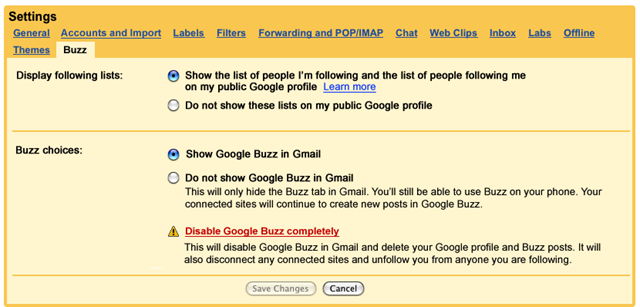
- Locate “Buzz” tab under settings, under this tab you will find an option “Disable Google Buzz Completely” also you have option to “Hide Google Buzz in Gmail”
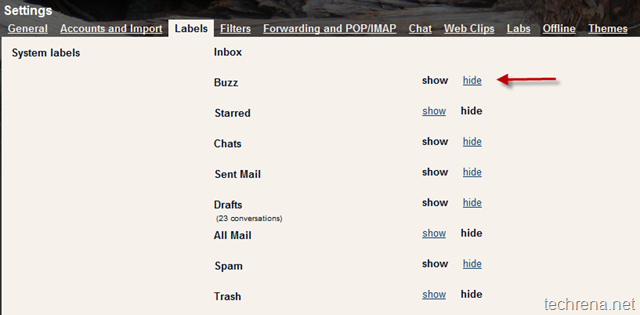
 Or in some accounts, this show/hide option may be located here:

This is some reliable stuff. It took me some time to come across this site but it was worth the time. I noticed this website was buried in google and not the first spot. This internet site has a lot of respectable stuff and it doesnt deserve to be burried in the searches like that. By the way Im going to add this site to my list of favorites.