
I wanted to have all of my blog posts with post URLs and titles at one place so that I can quickly quote or make reference to them whenever I post a new post at appropriate places.(In fact I wanted to have a XLS list of the same so that I can always check them directly from my computer .I’m not sure if there’s such a possibility in WordPress.)
However, there’s a little code (thanks to jdembowski), which will allow you view all of your Blog posts with Titles and URLs:
<?php

require_once('../wp-blog-header.php');
query_posts('&showposts=-1&order=ASC');

while (have_posts()) : the_post(); ?>

"<?php the_title(); ?>","<?php the_permalink(); ?>"
<br />

<?php endwhile; ?>
Open text editor, paste this code into that and save it as posts-urls.php,Now upload this file into “wp-content” folder i.e it should be like wp-content/posts-urls.php.
Now open this in your browser like www.yourdomain.com/wp-content/posts-urls.php and you can view all of your Blog posts in Ascending order of time (latest one at last) as a comma seperated list.However if you want it to be in descending order, just use ‘DSC’ instead of ‘ASC’ in the above code.
The output would be something like this:
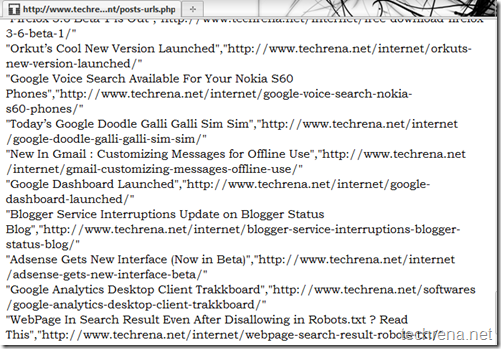
Please let me know if there is any another really good method to extract all Posts and titles form any WordPress blog.
Note: I know that sitemap.xml file lists all post URLs (in fact all URLs associated with blog) but it doesn’t serve the purpose as it doesn’t show up post/page titles.
Also read Configure Google Friend Connect For WordPress Blogs.

WOW it works… actually i was trying to check PR for my all blog post & i was not able to find any tool for this. When i found your article i realize why not to get my all post first & then check pr for all pages… with in few minutes i found all post links with title… Thanks for this great information
Great hack! I’m not a HTML expert but I found you can customize the code as you please to get only the titles or the urls.
Hi,
I tried it on one of our sites comparekings.co.uk and it returned a 404 error, maybe something to do with the template
Hi,
Great thanks, i have a blog with 200 links. I sat down had some coffee made and started to copy title’s and url’s manually, after a whole 3 links i said to my self there must be a better way and after Googling i found your blog. 🙂
Thanks a lot for this information save me probably 1-2-3 hours of work.
Thx
Hey… this works like a charm =) Thanks a lot ya =D
e dizer que gosto muito de ler os vossos blogues.
Thank you for your sharing. I am worried that I lack creative ideas. It is your article that makes me full of hope. Thank you. But, I have a question, can you help me?