We had issued and advisory earlier that the Internet Explorer 9 and lower versions are facing a security flaw where the attackers may exploit the bug, targeting hundreds of millions of computers, to infect the PC of somebody who visits a malicious website and then take control of the victim’s computer. Well this issue has been fixed.
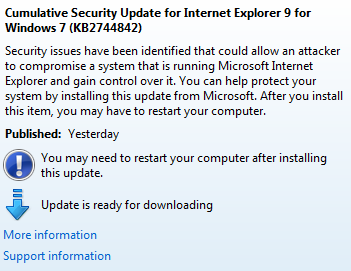
Microsoft promised that the fix will be available by Friday, 21 September. Well they kept their promise but with some variations. Microsoft had said that this is an easy fix and it will not even require a reboot. Well that’s not true. The Critical update details say:
Security issues have been identified that could allow an attacker to compromise a system that is running Microsoft Internet Explorer and gain control over it. You can help protect your system by installing this update from Microsoft. After you install this item, you may have to restart your computer.
The Cumulative Security Update for Internet Explorer 9 for Windows 7 (KB2744842) will be fixing the issue. This update is available in Windows Update. You can directly update it from your Windows PC.
If you don’t use Windows Update service. you can still download it from Microsoft. Choose the correct Windows Version while downloading.
Well we use to program for an 8-bit microprocessor, then 16-Bit some years back. Currently most of the CPUs are 32-Bit architecture. Now the latest one is the 64-Bit CPU. With this advancement of technology in the hardware sector, certain advancements needs to be done in the software sector that will be running on these CPUs.
Here we are talking of System Software that is the Operating Software in your computer, which are the basis for all other user level application software to be installed. If we come to the latest version of Microsoft’s Windows OS, now we see Windows 7. Windows 7 has two versions in terms of hardware compatibility, one for 32-bit architecture CPUs and another for 64bIt architecture CPUs. All 64-bit CPUS can be installed with 32-Bit OS but not vice-versa.
Suppose you have a PC running 32-bit Windows 7, and you want to know if your CPU will support the 62-bit Windows 7, then how will you find it out the easy way? Well we will tell you how.
You can follow the steps:
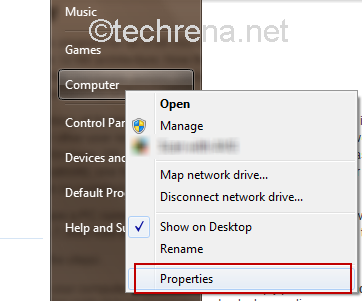
Step1 Open your computer properties. You can simply press the Windows Key + Pause/Break or you go to start then right click on Computer and select properties.
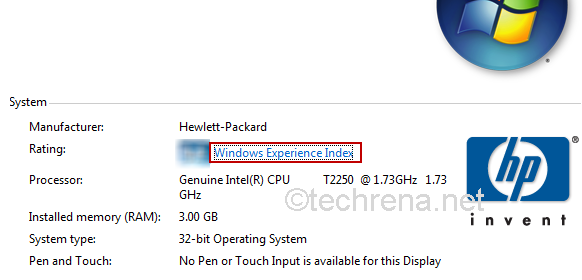
Step2 In you’re the computer properties, click on “Windows Experience Index”. You can find this under System –> Rating
Note: First two steps can also be performed via Control Panel as “Control Panel –>Performance Information and Tools” (You can see this option if you set the “View By” as “Large/Small Icon” only)
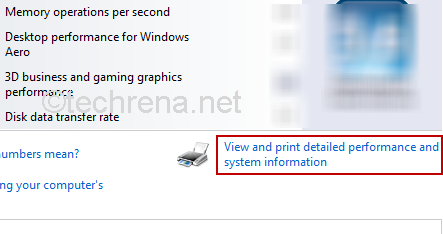
Step3 In the windows experience index windows, Click on “View and print detailed performance and system information”.
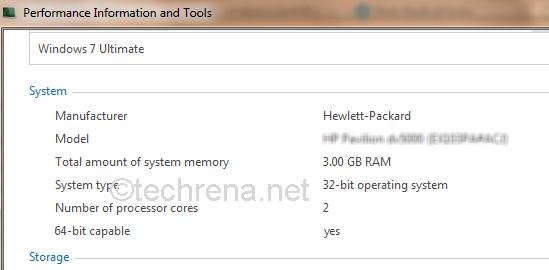
Step4 In the “View and print detailed performance and system information” windows you can find “64-bit Capable” under System. It will be yes if your CPU supports 64 Bit else No.
There you are it is as easy as I had promised. Now as you know the capability of your CPU, you can go for 64-bit OS or not!
The German government urged the public on Tuesday to temporarily stop using Microsoft’s Internet Explorer after a bug was discovered which is yet-to-be repaired. The German government’s Federal Office for Information Security, or BSI, said it was aware of targeted attacks and that all that was needed was to lure Web surfers to a website where hackers had planted malicious software that exploited the bug.
This security flaw in IE may enable attackers to exploit the bug, targeting hundreds of millions of computers, to infect the PC of somebody who visits a malicious website and then take control of the victim’s computer.
Our advisory in using the IE browsers except IE10 are:
Though IE browsers are considered to be most secure ones, we advise for now you look at others
The IE big fix will be released in the next few days by Microsoft and will be available for download only then
There have been a few attempts to exploit the bug, but German officials claim that this issue can be misused in large scale hacking
Users should take proactive actions to ensure that their PCs are well protected
Microsoft claims that the Fix will be an easy-to-use, one-click, full-strength solution any Internet Explorer user can install and it won’t even require a reboot of your computer.
We hope that the Fix is releases ASAP and we are sure that Microsoft is working on it.
We all used the Parallel ATA (PATA) Hard Drives or Optical Drives with the IDE interface. With the rapid advancement of technology, currently we shifted to the Serial ATA (SATA) Drives which does not require the IDE Interface and which have faster data rates. This means that all our IDE HDDs, Optical Drives etc. are obsolete to the current world. But, do you need to throw it or dump with your Old Desktops?
The answer is no! Your old 40GB, 80GB HDDs can be still useful now. Here we will show you how to interface these obsolete devices to your brand ne computer using a very cheap interface available in the market.
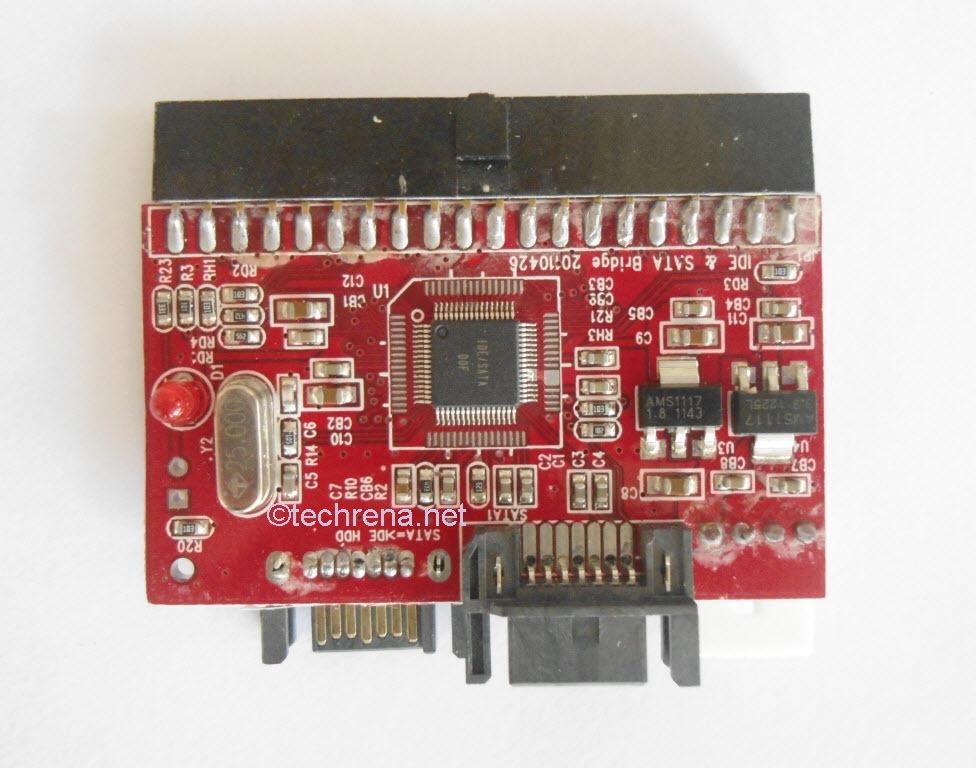
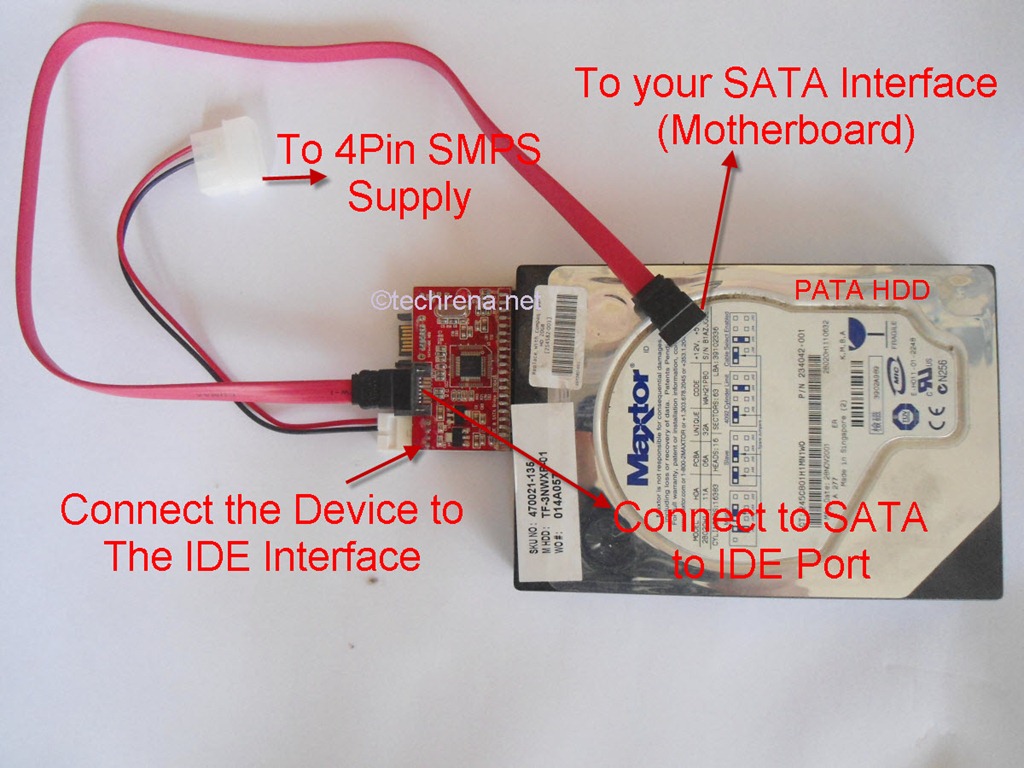
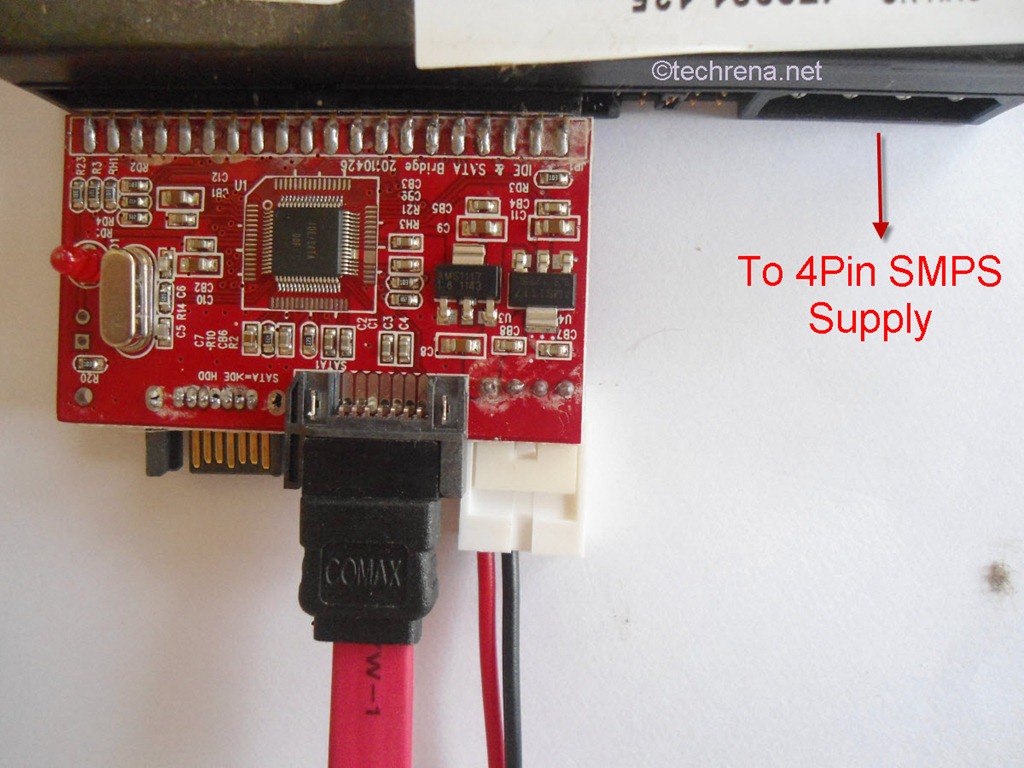
All you need is the device shown below. It is the “IDE to SATA” or “SATA to IDE” 2 in 1 Converter. It is easily available in the market. You can find one in eBay or Amazon for less than 5 bucks.
Connecting Old PATA HDD or IDE Optical Drives to your new SATA Motherboard
Suppose you have a PATA HDD with IDE Interface, Then connect the IDE interface (Female) to your HDD’s Male interface. Connect the power supplied to the standard 4 Pin supplied. Connect the SATA interface cable to the SATA to IDE marked port in the device. The other end of the SATA cable to your CPU’s motherboard. That’s it, now use can use some extra disk space instead of throwing the HDD. The connection process has been shown as follows.
Make sure you do not forget the Power supply to the drive.
The same procedure is applied for Optical drives too.
Connecting new SATA HDD or Optical Drives to your Old IDE interface Motherboard
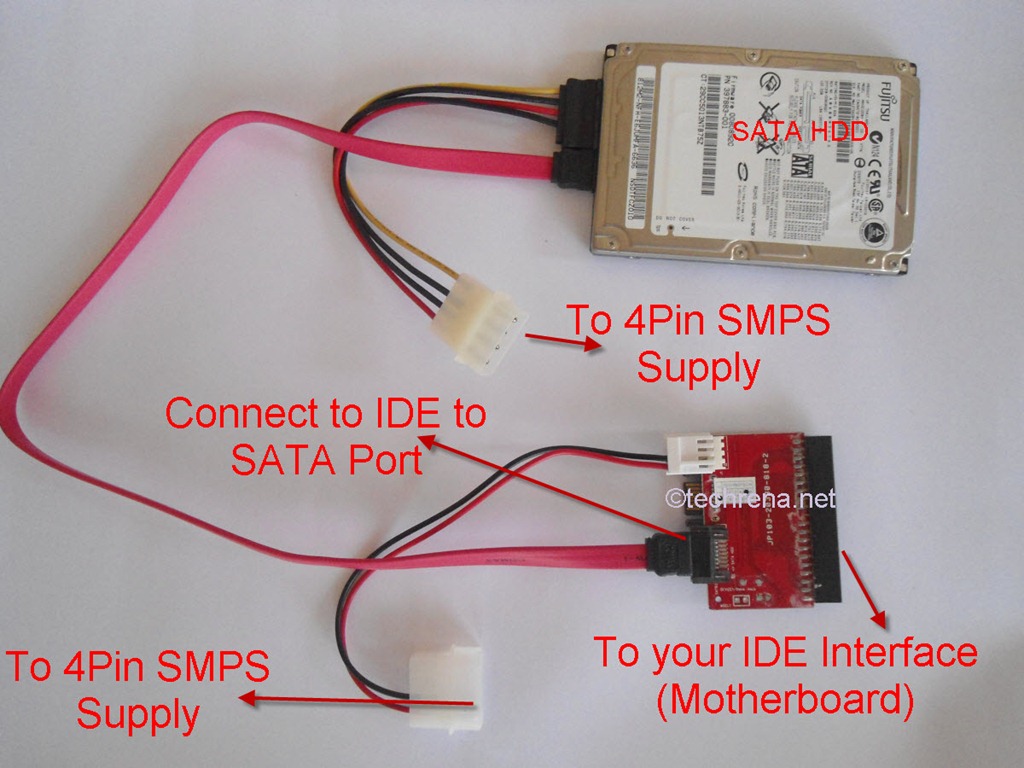
What about the reverse, that is if you have a SATA HDD and you want to connect to your OLD Computer? Then connect the IDE interface (Female) to your Motherboard’s Male interface. Connect the power supplied to the standard 4 Pin supplied. Connect the SATA interface cable to the SATA HDD and the other end to the device’s port marked as IDE to SATA. That’s it, now use can use some extra disk space instead in your old Computer. The connection process has been shown as follows.
Note: Please turn off your Computer completely, i.e. even the power plug is to be disconnected in order to prevent any hazard or damages.
We hope you have found this post useful. Like us on Facebook or leave a comment!
Microsoft has yesterday released the release candidate version of the upcoming Windows Home Server 2011 (WHS 2011) for testers. The product which was codenamed “Vail” during its development was previously in the news because of Microsoft’s surprise and controversial move to not to include the popular Driver Extender (DE) feature in WHS 2011. For starters, Drive Extender was a handy feature in WHS which allowed the users to merge hard drives into a storage pool that made it easy to manage all the drives. Microsoft has decided to drop this feature apparently because it thinks that the drives coming these days are big enough (storage wise) and the users may not go for the drive pooling via Drive Extender. The another limitation in WHS 2011 is that the maximum size of a partition can only be 2TB. To makeup for these limitations, Microsoft has added few new features like Move Folder Wizard which makes you to move data from one drive to another and the other being Shadow Copy which allows you to quickly return to a previous version of existing files.
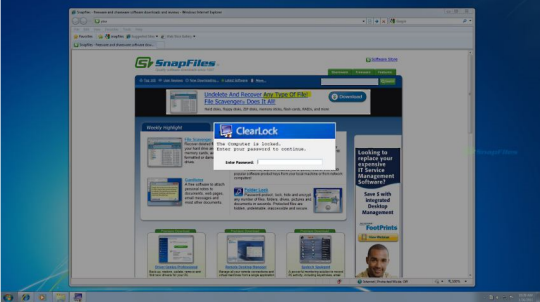
We, all the Windows users are very much used to the famous Windows + L shortcut to lock the computer when we are moving away from the system. This is just fine and serves the purpose. I have just come across a small Windows freeware that lets you lock your computer while keeping a transparent layer of your desktop screen at the background.
So you would still see the the desktop as it is, the same way as it appears if it had not been locked. But the only catch is that you need to provide the password to actually get into the system. Thus you may even tease others by allowing a sneak peek at your desktop while not allowing them to enter into it.
Download the ClearLock from the link that I have added below and run it. It will ask your for a password. When you confirm the password, the screen gets locked.
When you are installing Windows 7 or Windows Server 2008 R2 on an advanced 512-byte emulation (512e) format disk drive that is configured to emulate like a RAID disk will most likely encounter the following error:
Windows Setup could not configure Windows on this computer’s hardware.
Microsoft has now addressed this issue in a dedicated KB article, suggesting a possible resolution.
According to Microsoft, the issue can be fixed with either of the two methods mentioned here. Follow these suggested solutions before installing the Windows 7 or Windows Server 2008 R2.
>> Method-1: Downloading The Appropriate Drivers For Hard Disk
Download the latest drivers for your hard disk drive (32-bit or 64-bit) from the Intel website and copy them to a flash drive or burn onto a CD or DVD and then use the media during the Windows 7 or Windows Server 2008 R2 setup phase.
>> Method-2: Changing The BIOS Settings
Warning: Working with BIOS settings could lead to a serious problem with your computer if you apply incorrect settings. Use this option at your own risk.
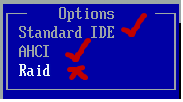
Open the BIOS settings by pressing the appropriate key just after your turn on the computer, and under the SATA Configuration (hard drive setting) to either AHCI or IDE. That is it, you don’t need to install the driver that you got through the method-1.
Windows system beep sounds turn up when your perform some invalid action (ex: pressing a wrong key or clicking or choosing a invalid button on window etc.) or when some error dialog appears. The beep sound also appears when you are using volume control.
(Click the Play button to listen to the sound; requires QuickTime Player plugin)
While the use of such beep sounds can be dated back to olden days when computers didn’t have sound cards but just built-in speakers producing various beep sounds to notify the troubleshooters help diagnosing the issues. Well, the times have changed, even though the desktops and laptops ship with internal speakers producing beep sounds, they are hardly useful when you are using advanced operating systems like Windows 7 as we have more sophisticated diagnosing mechanism to troubleshoot the OS issues. Too many beeps, you would easily get annoyed. Follow these steps to disable the system beep sounds in Windows 7.
This can be done in either of the two ways:
>> Method-1:
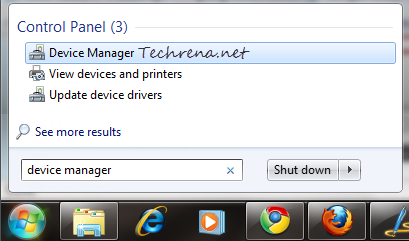
1. Type “device manager” in the Start Menu search box and open the Device Manager from the results under “Control Panel” items.
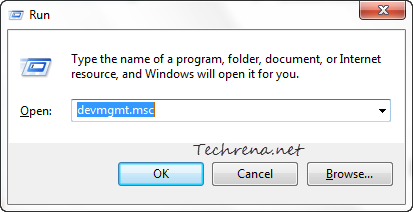
Alternatively, press Windows key + R to open the Run command. Type “devmgmt.msc” and hit enter to open the Device Manager.
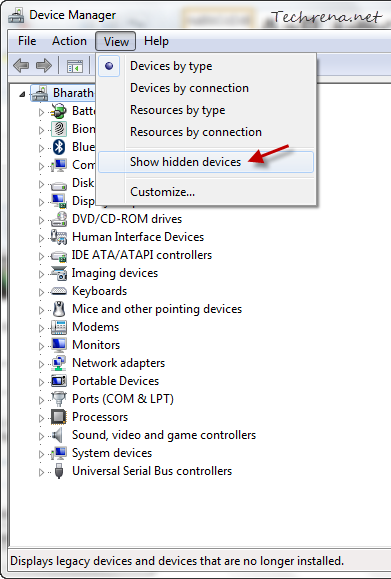
2. From the Device Manager window, choose “Show Hidden Devices” under “View” menu.
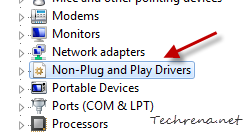
3. Scroll down the list until you find “Non-Plug and Play Drivers” and click on it to expand.
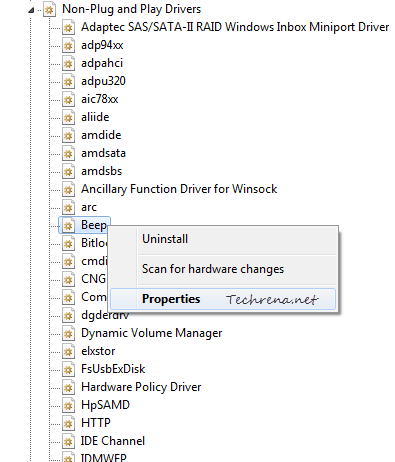
4. Right-click on the Beep item and choose Properties.
Warning: Do not click “Uninstall” as the option will completely remove the beep sounds from your Windows 7, you might find it hard to reinstall the same again.
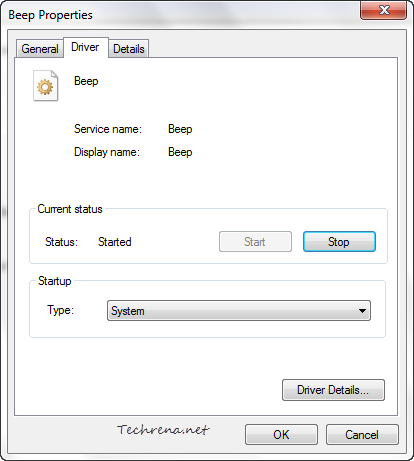
5. In the Beep Properties, click on the Driver tab
From the Start up type, choose “Disabled” from the list.
Click OK to apply and save the settings. You need to restart the system for the changes to take effect. To enable the beep sounds again, just choose “System” from the list in the step-5.
>> Method-2:
We can also achieve our desired result from the Control Panel, let’s see how to do it.
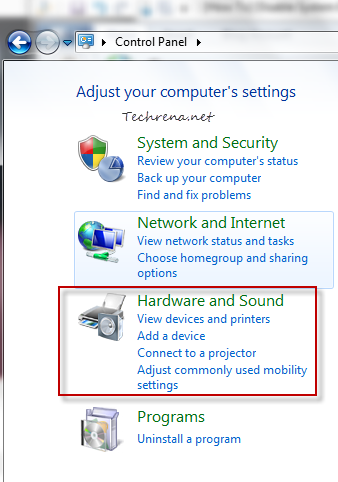
1. Open the Control Panel and click on the Hardware and Sound item link from the list.
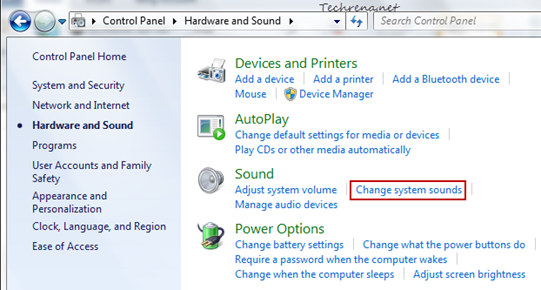
2. Click on the Change system sounds link under the “Sound”.
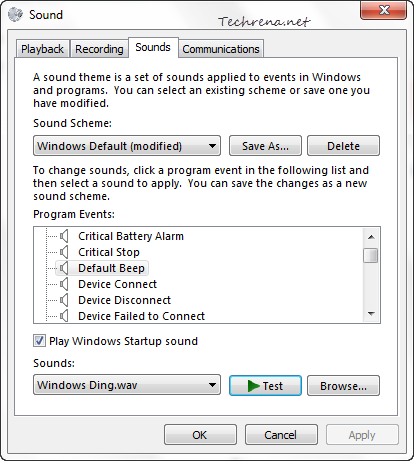
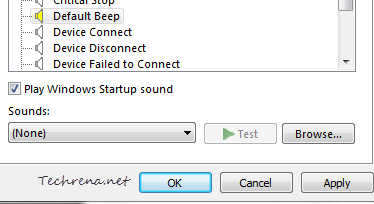
3. Under the Sounds tab, scroll down to find “Default Beep”
Choose “None” from the list under Sounds and click OK to save the settings.
You are done! But please not note that these are the settings for current sound scheme for your Windows 7. In future if you change the settings, the default beep sound may be enabled again automatically. Hence we suggest you to use method-1 if you completely want to disable the internal speakers system beep sound.
Whenever you copy anything while using your computer, the computer uses a special place known as Clipboard to place the data. Suppose you copy some text from a text file, the information(data) gets copied into the Clipboard. Then when you paste the text to your desired location, the data is transferred from your clipboard. The clipboard is used for any type of copy action done.
Now, you have copied some data and hence it is now present it in your computer’s clipboard. Suppose the data you are handling is a sensitive one and hence you don’t want to leave any trace, even in your clipboard. So how do you do it? Here is the simplest answer known.
Steps to create a shortcut to clear your clipboard:
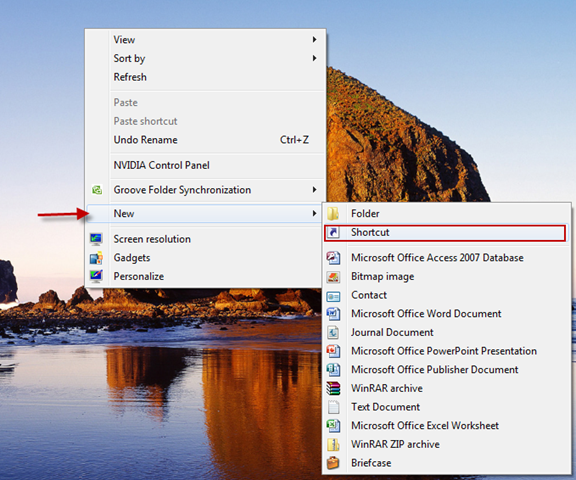
1. Right click on your desktop, go to New—>Shortcut.
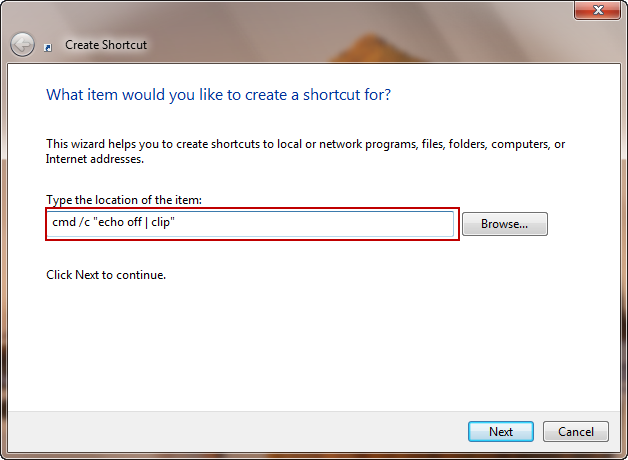
2. In the New Shortcut window, Type
cmd /c "echo off | clip"
and press Next
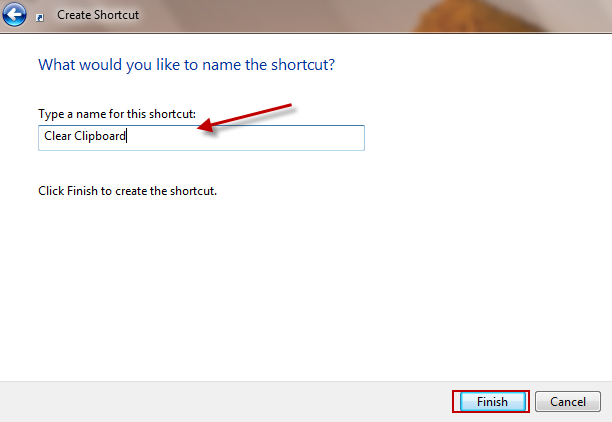
3. Type in a Shortcut Name of your choice and Finish.
Now you can click on the shortcut anytime you want to clear your data off the clipboard.
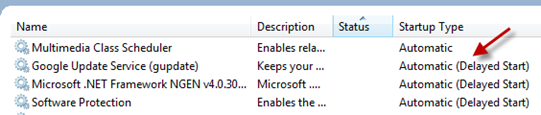
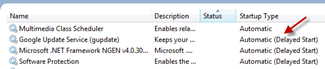
Is your Windows starting up too slow even after performing the suggested optimizations? Wonder what more you can do to save on your computer’s boot up time? Consider delaying the non-essential services so that they can be run once the system has completed the booting and has enough free time to load these services. Windows services are the ones that are needed by various programs installed on your PC. Even though some of the services need to run along with the Windows boot, some may be delayed to start so as to reduce the high activity during the start-up. Delaying the Windows services was introduced for the first time in Windows Vista and is now available in Windows 7 as well. By default Windows automatically sets some services like Windows update, Google update (if installed), Windows Font cache etc. to start delayed.
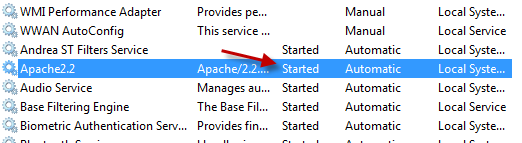
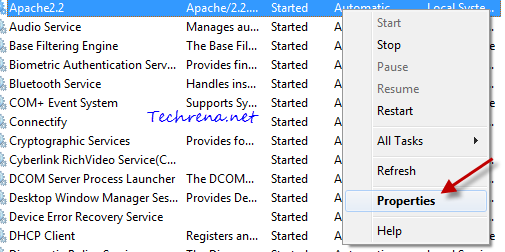
But you might want to consider delaying other third party services to boot your Windows even faster. Take the following screenshot for instance, you don’t need to run the “Apache web server service” along with boot, you can safely delay it so that your Windows gets loaded a touch quicker.
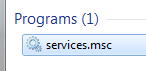
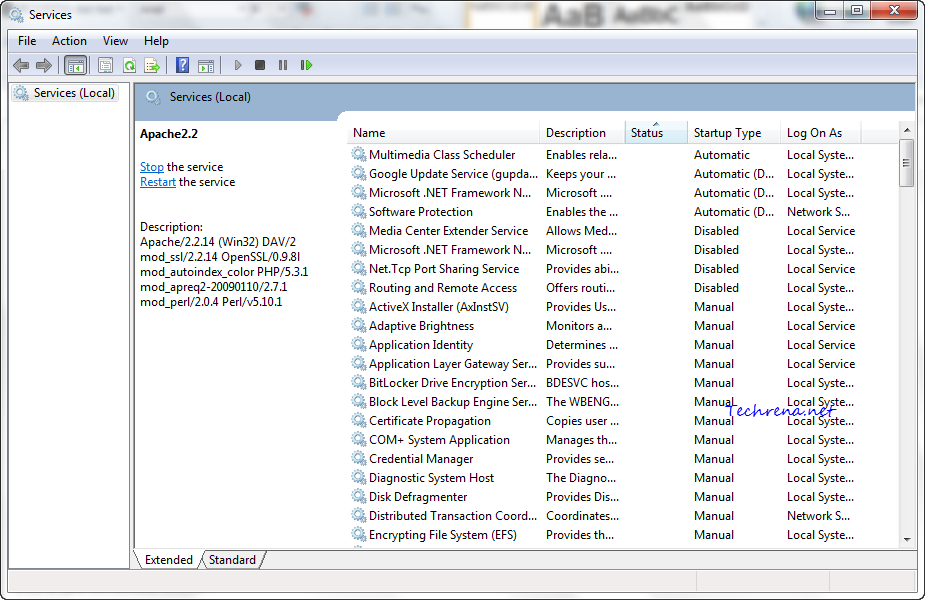
>> To see all the services installed on your Windows, type “services.msc” in the Start Menu search and open the services.msc from the results.
Alternatively press Windows button + R to open the RUN command and type services.msc and hit enter to open the Services window.
>> To see all the services which are already set to “Delayed Start”, first click on the “Startup Type” column and then click “Status” column. All the delayed services will be shown as “Automatic (Delayed Start)” next to them under the Startup Type.
>> To delay start of any service (for instance Apache2.2 in this case), just right-click on the service and choose “Properties”
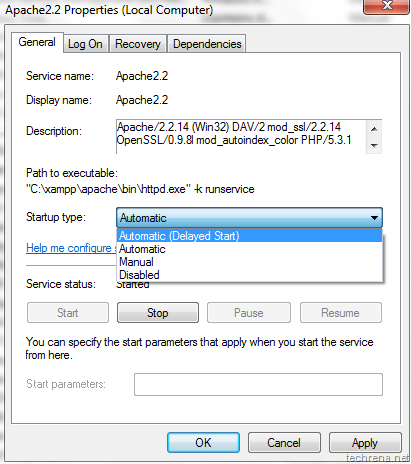
>> In the Properties window, choose “Automatic (Delayed Start)” from the drop down menu under Startup Type filed.
Click “OK” to apply the settings and close the properties window. Now the startup of the selected service would be delayed. You can safely set “manual” and “disabled” services to delayed startup, however you should be careful while handling important services like Windows related services which are set to start automatically by default .